


10 Best CRM with Order Management Tools

Ryan Tanner
Product Marketing Specialist
Aug 5, 2026
Ryan Tanner
Aug 5, 2026


22 min read


Today, businesses can't afford inefficiencies caused by managing customers and orders in separate systems. That's where CRM with order management comes in, combining customer relationship management and sales order tracking into one seamless platform. This collaboration enhances accuracy and ensures every interaction from quote to delivery runs smoothly. In this guide, we'll explore how a CRM order management system connects sales, operations, and customer service. We'll also review top tools like Lark, Salesforce, Monday.com, Zoho, and ClickUp to help businesses boost productivity and deliver exceptional customer experiences. Here is the list of tools:
1. Lark for all-in-one CRM and order automation
2. Salesforce Order Management for enterprise-grade sales and fulfillment control
3. Monday.com CRM & Sales for visual and flexible order tracking
4. ClickUp CRM + Order Management for customizable workflows and operations
5. 1CRM for affordable CRM and order lifecycle management
6. CentraHub CRM for integrated sales, inventory, and approval workflows
7. Workbooks CRM for CRM with invoicing and financial integration
8. Zoho CRM + Inventory for scalable CRM and multi-channel selling
9. HubSpot CRM + Operations Hub for automation and seamless e-commerce sync
10. Odoo CRM + Inventory for open-source, full-suite business management

What is CRM with order management?
CRM with order management refers to the collaboration of Customer Relationship Management (CRM) and Order Management Systems (OMS) into one unified platform. A CRM system helps businesses manage customer data, track interactions, and nurture relationships across the sales cycle. Meanwhile, order management focuses on processing sales orders, managing inventory, tracking shipments, and ensuring timely fulfillment.
When combined, a CRM order management system creates a single source of truth that connects sales, customer service, and operations teams. This collaboration ensures seamless communication between departments, improves accuracy in order processing, and enhances visibility into customer history and order status. Businesses can manage leads, convert them into sales, track fulfillment, and monitor payments all in one place. Ultimately, CRM and order management together streamline workflows, reduce manual errors, and enable data-driven decision-making for a smoother, more efficient customer experience.
Key benefits of CRM with order management
Integrating a CRM with order management system provides end-to-end visibility across your sales, fulfillment, and customer service operations. It helps teams work from a single source of truth, improving accuracy, collaboration, and customer satisfaction.
- Centralized customer and order data: A unified CRM order management system stores all customers and order details in one place. This eliminates data silos, making it easier for teams to access past purchases, invoices, and communications. With centralized data, businesses can deliver more personalized and efficient service.
- Improved accuracy in inventory & delivery: By syncing inventory with the order management CRM, businesses can avoid stockouts, duplicates, or fulfillment delays. Real-time updates ensure that stock levels and shipping statuses are always accurate. This leads to smoother operations and higher customer trust.
- Better customer experience: With CRM and order management integration, sales and support teams have complete visibility into order history. They can resolve issues quickly, offer personalized recommendations, and keep customers informed at every stage. The result is stronger relationships and higher retention.
- Faster sales cycle and reduced errors: Automation within a CRM with order management system removes manual handoffs and repetitive data entry. Orders move seamlessly from quote to fulfillment, saving time and minimizing mistakes. This accelerates sales conversions and improves operational efficiency.
- Data-driven decision making: The integrated system provides valuable insights into customer behavior, order trends, and performance metrics. Teams can use these analytics to forecast demand, optimize processes, and refine strategies. In short, CRM order management transforms raw data into actionable business intelligence.
Must-have features in a CRM + Order management system
A powerful CRM with order management system goes beyond tracking customers and orders it unites every stage of the sales and fulfillment process. The right features ensure smooth operations, accurate data, and better decision-making across teams.
- Customer database management: At the heart of any CRM order management system is a centralized customer database. It stores contact details, purchase history, preferences, and communication logs. This ensures every team member has real-time access to accurate, updated customer information.
- Order tracking & fulfilment automation: A robust order management CRM automates order processing from creation to delivery. It tracks each stage from packaging to shipment with real-time updates and alerts. Automation minimizes manual errors and ensures customers receive timely information.
- Inventory management: A collaborative CRM and order management platform keeps inventory data synced across all channels. Teams can monitor stock levels, avoid overselling, and plan reorders efficiently. This helps maintain product availability while reducing excess inventory costs.
- Invoicing & payment tracking: The system simplifies billing by generating invoices automatically when an order is confirmed. It also tracks payments and updates records in real time. With a CRM with order management, finance teams gain full visibility into pending or completed transactions.
- Multi-channel sales integration: Modern CRM order management systems integrate data from e-commerce, POS, and marketplaces into one dashboard. This gives businesses a unified view of sales performance across all channels. It helps streamline operations and deliver consistent customer experiences.
- Reporting & analytics: Comprehensive analytics within a CRM with order management platform provide insights into sales trends, delivery performance, and customer behavior. Teams can create custom dashboards to track KPIs and forecast demand. This data-driven approach supports smarter, faster business decisions.
10 Best CRM with order management tools
1. Lark: Unified CRM and order management workspace
Sales and operations teams need more than just CRM visibility; they need real-time collaboration, automated workflows, and complete control over the order lifecycle. Lark delivers all three. It blends CRM, communication, and process automation to help teams manage leads, track orders, and provide faster service from a single connected workspace.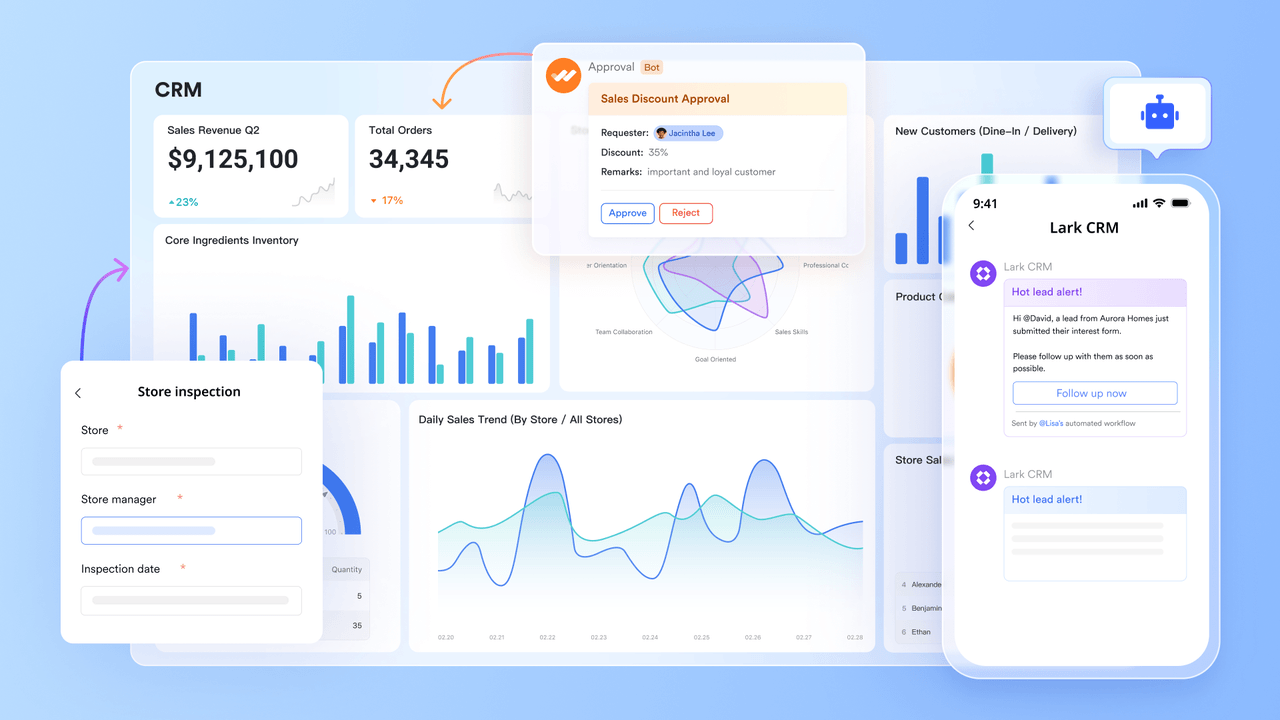
Key features:
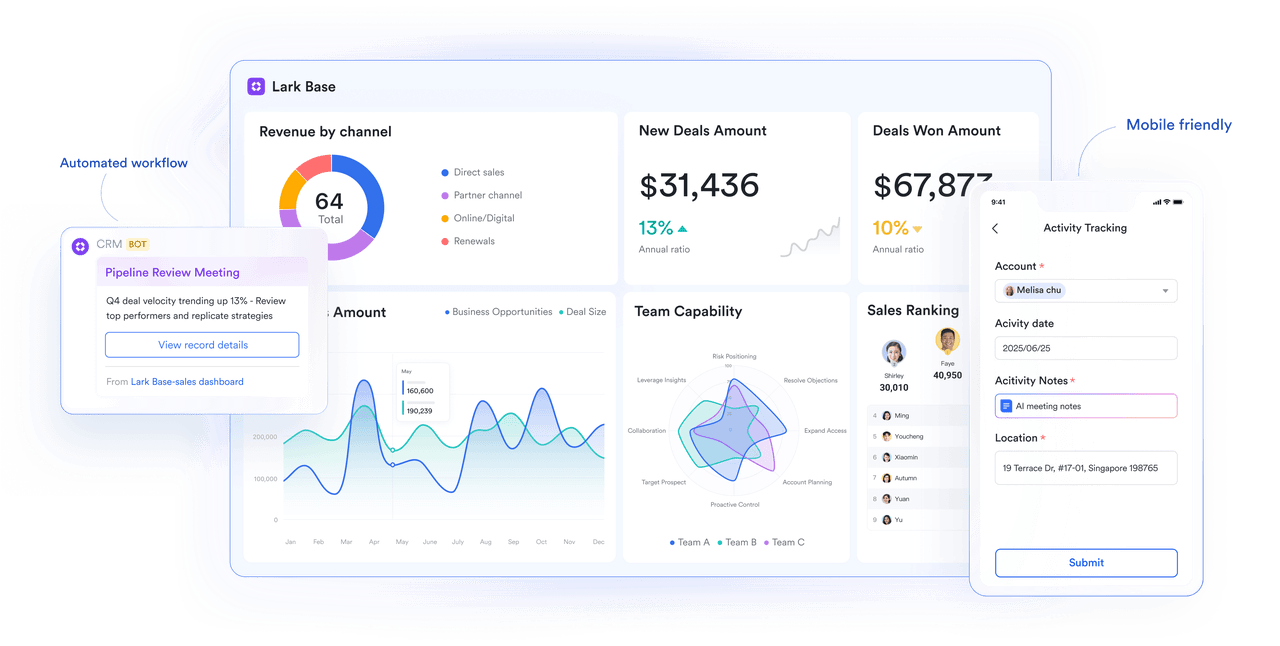
Lark Base: Centralizing clients, orders, and products
At the heart of Lark's system is Lark Base, where teams build a structured database that connects clients, products, and orders in one view. Agents can create custom fields to record details such as order ID, SKU, payment status, or delivery timeline.
Customer records can be linked directly to past orders and invoices, ensuring no details fall through the cracks. Managers can sort or filter data to identify key clients, top-selling products, or overdue shipments. Role-based permissions help maintain data privacy and compliance across teams handling financial or customer data. With Base acting as both CRM and order hub, every stakeholder sees the same, up-to-date information without relying on spreadsheets or scattered apps.
Lark Tasks: Keeping every order on schedule
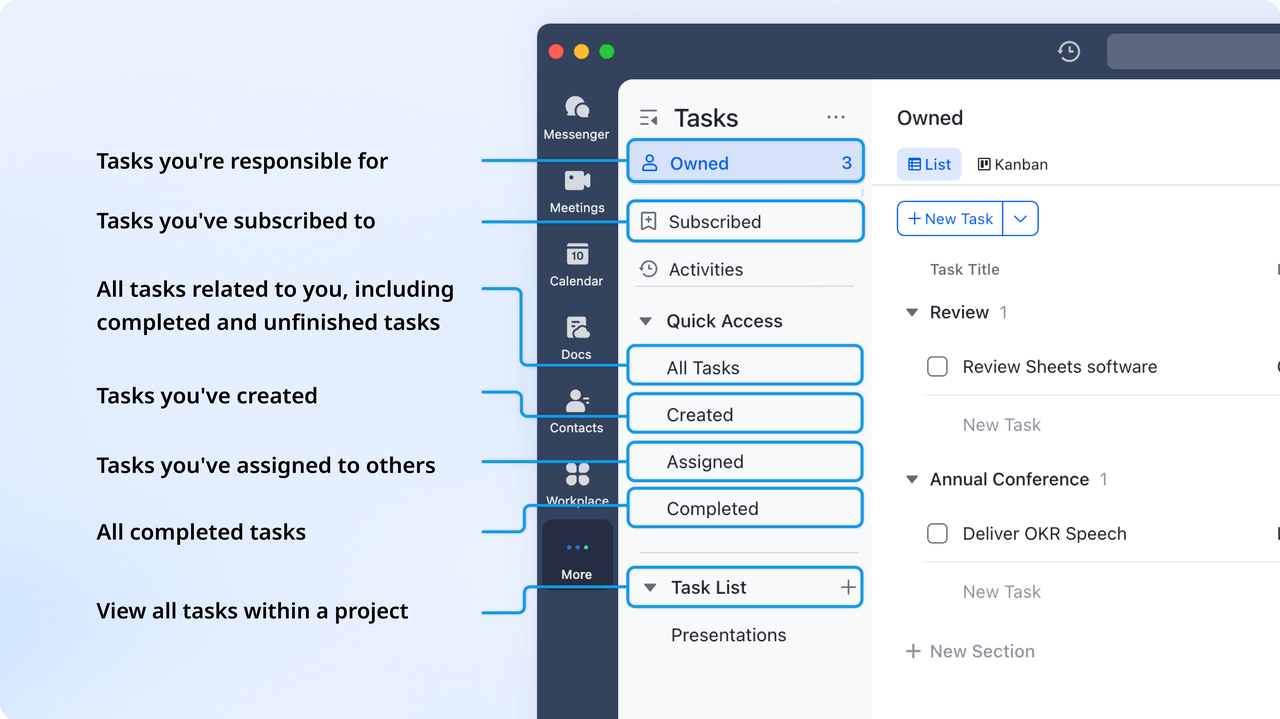
Once an order is created, Lark Tasks turns it into a living workflow. Each step, packaging, shipping, invoicing, or customer feedback, can be assigned as a task with deadlines, assignees, and progress tracking. Tasks update automatically when an order status changes, giving teams instant visibility into what's pending or delayed. Sales teams can also use recurring tasks to manage reorders or routine follow-ups. As a result, every order moves through a structured process without manual coordination, reducing missed steps and saving hours each week.
Lark Approval: Streamlining order validation and oversight
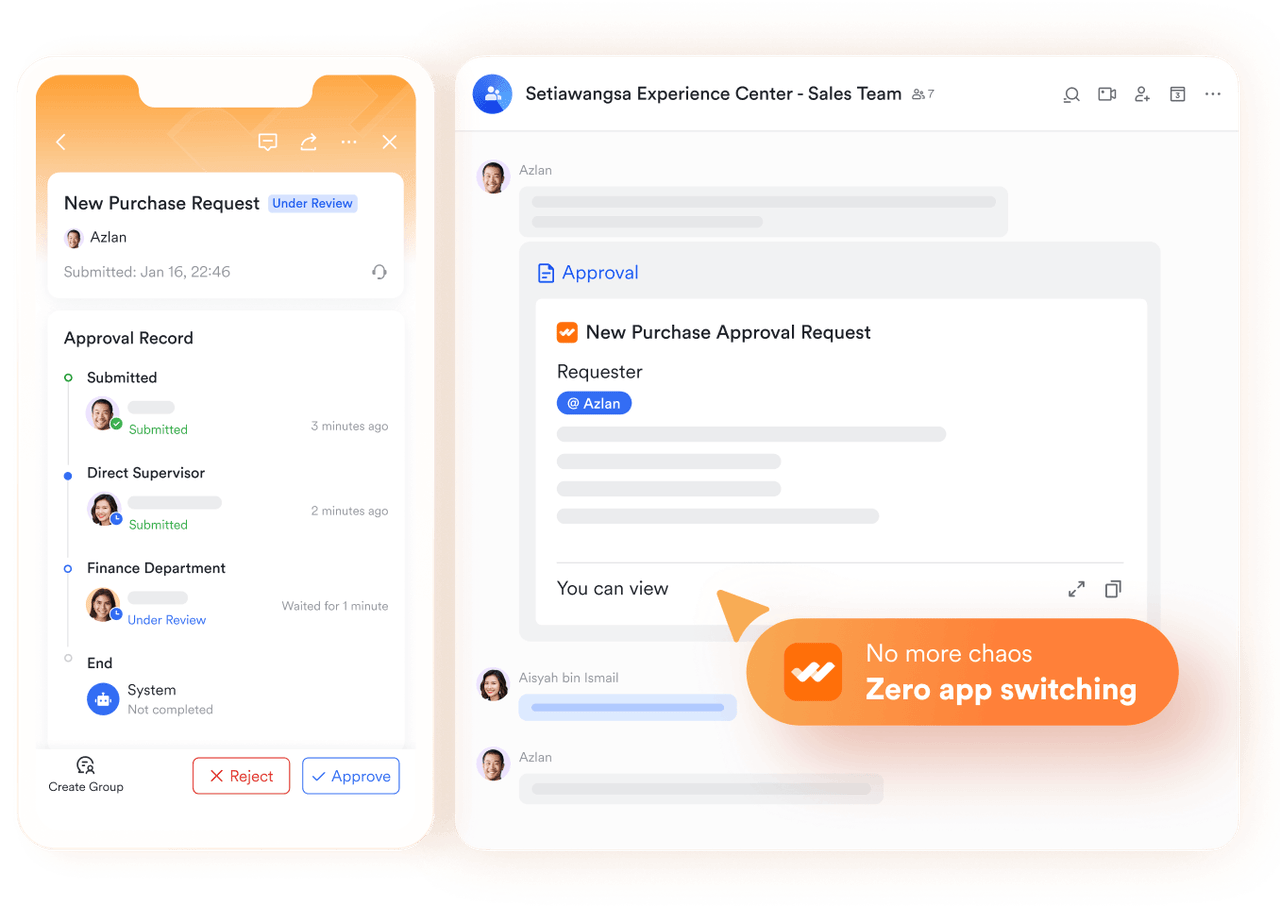
For high-value or custom orders, Lark Approval ensures compliance and proper review before fulfillment. Teams can design conditional workflows — for instance, routing orders over a certain value to a manager or finance officer for sign-off. Approvers receive instant notifications and can approve or reject directly from desktop or mobile. Every action is logged for audit purposes, ensuring transparency and accountability. This automated approval chain replaces time-consuming email threads and eliminates bottlenecks that delay shipping or invoicing.
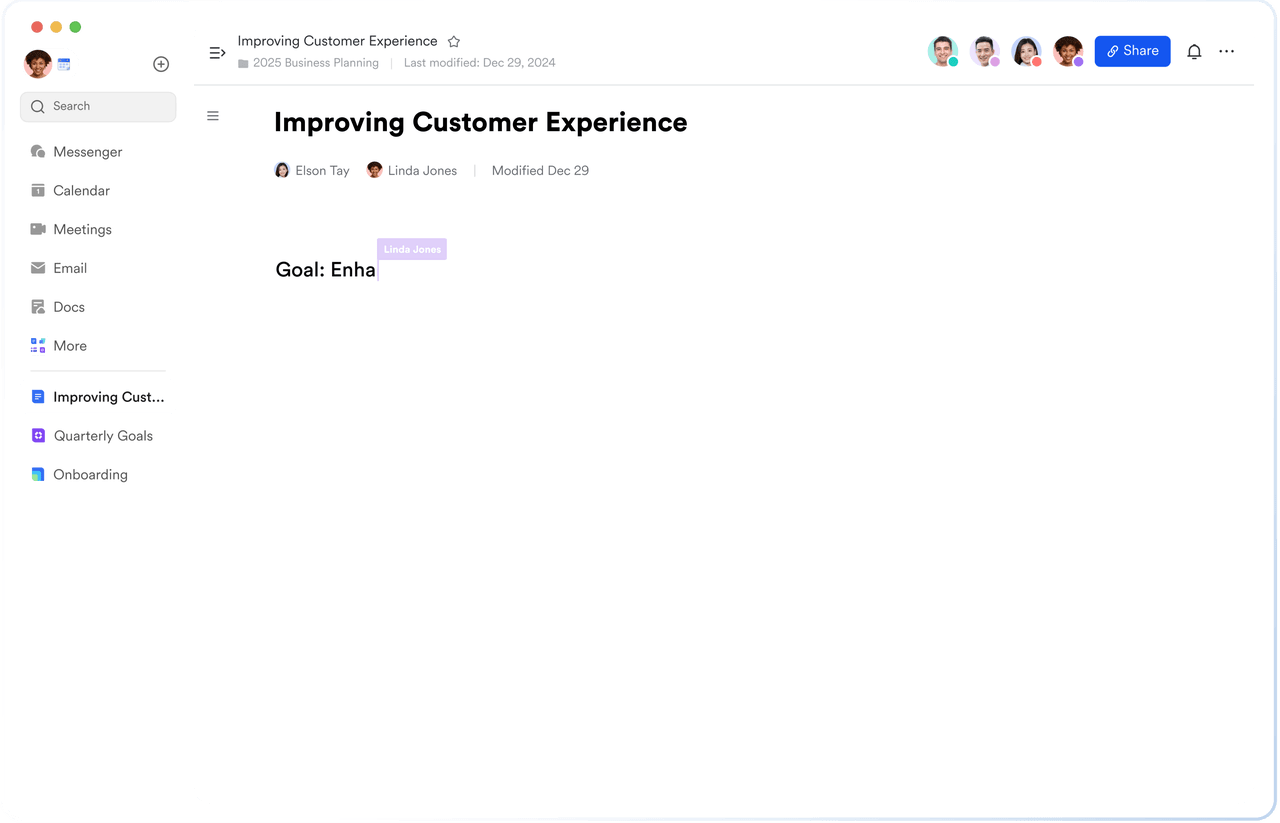
Lark Docs & Wiki: Managing proposals, invoices, and SOPs
Lark Docs turns document management into a collaborative experience. Sales reps can create quotes or proposals while finance teams co-edit the same document to finalize pricing. Once approved, documents can be stored or shared securely with clients, linked directly to their records in Lark Base. The built-in Lark Wiki is perfect for maintaining sales playbooks, product catalogs, or standard operating procedures — ensuring that all team members follow the same best practices. With Docs combined into the workflow, paperwork never slows down operations again.
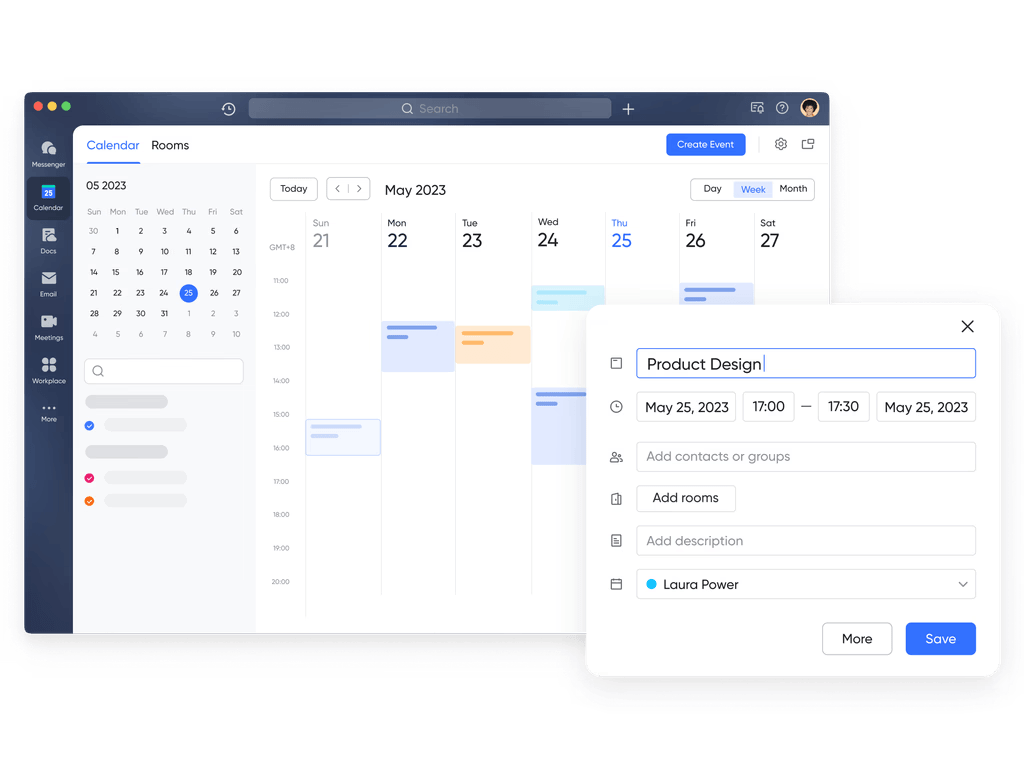
Lark Calendar & Meetings: Aligning schedules and client communication
Smooth order management depends on timely coordination, and Lark Calendar keeps everyone aligned. Teams can schedule delivery reviews, client consultations, or internal check-ins directly from an order record in Base. Each meeting is automatically linked to the relevant client, so context is never lost. With Lark Meetings, teams can discuss order issues or resolve delays on the spot and even turn meeting notes into actionable tasks right after the call. The result is faster decisions, clearer timelines, and a more cohesive customer experience.
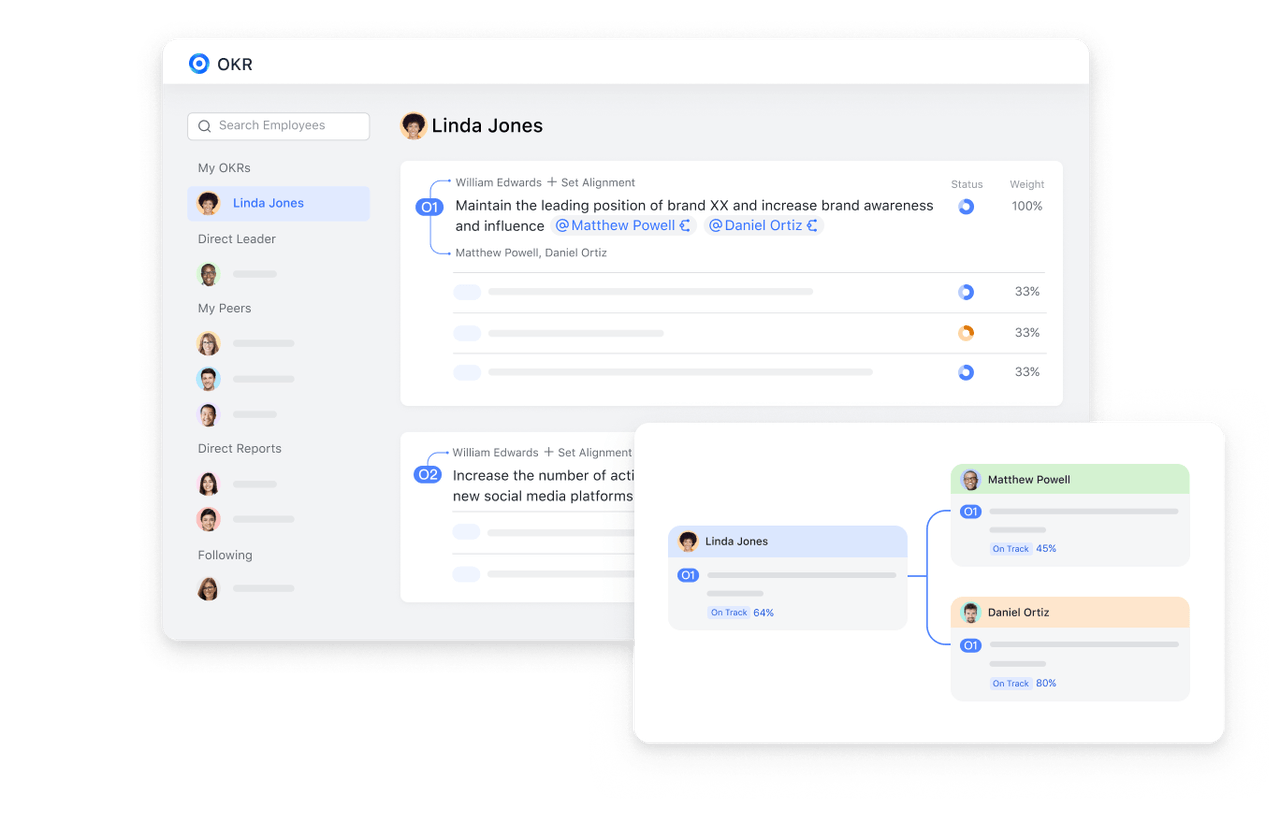
Lark OKR & Messenger: Linking goals and collaboration
To ensure every order supports broader business outcomes, Lark OKR allows managers to set measurable goals such as improving delivery speed or increasing repeat orders and connect them directly to the team's daily activities. As agents complete tasks or fulfill orders, progress updates feed into the OKR dashboard automatically. Meanwhile, Lark Messenger ensures everyone stays connected in real time. A quick message about a delayed shipment can instantly be turned into a task or tagged to the relevant order in Base, keeping all communication contextual and actionable.
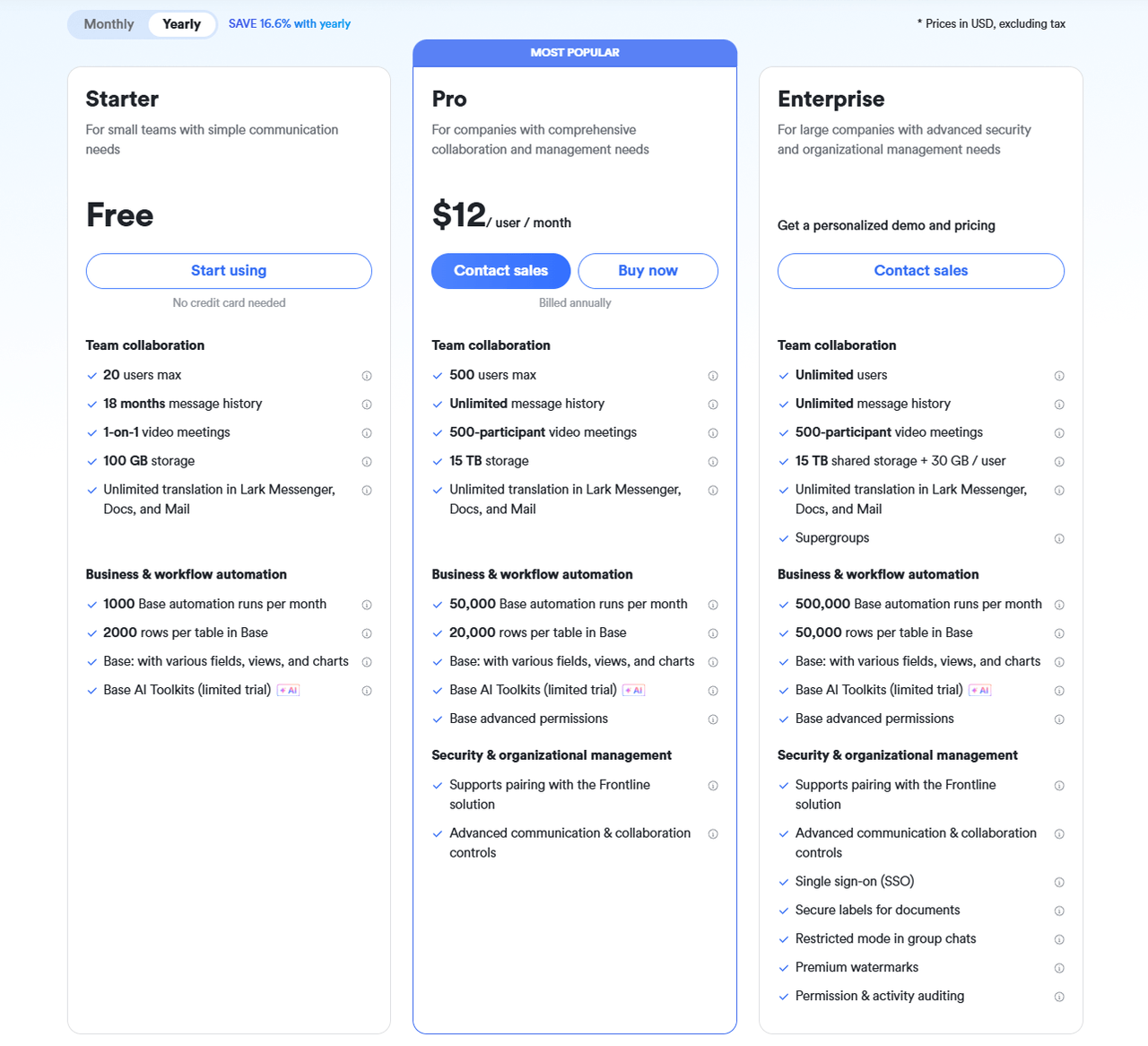
- Starter plan: Free forever plan that includes Sheets, Docs, Base, and 8 other powerful tools for up to 20 users. It also comes with 100GB of cloud storage, 1000 automation runs, AI translations, and more.
- Pro plan: $12/user/month (billed annually) for up to 500 users. It includes everything in Starter plus group calling for up to 500 attendees, 15TB of storage, 50,000 automation runs, and more.
- Enterprise plan: Contact sales for custom pricing. Supports unlimited users and includes even more automation runs and advanced security, compliance, and management features.
2. Salesforce order management: Enterprise-grade CRM and order fulfillment powerhouse
Salesforce Order Management is a robust, enterprise-level CRM order management system that unifies sales, service, and fulfillment into one seamless workflow. Designed for high-volume businesses, it automates complex order processes, optimizes inventory, and enhances post-sale experiences. With AI-powered insights and deep integrations, Salesforce enables teams to deliver consistent, efficient, and customer-centric operations. It's a top choice for large organizations seeking scalability and visibility across every channel.
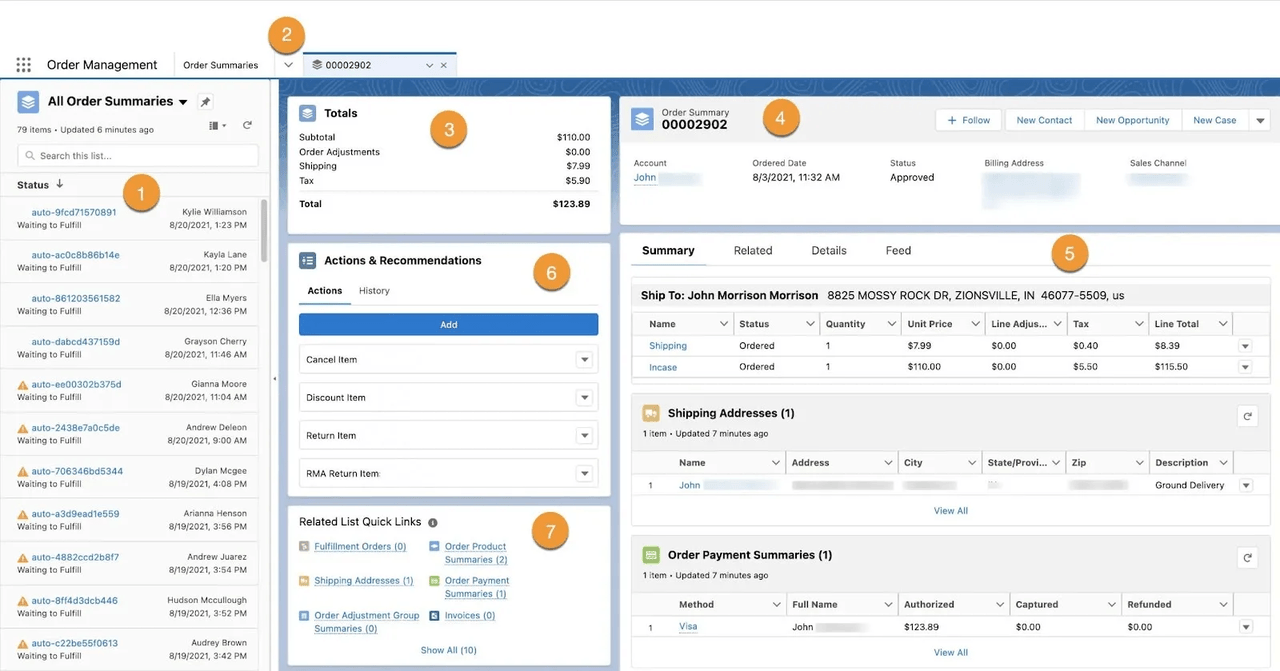 Image source: salesforce.com
Image source: salesforce.comKey features:
- End-to-end automation for order capture and fulfillment
- Real-time inventory tracking and intelligent order routing
- Automated returns and reverse logistics management
- AI-driven forecasting and performance analytics
- Native integration with Salesforce CRM and Commerce Cloud
Pros:
- Scalable and highly customizable for complex enterprise needs
- Deep integration across Salesforce ecosystem and APIs
- Powerful analytics and reporting tools
- Reliable automation reduces manual errors and delays
Cons:
- High implementation and maintenance costs
- Requires technical expertise for setup and customization
Pricing:
- Available as an add-on to Salesforce Commerce or Service Cloud
- Pricing typically starts from $25,000/year for enterprise users
- Custom quotes provided based on business requirements and user scale
3. Monday.com CRM & Sales: Visual, flexible CRM and order tracking platform
Monday.com CRM & Sales combines customer relationship management with powerful order management tools in a highly visual and intuitive workspace. Ideal for growing teams, it allows users to track leads, manage sales pipelines, automate order workflows, and monitor fulfillment in real time. With drag-and-drop dashboards and easy integrations, Monday.com helps streamline communication between sales, operations, and customer support. It's a great choice for teams that want flexibility, visibility, and simplicity in one collaborative platform.
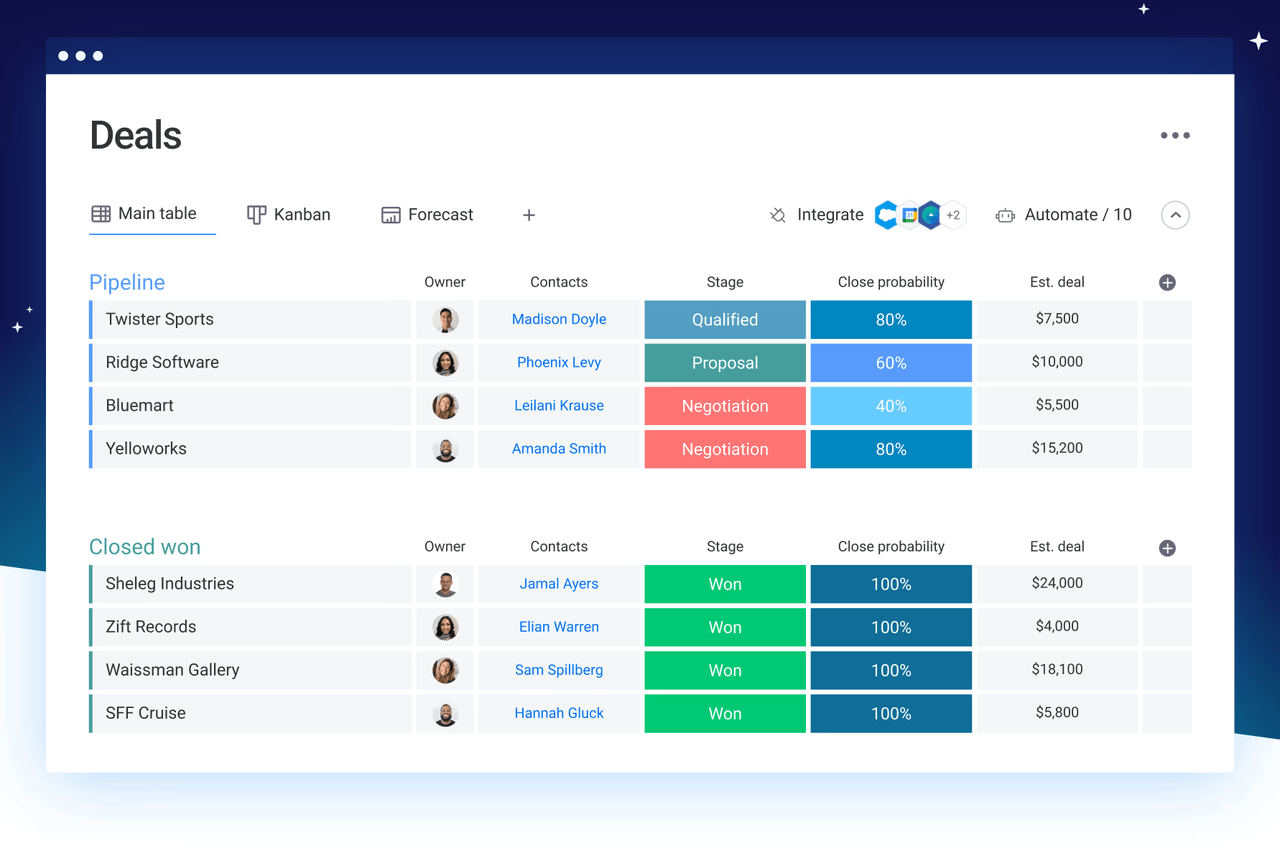 Image source: monday.com
Image source: monday.comKey features:
- Customizable pipelines and boards for CRM and order tracking
- Automation for order updates, approvals, and follow-ups
- Built-in email integration and communication tracking
- Centralized dashboards for sales and delivery performance
- Integrations with tools like Shopify, Stripe, and Gmail
Pros:
- Easy-to-use, no-code setup for all team sizes
- Highly visual workflows improve collaboration and clarity
- Flexible templates for sales and order management
- Affordable plans with scalable customization options
Cons:
- Limited advanced inventory and fulfillment tools
- Automation runs may be restricted in lower-tier plans
Pricing:
- Basic CRM plan: Starts at $10/user/month (billed annually)
- Standard plan: From $14/user/month with automations and integrations
- Pro plan: From $24/user/month for advanced reporting and permissions
- Enterprise plan: Custom pricing available on request
4. ClickUp CRM and order management: Customizable workspace for sales and operations
ClickUp CRM and order management brings together project management, CRM, and order tracking into a single, flexible platform. Designed for teams that value customization, ClickUp lets you build tailored workflows to manage leads, process orders, and oversee fulfillment efficiently. From visual pipelines and automation to dashboards and integrations, ClickUp provides everything needed to streamline customer and order operations. It's a perfect fit for small to mid-sized teams seeking an adaptable and affordable CRM order management system.
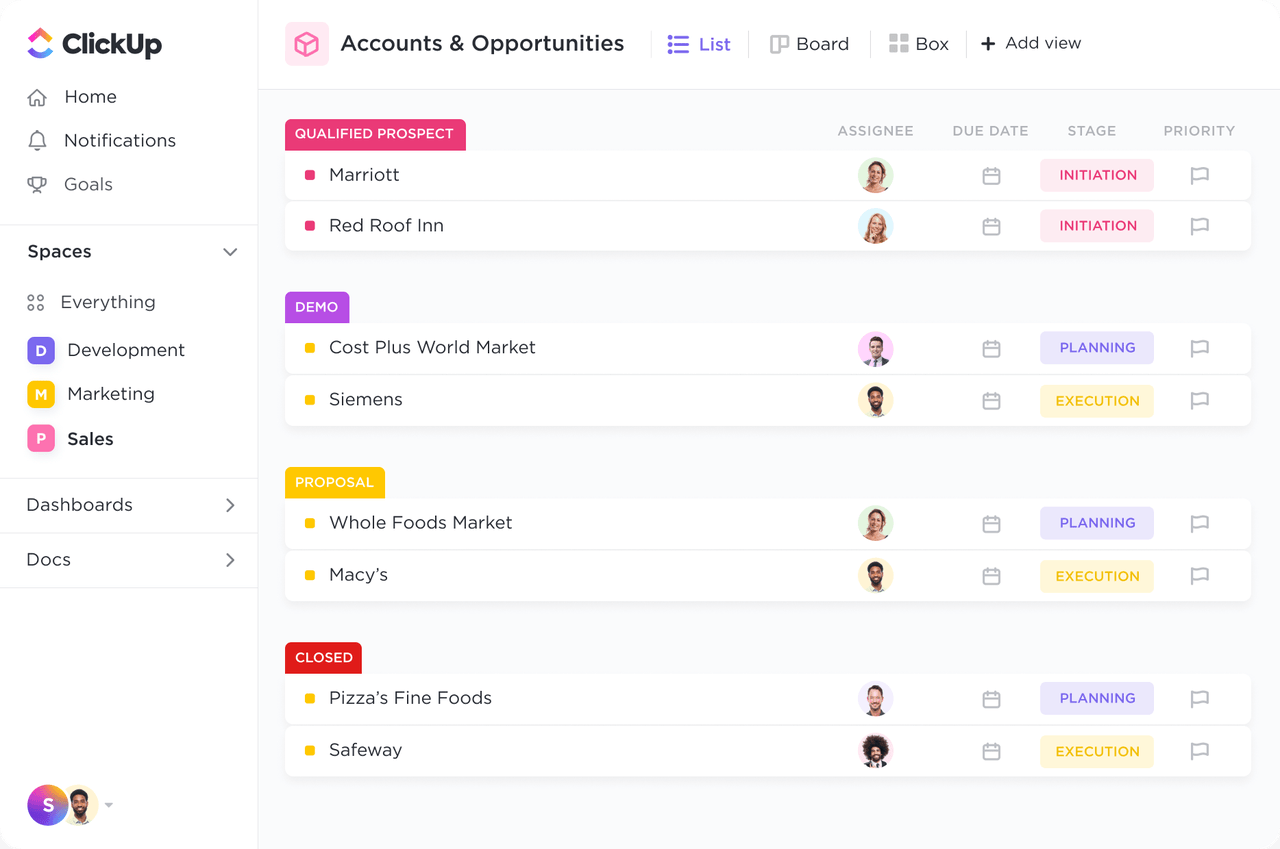 Image source: clickup.com
Image source: clickup.comKey features:
- Custom fields for tracking customers, orders, and payments
- Automated workflows for quote, order, and delivery management
- Dashboards to visualize sales, fulfillment, and performance metrics
- Task dependencies and reminders for smooth order progression
- Integrations with tools like Slack, Shopify, and Google Drive
Pros:
- Highly customizable workspace with flexible views (List, Board, Gantt)
- Combines CRM, task management, and operations in one platform
- Affordable plans with strong automation capabilities
- Detailed dashboards for tracking sales and order KPIs
Cons:
- Initial setup and customization can be time-consuming
- Some advanced CRM features require manual configuration
Pricing:
- Free Forever plan: Includes core CRM and task features
- Unlimited plan: From $7/user/month (billed annually)
- Business plan: From $12/user/month with automation and reporting
- Enterprise plan: Custom pricing for advanced security and integrations
5. 1CRM: Affordable, all-in-one CRM and order management for growing businesses
1CRM is a comprehensive CRM order management system designed for small and mid-sized businesses that need an affordable yet powerful solution. It combines sales automation, project tracking, and full order lifecycle management in one unified platform. With features like quote-to-invoice automation, inventory control, and customer self-service portals, 1CRM helps teams streamline operations, improve accuracy, and enhance customer satisfaction. It's ideal for businesses looking for flexibility, cost efficiency, and end-to-end visibility without enterprise-level complexity.
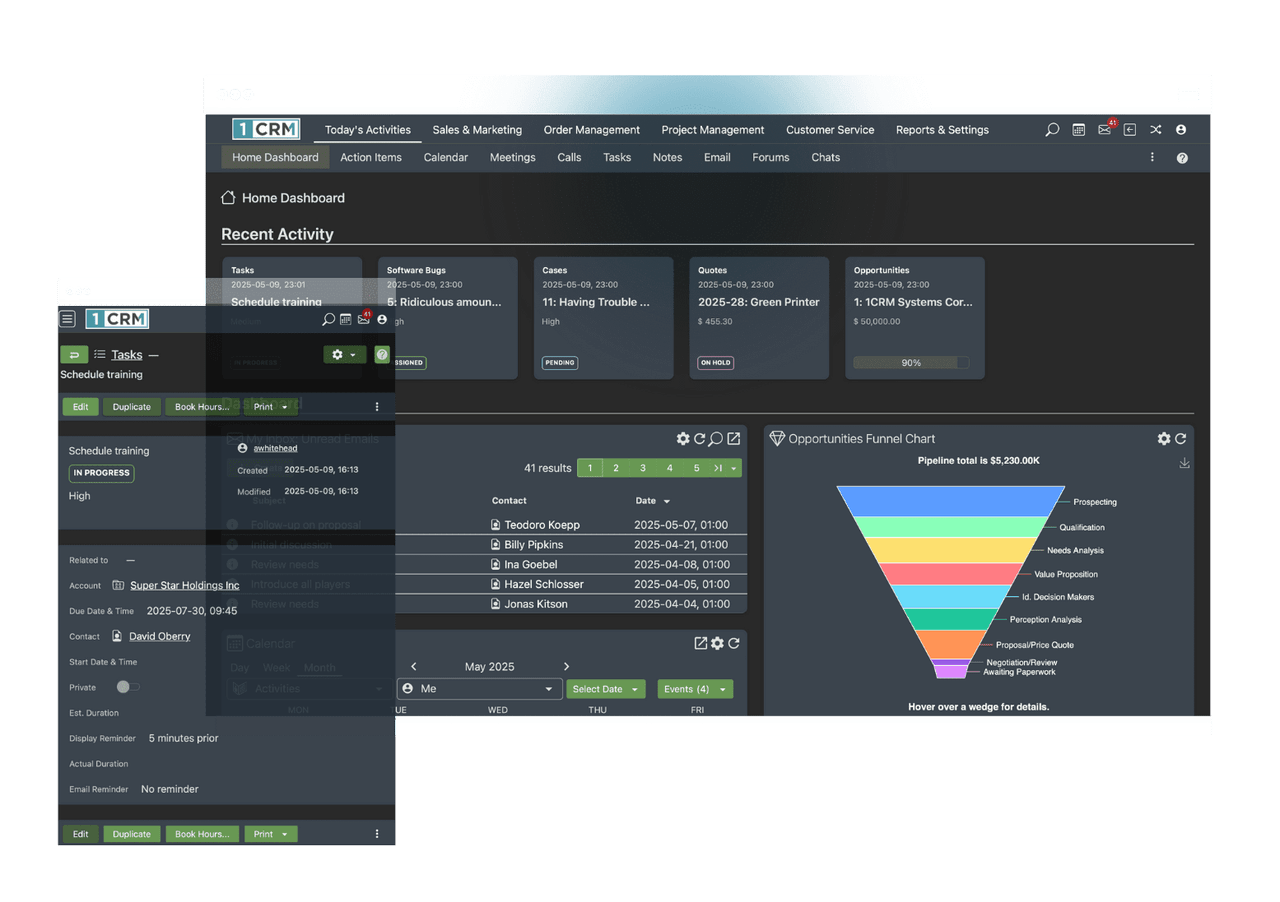 Image source: 1crm.com
Image source: 1crm.comKey features:
- Quote-to-invoice automation with real-time order updates
- Integrated inventory management and product tracking
- Customer self-service portal for orders and invoices
- Time-based billing and expense tracking for projects
- Reporting and analytics for sales and fulfillment insights
Pros:
- Cost-effective and feature-rich for SMBs
- Combines CRM, order management, and project tracking
- Highly customizable with open-source flexibility
- Cloud and on-premise deployment options available
Cons:
- Interface feels dated compared to newer platforms
- Limited third-party integrations without custom setup
Pricing:
- Startup plan: From $15/user/month (billed annually)
- Professional plan: From $23/user/month with advanced automation
- Enterprise plan: From $34/user/month including reporting and customization options
- Free trial available for new users
6. CentraHub CRM: Unified CRM and order management for retail and distribution
CentraHub CRM is an integrated CRM with order management solution built for retail, distribution, and service-based industries. It combines lead management, sales automation, inventory tracking, and order processing into one cohesive platform. Designed to improve visibility and efficiency, CentraHub ensures that teams can manage quotes, track deliveries, and maintain accurate stock records from a single interface. It's ideal for organizations that need strong control over both customer and inventory operations.
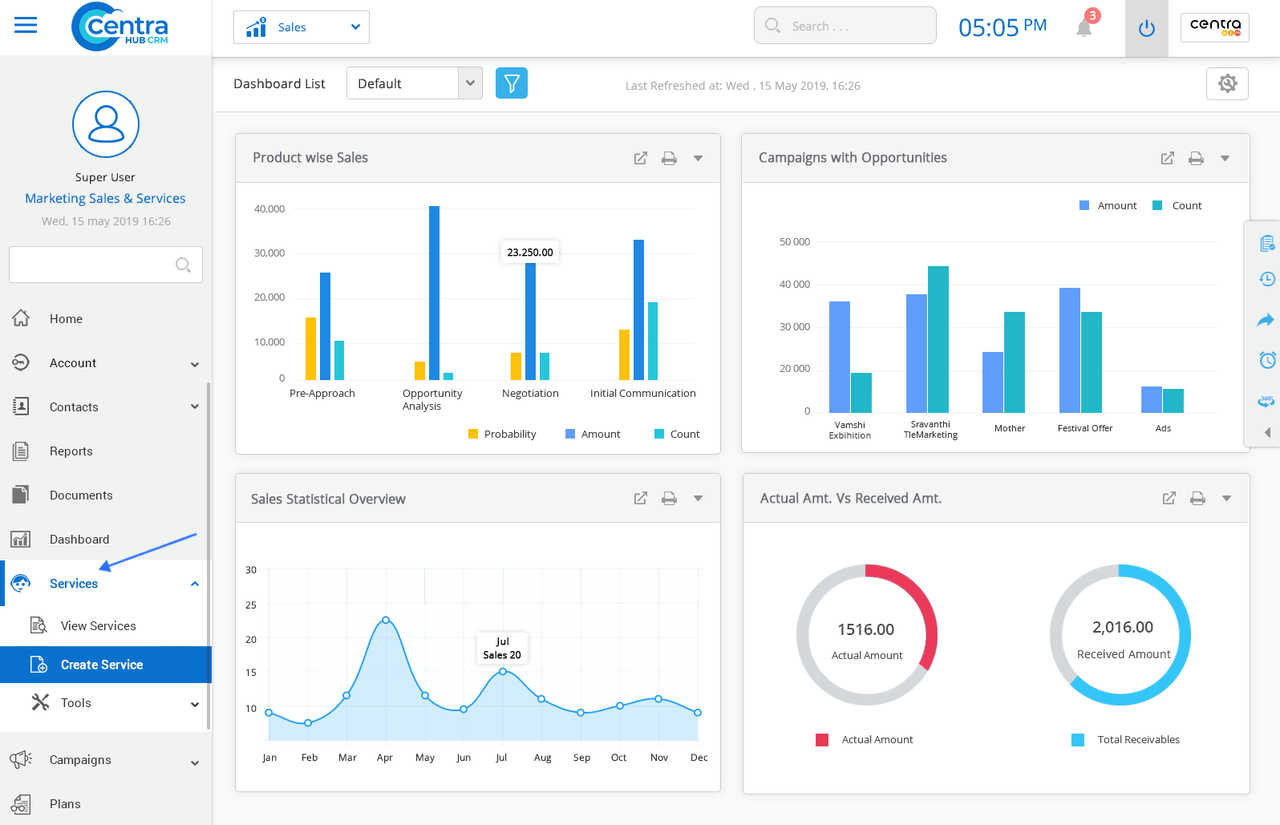 Image source: centrahub.com
Image source: centrahub.comKey features:
- Centralized customer and order tracking dashboard
- Automated purchase and sales order workflows
- Real-time inventory and stock-level visibility
- Customizable approval hierarchies for order validation
- Built-in reporting and role-based access control
Pros:
- Excellent for businesses with large product catalogs
- Strong automation capabilities for order processing
- Real-time visibility across sales and inventory functions
- Flexible customization for different industry workflows
Cons:
- Fewer third-party app integrations than competitors
- Interface may feel complex for first-time users
Pricing:
- Custom pricing based on user count and modules selected
- Free demo available upon request from CentraHub's sales team
7. Workbooks CRM: Integrated CRM and order management for commercial operations
Workbooks CRM is a comprehensive CRM order management system that connects sales, finance, and operations to streamline business performance. It goes beyond traditional CRM by offering built-in tools for quotes, orders, invoicing, and contract management. Perfect for B2B organizations, Workbooks helps businesses manage the entire customer lifecycle from lead acquisition to payment collection all in one place. With strong reporting and accounting integrations, it delivers a 360° view of both customers and operations.
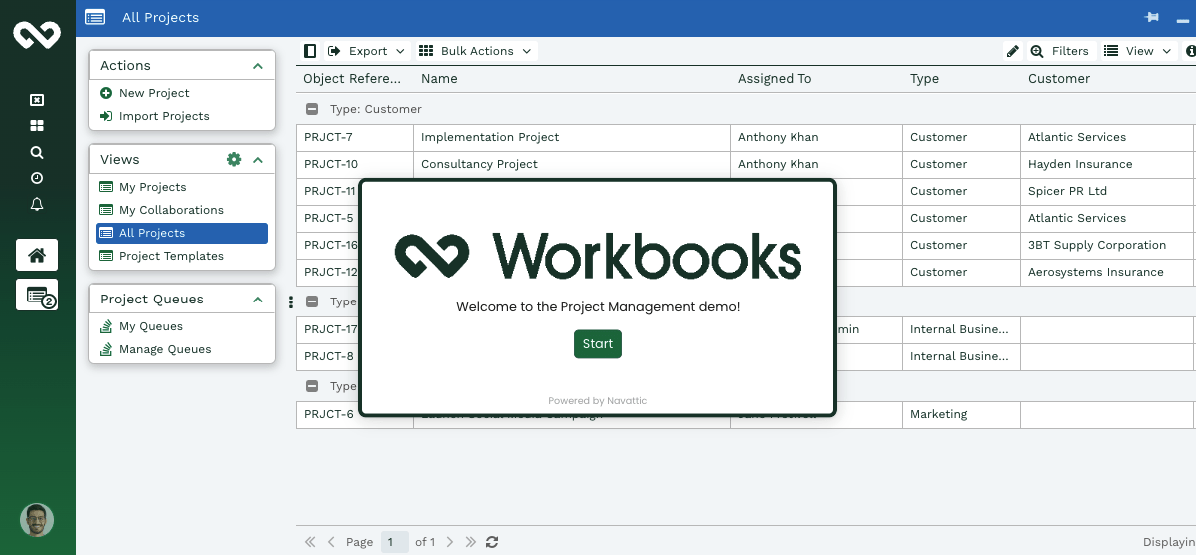 Image source: workbooks.com
Image source: workbooks.comKey features:
- Lead, opportunity, and quote management in one platform
- Built-in order, invoice, and contract tracking
- Integration with accounting and ERP systems
- Real-time dashboards for sales and fulfillment analytics
- Custom workflows and automation for approvals and renewals
Pros:
- Ideal for commercial and service-based industries
- Combines CRM, finance, and order functions seamlessly
- Intuitive interface with customizable dashboards
- Strong reporting and forecasting capabilities
Cons:
- Requires technical setup for advanced customization
- Higher cost for small teams or startups
Pricing:
- CRM Edition: From $35/user/month
- Business Edition: From $55/user/month with order management and reporting
- Custom enterprise plans available for larger organizations
8. Zoho CRM + Inventory: Affordable CRM order management for small and mid-sized businesses
Zoho CRM and Inventory is a powerful yet budget-friendly CRM with order management system that helps small and mid-sized businesses automate their sales and fulfillment workflows. It integrates customer management, inventory tracking, order processing, and billing into one intuitive platform. Designed for growing teams, Zoho simplifies the process of converting leads into sales, generating quotes and invoices, and ensuring timely delivery. The seamless connection between Zoho CRM and Zoho Inventory allows businesses to maintain real-time visibility over stock levels, orders, and payments making it a reliable solution for fast-moving organizations.
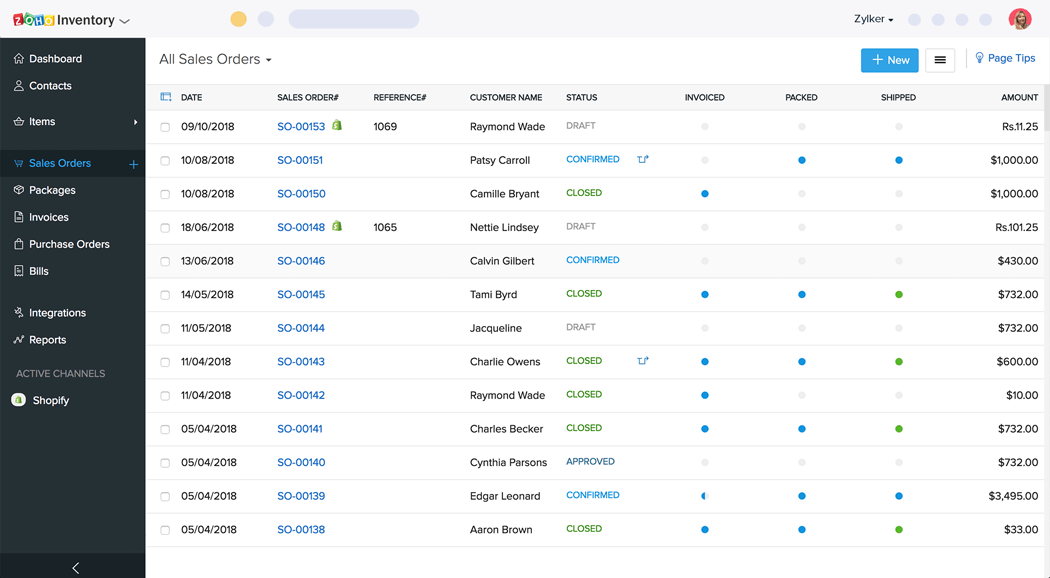 Image source: zoho.com
Image source: zoho.comKey features:
- Centralized customer and order database synced across CRM and inventory
- Automatic quote-to-invoice conversion for smooth sales cycles
- Real-time stock tracking and reorder automation
- Multi-channel sales integration with Amazon, eBay, and Shopify
- Comprehensive analytics for sales, revenue, and order performance
Pros:
- Cost-effective solution ideal for SMBs
- Easy integration between CRM, Inventory, and Books (accounting)
- Highly customizable dashboards and automation workflows
- Cloud-based platform with mobile access and 24/7 uptime
Cons:
- Limited scalability for complex enterprise-level operations
- Advanced analytics require higher-tier plans
Pricing:
- Standard plan: From $20/user/month (billed annually)
- Professional plan: From $35/user/month with automation and integrations
- Enterprise plan: From $50/user/month for advanced customization
- Zoho Inventory add-on: From $59/month (billed annually) depending on usage tier
- Free 15-day trial available for new users
9. HubSpot CRM + Operations Hub: Powerful, user-friendly CRM and order management solution for growing businesses
HubSpot CRM + Operations Hub offers a unified platform that connects customer management, sales automation, and operational workflows, making it one of the most flexible CRM with order management systems for growing businesses. By integrating order data with customer records, HubSpot ensures full visibility into every stage of the sales and fulfillment process. It helps teams track deals, automate order-related tasks, and sync data with e-commerce and accounting tools in real time.
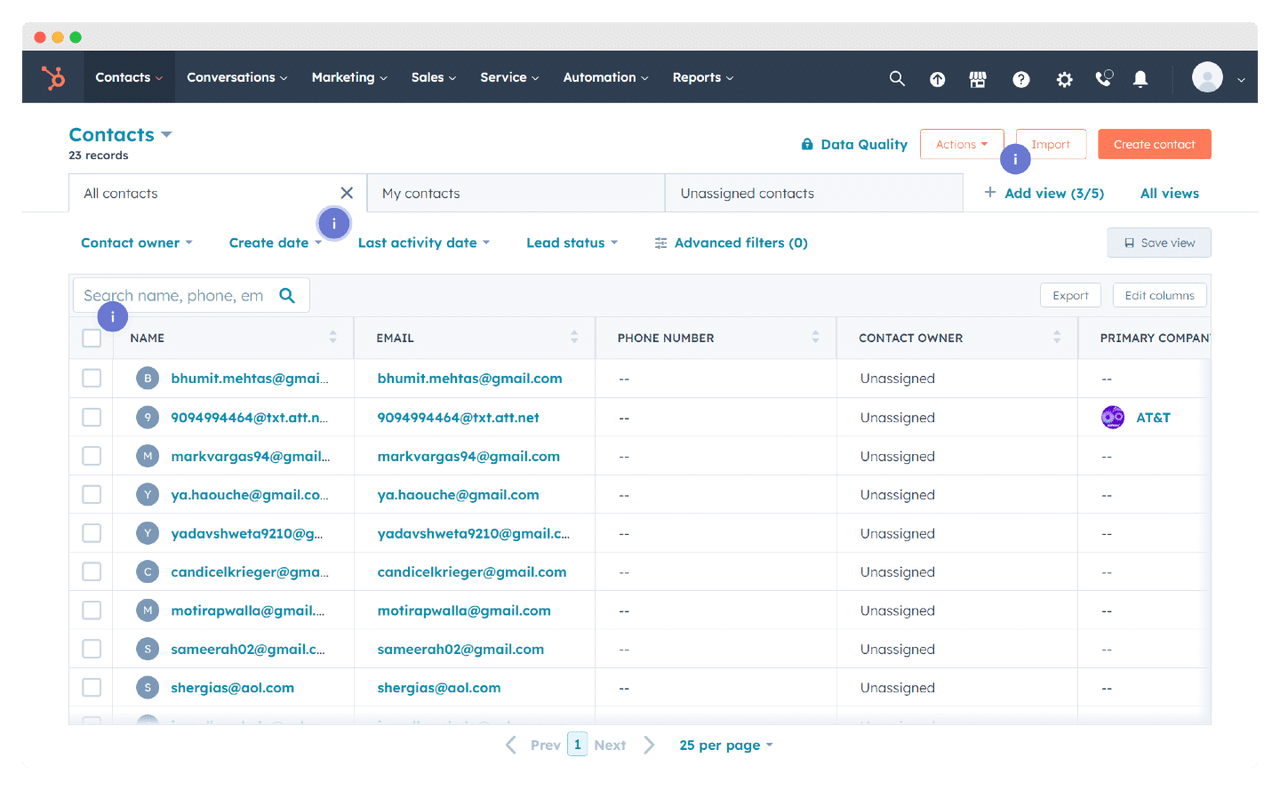 Image source: hubspot.com
Image source: hubspot.comKey features:
- Deal and pipeline management with order tracking automation
- Real-time synchronization with e-commerce and ERP systems
- Workflow automation for invoicing, payments, and renewals
- Centralized dashboards for customer and order analytics
- Integration with Shopify, Stripe, QuickBooks, and more
Pros:
- Free CRM core with robust scaling potential
- Intuitive interface and minimal onboarding time
- Extensive app marketplace for seamless integrations
- Excellent reporting and data visualization tools
Cons:
- Advanced automation and reporting require paid tiers
- Limited inventory management out of the box
Pricing:
- Free plan: Includes CRM, contact management, and basic automation
- Starter (Sales Hub): From $30/user/month (billed annually)
- Professional plan: From $90/user/month with advanced automation and analytics
- Enterprise plan: Custom pricing for larger organizations with extensive data and integration needs
- Free tools available for marketing, operations, and customer service integration
10. Odoo CRM + Inventory: Open-source CRM and order management suite for growing businesses
Odoo CRM + Inventory is a highly flexible and open-source CRM with order management system designed to unify sales, operations, and logistics in one powerful platform. Perfect for companies that need end-to-end visibility, Odoo integrates customer relationship management with product tracking, stock control, purchasing, and invoicing. Its modular design allows businesses to start with CRM and expand into inventory, accounting, and HR as they grow. With real-time insights, automated workflows, and customizable dashboards, Odoo helps streamline every stage of the order lifecycle from leading to delivery improving efficiency and customer satisfaction.
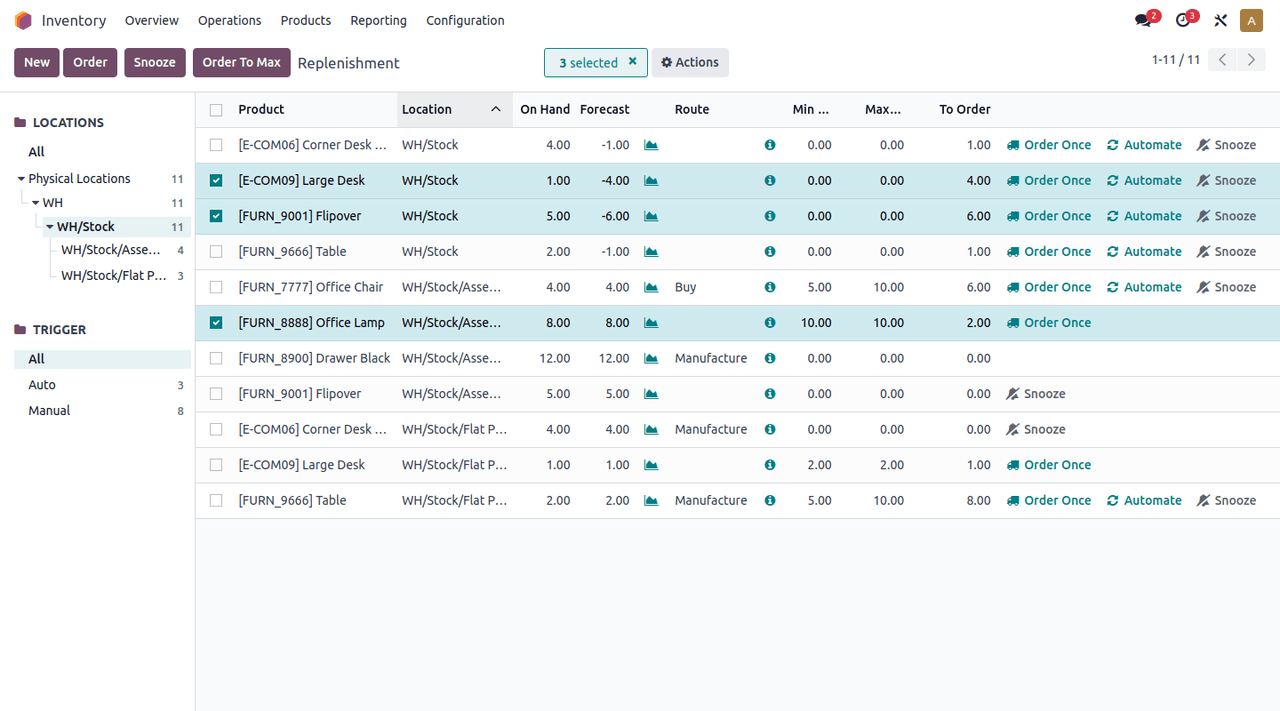 Image source: odoo.com
Image source: odoo.comKey features:
- Seamless integration between CRM, Sales, and Inventory modules
- Real-time stock updates and automated reorder management
- Quotation-to-invoice conversion with payment tracking
- Multi-warehouse and multi-channel sales management
- Comprehensive reporting on sales, fulfillment, and inventory performance
Pros:
- Fully modular, add or remove features as needed
- Excellent for businesses seeking an open-source, customizable solution
- Strong automation for inventory and sales workflows
- Supports manufacturing, distribution, and e-commerce operations
Cons:
- Requires technical expertise for setup and customization
- Interface may feel complex for non-technical users
Pricing:
- Free plan: Available for one app (e.g., CRM or Inventory)
- Standard plan: From $31.10/user/month (billed annually) with all core apps
- Custom enterprise plan: Available with advanced modules and hosting options
- Cloud, on-premise, and community (self-hosted) versions available
How to choose the right CRM with order management
Choosing the right CRM with an order management system is crucial to ensure it aligns with your business needs, size, and long-term goals. The ideal platform should simplify operations, integrate smoothly with existing tools, and scale as your organization grows. Here's how to evaluate the best fit for your team.
- Consider company size and industry: Every business has unique requirements; a small retail store won't need the same system as a global manufacturer. Choose a CRM order management system that matches your operational complexity and industry standards. Scalable tools like Lark, Salesforce, or Zoho cater to different business sizes with flexible modules and pricing.
- Combining with existing tools: A great CRM and order management platform should easily integrate with your current software stack, from e-commerce and accounting tools to marketing automation systems. Seamless integration ensures smooth data flow, eliminates duplicate entries, and keeps your teams aligned in real time.
- Ease of use vs. advanced customisation: While powerful customisation options are valuable, user-friendliness should remain a top priority. A CRM with an intuitive order management system encourages quick adoption across teams. Look for platforms like Monday.com or ClickUp, which balance simplicity with flexibility for custom workflows.
- Cost and scalability: Your CRM investment should grow with your business. Consider pricing tiers, user limits, and included features before committing. Platforms such as Lark and Zoho offer affordable entry-level plans that can scale to enterprise-grade solutions as your needs expand, ensuring long-term value without frequent migrations.
Final thoughts
Adopting a CRM with an integrated order management system is essential for businesses that prioritise efficiency, accuracy, and customer satisfaction. The combination of CRM and OMS capabilities connects sales, operations, and service teams within a single unified platform. This integration simplifies order tracking, automates workflows, and centralises customer data to minimise errors, accelerate fulfilment, and improve productivity. The result is a shorter sales cycle and a more personalised customer experience that strengthens long-term loyalty.
If you're looking for a solution that combines CRM, communication, automation, and analytics seamlessly, Lark stands out as the best all-in-one productivity platform. With features like Lark Base, Tasks, Docs, and Approvals, it delivers everything teams need to manage customers and orders efficiently, helping your business stay agile, data-driven, and ready for growth.
FAQs
Is CRM with order management suitable for small businesses, or only for enterprises?
CRM with order management is ideal for both small businesses and enterprises. Scalable tools like Lark, Zoho, and ClickUp offer affordable plans with automation and tracking features that grow with your business needs.
Can CRM with order management integrate with e-commerce platforms like Shopify or WooCommerce?
Yes, most modern CRM order management systems integrate seamlessly with e-commerce platforms such as Shopify, WooCommerce, and Amazon. This ensures automatic synchronization of orders, inventory, and customer data.
What is the cost range of CRM with order management software?
Pricing varies by features and scale from free or $7/user/month for starter plans (like Lark and ClickUp) to $25,000/year or more for enterprise-grade solutions such as Salesforce.
How does CRM with order management improve customer support after sales?
It provides real-time access to customer history, order details, and payment records, helping teams resolve issues faster. This integration ensures transparent communication and builds customer trust.
What are the common challenges businesses face when implementing CRM with order management?
Typical challenges include data migration, user adoption, and integrating with existing tools. Choosing a user-friendly, well-integrated system like Lark helps overcome these hurdles efficiently.
Related reading
Table of contents
Start using Lark today

Manage all your work in one place
Boost team efficiency by 10x
Save up to 70% on software costs
Table of contents
Start using Lark today
Manage all your work in one place
Boost team efficiency by 10x
Save up to 70% on software costs
Keep reading









2026 Lark Technologies Pte. Ltd.
Headquartered in Singapore with offices worldwide.






Explore: