Salesforce automation has reshaped how businesses manage customer relationships by streamlining workflows, reducing manual effort, and centralizing sales, marketing, and operational data. From simple record updates to multi-step flows and AI-assisted processes, Salesforce provides a layered approach to automation that can improve efficiency while maintaining governance. However, as automations grow in complexity, scaling across teams, maintaining visibility, and ensuring triggered tasks are completed becomes challenging. In this guide, we'll explore how Salesforce automation works, the key tools available, best practices for scaling, and the limitations teams often encounter when managing complex workflows.
Get started with smarter workflow automation
What is Salesforce automation?
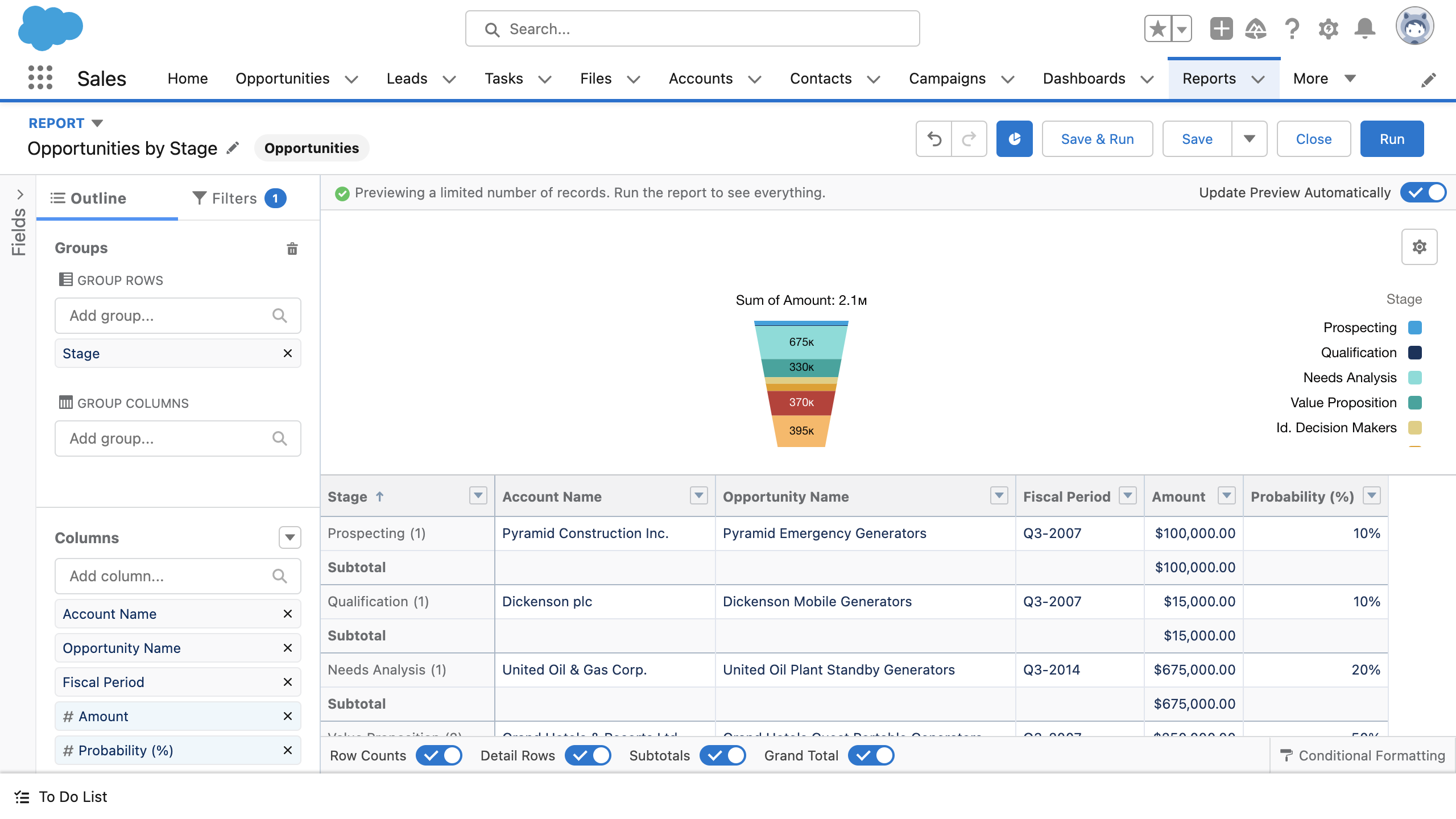
Image source: salesforce.com
Salesforce automation refers to the system's ability to automatically execute actions based on record changes, user behavior, or predefined conditions within the CRM. At its core, it reduces manual work, ensures data consistency, and helps teams focus on high-value tasks. Salesforce automation spans multiple layers, from record-level automation with rules and triggers to more complex flow-based using Salesforce Flow.
Beyond operational processes, Salesforce supports marketing automation in Salesforce through tools like Salesforce Marketing Cloud and (Pardot), enabling automated campaigns, lead scoring, and nurture journeys. Teams can also leverage Salesforce process automation and AI-assisted solutions, such as Einstein Automate, to orchestrate workflows across systems.
While these tools are powerful, they are primarily CRM-centric. Automation works best for managing records, approvals, and campaigns, but operational follow-through and cross-team coordination often require additional platforms or integrations beyond Salesforce itself.
The core automation layers inside Salesforce
As a leading , Salesforce offers multiple layers of automation designed to streamline and reduce manual effort. From simple record updates to complex multi-step processes, each layer serves a specific purpose. Understanding these layers helps teams implement effective Salesforce process automation and Salesforce marketing automation. In this section, we break down the key automation layers and their use cases.
- Record-level automation (rules and triggers): At the foundation, Salesforce automates actions when records are created, updated, or meet specific criteria. This includes field updates, notifications, and task creation tied directly to objects like Leads, Opportunities, or Cases. These automations keep CRM data consistent but are tightly bound to record changes rather than real-world execution.
- Flow-based process automation: Salesforce Flow sits above basic rules and enables multi-step logic using a visual builder. Teams can design branching workflows, scheduled actions, and guided screens for users. While powerful, flows often become complex as business logic grows, requiring careful testing and ongoing admin oversight.
- Approval and governance workflows: Salesforce supports approval processes for discounts, contracts, and exceptions. These workflows define who must approve what, in which order, and under which conditions. They are effective for compliance and control but remain document- or record-centric, rather than work-centric.
- Marketing and engagement automation: Through tools like Marketing Cloud and Account Engagement (Pardot), Salesforce automates campaigns, lead scoring, and nurture journeys. This layer focuses on engagement and conversion rather than operational follow-through, often requiring coordination with sales and ops teams outside the automation itself.
- Cross-system orchestration and : At the highest layer, Salesforce uses Einstein Automate and MuleSoft to orchestrate automation across systems and apply AI-driven recommendations. This enables complex enterprise workflows but adds technical overhead and cost, making it better suited for mature organizations with dedicated admin and integration resources.
Top 5 Salesforce automation tools
To implement Salesforce automation effectively, organizations rely on a mix of native and third-party tools. These tools help automate record updates, , approvals, and cross-system workflows, improving efficiency and consistency across teams.
1. Salesforce Flow: Salesforce Flow enables multi-step automation with a visual interface, allowing teams to build branching workflows, guided screens, and scheduled actions. It supports process automation in Salesforce by connecting records, approvals, and tasks. While powerful, complex flows require careful planning and maintenance to avoid errors. In complex environments, often help organizations design automation architectures that remain scalable and manageable over time.
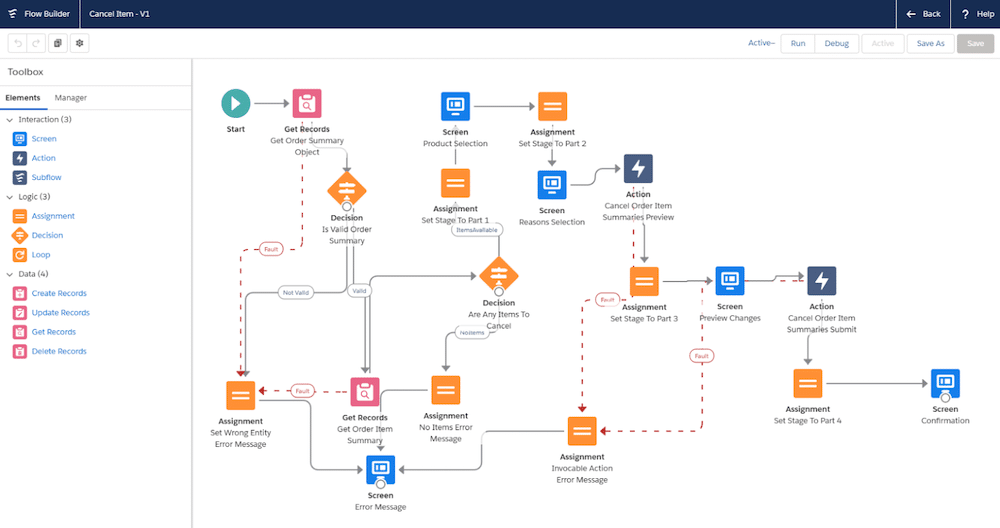
Image source: salesforce.com
2. Process Builder: Automates standard business logic, such as field updates, notifications, and task creation. It is ideal for straightforward Salesforce process automation without needing extensive coding. Its visual design simplifies workflow creation but can become less efficient for highly complex scenarios.
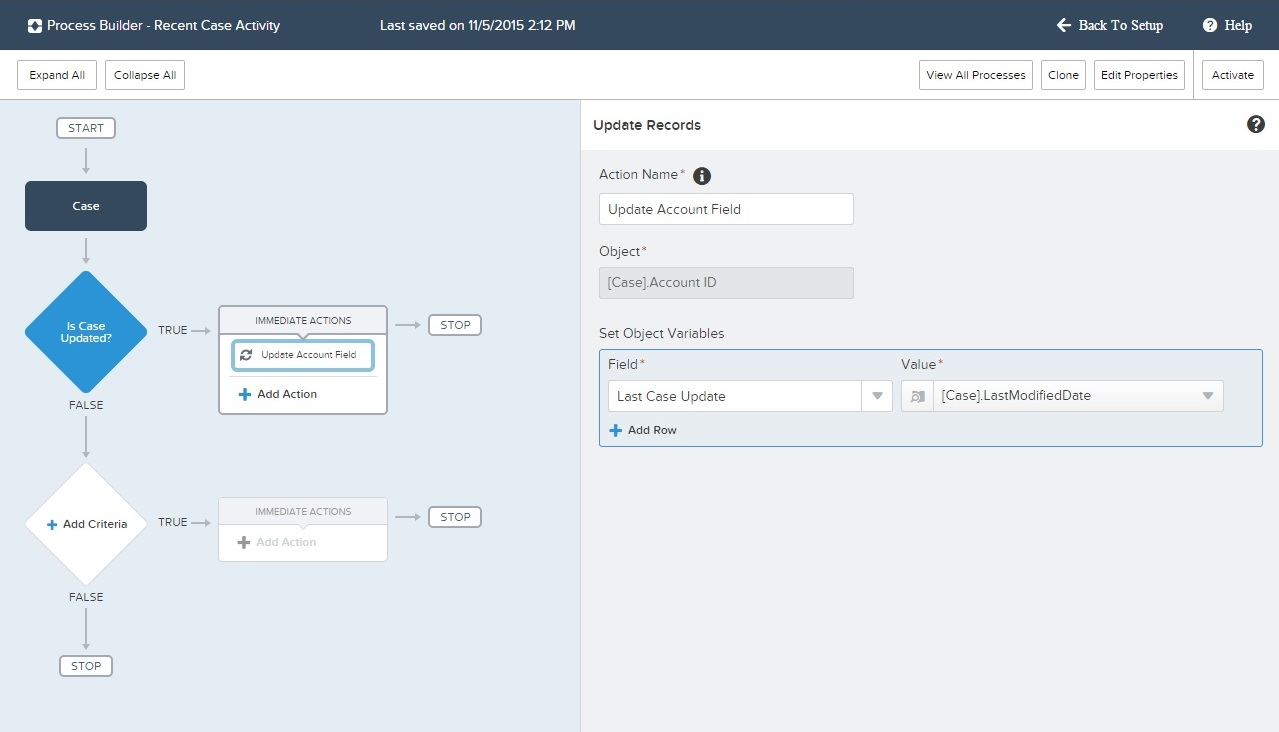
Image source: salesforce.com
3. Salesforce Pardot: Pardot focuses on for Salesforce, handling lead nurturing, scoring, and campaign management. It enables automated email sequences, segmentation, and performance tracking. Pardot bridges marketing and sales efforts, ensuring leads are engaged and follow-ups are timely.
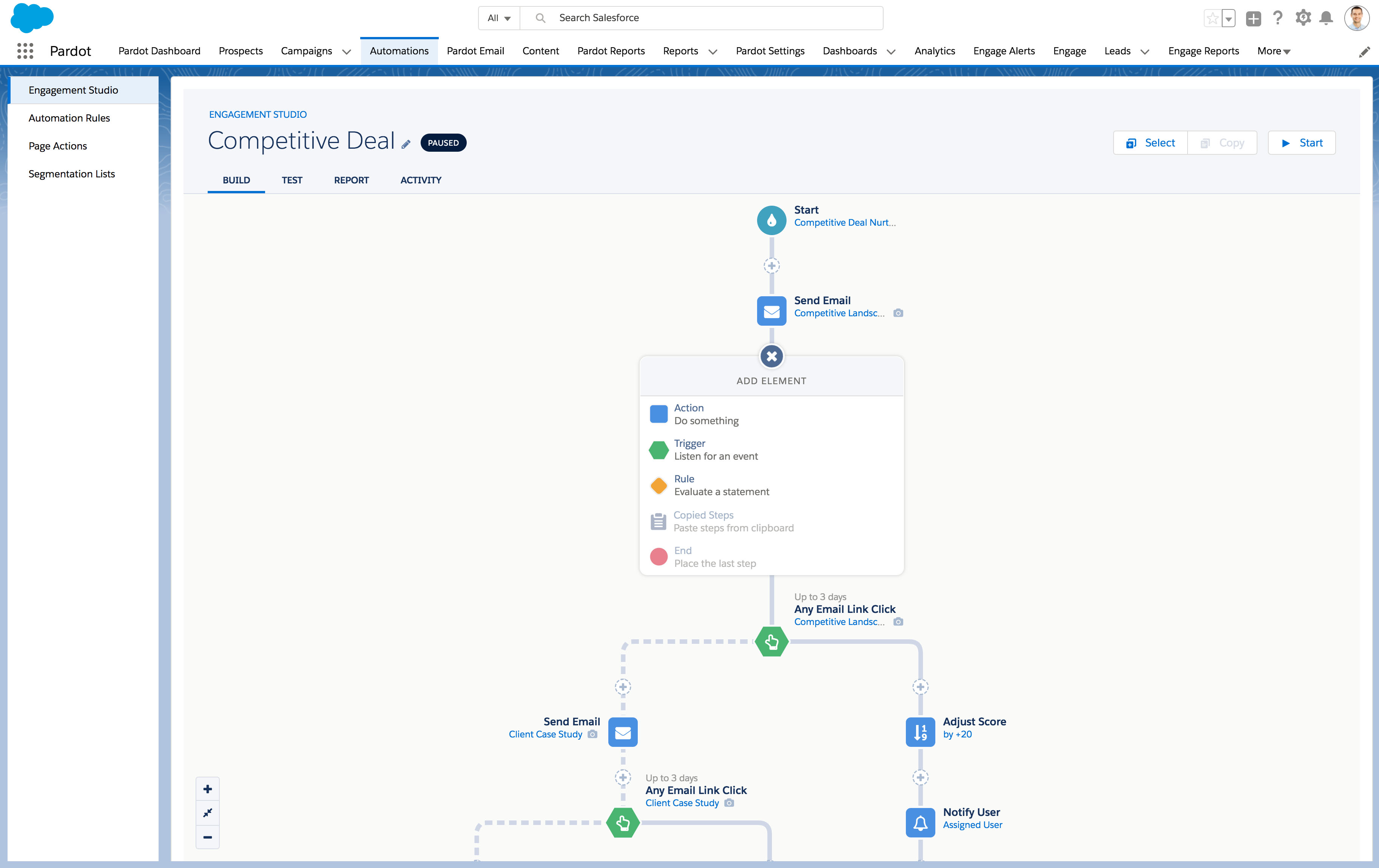
Image source: salesforce.com
4. Salesforce Einstein Automate: Einstein Automate combines AI-driven insights with workflow orchestration across multiple systems. It enhances Salesforce marketing automation and operational processes by recommending actions and predicting outcomes. This tool is best suited for mature organizations with advanced automation needs.
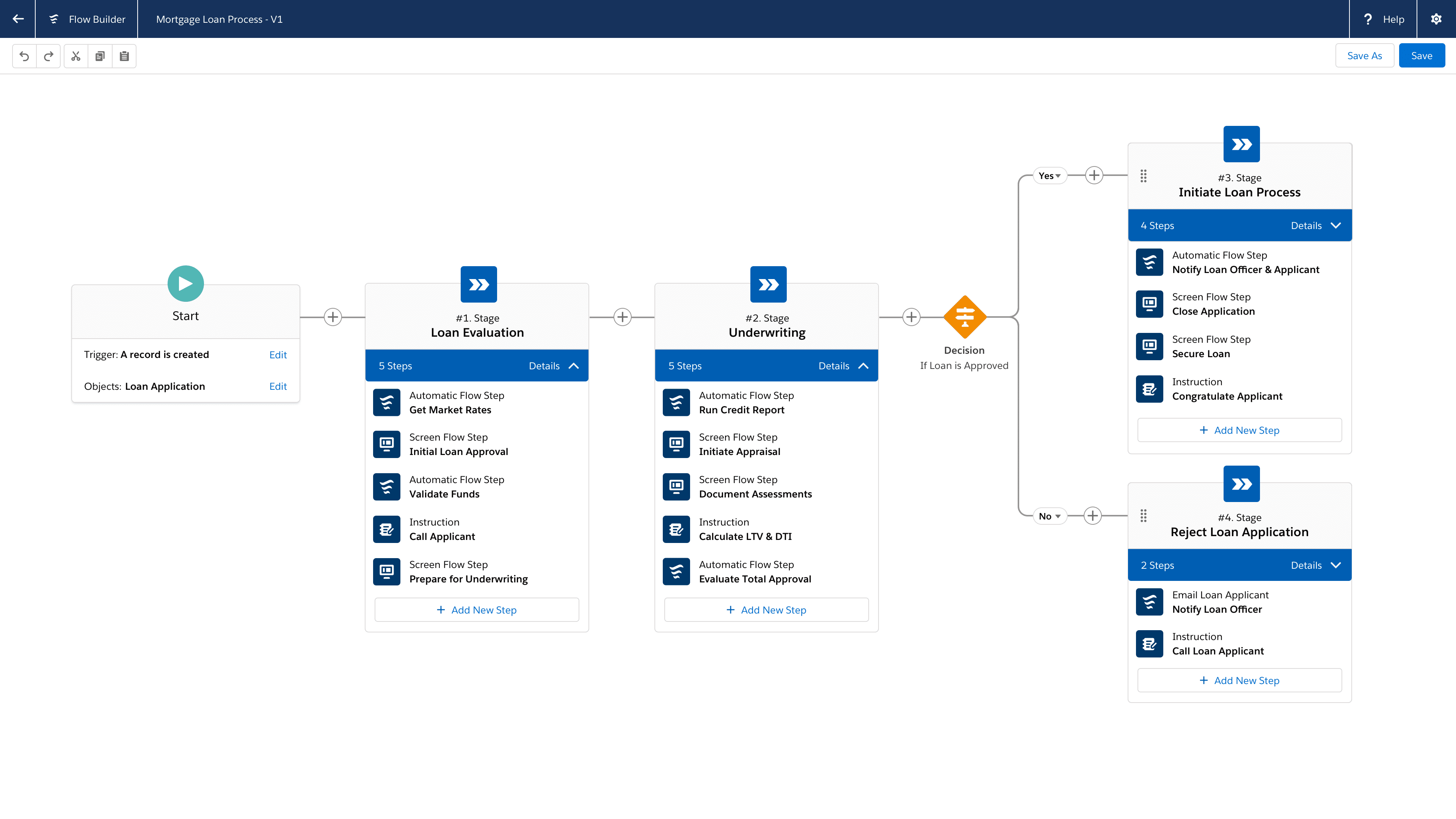
Image source: salesforce.com
5. Third-party automation platforms: These platforms, often featuring an intelligent Salesforce form builder, extend Salesforce's native automation capabilities by integrating with other apps and enabling cross-team workflows. These tools support NetSuite Salesforce automation and other multi-system processes. They offer flexibility but may require additional setup and governance. Designing Salesforce automation that scales
Here are five best-practice principles that go beyond basic setup and focus on long-term usability, governance, and scalability.
Step 1: Start with outcomes, not triggers
Define the business outcome first (faster deal progression, fewer handoffs, cleaner data) before building triggers or flows. Automation built around record events alone often misses the real work teams need to complete after a change happens.
Step 2: Keep automation logic simple and observable
Avoid stacking multiple flows, rules, and approvals on the same object without visibility into them. Use clear naming conventions and so admins can quickly understand what runs, when it runs, and why.
Step 3: Design for change, not perfection
Salesforce processes evolve constantly. Build modular flows that can be adjusted without breaking downstream logic. Over-engineered automation creates technical debt and slows future changes.
Step 4: Limit automation to CRM-appropriate work
Salesforce excels at states and decisions. Execution-heavy work, such as cross-team coordination, document collaboration, or operational follow-ups, often belongs outside the CRM to avoid bloated workflows.
Step 5: Test automation in real scenarios, not edge cases
Validate automation using real user behavior and real data patterns. Many Salesforce automations fail not due to logic errors, but because they don't match how teams actually work day to day.
Rethink automation without added complexity
The operational cost of maintaining Salesforce automation
While Salesforce automation can streamline workflows and reduce manual effort, maintaining it comes with hidden operational costs. As in complexity, organizations face ongoing challenges in testing, updates, and cross-team coordination. Understanding these costs helps businesses plan resources and avoid inefficiencies. In this section, we break down the key factors driving the operational burden.
- Heavy admin dependency: Most Salesforce automations require experienced admins or consultants to build, debug, and update. Even small changes often can't be made safely by business users, slowing iteration and increasing reliance on specialized roles.
- High testing and release overhead: Changes to flows or rules usually require sandbox testing, regression checks, and controlled releases. This adds time and coordination cost, especially when automation touches multiple objects or teams.
- Brittle workflows as complexity grows: As automations stack over time, minor updates can trigger unintended side effects. Teams often avoid because they fear breaking existing logic, which can lead to technical debt.
- Limited visibility into automation impact: Understanding why something happened, or didn't, can be difficult without deep inspection. Troubleshooting often means tracing multiple flows, rules, and approvals across objects.
- Rising cost beyond licensing: The real cost of Salesforce automation isn't just licenses. It includes consulting fees, admin hours, maintenance time, and opportunity cost when automation slows rather than accelerates work.
When Salesforce automation becomes hard to scale
Even the most well-designed Salesforce automation can face challenges as business processes grow in complexity. Recognizing the signs that automation is struggling helps teams prevent bottlenecks and maintain efficiency across sales, marketing, and operations.
- Cross-team workflows: Automation that spans multiple teams often breaks down because Salesforce is primarily a . Tasks that require coordination among sales, operations, and support may not trigger correctly or may be confused. Over-reliance on complex flows can slow execution and increase administrative overhead.
- Non-CRM processes: Processes outside the CRM, such as operational tasks, internal approvals, or , are challenging to automate effectively in Salesforce. Attempts to shoehorn these tasks into Salesforce process automation can lead to brittle workflows and failed handoffs.
- Operational handoffs: Manual handoffs between departments reveal gaps in automation. Even if a record is updated automatically, the right person may not act on it, delaying follow-through and creating bottlenecks. Clear ownership and notifications are critical to maintain workflow efficiency.
- Execution outside sales: Automation focused solely on sales activities may fail to scale across delivery, customer success, or marketing execution. Teams attempting marketing automation Salesforce solutions across departments often encounter hidden complexity and technical debt.
While Salesforce automation excels at managing CRM-centric workflows, many teams find gaps when processes extend beyond sales and marketing. Tasks that require cross-team coordination, real-time collaboration, or operational follow-through often remain manual. Organizations increasingly look for tools that complement Salesforce by turning automated triggers into accountable action. In the next section, we'll explore how Lark supports execution-first automation to bridge these gaps.
Simplify cross-team workflow management
Lark: Execution-first automation beyond Salesforce
Salesforce automation is highly effective at managing CRM logic, records, stages, approvals, and campaigns. But as automation expands beyond sales into delivery, operations, and cross-team execution, teams often need a workspace that turns CRM signals into coordinated action. This is where complements Salesforce by focusing on execution after automation, not just automation itself. Instead of endlessly extending Salesforce flows, teams use Lark to manage ownership, , and follow-through once is triggered.
Record-driven automation that assigns real ownership
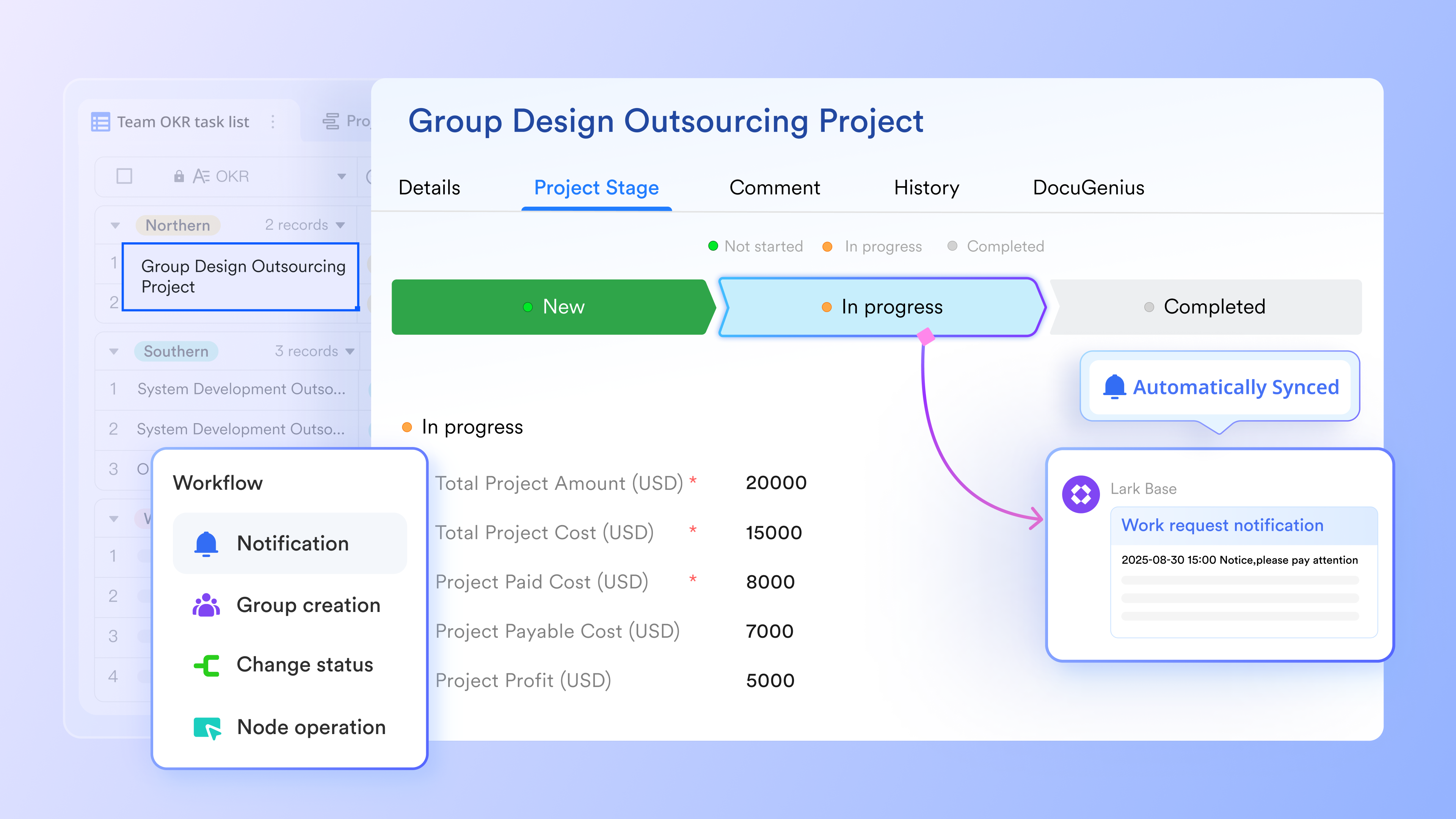
Lark Base automation is triggered by record-level changes, such as when an owner field is updated, a status changes, or a condition is met. Instead of only updating fields or sending alerts, Lark can immediately assign responsibility, notify the stakeholders, and include action buttons that open the exact record. This ensures the automation results in action, not just a data update. Salesforce automation often updates records or sends emails, but ownership and follow-through frequently happen outside the CRM. Lark closes that gap by turning triggers into accountable action inside the same workspace. 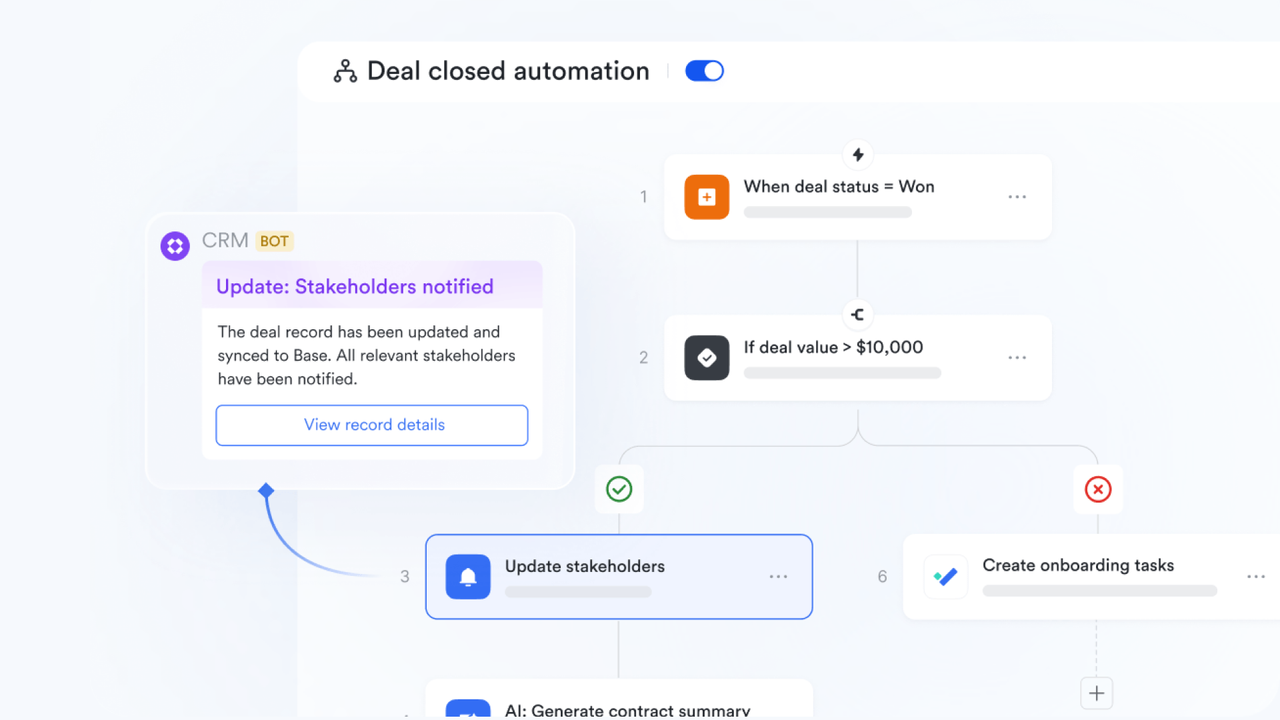
Native messaging automation tied to execution context
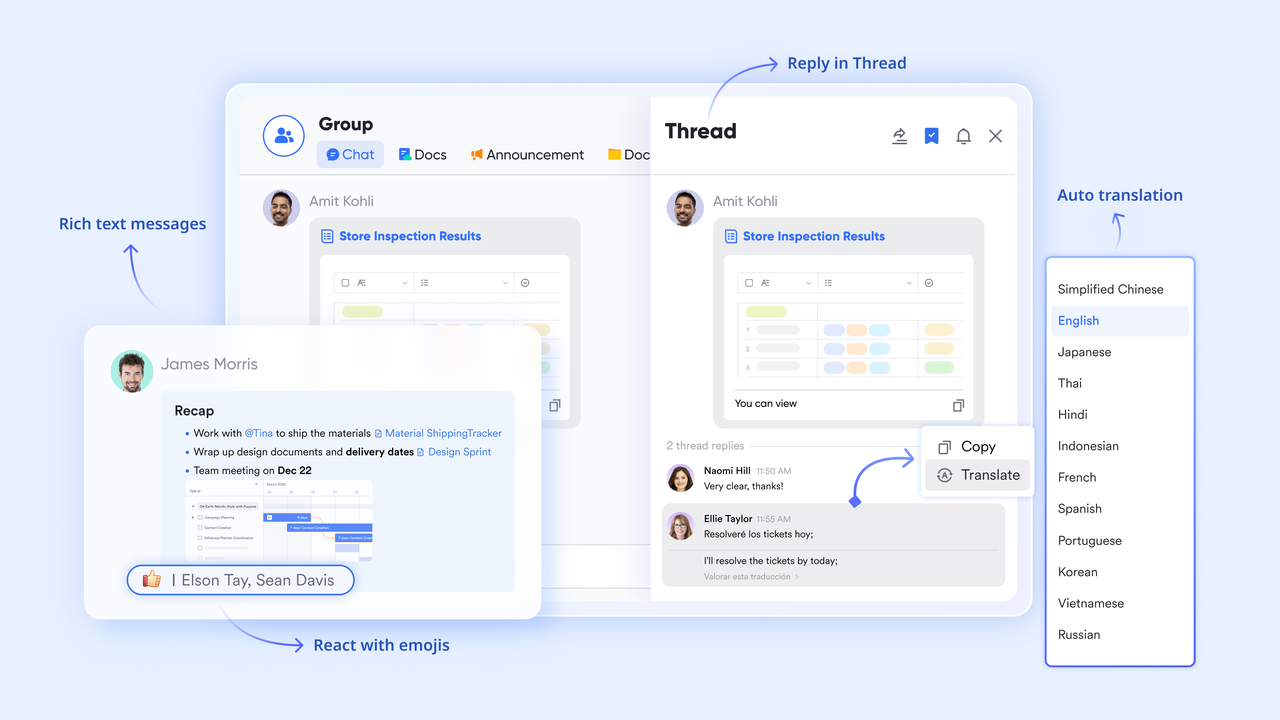
Lark allows automations to send context-aware messages directly in . Messages can reference record data, dynamically mention assignees, and include buttons that take users straight to the relevant Base view or task. This keeps communication anchored to the work itself rather than buried in email or notifications. Salesforce notifications are typically email-based or system alerts, which are easy to ignore. Lark delivers automation outcomes inside , where teams already coordinate daily work.
Automation is designed for evolving workflows, not fixed processes
Lark automations are easy to edit, suspend, or duplicate as workflows change. Because is closely tied to tables and fields rather than rigid objects, teams can adapt processes without refactoring complex flows. With no-code design, this supports experimentation and gradual improvement rather than "set once and fear touching later." Salesforce automations are powerful but brittle at scale; small changes can cascade into failures. Lark prioritizes flexibility, which suits fast-moving teams. 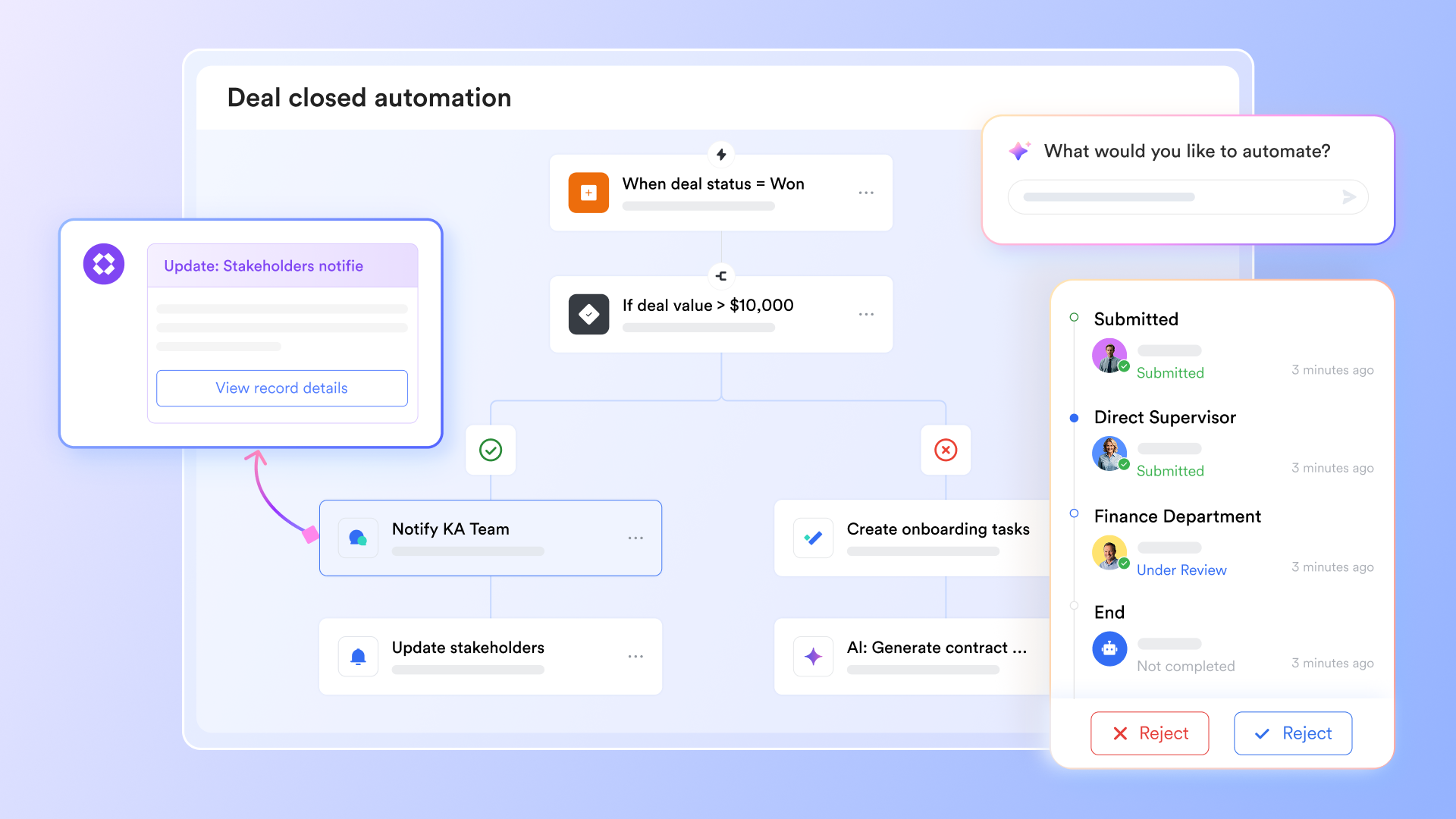
Automation that scales across teams, not just CRM objects
Lark Base automation works across projects, operations, routing, and internal workflows, not only sales data. Triggers can support handoffs to operations, onboarding, finance, or by automatically creating tasks, updating statuses, or notifying different teams. Salesforce automation is inherently CRM-centric. Extending it to cross-team execution often increases complexity and cost. Lark is built for from the start, making automation usable beyond sales alone.
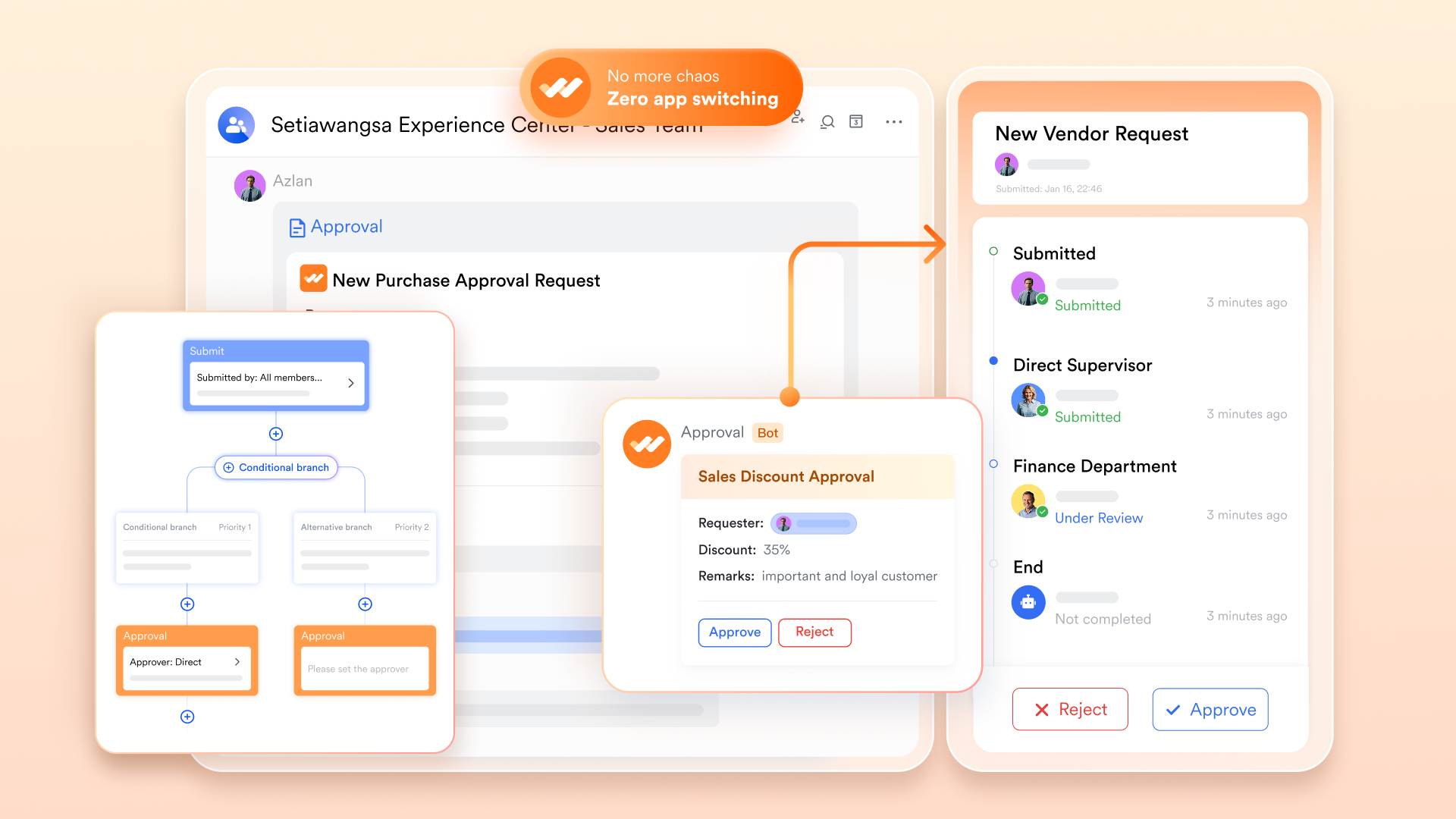
Smart approval process powered by automated workflows
For everything from leave to complex financial reimbursements, turns manual requests into . Using branches, you can design smart approval paths that automatically route requests to different managers based on specific conditions, like the total cost or department type. The system maintains a complete, transparent log of every action, ensuring you can always audit who approved what and when. Unlike Salesforce's method, which requires clicking into a specific record to see the full context and history of approval, Lark can notify the stakeholders and offer access with one click.
:
- Starter plan: Free forever plan that includes 11 powerful tools for up to 20 users. It also comes with 100GB of storage, 1000 automation runs, AI translations, and more.
- Pro plan: $12/user/month (billed annually) for up to 500 users. It includes everything in Starter plus group calling for up to 500 attendees, 15TB of storage, 50,000 automation runs, and more.
- Enterprise plan: for custom pricing. Supports unlimited users and includes even more automation runs and advanced security, compliance, and management features.
For small teams with simple communication needs

18 months message history
1000 Base automation runs/month
2000 rows per table in Base
Most POPULAR
For companies with comprehensive collaboration and management needs
Unlimited message history
500-participant video meetings
50k Base automation runs/month
20k rows per table in Base
For large companies with advanced security and organizational management needs
Get a personalized demo and pricing
Unlimited message history
500-participant video meetings
15 TB storage + 30 GB storage/user
500k Base automation runs/month
50k Base automation runs/month
Most POPULAR
For companies with comprehensive collaboration and management needs
Unlimited message history
500-participant video meetings
50k Base automation runs/month
20k rows per table in Base
Wise decision: When Salesforce automation is enough and not
Understanding the limits of Salesforce automation helps organizations know when to rely on native tools and when to use additional platforms. While Salesforce handles well, operational execution and cross-team coordination often require complementary solutions.
When Salesforce automation is preferred
- CRM-centric processes: Salesforce automation is ideal for managing leads, opportunities, cases, and approvals within the CRM. Tasks such as updating records, triggering notifications, and enforcing business rules are handled efficiently. For most sales and service workflows, native automation tools such as Flow or Process Builder are sufficient.
- Marketing campaigns and : Tools like Salesforce Pardot and Marketing Cloud support marketing automation in Salesforce, automating email campaigns, segmentation, and lead scoring. These solutions streamline engagement and ensure timely follow-ups. When campaigns stay within marketing and sales, Salesforce automation meets most requirements.
When you need more
- Cross-team operational workflows: Workflows spanning operations, finance, or customer success may be challenging to manage solely with Salesforce. Execution-heavy tasks require collaboration tools, such as , to assign ownership and track completion.
- Complex orchestration across systems: Processes involving multiple systems or AI-driven decision-making may need Einstein Automate or third-party automation platforms. While these extend Salesforce capabilities, they also introduce technical complexity, making complementary solutions critical for smooth execution.
Conclusion
Salesforce automation provides powerful tools to streamline CRM workflows, from record-level rules and approvals to marketing automation and AI-driven orchestration. When implemented thoughtfully, it improves efficiency, reduces manual work, and ensures data consistency. However, as processes grow across teams, departments, and systems, scaling Salesforce automation can become challenging, with risks of complexity, technical debt, and missed execution. Organizations must balance native tools like Flow, Pardot, and Einstein Automate with complementary platforms that handle operational follow-through. For teams seeking execution-first automation beyond CRM boundaries, provides the flexibility, accountability, and collaboration needed to turn automated triggers into real action.
Turn triggers into accountable action today
FAQs
How does Salesforce use automation?
Salesforce uses automation to eliminate manual data entry and repetitive tasks across sales, service, and marketing departments. It can automatically assign incoming leads to specific reps, trigger follow-up emails based on customer behavior, and route discount requests through multi-step approval chains. By handling these operational "loops" in the background, it ensures that your team focuses on high-value strategy rather than administrative upkeep.
What is the difference between Salesforce automation and CRM?
CRM is the overall strategy and database used to manage your entire history of customer interactions, serving as your "system of record." However, Salesforce automation is the technology within CRM that actually performs actions, such as moving a deal to the next stage or sending an alert. Essentially, CRM is the library where your data lives, while automation is the digital assistant that organizes the files and notifies you of deadlines.
Which automation tool do I use in Salesforce?
The primary tool to use is Salesforce Flow, which is the current standard for creating complex, low-code business processes and screen-guided workflows. For formal sign-off requests like expense reports, you should use the dedicated Approvals tool, while Apex remains the choice for pro-code developers handling massive data volumes. Salesforce has officially retired older tools like Workflow Rules and Process Builder, so Flow is now the go-to for almost every scenario.
How hard is it to change Salesforce automation once it's live?
Once implemented, Salesforce and Salesforce marketing automation can be difficult to modify. Changes often require sandbox testing, regression checks, and careful deployment. Even with Salesforce automation tools, updates can impact linked flows. Teams rely on Salesforce test automation tools or Salesforce automation testing tools to safely validate adjustments before going live.
Can Salesforce automation handle non-sales workflows effectively?
Salesforce automation is designed for CRM-centric processes. in Salesforce handles campaigns and leads nurturing efficiently, but cross-departmental tasks often fall outside native capabilities. Using Salesforce automation tools or integrating NetSuite Salesforce automation can help, yet execution-heavy workflows may still require complementary platforms beyond Salesforce itself.
What breaks most often in complex Salesforce automations?
Complex flows and layered approvals in Salesforce process automation often fail due to unintended dependencies. Salesforce marketing automation or multi-object workflows are prone to errors without proper design. Salesforce test automation tools and Salesforce automation testing tools help identify failure points, but overlapping logic or untested scenarios remain the leading cause of breakdowns.
Related reading












