Most teams are buried under "work about work," the manual status updates, data entry, and constant chasing of approvals that kill productivity. A workflow engine solves this by acting as a digital brain, automatically routing tasks and data according to your business rules. Instead of hoping people remember the next step, the system enforces it for you. This guide breaks down how a modern workflow engine works and how you can use one to move from manual chaos to a streamlined, automated operation.
What is a workflow engine?
At its core, a workflow engine is a software application that manages and executes modeled computer processes. It serves as the "brain" of a (BPM) system, ensuring that tasks are performed in the correct order, by the right people or systems, based on predefined business rules.
Think of it as an automated air traffic controller. It doesn't fly the planes (execute the tasks), but it ensures every plane (task) has a clear path, knows its sequence, and is redirected if conditions change. By utilizing a workflow orchestration engine, organizations can move away from manual oversight and toward a system where the software itself handles the handoffs between steps.
For teams managing complex operations, a workflow engine provides the structural integrity needed to scale. It ensures that a Python workflow engine script or low-code automation follows the exact same logic every time, reducing human error and increasing throughput.
Features of modern workflow engines
The modern workflow and rules engine has evolved far beyond basic automation. Today’s top-tier engines are designed for high availability, visibility, and flexibility. Key features include:
- Visual process modeling: Most modern tools use BPMN (Business Process Model and Notation) or proprietary drag-and-drop interfaces to help non-technical users map out flows.
- State persistence: A critical feature for long-running processes. The engine "remembers" where a workflow is, even if it takes weeks to complete or the system restarts.
- API connectivity: The ability to "talk" to other platforms (, ERPs, or custom databases) is essential for modern .
- Error handling and retries: If a task fails (e.g., an external API is down), the engine can automatically retry the action or escalate the failure to a human.
- Detailed audit trails: Every step, decision, and timestamp is recorded, providing a perfect log for compliance and optimization.
Example of workflow engine: Common use cases
The versatility of a workflow engine allows it to support structured processes across almost every department. By automating handoffs and enforcing rules, teams reduce manual coordination and improve consistency. These examples show how workflow engines operate in real business scenarios.
- HR & people management: Workflow engines streamline the transition from candidate selection to employee onboarding. Once a candidate is marked as hired, the system can trigger account creation, document collection, and equipment requests. Each step follows predefined rules and timelines. This reduces delays and ensures new hires receive consistent experience. HR teams gain visibility into onboarding progress without manual follow-ups.
- Finance: In finance teams, workflow engines manage the invoice-to-pay process from submission to approval and payment. Expenses are automatically routed for review based on amount, category, or department. Budget thresholds are enforced before payments proceed. This reduces errors and improves financial control. Audit trails remain available for compliance reviews.
- IT & DevOps: Workflow engines coordinate complex technical processes across systems and services. A single user signup event can trigger database updates, access provisioning, and notification emails. These steps run in sequence or parallel based on defined logic. Automation reduces manual intervention and improves system reliability. Teams maintain consistency across environments.
- Marketing: Marketing teams use workflow engines to and asset reviews. Creative materials move through defined stages such as draft, legal review, and final approval. Stakeholders are notified automatically when their input is required. This prevents bottlenecks and missed deadlines. Campaign execution becomes more predictable and transparent.
5 open source workflow engines with practical limits
For teams with deep engineering resources, an open source workflow engine can provide high levels of customization. However, each comes with its own trade-offs.
How a workflow engine works under the hood
To understand why a workflow engine is so powerful, we need to look at the five-step cycle it follows every time a process runs.
Step 1: A trigger starts the workflow
Every workflow begins with a trigger. This could be an event such as a form submission, a data update, a scheduled time, or an external system signal. The workflow engine listens for these events and, when the defined condition is met, instantiates a new workflow instance. At this point, the engine records the initial state, so execution can be tracked and resumed if needed. Step 2: The engine evaluates rules and conditions
Once the workflow starts, the engine checks the decision logic associated with the first step. These rules determine which path the workflow should follow, such as routing an item for , skipping steps, or branching into parallel actions. This is where business logic is applied consistently, ensuring the same rules are enforced every time the workflow runs.
Step 3: Tasks and actions are executed
The engine then executes the actions defined in the workflow. Actions can include creating tasks, sending notifications, calling APIs, updating records, or requesting human input. Each action is treated as a discrete step, and the engine monitors whether it completes successfully, fails, or requires waiting for external input.
Step 4: The state is persisted, and progress is tracked
After each step, the workflow engine saves the current state of the workflow. This persistence allows the engine to pause and resume long-running workflows, recover from system failures, and maintain an audit trail of what has happened so far. State management is critical for workflows that span hours, days, or even months.
Step 5: Transitions lead to completion or continuation
Based on the outcome of each action, the engine transitions the workflow to the next step. This may mean looping back, moving forward, branching into multiple paths, or ending the workflow entirely. When all required steps are completed, the engine marks the workflow as finished and records the final outcome for reporting, auditing, or downstream processes.
Automate your business processes today
Modern option: How Lark approaches workflows differently
fundamentally shifts the automation experience by moving the workflow engine out of the backend and into the hands of the people doing the work. Instead of managing disconnected scripts, teams use a visual interface that links structured data directly to . This ensures that every automated step is visible, actionable, and deeply integrated into the tools you use every day.
Multi-step process workflow automation
Lark Base workflow feature allows you to move beyond simple, single-action triggers by building multi-step workflows on a visual canvas. This function allows a single event, such as a "Status" change in a project record, to kick off a sequence of different actions across various tables and apps. For example, a "Project Completed" trigger can simultaneously update the project archive, send a summary message to a stakeholder group, and generate a final invoice record. This ensures that complex, end-to-end business processes are handled within one unified flow. 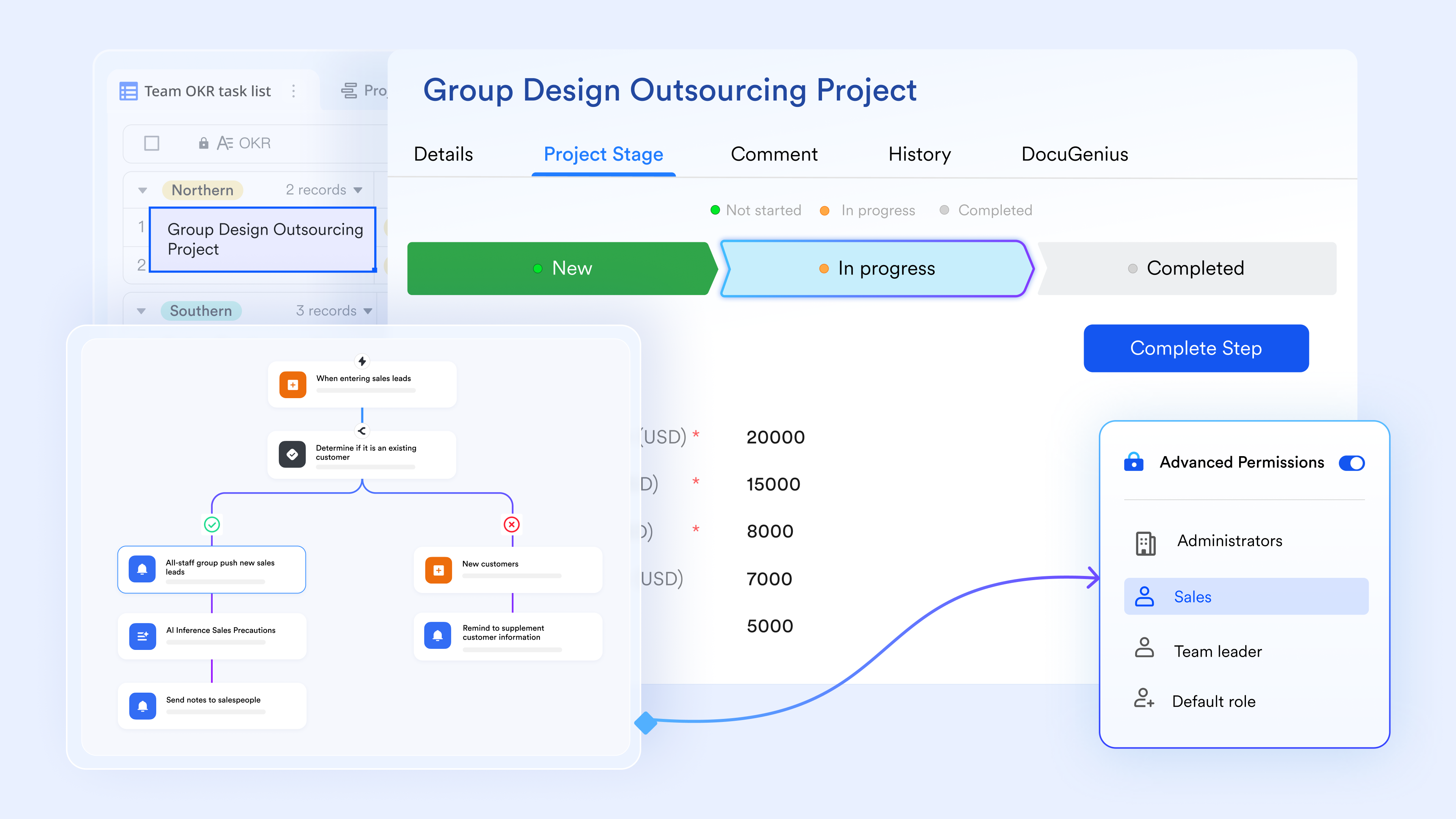
Logic-based actions (If/Else & switch nodes)
To handle the complexity of real-world business rules, Lark Base workflow includes If/Else and switch nodes. These functions allow the workflow to "make decisions" based on the data within a record. The If/Else node handles binary conditions (e.g., if a budget is over a certain limit, it routes for approval), while the switch node allows for multiple parallel paths based on a specific category (e.g., routing a bug report to the iOS, Android, or Web team based on the "Platform" field). This ensures that a single automation can handle a variety of different scenarios without needing dozens of separate rules. 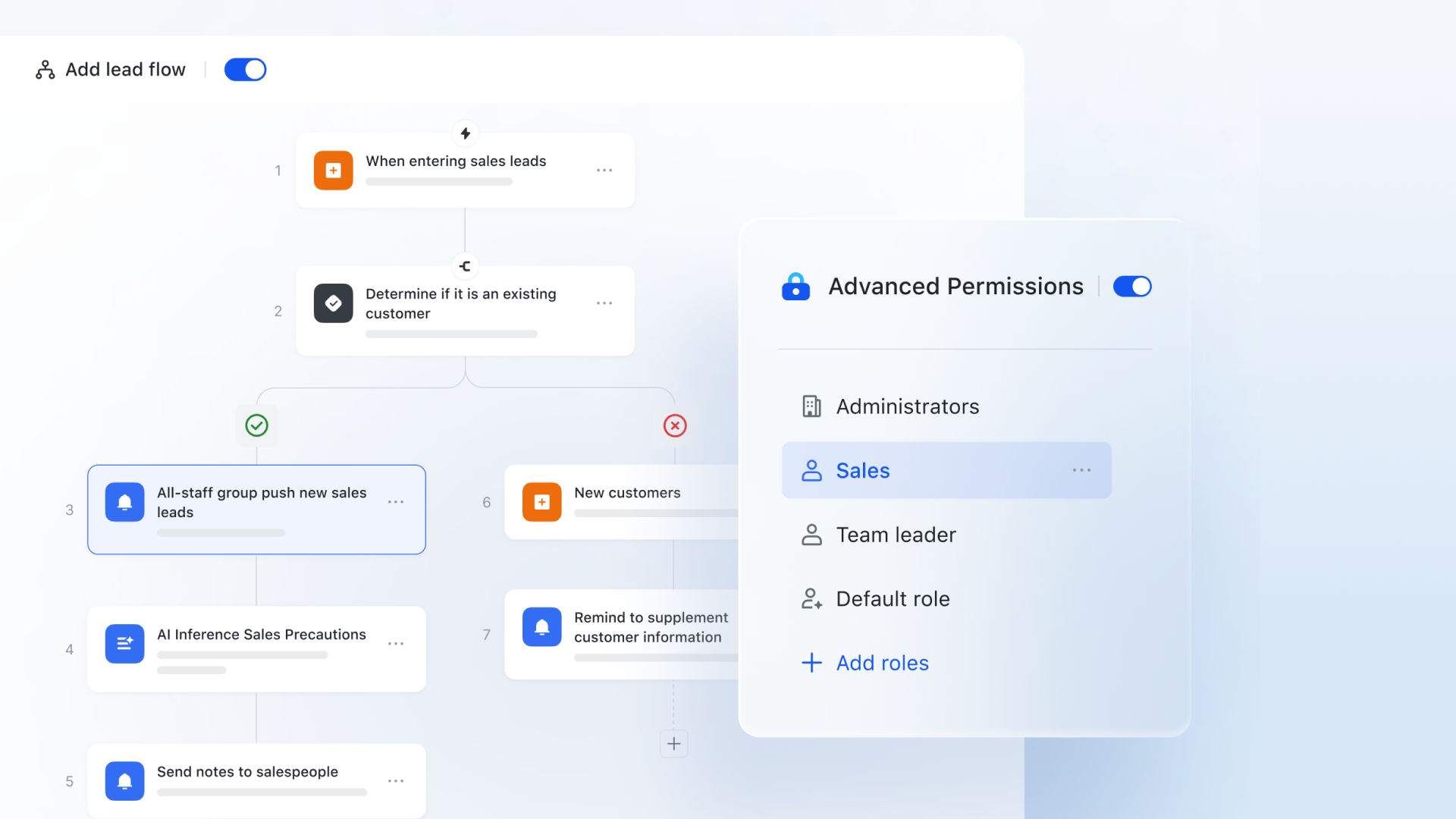
Formulas support complex workflow
If you have a talent for formulas, Lark Base is the perfect place to apply it. Its workflows feature a powerful formula engine that calculates, processes, and transforms data in real-time as your automation runs. By connecting formulas into workflow nodes, you can build sophisticated conditional logic and dynamic data flows—such as auto-updating inventory, calculating billable hours, or applying tiered discounts. Supporting a wide range of data types like text, numbers, and arrays, the engine ensures your workflows adapt intelligently to the specific values generated in every step. 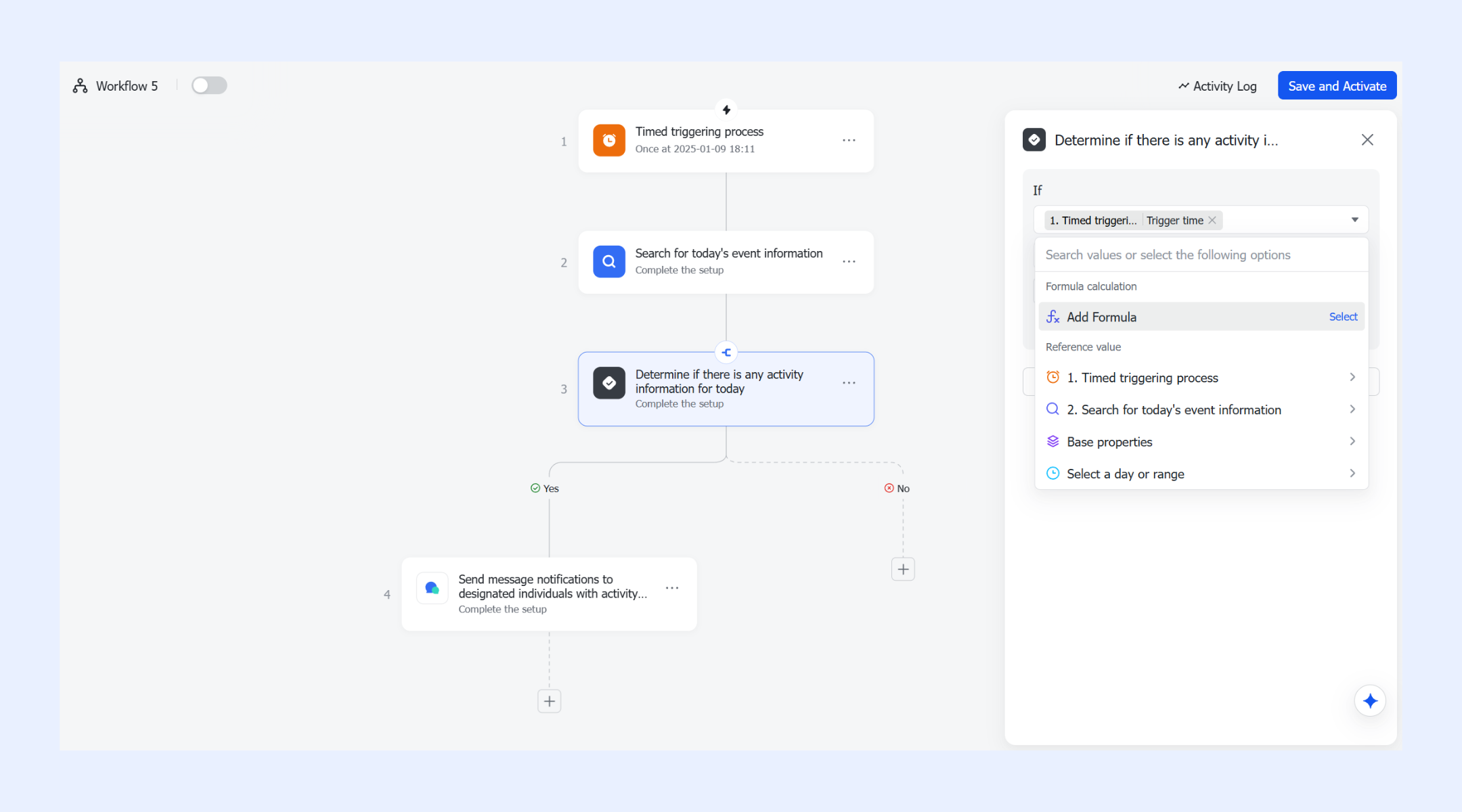
AI nodes and intelligent shortcuts
differentiates itself by embedding AI-powered nodes directly into the automation sequence. These are "cognitive" functions that can analyze and transform data on the fly. For instance, you can use an AI text node to automatically summarize a long "Risk Description" field into a one-sentence brief before it is sent to a manager's mobile device. Other shortcuts include JSON parsing and data conversion, which allow the Base to talk to external systems and reformat data automatically, reducing the need for manual data manipulation. 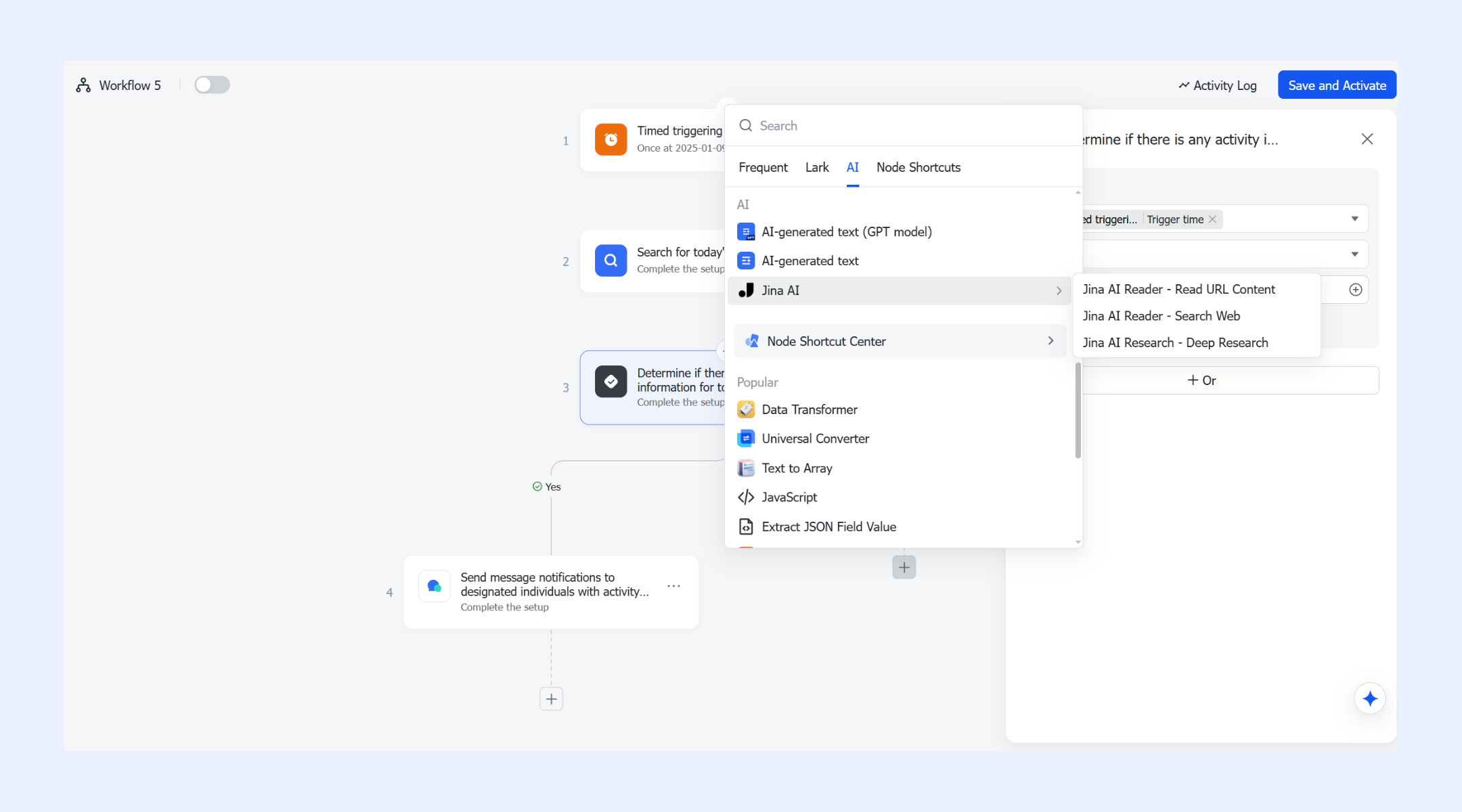
Link field configuration (Automated record linking)
One of the most powerful relational functions in Lark Base is the ability to automate Link field assignments. This function automates the "relationship" between different datasets. Using one-way or two-way link fields within a workflow, Lark can automatically create and link sub-records. For example, when a "New Client" record is added, the workflow can instantly create a linked "Onboarding Checklist" in a separate table. This ensures that your project data remains perfectly relational and that no "orphan" records are created by manual entry errors. 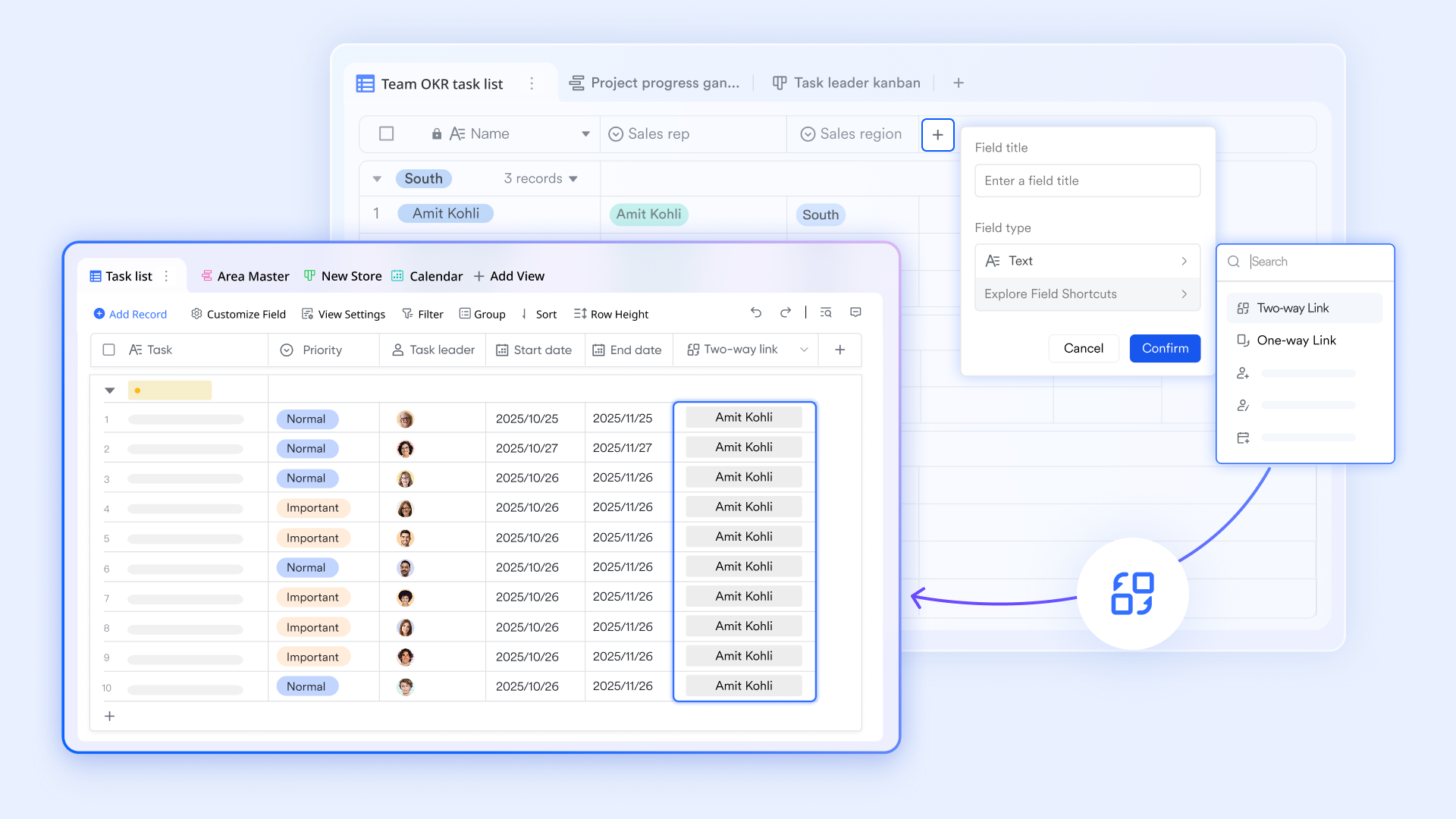
:
- Starter plan: Free forever plan that includes 11 powerful tools for up to 20 users. It also comes with 100GB of storage, 1000 automation runs, AI translations, and more.
- Pro plan: $12/user/month (billed annually) for up to 500 users. It includes everything in Starter plus group calling for up to 500 attendees, 15TB of storage, 50,000 automation runs, and more.
- Enterprise plan: for custom pricing. Supports unlimited users and includes even more automation runs and advanced security, compliance, and management features.
For small teams with simple communication needs

18 months message history
1000 Base automation runs/month
2000 rows per table in Base
Most POPULAR
For companies with comprehensive collaboration and management needs
Unlimited message history
500-participant video meetings
50k Base automation runs/month
20k rows per table in Base
For large companies with advanced security and organizational management needs
Get a personalized demo and pricing
Unlimited message history
500-participant video meetings
15 TB storage + 30 GB storage/user
500k Base automation runs/month
50k Base automation runs/month
Most POPULAR
For companies with comprehensive collaboration and management needs
Unlimited message history
500-participant video meetings
50k Base automation runs/month
20k rows per table in Base
Common challenges teams face with workflow engines
Automation promises speed and consistency, but many organizations discover that traditional workflow engines introduce new layers of friction. A typical temporal workflow engine overview reveals systems originally designed with engineering teams in mind, not business users. This creates a disconnect between how workflows are coded and how work actually happens across departments. As a result, automation often feels powerful in theory but difficult to sustain in practice.
- High setup and engineering dependency: Many implementations of a temporal workflow engine rely on a code-first model. According to the temporal workflow engine documentation, even small changes often require developer intervention. Business leaders understand the process logic but must wait for engineering teams to implement updates. This dependency creates bottlenecks and slows down operational improvements.
- Limited visibility for non-technical users: In many temporal workflow engine setups, workflows run deep in backend systems. For non-technical users, the process becomes a black box. Teams cannot easily see where a request is stuck or why a decision path was triggered. This lack of transparency reduces trust and adoption, even when the automation works as designed.
- Workflow logic drifting from business reality: Business conditions evolve faster than most automated workflows. Over time, the logic defined in a temporal workflow engine may no longer reflect real operating needs. Teams compensate by creating manual workarounds using emails or spreadsheets. This gap between and actual behavior makes the automation less relevant.
- Difficulty adapting workflows over time: Scaling or modifying workflows often introduces significant technical debt. Adding new approval layers, teams, or integrations inside a temporal workflow engine can require architectural changes. As highlighted in many temporal workflow engine overview discussions, this rigidity makes organizations feel locked into outdated processes.
These challenges push some teams to abandon automation altogether and return to manual coordination. To scale effectively, organizations need workflow engines that balance the robustness described in temporal workflow engine documentation with accessibility for everyday users. The next generation of workflow engines focuses on visual design, shared visibility, and closer alignment with how work truly flows across teams. Let us explore how Lark approaches workflows differently to solve these challenges.
Simplify complex business processes now
Key advantages of using a workflow engine
Organizations adopt workflow engines because they deliver reliability and visibility that manual processes cannot sustain. As operations scale, scripts and checklists break down under changing conditions and human error. A workflow orchestration engine enforces structure while remaining adaptable to business needs.
- Consistency at scale: Workflow engines execute every process using the same predefined logic each time. Unlike manual execution, steps are never skipped or reordered. Hiring, procurement, and approvals follow identical paths across teams and locations. This reduces variability and improves predictability. Consistency becomes easier to maintain as volume increases.
- Reduced bottlenecks: Real-time visibility allows teams to see exactly where a workflow is stalled. Managers can identify approval delays, handoff issues, or missing inputs quickly. Instead of chasing updates manually, they rely on system status. This shortens cycle times and improves accountability.
- Auditability: Workflow engines record every trigger, decision, and action automatically. This creates a detailed audit trail that shows who approved what and when. In regulated environments, this transparency is critical. Audit preparation becomes faster and less disruptive.
- Agility: When business processes change, teams update the workflow logic centrally. There is no need to retrain entire departments on new procedures. Changes propagate instantly across all executions. This allows organizations to adapt quickly without operational friction.
Conclusion
Workflow engines play a critical role in reducing manual coordination and enforcing consistency across From approvals and onboarding to data orchestration and long-running workflows, they help teams move away from reactive work toward predictable execution. However, not all workflow engines are built for the same audience. Code-first systems offer power and durability but often create distance between logic and the people doing the work.
As organizations scale, the challenge shifts from simply automating steps to keeping workflows visible, adaptable, and aligned with daily operations. This is where newer approaches to workflow orchestration matter. Platforms like focus on bringing automation closer to communication and structured data, so workflows remain understandable and actionable. Instead of managing automation as a separate technical system, teams can embed it into how work already happens. The result is automation that supports productivity without becoming another layer of complexity to manage.
Find your perfect automation solution with Lark
FAQs
What is the best workflow engine?
There is no single best workflow engine for every use case. Tools like and Temporal work well for engineering-driven workflows. Business teams often prefer visual and low-code options. Platforms such as Lark balance automation with accessibility for non-technical users.
How do workflow engines scale with long-running business processes?
Workflow engines scale long-running processes through state persistence. They store progress externally and resume execution when conditions are met. This approach prevents data loss over time. Modern platforms, including Lark, surface this state clearly for ongoing visibility.
What security considerations matter most?
Key security factors include encryption, role-based access control, and audit logs. These ensure that workflows handling sensitive data remain protected. Visibility into who triggered what action is essential. Lark includes permission controls that align with enterprise governance needs.
How do workflow engines support audit trails?
Workflow engines log every trigger, decision, and action taken during execution. This creates a complete history for compliance and review. Auditability is especially important in regulated environments. Tools like Lark make these records accessible without manual reporting.
When should teams migrate from scripts to a workflow engine?
Teams should migrate when scripts become difficult to manage or maintain. Frequent errors, skipped steps, or heavy manual oversight are common signs. A introduces structure and reliability. Lark helps teams make this transition without heavy technical overhead.
Related reading

















