Every team has workflows—whether documented or not. From approving expenses to launching campaigns or onboarding new hires, work follows a sequence of steps, decisions, and handoffs. When these flows exist only in people's heads or scattered documents, inefficiencies and delays quickly appear.
Workflow diagrams turn abstract processes into explicit, visual representations. They help teams understand how work actually happens, identify bottlenecks, and clarify ownership. In many organizations, these diagrams serve as a shared reference for how processes should run.
Not all workflow diagrams are equal, though. Some remain static, while others stay connected to real execution. Tools like Lark help teams keep workflow diagrams collaborative, current, and closer to everyday work.
What is a workflow diagram?
A workflow diagram is a of how work moves from start to finish within a process. It shows the sequence of steps, decision points, roles, and handoffs involved in completing a task or achieving an outcome. By using standardized symbols—such as rectangles for actions, diamonds for decisions, and arrows for flow—workflow diagrams make complex processes easier to understand at a glance.
Teams use workflow diagrams to clarify responsibilities, identify bottlenecks, reduce errors, and ensure everyone follows the same process. They are commonly used in areas such as approvals, customer onboarding, project delivery, operations, and compliance workflows. Unlike written procedures, workflow diagrams emphasize flow and logic rather than detailed instructions.
Traditionally, workflow diagrams were static documents created for reference. Today, many teams use them as living guides that evolve with the process. When paired with and work management tools, workflow diagrams can stay current, collaborative, and closely aligned with how work is actually executed.
Types of workflow diagrams and when to use each
Workflow diagrams come in different formats, each suited to specific process needs. Choosing the right type helps teams balance clarity, ownership, and decision logic without overcomplicating the visual flow.
- Basic flowcharts: Best for simple, linear processes with minimal branching. They work repeatable tasks such as form submissions, standard requests, or checklist-based procedures.
- Swimlane workflow diagrams: Ideal for cross-functional processes involving multiple roles or teams. Swimlanes clearly show ownership and handoffs, making them useful for approvals, service requests, and interdepartmental workflows.
- Decision-based workflow diagrams: Designed for processes with multiple outcomes based on conditions or rules. These diagrams are helpful for approval paths, exception handling, and compliance-related workflows.
- Business process workflow diagrams: Used for end-to-end that span systems and teams. They provide a high-level view of how work flows across the organization, from initiation to completion.
Learn how teams manage workflows more effectively
Workflow diagrams examples from real business scenarios
Workflow diagrams are widely used across industries to bring structure and clarity to everyday business processes. Below are practical examples that show how different workflows are visualized and applied in real organizational settings.
Sales lead qualification workflow: to show how leads move from capture to qualification, assignment, follow-up, and closure. It helps teams apply the right types of workflow diagrams to ensure consistent decision-making at each stage.
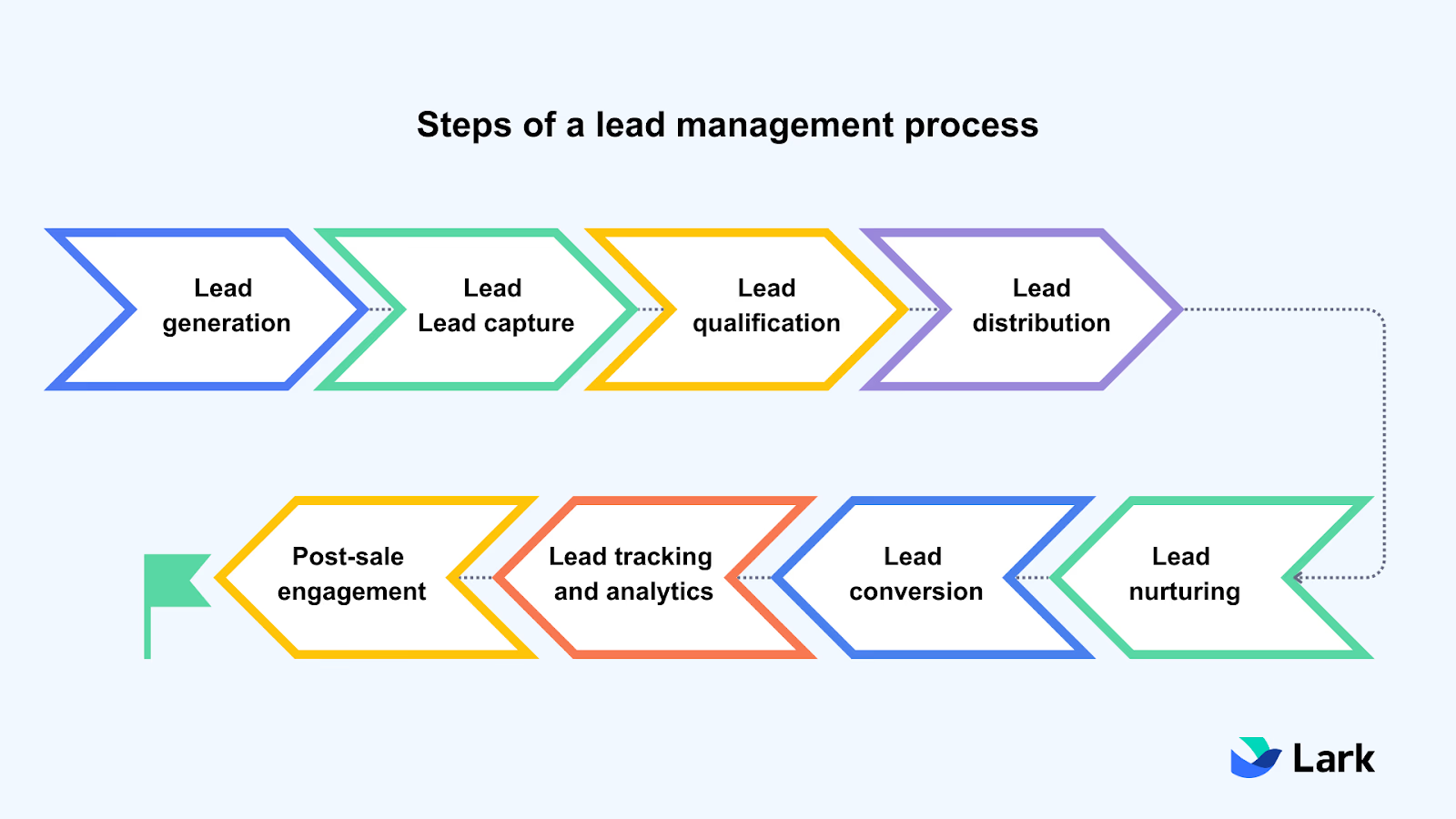
Expense approval workflow: This workflow maps how an employee submits an expense, how it is reviewed, approved, or rejected, and when reimbursement is processed. As the workflow diagrams in Word show, approval workflows are among the most common workflow diagram examples used to reduce delays and confusion over approvals.
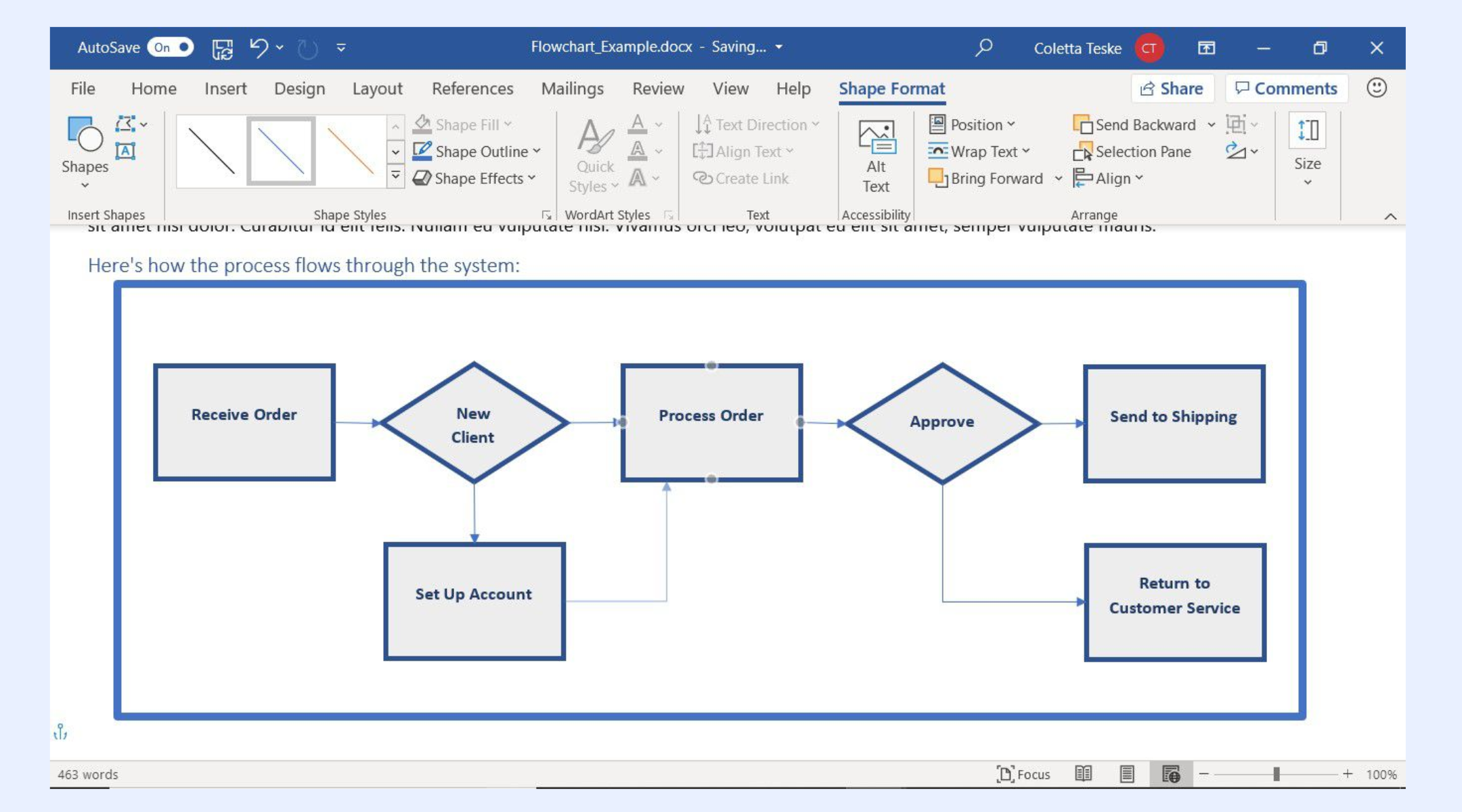
Image source: microsoft.com
Product design workflow: Product design workflows visualize the end-to-end journey from initial user research and ideation to high-fidelity prototyping and handoff. Many design teams initially map these iterative cycles and align cross-functional stakeholders.
Employee onboarding workflow: HR teams document onboarding workflows to coordinate tasks across IT, payroll, managers, and new hires. As the Visio workflow diagrams show, visualizing this process prevents missed steps and improves cross-team handoffs.
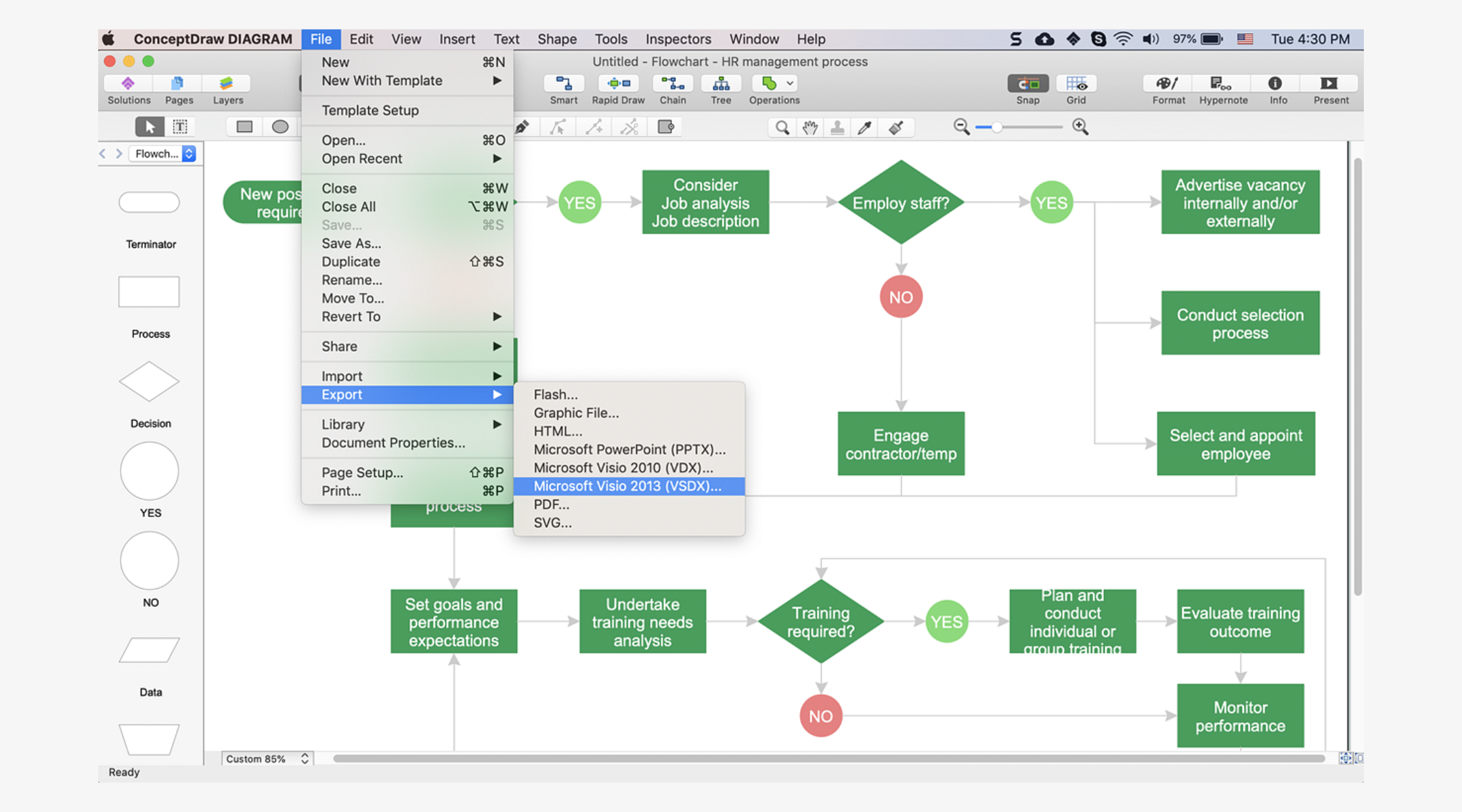
Image source: microsoft.com
Procurement request workflow: outline request submission, vendor checks, budget approval, and purchase execution. Many organizations initially document these processes using Visio workflow diagrams before further optimizing them.
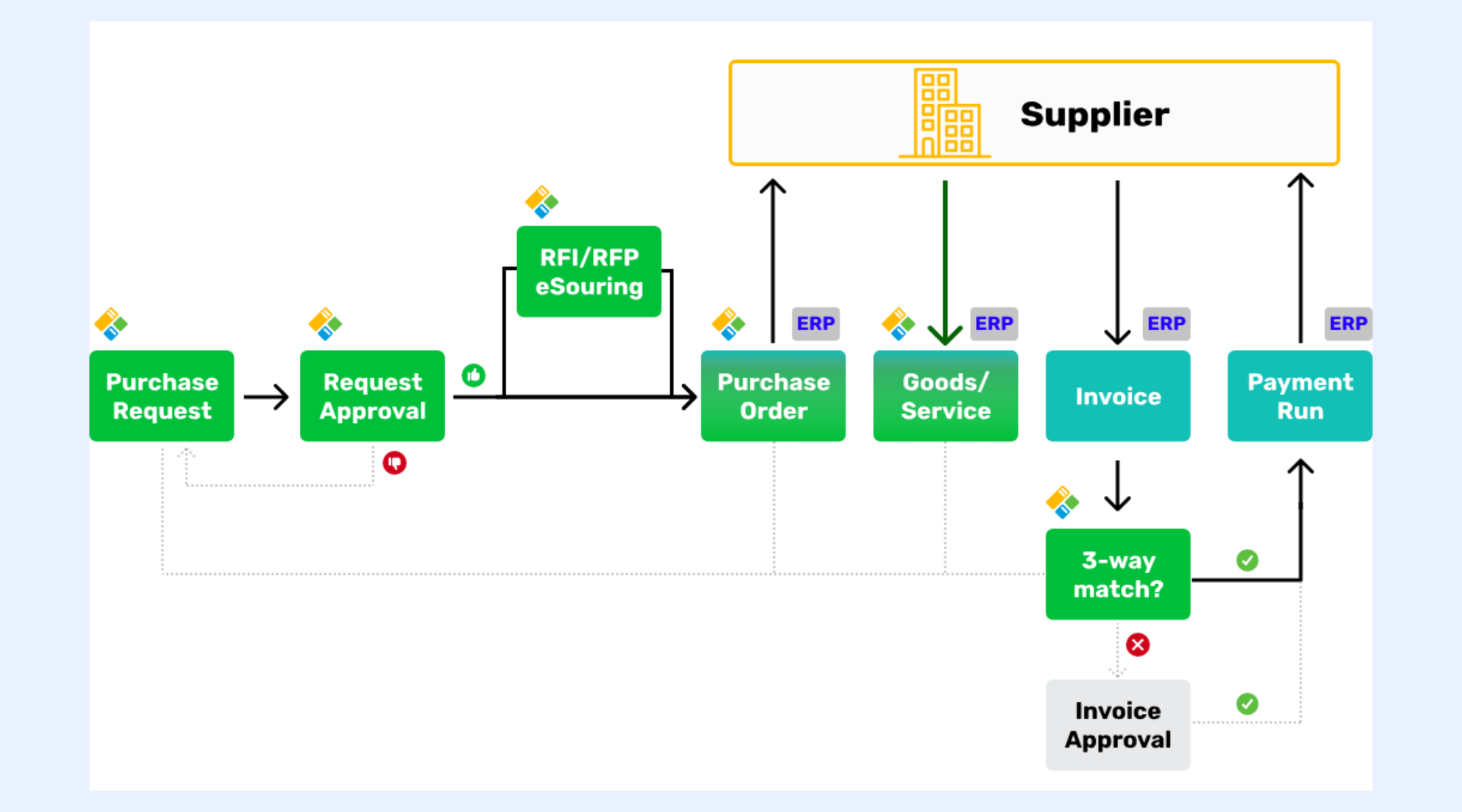
Image source: procurementflow.com
How to make workflow diagrams: From static charts to living systems
Creating a workflow diagram is most effective when you focus on clarity, ownership, and real execution—not just visual flow. Follow these five steps to build a diagram that teams can actually use.
Step 1: Define the purpose and scope
Start by clarifying what process the workflow diagram is meant to represent. Identify where the , where it ends, and what problem it is solving. Keeping the scope focused prevents unnecessary complexity and ensures the diagram stays readable and actionable.
Step 2: Identify key steps, decisions, and roles
List every significant step in the process, including decision points and handoffs between people or teams. Assign roles or owners to each step so it's clear who is responsible for actions and approvals. This step turns the diagram from a flow of actions into a representation of accountability.
Step 3: Choose the proper diagram format
Select a diagram type that best fits the process. Simple linear workflows work well as basic flowcharts, while cross-team processes benefit from swimlane diagrams. Decision-heavy workflows may require branching paths to clearly show alternative outcomes. Step 4: Map the workflow visually
Arrange steps in a logical sequence using standard symbols such as rectangles for actions and diamonds for decisions. Keep labels short and consistent, and avoid crossing lines whenever possible. The goal is readability—any team member should understand the workflow at a glance.
Step 5: Review, validate, and keep it updated
Share the workflow diagram with stakeholders to confirm accuracy and completeness. Validate that it reflects how work actually happens, not just how it's supposed to happen. Revisit and update the diagram as processes change so it remains a reliable reference rather than static documentation.
Workflow diagrams software compared: what actually matters
Workflow diagrams software should do more than display shapes—it should help teams turn visual maps into usable, evolving assets. When creating workflow diagrams, focus on capabilities that support real work, not just static drawings.
- Ease of updates: Tools should let you revise diagrams quickly as processes change without rebuilding from scratch. This keeps visuals in sync with how work actually happens, avoiding outdated charts.
- Collaboration: Real-time review and edit features help multiple stakeholders refine workflows together. This level of shared access reduces version conflicts and speeds alignment.
- Connection to execution: The best tools tie visual steps directly to tasks, data, or approvals, so diagrams reflect live work. That link makes diagrams actionable rather than purely illustrative.
- Automation readiness: Look for platforms that can turn decision points into real triggers and actions. These capabilities distinguish diagram tools from the best platforms for diagrams that support execution.
- Visibility and ownership: It should be clear who owns each step and the status of work in progress. This transparency drives accountability and makes diagrams practical guides, not just references.
Common mistakes teams make with workflow diagrams
Workflow diagrams are meant to simplify work, but they often fail when teams treat them as static artifacts rather than practical tools. The following mistakes are common and can limit the real value of even well-designed diagrams.
- Treating diagrams as one-time documentation: Many teams diagrams once and never revisit them. Over time, these diagrams drift away from reality and lose relevance as processes evolve.
- Overloading diagrams with too much detail: Trying to capture every exception and edge case can clutter the visual flow. Excessive detail reduces readability and makes diagrams harder to understand at a glance.
- Failing to assign clear ownership: When steps lack named owners, accountability breaks down. Teams may know the flow but remain unclear about who is responsible at each stage.
- Designing workflows that don't reflect reality: Diagrams often represent ideal processes rather than how work actually happens. This gap leads teams to ignore the diagram rather than use it.
- Storing diagrams away from execution tools: When diagrams live separately from daily work tools, they are rarely referenced. This separation weakens their impact on real execution.
- Updating processes but not diagrams: without diagram updates quickly create inconsistencies. Outdated visuals confuse and erode trust in documentation.
These challenges often stem from a gap between how workflows are designed and how work is actually carried out. When diagrams are disconnected from collaboration, data, and execution, they quickly lose relevance. Teams need tools that keep workflows visible, editable, and aligned with real activity. This is where platforms like Lark help bridge the gap—by bringing workflow design closer to everyday work without treating diagrams as isolated documentation.
Keep workflow diagrams up to date
Practice it: Turns workflow diagrams into executable actions with Lark
Workflow diagrams become far more valuable when they move beyond visualization and begin to guide real work. Instead of sitting in separate files, modern workflows need to live , make decisions, and take action. approaches workflow diagrams as part of an integrated work environment rather than standalone charts. By connecting visual process design with data, communication, and approvals, Lark helps teams translate diagrams into practical execution paths. This makes workflows easier to follow, adapt, and use consistently across teams.
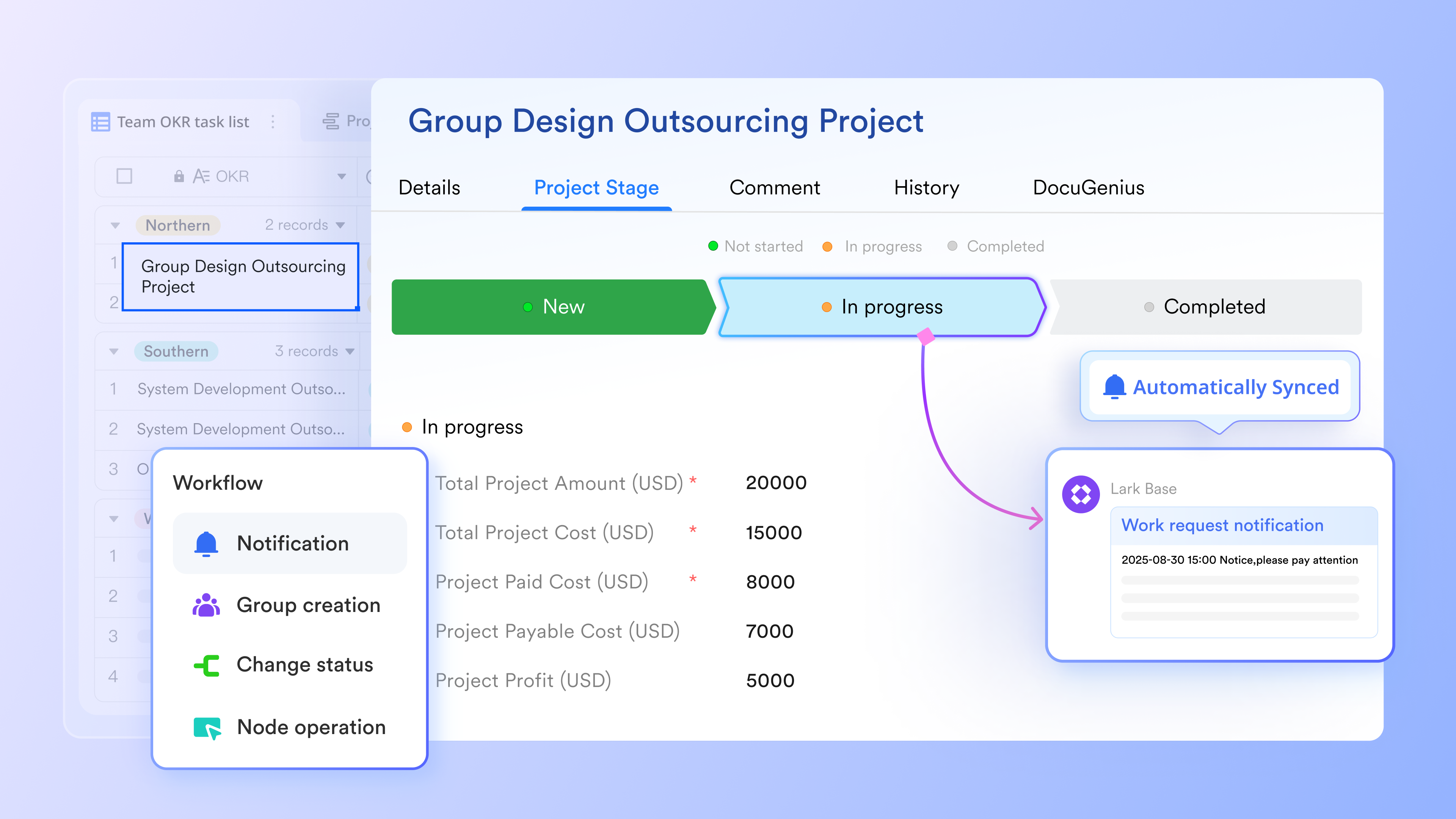
Live diagrams embedded where work happens
Lark Board allows teams to create and embed workflow diagrams, flowcharts, swimlane diagrams, and mind maps directly inside . Instead of storing diagrams in separate files, and accessible in the same space as execution. Diagram elements can be linked to real records or tasks, so clicking a step in the diagram opens the corresponding live item. This keeps visual process design tightly connected to ongoing work. 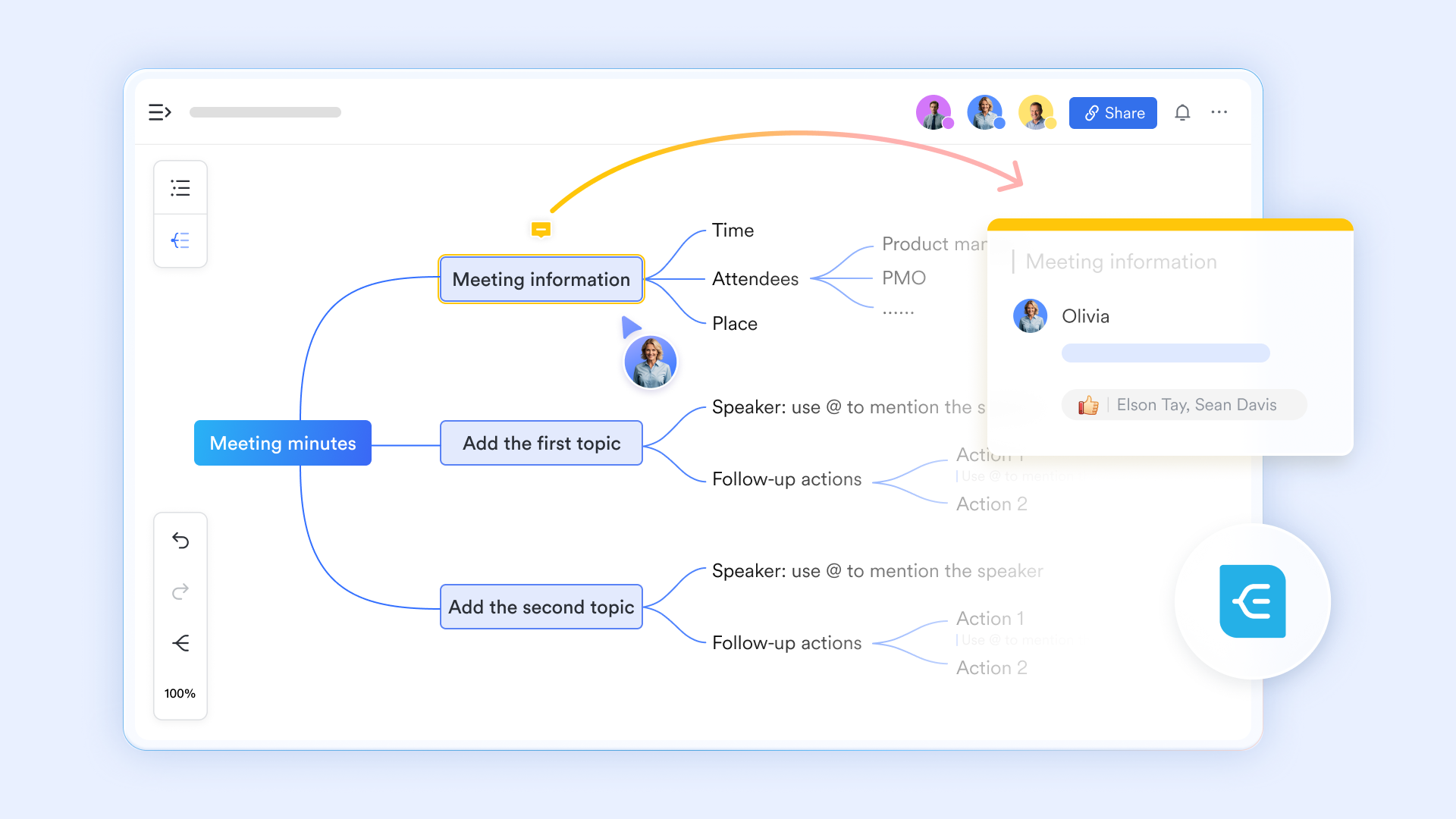
Collaborative workflow design in real time
enhances workflow diagram creation by enabling teams to brainstorm, review, and refine processes together in real time. With Magic Share, a presenter can share workflow documents or diagrams, so participants can either follow along with the presenter or explore the content independently. This makes it easier to , identify gaps, and align on decisions without the friction of traditional screen sharing. 
Visual workflows that actually run
transforms static flowcharts into living workflows using a drag-and-drop visual builder. Each step in a process—such as submission, review, approval, or completion—can be represented as a node with associated actions. Instead of simply documenting logic, teams can use triggers, actions, and nodes to define conditions and outcomes directly in the flow. For example, lead routing can change automatically based on values like amount, priority, or department, ensuring the workflow behaves exactly as designed without manual intervention.
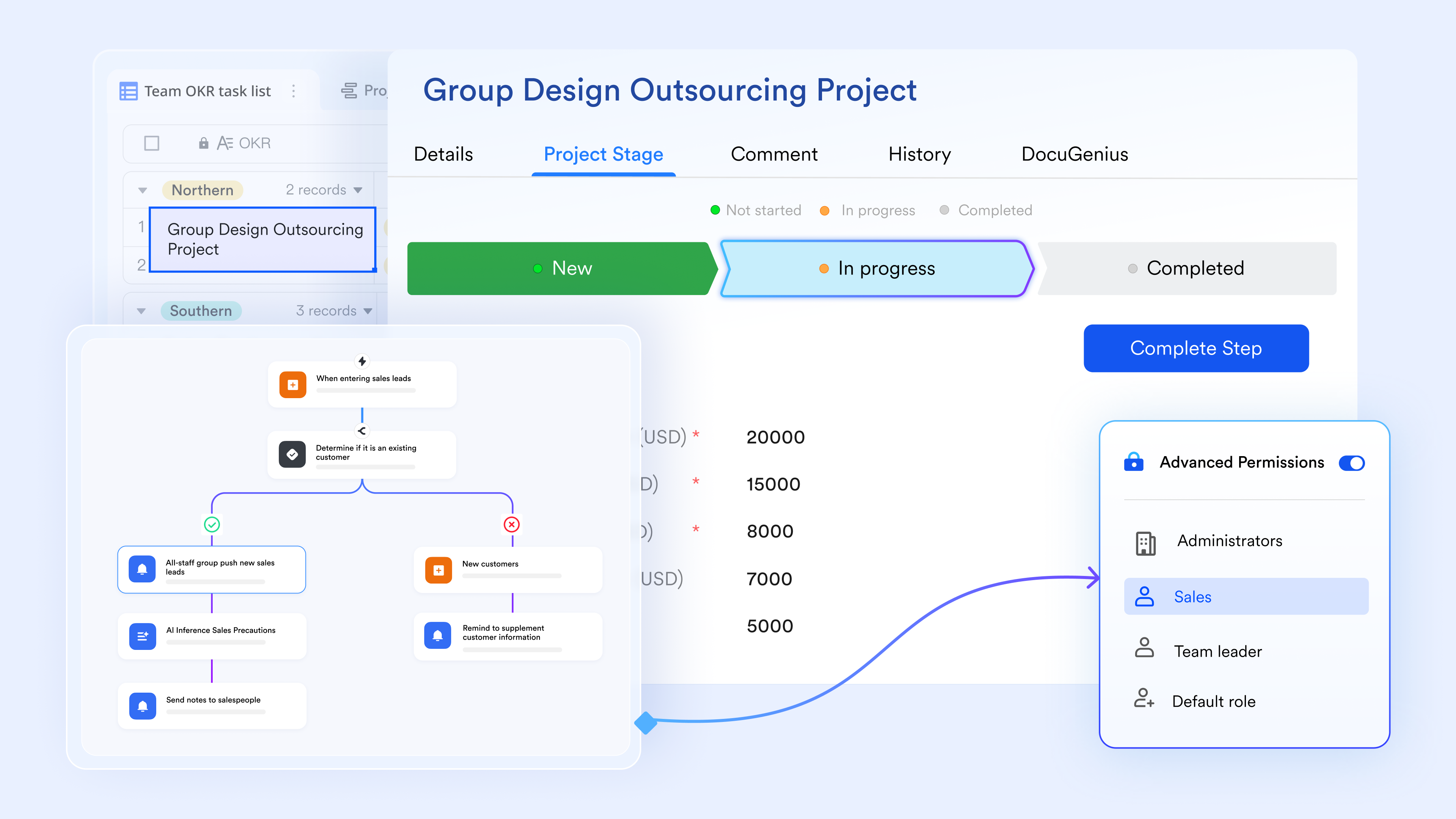
Structured decision paths with real outcomes
Decision diamonds in workflow diagrams often represent approvals, but on paper, they stop there. digitizes these decision points by creating structured, multi-level approval chains that reflect organizational hierarchies and policies. Approvers receive clear notifications with contextual details and simple approve or reject actions. Once a decision is made, the continue automatically, eliminating delays and ambiguity around next steps.
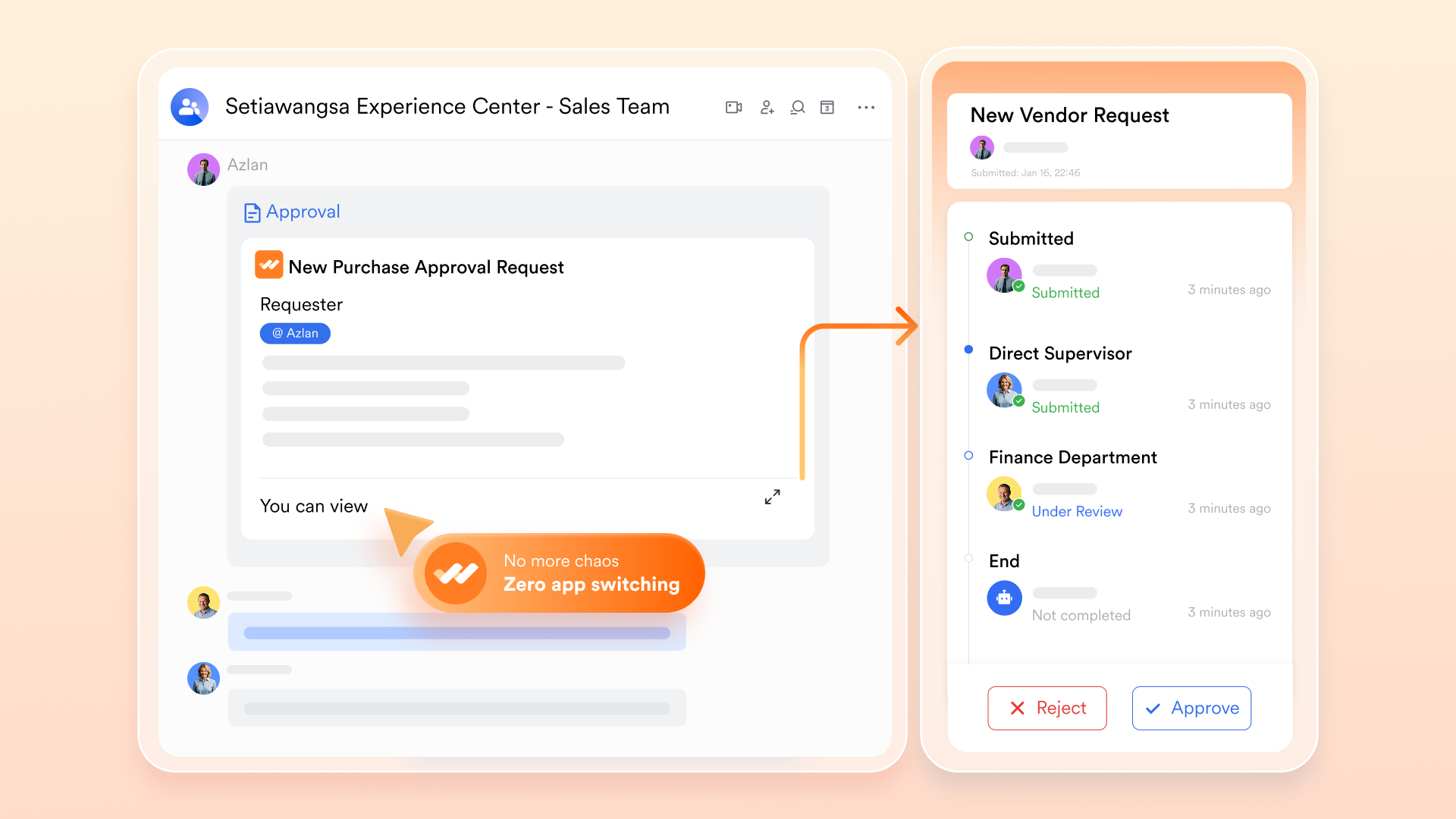
Automated communication at each step
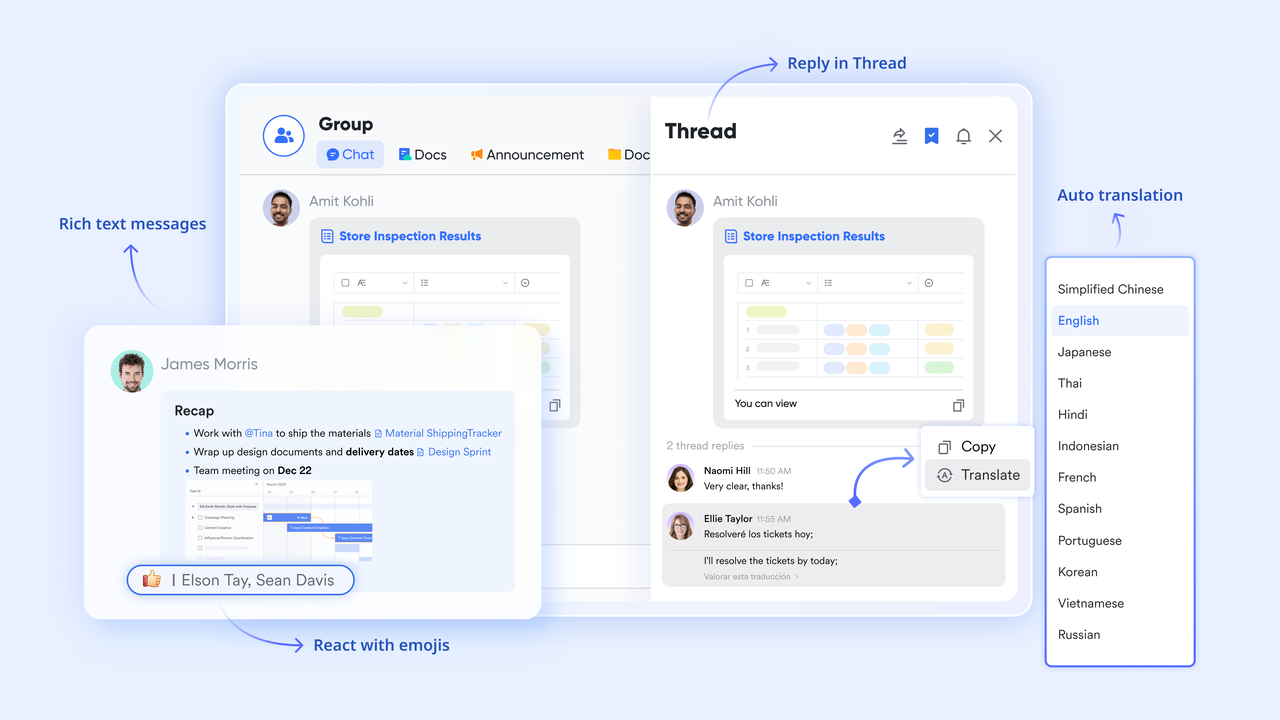
Workflow diagrams often include steps such as "notify team" or "inform manager," but these remain abstract in static visuals. turns these into real-time, automated communication. Workflows can send customized message cards to individuals or group chats, complete with context and action buttons. Team members can update status, approve requests, or acknowledge tasks directly from chat, ensuring people stay aligned without leaving their daily communication flow.
:
- Starter plan: Free forever plan that includes 11 powerful tools for up to 20 users. It also comes with 100GB of storage, 1000 automation runs, AI translations, and more.
- Pro plan: $12/user/month (billed annually) for up to 500 users. It includes everything in Starter plus group calling for up to 500 attendees, 15TB of storage, 50,000 automation runs, and more.
- Enterprise plan: for custom pricing. Supports unlimited users and includes even more automation runs and advanced security, compliance, and management features.
For small teams with simple communication needs

18 months message history
1000 Base automation runs/month
2000 rows per table in Base
Most POPULAR
For companies with comprehensive collaboration and management needs
Unlimited message history
500-participant video meetings
50k Base automation runs/month
20k rows per table in Base
For large companies with advanced security and organizational management needs
Get a personalized demo and pricing
Unlimited message history
500-participant video meetings
15 TB storage + 30 GB storage/user
500k Base automation runs/month
50k Base automation runs/month
Most POPULAR
For companies with comprehensive collaboration and management needs
Unlimited message history
500-participant video meetings
50k Base automation runs/month
20k rows per table in Base
Quick checklist: When you need to evolve your workflow diagram
Workflow diagrams should evolve as processes change. When they stop reflecting how work actually flows, minor issues start to appear, signaling it's time for an update. Just as businesses constantly re-evaluate their tools and subscriptions – sometimes exploring or scrutinizing their for better value – workflow diagrams also need regular scrutiny to ensure they remain effective and efficient. Similarly, a growing team might find itself re-evaluating its tier as its needs for task management and collaboration evolve, much like an organization should continuously update its process documentation.
Here are key indicators that your workflow diagrams are due for an update:
- Diagrams haven't been updated in months: If no one remembers the last update, the diagram likely no longer matches reality. Outdated workflows often create more confusion than clarity.
- Teams ask "Who owns this": Repeated questions about responsibility indicate missing or unclear ownership. A functional workflow diagram should make accountability obvious at every step.
- Approvals happen in chat or email: When approvals bypass the , it shows that the diagram isn't practical. Informal approvals create gaps, delays, and audit challenges.
- Work stalls without clear visibility: If progress depends on manual follow-ups, the workflow lacks transparency. Diagrams should help teams see status and next steps without guesswork.
Bridge the gap between workflows & daily execution
Conclusion
Workflow diagrams play a crucial role in helping teams understand how work moves from idea to completion. When designed well, they clarify steps, responsibilities, and decision points, making processes easier to follow and improve. However, as , static diagrams quickly lose relevance. To remain useful, workflow diagrams must stay connected to real work, collaboration, and ongoing execution.
Modern teams increasingly look for ways to keep workflows visible, adaptable, and actionable rather than locked in documents or disconnected tools. Platforms like support this shift by bringing workflow design, collaboration, and execution closer together in a single workspace. Instead of replacing traditional diagrams, Lark helps teams extend them into living workflows that reflect how work actually happens.
If your workflow diagrams are becoming harder to maintain or follow, it may be time to rethink how they fit into daily operations and explore more connected approaches.
FAQs
How often should workflow diagrams be updated?
Workflow diagrams should be reviewed whenever a process changes and at regular intervals, such as quarterly. Keeping them current ensures they reflect real work rather than outdated assumptions. With Lark, teams can update workflows collaboratively, similar to maintaining of workflow diagrams.
Can workflow diagrams replace SOP documents?
Workflow diagrams don't fully replace SOPs but complement them by showing process flow visually. SOPs explain details, while diagrams show structure and logic. Lark allows teams to link diagrams with supporting documents for better clarity.
Are workflow diagrams suitable for agile teams?
Yes, workflow diagrams work well for agile teams when kept lightweight and flexible. They help visualize handoffs and decision points without rigid control. Lark supports fast updates, making diagrams easier to adapt during iterations.
How do workflow diagrams support compliance and audits?
They provide a clear of steps, approvals, and responsibilities. Auditors can quickly understand how work is handled and where controls exist. Lark helps centralize workflows, improving traceability.
What's the difference between workflow diagrams and BPM tools?
Workflow diagrams focus on visualizing processes, while BPM tools manage execution and optimization at scale. Some platforms, including Lark, bridge this gap by combining visuals with the functionality of the best software for workflow diagrams.
Related reading





























