














Workflow Orchestration: Meaning, Benefits, Use Cases and Best Tools

Ryan Tanner
Product Marketing Specialist
Sep 18, 2026
Ryan Tanner
Sep 18, 2026

16 min read


Modern teams run on hundreds of interconnected tasks such as data workflows, AI pipelines, customer operations, approvals, and system updates. Workflow orchestration helps coordinate all of these steps, ensuring every process runs accurately, efficiently, and without repetitive manual work. It reduces errors, improves reliability, and gives teams full visibility into how work moves across tools and systems.
To help you navigate this space, below is a list of the top workflow orchestration tools used by modern businesses today:
1. Lark: All-in-one workflow orchestration for business teams
2. Camunda: Enterprise process and workflow orchestration platform
3. Apache Airflow: Open-source data pipeline and workflow orchestration
4. Zapier: No-code workflow orchestration and app automation platform
5. IBM workflow orchestration: Enterprise automation and process control
6. Appian: Low-code process and workflow orchestration platform
7. Cflow: No-code workflow and orchestration tool for teams
8. AWS Step Functions: Cloud-native workflow orchestration engine

Quick comparison table: Workflow orchestration tools
Choosing the right workflow orchestration platform depends on your team size, technical skill level, automation goals, and the complexity of your processes. Before diving deeper into each tool, here's a quick comparison table to help you understand how these platforms differ in focus, capabilities, and ideal use cases. This overview gives you a snapshot of the strengths of each solution, so you can quickly identify which ones match your operational needs.
Information source: Official vendor sites
Update time: 2025-11-18
Note: Pricing and plan details reflect publicly available data as of the update date and may vary based on region, billing cycle, and number of agents.
What is workflow orchestration?
Workflow orchestration is the coordinated management of tasks, systems, data flows, and automations across a business process. Instead of handling steps manually or relying on disconnected tools, orchestration ensures every action happens in the right sequence, at the right time, with the right dependencies. It brings structure to complex, multi-step workflows by connecting apps, triggering actions automatically, and ensuring consistency across operations.
In modern teams, orchestration acts as the "central conductor", guiding everything from data pipelines and AI tasks to approvals, customer operations, and backend processes. The result is a more predictable, efficient, and scalable way to manage work across teams and systems.
How workflow orchestration works (Core components)
Workflow orchestration manages the flow of actions, logic, and dependencies across an entire business process. It acts as the central controller that ensures every step is executed in the correct order with the right timing. Using rules, triggers, and monitoring tools, orchestration coordinates AI-powered systems, human tasks, applications, and data pipelines. This unified structure prevents delays, reduces complexity, and creates reliable operations that scale easily. By organizing each activity into a clear path, orchestration ensures consistent results for every team.
- Triggering logic: Every orchestration sequence begins with an event such as a form submission, system update, scheduled time, or incoming data. Triggering logic defines how and when the workflow starts and makes sure actions begin automatically. This removes the need for manual activation and allows processes to run immediately under the correct conditions.
- Dependencies: Many tasks rely on the outputs of earlier steps, and orchestration ensures that these relationships are respected. Dependencies guarantee that each action waits for the previous one to complete successfully. This avoids incomplete data, prevents skipped actions, and maintains consistency across operations where timing and sequence are essential for accurate results.
- Parallel versus sequential execution: Some tasks can run at the same time, while others must wait for earlier steps to finish. Orchestration chooses the best execution pattern based on rules and requirements. Parallel execution speeds up processes by handling multiple actions at once, while sequential flows maintain accuracy for tasks that must follow a strict order.
- Monitoring and status visibility: Effective orchestration provides real-time visibility into running workflows. Teams can track progress, identify slow points, and detect failures early. This visibility improves decision-making and helps operations stay consistent. It also supports optimization, as teams can learn how processes perform and adjust the logic to create smoother, more efficient flows.
- Error handling and retries: Failures can occur due to missing data, system limits, or unexpected conditions. Orchestration introduces automated recovery by retrying steps, redirecting flows, or using fallback paths. This reduces downtime and prevents disruptions. Intelligent error handling also helps teams maintain performance and reliability even when certain tasks encounter temporary issues.
- Human versus system tasks: Some steps require human judgment, such as approvals or reviews, while others are fully automated. Orchestration combines both inside one structured flow, so work moves seamlessly between people and systems. This ensures accuracy, reduces delays, and maintains consistency through a balanced process where each action is handled by the right participant.
- Orchestration engine versus orchestration platform: The workflow orchestration engine is responsible for executing logic at scale with maximum reliability. An orchestration engine executes logic, triggers tasks, and manages dependencies, while a platform provides broader capabilities such as dashboards, collaboration features, AI-powered automation, and integration layers. Together, they create a complete orchestration environment that supports both technical workflows and business-oriented operations for teams at every scale.
Key use cases for workflow orchestration
Modern organizations run a wide range of processes that involve people, applications, data systems, and AI-powered engines. Workflow orchestration brings structure to these activities by connecting every step under one controlled path. It supports predictable operations and reduces the effort teams spend coordinating work across different tools. As companies scale, orchestration becomes essential for error-free execution, faster decisions, and smooth collaboration across departments. It transforms complex processes into reliable flows that work consistently and efficiently every day.
- Data workflow orchestration including ETL and transformations: Data analytics depends on a steady flow of information that moves through extraction, cleaning, transformation, and loading. Orchestration controls each stage with a clear sequence to avoid inconsistencies. This ensures data arrives in the right format at the right time. It improves accuracy and provides a dependable structure for teams that rely on data driven decisions.
- AI workflow orchestration including LLM tasks and automated decisioning: AI initiatives involve model training, input preparation, quality checks, and . Orchestration keeps these tasks aligned and ensures each step uses the correct data. This produces more accurate models and smoother execution. It also reduces the time teams spend managing manual steps and creates a stable base for intelligent and scalable automation.
- Customer operations including ticket routing and case handling: Support processes require timely actions such as assigning tickets, escalating cases, and updating records. Orchestration automates these transitions with rules that guide the flow from one step to the next. This prevents delays, improves customer satisfaction, and helps teams manage larger volumes with consistent performance and clear visibility across the entire service pipeline.
- IT workflow orchestration including CI or CD and system updates: Technical teams depend on reliable sequences to deploy applications, push updates, run tests, and maintain environments. Orchestration enforces order so these actions happen safely and predictably. This reduces failure risks, shortens deployment cycles, and provides detailed oversight. It strengthens the stability of complex environments where precision is required every day.
- Marketing and CRM workflows, including lead qualification and routing: Marketing operations involve capturing leads, scoring them, assigning ownership, and sending follow-up actions. Orchestration controls each stage to ensure accurate routing and timely engagement. This strengthens conversion rates and ensures prospects receive the right response. It also helps teams remove repetitive tasks and focus on the work that drives stronger customer relationships.
- SaaS business operations: SaaS companies manage a mix of billing actions, user provisioning, onboarding flows, product notifications, and lifecycle management. Orchestration centralizes these steps into predictable patterns that operate automatically. This reduces errors, improves customer experience, and supports scalable growth. It also simplifies internal coordination by linking separate systems into one structure.
- Industry specific data orchestration for finance, telecom, and retail: Sector based operations often include heavy data movement, regulatory requirements, fraud checks, and real-time updates. Orchestration provides a reliable structure that connects these activities without manual supervision. Many companies now rely on a data workflow orchestration service to maintain performance across large and regulated environments. This creates stable performance and supports compliance. It also helps teams manage higher volumes and deliver faster services across industries that depend on precise information flow.
Top 8 workflow orchestration tools
Workflow orchestration platforms come in many forms, from AI-powered business systems to cloud-native engines designed for technical workloads. Modern teams rely on workflow orchestration tools to connect data, people, and applications under one structured system. Each tool offers different strengths depending on the size, structure, and automation goals of a team. To help you make an informed choice, below are the top tools used by modern organizations:
1. Lark: All-in-one workflow orchestration for business teams
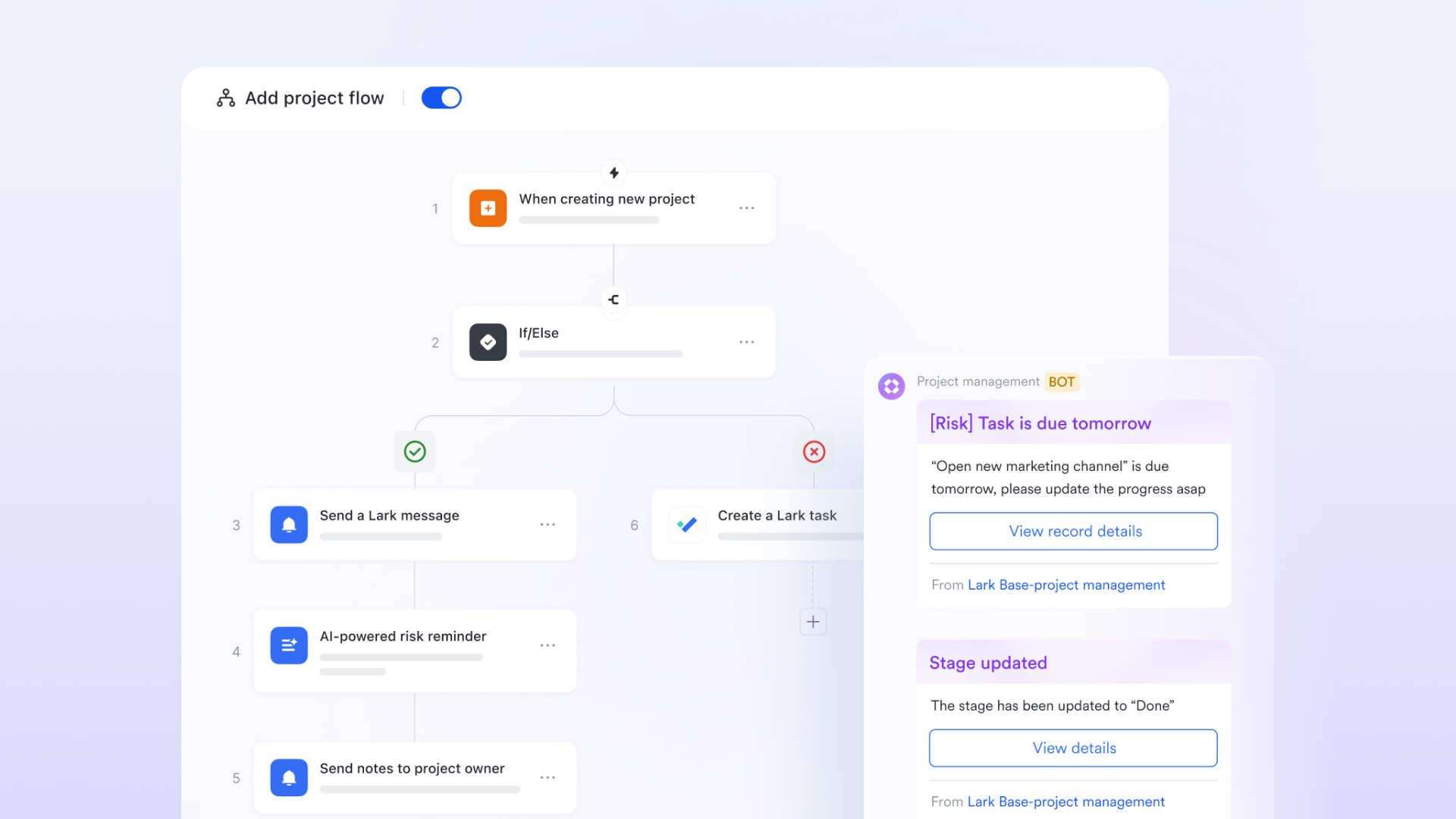
Lark is emerging as an orchestration leader in workflow automation for teams that want unified processes with minimal complexity. As one of the best Google Workspace alternatives, Lark brings workflow orchestration into a centralized workspace built for modern teams that want to move faster with fewer tools. It connects communication, documents, automation, approvals, dashboards, and integrations inside one coordinated environment. This creates a unified flow where processes run smoothly from start to finish. With Lark, teams can manage complex work, increase reliability, and automate operations in a single, cloud-native platform designed for real-time collaboration.
Drag-and-drop canvas for no-code workflow design
Lark Base Workflow provides a visual canvas where teams can build complex, multi-stage processes through connected nodes. The canvas allows users to zoom in for fine-grained edits or zoom out to view the entire workflow structure, making it easier to understand how each step fits into the bigger picture. Nodes can be moved freely to improve layout clarity, helping teams spot bottlenecks or redundant sequences. This visual approach makes even intricate workflows easier to plan, explain, and optimize.
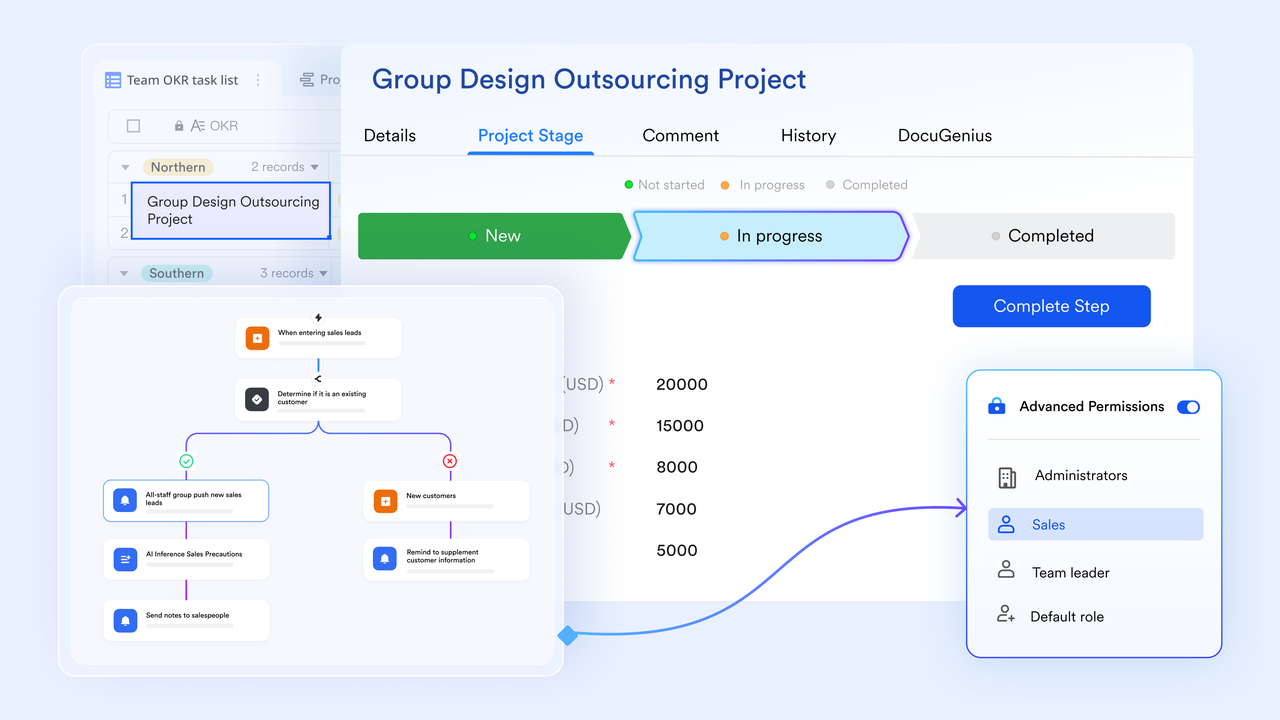
Use If/Else or Switch to branches support your needs
Base workflows support advanced logic through If/Else and Switch branches, allowing teams to direct items through different paths based on real-time conditions. For example, a record can follow one route if it meets a threshold, and another route if it doesn't. This conditional routing helps teams automate decision-making steps that would normally require manual judgment. As a result, workflows handle more sophisticated business processes with consistent rules and fewer human touchpoints.
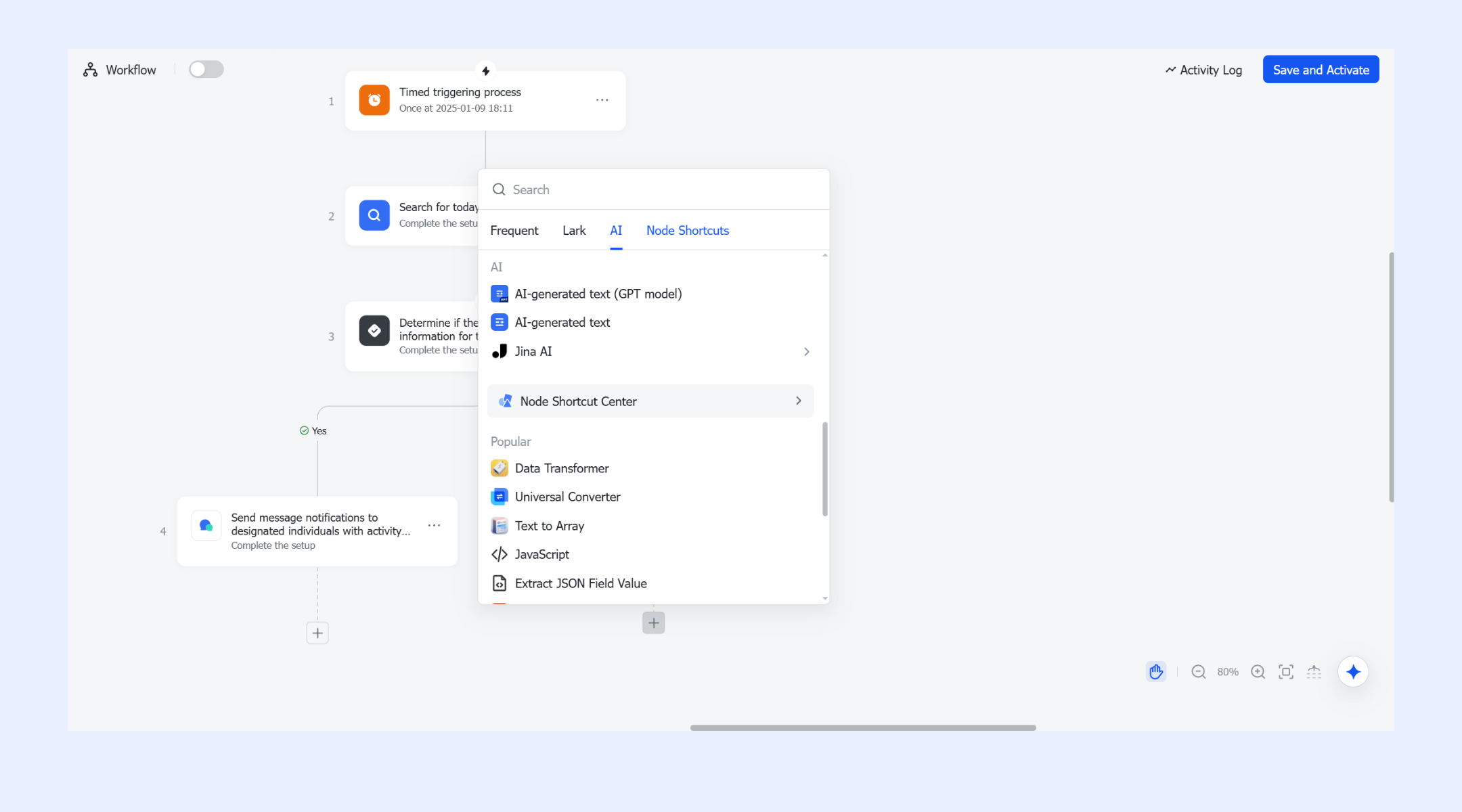
AI-powered nodes and customizable node shortcuts
Base includes AI nodes that can perform tasks such as summarizing text, extracting information, classifying data, or generating draft content. These AI-driven steps enhance the speed and accuracy of workflows by reducing manual work during review or analysis stages. Users can also create node shortcuts that bundle commonly used AI tasks, making it fast to add intelligent logic to any workflow. These capabilities make workflows more adaptive, efficient, and context-aware.
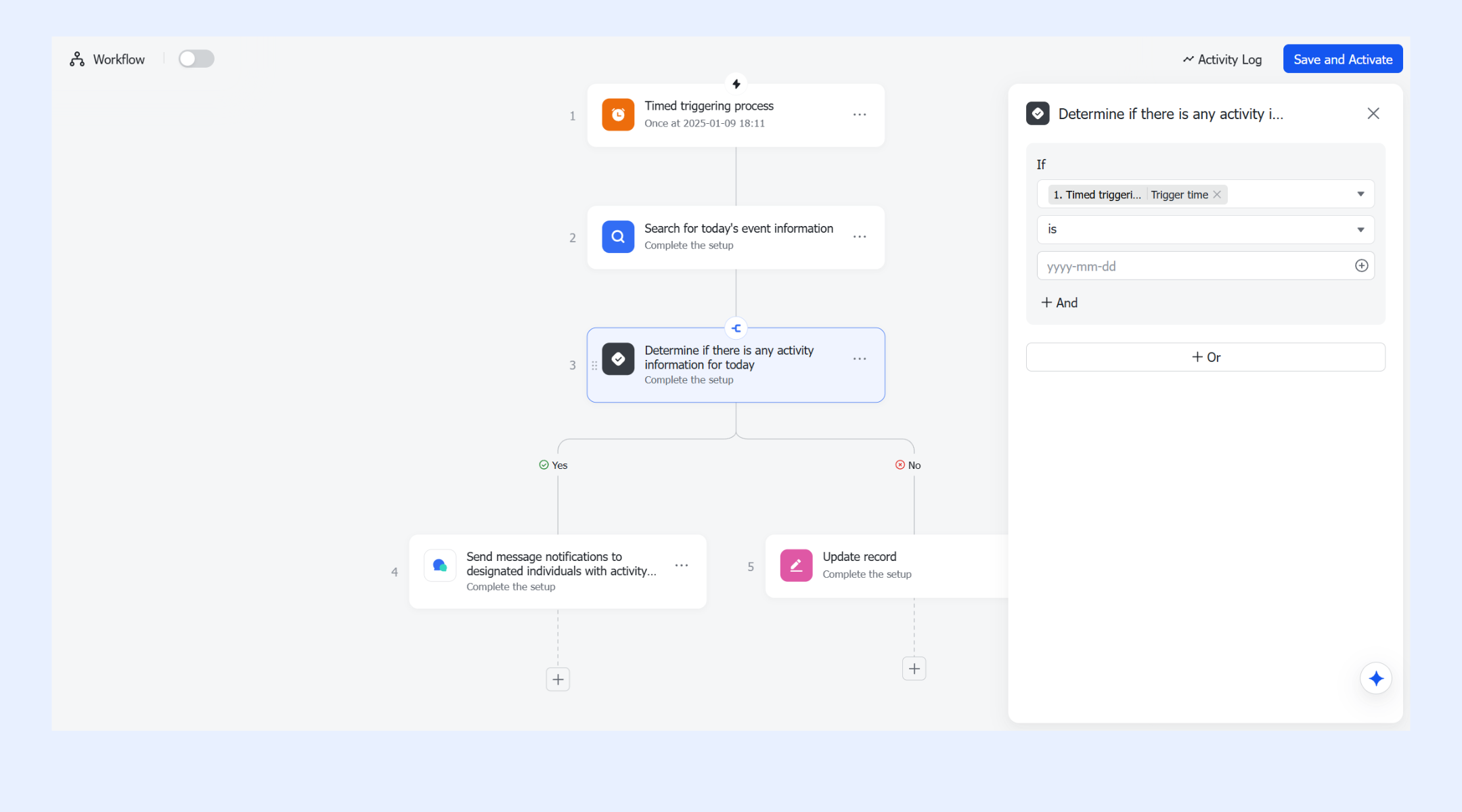
Automatic condition assessment for efficient execution
Automated workflow engine evaluates conditions instantly and carries out the corresponding actions without delay. Whether it's routing a task, updating a field, or triggering a follow-up step, everything happens automatically in sequence. This eliminates manual checks and keeps processes moving forward without interruptions. By removing the need for constant monitoring, teams save time, reduce errors, and maintain more predictable operational flows.
- Starter plan: Free forever plan that includes 11 powerful tools for up to 20 users. It also comes with 100GB of storage, 1000 automation runs, AI translations, and more.
- Pro plan: $12/user/month (billed annually) for up to 500 users. It includes everything in Starter plus group calling for up to 500 attendees, 15TB of storage, 50,000 automation runs, and more. Companies looking to optimize software spending frequently compare their options against Google Workspace pricing and ClickUp pricing.
- Enterprise plan: Contact sales for custom pricing. Supports unlimited users and includes even more automation runs and advanced security, compliance, and management features.
2. Camunda: Enterprise process and workflow orchestration platform
Camunda is an orchestration platform built for teams that manage large-scale, business-critical processes. It is widely used in enterprises that require precision, visibility, and long-running workflows. The platform focuses on modeling, executing, and optimizing operations through a cloud-native foundation. Camunda supports developers and business teams with equal flexibility. It is recognized for handling complex automations that cannot be managed by simple no code tools.
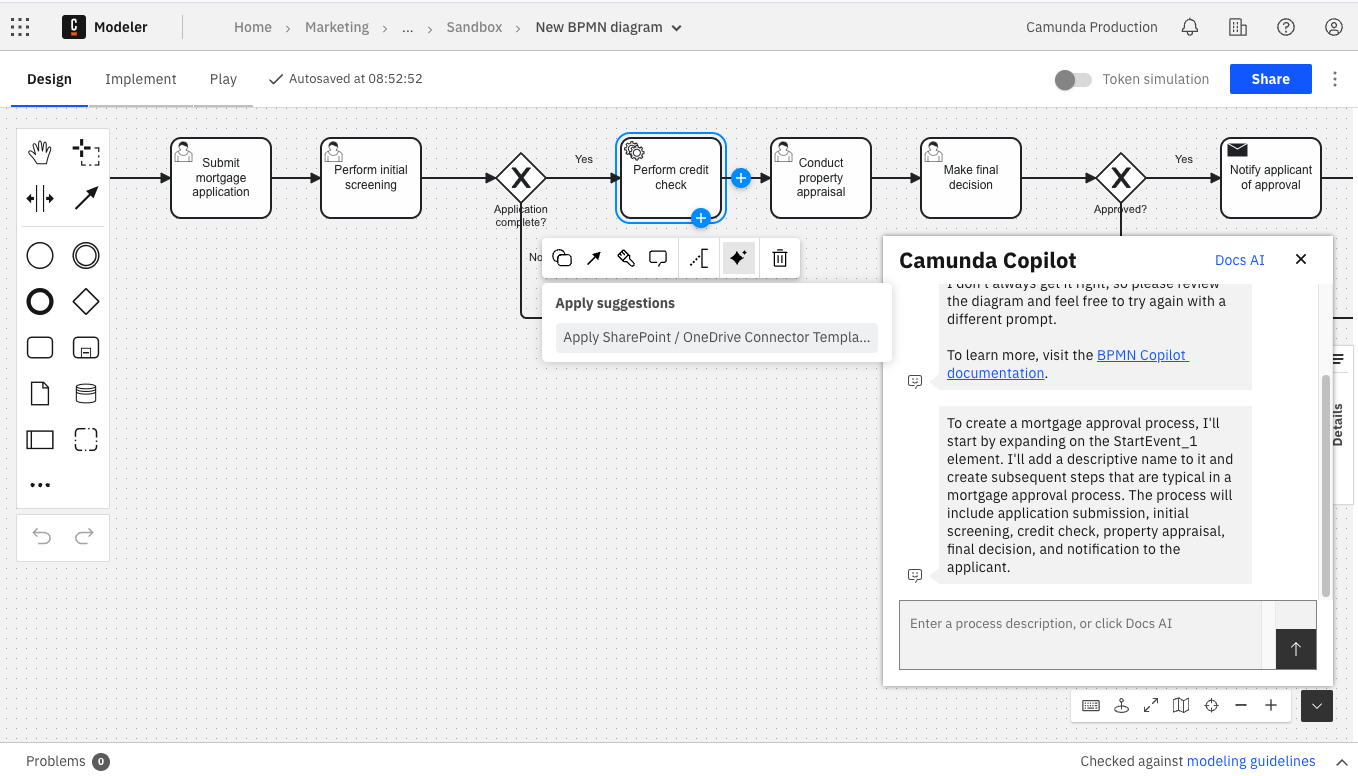
Image source: camunda.com
Key features:
- Supports BPMN modeling for clear process visualization.
- Offers orchestration for human tasks and system tasks.
- Provides real-time monitoring for workflow performance.
- Integrates easily with enterprise systems and custom applications.
Pros:
- Strong support for complex enterprise workflows.
- Highly flexible for technical teams with custom needs.
- Scales efficiently across distributed environments.
- Provides detailed analytics for process optimization.
Cons:
- Requires technical expertise for setup and management.
- Less suitable for simple or small team workflows.
Pricing:
- Starter: Free (self-managed or SaaS, limited seats
- Enterprise: Custom pricing.
3. Apache Airflow: Open-source data pipeline and workflow orchestration
Apache Airflow is a cloud-native, open-source orchestration platform used for managing data pipelines and scheduled operations. It is favored by data engineering teams that require complete control over pipeline structure, timing, and dependency handling. Airflow is code-driven and highly extensible, making it suitable for complex data workflows. It offers a large ecosystem of connectors and community support. Organizations use it to coordinate transformations, ETL tasks, and data workflows at scale.
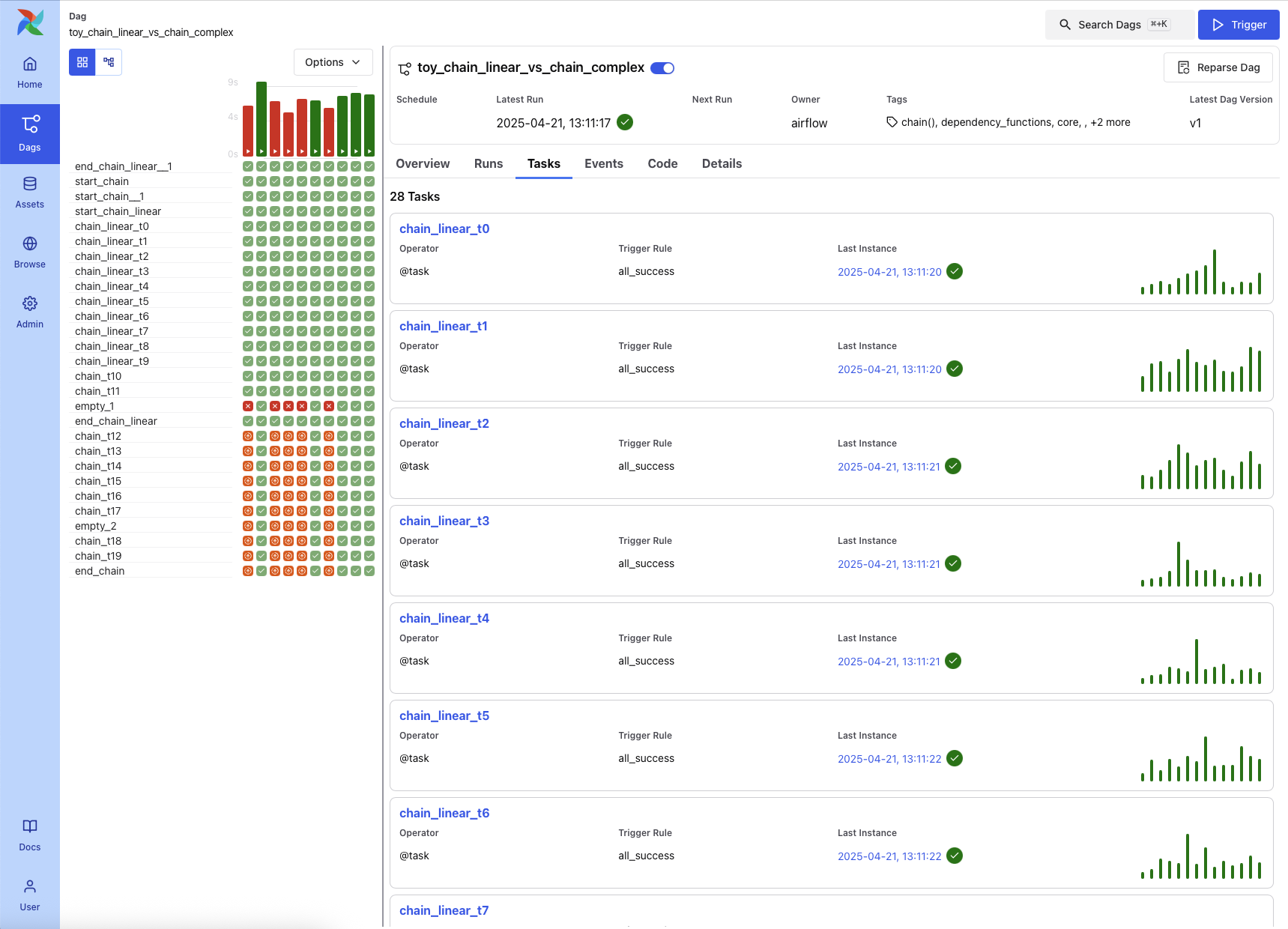
Image source: airflow.apache.org
Key features:
- Handles scheduled and event-based data pipelines.
- Provides clear dependency management through DAGs.
- Offers strong extensibility through custom operators.
- Supports real-time monitoring of pipeline execution.
Pros:
- Excellent for large-scale data workflows.
- Strong open source community support.
- Highly customizable for engineering teams.
- Works well with modern cloud data stacks.
Cons:
- Not suitable for non-technical users.
- Can be complex to maintain in advanced setups.
Pricing:
- Starter: Free (open-source)
- Managed via AWS MWAA: custom pricing, pay-as-you-go (hourly instance + worker + scheduler + storage)
4. Zapier: No-code workflow orchestration and app automation platform
Zapier is a no-code workflow orchestration and app automation platform designed to help businesses connect their favorite apps and automate repetitive tasks without writing code. By enabling users to create automated workflows—called "Zaps"—that link triggers and actions across hundreds of applications, Zapier streamlines processes such as data entry, notifications, approvals, and reporting. It is particularly valuable for small to medium-sized teams looking to reduce manual work, improve efficiency, and maintain consistency across operations without the complexity of traditional automation tools.
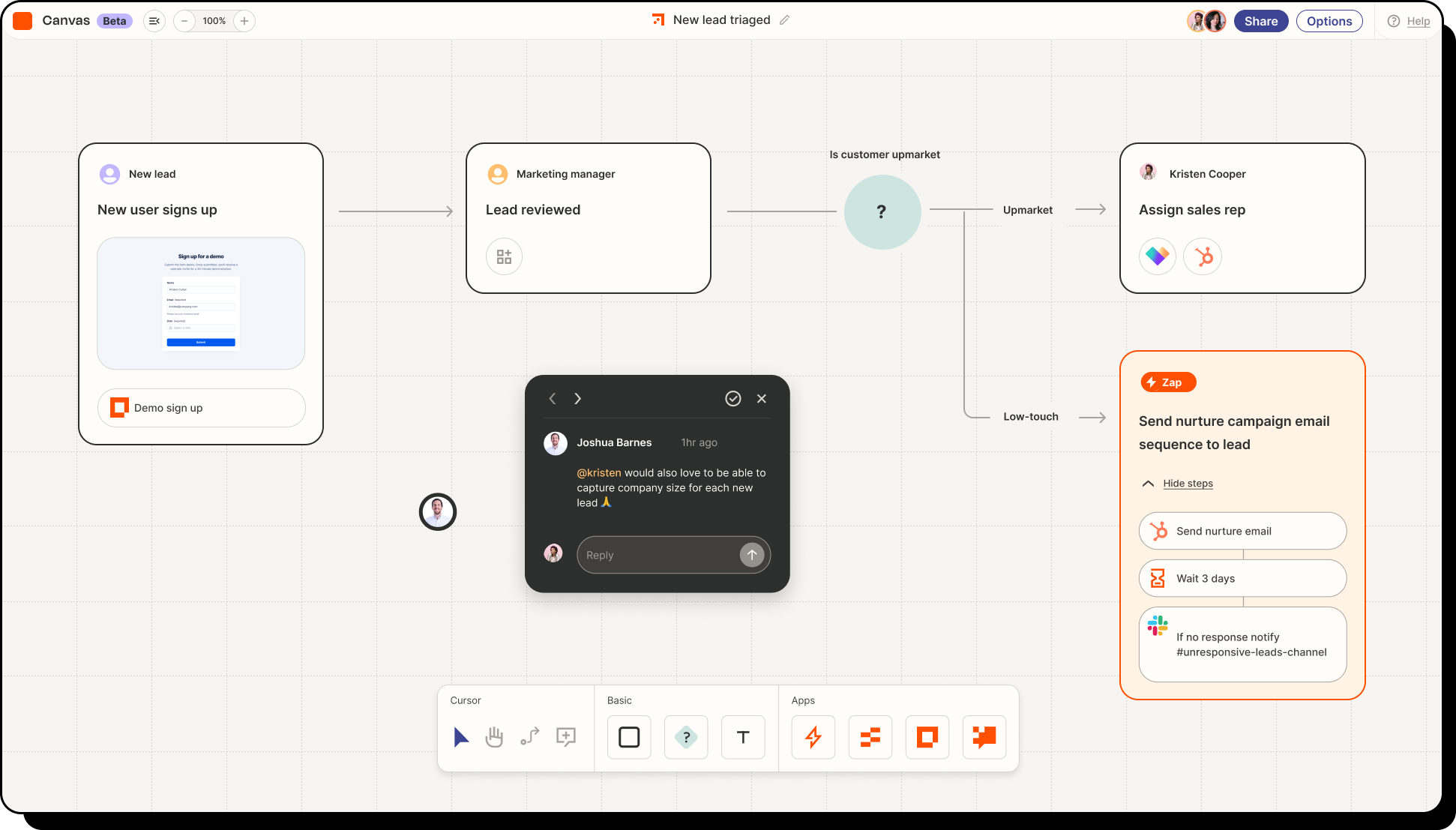
Image source: zapier.com
Key features:
- Offers no code workflow creation for quick automation.
- Connects with thousands of popular business applications.
- Provides triggers, filters, and logic controls.
- Supports multi step workflows for advanced use cases.
Pros:
- Very easy to use for all skill levels.
- Large integration catalog for rapid setup.
- Ideal for small business operations.
- Reduces manual work without technical complexity.
Cons:
- Limited flexibility for complex enterprise workflows.
- Can become expensive at higher task volumes.
Pricing:
- Free
- Professional: $19.99/month
- Team: $69/month
- Enterprise: custom pricing
5. IBM workflow orchestration: Enterprise automation and process control
IBM workflow orchestration focuses on enterprise level process coordination across large and regulated industries. It supports business teams that operate in structured environments with high reliability requirements. IBM offers deep automation capabilities supported by ai-powered intelligence, compliance controls, and strong governance. It is often used in finance, telecom, healthcare, and manufacturing. The platform helps organizations align processes, reduce operational risk, and improve consistency across global operations.
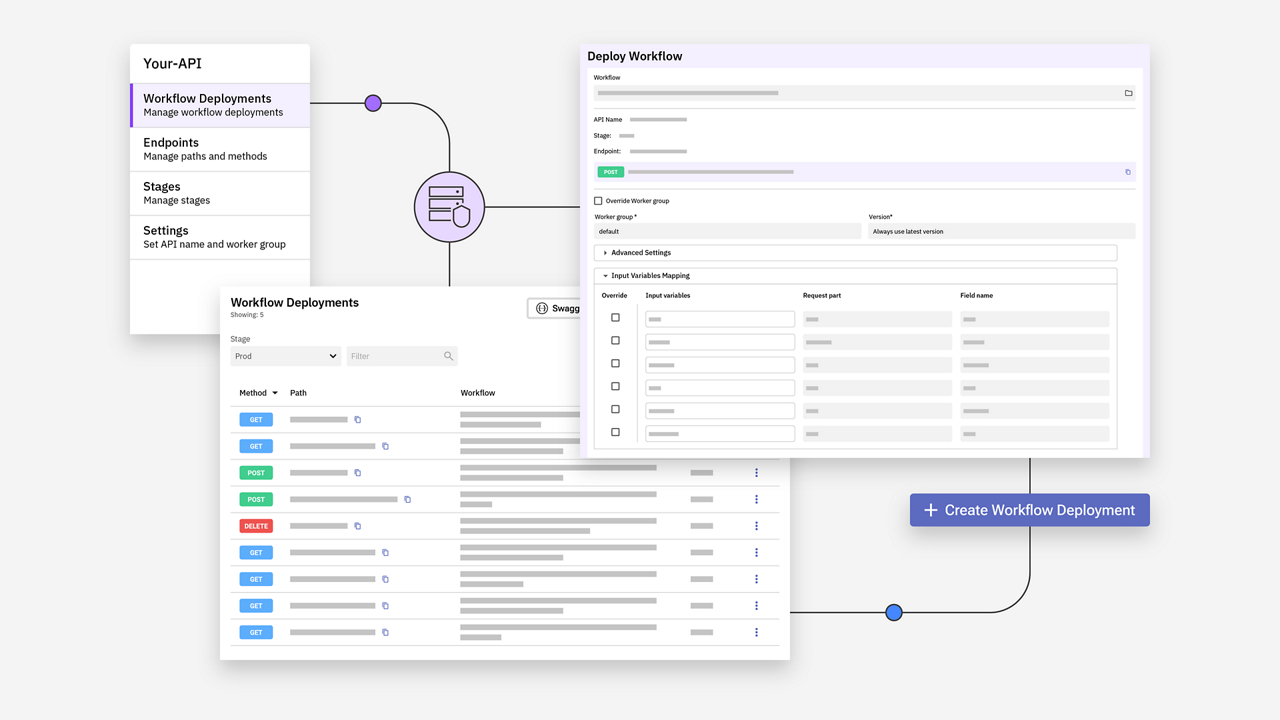
Image source: ibm.com
Key features:
- Provides enterprise grade workflow governance.
- Offers AI-powered insights for optimization.
- Integrates with legacy and modern systems.
- Supports long running and mission critical workflows.
Pros:
- Strong compliance and reliability features.
- Ideal for enterprises with complex process needs.
- Robust AI-powered automation capabilities.
- Works well in large, distributed environments.
Cons:
- Not suitable for small teams or simple use cases.
- Requires experienced administrators.
Pricing:
- No free plan available.
- Custom/enterprise pricing (not publicly listed)
6. Appian: Low-code process and workflow orchestration platform
Appian is a low code workflow and process automation platform designed for organizations that want to build custom business applications quickly. It combines workflow orchestration, case management, and low code development in a unified environment. Appian helps teams automate manual processes and create business apps without heavy engineering work. It is commonly used in industries that require fast, flexible, and secure workflow delivery. Appian supports digital transformation across operations, customer service, and compliance.
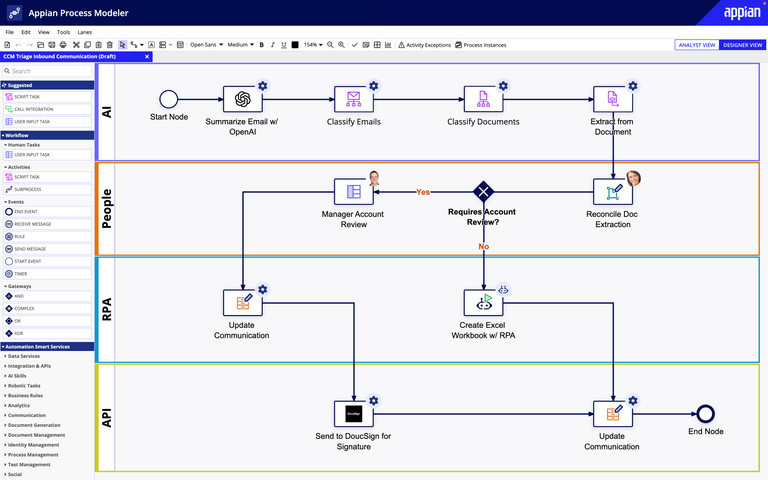
Image source: appian.com
Key features:
- Offers low code tools for rapid app creation.
- Provides workflow modeling with enterprise controls.
- Supports AI-powered automation for complex tasks.
- Integrates with cloud-native and legacy systems.
Pros:
- Fast development for custom workflows.
- Strong suitability for enterprise operations.
- Reliable performance with secure architecture.
- Combines app building and workflow control in one place.
Cons:
- Learning curve for new users.
- Pricing can be high for smaller organizations.
Pricing:
- Community Edition Free
- Paid plans start around $75/user/month for the standard app edition
7. Cflow: No-code workflow and orchestration tool for teams
Cflow is a no code workflow orchestration platform built for teams that need fast implementation without engineering work. It supports business processes such as approvals, forms, routing, and operations management. Cflow is known for its easy setup, accessible interface, and strong no code capabilities. It helps teams digitize repetitive processes and create structured flows for daily work. Small and midsize companies use it to replace spreadsheets and manual tracking.
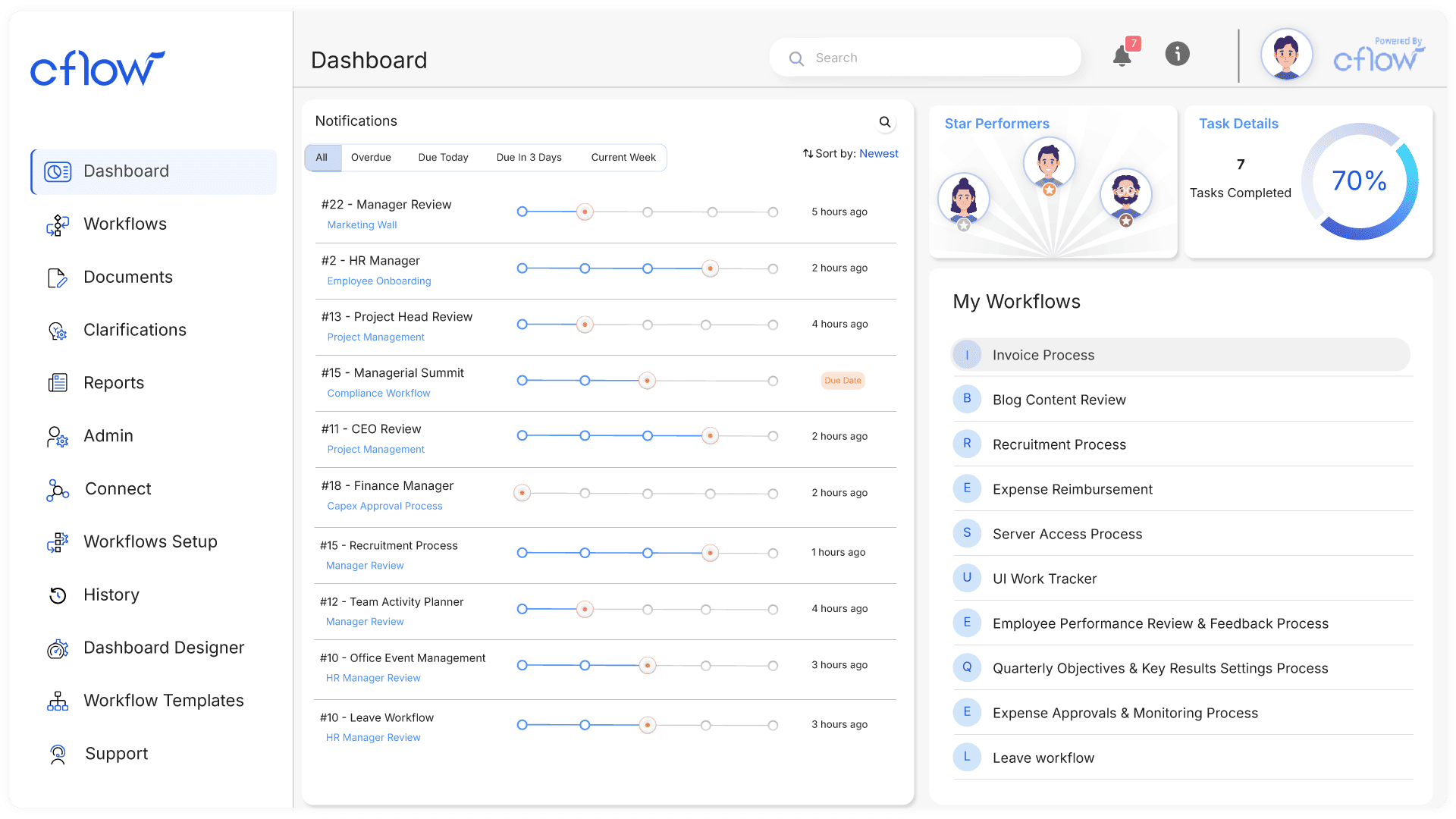
Image source: cflowapps.com
Key features:
- Provides drag and drop workflow creation.
- Supports form based processes for business teams.
- Offers real-time monitoring and reporting.
- Integrates with common office and productivity tools.
Pros:
- Very accessible for non technical teams.
- Quick to implement for small and midsize businesses.
- Helps replace manual and paper based processes.
- Clear interface for workflow tracking.
Cons:
- Limited advanced automation features.
- Not ideal for complex engineering workflows.
Pricing:
- Joy: From $11/user/month; minimum 10 users, up to 20 workflows.
- Bliss: From $16/user/month; minimum 20 users, up to 50 workflows.
- Zen: Custom pricing; 100+ users, unlimited workflows.
8. AWS Step Functions: Cloud-native workflow orchestration engine
AWS Step Functions is a cloud-native orchestration engine built for developers and technical teams. It is one of the most widely used aws workflow orchestration solutions for cloud development teams. It supports serverless applications, microservices, data workflows, and AI-powered automation inside the AWS ecosystem. The platform offers strong reliability with built in state management and automatic retries. Teams use it to connect Lambda functions, data operations, and backend processes. It is designed for applications that require precise logic, scalability, and real-time performance.
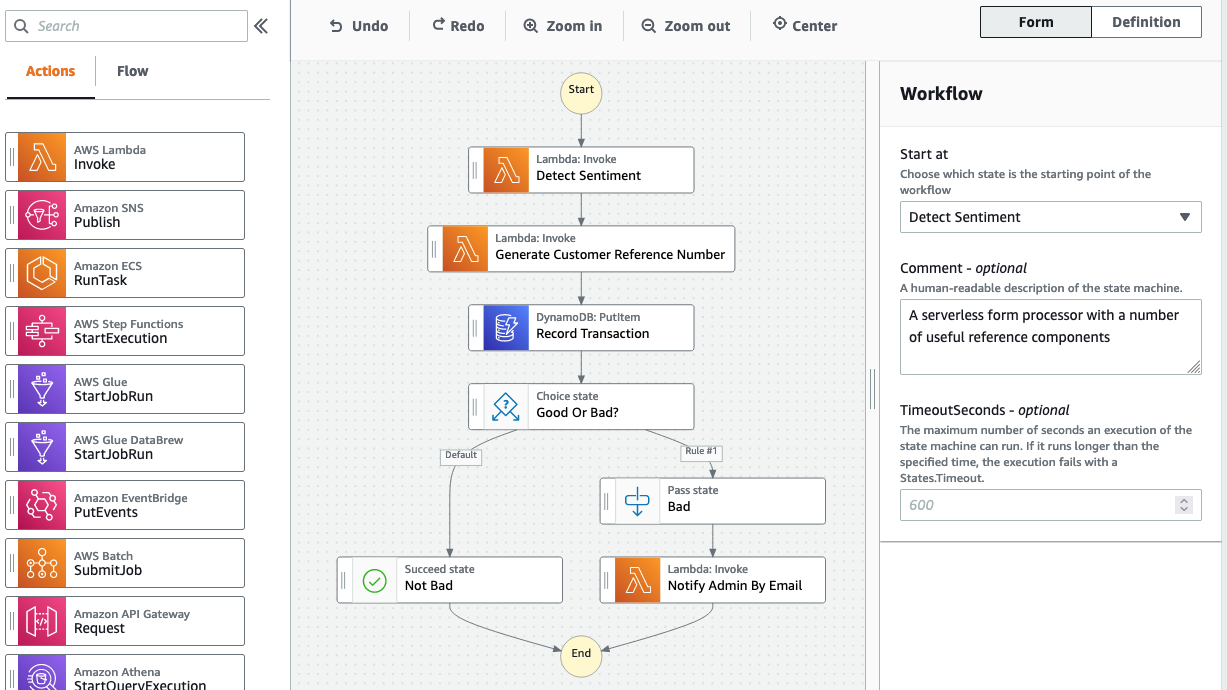
Image source: aws.amazon.com
Key features:
- Provides visual workflow creation for cloud-native apps.
- Integrates deeply with AWS services and serverless tools.
- Offers automatic retries and strong error handling.
- Supports both express and standard workflows.
Pros:
- Ideal for technical and engineering teams.
- Highly scalable for enterprise applications.
- Strong reliability with built in automation.
- Excellent fit for serverless and cloud-native architectures.
Cons:
- Not suitable for non technical users.
- Requires AWS knowledge for effective setup.
Pricing:
- Standard Workflows: Free tier: 4,000 state transitions/month; then $0.000025 per state transition.
- Express Workflows: $1.00 per 1M requests + $0.00001667 per GB-second for execution duration.
How to choose a workflow orchestration platform
Selecting the right workflow orchestration platform depends on your team's technical skills, process complexity, automation goals, and long-term scalability plans. A well-chosen platform can streamline daily work, reduce operational delays, and support AI-powered workflows across business and technical teams. It is important to evaluate each tool based on capability, usability, visibility, and flexibility. With the right orchestration foundation, organizations can create stable and efficient processes that adapt to growth and new challenges.
- Technical capability: A strong orchestration platform should handle complex workflows, dependency management, data connections, and real-time automation. Look for a tool that supports both simple and advanced processes without performance issues. The platform must integrate well with your existing systems and support modern architectures such as cloud-native and serverless frameworks for long term stability.
- Ease of use: Teams operate better with tools that are clear, intuitive, and simple to maintain. Ease of use ensures workflows can be created and updated quickly without heavy technical involvement. A platform that offers visual builders, clean interfaces, and accessible controls allows both technical and business users to collaborate effectively and manage processes with confidence.
- Scalability: As your organization grows, workflows become more demanding and involve larger data volumes and more interactions. A scalable orchestration platform should support increasing workload without losing reliability. It must maintain consistent performance, handle parallel actions when required, and provide the flexibility to expand workflows without redesigning entire processes from the beginning.
- Monitoring: Visibility is essential for understanding the performance of running workflows. Monitoring helps teams track execution, identify issues quickly, and improve process reliability. A good orchestration platform should offer real-time dashboards, alerts, and insights that help teams detect errors early and make timely decisions that maintain smooth and efficient operations across departments.
- AI support: Modern workflows often involve AI-powered decisions, model execution, content generation, and automated classification. The right platform should support these capabilities with smooth integrations, clear logic controls, and reliable execution paths. Strong AI support allows businesses to build intelligent automation that adapts to evolving data, improves decision quality, and strengthens operational efficiency.
- Cross team suitability: Processes often move between departments, applications, and data systems. A capable orchestration platform should connect these elements with a unified structure that supports collaboration. Cross-team suitability ensures the platform can handle human tasks, automated tasks, approvals, and system actions in one flow, creating a consistent and predictable experience for the entire organization.
Why workflow orchestration matters today
As workflow orchestration news continues to highlight rapid growth in automation, organizations are adopting structured workflows at a faster pace. Modern organizations rely on a growing network of applications, data streams, automations, and AI-powered systems. Without orchestration, these interconnected activities become slow, inconsistent, and difficult to manage. Workflow orchestration creates clarity by coordinating every step of a process from start to finish. It improves reliability, reduces manual work, and gives teams a predictable structure for every operation. As work becomes more digital and distributed, orchestration ensures processes remain fast, accurate, scalable, and fully aligned across teams and tools.
- Eliminates manual hand-offs: Manual steps interrupt momentum and create delays across teams. Workflow orchestration removes repetitive coordination by triggering every task automatically. This ensures each action begins exactly when it should, maintains smooth transitions between stages, and allows teams to focus on higher-value work instead of routine follow-ups that consume valuable time.
- Improves system reliability and business efficiency: Consistent execution is essential for operations that depend on multiple tools and data sources. Orchestration enforces clear logic for every step, so tasks run the same way each time. This reduces unexpected failures, improves performance, and increases overall efficiency by creating dependable processes that support faster decision-making and better team coordination.
- Reduces errors and operational delays: Human mistakes often appear in manual workflows where information is copied, transferred, or processed without structure. Orchestration minimizes these issues through automated handovers and predefined rules. This leads to cleaner data, fewer interruptions, quicker turnaround times, and smoother collaboration between departments that rely on accurate and timely information in their daily work.
- Increases predictability and scalability: Growing teams and expanding data flows require systems that can handle increasing volume without losing control. Orchestration provides the framework for predictable performance while scaling operations safely. Monitoring features, structured logic, and automated responses allow teams to expand processes with confidence, knowing the system can support higher workloads effectively.
- Essential for AI workflows, data pipelines, and cross-team processes: Modern operations depend on data movement, model execution, multi-application activities, and actions shared between different departments. Orchestration connects these elements into a unified sequence that moves without interruption. This enables faster AI-powered decisions, stronger data accuracy, and smoother collaboration across teams that need reliable, end-to-end automation for complex tasks.
Conclusion
Workflow orchestration is now a core requirement for modern teams that want predictable, efficient, and scalable operations. It brings structure to complex activities by connecting applications, data systems, human tasks, and AI-powered automation inside a unified environment. Modern workflow orchestration software gives organizations the structure needed to operate with speed and accuracy.
With the right platform, organizations can reduce manual work, improve accuracy, and accelerate end to end execution. This creates stronger collaboration and faster decision making across every department. As businesses continue to grow and adopt more digital tools, orchestration becomes the foundation that ensures work moves smoothly, consistently, and with complete clarity.
FAQs
What is the difference between workflow orchestration and workflow scheduling?
Workflow scheduling focuses on timing and triggers, while orchestration governs the entire flow, including dependencies, parallel tasks, error logic, and multi-step coordination.
Do you need coding skills for workflow orchestration?
Some platforms require technical skills, especially data-focused engines, but many modern business-oriented tools allow no-code orchestration using visual builders.
Can workflow orchestration work across different departments?
Yes. Orchestration is designed to coordinate tasks across multiple teams—operations, sales, IT, finance, and support—so everyone follows the same structured flow.
How does workflow orchestration improve reliability?
It ensures tasks run in the right order, retries failed steps automatically, handles exceptions, and reduces manual dependencies, strengthening operational consistency.
Is workflow orchestration required for AI workflows?
AI tasks often depend on multiple steps—data preparation, model actions, validation, and output delivery—so orchestration helps sequence these actions and maintain accuracy.
Related reading
Table of contents
Start using Lark today

Manage all your work in one place
Boost team efficiency by 10x
Save up to 70% on software costs
Table of contents
Start using Lark today
Manage all your work in one place
Boost team efficiency by 10x
Save up to 70% on software costs
Keep reading







2026 Lark Technologies Pte. Ltd.
Headquartered in Singapore with offices worldwide.






Explore: