Zoom has become one of the most recognizable video conferencing tools for businesses worldwide. From client calls to internal meetings, many teams rely on Zoom as a core part of daily communication. Its ease of use and reliable video quality helped it grow rapidly, especially as remote and hybrid work became common. However, as teams mature, meetings alone are no longer enough. Collaboration now requires shared context, follow-through, and fewer disconnected tools. This Zoom review explores how the platform performs today, where it continues to excel, and why some growing teams begin looking beyond standalone meeting tools.
What is Zoom, and why is it so widely used?
Zoom is a video conferencing platform designed to make online meetings simple, reliable, and accessible for users across devices and locations. It allows individuals and teams to host video meetings, join calls through links, share screens, and without complex setup. Because Zoom works well on desktop, mobile, and web browsers, it quickly became a default choice for remote meetings, client calls, and virtual events. Its focus on stability and ease of use helped it gain rapid adoption among businesses, educators, and individuals alike.
Zoom is so widely used because it lowers the barrier to joining and hosting meetings, especially for external participants. Guests can join calls with minimal friction, often without creating an account, which makes it practical for sales calls, interviews, and webinars. Over time, Zoom expanded its feature set to include breakout rooms, recordings, webinars, and integrations with other workplace tools. While it excels at delivering dependable video communication, many teams later discover that meetings alone are not enough to support ongoing collaboration and execution as work becomes more complex.
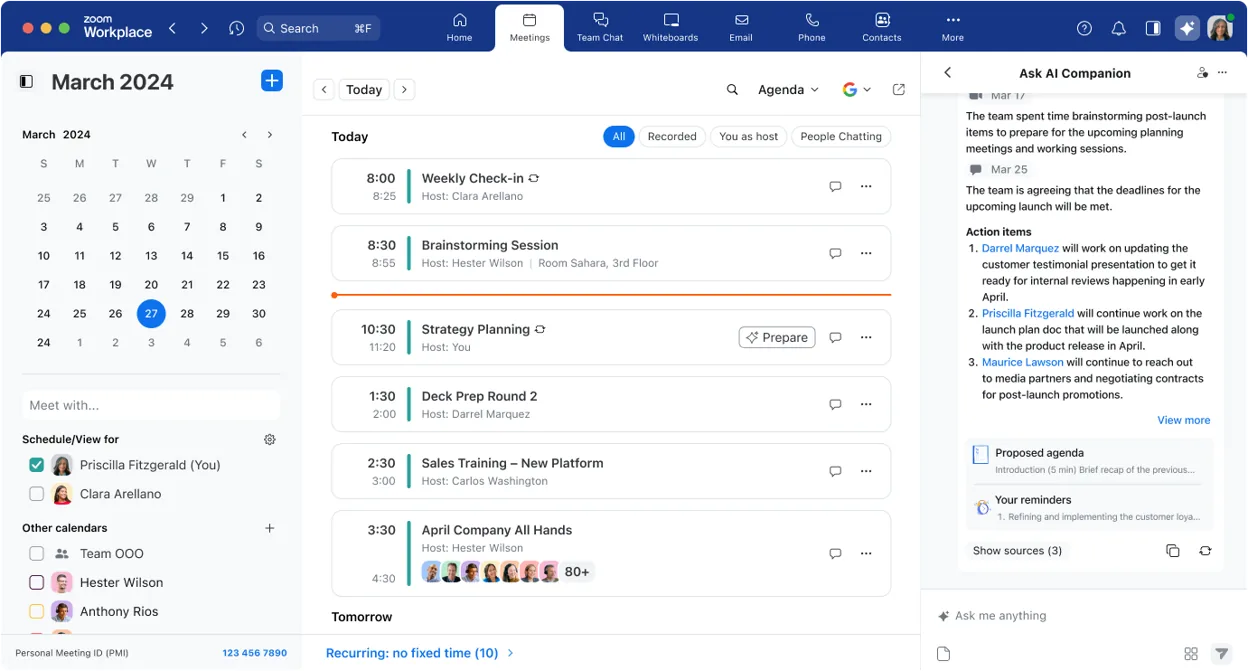
Image source: zoom.com
Key features that define Zoom today
Zoom has evolved from a simple video conferencing tool into a broad used by businesses, educators, and distributed teams worldwide. Its feature set focuses on delivering reliable meetings, flexible collaboration formats, and scalable options for both small groups and large audiences. These capabilities are a major reason Zoom remains a default choice for virtual communication across industries. Below are the core Zoom features that most teams rely on in daily work.
- HD video and audio quality: Zoom is best known for consistent HD video and clear audio, even with large numbers of participants. Adaptive bandwidth optimization helps meetings remain usable across different network conditions. This reliability is a key factor highlighted in many Zoom review discussions. For teams prioritizing meeting stability, this remains one of Zoom's strongest advantages.
- Screen sharing and remote control: Zoom allows users to share entire screens, specific applications, or selected windows with minimal setup. Remote control functionality enables collaborators to interact directly with shared screens during troubleshooting or co-working sessions. This makes Zoom practical for training, demos, and technical support scenarios. The simplicity of these tools contributes to Zoom's broad adoption.
- Breakout rooms and polls: Breakout rooms let hosts split meetings into smaller groups for workshops, classes, or collaborative sessions. Built-in polls allow quick feedback and engagement without external tools. These features are widely used in education and large . They help Zoom support interactive formats beyond basic video calls.
- Recording and cloud storage: Zoom supports local and cloud recording, allowing teams to capture meetings for later review. Cloud recordings can be shared easily with participants who could not attend live sessions. This is useful for documentation, training, and compliance purposes. However, managing recordings often requires separate organization and follow-up.
- Zoom Phone and Zoom Rooms: Zoom Phone extends Zoom into cloud-based business telephony, while Zoom Rooms supports dedicated conference room hardware. These offerings expand Zoom beyond meetings into voice and physical meeting spaces. While powerful, they are typically adopted as add-ons rather than core features. This reflects Zoom's modular approach to building its ecosystem.
Zoom pricing plans explained in simple terms
Understanding how Zoom pricing works helps teams decide whether the platform fits both their needs and long-term budget. Zoom offers tiered plans that are built around meeting size, admin controls, and advanced features, so teams can choose options that match their scale. Pricing changes depending on billing frequency, region, and included capabilities, and real costs often include add-ons like webinar seats or phone services. Before selecting a productivity suite, it's worth reviewing the latest and plans. Below is a straightforward breakdown of Zoom's most common plans and what teams actually get at each level, according to official information.
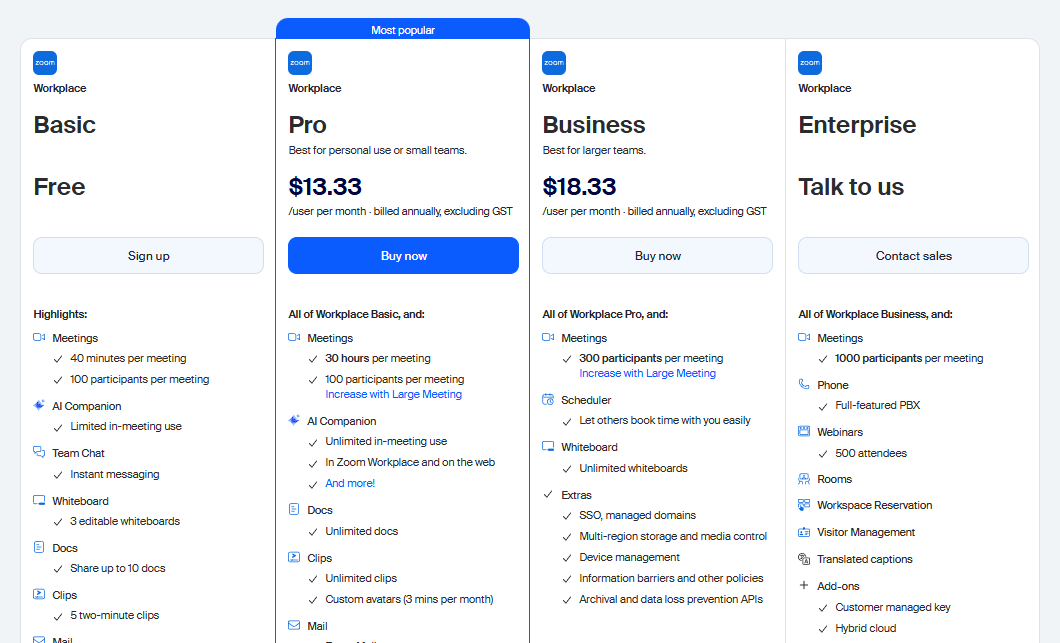
Information source: zoom.com
Update time: 2025-12-28
Note: Pricing and plan details reflect publicly available data as of the update date and may vary based on region, billing cycle, and number of agents.
Why this matters: This table shows how Zoom's features expand as you move up tiers. Basic works for quick video calls but lacks recording and admin tools. Pro adds core professional meeting features. Business introduces support and branding suited for customer-facing teams. unlocks organizational controls, unlimited storage, and advanced support, making it ideal for global companies with strict governance needs.
Save your budget with a reliable alternative
Strengths: why people choose Zoom for work
Zoom remains a popular choice for business meetings because it delivers stable performance and low friction for both and external participants. Its reliability and broad ecosystem make it easy for organizations to scale meetings without heavy setup or training.
- Reliable video performance: Zoom is widely recognized for consistent video and audio quality, even with large participant counts. This reliability makes it suitable for daily team meetings, client calls, and executive sessions where interruptions are not acceptable.
- Easy meeting access for external users: Participants can join Zoom meetings through a simple link without needing deep account setup. This ease of access is especially valuable for customer calls, interviews, and partner meetings involving .
- Scales well for large meetings and webinars: Zoom supports large meetings, webinars, and live events with features like host controls, attendee management, and broadcast-style sessions. This makes it effective for company-wide updates, training, and marketing events.
- Strong ecosystem and integrations: Zoom integrates with calendars, CRMs, and , allowing teams to embed meetings into existing workflows. Its wide integration library helps organizations adopt Zoom quickly without changing their core systems.
Limitations: Issues that users complain about
Despite its popularity, Zoom introduces several practical limitations that become more noticeable as teams rely on it for daily work. These challenges often relate to cost, fragmentation, and the need to combine Zoom with multiple other tools to complete workflows.
- Meeting time limits on the free plan: The free plan's time cap disrupts longer discussions and recurring meetings, forcing teams to restart calls or upgrade earlier than planned. This limitation can interrupt productivity and reduce meeting flow for growing teams.
- Rising costs as teams grow: scales per user and feature set, which means costs increase steadily as more employees and advanced needs are added. For expanding organizations, this can make budgeting less predictable over time.
- Feature fragmentation across products: Core collaboration features are spread across separate offerings like Zoom Meetings, Zoom Phone, and Zoom Rooms. Teams often need multiple subscriptions to achieve a complete setup, increasing complexity and overhead.
- Fatigue from app-switching for chat, docs, and meetings: Zoom focuses primarily on meetings, leaving chat, documents, and task follow-up to external tools. Constantly switching between apps can slow execution and make it harder to keep context connected.
Time to change: When Zoom may not be the best fit
While Zoom excels at video meetings, some teams begin to feel limitations when collaboration extends beyond live calls. As work becomes more execution-driven, relying on separate tools for chat, documents, and workflows can introduce friction. These gaps often surface as teams grow or aim to simplify their software stack.
- Teams needing built-in chat, docs, and workflows: Zoom focuses on meetings rather than ongoing collaboration. Teams that need persistent chat, shared documents, and follow-through often rely on additional tools. This separation can cause context loss after meetings end. Over time, coordination becomes harder.
- Organizations focused on cost predictability: Zoom pricing increases as features, hosts, and add-ons are added. Webinars, large meetings, phones, and storage often require extra licenses. For growing teams, forecasting total costs can be difficult. This creates budgeting uncertainty.
- Teams wanting fewer third-party integrations: When core collaboration depends on integrations, reliability and data flow can suffer. Teams that want conversations, meetings, and execution tightly connected may find Zoom too meeting-centric. As a result, some organizations explore platforms that unify communication and work in one place.
Manage collaboration and workflows in one place
Meet Lark: Fuse communication, workflows, and execution into one
As teams move beyond standalone video calls and toward more collaboration, many are re-evaluating how Zoom fits into their daily workflows. While Zoom remains strong for meetings, it often operates as a separate destination rather than a combined part of work. This separation can create friction between discussions, follow-ups, and actual execution. , one of the best , approaches meetings differently by embedding them directly into chat, tasks, documents, and schedules. For growing teams, this shift reduces context switching and turns meetings into a continuous, outcome-focused workflow rather than isolated events.
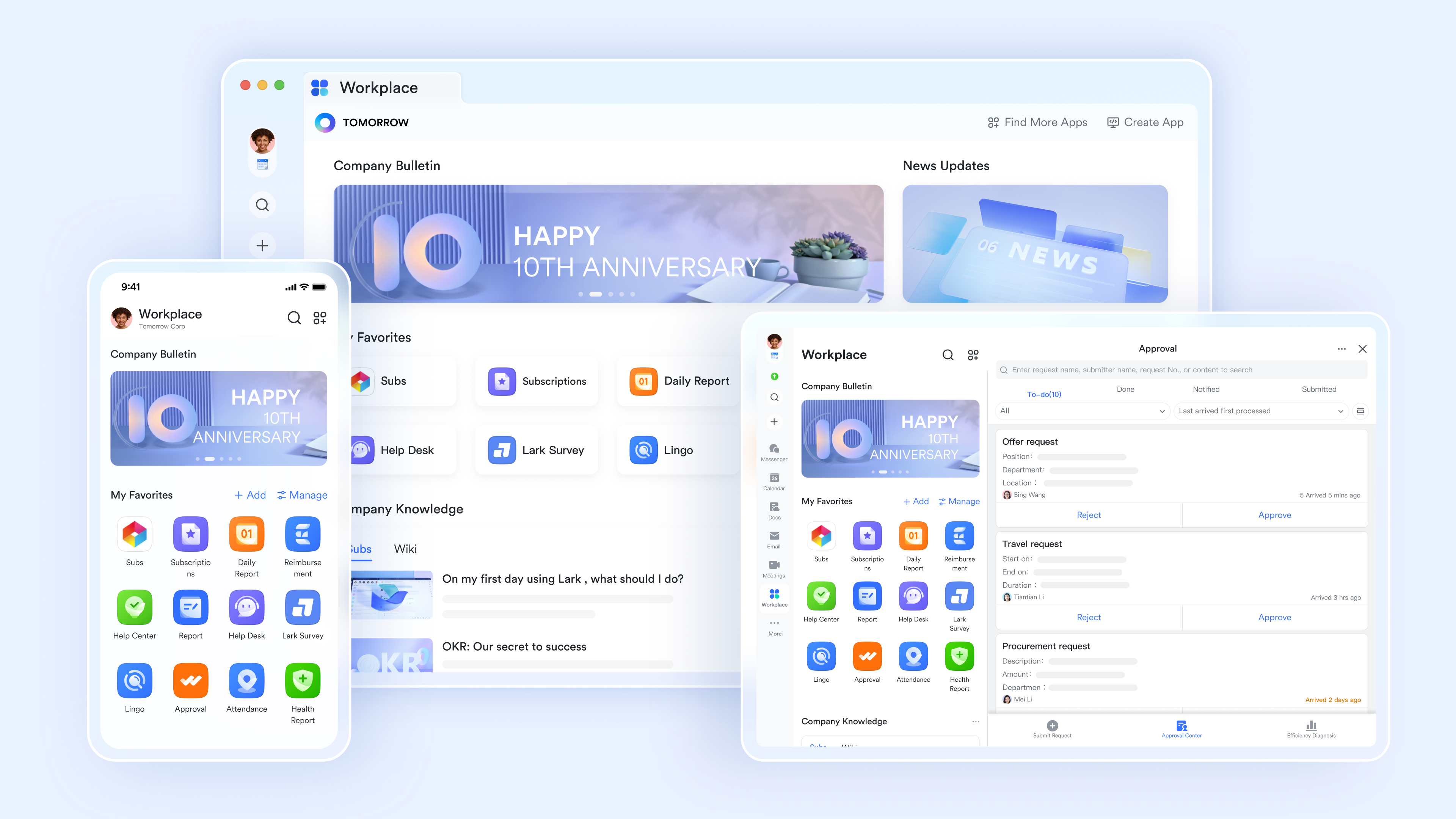
Meetings embedded directly into daily workflows
How it works in Lark: Users can schedule, start, or join meetings directly from group and private chats in , user profiles, the left navigation bar, or calendar events. Meetings can also be launched instantly from ongoing conversations, without switching tools or copying links. This keeps discussions, context, and participants connected before, during, and after the meeting. Why it excels over Zoom: Zoom treats meetings as a separate destination, often requiring users to manage links, apps, or standalone meeting windows. Lark removes this friction by placing meetings exactly where work already happens, reducing context switching and making collaboration faster and more natural.
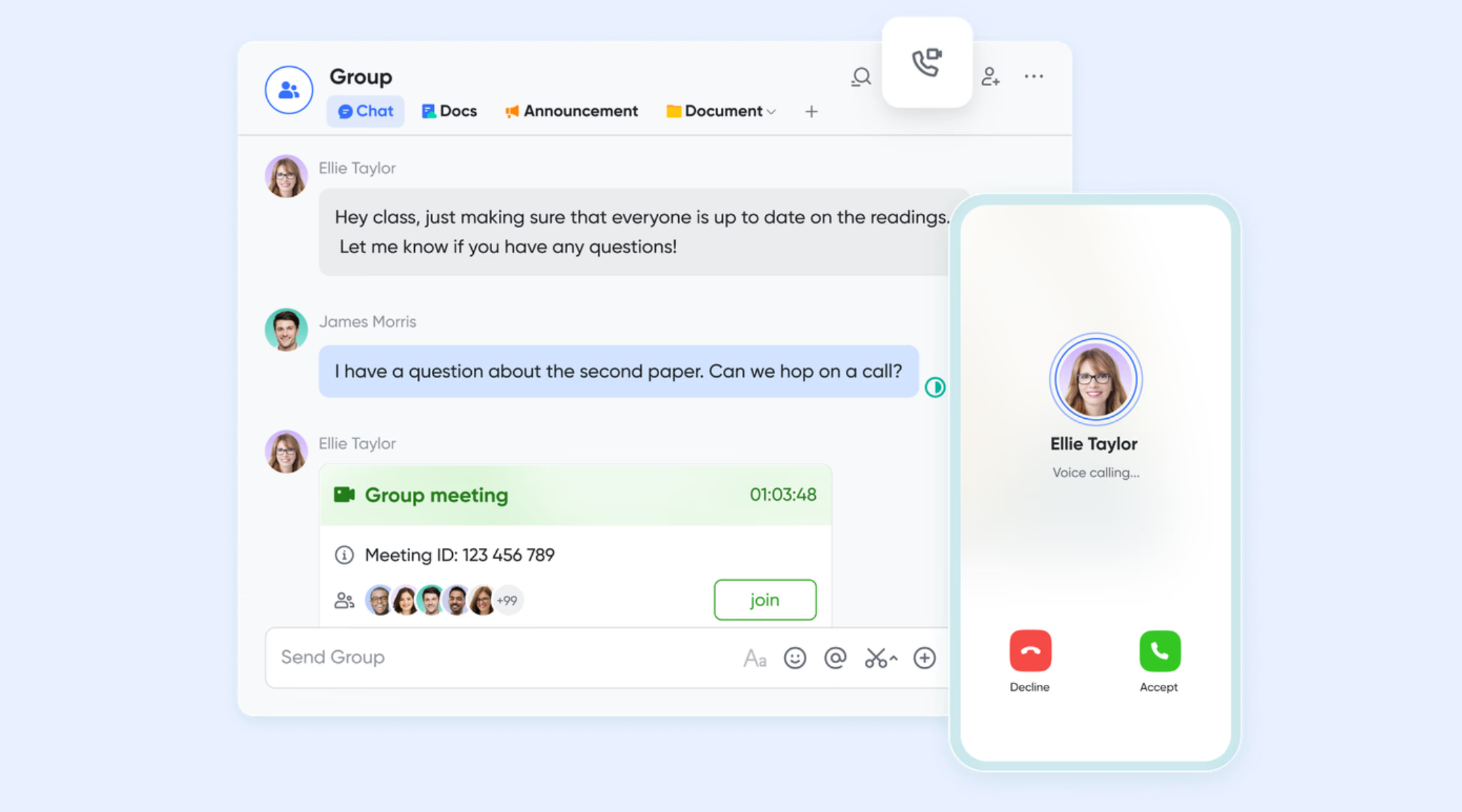
Centralized meeting history with advanced search
How it works in Lark: Powered by , Lark stores meeting records in a unified meetings interface and makes them searchable through global search. Users can quickly find past meetings using organizer names, participant lists, meeting IDs, or other filters. This allows teams to revisit discussions, confirm decisions, or follow up on action items without digging through emails or chat logs. Why it excels over Zoom: Zoom's meeting history is more account-centric and less accessible to everyday users, especially across multiple teams or projects. Lark's searchable meeting history is designed for frequent reference, making knowledge retrieval faster and more practical for ongoing work.
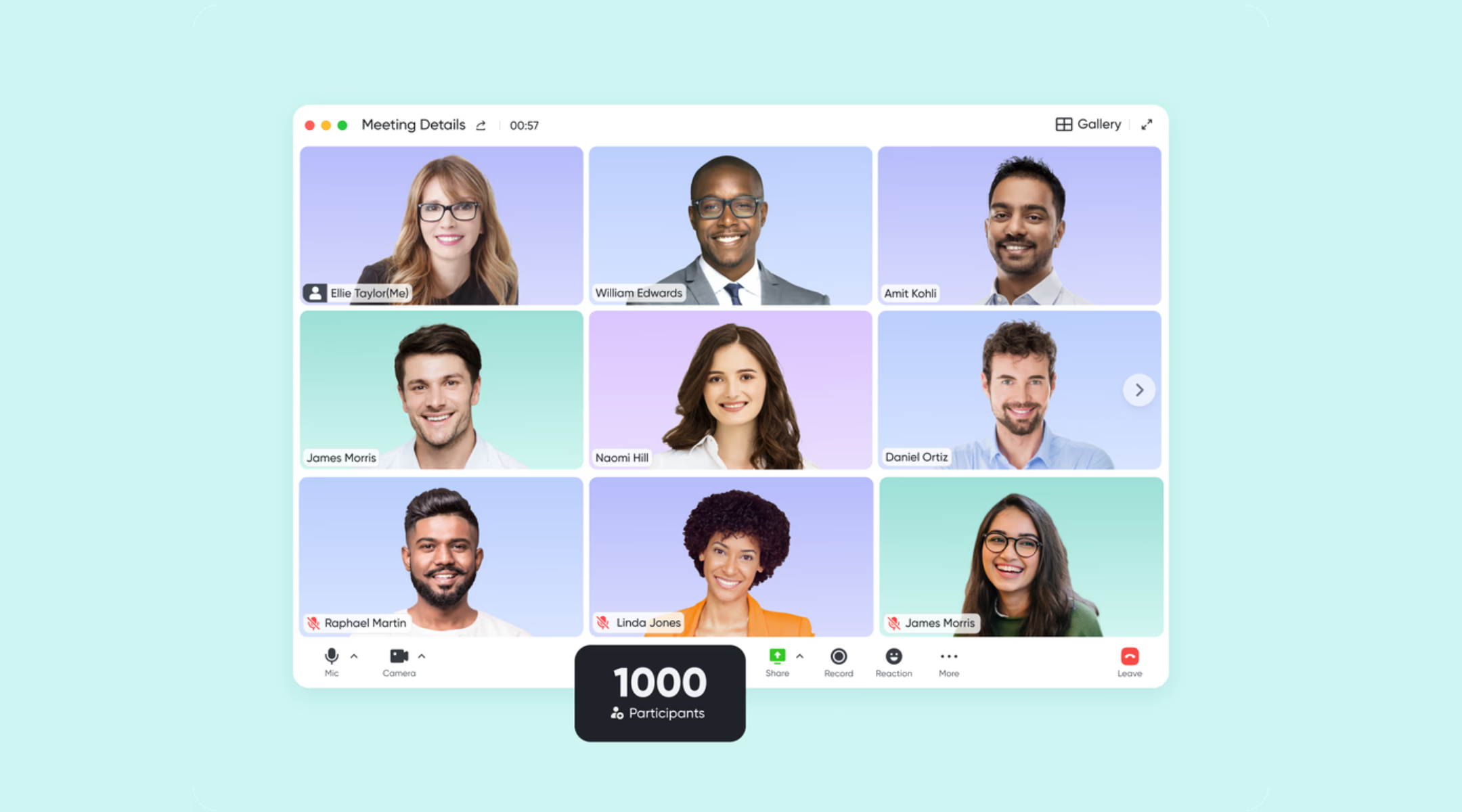
Frictionless joining for internal and external participants
How it works in Lark: Lark supports joining meetings directly from a web browser using a meeting link or ID, with no download required. This makes it easy for guests, clients, or partners to join instantly. Users can also join from the desktop app or mobile app, depending on their preference or device. Why it excels over Zoom: While Zoom offers browser access, it often encourages app downloads and limits key functionality for browser users. Lark prioritizes quick access, reducing barriers to external collaboration and improving attendance and participation.

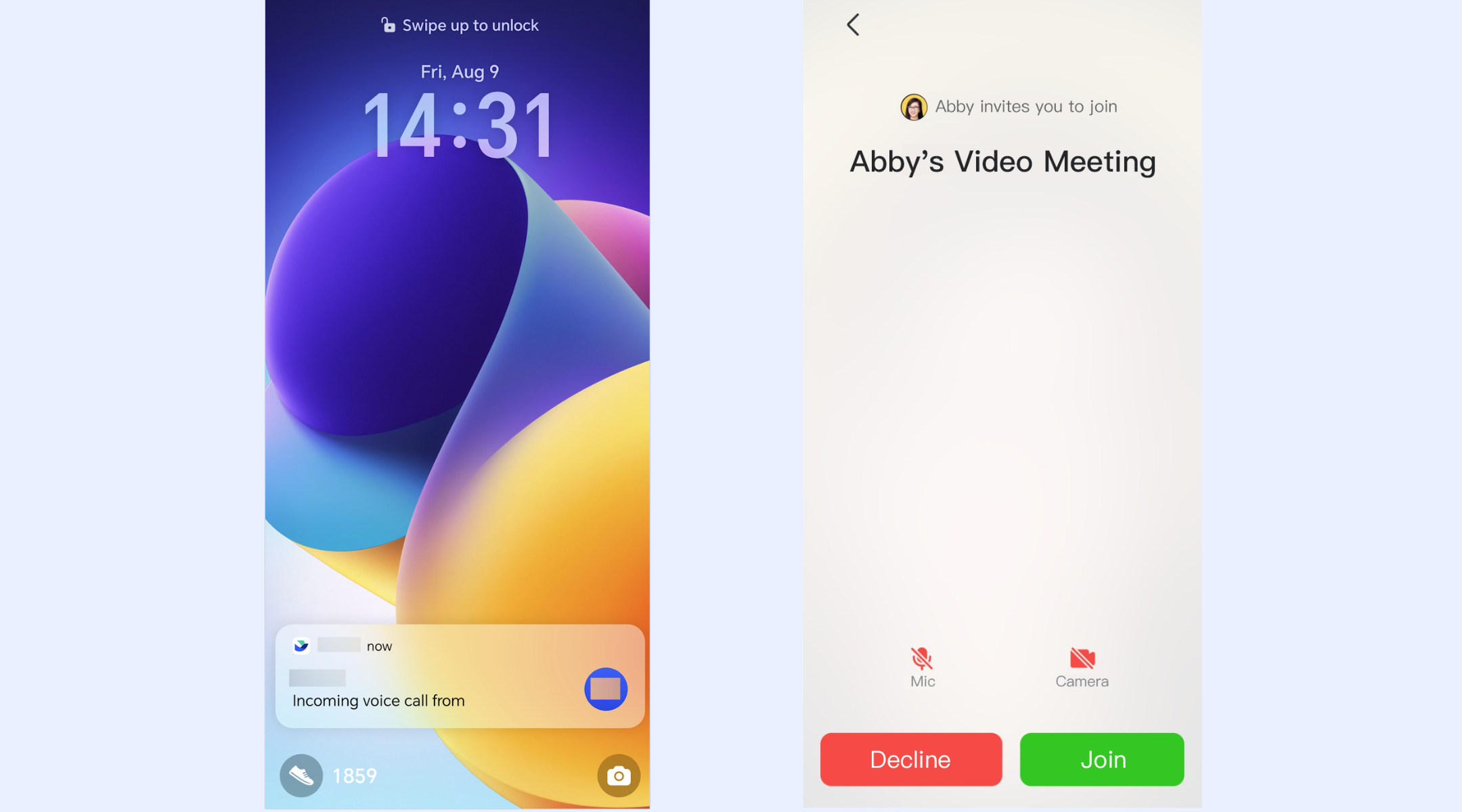
Reliable mobile alerts and call notifications
How it works in Lark: Through , Lark supports VoIP notifications on Android devices that display incoming calls or meeting invites as banners or full-screen alerts, even when the app is running in the background. This ensures users don't miss important meetings or calls when they're away from their desks. Why it excels over Zoom: Zoom's notifications rely more heavily on system-level behavior and are easier to miss when the app isn't actively open. Lark's call-focused alert system improves responsiveness, especially for teams that rely on mobile devices throughout the day.
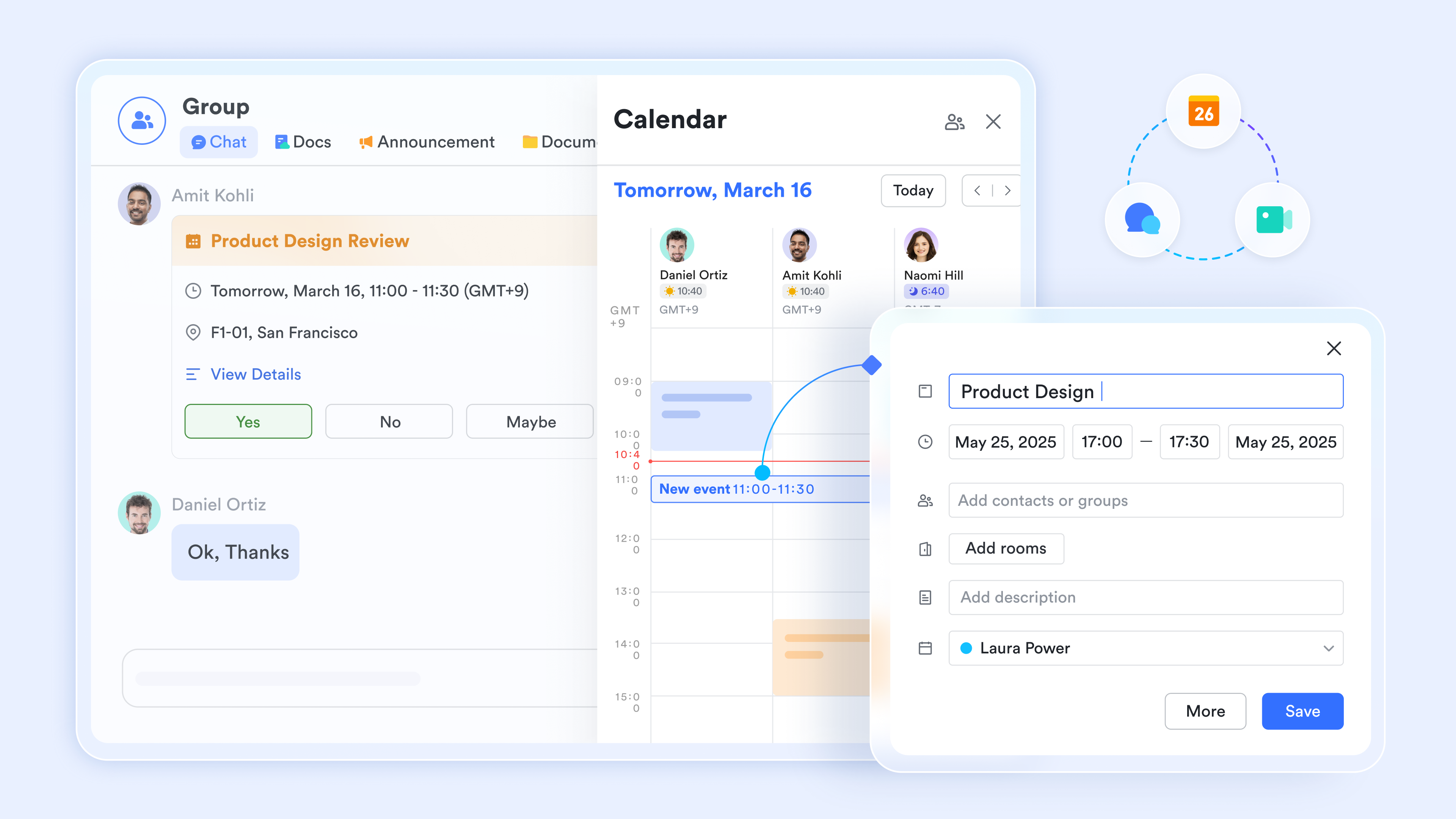
Meetings connected to tasks, schedules, and follow-through
How it works in Lark: The connects naturally with meetings, tasks, and work records. Meetings can be started from scheduled calendar events, linked to ongoing tasks, and followed by structured action items. This keeps meetings tied to execution rather than existing as isolated conversations. Why it excels over Zoom: Zoom focuses mainly on the meeting itself, leaving follow-up and execution to external tools. Lark treats meetings as part of a continuous work cycle, helping teams move smoothly from discussion to action without losing context.
Built-in intelligence for documentation and accountability
How it works in Lark: supports meeting video recording, searchable records, and AI Meeting Notes that capture key points, decisions, and next steps automatically. This reduces manual note-taking and ensures important outcomes are documented and shared with the right stakeholders. Why it excels over Zoom: Zoom recordings often require manual review and separate documentation workflows. Lark shortens the gap between meetings and outcomes by making insights immediately usable, improving accountability and alignment across teams.

:
- Starter plan: Free forever plan that includes 11 powerful tools for up to 20 users. It also comes with 100GB of storage, 1000 automation runs, AI translations, and more.
- Pro plan: $12/user/month (billed annually) for up to 500 users. It includes everything in Starter plus group calling for up to 500 attendees, 15TB of storage, 50,000 automation runs, and more.
- Enterprise plan: for custom pricing. Supports unlimited users and includes even more automation runs and advanced security, compliance, and management features.
For small teams with simple communication needs

18 months message history
1000 Base automation runs/month
2000 rows per table in Base
Most POPULAR
For companies with comprehensive collaboration and management needs
Unlimited message history
500-participant video meetings
50k Base automation runs/month
20k rows per table in Base
For large companies with advanced security and organizational management needs
Get a personalized demo and pricing
Unlimited message history
500-participant video meetings
15 TB storage + 30 GB storage/user
500k Base automation runs/month
50k Base automation runs/month
Most POPULAR
For companies with comprehensive collaboration and management needs
Unlimited message history
500-participant video meetings
50k Base automation runs/month
20k rows per table in Base
Zoom vs Lark: Which is better for collaboration?
Comparing Zoom with platforms designed for broader highlights the difference between a specialized video tool and a unified work environment. Zoom excels at delivering reliable meetings and video quality, but modern teams increasingly value platforms that combine communication, asynchronous work, and in one place. A collaboration tool should not only enable effective meetings but also support follow-through, knowledge sharing, and cross-team execution. Evaluating Zoom alongside a unified workspace like Lark helps teams understand where meetings fit into broader collaboration needs and what trade-offs arise when choosing one over the other.
In the table below, we compare core aspects of traditional meeting-centric collaboration versus a workspace that embeds meetings into a broader set of work tools. This shows how different approaches impact productivity, tool switching, and long-term scalability for teams that rely on both synchronous and asynchronous collaboration.
Final verdict: Is Zoom still worth it in 2026?
Zoom remains one of the most recognizable for business, but its role has shifted as collaboration needs evolve. While it continues to perform well for meetings, many teams now expect tighter connections between discussions, follow-ups, and daily work. Evaluating Zoom in 2026 means looking beyond call quality and considering how well it supports execution and long-term . The answer depends largely on how central meetings are to your workflows versus how much coordination happens outside them.
- Who should continue using Zoom? Zoom is still a strong choice for teams that primarily need dependable video meetings, webinars, and external collaboration. Organizations running large virtual events or client-facing calls may value Zoom's stability and familiarity. If meetings are mostly standalone and follow-up happens in other established tools, Zoom can remain a practical option.
- Who should consider switching: Teams that rely on frequent internal coordination, ongoing projects, and cross-functional execution may feel limited by Zoom's meeting-only focus. When work requires constant movement between chat, documents, tasks, and meetings, the friction of separate tools becomes more visible. These teams often look for platforms that reduce context switching and keep work connected end to end.
- Why Lark is the smarter long-term choice for teams: Lark appeals to teams that want meetings to drive action rather than exist in isolation. By directly into chat, tasks, documents, and schedules, it supports a continuous workflow from discussion to execution. Over time, this unified approach helps teams scale collaboration more efficiently and maintain clarity as work becomes more complex.
Discover an all-in-one collaboration approach
Conclusion
Zoom remains a strong and reliable choice for teams that primarily need high-quality video meetings, webinars, and external communication. Its stability, familiarity, and wide adoption make it especially suitable for organizations that treat the meetings as discrete events rather than part of a larger execution workflow. For companies already invested in Zoom's ecosystem and comfortably managing chat, documents, and task follow-ups through separate tools, Zoom can continue to serve its role effectively. In these cases, Zoom does exactly what it was designed to do and does it well.
However, as becomes more execution-driven, the limitations of a meeting-only platform become more apparent. Work today often requires conversations, decisions, documentation, tasks, and follow-through to stay connected in one place. This is where many teams begin exploring platforms like Lark, which treat meetings as part of a continuous work cycle rather than a standalone activity. By unifying chat, meetings, documents, tasks, and automation under one workspace, helps teams reduce tool switching, improve accountability, and move faster from discussion to outcomes. For organizations planning long-term collaboration at scale, this unified approach offers clearer alignment and more sustainable productivity.
FAQs
Who is Zoom's biggest competitor?
Microsoft Teams is widely considered Zoom's most formidable competitor, especially within corporate environments that already utilize the Microsoft 365 ecosystem. By bundling high-capacity video conferencing with deep integrations for Excel, Word, and real-time document co-editing, teams often replace the need for a standalone meeting app. Google Meet serves as another major rival, specifically for those integrated with Google Workspace, offering a frictionless, browser-based experience that requires no additional software downloads.
Is there a better option than Zoom?
Whether an option is "better" than Zoom depends entirely on your team's existing tech stack and specific collaboration needs. For organizations already paying for Lark, Microsoft 365 or Google Workspace, those native tools are often superior choices because they eliminate extra subscription costs and centralize security. If your priority is specialized functionality, Cisco Webex is frequently cited as the better choice for high-security regulated industries, while Slack Huddles is often preferred for teams that want quick, informal, audio-first check-ins without the formality of a scheduled Zoom call.
Is Zoom suitable for companies with strict compliance requirements?
Zoom offers enterprise-grade security features, including , waiting rooms, and administrative controls that meet many compliance standards. For regulated industries, Zoom's paid plans provide stronger governance and reporting capabilities. However, compliance often extends beyond meetings into document access, task tracking, and data handling. Teams with broader compliance needs sometimes evaluate platforms like Lark that centralize communication and work records under unified controls.
How does Zoom perform in low-bandwidth or unstable networks?
Zoom generally handles moderate network instability better than many video tools by dynamically adjusting video quality and prioritizing audio. In low-bandwidth situations, users may still experience dropped video, lag, or delayed screen sharing, especially in larger meetings. Performance also depends heavily on local device resources and network consistency. For teams that frequently work from mobile networks or unstable connections, platforms that combine meetings with lightweight async , such as Lark, can help reduce reliance on always-on video.
Can Zoom scale cost-effectively for startups as they grow?
Zoom can be affordable at early stages, but costs tend to increase quickly as teams add more hosts, longer meetings, webinars, and advanced features. often find themselves paying for multiple add-ons as usage expands across departments. This can make long-term cost predictability challenging. As a result, some growing teams explore unified collaboration platforms like Lark that bundle meetings, chat, docs, and workflows into a single pricing model, helping control costs as headcount grows.
Related reading


















