














Zoom Plans and Pricing Explained: Meeting, Phone & Webinar Costs
Oct 28, 2026
Oct 28, 2026

30 min read
Add to preferred sources


Zoom has become a household name for online meetings and virtual collaboration, serving organizations of all sizes—from small startups to large multinational corporations. Businesses rely on Zoom for video calls, webinars, team chat, and cloud phone services, making it a core part of their communication infrastructure. However, understanding Zoom pricing can be challenging due to its modular structure, where different products—Meetings, Phone, Docs, Whiteboard, Scheduler, Webinars, and Events—often require separate subscriptions, resulting in additional costs and complexity.
In this guide, we break down Zoom's pricing plans, compare their features, and briefly highlight alternatives like Lark for teams seeking a unified collaboration experience.

Zoom pricing snapshot table for quick review
Information source: Official vendor sites
Update time: 2025-11-25
Note: Pricing and plan details reflect publicly available data as of the update date and may vary based on region, billing cycle, and number of agents.
What is Zoom?
Zoom is a leading cloud-based platform that enables virtual communication and collaboration for businesses, educational institutions, and individuals. At its core, Zoom offers video conferencing, team messaging, cloud phone services, webinars, and online events, making it a versatile tool for remote work and hybrid setups. Organizations can host one-on-one meetings, large group calls, or interactive sessions using Zoom's robust features, including screen sharing, meeting recordings, breakout rooms, and real-time chat.
For teams evaluating costs, understanding the Zoom pricing plan is essential, as different modules—Meetings, Phone, Docs, Whiteboard, Scheduler, Webinars, and Events—often require separate subscriptions. Businesses also need to consider Zoom webinar pricing, which varies depending on audience size and production features. Comparing Zoom plans and pricing helps organizations select the best fit for their collaboration needs while balancing budgets. This flexibility makes Zoom a widely adopted solution across industries.
Zoom vs Zoom Workplace: What's the difference?
Zoom is the broader platform encompassing all of its products, including Meetings, Team Chat, Phone, Docs, Whiteboard, Scheduler, Events, Webinars, Rooms, and more. This makes it a flexible solution that allows organizations to pick and choose the tools they need. However, this modular approach means costs can quickly add up, which is why understanding Zoom pricing plans is essential for budgeting and planning.
On the other hand, Zoom Workplace is a bundled subscription that combines key tools into a single plan. Instead of buying Meetings, Chat, Mail, Calendar, Docs, or Whiteboard separately, Workplace offers them together, streamlining adoption and management. Teams also need to account for Zoom phone pricing if integrated calling is required. Additionally, businesses evaluating the platform can consult Zoom info pricing and plan details to ensure they choose the tier that aligns with their collaboration, calling, and security needs.
What drives Zoom Workplace pricing and how to choose the right plan
Choosing the right Zoom Workplace plan depends on several factors, as pricing can vary widely based on the tools and features a team needs. Whether you are a small business, a nonprofit, or a large enterprise, understanding Zoom's pricing plans and costs is crucial to ensure you get value without overspending. Zoom also offers specialized options, such as Zoom nonprofit pricing and Zoom contact center pricing, that cater to unique operational requirements. Additionally, for organizations hosting large-scale sessions, Zoom events pricing may influence the overall budget. Careful evaluation of team needs, usage patterns, and desired features will help businesses select the plan that balances functionality with cost-efficiency.
- Frequency of meetings: The number and length of meetings your team conducts a significant factor in pricing. Teams with frequent, long-duration meetings may require the Pro or Business tiers to avoid the 40-minute limit of the Basic plan. For heavy users, choosing higher tiers can reduce interruptions and improve productivity. Frequent meetings also benefit from features like unlimited Whiteboard access and AI tools. Organizations should evaluate usage patterns to avoid paying for unused capacity.
- Audience size: The number of participants in your meetings, webinars, or events directly impacts plan selection. Larger audiences require higher-tier plans with expanded participant limits. For instance, the Business and Enterprise plans allow 300–1,000 participants, whereas the Basic and Pro plans support fewer. If your organization regularly hosts large sessions, you may also need to consider Zoom events pricing for multi-session conferences and webinars. Accurate planning ensures teams have sufficient capacity without overspending.
- Calling needs: Teams that rely heavily on voice communication must factor in Zoom Phone pricing when selecting a plan. Features such as unlimited domestic calling, multi-device support, and PBX functionality vary across tiers. Smaller teams may only need basic outbound calling, while larger teams or customer support centers may benefit from Zoom contact center pricing. Understanding your calling volume and requirements will help optimize costs and prevent paying for unnecessary features.
- Security requirement: Security and compliance features can influence overall costs. Businesses handling sensitive data may require advanced admin controls, SSO, or encryption options included in higher-tier plans. Nonprofits may access specific Zoom nonprofit pricing for discounted security-enabled plans. Evaluating regulatory and internal security needs ensures your team selects a plan that meets compliance standards without compromising budget.
Zoom pricing plan for the workplace
Zoom Workplace pricing bundles Meetings, Team Chat, Mail, Calendar, Docs, and Whiteboard, but the cost varies widely by plan. Workplace Basic is free but limited to short meetings and light collaboration features. Workplace Pro expands meeting duration, unlocks unlimited Docs and Whiteboard, and adds AI Companion, making it suitable for small teams. Workplace Business increases participant capacity and adds Scheduler plus admin features for growing teams. Workplace Enterprise is custom-priced and includes phones, webinars, and additional enterprise-level tools.
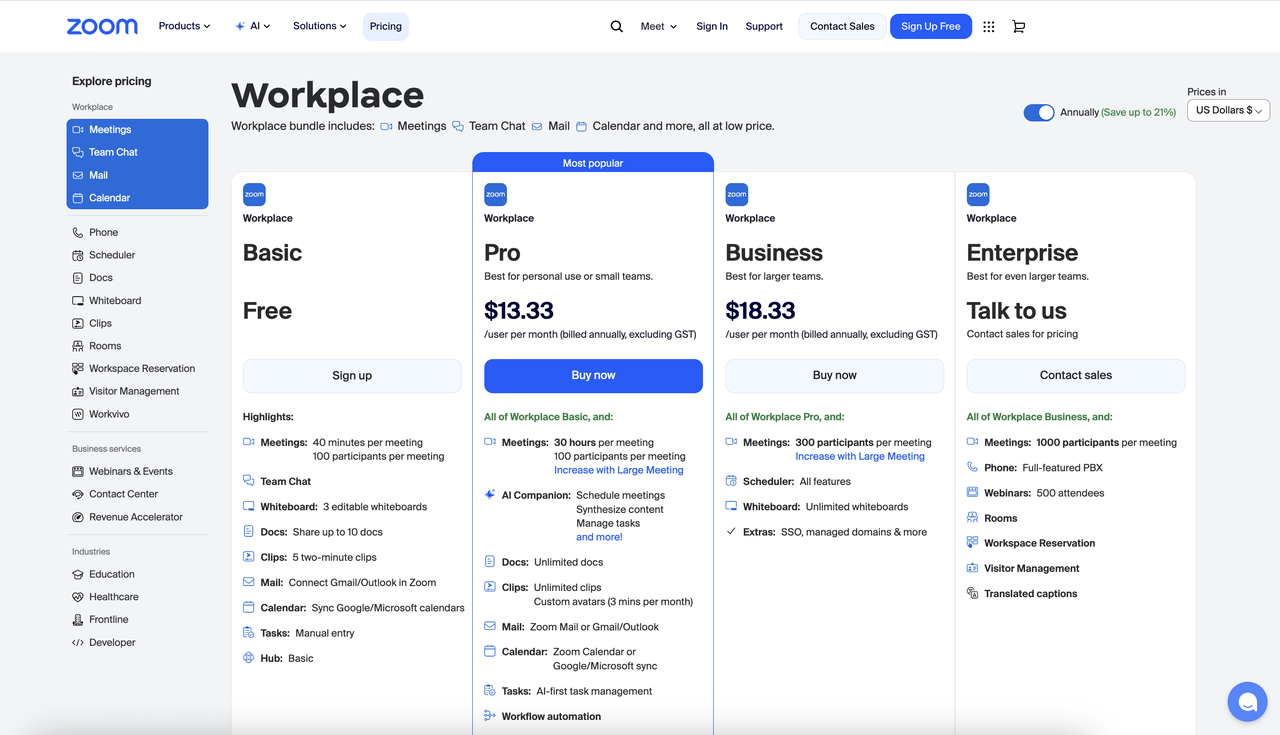
Image source: zoom.com
Workplace Basic: Free plan
The Workplace Basic plan is designed for individuals or tiny teams who need essential virtual meeting and collaboration tools without cost barriers. It supports short meetings and provides lightweight collaboration features suitable for simple workflows. This tier is ideal for users getting started with Zoom before committing to paid features. While limited, it covers the fundamentals needed for everyday communication. It is a practical entry point for teams exploring remote collaboration tools.
Features:
- Meetings (40 minutes, 100 participants): This feature allows hosting meetings up to 40 minutes long, making it practical for daily check-ins or quick presentations. Up to 100 participants can join to support small-group sessions or community meetings. The time limit encourages efficient discussions and shorter meeting cycles. Core tools like screen sharing and chat remain available. It is an appropriate setup for lightweight virtual interactions.
- Whiteboard (3 editable boards): The Basic plan includes three editable whiteboards for visual brainstorming and planning. Users can collaboratively draw, annotate, and create notes. These whiteboards help support creative thinking and basic workflow mapping. They remain accessible for editing across sessions. This tool is helpful for small teams working on simple visual tasks.
- Docs (Up to 10 shared docs): Users can create and share up to ten documents, making it suitable for essential notes or small project files. Real-time collaboration allows multiple users to contribute simultaneously. Basic formatting keeps documents clean and functional. The limited doc count helps small teams remain organized without overwhelming storage. It's an efficient tool for fundamental document sharing.
Workplace Pro: $13.33/user/month
Workplace Pro is geared toward small teams or professionals who require longer meeting durations and enhanced productivity tools. It removes the 40-minute cap and introduces AI capabilities for summarizing discussions and generating content. Unlimited Docs and expanded collaboration features provide more flexibility for growing workflows. This plan suits teams that depend heavily on meetings and documentation. It bridges the gap between essential and advanced virtual collaboration.
Features:
- Meetings (30 hours, 100 participants): Expanded meeting duration of up to 30 hours allows for long workshops, extended training, or multi-day sessions. The participant limit stays at 100, which fits many medium-sized teams. Removing time restrictions reduces interruptions and improves flow. Users retain access to breakout rooms, in-meeting chat, and screen sharing. It's a substantial upgrade for sustained team collaboration.
- AI Companion: AI Companion automates meeting notes, extracts next steps, and synthesizes discussions. It helps users quickly create agendas, summaries, and follow-up tasks. Teams save time by automating routine documentation and administrative actions. AI can also enhance email or document drafts, improving clarity and efficiency. This feature functions as a practical digital assistant throughout a workday.
- Docs (Unlimited docs): Pro users can generate unlimited documents, supporting expanded collaboration needs. Teams can build complex project plans, content libraries, or internal documentation without limits. Real-time editing supports seamless teamwork across distributed teams. AI tools help speed up content generation and editing. This enables scaling documentation workflows without constraints.
Workplace Business: $18.33/user/month
Workplace Business is designed for larger teams that need increased meeting capacity, advanced scheduling tools, and stronger organizational controls. It includes everything from the Pro plan but adds more robust administrative features. This tier is suitable for structured departments requiring streamlined coordination across multiple teams. Unlimited whiteboards enhance visual planning at scale. Overall, it offers a stronger operational backbone for mid-sized organizations.
Features:
- Meetings (300 participants): This expanded capacity allows hosting up to 300 participants, making it effective for departmental meetings or large internal gatherings. It supports expansive communication across growing teams. The plan helps reduce reliance on third-party meeting platforms for larger sessions. Hosts receive enhanced controls to manage big groups effectively. It's ideal for businesses with broad communication needs.
- Scheduler: Scheduler automates meeting booking with availability-based scheduling, booking pages, and reminders. It eliminates manual calendar coordination between teams and external clients. Integrations with major calendar apps improve ease of use. Smart rules, such as round-robin, support structured appointment distribution. This feature is especially valuable for HR, sales, and client-facing teams.
- Whiteboard (Unlimited): Unlimited whiteboards enable continuous visual collaboration across complex teams and long-term projects. Organizations can maintain multiple boards for brainstorming, planning, or mapping workflows. Version history helps track changes over time. Template support speeds up repetitive tasks like process mapping or presentations. This fosters a visually dynamic working environment.
Workplace Enterprise: Custom pricing
Workplace Enterprise is built for large organizations that require advanced collaboration capabilities, enterprise-grade telephony, and large-scale meeting support. It combines communication, phone systems, webinars, and workspace management into one customizable package. With high attendee limits and comprehensive admin tools, it serves global teams with diverse operational needs. This plan is ideal for enterprises managing complex internal and external communication flows. It provides the full breadth of Zoom's platform capabilities in one place.
Features:
- Meetings (1,000 participants): This feature supports extensive meetings suitable for company-wide town halls, shareholder updates, or global training sessions. The capacity ensures stability even in high-traffic environments. Advanced moderation tools help hosts manage large audiences effectively. Ideal for enterprises running frequent large-scale events. It provides professional-grade performance throughout.
- Phone (Full-featured PBX): Zoom's cloud-based PBX replaces traditional office phone systems with flexible routing, extensions, and voicemail. Teams can answer calls on multiple devices, ensuring seamless communication. Integrated voice and video streamline internal workflows. This system centralizes telephony for distributed and hybrid teams. It is beneficial for enterprise-level customers or operations teams.
- Webinars (500 attendees): Included webinar hosting enables professional presentations with interactive tools like polls, Q&A, and branded layouts. Ideal for external marketing, training, or partner events. Hosts can manage large audiences with backstage controls. Reporting helps evaluate engagement and performance. This feature supports polished, large-scale virtual broadcasting.
Zoom scheduler pricing: standalone vs bundled
Zoom Scheduler can be purchased independently for teams that only need streamlined appointment booking, or bundled into Workplace Business for a wider set of collaboration tools. The standalone $4.99 plan offers calendar syncing, automated reminders, and round-robin scheduling, making it simple to schedule interviews and consultations. When bundled under Workplace Business, Scheduler becomes part of a larger suite of communication and meeting tools, ideal for teams needing centralized coordination. The bundled option provides better value for organizations already using Zoom Meetings.
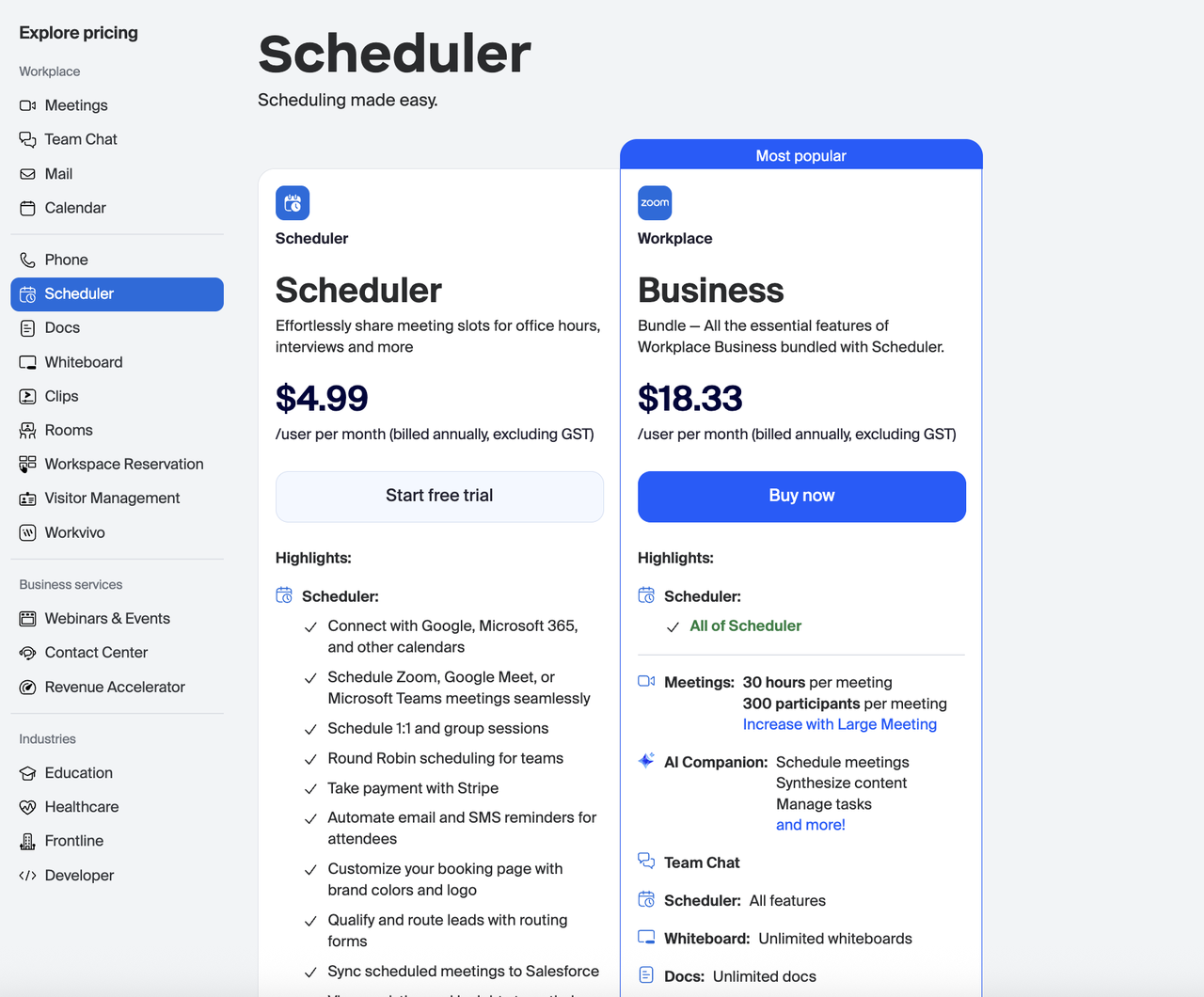
Image source: zoom.com
Scheduler plan: $4.99/user/month
The Scheduler plan is designed for individuals or small teams that primarily need a simple, reliable way to share availability and automate meeting bookings. It streamlines scheduling with external clients, students, candidates, or partners by allowing easy calendar syncing and automated meeting creation. Its focus is on reducing back-and-forth emails and providing a branded booking experience. This plan supports both one-to-one and group sessions, making it suitable for consultants, educators, and recruiters. Overall, it offers essential automation at an affordable price.
Features:
- Connect with Google, Microsoft 365, and other calendars: Scheduler syncs with leading calendar platforms so all meetings—whether personal, work, or recurring—stay aligned in real time. This prevents double-booking and ensures your availability is always accurate. It also helps capture cross-team scheduling without juggling multiple apps. All changes made in your primary calendar are reflected instantly in the booking tool. The result is seamless time management without manual updates.
- Schedule Zoom, Google Meet, or Microsoft Teams meetings seamlessly: Every scheduled appointment automatically generates the corresponding meeting link using your preferred video platform. This eliminates the extra step of manually creating meeting rooms. It also standardizes the attendee experience and ensures consistency across different session types. Automated creation reduces human error and saves time. You simply choose the platform once, and Scheduler handles the rest.
- Round Robin scheduling for teams: Round Robin evenly distributes meeting requests by assigning new bookings to the next available team member. This ensures fairness, faster response times, and better utilization of team capacity. It's beneficial for sales, support, and interview panels that require shared workload. The system evaluates availability in real time before assigning sessions. This boosts efficiency while providing a smooth customer experience.
Workplace Business + Scheduler Bundle: $18.33/user/month
The Business plan bundles Workplace Business features with the complete Scheduler toolkit, giving teams an integrated suite for meetings, chat, docs, whiteboards, and AI-powered collaboration. It's designed for organizations that want unified communication and scheduling in one subscription. With extended meeting durations, higher participant limits, and AI Companion access, productivity across departments is enhanced. This tier supports richer collaboration through unlimited whiteboards and documents. It's ideal for growing businesses looking for a centralized ecosystem rather than multiple separate tools.
Features:
- Meetings: 30 hours per meeting, up to 300 participants: The plan significantly expands meeting capacity, enabling long workshops, training sessions, webinars, and client consultations without time pressure. With support for up to 300 participants, it suits mid-sized teams and public-facing sessions. Teams hosting all-hands, onboarding, or hybrid events benefit from the larger limits. This removes the constraints typical in lower-tier plans. The upgrade ensures meetings scale smoothly as organizations grow.
- AI Companion for scheduling, content synthesis, and task management: The AI Companion assists with preparing meeting summaries, drafting follow-ups, organizing tasks, and simplifying scheduling. It reduces manual administrative work by automatically generating actionable outputs. The AI also helps teams capture insights faster, improving alignment after every discussion. This is especially useful in fast-moving environments where decisions must be documented quickly. Overall, it accelerates productivity by automating routine workflows.
- Unlimited Docs and Whiteboards: This feature supports collaborative content creation without storage or project limits. Teams can brainstorm, draft documents, plan projects, and organize workflows in one integrated space. Unlimited capacity means every department can create its own workspace without worrying about allocation. It also improves cross-team visibility since files live in a shared environment. The result is a more connected and transparent documentation process.
Zoom docs pricing: AI-first collaboration plans
Zoom Docs offers multiple tiers, from a free plan for basic document creation to premium plans for teams that work heavily with content. Docs Basic limits users to 10 documents, but remains helpful for simple notes and meeting summaries. The $7.49 Docs plan unlocks unlimited documents, file attachments, and version history, along with AI Companion support for generating and refining content. Workplace Pro and Business bundle Docs into larger collaboration packages, making them more useful for teams needing integrated meetings and file workflows. These bundles offer better value for users who rely on both document and video collaboration.
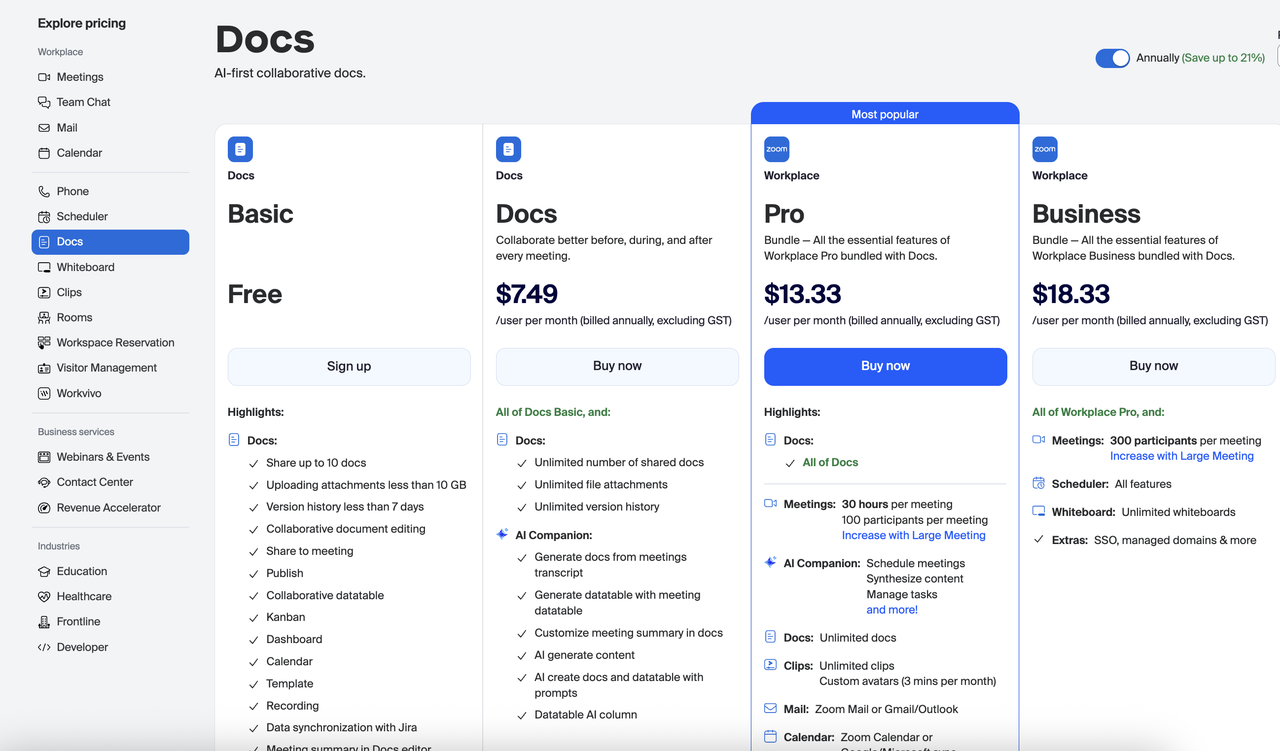
Image source: zoom.com
Docs basic (Free)
The Docs Basic plan provides an entry-level workspace for individuals who need simple collaborative documents without cost. It supports essential editing, sharing, and organization tools that help teams co-create content without switching apps. The plan includes version history, basic templates, and meeting document workflows, making it ideal for small teams or freelancers. Though limited to the number of documents and attachments, it still enables smooth collaboration. It's a great starting point for users wanting to test the platform before upgrading.
Features:
- Share up to 10 documents: Users can create and share up to 10 papers, helping small teams manage focused work without clutter. It keeps the workspace organized and encourages teams to prioritize essential files. While limited, it's suitable for lightweight collaboration or personal planning. Teams can still comment, co-edit, and structure content effectively. This feature makes Basic functional but intentionally minimal.
- Upload attachments up to 10 GB: The plan supports attachments that complement documents, such as PDFs, images, or project assets. Limiting each file to under 10GB ensures smooth storage management. It helps teams include contextual materials without overwhelming the system. Most everyday attachments fit comfortably under this limit. For larger media projects, users may need upgraded storage.
- Collaborative document editing: Multiple users can work simultaneously on a document, enabling smooth team collaboration. Real-time updates ensure every participant sees changes instantly. This feature supports co-authoring during meetings, brainstorming sessions, or project reviews. It reduces delays caused by sequential editing. It ensures Basic users enjoy the core advantage of working together live.
Docs (Paid): $7.49/user/month
The standard Docs plan is designed for teams that need unlimited document usage, expanded storage, and AI-assisted workflows. It enhances collaboration during and after meetings by supporting rich file creation and automated documentation. The plan removes Basic's document and attachment limits, making it fit for content-heavy teams. It also embeds AI Companion features that accelerate summarization, data table generation, and document generation. This tier is ideal for teams that want deeper productivity functionality without adopting the entire workplace suite.
Features:
- Unlimited number of shared documents: Users can create as many documents as needed across all teams and workflows. This eliminates worry about reaching caps during active projects or scaling teams. It enables richer documentation habits across departments. Teams can maintain archives, run multiple projects, and create structured repositories. This significantly increases capacity compared to Basic.
- Unlimited file attachments: The plan removes size restrictions, allowing users to upload documents, videos, design files, and datasets without constraints. This benefits teams handling large asset projects, such as marketing, engineering, and research. The expanded storage supports smoother collaboration by keeping all relevant files in one place. Users avoid reliance on third-party storage tools. It leads to a more unified workflow experience.
- AI Companion document generation: AI can generate documents from meeting transcripts, prompts, or structured templates. This streamlines note-taking, reporting, and content creation. Users save time by letting AI summarize discussions and extract action items. It also automatically converts meeting datatables into documents. This improves efficiency across recurring workflows.
Workplace Pro + Docs (Bundle): $13.33/user/month
The Pro plan bundles the complete Docs plan with Workplace Pro features, creating an all-in-one collaboration suite. It supports longer meetings, greater participant capacity, and a broader AI toolkit for everyday team operations. This tier is ideal for teams that collaborate heavily and require meeting, content, and communication features within a single ecosystem. Unlimited docs, clips, mail, and calendar integrations make it a comprehensive workspace. It's best for growing businesses needing centralized productivity tools.
Features:
- Meetings: 30 hours per meeting, 100 participants. The plan extends the meeting duration to accommodate multi-day workshops, training sessions, or strategic sessions. Teams can run extended work reviews without interruption. The 100-participant limit works well for small to mid-sized teams in internal or client meetings. It effectively supports remote and hybrid operations. This upgrade ensures flexibility for more complex meeting formats.
- Unlimited Docs & Clips: Users can create unlimited documents and video clips for communication or training. Clips help teams share updates or walkthroughs asynchronously. This reduces dependency on meetings and improves knowledge transfer. Unlimited capacity enables departments to build large internal libraries. It adds a powerful multimedia collaboration layer.
- AI Companion for scheduling, content synthesis & task management: The AI Companion extends beyond docs to support meeting coordination, task creation, and workflow orchestration. It helps generate summaries, organize responsibilities, and analyze content across tools. This centralizes productivity automation in one environment. Teams save time by reducing manual steps across meetings and everyday tasks. It boosts overall team efficiency.
Workplace Business + Docs (Bundle): $18.33/user/month
The Business plan adds enterprise-grade collaboration features, higher meeting limits, Scheduler integration, and advanced security controls. It is designed for larger teams needing SSO, managed domains, and cross-department coordination tools. With unlimited whiteboards, docs, and clips, it supports broad project environments. The upgrade is ideal for organizations that need structured governance alongside advanced collaboration. It ensures scalability as teams expand.
Features:
- Meetings (300 participants per meeting): This tier dramatically increases participant capacity for significant events, all-hands meetings, and client sessions. It supports growing companies with multiple departments or external stakeholders. The increased participant limit eliminates the need for separate webinar tools for mid-sized gatherings. It also helps training, leadership meetings, and customer programs scale more easily. This boosts value for organizations with expanding teams.
- Scheduler: Users gain access to the full scheduling suite, enabling automated bookings, routing, and payments. This is ideal for sales teams, interview processes, and service-based workflows. It centralizes scheduling inside the Workplace ecosystem, removing reliance on third-party tools. This reduces friction between booking, meeting, and documentation. It enhances operational smoothness across departments.
- SSO, managed domains & admin controls: Business includes enterprise-level security and identity management. SSO ensures seamless and secure user authentication. Managed domains allow centralized control over member access and data governance. This is essential for compliance-focused organizations. It strengthens both security posture and administrative oversight.
Zoom whiteboard pricing and premium upgrades
Zoom Whiteboard pricing starts with a free plan suitable for quick brainstorming sessions and basic visual collaboration. The standard $2.08 plan unlocks unlimited boards, version history, and co-owners, making it more flexible for teams mapping workflows. Whiteboard Plus, priced at $5.83, adds advanced integrations with tools such as Jira, Asana, and Azure DevOps, along with organizational templates and export formats. For teams that need full meeting and collaboration functionality, Whiteboard is included with Workplace Business. This bundled option offers comprehensive collaboration features for teams managing visual workspaces.
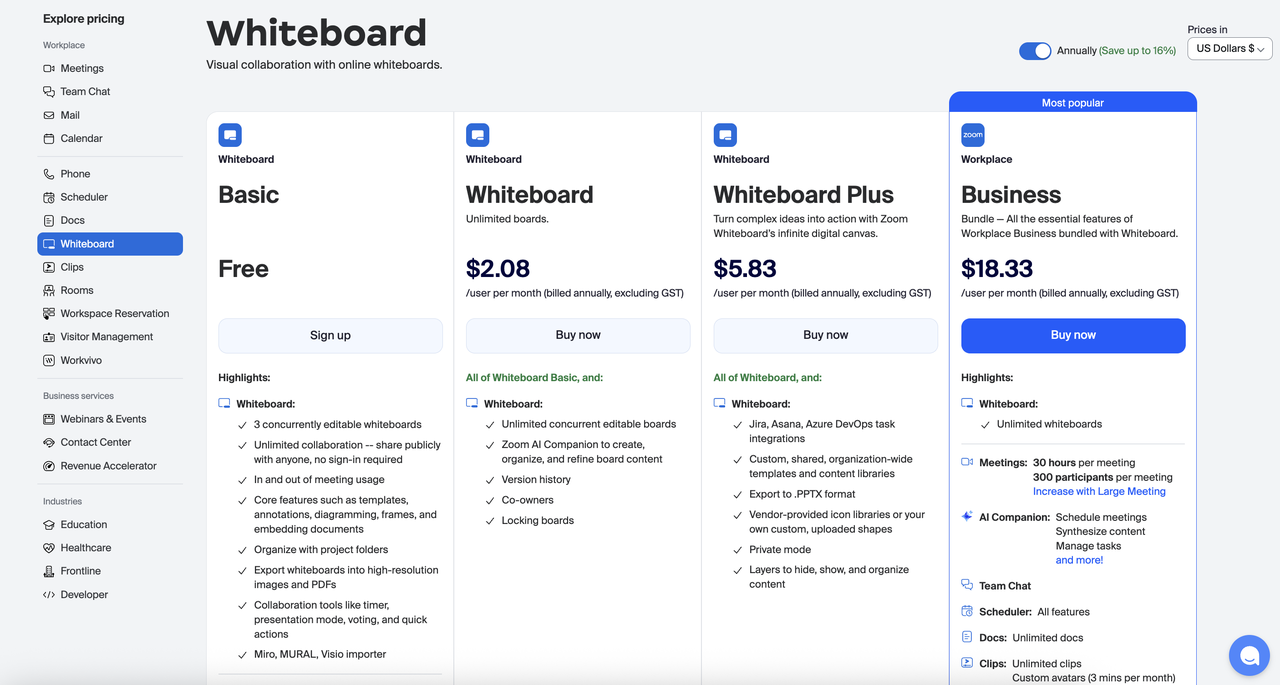
Image source: zoom.com
Whiteboard Basic: Free plan
The Whiteboard Basic plan is designed for individuals or small teams who need simple visual collaboration at no cost. It includes a limited but valuable set of core tools for brainstorming, planning, and lightweight project mapping. With three concurrent whiteboards and essential templates, it supports everyday collaboration needs. Users can share publicly without requiring sign-ins, making it ideal for quick workshops or external reviews. It is a practical entry plan for experimenting with visual workflows before scaling.
Features:
- 3 concurrently editable whiteboards: Basic users can have up to three active whiteboards at the same time, which encourages focused visual planning. This cap prevents clutter and helps maintain clean project organization. Teams can still collaborate freely within these boards. The limit is suitable for minimal workflows, such as brainstorming or outlining ideas. For broader usage, upgrading unlocks unlimited boards.
- Unlimited public sharing without sign-in: This feature allows creators to share whiteboards externally with clients or partners instantly. It removes sign-up friction and supports fast reviews and real-time collaboration. It's ideal for workshops, teaching, interviews, or quick feedback loops. Users can maintain momentum without guests having to navigate login barriers. This increases accessibility and convenience for lightweight workflows.
- Core features — templates, annotations, diagramming, frames: Basic includes essential visual tools needed for mapping processes, illustrating concepts, and structuring ideas. Templates help users start quickly, while frames keep large boards organized. Diagramming tools support workflows, mind maps, and stakeholder diagrams. Annotations make collaboration clearer during discussions. These fundamentals enable meaningful teamwork even in the free tier.
Whiteboard (Standard): $2.08/user/month
The Whiteboard plan is built for teams that need unlimited boards and more structured collaboration. It enhances brainstorming sessions with AI tools, version history, and content management controls. This tier eliminates the Basic limitations, allowing teams to create expansive visual libraries for projects. Co-owner capabilities and locking boards improve team governance. It's ideal for teams who frequently ideate, plan, or present visually.
Features:
- Unlimited concurrent editable boards: This removes all constraints on the number of boards a team can create and maintain. It enables departments to run multiple projects simultaneously without cleanup pressure. Teams can build long-term visual archives for processes, campaigns, or roadmaps. The unlimited capacity encourages deeper visual workflows. It is a significant upgrade for collaboration-heavy teams.
- AI Companion to create and refine board content: The AI Companion can help jump-start brainstorming by generating structures, ideas, and content in response to prompts. It refines complex diagrams or reorganizes information quickly. This is valuable for workshops, strategy sessions, and content planning. Users save time by letting AI clean up and enhance messy whiteboard sessions. It boosts productivity and visual clarity.
- Version history: Version history allows teams to track changes and revert to earlier iterations of a board. This is crucial during large or complex projects where ideas evolve rapidly. It encourages experimentation without fear of losing progress. It also improves accountability when multiple collaborators contribute. Teams gain better control over their creative process.
Whiteboard Plus: $5.83/user/month
Whiteboard Plus is the advanced plan for teams needing integrations, enterprise-grade templates, and richer export capabilities. It expands the visual toolkit by adding private mode, organizational libraries, and PPTX export. The plan supports complex workflows involving Jira, Asana, or DevOps integrations. It also introduces layered content controls for more precise management. Ideal for professional brainstorming, design, engineering, and enterprise product teams.
Features:
- Jira, Asana, Azure DevOps task integrations: These integrations bring project data directly into the whiteboard for hybrid visual-task collaboration. Teams can align brainstorming with real, actionable work items. It bridges planning and execution seamlessly. This reduces context switching across tools. It is powerful for agile or DevOps-driven teams.
- Export to PPTX format: Whiteboard Plus lets you export boards directly to PowerPoint presentations. This helps teams convert visual sessions into shareable decks instantly. It removes the time spent manually recreating content for stakeholder reviews. This feature is helpful for client demos, product updates, or internal presentations. It strengthens the connection between ideation and reporting.
- Layers and private mode: Layering allows users to structure content clearly, hide or reveal ideas, and present content step by step. Private mode enables facilitators to prepare content discreetly during workshops. These tools improve live collaboration and structured teaching environments. They help maintain clarity during complex discussions. Together, they give professional-grade control to facilitators and creators.
Workplace Business + Whiteboard: $18.33/user/month
The Business plan bundles Workplace Business capabilities with unlimited whiteboards and advanced collaboration tools. It supports larger teams needing long meetings, broader participant limits, AI Companion workflows, and multi-tool integration. This tier centralizes scheduling, documentation, chat, clips, and whiteboards into one workspace. It includes enterprise features like SSO and managed domains. It is the best choice for organizations seeking a unified, scalable workspace.
Features:
- Unlimited whiteboards: Business users can create and manage an unlimited number of whiteboards across teams and departments. This supports large-scale visual documentation, from strategy maps to sprint boards. Teams can maintain evergreen boards for recurring processes. The unlimited capacity fosters cross-department creativity. It fits enterprise collaboration needs.
- Meetings (30 hours, 300 participants): This expands meeting capabilities for organizations that host extended sessions or significant internal events. It accommodates hybrid workshops, departmental syncs, and client-facing discussions. Teams can run all-hands meetings without capacity issues. Long-duration support fits training, planning, and multi-day programs. It removes the constraints of shorter meeting tiers.
- AI Companion for scheduling, content synthesis & task management: The AI Companion centralizes automation across meetings, docs, chat, and whiteboards. It helps generate summaries, extract insights, and organize action items. It reduces manual labor during complex collaborations. Teams benefit from faster follow-ups and cleaner workflows. AI becomes a built-in partner for productivity at scale.
Zoom phone pricing for calling and messaging
Zoom Phone provides cloud-based calling and PBX features designed for businesses wanting centralized voice communication. The Phone Pro plan at $9.20 per user per month includes extension-based calling and outbound metered usage. Pro Plus bundles Workplace Pro with unlimited domestic calling, making it ideal for hybrid teams that need integrated meetings and telephony. The Business Plus plan is a step above, combining Workplace Business with Zoom Phone for larger teams requiring additional meeting capacity and cloud storage. These options give organizations flexibility depending on their calling volume and collaboration needs.
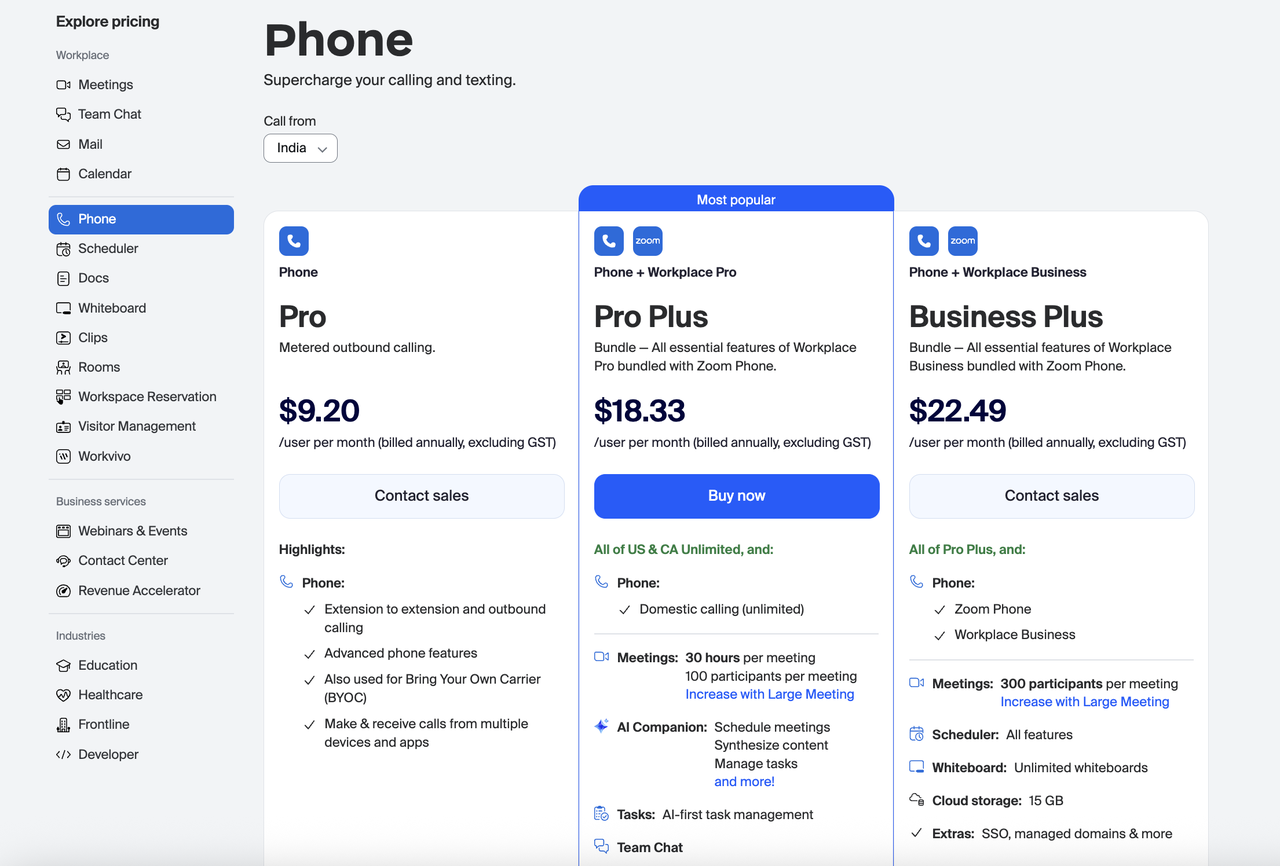
Image source: zoom.com
Zoom Phone Pro: $9.20/user/month
The Pro plan is designed for teams that need essential calling capabilities with metered outbound calling. It supports users who require a professional phone system at a low entry cost while keeping control over call usage. The plan includes key features such as extensions, multi-device support, and advanced phone features to ensure reliability. It also serves organizations using a Bring Your Own Carrier (BYOC) model, enabling flexible telecom setups. Overall, it is ideal for small teams or hybrid workforces who want dependable calling without unlimited minutes.
Features:
- Extension-to-extension and outbound calling: This feature allows users to call teammates internally and make outbound calls externally, supporting clear communication flows. Internal extensions help streamline operations, especially for departments and customer-facing teams. Outbound metered calling keeps costs predictable for low-volume users. It ensures employees remain reachable on a professional business line. The structure supports both remote and in-office environments.
- Advanced phone features: Users have access to capabilities such as call forwarding, transfer, routing, voicemail, and call recording, depending on the setup. These tools improve communication efficiency for support, sales, and operational teams. Advanced features help reduce missed calls and improve professionalism. They give teams control over how calls are handled in different scenarios. This upgrade supports both customer-facing and internal communication scenarios.
- Make & receive calls on multiple devices: Zoom Phone Pro works across desktops, mobile apps, and supported hardware devices. This ensures employees stay connected during travel, remote work, or office shifts. Multi-device support lets users switch seamlessly between platforms without dropping calls. It improves flexibility for hybrid teams that work across environments. The experience ensures reliable connectivity regardless of location.
Zoom Phone Pro Plus (Phone + Workplace Pro): $18.33/user/month
Pro Plus combines Zoom Phone with the full capabilities of Workplace Pro, creating a unified communication and collaboration suite. It includes unlimited domestic calling in the US & Canada, making it valuable for teams with high call volumes. The plan expands functionality with longer meetings, AI Companion tools, task management, and team chat. It enables teams to centralize calls, meetings, and productivity workflows in one system. This tier is ideal for growing businesses that want unlimited calling plus a richer collaboration platform.
Features:
- Unlimited domestic calling (US & CA): This removes metered billing and allows teams to call freely across the US and Canada. It supports high-volume operations such as customer service, sales, or support centers. Unlimited calling simplifies budgeting by eliminating unpredictable call charges. Teams can focus on productivity rather than managing call limits. This offers significant value to organizations with heavy calling needs.
- Meetings (30 hours, 100 participants): Pro Plus expands meeting capabilities to handle lengthy discussions, workshops, or recurring weekly sessions. The 100-participant limit provides flexibility for most small to mid-sized teams. It supports external client sessions, internal training, and cross-department discussions. Long-duration meetings eliminate interruptions for extended collaboration. This makes the platform more versatile for distributed teams.
- AI Companion: scheduling, synthesis, task management: The AI Companion helps automate meeting summaries, content organization, and task creation. It reduces administrative overhead by turning discussions into structured outputs. This improves follow-through and accountability across teams. AI scheduling further streamlines workflow planning. Overall, it enhances productivity by integrating intelligent automation into everyday operations.
Business Plus (Phone + Workplace Business): $22.49/user/month
Business Plus bundles Zoom Phone with Workplace Business features, offering the most complete enterprise-grade package. It includes all Pro Plus capabilities along with larger meeting capacity, enterprise security, Scheduler integration, and 15GB cloud storage. The plan is designed for mid-size to large organizations that need unified communication with advanced governance controls. Teams benefit from unlimited whiteboards, full access to docs, and cross-department collaboration features. It is the ideal choice for companies scaling their communication and operational infrastructure.
Features:
- Zoom Phone + Workplace Business bundle: Users get full phone capabilities, unlimited calling, and the highest-tier Workplace tools in one subscription. This eliminates the need for multiple separate communication platforms. The bundle ensures consistency across chat, meetings, whiteboards, docs, and calling workflows. It supports large teams with cross-functional collaboration requirements. The unified environment improves efficiency and reduces tool fragmentation.
- Meetings (300 participants per meeting): This tier supports large-scale customer sessions, all-hands, training programs, and multi-team collaborations. Teams can host expanded events without switching to a separate webinar tool. The capacity suits growing businesses with larger departments or public-facing engagements. It eliminates friction when participant numbers increase unpredictably. This capability is essential for scaling communication.
- Cloud storage: 15GB + enterprise extras (SSO, managed domains): The plan includes additional cloud storage for recordings, files, and collaboration assets. Enterprise controls like SSO and managed domains ensure secure access management for organizations with strict IT policies. These features simplify onboarding, compliance, and user governance. They help reduce security risks and align with corporate standards. Combined, they enhance the platform's reliability for larger teams.
Zoom webinar and event pricing plans
Zoom offers multiple pricing tiers for Webinars and Events, based on attendee counts and production needs. The standard Webinar plan at $66.67 per month supports up to 300 attendees and includes interactive engagement tools like Q&A, polls, and chat. Webinars Plus, at $290.83 per month, is designed for advanced production with pre-recorded sessions, backstage coordination, and polished layouts. The Events plan at $415.83 per month is ideal for multi-session conferences and includes ticketing options, lobby experiences, and sponsor tools. All webinar and event plans require Zoom Workplace Pro.
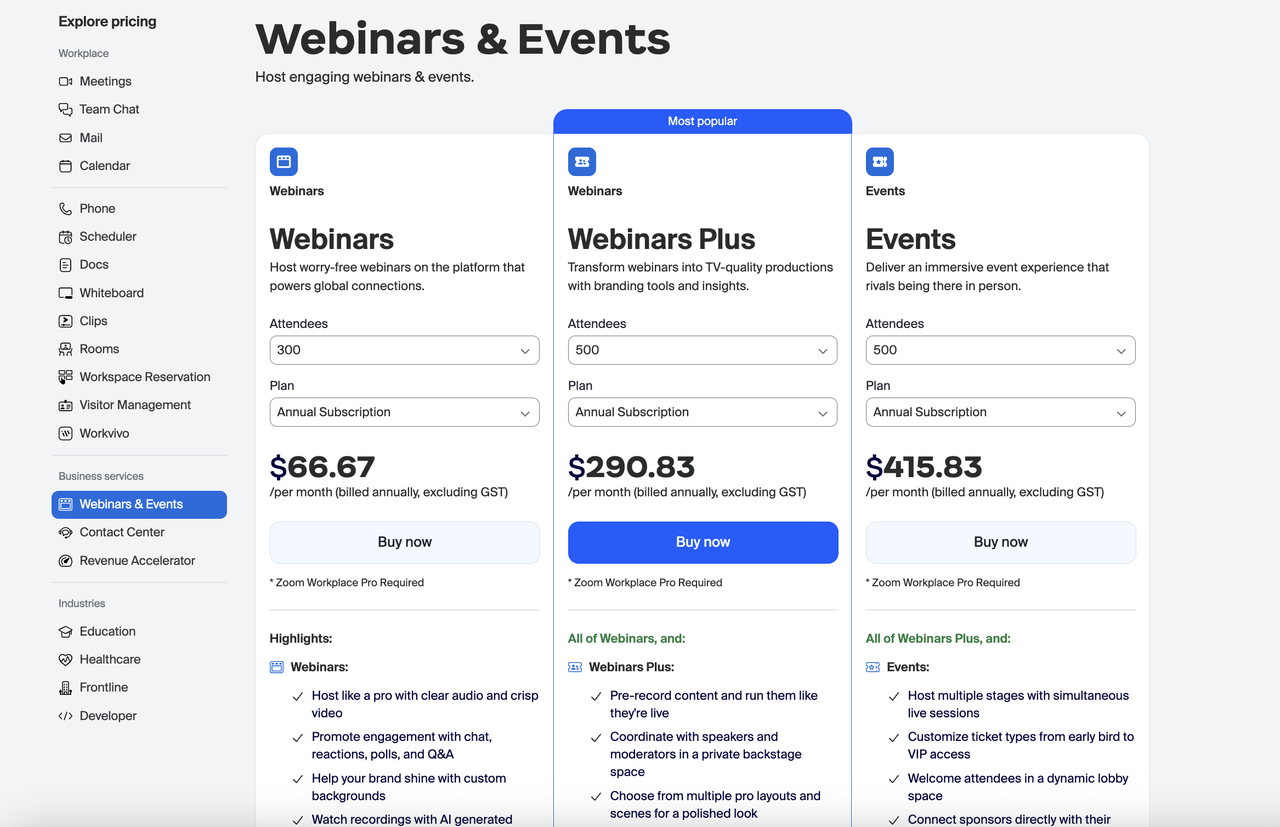
Image source: zoom.com
Webinars: $66.67/user/month
The Webinars plan is designed for teams that want to host professional, stable, and interactive online webinars without complexity. It includes all the core presentation tools needed to run smooth sessions for audiences of up to hundreds of attendees. The package focuses on clarity, engagement, and brand presentation through polls, chat, reactions, and virtual backgrounds. It also supports AI-generated highlights for quick session reviews. This tier is ideal for marketing teams, trainers, educators, and thought-leadership sessions.
Features:
- Clear audio and crisp HD video for professional hosting: This ensures presenters deliver high-quality sessions without interruptions, helping maintain audience trust. Smooth video and stable audio elevate the professional experience. It supports better engagement and reduces dropout during long sessions. High-definition quality is especially valuable for demos, training, and visual content. It creates a polished experience for both the host and viewers.
- Engagement tools: These tools encourage interaction and help maintain attention throughout the webinar. Polls allow presenters to gather instant feedback or gauge knowledge. Q&A lets attendees participate actively without disrupting the flow. Reactions add lightweight real-time engagement, making sessions feel more dynamic. Combined, they turn passive viewing into interactive learning.
- Branded sessions with custom virtual backgrounds: Presenters can enhance brand identity by using consistent on-screen backgrounds and layouts. This is important for marketing-focused webinars where branding shapes audience perception. Custom visuals add authority and help distinguish professional events from casual meetings. They also create a recognizable visual environment across multiple sessions. This strengthens brand presence during live events.
Webinars Plus: $290.83/user/month
Webinars Plus transforms standard webinars into broadcast-style productions with advanced backstage tools and polished layouts. It adds pre-recording, advanced speaker coordination, and studio-quality presentation options. This plan is ideal for organizations that want to deliver events that feel like live TV broadcasts. The additional controls help teams manage complex events with multiple hosts and structured segments. It is built for high-stakes webinars such as launches, conferences, and executive presentations.
Features:
- Pre-record and run sessions as if they're live: This lets presenters record flawless content ahead of time and broadcast it just as if it were a live session. It removes the risk of mistakes while preserving audience engagement. Automated broadcasting supports global attendees across time zones. It is ideal for product launches, executive messages, or training modules. The feature improves quality control and reduces event-day stress.
- Private backstage for speaker coordination: Speakers and moderators can meet in a dedicated backstage area before going live. This ensures smooth coordination and role assignment. Teams can finalize cues, check equipment, and organize transitions without the audience seeing. Backstage environments replicate the workflows of professional physical events. It increases event reliability for multi-speaker formats.
- Professional layouts and scene switching: Presenters can choose from multiple polished layouts for enormous visual impact. Scene switching allows smooth transitions between speakers, screens, and content. This makes events feel like high-quality productions rather than simple screen shares. Visual consistency improves audience focus and retention. It significantly elevates the overall viewing experience.
Events: $415.83/user/month
The Events plan is the highest-end package built for teams hosting large, immersive, multi-stage virtual conferences. It includes all Webinars Plus features and adds event-level tools, including lobbies, ticketing, sponsor booths, and multi-track sessions. This tier replicates the feel of an in-person experience by giving attendees freedom to explore stages and sessions. It supports complex agendas and hundreds of participants. Events is ideal for summits, expos, festivals, and enterprise-scale virtual conferences.
Features:
- Multiple stages with simultaneous live sessions: This allows hosts to run conferences with several parallel tracks, just like in-person events. Attendees can choose sessions that match their interests. Multi-stage support is perfect for industry summits with diverse topics. It helps organizers run rich, multi-speaker agendas without schedule conflicts. This makes online conferences more engaging and flexible.
- Customizable ticketing: Organizers can design tiered ticketing experiences to maximize revenue and segment attendees. Early-bird discounts help boost registrations, while VIP options add premium perks. This flexibility supports various monetization strategies. Custom ticketing is ideal for professional events, festivals, and paid workshops. It lets teams tailor pricing to different audience types.
- Dynamic lobby and sponsor interaction: The virtual lobby provides a centralized navigation hub for attendees. Sponsors can showcase booths, videos, and live interactions to enhance event monetization. Attendees can network, explore content, and join sessions from one place. The lobby creates an immersive "venue-like" experience. It bridges the gap between digital and physical events.
Limitations of Zoom you should know
Zoom remains one of the world's most widely used communication platforms, but many teams discover its limitations as they scale beyond basic meetings. While the ecosystem is large, its modular design means businesses must purchase multiple add-ons to achieve a fully functional workspace. As a result, Zoom pricing plans cost more than expected once Phone, Docs, Whiteboard, and Scheduler are added. This can complicate budget forecasting, IT planning, and tool consolidation efforts. Additionally, Zoom's architecture is fundamentally video-first rather than workflow-first, leaving gaps in project execution and in everyday operational needs. Understanding these limitations helps businesses choose tools that align better with modern collaboration and execution workflows.
Modular pricing quickly becomes expensive
Zoom's modular ecosystem means each feature—Meetings, Phone, Docs, Whiteboard, Scheduler—comes at an additional cost. The more a business expands, the faster Zoom pricing plans cost escalates across departments. What begins as a simple video solution becomes a stack of interconnected subscriptions. This raises overhead for finance teams who must manage multiple renewals and pricing models. Over time, the total cost often exceeds that of unified platforms that bundle everything into a single plan.
Collaboration is spread across various tools
Zoom divides everyday collaboration into separate modules: files in Docs, chat in Team Chat, tasks in other external tools, and meetings in yet another area. This fragmentation slows down workflows because teams constantly switch contexts to find information. It also increases confusion about where work actually lives, especially across multi-department teams. As usage grows, Zoom pricing plans cost more as businesses pay for additional features. Ultimately, productivity suffers because essential collaboration isn't happening in one unified place.
Whiteboard, Docs, and Scheduler all have separate pricing
Even core collaboration features—Whiteboard, Docs, Scheduler—require separate monthly fees. This forces teams to evaluate which departments need which tools, adding more administrative decisions. As companies scale to dozens or hundreds of employees, these micro-subscriptions significantly raise the cost of Zoom pricing plans. IT teams also struggle with provisioning and access control across so many standalone modules. The result is higher operational complexity for tools that should be easy and integrated.
Video-first, not workflow-first
Zoom is fundamentally designed around video meetings, not end-to-end business workflows. Teams increasingly need more than calls—they need structured data, docs, tasks, approvals, and automation. Because Zoom doesn't center these functions, companies must supplement it with external workflow tools. This not only increases the cost of Zoom's pricing plans but also reduces efficiency due to tool sprawl. Modern teams require platforms built around execution, not just communication.
AI Companion is locked behind higher plans
Zoom's AI Companion, including summaries, task extraction, and content drafting, is only available on Pro, Business, or specific add-on plans. This leaves many users paying extra just to access AI features that are now standard in modern collaboration platforms. Organizations must upgrade entire departments just to unlock AI for everyone. As a result, Zoom pricing plans cost rise steeply for AI-enabled workflows. This makes AI adoption more expensive compared to unified workspaces that include it natively.
Limited project execution features
Zoom lacks built-in support for structured data management, automated workflows, project boards, or multi-step operational processes. Teams must rely on external tools like Notion, Asana, Jira, or ClickUp for anything beyond communication. This creates duplication, inefficiency, and scattered information across platforms. Businesses end up paying more overall because Zoom pricing plans only cover communication—not execution. The gap between meetings and action remains a significant limitation for operational teams.
Afterthought
While Zoom excels at video communication, its modular design, high cumulative costs, and fragmented collaboration can make managing workflows and projects cumbersome. Teams often need multiple add-ons to handle tasks, documents, approvals, and automation, resulting in tool sprawl and inefficiency. For organizations seeking a more unified approach, Lark offers an all-in-one platform that combines multiple collaborative features. Let's take a closer look and check how this platform can make a difference
Smart alternative: Lark's all-in-one workspace with robust features
Choosing the right collaboration platform goes beyond meetings—teams today need messaging, documents, tasks, workflows, and scheduling to operate efficiently in one place. While Zoom offers strong meeting capabilities, its modular pricing and separate product add-ons can make the overall experience fragmented and costly as needs grow.
Lark takes a different approach by providing an integrated workspace where communication and work tools seamlessly come together. This simplifies daily operations, reduces tool switching, and streamlines budgeting for teams that prefer predictable costs. With everything built into one environment, teams spend less time managing apps and more time on work management. This unified structure is what makes Lark a compelling alternative for organizations seeking a more connected way to collaborate.
Contextual communication tied to docs, tasks, and data.
Lark Messenger keeps conversations tightly connected to the work itself. Teams can jump from chat to a document, task, or data record instantly without losing context. In contrast, Zoom’s chat is isolated—messages live separately from files, tasks, and project spaces, making follow-ups harder to organize. Lark’s connected environment eliminates this disconnect, allowing teams to discuss, decide, and act in the same workspace without switching apps.
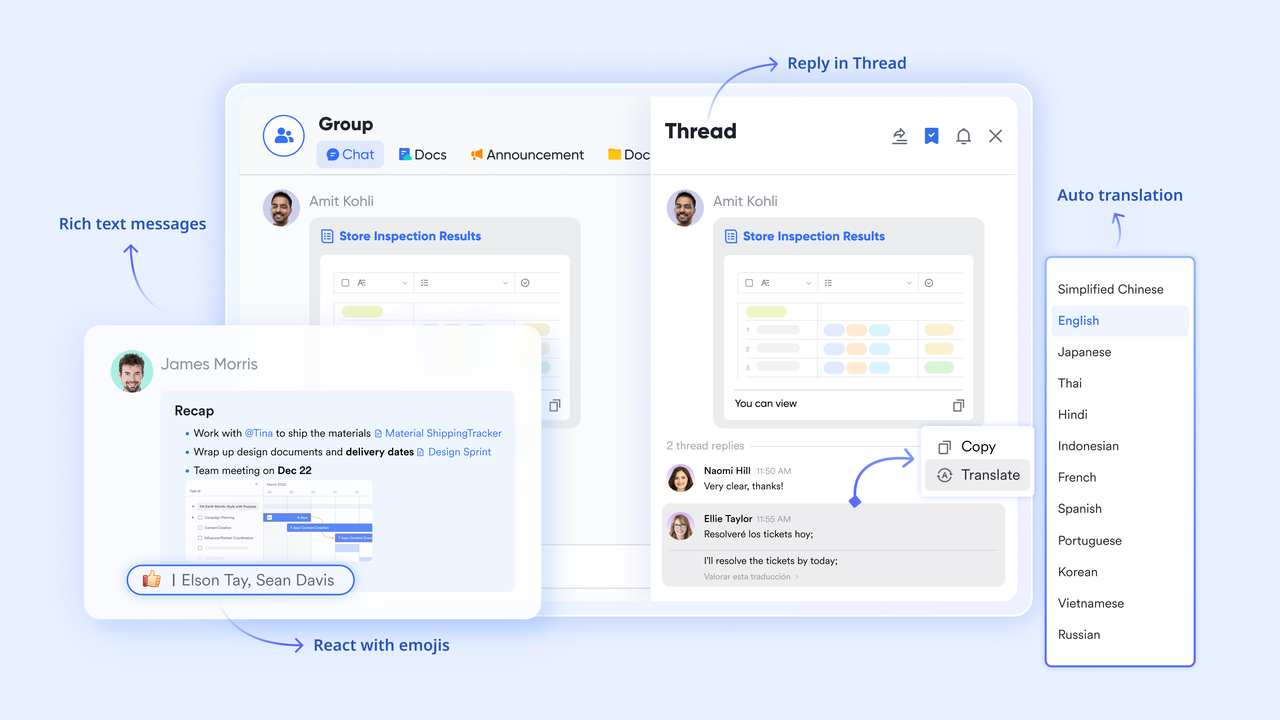
Reliable calls built directly into the same workspace — no add-ons needed.
Lark Meetings offers video and audio calls directly inside the same workspace where teams already manage tasks, documents, and communication. Zoom requires users to rely solely on its meeting module, with everything else—messaging, scheduling, collaboration—existing in external tools. This separation forces constant context switching. With Lark, meetings tie seamlessly into Calendar, Messenger, Tasks, and Docs, allowing teams to move from a conversation to a call—and back to execution—in one smooth flow.
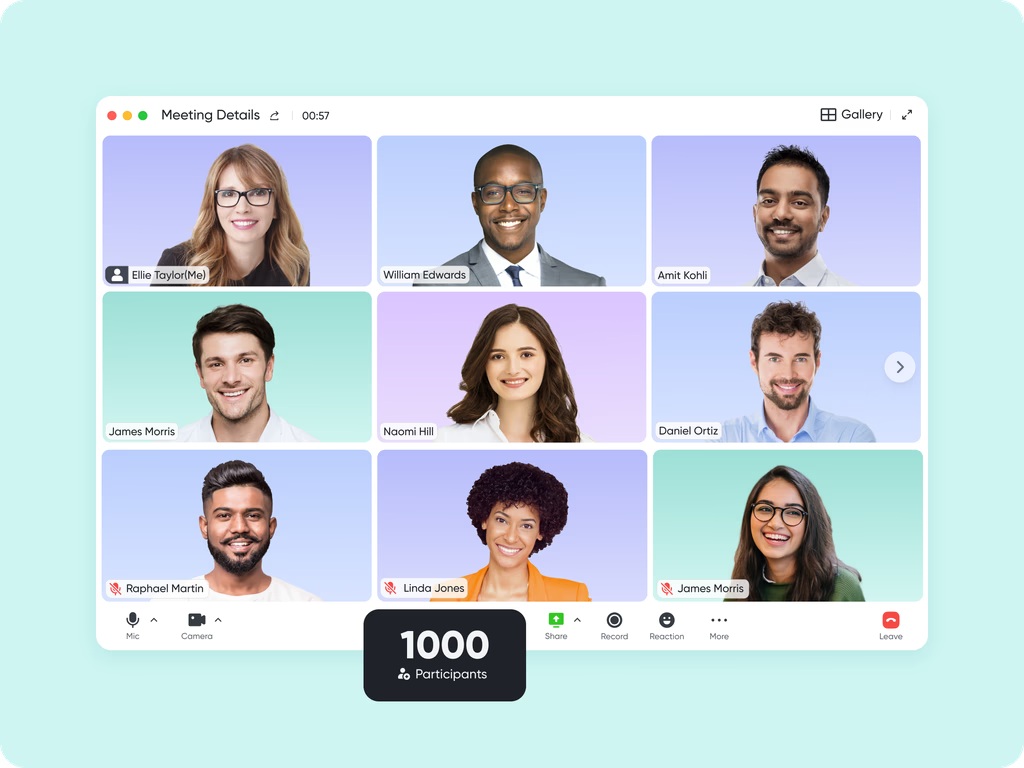
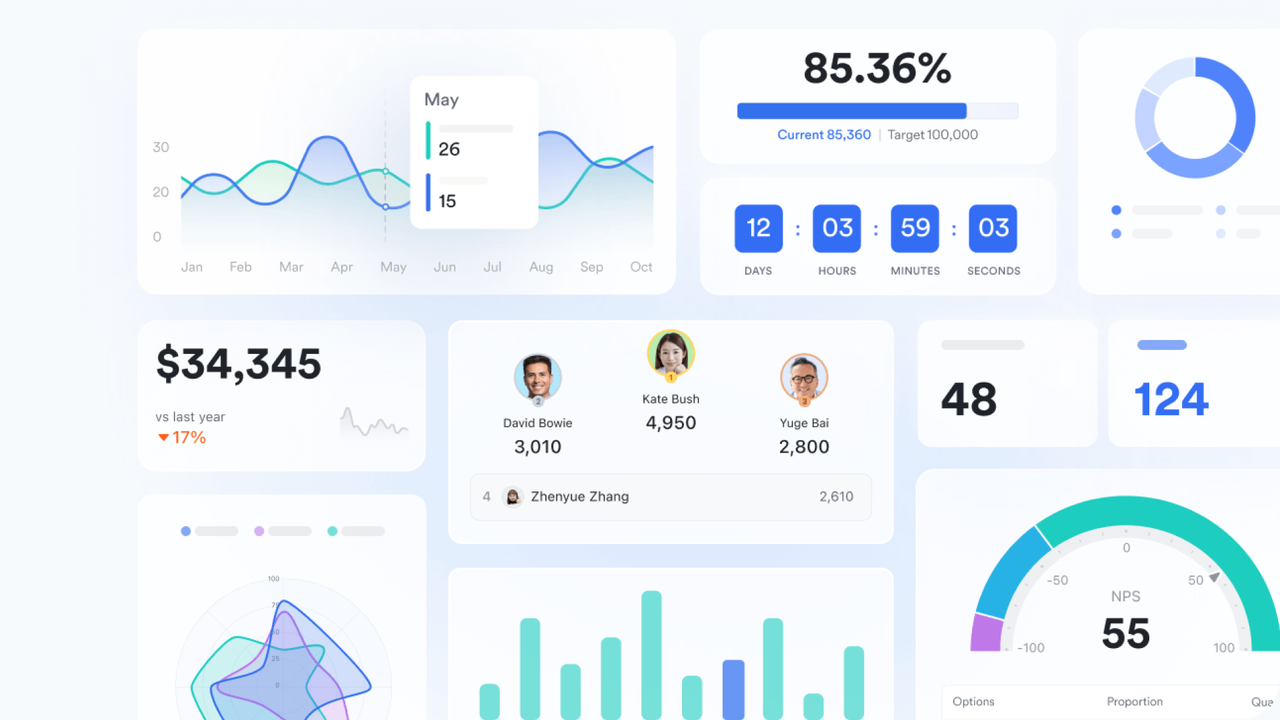
Structured data, workflow logic, rules, and automation
Lark Base gives teams a powerful system for structured data, workflow logic, and rule-based automation. Teams can manage multi-step processes without leaving the workspace. Zoom offers no native capabilities for structured data or workflow automation, forcing teams to rely on external systems for approvals, databases, or operational workflows. Lark’s built-in Base closes this gap by giving teams a true operational core for tracking, decision-making, and automated work.
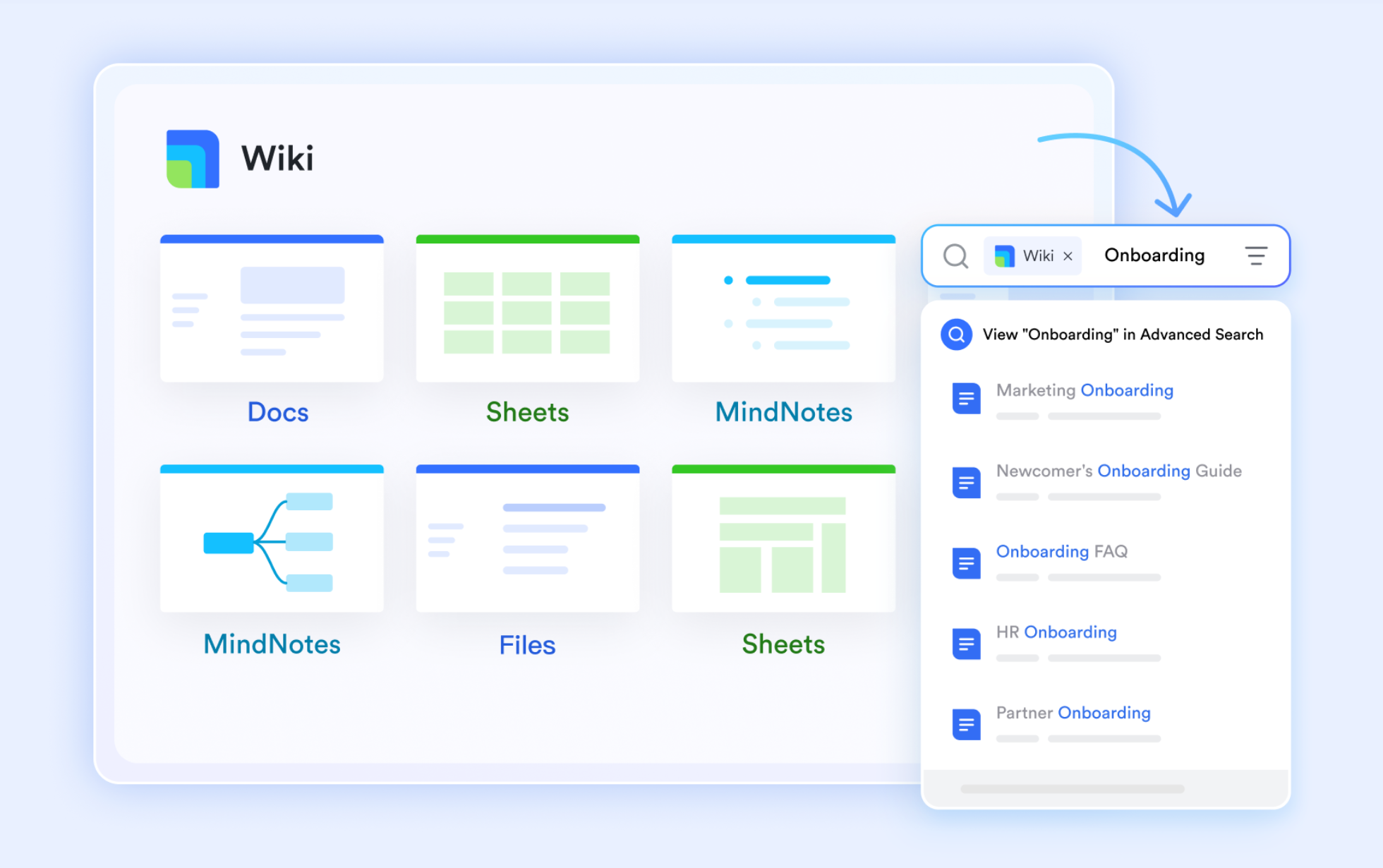
Real-time documents and structured knowledge in one place.
Lark Docs allows teams to co-edit content in real time, add comments, embed media, and work fluidly across departments. Lark Wiki builds on this by organizing company knowledge into a structured, searchable hub that anyone can access instantly. Together, they centralize documents and knowledge so teams can produce, refine, and reference content without having to navigate multiple systems.
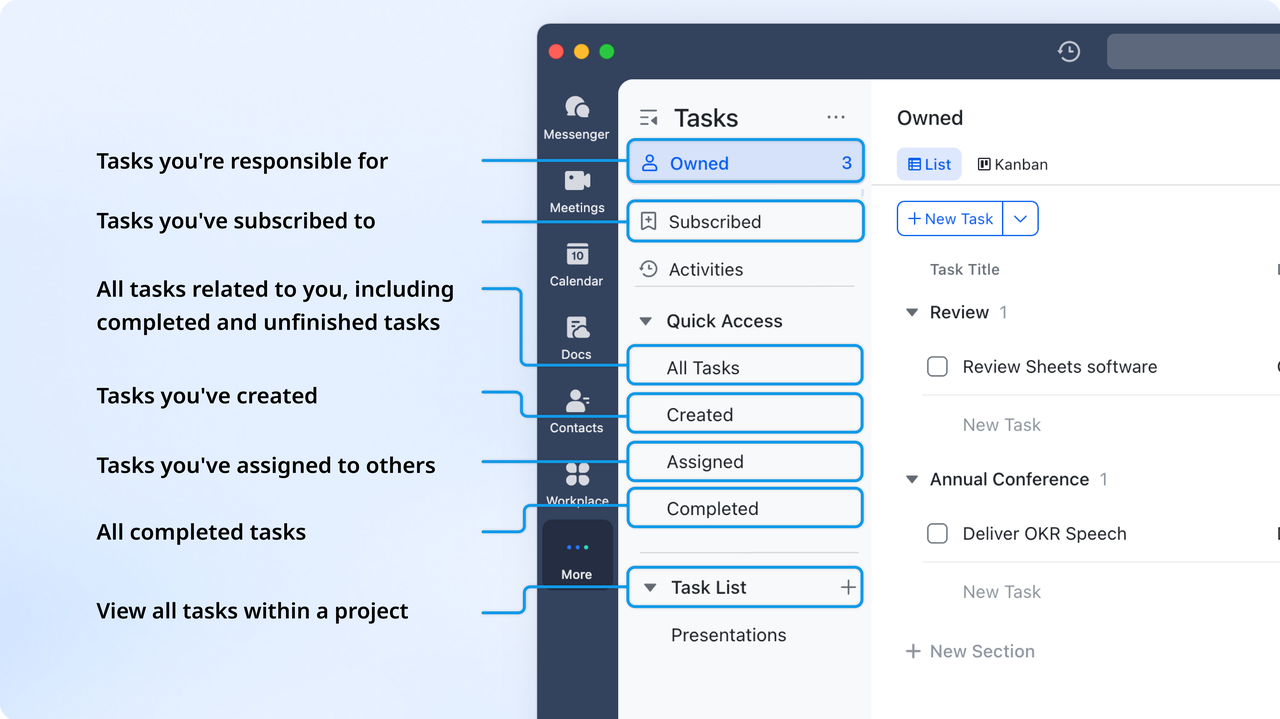
Clear ownership, due dates, status updates
Lark Tasks brings clarity to execution with ownership, due dates, real-time status updates, and links to related docs or chats. Zoom does not include built-in task management, forcing teams to rely on separate apps for action tracking. This often scatters responsibilities and makes follow-ups difficult. Lark’s task system keeps all work visible and connected to conversations and documents, ensuring accountability at every step.
- Starter plan: Free forever plan that includes 11 powerful tools for up to 20 users. It also includes 100GB of storage, 1,000 automation runs, AI translations, and more.
- Basic plan: $6/user/month (billed annually) for up to 500 users. It includes everything in Starter plus group calling for up to 500 attendees, 5TB of storage, 1000 automation runs, and more.
- Pro plan: $12/user/month (billed annually) for up to 500 users. It includes everything in Starter, plus group calling for up to 500 attendees, 15 TB of storage, 50,000 automation runs, and more.
- Enterprise plan: Contact sales for custom pricing. Supports unlimited users and includes even more automation runs and advanced security, compliance, and management features.

Starter
Pro
Enterprise
Starter
For small teams with simple communication needs
$0
/ user / month
20 users max
18 months message history
1-on-1 video meetings
100 GB storage
Lark Docs & Mail
1000 Base automation runs/month
2000 rows per table in Base
Pro
For companies with comprehensive collaboration and management needs
$12
/ user / month
500 users max
Unlimited message history
500-participant video meetings
15 TB storage
Lark Docs & Mail
50k Base automation runs/month
20k rows per table in Base
Enterprise
For large companies with advanced security and organizational management needs
Get a personalized demo and pricing
Unlimited users
Unlimited message history
500-participant video meetings
15 TB storage + 30 GB storage/user
Lark Docs & Mail
500k Base automation runs/month
50k Base automation runs/month
Single sign-on (SSO)
Pro
For companies with comprehensive collaboration and management needs
$12
/ user / month
500 users max
Unlimited message history
500-participant video meetings
15 TB storage
Lark Docs & Mail
50k Base automation runs/month
20k rows per table in Base
Final check: Zoom vs Lark comparison of features and prices
Before diving into the details, the table below provides a clear, side-by-side comparison of how Zoom and Lark differ in features and pricing. The two tables highlight where each platform excels—Zoom in video-centric communication and Lark in unified collaboration—helping you quickly understand which solution better fits your team's workflow and budget.
Features
Pricing comparison
Conclusion
Choosing the right collaboration platform can significantly impact how teams communicate, manage projects, and stay productive. Zoom remains a powerful option for video meetings and webinars, but its modular pricing and separate tools can create added complexity as organizations scale. In this guide, we explored Zoom's complete pricing structure—covering Workplace plans, Phone, Docs, Whiteboard, Scheduler, Webinars, and Events—so you can better assess which plan truly fits your needs. For teams looking to reduce tool fragmentation and streamline daily workflows, an integrated alternative like Lark offers a unified workspace with messaging, meetings, docs, tasks, and automation all in one place. By bringing your core work tools under a single platform, Lark helps teams stay focused, coordinated, and efficient.
If you're exploring simpler, more connected ways to collaborate, you can learn more about Lark's plans and capabilities.
FAQs
Does Zoom offer monthly vs. yearly pricing?
Yes, Zoom allows users to choose between monthly and yearly billing across most of its plans. Annual billing offers a slight discount, while monthly billing provides more flexibility for teams with short-term needs. However, costs can still add up because different modules—like Phone, Webinars, Whiteboard, or Scheduler—may require separate subscriptions. This underscores the importance of budgeting, especially for growing teams. Some organizations prefer unified platforms like Lark to avoid juggling multiple billing cycles.
Is Zoom cheaper for small teams with only occasional meetings?
Zoom can be cost-effective for small teams that only need short, occasional meetings, especially with its free Basic plan. But if teams need more extended sessions, more participants, or additional tools like Docs, Whiteboard, or Phone, the price increases quickly. This may reduce the cost advantage for teams with evolving needs. Occasional users may still find value, but frequent collaboration requires add-ons. Some smaller teams choose Lark for more built-in features at predictable pricing.
How does Zoom pricing compare with Google Meet or Microsoft Teams?
Compared to Google Meet or Microsoft Teams, Zoom often provides stronger meeting features but can become more expensive due to its modular pricing. Google and Microsoft bundle more tools—email, docs, storage, and chat—into single subscription packages, which is why many businesses also evaluate Google Workspace alternatives when comparing collaboration platforms. Zoom's add-ons can raise the overall cost if teams need more than just meetings. Evaluating total tool usage is essential when comparing platforms. Some organizations choose Lark because it consolidates many of these capabilities into a single integrated workspace.
Are there hidden fees for Zoom pricing, such as storage upgrades or add-on charges?
Zoom's base plans cover meetings, but many advanced capabilities—such as Webinars, Events, Phone, Whiteboard Plus, and extra cloud storage—come as paid add-ons. These add-on costs can accumulate, especially for teams needing a broad collaboration toolkit. Storage upgrades or expanded meeting capacities may increase the final monthly cost. It's important to review all required features before choosing a plan. Teams looking for fewer add-ons sometimes turn to Lark, which bundles more tools in a single platform.
Related reading
Table of contents
Start using Lark today

Manage all your work in one place
Boost team efficiency by 10x
Save up to 70% on software costs
Table of contents
Start using Lark today
Manage all your work in one place
Boost team efficiency by 10x
Save up to 70% on software costs
Keep reading



Lark recognized in 2023 Gartner® Collaborative Content Workspaces and Meeting Solutions reports
Lark, the global superapp for productivity, is delighted to announce it receives recognition in the Gartner's 2023 Innovation Insight for Collaborative Content Workspaces and Market Guide for Meeting Solutions.





2026 Lark Technologies Pte. Ltd.
Headquartered in Singapore with offices worldwide.






Explore: