This Keap review examines how the platform performs across real business workflows, beyond surface-level features. Keap is widely known for combining CRM, email marketing, and automation to support lead nurturing and sales follow-ups. While these tools can deliver strong results, their impact depends on how well they align with daily execution needs. In this Keap review, we explore features, pricing, and user experience to understand where Keap fits best and where teams encounter challenges as they scale.
Explore connected workspaces for growing teams
What is Keap?
Keap is a customer relationship management and platform built primarily for small businesses and service-based teams. It was previously known as Infusionsoft, a name still widely used today, which is why Infusionsoft (Keap) review searches remain common. The rebrand aimed to position Keap as a more approachable and simplified solution.
Keap combines contact management, email marketing, , automation, invoicing, and payments in one platform. The idea is to help businesses capture leads, nurture them through automated campaigns, and convert them into customers without relying on multiple tools. This makes Keap especially popular among coaches, consultants, and small online businesses.
This Keap CRM review shows that Keap is designed around marketing-driven workflows first, with CRM
and sales features built to support that core focus.
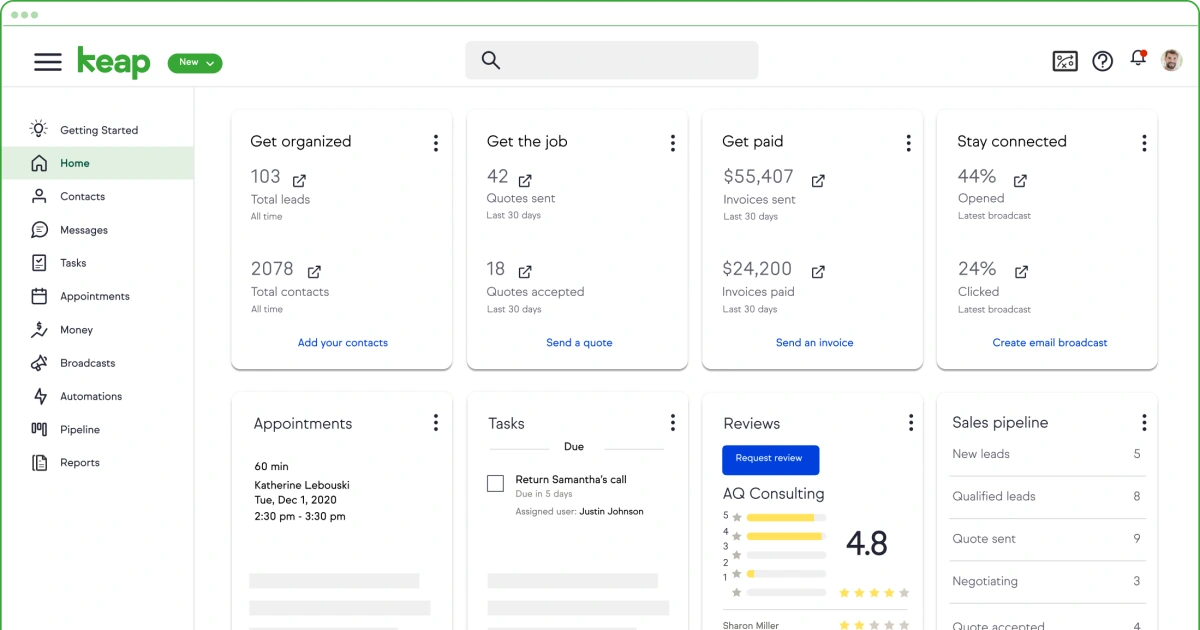
Image source: keap.com
Keap features explained: CRM, marketing, and automation
Keap brings together customer data, , and automation to support revenue-focused workflows. The platform is designed to help small businesses manage leads, nurture prospects, and convert them into customers with minimal manual effort. Each feature area plays a specific role in guiding contacts through the sales journey. While the tools are powerful, they are built primarily around automation rather than everyday collaboration. Understanding how each feature works helps teams evaluate whether Keap fits their operating style.
- Keap CRM review: Keap is built around individual contact records rather than complex account structures. It centralizes customer details, communication history, and activity tracking in one place. The CRM supports sales pipelines and basic task management to help teams follow up consistently. It works best for simple sales processes tied closely to marketing campaigns. Teams with multi-stage or collaborative sales cycles may find the structure limiting.
- Keap email marketing review: Keap's email marketing tools are designed to support automated lead nurturing and customer communication. Users can create campaigns using templates, personalization fields, and behavioral triggers. Emails connect directly to contact actions, improving targeting and relevance. Performance tracking shows opens, clicks, and conversions. Set up and optimization require time for best results.
- Automation and workflows: Automation is central to how Keap operates across CRM and marketing activities. Visual workflow builders allow teams to trigger emails, tasks, and data updates automatically. These workflows reduce manual follow-ups and improve process consistency. As automation grows, maintenance becomes more complex. Clear planning is required to avoid workflow conflicts.
- E-commerce and invoicing tools: Keap includes built-in invoicing and payment tools for service-based businesses. Teams can send invoices, collect payments, and link transactions to contact records. Order forms connect sales activity with marketing automation. These tools support simple products and services well. They are less suitable for complex e-commerce operations.
- Reporting and analytics: Keap provides reporting tools for monitoring and sales activity. Dashboards offer high-level insights into revenue and engagement. Email and pipeline reports help teams evaluate conversion trends. Custom reporting options are limited. Many teams export data for deeper analysis.
Keap pricing and plans: What you pay and what you get
Keap uses a calculator-based pricing model rather than fixed tiers. Your monthly cost is determined by factors such as the number of users and contact volume, with pricing typically starting at a higher base level and increasing as your database grows. This approach allows Keap to tailor plans to specific business needs, but it also makes costs less predictable over time, especially for teams adding contacts, users, or advanced features as they scale.
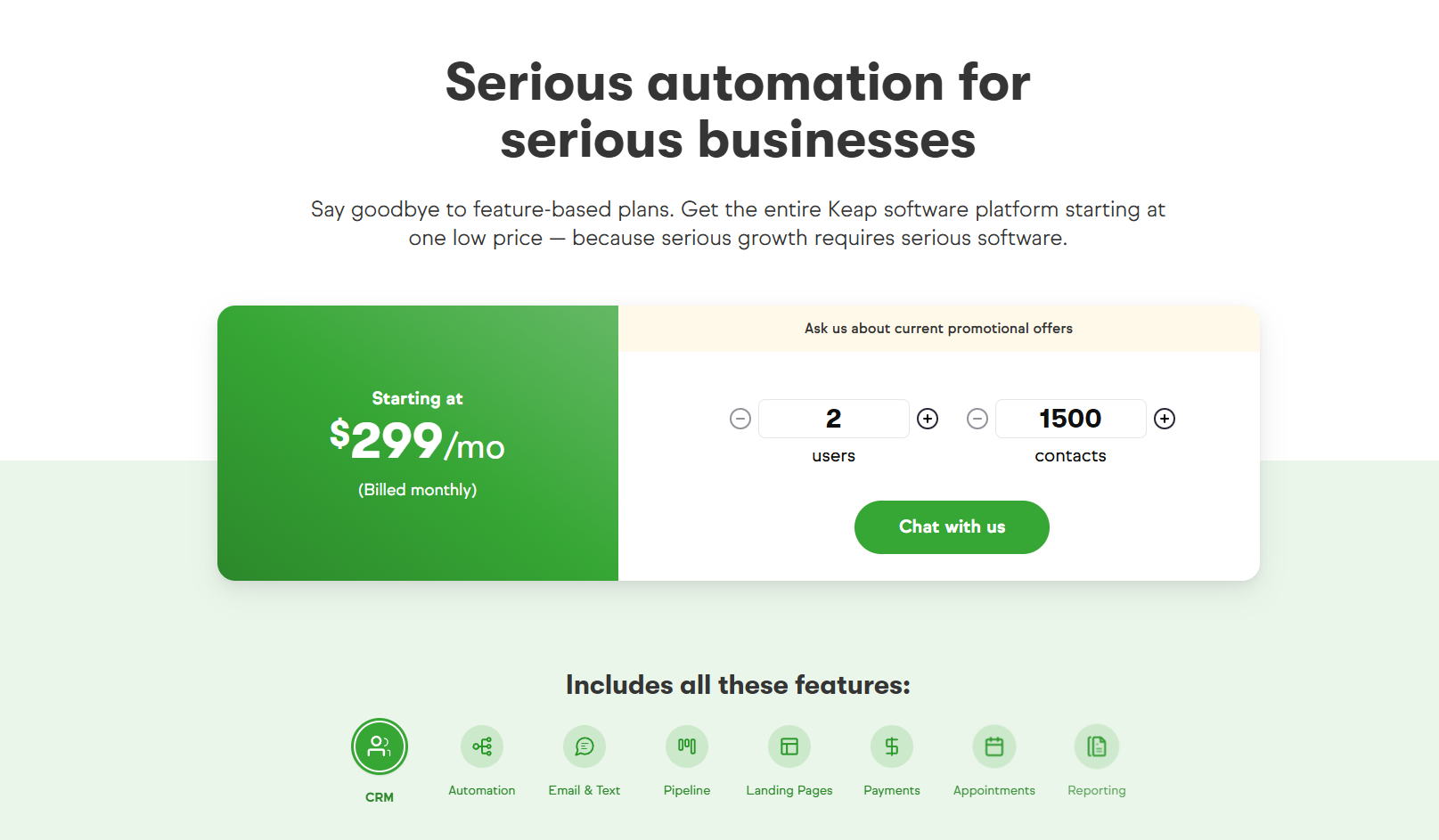
Information source: keap.com
Update time: 2025-12-18
Note: Pricing and plan details reflect publicly available data as of the update date and may vary based on region, billing cycle, and number of agents.
Key factors that affect Keap pricing include:
- Number of users: Adding more team members increases the monthly subscription cost. Each additional user requires access to CRM, automation, and communication features. This can raise expenses quickly for growing teams. Businesses with expanding sales or support staff often feel this impact early.
- Contact volume: Pricing scales as your grows over time. As more leads and customers are added, Keap automatically moves businesses into higher pricing ranges. This makes long-term cost planning more difficult. Contact growth is one of the biggest drivers of rising expenses.
- Selected features: Advanced automation,, and e-commerce tools can increase overall pricing. Businesses that rely heavily on automation flows or campaign features often pay more. Feature selection plays a key role in total cost. Teams may need to reassess features as usage evolves.
- Billing cycle: Monthly and annual billing options can affect total spend. Annual plans may offer cost savings compared to monthly billing. However, longer commitments reduce flexibility. Teams must balance savings with adaptability.
- Add-ons and services: Onboarding, training, and premium support services add to overall costs. Many businesses require guided setup due to platform complexity. These services improve adoption but increase total ownership costs over time.
Pros and cons of using Keap in real workflows
Keap's strengths and limitations become clearer when used in day-to-day business workflows. While the platform offers powerful tools for automation and email marketing, real usage often highlights trade-offs related to complexity, cost, and flexibility. Understanding these pros and cons helps teams evaluate whether Keap supports how they actually work as they grow. Pros
- Strong marketing automation supports lead nurturing at scale. This reduces manual follow-ups.
- Email marketing tools are powerful and flexible. They support personalization and segmentation.
- Built-in invoicing simplifies billing for service businesses. Payments connect directly to CRM records.
- Visual automation builders support structured workflows. This improves consistency.
- Suitable for marketing-driven teams focused on conversions and revenue.
Cons
- Setup and onboarding require time and training. New users often feel overwhelmed.
- Pricing increases as contacts and users grow. Long-term costs are difficult to predict.
- Limited flexibility for or internal collaboration. Execution feels fragmented.
- Daily tasks and conversations feel disconnected from CRM records.
- Automation-heavy design may feel rigid for teams preferring simpler workflows.
Why users are looking for an alternative tool
As businesses grow, the gap between powerful features and practical daily use often becomes more visible. Many teams adopt Keap for its automation strengths, but later find that complexity and cost affect productivity. Day-to-day execution, collaboration, and flexibility become higher priorities over time. These factors explain why many users begin exploring alternative tools that better support how teams actually work.
- Complex setup and learning curve: Many users find Keap powerful but difficult to configure during initial setup. , workflows, and data structures requires time and training. Teams often depend on onboarding support to become productive. This slows adoption for fast-moving businesses.
- Costs that increase as usage grows: Keap pricing rises as contact lists expand and more users are added. Add-ons and advanced features further increase monthly costs. Predicting long-term spending becomes difficult for growing teams. Budget planning often requires regular reassessment.
- Limited flexibility outside : Keap works best for email-driven workflows tied to campaigns. Teams managing projects, internal collaboration, or cross-team execution face limitations. Working outside marketing often feels disconnected. This creates friction in daily operations.
- Sales data and daily work feel disconnected: Customer records, tasks, and conversations live in separate areas. Follow-ups and handoffs require extra navigation. Important context is harder to track. This slows response time and affects collaboration.
- Dependence on automation-heavy processes: Keap relies heavily on structured automation to function efficiently. Teams preferring simpler and more may feel constrained. Adjusting processes requires configuration effort. Every day execution can feel rigid.
As teams grow, many begin to look beyond feature-heavy CRM systems toward tools that better support day-to-day execution. Rather than adding more automation or configuration, they want a workspace where customer data, tasks, conversations, and documents stay connected. This shift in priorities is what leads many teams to consider a more unified, execution-focused approach.
Simplify daily work across teams
Lark: Bringing CRM, collaboration, and execution together
Modern teams increasingly look for tools that reduce fragmentation rather than add more . Instead of managing CRM, chat, docs, and tasks separately, they prefer a shared workspace. approaches CRM differently by connecting with communication, documents, tasks, and workflows in one environment. Rather than focusing only on campaigns, it supports day-to-day execution where teams actually work.
Structured customer database
provides flexible data tables to manage customer records, deals, and pipelines. Beyond simple rows and columns, it features various field types—such as automated formula fields, two-way link fields, and attachment fields—that allow you to capture complex deal details and contract files without any technical setup. For data visualization, it offers customizable views like for deal stages, Gantt view for , all of which can be toggled instantly to suit different team roles. This low-code flexibility ensures that your CRM scales alongside your business, providing enterprise-grade power. 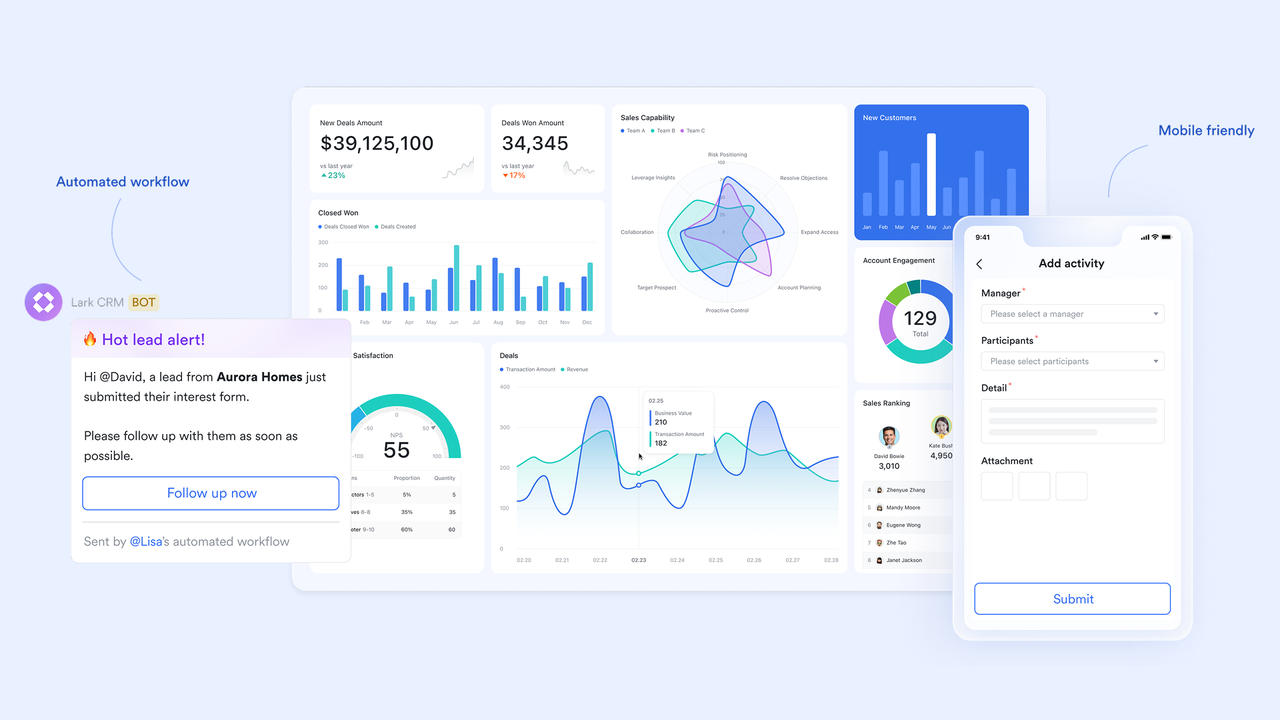
Contextual communication hub
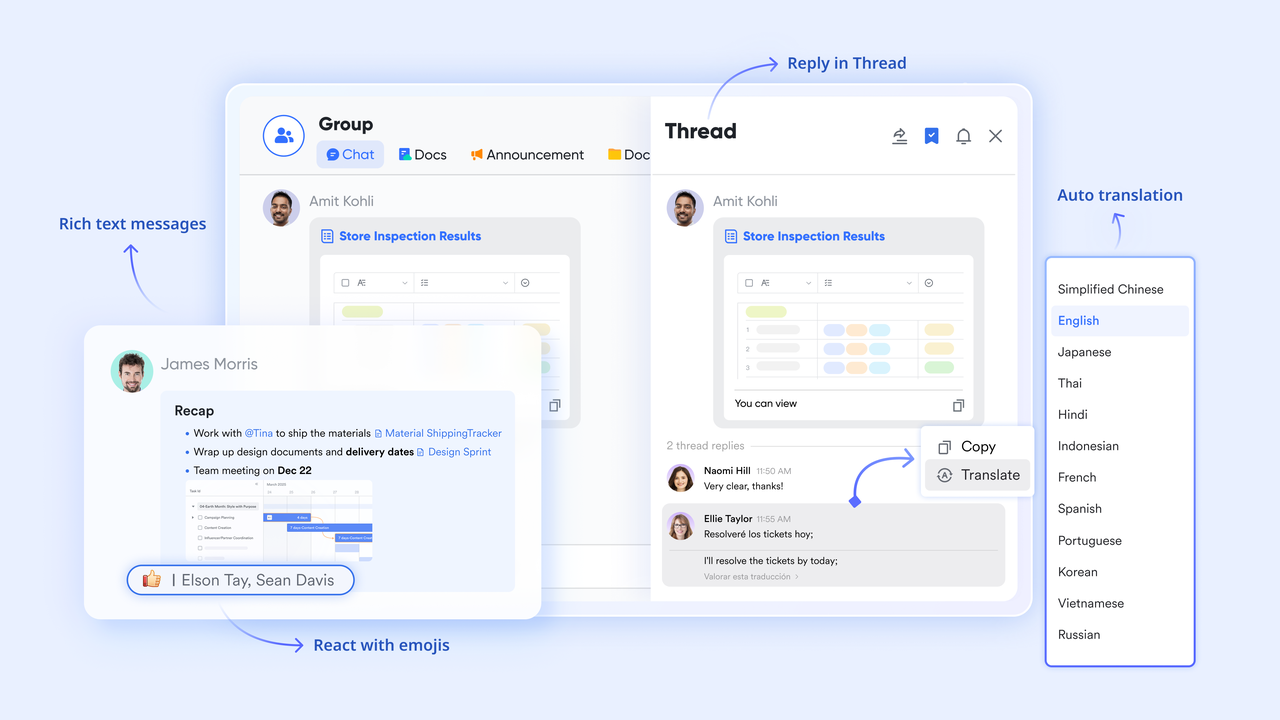
keeps conversations directly connected to customer context instead of scattered across channels. To keep the organized, pins and tabs let teams anchor live Lark Base dashboards or contract docs at the top of a chat, while threads keep specific technical discussions from cluttering the main sales feed. Furthermore, the "Flag" and "Mark as Done" functions allow sales reps to treat their inbox like a triage system. This combination of tools ensures that communication isn't just "talk", but a structured part of the sales execution process.
Online document collaboration platform
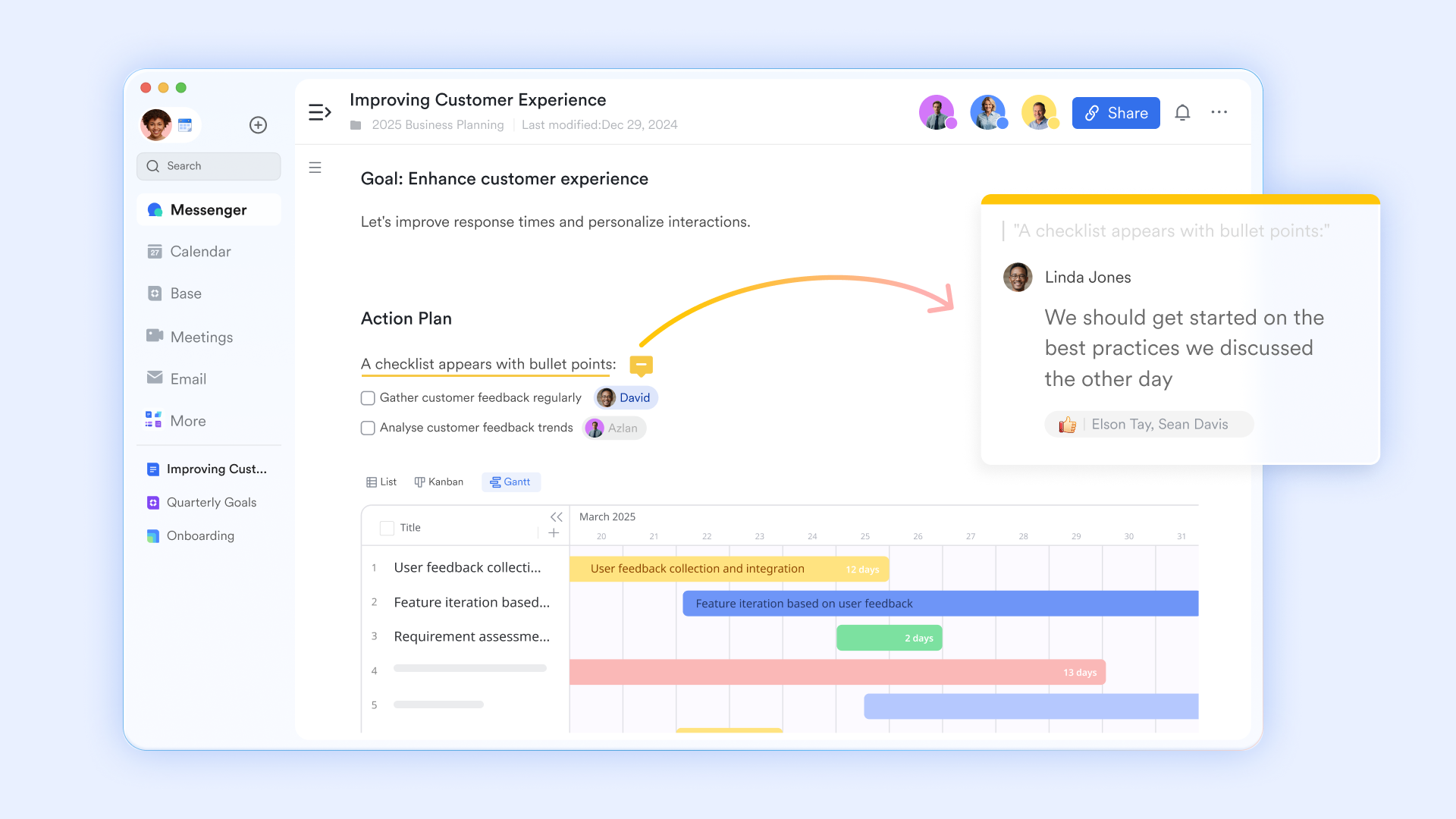
allows teams to create and share in real time. Instead of digging through email attachments, teams use real-time co-editing to finalize client pitches together, with every change reflected instantly to ensure global alignment. By using inline comments and @mentions, sales reps can tag product experts or legal teams directly within a document to resolve questions in context, eliminating the need for separate meetings.
Task tracking and step-by-step execution
Lark Tasks helps teams turn conversations and decisions into visible action items. Tasks can be created directly from chats or documents, keeping follow-ups connected to context. Owners, deadlines, and progress remain clear to all stakeholders. This reduces missed handoffs and unclear responsibilities. Execution stays organized without heavy automation. 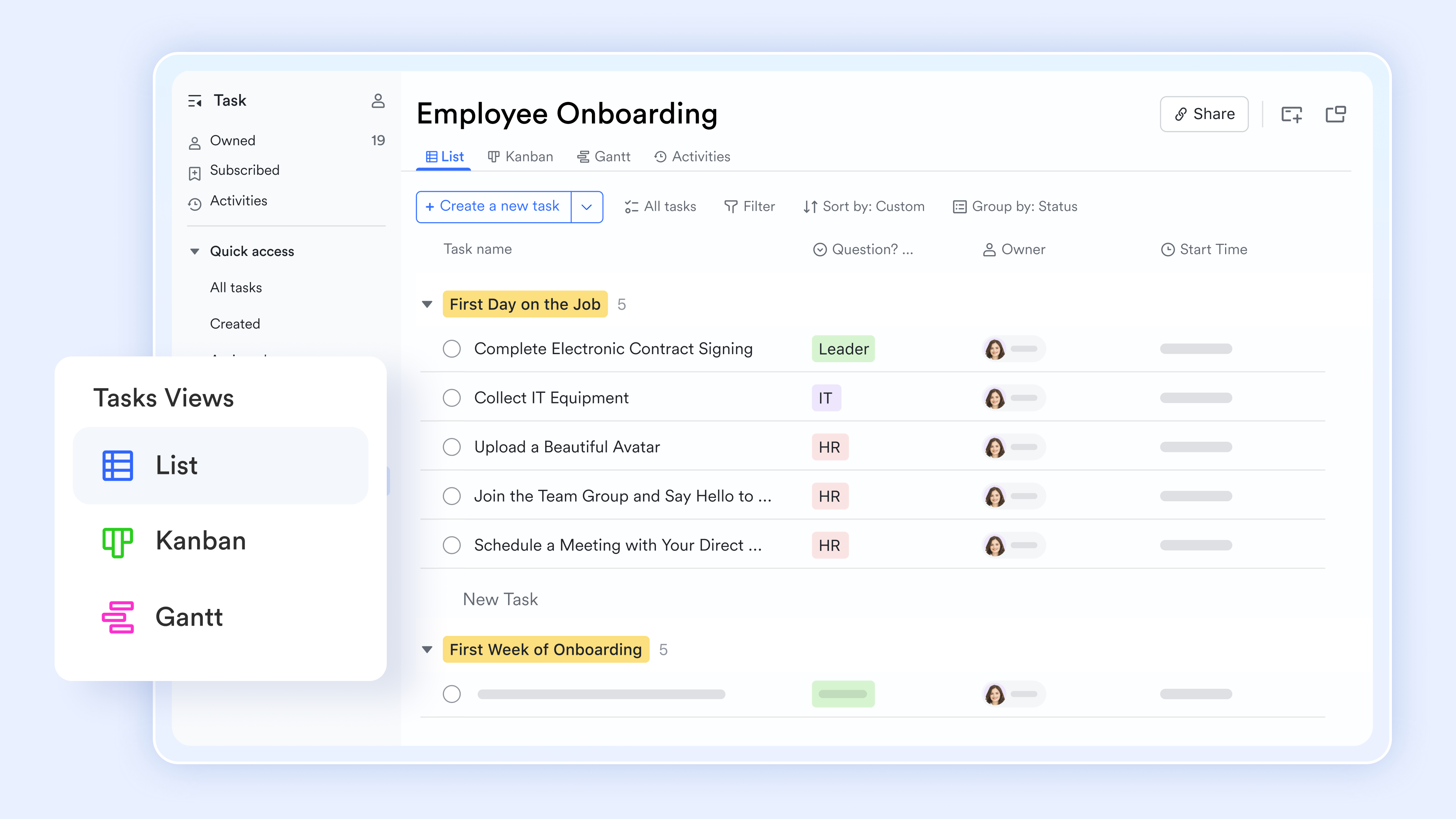
Workflow coordination across teams
Lark Base workflow helps automate high-frequency sales actions like lead routing, updating status, and contract approvals. Instead of over-engineering, teams can use conditional branches (IF/Else nodes) to automatically assign leads or trigger discount approvals based on specific deal values, ensuring consistent handoffs between sales and finance. The flexible canvas allows managers to zoom in on specific steps or drag and drop nodes to adjust the process in real-time as the business scales. 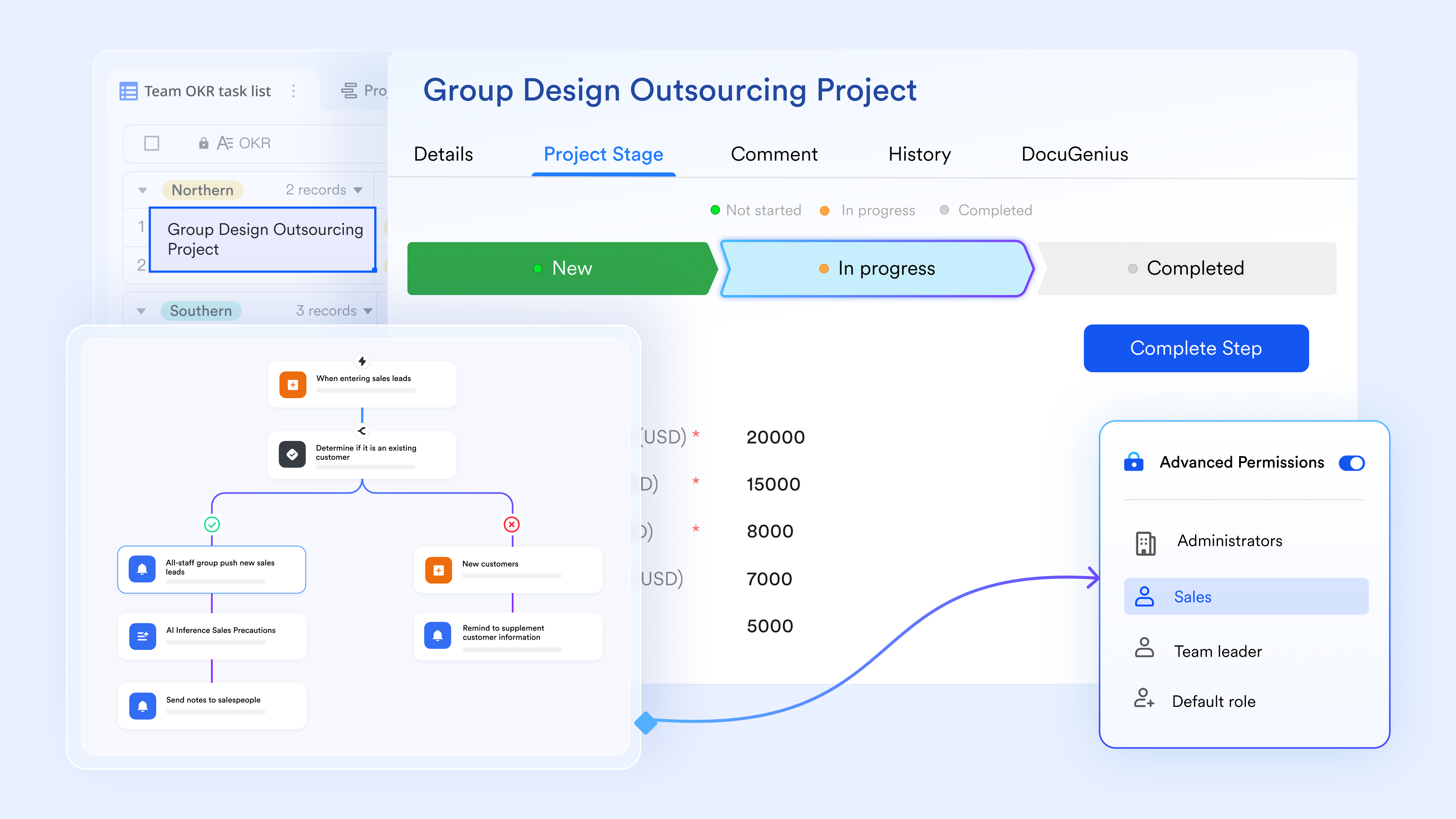
:
- Starter plan: Free forever plan that includes 11 powerful tools for up to 20 users. It also comes with 100GB of storage, 1000 automation runs, AI translations, and more.
- Pro plan: $12/user/month (billed annually) for up to 500 users. It includes everything in Starter plus group calling for up to 500 attendees, 15TB of storage, 50,000 automation runs, and more.
- Enterprise plan: for custom pricing. Supports unlimited users and includes even more automation runs and advanced security, compliance, and management features.
For small teams with simple communication needs

18 months message history
1000 Base automation runs/month
2000 rows per table in Base
Most POPULAR
For companies with comprehensive collaboration and management needs
Unlimited message history
500-participant video meetings
50k Base automation runs/month
20k rows per table in Base
For large companies with advanced security and organizational management needs
Get a personalized demo and pricing
Unlimited message history
500-participant video meetings
15 TB storage + 30 GB storage/user
500k Base automation runs/month
50k Base automation runs/month
Most POPULAR
For companies with comprehensive collaboration and management needs
Unlimited message history
500-participant video meetings
50k Base automation runs/month
20k rows per table in Base
Keap vs Lark: Key differences that affect daily execution
Keap and Lark are built to solve different problems, which becomes clear in daily execution. Keap focuses on marketing automation and , while Lark emphasizes connected teamwork and shared context. The differences affect how teams manage follow-ups, collaboration, and ongoing work. Understanding these contrasts helps businesses choose a platform that aligns with how their teams actually operate.
- Primary focus: Keap is designed around and marketing automation. Lark centers on everyday execution by connecting communication, documents, tasks, and data. This impacts how teams spend their time on the platform.
- Workflow flexibility: Keap relies heavily on predefined automation flows and campaign logic. Lark supports flexible workflows that adapt to real conversations and changing priorities. This makes adjustments easier during daily work.
- Collaboration model: Keap separates CRM records from internal communication. Lark keeps discussions, tasks, and documents in shared spaces. Teams experience fewer handoff delays and less context switching.
- : Keap ties tasks mainly to automation triggers. Lark allows teams to manage tasks organically within chats, docs, and records. This improves visibility for ongoing work.
- Scalability for growing teams: Keap scales by adding more automation and configuration. Lark scales by improving clarity across people, processes, and information. This reduces operational complexity as teams grow.
Final verdict: Is Keap the right CRM for your business?
Keap is a strong choice for small businesses that rely heavily on and automated lead nurturing. Its automation and campaign tools are powerful when configured correctly. However, this keap review shows that complexity, rising costs, and limited execution flexibility can become challenges as teams grow.
Businesses that prioritize marketing automation above all else may find Keap effective. Teams seeking clearer daily execution, shared context, and simpler collaboration may benefit from exploring more unified platforms over time.
Conclusion
Keap offers strong value for businesses that rely heavily on email marketing and automation to manage customer relationships. Its CRM, , and workflow builders are well-suited for teams focused on lead nurturing and conversion-driven processes. However, as this keap review shows, complexity, setup effort, and rising costs often become more noticeable as contact volumes and team size increase. Many users also find that daily execution feels fragmented, with tasks, conversations, and records spread across different views.
For growing teams, priorities often shift from adding more automation to improving clarity and collaboration. This is where some businesses begin exploring connected workspaces like , which bring customer data, communication, documents, and tasks together in one environment. Ultimately, Keap is a strong fit for marketing-led operations, while teams seeking smoother execution and shared context may benefit from evaluating broader .
Bring customer execution and collaboration together with Lark
FAQs
Is Keap too complicated for a beginner?
Keap can feel challenging for beginners due to its automation-focused design and setup requirements. New users often need time to understand campaigns, workflows, and contact structures. Many small teams rely on onboarding support to get started. Beginners who want a simpler starting point sometimes explore workspaces like Lark, where communication, tasks, and customer context are easier to access from day one.
Did Keap get bought out?
Keap was not bought out but rebranded from Infusionsoft to better reflect its evolving product direction. The company continues to operate independently under the Keap name. Many long-time users still reference Infusionsoft, which is why Infusionsoft (Keap) review searches remain common. The rebrand did not significantly change how the platform works. Teams comparing newer tools like Lark often focus more on workflow style than brand history.
What companies use Keap?
Keap is commonly used by small businesses, coaches, consultants, and service-based companies. It appeals to teams that rely heavily on and automated follow-ups. Businesses with simple sales cycles often benefit most from this structure. Companies managing cross-functional work or internal collaboration sometimes look toward platforms like Lark for better execution visibility.
How much does Keap cost?
Keap pricing typically starts around $299 per month and scales based on users and contact volume. Costs increase as databases grow or advanced features are added. This makes long-term budgeting more difficult for growing teams. Some businesses compare this model with platforms like Lark that offer clearer per-user pricing and broader collaboration features.
Is Keap worth it?
Keap is worth considering for businesses that prioritize and lead nurturing. It delivers strong tools when properly configured and maintained. However, teams that value simplicity, daily execution, and shared context may find it less flexible. Exploring connected workspaces such as Lark can help teams evaluate whether a more collaborative approach better supports their growth.
Related reading


















