Zimbra has long been a key player in the email and collaboration market, known for its flexibility and robust, open-source-based features. As businesses evaluate their options in 2026, a critical question arises: How does Zimbra pricing model hold up against modern, all-in-one cloud suites? This guide provides a clear breakdown of Zimbra's cost structure, from its various editions and licensing models to how it stacks up against key competitors, helping you make a cost-effective choice for your organization.
What is Zimbra Collaboration?
Zimbra Collaboration, often simply referred to as Zimbra, has been around for a while, establishing itself as a reliable and feature-rich email and . Its journey began with a vision to offer businesses a more open and flexible alternative to the dominant players in the market. Over time, Zimbra evolved, adapting to changing technology and user demands.
At its core, Zimbra provides a comprehensive suite of tools designed to enhance communication and collaboration within organizations. Key features include:
- Email: Robust email functionality with advanced filtering, tagging, and search capabilities.
- Calendar: Shared calendars for scheduling meetings, managing appointments, and coordinating team activities.
- Contacts: Centralized contact management with address books, distribution lists, and contact sharing.
- Tasks: Task management features for creating, assigning, and tracking tasks.
- Collaboration tools: File sharing, , and other collaborative features to facilitate teamwork.
One of Zimbra's key strengths is its flexibility. It's designed to be cost-effective and offers multiple deployment options, allowing businesses to choose the solution that best suits their needs. As a collaboration solution, Zimbra can be self-hosted or cloud-based, depending on a company's resources, security needs, and technical expertise. You can deploy Zimbra in the cloud for a fully managed experience, including the option for private cloud setups that enhance security and compliance, host it on your own servers (on-premise) for greater control, or opt for a hybrid approach that combines the benefits of both.
Zimbra is trusted by companies of all sizes, from small businesses to large enterprises, due to its versatility and scalability. Security is also paramount, with built-in measures to protect your data. Furthermore, zimbra collaboration suite pricing depends largely on these factors. The open-source nature of Zimbra, especially the Zimbra Open Source Edition, contributes to its appeal.
Organizations evaluating collaboration suites often compare Zimbra with other to find the best balance between flexibility, cost, and productivity.
Understanding Zimbra pricing structure
When it comes to zimbra pricing, it is important to understand the framework within which it operates. Zimbra's pricing model is not a one-size-fits-all approach; instead, it offers a combination of options tailored to different organizational needs and preferences. The primary decision you'll need to make is whether to go with a subscription-based model or a perpetual license.
Licensing model
The subscription model, as the name suggests, involves paying a recurring fee (usually monthly or annually) for the right to use Zimbra. This typically includes access to the latest software updates, security patches, and technical support. The primary advantage of this approach is lower upfront costs, making it easier for smaller businesses to get started. It also offers scalability; you can easily add or remove user licenses as your needs change. The hosted zimbra pricing will usually fall into this category. When considering hosted or cloud-based options, it's important to note that the presence or absence of a local data center can impact performance, compliance, and latency, especially for organizations with specific regional requirements.
Alternatively, the perpetual license model involves a one-time purchase of the software license, granting you the right to use a specific version of Zimbra indefinitely. While this requires a larger upfront investment, it can potentially be more cost-effective in the long run, especially if you plan to use Zimbra for many years. This cost effectiveness makes the perpetual license model attractive for organizations seeking long-term value. However, keep in mind that you may need to pay extra for software updates and support after the initial purchase.
Editions
Beyond the licensing model, Zimbra also offers different editions, each with its own set of features and pricing. The Zimbra Open Source Edition is free to use, but it lacks some of the advanced features and support options available in the commercial editions.
The Zimbra Professional Edition is designed for businesses that need a comprehensive set of collaboration features and robust support.
There might also be a Zimbra Standard Edition, offering a middle ground between the open-source and professional versions. Understanding these editions is crucial when comparing zimbra mail pricing across different offerings. Different vendors might have different offerings that will ultimately affect the final cost.
For organizations considering on-premise or self-hosted deployment, self-hosting Zimbra provides complete control over data storage, security protocols, and server configurations, allowing you to tailor the environment to your specific needs.
Zimbra licensing options explained
Diving deeper into Zimbra licensing, it's crucial to understand the nuances of both subscription and perpetual models. The right choice significantly impacts your overall cost and flexibility. To help you visualize the key differences, here's a comparative overview:
With perpetual licensing, you are making a permanent software license purchase, granting you ongoing use of the software without the need for renewal. However, this license is tied to a specific major release version, and access to updates beyond that version requires additional support or maintenance agreements. Maintenance agreements for perpetual licenses often provide software assurance, ensuring you receive updates and support services as long as your agreement is active.
Subscription licensing
This model is akin to renting your software. You pay a recurring fee, typically monthly or annually, for the right to use Zimbra.
What's included?
The subscription fee typically covers the software license, access to the latest software updates and security patches—including both major and minor release updates—and technical support. Premium subscriptions may offer enhanced features like advanced archiving, , or premium support. Premier support is also available, providing priority assistance and comprehensive updates, which is especially recommended for new customers during initial deployment. Zimbra hosting pricing typically falls under this model.
Cost structure
Subscription fees are usually calculated on a per-user basis, making it easy to scale your costs up or down as your organization's needs change. Some vendors may offer tiered pricing, with discounts available for larger user counts.
Benefits
- Lower upfront costs: Reduces the initial financial burden, making Zimbra accessible to startups and small businesses. Instead of a hefty initial payment, you have predictable, manageable monthly or annual expenses.
- Automatic updates: Ensures you're always running the latest version of Zimbra with the newest features and security enhancements. No need to worry about manual upgrades or compatibility issues.
- Simplified management: The vendor handles the technical aspects of running Zimbra, freeing up your IT staff to focus on other priorities.
- Scalability: Easily add or remove user licenses as your business grows or shrinks. This flexibility allows you to adapt to changing business conditions without incurring significant costs.
Considerations
- Long-term costs: Over several years, the total cost of subscription licensing can exceed the cost of a perpetual license.
- Vendor lock-in: You are dependent on the vendor for continued service and pricing. Switching to a different platform can be disruptive and costly.
- Potential price increases: Subscription fees may increase over time, which can impact your budget.
Perpetual licensing
With perpetual licensing, you purchase the software license upfront, granting you the right to use a specific version of Zimbra indefinitely.
What's included?
The initial license fee covers the right to use a particular version of the software. However, it typically does not include software updates, security patches, or technical support. These services may be available through a separate maintenance agreement. Support agreements must be renewed on or before the anniversary date of the original purchase to maintain continuous coverage.
Cost structure
Perpetual licensing involves a significant upfront investment, followed by optional maintenance fees. These fees are usually calculated as a percentage of the original license fee.
Benefits
- Long-term cost savings: Over an extended period, perpetual licensing can be more cost-effective than subscription licensing.
- Greater control: You have greater control over your Zimbra environment. You can customize it to your specific needs and choose when to upgrade to new versions.
- Reduced vendor dependence: You are not reliant on the vendor for continued service. You can continue to use your licensed version of Zimbra even if the vendor goes out of business.
Considerations
- Higher upfront cost: Requires a significant initial investment, which can be a barrier for startups and small businesses.
- Responsibility for maintenance: You are responsible for maintaining your Zimbra environment, including applying security patches, performing backups for data security and loss prevention, and troubleshooting issues.
- Potential upgrade fees: Upgrading to new versions may require purchasing new licenses or paying upgrade fees.
- Requires in-house expertise: Managing a perpetual license often necessitates dedicated IT staff with specialized knowledge of Zimbra. Zimbra mail pricing can be greatly affected by this factor.
Choosing between subscription and perpetual licensing requires a careful assessment of your organization's needs, budget, and technical capabilities. There is no one-size-fits-all answer, so weigh the pros and cons of each option carefully before making a decision.
Zimbra core editions: Pricing & key features
Zimbra's core offerings are divided into three main editions, each tailored to different organizational sizes and IT capabilities. Zimbra provides native zimbra mailbox management, including storage, backup, and synchronization features, ensuring robust and integrated mailbox-related functionalities.
- The Network Edition is the most feature-rich, designed for enterprises that require advanced collaboration tools, security, and support. The Zimbra server in the Network Edition hosts integrated communication tools such as chat, , and collaboration features, making it a comprehensive platform for needs.
- The Open Source Edition is ideal for organizations seeking a cost-effective, community-supported solution with essential email and collaboration features.
- The Desktop Edition allows users to access their Zimbra accounts offline, providing flexibility for users who need to work without a constant internet connection.
Zimbra Open Source Edition
- Pricing: $0 (free for the software itself)
- Included features: Core collaboration tools such as email, calendar, contacts, , and basic web interface access. Supports standard protocols like IMAP, POP3, and CalDAV.
- Limitations: No official Zimbra technical support (only community forums); lacks advanced features like mobile sync, advanced security, and archiving. Requires in-house IT resources for deployment, maintenance, and updates. Administrators can configure the interface, integrate third-party apps, and access community support resources tailored for Zimbra administrators.
- Ideal for: Small teams or tech-savvy startups with limited budgets who can manage infrastructure and support independently.
Zimbra Network Edition
The commercial flagship edition, designed for businesses needing enhanced features and official support. Historically, Zimbra offered both subscription licensing (annual or multi-year) and perpetual licensing for Network Edition. However, in line with industry-wide shifts toward recurring revenue models and to better support continuous feature updates, Zimbra has increasingly focused on subscription-based offerings for most customers. Here's a breakdown of both models:
Subscription licensing:
- Starter plan: $399/year (for up to 25 users). Includes basic email, calendar, and standard support during business hours.
- Standard plan: $625/year for 25 users (~$25/user/year). Adds mobile device management, 10GB mailbox storage per user, and advanced admin controls.
- Professional plan: $875/year for 25 users (~$35/user/year). Includes premium features like email archiving, advanced security (anti-phishing, encryption), and 20GB mailbox storage per user. Advanced security features include data encryption to protect user data and ensure secure communication channels. Two factor authentication is also available to enhance account security and prevent unauthorized access.
Perpetual licensing: Currently available only for select enterprise customers via custom quotes (not publicly listed). This model involves:
- One-time license fee: ~$34.50/user (Standard Edition) to ~$49.50/user (Professional Edition) for unlimited use of the software version at purchase.
- Annual support & maintenance: Mandatory for ongoing updates/security patches – typically 15-20% of the initial license cost per year (e.g., $5.18-$9.90/user/year).
- Limitations: No access to future major version upgrades without purchasing a new license or upgrade plan; less flexibility for scaling user counts compared to subscriptions.
Zimbra Professional Edition
A hosted/managed version of Network Edition, typically offered through Zimbra's authorized partners:
- Per-user subscription: $30.23/user/year (includes standard support and partner-managed infrastructure)
- 250-user bundle: $6,415/year (~$25.6/user/year) – Bundles license, hosting, and 24/7 basic support.
- Key benefit: Reduces in-house IT overhead, as partners handle server maintenance, updates, and security patches.
Tired of comparing complex pricing plans?
Zimbra Cloud pricing (SaaS deployment)
Zimbra Cloud is a fully managed SaaS solution, ideal for businesses avoiding on-premise infrastructure costs. Zimbra Cloud enables users to synchronize their mailboxes and data across multiple devices, ensuring consistency and seamless access. The vast majority of mobile devices are supported through native synchronization protocols like Exchange ActiveSync, providing broad compatibility and reliable integration. Pricing is subscription-based, with tiered plans:
Large enterprise tiered pricing: For organizations with 500+ users, Zimbra offers scaled discounts.
- 500 users or fewer: $3/user/month.
- 501 – 1,000 users: $2.5/user/month.
- 1,001 – 5,000 users: $2/user/month.
- 5,000+ users: Starts from $1.5/user/month.
On-premise deployment: Hidden costs to consider
For businesses choosing self-hosted Zimbra (Network Edition), the license fee is just one part of the . Additional expenses include:
- Server hardware: $500 – $5,000+ upfront. Small deployments (50 users) need a basic server ($500-$1,000), while enterprise-scale (1,000+ users) requires high-performance servers with redundant storage ($3,000-$5,000+).
- Software licenses: Operating system (e.g., Windows Server: $400-$1,200) or Linux (free, but requires admin expertise); database (PostgreSQL: free; Oracle: $5,000+ for enterprise licenses).
- IT labor & maintenance: $500 – $2,000/server/year. Includes , backups, security monitoring, and troubleshooting. Larger deployments may need a dedicated sysadmin ($60,000-$100,000/year salary).
- Scaling costs: Adding users may require server upgrades (RAM, storage) – $500-$1,500 per upgrade cycle.
Avoid hidden fees with a single platform
Third-party hosted Zimbra pricing
Many managed service providers (MSPs) offer Zimbra hosting, bundling licenses with infrastructure and support. Typical pricing:
- Basic email hosting: $1.79 – $5/user/month. Includes core email/calendar, 5-10GB storage, and basic support.
- Small-to-Medium Business (SMB) bundles: $12 – $16/user/year. Adds mobile sync, 10GB storage, and 24/7 support (via the MSP).
- Enterprise-grade managed hosting: $100 – $350/month (flat rate for 50-200 users). Includes custom configurations, advanced security, and dedicated account management.
💡Important note: Zimbra does not publish an official public price list for all offerings. Perpetual licensing is primarily available via custom quotes for enterprise customers. All figures above are based on data from authorized resellers and partners. For the most accurate quote—especially for perpetual license inquiries—contact Zimbra's sales team or reach out to a local MSP.
How to choose the right Zimbra plan
Selecting the appropriate Zimbra plan involves a careful assessment of your organization's requirements and priorities. There is no universally perfect plan, as the optimal choice varies depending on factors such as company size, technical expertise, and desired features.
Follow these steps to choose the right Zimbra plan for your organization:
Step 1: Determine the number of users
Accurately count the number of users who will require access to Zimbra. Zimbra pricing is typically based on a per-user model, making this a critical factor in cost estimation.
Step 2: Identify essential features
List the specific features and functionality that your organization needs. Consider whether your team relies heavily on , , task management, or other collaboration tools. Prioritize the features that are essential for your business operations.
Step 3: Assess your IT capabilities
Evaluate your internal IT capabilities and resources. Determine whether you have the expertise to manage your own Zimbra environment or if you would prefer a fully managed cloud-hosted solution.
Step 4: Establish a budget
Determine how much you are willing to spend on Zimbra. Consider both upfront costs and ongoing expenses.
Step 5: Consider long-term goals
Project how your needs may change in the future. Are you anticipating rapid growth or significant changes to your IT infrastructure? Factor these considerations into your decision-making process.
Step 6: Review service level agreements and contract terms
Carefully review the vendor's and contract terms. Pay close attention to the terms of service, support options, and renewal policies.
Step 7: Perform a cost-benefit analysis
Analyze the costs and benefits of different Zimbra plans. Compare the features, pricing, and support options of each plan to determine which one offers the best value for your organization.
By following these steps, you can make an informed decision and select a Zimbra plan that aligns with your budget, needs, and long-term goals. Remember to check all zimbra cloud pricing options as this is a very popular way of deploying the solution. Careful analysis will allow you to choose the plan best suited to your requirements.
Drawbacks of Zimbra
While Zimbra offers a flexible and powerful platform, particularly for organizations requiring on-premise control, it has several drawbacks when compared to modern, cloud-native collaboration suites. These limitations are crucial to consider when evaluating its true cost and impact on productivity.
- Dated user interface and experience: One of the most common criticisms of Zimbra is its user interface, which can feel clunky and less intuitive than its modern competitors. In an era where employees expect seamless, consumer-grade app experiences, a dated UI can lead to slower user adoption and frustration, ultimately hindering productivity.
- Fragmented collaboration tools: Zimbra was fundamentally built around email. While it has expanded to include calendars and file sharing, its collaboration features are not as deeply integrated as those in . Essential tools like team chat, video conferencing, and real-time document co-editing often feel like separate components rather than part of a unified workspace. This fragmentation forces users to juggle multiple applications, creating friction and disrupting workflow.
- Significant ddministrative overhead: For both the open-source and the on-premise Network Edition, Zimbra demands significant technical expertise and administrative resources. IT teams are responsible for deployment, server maintenance, security patching, performing updates, and managing backups. This hidden overhead substantially increases the and diverts valuable IT resources away from more strategic business initiatives.
A powerful unified collaboration suite to replace Zimbra
If you're exploring alternatives to Zimbra, especially those that offer a more modern and unified approach to collaboration, warrants a close look. While Zimbra has been a reliable solution for many years, the collaboration landscape has evolved, and platforms like Lark have emerged to address the changing needs of today's teams.
All-in-one collaboration platform
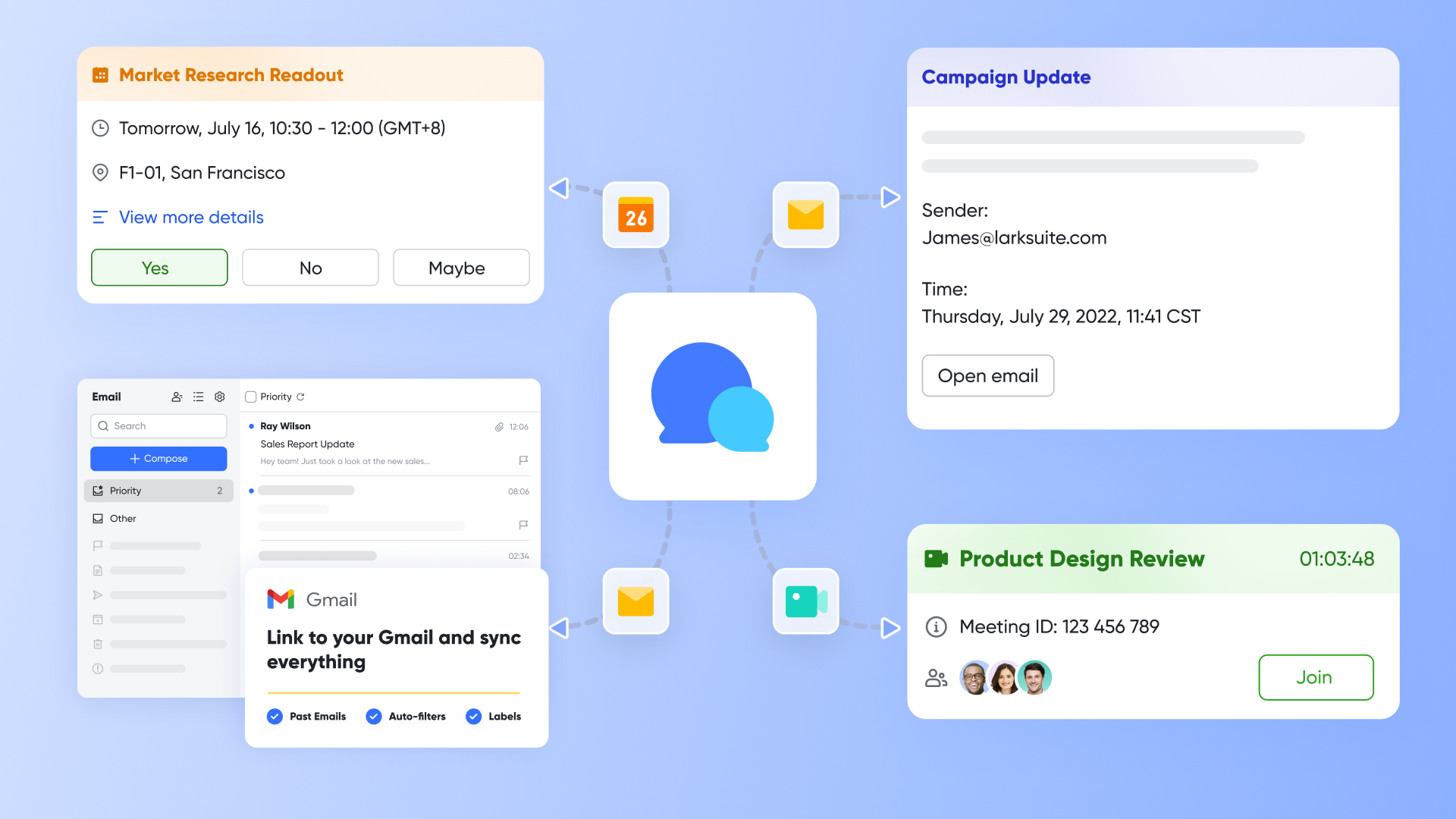
Zimbra primarily focuses on email, with relatively basic collaboration capabilities. , on the other hand, is a natively integrated collaboration platform. It brings , , , , and —all core work needs—deeply together in one application. This creates a fundamentally different experience:
In Lark, you can start a high-quality video call directly from a group chat about a client need. After the meeting, you can instantly create to-do tasks from the chat or meeting notes and assign them to colleagues. Task-related materials can be edited together in Docs. Everything happens smoothly within the same platform—without switching between different apps, copying and pasting information, or worrying about losing context. 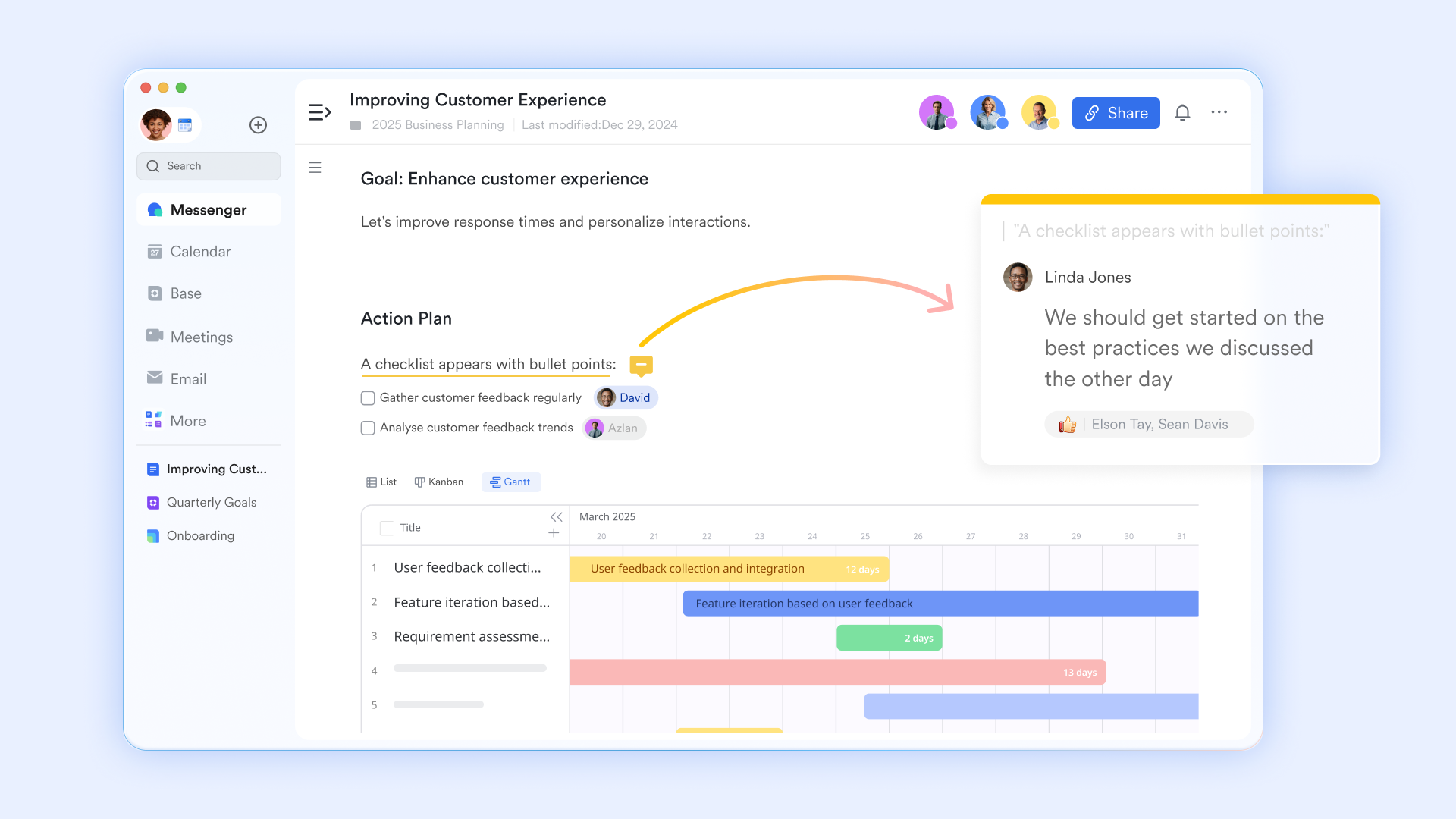
Communication centered around work
Communication in Zimbra relies heavily on email, which can be inefficient when you need quick clarifications or spontaneous brainstorming. Lark, however, deeply integrates instant communication into every part of your work, creating a "communicate around content" model:
In , you can comment on any paragraph and @mention a teammate. They'll receive a notification in Lark chat immediately and can jump straight to that exact point. In a group chat, you can easily share a task, a document, or a meeting link—everyone gets the full context with one click.
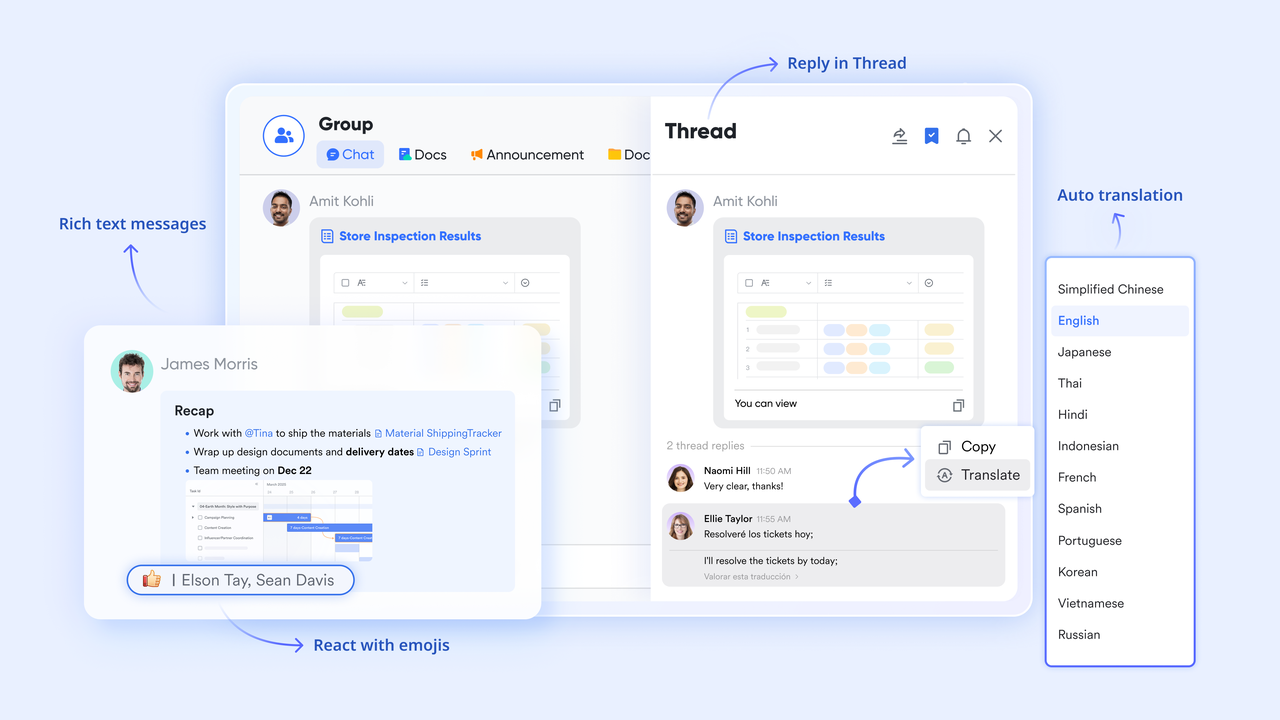
also supports threaded replies to specific messages, allowing multiple topics to be discussed in parallel without confusion. This effectively solves the problem of being flooded by "Got it" messages.
Smart email management
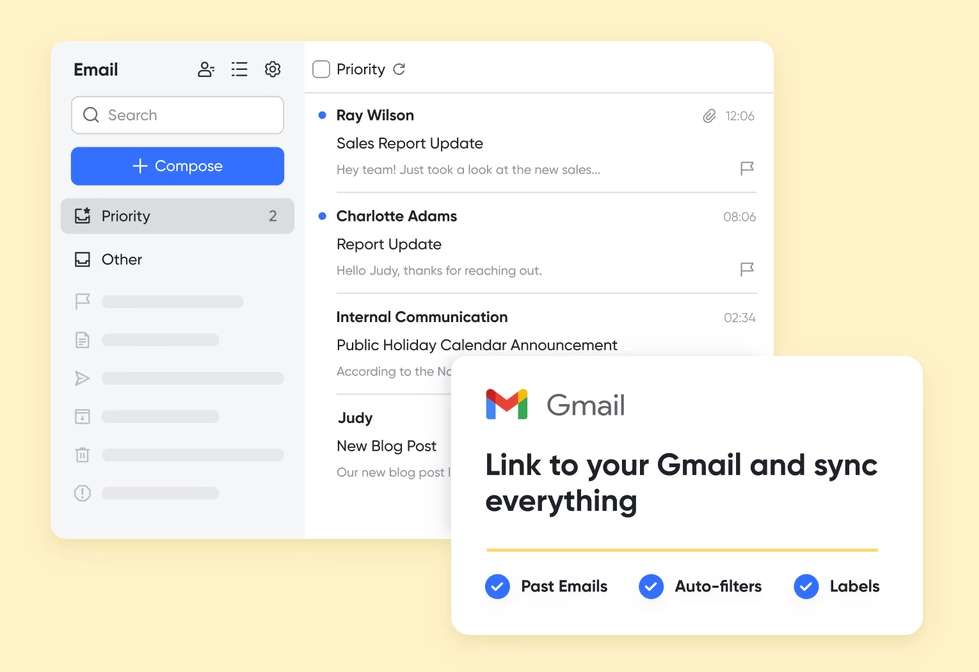
perfectly blends traditional email with modern collaboration: all emails, approval notifications, and system alerts are gathered all in one place, eliminating the need to switch between different apps. Important emails can be directly turned into to-do tasks, assigned to team members with deadlines. It also automatically identifies important emails and filters out lower-priority messages, helping you stay focused on critical matters. Also, you can link Gmail account to Lark to experience seamless integration between mails, communication and actions.
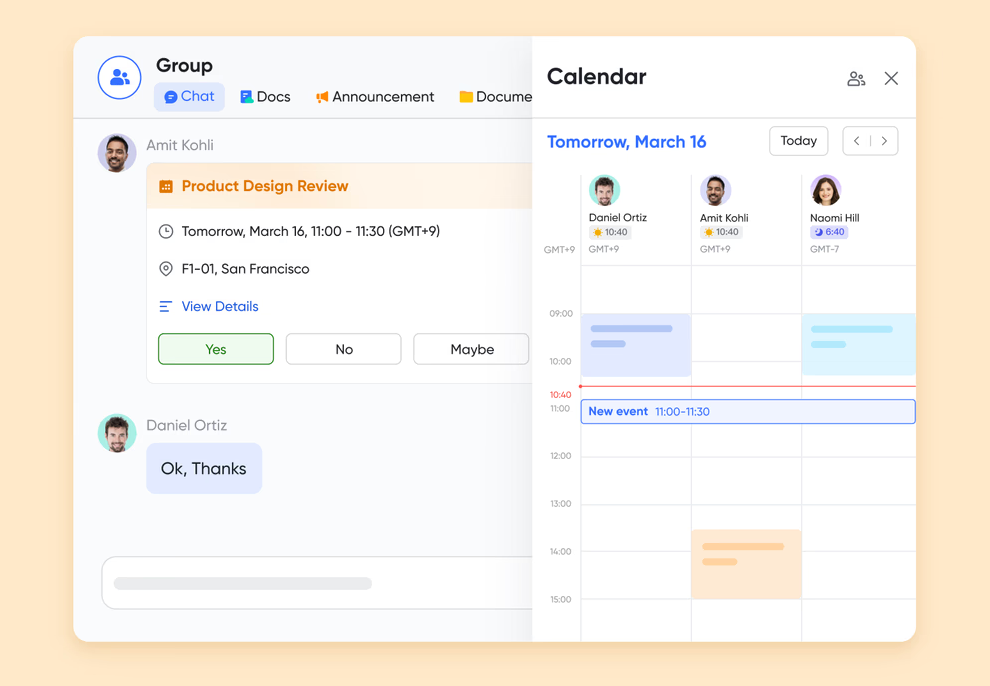
Intelligent schedule coordination
redefines how you manage your schedule: you can directly subscribe to team members' or meeting room calendars to see everyone's availability at a glance. This makes it easy to find the most suitable meeting times and significantly reduces coordination efforts. Lark Calendar is also combined with , supporting one-click booking of meeting rooms.
Build a custom workspace for your team
While Zimbra offers some collaboration features, it lacks flexibility in adapting to unique team workflows and its customization often requires complex development and integration. Lark empowers teams with strong customization capabilities through .
You can build fully tailored management systems for different teams. Sales teams can use it to track leads and visually manage each stage in a "Kanban view." HR teams can manage hiring processes, and marketing teams can . You can also set up automation rules to free up your team. For instance, when a new lead's status changes to "Confirmed" in the table, the system can automatically notify the sales owner. This automation connects communication, tasks, and data management, forming a smooth, closed-loop workflow. 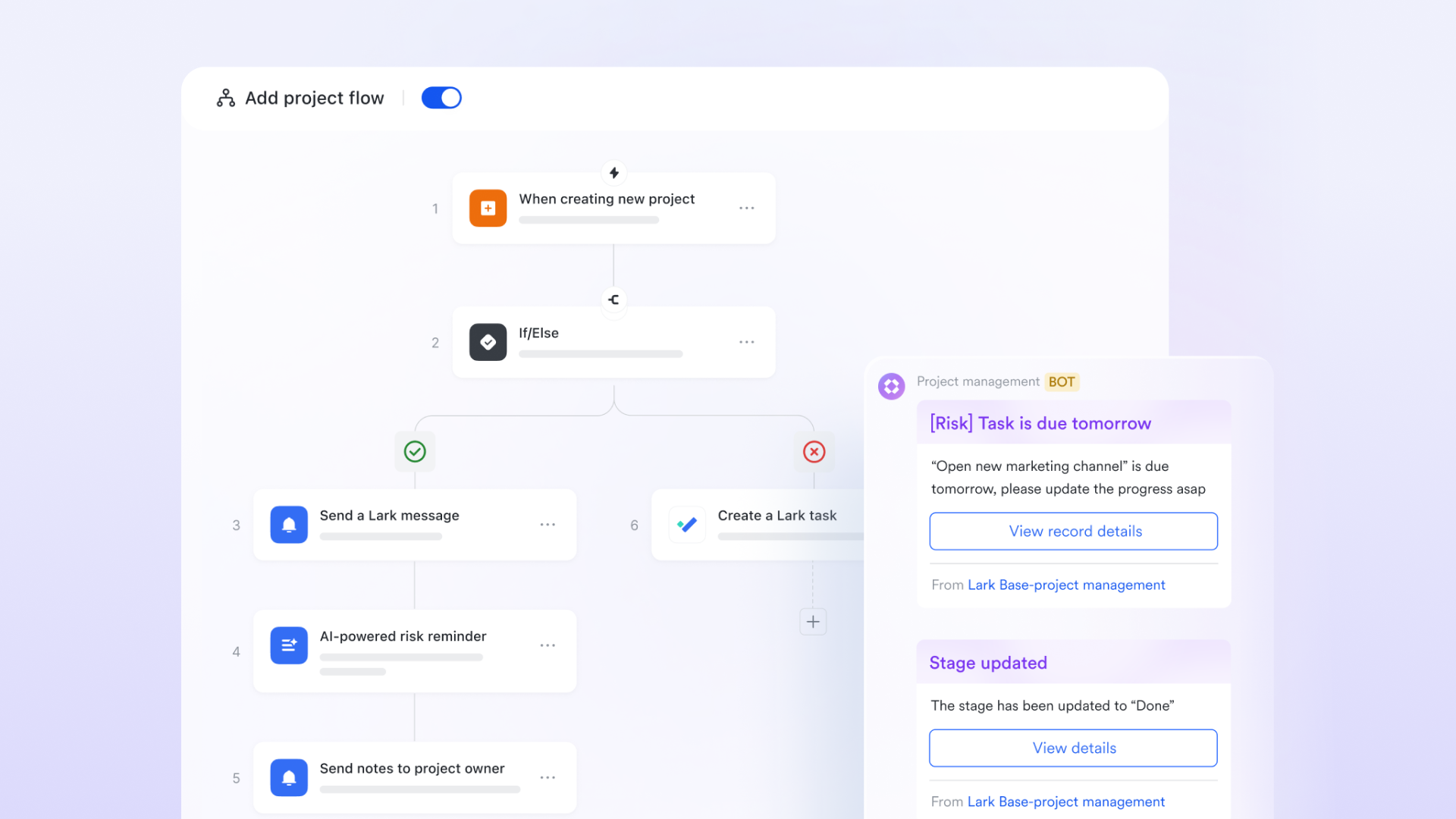
Attractive price to get full experience
delivers exceptional value by offering a comprehensive suite of at a competitive price point. While Zimbra primarily provides email and basic features, Lark gives you a complete workspace with integrated messaging, video meetings, cloud docs, project management, and workflow automation - all within a single platform. Cost-conscious businesses may also compare Lark with when assessing the long-term value of different productivity platforms.
With Lark, you're not just getting an email replacement - you're getting a unified work platform that while reducing overall software costs. It's a smarter way to invest in your team's collaboration needs. Here is Lark's detailed pricing plans:
- Starter plan: Free forever plan that includes 11 powerful tools for up to 20 users. It also includes 100GB of storage, 1,000 automation runs, AI translations, and more.
- Basic plan: $6/user/month (billed annually) for up to 500 users. It includes everything in Starter plus group calling for up to 500 attendees, 5TB of storage, 1000 automation runs, and more. Some users may need to to purchase.
- Pro plan: $12/user/month (billed annually) for up to 500 users. It includes everything in Starter, plus group calling for up to 500 attendees, 15 TB of storage, 50,000 automation runs, and more.
- Enterprise plan: for custom pricing. Supports unlimited users and includes even more automation runs and advanced security, compliance, and management features.
For small teams with simple communication needs

18 months message history
1000 Base automation runs/month
2000 rows per table in Base
Most POPULAR
For companies with comprehensive collaboration and management needs
Unlimited message history
500-participant video meetings
50k Base automation runs/month
20k rows per table in Base
For large companies with advanced security and organizational management needs
Get a personalized demo and pricing
Unlimited message history
500-participant video meetings
15 TB storage + 30 GB storage/user
500k Base automation runs/month
50k Base automation runs/month
Most POPULAR
For companies with comprehensive collaboration and management needs
Unlimited message history
500-participant video meetings
50k Base automation runs/month
20k rows per table in Base
Conclusion
Choosing the right email and collaboration platform is a critical decision that can significantly impact your organization's productivity and efficiency. Zimbra pricing offers a flexible and cost-effective solution for businesses of all sizes, with a range of deployment options and licensing models to choose from.
Throughout this guide, we've explored the different Zimbra editions, dissected the licensing models, uncovered potential hidden costs, and compared Zimbra with its competitors. We've also considered Lark as a potential alternative, highlighting its strengths and weaknesses.
Ultimately, the best platform depends on your unique needs and priorities. Take the time to carefully assess your requirements, evaluate the available options, and make an informed decision. By doing so, you can empower your team with the tools they need to communicate, collaborate, and succeed.
To learn more about Zimbra pricing and find the right plan for your business, contact a Zimbra partner today for a custom quote. You can also explore to see if it could be the right fit for your company.
Future-proof your collaboration with Lark
FAQs
How much does a Zimbra mailbox cost?
The cost of a Zimbra mailbox varies widely depending on the edition (Standard, Professional), licensing model (subscription or perpetual), and the specific partner you choose. Subscription plans can start from a few dollars per user per month, but for accurate pricing, it's always best to get a custom quote based on your specific needs.
Is Zimbra free or paid?
Zimbra offers both. There is a free, open-source version (Zimbra Open Source Edition) that is powerful but requires technical expertise to deploy and manage. The paid versions (Zimbra Network Edition) include professional support, additional features, and a more stable, business-ready platform.
What are the costs associated with Zimbra?
Beyond the initial license or subscription fee, you should consider potential costs for data migration, implementation, user training, and ongoing maintenance. For on-premise deployments, you also have to factor in server hardware and IT administration costs, which is why many businesses compare these total costs to all-in-one platforms.
Is Zimbra good for small businesses?
Yes, Zimbra can be a flexible option for small businesses, especially with its on-premise and cloud hosting choices. However, small businesses that prioritize ease of use, a modern interface, and integrated collaboration tools might find all-in-one platforms like Lark to be a more streamlined and cost-effective alternative.
Related reading


















