














Contact Management: Definition, Benefits, and Best Tools

Ryan Tanner
Product Marketing Specialist
Sep 18, 2026
Ryan Tanner
Sep 18, 2026

30 min read


To meet the dynamic business environment, teams need to stay on top of every customer, partner, and lead. Contact management is the practice of organizing all relationship data so teams can act efficiently, communicate consistently, and collaborate effectively. From small businesses seeking simple solutions to enterprises handling thousands of contacts, having a reliable contact management system ensures accurate, up-to-date records and streamlined workflows.
In this guide, we'll explore what contact management is, why it matters, the key features modern teams expect, the common challenges, and then dive into some of the best tools, to help you pick the right solution.
1. Lark: Connected contact and workflow management
2. HubSpot CRM: Free and scalable contact tracking
3. Zoho CRM: Affordable contact and lead management
4. Pipedrive: Pipeline-focused contact management
5. Salesforce: Enterprise-grade CRM and automation
6. Freshsales: AI-powered contact engagement
7. Monday.com: Visual contact tracking boards
8. ClickUp: Customizable contact and project tracking
9. Insightly: Contact management with project features
10. Contacts+: Simple contact sync for small businesses

What is contact management?
Contact management is the process of collecting, organizing, and maintaining information about the people and organizations your business interacts with, including customers, prospects, partners, and suppliers. It involves storing essential details such as names, emails, phone numbers, company information, and interaction history. Effective contact management helps teams track communications, schedule follow-ups, and keep records up to date, reducing duplication and errors.
Beyond simply storing data, modern contact management systems provide collaboration tools, activity tracking, and analytics, enabling teams to coordinate efforts, maintain strong relationships, and gain insights into engagement patterns across all contacts.
Image source: unsplash.com
Why contact management matters
Effective contact management goes beyond storing names and numbers. It helps teams coordinate interactions, maintain accurate records, and respond to customers and partners efficiently. With the right approach, businesses can build stronger relationships, reduce errors, and streamline workflows. Modern systems also enable automation, ensuring reminders and updates happen consistently without manual effort.
- Builds stronger customer relationships through accurate, updated data: Accurate contact data ensures that every team member has the most recent information about clients, partners, and prospects. By centralizing names, emails, phone numbers, and interaction histories, teams can tailor communication to individual needs and preferences. This level of precision helps build trust, improve engagement, and foster long-term relationships with every contact.
- Reduces communication errors and duplicated outreach: When contact information is scattered across spreadsheets, emails, or multiple tools, miscommunication and duplicate outreach can occur. Contact management systems prevent these issues by providing a single, organized repository. Teams can easily track who has communicated with each contact and when, reducing confusion and ensuring consistent messaging across all interactions.
- Improves cross-team visibility: Shared access to contact records allows multiple teams—sales, marketing, and support—to stay informed about ongoing interactions. Real-time updates ensure that everyone sees the current status of relationships, avoiding duplicated efforts and enabling coordinated action. This transparency fosters collaboration and helps teams respond quickly to changing client needs.
- Enables personalized interactions and timely follow-ups: Tracking past communications allows teams to craft messages that are relevant to each contact's history and preferences. Automated reminders help ensure that follow-ups happen on time, preventing missed opportunities. Personalizing interactions not only improves engagement but also demonstrates attentiveness, which strengthens the overall client experience.
- Automated workflows keep data consistent and reminders active: Modern contact management systems can automatically update records, trigger tasks, and set reminders based on pre-defined rules. Tools like Lark Base Automation take this further by letting teams create custom triggers and workflows, ensuring follow-ups, reminders, and updates happen automatically across your contacts and tasks.
10 Best contact management tools you need to know
1. Lark: Connected contact and workflow management
Lark offers a unified contact management system that combines centralized databases, task management, and collaboration tools in one workspace. Teams can store and organize contacts, track interactions, and manage leads, clients, and partners efficiently. With features like automated reminders, workflow triggers, and activity tracking, Lark ensures every engagement is timely and accurate. Its integration of contact relationship management, messaging, and document sharing allows teams to collaborate seamlessly without switching between apps.
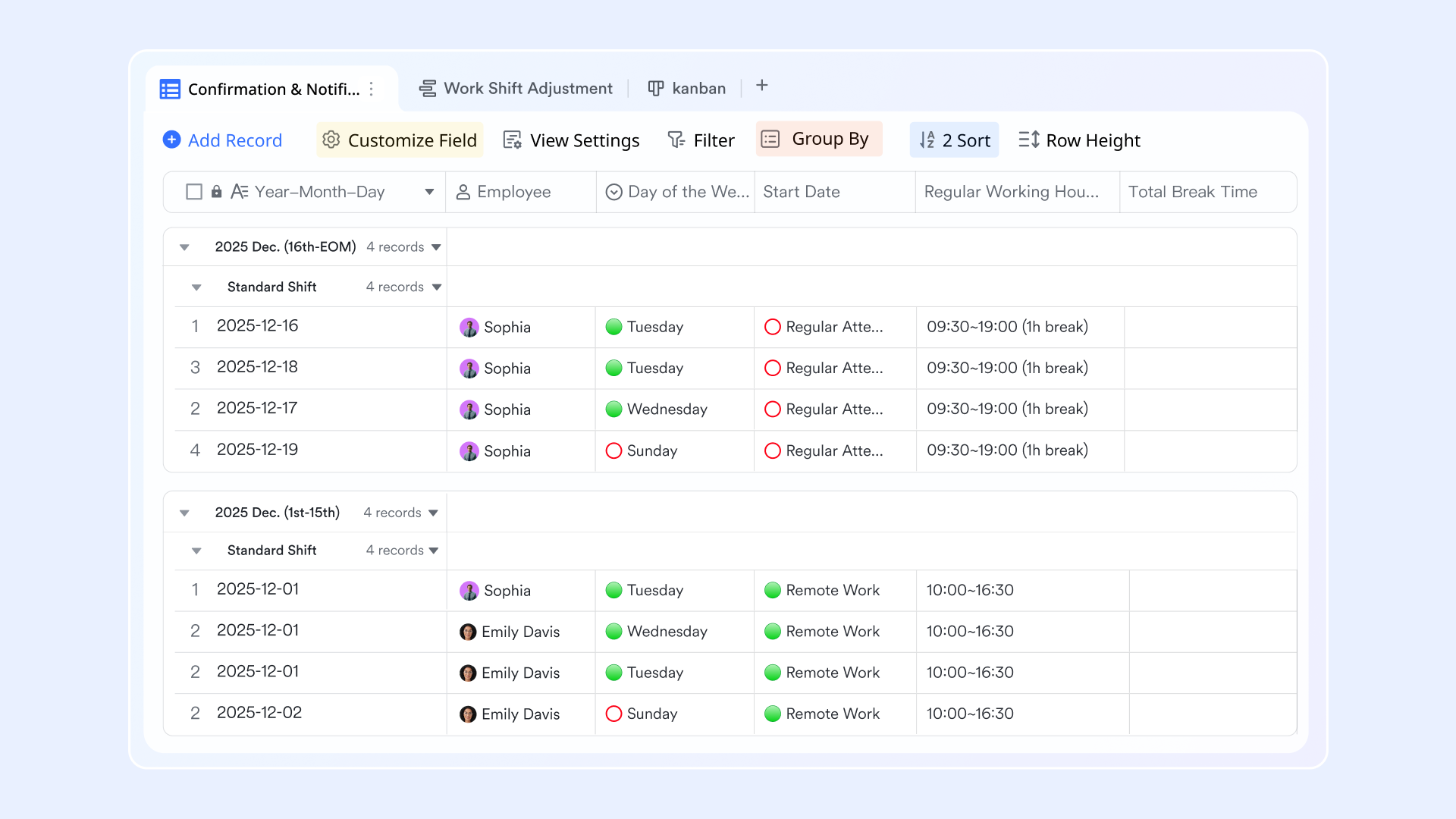
- Lark Base: Build and visualize your contact database
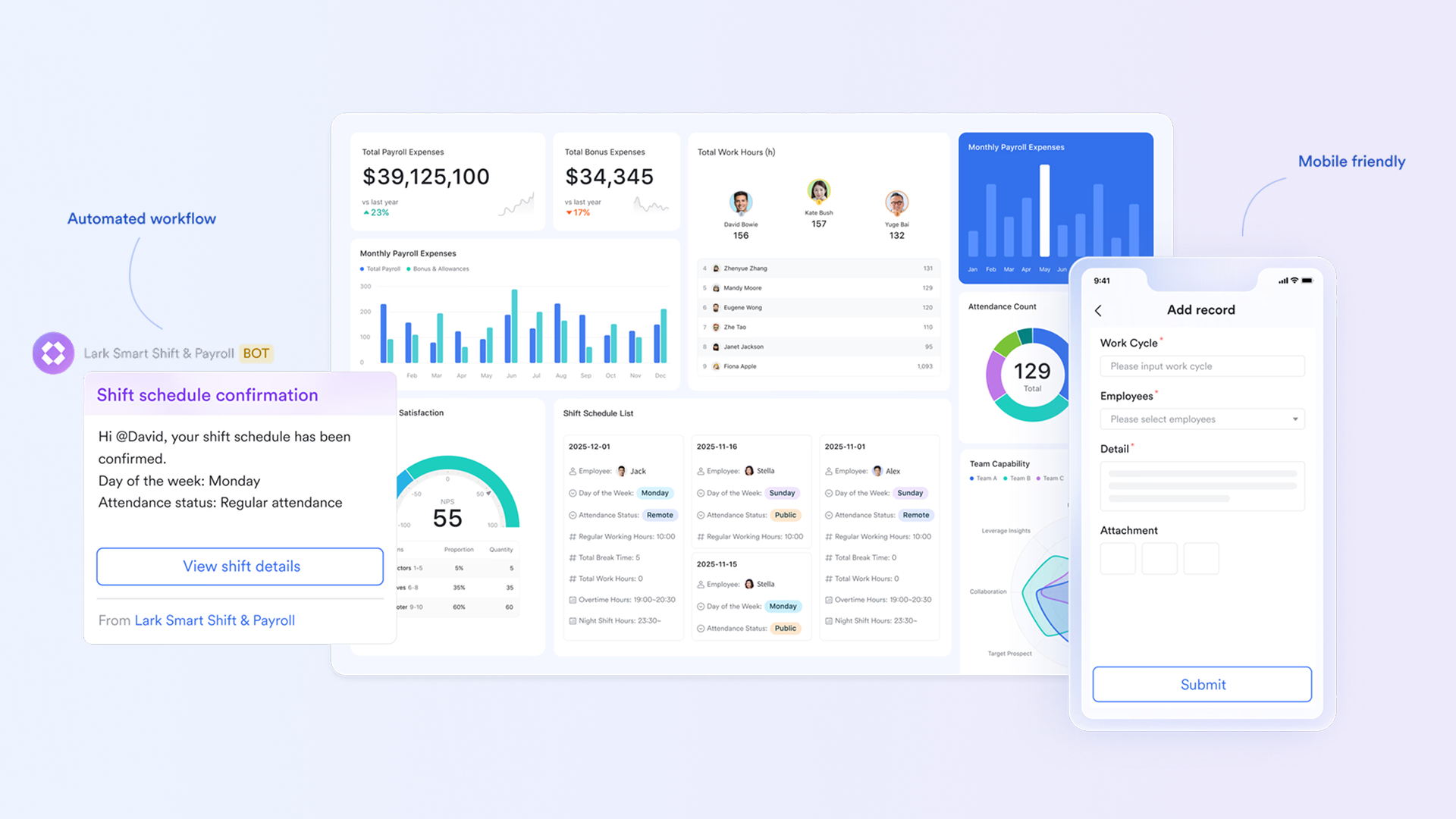
Lark Base serves as the foundation for all contact management activities. Teams can design custom databases to store client and partner details—including company name, industry, contact info, deal status, and relationship history. You can visualize this data using different views, like Table, Kanban, or Gantt, depending on your workflow needs. Also, Lark Base Automation further enhances this by triggering reminders or tasks automatically—such as scheduling follow-ups when a contact hasn't been reached in 14 days or notifying a manager when a high-value deal changes stage.
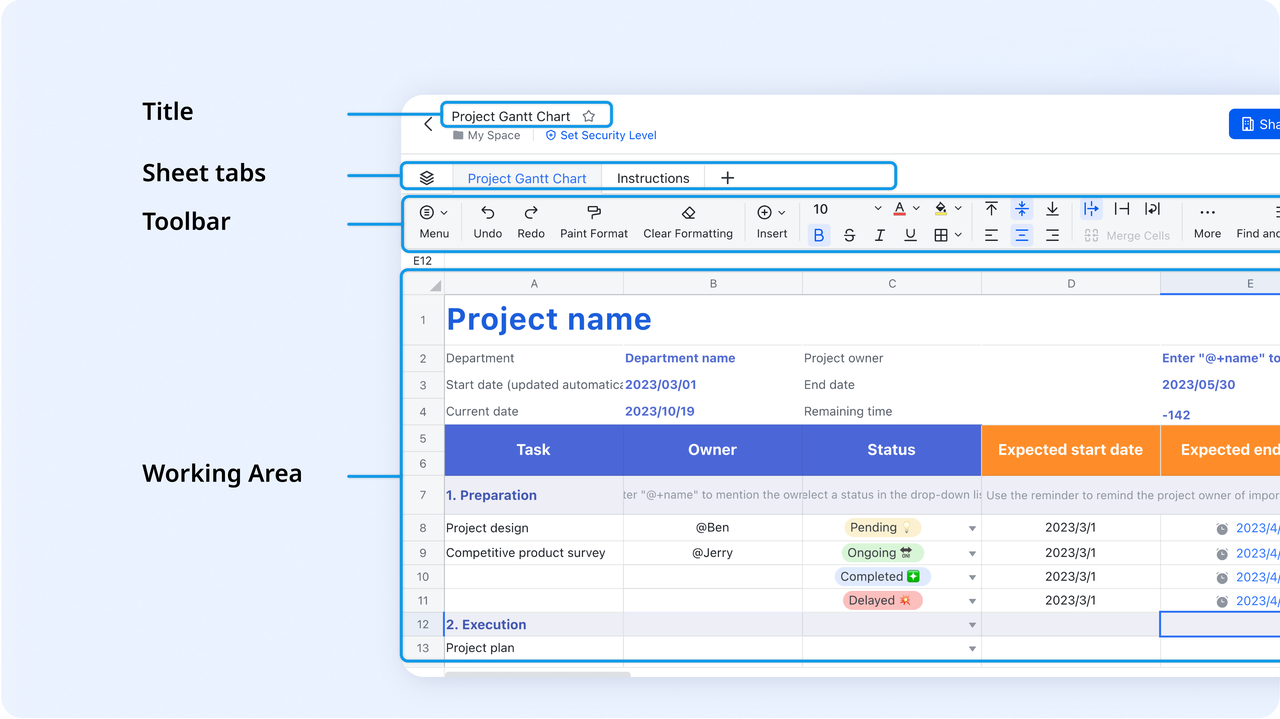
- Lark Sheets: A digital spreadsheet & management hub
Lark Sheets enhances contact management by transforming a simple spreadsheet into a collaborative, smart console tailored for sales and publishing teams. You can use Lark Sheets to create data validation rules, ensuring fields like "Renewal Date" or "Status" remain consistent by restricting cell input to predefined options or formats. Also, Lark Sheets supports drop-downs and data validation for accurate and consistent data entry. With automatic real-time saving and version history, you can keep client records safe, traceable, and synchronized for your team.
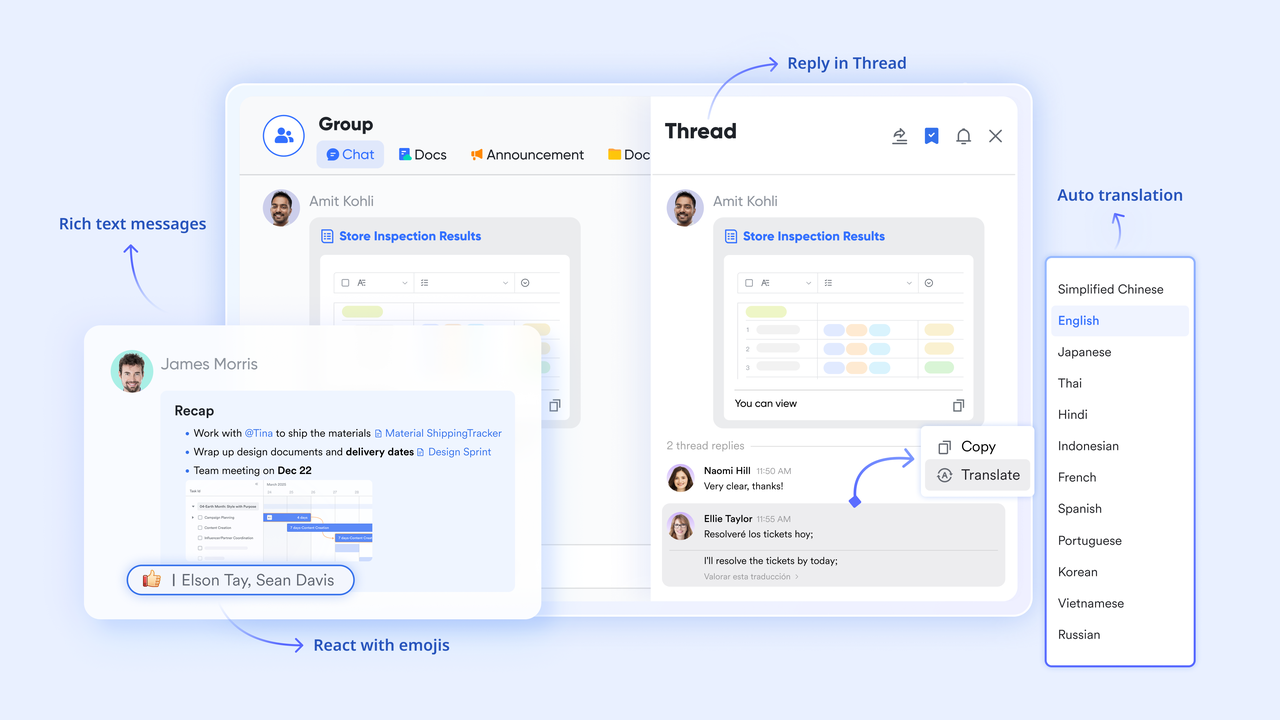
- Lark Messenger and Mail: Communication without switching tools
In Lark, communication and contact management work hand in hand. Lark Messenger allows teams to discuss client updates, share files, and @mention colleagues right within the workspace. Lark Mail syncs with your contacts, so all email correspondence appears in one place—no more searching across inboxes. For example: A marketing team can review a client email in Lark Mail, discuss campaign feedback in Messenger, and then assign follow-up actions—all without leaving Lark.
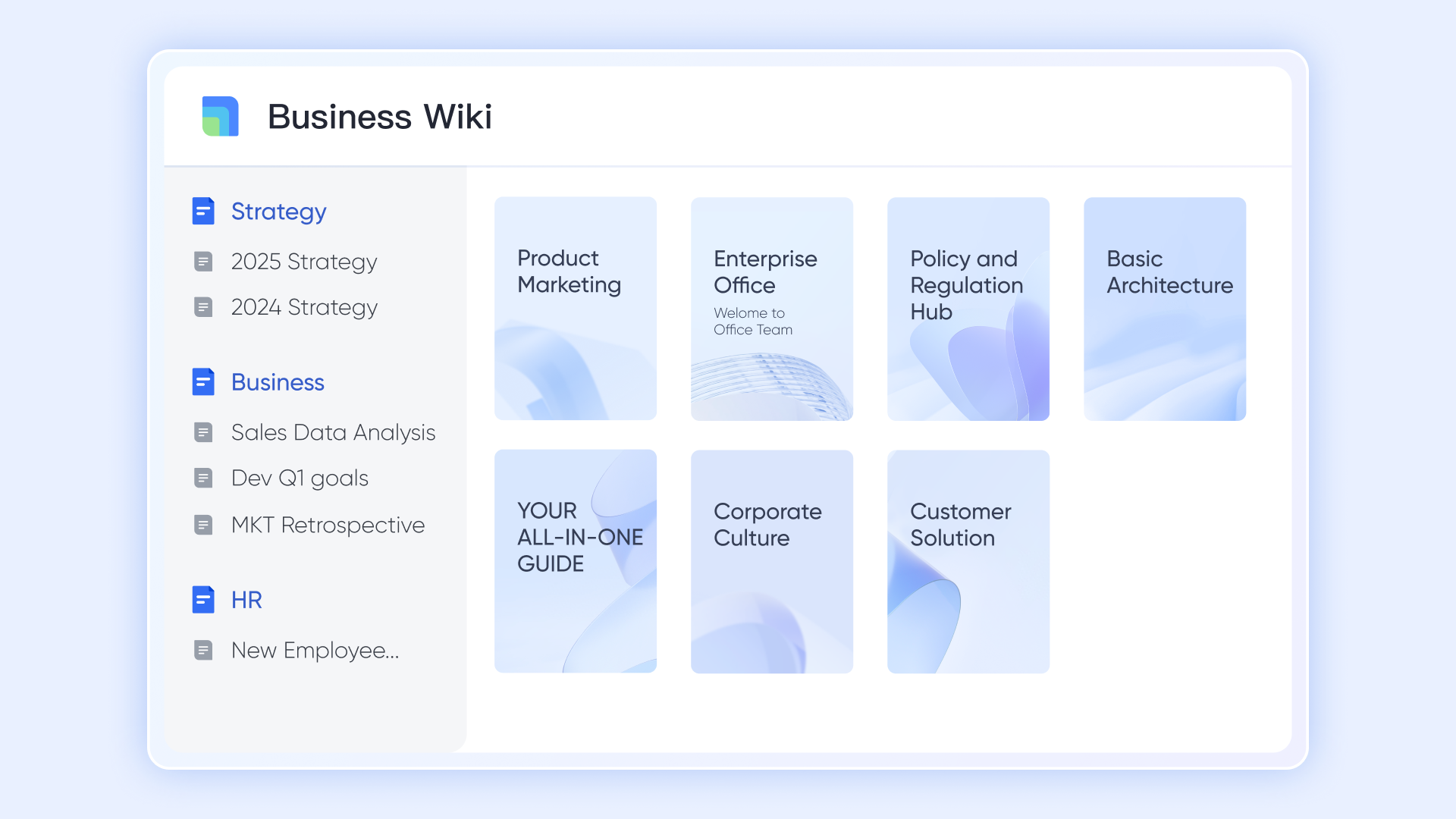
- Lark Docs and Wiki: Centralized documentation and templates
Lark Docs and Lark Wiki let teams co-author client notes, proposals, meeting summaries, or service templates. Instead of storing files across drives or folders, everything lives within your Lark workspace—fully searchable and version-controlled. You can even link Docs directly to contact records in Base, giving teams one-click access to client-specific documentation. Example: A consulting firm can maintain one Wiki page per client with project milestones, preferences, and deliverables—ensuring everyone works from the same source of truth.
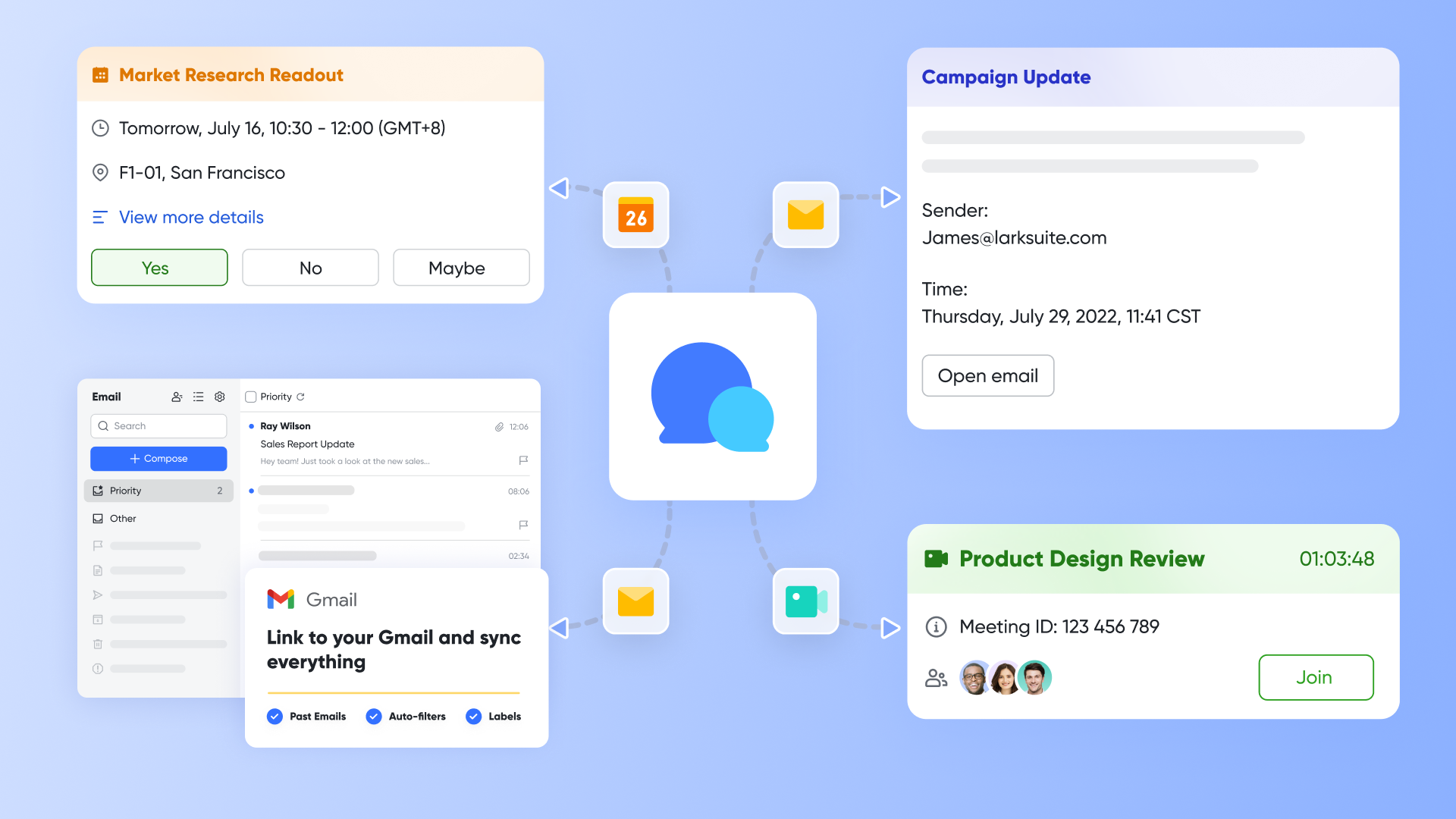
- Lark Meetings: Seamless scheduling and client discussions
Lark Meetings makes it easy to schedule video calls through Lark Calendar and collaborate seamlessly using the Share Docs feature—so teams can edit together in real time without switching apps. Meeting notes can be linked directly to calendar events, and with Lark AI Meeting Notes enabled, notes are automatically generated and saved in Lark Docs, keeping all discussions organized and connected to the right contacts in Base.
- Starter plan: Free forever plan that includes 11 powerful tools for up to 20 users. It also comes with 100GB of storage, 1000 automation runs, AI translations, and more.
- Pro plan: $12/user/month (billed annually) for up to 500 users. It includes everything in Starter plus group calling for up to 500 attendees, 15TB of storage, 50,000 automation runs, and more.
- Enterprise plan: Contact sales for custom pricing. Supports unlimited users and includes even more automation runs and advanced security, compliance, and management features.
2. HubSpot CRM: Free and scalable contact tracking
HubSpot CRM is a popular choice for businesses looking for contact management software that is both scalable and user-friendly. Designed for small businesses, growing teams, and even enterprise users, it provides a centralized hub to track contacts, leads, and customer interactions. With intuitive dashboards, activity tracking, and automation capabilities, HubSpot CRM helps teams manage sales contact management, improve engagement, and maintain clean, up-to-date contact management systems without heavy technical overhead. Its free tier makes it accessible for small businesses seeking a reliable contact management system to organize communications and track interactions effectively.
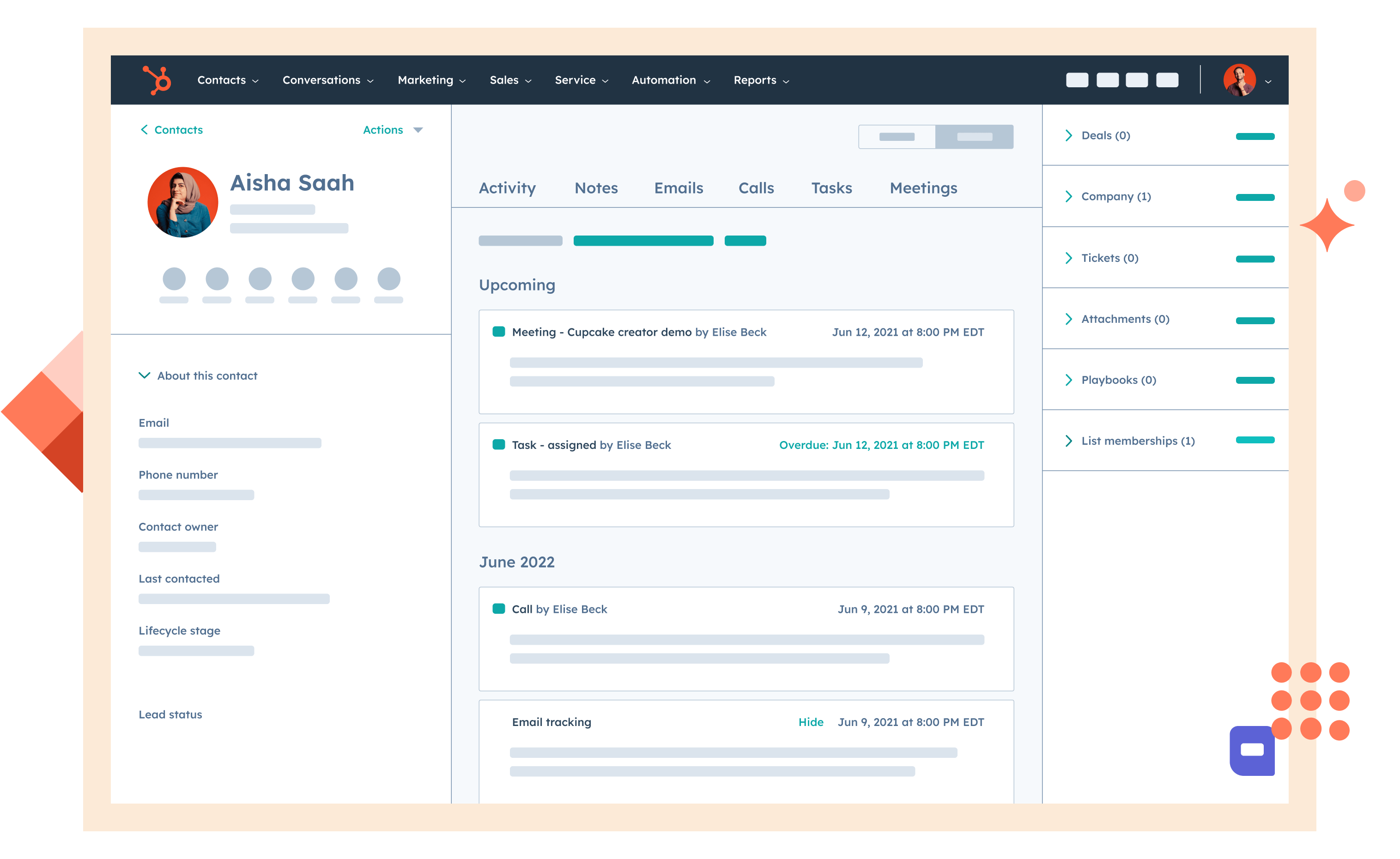
Image source: hubspot.com
Features
- Centralized contact database with tags, filters, and segmentation.
- Activity tracking for emails, calls, meetings, and notes.
- Automated workflows for follow-ups, reminders, and pipeline management.
- Integration with email, calendar, marketing, and support tools.
- Analytics and reporting on contact engagement and deal progression.
Strengths
- Strong free plan suitable for small teams or startups.
- Easy to use with minimal setup, reducing onboarding time.
- Scalable for growing businesses with advanced marketing and sales tools.
- Supports automated contact relationship management to keep data accurate and consistent.
Limitations
- Advanced features, including marketing automation and reporting, require paid plans.
- Limited customization compared to enterprise-grade CRM platforms like Salesforce.
Pricing
- Starter Plan: $25/user/month (billed monthly).
- Professional Plan: $80/user/month (billed monthly).
- Enterprise Plan: $320/user/month (billed monthly).
3. Zoho CRM: Affordable contact and lead management
Zoho CRM is a flexible and budget-friendly contact management software designed for small and medium-sized businesses. It helps teams organize contacts, leads, and deals while providing robust tools for contact relationship management and workflow automation. With features like activity tracking, analytics, and collaboration, Zoho CRM ensures teams can manage sales contact management efficiently, maintain updated contact management systems, and improve engagement with clients and prospects. Its affordability and ease of use make it a popular choice for businesses seeking a reliable contact management system without a steep learning curve.
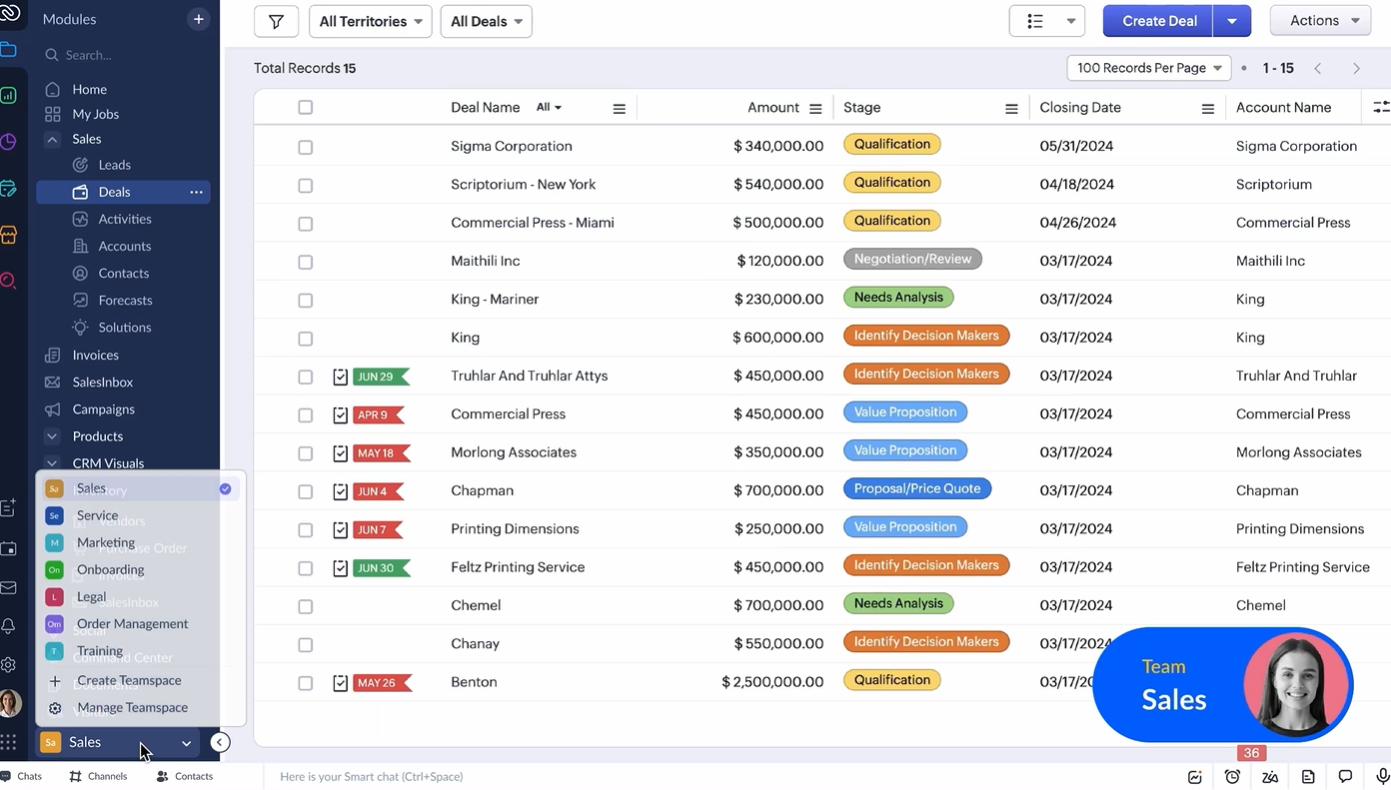
Image source: zoho.com
Features
- Centralized contact and lead database with tagging, filters, and grouping.
- Activity tracking across emails, calls, meetings, and tasks.
- Automated workflows, reminders, and follow-up scheduling.
- Analytics and reporting for sales pipelines, engagement, and customer behavior.
- Integration with email, social media, and third-party applications for seamless contact management software usage.
Strengths
- Affordable pricing with strong features suitable for small businesses.
- Customizable dashboards, fields, and modules to match business workflows.
- Supports automated contact relationship management to reduce errors and save time.
- Scalable solution as businesses grow, from SMBs to enterprise-level operations.
Limitations
- User interface may feel complex initially for new users.
- Mobile experience is functional but can be slower compared to desktop usage.
Pricing
- Standard: $12/user/month (billed monthly).
- Professional: $20/user/month (billed monthly).
- Enterprise: $35/user/month (billed monthly).
4. Pipedrive: Pipeline-focused contact management
Pipedrive is a contact management software designed with a strong focus on visualizing sales pipelines and managing sales contact management effectively. Ideal for small and medium-sized businesses, it helps teams track leads, deals, and customer interactions in an intuitive, visual format. By combining contact management system capabilities with pipeline-centric workflows, Pipedrive enables sales teams to prioritize contacts, follow up consistently, and maintain accurate records, improving both engagement and conversion rates. Its simple interface and automation features make it a practical solution for businesses looking to streamline contact management processes.
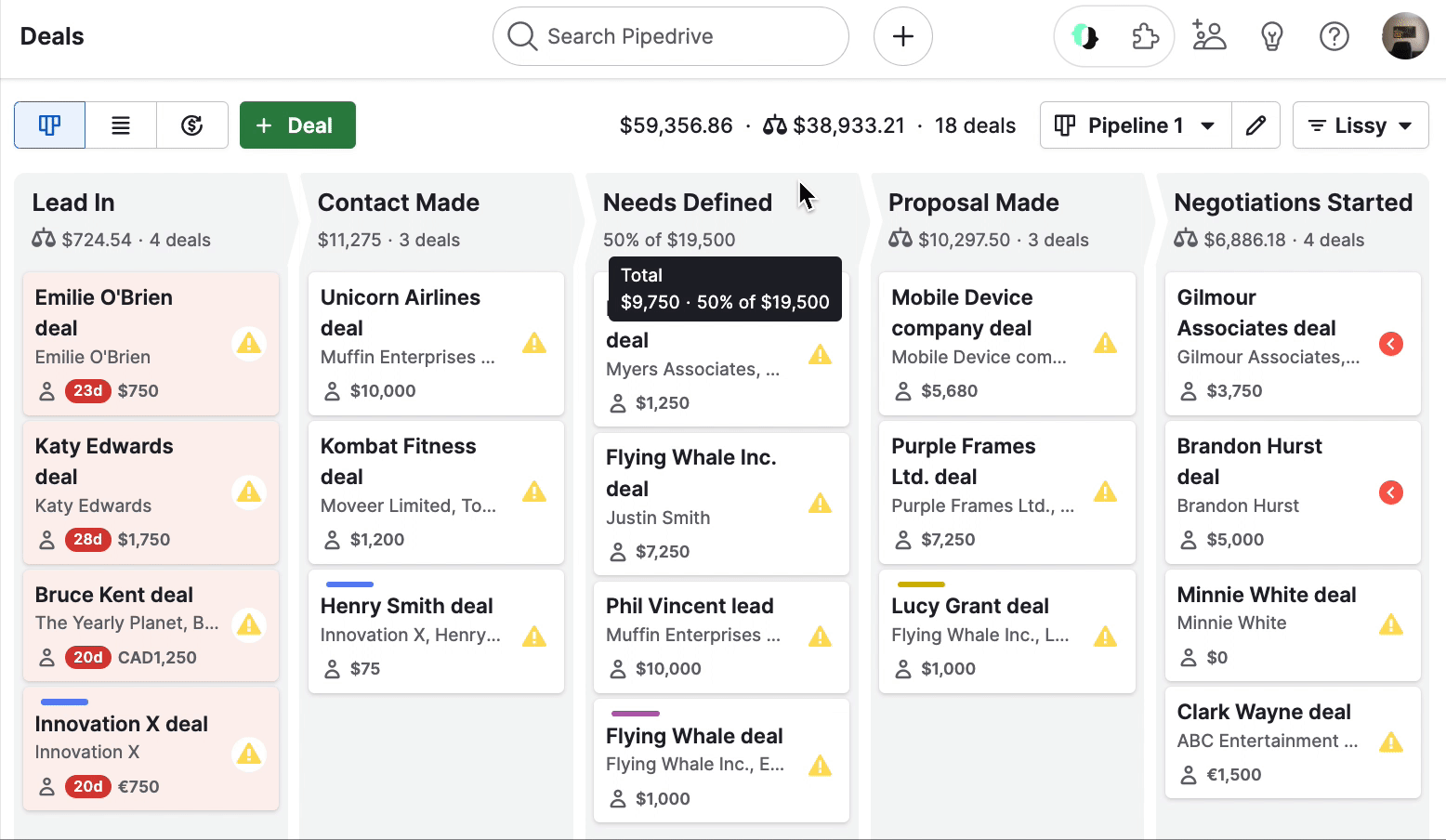
Image source: pipedrive.com
Features
- Visual pipeline boards to track deals through stages like Prospect → Contacted → Proposal → Won.
- Centralized contact database with activity tracking, notes, and communication history.
- Automated reminders and follow-up scheduling to keep engagement consistent.
- Email integration and templates for seamless CRM contact management.
- Reporting and analytics on deals, conversion rates, and team performance.
Strengths
- Intuitive pipeline-focused interface simplifies sales contact management.
- Automation features reduce manual follow-ups and missed opportunities.
- Centralized contact management system keeps data organized and accessible.
- Customizable dashboards and filters allow teams to prioritize high-value contacts efficiently.
Limitations
- Limited advanced analytics compared to enterprise-grade CRMs like Salesforce.
- Can be less suitable for non-sales-focused teams needing broader contact management.
Pricing
- Essential: $15/user/month (billed monthly).
- Advanced: $29/user/month (billed monthly).
- Professional: $59/user/month (billed monthly).
- Enterprise: $99/user/month (billed monthly).
5. Salesforce: Enterprise-grade CRM and automation
Salesforce is a leading contact management system and enterprise-grade CRM contact management platform, trusted by large organizations worldwide. It provides robust tools for managing contacts, leads, opportunities, and customer interactions across multiple teams. With advanced automation, analytics, and customization options, Salesforce helps businesses maintain accurate contact management systems, streamline contact center management, and deliver personalized engagement at scale. Its scalability and extensive integrations make it suitable for enterprises looking to centralize their contact management software while optimizing workflows and customer relationship processes.
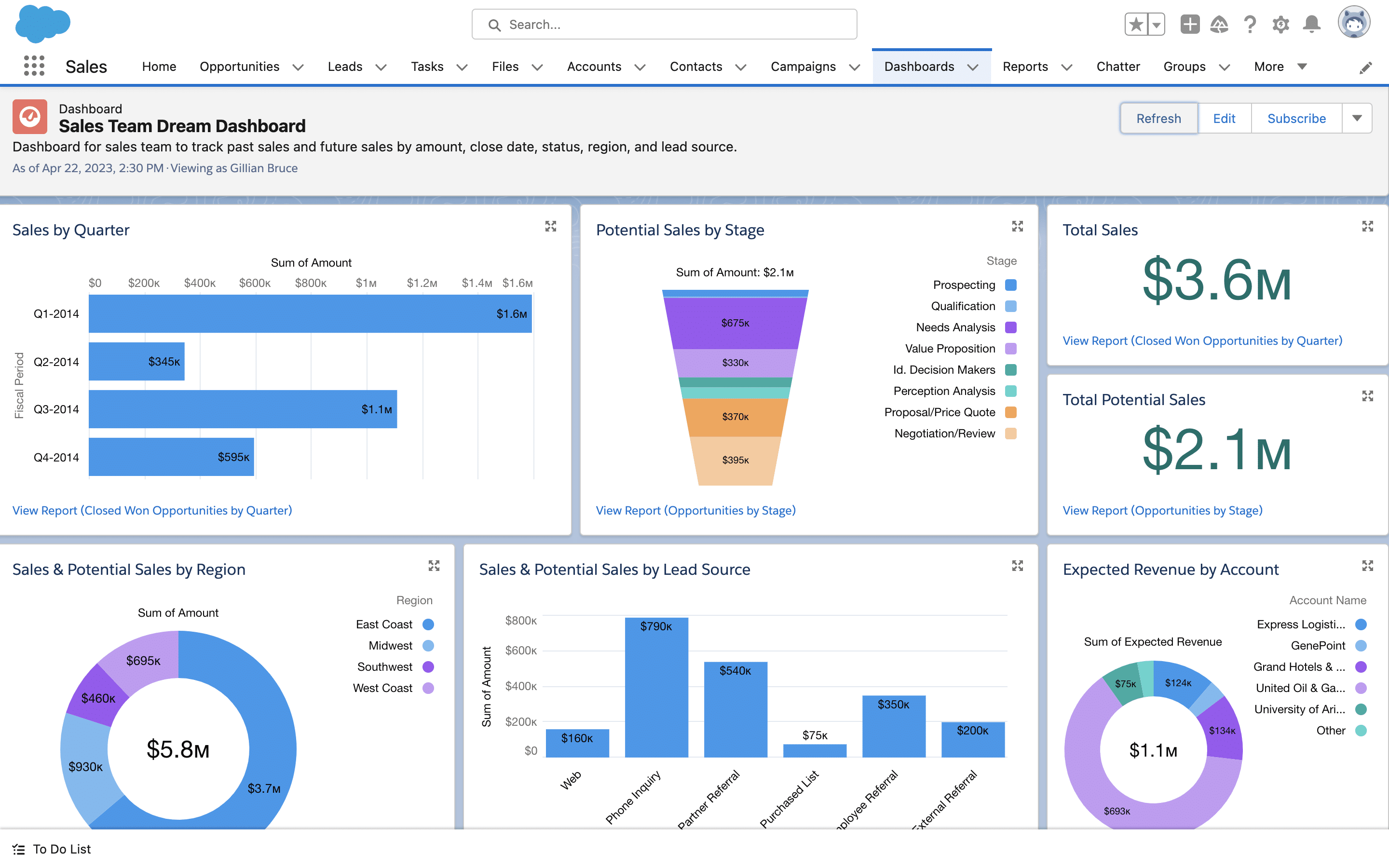
Image source: salesforce.com
Features
- Centralized contact and account database with segmentation and tagging.
- Activity tracking for emails, calls, meetings, and tasks.
- Advanced automation workflows for follow-ups, approvals, and reminders.
- Analytics and reporting dashboards to monitor engagement, sales performance, and pipeline health.
- Integration with marketing, support, and collaboration tools for holistic contact center management.
Strengths
- Highly customizable contact management system suitable for complex enterprise needs.
- Automation reduces manual effort and improves contact center workforce management efficiency.
- Real-time analytics and reporting support data-driven decision-making.
- Scalable to manage thousands of contacts, leads, and customer interactions.
Limitations
- Higher cost, making it less suitable for small businesses or startups.
- Customization and advanced features may require dedicated admin support.
Pricing
- Essentials: $25/user/month (billed monthly).
- Professional: $75/user/month (billed monthly).
- Enterprise: $150/user/month (billed monthly).
- Unlimited: $300/user/month (billed monthly).
6. Freshsales: AI-powered contact engagement
Freshsales is a contact management software that leverages AI to help teams engage more effectively with leads, customers, and partners. Designed for small to medium-sized businesses, it combines contact relationship management with automated workflows, activity tracking, and predictive insights. Freshsales enables teams to maintain accurate contact management systems, prioritize high-value contacts, and optimize sales contact management with AI-driven recommendations. Its integration capabilities and intuitive interface make it a strong choice for businesses looking to enhance engagement and streamline contact management processes.
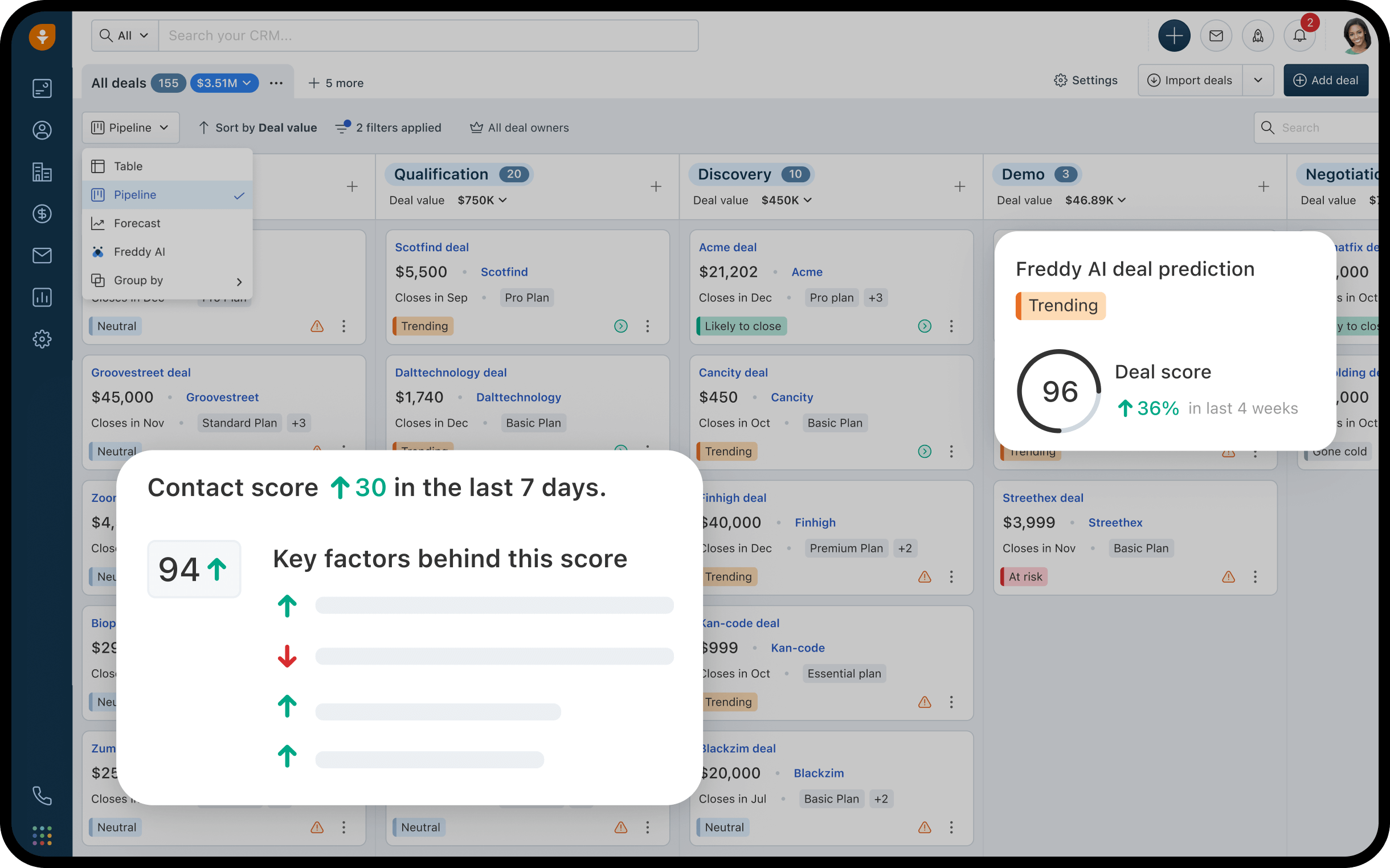
Image source: freshsales.com
Features
- Centralized contact database with segmentation, tags, and activity history.
- AI-powered lead scoring and predictive insights for prioritizing contacts.
- Automated workflows, follow-ups, and reminders to improve engagement.
- Email, phone, and chat integration for unified contact center management.
- Analytics and reporting dashboards to monitor customer interactions and team performance.
Strengths
- AI-driven insights help teams focus on high-value contacts and opportunities.
- Automation reduces manual work and ensures timely follow-ups.
- Unified contact management system keeps all data organized and accessible.
- Integrates easily with marketing and support tools for a seamless workflow.
Limitations
- Customization options are more limited compared to enterprise platforms like Salesforce.
- Reporting and analytics may require additional setup for complex business needs.
Pricing
- Growth: $15/user/month (billed monthly).
- Pro: $39/user/month (billed monthly).
- Enterprise: $69/user/month (billed monthly).
7. Monday.com: Visual contact tracking boards
Monday.com is a contact management system that emphasizes visual organization and workflow customization. Its flexible boards allow teams to manage sales contact management, track leads, and maintain accurate contact management systems across departments. With intuitive drag-and-drop interfaces, activity tracking, and automation features, Monday.com helps teams centralize data, improve collaboration, and streamline contact management software processes. Its versatility makes it suitable for small businesses, growing teams, and even larger organizations looking for a visually-driven solution.
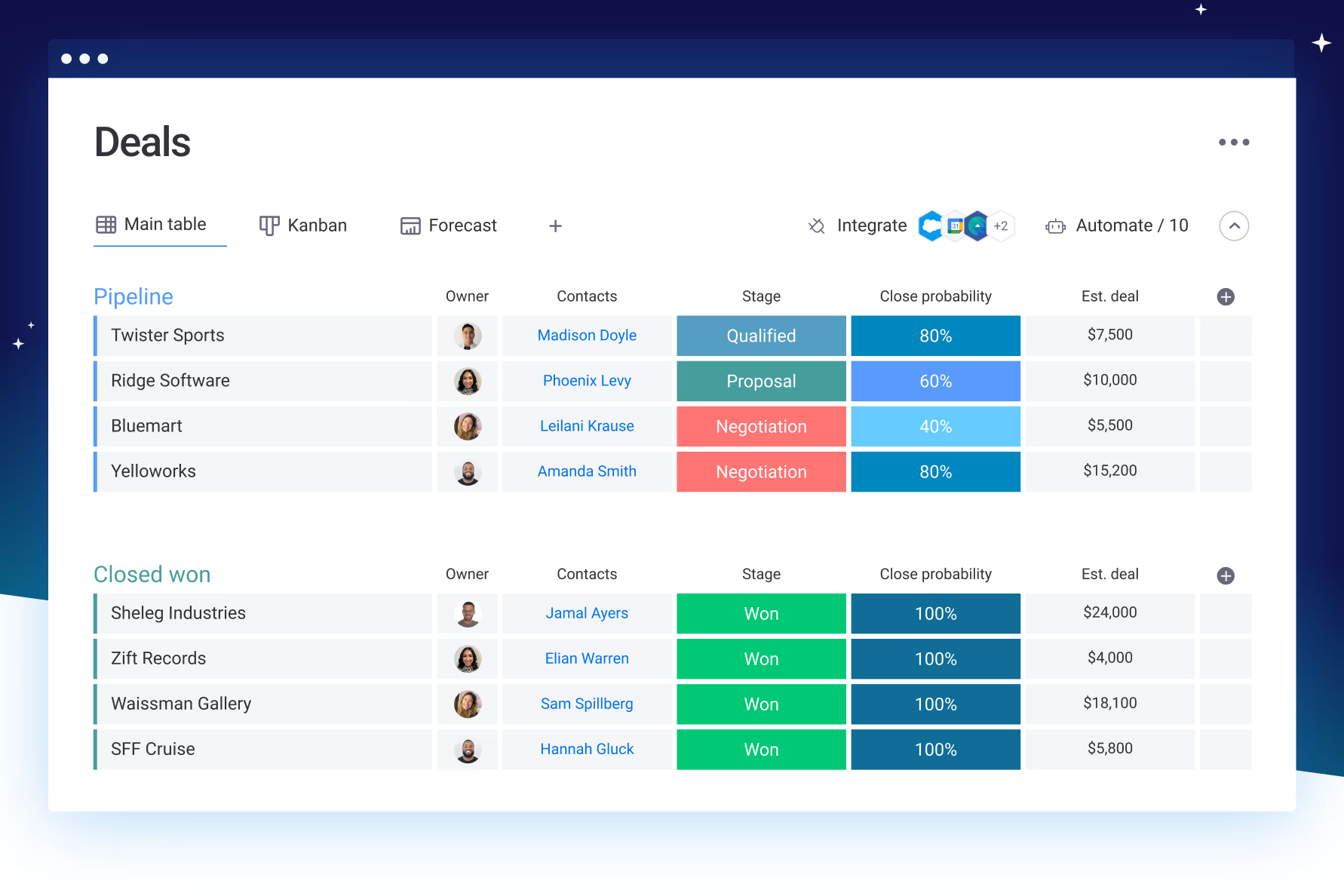
Image source: monday.com
Features
- Visual boards (Table, Kanban, Timeline) for tracking contacts, deals, and projects.
- Centralized contact database with tags, filters, and grouping.
- Automated reminders, notifications, and workflow triggers for follow-ups.
- Collaboration features including shared notes, files, and updates.
- Reporting dashboards for monitoring engagement, deal progress, and team performance.
Strengths
- Highly visual interface makes sales contact management intuitive and easy to track.
- Automation reduces manual follow-ups and improves workflow efficiency.
- Centralized contact management system keeps all information organized and accessible.
- Flexible enough to adapt for project management, CRM, or marketing use cases.
Limitations
- Can become complex with large teams or high volumes of contacts.
- Reporting may require setup for detailed analytics and performance tracking.
Pricing
- Basic: $10/user/month (billed monthly).
- Standard: $12/user/month (billed monthly).
- Pro: $20/user/month (billed monthly).
8. ClickUp: Customizable contact and project tracking
ClickUp is a versatile contact management system that combines contact management software with project tracking, making it ideal for teams managing both relationships and workflows. It allows businesses to centralize contact information, track engagement, and align projects with client interactions. With customizable views and automation options, ClickUp supports contact relationship management and sales contact management, helping teams stay organized, collaborate efficiently, and maintain up-to-date contact management systems across multiple projects and departments.
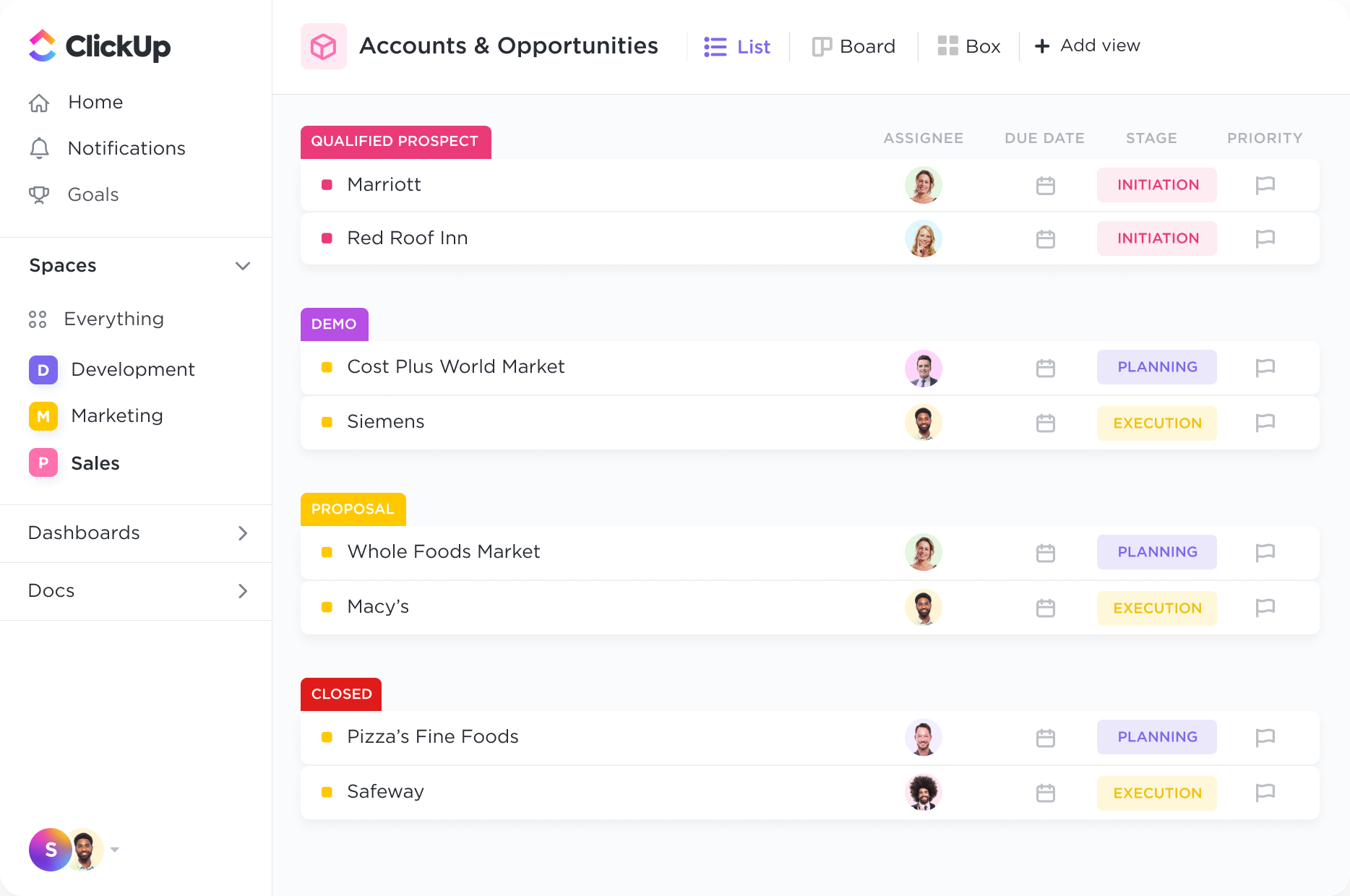
Image source: clickup.com
Features
- Centralized contact database with custom fields, tags, and grouping.
- Task and project management linked directly to contact records for workflow alignment.
- Automated reminders, recurring tasks, and workflow automation to improve efficiency.
- Collaboration tools including comments, shared documents, and team notifications.
- Reporting dashboards to monitor engagement, task completion, and relationship health.
Strengths
- Combines contact management with project tracking for seamless workflow integration.
- Highly customizable dashboards, fields, and views for teams of any size.
- Automation reduces repetitive tasks and improves contact management processes.
- Supports collaboration across departments, ensuring everyone is aligned on client interactions.
Limitations
- Can feel complex for teams using ClickUp solely for contact management software.
- Requires time to set up custom workflows and dashboards.
Pricing
- Unlimited: $5/user/month (billed monthly).
- Business: $12/user/month (billed monthly).
- Business Plus & Enterprise: $19–$25/user/month (billed monthly).
9. Insightly: Contact management with project features
Insightly is a contact management software that combines traditional contact relationship management with robust project management capabilities. Designed for small and medium-sized businesses, it helps teams track contacts, leads, and opportunities while managing projects and tasks in one unified platform. Insightly supports contact management systems by centralizing customer data, automating workflows, and enabling collaboration. Its integration of project and contact management makes it ideal for businesses that need to coordinate client relationships alongside deliverables, ensuring better visibility and accountability across teams.
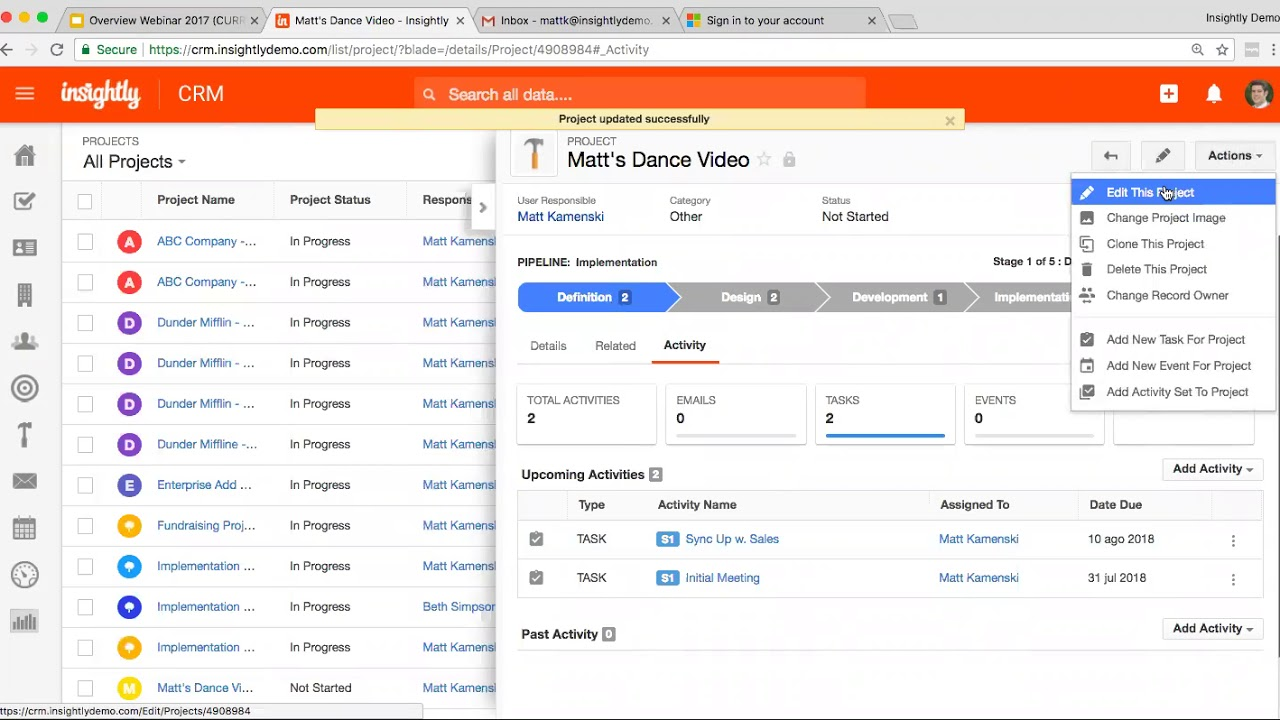
Image source: insightly.com
Features
- Centralized contact and lead database with tagging, filters, and relationship linking.
- Activity tracking for emails, calls, meetings, and task completion.
- Project and task management integrated directly with contact records.
- Automated reminders, workflows, and follow-ups to maintain consistent engagement.
- Analytics and reporting for contacts, sales pipelines, and project progress.
Strengths
- Combines contact management system and project management in one platform.
- Automation and task assignment enhance contact center workforce management and accountability.
- Centralized database ensures all teams have access to up-to-date contact and project information.
- Customizable dashboards and reporting allow teams to track engagement and project outcomes effectively.
Limitations
- Advanced project management features are only available on higher-tier plans.
- Some users may find integration with third-party tools less intuitive.
Pricing
- Plus: $29/user/month (billed monthly).
- Professional: $49/user/month (billed monthly).
- Enterprise: $99/user/month (billed monthly).
10. Contacts+: Simple contact sync for small businesses
Contacts+ is a contact management software for small business teams that focuses on simplicity, synchronization, and efficiency. It helps users organize contacts, maintain up-to-date information, and streamline sales contact management without the complexity of enterprise-grade CRMs. With a unified database, automatic updates, and mobile access, Contacts+ enables small businesses to manage contact management systems effectively, reduce data duplication, and maintain strong relationships with customers, partners, and suppliers. Its lightweight design and intuitive interface make it an ideal choice for teams that need reliable contact management software without unnecessary features.
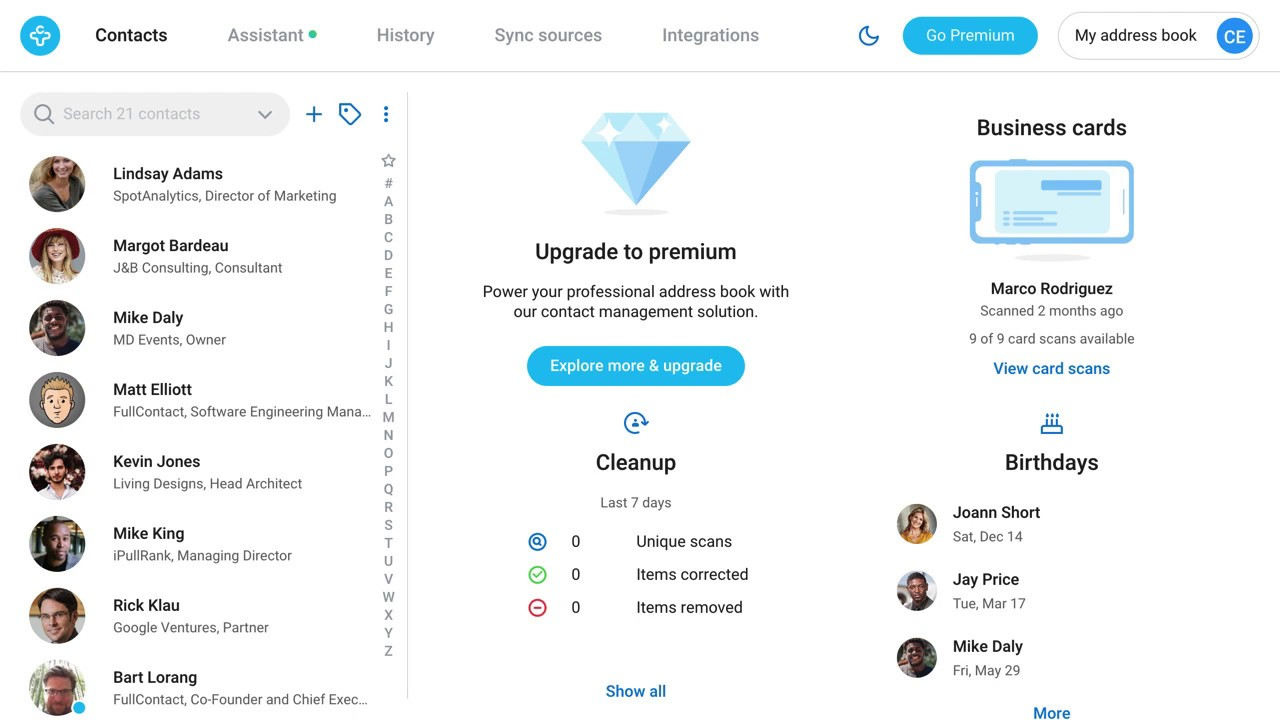
Image source: contacts+.com
Features
- Centralized contact database with automatic syncing across devices and platforms.
- Duplicate detection and data cleansing to maintain accurate contact records.
- Integration with email, calendar, and social apps for seamless contact relationship management.
- Activity tracking for calls, emails, and meetings.
- Simple analytics and reporting to monitor engagement and contact trends.
Strengths
- Easy-to-use interface ideal for small teams and startups.
- Automation ensures contact data remains up-to-date across devices.
- Supports small business contact management software needs without unnecessary complexity.
- Mobile-friendly platforms allow teams to access and update contacts on the go.
Limitations
- Limited reporting and analytics compared to enterprise CRMs.
- Not ideal for large organizations with complex sales pipelines or multiple teams.
Pricing
- Pro: $9.99/user/month (billed monthly).
- Business: $14.99/user/month (billed monthly).
Key features of modern contact management systems
Modern contact management systems offer more than just storage for names and numbers. They provide tools to organize, track, and act on customer and partner interactions efficiently. By centralizing data, automating repetitive tasks, and enabling collaboration, these systems help teams stay productive and informed. The following are key features that businesses should look for when evaluating contact management solutions.
- Centralized contact database with filters, tags, and grouping: A centralized database ensures all contact information is stored in one place, eliminating duplicates and inconsistencies. Filters, tags, and grouping allow teams to segment contacts based on criteria like industry, deal stage, or location. This makes it easy to locate specific contacts, organize outreach, and prioritize communication efforts efficiently.
- Activity tracking (emails, meetings, follow-ups): Activity tracking logs every interaction with contacts, including emails, meetings, calls, notes, and related contracts. This gives teams a complete view of each relationship, from communication history to active agreements. Teams gain a complete view of each relationship, which helps in planning personalized outreach. Tracking follow-ups ensures no opportunities are missed and supports consistent engagement across all touchpoints.
- Automated data updates and reminders: Automation keeps contact records accurate and reduces manual effort. Systems can trigger reminders for follow-ups, renewals, or unaddressed messages, ensuring timely engagement. Tools like Lark Base Automation allow teams to set custom triggers and workflows, keeping data consistent and tasks on schedule.
- Collaboration tools (notes, shared docs, comments): Collaboration features allow teams to co-author notes, attach files, and leave comments directly within contact records. This ensures that knowledge is shared and accessible across departments. Centralized collaboration reduces miscommunication and keeps everyone aligned with client interactions.
- Analytics and reporting on customer interactions: Analytics provide insights into engagement patterns, response times, and overall relationship health. Reporting features help managers identify high-value contacts and evaluate team performance. These insights support data-driven decision-making and help optimize outreach strategies.
- Mobile access for remote teams: Mobile access ensures that sales, support, or field teams can view and update contact information on the go. Cloud-based systems synchronize data in real time, so remote team members always have the latest information. This flexibility improves responsiveness and keeps workflows uninterrupted, even outside the office.
Common challenges in contact management
Even with modern tools, many organizations struggle to manage their contacts efficiently. Challenges often arise from inconsistent data, dispersed information, and a lack of clear processes. Without a structured system, teams can lose visibility into relationships, miss follow-ups, and duplicate efforts. Recognizing these obstacles is the first step toward implementing a solution that improves workflow and collaboration.
- Data duplication or outdated entries: When contacts are entered multiple times across spreadsheets, CRMs, or email lists, duplicates can create confusion. Outdated or incomplete entries reduce the reliability of data, leading to errors in communication. Maintaining clean, updated records requires consistent data practices and tools that can detect and merge duplicates automatically.
- Scattered contact information across tools (spreadsheets, email, CRMs): Many businesses store contacts in multiple systems, creating fragmented information silos. This makes it difficult to get a comprehensive view of interactions and relationship history. Consolidating contact data into a single, centralized platform improves access and ensures teams work from the same source of truth.
- Poor visibility into relationship history: Without proper logging of past communications, teams can lose context on interactions with clients or partners. This lack of visibility can lead to repeated outreach, missed opportunities, and inconsistent messaging. Tracking activity across all touchpoints ensures every team member stays informed.
- Lack of automation or ownership tracking: Manual follow-ups and unclear responsibilities can result in missed deadlines and neglected contacts. Assigning ownership for each contact and automating reminders ensures accountability and timely engagement. Automated workflows help maintain consistency and reduce human error.
- Limited access to mobile or during field work: Teams working outside the office often need real-time access to contact data on mobile devices. Without mobile-friendly platforms, employees may miss updates or fail to log interactions promptly. Cloud-based solutions enable field teams to access and update contacts anytime, anywhere.
These challenges highlight the gaps that modern platforms, like Lark, aim to solve by centralizing data, providing automation, improving visibility, and supporting mobile access.
Best practices for effective contact management
Managing contacts effectively isn't just about storing names and numbers—it's about keeping every interaction organized, timely, and visible across your team. Here's how to apply best practices in contact management and how Lark makes it easier to maintain at scale.
- Centralize all contact data
Best practice: Keep every customer, partner, or supplier record in a single, searchable location to eliminate duplication and confusion.
How Lark helps: With Lark Base, teams can create a unified contact database with customizable fields such as company name, communication history, deal stage, and renewal date. Filters and views (like Table or Kanban) make it easy to see every relationship status at one glance.
- Automate reminders and updates
Best practice: Automate follow-ups, renewal alerts, and data maintenance to avoid missed opportunities.
How Lark helps: Base Automation allows you to set triggers that automatically create follow-up tasks or reminders based on contact activity. For example, when a client hasn't been contacted in 30 days, Lark can notify the account manager instantly—ensure consistent engagement.
- Assign ownership for every relationship
Best practice: Every contact should have a clear owner responsible for follow-ups, updates, and relationship tracking.
How Lark helps: Lark Tasks lets teams assign ownership directly from contact records. Tasks can include due dates, priorities, and progress tracking, so stakeholders of the task (creator, owners, and followers) know who's accountable for each client or prospect.
- Maintain transparent communication
Best practice: Keep all conversations visible and accessible to ensure smooth handoffs and informed collaboration.
How Lark helps: Lark Messenger links directly to contact records, allowing teams to discuss updates, share files, and @mention teammates without losing context. Lark Mail complements this by storing client correspondence within the same workspace for a full communication trail.
- Keep your team aligned with shared documentation
Best practice: Store client notes, templates, and reference materials in a shared space to prevent version conflicts.
How Lark helps: Lark Docs and Wiki allow teams to co-edit proposals, maintain client summaries, and publish internal reference pages (like tone guides or service playbooks). Everything stays accessible and up to date, improving both client consistency and internal efficiency.
- Use data to prioritize key relationships
Best practice: Regularly review metrics like engagement frequency, deal size, or renewal value to focus on high-impact contacts.
How Lark helps: Lark Base dashboards visualize contact performance and relationship trends, helping managers identify priority clients and growth opportunities in real time.
- Protect data and ensure compliance
Best practice: Restrict access to sensitive information and maintain proper audit trails.
How Lark helps: Lark includes granular permissions, roles, and audit logs, so managers can control who views, edits, or exports contact data—ensuring secure, compliant handling of customer information.
Conclusion
Strong contact management is essential for building lasting relationships, improving team efficiency, and ensuring timely engagement with customers, partners, and leads. By keeping contact data accurate, centralized, and actionable, businesses can reduce errors, streamline workflows, and make more informed decisions. Platforms like Lark go beyond traditional spreadsheets, providing automation, real-time updates, and collaboration tools that keep teams aligned and accountable.
Whether tracking communications, assigning tasks, or managing follow-ups, Lark enables businesses to create smarter, more organized contact management workflows. Explore Lark's free plan today to start managing contacts and relationships more effectively.
FAQs
What is the difference between contact management and CRM?
Lark helps illustrate the distinction: contact management focuses on storing, organizing, and maintaining information about your contacts, while a CRM (Customer Relationship Management) system extends this by tracking interactions, sales pipelines, and relationship metrics. CRMs often include analytics, automation, and collaboration features, whereas contact management may be simpler, focusing primarily on keeping contact data organized.
How can Lark help small teams manage contacts more efficiently?
Lark provides a centralized contact management system with activity tracking, shared databases, and task assignment. Small teams can manage leads, clients, and partners in one workspace, reducing duplication and improving visibility. Integration with Lark Messenger, Mail, and Docs ensures communication, follow-ups, and documentation are all accessible in real time.
How does automation improve contact management?
Automation helps maintain clean, accurate, and up-to-date contact management systems. Tasks like reminders, follow-ups, and data updates can be triggered automatically, reducing human error and ensuring timely engagement. Lark's automation tools streamline these processes, allowing teams to focus on building relationships instead of administrative work.
Can Lark replace standalone contact management software?
Yes, Lark combines contact organization, task management, messaging, and collaboration in one platform. By integrating communication, automation, and record-keeping, it can serve as a comprehensive contact management software alternative for both small and medium-sized teams.
How can teams maintain clean and accurate contact data?
Teams can use centralized databases, set validation rules, and implement automated workflows to avoid duplicates and outdated entries. Regular audits and activity tracking, like those available in Lark Base, ensure that all contact information remains current and reliable.
Is contact management useful for non-sales teams?
Absolutely. Beyond sales, marketing, HR, support, and operations teams benefit from a structured contact management system. It helps manage vendors, partners, internal stakeholders, and clients, providing visibility and coordination across all interactions.
Related reading
Table of contents
Start using Lark today

Manage all your work in one place
Boost team efficiency by 10x
Save up to 70% on software costs
Table of contents
Start using Lark today
Manage all your work in one place
Boost team efficiency by 10x
Save up to 70% on software costs
Keep reading









2026 Lark Technologies Pte. Ltd.
Headquartered in Singapore with offices worldwide.






Explore: