


Airtable vs Monday: Which Tool Is Right for Your Team?

Fecilia Clarke
Solutions Marketing Specialist
Aug 5, 2026
Fecilia Clarke
Aug 5, 2026

14 min read


It’s a familiar feeling in any growing organization. The initial energy of a new project gives way to a subtle chaos of scattered information. You know you need a central hub to bring order to the chaos, and your search for the right project management tool has likely led you to two of the most popular tools in the industry: Airtable and Monday.com.
This guide is designed to cut through the noise. We will dive deep into the Airtable vs Monday comparison, exploring their core functionalities, ideal use cases, and pricing structures. We'll help you understand not just what these tools do, but which one aligns with the unique DNA of your team and its approach to project management.
The core dilemma: A flexible database vs. a structured project manager
Before we compare specific project management features, it’s crucial to understand the fundamental difference in their approach. This isn't just about surface-level capabilities; it's about the very foundation upon which each project management platform is built. Choosing the right one starts with understanding which philosophy best matches your team's needs, challenges, and desire to manage projects effectively.
Airtable: A database with a friendly face
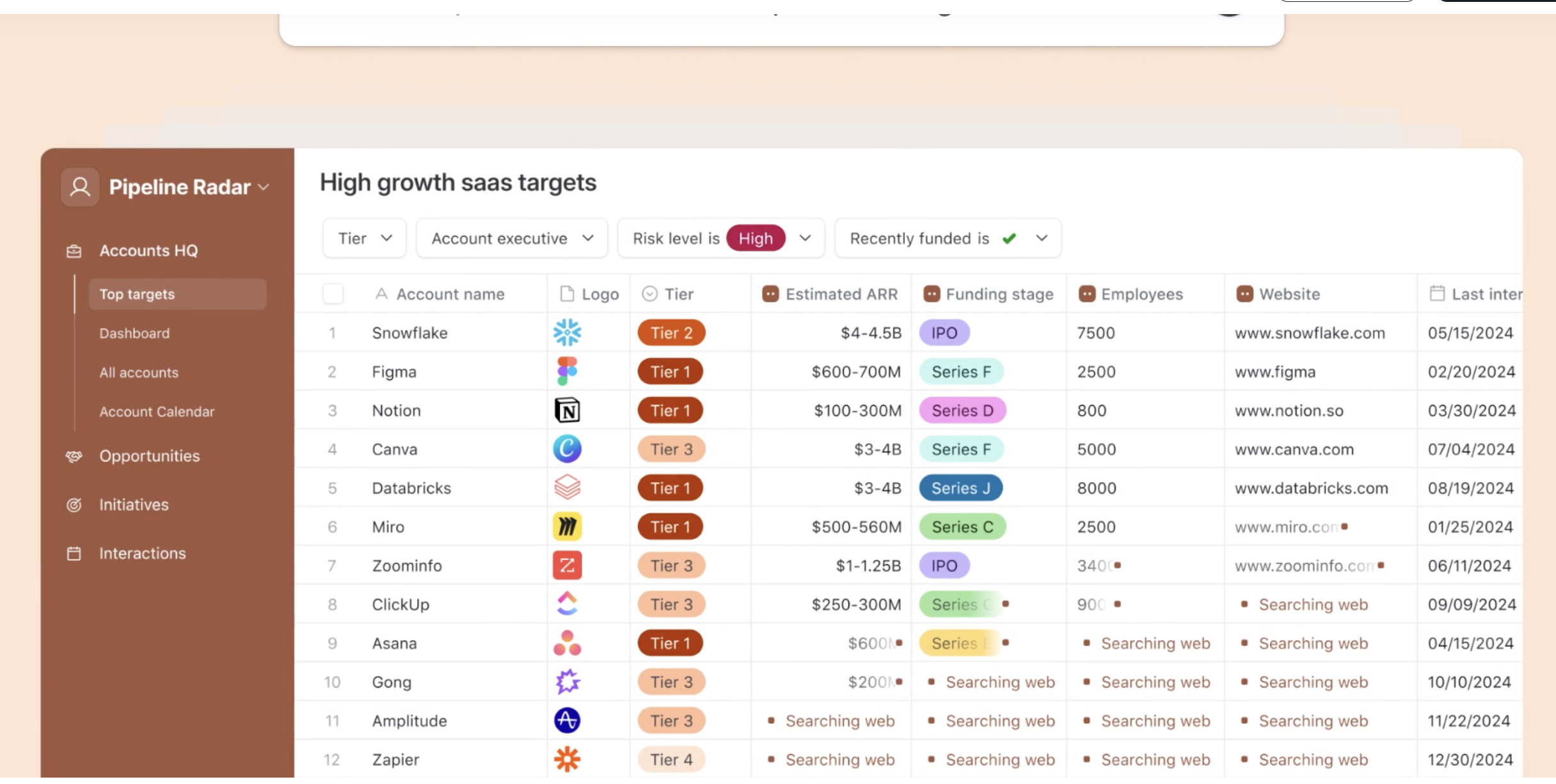
Image source: airtable.com
Imagine having a set of infinitely versatile building blocks. You can build a simple car, a sprawling castle, or something entirely new that only you could dream up. This is Airtable. At its heart, it is a powerful relational database, but it presents itself through a clean, inviting spreadsheet interface. This spreadsheet database hybrid model is its superpower. You don't need to be a developer to start organizing information, but underneath that simplicity lies a robust relational database structure, giving you the power to link related data, create complex data models, and build your own custom apps to run your unique workflows.
Airtable doesn’t tell you how to work; it gives you the tools to build your own perfect system from the ground up. Its flexibility is its greatest strength, making it ideal for everything from content calendars and CRMs to inventory management and bug tracking. It’s less of a tool for managing a single project and more of a tool for creating custom databases to manage the information that powers countless projects. It’s a space where you can truly create apps without code.
Monday.com: A visual command center for work
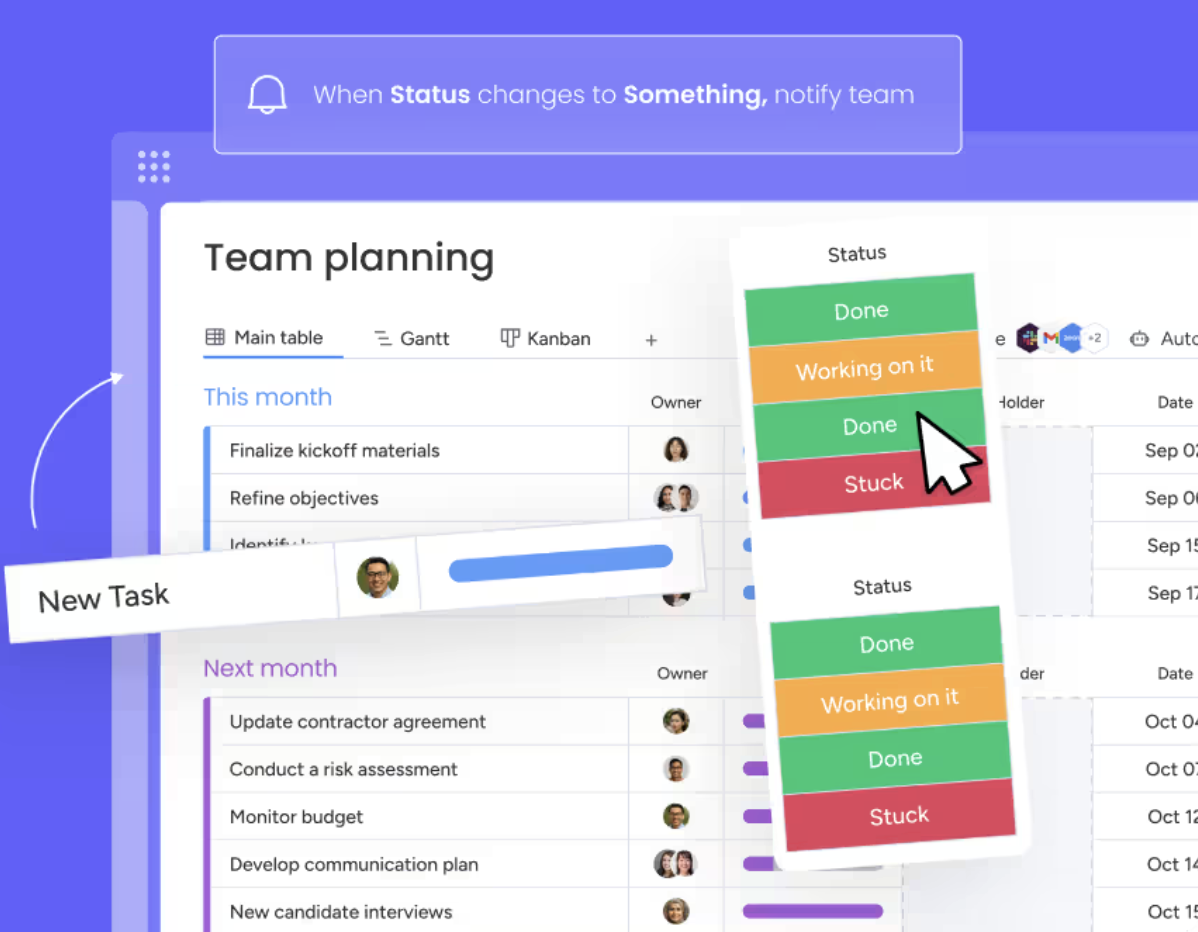
Image source: monday.com
If Airtable is a set of building blocks, monday.com is a high-quality, pre-fabricated model kit. It comes with clear instructions and purpose-built parts designed to create a specific, high-functioning outcome: a well-managed project. Calling itself a "Work OS," it excels as a command center for team collaboration and project execution. The philosophy behind monday work management is providing a structured, visual environment built around the concepts of boards, tasks, timelines, and dynamic dashboards.
From the moment you log in, monday.com guides you toward organizing your work into clear, actionable stages. Its strength lies in this structure and its visually intuitive interface. Gantt charts, Kanban boards, and workload views aren't add-ons; they are central to the experience. This makes it incredibly effective for teams that need to plan, track, and collaborate on projects with defined start and end points, clear ownership, and a focus on hitting deadlines.
The in-depth showdown: Airtable vs Monday feature comparison
Now that we understand their core philosophies, let's break down how Airtable and monday.com stack up against each other across the features that matter most to modern teams and project managers.
Core functionality: How work gets done
The difference in functionality begins with their basic building blocks:
The core functionality of Airtable revolves around a "Base" (a database) which contains "Tables" of "Records" (rows) and "Fields" (columns). The magic happens when you link records between tables—for example, linking a "Clients" table to a "Projects" table. This allows you to manage data with a level of interconnectedness that provides a true single source of truth for all your business information, moving far beyond basic task tracking.
Monday.com is built around "Boards," which can be configured as private boards or shared team spaces. A board typically represents a single project or workflow. Each board contains "Items" (tasks or project components) and "Columns" that track data like status, owner, and due date. The focus is linear and progressive: moving a task from "To Do" to "In Progress" to "Done." It's a highly effective model for visualizing momentum and tracking progress toward a specific goal.
Ease of use and the learning curve
Both platforms are praised for being user-friendly, but their learning curve can diverge significantly.
Monday.com is widely considered easier to pick up and run with for standard project management. Its extensive library of templates and intuitive boards means teams can get organized in minutes. The visual nature of its user interface provides immediate clarity, making it a user friendly interface for those new to this type of software.
Airtable is also easy to get started with—if you can use Google Sheets, you can use Airtable. However, this initial simplicity masks a much deeper level of functionality. To unlock its true power and all the features it offers, you must invest time in understanding its database concepts. Mastering formulas, linked records, and automations presents a steep learning curve, especially for those trying to use its interface designer to create polished front-ends for their bases. The reward, however, is a system that is perfectly tailored to your exact needs.
For more Google Workspace's information, you can refer to Google Workspace Pricing and Google Workspace alternatives.
Visual project management: timelines, boards, and charts
For teams who live and breathe by project timelines, this is a critical point of comparison.
Monday.com has a distinct advantage here, with a suite of polished, native visualization tools. Its Gantt charts are dynamic and interactive, making it easy to map out dependencies and adjust project schedules. The workload view provides an instant overview of team capacity, helping managers prevent burnout and allocate resources effectively for both large-scale initiatives and individual tasks.
Airtable also offers different "Views" to visualize your data, including a Kanban board, a calendar, a gallery, and its own Gantt view. These views are powerful ways to see your data from different angles. However, they can sometimes feel more like different ways to display data rather than purpose-built project management tools. While highly functional, they may require more configuration to match the out-of-the-box power of Monday.com’s dedicated project visualization features.
Data management and ultimate flexibility
This is where Airtable truly shines and demonstrates its power as a flexible database. Airtable offers a vast array of "field types" that allow you to manage information with incredible precision. This flexibility means Airtable can become the central repository for almost any type of business information, enabling you to build powerful business apps without writing code. These aren't just simple forms; you can create sophisticated web apps and no code apps to run entire departments.
This flexibility is a game-changer for organizations that see their projects as an extension of their core data. Monday.com can track data effectively, but Airtable allows you to model it with a level of custom functionalities that is hard to match. If your goal is to build a system of interconnected information, Airtable is the stronger choice.
Collaboration and team communication
Both platforms understand that work doesn't happen in a vacuum, and they provide collaboration features for teams. You can comment on tasks in Monday.com and on records in Airtable, @mention teammates, and attach files. These features are effective for keeping conversations tied to specific work items. However, they share a common limitation: the conversation is trapped within that tool.
This creates a communication silo. Important discussions about a project might happen in the project management platform, while broader strategic conversations happen in a separate chat app. This fragmentation forces users to constantly switch contexts, hindering effective team communication. It's a friction point that can lead to miscommunication and a loss of momentum, even with the best collaboration tools.

Integrations and workflow automation
A key strength of modern project management platforms is their ability to automate workflows. Both platforms have robust automation features designed to handle repetitive tasks and automate tasks based on triggers and actions. This workflow automation is crucial for saving time and reducing manual error.
Both also have marketplaces filled with third party apps and support third party integrations with popular services like Slack, Jira, and Google Drive. You can connect to thousands of other third party tools through middleware like Zapier. However, some of the most powerful connections, such as premium sync integrations that offer two-way data flow, may be reserved for higher-tier plans. In the monday.com vs Airtable integration race, the winner depends on the specific tools you need to connect.
Reporting and project tracking
Effective project tracking requires powerful reporting.
Monday.com provides highly visual, widget-based dashboards that are excellent for at-a-glance project health checks and KPI monitoring. They are designed for managers who need quick, digestible insights into team performance and project progress.
Airtable’s approach to advanced reporting is different. While it has some built-in charting capabilities, much of its advanced visualization power comes from its marketplace apps and integrations. For the most complex needs, such as governance advanced reporting required by large enterprises, you may need to connect Airtable to a dedicated business intelligence tool. Both Airtable and Monday.com can provide the data, but Monday.com's native dashboards are often more immediately accessible.
The pricing showdown: Monday.com vs Airtable
Pricing for both tools can be complex, and the "cheaper" option depends entirely on your team's size and needs. It's important to look beyond the advertised monthly price and consider the limitations of each plan.
Both tools offer a free plan, which is great for individuals or very small teams to get started. Airtable's free plan is particularly generous for data organization, but it has limits on records and automation runs. As you move into paid plans, such as the team plan or business plan, you unlock more features. The Airtable pricing structure is heavily influenced by record counts and automation needs.
Monday.com also uses a per-user model but often requires a minimum number of seats. Its plans unlock features like more dashboards, timeline views, and integrations. For large organizations, both offer an enterprise plan with features like enterprise grade security, an admin panel for user management, and the possibility of custom pricing and dedicated support or professional services. Some higher-tier plans may also offer unlimited boards, a key consideration for agencies or teams with many projects.
Who should choose Airtable?
Airtable is the ideal choice for teams and organizations that prioritize flexibility and custom solutions. If your workflow for complex projects doesn't fit into a standard project management box, Airtable provides the canvas to build the exact tool you need.
You should choose Airtable if:
- You need to manage complex, interconnected data and see relational databases as a core part of your strategy.
- You value the ability to build custom applications and custom workflows from the ground up without extensive coding.
- Your team is willing to navigate a potential steep learning curve to achieve a perfectly tailored solution.
- Your primary goal is data management that powers various business functions, not just project execution.
Who should choose Monday.com?
Monday.com is the perfect fit for teams that need a powerful, structured, and visually-driven project management tool right out of the box. If your primary goal is to manage projects efficiently and improve team collaboration on tasks, monday.com excels.
You should choose Monday.com if:
- Your work is centered around projects with clear stages, deadlines, and deliverables.
- You are a project manager who needs strong, native visual tools like Gantt charts and workload management.
- Your team values an intuitive, easy-to-adopt interface that allows them to get started quickly.
- You are looking for a dedicated command center for project execution over deep data customization. The vs Airtable debate for you is about speed to value.
Beyond the 'vs' debate: Is tool fragmentation the real enemy?
After this detailed analysis, you might have a clearer idea of which tool aligns with your team. But let's ask a critical question. Even with the "perfect" tool, is your workflow still fragmented? Are you still switching between your project board, your team chat, your documents, and your calendar just to move a single task forward?
This constant context-switching is a hidden productivity killer. The real challenge isn't just managing projects; it's managing the entire ecosystem of work—the data, the conversations, the documents, the meetings, and the decisions. This is a problem that no standalone tool can solve on its own. It's a problem of fragmentation, and it's what makes modern project collaboration so difficult.
Unify your work: Introducing a smarter way with Lark
Instead of simply choosing another tool to add to your stack, what if you could adopt a platform that eliminates the stack altogether? Lark is an all-in-one collaboration suite designed to solve the problem of fragmentation. It seamlessly integrates team chat, a flexible database, dynamic documents, video meetings, calendar, email, and automated workflows into a single, intelligent environment.
Lark doesn't just offer an alternative; it offers a fundamentally different and more efficient way to work, giving you all the features you need in one place.
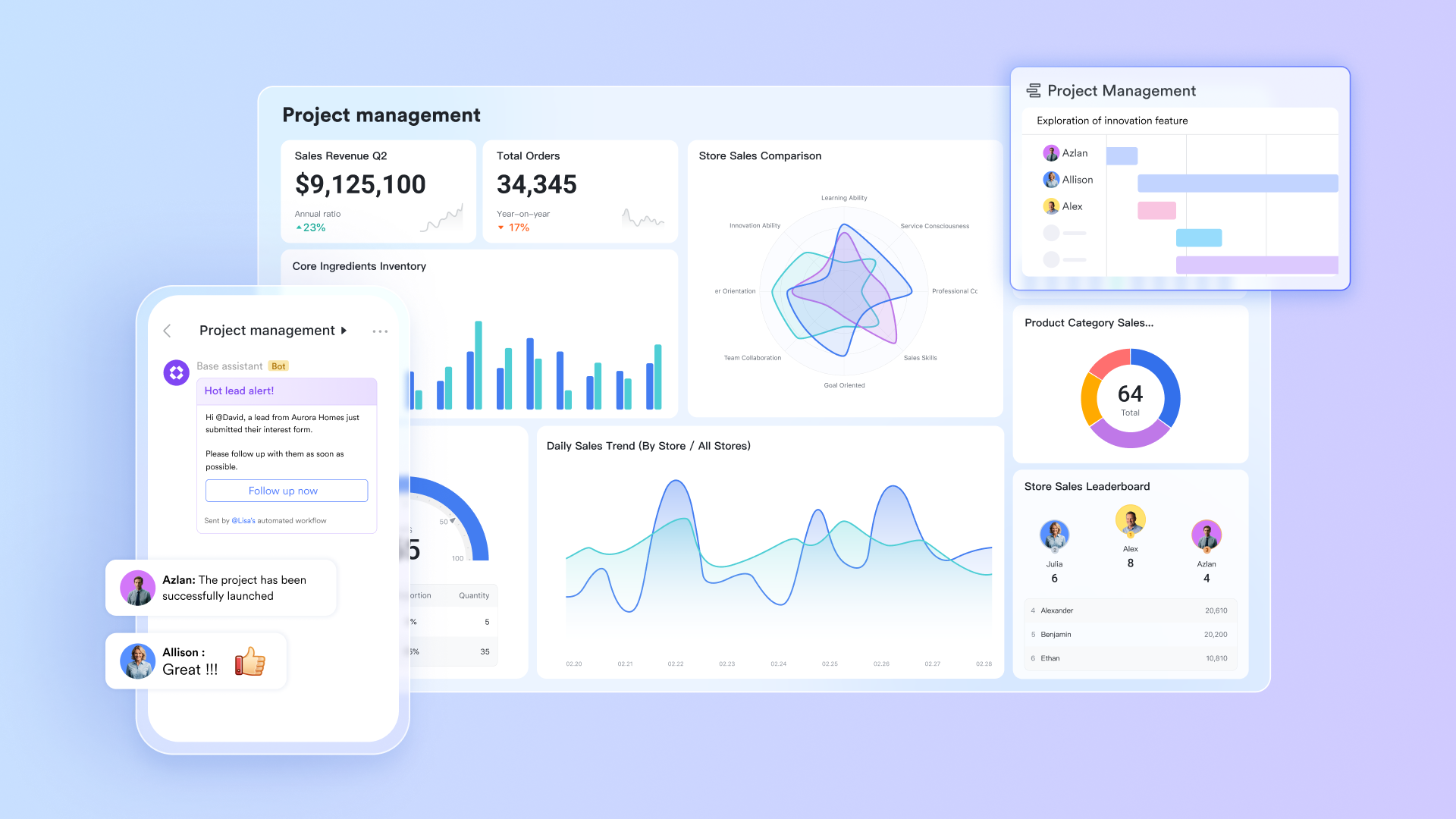
Connect your data and your conversations, seamlessly
Imagine a world where your database and your chat app are one and the same. With Lark Base, you get a powerful and flexible database, much like Airtable. But here’s the magic: you can discuss a specific record in Base directly and @ mention the stakeholders, keeping context and conversation together. No more copy-pasting links or taking screenshots.
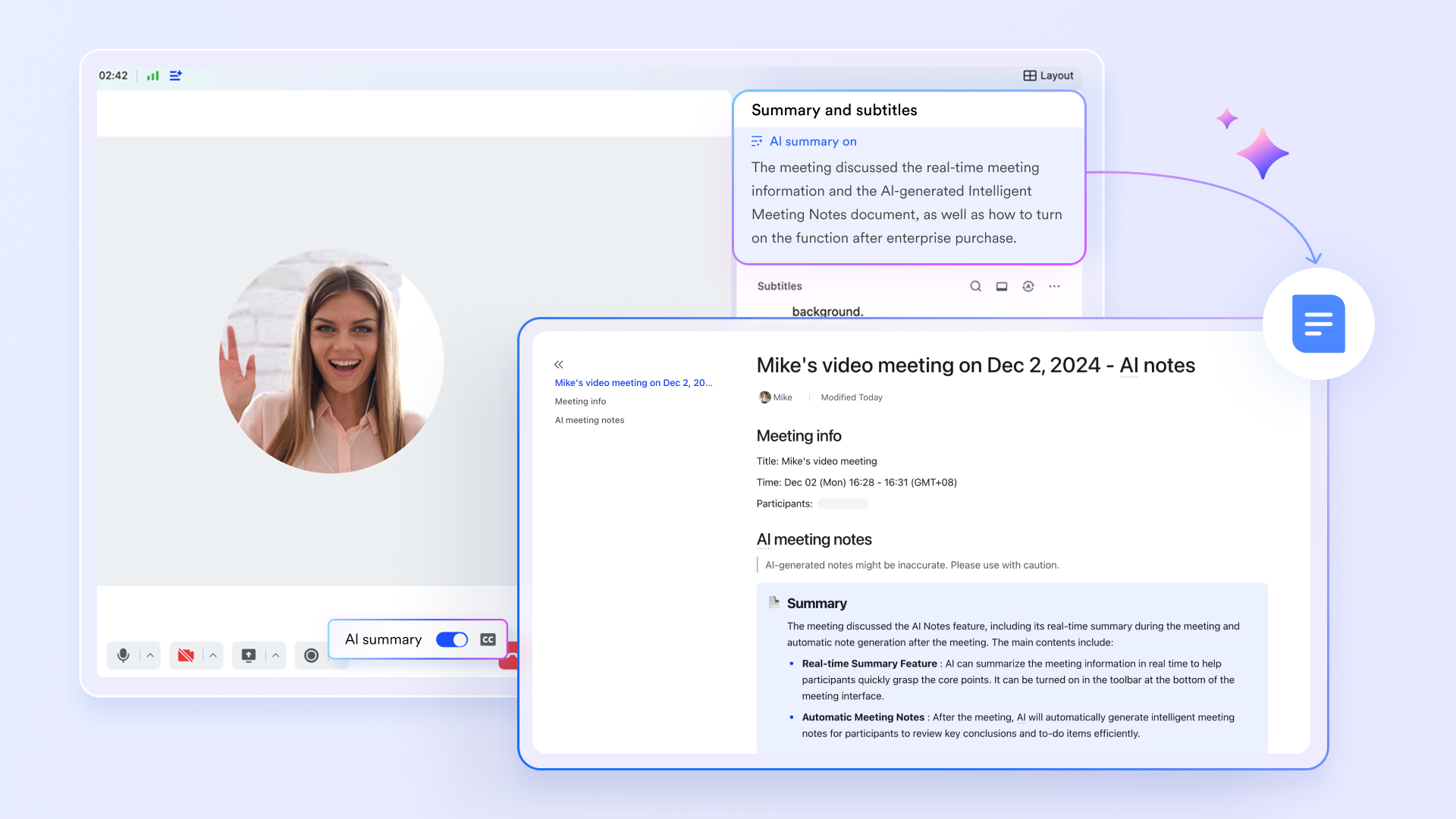
Turn your meetings into action, automatically
The cycle of meetings that end without clear outcomes is over. With Lark, you can schedule a project sync in Lark Calendar, hold the call in Lark Meetings, and let AI Meeting Notes automatically capture action items. These items can then be assigned and synced to your project tracker in Lark Base. The entire lifecycle of a meeting is handled in one place.
Streamline your business processes with built-in workflows
Lark Base is far more than a static database; it's the dynamic engine for your team's most important processes. It gives you the power to build automated workflows that perfectly mirror how your team actually operates. Imagine automatically routing tasks and eliminating bottlenecks—for example, when a record’s status changes to “Pending Approval,” an automation can instantly notify the right manager for sign-off. Similarly, you can connect Lark Forms to capture client requests, with each submission instantly creating a new, actionable item in your database that notifies and assigns the task to the correct team.
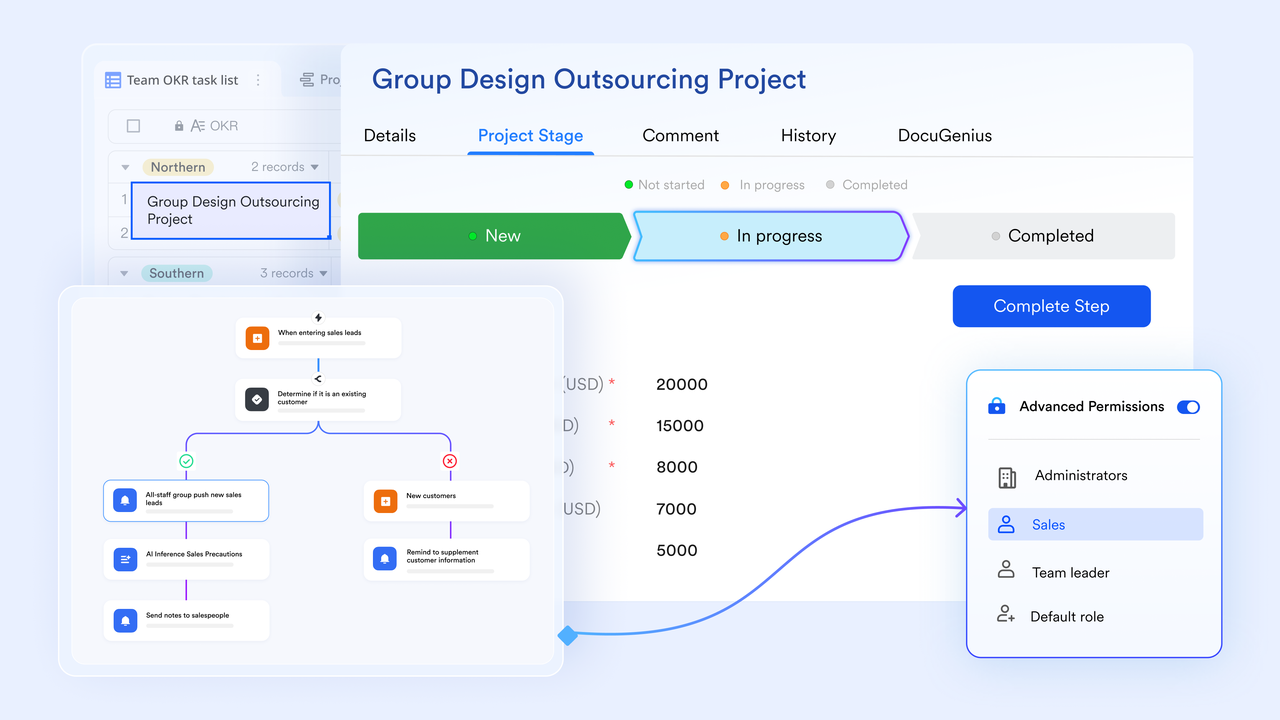
Build a true single source of truth with dynamic docs
Static project briefs and outdated reports are a thing of the past. Lark Docs can become your team's ultimate project headquarters. You can embed live and editable Lark Base views directly within a document. Imagine a project proposal where the budget tracker and task list are not just screenshots, but live data feeds. As you update your base, your doc updates automatically.
👉Try Lark’s Savings Calculator: Switching to Lark’s Pro plan can lead to significant cost savings— for example, a 100-employee company using Slack, Google Workspace, and Airtable could save approximately $25,200 annually by consolidating their tools with Lark.
Conclusion
The choice in the Airtable vs Monday debate is a choice between two excellent but fundamentally different tools. Your decision should be guided by your team's primary mode of work.
- Choose Airtable for its unparalleled data flexibility and the power to build custom solutions.
- Choose Monday.com for structured, visually-driven project management out of the box.
When you recognize that the real challenge is tool fragmentation, you perhaps need to empower your team with a single, unified platform that brings your data, conversations, and workflows together, reducing costs and dramatically boosting productivity. The future of work isn't about finding the perfect single-purpose tool; it's about creating a frictionless, integrated environment where great work can happen effortlessly. Ready to stop switching tabs and start collaborating? Experience the power of a truly unified workspace where your team can achieve more, together.
FAQs
Is Airtable better than Monday?
Neither is objectively "better"—they are designed for different purposes. Airtable excels at flexible data management and building custom solutions, making it a powerful database with a friendly interface. Monday.com is superior for structured, visual project management out of the box. The best choice depends entirely on whether your team prioritizes data flexibility or guided project execution.
Who is Monday.com's biggest competitor?
While it competes with many tools, Monday.com's biggest competitors are often considered to be Asana and ClickUp. These platforms similarly offer comprehensive project management and team collaboration features within a "Work OS" framework. Airtable also poses a significant challenge, especially for teams seeking more database functionality and custom workflow creation instead of structured project tracking.
What are the disadvantages of Airtable?
Airtable's primary disadvantages include a steep learning curve to master its advanced database features like linked records and formulas. Its pricing can become expensive as data grows, since plans are often limited by record counts. Furthermore, its native project management visualizations, while functional, may feel less robust than the dedicated tools found in platforms like monday.com.
Do people still use Airtable?
Absolutely. Airtable is widely used by millions of users, from individual creators and startups to large departments within enterprise companies. Its continued popularity stems from its unique flexibility as a spreadsheet-database hybrid. It empowers teams to build custom applications and workflows perfectly tailored to their specific needs, a capability that keeps it highly relevant and in demand.
Related reading
Table of contents
Start using Lark today

Manage all your work in one place
Boost team efficiency by 10x
Save up to 70% on software costs
Table of contents
Start using Lark today
Manage all your work in one place
Boost team efficiency by 10x
Save up to 70% on software costs
Keep reading








2026 Lark Technologies Pte. Ltd.
Headquartered in Singapore with offices worldwide.






Explore: