














Budget Proposal Template: 3 Simple Steps and 6 Free Templates

Owyn Thomas Kerr
Senior Content Manager
Nov 3, 2026
Owyn Thomas Kerr
Nov 3, 2026

10 min read
Add to preferred sources


You've thought of a great project idea and you're now ready to talk to leadership. Now comes the hard part: convincing these decision-makers that your idea is worth the investment. You need to draft a budget proposal that clearly shows the value your project will deliver.
In this blog, I'll walk you through 3 simple steps to create an effective budget proposal and share 6 of the best project proposal templates to help you secure the funding you need.

What is a budget proposal?
A budget proposal outlines the expected costs of a project to help secure funding from stakeholders. With the support of project management tools, it breaks down expenses so stakeholders can understand the potential benefits and risks of supporting the project.
Costs in a budget proposal generally fall into four main categories:
- Direct costs: Expenses directly tied to the project, such as labor, team hours, software, or specific project activities.
- Indirect costs: Expenses that support the project but also benefit the organization as a whole, like utilities, insurance, IT services, and server fees.
- Equipment and materials: Physical items needed specifically for the project. These are considered a type of direct cost but are listed separately because they are unique to the project.
- Travel and other expenses: Costs for travel, training, taxes, or other variable fees that may arise during the project.
How to create a budget proposal in 3 steps
A budget proposal isn’t just for securing funding; it’s also a handy tool for your team to plan resources and track costs. Once you've opened your document, here’s how to create one in 3 simple steps:
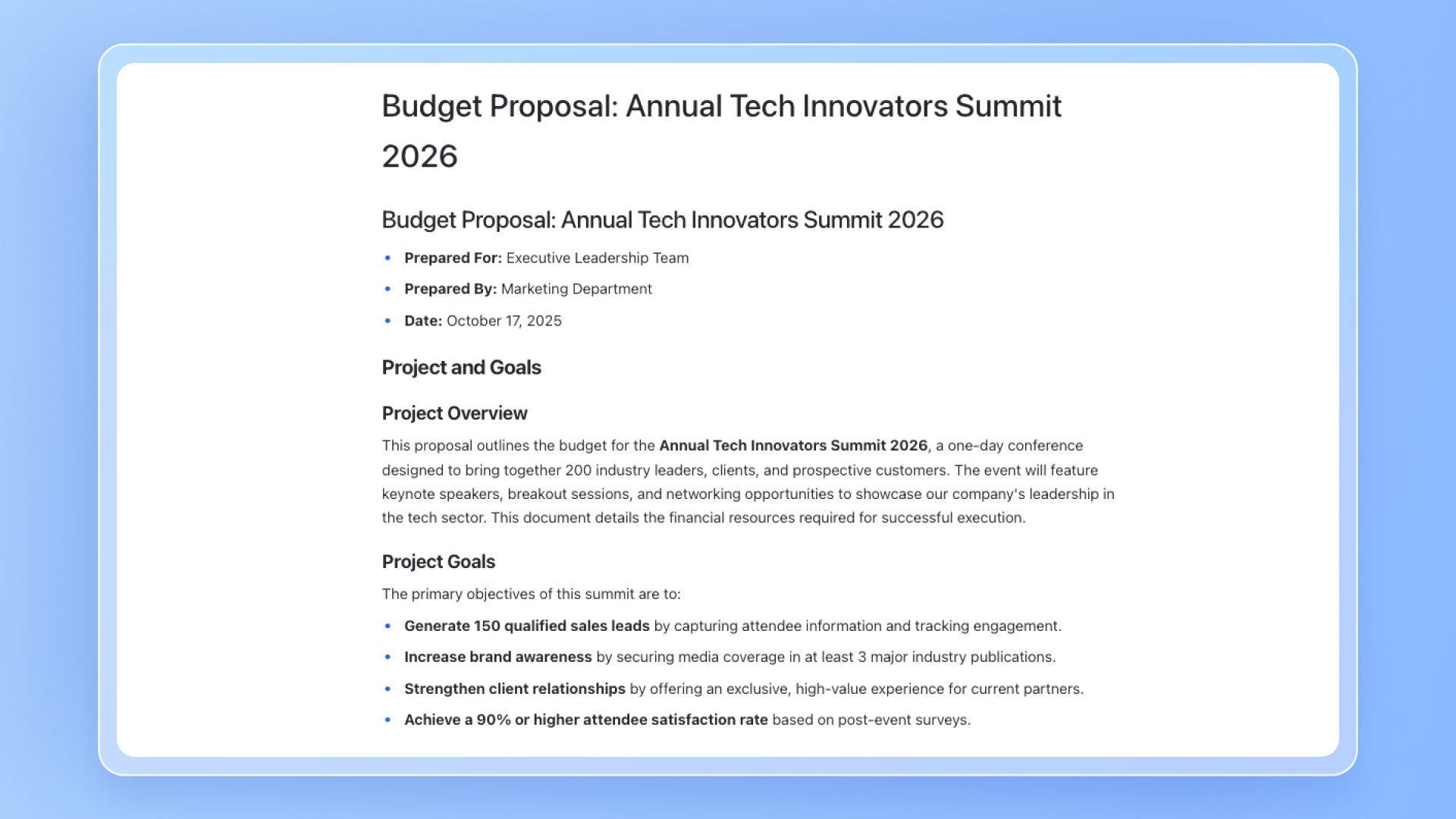
Step 1: Explain your project and goals
Start by giving a brief overview of your project. What’s it about? What do you hope to achieve? This helps readers understand why each expense is necessary.
You can include the budget within a full project plan or keep it as a standalone document for stakeholders who only care about finances. Either way, make sure the purpose of your project comes through clearly.
Step 2: Break down your costs
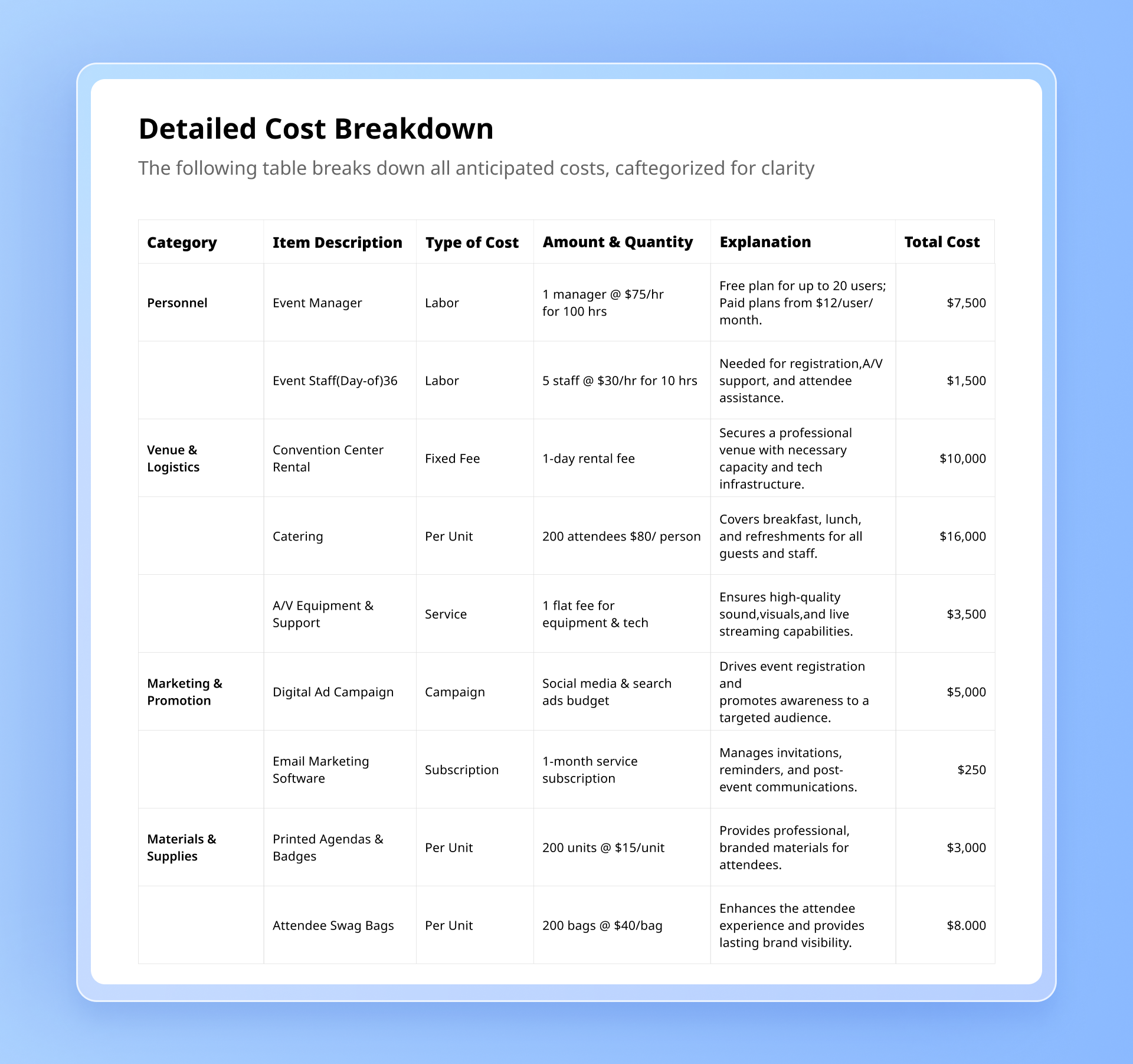
Next, outline your major expense categories—things like team wages, materials, software, travel, or equipment—and then get into the details.
For each cost, include:
- Type of cost: What it is (e.g., labor, subscription, utilities).
- Amount and quantity: Price per hour, per item, or per unit.
- Explanation: Why this cost matters and how it supports your project.
- Total: The full cost for that line item or category.
You can also include a note about expected value or ROI if it helps stakeholders see how the investment pays off.
Step 3: Summarize and get approval
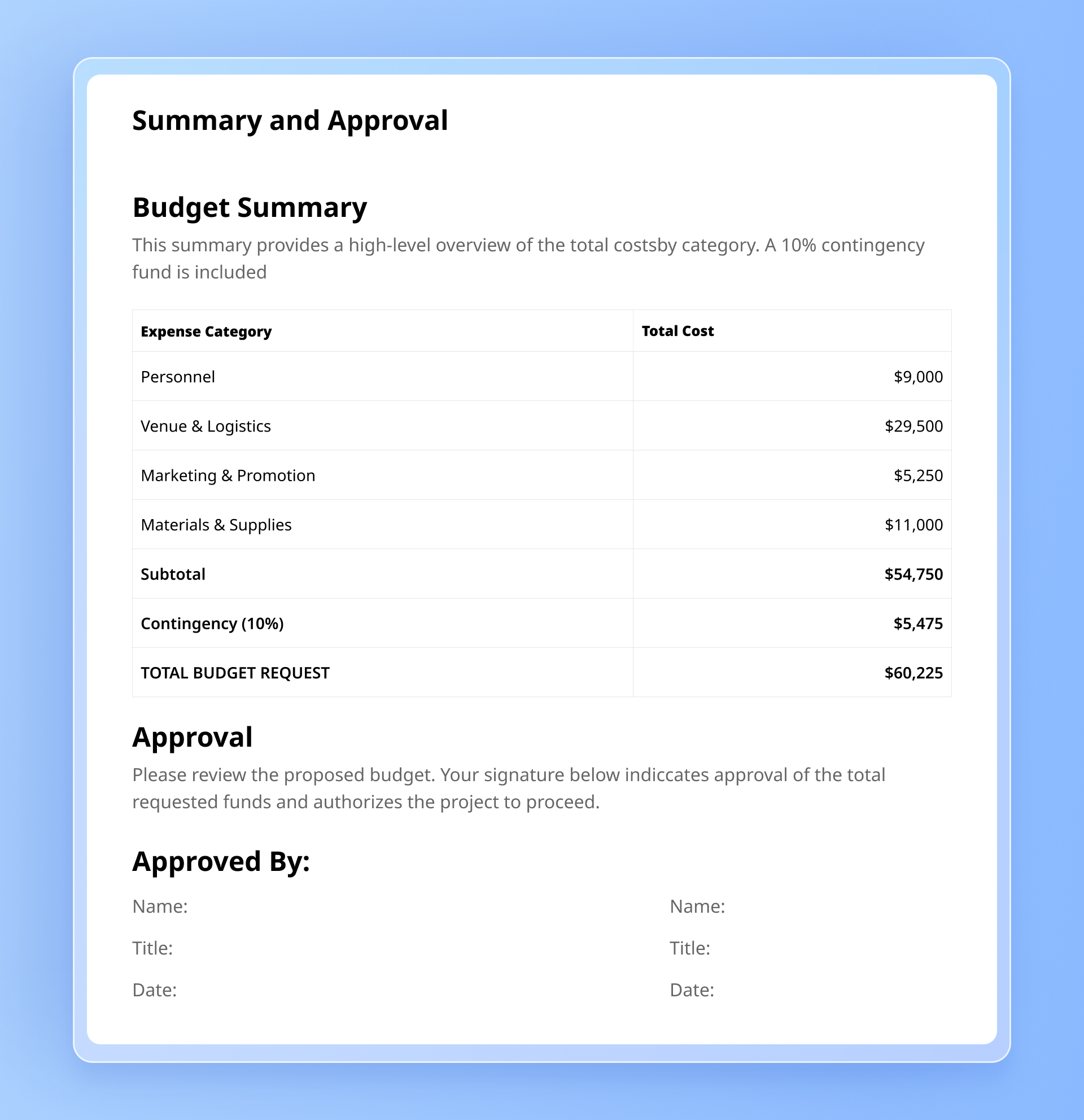
Finally, add a simple summary showing total costs by category and the overall project budget. This makes it easy for readers to grasp the financial picture at a glance.
Once everything looks solid, include a space for signatures or approvals so stakeholders can sign off on the budget.
6 free budget proposal templates
If writing a budget proposal from scratch sounds like a daunting task, then fear not. Here are 5 great budget proposal templates that are free to use.
Budget proposal template by Lark
This simple budget proposal template makes it easy to create, manage, and track proposals. List budget items, proposed amounts, approvers, department heads, and primary and secondary categories effortlessly. Fully customizable with drag-and-drop functionality, it’s seamlessly integrated into the all-in-one Lark platform, which is free to use.
Project budget proposal template by Canva
This stylish Canva template includes both a project proposal and a detailed budget proposal. It covers budget estimates, risk assessments, expected outcomes, and more, helping you clearly present your project’s goals, costs, and potential impact. While it may take a bit more time to prepare than simpler templates, it’s designed to make a strong impression on your leaders.
Simple budget plan template by Lark
If you’re looking for a simple budget plan template, try this free version from Lark. It guides you through what to include in each section—such as objectives, cost analysis, ROI, and more. You can print it, download it, or share it directly in Lark to collaborate with your team during video calls, group chats, or when attaching it to a budget proposal for approval.
Excel budget proposal template by ProjectManager
This free Microsoft Excel template for budget proposals is organized into categories like salaries, materials, equipment, travel, communications, and miscellaneous items. Fully customizable, you can add or remove categories to fit any project. By estimating all potential costs, it helps you create a more accurate budget forecast.
Google Docs budget proposal template by ProjectManager
Originally designed as a project proposal template for Google Docs users, this resource also includes a detailed budget proposal section that is perfect for securing funding and project approval. In addition to budgeting, it covers resources, success criteria, and other key project-related details.
Microsoft Word budget proposal template by Bill
Create a simple, yet professional budget proposal in minutes with this free Word template. Streamline your budgeting process with a ready-made framework that makes it easy to estimate costs, forecast revenue, and support informed decision-making.
Why using a budget proposal template helps
A budget proposal outlines the costs you expect to face during a project. Having one in place brings clarity and accountability to everyone involved. Here’s how it helps your team and stakeholders:
- Promotes financial transparency: When you put together a budget proposal early on, you make finances part of the open discussion from the start. This transparency helps everyone see how their work fits into the bigger picture, and gives stakeholders a clear view of where funds are going and why.
- Highlights project value and impact: A well-prepared budget proposal shows how your project will create value—both for your organization and for others who benefit from it. By explaining what you’re spending money on and the reasoning behind it, you help validate the importance and potential impact of your project.
- Demonstrates cost efficiency: Creating a budget proposal forces you to research and compare your options, whether that’s materials, vendors, or other resources. By detailing each cost, you can show that your choices are cost-effective and aligned with your project goals.
- Supports profit forecasting: If your project involves selling a product or service, a budget proposal helps you estimate potential earnings. Knowing your projected expenses allows you to forecast profits more accurately and make better financial decisions.
- Enables project comparison: Once completed, your budget proposal becomes a useful reference point. Stakeholders can compare it with budgets from past or ongoing projects to assess feasibility and decide whether to move forward.
While the benefits of budget proposal templates are clear, they also come with downsides—like scattered feedback, delayed approvals, and version confusion. That’s why teams are turning to a better solution.
Handle your proposals and projects in Lark
If your team relies on generic templates and endless email chains for budget proposals, you’re likely wasting time and risking costly mistakes. Feedback gets lost, approvals are delayed, and progress stalls.
Tired of juggling multiple apps, spreadsheets, and endless email chains? Lark changes that by bringing your entire workflow—budget proposals, project plans, team tasks, and daily operations—into a single connected platform. Teams can see the full context in one view, track progress in real time, collaborate seamlessly, and make smarter decisions faster.
Automate your proposals
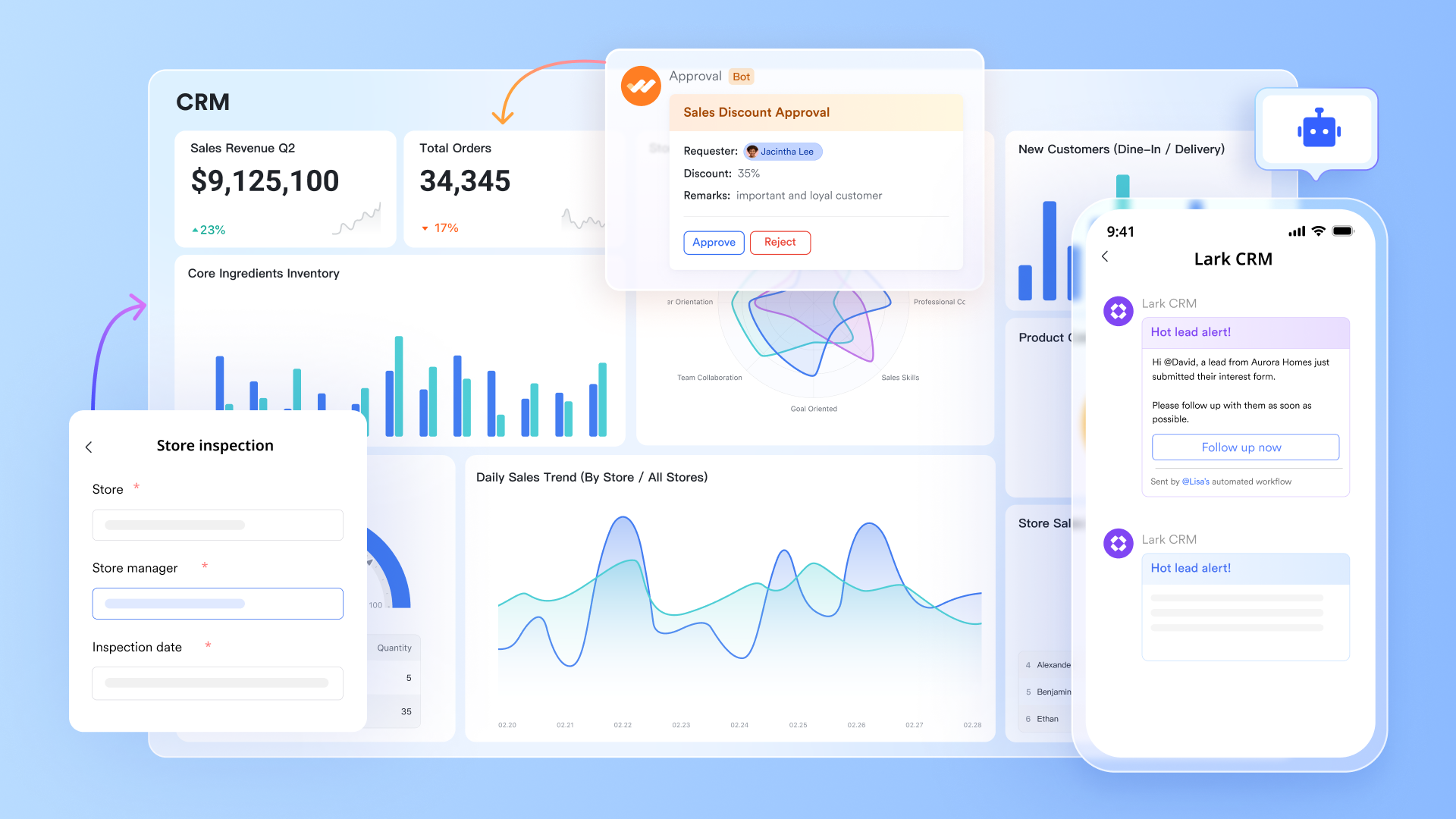
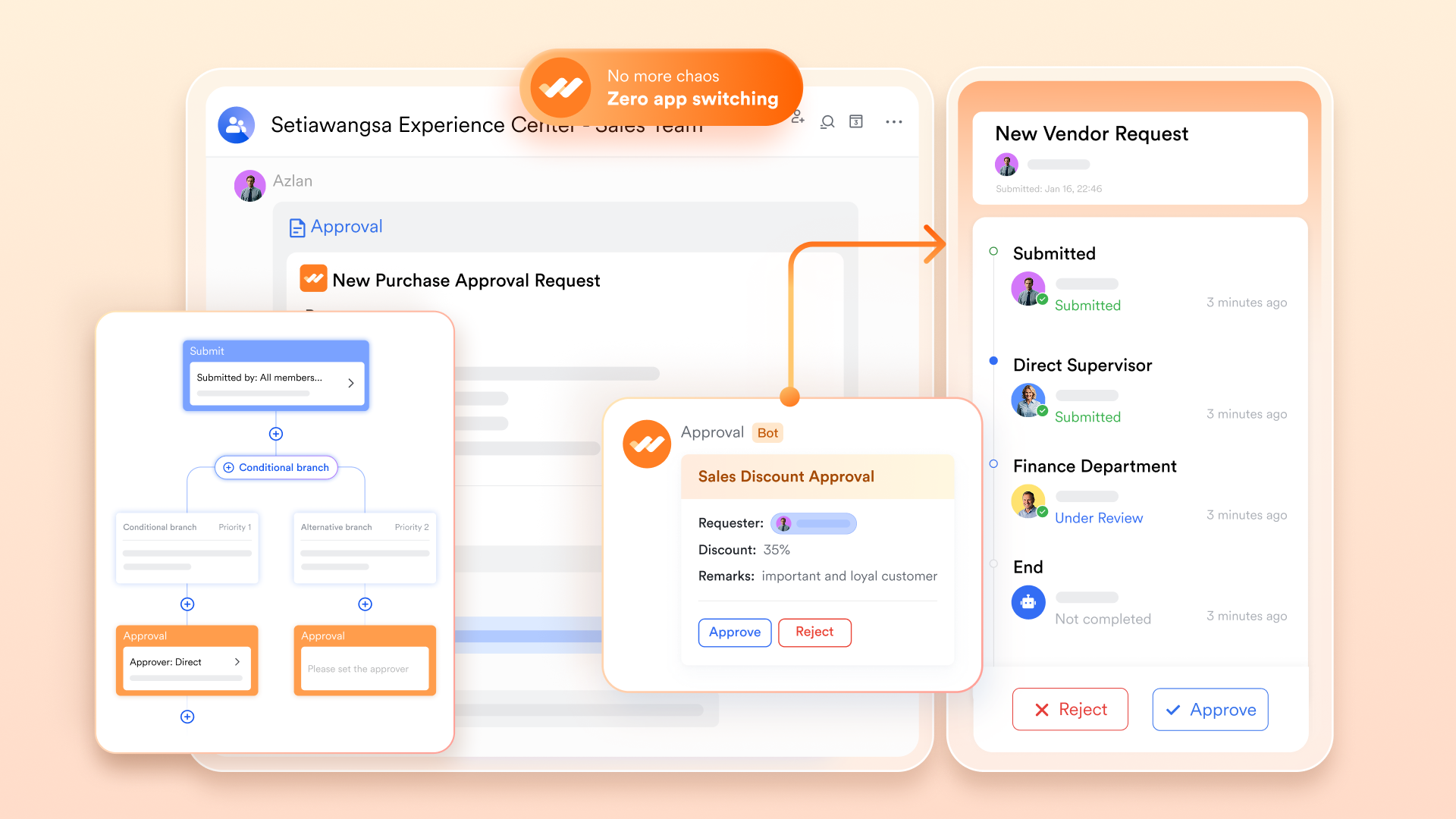
From budget approvals to task assignments and travel requests, Lark lets you automate any process. Use ready-made templates or create custom workflows in seconds without coding or IT support. Requests are routed automatically, reminders are sent, and deadlines are tracked—so projects never stall.
Collaborate seamlessly
Team members can comment on docs, share files, and discuss work directly in Lark from any device—no app-switching required. This seamless collaboration also extends to approval processes, where feedback and discussions happen in real time. If deeper discussion is needed, a group chat or video call can be started instantly, keeping communication clear and projects on track.

Monitor costs in real time
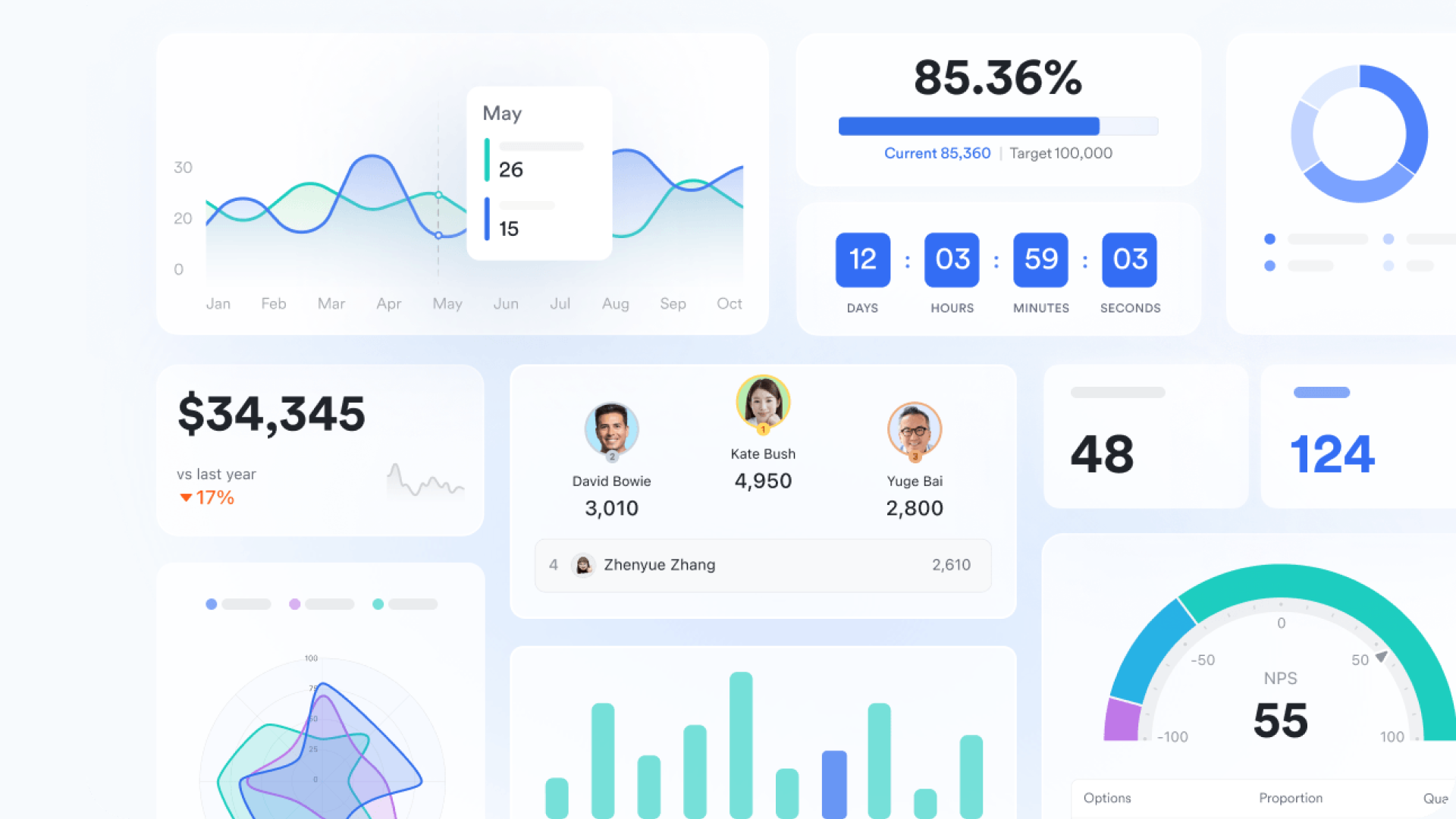
Keeping your budget under control is easier when you can see your spending at a glance. Lark's real-time dashboards do exactly that. There's no complicated setup needed. Simply drag and drop the charts and widgets you need. It pulls live project data and turns it into clear, easy-to-read charts and graphs, so you always know where your costs stand. Need to share a report? Simply share your dashboard in documents, chats, or meetings.
Exceptional value without the large price tag
Lark provides incredible capability without the prohibitive cost. Get started immediately with a free plan that supports up to 20 users and 11 core features, including chat, meetings, cloud documents, approvals, project management, and more. For even more power, it'll cost you as little as $12 per user/month with capabilities that surpass the tools you're using while saving you thousands of dollars each month.
Overhaul your approval process, increase efficiency, and experience immediate results, without any upfront investment.
With Lark, it’s easy to set financial goals for your projects and keep everything moving from start to finish. As your work evolves, you can update budgets, adjust plans, and share data instantly with your team. Whether you’re tracking expenses, running meetings, or collaborating on daily tasks, everything happens in one connected space—so your team stays aligned and focused.
Final thoughts on budget proposal templates
A budget proposal template streamlines planning, communication, and approvals, keeping your team aligned. For HR, professional services, or event management, the right template helps save time and minimize stress.
Tools like Lark take it a step further by offering ready-made templates and letting you create and submit approval requests right from your mobile, keeping all your budget details organized in one place. With these tools, budgeting becomes simpler, faster, and more collaborative.
FAQs about budget proposal templates
How do you write a budget proposal?
Start with a clear project description that outlines what you aim to achieve. Include a cost breakdown showing both direct costs and indirect costs, and explain how these expenses support your project objectives. This helps stakeholders gain a better understanding of your plan and ensures alignment with your financial goals.
Are there different types of budget proposals?
Yes. Here are some common types:
- Project budget proposal – For specific initiatives with defined timelines, deliverables, and resources (e.g., software, marketing, construction, research).
- Annual budget proposal – Covers a full fiscal year, including recurring costs, departmental breakdowns, and cash flow projections.
- Grant budget proposal – Designed to meet funder requirements, with compliance, timelines, and cost-sharing details.
- Department-specific templates – Tailored to functional needs: IT, marketing, events, research, and more.
What is the best format for a budget proposal?
You can use budget templates in Docs, Word, or Excel. Word and Docs work well for narratives and explanations, while Excel is ideal for detailed labor costs, calculations, and total budget tracking. Alternatively, you can use a collaboration platform like Lark lets you submit create and submit proporals directly to management without switching between tools.
How detailed should a budget proposal be?
Include enough detail to justify expenses, referencing current and past projects if relevant, but avoid overwhelming readers. A clear overview helps potential stakeholders review and approve efficiently.
What makes a budget proposal strong?
A strong proposal is accurate, realistic, and aligns with financial goals. Highlight results from past projects when relevant, provide a clear cost breakdown, and demonstrate value to secure buy-in from decision-makers.
How long should a proposal be?
Typically 1–5 pages depending on complexity. Focus on essential information, such as project costs, objectives, and a cost summary, while keeping it readable for your audience.
Does Excel have a budget proposal template?
Yes, Excel offers built-in budget templates suitable for proposals. These templates can include tables for labor costs, project costs, and a cost summary, making it easy to calculate totals, track spending, and present a professional proposed budget.
What are the 4 P's of proposal writing?
Purpose, Plan, People, and Performance: clearly define why the proposal exists, how you will achieve it, who is involved, and expected results. Using a collaborative platform like Lark can help your team coordinate, track current and past projects, and improve overall proposal quality.
What is the 50/30/20 rule budget?
The 50/30/20 rule is a simple way to stay on track with financial goals. It splits income into:
- 50% needs: Rent, utilities, groceries
- 30% wants: Dining out, entertainment
- 20% savings/debt: Savings, investments, loan repayment
Related reading
Table of contents
Start using Lark today

Manage all your work in one place
Boost team efficiency by 10x
Save up to 70% on software costs
Table of contents
Start using Lark today
Manage all your work in one place
Boost team efficiency by 10x
Save up to 70% on software costs
Keep reading







2026 Lark Technologies Pte. Ltd.
Headquartered in Singapore with offices worldwide.






Explore: