














Best Workplace Communication Tools to Boost Team Productivity

Ryan Tanner
Product Marketing Specialist
Sep 18, 2026
Ryan Tanner
Sep 18, 2026

21 min read


Effective communication is the foundation of every productive team. In today's hybrid and remote work era, choosing the right workplace communication tools is crucial for keeping teams connected, aligned, and efficient. From real-time messaging and video meetings to document collaboration and project tracking, modern tools are reshaping how teams interact and achieve goals.
The AI-powered and integrated platforms are growing and therefore, understanding which tools best fit your workflow can help your organization enhance productivity, streamline collaboration, and build a stronger, more connected workplace. Choosing the right platform can help teams work smarter, stay aligned, and achieve goals faster. Here is a brief preview of such tools:
- Lark: Unified workspace for communication and collaboration
- Slack: Real-time messaging with integrations
- Microsoft teams: Workplace chat and video
- Zoom: Reliable video communication
- Google workspace: Productivity + communication
- Asana: Task and project communication
- Trello: Visual boards for team updates
- Monday: Customizable communication workflows

Why teams need next-level communication tools
The success of any organization depends on how effectively its teams communicate. Modern workplaces require workplace communication tools that go beyond basic messaging, i.e., tools that foster collaboration, streamline workflows, and adapt to hybrid or remote settings. Here's why upgrading your communication systems is essential for long-term productivity and growth.
- Improve team collaboration and reduce silos: Effective communication tools in the workplace connect departments, enabling seamless knowledge sharing and teamwork. By centralizing chat, documents, and projects, teams can collaborate without switching between multiple apps. This eliminates information silos, ensuring everyone has access to the same data and updates in real time.
- Support remote and hybrid work culture: As flexible work models become the norm, digital communication tools in the workplace keep dispersed teams aligned. They enable real-time messaging, video conferencing, and document co-editing, helping employees feel equally engaged no matter where they work from. The result is a cohesive and inclusive work environment that supports productivity and connection.
- Increase productivity through better communication: When employees can communicate clearly and efficiently, decision-making accelerates. The best tools for workplace communication integrate chat, tasks, and automation to reduce delays and miscommunication. This leads to faster project turnaround times and greater accountability across all levels of the organization.
- Build stronger clients and internal relationships: Strong relationships — both internal and external — thrive on transparent, timely communication. Modern workplace communication tools help teams manage client interactions, track discussions, and maintain records in one place. This consistency improves collaboration with clients and strengthens trust among internal stakeholders.
Must-have features for modern workplace tools
The best communication tools in the workplace are more than just chat apps — they're integrated ecosystems that connect people, projects, and information seamlessly. To truly enhance productivity and team alignment, these platforms must include features that enable real-time collaboration, ensure data security, and leverage automation for smarter workflows. Here are the essential capabilities every organization should look for in 2025.
- Real-time messaging and chat functions: Instant messaging allows teams to exchange ideas, updates, and files quickly without delays in email. The best team communication tools also support organized channels and topic-based chats to keep conversations focused and searchable.
- Video conferencing and screen sharing: Face-to-face interaction remains vital in hybrid environments. High-quality video meetings and screen sharing foster stronger connections, making collaboration more engaging and reducing miscommunication in remote work settings.
- Document sharing and co-editing: Efficient collaboration relies on shared access to files and simultaneous editing. Modern team collaboration tools let multiple users work on documents in real time, eliminating version confusion and improving workflow transparency.
- AI-powered suggestions and automation: Artificial intelligence now plays a key role in improving productivity. From automated meeting notes to smart task recommendations, AI-powered workplace platforms help teams work faster and make data-driven decisions.
- Security and compliance support: As organizations handle sensitive data daily, built-in security and compliance features are non-negotiable. Advanced enterprise project management tools ensure encrypted conversations, secure file sharing, and adherence to global data protection standards.
Comparison table of workplace communication tools
8 Top workplace communication tools
1. Lark: Unified workspace for communication and collaboration
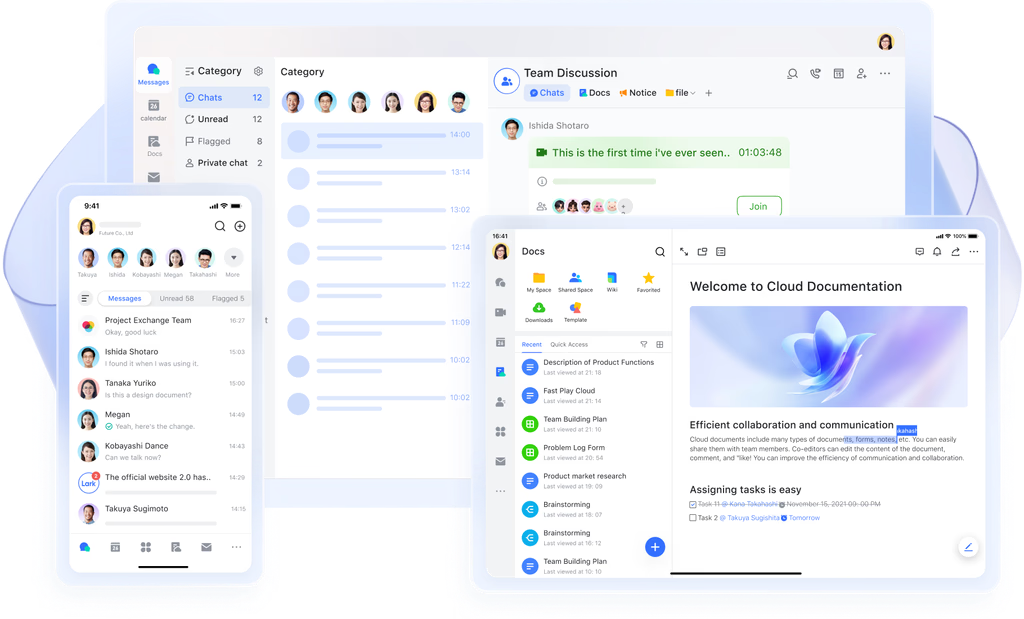
Lark is redefining what it means to have a truly connected and efficient digital workplace. As one of the best workplace communication tools, it unifies chat, video meetings, cloud storage, task management, and document collaboration into a single, intuitive platform.
Teams can brainstorm ideas in group chats, jump instantly into video calls, co-edit documents in real time, and manage projects without ever leaving the workspace. With features like smart search, shared calendars, and AI-powered automation, Lark empowers organizations to work faster, stay aligned, and maximize productivity — no matter where their teams are located.
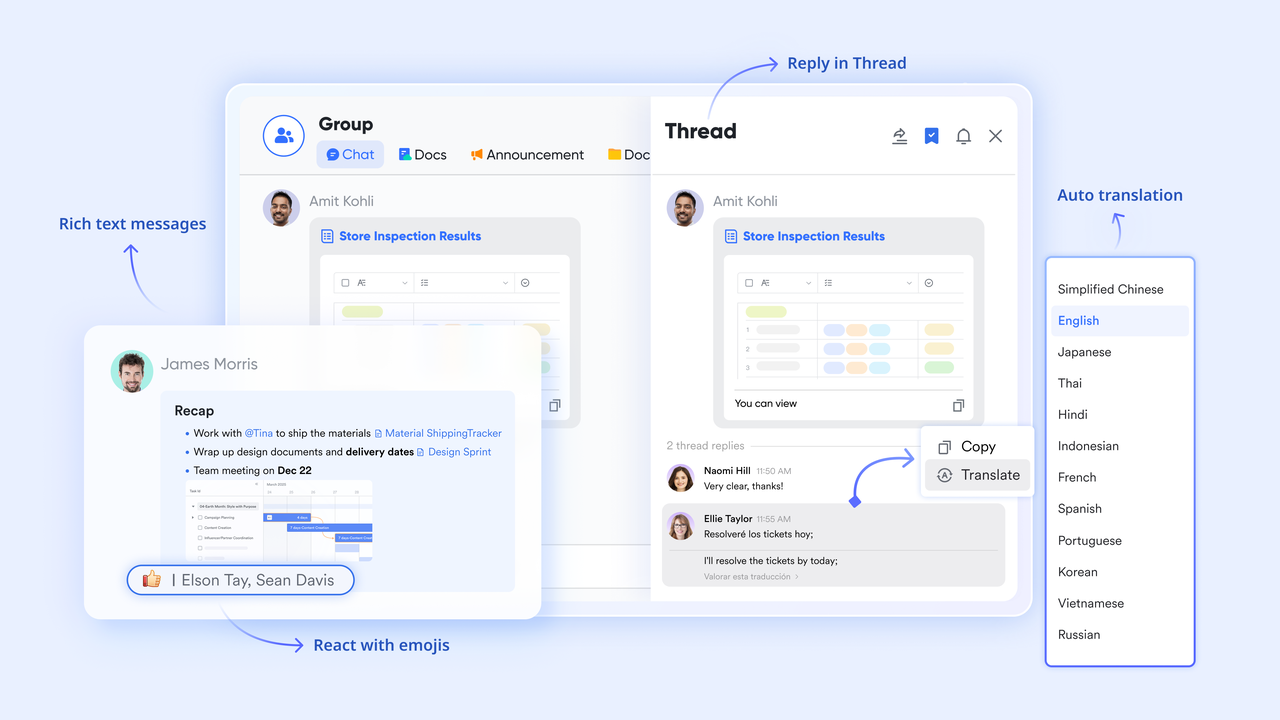
Lark Messenger: Real-time team conversations with context
Lark Messenger provides instant chat and threaded conversations, with the ability to embed links to tasks, docs, or Base records. You can tag people, react to messages, pin important threads, and search across past conversations.
How it helps:
- Keeps work discussion in one place rather than scattered across email or multiple chat apps.
- Ensures context is preserved—when a message mentions a project or task, you can jump directly to it.
- Threaded replies stop conversations from becoming tangled and make referencing easy.
Example: Your marketing team is discussing content strategy. One person posts a draft headline and says, "Do you prefer version A or B?" Another replies in thread, tagging the designer. Later, that same thread is turned into a task ("Finalize headline") and links directly to the Lark Doc. Everything stays connected.
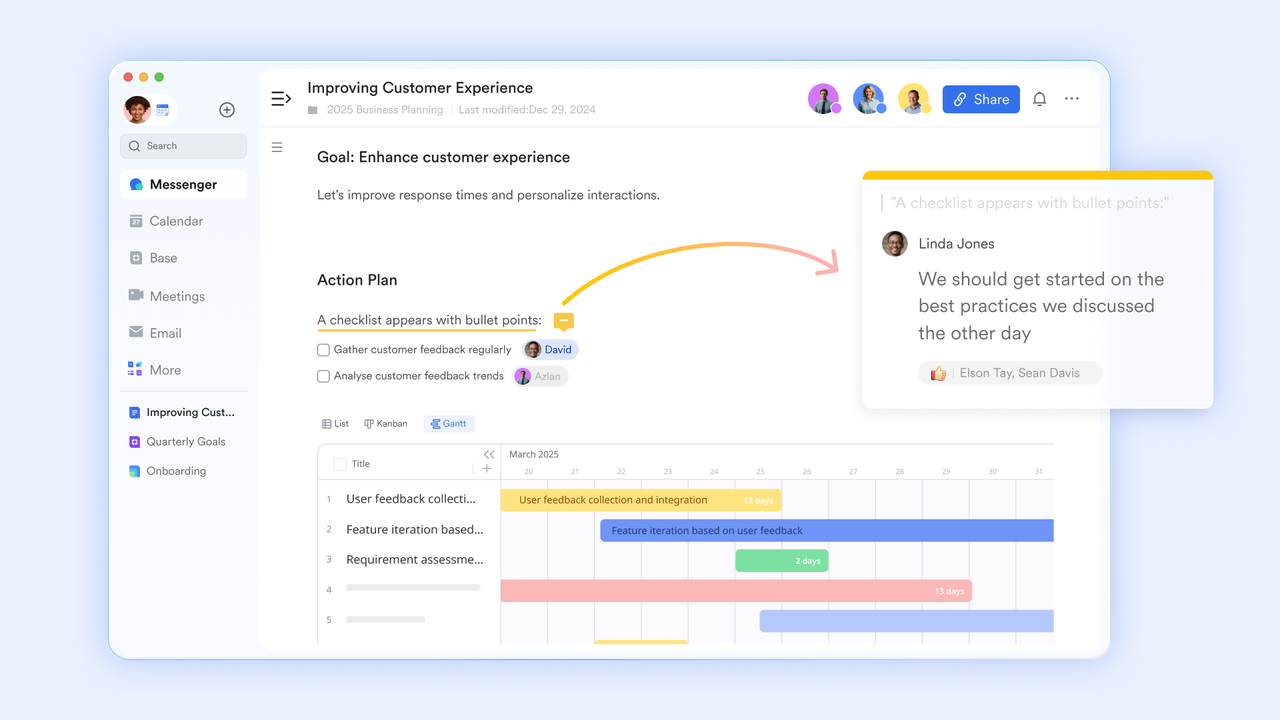
Lark Docs: Collaborative documents with inline comments
Lark Docs allows multiple users to co-edit documents in real time, comment inline, mention teammates, and convert comments into tasks. Each document keeps a version history and permission settings.
How it helps:
- Enables writing, reviewing, and editing in a single place—no emailing attachments back and forth.
- Feedback stays in context. When someone comments "please revise this clause," you can reply or resolve it directly.
- Comments can be turned into tracked tasks so nothing is forgotten.
Example: Your team is writing a project proposal. While the strategist writes the introduction, the operations lead adds a cost table, and the finance lead flags a number for review. All edits appear live. Afterward, a comment remains to "Double-check budget line 3," which is converted into a follow-up task.
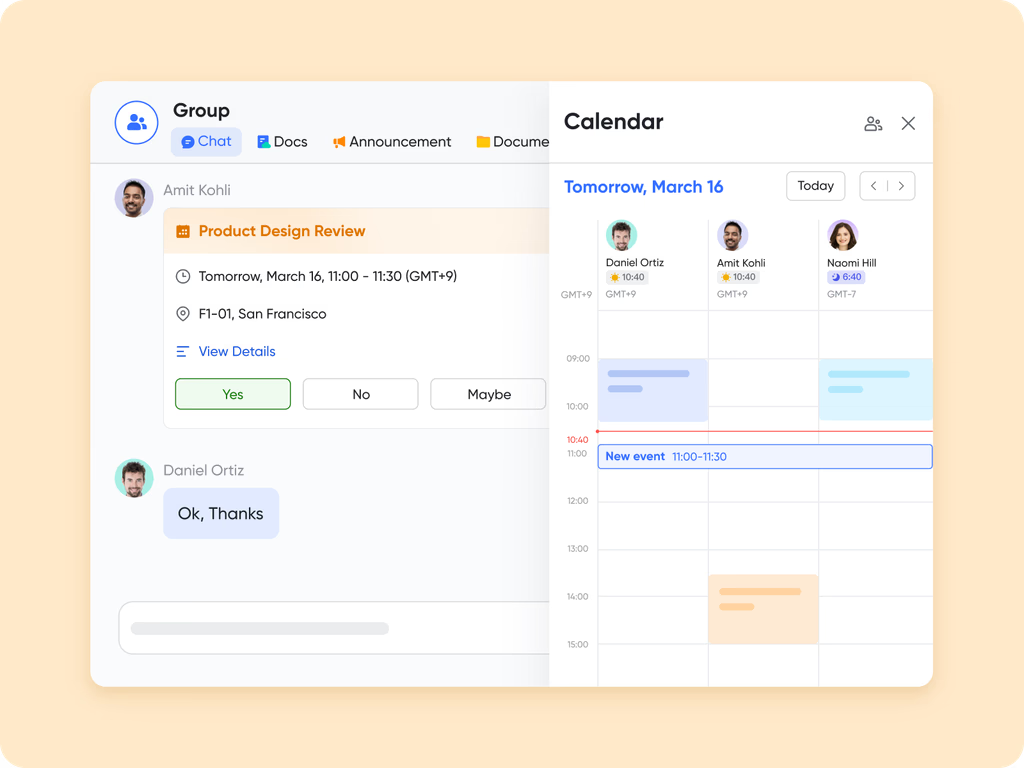
Lark Calendar & Meetings: Scheduling with context
Lark Calendar shows internal availability, allows scheduling of meetings, and those meeting invites can include links to relevant docs and chat threads. Lark Meetings often include access to shared docs or conversation history. You can join calls directly from the event.
How it helps:
- Eliminates confusion about when team members are free.
- Connects meeting agendas and notes with relevant tasks and docs.
- Saves time joining calls because you don't need to hunt for links across tools.
Example: Your project lead schedules a feedback session with the creative team. The invite includes the working draft doc and chat thread for reference. During the meeting, the team co-edits the doc while referencing earlier chat messages, then next steps are captured immediately as tasks.
Lark Base: Centralized communication and intelligent workflows
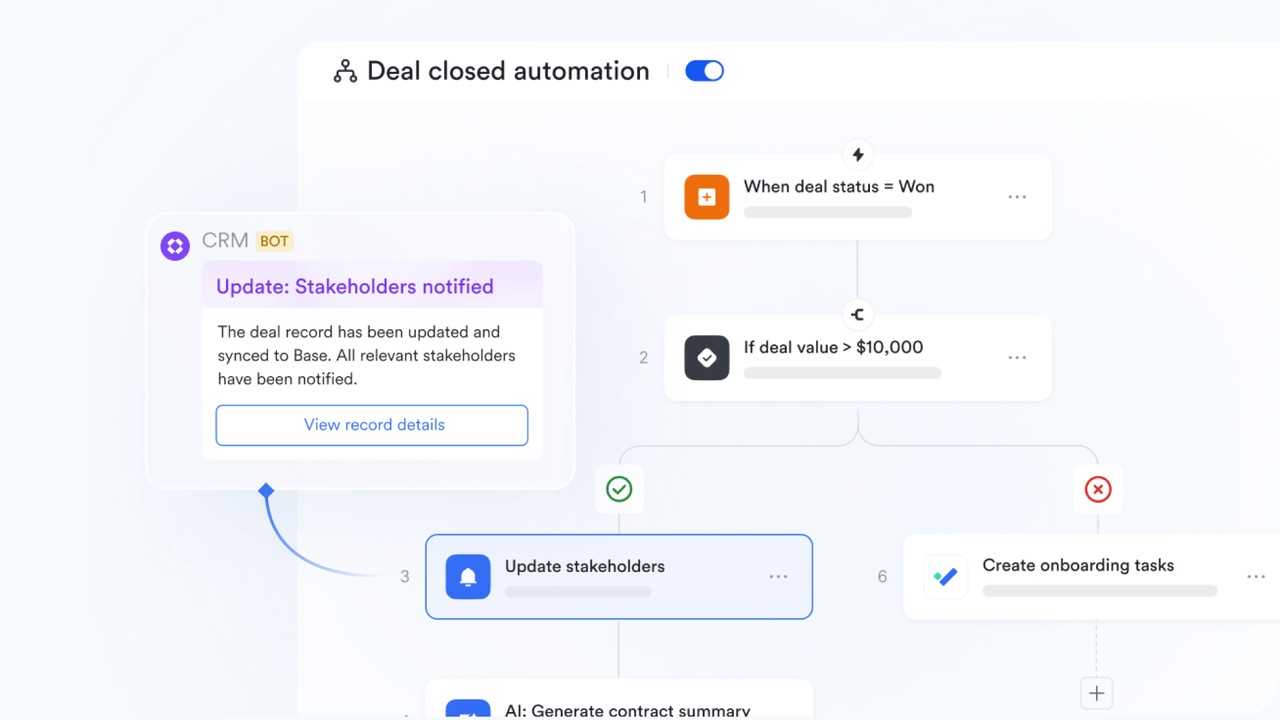
Lark Base serves as the communication backbone for teams that need visibility, organization, and speed. It acts as a shared workspace where teams can manage clients, track deliverables, and connect conversations, tasks, and documents in one place.
Its built-in AI and automation elevate daily operations — generating smart reminders, summaries, and real-time updates that keep everyone informed without noise. When project stages or records change, Base automatically notifies the right people and surfaces short summaries of key discussions or updates.
Example: A consulting team manages client projects in Lark Base. When a project's status changes from In Review to Approved, Lark automatically sends a notification to the delivery lead and summarizes recent activity ("3 comments added, proposal approved, design task reassigned"). This saves time, ensures alignment, and prevents missed updates.
This approach keeps AI and smart notifications tightly linked to Base's purpose — simplifying communication and coordination through one intelligent workspace.
Pros
- All-in-one platform combining chat, meetings, docs, tasks, and calendar.
- Real-time collaboration with live document editing and file sharing.
- AI-powered features for smart scheduling and workflow automation.
- Accessible across desktop, mobile, and web devices.
Cons
- A wide range of features can create a learning curve.
- Requires a stable internet connection for optimal performance.
- Starter plan: Free forever plan that includes 11 powerful tools for up to 20 users. It also comes with 100GB of storage, 1000 automation runs, AI translations, and more.
- Pro plan: $12/user/month (billed annually) for up to 500 users. It includes everything in Starter plus group calling for up to 500 attendees, 15TB of storage, 50,000 automation runs, and more.
- Enterprise plan: Contact sales for custom pricing. Supports unlimited users and includes even more automation runs and advanced security, compliance, and management features.
2. Slack: Real-time messaging with integrations
Slack is one of the most widely adopted communication tools in the workplace, known for its robust messaging capabilities and extensive integration ecosystem. It focuses on real-time team conversations through organized channels and direct messages, helping teams stay connected, share information quickly, and streamline daily workflows. Slack is particularly popular in tech-savvy teams that rely on multiple apps and need a centralized hub for collaboration.
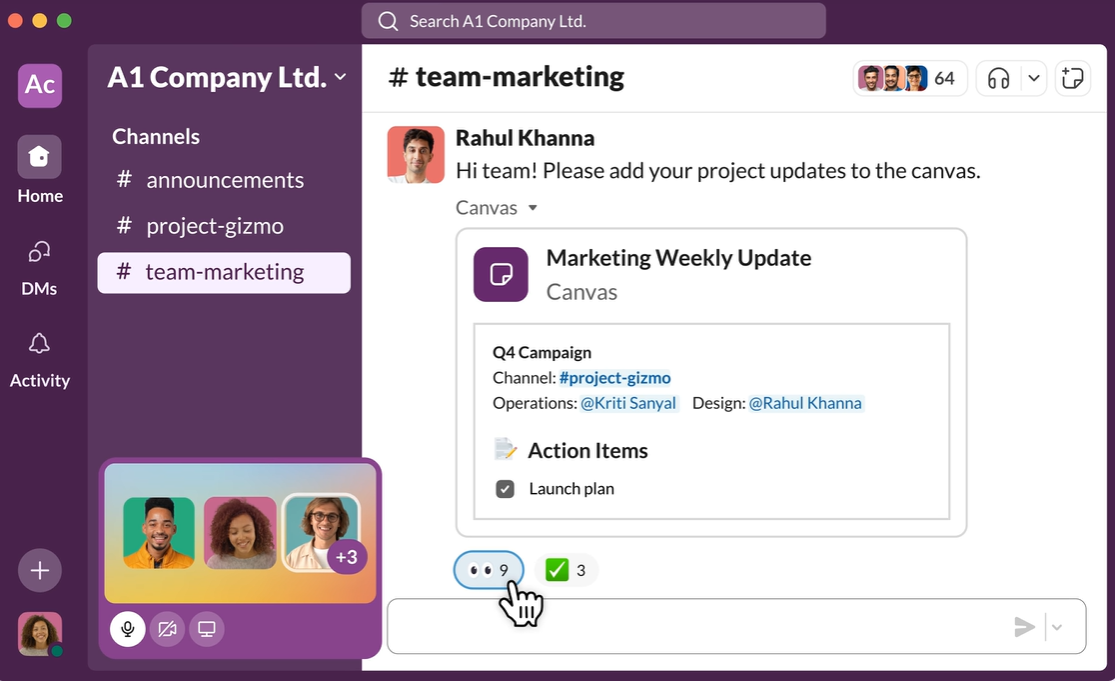
Image source: slack.com
Features
- Channels and threads to organize conversations by project or topic.
- Direct messaging and group chats for quick team communication.
- File sharing with powerful searchable history.
- Integrations with over 2,000 apps like Google Workspace, Zoom, and Jira.
- Customizable notifications and reminders.
Pros
- Wide adoption with intuitive interface.
- Extensive app integration ecosystem.
- Organized conversation structure with channels and threads.
- Strong search functionality for past messages and files.
Cons
- Can become noisy with many channels and messages.
- Video and call features are basic compared to dedicated platforms.
Pricing
- Pro: $8/user/month billed annually (Unlimited message history, group calls with screen sharing, unlimited integrations, guest access.)
- Business+: $15/user/month billed annually (Advanced security, compliance, and analytics features.)
- Enterprise Grid: Custom pricing for large organizations with enhanced security, compliance, and enterprise-level controls.
3. Microsoft teams: Workplace chat and video
Microsoft Teams is a comprehensive workplace communication tool that integrates chat, video conferencing, and collaboration within the Microsoft 365 ecosystem. As one of the leading digital communication tools in the workplace, it enables seamless communication tools in the workplace for both remote and in-office teams. Teams is ideal for enterprises seeking strong security, compliance, and productivity features, allowing employees to collaborate efficiently and stay aligned on projects.
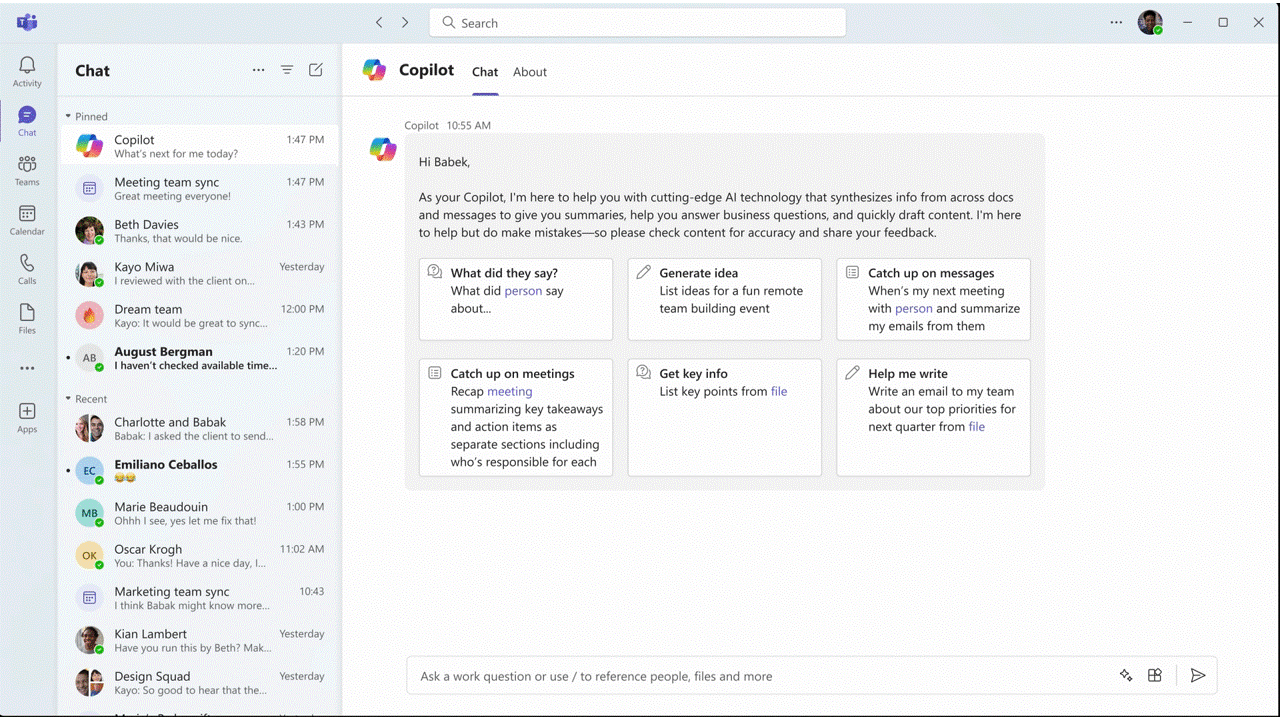
Image source: microsoft.com
Features
- Chat and threaded conversations for team and one-on-one messaging.
- Video conferencing with screen sharing, meeting recording, and live captions.
- File sharing and real-time collaboration through OneDrive and SharePoint.
- Integration with Microsoft 365 apps (Word, Excel, PowerPoint, Outlook).
- Team channels and customizable tabs for project organization.
Pros
- Deep integration with Microsoft 365 apps for seamless workflows.
- Supports large meetings, webinars, and tools to improve communication in the workplace.
- Enterprise-grade security and compliance features protect sensitive data.
- AI-powered features enhance productivity and effective communication tools in the workplace.
Cons
- Can be complex and overwhelming for small teams.
- Notifications can become overwhelming in busy teams.
Pricing
- Microsoft 365 Business Basic: $6/user/month) (Full Teams capabilities, web and mobile Office apps, 1 TB file storage.)
- Microsoft 365 Business Standard: $12.50/user/month (Desktop Office apps included, Teams meetings, and webinars.)
- Microsoft 365 E3/E5: Enterprise plans (Advanced security, compliance, analytics, and enterprise-level features; custom pricing.)
4. Zoom: Reliable video communication
Zoom is one of the most widely used tools for communication in the workplace, offering high-quality video and audio conferencing for teams of all sizes. In 2025, as hybrid and remote work continue to expand, Zoom has become essential for seamless meetings, webinars, and training sessions. Its reliability and ease of use make it a go-to platform for organizations seeking digital communication tools in the workplace that enhance collaboration and maintain strong team connections.
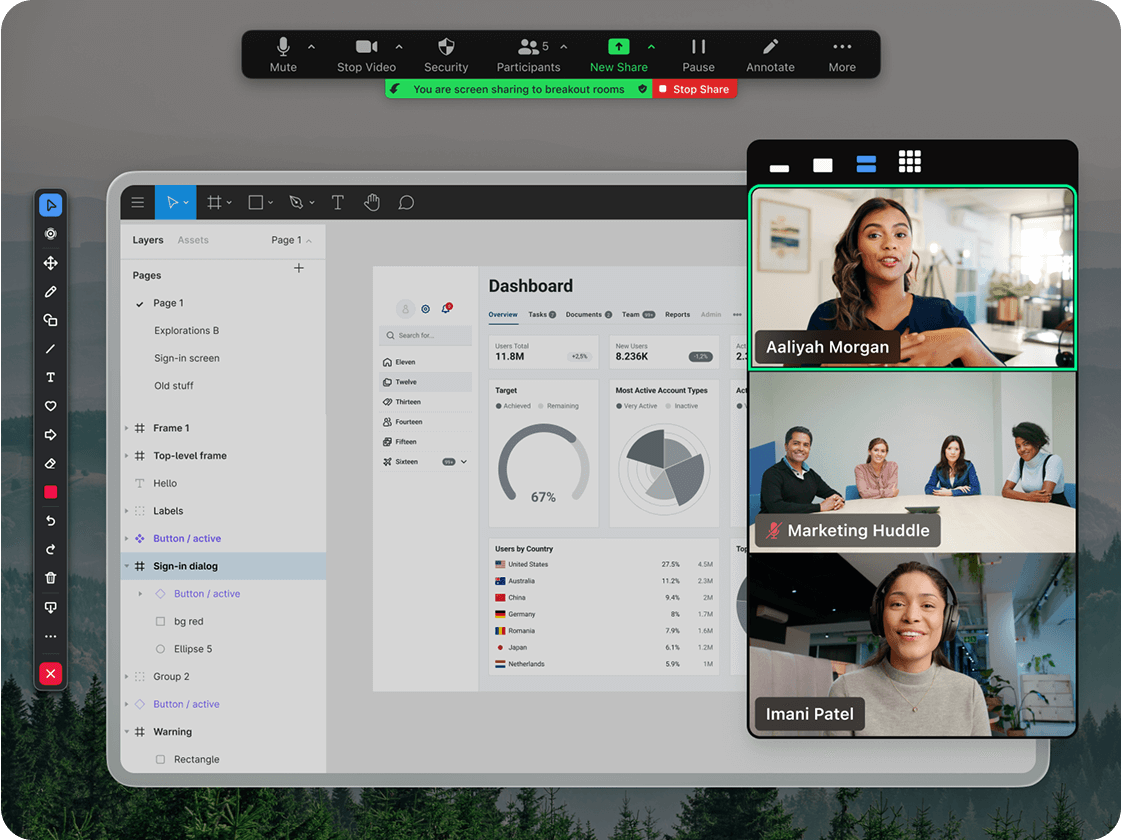
Image source: zoom.com
Features
- HD video and audio meetings with support for large groups.
- Screen sharing, virtual whiteboards, and breakout rooms for interactive collaboration.
- Meeting recording, transcripts, and cloud storage for easy reference.
- Webinar and live streaming capabilities for client presentations and events.
- Chat and reactions integrated within video calls for engagement.
Pros
- Reliable and stable video and audio quality, even for large meetings.
- Easy-to-use interface suitable for all team members.
- Supports webinars and training sessions, making it versatile for internal and external communication.
- Strong security features to ensure safe virtual meetings.
Cons
- Limited collaboration features beyond video and chat.
- Heavy reliance on internet bandwidth for optimal performance.
Pricing
- Pro: $14.99/host/month (100 participant limit)
- Business: $19.99/host/month (Up to 300 participants)
- Enterprise: $19.99+/host/month (Up to 500 participants)
5. Google Workspace: Productivity + communication
Google Workspace is a comprehensive suite of digital communication tools in the workplace that combines email, chat, video meetings, and collaborative documents. It is designed to streamline effective communication tools in the workplace by integrating Gmail, Google Chat, Meet, Docs, Sheets, and Slides in one ecosystem. With cloud-based accessibility and real-time collaboration, Google Workspace empowers teams to work efficiently, stay aligned, and manage projects seamlessly from anywhere.

Image source: workspace.google.com
Features
- Gmail for professional email communication and organization.
- Google Chat for real-time messaging and team collaboration.
- Google Meet for high-quality video and audio calls with screen sharing.
- Google Docs, Sheets, and Slides for collaborative document editing.
- Google Drive for cloud storage and secure file sharing.
Pros
- Seamless real-time collaboration on documents, spreadsheets, and presentations.
- Cloud-based platform accessible across devices.
- Strong security and admin controls for enterprise use.
- Integrated calendar and scheduling tools enhance productivity.
Cons
- Heavy reliance on Google ecosystem for full functionality.
- Limited offline capabilities for some apps.
Pricing
- Business Starter: $6/user/month (Custom email, 30GB cloud storage per user, Google Meet and Chat.)
- Business Standard: $12/user/month (2TB cloud storage, advanced collaboration and reporting tools.)
- Business Plus: $18/user/month (Enhanced security, compliance, and endpoint management.)
- Enterprise: Custom pricing with advanced security, analytics, and unlimited storage.
6. Asana: Task and project communication
Asana is a powerful tool to improve communication in the workplace by combining project management with team messaging. It enables teams to organize tasks, track progress, and collaborate on projects while reducing email dependency. Asana is ideal for organizations looking to centralize workflow, monitor deadlines, and maintain clarity on responsibilities across teams.
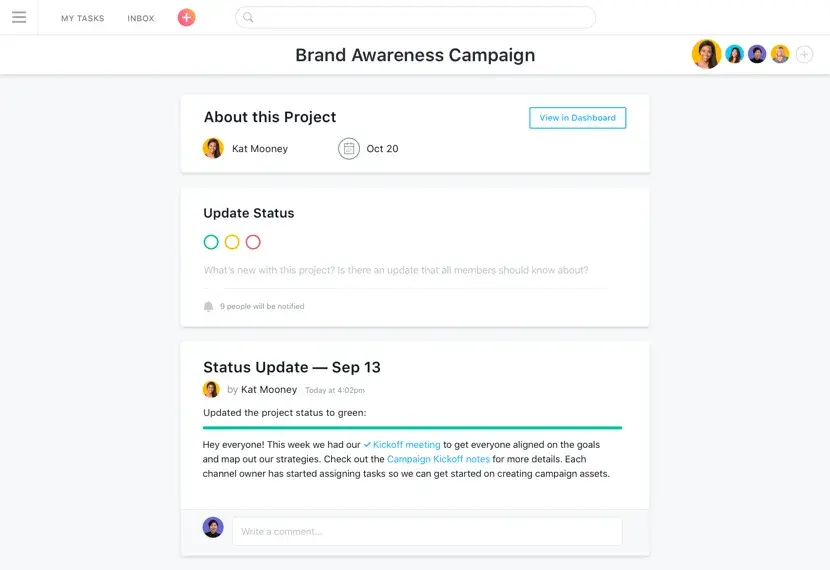
Image source: asana.com
Features
- Task assignment and progress tracking for teams.
- Project boards and timelines for visual project management.
- Team conversations and comments within tasks for context.
- Automation rules and reminders to streamline workflows.
- Reporting and analytics for project performance.
Pros
- Centralizes tasks and project updates for better team alignment.
- Reduces miscommunication by keeping conversations tied to tasks.
- Supports automation to save time on repetitive workflows.
- Visual boards make project tracking intuitive.
Cons
- Not ideal for casual team chat outside project context.
- Can be overwhelming for small teams with simple needs.
Pricing
- Premium: $10.99/user/month (Timeline view, advanced search, custom rules.)
- Business: $24.99/user/month (Portfolios, workload, advanced integrations.)
- Enterprise: Custom pricing with advanced security and analytics.
7. Trello: Visual boards for team updates
Trello is a user-friendly digital communication tool in the workplace that uses Kanban-style boards to organize tasks and projects visually. It helps teams collaborate effectively by providing a clear overview of tasks, deadlines, and responsibilities. Trello is ideal for smaller teams or departments that need a simple, visual workflow management system.
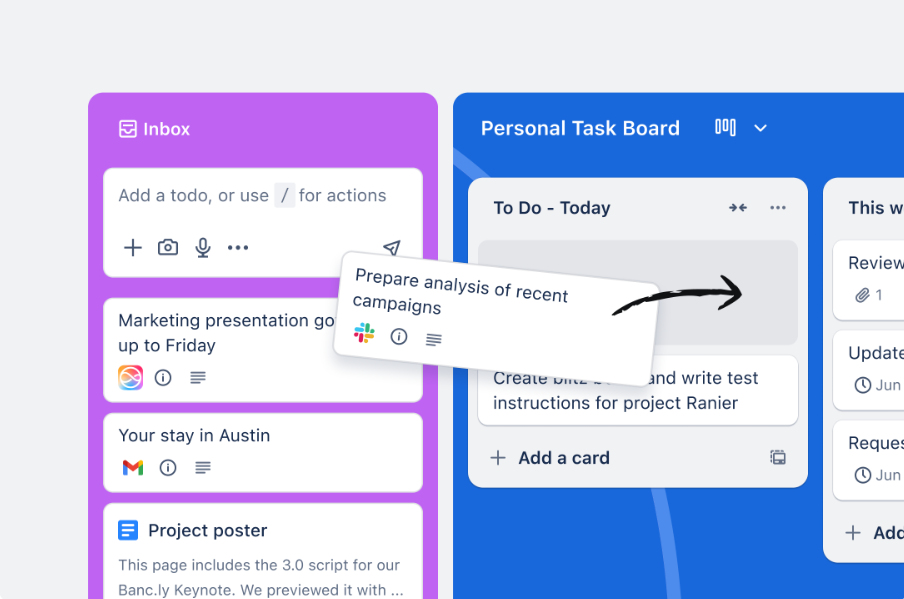
Image source: trello.com
Features
- Kanban boards to track project progress.
- Task cards with due dates, attachments, and checklists.
- Team comments and mentions for contextual communication.
- Automation with Butler for repetitive actions.
- Integration with Slack, Google Workspace, and other tools.
Pros
- Simple and visual interface for quick onboarding.
- Enables team collaboration with task comments and notifications.
- Automation rules save time on repetitive tasks.
- Flexible for multiple project types and team sizes.
Cons
- Can get cluttered with many boards and cards.
- Integrations required for full AI tools in workplace communication and collaboration.
Pricing
- Standard: $5/user/month (Advanced checklists, unlimited boards, priority support.)
- Premium: $10/user/month (Timeline, dashboard, and workspace views.)
- Enterprise: Custom pricing for large organizations with advanced controls.
8. Monday: Customizable communication workflows
Monday is a versatile workplace communication tool that combines task management, project tracking, and team communication in a customizable interface. It helps teams centralize workflows, automate routine tasks, and collaborate efficiently, making it one of the best workplace communication tools in 2025 for organizations seeking flexibility and control over their processes.
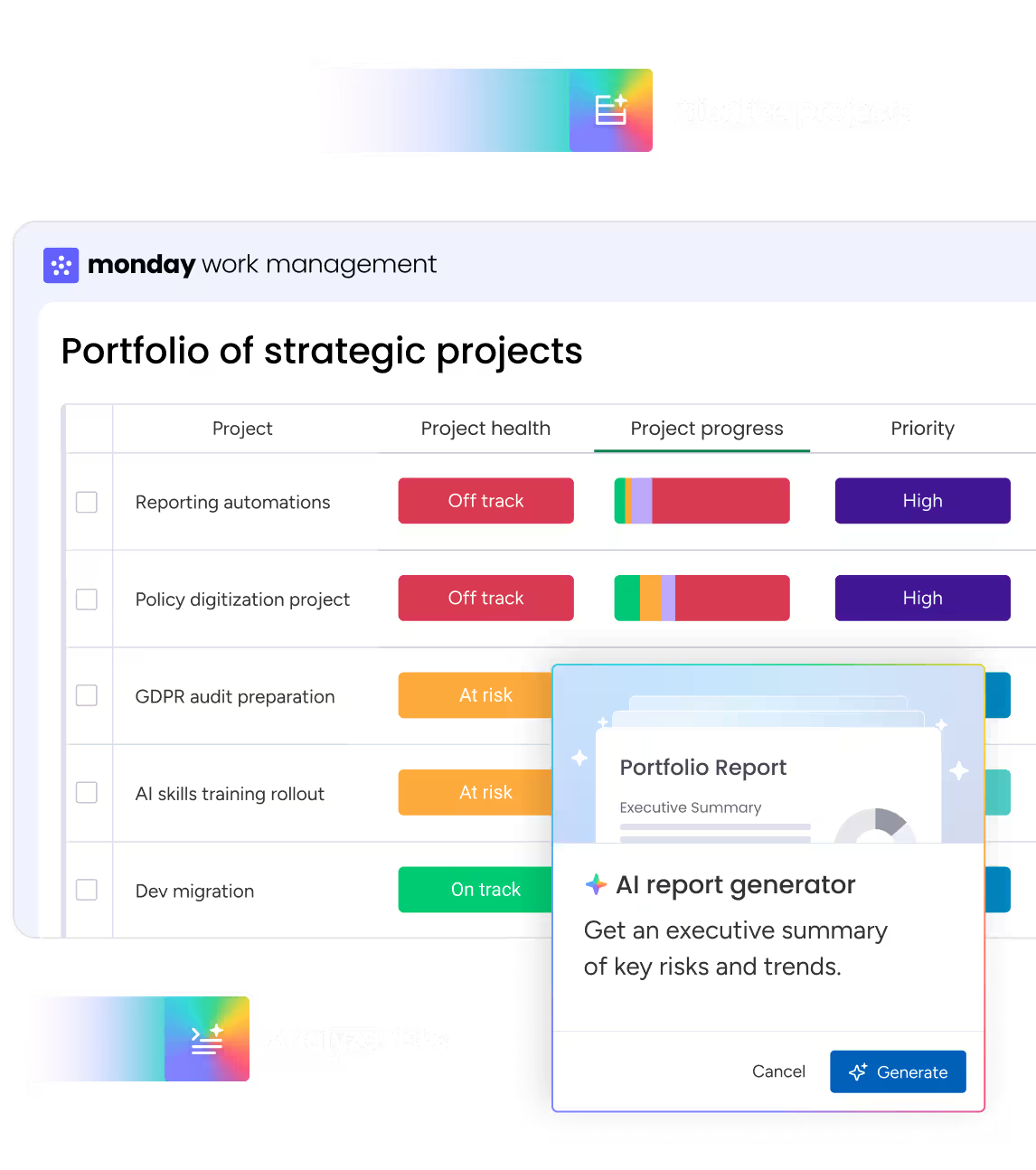
Image source: monday.com
Features
- Customizable workflows and project boards.
- Real-time updates and team communication on tasks.
- Automation of repetitive processes for efficiency.
- File sharing and document collaboration.
- Integrations with Slack, Google Workspace, Zoom, and more.
Pros
- Combines task management with communication in one platform.
- Supports automation to reduce repetitive work.
- Visual dashboards for tracking performance.
- Integrates with multiple AI tools in workplace communication and collaboration.
Cons
- Learning curve due to feature-rich interface.
- Pricing can be high for smaller teams.
Pricing
- Basic: $10/user/month (Unlimited items, 5GB file storage, integrations.)
- Standard: ($12/user/month (Timeline, calendar views, automations.)
- Pro: $20/user/month (Advanced reporting, time tracking, unlimited automations.)
- Enterprise: Custom pricing for advanced security, governance, and analytics.
Tips for workplace communication tools
Implementing workplace communication tools effectively goes beyond just adopting the latest technology. To maximize productivity and foster collaboration, organizations need to ensure teams are trained, workflows are streamlined, and feedback loops are in place. Here are some actionable tips to help your team get the most out of digital communication tools in the workplace.
- Train employees on using tools effectively: Providing comprehensive training ensures employees understand all the features and capabilities of the platform. This reduces frustration, increases adoption, and enables teams to leverage digital communication tools in the workplace to their full potential.
- Avoid tool overload by picking essentials: Using too many apps can create confusion and reduce productivity. Focus on a few essential tools to improve communication in the workplace to streamline workflows and maintain clarity.
- Encourage open feedback culture: Foster an environment where employees feel comfortable sharing what works and what doesn't. Collecting feedback helps optimize the use of communication tools in the workplace and ensures teams remain engaged.
- Monitor adoption and refine usage: Regularly track how employees use the tools and identify gaps or inefficiencies. Refining workflows and adoption strategies ensures that workplace communication tools continue to enhance collaboration and productivity.
Use cases by industry
Different industries have unique communication needs, and the right tools for communication in the workplace can significantly improve efficiency, collaboration, and client engagement. By tailoring digital workflows to industry-specific requirements, organizations can enhance productivity and ensure smooth operations across teams.
- Consulting: Consulting teams rely on seamless access to project files and client information. Workplace communication tools enable easy document sharing, secure client meetings, and streamlined collaboration across dispersed teams.
- IT and Software: Software teams benefit from real-time task tracking, sprint planning, and issue resolution. Digital platforms help IT teams coordinate updates, share code reviews, and maintain transparency during agile development cycles.
- Education: Educational institutions use integrated platforms to connect instructors and students. Digital communication tools in the workplace allow live lectures, interactive discussions, and shared resources, supporting both in-person and remote learners.
- Healthcare: Healthcare organizations need secure channels for sensitive patient and operational data. Advanced workplace communication solutions ensure HIPAA-compliant messaging, document sharing, and team coordination without compromising privacy.
- SMBs: Small and medium-sized businesses require cost-effective solutions to manage projects and internal communication. All-in-one communication tools consolidate chat, tasks, and files, simplifying daily workflows and boosting team productivity.
Conclusion
Workplace communication tools have become essential for teams seeking productivity, collaboration, and alignment in today's hybrid and remote work environments. While platforms like Slack, Microsoft Teams, Zoom, Google Workspace, and Asana provide valuable communication and project management features, Lark distinguishes itself as a comprehensive, all-in-one solution. By unifying messaging, video meetings, collaborative documents, task management, and intelligent automation, Lark reduces app switching, preserves context, and enhances team efficiency. Its AI-powered workflows and centralized workspace make it ideal for organizations of all sizes, helping teams communicate effectively, stay organized, and achieve goals faster.
FAQs
What are the best workplace communication tools?
Lark stands out as the best all-in-one workplace communication tool, combining chat, video calls, calendars, and collaborative docs seamlessly. Other top options include Slack, Microsoft Teams, Zoom, Google Workspace, Asana, Trello, and Monday.
How do workplace communication tools improve productivity?
They centralize messaging, video, and document collaboration, reduce email overload, streamline workflows, and enable real-time task tracking for faster decision-making.
Which is better: Slack or Microsoft Teams?
Slack excels in integration and real-time messaging for agile teams, while Teams offers deep Microsoft 365 integration and enterprise-grade security; choice depends on organizational needs.
Are free workplace communication tools reliable?
Yes, free tiers provide essential messaging, file sharing, and video features, but advanced collaboration, storage, and administrative controls are limited.
Why is Lark considered a top choice for consulting and SMBs?
Lark combines chat, meetings, docs, tasks, and AI-powered automation in one platform, simplifying workflows, preserving context, and boosting productivity for small and consulting teams.
Related reading
Table of contents
Start using Lark today

Manage all your work in one place
Boost team efficiency by 10x
Save up to 70% on software costs
Table of contents
Start using Lark today
Manage all your work in one place
Boost team efficiency by 10x
Save up to 70% on software costs
Keep reading


![What Is a 2-2-3 Work Schedule? Explanation and More [2026]](https://framerusercontent.com/images/uKHRfkp4v7y4azRNTYUmuteNQz8.png)



2026 Lark Technologies Pte. Ltd.
Headquartered in Singapore with offices worldwide.






Explore: