














Best Project Tracking Software: Compare Top Tools

Matthew Sia
Product Marketing Manager
Sep 18, 2026
Matthew Sia
Sep 18, 2026

27 min read


A project's vision sets the destination, but the path to completion is rarely a straight line. Unforeseen challenges, shifting priorities, and communication gaps can quickly derail even the most promising initiatives. This is where project tracking transforms from an administrative task into a critical strategic discipline. It acts as both a compass for navigation and a dashboard for performance, offering real-time visibility into progress, resources, and overall project health. Without it, teams operate blindly, leading to missed deadlines, budget overruns, and collective fatigue. Modern project tracking software facilitates a fundamental shift from reactive firefighting to proactive management, empowering teams to maintain momentum, achieve strategic goals, and deliver their best work.
To help you navigate the options, here is a detailed analysis of the best project tracking software available.
1. Lark: The all-in-one workspace for seamless project tracking
2. Monday.com: Visual work OS for customizable project tracking
3. ClickUp: Comprehensive work platform for unified project management
4. Adobe Workfront: Enterprise-scale work management and tracking
5. Zoho Projects: Comprehensive project tracking within a broader ecosystem
6. Asana: Intuitive project tracking for collaborative team workflows
7. Wrike: Scalable project tracking with enterprise capabilities
8. Jira: Purpose-built project tracking for software development
9. Trello: Visual project tracking through simple card-based system
What is project tracking software?
Project tracking software is a digital platform designed to monitor the progress of a project's lifecycle. It represents a significant move beyond simple checklists and static spreadsheets. This category of tools provides a dynamic, centralized space for planning tasks, assigning owners, setting deadlines, and visualizing workflows. The core function is to offer real-time visibility into every aspect of a project. It allows managers and team members to see what has been completed, what is currently in progress, and what is upcoming. This clarity is fundamental for ensuring that everyone is aligned and working towards the same objectives. Effective project management tools also track time, manage resources, and facilitate collaboration, making them the operational hub for project teams.
Best project tracking software reviews
1. Lark: The all-in-one workspace for seamless project tracking
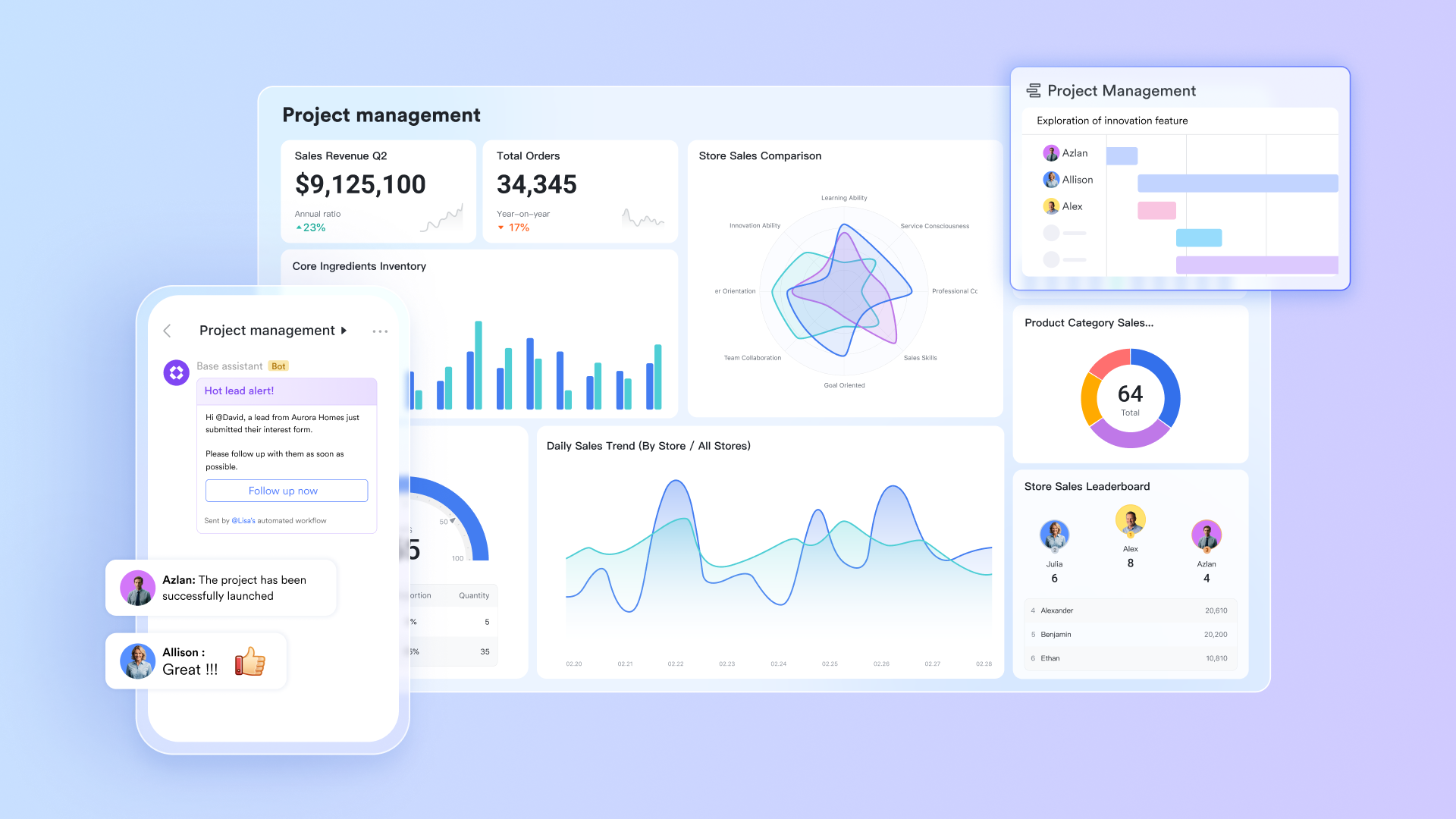
Overview: Lark redefines project tracking by combining all essential work tools into one unified platform. Unlike disconnected solutions that force teams to switch between applications, Lark unifies messaging, document creation, meetings, and task management natively. This creates a fluid environment where project discussions naturally evolve into tracked actions, deadlines automatically sync across calendars, and all project artifacts remain connected. The platform eliminates information silos by ensuring that communication, tasks, and documents are intrinsically linked, providing complete project visibility without the friction of app switching.
Key features:
Lark Base: The central database for project information
The core function of Lark Base is to serve as the "single source of truth" for all project information. It centrally manages progress, resources, and documents through its highly customizable database.
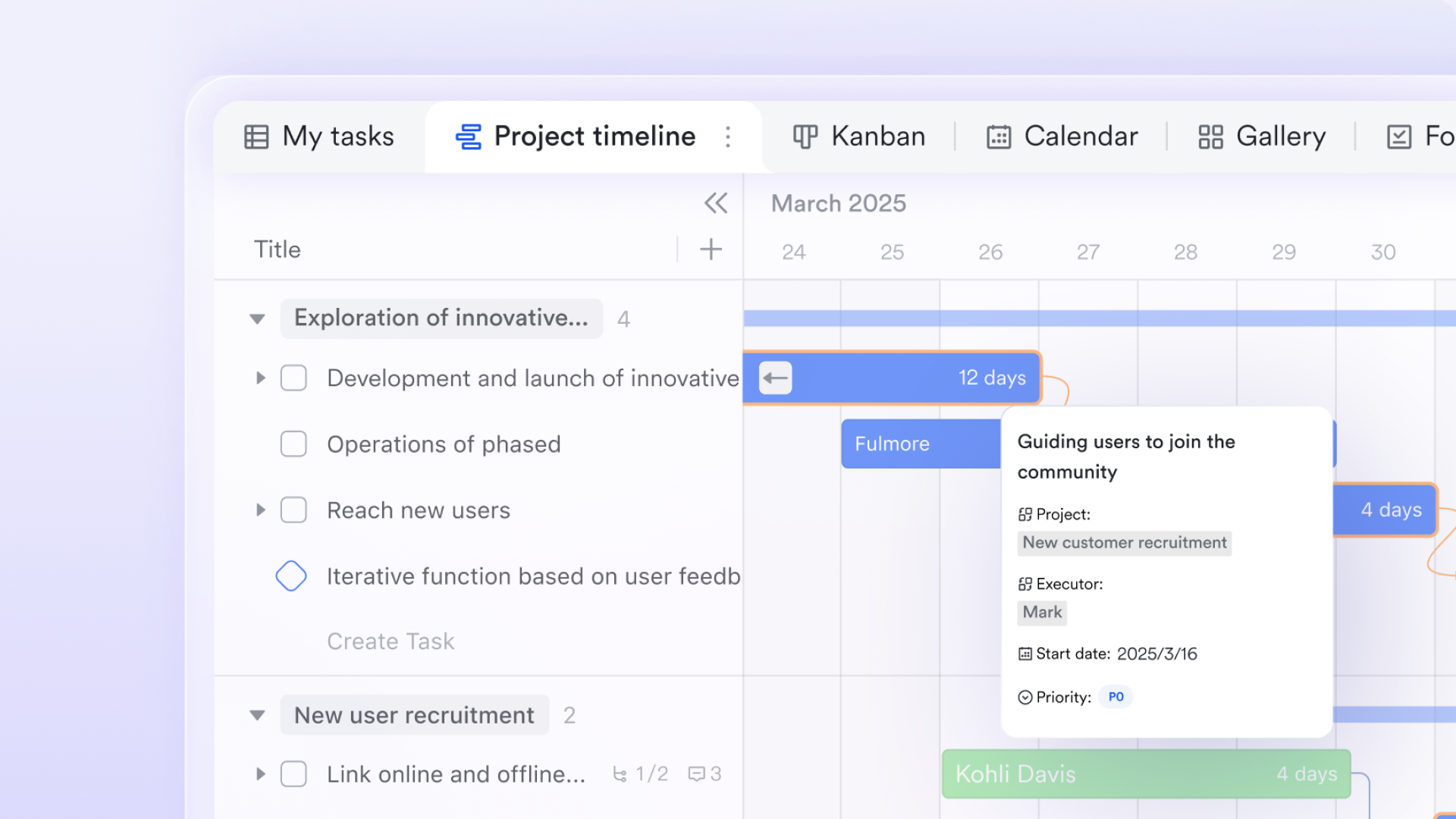
- Multi-dimensional views map project status: The Grid, Kanban, and Gantt chart views provided by Base allow you to examine your project from different perspectives. The Kanban view is ideal for agile teams, visually displaying the flow of tasks from "To Do" to "In Progress" to "Done." The Gantt chart view, a staple of traditional project management, clearly illustrates task progress, dependencies, and the overall timeline using bars, which is crucial for managing the project's critical path.
- Automated status updates & reminders: You can configure automation rules. For instance, when a task status changes, the system can automatically send a notification to a relevant chat group. This reduces the time project managers spend on manual follow-ups and ensures project data is updated in real-time.
Lark Messenger: The contextual hub for project communication
Lark Messenger ensures project communication is tightly unified with project execution, preventing information from becoming disconnected between chat tools and project management software.
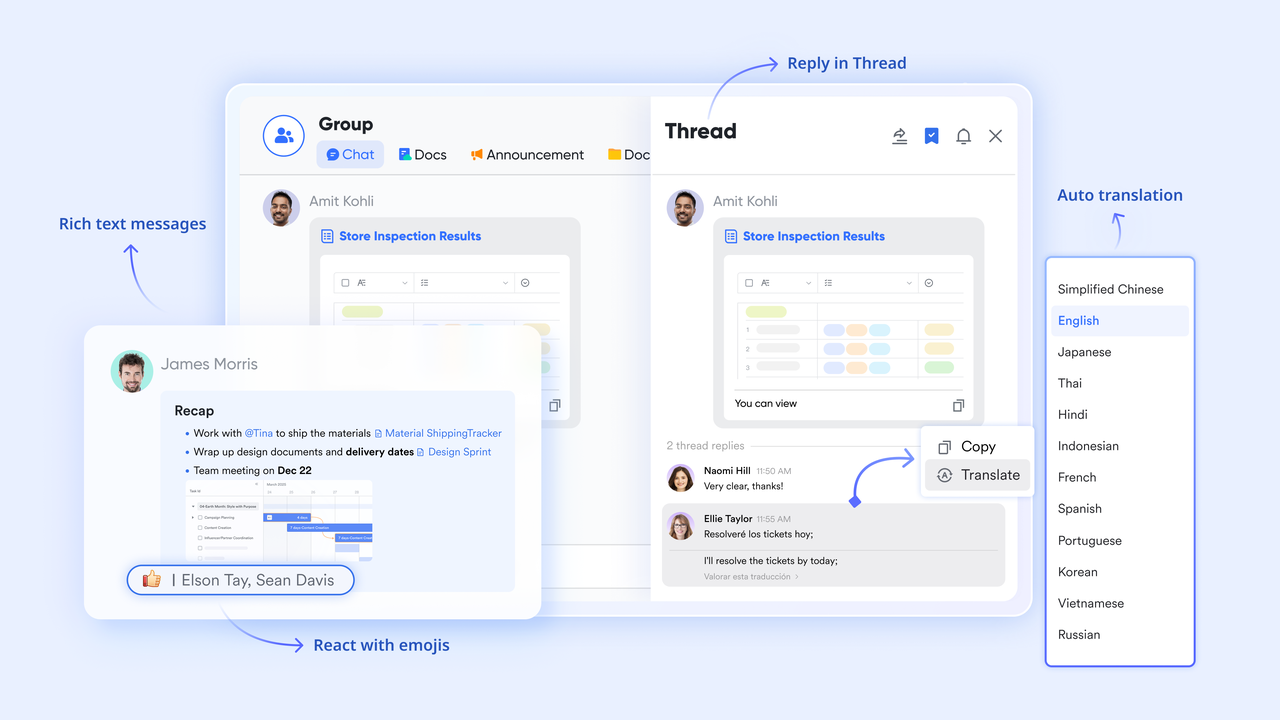
- Contextual communication around work items: For specific work items, teams can hold focused discussions directly within a Lark Messenger group chat. This approach centralizes information, avoiding fragmented communication across multiple private chats or emails. All related discussion history is preserved in the group for future reference, effectively solving the "information fragmentation" problem.
- Seamless transition from discussion to action: A discussion in Messenger about a bug or a design change can be instantly converted into a formal Lark Task and assigned to the relevant member. This creates a closed loop from "identifying a problem" to "tracking its resolution."
Lark Docs: The dynamic repository for project knowledge
Lark Docs, as a collaborative platform for project documentation, ensures that project knowledge is preserved and passed on through iterations.
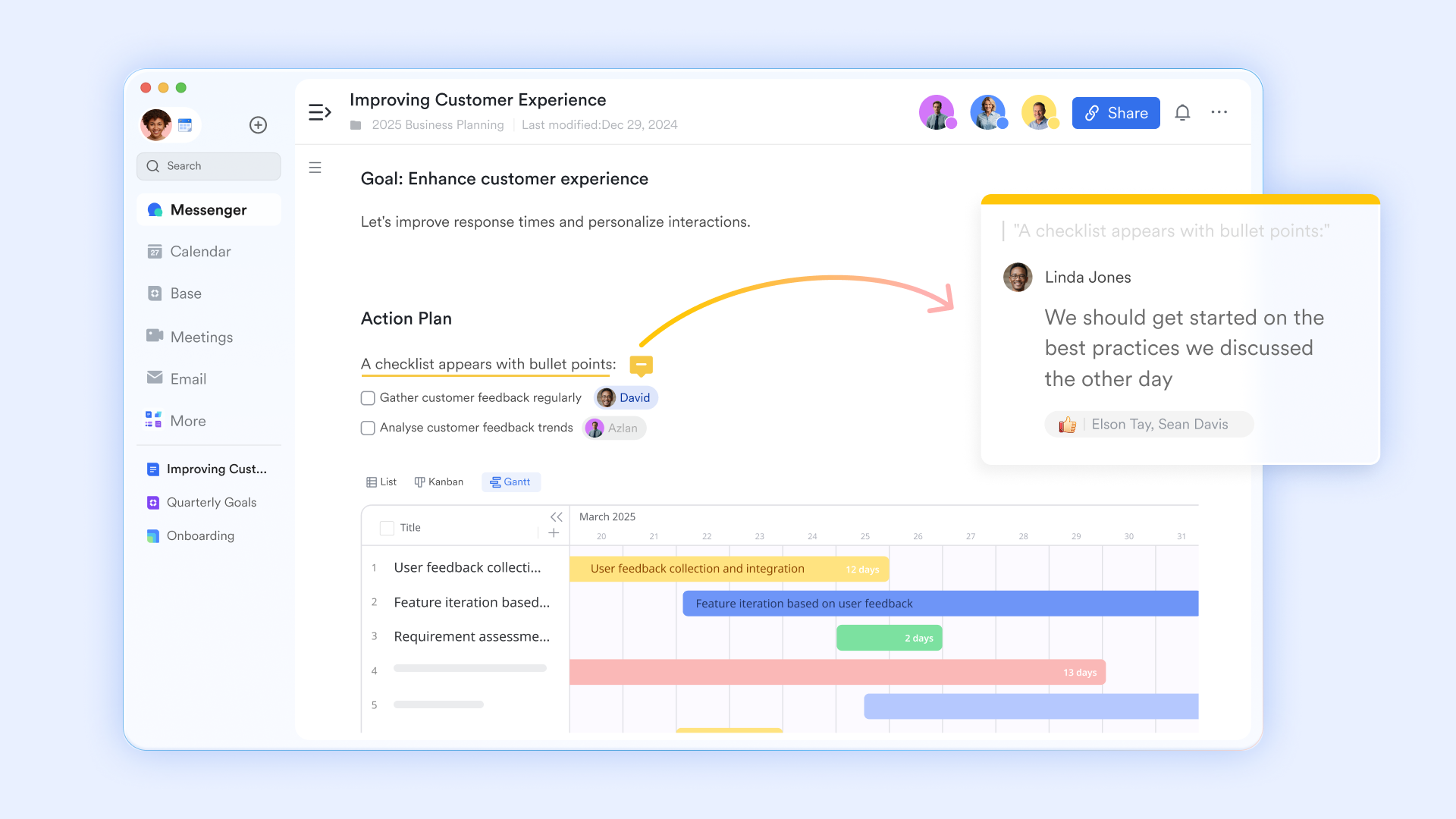
- Dynamic & interlinked project documentation: Lark Docs supports real-time multi-person collaborative editing, and the version history feature ensures every change is documented. When writing project proposals or requirement documents in Docs, you can use @mentions to notify colleagues via Lark, prompting them to review or collaborate. This transforms documents from "static archives" into a "dynamic knowledge base" maintained by the entire team.
Lark Meetings & AI Meeting Notes: The intelligent assistant for project meetings
Project meetings are critical junctions for decision-making and alignment. Lark Meetings and its AI features significantly enhance meeting efficiency.
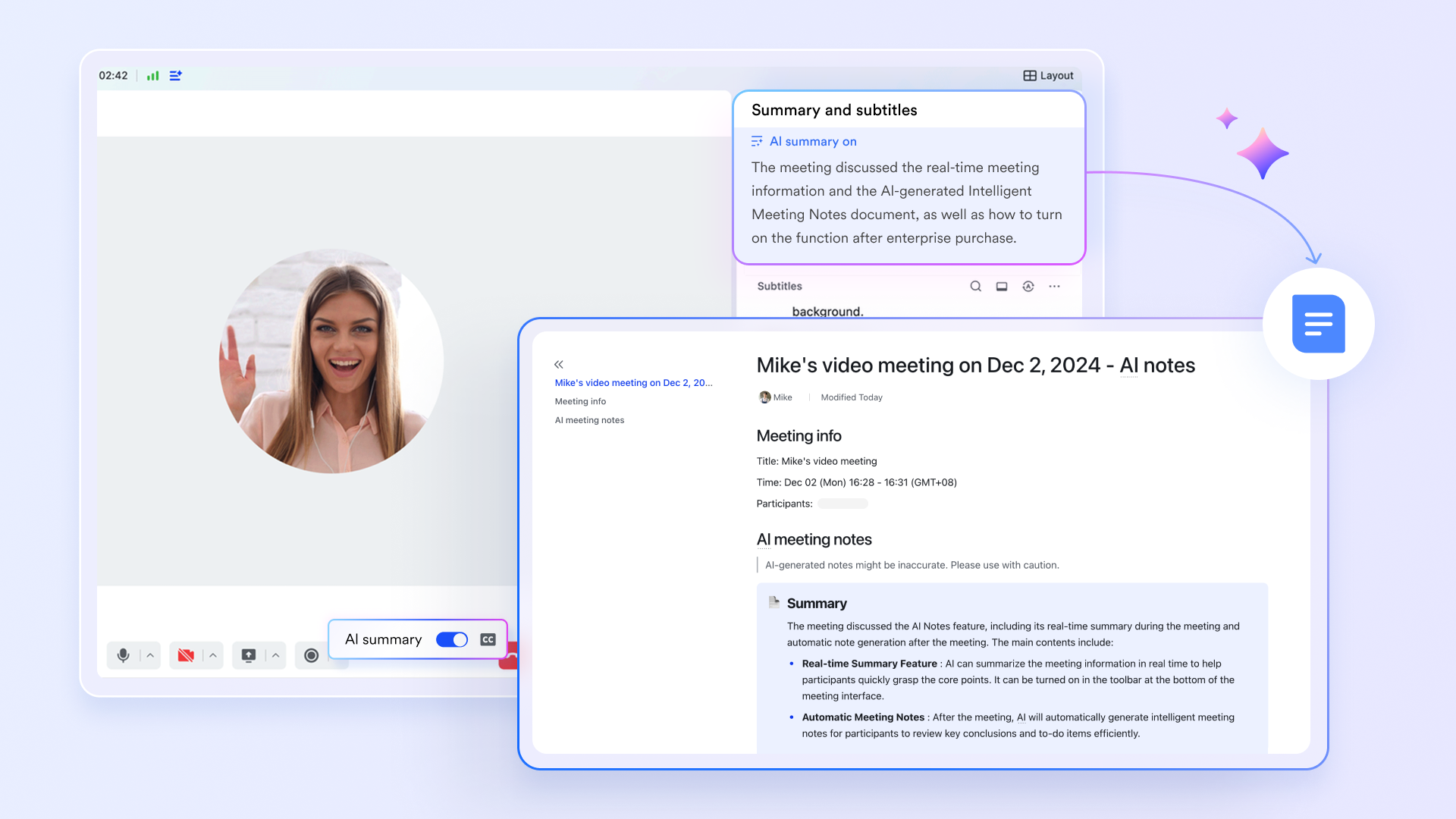
- Effective remote synchronization: Lark Meetings supports features like breakout rooms and real-time translation, meeting the needs of various project meeting scenarios.
- Automated meeting summaries & action item extraction: Lark AI Meeting Notes can generate meeting summaries and extract action items discussed. This ensures meeting conclusions and follow-up tasks are not forgotten, safeguarding the stability of the project tracking process.
Lark Approval: The standardization engine for project processes
Lark Approval structures and digitizes common project approval workflows (e.g., budget approval, design confirmation, release go-live).
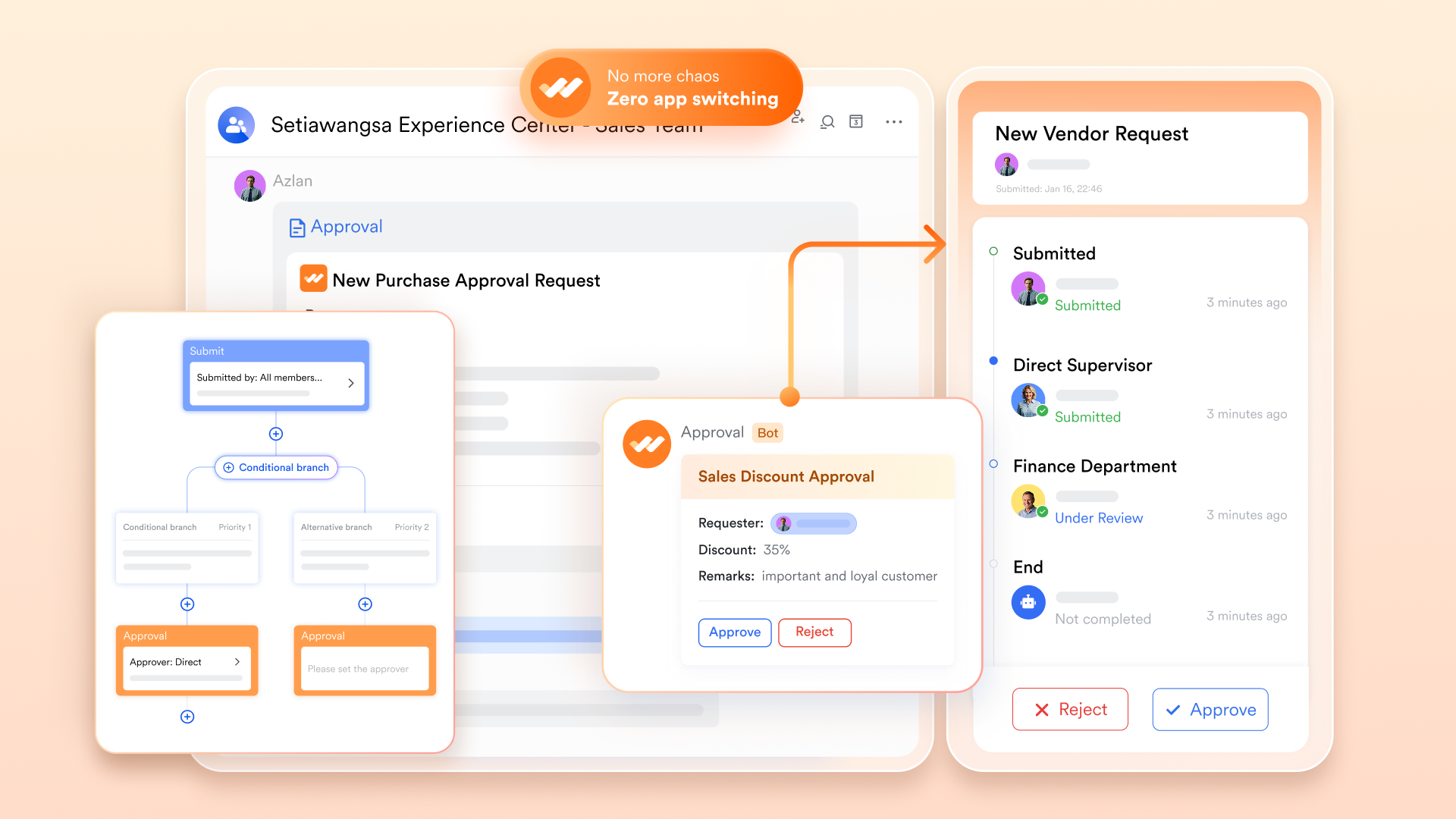
- Traceable decision chain: Lark Approval structures and digitizes the approval process. The entire sequence—from an employee submitting a request to the responsible person's approval—is recorded. This creates a clear decision log, facilitating audits or resolving disputes, and provides managers with reliable decision-making evidence.
- Accelerated project flow: Pre-defined approval workflows automatically route requests to the correct approver, avoiding the delays and awkwardness of applicants searching for the right person, thereby speeding up the passage through critical project milestones.
Lark Calendar: The visual timeline for project milestones & resources
Lark Calendar makes the temporal aspects of a project concrete, serving as the central hub for project milestones and resource planning.
- Unified visual scheduling: Lark Calendar acts as a shared time center for the team. For example, tasks with deadlines set in Lark Tasks can be displayed in the calendar view, helping members visualize key deadlines. Furthermore, meetings created in Calendar can instantly generate a dedicated chat group for pre-meeting material sharing and post-meeting discussion. Agendas can also link to relevant Docs, creating a tighter connection between meetings and execution.
Lark Tasks: The atomic tracking unit for work items
Lark Tasks break down macro-level "tasks" in a project into specific, assignable, and trackable "action items."
- Ubiquitous task creation: The power of Tasks lies in the ability to create them with one click directly from a discussion in Lark Messenger or based on the content of an email in Lark Mail. This ensures that all actionable items arising from communication are captured and enter the tracking system.
- Clear ownership & progress: In Lark, each task can be assigned a clear owner and deadline. Tasks support custom fields (like "Priority" or "Effort") to track additional details. Project members can view tasks from different angles using filtering, sorting, and grouping functions, enabling visual task management.
Ideal for: All kinds of teams seeking a deeply unified, all-in-one platform to eliminate app switching.
- Starter plan: Free forever plan that includes 11 powerful tools for up to 20 users. It also comes with 100GB of storage, 1000 automation runs, AI translations, and more.
- Paid plans: Provides competitive and affordable Basic plan and Pro plan.
- Enterprise plan: Contact sales for custom pricing. Supports unlimited users and includes even more automation runs and advanced security, compliance, and management features.
2. Monday.com: Visual work OS for customizable project tracking
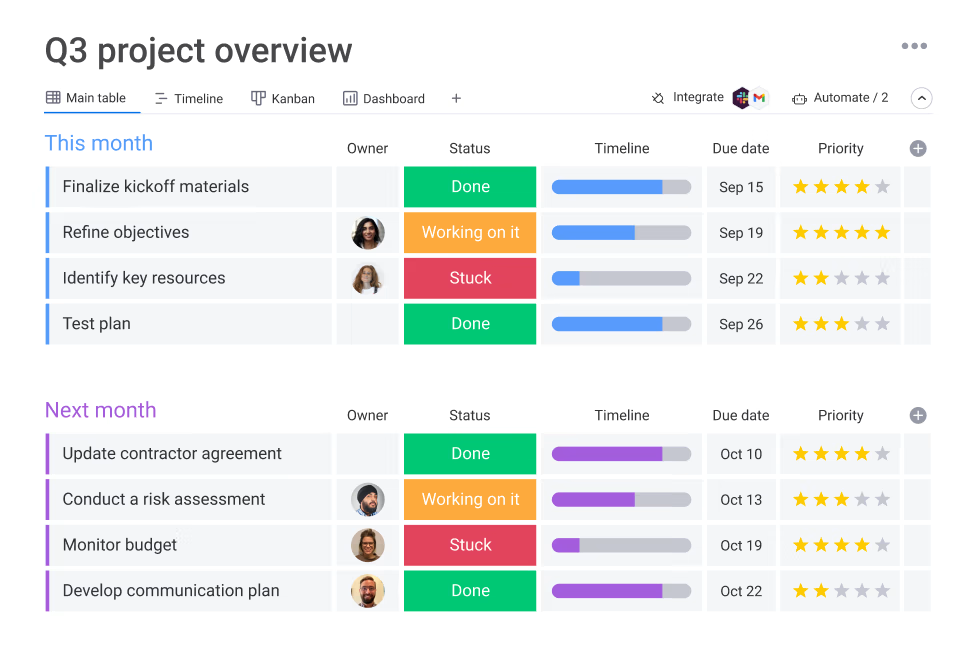
Image source: monday.com
Overview: Monday.com offers a highly visual and adaptable work operating system that enables teams to build custom project tracking solutions. Its color-coded, intuitive interface allows teams to track everything from simple tasks to complex projects through customizable boards and workflows. The platform stands out for its automation capabilities that streamline repetitive tracking tasks and its multiple viewing options that cater to different team preferences. While powerful, its extensive customization options require thoughtful setup to create an optimal project tracking environment that scales with team needs.
Key features:
- Highly visual and customizable dashboards and workflow templates.
- Strong automation builder to reduce manual administrative work.
- Multiple views including Kanban, Gantt, and Calendar.
- Extensive integration library with popular third-party apps.
- Time tracking and timeline views for managing deadlines.
- Forms to collect data directly into boards from external sources.
Limitations:
- Pricing can become expensive for larger teams needing advanced features.
- The high level of customization can lead to initial complexity.
- Some key features like the Gantt view are locked behind higher tiers.
Ideal for: Teams in marketing, operations, and software development that require extensive workflow customization.
Pricing:
- Free plan: Free forever, includes 2 seats.
- Basic plan: $27/month for 3 seats (annual billing), 14-day trial.
- Standard plan: $36/month for 3 seats (annual billing), 14-day trial.
- Pro plan: $57/month for 3 seats (annual billing), 14-day trial.
- Enterprise plan: Custom pricing.
3. ClickUp: Comprehensive work platform for unified project management
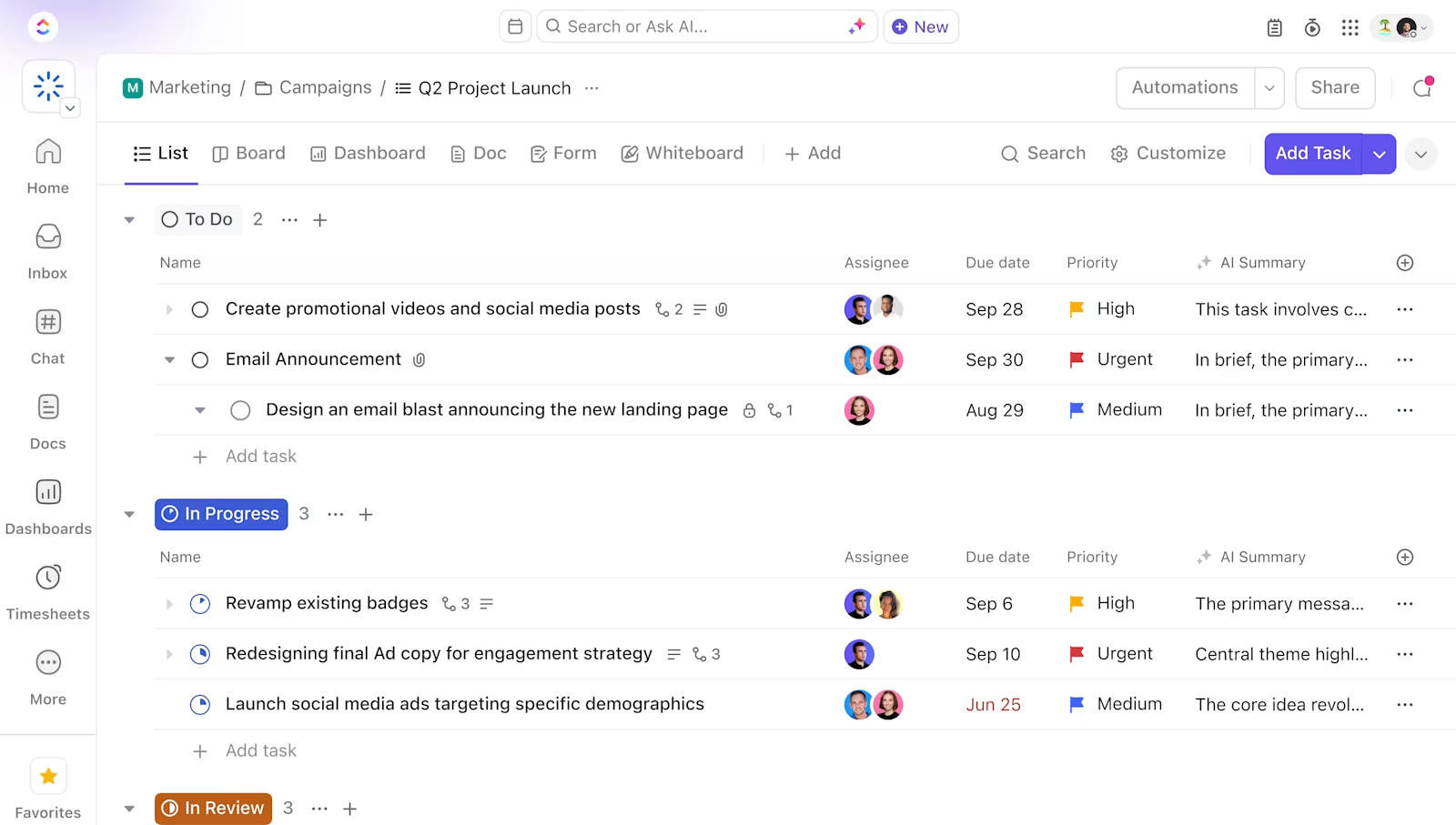
Image source: clickup.com
Overview: ClickUp positions itself as an all-in-one productivity platform that consolidates various work functions into a single environment. It offers an extensive array of project tracking features, including multiple view options, detailed task management, and built-in collaboration tools. The platform's strength lies in its flexibility to accommodate different workflow styles and project types through extensive customization options. However, this feature richness comes with significant complexity that teams must navigate to establish efficient tracking processes.
Key features:
- Over 15 different views for tasks, including List, Gantt, and Mind Map.
- Nested subtasks, checklists, and multiple assignee options.
- Built-in docs, goals, and whiteboards for connected collaboration.
- Custom fields and statuses to tailor workflows precisely.
- Strong time tracking and reporting capabilities.
- “ClickApps” to enable specific functionalities like dependencies.
Limitations:
- The extensive feature set can create a steep learning curve.
- The mobile app experience is less refined than the desktop version.
- Occasional performance lags and bugs due to rapid development.
Ideal for: Tech-savvy teams and project managers who need a highly configurable all-in-one solution.
Pricing:
- Free plan: Free Forever, best for personal use.
- Unlimited plan: $5 per member per month (annual billing), best for small teams.
- Business plan: $12 per member per month (annual billing), best for mid-sized teams, Most Popular.
- Business Plus plan: $19 per member per month (annual billing), best for multiple teams.
- Enterprise plan: Custom pricing, best for many large teams.
4. Adobe Workfront: Enterprise-scale work management and tracking
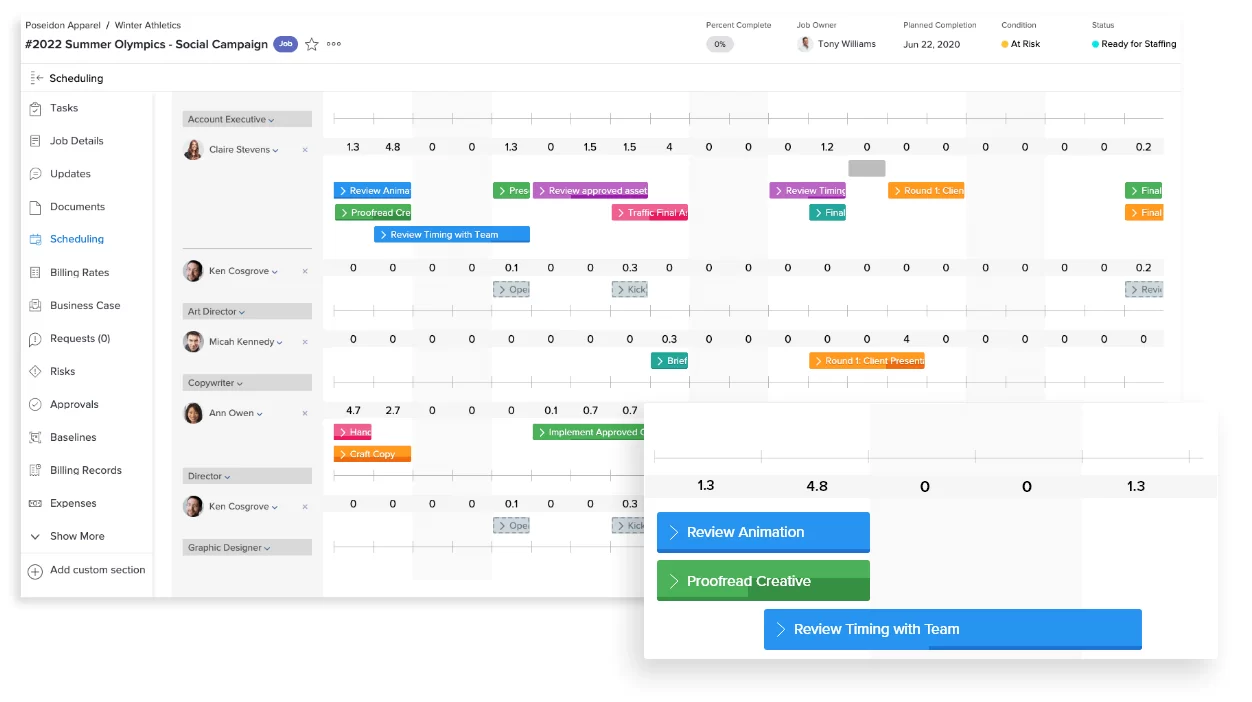
Image source: business.adobe.com
Overview: Adobe Workfront delivers robust work management capabilities designed for large organizations with complex project tracking requirements. The platform excels at connecting strategic initiatives with execution through advanced resource management, portfolio reporting, and workflow automation. Particularly strong for creative and marketing teams, it offers specialized digital proofing and approval workflows integrated with Adobe Creative Cloud. As an enterprise solution, it provides the security, governance, and scalability needed for large-scale project tracking across distributed teams.
Key features:
- Advanced resource management and capacity planning tools.
- Comprehensive reporting and analytics for portfolio performance.
- Strong proofing and approval workflows for creative assets.
- Scenario Planner for modeling project outcomes and resource needs.
- Deep integration with the Adobe Creative Cloud suite.
- Enterprise-level security, compliance, and governance controls.
Limitations:
- Significant cost, making it suitable only for large budgets.
- Complex setup and administration require dedicated training.
- Can be overkill for small to mid-sized teams or simple projects.
Ideal for: Large enterprises, especially marketing and IT teams, that need to manage complex project portfolios.
Pricing:
- Select plan: Custom pricing, essential work management for collaboration and execution.
- Prime plan: Custom pricing, includes all Select features plus advanced strategic planning and security.
- Ultimate plan: Custom pricing, includes all Prime features plus automation and data management capabilities.
- Add-ons: Workfront Planning, Workfront Fusion, HIPAA-ready package, BYOK, Data Connect.
5. Zoho Projects: Comprehensive project tracking within a broader ecosystem
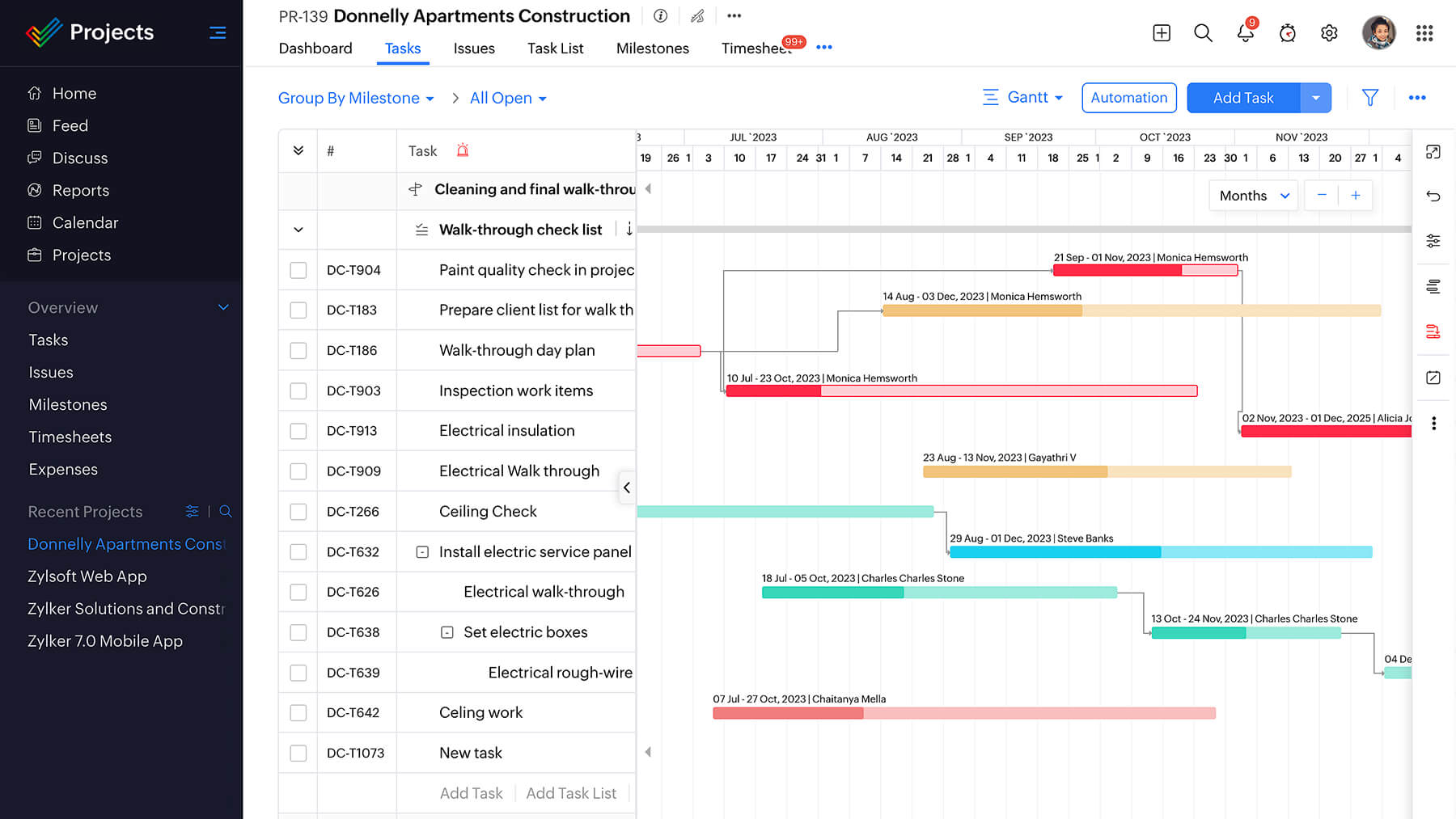
Image source: zoho.com
Overview: Zoho Projects provides comprehensive project tracking functionality as part of the broader Zoho ecosystem, offering strong value for budget-conscious teams. The platform covers essential tracking needs through Gantt charts, task dependencies, time tracking, and issue management in a single integrated environment. Its strength lies in connecting project tracking with other business functions through the Zoho app ecosystem, though the interface may feel less polished than some competitors. The solution scales from small team projects to enterprise-level tracking requirements.
Key features:
- In-depth task management with dependencies and baselines.
- Integrated time tracking with timesheets and approval.
- Gantt charts for detailed timeline planning and visualization.
- Forums and chat for built-in team collaboration.
- Issue tracking system for logging and resolving bugs or problems.
- Good integration with other Zoho apps and third-party tools.
Limitations:
- The user interface can feel dated and less intuitive than competitors.
- The wide array of features can make the initial setup complex.
- Mobile app experience is functional but not as polished.
Ideal for: Small to medium-sized businesses already using the Zoho suite or seeking a cost-effective powerful tool.
Pricing:
- Standard plan: $3 per user per month, starts from 6 users (up to 10 users), includes 10 Projects and 5 Project Templates.
- Express plan: $4 per user per month, starts from 12 users (up to 50 users), includes Unlimited projects and 10 Project Templates.
- Premium plan: $5 per user per month, starts from 15 users (up to 100 users), includes Unlimited projects and 20 Project Templates.
- Enterprise plan: $6 per user per month, starts from 20 users (unlimited scalability), includes Unlimited projects and 30 Project Templates.
- Always Free plan: Available.
6. Asana: Intuitive project tracking for collaborative team workflows
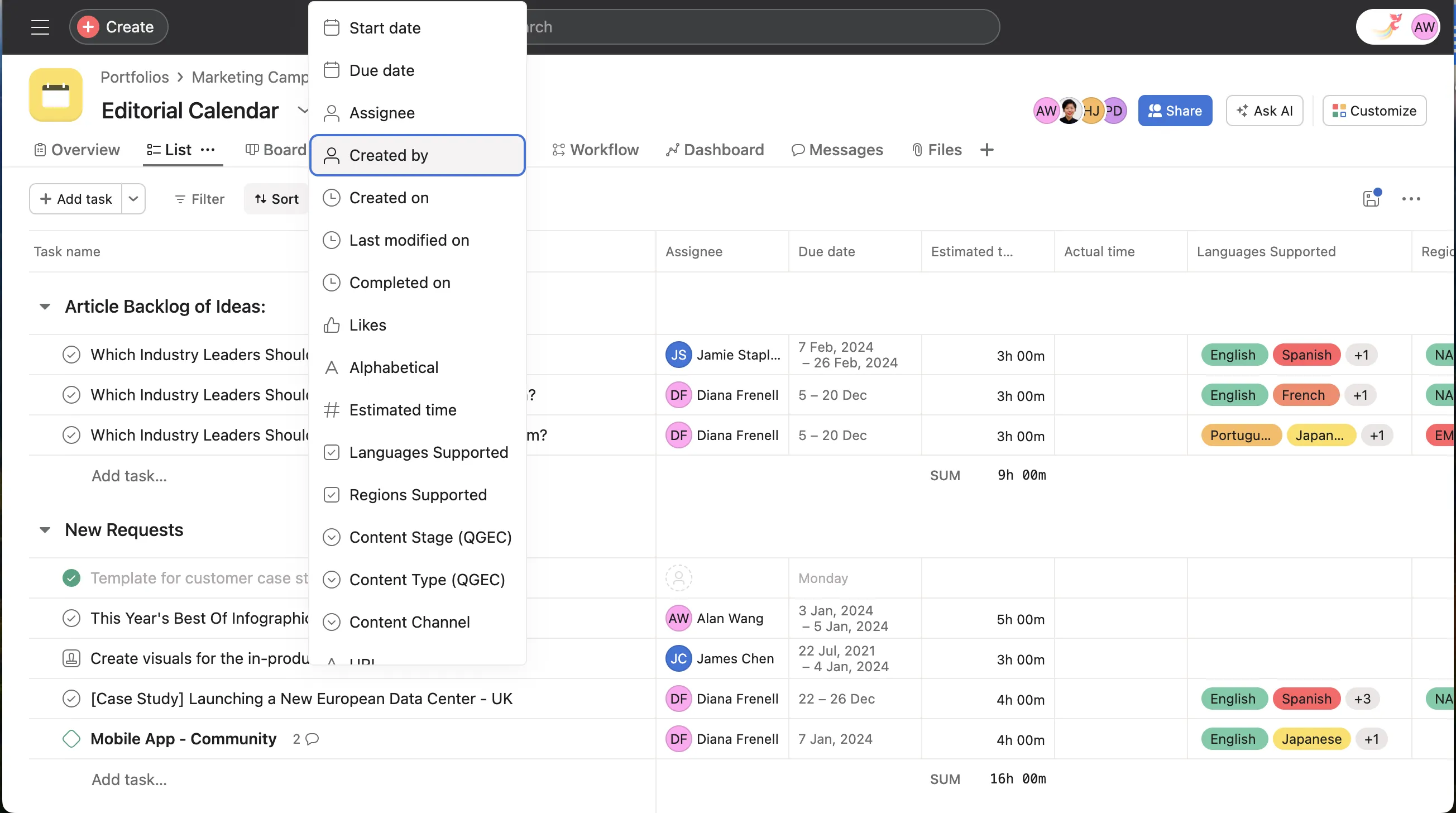
Image source: help.asana.com
Overview: Asana delivers flexible project tracking through an intuitive interface that supports various workflow methodologies and team structures. The platform enables teams to organize and track work through multiple viewing options including lists, boards, timelines, and calendars, adapting to different project types and personal preferences. With strong template libraries and integration capabilities, Asana helps teams establish consistent tracking processes across projects while maintaining the flexibility needed for evolving work requirements. The tool particularly shines for teams that value visual project organization and straightforward collaboration.
Key features:
- Boards and cards for task organization and visualization.
- Easy drag-and-drop functionality, making it easy to use for everyone.
- Checklists, due dates, and collaboration tools.
- Wide variety of templates for task management.
- Over 300 integrations that allow you to track work across the tools you already use.
- You can create unlimited tasks for your team.
Limitations:
- Limited features in the free version.
- No native time tracking feature for tasks.
Ideal for: Marketing, operations, and product teams seeking visual workflow customization.
Pricing:
- Basic plan: Free for individuals/teams new to project management.
- Premium plan: $10.99 per user per month (billed annually), or $13.49 monthly, for teams needing confident project planning.
- Business plan: $24.99 per user per month (billed annually), or $30.49 monthly, for teams/companies managing work across initiatives.
- Enterprise plan: Custom pricing, for organizations needing extra security, control, and support.
7. Wrike: Scalable project tracking with enterprise capabilities
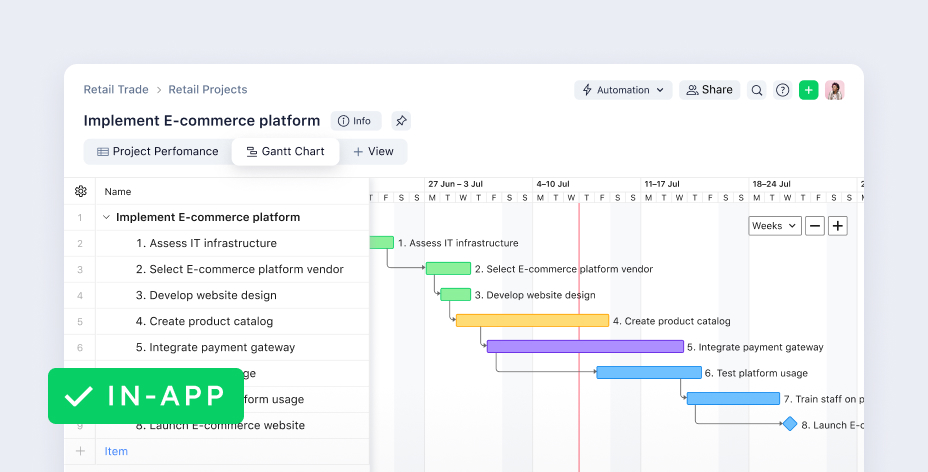
Image source: wrike.com
Overview: Wrike offers dynamic project tracking solutions that scale from team-level initiatives to enterprise-wide project portfolios. The platform combines real-time visibility with robust customization options, allowing organizations to tailor tracking workflows to specific business needs. Advanced features like interactive Gantt charts, custom request forms, and automated approval processes make it suitable for complex project environments requiring detailed tracking and reporting. Wrike's balance of user-friendly interfaces with powerful backend customization supports both immediate team needs and long-term organizational scaling.
Key features:
- Interactive Gantt charts for real-time timeline adjustments.
- Custom item types and request forms to standardize intake.
- Advanced analytics and real-time reports with dashboards.
- Robust automation engine for task creation and status updates.
- Proofing and approval tools for digital asset management.
- Time tracking and resource management capabilities.
Limitations:
- The interface can be complex and intimidating for new users.
- Many advanced features are gated behind higher-priced enterprise tiers.
- The learning curve is steeper than with simpler tools like Trello.
Ideal for: Marketing teams, professional services, and enterprises requiring robust reporting and custom workflows.
Pricing:
- Free plan: $0 user/month, a simple shared task list for small teams.
- Professional plan: $9.80 user/month, full project planning & collaboration.
- Business plan: $24.80 user/month, robust work management with customization & exec reporting, includes Free Trial of Wrike Proof.
- Enterprise plan: Custom pricing, comprehensive solution with advanced security & controls, includes Free Trial of Wrike Proof.
8. Jira: Purpose-built project tracking for software development
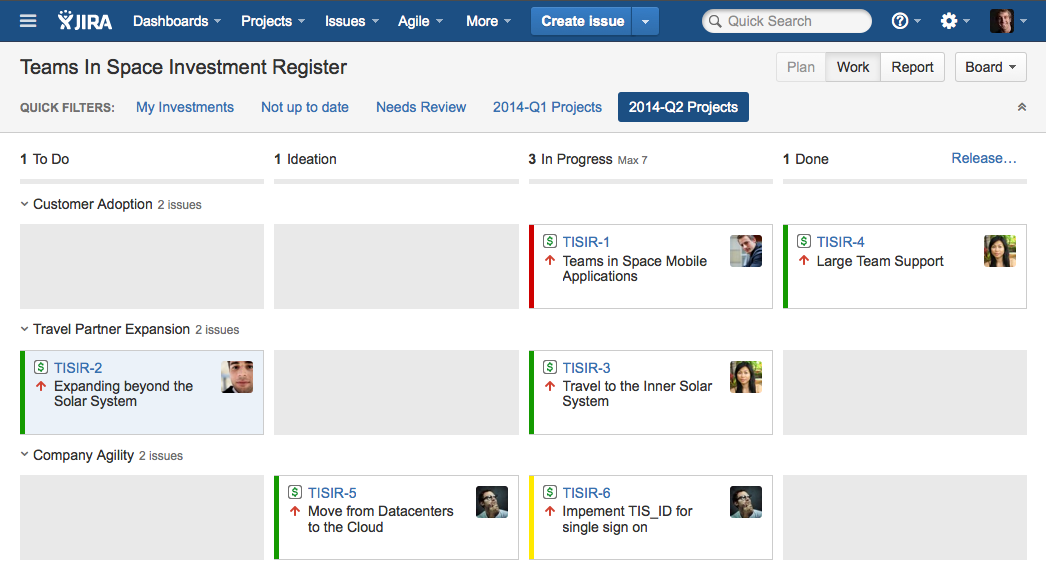
Image source: atlassian.com
Overview: Jira provides specialized project tracking tailored to software development workflows and agile methodologies. The platform offers deep customization for Scrum and Kanban processes, with advanced issue tracking, sprint planning, and release management capabilities. While primarily focused on technical teams, Jira's flexibility allows it to adapt to various project types through extensive configuration and a massive marketplace of integrations. Its strength lies in providing detailed insights into development progress through specialized reports and metrics that track team velocity, burn-down, and other agile indicators.
Key features:
- Highly customizable Scrum and Kanban boards.
- Advanced bug and issue tracking with detailed workflows.
- Powerful reporting and insights with burndown charts and velocity metrics.
- Extensive developer tool integrations and a massive marketplace.
- Agile storytelling and epic management for backlog grooming.
- Robust permissions and security settings for large teams.
Limitations:
- Not user-friendly for non-technical teams or business stakeholders.
- Can be overly complex and cumbersome for non-software projects.
- Requires significant administration and setup to work optimally.
Ideal for: Software development, engineering, and IT teams practicing Scrum or Kanban.
Pricing:
- Free plan: Free forever for up to 10 users.
- Standard plan: $7.53 per user per month, includes essential features to get started.
- Premium plan: $13.53 per user per month, for aligning multiple teams.
- Enterprise plan: Custom pricing, for enterprises needing advanced analytics, scalability, and security.
9. Trello: Visual project tracking through simple card-based system
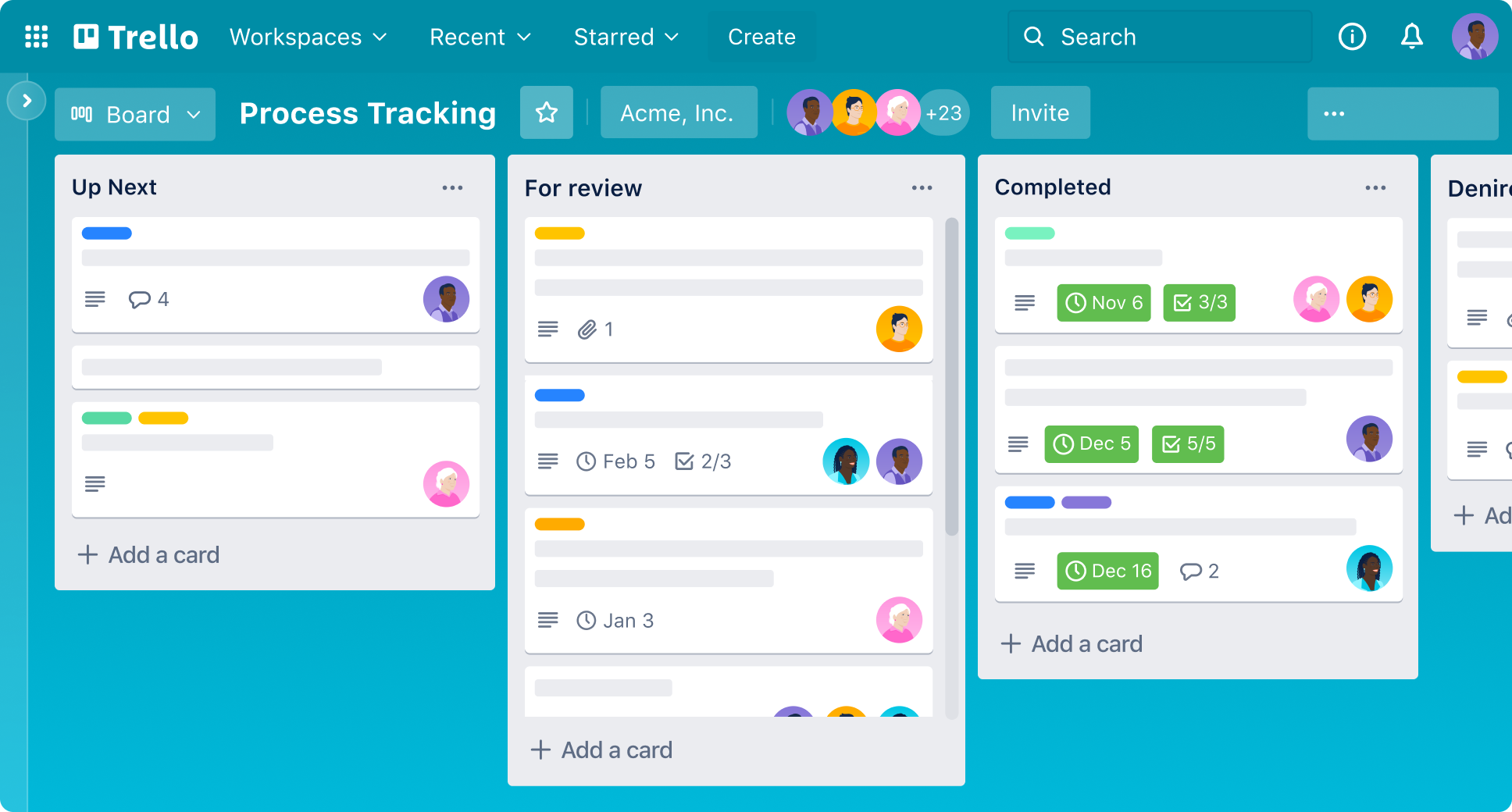
Image source: trello.com
Overview: Trello offers straightforward project tracking through its signature card-and-board system that provides immediate visual clarity on project status. The platform's simplicity makes it accessible for teams seeking quick setup and easy adoption, with flexibility to scale complexity through Power-Ups and automation. While lacking native advanced project management features, Trello's extensive template library and integration ecosystem allow teams to build customized tracking solutions that match their specific workflow needs. The tool excels for personal organization, small team collaboration, and projects benefiting from clear visual workflow stages.
Key features:
- Intuitive drag-and-drop Kanban board interface.
- Power-Ups to enable integrations and add features like calendars or voting.
- Butler automation tool for rule-based task automation.
- Checklists, due dates, labels, and attachments on cards.
- Templates for a wide variety of personal and team use cases.
- Seamless collaboration through comments and member assignments.
Limitations:
- Lacks native advanced features like Gantt charts or time tracking.
- Can become unwieldy for very complex, multi-phase projects.
- Many essential features require Power-Ups, which can feel fragmented.
Ideal for: Individuals, small teams, and anyone needing a simple, visual way to organize tasks and projects.
Pricing:
- Free plan: Free for up to 10 collaborators per Workspace, for basic task capture and organization.
- Standard plan: $5 per user per month (billed annually), includes unlimited boards, card mirroring, and automation features.
- Premium plan: $10 per user per month (billed annually), adds AI capabilities, admin controls, and advanced views.
- Enterprise plan: $17.50 per user per month (billed annually), with enterprise-grade security, Atlassian Guard Standard, and 24/7 admin support.

Core benefits of effective project tracking software
Implementing a robust system for project tracking is a strategic move that transforms how teams work. It moves project management from a reactive state of chasing updates to a proactive practice of guiding work to successful completion. The right software delivers tangible advantages that impact efficiency, clarity, and team morale.
- Improves on-time delivery and project success rates: Clear timelines, visible task dependencies, and automated reminders create a structured environment that keeps projects moving forward. Teams have a constant awareness of priorities and deadlines, which significantly reduces the risk of tasks being overlooked. This disciplined approach ensures that projects not only finish on time but also meet their initial quality and scope objectives.
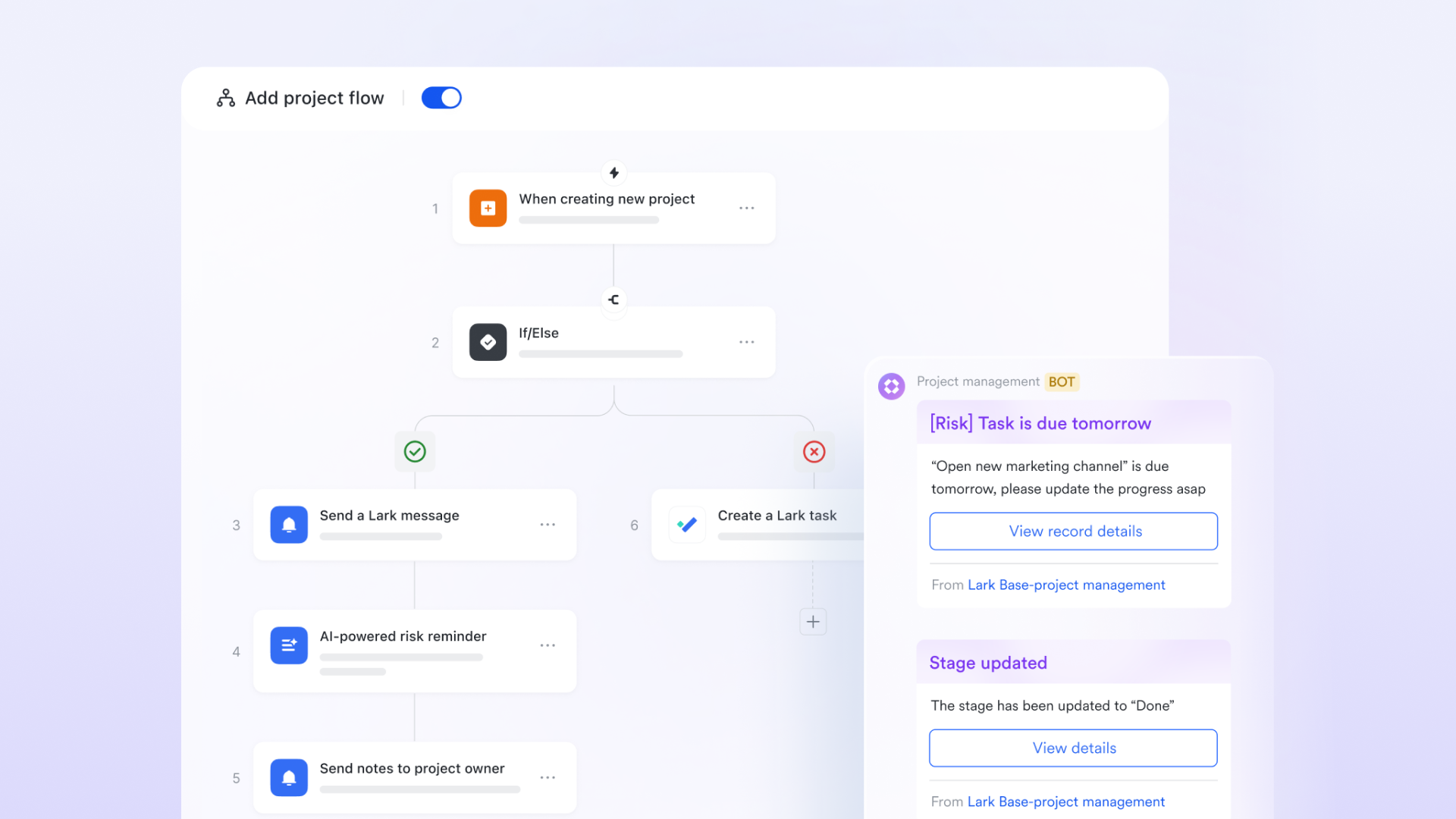
- Enhances resource allocation and prevents team overload: One of the most significant advantages is gaining a clear view of team capacity. Managers can see who is working on what and identify bottlenecks before they lead to burnout. This visibility allows for intelligent distribution of tasks, ensuring work is balanced and team members can maintain a sustainable pace, which boosts both productivity and job satisfaction.
- Provides real-time visibility for stakeholders and managers: Eliminate the constant need for status update meetings. With a central source of truth, stakeholders, managers, and team members can check project progress on demand. This transparency builds trust, empowers individuals to take ownership, and allows leaders to make informed decisions based on current data, not outdated reports.
- Identifies risks and bottlenecks early, enabling proactive solutions: Modern project tracking software acts as an early warning system. Potential roadblocks, resource conflicts, or timeline slippage become visible within the platform before they escalate into major crises. This allows teams to collaboratively address issues head-on, adjusting course proactively to keep the project healthy and on track.
Essential features of modern project tracking software
Choosing a platform means evaluating its core components. The best tools offer a suite of features that support the entire project lifecycle, moving beyond basic task lists to become a central work hub.
- Visual project timelines: Tools like Gantt charts and Kanban boards transform complex project data into an intuitive, at-a-glance overview. They help teams understand timelines, workflows, and progress instantly, without sifting through spreadsheets or lengthy email threads.
- Real-time collaboration tools: Tracking should not happen in a vacuum. Features like in-task commenting, @mentions, and shared document editing are essential. They keep discussions directly linked to the relevant work, eliminating context switching and ensuring feedback is never lost. Unlike platforms where collaboration is a separate module, unified workspaces like Lark embed these conversations directly into the task, making collaboration a natural part of tracking.
- Customizable workflows and automation: Every team has unique processes. The software should adapt to these workflows, not the other way around. Custom statuses, fields, and automated actions—like assigning a task when a status changes or sending a reminder when a deadline approaches—reduce manual administrative work and ensure consistency.
- Comprehensive reporting and dashboards: Data is powerful only when it can be understood. Customizable dashboards and visual reports transform raw project data into actionable insights. Teams can track metrics like project velocity, budget adherence, and team performance, enabling data-driven decisions and continuous improvement.
Guide to choose the right project tracking tool
With numerous options available, selecting the right software requires a strategic approach that looks beyond marketing claims and feature checklists. The goal is to find a platform that your team will not only use but will also enhance their natural way of working.
The most important consideration is workflow integration. Ask a critical question: Does this tool fit seamlessly into how we already work, or will it force us to change our processes to accommodate its limitations? The ideal software minimizes friction and adoption resistance.
Key evaluation criteria should include:
- Ease of use: An intuitive interface is non-negotiable. If the tool is not easy and pleasant to use, team adoption will be low, rendering it ineffective.
- Integration depth: Evaluate whether the platform offers deep, native integrations with your core tools or, better yet, provides these functionalities within a single workspace like Lark to eliminate app-switching entirely.
- Scalability: The solution should grow with your team, supporting increasing complexity and user numbers without requiring a disruptive platform migration later.
- Total cost of ownership: Look beyond the monthly per-user fee. Consider the costs of implementation, training, and potential productivity lost to a steep learning curve or inefficient workflows.
Ultimately, the focus should be on finding a tool that connects communication and execution. Software that separates task tracking from team discussions and document creation creates information silos. The most effective platforms serve as a unified workspace where a conversation can instantly become a task, a document can be reviewed in context, and a deadline update automatically syncs to a shared calendar. This connected approach is what truly empowers teams to track and complete projects with unparalleled efficiency.
Best practices for seamless project tracking
Implementing the right software is only half the battle. To truly master project tracking, teams need to adopt practices that leverage the full potential of their chosen platform. These strategies transform the tool from a simple tracker into a powerful engine for team alignment and productivity.
- Set clear, measurable goals and key results
Before creating the first task, establish what success looks like. Define clear objectives and key results that align with the project's purpose. This creates a north star for the entire team, ensuring every tracked task contributes directly to the ultimate goal. Well-defined outcomes make it easier to prioritize work and measure real progress beyond just task completion.
- Establish a single, centralized platform for all project communication
Resist the temptation to let discussions scatter across email, instant messaging, and other channels. Centralize all project-related communication, documents, and tasks within the tracking platform. This practice eliminates information silos, prevents version control issues, and ensures everyone operates from the same source of truth. When using a unified platform like Lark, this happens naturally as conversations, files, and tasks are inherently connected.
- Schedule regular check-ins based on live data, not guesswork
Move beyond status meetings that rely on memory or manually prepared reports. Use the real-time data from your project tracking software to drive conversations. This shifts the focus from "what have you been doing?" to "how can we solve this visible challenge?" and "what's the next priority based on our current progress?" Meetings become shorter, more focused, and truly actionable.
- Encourage a culture of transparency and continuous updates
The most sophisticated tracking system fails without honest input. Foster an environment where team members feel psychologically safe to update task statuses, log time accurately, and flag risks without fear of blame. When updating the project tracker becomes as natural as sending a message, the data remains reliable and valuable for everyone, enabling truly proactive management.
Conclusion
Project tracking has undergone a significant evolution, transforming from an administrative chore into a strategic capability that empowers entire teams. The modern approach is no longer about micromanagement but about creating clarity, enabling coordination, and providing context. By moving beyond fragmented tools and adopting a centralized platform, organizations can finally break down the information silos that hinder collaboration and innovation.
With the right practices and the right platform, teams are equipped to navigate complexity with confidence and achieve their most ambitious goals. Experience the difference that a truly unified workspace can make for your team's productivity. We encourage you to discover how Lark transforms project tracking from a necessary task into a natural advantage for your organization's success.
FAQs
What is the best tool for tracking a project?
The best tool depends entirely on your team's specific needs. For an all-in-one workspace that connects tracking with communication, Lark provides a seamless experience that eliminates app switching. For comprehensive features, consider tools like Asana or Monday.com. For software development teams, Jira is often the preferred choice.
What Microsoft tool is used to track projects?
Microsoft offers Project for complex, large-scale project tracking with detailed Gantt charts and resource management. For lighter, collaborative task management within Microsoft 365, Planner is the go-to tool. Both integrate with the Microsoft ecosystem, though Project has a steeper learning curve and higher cost.
What is the best PMO tool?
The ideal PMO tool balances strategic oversight with team execution. While options like Microsoft Project handle complex scheduling and Jira Align supports agile frameworks, modern PMOs benefit from unified platforms like Lark. Lark connects portfolio tracking in Base with team communication, docs, and workflows, creating a unified environment for both strategic oversight and daily execution. This eliminates tool fragmentation while providing real-time visibility across all projects.
Is Microsoft Project free?
No, Microsoft Project is not free. It is a premium application with various paid subscription plans, starting with a cloud-based version and extending to more expensive on-premise solutions. For users seeking a free alternative within the Microsoft ecosystem, Microsoft Planner offers basic task and project tracking features at no extra cost with a Microsoft 365 subscription.
Related reading
Table of contents
Start using Lark today

Manage all your work in one place
Boost team efficiency by 10x
Save up to 70% on software costs
Table of contents
Start using Lark today
Manage all your work in one place
Boost team efficiency by 10x
Save up to 70% on software costs
Keep reading








2026 Lark Technologies Pte. Ltd.
Headquartered in Singapore with offices worldwide.






Explore: