To win over your customers, you must understand them first. Customer Relationship Management (CRM) software strives to help you with that. It's a big industry too, generating billions of dollars of revenue every year. In this guide, we'll explore this topic to explain what a CRM is, who it is for, the top tools available, why it's important, and how to select the right platform for your business.
Key takeaways on finding the right CRM
- Small teams and solopreneurs: If you need an affordable, all-in-one workspace that your team can learn to use in an afternoon without IT help, prioritize Lark or Less Annoying CRM.
- Sales-driven teams: If your daily focus is making calls, tracking activities, and visually moving deals toward the finish line, prioritize Pipedrive or Freshsales.
- Marketing and automation focus: If you want a system designed to capture website visitors and automatically nurture them with targeted emails over time, prioritize Lark or Keap.
- Support and service-heavy operations: If your sales process is deeply connected to account management, project delivery, and resolving customer tickets, prioritize Zendesk Sell.
- Complex setups and strict permissions: If you run a large enterprise that requires highly specific rules about who can see certain data, custom coding, and intricate territory divisions, prioritize Salesforce Sales Cloud.
What is CRM software?
software is the technology that helps businesses track communications and nurture relationships with both leads and current customers. It connects all the disparate pieces of customer data from your sales, marketing, and service teams and consolidates them into one accessible place.
"CRM" is often used to mean "CRM software" but it's important to differentiate the two. CRM represents a business philosophy that is about putting the customer at the center. CRM software is the tool that people use to manage customer relationships. Getting the philosophy and tools right is crucial to success.
Let's take a look at what a modern CRM tool can do:
- Contact details and company information.
- A complete history of customer interactions, from emails and meetings to live chats.
- Important documents, quotes, and purchase histories.
- Support tickets and service requests.
These are just a few examples. CRM tools are more powerful than ever, with ever-growing features to help your entire team to deliver an outstanding experience.
Want to do some hands-on testing? Try this CRM template from Lark!
Who needs a CRM?
It is a common misconception that CRM platforms are only for massive enterprises with sizable sales teams. In reality, any organization that relies on building, maintaining, and tracking relationships can benefit from using a CRM. Here are some real-world use cases:
- Rapidly scaling startups and SMBs: When your business starts growing faster than you can keep up with, a CRM steps in to organize your scattered customer details into one reliable place.
- B2B companies with complex sales cycles: If closing a deal takes months and involves talking to several different decision-makers, a CRM remembers the entire history of those interactions so you don't have to.
- Service providers and agencies: Firms that rely heavily on client trust use a CRM to maintain a running log of project communications while smoothly passing accounts between different team members.
- Businesses with high-volume inbound leads: If you are getting more website inquiries than your team can handle manually, a CRM automatically organizes those requests to ensure every person gets a timely response.
- Distributed or remote teams: When your staff works from different physical locations, a cloud-based CRM serves as a shared digital workspace where everyone can view the exact same customer history.
- Organizations focused on recurring revenue: Subscription businesses rely on a CRM to understand how often clients actually use their service or to spot early warning signs that someone might cancel.
Comparison table of the top CRM software in 2026
How to read this table: Evaluate daily usability through pipeline, dashboard, and mobile functionalities; assess scalability via automation and reporting; and gauge downstream risks by examining third-party connections and platform limitations. When two tools tie on the first three metrics, limitations typically act as the tiebreaker.
For more details on CRM prices, see
Get the top CRM software for free
Top 11 CRM software for different use cases in 2026
The CRM landscape is always changing as exciting new features are launched and innovative new products enter the market every year. To help you pick the best CRM software, we've tested 33 tools based on ease of use, value, and innovation, and picked out these 11.
1. Lark: Best for all-in-one customer management
Use Case: Teams who need a simple, mobile-friendly workspace to automate workflows and nurture leads without complex setups.
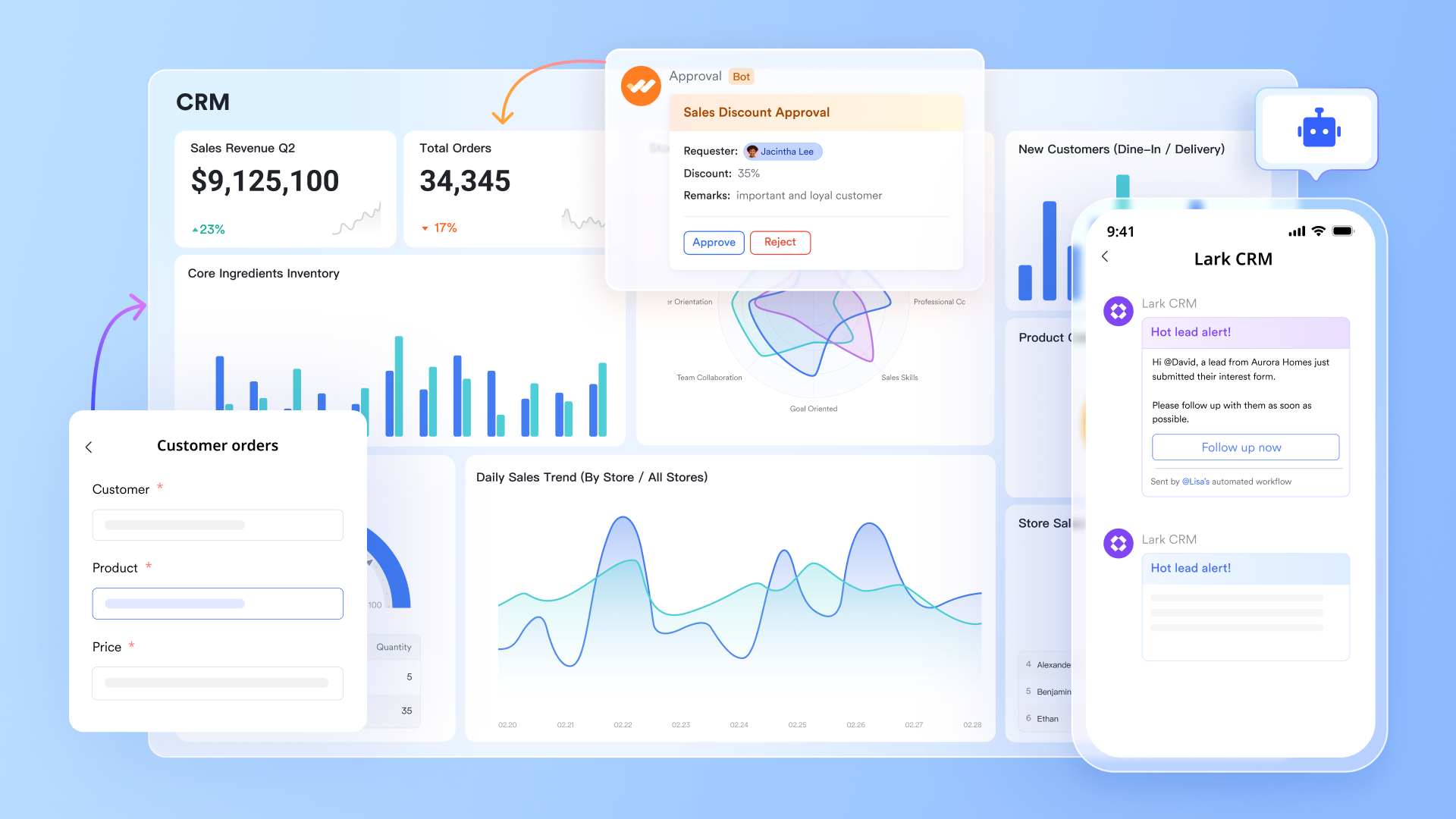
Lark is the best app for teams who want to manage their entire workflow on a unified platform. Traditional CRM tools often live in a browser tab or require constant back-and-forth between apps, but Lark gives you everything in one place for your sales activities: custom CRM capabilities, , , , , , and more.
These features function seamlessly across all your devices. Sales reps can update deals, message teammates, join meetings, or review client docs right from their phones. Managers can monitor pipelines, , and get real-time updates, no matter where they are. Boasting features that perform equally well on mobile and desktop, Lark ensures your entire team moves fast and stays aligned, whether they're at HQ or out in the field.
Key Features:
- Flexible CRM design: Design end-to-end workflows using relational tables and forms to build custom pipelines and objects without writing code.
- Automated workflows: Eliminate busywork using automations to auto-assign owners, send reminders, and generate tasks based on record updates.
- Pipeline management: Align with your workflow using versatile views—including Kanban, Gantt, Calendar, Gallery, and more—to visualize and manage deals exactly the way you want.
- AI-enriched data: Automatically enrich and classify leads using AI, and use the AI formula generator to write advanced formulas with ease.
- Dynamic dashboards: Build custom dashboards to surface critical metrics, featuring a built-in AI that can analyze charts for instant insights.
Pros:
- Exceptional mobile app that works just as well as the desktop version, gaining a rating of 4.8 on the Apple App Store.
- Small teams benefit from a generous free plan for up to 20 users with access to over 11 core features.
- Centralizing messaging and sales data for smoother collaboration to close deals faster.
- Integrated approval workflows speed up administrative tasks like deal sign-offs directly in the chat.
Cons:
- The sheer number of features may require some time to learn. Visit Lark's and for helpful guides and tips.
Ratings:
Pricing:
- Starter plan: that includes 11 powerful tools for up to 20 users. It also comes with 100GB of storage space, 1000 automation runs, AI translations, and more. No credit card needed.
- Basic plan: (billed annually) for up to 500 users. It includes everything in Starter and unlimited message history, 5TB of storage space, 1,000 automation runs, and more. Some users may need to to purchase this plan.
- Pro plan: (billed annually) for up to 500 users. It includes everything in Basic plus group calling for up to 500 attendees, 15TB of storage space, 50,000 automation runs, and more.
- Enterprise plan: for custom pricing. Supports unlimited users and includes even more automation runs and advanced security, compliance, and management features.
For small teams with simple communication needs

18 months message history
1000 Base automation runs/month
2000 rows per table in Base
Most POPULAR
For companies with comprehensive collaboration and management needs
Unlimited message history
500-participant video meetings
50k Base automation runs/month
20k rows per table in Base
For large companies with advanced security and organizational management needs
Get a personalized demo and pricing
Unlimited message history
500-participant video meetings
15 TB storage + 30 GB storage/user
500k Base automation runs/month
50k Base automation runs/month
Most POPULAR
For companies with comprehensive collaboration and management needs
Unlimited message history
500-participant video meetings
50k Base automation runs/month
20k rows per table in Base
2. Salesforce Sales Cloud: Best for enterprise customization
Use Case: Large enterprises demanding deep customization and complex territory management.
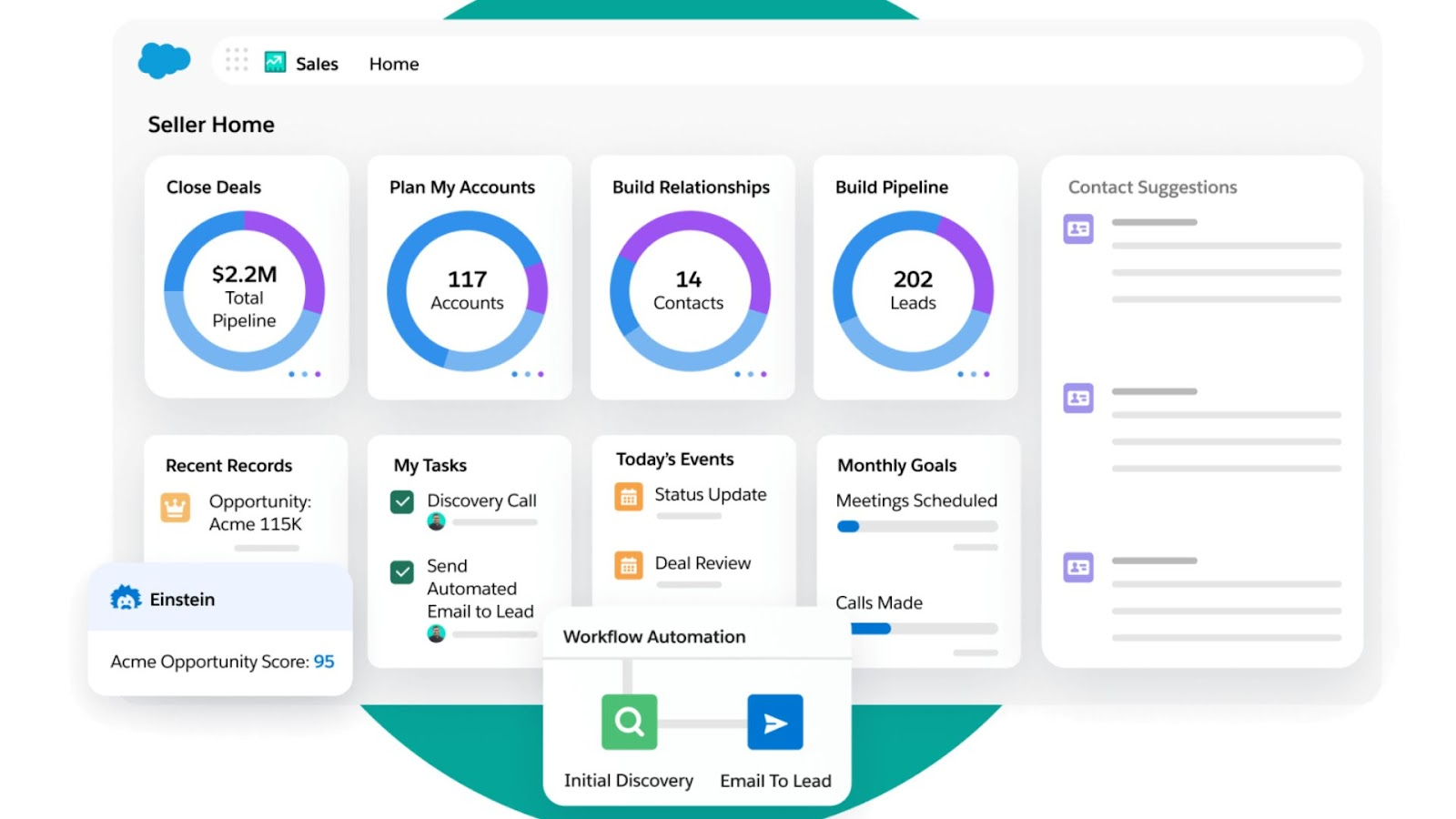
Image source: salesforce.com
Salesforce serves as a comprehensive Platform as a Service (PaaS) that can be engineered to support highly specific business processes and complex global territory models, making it the standard for large-scale operations. Although the platform offers powerful capabilities like the new autonomous "Agentforce," the complexity often necessitates significant investment in implementation and dedicated administration to maintain effective workflows.
Key Features:
- Agentforce: Autonomous AI agents can execute multi-step workflows without human intervention.
- AppExchange: The extensive B2B app marketplace allows for infinite functionality expansion.
- Territory management: Administrators can model complex global sales hierarchies and revenue splits.
- Flow builder: This visual engine allows for building complex backend automation logic.
Pros:
- The platform boasts the most robust ecosystem and third-party integrations in the market.
- Reporting and analytics capabilities are unmatched for complex data.
- Industry-specific clouds provide tailored solutions for sectors like healthcare and finance without heavy custom coding.
Cons:
- The learning curve is steep and often requires dedicated staff to manage.
- Implementation costs can often exceed the price of the software license itself.
Ratings:
Pricing:
- Pro Suite: $100/user/month
- Enterprise: $175/user/month
- Unlimited: $350/user/month
For more on pricing, see .
3. HubSpot CRM: Best for marketing alignment
Use Case: Growing teams wanting to bridge the gap between lead generation and sales closing.
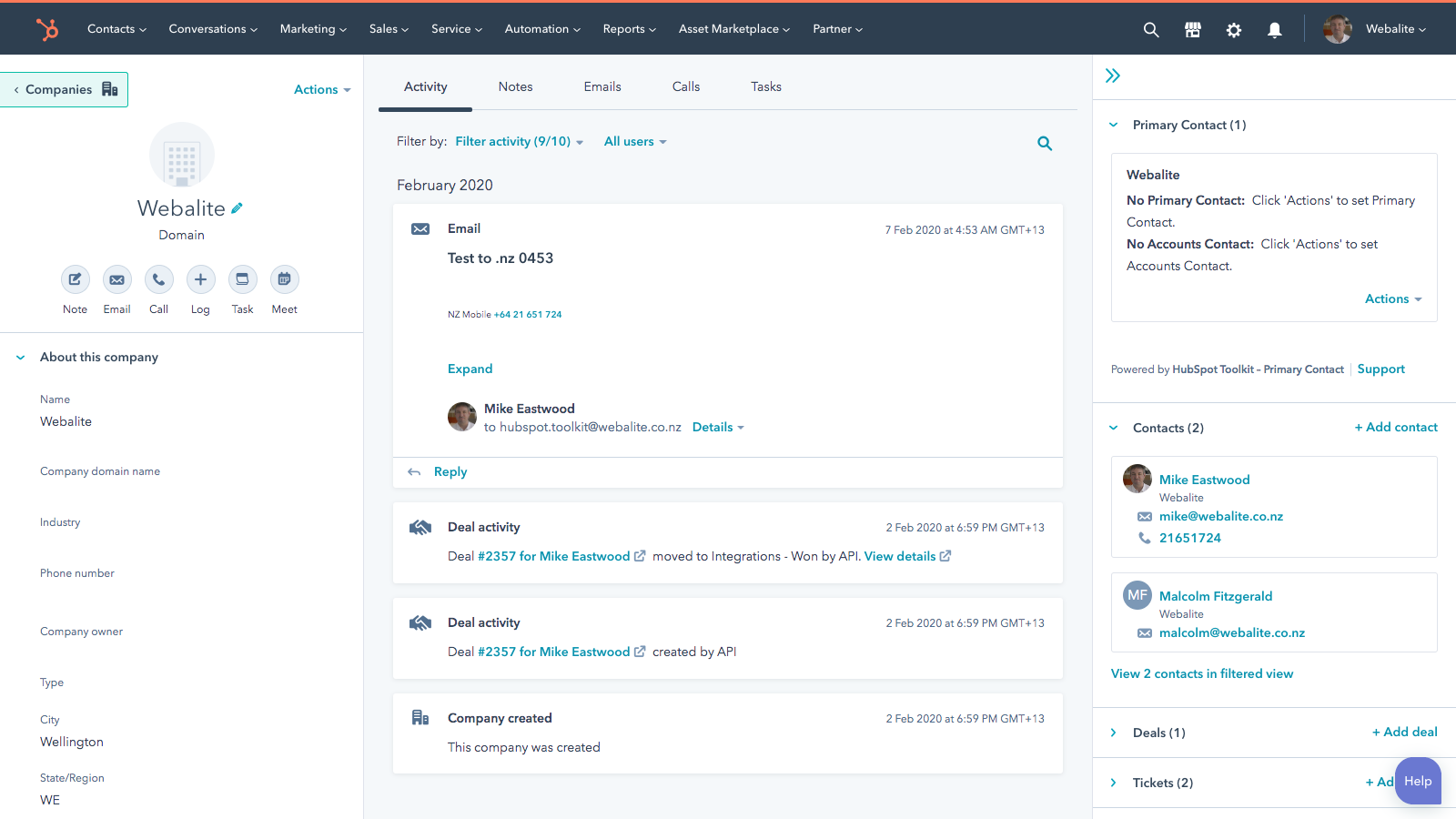
Image source: hubspot.com
HubSpot connects marketing data with sales action through a unified codebase, providing a seamless flow of information from the first website visit to the final contract. Companies prioritizing inbound growth and usability will find this a strong choice, though costs can escalate quickly as businesses move from the starter tiers to the more advanced automation features found in the Professional plans.
Key Features:
- Unified activity timeline: The interface aggregates all prospect interactions into a single chronological stream.
- Breeze AI: Practical AI tools help draft content and analyze sales calls for action items.
- Meeting scheduler: Native calendar booking tools sync directly to the contact record.
- Smart send times: Email tracking suggests the optimal time to message a specific prospect.
Pros:
- The user interface is incredibly clean and requires minimal training.
- Sales and marketing teams align seamlessly around a single source of truth.
- Extensive free training resources via HubSpot Academy ensure teams can master the platform quickly.
Cons:
- The pricing jump from starter to professional tiers is very steep.
- Advanced customization options are more limited compared to Salesforce.
Ratings:
Pricing:
- Professional: $90/user/month
- Enterprise: $150/user/month
For more on HubSpot pricing, see .
4. Zoho CRM: Best value for feature depth
Use Case: SMBs looking for a comprehensive feature suite at an affordable price point.
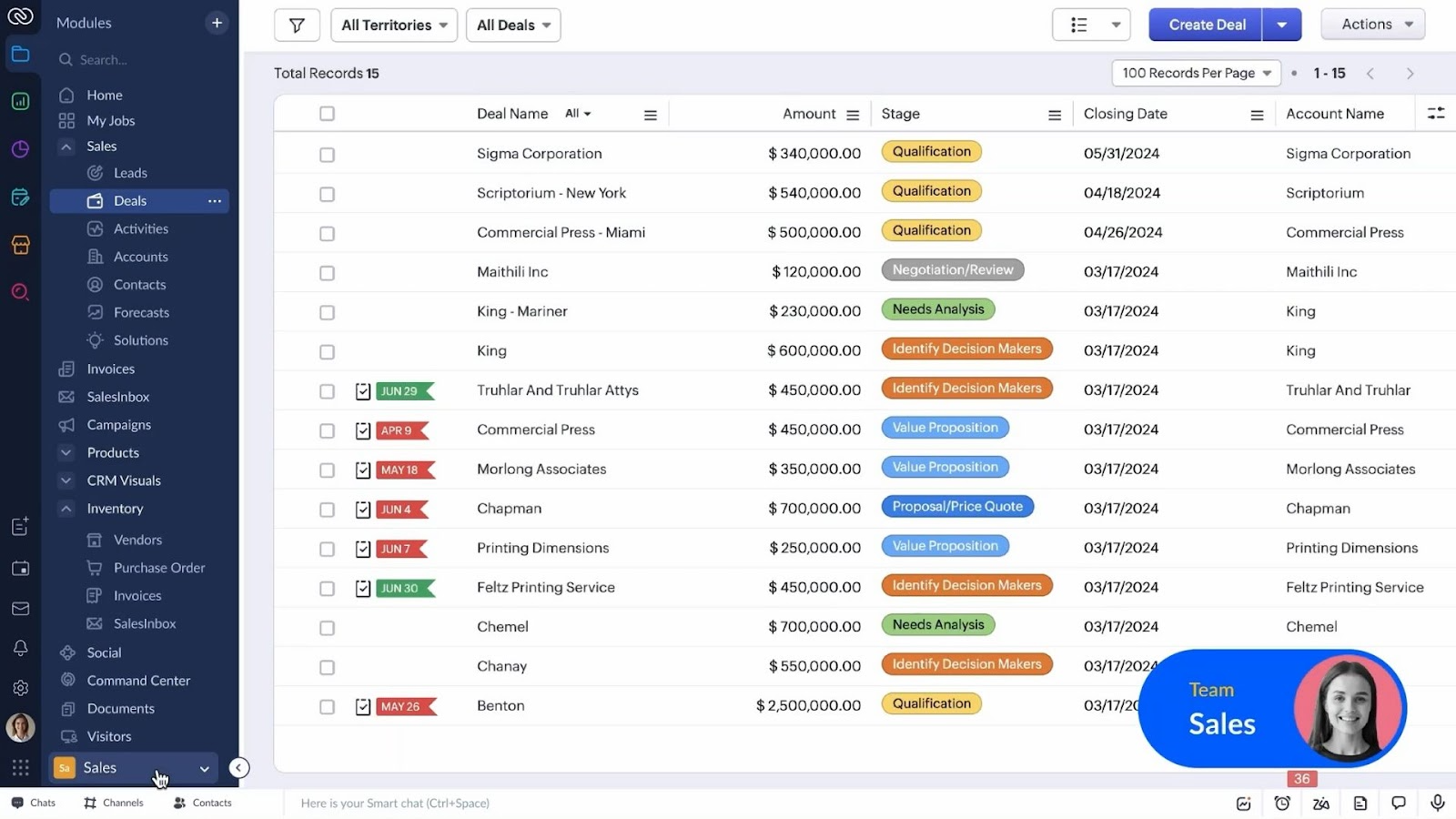
Image source: zoho.com
Zoho CRM offers an impressive breadth of functionality by vertically integrating features that competitors often charge extra for, such as inventory management and gamification. Despite providing extensive capabilities and customization options like Canvas, the user interface can feel utilitarian compared to more modern design-led tools in the market.
Key Features:
- Canvas design studio: This no-code builder allows users to completely redesign the CRM interface.
- Zia AI assistant: A conversational AI offers predictive sales analysis and sentiment tracking.
- Blueprint: This process validation tool ensures reps follow specific steps during the sales cycle.
- Gamescope: Built-in gamification features allow managers to run sales contests and leaderboards.
Pros:
- Users get enterprise-grade features at a fraction of the cost of competitors.
- The customization options allow you to tailor the look and feel extensively.
- "Blueprint" technology enforces process compliance by mandating specific actions at each stage of the pipeline.
Cons:
- The user interface can feel cluttered and less modern than rivals.
- Customer support response times can be inconsistent for lower-tier plans.
Ratings:
Pricing:
- Standard: $14/user/month
- Professional: $23/user/month
- Enterprise: $40/user/month
- Ultimate: $52/user/month
For more on Zoho pricing, see
5. Pipedrive: Best for visual pipelines
Use Case: Sales teams focused purely on activity-based selling and visual deal tracking.
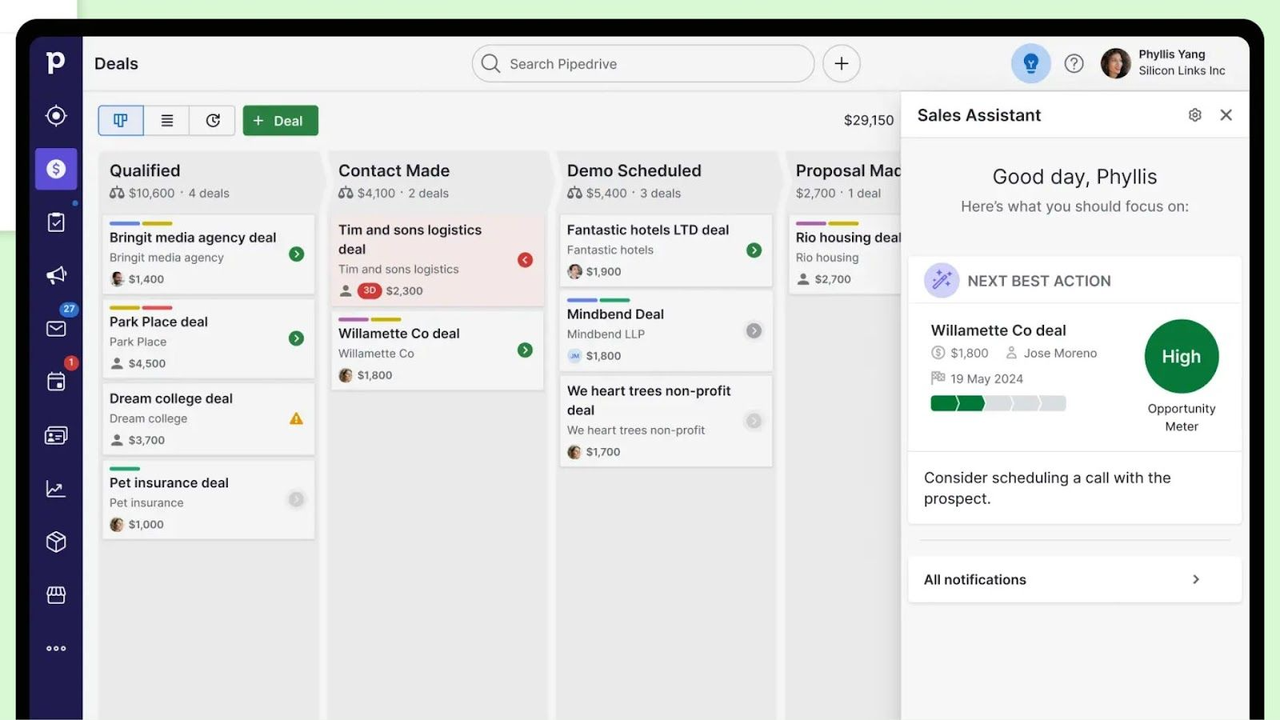
Image source: pipedrive.com
Pipedrive is built around the philosophy of "Activity-Based Selling," focusing on the actions that drive deals rather than just the results. Intentionally stripped down to prioritize visual pipeline management, the interface is highly effective for sales teams that want a distraction-free environment, though the platform lacks the broad marketing features of larger ecosystems.
Key Features:
- Visual Kanban pipeline: The drag-and-drop interface provides immediate visual feedback on deal stages.
- Sales assistant: An AI notification center offers proactive tips on deal rot and follow-ups.
- Smart contact data: The system automatically scrapes public data to enrich contact profiles with one click.
- Rotting deals: Visual cues highlight deals that have stagnated in the pipeline for too long.
Pros:
- The visual interface is highly intuitive and beloved by sales reps.
- Setup is quick, requiring very little onboarding time.
- Advanced security features, including a dedicated dashboard, protect sensitive customer data from unauthorized access.
Cons:
- The platform lacks robust marketing automation and service features.
- Costs can accumulate quickly when adding necessary paid add-ons.
Ratings:
Pricing:
- Essential: $14/user/month
- Advanced: $29/user/month
- Professional: $49/user/month
- Enterprise: $99/user/month
For more on Pipedrive pricing, see .
6. Monday CRM: Best for project management integration
Use Case: Teams needing to transition seamlessly from closing a deal to managing the project delivery.
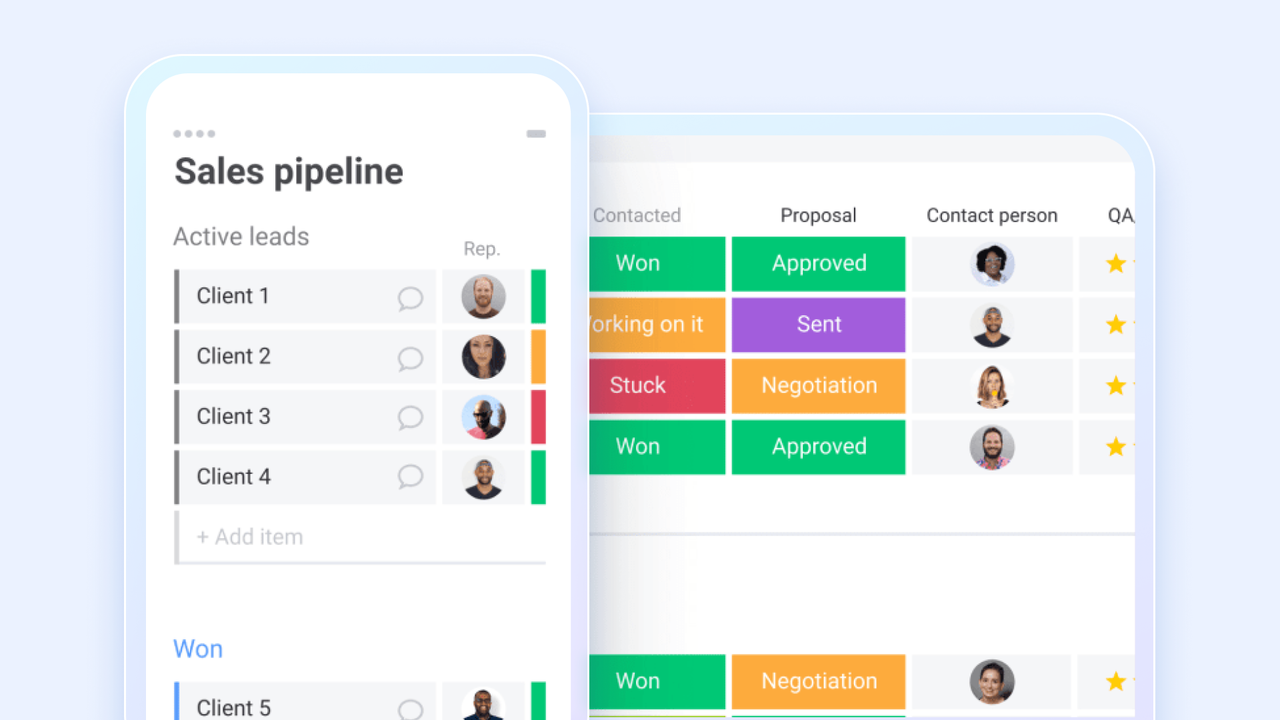
Image source: monday.com
Built on the monday.com Work OS, this CRM blurs the line between sales and operations by using flexible board views to handle the handoff without moving data between different apps. Highly visual and customizable, the platform excels in many areas, but its seat-based pricing model and minimum seat requirements can be rigid for smaller teams.
Key Features:
- Post-sales handoff: The system automatically creates project boards and assigns tasks when a deal is marked won.
- Visual dashboards: Colorful and customizable widgets allow for tracking revenue and team KPIs.
- No-code automation: Simple logic builders allow users to automate routine tasks without IT support.
- Doc column: Users can draft and store contracts directly within the deal record.
Pros:
- Bridging the gap between sales and post-sales operations is a key strength.
- The highly visual interface is easy to customize for any workflow.
- Native time-tracking capabilities help service teams monitor billable hours and project efficiency directly in the CRM.
Cons:
- The pricing model requires purchasing seats in pre-defined blocks.
- Power users may feel it resembles a spreadsheet more than a dedicated CRM.
Ratings:
Pricing:
- Basic: $12/seat/month (min 3 seats)
- Standard: $17/seat/month (min 3 seats)
- Pro: $28/seat/month (min 3 seats)
For more on monday.com pricing, see .
7. Freshsales: Best for AI-powered lead scoring
Use Case: High-velocity sales teams needing built-in phone tools and AI-driven prioritization.
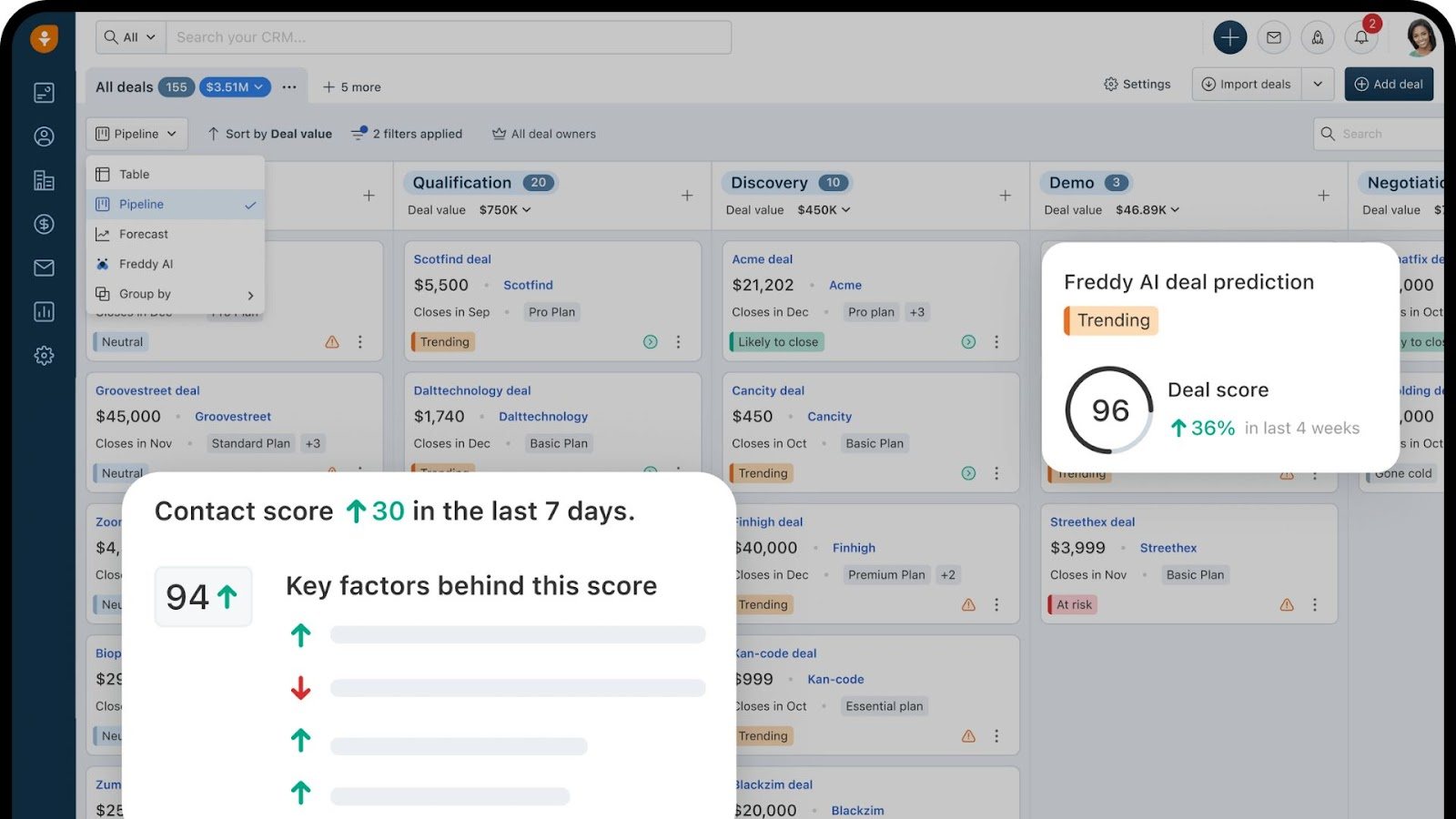
Image source: freshworks.com
Freshsales brings a consumer-grade user experience to the CRM world, designed specifically for high-velocity teams that manage large volumes of leads. The platform differentiates itself by including built-in telephony and "Freddy AI" as core features rather than expensive add-ons, helping sales reps prioritize who to call next without leaving the browser.
Key Features:
- Freddy AI insights: The AI provides predictive lead scoring and suggestions for the next best action.
- Built-in cloud telephony: A native phone dialer allows calls and recording directly from the browser.
- 360 customer view: This feature aggregates social, website, and email interactions into a single timeline.
- Sales sequences: Automated multi-step drip campaigns help nurture leads over time.
Pros:
- Built-in telephony features save money on external dialer software.
- The AI features are practical and accessible on lower pricing tiers.
- Website event tracking gives reps visibility into prospect behavior and page visits before they call.
Cons:
- Reporting features can be limited compared to enterprise competitors.
- Support responsiveness has received mixed reviews from users.
Ratings:
Pricing:
- Enterprise: $59/user/month
For more on Freshsales pricing, see .
8. Zendesk Sell: Best for customer support integration
Use Case: Teams where sales and support are deeply intertwined and need shared visibility.
Zendesk Sell focuses on the expansion phase of the customer lifecycle by integrating natively with Zendesk Support to provide sales reps with full visibility into active support tickets. Although valuable for account management and renewal discussions, the tool is most effective when paired with the broader Zendesk ecosystem.
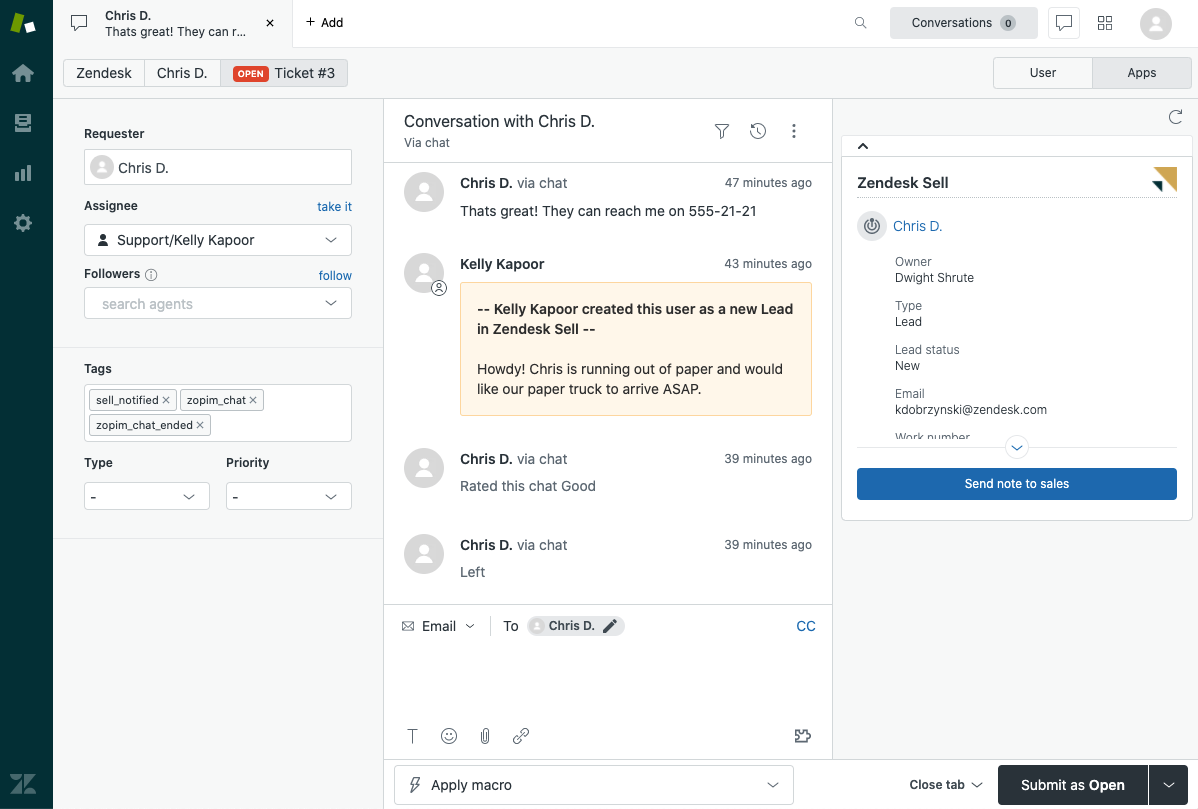
Image source: zendesk.com
Key Features:
- Support ticket integration: Sales reps can view the status of support tickets within the deal view.
- Reach prospecting: Built-in lead enrichment tools help users find new contacts.
- Smart lists: Dynamic lead lists automatically update based on filtering criteria.
- Email sentiment analysis: AI tools flag email responses as positive or negative risks.
Pros:
- Teams already using Zendesk Support will find the native integration superior.
- The mobile app is robust and well-designed for field sales.
- "Smart Lists" allow for dynamic filtering of leads and deals to prioritize daily outreach.
Cons:
- Costs can be high if you are not already in the Zendesk ecosystem.
- The interface is functional but lacks the modern polish of newer tools.
Ratings:
Pricing:
- Professional: $115/agent/month
- Enterprise: $169/agent/month
For more on Zendesk pricing, see .
9. Copper: Best for Google Workspace users
Use Case: Google-heavy agencies wanting a CRM that lives entirely inside Gmail.
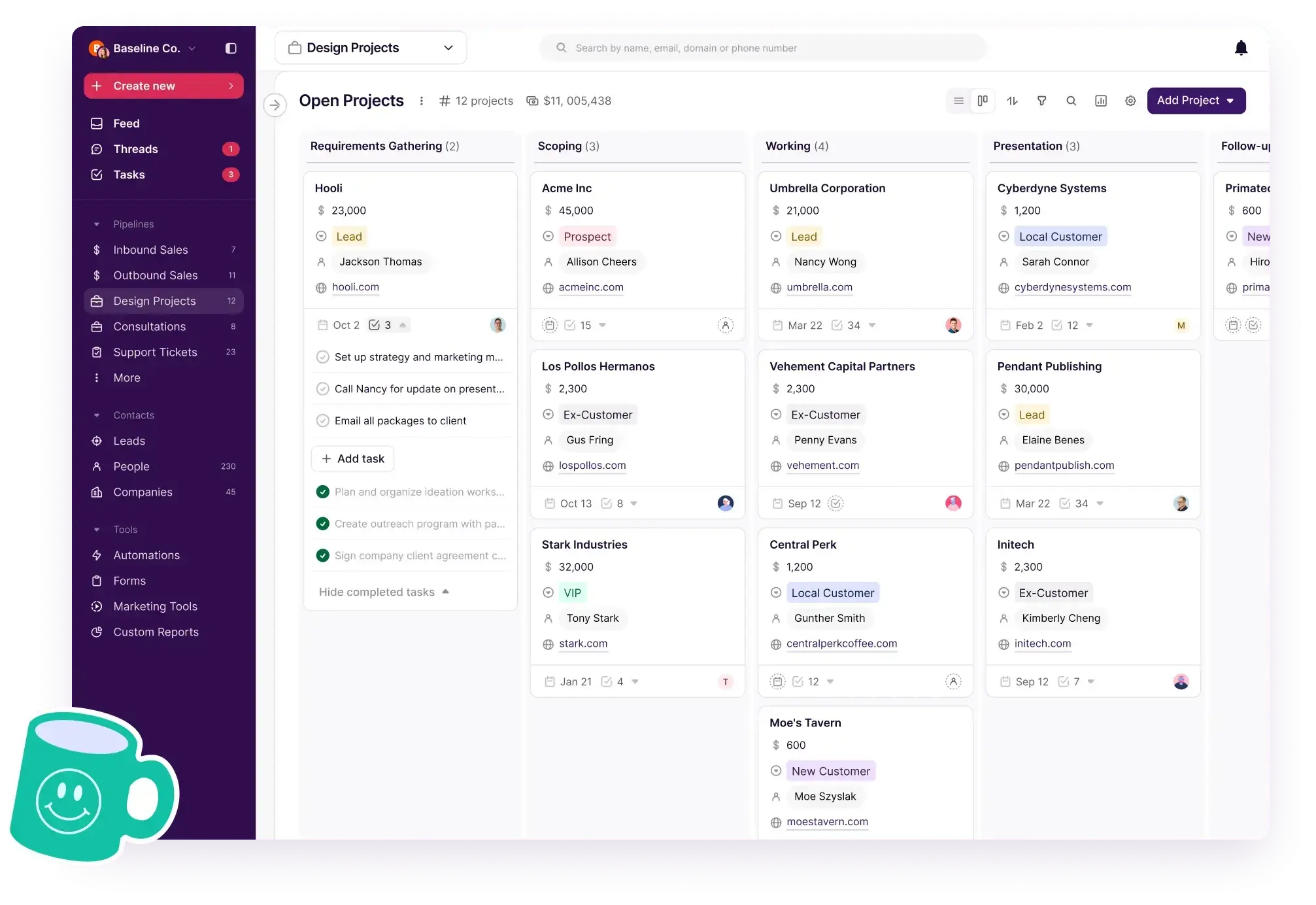
Image source: copper.com
Copper is designed to be an "Invisible CRM" that functions primarily as a sidebar within Google Workspace applications, eliminating manual data entry by scraping information from emails and calendar events. This deep integration makes the system ideal for users who live in Gmail, but renders the tool less useful for organizations using Outlook or other email providers.
Key Features:
- Deep Google integration: The system syncs seamlessly with Gmail, Calendar, and Drive with a Material Design interface.
- Zero-touch auto-log: It automatically captures emails and creates contacts from signatures.
- Project boards: Basic pipeline tools allow for managing post-sales delivery workflows.
- Chrome extension: Full CRM functionality is available directly within the Gmail browser tab.
Pros:
- Background scraping eliminates the need for manual data entry.
- The learning curve is near zero for users familiar with Google apps.
- A robust Chrome extension allows users to manage the entire CRM without ever leaving their Gmail inbox.
Cons:
- Companies not using Google Workspace will find the tool effectively useless.
- Native features for multi-channel marketing beyond email are missing.
Ratings:
Pricing:
- Professional: $59/user/month
- Business: $99/user/month
For more on Copper pricing, see .
10. Keap: Best for small business automation
Use Case: Solopreneurs needing to automate the entire client lifecycle from lead to payment.
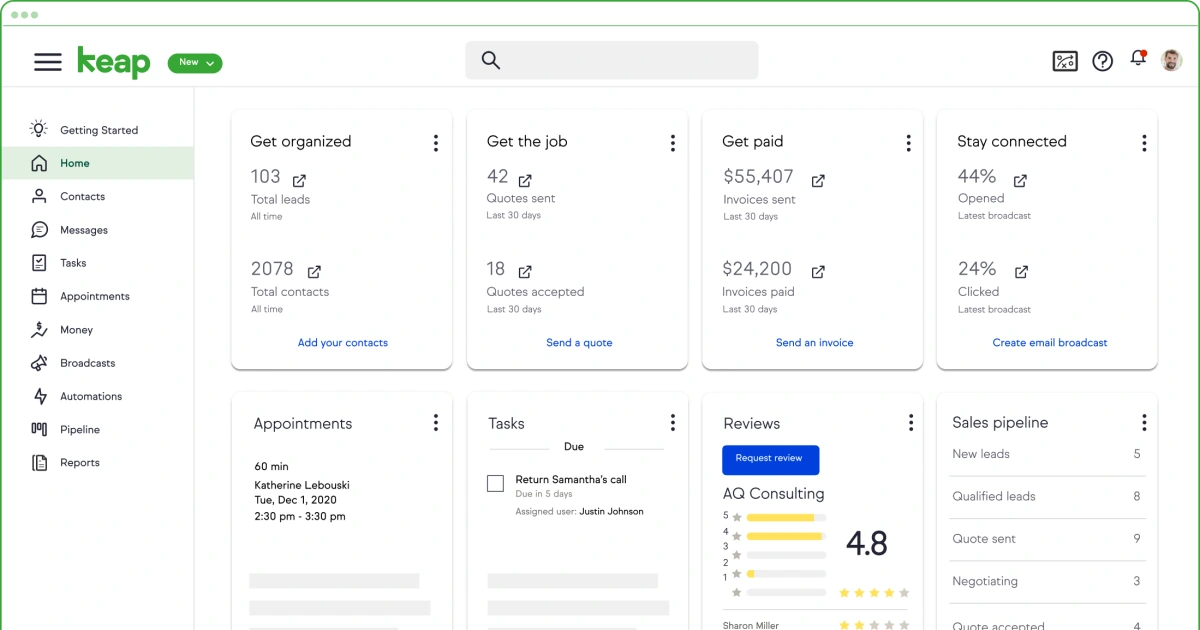
Image source: keap.com
Keap acts as a business automation platform rather than just a CRM, targeting small service providers who need to combine CRM, text messaging, and invoicing into one suite. Powerful for building complex automation flows that handle client intake and follow-up, the platform carries a higher starting price point than many competitors.
Key Features:
- Automation builder: The visual tool allows for creating complex logic for marketing and sales follow-up.
- Invoicing & payments: Users can send quotes and collect payments natively within the CRM.
- Dedicated business line: The app provides a business phone number that rings to the user's mobile device.
- Appointment scheduling: Built-in calendar booking triggers automated intake workflows.
Pros:
- This solution combines CRM, marketing, and payments into a single platform.
- The automation builder is exceptionally powerful for service businesses.
- Dedicated business phone lines and text messaging separate professional communications from personal devices.
Cons:
- The starting price is significantly higher than other SMB tools.
- The sheer number of features can present a steep learning curve.
Ratings:
Pricing:
- Pro: $199/month (includes 2 users)
- Max: $289/month (includes 3 users)
For more on Keap pricing, see .
11. Less Annoying CRM: Best for simplicity
Use Case: Micro-businesses and first-time CRM users wanting a zero-learning-curve tool.
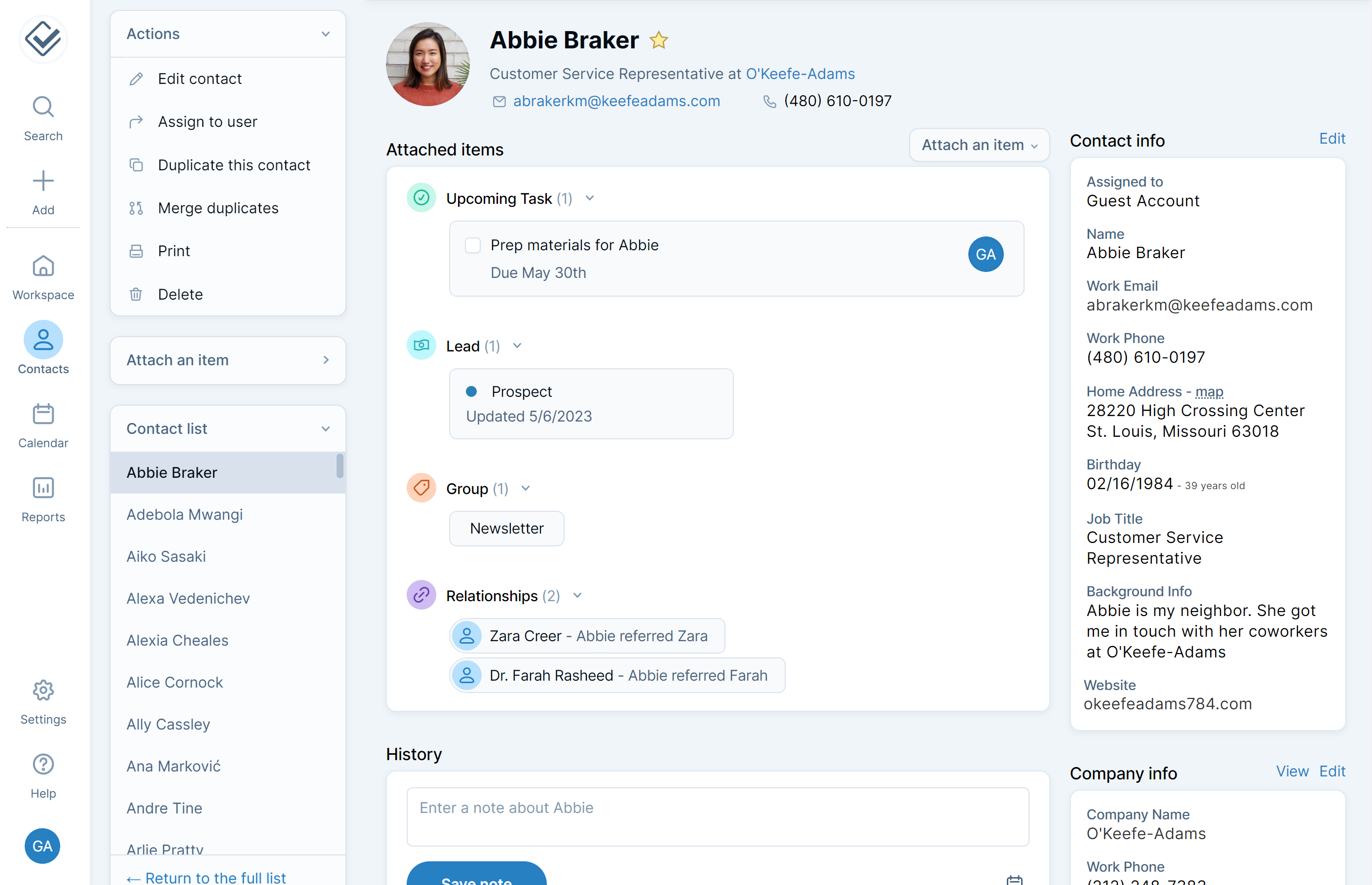
Image source: lessannoyingcrm.com
Less Annoying CRM (LACRM) lives up to its name by rejecting feature bloat in favor of a straightforward, contact-centric design that offers a single pricing tier. Focusing entirely on usability makes it a favorite for small businesses that find enterprise tools overwhelming, though the system lacks advanced automation.
Key Features:
- Workspace dashboard: A simple daily agenda view shows tasks and leads to contact.
- Universal search: The search bar allows for fast retrieval of any contact or note across the entire system.
- Lead report: A simplified list view tracks the status of active leads.
- US-based human support: Free phone and email support is included for every user.
Pros:
- Learning the system is incredibly easy, requiring no training.
- Customer support is consistently rated as the best in the industry.
- Customization of pipelines and fields is included in the base price, avoiding the need for expensive consultants.
Cons:
- Automation and integration features found in modern CRMs are missing.
- Larger sales teams or those with complex pipelines will find it unsuitable.
Ratings:
Pricing:
- Standard: $15/user/month
How we select and assess software in our reviews
Our editorial team follows a transparent, repeatable methodology. Every review is based on our hands-on experience in realistic working scenarios, and we always stick to a set of consistent scoring criteria.
- Features and functionality
- Security, privacy, and compliance
- Integrations and compatibility
Our team reviews and assesses tools using consistent datasets and real-world scenarios, focusing on the things users care about most—such as sales pipelines, marketing automation, collaboration, and knowledge management. We confirm the official pricing and release notes of each product we review, and gather user feedback from across different channels. We do not accept paid placements and ensure our reviews are completely unbiased and fair. Additionally, as software and digital work environments constantly evolve, we review our content at least quarterly and update articles whenever products undergo significant changes. For more information about our review methodology, read the full rundown of.
The benefits of CRM
Understanding the features is one thing, but the real question is: what results can you expect? Implementing the right CRM software translates into compelling, real-world business outcomes.
Increase productivity and improve efficiency
By automating repetitive tasks, a CRM gives your team back their most valuable resource: time. A wide range of tasks, from managing sales pipelines visually, tracking deals from lead to close to follow-up reminders, and generating highly accurate sales forecasts can be automated. This allows them to focus on high-impact activities that require a human touch, leading to a direct boost in productivity across the board.
Drive sales growth and shorten the sales cycle
A CRM helps your sales team prioritize their efforts by identifying the hottest leads through lead scoring. It ensures no opportunity falls through the cracks with automated follow-ups and provides a clear, visual overview of the entire sales process. This focus and efficiency lead to more deals closed in less time.
Enable smarter, data-backed strategic decisions
Gut feelings have their place, but a CRM provides the hard data needed to guide your strategy. With powerful reporting capabilities and , you can turn raw numbers into actionable intelligence. Leaders can track team performance, spot emerging market trends, and make informed decisions with confidence.
Build stronger, more loyal customer relationships
This is the ultimate goal. By giving your team a complete view of every customer's journey, a CRM empowers them to deliver personalized, proactive, and consistent service. A CRM gives your service agents immediate access to a customer's full interaction history. They can see past purchases, previous support tickets, and recent conversations with the sales team. When customers feel understood and valued, you deepen those customer relationships, which in turn boosts satisfaction, retention, and referrals.
Create a single source of truth
The foundational function of any CRM is to act as a centralized database for all things customer-related. This is the heart of effective contact management. By eliminating data silos and duplicate records, it ensures that everyone, from a sales rep preparing for a call to a support agent solving a problem, is working with the same accurate, up-to-the-minute information.
Create personalized marketing campaigns
A CRM is also a powerful engine for your marketing efforts. It allows you to segment your audience with incredible precision based on their behaviors, preferences, and purchase history. This detailed customer data fuels, enabling you to run highly targeted email marketing campaigns and personalize your messaging at scale. Instead of generic email blasts, you can send the right message to the right person at the right time, improving customer engagement and conversion rates.
See how Lark can help you deliver these benefits
Key features of CRM software
The exact tools you require will depend heavily on your specific business needs. A B2B enterprise might prioritize complex pipeline tracking, whereas a retail startup might focus entirely on marketing automation. Every CRM is a little different, but top platforms share a core set of capabilities designed to keep your team organized and your customers happy:
- Contact and lead management: A centralized database serves as the primary foundation of any CRM. These systems store essential details, communication history, and interaction logs so your entire team can access a unified profile for every prospect or client.
- Pipeline and opportunity management: A clear visual representation of your sales process is critical for closing deals. Drag-and-drop boards and customizable stages allow sales representatives to track exactly where each prospect stands and ensure no opportunities slip through the cracks.
- Workflow automation: Automated processes eliminate busywork for marketing, sales, and customer service teams so they can focus on high-value tasks. For example, the CRM can instantly assign new leads to the right sales representatives, trigger targeted marketing emails, or route support tickets based on specific criteria.
- Reporting and analytics dashboards: Raw data requires the right context to be truly useful. Custom dashboards transform complex numbers into visual insights, helping leaders forecast revenue accurately, monitor team performance, and spot emerging market trends.
- Email tracking and integration: A direct connection between your inbox and the CRM keeps your communications seamlessly organized. Sales professionals can track email opens, log responses automatically, and sync calendar events without constantly switching between applications.
- AI tools and autonomous agents: Artificial intelligence (AI) can now handle more and more complex tasks that previously required human intervention. It can do anything from drafting emails and scoring incoming leads to summarizing meeting notes, and even operate as autonomous agents to resolve routine customer issues around the clock.
The different types of CRM
Not all CRM solutions are created equal. They can be categorized based on how they are deployed and what their primary functional focus is. Understanding these distinctions is key to finding the platform that best aligns with your business needs.
Deployment model: On your server or in the cloud?
There are two main ways to deploy a CRM. On-premise CRM is software you install and run on your own servers, giving you total control but also making you responsible for all maintenance, security, and upgrades.
The far more common model today is cloud CRM software, also known as SaaS (Software-as-a-Service). With a , the vendor hosts and manages everything for you; you simply access it through the internet. This model has come to dominate the market, with cloud-based CRM software accounting for 87% of all CRM. The benefits are clear: lower upfront costs, accessibility from any device, automatic updates, easy scalability, and enterprise-grade security managed by the CRM provider. If neither of those options perfectly fits your needs, a hybrid deployment, which combines both on-premise servers and cloud-based systems, offers a flexible middle ground. Companies in regulated industries prefer this model because they can lock down sensitive data on their own private servers but still use the cloud to give remote teams access.
Functional model: What is the CRM built to do?
Beyond deployment, types of CRM software can be understood by their core purpose. While most modern platforms blend these capabilities, they often have a primary strength in one of three areas: operational, analytical, or collaborative.
- Operational CRM: This is the workhorse. Its primary goal is to automate and streamline your day-to-day, customer-facing processes. It includes sales force automation, marketing campaign management, and customer service workflows. An operational CRM is focused on helping your teams execute more efficiently and consistently.
- Analytical CRM: This is the brain. Its purpose is to help you analyze the vast amounts of customer data you collect to uncover meaningful insights. It's about understanding customer behavior, identifying trends, and making smarter, data-driven decisions. Key features include robust reporting dashboards, data mining tools, and predictive analytics for forecasting.
- Collaborative CRM: This is the network. Its main objective is to break down internal silos and improve communication and collaboration between your teams. It ensures that your sales, marketing, and service departments are all on the same page, presenting a single, unified face to the customer. It achieves this through features like a centralized customer database, shared inboxes, and tools to manage interactions across all channels.
CRMs can be classified into even more functional types. To read more, see .
Key CRM trends shaping 2026 and beyond
The CRM landscape is evolving at a breakneck pace, and platforms are becoming more intelligent than ever. Here are several key trends to watch:
- From predictive to autonomous AI (Agentic AI): Earlier iterations of artificial intelligence focused primarily on predicting customer behavior or drafting emails. Today, the latest "Agentic AI" takes things a step further by executing complex tasks autonomously. These intelligent agents automatically update account records based on email context, rearrange calendars according to priority, and route support tickets in real time—all without human intervention.
- Voice and conversational interfaces: Manual data entry will soon be a relic of the past. Field reps now rely on voice-activated AI to update their pipelines, log meeting transcripts automatically, and query the database hands-free. A simple prompt like, "Hey CRM, which of my deals are most likely to close this week?" instantly brings up the necessary insights.
- Unified customer data platforms (CDPs): True hyper-personalization requires a flawless data foundation. CRMs now integrate deeply with CDPs to establish a single "golden record" for every buyer. Teams can leverage real-time behavioral data from website visits, product usage, and support interactions to trigger highly personalized campaigns exactly when a prospect shows intent.
- Composable and low-code architecture: Companies demand agility but want to avoid heavy IT overhead. The market has responded by shifting toward "composable" platforms equipped with intuitive, drag-and-drop builders. Revenue and operations leaders can easily snap together the exact modules they need and instantly adapt their workflows whenever market conditions shift.
How is AI being used in CRM?
Artificial intelligence is transforming CRM platforms from passive databases into proactive partners. An AI-powered CRM can help analyze, predict, and automate interactions, adding a layer of intelligence to every customer-facing process. AI-driven features can automate routine administrative work, such as data entry and scheduling.
For sales teams, AI enhances lead scoring by analyzing behavior to predict which prospects are most likely to convert. It also powers more accurate sales forecasting by analyzing historical data and market trends.
In marketing and service, AI enables a deeper level of personalization, tailoring recommendations and communications based on individual customer behavior. AI-powered chatbots can provide 24/7 customer support, instantly handling common inquiries and reducing wait times.
Read more: .
Get a powerful AI CRM for free
How to pick CRM software for your team
Selecting a CRM is a major decision. The right one needs to align with your unique processes, goals, and team culture. As you evaluate top CRM software platforms, consider these critical factors or check out our .
Core CRM features
Don't be swayed by a laundry list of flashy tools you may never use but focus on how well a platform's core capabilities align with your specific business needs instead. If you run a B2B sales operation, robust visual pipeline management and lead scoring are non-negotiable. On the other hand, if your focus is driving inbound leads, you will want to prioritize advanced marketing automation and customer segmentation.
You can start by mapping out your team's daily workflows, then choose a CRM whose primary feature set directly solves your biggest bottlenecks.
Usability and adoption
This is arguably the most important factor. A powerful CRM is useless if your team finds it too complicated to use. Look for a clean, intuitive interface and a great user experience. Given that 83% of businesses report that staff adoption is their biggest challenge, prioritizing ease of use is non-negotiable.
Scalability
Your business is going to grow, and your CRM needs to be able to grow with it. Ensure the platform offers plans that can easily accommodate more users, more data, and additional features as your needs evolve.
Customization
No two businesses operate in exactly the same way. A good CRM should be flexible enough to be molded to your specific workflows. Can you add custom fields to track industry-specific data? Can you build custom reports and automate your unique processes?
Integration capabilities
Your CRM won't be the only tool you use. It needs to connect seamlessly with your other essential applications, like your email, calendar, marketing automation tools, and accounting software. Look for a robust library of pre-built integrations or a powerful API for custom connections.
Mobility
Work doesn't just happen at a desk. If you have sales or service teams in the field—common for industries using real estate CRM software or field service tools—a reliable is essential. It ensures your team can access and update customer information on the go.
Security
You're entrusting a CRM provider with your most valuable data. Make sure they have strong security measures in place, including granular access controls, audit logs, data encryption, and compliance with regulations like GDPR.
Finally, make the selection process a team effort. A decision made in a boardroom and handed down to the front lines is often met with resistance. Involve the sales reps, marketers, and service agents who will be using the system every day. This not only ensures the chosen tool actually meets their needs but also creates a sense of ownership, dramatically increasing the odds of a successful rollout.
Customer service
Even the most intuitive platforms have a learning curve, and technical hiccups are inevitable. This is why customer service is so important. Do they offer 24/7 live chat and phone support, or are you stuck waiting days for an email reply? You should also consider the availability of self-service resources, such as a comprehensive knowledge base, active community forums, and video tutorials. For larger deployments, check if the provider includes a dedicated account manager or personalized onboarding assistance to guarantee a smooth transition.
Total cost
The sticker price does not reflect the final cost incurred due to hidden costs. For example, there are fees related to implementation, integrations, add-ons, and hands-on training, so pay close attention to seat minimums and how pricing scales for higher-tier plans. Plan for how your team will grow and evolve, and what upgrades are necessary, so you won't run into any unexpected budget strains.
Effective solutions for CRM implementation challenges
Picking the software is just the start. Implementing and getting the team to actually use it is where the real challenges come. Here are some practical solutions to overcome the most common hurdles.
- Focus on user adoption from day one: Even the best CRM is useless if your team does not use it. To get them on board, involve sales and service reps in the selection process. Provide training that moves beyond features and focuses on their daily tasks, showing them exactly how the tool makes their job easier. If they see the tool as a benefit rather than extra work, adoption will naturally follow.
- Define clear and simple goals: Before you even import the data, you must know what the CRM needs to do. Don't try to solve every problem at once but focus on a specific, high-impact goal like "Give all sales reps a clear view of their pipeline" or "Track all support tickets in one place." This focused approach is far more manageable.
- Clean your data before moving it: Importing messy or outdated information from old spreadsheets will just lead to errors and frustration. It's important to clean and organize the data first which ensures the information in the new system is reliable from the start.
- Implement in multiple phases: Trying to launch every feature to every department at once can lead to confusion or missteps. You can try with one core function first, such as contact and deal management for the sales team. Once that group is comfortable and successful, you can roll out features to the marketing or service teams.
- Lead by example: If leaders keep asking for old spreadsheet reports, they send a message that the CRM is optional. To drive success, managers must use the CRM's dashboards in meetings and actively rely on it as the single source of truth.
Start your CRM journey with Lark
As we've seen, the tool must be easy to use but also customizable for it to be adopted by teams. is designed to address that pain point, offering an intuitive and affordable platform that can be customized to fit your specific workflow. With Lark, you get an all-in-one management platform that breaks down silos between your sales, marketing, and service teams.
The four building blocks that make Lark a full-stack lightweight CRM:
- : Think of this as your core database. You can model leads, accounts, deals, activities, quotes, and tickets using relational tables. Your team can view the exact same data as a Kanban board, Gantt chart, calendar, or gallery without ever exporting a spreadsheet.
- : This keeps decisions close to the actual work. You route requests for discounts, contracts, and refunds directly within the chat where the deal discussion is happening. Every choice automatically syncs back to the main deal record.
- : Customer communications and internal context share the exact same space. You link chats, calls, and video meetings to a specific contact or deal. This prevents critical deal history from being trapped in a private inbox that only one sales rep can access.
- : Proposals and meeting notes remain attached to your pipeline. You draft pitch materials, playbooks, and account plans right next to the deal record. When a new sales rep joins, they can read the entire history of an account instead of relying on verbal handovers.
That setup is why sales teams often view Lark as a customizable CRM paired with an active workspace, rather than just an extra browser tab.
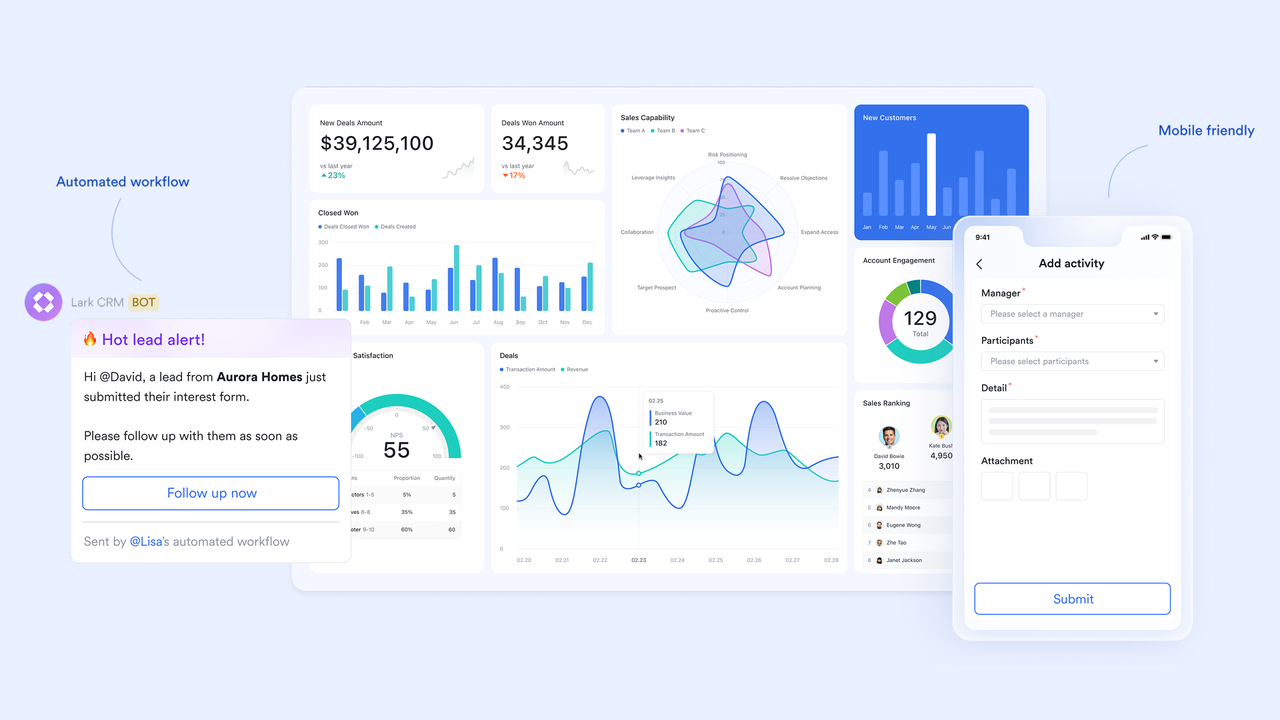
The design ensures your team can stay productive from anywhere, while AI-native capabilities automate repetitive tasks and deliver smart insights. You can make decisions confidently with automated reminders and live dashboards, all within a platform that offers chat, video meetings, documents, approvals, and all essential tools built in, no integrations or coding needed.
Getting started is easy:
- for free, no credit card needed.
- Use this , which contains fields for leads, deals, quotes, and more, as well as a dashboard. You can also start from scratch by creating a new base or select another template from our vast .
- The template already comes with tables for leads, contacts, deals, activities, and more. You can add a new table to track whatever else you need.
- Customize the fields in the table to fit your workflow. For example, you can add a "Source" field in the Leads table to keep track of where the leads come from.
- Create a form to capture new leads and set up automations in just a few clicks, no coding needed.
- Populate the base with customer details. The dashboard will be updated automatically when records are updated.
Tip: Use the built-in AI to help classify leads, draft call scripts, and research customer information. Learn more about our .
Get started with Lark in seconds
FAQs on CRM software
What is CRM software used for?
CRM software is used to store customer and prospect information, manage sales opportunities, simplify customer service, and run marketing campaigns all from one place. It often combines features of CRM sales software and CRM marketing software to automate routine tasks and give teams a complete view of all customer interactions.
Are there any free CRM software?
Yes, many providers offer CRM software free versions that are great for getting started. For example, Lark offers a generous free plan that supports up to 20 users and comes with over 11 essential tools and 100GB of storage.
What is the best CRM software for small business?
The best small business CRM software is typically one that is cost-effective, mobile-friendly, and easy to use. A platform like Lark meets all these criteria, offering powerful and customizable features that are easy to use at affordable prices.
Read more: .
What are some examples of CRM software?
Common CRM software examples include Salesforce, Zoho CRM, Keap, HubSpot, and Lark. Each platform offers different features and is often tailored for businesses of different sizes, from small businesses to large enterprises. Open source CRM software examples include Odoo and SuiteCRM.
Are there CRMs for different industries?
Yes, many CRM platforms offer specialized solutions for specific industries to meet unique business requirements and compliance standards. Examples include healthcare CRM software for managing patient data, insurance CRM software for policyholders, CRM software for real estate agents to track properties and clients, and retail CRM software for retailers.
What is cloud-based CRM software?
Cloud-based CRM software is a type of SaaS that allows you to access your system via the internet while the vendor manages all hosting, security, and updates. It accounts for the vast majority of the market today because it offers lower upfront costs and easy accessibility from any device.
How much does CRM software typically cost?
Most platforms offer a free entry-level plan, with paid subscriptions typically ranging from $6 to $25 per user per month for standard features. Enterprise-level solutions or advanced tiers like those from Salesforce can cost significantly more depending on customization needs.
What integrations do I need for CRM software?
Common integrations include connecting your email (such as Gmail and Outlook), calendar, and messaging software (such as WhatsApp) to ensure data flows smoothly between tools. Alternatively, all-in-one platforms like Lark provide a superior experience by including these essential collaboration tools directly into the CRM, eliminating the need for unreliable third-party connections.
Can I use CRM on mobile devices?
Absolutely. As we noted in our guide, a CRM that offers an exceptional mobile experience like Lark is essential, especially if your sales or service teams spend time in the field. You should prioritize a mobile-friendly interface to ensure that your staff can update pipelines, pull up customer details, and collaborate from anywhere without missing a beat.
If you're looking for mobile CRM apps, check out
Why is the quality of CRM data important?
Clean, well-organized data is the foundation of a successful rollout because it guarantees your new system serves as a reliable, single source of truth. As discussed in our implementation solutions, importing messy or outdated spreadsheets right out of the gate will only lead to errors, duplicate records, and team frustration.
How do I secure my CRM data?
The most important step to securing your CRM data is choosing a provider that takes protection seriously. When evaluating the top tools we reviewed, you should always verify that the platform offers strong built-in security measures—such as data encryption, granular access controls, audit logs, and strict compliance with privacy regulations like GDPR.
How does billing work when adding or removing seats?
When you add new users to your CRM mid-contract, you are typically charged a prorated amount for the remainder of your current billing cycle. If you remove seats, those changes usually won't take effect until your next renewal date, which means you won't receive a credit or refund for unused time on the seats you removed.
What is the cancellation policy for flexible vs. annual plans?
Flexible monthly plans let you cancel at any time, and your service will simply end at the close of your current billing month without any early termination fees. Annual plans offer a discounted rate in exchange for a year-long commitment, so canceling early typically means you will not receive a refund for the remaining unused months.
What is a customizable CRM, and when do I need one?
I define a customizable CRM as a system that lets you change fields, pipeline stages, views, permissions, and automations without waiting for a developer. You need one when your sales motion involves multiple pipelines (for example, new business versus renewals), when you sell into various industries, or when your reporting outgrows default dashboards. Platforms like Lark Base and Zoho CRM represent customizable CRMs. Rigid and locked tools tend to break the moment your process changes. Learn more in our guide to customizable CRM software.
What is a CRM dashboard and what should it show?
A CRM dashboard functions as the single screen where sales leaders and representatives view pipeline health, activity levels, and forecasts in real time. A useful CRM dashboard covers pipeline value by stage, deals by owner, activities in the last seven to fourteen days, win rate, average sales cycle, and forecast versus quota. Anything else is usually just decoration. See how to set up a CRM dashboard for a complete walkthrough.
CRM tools versus CRM software: is there a difference?
In everyday use, they mean the exact same thing. People use both terms to describe systems that manage customer relationships. Strictly speaking, CRM software refers to the platform itself (such as Lark, Salesforce, or HubSpot), while CRM tools describe the wider set of features you use inside it. These features include pipelines, contact management, email syncing, reporting dashboards, automations, and mobile access. When you search for CRM tools, most articles actually mean CRM software with an emphasis on feature comparisons.
What is a mobile CRM and does my team need one?
A mobile CRM is a system you can fully operate from a phone or tablet. You can update deals, log calls, send quotes, and view dashboards on the go. If your representatives travel, meet customers on site, or handle field service, a mobile CRM stops them from moving work from paper to a spreadsheet at the end of the day. The Lark mobile application carries almost every desktop feature, which is why field teams use it as their default choice. See our guide on the best mobile CRMs for more options.
How does Lark work as a CRM if it was not originally called a CRM?
Lark serves as a work platform where the Lark Base, Lark Approval, Lark Messenger, and Lark Docs modules combine into a complete CRM workflow. Lark Base holds the pipeline and contact records. Lark Approval handles deal decisions. Lark Messenger keeps customer and internal threads right next to those records, and Lark Docs stores proposals and playbooks. Because these modules naturally connect with one another out of the box, I see most teams launch a working CRM application in Lark within a single day. They achieve this using a ready made CRM setup, requiring no separate purchase of email, chat, or approval software.
Last updated on July 8th, 2026. Added a "Who needs a CRM" section, updated the latest pricing for all products, and added internal links to improve navigation.
Related reading


















