Dropbox remains one of the most widely recognized cloud storage platforms for individuals, freelancers, and businesses that need secure file management. As more users compare Dropbox pricing plans, the need to understand storage limits, recovery options, and collaboration features has grown. Choosing the right plan depends on how teams store files, share content, and handle long-term projects, so this guide explains each pricing tier clearly and practically. Let's dive in now.
Improve your file management today
Dropbox pricing overview: All plans compared at a glance
Dropbox offers a range of personal and business plans, and many users compare Dropbox pricing plans to understand how these tiers differ in storage, recovery periods, and . Each plan is designed to support different levels of file management, from simple personal storage to advanced team administration. When people explore Dropbox features and pricing, they often focus on how much space they receive and how easily their teams can work together. This includes checking details related to Dropbox teams pricing, so they understand how collaboration scales across members. This overview gives a clear snapshot of the core plans so readers can quickly identify which option best fits their daily workflow.
Information source: dropbox.com
Update time: 2025-12-11
Note: Pricing and plan details reflect publicly available data as of the update date and may vary based on region, billing cycle, and number of agents.
What is Dropbox?
Dropbox is a that helps individuals and teams store, sync, and share files across devices with ease. It was created to simplify the way people by keeping important files accessible from any location. As work becomes increasingly distributed, many users rely on Dropbox for dependable file access, structured sharing, and workflows. Although Dropbox started as a basic storage tool, it has expanded to include syncing, version history, permissions, and selective offline access, supporting both personal and business users.
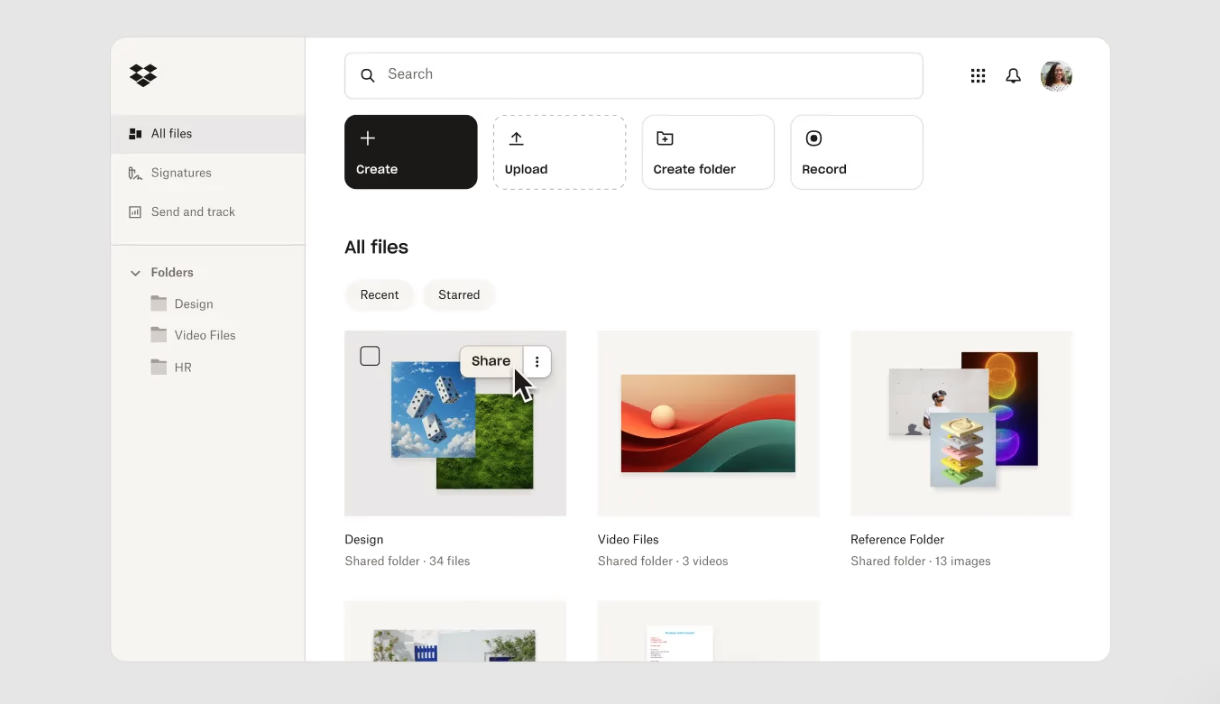
Image source: dropbox.com
Dropbox core features and capabilities briefly explained
Dropbox includes a collection of tools that make it easier for individuals and teams to store files securely and access them from any device. Users who evaluate Dropbox's features and pricing often consider how well it supports daily work, sharing tasks, and long-term file management. The platform focuses on dependable syncing, , and version protection, which are essential for both personal and professional workflows. The list below provides a clear overview of the core functions that shape the Dropbox experience.
Dropbox pricing structure: What each plan includes
Dropbox offers multiple pricing tiers designed to match the needs of personal users, freelancers, and businesses with more complex storage requirements. People comparing Dropbox plan pricing often focus on storage capacity, file transfer limits, and how long deleted files can be recovered. Each plan is structured to support a specific workflow, from simple personal use to . This section explains the overall pricing framework so users can understand what they receive before exploring individual plans in detail.
Dropbox personal pricing plan
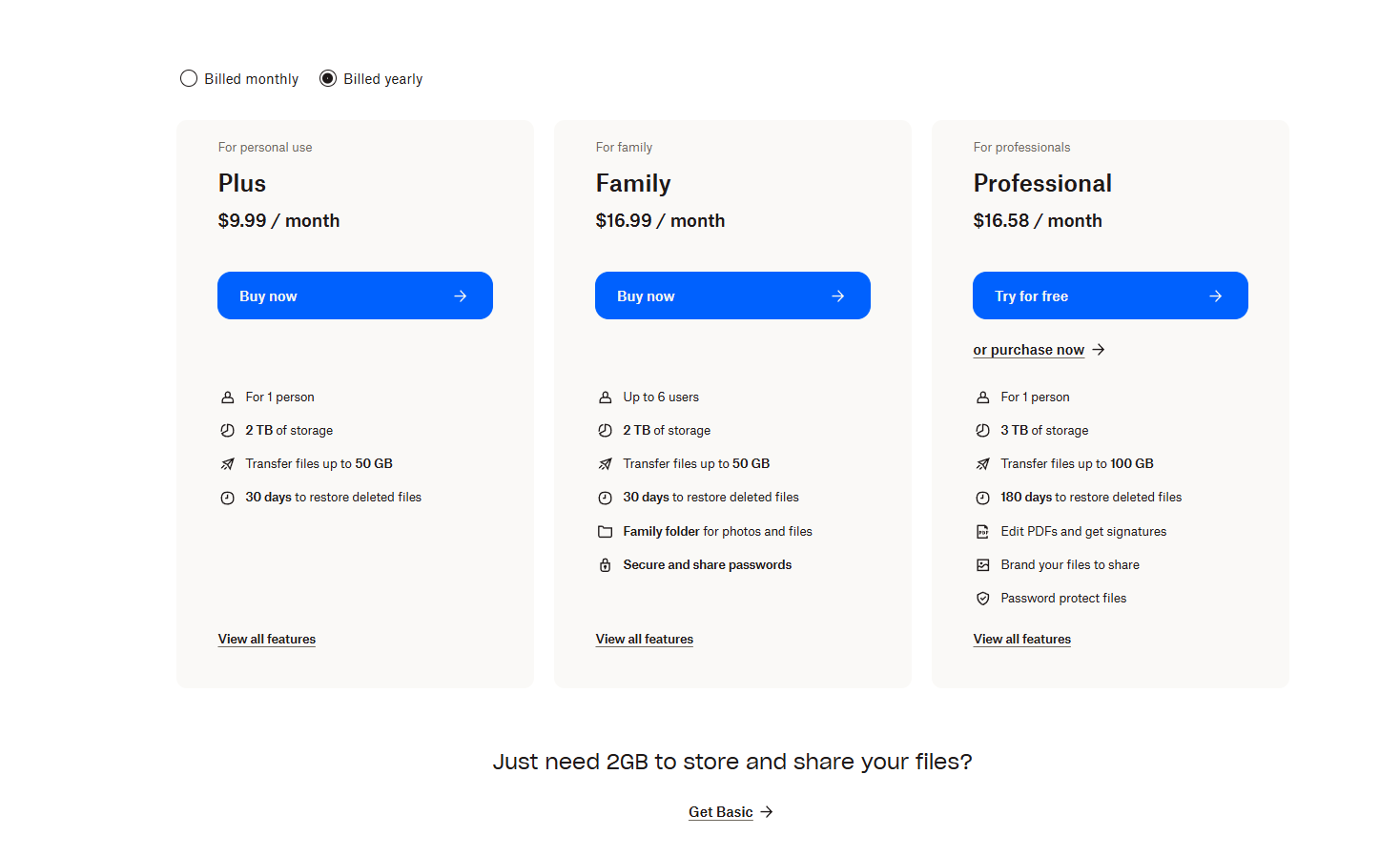
Dropbox personal pricing is designed for individuals and households that need secure storage, reliable syncing, and simple file sharing without advanced Users comparing Dropbox personal pricing often look at storage limits, recovery duration, and whether tools like PDF editing or branded sharing are necessary. These plans support everyday file organization for students, freelancers, and families who want dependable access across devices. Many users also check Dropbox pro pricing to understand how personal tiers grow into advanced individual needs. Each option focuses on ease of use while still offering protection through version history and recovery tools.
information source: dropbox.com
Update time: 2025-12-11
Note: Pricing and plan details reflect publicly available data as of the update date and may vary based on region, billing cycle, and number of agents.
- Basic: 2G storage for storing and sharing files
- Dropbox Plus personal plan($9.99/month): Dropbox plus pricing is designed for individual users who need reliable personal storage and essential file-sharing tools. It provides 2 TB of cloud storage, supports file transfers up to 50 GB, and allows users to restore deleted files for up to 30 days. With syncing across all devices and basic pdf editing and signature features, it is a solid option for users who want simple storage without team-level, , and often compare it directly with Dropbox pro pricing as their needs increase.
- Dropbox Family($16.99/month): The Dropbox family pricing plan extends the plus experience to households by supporting up to six users. It includes a shared 2 TB storage pool, file transfers up to 50 GB, and 30-day file recovery across accounts. The plan adds a dedicated family folder for organizing shared photos and files, along with secure password storage for all members. It’s ideal for families looking to centralize digital content safely and manage shared access effortlessly.
- Dropbox Professional personal plan($16.58/month): Dropbox professional pricing upgrades for freelancers and solo professionals who require more control. It offers 3 TB of storage, allows file transfers up to 100 GB, and extends deleted-file recovery to 180 days. Additional features include pdf editing, branded file-sharing pages, and password-protected links capabilities designed to support client work, polished presentations, and secure sharing workflows.
Dropbox business pricing tiers
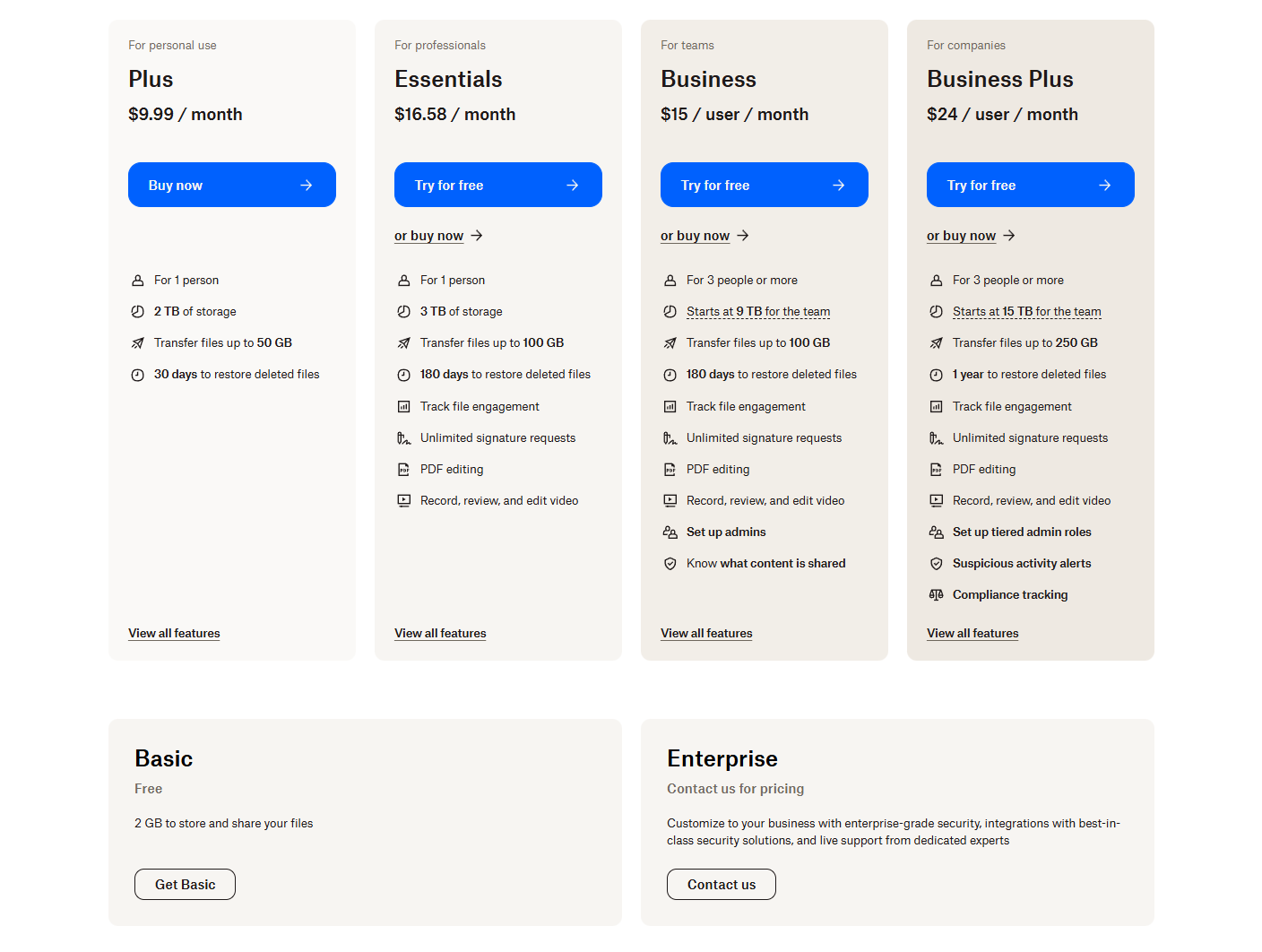
Dropbox business pricing supports teams that require shared storage, centralized administration, and structured control over permissions and file activity. Organizations comparing Dropbox for business pricing often review pooled storage amounts, recovery windows, and how well each plan supports collaboration across departments. These tiers are designed to help teams maintain consistent access to shared documents while managing needs more effectively. As companies grow, many evaluate whether these plans offer enough built-in or if additional software must be added. The sections that follow explain how each business plan aligns with different team sizes and workflow requirements.
information source: Dropbox.com
Update time: 2025-12-11
Note: Pricing and plan details reflect publicly available data as of the update date and may vary based on region, billing cycle, and number of agents.
- Basic: 2G storage for storing and sharing files
- Dropbox Plus business plan($9.99/month): Dropbox plus pricing is built for individual users who need reliable storage and simple file management. It includes 2 TB of cloud storage, syncing across all devices, and the ability to transfer files up to 50 GB useful for sending large media or project files. Users also get a 30-day window to restore deleted files or recover previous versions, offering an extra layer of protection against accidental loss.
- Dropbox Professional business plan($16.58/month): Dropbox professional is aimed at freelancers and solo professionals who need more storage and stronger sharing controls. The plan expands storage to 3 TB and boosts file transfer limits to 100 GB, making it ideal for designers, videographers, and consultants who share large assets with clients. It extends file recovery and version history to 180 days, allowing users to roll back work much further than in plus. Additional features like pdf editing, branded sharing pages, and password-protected files help professionals present polished deliverables and maintain secure .
- Dropbox Standard (team plan $15/month): Dropbox standard offers a collaborative storage environment for small teams, providing 5TB of pooled storage that all members can access. Designed for teams of three or more, it includes shared team folders for structured file organization and supports 100 GB file transfers for convenient sharing of large assets. Teams benefit from 180-day file recovery, password-protected sharing options, and pdf editing and signature features.
- Dropbox Advanced (company plan $24/month): Dropbox advanced is built for larger organizations with heavy storage and administrative needs. The plan starts at 15 TB for the team and scales as storage requirements grow. It includes one full year of file recovery and version history, Dropbox’s longest retention window, making it ideal for teams handling sensitive, long-term projects. Along with 100 GB file transfers, the plan provides advanced admin controls, team folder automation, enhanced security settings, and detailed .
- Enterprise: Custom pricing for tailored solutions and robust combinations.
Dropbox add-on pricing: What users often overlook
Dropbox offers several optional tools that extend its storage platform, and many users discover these only after reviewing Dropbox plans pricing in detail. These add-ons support tasks such as document signing, creative review, and workspace organization, but they are not included in the main storage tiers. often considers these tools when they need specific capabilities that go beyond simple file management. Understanding how these add-ons are priced helps users evaluate the true cost of using Dropbox at scale and whether additional subscriptions will be required for their workflow.
Dropbox sign
- This is a standalone e-signature tool designed for teams that need reliable digital document signing and contract workflows. It is separate from Dropbox storage plans and requires its own subscription.
- It supports approval flows, signature tracking, and consistent documentation processes across departments, making it useful for hr teams, legal teams, and companies that rely on formal agreements.
- Since Dropbox sign pricing is not included with standard plans, organizations must budget for it when they need secure signing features alongside their storage setup. Some teams also reference Dropbox sign api pricing when combining signing workflows into other applications.
Dropbox replay
- Dropbox replay is built for creative teams that review and refine video content regularly. It provides frame-accurate comments that help editors and clients collaborate more efficiently during revision cycles.
- The tool centralizes feedback directly within the video, which prevents confusion and reduces long back-and-forth conversations during review processes.
- Because replay operates as a separate subscription from , teams must evaluate Dropbox replay pricing to determine whether it fits their video production workload.
Dropbox dash
- Dropbox dash serves as a that organizes links, shared resources, and quick access information in one place. It helps users retrieve content faster and keeps commonly used materials within reach.
- Teams benefit from dash when they work across multiple platforms and need a centralized hub for shortcuts, notes, and internal references. This reduces the time spent navigating different tools.
- As dash is billed independently from storage, companies must factor Dropbox dash pricing into their total subscription costs if they plan to use it alongside Dropbox for everyday work.
Strengths and limitations of Dropbox
Dropbox provides dependable cloud storage and simple sharing features, but its value varies based on how each team works. Users comparing and pricing often look at where the platform performs well and where extra tools may be required. These strengths and limitations help teams understand how Dropbox fits into their workflows. The points below outline where Dropbox supports users effectively and where it may fall short.
Strengths of Dropbox
- Dropbox offers simple and reliable cloud storage with easy syncing across devices for individuals, freelancers, and small teams.
- Creative professionals benefit from large file transfer support, especially in higher tiers that handle up to 100 GB per upload.
- Version history and recovery tools help users restore deleted or earlier file versions during ongoing projects.
- Team folders and admin controls support organized file management and consistent access across departments.
Limitations of Dropbox
- Dropbox focuses on storage and basic sharing, lacking built in real time collaboration for documents or presentations.
- It does not include or , leading teams to rely on external tools.
- Add-ons like Dropbox Sign, Dropbox Replay, and Dropbox Dash require separate subscriptions, increasing overall costs.
- Large organizations may find Dropbox limiting due to its basic permission structures and lighter compliance controls.
When Dropbox is worth the cost-and when it isn't
Dropbox suits users who need simple, reliable storage, but its value shifts as become more complex. Many people compare Dropbox plans and pricing to check whether the platform can support their daily tasks or if extra tools will be required. This overview helps readers identify where Dropbox fits well and where it may not meet growing collaboration needs.
When Dropbox is worth the cost
- Works well for freelancers who need secure personal file storage.
- Suitable for small creative teams handling large media files.
- Helpful for users who rely on strong file recovery features.
- Good fit for teams using simple folder-based collaboration.
When Dropbox isn't ideal
- Not suitable for teams needing real-time .
- Not ideal for businesses that require workflow automation.
- Less effective for organizations needing multiple add-on tools.
- It may not fit large companies requiring advanced permission controls.
As teams scale, storing files is no longer enough-people need to collaborate inside the same workspace where their documents live. Instead of jumping between chat apps, storage folders, and task tools, many organizations look for platforms that unify these daily activities. This shift in needs naturally leads teams to explore solutions like Lark, which supports both content management and real-time teamwork.
Upgrade to a workspace built for real-time teamwork
Why teams consider Lark as a favored alternative to Dropbox
is an all-in-one productivity suite and unified workspace that moves beyond traditional file storage by collaborating with essential tools natively. It combines in Docs with a secure cloud Drive, a centralized Messenger, and an advanced system. This unified approach eliminates the need to switch between multiple apps, allowing teams to seamlessly transition from conversation to execution, manage workflows, and maintain a single source of truth across all projects.
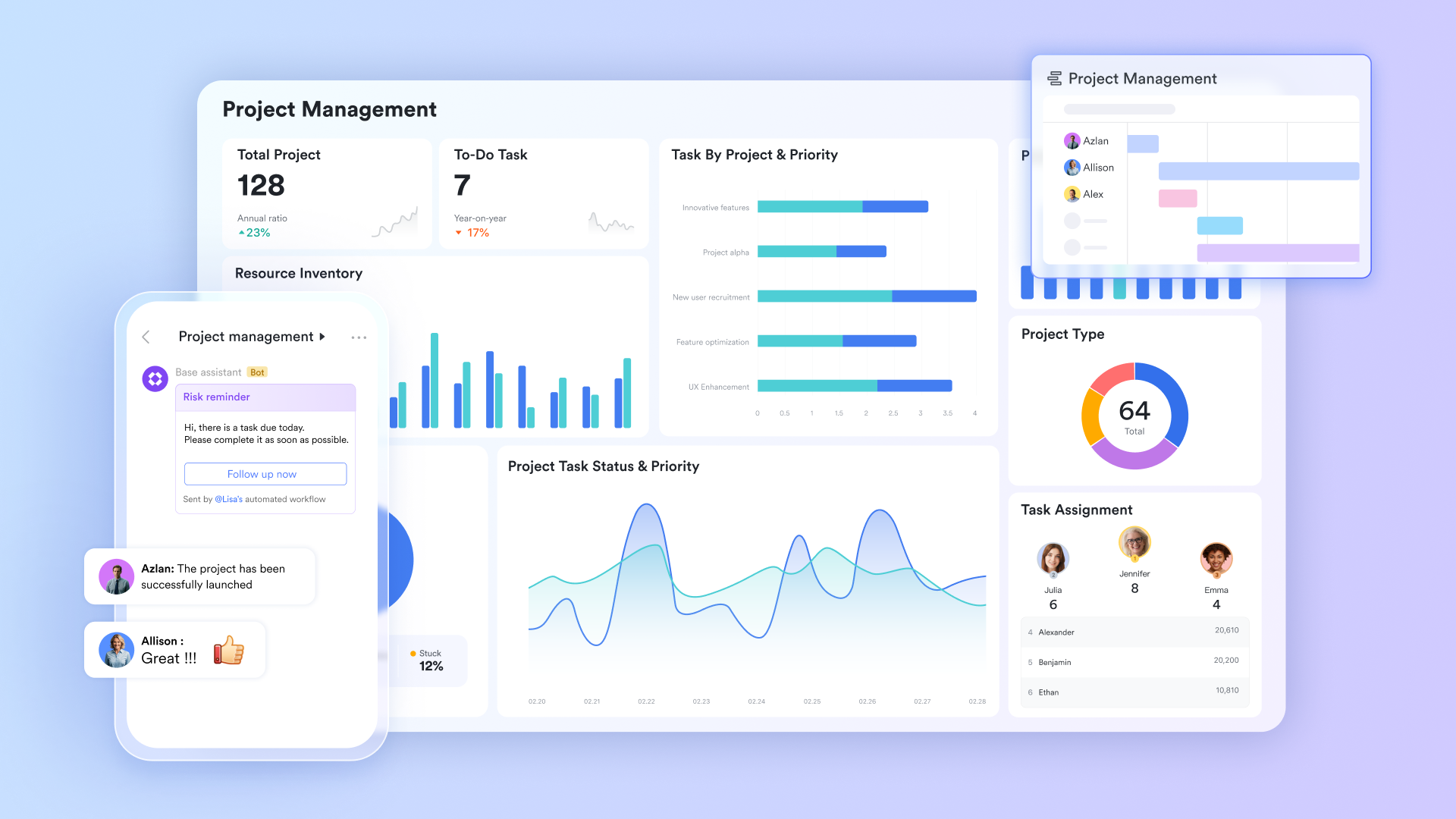
Collaborative document editing platform with advanced features
helps teams co-edit documents and exchange ideas right in the document. Working inside Lark Docs allows users to collaborate live, share files instantly, add comments, check the version history, and exchange ideas with @mention and reply without switching between apps. This unified experience helps teams stay aligned across projects and reduces delays caused by scattered tools. By keeping content and communication together, Lark Docs supports faster decision-making for modern teams. 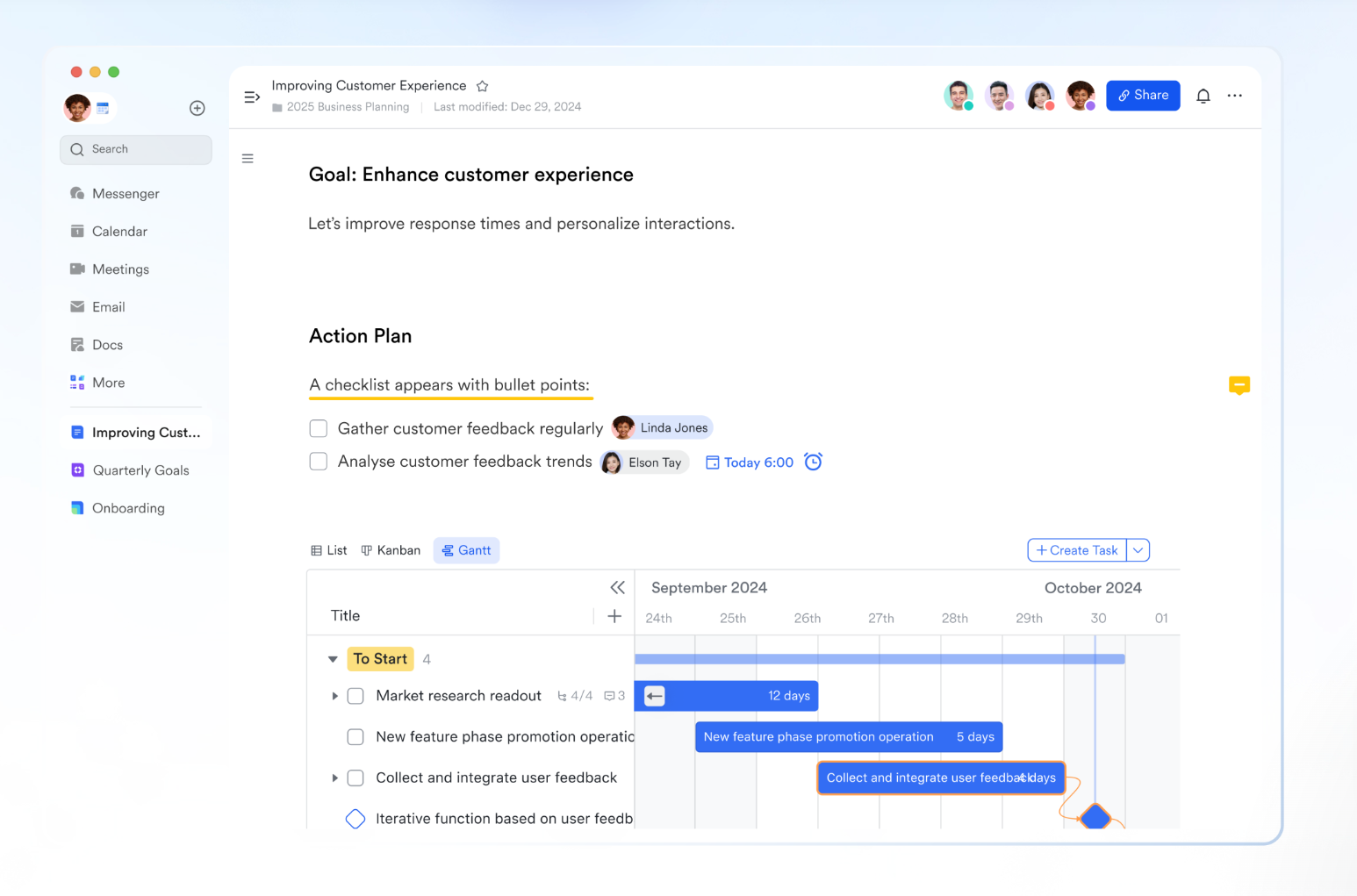
Structured file organization and intelligent search
Lark enhances team collaboration and information access through a unified approach to content management. It enables structured organization by allowing users to arrange content using Drive's folder structure alongside the my documents library, which serves as the default location for documents and folders. This organized content is made easily accessible through Lark Search, which provides a searchable workspace spanning documents, files, events, and contacts across the platform. In addition, Lark supports secure collaboration and control through shared folders in both Drive and , helping teams manage permissions while maintaining clear access to shared knowledge and resources. 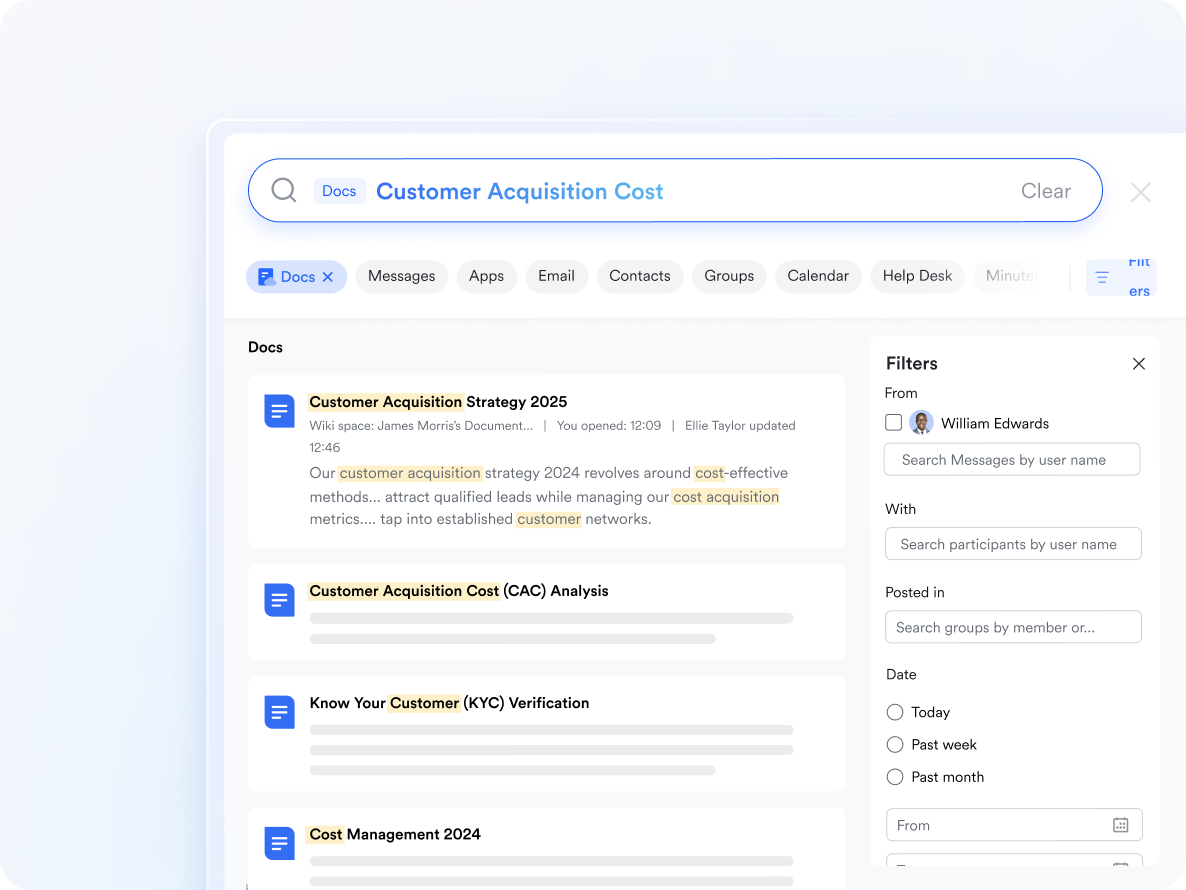
Communication hub for exchanging ideas and further discussions
allows organizations to consolidate communication, collaboration, and file sharing into a single platform, which reduces the need for multiple paid tools. With Lark Messenger connecting conversations directly to documents and tasks, teams avoid juggling separate apps for messaging, meetings, and editing. This helps businesses control costs and simplifies budgeting across departments. By centralizing core workflows, Lark Messenger improves efficiency and reduces software complexity as teams scale. 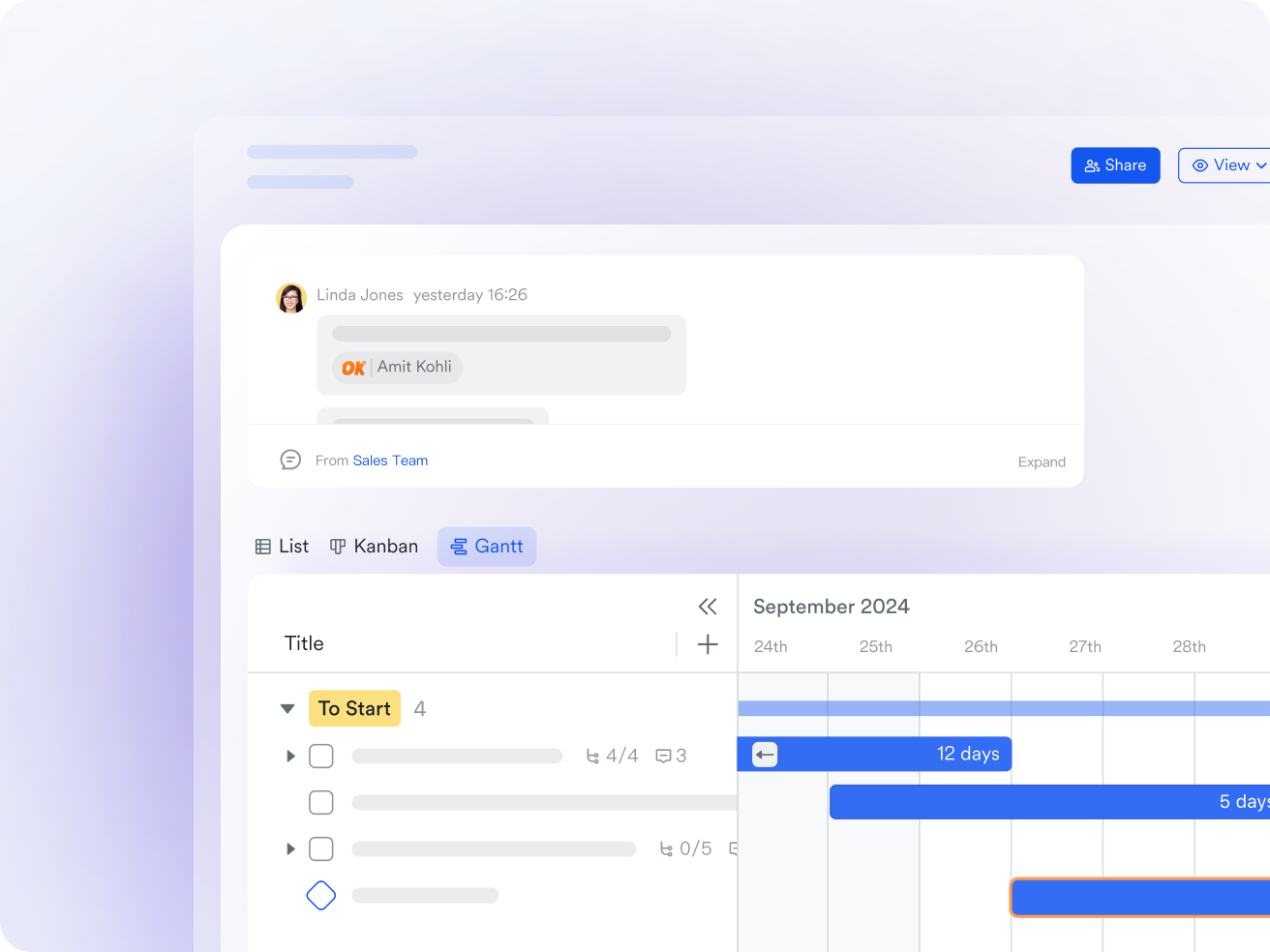
Strong file access & permission controls
Lark provides robust security and access control across shared content through granular permission settings that apply throughout the platform. For external sharing, it supports password-protected access, requiring guests to authenticate before opening documents, folders, or records. Teams can define precise restrictions for external and internal users, including whether content can be viewed, edited, copied, or reshared. These controls help organizations protect sensitive information while maintaining flexible collaboration across Docs, Wiki, Base, and other shared workspaces. For small teams with simple communication needs

18 months message history
1000 Base automation runs/month
2000 rows per table in Base
Most POPULAR
For companies with comprehensive collaboration and management needs
Unlimited message history
500-participant video meetings
50k Base automation runs/month
20k rows per table in Base
For large companies with advanced security and organizational management needs
Get a personalized demo and pricing
Unlimited message history
500-participant video meetings
15 TB storage + 30 GB storage/user
500k Base automation runs/month
50k Base automation runs/month
Most POPULAR
For companies with comprehensive collaboration and management needs
Unlimited message history
500-participant video meetings
50k Base automation runs/month
20k rows per table in Base
Dropbox vs Lark: Which platform delivers better value?
Teams often compare Dropbox with modern to understand how storage-focused tools differ from unified workspaces. Dropbox works well for simple file sharing, but many organizations eventually need communication, coordination, and workflow features in the same place. Lark begins to stand out when teams look for a single environment that brings real-time collaboration and task execution together. The comparison below highlights how both platforms approach storage, teamwork, and long-term operating costs.
Dropbox vs Lark: Features comparison table
Dropbox vs Lark: Pricing comparison table
Conclusion
Dropbox continues to be a strong choice for individuals, , and that need reliable cloud storage with simple sharing features. Its pricing plans support a variety of storage needs, from personal use to business environments that require pooled team space. Dropbox performs well when the focus is on managing files, sending large assets, and maintaining access across devices. As needs grow, many teams eventually look for tools that bring communication, documents, and workflows into one connected system.
This is where platforms like Lark begin entering consideration for organizations seeking real-time co-editing, built-in meetings, and structured task management. By combining storage with collaboration and automation, helps teams reduce tool switching and improve daily coordination. Exploring both platforms allows teams to choose the environment that best matches their long-term workflow goals.
Balance teamwork and file management with Lark
FAQs
How much does Dropbox cost per month?
Dropbox pricing starts with a free plan that includes 2 GB of storage. Paid personal plans begin at around $9.99 per month for 2 TB of storage, while business plans typically start at about $15 per user per month with shared team storage. Costs increase as teams add more users, storage, or paid add-ons such as Dropbox Sign or Replay. Many teams reassess pricing when collaboration needs to grow beyond file storage.
Is it better to use Google Drive or Dropbox?
Google Drive and Dropbox serve different priorities. Google Drive works well for teams that rely heavily on document creation and editing within Google Workspace or are evaluating . Dropbox is often preferred for reliable file syncing and large file transfers. Teams comparing the two usually evaluate collaboration depth, storage needs, and fit. As workflows become more complex, some organizations also explore platforms like Lark that combine storage, documents, chat, and meetings in one workspace.
What is the disadvantage of Dropbox?
The main limitation of Dropbox is that it focuses primarily on file storage and sharing. It lacks built-in real-time collaboration, task management, and workflow automation, which means teams often rely on additional tools. Over time, this can increase software costs and reduce visibility across workstreams. Teams that need tighter coordination sometimes look for solutions where files and collaboration live together.
Is there a way to get Dropbox for free?
Yes, Dropbox offers a free Basic plan with 2 GB of storage. Users can earn small storage bonuses through referrals, but the free tier remains limited for ongoing professional use. As storage and collaboration demands increase, most users eventually upgrade or evaluate . Some teams later consider platforms like Lark when they want more built-in tools alongside generous free storage.
Related reading












