


Dropbox Review: Features, Pricing, Pros, Cons & Alternatives

Ryan Tanner
Product Marketing Specialist
Aug 5, 2026
Ryan Tanner
Aug 5, 2026

13 min read


Dropbox is one of the most recognizable names in cloud storage. For over a decade, it has helped individuals and businesses store files, sync content across devices, and securely share documents. What began as a simple file-syncing tool has expanded into a broader collaboration ecosystem, with offerings such as Dropbox Paper, Dropbox Backup, and Dropbox Dash.
As teams increasingly prioritize real-time collaboration, faster execution, and automated workflows, many are reassessing whether Dropbox still fits modern work needs. In this guide, this Dropbox review examines its features, pricing, user experience, and limitations, and briefly introduces how it compares with newer alternatives for teams that need more than basic file storage.

What is Dropbox?
Dropbox is a cloud-based file storage and content sharing platform that allows individuals and teams to store, access, and manage files from anywhere. At its core, Dropbox enables users to sync files across devices, securely share documents, and collaborate in real time without relying on local storage. This functionality has made it a popular choice for remote workers, freelancers, and distributed teams.
Over time, Dropbox has expanded beyond basic storage. Features like Dropbox Paper support lightweight document collaboration, while Dropbox Backup provides automated backups for computers and external drives. Tools such as Dropbox Dash add AI-powered search across connected apps, helping users find content faster. In a typical Dropbox for business review, these additions are positioned as ways to centralize content while maintaining security and control.
While Dropbox remains strong in online storage and file sharing, many Dropbox business review discussions note that its primary focus is still file management rather than complete workflow execution or project collaboration.
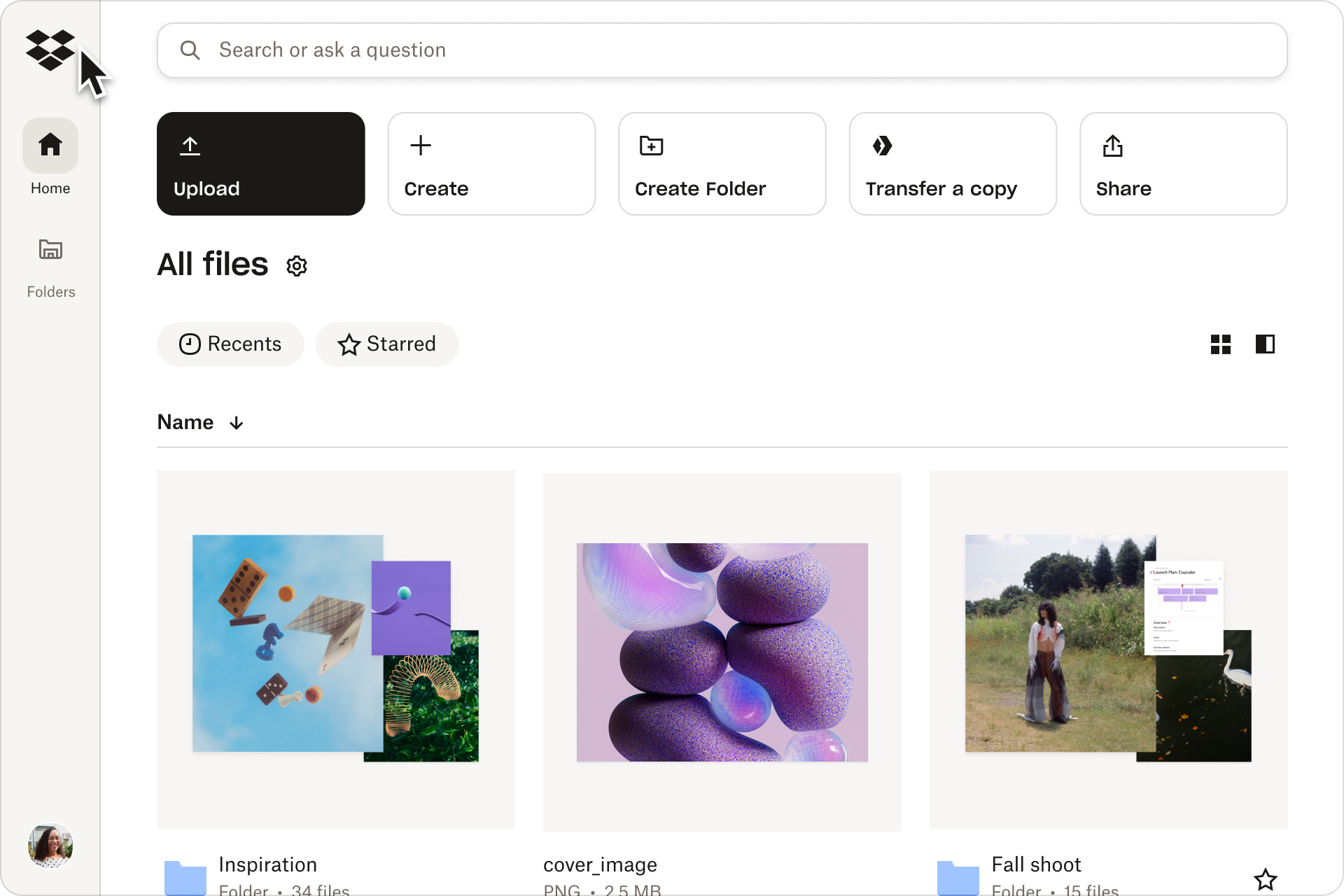
Image source: dropbox.com
Dropbox features review: Core storage & beyond
This Dropbox features review looks at how the platform goes beyond basic cloud storage to support file sharing, collaboration, and content management. While Dropbox is still fundamentally file-centric, its expanded feature set aims to cover more stages of the content lifecycle.
Core cloud storage and file sync
Dropbox's core offering is secure cloud storage with fast, reliable file synchronization across devices. Files uploaded on one device are instantly available on others, making it easy to work across desktop, mobile, and web apps. In many Dropbox review discussions, sync speed and stability are consistently highlighted as key strengths.
Smart Sync and selective sync
Smart Sync allows users to see all files locally without downloading them, saving hard drive space while maintaining visibility. Selective Sync lets users choose which folders sync to specific devices. A Dropbox smart sync review often notes how useful this is for teams handling large or medium-heavy files.
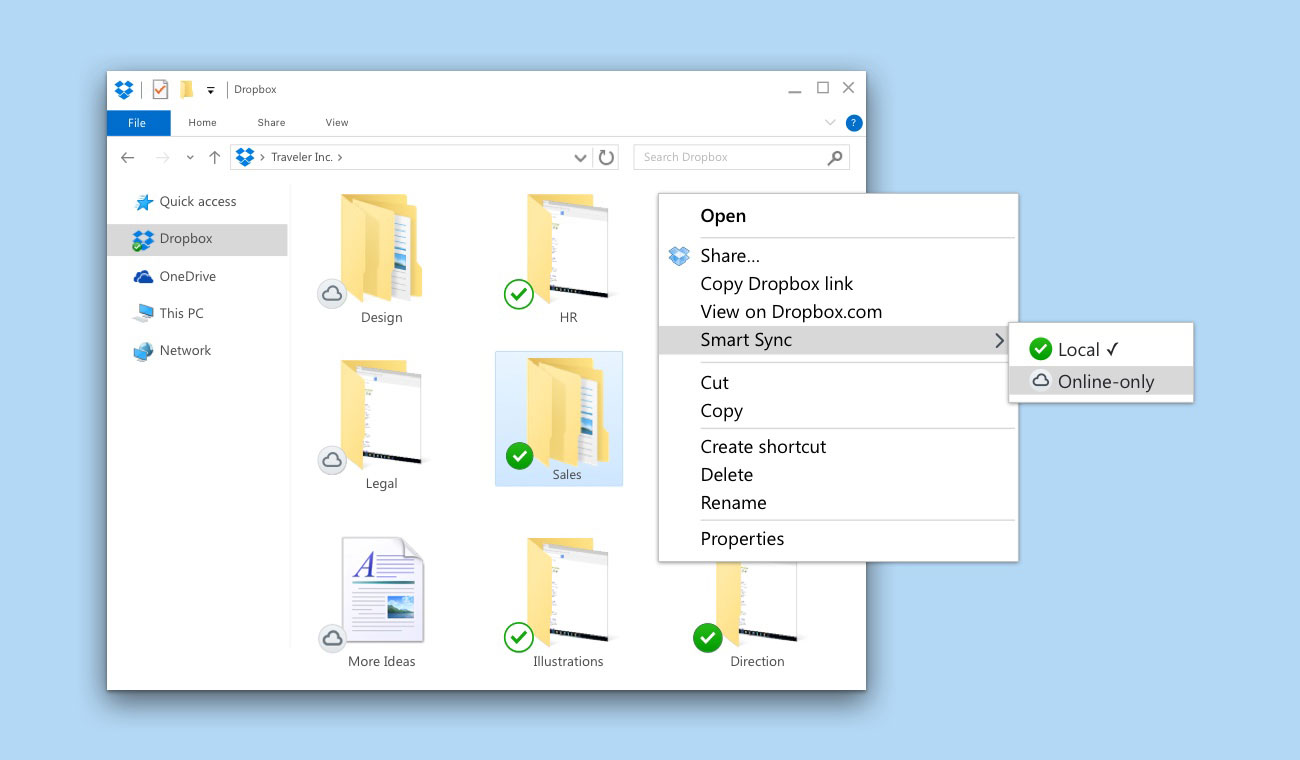
Image source: dropbox.com
File sharing and access controls
Dropbox enables simple file and folder sharing through links with customizable permissions. Users can assign view-only or edit access, add passwords, and set expiration dates on shared links. These controls are frequently praised in Dropbox business review content for balancing ease of sharing with basic security needs.
Version history and file recovery
Dropbox automatically tracks file versions, allowing users to restore earlier versions or recover deleted files within a defined time window. Recovery periods vary by plan, from 30 days on personal plans to up to one year on advanced business tiers. This feature is especially valuable in the context of a Dropbox online backup review.
Dropbox Paper
Dropbox Paper is a collaborative document tool designed for notes, meeting agendas, and lightweight documentation. It supports comments, mentions, and basic media embeds. However, many Dropbox Paper review summaries point out that it lacks advanced formatting and structured content features.
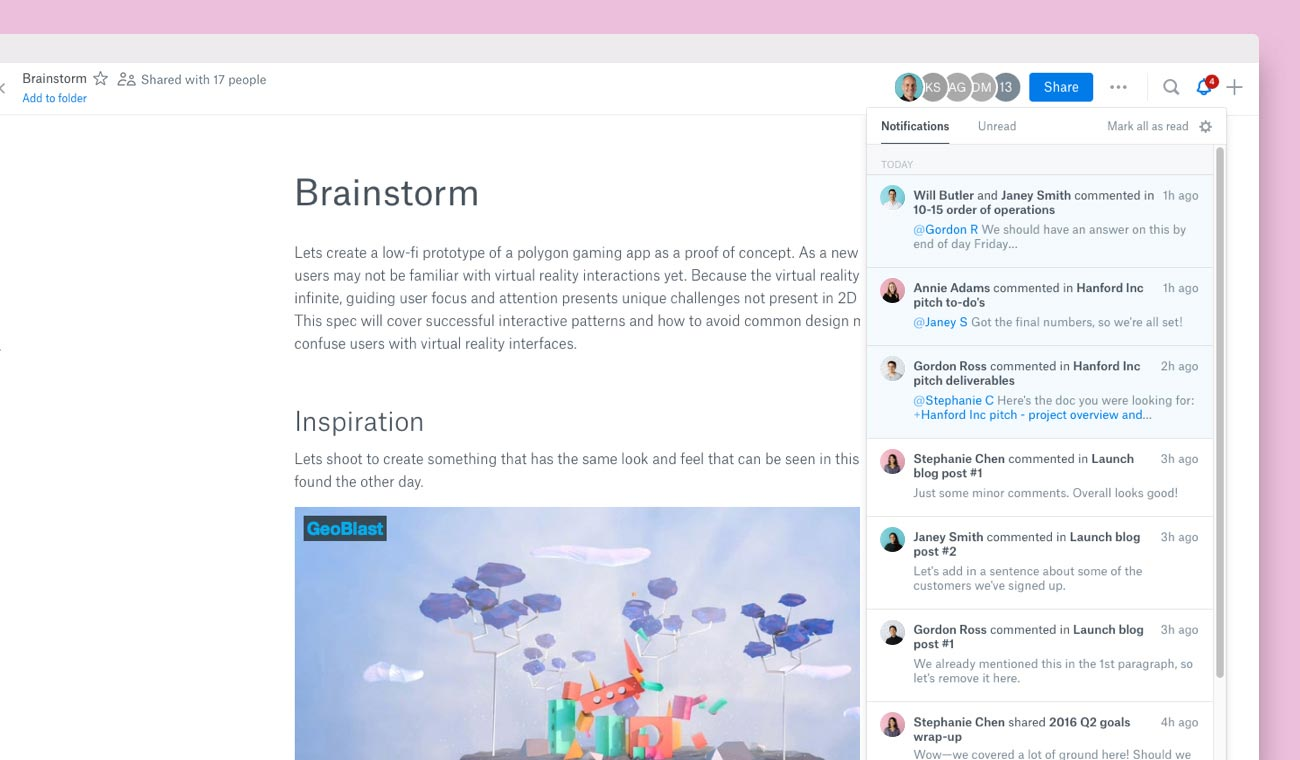
Image source: dropbox.com
Dropbox Backup
Dropbox Backup provides automated backups for computers and connected drives, helping users protect local data. Backups run in the background and can be restored from the cloud when needed. In a typical Dropbox backup review, ease of setup is often cited as a significant advantage.
Dropbox Dash
Dropbox Dash is an AI-powered search experience that helps users find files across Dropbox and connected third-party apps. It reduces the time spent switching between tools to locate information. A growing number of Dropbox Dash review articles note its potential for teams managing content across multiple platforms.
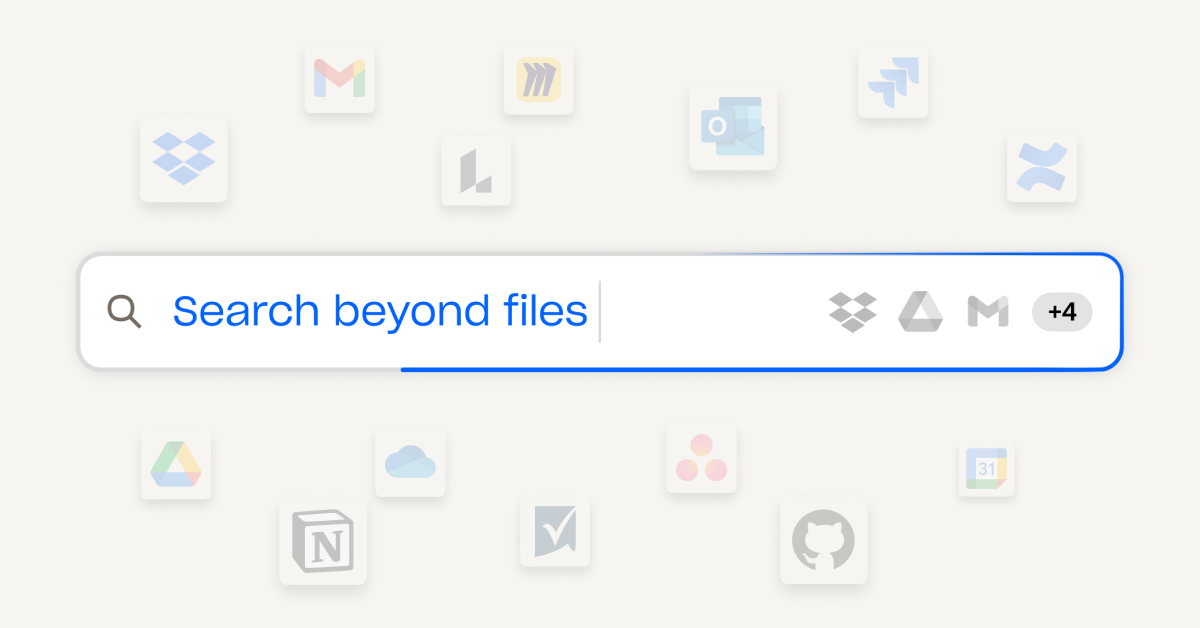
Image source: dropbox.com
Security and compliance features
Dropbox uses encryption, access controls, and compliance certifications to protect stored data. Business plans include admin dashboards, audit logs, and single sign-on support. These features are commonly highlighted in Dropbox for business review discussions focused on data security and governance.
Dropbox user experience: Apps, UI & performance
The overall Dropbox user experience is designed to feel simple, reliable, and familiar, especially for users who primarily work with files. In this section of the Dropbox review, we look at how its apps, interface, and performance support everyday work across devices.
- Desktop applications: Dropbox's desktop app integrates directly with the operating system, creating a local folder that syncs automatically with the cloud. Files behave like regular local files while staying continuously updated in the background. Many Dropbox for Business review insights highlight this seamless integration as a major productivity advantage.
- Mobile apps: iOS and Android apps allow users to access, preview, scan, and share files on the go. Offline access and document scanning make it practical for remote and field work. In a typical Dropbox video review, mobile usability is often cited as a strong point.
- Web interface and UI design: Dropbox's web interface is clean and minimal, with a strong focus on folders and files. Navigation is straightforward, making it easy for new users to get started. However, this simplicity also limits visibility into tasks, ownership, and workflow status, as noted in many analyses of the Dropbox review page.
- Performance and reliability: Dropbox is widely regarded as one of the most reliable cloud storage platforms. Sync speeds are fast, downtime is rare, and large file transfers are handled efficiently. From a performance standpoint, most Dropbox Business review discussions report consistent, dependable behavior.
Dropbox pricing plans breakdown
Dropbox offers a range of plans designed for individuals, small teams, and large organizations. Each plan varies by storage capacity, user limits, file recovery options, and collaboration features. In this Dropbox review, we break down the pricing tiers to help you understand which option fits your needs. Whether you're looking for personal storage or advanced business tools, Dropbox has options to consider.
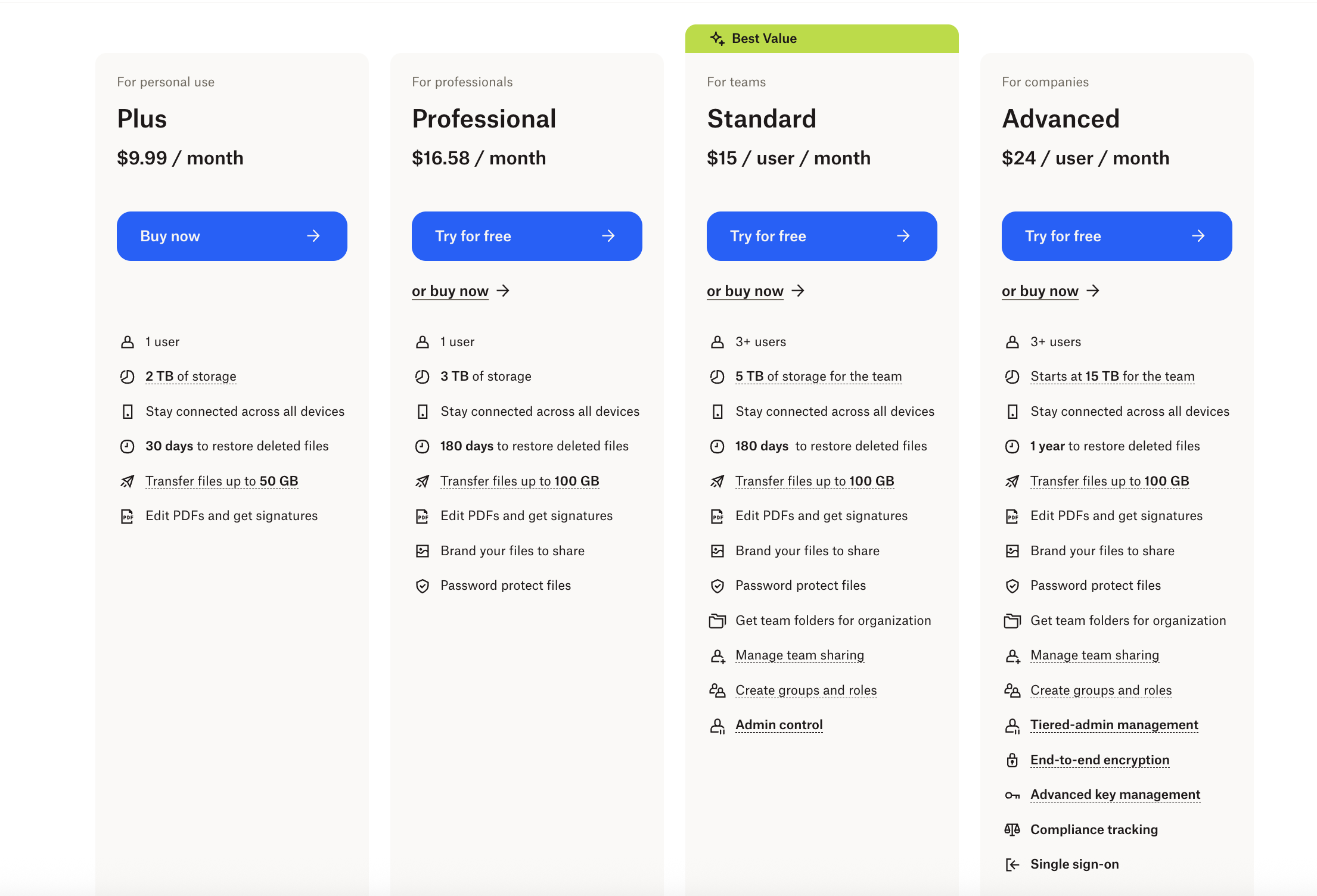
Information source: Official vendor sites
Update time: 2025-12-12
Note: Pricing and plan details reflect publicly available data as of the update date and may vary based on region, billing cycle, and number of agents.
Pros and cons of using Dropbox
In this part of the Dropbox review, we summarize the platform's key advantages and limitations based on real-world usage. While Dropbox remains a dependable cloud storage solution, its strengths and weaknesses become clearer when evaluated against modern team collaboration needs.
Pros
- Reliable file syncing and performance: Dropbox is known for fast, stable file synchronization across devices. Files update in near real time with minimal errors, making it a trusted choice for users who rely on consistent access. Many Dropbox Business reviews rank sync reliability as its biggest strength.
- Simple and intuitive user experience: The interface is clean and easy to navigate, even for non-technical users. Files and folders behave like local storage, reducing the learning curve. This simplicity is often praised in long-term reviews of Dropbox.
- Strong file-sharing capabilities: Dropbox makes sharing files and folders quick and flexible through links and permission settings. Password protection and link expiration add an extra layer of control on paid plans. These features are frequently highlighted in Dropbox for business review content.
- Cross-platform availability: Dropbox works seamlessly across Windows, macOS, iOS, Android, and web browsers. This makes it suitable for distributed teams using different devices. Cross-platform consistency is a recurring theme in many Dropbox review page summaries.
Cons
- Limited built-in collaboration tools: Dropbox collaboration is primarily focused on files rather than workflows. There is no native task management or project tracking. Many Dropbox Business review articles note this gap for teams that need structured execution.
- Minimal workflow automation: Automation options within Dropbox are basic and rely heavily on third-party integrations. Users looking for advanced workflow logic often need additional tools. This limitation appears frequently in critical Dropbox review comparisons.
- Costs increase quickly for teams: Dropbox pricing can become expensive as storage needs grow or more advanced admin features are required. Business plans scale per user, which adds up for larger teams. Pricing concerns are common in Dropbox for business review feedback.
- Fragmented work experience: Because Dropbox focuses on storage, teams often need separate apps for chat, tasks, and approvals. This leads to context switching and scattered workflows. Many analyses of the Dropbox review page highlight this lack of an all-in-one experience.
What Dropbox lacks for modern workflow execution
This section of the Dropbox review focuses on the gaps that become more visible as teams move beyond simple file storage. While Dropbox manages content well, it falls short when work needs to be planned, executed, and tracked within the same system.
- No native task or project management: Dropbox lacks built-in tools for assigning tasks, setting deadlines, or managing projects. Teams must rely on external project management platforms to track work. This separation makes it harder to connect files directly to actionable tasks.
- Limited workflow automation: Automation within Dropbox is minimal and primarily dependent on integrations with third-party tools. There is no native way to create multi-step workflows or approval processes. In many Dropbox business review discussions, this limitation slows down operational efficiency.
- Files are central, but execution is external: Dropbox keeps files at the center of collaboration, but actions happen elsewhere. Discussions, approvals, and decisions often take place in other apps. This disconnect creates context switching and fragmented work experiences.
- Difficult to track ownership, status, and progress: Dropbox lacks visibility into who owns a piece of work, its stage, or what comes next. Teams must manually track progress outside the platform. This challenge is often highlighted in critical Dropbox review comparisons.
To execute real workflows, teams typically combine Dropbox with chat, task, automation, and reporting tools. Managing these integrations adds complexity and overhead. As a result, many teams begin exploring platforms that unify files and execution, such as Lark, which connects documents, communication, and workflows in one place.
Meet Lark: Where file storage, document collaboration, and work converge
Lark is a unified digital workplace that centralizes critical tools—group messaging, documents, and cloud storage—to eliminate communication friction and application switching. It promotes fluid collaboration through a single shared storage pool for all content, from documents and emails to chat files and meeting recordings. By combining real-time collaboration with structured file management, a powerful search function, and advanced security controls, Lark ensures teams can work efficiently, find information quickly, and maintain robust data governance.
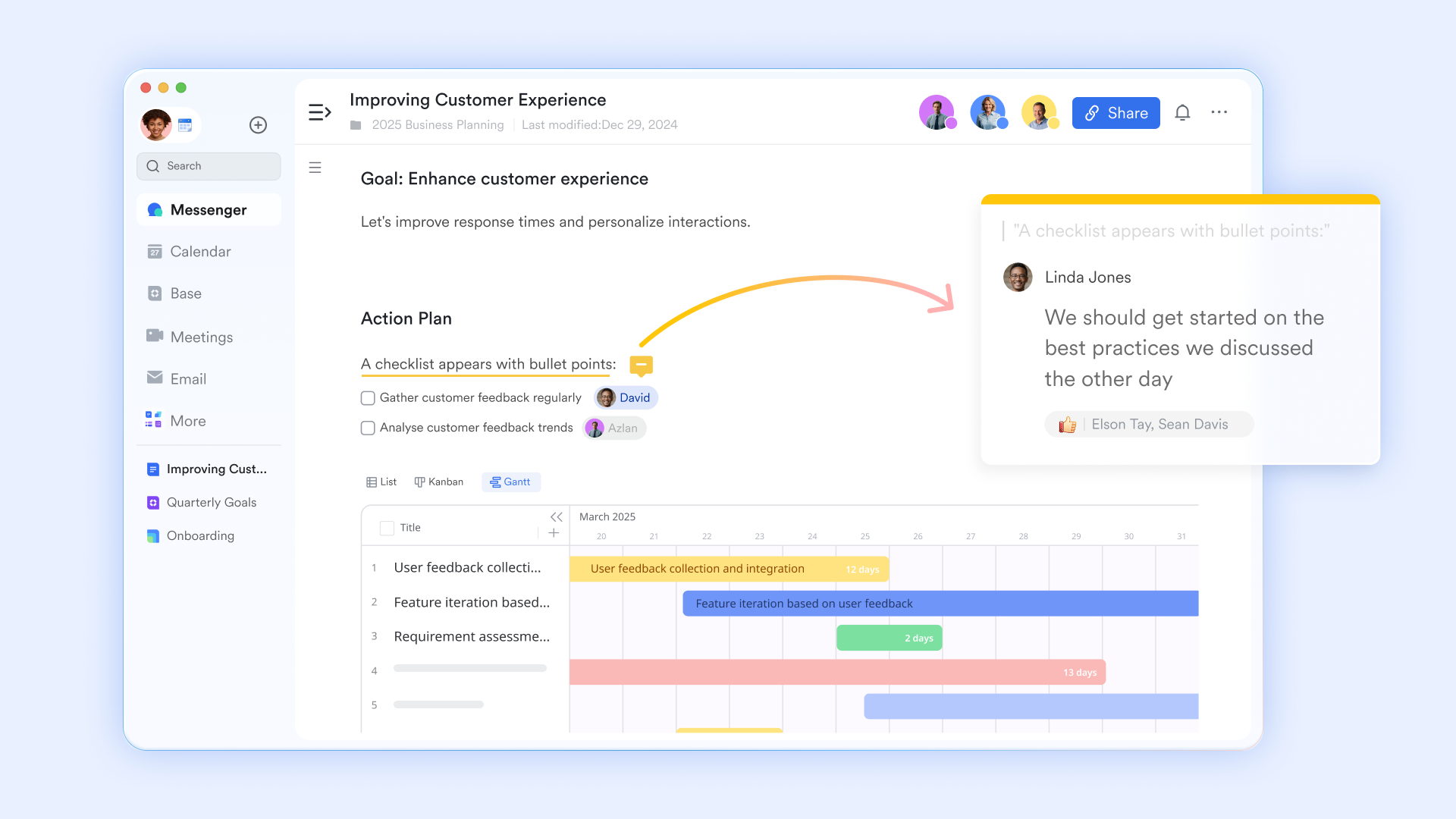
Online document collaboration platform
Lark Docs excels at document collaboration by enabling real-time co-editing where team members can simultaneously work, comment, and leave reactions on a document. Features like @mentions link document sections directly to Lark Messenger for instant notifications, capturing discussions in context. Advanced organizational tools such as synced blocks allow critical information to be updated across multiple documents from a single source, while built-in translation and Magic Share (for editing during video calls) facilitate seamless and efficient cross-functional and cross-border teamwork.
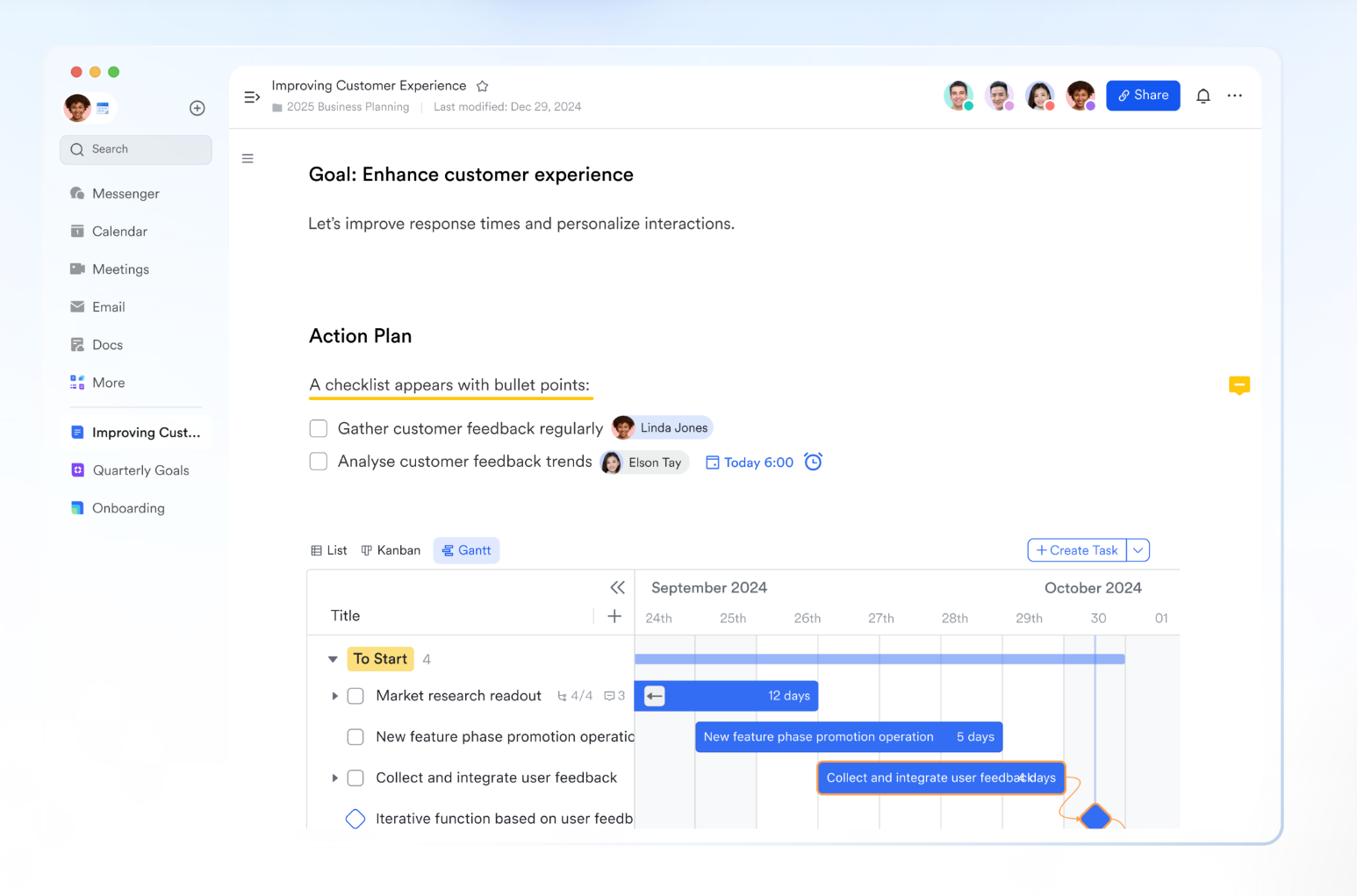
Centralized file management with structured organization
Lark's centralized cloud storage solution, Drive, serves as the hub for all organizational and personal documents, encompassing Docs, Sheets, Base, and uploaded files. Drive organizes content into three primary areas: My Folders (My Space) for personal work, Shared Folders (Shared Spaces) for team collaboration, and its integration with Lark Wiki for structured knowledge bases. Lark Wiki is designed to create and manage a team's knowledge base. It uses a structured hierarchy of pages that function as standard Lark documents, allowing content creation, comments, and collaboration just like in Docs. Wiki spaces help teams keep content organized by purpose rather than scattered across folders.
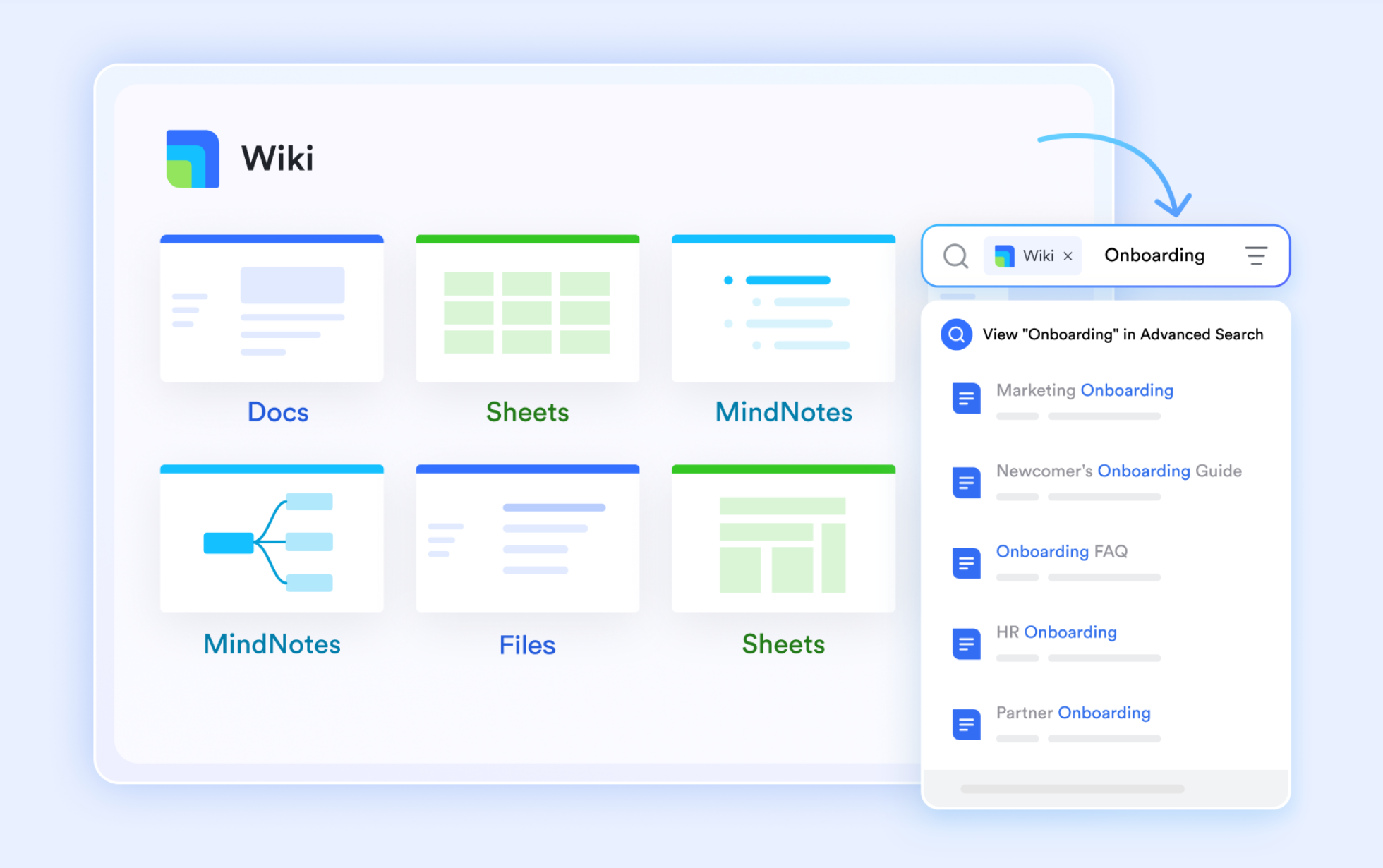
Powerful search across all content
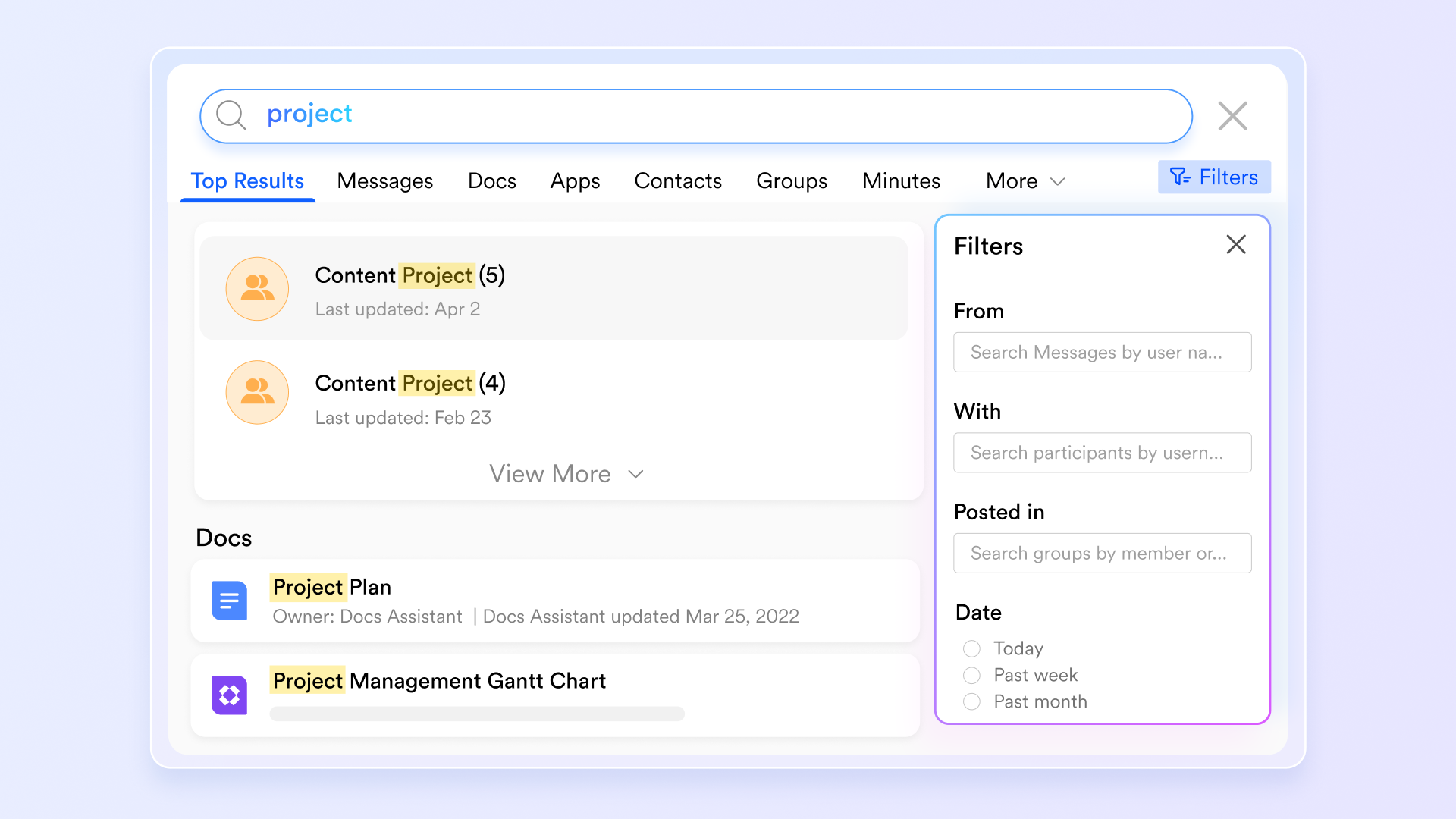
Lark includes an advanced search function that allows users to quickly locate documents, messages, files, and meeting records, regardless of where they're stored. Users can apply filters to narrow results by content type, owner, or location, significantly reducing time spent searching. This makes it easier for teams to retrieve information and maintain momentum, especially in fast-moving environments.
Automated migration from Google Drive
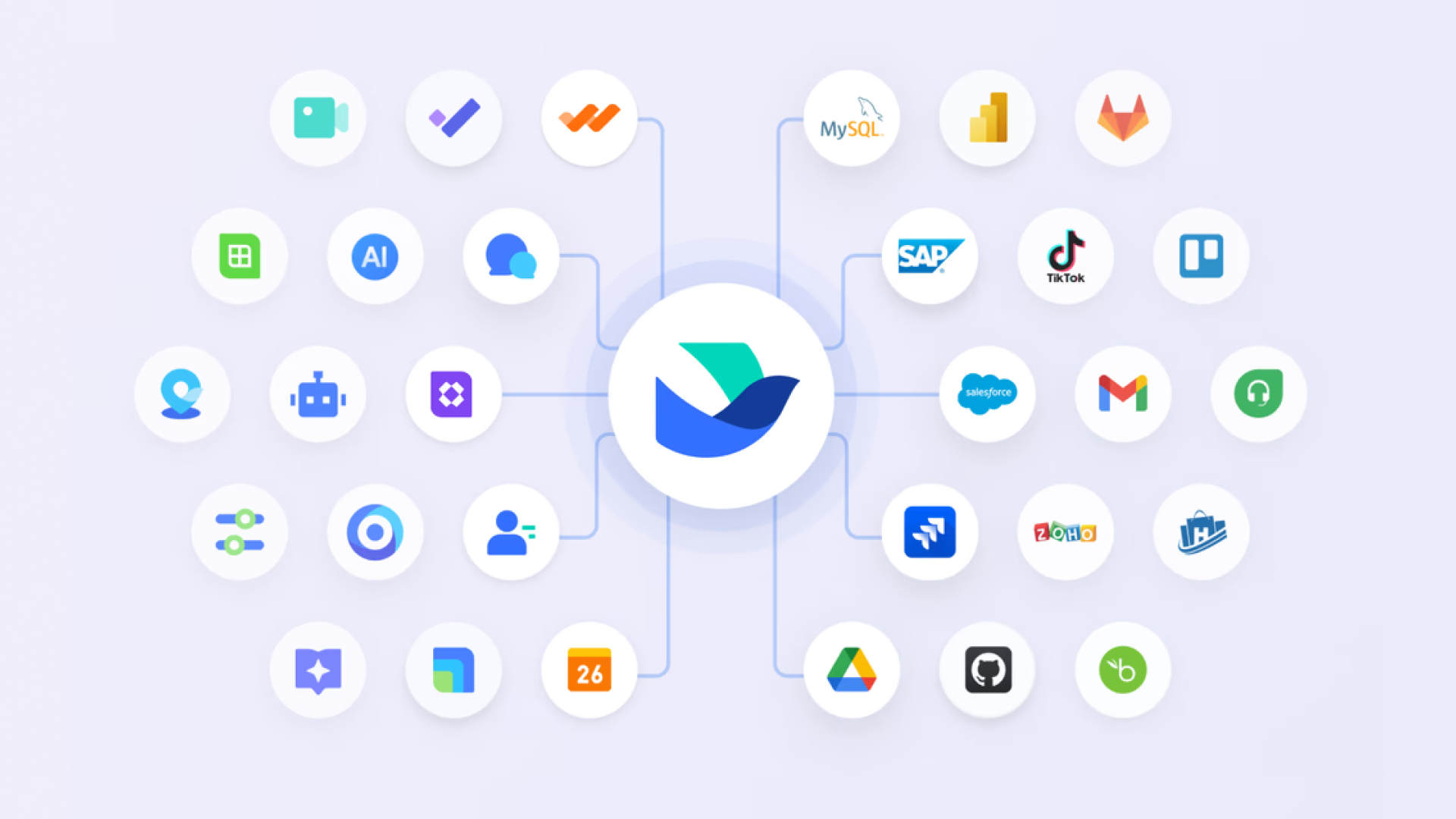
Lark offers an automated migration tool that helps organizations move files from Google Drive to Lark Docs efficiently. Administrators can centrally manage the migration, ensuring that the original files remain intact during transfer. This tool simplifies the transition process, reduces manual effort, and helps teams adopt Lark without disrupting ongoing work or losing important content.
Robust data security and compliance safeguards
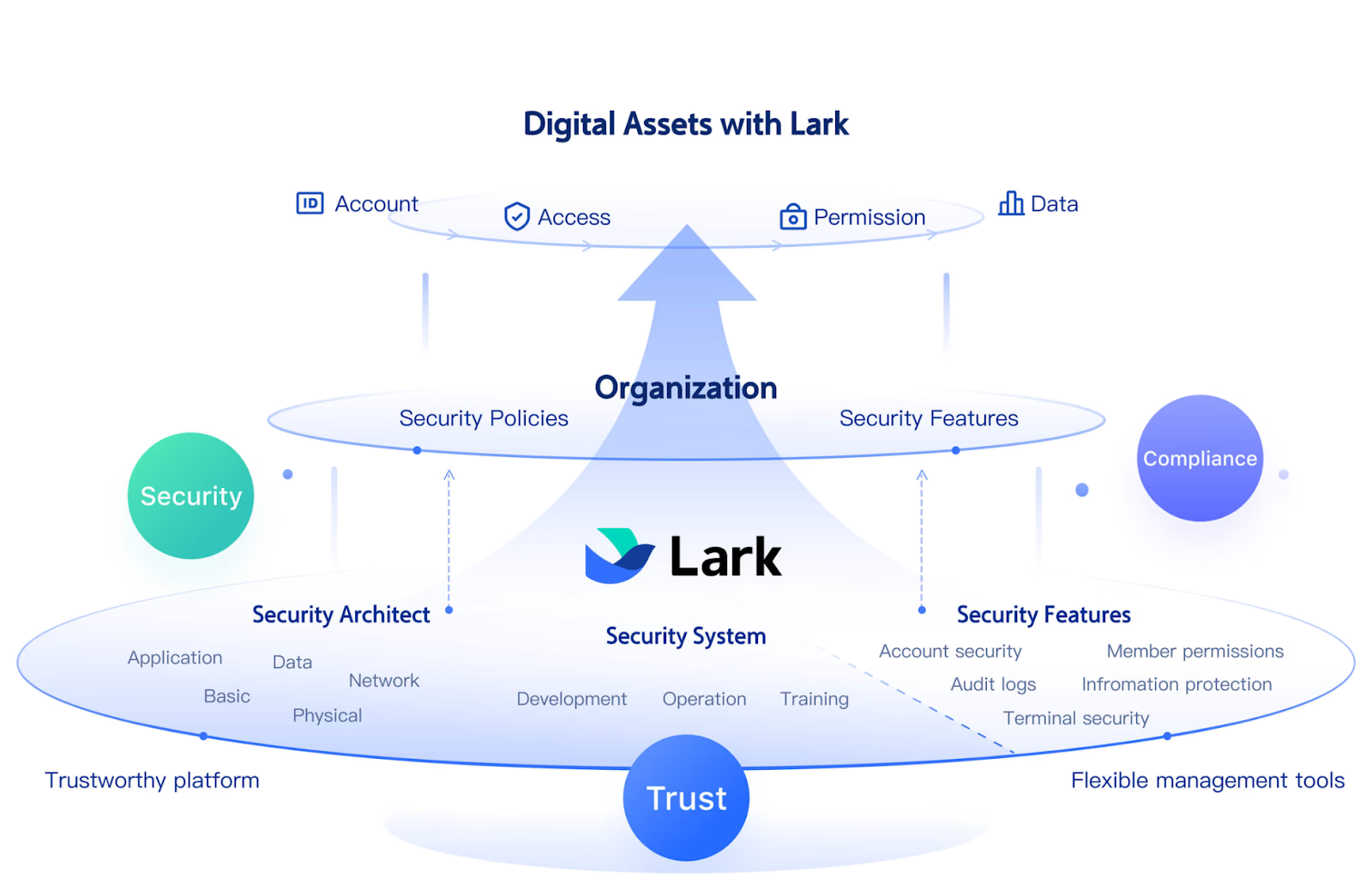
Lark places strong emphasis on data protection by using encryption and other security mechanisms to safeguard information across its platform. These protections help ensure that sensitive business data remains secure throughout storage and usage. Lark also aligns its security practices with widely recognized compliance standards, giving organizations confidence that their data is handled responsibly and securely.
100 GB of free shared storage for beginners to try
Lark's Starter plan provides 100 GB of free shared storage for up to 20 users, giving teams ample space to store documents, messages, emails, and meeting content without upfront cost. This storage is shared across Lark Docs, Messenger, Mail, and Minutes, which means teams don't have to manage separate quotas for different tools. Whether it's documents, chat files, email attachments, or meeting recordings, everything lives in one shared storage pool, making it easier to manage space and reducing friction caused by scattered file limits.
Advanced permission controls for secure collaboration
Lark provides administrators with granular permission controls to manage who can view, edit, share, copy, or download documents and folders. Permissions can be adjusted at multiple levels, allowing teams to protect sensitive information while still enabling collaboration. This ensures that the right people have the right level of access, reducing the risk of accidental data exposure as teams scale.
- Starter plan: Free forever plan that includes 11 powerful tools for up to 20 users. It also comes with 100GB of storage, 1000 automation runs, AI translations, and more.
- Basic plan: $6/user/month (billed annually) for up to 500 users. It includes everything in Starter plus group calling for up to 500 attendees, 5TB of storage, 1000 automation runs, and more. For more details, please contact sales.
- Pro plan: $12/user/month (billed annually) for up to 500 users. It includes everything in Basic plus group calling for up to 500 attendees, 15TB of storage, 50,000 automation runs, and more.
- Enterprise plan: Contact sales for custom pricing. Supports unlimited users and includes even more automation runs and advanced security, compliance, and management features.
Dropbox vs Lark: Feature comparison for practical decision-making
When evaluating cloud platforms for file management and team collaboration, understanding how Dropbox compares with Lark can help you make a practical decision. This feature comparison highlights core strengths and where each platform may better fit specific needs.
Who should choose Dropbox
Dropbox is ideal for individuals or teams that need reliable cloud storage and fast file synchronization across devices. It works well for users who primarily manage documents, media files, and backups. Teams with established workflows using other project management or communication tools can easily integrate Dropbox. Freelancers, remote workers, and small businesses that prioritize file security and simple sharing will benefit. If your primary focus is file-centric collaboration rather than workflow execution, Dropbox remains a strong choice.
Who should choose Lark?
Lark is best suited for teams seeking an all-in-one collaboration platform that combines messaging, video meetings, tasks, and file management. Organizations that want to streamline workflows without switching between multiple apps will find Lark valuable. It works well for growing businesses needing centralized storage, automation, and advanced permission controls. Teams that rely on real-time collaboration and structured project tracking will gain efficiency. Essentially, Lark is ideal for groups looking to connect communication, content, and execution on one platform.
Conclusion
In this Dropbox review, we've seen that Dropbox remains a reliable and widely used cloud storage platform with fast file syncing, strong sharing capabilities, and valuable tools like Dropbox Paper and Backup. It excels for individuals and teams focused on file-centric collaboration and secure content management. However, its limitations, such as the lack of native task management, minimal workflow automation, and reliance on third-party tools, can slow down modern team execution. For organizations looking to combine file storage with communication, project tracking, and workflow automation in a single workspace, platforms like Lark offer a more integrated solution.
FAQs
How does Dropbox perform team collaboration compared to Google Drive or OneDrive?
Dropbox offers reliable file syncing and sharing, but collaboration is primarily file-centric. Unlike Google Drive or OneDrive, it lacks native task or project management features, so teams often need additional apps. Many Dropbox video review users note that while document sharing is smooth, tracking progress and real-time collaboration across multiple contributors can be limited.
For more Google Workspace's information, you can refer to Google Workspace Pricing and Google Workspace alternatives.
Is Dropbox a good solution for online backup and data recovery?
Yes, Dropbox Backup provides automated cloud backup for computers and external drives. Users can restore deleted files or previous versions within set recovery periods. In a typical Dropbox online backup review, the platform is praised for reliability and ease of restoring critical data, though it may not replace dedicated backup solutions for large enterprises.
Can Dropbox Paper replace tools like Google Docs or Notion?
Dropbox Paper allows real-time document editing, comments, and lightweight collaboration. However, in most Dropbox paper review feedback, it is considered less feature-rich than Google Docs or Notion, especially for structured content, advanced formatting, and database-style note-taking. Paper works best for simple documents and team note-taking.
How does Dropbox handle permissions and security for businesses?
Dropbox for business plans include encryption, tiered admin controls, SSO, and audit logs. Team owners can set folder-level or file-level access permissions, manage sharing policies, and monitor activity. Many Dropbox for business review analyses highlight these features as reliable for protecting sensitive organizational data.
Is the Dropbox Family plan worth it for personal and household use?
The Dropbox Family plan provides shared storage and individual accounts for up to six members. In Dropbox family plan review discussions, it's valued for centralized billing and easy sharing, though some users note higher cost compared to personal plans. It's suitable for households needing collaborative file access with moderate storage.
Can Dropbox support business workflows beyond file storage?
Dropbox supports workflow extensions via integrations and limited automation, but native task and project management are missing. Most Dropbox business review insights suggest that while files are central, full workflow execution often requires additional tools. Dropbox Dash and Smart Sync features improve file management but don't fully replace workflow platforms.
Related reading
Table of contents
Start using Lark today

Manage all your work in one place
Boost team efficiency by 10x
Save up to 70% on software costs
Table of contents
Start using Lark today
Manage all your work in one place
Boost team efficiency by 10x
Save up to 70% on software costs
Keep reading








2026 Lark Technologies Pte. Ltd.
Headquartered in Singapore with offices worldwide.






Explore: