














CRM Spreadsheet Templates and Examples You Can Use

Ryan Tanner
Product Marketing Specialist
Sep 18, 2026
Ryan Tanner
Sep 18, 2026

14 min read


Many small businesses and startups begin by tracking customers with a CRM spreadsheet. It's a quick, affordable way to organize contacts, follow up on leads, and monitor sales activity without investing in complex software. Tools like Excel or Google Sheets make it simple to get started, especially with a ready-made crm spreadsheet template. You'll even find a free crm spreadsheet template that lets you customize fields for your pipeline, tasks, and interactions.
However, as your data grows, spreadsheets can quickly become cluttered and more difficult to manage. In this guide, we'll share free templates, industry-specific examples, and highlight how Lark Base & Sheets offer more innovative alternatives while keeping the familiar spreadsheet format.

What is a CRM spreadsheet?
A CRM spreadsheet is essentially a Google Sheets or Excel file adapted to function as a basic customer relationship management system. Instead of adopting complex software, many small teams prefer a spreadsheet CRM to record leads, track customer details, and manage sales pipelines in one place. For example, a crm excel spreadsheet might feature columns for contact information, deal stage, priority, and next follow-up date. Some businesses also build dashboards or use formulas to create simple reporting.
The advantages are obvious: it's free, quick to set up, and flexible enough to design around your workflow. A crm spreadsheet template can be duplicated, customized, and shared with a team in minutes. However, the drawbacks become apparent as your customer base expands, manual updates lead to increased errors, data becomes messy, and there's no built-in automation to remind you of overdue tasks.
That's where more innovative solutions come in. Lark Base offers a modern excel crm spreadsheet template with automation, notifications, and collaboration features, giving you the simplicity of spreadsheets without the limitations of manual upkeep.
Free CRM spreadsheet templates you can download
If you're starting, a free CRM spreadsheet template can be a practical solution for organizing customer data. Both crm spreadsheet Excel and crm spreadsheet template Google Sheets versions are available, giving you flexibility depending on whether your team prefers desktop or cloud collaboration. Below are some ready-to-use options:
- Basic contact management template: This simple Google spreadsheet CRM template allows you to store client names, phone numbers, and email addresses in a clean format. It's ideal for freelancers or small teams who need a central place to keep track of customer information. The Smartsheet crm spreadsheet example comes pre-formatted, so you can duplicate it and start logging contacts instantly.
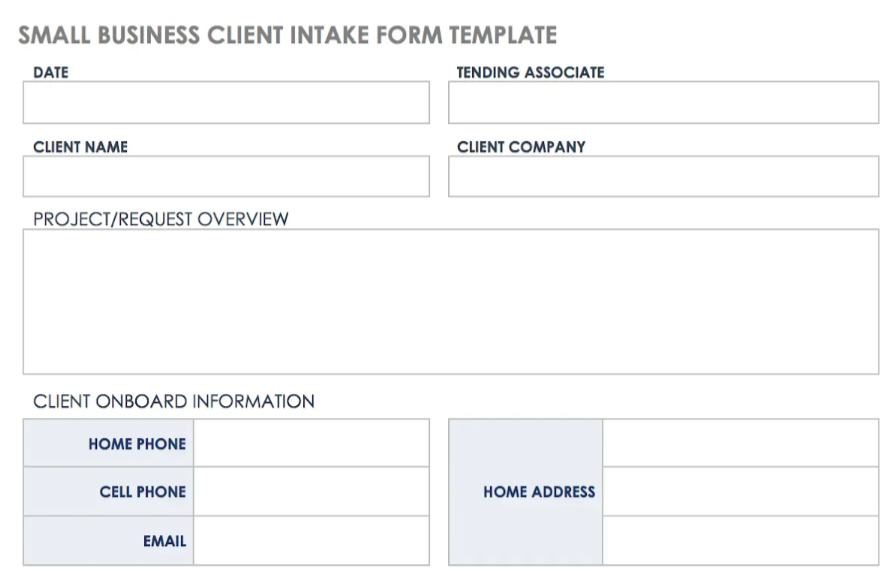
Image source: smartsheet.com
- Sales pipeline spreadsheet: A pipeline-focused Excel CRM spreadsheet helps you visualize deals as they move through stages, such as prospecting, negotiation, and closing. This template makes it easier to see where leads are stuck and which opportunities require attention. The ClickUp crm excel spreadsheet download option is handy for sales teams that need clarity without complex software.
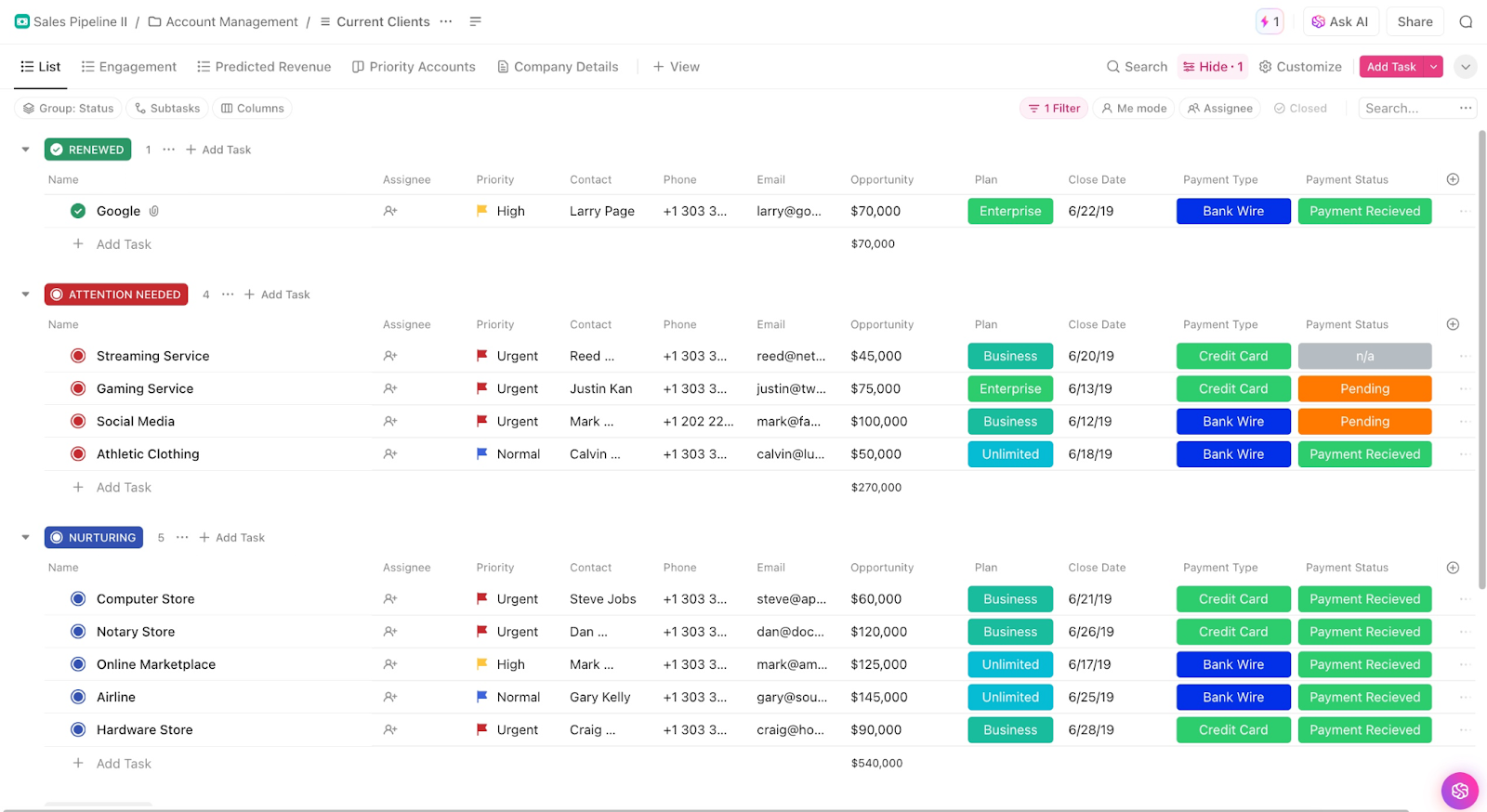
Image source: clickup.com
- Task & follow-up tracker: Keeping up with calls, emails, and deadlines is simpler with a crm tracking spreadsheet. This template provides space to log every interaction and schedule follow-ups, ensuring no lead slips away. OnePageCRM's spreadsheet crm template also highlights overdue activities, which is perfect for maintaining accountability in a small sales team.
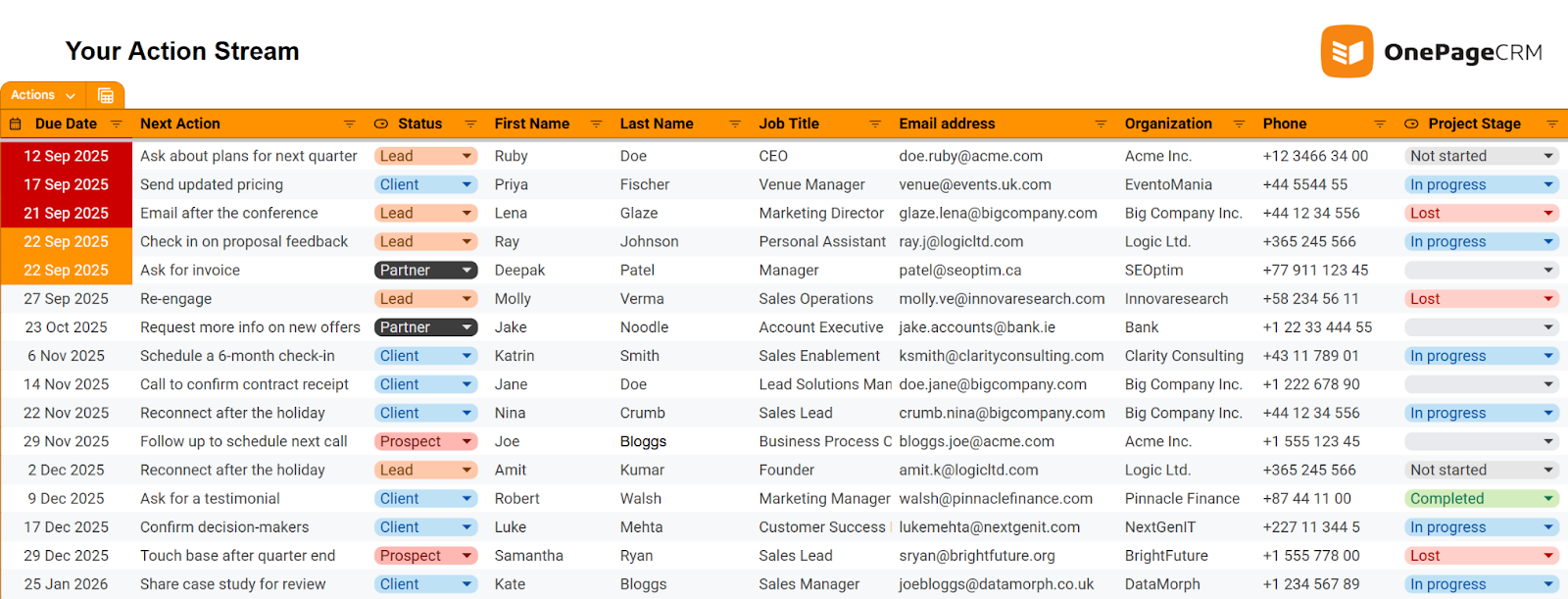
Image source: onepagecrm.com
- Marketing campaign tracker: If you send email campaigns, host events, or engage in social outreach, a Google spreadsheet CRM template for campaigns helps you monitor performance. It allows you to record lead sources, measure responses, and track ROI without requiring dedicated software. Template.net offers a free CRM spreadsheet template in Google Sheets, tailored for marketing teams.
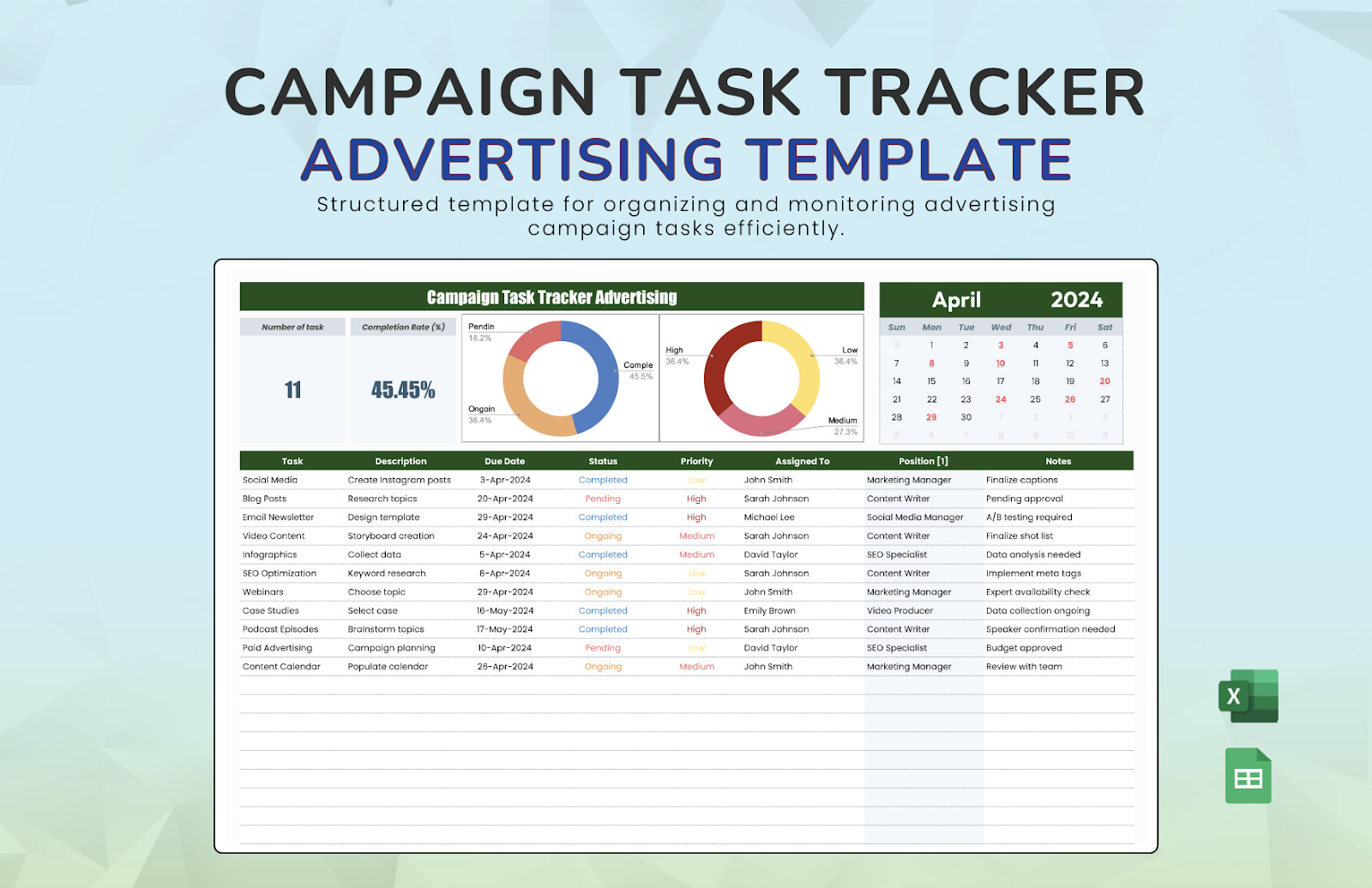
Image source: template.net
- Estate CRM Spreadsheet: For agents and property managers, a real estate CRM spreadsheet provides structured fields to manage listings, client preferences, and property viewings. It ensures that leads and follow-ups are organized, making the buying or renting process smoother and more efficient. Template.net offers a ready-to-use Excel spreadsheet crm template specifically designed for the real estate industry.\
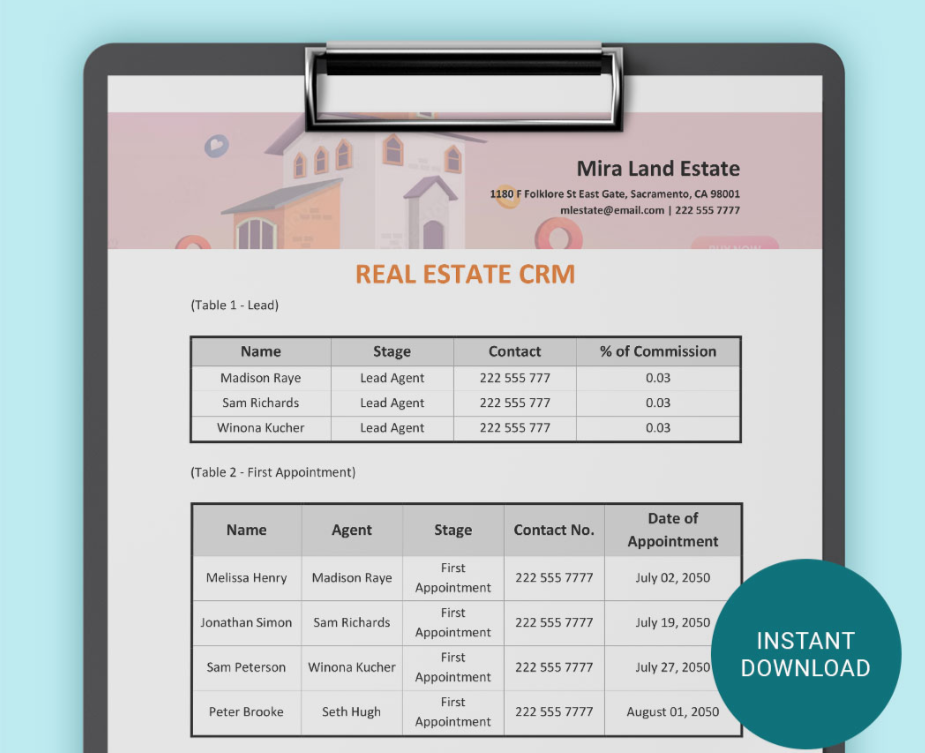
Image source: template.net
Lark templates–smarter alternative to CRM spreadsheets
While a crm spreadsheet template in Excel or Google Sheets can be helpful, it often falls short when teams grow and data becomes more complicated to manage. Lark, one of the best Google Workspace alternatives, takes the familiar spreadsheet concept and supercharges it with automation, collaboration, and scalability. Here are some of the most powerful Lark templates that replace traditional crm spreadsheet examples with more innovative solutions:
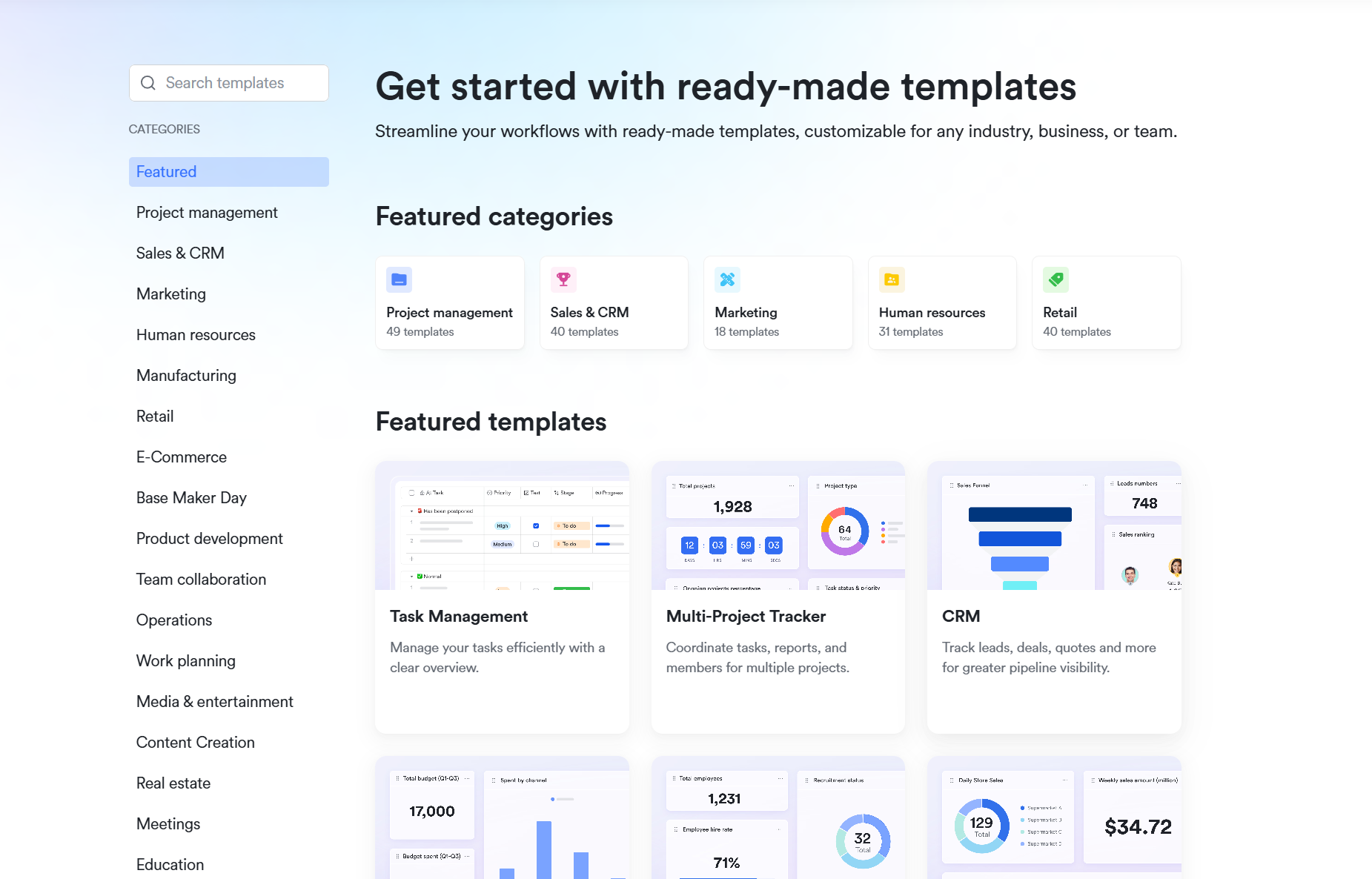
Lark Base: Contact & lead management template
This template centralizes all client details — including names, emails, phone numbers, and preferences- into a structured, searchable database. Unlike a crm excel spreadsheet that risks duplicate entries or version mismatches, Lark Base keeps your data consistent and clean across the team. You can also create customizable fields tailored to your industry, whether you're managing real estate crm spreadsheet records or handling travel bookings. With everything organized in one place, you get the simplicity of a spreadsheet crm with the intelligence of a real CRM.
Lark Base: Sales pipeline template
A sales pipeline in Excel often requires manual updates and charts, but Lark Base offers a dynamic alternative. You can visualize opportunities in Kanban, Gantt, or Gallery views — a massive upgrade from a static crm tracking spreadsheet. Deals can be tracked by stage, from "new lead” to "proposal” to "closed deal," with built-in dashboards that display conversion rates and revenue forecasts. No need for manual calculations as in a crm spreadsheet Excel — the system updates automatically as your data changes.
Lark Base: Real estate CRM template
Managing listings, property details, and client inquiries in a real estate crm spreadsheet can quickly get messy. Lark Base provides a pre-built template specifically for real estate professionals. Agents can link contracts, photos, and floor plans directly to client records, ensuring all information is easily accessible. With secure sharing via Lark Docs or Wiki, clients can view updates without exposing your complete internal database. This Excel CRM template eliminates the clutter of traditional files while providing a professional and modern client experience.
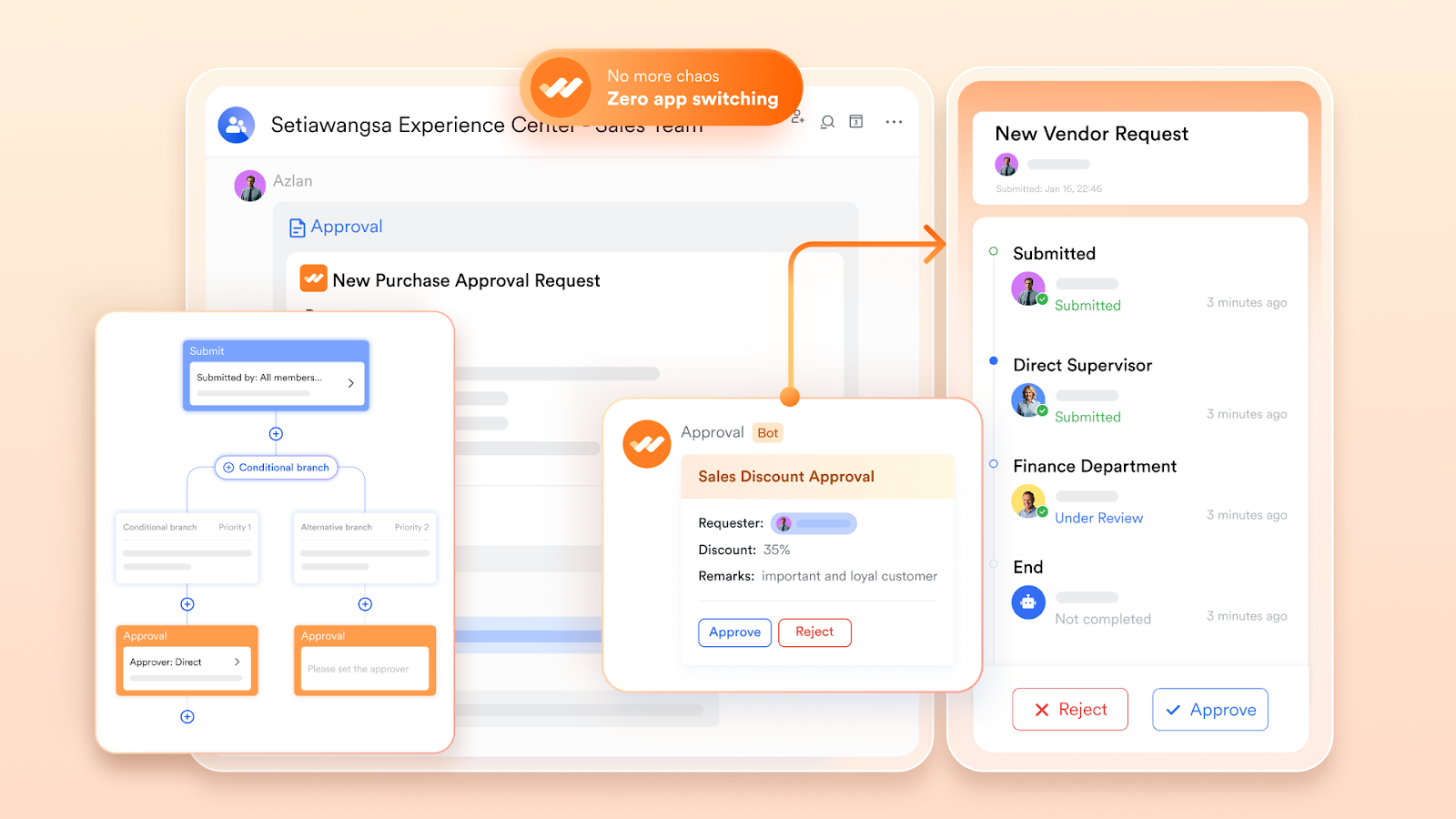
Lark Approval: Client & deal workflow template
Discounts, contracts, and custom deals often create long email chains when managed with a crm spreadsheet example. Lark Approval automates the process by routing requests through structured workflows. Sales teams can instantly submit, review, and approve deals without leaving the platform. This makes it an ideal replacement for agencies or enterprises that have outgrown a CRM Excel spreadsheet, streamlining compliance and reducing delays in closing sales.
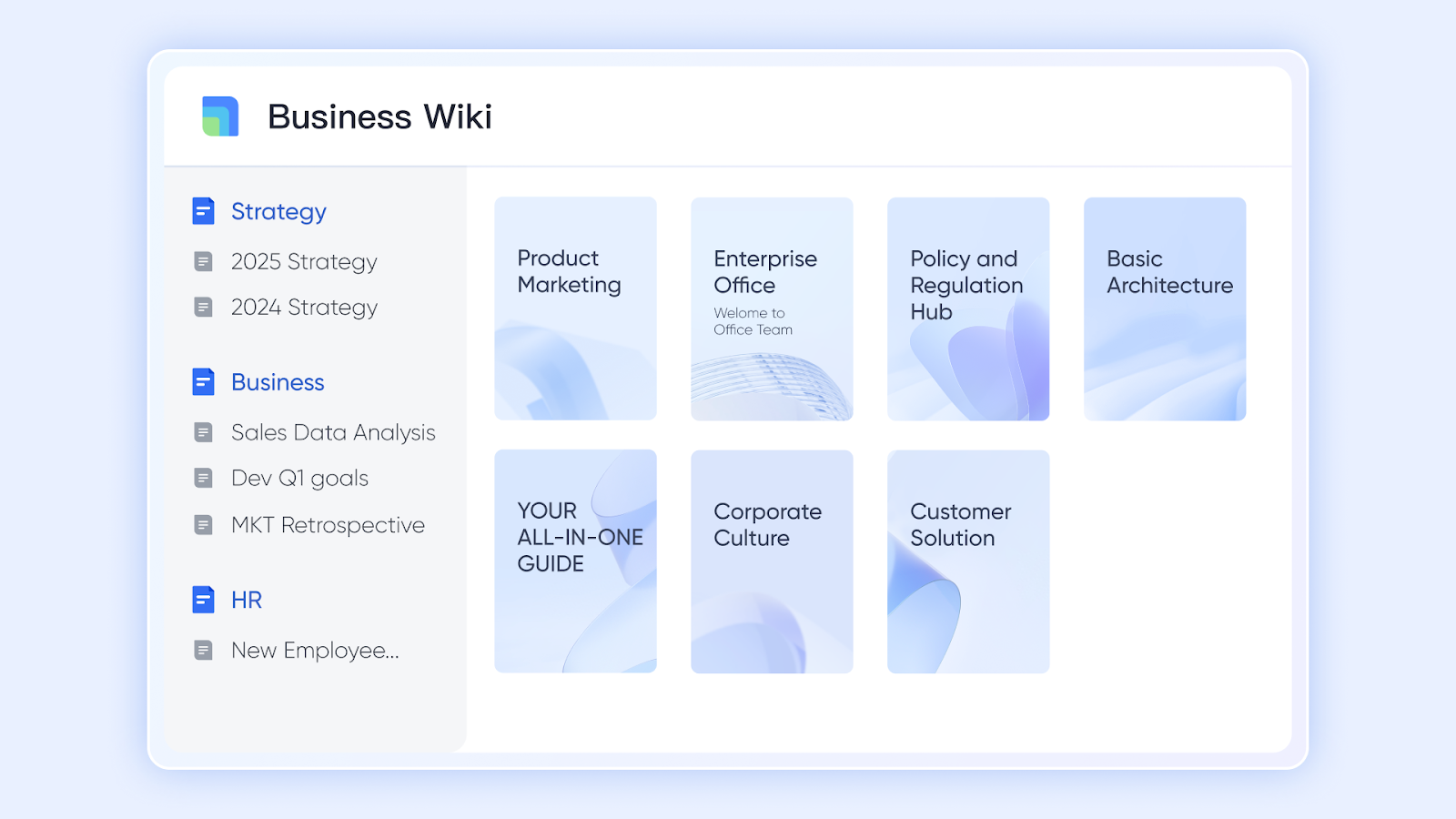
Lark Wiki: Knowledge hub template
While a spreadsheet crm template is good for storing lists, it can’t serve as a living knowledge base. Lark Wiki fills this gap by acting as a central hub for playbooks, pricing guides, and FAQs. Unlike static crm spreadsheet examples that get buried in email attachments, Wiki pages are searchable, dynamic, and accessible across teams. Sales reps can instantly reference onboarding materials or client FAQs, reducing time wasted on repetitive queries and ensuring consistent communication.
When should you move from a CRM spreadsheet to CRM software?
A CRM spreadsheet is a great starting point, but there comes a stage when relying on Excel or Google Sheets is no longer enough. Knowing when to switch to full CRM software can save your business from lost opportunities and messy data.
- Client list too big: A CRM Excel spreadsheet or Google spreadsheet crm template works well for a small database, but once you're managing hundreds of contacts, things quickly become overwhelming. At this point, a dedicated system ensures data stays searchable and secure.
- Team collaboration: While a CRM spreadsheet template, such as Google Sheets, supports basic collaboration, larger teams often face version mismatches and duplicate records. CRM software provides real-time updates and permissions, ensuring data consistency across the organization.
- Need automation: A static spreadsheet CRM requires manual updates, whereas CRM software can send reminders, automate follow-ups, and generate visual dashboards instantly. This eliminates the repetitive tasks associated with a CRM tracking spreadsheet.
- Error and version issues: Free templates, such as a CRM spreadsheet Excel template, are prone to human error and version discrepancies. Over time, duplicates and outdated files lead to confusion and lost deals. CRM software prevents this by centralizing and validating your data.
If you're hitting these challenges, it's a clear sign that it's time to graduate from a CRM spreadsheet example to a modern solution like Lark Base. It provides all the simplicity of a spreadsheet with the power of automation, collaboration, and scale.
- Starter plan: Free forever plan that includes 11 powerful tools for up to 20 users. It also comes with 100GB of storage, 1000 automation runs, AI translations, and more.
- Pro plan: $12/user/month (billed annually) for up to 500 users. It includes everything in Starter plus group calling for up to 500 attendees, 15TB of storage, 50,000 automation runs, and more.
- Enterprise plan: Contact sales for custom pricing. Supports unlimited users and includes even more automation runs and advanced security, compliance, and management features. Many teams also consider Google Workspace pricing and ClickUp pricing when assessing the value of alternative workplace solutions.
Conclusion
CRM spreadsheets are an excellent starting point for small teams and startups, especially when using free CRM spreadsheet templates in Excel or Google Sheets. They make it easy to track contacts, manage pipelines, and monitor follow-ups without upfront costs. However, as your team and client base grow, spreadsheets can quickly become limiting, with challenges in collaboration, automation, and data accuracy.
Lark offers the perfect balance between simplicity and power. With customizable crm spreadsheet templates in Lark Base and Lark Sheets, you get the familiar spreadsheet interface combined with automation, dashboards, and real-time collaboration—giving your team complete visibility and control without the headaches of traditional crm excel spreadsheet files. Take your CRM to the next level by trying Lark today and experience smarter, faster, and more reliable customer management.
FAQs
How do I create a simple CRM in Excel or Google Sheets?
You can set up a basic crm spreadsheet by creating columns for contact details, deal stages, follow-up dates, and notes. This DIY approach is perfect for small teams or solo entrepreneurs. While it works for tracking leads initially, maintaining accuracy and automation can be challenging. Using Lark Base, you can start with a ready-made crm spreadsheet template that automates follow-ups and organizes contacts efficiently.
Are there industry-specific CRM spreadsheet templates (e.g., real estate, travel)?
Yes, many CRM spreadsheet examples cater to industries such as real estate, travel, or consulting, with fields tailored to client preferences, bookings, or property listings. These templates help manage specific workflows without requiring the creation of everything from scratch. Project management & CRM specialist tools like Lark Base also offer specialized templates, such as real estate CRM spreadsheets and travel client trackers, providing teams with a more structured and collaborative solution than standalone spreadsheets.
Can a spreadsheet CRM handle sales pipeline tracking effectively?
For small teams, a crm tracking spreadsheet can manage simple pipelines and deal stages. You can manually update lead status and calculate totals using formulas. However, as the number of deals increases, maintaining visibility becomes increasingly tricky. New-age combined tools, like Lark Base sales pipeline templates, offer dynamic Kanban, Gantt, and dashboard views, providing the same simplicity as a CRM spreadsheet template but with automation and real-time updates.
What are the risks of managing customer data in spreadsheets?
Spreadsheets are prone to errors, duplicates, and version control issues, which can result in missed opportunities and data inconsistencies. They also lack built-in reminders, dashboards, and security controls. Tools like Lark Base mitigate these risks by centralizing client data, preventing duplicates, and offering automated workflows, providing teams with the flexibility of a spreadsheet CRM without the common pitfalls.
Can I import my CRM spreadsheet into a CRM tool later?
Yes, most CRM software supports importing data from Excel or Google Sheets, allowing teams to easily migrate contacts, deals, and follow-ups. This ensures your initial crm excel spreadsheet download isn’t wasted. Lark allows seamless CSV or Excel imports so that you can transition from a free CRM spreadsheet template to a fully automated, collaborative system effortlessly.
How does a CRM spreadsheet compare to Lark Base templates?
A CRM spreadsheet Excel template provides simplicity and flexibility, but lacks automation, collaboration, and advanced reporting capabilities. Lark Base templates, on the other hand, provide structured layouts, dashboards, and workflow automation, all while maintaining the familiar spreadsheet interface. Teams gain better visibility, fewer errors, and faster follow-ups, making Lark the more intelligent choice over standalone crm spreadsheet examples.
Related reading
Table of contents
Start using Lark today

Manage all your work in one place
Boost team efficiency by 10x
Save up to 70% on software costs
Table of contents
Start using Lark today
Manage all your work in one place
Boost team efficiency by 10x
Save up to 70% on software costs
Keep reading









2026 Lark Technologies Pte. Ltd.
Headquartered in Singapore with offices worldwide.






Explore: