














Google Sheets CRM Templates: Free Downloads and Smarter Alternatives

Ryan Tanner
Product Marketing Specialist
Sep 18, 2026
Ryan Tanner
Sep 18, 2026


12 min read


Every growing business has been there: you start tracking leads in a spreadsheet, thinking it will be temporary. A tab for contacts, a column for status updates, a color code for hot deals. But before long, that "simple system" becomes a cluttered mess—missed follow-ups, duplicate data, and a sales pipeline that feels more like guesswork.
This is why Google Sheets CRM templates exist. They offer a ready-made structure that helps teams bring some order to the chaos. And for businesses on a budget, they're an attractive, free solution. But here's the truth: spreadsheets can only take you so far. The moment you need automation, real-time collaboration, or integration with other tools, it's time to look at smarter options. In this guide, we'll share the best free Google Sheets CRM templates to get you started—and then show you how to level up to a more scalable system.
What is Google Sheets CRM?
A Google Sheets CRM is essentially a spreadsheet customized to act like a lightweight customer relationship management system. Businesses use it to record contacts, leads, deals, and customer activities—all within a familiar tool they already know.
It's a popular choice because it's:
- Free: Anyone with a Google account can create and share a spreadsheet instantly.
- Easily accessible: Because it is cloud-based, your data is available anytime, anywhere, across devices.
- Simple to set up: Unlike complex CRM platforms that require onboarding, a CRM in Google Sheets can be created in minutes with a template.
For small teams or freelancers, this makes it a practical first step before investing in more advanced CRM software.

Free Google Sheets CRM templates (by category)
While spreadsheets weren't originally built to be CRMs, they've proven to be a handy starting point. With the right template, you can transform a basic Google Sheet into a lightweight customer management system. To make it easier, we've grouped some of the best free CRM Google Sheets template options by category, so you can pick the one that matches your team's needs.
1. Contact management templates
Contact management is often the first step toward better organization. These templates give you a place to store names, phone numbers, email addresses, notes, and even a history of customer interactions. Instead of scattering details across emails and sticky notes, a CRM template Google Sheets download centralizes everything into one easy-to-share file.
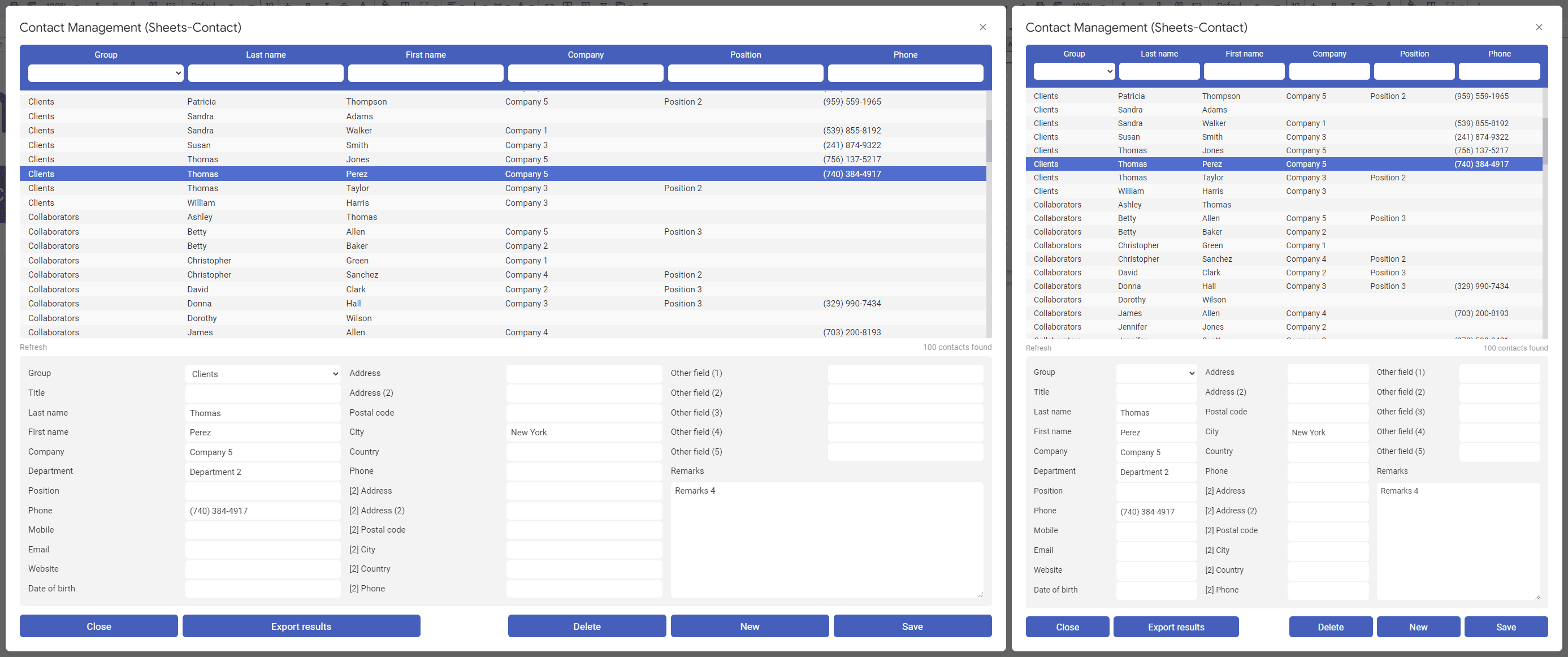
Image source: sheets-pratique.com
2. Sales pipeline templates
A sales pipeline template gives you a visual way to track deals as they move from prospect to close. Instead of guessing where opportunities stand, you can see which stage each lead is in and which ones need attention. These Google Sheets CRM template free options help teams bring structure to what can otherwise feel like a messy process.
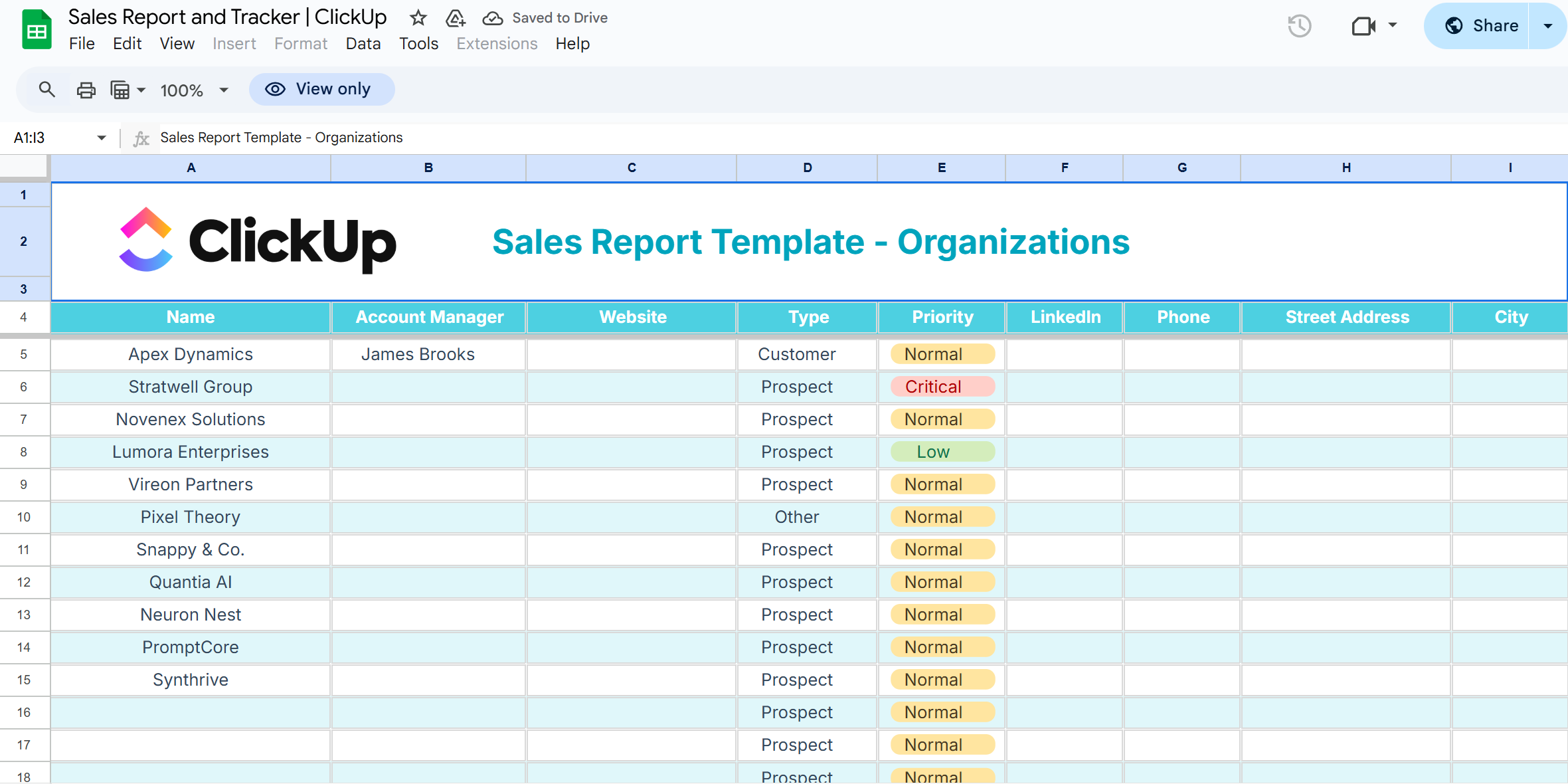
Image source: clickup.com
3. Lead tracking templates
Capturing and managing leads is essential for sales teams. Lead tracking templates help record where inquiries come from, how they're being followed up on, and whether they're moving toward qualification. A CRM in Google Sheets for leads ensures you don't lose sight of potential customers along the way.
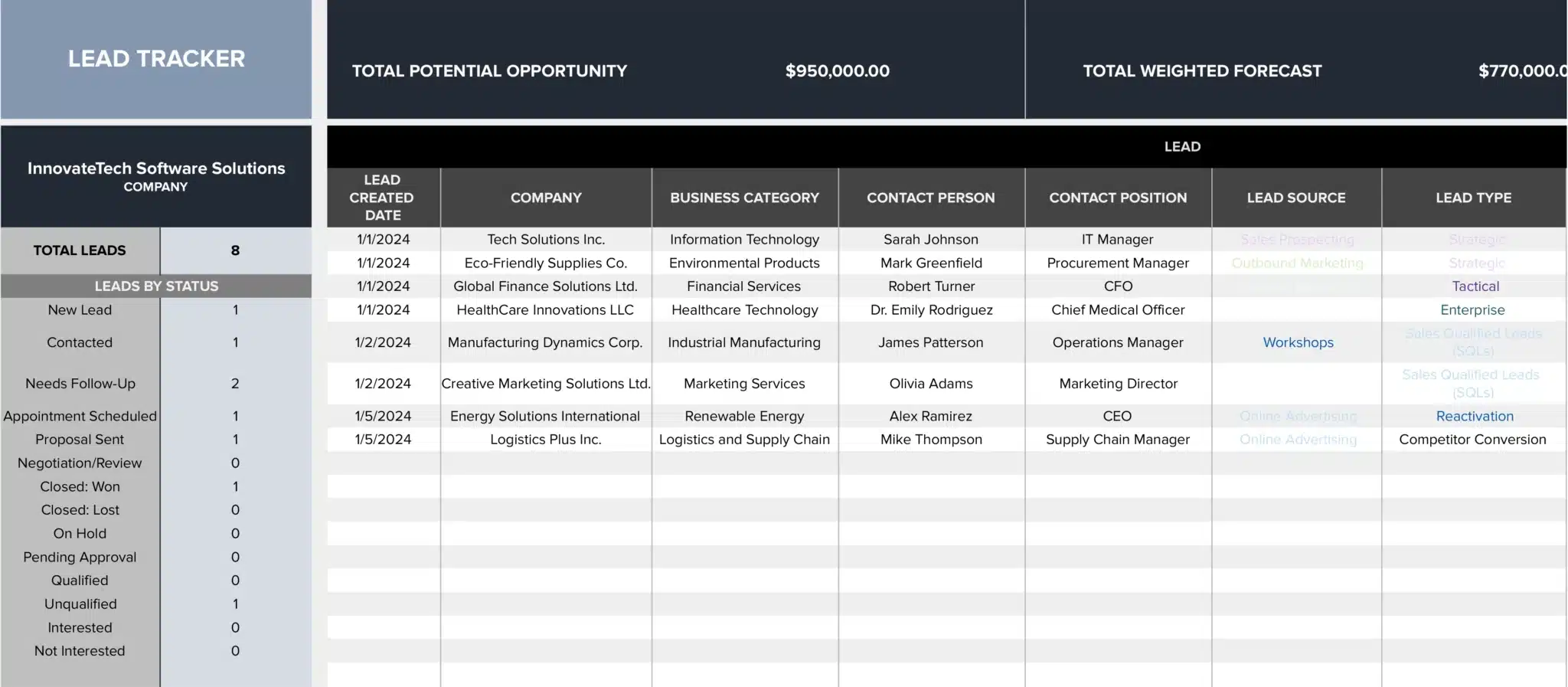
Image source: coefficient.io
4. Activity and task templates
Managing customer activities—calls, meetings, and follow-up is just as important as tracking leads. Activity templates give you a simple framework to log interactions and ensure no touchpoint is forgotten. Instead of juggling reminders in your inbox, an activity-focused CRM Google Sheets template keeps everything in one place.
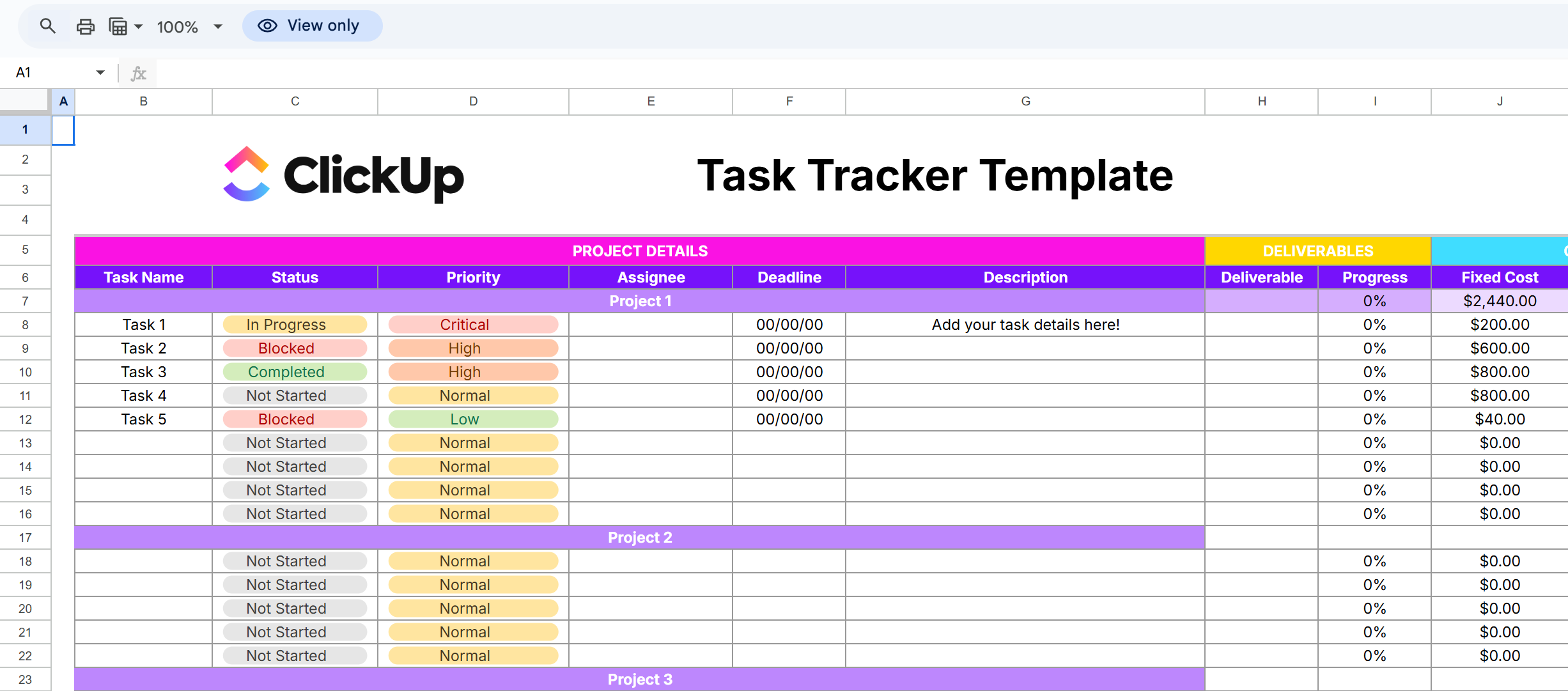
Image source: clickup.com
5. Reporting and KPI templates
Tracking performance is where many spreadsheet CRMs fall short, but with the right template, you can gain at least some visibility. Reporting templates allow you to measure revenue, conversion rates, and deal velocity in a structured way. While not as advanced as dedicated platforms, a CRM template in Google Sheets for reporting can still reveal valuable insights.
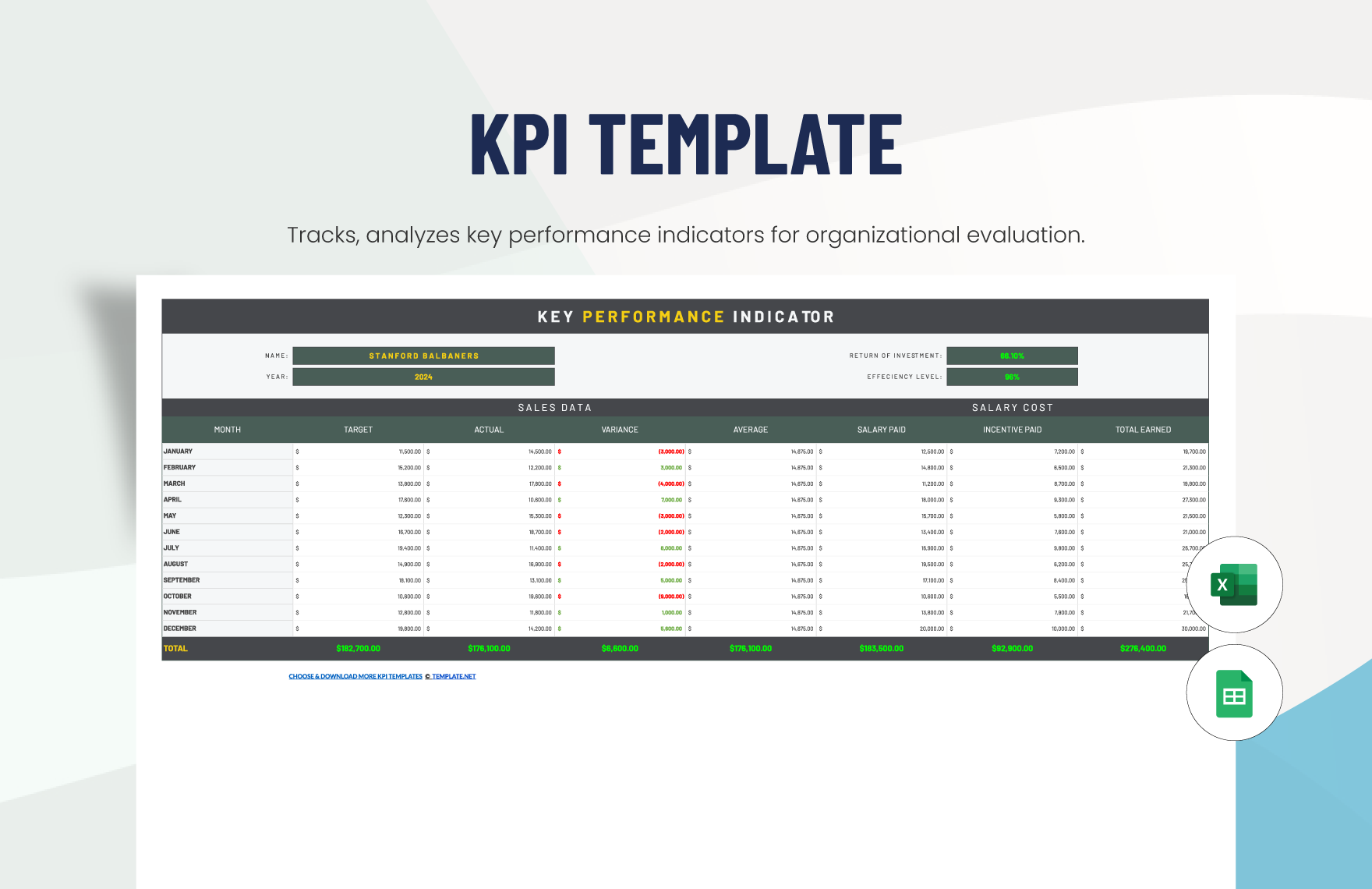
Image source: template.net
Benefits of using Google Sheets as a CRM
If you're exploring Google Sheets CRM templates, you'll quickly see why so many small businesses use them as their starting point. They're simple, accessible, and cost next to nothing. Here's why they work so well:
- Low-cost and beginner-friendly: Instead of investing in costly software, you can download a Google Sheets CRM template free and have your system ready in minutes. For small businesses or solo entrepreneurs, this means you can stay organized without straining your budget. Plus, because it's easy to use, even those with limited technical skills can manage leads and contacts confidently.
- Easy to share and collaborate: A CRM Google Sheets template is stored in the cloud, which makes collaboration seamless. Whether your team is in the same office or spread across time zones, everyone can access and edit the same document. This real-time collaboration keeps communication clear and ensures follow-ups never slip through the cracks.
- Quick setup with templates: Prebuilt CRM template, Google Sheets files save you from reinventing the wheel. Instead of spending hours building a system from scratch, you can download a ready-to-use template and adapt it to your workflow. This speed is a significant advantage for businesses that need to organize their data promptly.
- Familiar interface for most teams: Almost everyone has worked in spreadsheets before, which makes using a CRM in Google Sheets feel natural. You don't need to spend time teaching employees how to navigate new software—they already know how rows, columns, and filters work. This familiarity reduces friction, making adoption faster and more seamless.
Limitations of Google Sheets CRM
While using a spreadsheet as a CRM works for beginners, it doesn't take long before the cracks begin to show. Here are the most common issues businesses run into when relying on a CRM in Google Sheets:
- Manual data entry → prone to errors: Every lead or contact has to be typed in by hand. The more rows you add, the more likely mistakes creep in—like duplicate entries or missed follow-ups. Over time, this makes your data less reliable.
- Limited automation: A spreadsheet can't automatically remind you of upcoming calls, assign tasks to teammates, or sync with your email tools. Without these time-saving features, you're left doing repetitive admin work that slows down growth.
- No advanced reporting: At best, you can add simple charts or pivot tables, but you won't get the kind of dashboards, forecasts, or performance tracking that dedicated CRMs provide. For managers trying to spot trends, a Google Sheets CRM template free download isn't enough.
- Version control issues with growing teams: Sharing one file works when it's just you, but it becomes problematic as the team grows. But as soon as multiple teammates start updating the spreadsheet, things can get messy. Data gets overwritten, and it's often unclear which version is most accurate.
These gaps explain why many businesses eventually upgrade from spreadsheets to a dedicated CRM platform. With tools like Lark Base CRM, you still keep the simplicity of a spreadsheet but gain automation, analytics, and collaboration designed to grow with your team.
Lark CRM templates: A smarter alternative
When your business starts outgrowing spreadsheets, Lark provides ready-made templates that combine structure, automation, and collaboration. Instead of manually managing everything in Google Sheets, these templates let you scale without reinventing the wheel. Below are key template types and features to look for in Lark, each with a brief intro.
- Base CRM template
Lark offers a Base CRM template that acts as a comprehensive foundation for managing leads, contacts, deals, and pipelines. It includes dashboards showing active deals, forecasted revenue, and conversion metrics, giving you visibility right from the start. Because it's built into Lark Base, you can customize fields, views, and workflows easily without starting from scratch.
- Sales & CRM template
The Sales & CRM template in Lark is designed to streamline your sales process end to end. It offers built-in opportunity management, client visit logging, and automated linking between visits and deals. Dashboards and operational metrics are built in to help you spot bottlenecks or trends without building your own reports.
- Basic CRM template
For teams just getting started, the Basic CRM template provides a lean setup that covers essential CRM functions. You'll find tools for capturing customers, tracking opportunities, and visualizing progress via Kanban or table views. Because it's lightweight, it's easy to adopt—and then scale later when your needs grow.
- Customer relationship management (CRM) template
Lark's CRM template covers broader customer management beyond just sales. It provides structured fields for segments, accounts, industries, and visualizations of deals by stage and value. This gives you not just deal tracking but a holistic view of your customer base and interactions.
- Light CRM system template
If your team doesn't need full-blown complexity yet, the Light CRM system template offers a streamlined, no-nonsense layout. (Mentioned in Lark's template listings) It typically includes contact tracking, simplified deal stages, and quick overviews without heavy automation. It's perfect for early-stage teams that want structure now but don't need too many bells and whistles.
- Template with automation & workflows built in
Many of Lark's CRM templates support automated workflows (e.g., lead assignment, status change reminders) out of the box. Because the automation is baked in, you don't have to build rule logic manually. This is a big jump up from spreadsheets, which can't natively support dynamic reminders or triggers.
Extra tips: How to use Google Sheets as a CRM
Using Google Sheets as your CRM is simple in concept—but to get value, you need discipline and structure. Below is a step-by-step approach you can follow to turn a spreadsheet into your team's lightweight CRM.
- Download a CRM template
The easiest way to get started is by copying a prebuilt CRM template in Google Sheets (often available as "Make a copy" in Google Drive). Many free templates include tabs for contacts, deals, activities, and dashboards. Starting from a template saves you from rebuilding the basic structure from scratch.
- Customize fields for your business
After you have the template, adjust the columns, tabs, and labels to match your sales process and terminology. Add or remove fields like "Company," "Deal Value," "Next Follow-Up Date," or "Lead Source" based on what matters most to you. Make sure the template reflects how you sell—not how generic templates assume you sell.
- Share with team members
Grant appropriate permissions (edit, comment, or view) to your teammates so everyone can access and update the sheet. Use built-in sharing settings in Google Sheets to control who can edit which tabs or fields. This keeps your CRM collaborative yet secure.
- Track activities and deals manually
Whenever someone talks to a prospect, sets a meeting, or makes an offer, log it in the spreadsheet immediately. Use dedicated sheets or columns for tasks, meetings, next steps, and deal stage changes. This manual logging is what keeps your CRM alive—but it only works if your team commits to updating it consistently.
- Update and review regularly
Schedule recurring check-ins (daily, weekly) to review the status of deals, remove stale leads, and ensure follow-ups are captured. Use filters, conditional formatting, or pivot tables to help you spot overdue actions or deals stuck in a stage. Over time, you might refine the structure, add formulas, or even automate part of this process.
While this process is totally doable, it becomes cumbersome and error-prone as your team and deal volume grow. That's why many companies upgrade to Lark CRM templates, which offer automation, error reduction, scalable workflows, and built-in reporting—all without losing the flexibility that spreadsheets provide.
Conclusion
A Google Sheets CRM can be a solid first step for businesses taking their customer management more seriously. With free templates for contacts, leads, and pipelines, it offers a simple and affordable way to get organized. However, as your data grows and your team expands, spreadsheets reveal their limitations—manual entry, a lack of automation, and reporting gaps make scaling difficult.
That's where Lark CRM templates come in. Built on Lark Base, they combine the ease of spreadsheets with powerful automation, real-time collaboration, and customizable workflows. Instead of patching together manual systems, you get a CRM that grows with your business and gives you the clarity to focus on what matters: building stronger customer relationships. If you're ready to move beyond spreadsheets, Lark makes the transition effortless.
FAQs
How does Lark differ from Google Sheets CRM?
While Google Sheet CRM templates give you a free and simple way to organize contacts, leads, and pipelines, they rely on manual data entry and offer limited automation. Lark CRM templates, on the other hand, go beyond the basics of a CRM template in Google Sheets by providing pre-built structures, automated workflows, and advanced reporting. This makes Lark a scalable choice for teams that need more than just a static spreadsheet.
Can Google Sheets CRM handle large teams?
A CRM in Google Sheets can work for freelancers or tiny teams, but it struggles to scale as more users come on board. With large teams, version control issues, missed updates, and duplicated data are common. Dedicated solutions like Lark CRM provide built-in collaboration tools and structured workflows that eliminate the challenges of managing customer data in a Google Sheets CRM template.
How do I track sales pipelines in Google Sheets?
The simplest way is to download a Google Sheets CRM template free, customize the deal stages, and update opportunities manually as they move from prospect to closed. Many users adapt a CRM Google Sheets template to visualize stages and track progress. While effective at first, it requires strict manual discipline—something that automated platforms like Lark handle more efficiently.
What's the easiest CRM alternative to spreadsheets?
For teams outgrowing a CRM template in Google Sheets, the easiest next step is adopting Lark CRM. It preserves the simplicity of spreadsheets while adding automation, reminders, and integrations. This makes it a smoother upgrade for anyone familiar with how to use Google Sheets as a CRM, but now ready for a scalable, modern system.
Is Lark CRM free to use?
Yes. Lark provides a free plan that includes access to CRM, Google Sheets template-style setups in Lark Base, along with Messenger, Calendar, and Docs for team collaboration. As your business grows, premium plans unlock deeper automation and analytics, ensuring you won't hit the same limitations you would with static Google Sheet CRM templates.
Related reading
Table of contents
Start using Lark today

Manage all your work in one place
Boost team efficiency by 10x
Save up to 70% on software costs
Table of contents
Start using Lark today
Manage all your work in one place
Boost team efficiency by 10x
Save up to 70% on software costs
Keep reading









2026 Lark Technologies Pte. Ltd.
Headquartered in Singapore with offices worldwide.






Explore: