Inventory list templates sit at the center of daily operations for retail, sales, project-driven, and service-based teams. Whether tracking raw materials, office assets, or finished products, inventory list templates provide the visibility teams need to control costs and meet customer expectations. Their structured format makes it easier to record, review, and manage stock across different use cases.
Most teams begin with simple inventory list templates built as spreadsheets or printable lists. As inventory volume and collaboration increase, these inventory list templates often shift from being helpful tools to operational constraints. Understanding how inventory list templates work, what information they include, and when to move beyond spreadsheet-based approaches helps teams build more reliable and scalable inventory processes from the start.
What are inventory list templates
Inventory list templates are predefined formats used to record, organize, and monitor inventory items in a consistent structure. They act as standardized reference points that help teams track quantities, locations, conditions, and ownership without designing a system from scratch.
Most inventory list templates are created as spreadsheets, documents, or printable tables. They provide a repeatable layout that reduces guesswork during data entry. Teams often rely on templates for inventory tracking because they simplify onboarding, reduce errors, and make business reporting easier.
As inventory operations mature, templates often expand to include reorder thresholds, supplier references, and movement history. While basic inventory list templates work well for small teams, scaling inventory usually exposes limitations related to manual updates and .
Explore professional tips for inventory management
Templates for inventory list: What information do they usually include
Inventory list templates may vary by industry, but most follow a common structure that supports daily tracking and basic reporting. Each field plays a specific role in maintaining accuracy and accountability.
- Item name and description: This field clearly identifies what is being tracked. It often includes product names, SKUs, or short descriptions. Clear naming prevents confusion when similar items exist. Consistent descriptions also help new team members understand inventory quickly.
- Item category or type: Categories group similar items together for easier filtering and reporting. Examples include raw materials, finished goods, office equipment, or marketing assets. Categorization improves visibility and helps teams analyze inventory trends across groups.
- Quantity on hand: Quantity fields reflect current stock levels. This information is critical for operational planning and replenishment decisions. In spreadsheet-based templates, quantities are updated manually, which increases the risk of outdated data.
- Location or storage area: Location fields track where inventory is stored. This may include warehouse names, shelves, rooms, or store branches. Accurate location data reduces search time and prevents misplaced stock.
- Reorder level or minimum stock: Reorder thresholds signal when inventory needs replenishment. Templates often include a minimum quantity field to highlight low-stock items. Without automation, teams must monitor these values manually.
- Supplier or source details: Supplier fields record where items are purchased or sourced. This information supports faster reordering and. It also helps teams evaluate supplier performance over time.
Inventory list templates for growing businesses
Inventory list templates remain a common starting point for many teams. They are easy to access, simple to customize, and familiar to users across roles. Many businesses rely on these templates to establish basic without investing in specialized tools. Their flexibility makes them suitable for early-stage inventory workflows.
Inventory management template
This template provides a centralized view of inventory across teams and locations. It organizes product details, stock levels, and reorder points in a structured table. Real-time updates ensure that everyone sees the same data at the same time. Teams moving beyond an inventory list, Excel spreadsheet templates often start here to gain better control and accuracy.
Retail order and inventory management template
This template connects inventory data directly with retail orders. It helps teams track stock availability, order status, and fulfillment progress in one place. Retail teams gain better visibility into fast-moving items. It reduces overselling risks that often occur when using static inventory list templates.
Office inventory management template
This template is designed to track office assets such as equipment, furniture, and tools. It includes ownership, condition, and location fields to improve accountability. Teams use it to support audits and asset reviews. Compared to basic templates for inventory list tracking, it provides clearer responsibility and history.
E-commerce order fulfillment and inventory template
This template supports direct-to-consumer workflows by linking inventory with orders and fulfillment stages. It provides real-time visibility into available stock as orders are processed. E-commerce teams use it to reduce delays and inventory mismatches. It offers more reliability than spreadsheet-based inventory list templates.
Store inventory management template
This template supports inventory tracking across multiple store locations. Teams can filter and view stock by store, product, or category. It helps managers identify imbalances and plan transfers. Retail teams often adopt it after outgrowing Microsoft templates' inventory list files.
Inbound and outbound inventory management template
This template focuses on tracking stock movement into and out of storage locations. It supports receiving, dispatching, and internal transfers. Clear movement records reduce confusion between teams. Warehouse teams often adopt this after outgrowing the inventory list Excel spreadsheet templates.
Garment inventory management system template
This template is tailored for apparel businesses that manage multiple variants. It supports tracking by size, color, and style without cluttering records. Teams gain better visibility into variant-level stock. It solves common issues found in generic inventory list templates used for fashion inventory.
Inventory sheet template
This template is designed for teams transitioning from spreadsheets. It mirrors the familiar layout of an inventory list Excel spreadsheet template while adding structure and real-time collaboration. Users can sort, filter, and update records without worrying about version conflicts. It works well for teams accustomed to Microsoft templates and inventory list formats.
Marketing material inventory list template
This template helps marketing teams track physical assets such as banners, samples, and display materials. It improves reuse and reduces unnecessary reprints. Ownership and location fields prevent losses. Compared to basic templates for inventory list tracking, it offers better control over shared resources.
Inventory list Excel spreadsheet template
This type of template shows the most basic structure used for inventory tracking. It typically includes item names, quantities, locations, and simple categories. Teams use it to gain quick visibility into stock without a complex setup. Inventory list Excel spreadsheet templates like this work best when updates are infrequent and handled by a small number of users.
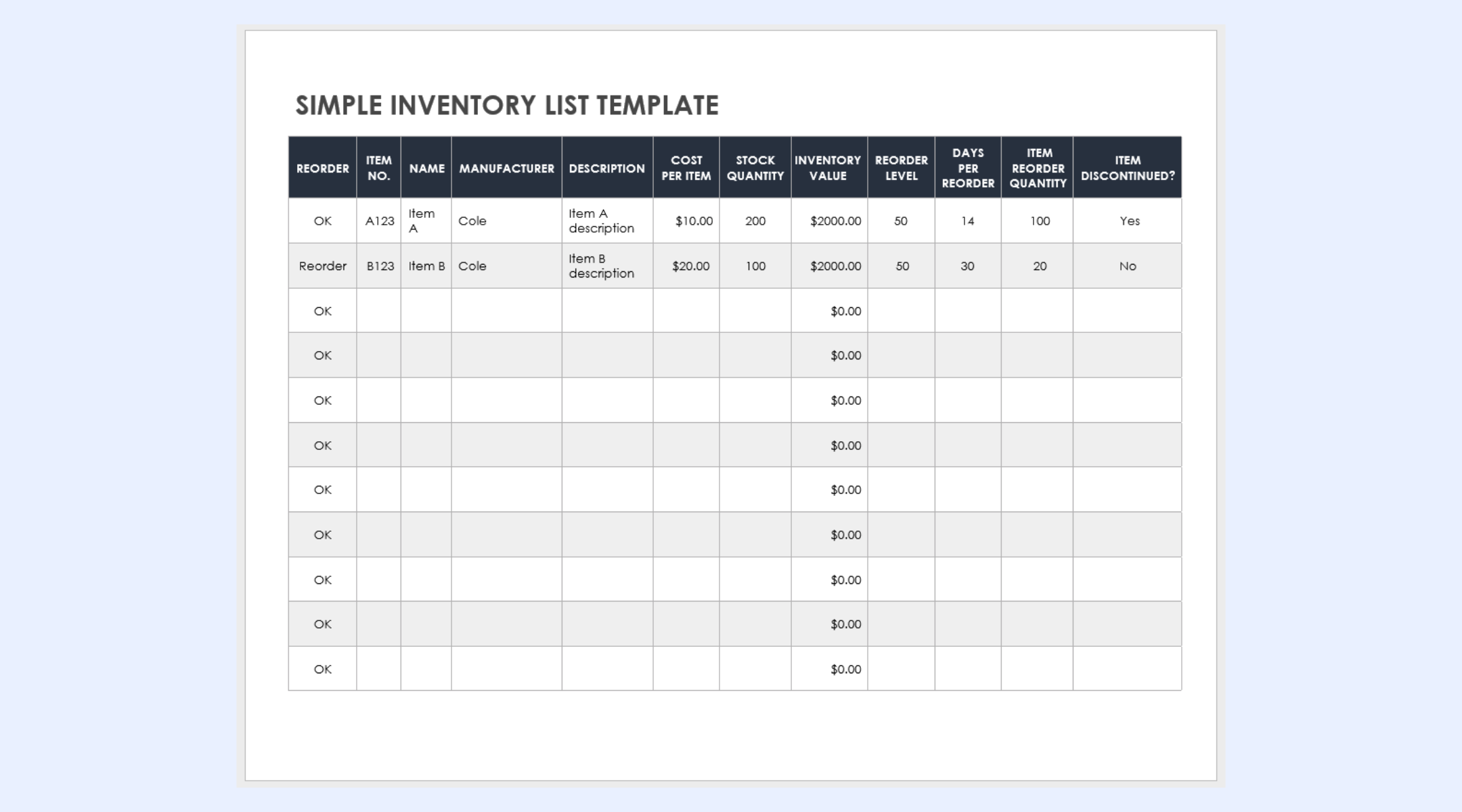
Image source: smartsheet.com
Inventory with barcode scanner
Barcode-enabled spreadsheet templates add speed to inventory updates. Items are scanned using external devices and logged into the spreadsheet. This reduces manual typing and improves accuracy during stock counts. However, barcode workflows still rely on manual file management and lack real-time synchronization.
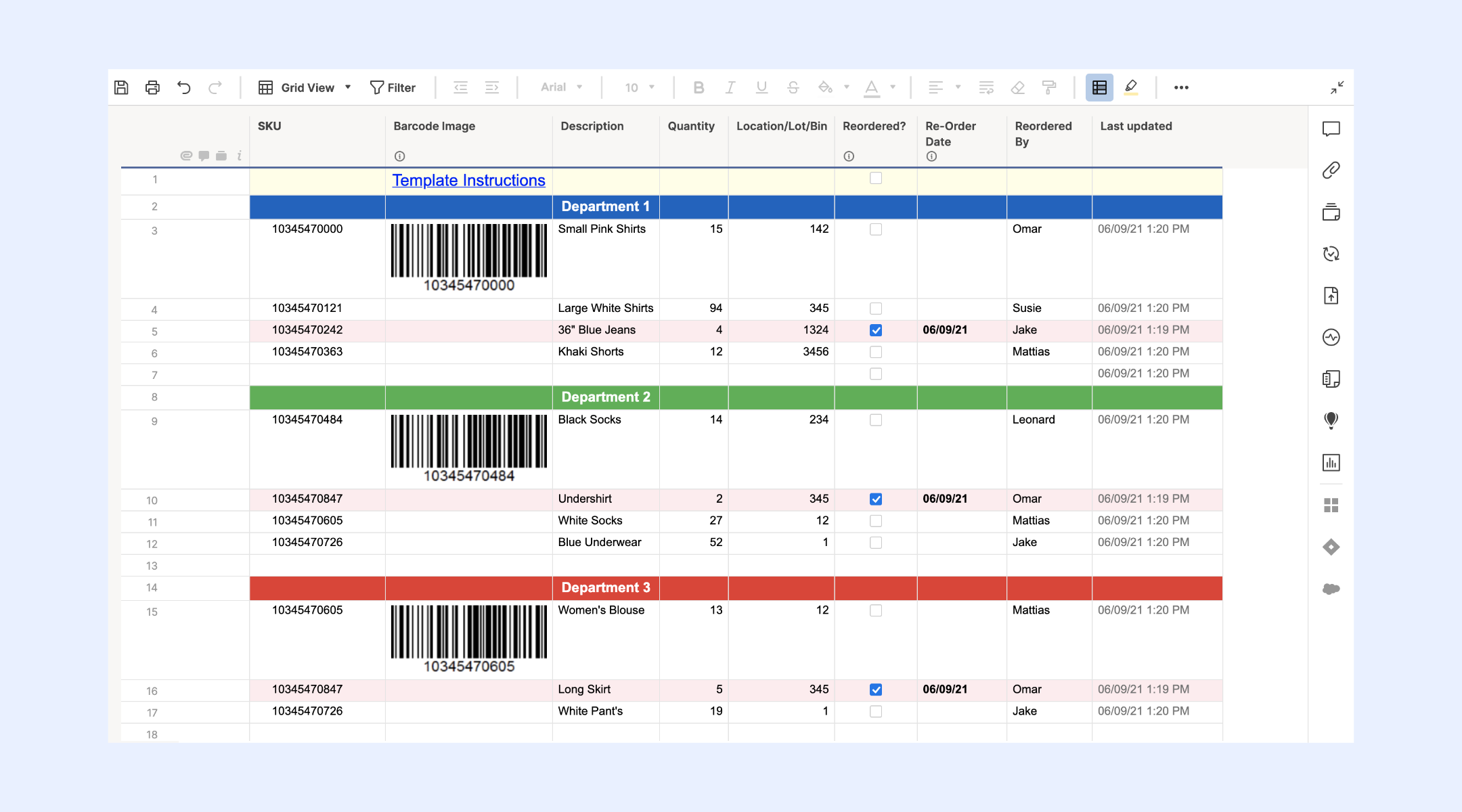
Image source: smartsheet.com
Warehouse inventory spreadsheet layout
Warehouse inventory spreadsheet layouts support higher item volumes and multiple storage locations. They often include bins, zones, and movement notes. These templates help teams organize large inventories on a single sheet. As activity increases, maintaining accuracy becomes harder without automated updates.
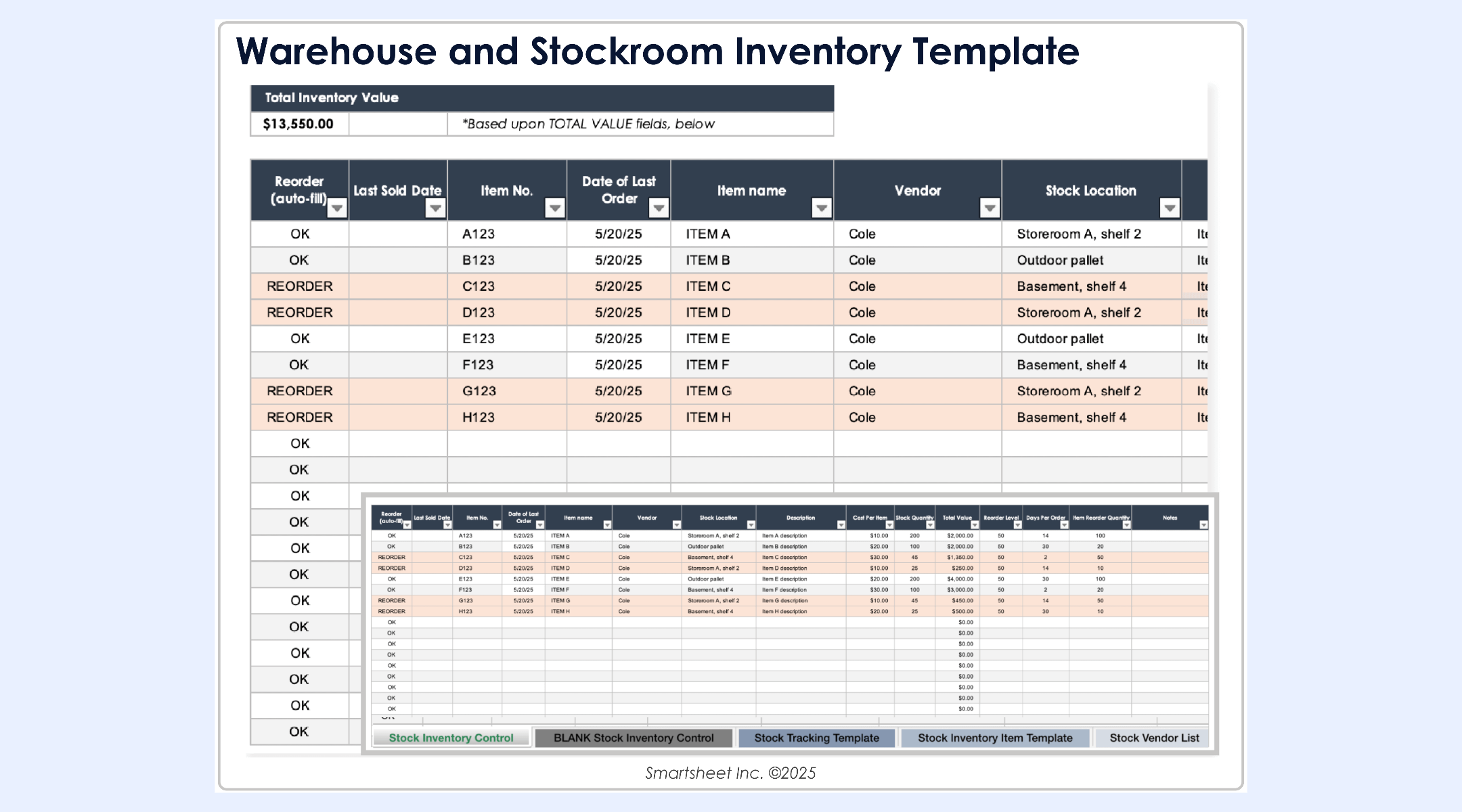
Image source: smartsheet.com
Office asset inventory template
Office asset inventory templates track non-consumable items such as laptops, furniture, and tools. They usually include ownership, condition, and purchase details. Teams use them to support audits and asset reviews. Over time, managing frequent changes manually can slow operations.
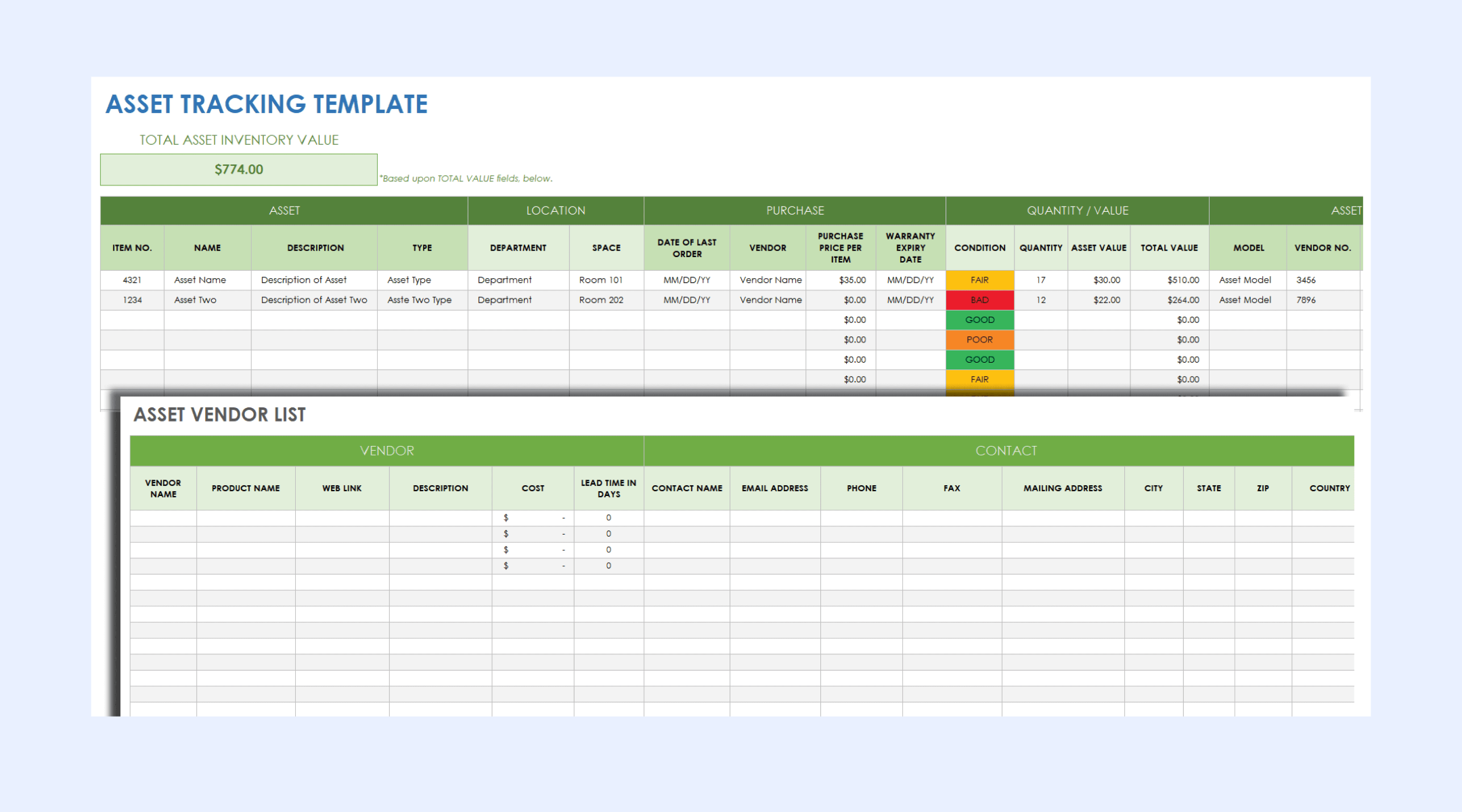
Image source: smartsheet.com
Retail stock inventory spreadsheet
Retail stock inventory spreadsheets focus on sellable products and turnover. They often include SKU codes, pricing, and sales-related fields. Retail teams rely on frequent updates to avoid stockouts. Spreadsheet-based retail tracking struggles during peak sales periods.
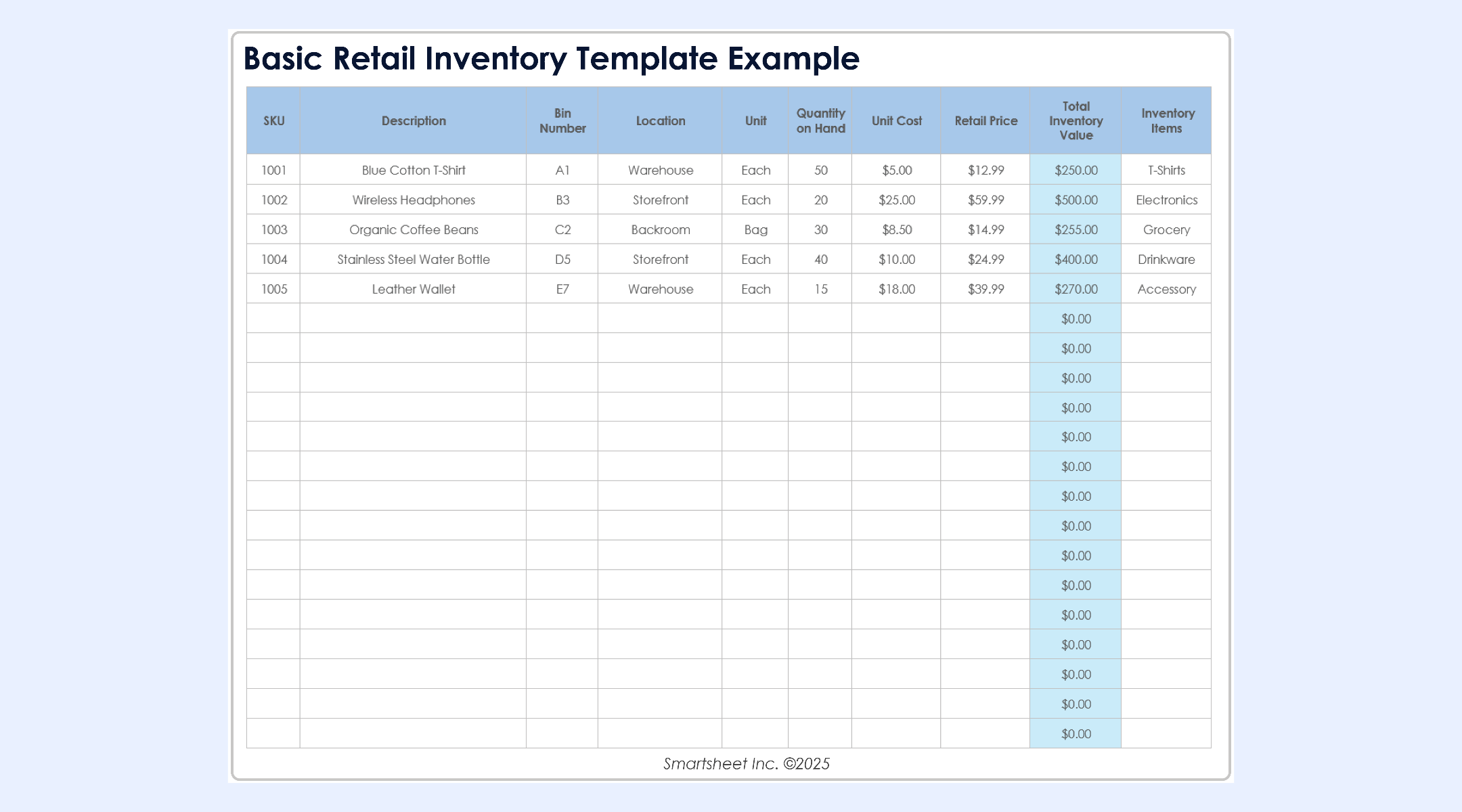
Image source: smartsheet.com
Lark: Beyond when teams outgrow spreadsheet-based inventory tracking
becomes relevant once teams begin to feel the constraints of spreadsheet-driven inventory workflows. Instead of juggling files and manual updates, Lark offers a structured workspace with database-style tables, , , and built-in communication. This setup makes it easier to manage larger product catalogs, reduce errors, and move faster. Teams that start with a Google Sheets inventory management system often shift to Lark when they need greater structure, consistency, and reliability.
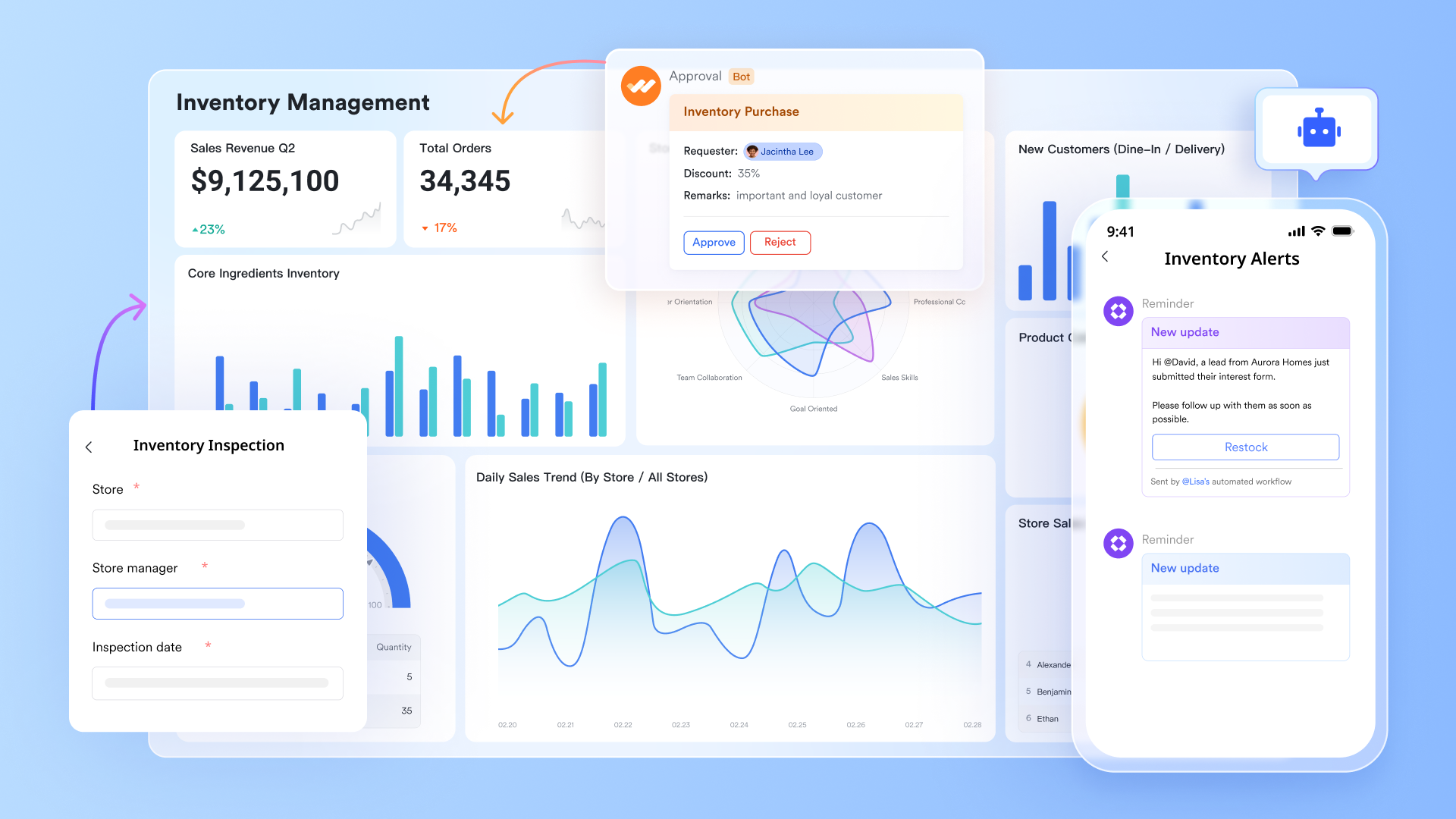
Powerful inventory management with linked tables and flexible fields
Lark Base streamlines inventory management by organizing critical data into specialized tables—such as product catalogs, live stock levels, and order records—while linking them to ensure total accuracy without data duplication. This relational structure maintains consistency across the entire system, allowing each department to focus on its specific operational tasks within a unified database. These core capabilities are further enhanced by specialized fields and views. Lookup fields provide instant visibility by pulling real-time stock quantities directly into product or order records, while barcode fields transform mobile devices into scanners for rapid receiving and cycle counts. For physical organization, inventory is tracked through option fields, enabling teams to use custom views, like or Gallery views, to filter, group, and manage stock. 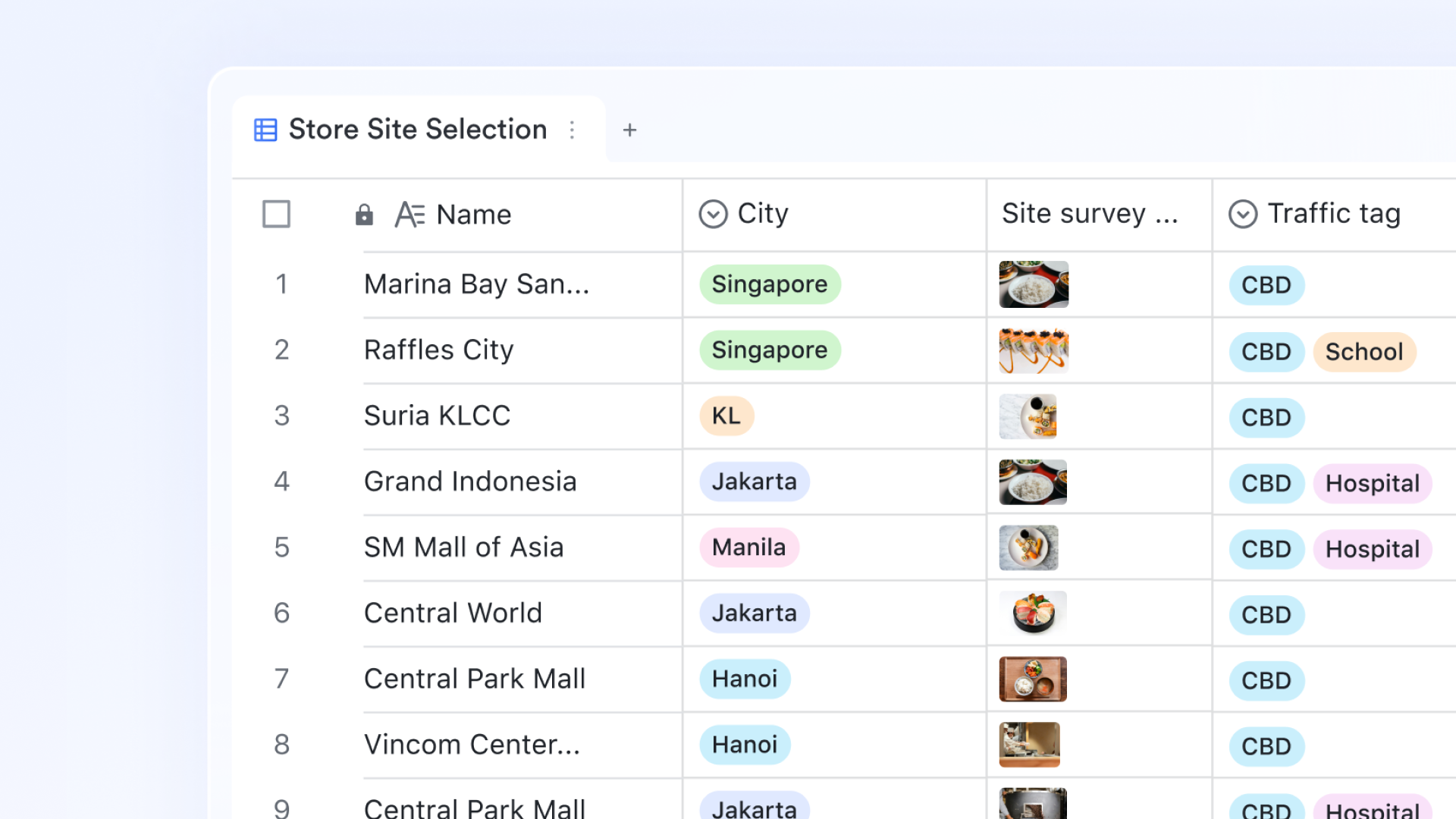
Real-time stock visibility and reporting through dashboards
Lark Base dashboards provide immediate insight into inventory performance and stock health. Metric blocks display key indicators such as available stock, low-inventory items, and order volume, updating automatically as data changes. For deeper analysis, dashboards support around 36 block types, including pivot tables that summarize trends, calculate totals, and surface patterns across inventory data. This allows teams to make informed decisions around replenishment, purchasing, and stock optimization without manual reporting. 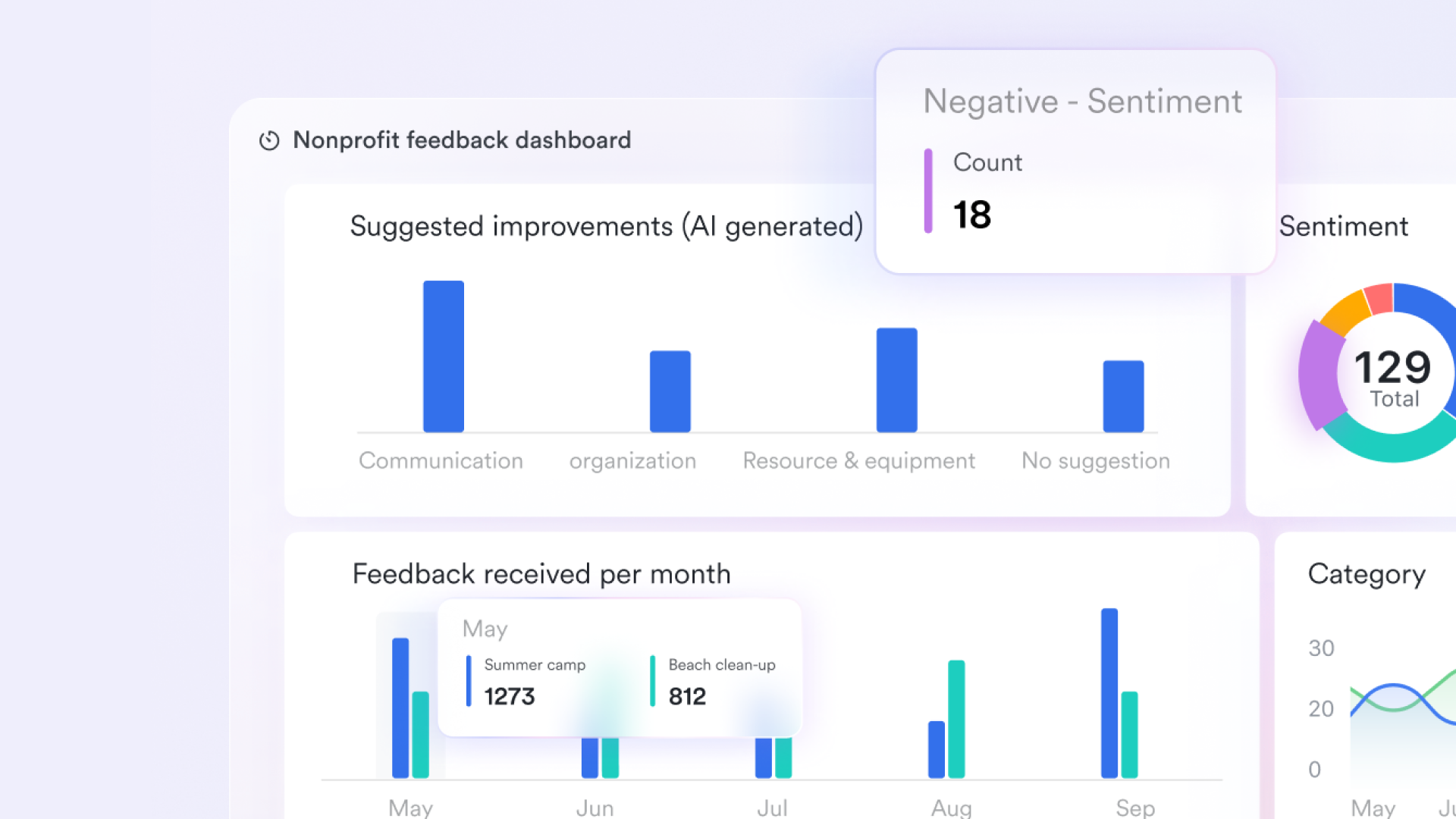
Automated workflows for low-stock alerts and order handling
Lark Base workflows help automate routine inventory actions, including low-stock notifications and reorder processes. Users can define triggers, such as inventory falling below a reorder threshold, and apply conditional logic using IF/Else steps. Once triggered, workflows can create new purchase records, notify procurement teams through , or pass data to external systems through HTTP requests. This automation reduces delays, ensures timely responses, and keeps inventory processes running consistently. 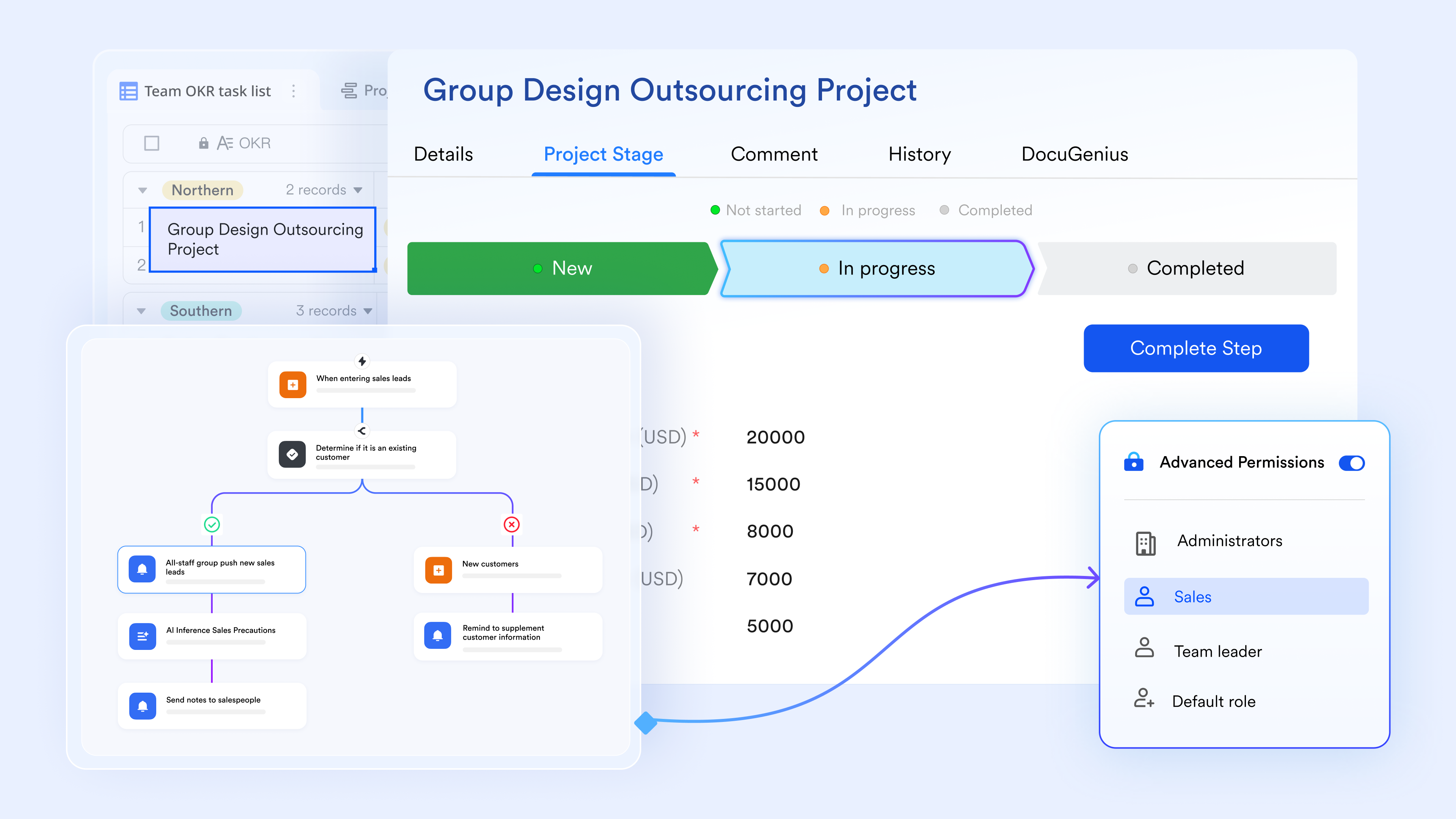
Clear accountability for inventory-related actions
Lark Tasks makes ownership visible by assigning responsibilities for stock checks, reorder reviews, and supplier follow-ups. Each task includes due dates and progress status, helping teams stay aligned on daily and weekly inventory activities. This level of accountability is especially valuable for teams transitioning away from spreadsheet-based systems, where responsibilities are often unclear or overlooked. 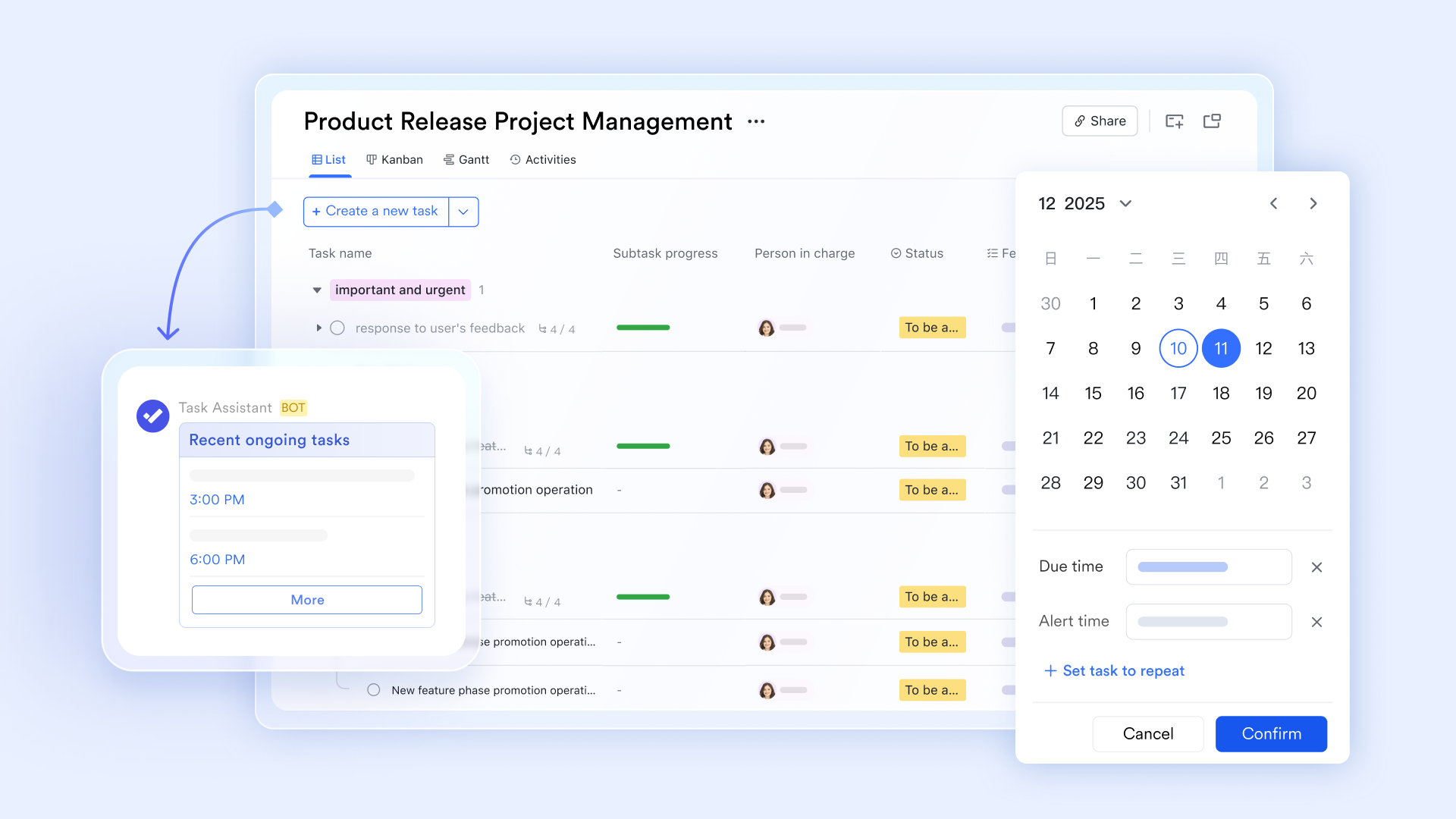
Faster and more focused inventory communication
enables around stock updates, delivery delays, and order confirmations. Conversations remain organized using groups and threads, preventing important details from getting lost. Teams can share photos, files, and quick updates directly within conversations, reducing the back-and-forth typically required when inventory tracking relies on spreadsheets and manual follow-ups. 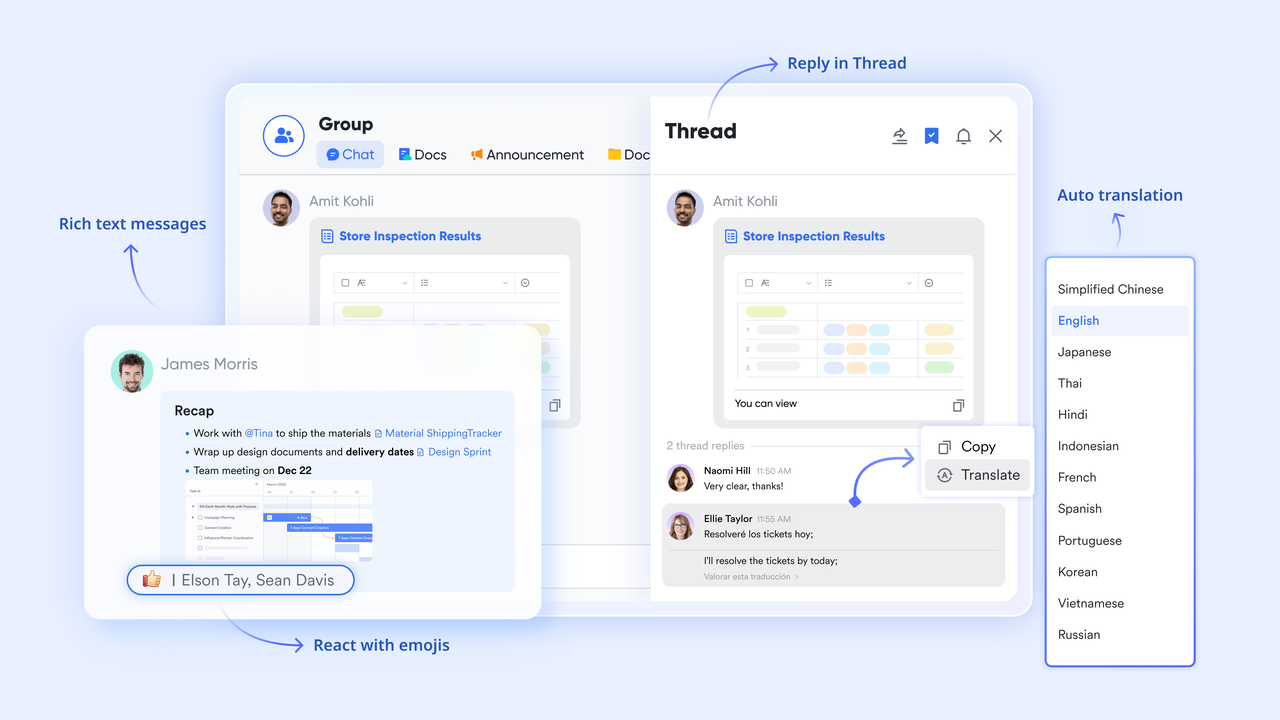
:
- Starter plan: Free forever plan that includes 11 powerful tools for up to 20 users. It also comes with 100GB of storage, 1000 automation runs, AI translations, and more.
- Pro plan: $12/user/month (billed annually) for up to 500 users. It includes everything in Starter plus group calling for up to 500 attendees, 15TB of storage, 50,000 automation runs, and more.
- Enterprise plan: for custom pricing. Supports unlimited users and includes even more automation runs and advanced security, compliance, and management features.
For small teams with simple communication needs

18 months message history
1000 Base automation runs/month
2000 rows per table in Base
Most POPULAR
For companies with comprehensive collaboration and management needs
Unlimited message history
500-participant video meetings
50k Base automation runs/month
20k rows per table in Base
For large companies with advanced security and organizational management needs
Get a personalized demo and pricing
Unlimited message history
500-participant video meetings
15 TB storage + 30 GB storage/user
500k Base automation runs/month
50k Base automation runs/month
Most POPULAR
For companies with comprehensive collaboration and management needs
Unlimited message history
500-participant video meetings
50k Base automation runs/month
20k rows per table in Base
Types of inventory list templates by use case
Different operations require different inventory tracking approaches. Inventory list templates are often customized based on how inventory is used, stored, and replenished.
- Basic inventory list templates: Basic inventory list templates focus on simplicity and accessibility. They are commonly used by small teams or early-stage businesses that need a quick way to track items. These templates typically include item name, quantity, and location fields. They are easy to maintain but rely heavily on manual updates. As inventory volume increases, basic templates can become harder to manage accurately.
- Warehouse inventory list templates: list templates support larger volumes and multiple storage locations. They often include bin numbers, zones, and batch tracking fields. These templates help warehouse teams manage inbound and outbound stock. However, spreadsheet-based warehouse templates struggle with real-time updates when multiple users are involved simultaneously.
- Office and asset inventory templates: Office and templates track non-consumable items such as laptops, furniture, and tools. They often include asset condition, assigned owner, and purchase date. These templates improve accountability and support audits. Over time, managing asset changes manually becomes time-consuming without structured workflows.
- Retail stock inventory templates: templates focus on sellable products and turnover. They often include pricing, SKU codes, and sales-related notes. Retail teams rely on frequent updates to avoid stockouts. Spreadsheet-based retail templates can lag behind actual sales activity, especially during peak periods.
Start organizing inventory more clearly
Conclusion
Inventory list templates remain essential tools for organizing stock and maintaining visibility. Many teams rely on inventory list excel spreadsheet templates and Microsoft templates inventory list formats to get started quickly. These approaches work well in the early stages, especially when inventory volumes are low and collaboration is limited.
As operations grow, the limitations of templates for inventory list tracking become clearer. Manual updates, version conflicts, and a lack of automation slow teams down. This is where structured systems gradually replace static files.
supports this transition by offering flexible inventory templates, real-time collaboration, and automation without overwhelming teams. Instead of abandoning familiar processes overnight, teams evolve their inventory management step by step. The result is better accuracy, faster decisions, and that scale with the business.
Build scalable inventory workflows using Lark
FAQs
Are inventory list templates suitable for small teams
Yes. Inventory list templates work well for small teams with limited stock and straightforward . Many teams begin with an inventory list Excel spreadsheet template because it is easy to access and requires minimal setup. These templates help establish basic inventory discipline early on. As inventory volume or team size increases, some teams start adding structure using tools like Lark to keep data consistent without changing familiar workflows.
What is the difference between inventory list templates and inventory software
Inventory list templates are static formats designed for manual data entry and periodic updates. Inventory software supports real-time updates, automation, and structured collaboration across teams. Templates for inventory list tracking work well on smaller scales. When accuracy, speed, and coordination become critical, platforms such as Lark provide a more structured way to manage inventory without relying on manual updates.
Can Microsoft templates inventory list files scale for large businesses
Microsoft templates inventory list files can support basic inventory tracking in growing teams. However, they struggle with scale as users, locations, and transactions increase. Version control issues and delayed updates become common over time. Large businesses often move toward structured systems like Lark to maintain consistency while supporting more complex inventory workflows.
When should teams stop using inventory list Excel spreadsheet templates
Teams usually reconsider the inventory list Excel spreadsheet templates when manual work increases significantly. Frequent errors, delayed updates, and conflicting file versions signal growing complexity. challenges also become more visible across departments. At this stage, teams often explore structured inventory platforms such as Lark to reduce friction and improve reliability.
Do modern inventory tools replace templates entirely
Not immediately. Many modern inventory tools are designed around familiar template concepts to ease adoption. The main difference lies in automation, visibility, and data consistency rather than layout alone. Tools like Lark allow teams to transition gradually, keeping familiar structures while gaining better control and scalability.
Related reading