If you've ever tried to figure out Microsoft 365 pricing for your business, you probably know the frustration. There are so many different plans (with or without Teams, with and without Copilot). Even worse, you won't be able to find all of the available plans on the official pricing page.
In this guide, we'll break down all the Microsoft 365 plans for businesses, including the hard-to-find ones, with clear comparisons across Business, Enterprise, and Copilot options, plus plain-language features and real use-case recommendations for teams of every size.
What's new in 2026
Microsoft introduced major price updates across almost all editions that go into effect July 1, 2026. Key changes include:
- Business plans go up: Business Basic rises 16% to $7 and Business Standard rises 12% to $14 per user/month, while Business Premium holds at $22.
- Enterprise plans go up: Office 365 E3 rises 13% to $26 and Microsoft 365 E5 rises 5% to $60 per user/month, with other E-tiers climbing 5–8%.
- Frontline see sthe steepest jumps: Microsoft 365 F1 rises 33% to $3 and F3 rises 25% to $10 per user/month.
- More value bundled in: Business plans gain +50GB mailbox storage, URL time-of-click protection, and Copilot Chat enhancements, while Enterprise plans add security tools like Defender for Office P1 and Security Copilot at no extra cost.
- Nonprofit and Government track commercial rates: Nonprofit pricing keeps a fixed 60–75% discount, and Government increases mirror commercial ones, though hikes above 10% are phased in over multiple years.
What is Microsoft 365?
Image source: microsoft.com
Chances are you already know Microsoft 365 even if the name feels new. The office suite grew out of Microsoft Office, the same Word, Excel, PowerPoint, and Outlook that have sat on office computers since the late 1980s, and it later became Office 365 when Microsoft moved everything to the cloud in 2011. The Microsoft 365 name arrived in 2020, when the company folded in Teams, security tools, and device management to signal a package much bigger than the classic powerful productivity apps. Today most business users spend their workday inside at least one part of it, so for a small business or a medium-sized business the real question is rarely whether to use it but which 365 plan fits.
Note: This guide covers the business and enterprise tiers. For home use, Microsoft 365 Personal and Microsoft 365 Family are separate consumer subscriptions that fall outside this comparison.
Overview of Microsoft 365 plans and pricing (Latest prices in 2026)
Microsoft 365 Business plans (with Teams)
Microsoft 365 Business plans (without Teams)
Microsoft 365 Enterprise plans (with Teams)
Microsoft 365 Enterprise plans (without Teams)
Pricing is current as of July 8, 2026, but may be subject to change. Check the Microsoft 365 website for the latest updates.
Microsoft 365 pricing plans explained
Digging into every Microsoft 365 business plan with and without Teams would make this article extremely long and impractical. To keep things useful, we will focus only on the plans that include Teams, since those unlock the full benefit of the Microsoft ecosystem.
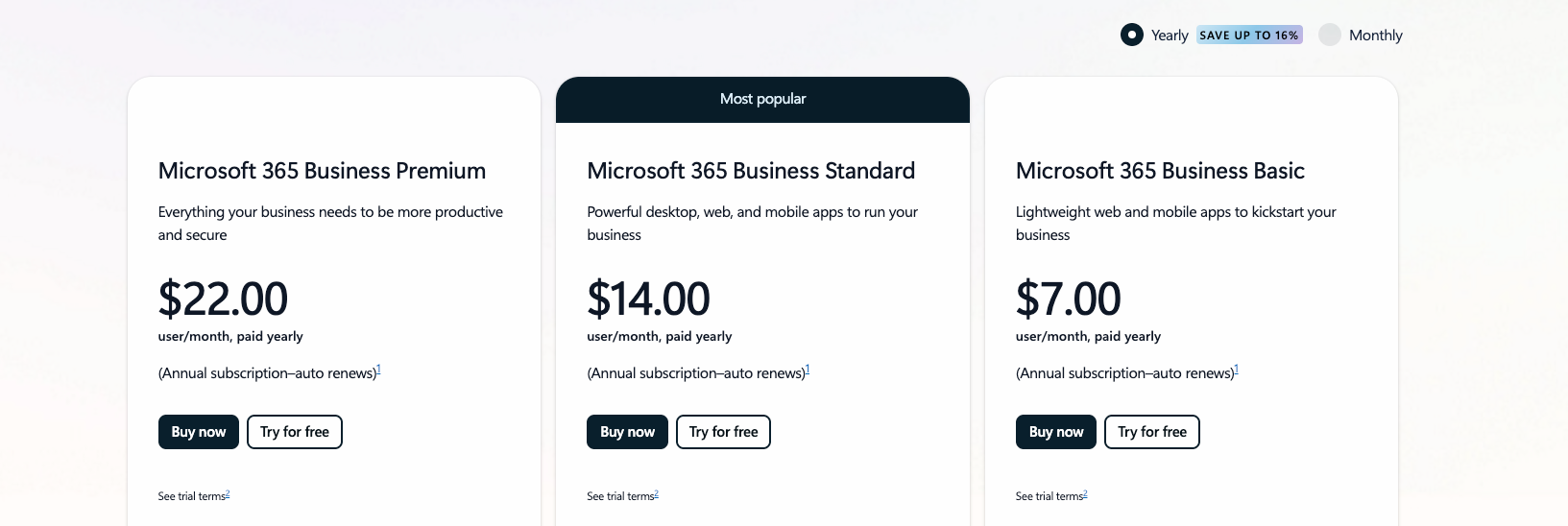
Image source: microsoft.com
Which Microsoft 365 business plan is right for you?
Microsoft 365 Business Basic
Cost: $6/user/month (billed annually) or $7.20/user/month (billed monthly)
Ideal for: Small teams and startups that want essential communication and productivity tools at the lowest entry price.
Business Basic covers the fundamentals for a connected team without asking anyone to install software. Everyone gets a custom business email, cloud storage, and the web and mobile Office apps, and Teams comes fully included so chat, video meetings, and file collaboration happen in one place. The tier supports up to 300 users, which leaves plenty of room to grow.
- Web and mobile Office apps: Word web and mobile, Excel web and mobile, PowerPoint web and mobile, and OneNote web and mobile versions, plus Outlook, with real-time co-editing and autosave. Desktop app availability starts at the Standard tier, and exact features vary by plan.
- Custom business email: Professional email through Exchange Online on your own domain, plus shared calendars and contacts.
- 1 TB of cloud storage per user: Secure cloud storage with version history and access from any device.
- Microsoft Teams: Chat, video meetings, and collaboration built into the plan.
Microsoft 365 Business Standard
Cost: $12.50/user/month (billed annually) or $15/user/month (billed monthly)
Ideal for: Growing businesses and customer-facing teams that need full desktop Office plus content and webinar tools.
Business Standard builds on everything in Basic and adds the full desktop versions of Office, so people can work offline and lean on advanced features like complex Excel formulas. The tier also brings creative and coordination tools that suit teams producing content or running events, and Teams remains fully included for meetings and shared workspaces.
- Desktop Office apps: Installed Word, Excel, PowerPoint, and Outlook that each person can run on multiple devices, including mobile devices, rather than being tied to one computer, with offline editing and advanced formatting.
- Microsoft Loop: Shared real-time workspaces where pages and components stay synced across apps.
- Clipchamp: Easy video editing for training clips, social content, and marketing videos.
- Webinars: Built-in hosting with registration pages and attendee reporting.
Microsoft 365 Business Premium
Cost: $22/user/month (billed annually) or $26.40/user/month (billed monthly)
Ideal for: Organizations that handle sensitive data or work across many devices and need enterprise-grade security without moving to enterprise licensing.
Business Premium delivers the complete productivity suite from Standard and layers on advanced security and device management. The tier fits hybrid teams and regulated industries that want strong protection and identity controls alongside full collaboration through Teams.
- Endpoint protection: Microsoft Defender for Business with next-gen antivirus and automated response across Windows, macOS, iOS, and Android.
- Identity and access controls: Conditional Access, multi-factor authentication, single sign-on, and identity risk scoring through Entra ID.
- Cybersecurity layers: Email threat protection, ransomware recovery, data loss prevention, and information governance.
Which Microsoft 365 enterprise plan is right for you?
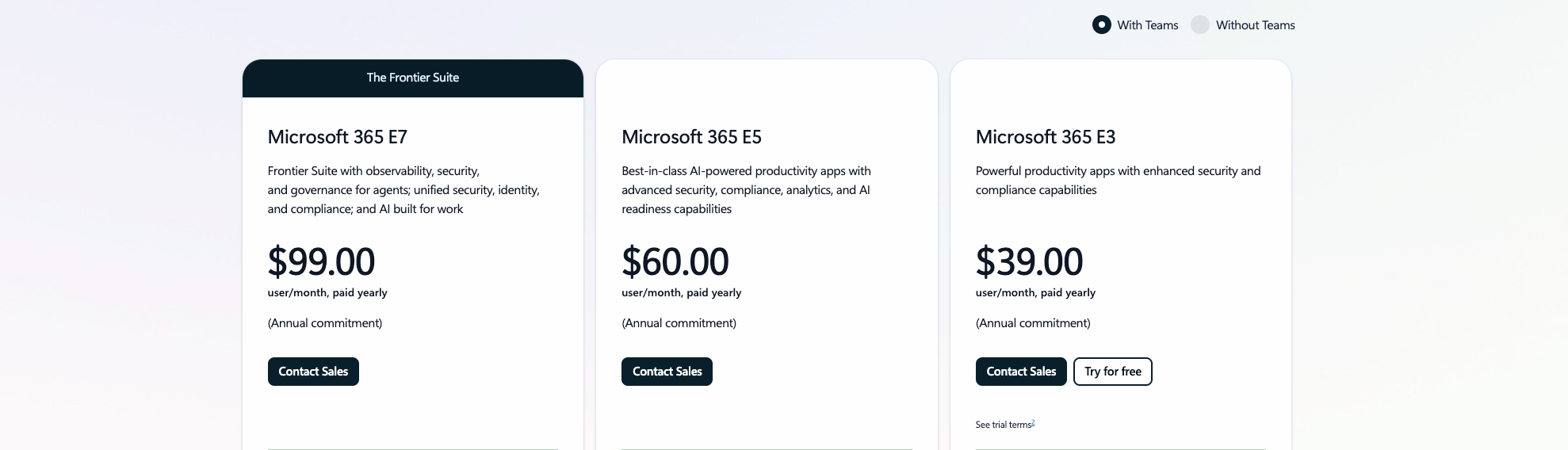
Image source: microsoft.com
Office 365 E1
Cost: $10/user/month (billed annually) or $12/user/month (billed monthly)
Ideal for: Large organizations that mainly need web-based apps, email, and Teams without desktop installs.
Office 365 E1 gives enterprise teams cloud productivity at the lowest entry point. Everyone gets the web and mobile Office apps, enterprise email, and Teams, which suits deskless and frontline staff who work primarily in the browser.
- Web and mobile Office apps: Word, Excel, PowerPoint, and Outlook online with real-time co-editing.
- Enterprise email: Exchange Online mailboxes with large storage and admin controls.
- 1 TB OneDrive and SharePoint: Cloud storage and intranet sites with version control.
- Microsoft Teams: Chat, meetings, and collaboration built in.
Office 365 E3
Cost: $23/user/month (billed annually) or $27.60/user/month (billed monthly)
Ideal for: Enterprises that need full desktop Office plus compliance and archiving, but not the top security stack.
Office 365 E3 adds the installed desktop apps and a solid layer of compliance and information protection on top of everything in E1. The tier fits knowledge workers who need offline editing and organizations with retention and eDiscovery requirements.
- Desktop and web Office apps: Installed Word, Excel, PowerPoint, and Outlook plus the online versions.
- Compliance and archiving: Retention policies, eDiscovery, and unlimited email archiving.
- Information protection: Sensitivity labels and basic data loss prevention.
- Microsoft Teams: Full communication and collaboration suite included.
Office 365 E5
Cost: $38/user/month (billed annually) or $45.60/user/month (billed monthly)
Ideal for: Enterprises that want advanced security, analytics, and voice on top of the full Office suite.
Office 365 E5 rounds out the Office family with advanced threat protection, analytics, and cloud calling. The tier suits organizations that want the richest Office 365 capabilities without stepping up to the Microsoft 365 identity and device stack.
- Advanced threat protection: Defender for Office 365 against phishing and malicious links.
- Analytics: Power BI Pro and workplace insights.
- Cloud voice: Audio conferencing and Phone System for Teams calling.
- Compliance: Advanced eDiscovery, auditing, and data loss prevention.
Microsoft 365 E3
Cost: $36/user/month (billed annually) or $43.20/user/month (billed monthly)
Ideal for: Enterprises that want Office plus Windows and enterprise mobility and security in one license.
Microsoft 365 E3 combines the full Office 365 E3 productivity set with Windows Enterprise and the Enterprise Mobility and Security suite. The tier gives IT a single license that covers apps, operating system, and device management.
- Office and Windows Enterprise: Desktop and web apps plus Windows 11 Enterprise.
- Device management: Microsoft Intune for endpoint and mobile management.
- Identity controls: Entra ID Premium P1 with Conditional Access and multi-factor authentication.
- Microsoft Teams: Full communication and collaboration suite included.
Microsoft 365 E5
Cost: $57/user/month (billed annually) or $68.40/user/month (billed monthly)
Ideal for: Enterprises in regulated industries needing the most complete security, compliance, and analytics.
Microsoft 365 E5 is the top standard tier, bundling everything in E3 with advanced security, identity governance, compliance, and voice. The tier fits organizations that need zero-trust protection and the deepest analytics without add-ons.
- Advanced security: Microsoft Defender across identities, endpoints, and cloud apps.
- Identity governance: Entra ID Premium P2 with risk-based access and privileged identity management.
- Compliance: Advanced eDiscovery, insider risk management, and information governance.
- Analytics and voice: Power BI Pro plus audio conferencing and Phone System.
Microsoft 365 E7 (Frontier Suite)
Cost: $99/user/month (billed annually) or $118.80/user/month (billed monthly)
Ideal for: Large enterprises that want the full Microsoft 365 E5 stack combined with AI and next-generation identity in one bundle.
Microsoft 365 E7, part of Microsoft's Frontier Suite, brings everything in E5 together with Microsoft 365 Copilot, Agent 365, and the Entra Suite. The tier targets organizations investing heavily in AI-driven productivity and advanced identity security at scale 1.
- Everything in Microsoft 365 E5: Full productivity, security, compliance, and voice.
- Microsoft 365 Copilot: AI assistance across the apps.
- Agent 365: Management for AI agents across the organization.
- Entra Suite: Advanced identity and network access security.
Copilot shows up as a bundled piece of E7, but any business or enterprise plan can add it, so it is worth a closer look on its own.
Microsoft 365 Copilot: the built-in AI companion
Microsoft 365 Copilot is the AI companion built into the apps, and Microsoft Copilot brings the same help to chat and search. Copilot features include drafting in Word, analyzing data in Excel, building decks in PowerPoint, and surfacing Power BI insights in plain language. A premium subscription is required because Copilot is an add-on to a qualifying Microsoft 365 business plan rather than a free version.
Why Lark offers a simpler alternative to Microsoft 365
Microsoft 365 delivers a robust set of apps. Still, the experience often feels spread across many separate tools—Teams for chat, OneDrive for storage, Outlook for email, Planner for tasks, SharePoint for knowledge, Loop for collaboration, Bookings for appointments, and more. This creates higher cost layers, more configuration steps, and a steeper learning curve for everyday users.
takes a different approach by providing teams with a unified workspace where communication, , data, tasks, and workflows all operate in a single, seamless environment. Here is a deeper look at Lark's core advantages and how they compare to Microsoft 365.
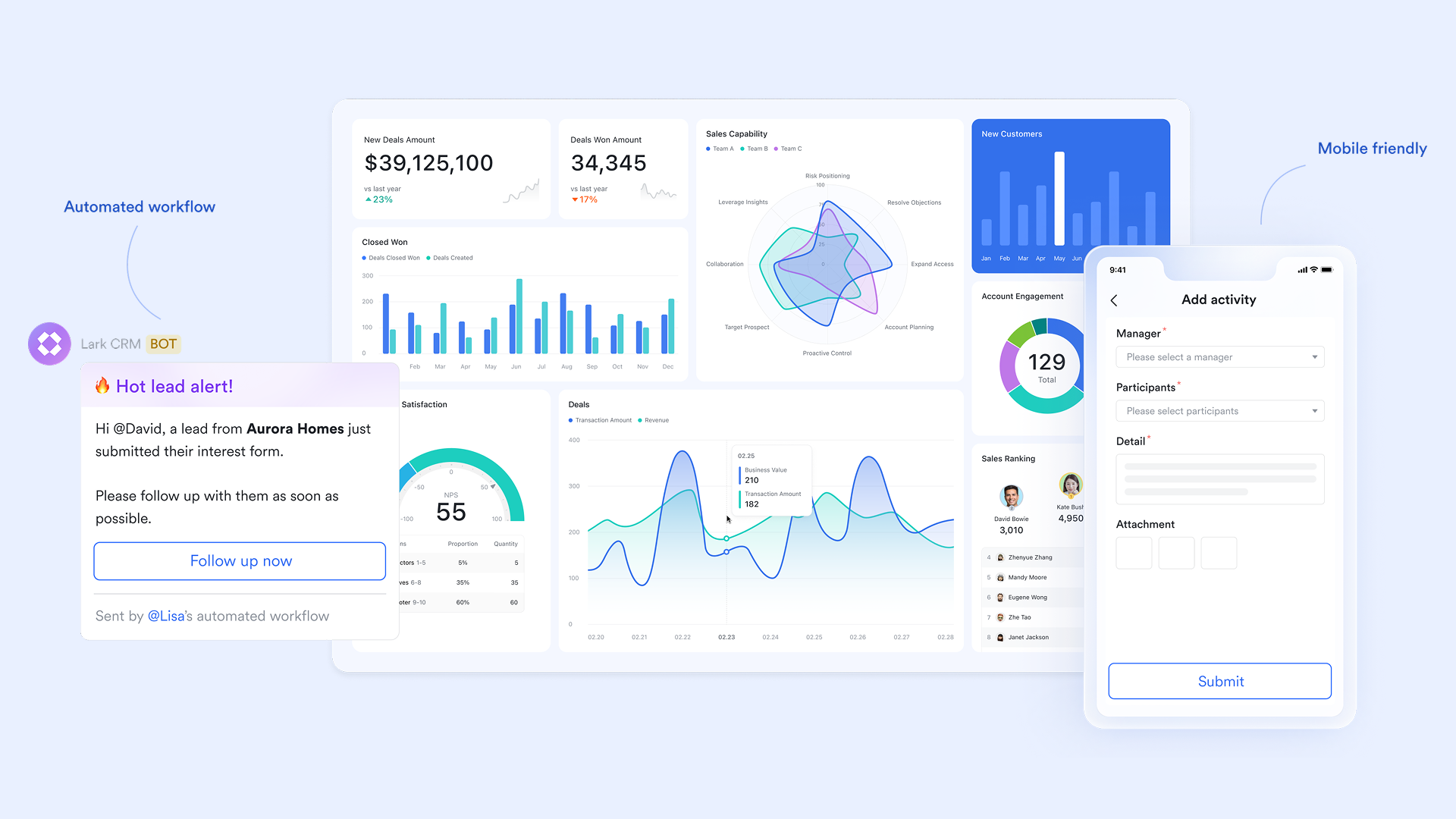
Lark Base: Structured data, workflow rules, and automation built in
is a versatile data management platform within Lark that allows users to create and manage databases in the form of tables. Each base consists of multiple tables, where columns are called fields and rows are called records. Base also offers features like multiple views for presenting data and built-in automation to streamline daily tasks.
Rules and automation let teams streamline daily tasks—like sending alerts or updating records—so operations run more smoothly. Views provide visual organization of data, making it easier to manage and track progress. And because no coding is required, every team member can create and use these tools efficiently.
Lark Base combines database and workflow builder capabilities, making it ideal for content production, HR, finance operations, sales operations, and project workflows. Its drag-and-drop builder allows anyone, even without technical skills, to create interactive business apps and workflows.
Microsoft 365 comparison:
- Microsoft relies on Lists, Power Automate, and SharePoint to manage structured data.
- These tools are powerful but require setup, connectors, or admin support.
- Custom workflows often require more profound Power Platform knowledge, which increases complexity.
Why Lark is better: Lark Base keeps data, tables, forms, and automation in one place, enabling everyday teams to build reliable workflows quickly without advanced configuration.
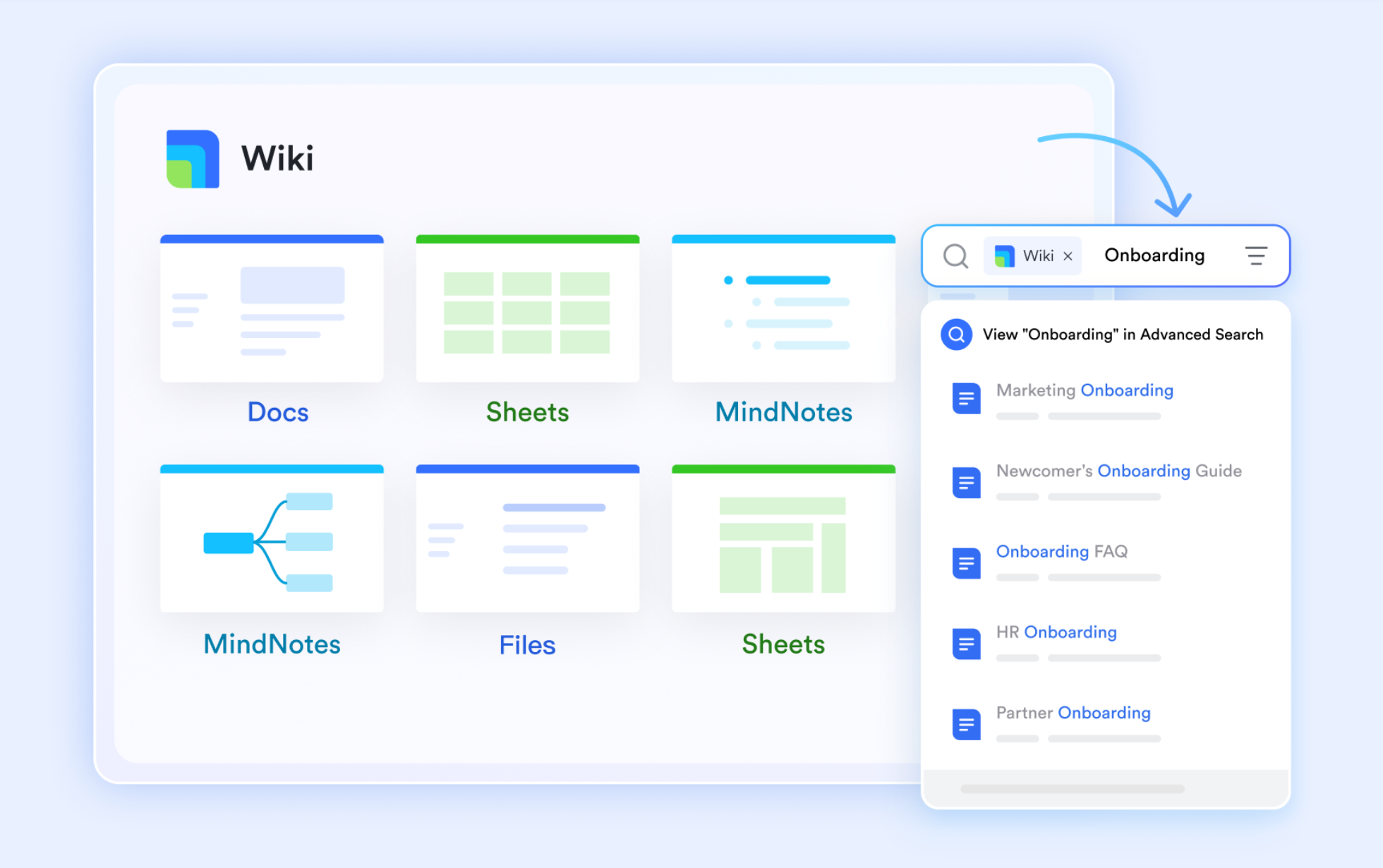
Lark Docs & Lark Wiki: Unified knowledge, real-time collaboration
is the suite of document tools within Lark, including Docs, Sheets, Base, MindNotes, and Slides, allowing you to create, edit, and organize various types of content. It supports real-time editing, comments, AI summaries, and rich media embeds.
is an organizational knowledge management tool. It lets you create dedicated wiki spaces for departments, projects, or personal use, organizing content in a directory tree for easy knowledge sharing and collaboration within your organization. It helps centralize all company knowledge in a clean, easily accessible structure.
With these two, content is always connected to chats, tasks, and projects, so information is never isolated. You can insert tasks directly into Docs, with all tasks managed and tracked in Lark Tasks. The Quick Insert feature lets you embed Docs, Sheets, and other content within a single document for centralized access. Wiki spaces help organize information with directory trees and sub-pages, making documents easy to find, navigate, and share across the team. Microsoft 365 comparison:
- Microsoft splits documentation across Word, OneNote, and SharePoint.
- SharePoint pages often require admin upkeep and feel less intuitive for small or fast-moving teams.
- Knowledge lives in several places, which increases search time and training overhead.
Why Lark is better: Lark keeps documents and knowledge in a single, lightweight system that connects directly with daily work—no separate sites, folders, or hubs needed.
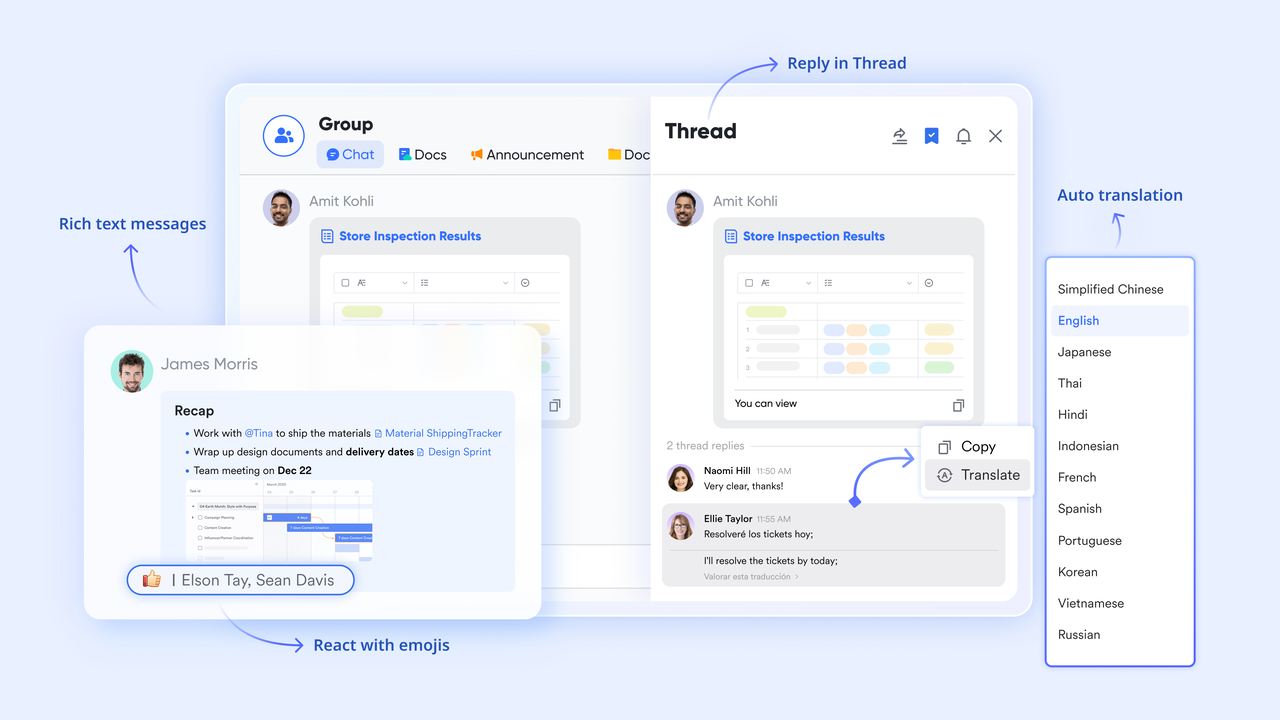
Lark Messenger: Communication with a shared context built in
is a communication tool designed to help you communicate and collaborate with your team. It offers instant messaging features such as sending messages, taking screenshots, adding emojis, organizing chats with filters and labels, and checking if someone has read your message.
Lark Messenger integrates chat, posts, voice messages, and files with related work, allowing users to access Docs, Base tables, Tasks, and Meetings directly from the same chat thread. You can view all chats discussing a specific page using the Related Chats function, making collaboration seamless. Intelligent search and shortcuts boost productivity by helping you quickly find and interact with content. Topic-based channels keep discussions organized, ensuring relevant conversations stay grouped together.
Microsoft 365 comparison:
- Teams handle messaging, but files open in separate windows, and context often gets lost.
- Switching between Teams, SharePoint, Outlook, and OneDrive creates friction.
- Conversation context is separated from documents, workflows, and tasks.
Why Lark is better: connects conversations with structured data, docs, tasks, and meetings—making it easier to move from discussion to execution instantly.
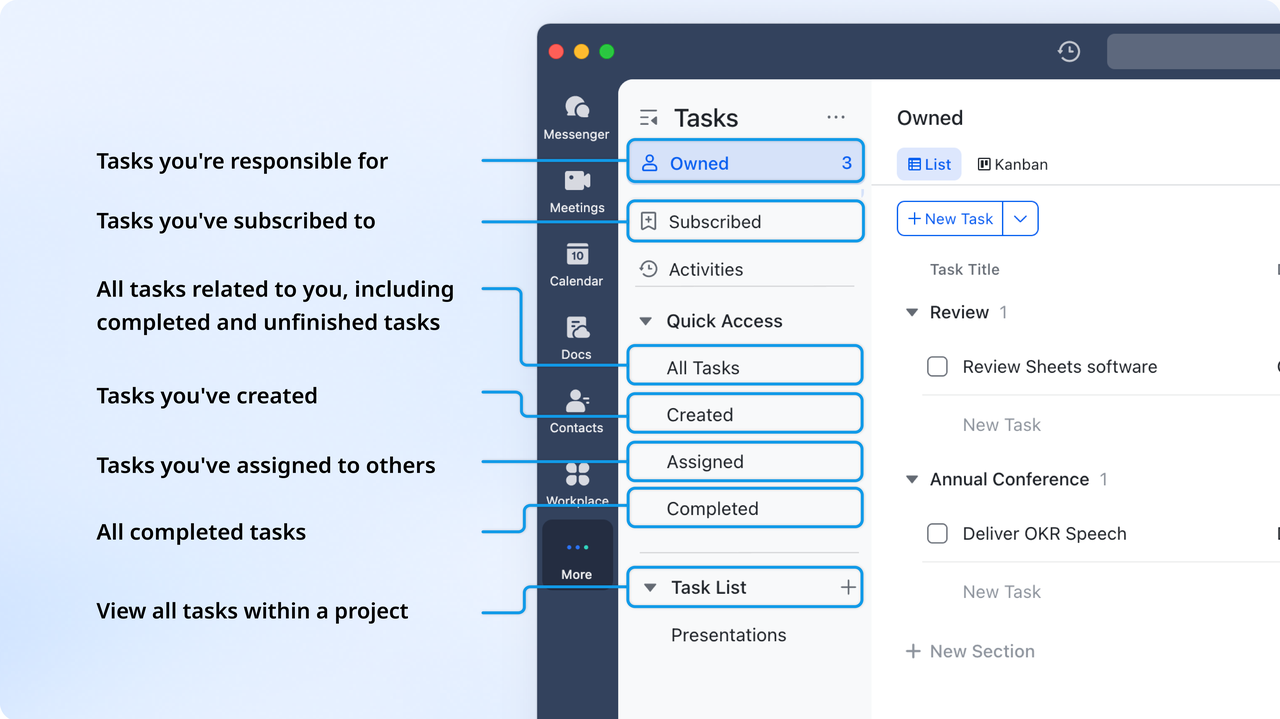
Lark Tasks: Assignments, accountability, and progress tracking
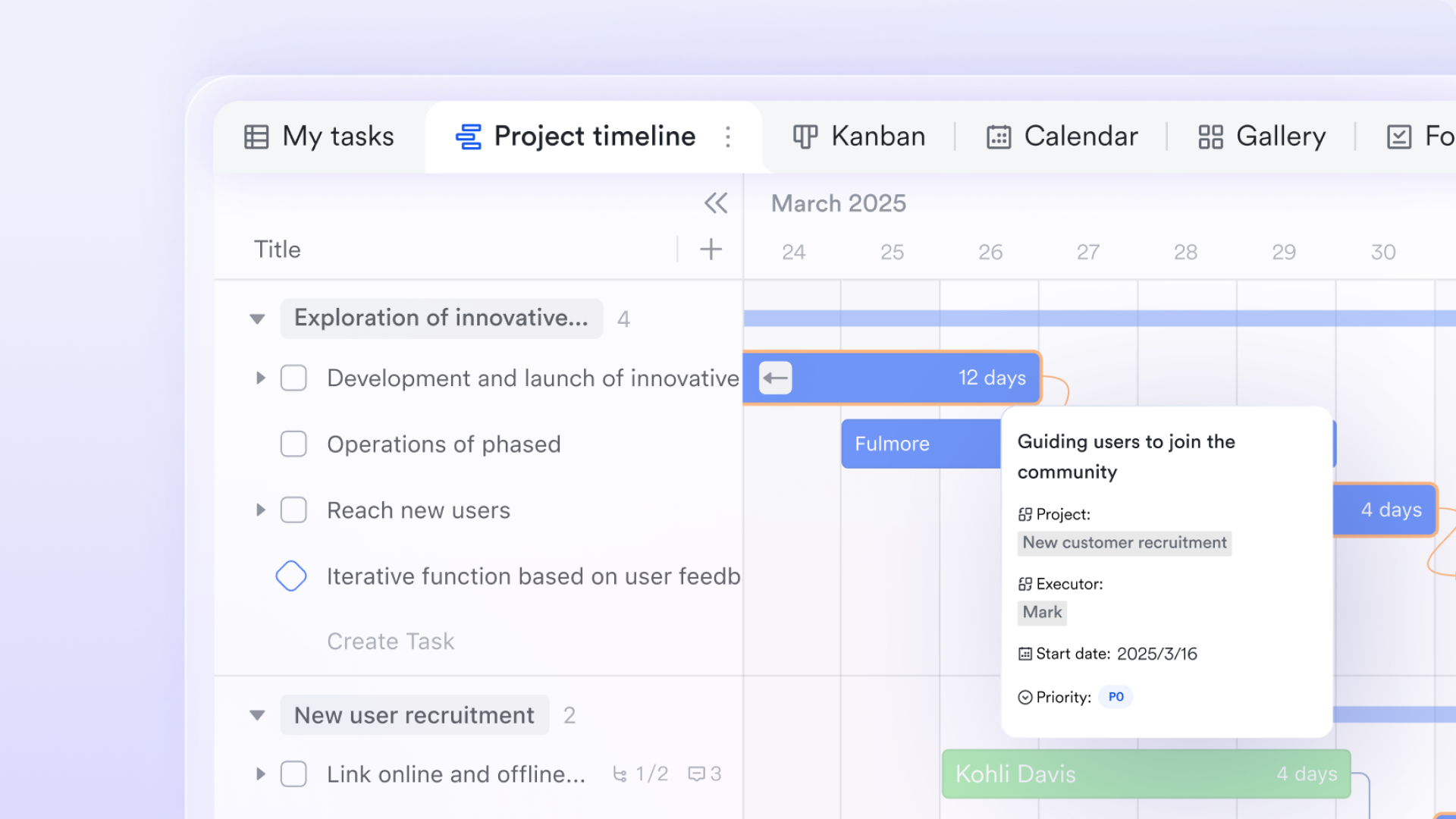
Lark Tasks is a task management tool within Lark that helps teams organize, collaborate, and execute tasks efficiently. It allows users to structure work, break down larger projects into individual steps, and track progress. Tasks can be assigned to specific owners to ensure accountability, with due dates and automated reminders to keep deadlines on track. Progress is easily monitored through status updates in the Activities section, and tasks can be directly linked with Docs, Chats, and Base records for seamless collaboration.
Microsoft 365 comparison:
- Tasks live across Planner, To Do, and Outlook.
- Multiple task systems can confuse teams about where work truly lives.
- Cross-tool visibility is limited unless using additional dashboards.
Why Lark is better: Lark keeps all tasks in one place and attaches them directly to the work context, avoiding scattered to-do lists.
Lark Meetings & Lark Calendar: Seamless team coordination
is a feature that allows you to securely and easily hold audio or video calls, from quick one-on-one meetings to large video events with hundreds of participants.
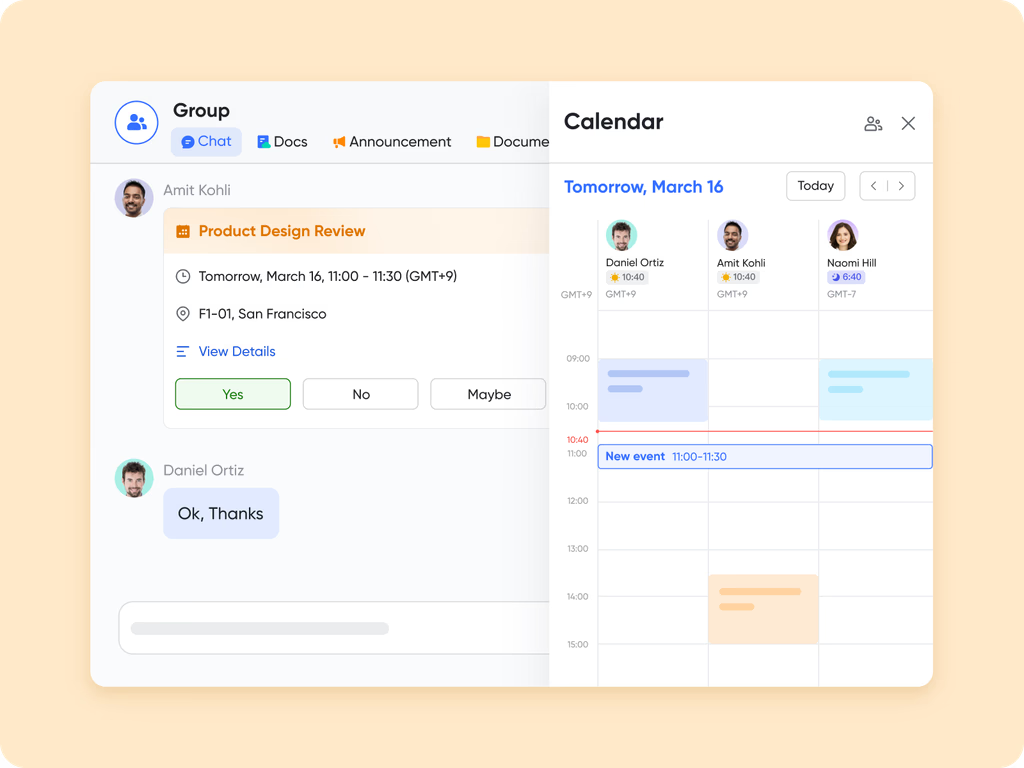
is a tool for scheduling, managing, and sharing events. It helps you find meeting times that work for everyone, create agendas, follow others' calendars, and set up public calendars for your organization.
Lark Meetings can be launched instantly from one-on-one or group chats, as well as from Lark Docs, making it easy to connect without delay. The Lark Calendar syncs with all workspace schedules, letting you set up meetings in just a few clicks and keeping everyone aligned. Everything is integrated within Lark, so you don't need to switch across tabs, enabling seamless collaboration and communication.
Microsoft 365 comparison:
- Meetings live in Teams, email lives in Outlook, and scheduling spreads across calendar layers.
- Users frequently switch between Outlook, Teams, and SharePoint links.
- Context is separated and harder to follow.
Why Lark is better: With everything in one environment—chat, docs, mail, meetings, and data—teams coordinate faster and avoid app-hopping.
Lark Pricing:
- Starter plan: that includes 11 powerful tools for up to 20 users. It also comes with 100GB of storage space, 1000 automation runs, AI translations, and more. No credit card needed.
- Basic plan: (billed annually) for up to 500 users. It includes everything in Starter and unlimited message history, 5TB of storage space, 1,000 automation runs, and more. Some users may need to to purchase this plan.
- Pro plan: (billed annually) for up to 500 users. It includes everything in Basic plus group calling for up to 500 attendees, 15TB of storage space, 50,000 automation runs, and more.
- Enterprise plan: for custom pricing. Supports unlimited users and includes even more automation runs and advanced security, compliance, and management features.
For small teams with simple communication needs

18 months message history
1000 Base automation runs/month
2000 rows per table in Base
Most POPULAR
For companies with comprehensive collaboration and management needs
Unlimited message history
500-participant video meetings
50k Base automation runs/month
20k rows per table in Base
For large companies with advanced security and organizational management needs
Get a personalized demo and pricing
Unlimited message history
500-participant video meetings
15 TB storage + 30 GB storage/user
500k Base automation runs/month
50k Base automation runs/month
Most POPULAR
For companies with comprehensive collaboration and management needs
Unlimited message history
500-participant video meetings
50k Base automation runs/month
20k rows per table in Base
Lark vs Microsoft 365: Comparison table of features & pricing
To help teams evaluate which platform best fits their needs, the table below compares Lark and Microsoft 365 across key features, collaboration capabilities, and pricing. These side-by-side views highlights how each platform handles workflow automation, communication, document management, and team productivity, making it easier to see the strengths and trade-offs of each solution.
Feature comparison
Pricing comparison
Conclusion
Choosing the correct workflow and collaboration platform ultimately depends on how easily your teams can work, automate, and adapt without added complexity. While traditional enterprise suites offer powerful capabilities, they often come with higher costs, steeper learning curves, and fragmented experiences across apps. Modern teams need a unified workspace where communication, documents, automation, and project execution flow naturally without switching tools.
That's where Lark stands out. With built-in AI, real-time collaboration, , shared docs, secure messaging, and cross-app visibility, brings everything into one streamlined experience. It reduces operational overhead, speeds up onboarding, and helps teams stay aligned from planning to delivery. If you're looking for a platform that boosts productivity while keeping things simple, flexible, and cost-efficient, Lark is the most intelligent choice.
Try Lark for free, no credit card needed
FAQs
How does Microsoft 365 pricing change when adding more users?
Microsoft 365 pricing increases per user, so the total cost scales linearly as you add more employees. SMBs often find that adding licenses across teams—IT, operations, sales, and support—quickly raises overall subscription spend. Volume discounts are limited, meaning most businesses still pay full per-user rates. This makes long-term cost forecasting harder as headcount grows. Many teams compare this with Lark, which offers more inclusive features on a unified platform at predictable pricing.
Does Microsoft 365 offer refunds or plan downgrades if requirements change?
Microsoft 365 generally does not offer prorated refunds for mid-term cancellations, and downgrading plans often requires waiting until the renewal period. Businesses may also face disruptions when shifting licenses because services and data structures differ across plans. This makes it harder for SMBs that need flexibility during scaling. Many compare this rigidity to Lark, which offers a smoother, more adaptable model for evolving team needs. The simpler switchability significantly reduces operational friction.
What is the difference between Microsoft 365 pricing business plans and enterprise plans?
Business plans are designed for SMBs with up to 300 users, offering essential communication, office apps, and device security. Enterprise plans provide advanced compliance, analytics, identity management, and unlimited users—but at significantly higher costs. Many smaller teams struggle to justify enterprise-grade pricing even if they need only one or two advanced features. This forces a trade-off between affordability and capability. In contrast, Lark delivers enterprise-level collaboration and security features in a more unified, cost-efficient package.
How does Microsoft 365 backup pricing vary for long-term data retention?
Microsoft 365's native retention options often require add-ons like Exchange Archiving, SharePoint backup tools, or third-party services for long-term storage. Costs rise as storage needs grow, especially for organizations in regulated industries. The layered pricing makes budgeting for long-term compliance requirements unpredictable. SMBs often struggle with managing multiple backup vendors just to meet retention policies. With Lark, teams gain a centralized collaboration environment that simplifies storage, data retention, and long-term access without complex add-on dependencies.
Related reading