In the intricate world of modern IT, organizations grapple with an ever-expanding array of tech software solutions designed to manage, secure, and automate their digital infrastructure. While the promise of increased efficiency and streamlined operations is enticing, the reality often involves a complex web of disparate tools, leading to operational inefficiencies and a fragmented approach to team collaboration. This article explores the challenges IT teams face in navigating this landscape and introduces a powerful, all-in-one solution designed to bring clarity and cohesion to your IT operations.
The evolving landscape of tech software
The realm of IT software is dynamic, constantly evolving with new technologies and methodologies. From artificial intelligence (AI) solutions that predict system failures to help desk software that automates support tickets, the choices are vast. We also see robust mobile device management (MDM) platforms securing corporate data on personal devices, sophisticated cybersecurity software defending against ever-growing threats, and reliable cloud storage and configuration management tools that form the backbone of modern IT infrastructure.
Historically, the approach has been to adopt "best-of-breed" solutions for each specific IT function, a topic frequently explored in This often meant acquiring separate tools for communication, project management, documentation, and various operational tasks. While each tool might excel in its niche, integrating them into a cohesive ecosystem presents significant challenges. The contemporary trend, however, is shifting towards integrated solutions that offer a more holistic approach, aiming to consolidate functionalities and simplify the IT environment. This shift is driven by the increasing complexity of IT operations and the growing demands placed on IT departments to be agile, efficient, and secure.
The hidden costs of fragmented IT tool stacks
While the allure of having the "best" tool for every conceivable IT task is strong, an overreliance on a fragmented collection of software can paradoxically hinder productivity and inflate operational costs. We challenge the common notion that more specialized tools automatically lead to greater efficiency. In reality, this approach often introduces hidden complexities and drains resources.
- Increased overhead for licensing and maintenance: Managing multiple vendor contracts, license renewals, and distinct maintenance schedules for various tools can be a significant administrative burden. IT teams spend valuable time on vendor management rather than core tasks.
- Siloed information and communication breakdowns: When different teams use different platforms for communication and documentation, critical information can become isolated. This leads to delays in problem-solving, redundant efforts, and a lack of transparency across the organization. Imagine an incident response scenario where the network team uses one chat tool, the server team another, and documentation resides in a third system. The time lost simply trying to correlate information can be critical.
- Steeper learning curves for team members across different platforms: Each new tool requires training, and maintaining proficiency across a multitude of applications is challenging. This impacts onboarding new team members and reduces the overall efficiency of the team.
- Security vulnerabilities arising from multiple integrations and access points: Every integration point between different software solutions introduces a potential security risk. Managing user access, permissions, and data flow across a fragmented ecosystem is significantly more complex and prone to errors than within a unified platform.
- Quantify the potential impact on efficiency and budget: While precise figures vary, studies consistently show that organizations with fragmented tool stacks experience higher operational costs and lower productivity. For example, a report by the Project Management Institute suggests that organizations that do not embrace digital transformation, which includes tool consolidation, waste 11.4% of their investment due to poor performance. The constant also incurs a "context-switching cost," where employees lose significant time when shifting focus between different tools. This can translate into hundreds or even thousands of lost hours annually for large IT teams.
Consider a mid-sized IT department managing dozens of servers, a complex network, and a growing user base. If they use one tool for help desk, another for , a third for internal communication, and yet another for documentation, the sheer effort of integrating these systems, training staff, and ensuring data consistency can become overwhelming. This fragmentation not only impacts productivity but also diverts valuable IT resources from strategic initiatives to mere tool maintenance.
See these features in a powerful project management tool
What makes the best tech software for IT teams?
When evaluating tech software for IT teams, it is crucial to move beyond generic feature lists and consider how well a solution addresses the unique challenges and workflows inherent in IT operations. The "best" software is not just powerful; it's purpose-built or highly adaptable to the IT environment.
- Seamless integration capabilities with existing IT infrastructure: Any new software must play well with your existing systems, such as monitoring tools, ticketing systems, and identity management solutions. Look for open APIs and robust integration frameworks that allow for a smooth exchange of data and automated workflows.
- Robust security and compliance features: IT teams are the first line of defense for an organization's digital assets. The software itself must adhere to stringent security standards, offering features like end-to-end encryption, granular access controls, audit trails, and compliance certifications relevant to your industry (e.g., ISO 27001, SOC 2).
- Scalability to grow with enterprise needs: As your organization expands, your IT software must be able to scale without significant architectural changes or performance degradation. This includes supporting an increasing number of users, data volume, and complex operations.
- Automation potential for routine IT tasks: IT professionals often spend a considerable amount of time on repetitive tasks. The best tech software offers strong automation capabilities, allowing for the creation of rules-based workflows for tasks such as user provisioning, alert management, or report generation, similar to leading , freeing up IT staff for more strategic work.
- User-friendliness for both IT professionals and end-users: While IT tools are often complex, a well-designed interface and intuitive user experience can significantly reduce the learning curve and improve adoption rates. For solutions that involve end-users (e.g., a knowledge base or help desk portal), ease of use is paramount to encourage self-service and reduce support requests. For instance, an IT administrator should be able to quickly navigate incident reports, while an employee should effortlessly find solutions in a knowledge base without needing IT assistance.
Lark for IT teams: Streamlining key workflows with tech software
's all-in-one platform is particularly adept at streamlining critical workflows within IT departments, transforming how teams manage incidents, , handle documentation, and even approach asset management.
Incident management & resolution
Effective incident management is paramount for any IT team. Lark facilitates rapid response and resolution by centralizing communication and documentation, leveraging its comprehensive tech software capabilities.
Rapid communication during incidents: and video meetings are crucial tech software components that enable quick alert dissemination and rapid formation of incident response chat groups, supporting remote collaboration and communication across distributed IT teams. Urgent issues can escalate to video calls with a single click, bringing all stakeholders together to diagnose and resolve problems in real-time, regardless of location. 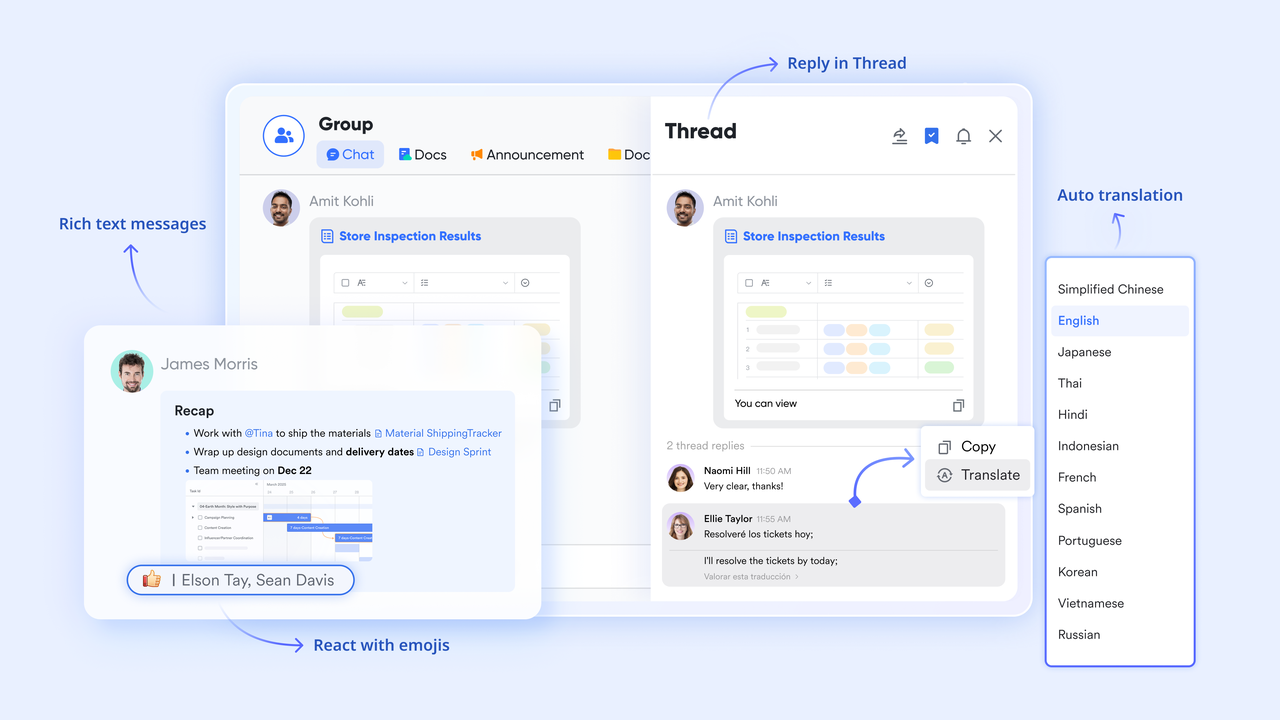
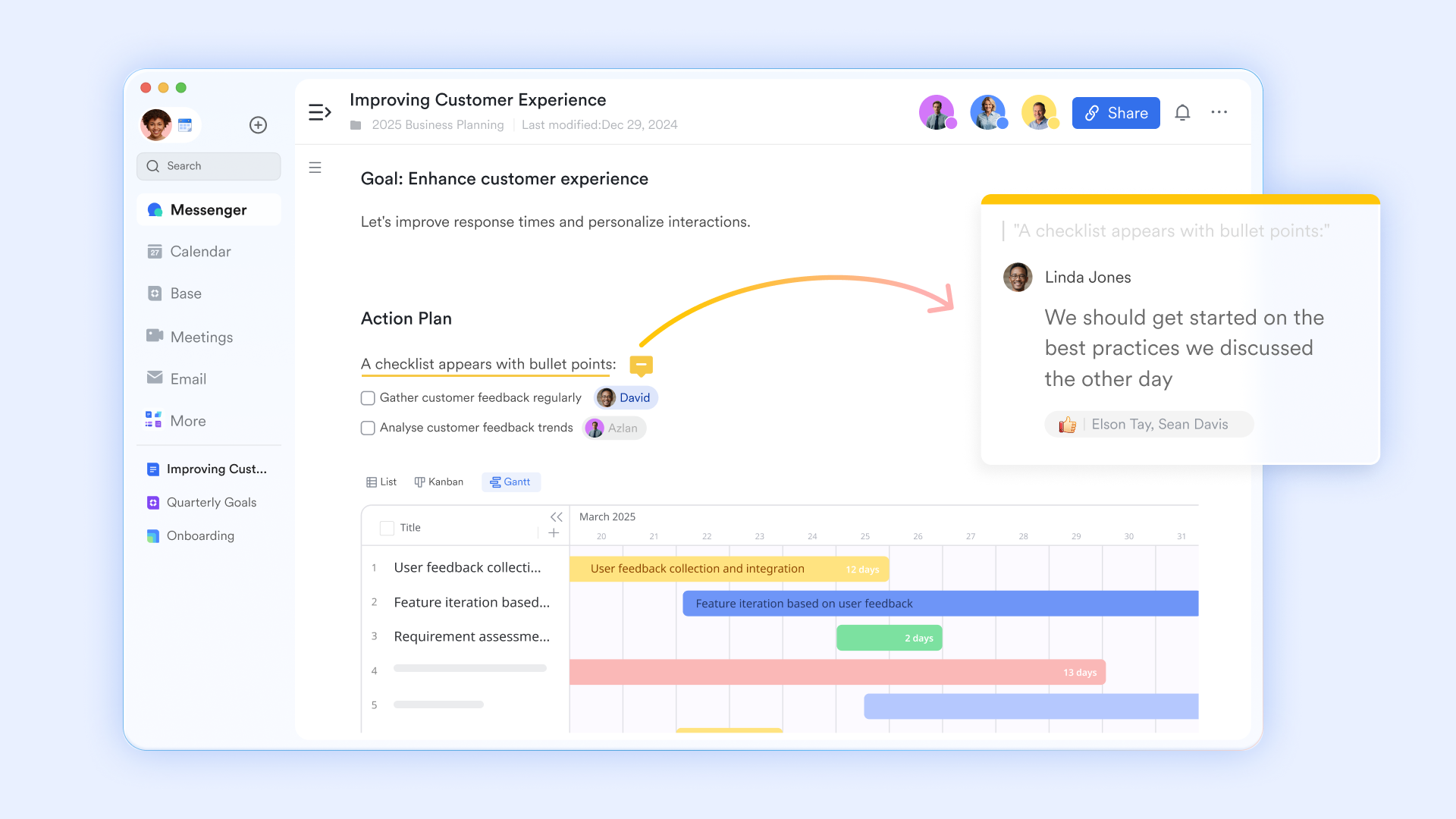
Incident logs and post-mortems in Lark Docs: Utilizing, IT teams can maintain live incident logs, allowing multiple members to document observations, actions, and progress simultaneously. Post-mortem reports can be collaboratively created, ensuring that lessons learned are captured and accessible. This is a key advantage of integrated tech software.
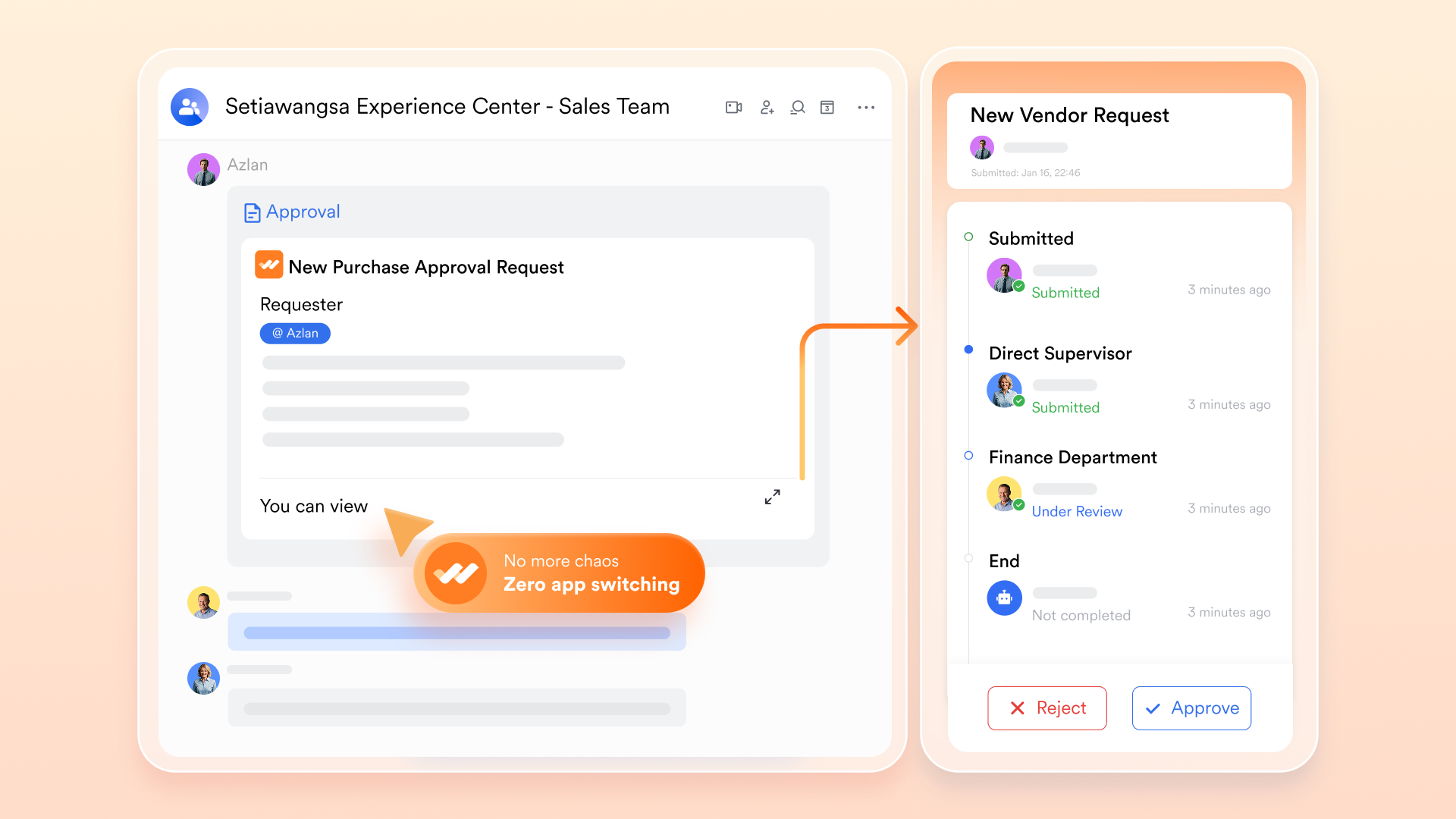
Automated incident escalation processes: workflows, a powerful feature of its tech software suite, automate notifications and authorizations. For example, a critical system outage can trigger automatic alerts to on-call personnel, department heads, and even executive leadership, streamlining response protocols.
Knowledge management & documentation
A robust knowledge base is a cornerstone of an efficient IT department, reducing reliance on individual expertise and speeding up problem resolution with effective tech software for knowledge sharing.
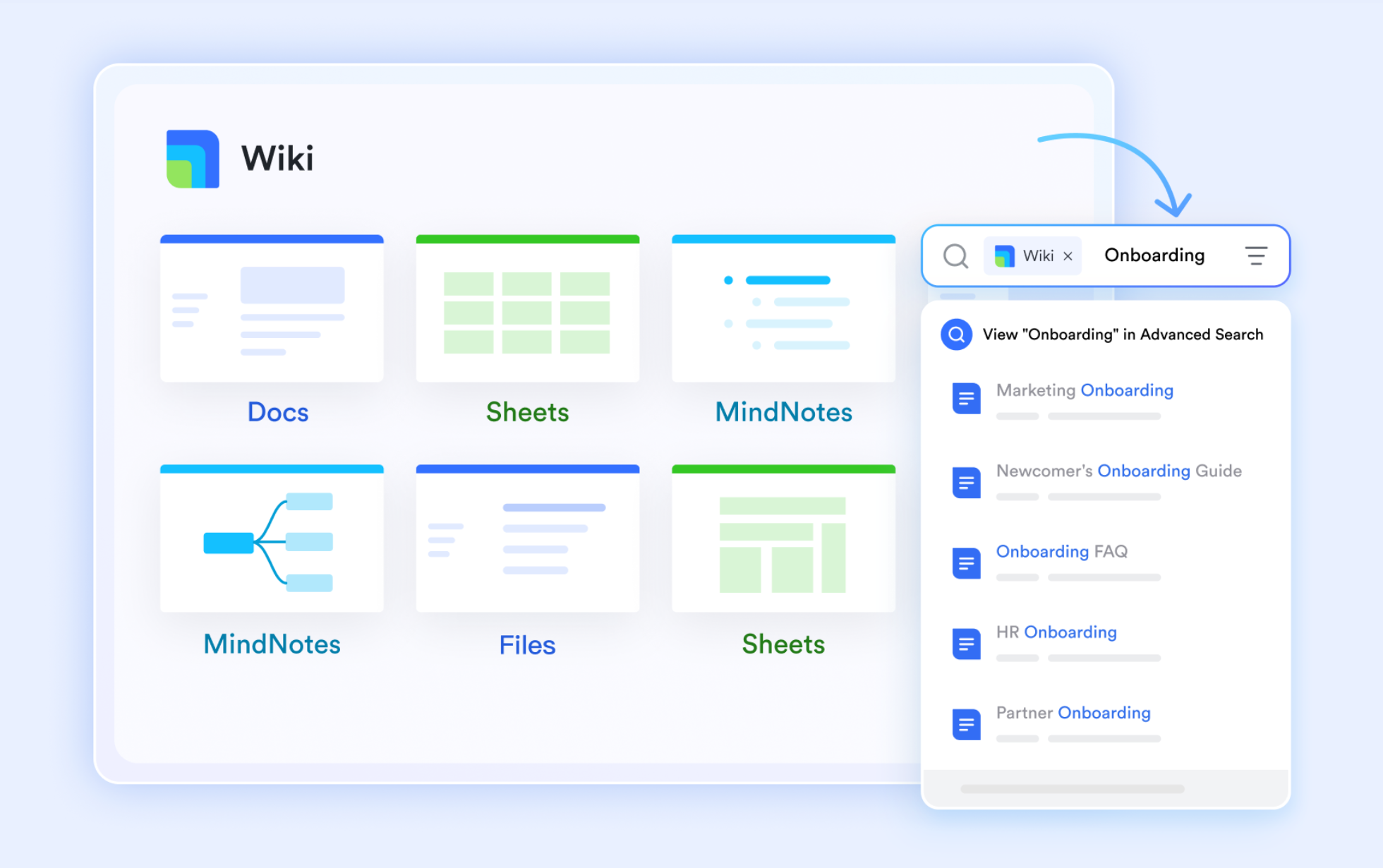
Centralized IT knowledge base using Lark Wiki: is an ideal tool for building a comprehensive, searchable knowledge base. This includes troubleshooting guides, FAQs, system configurations, and internal policies, making information readily accessible to the entire team.
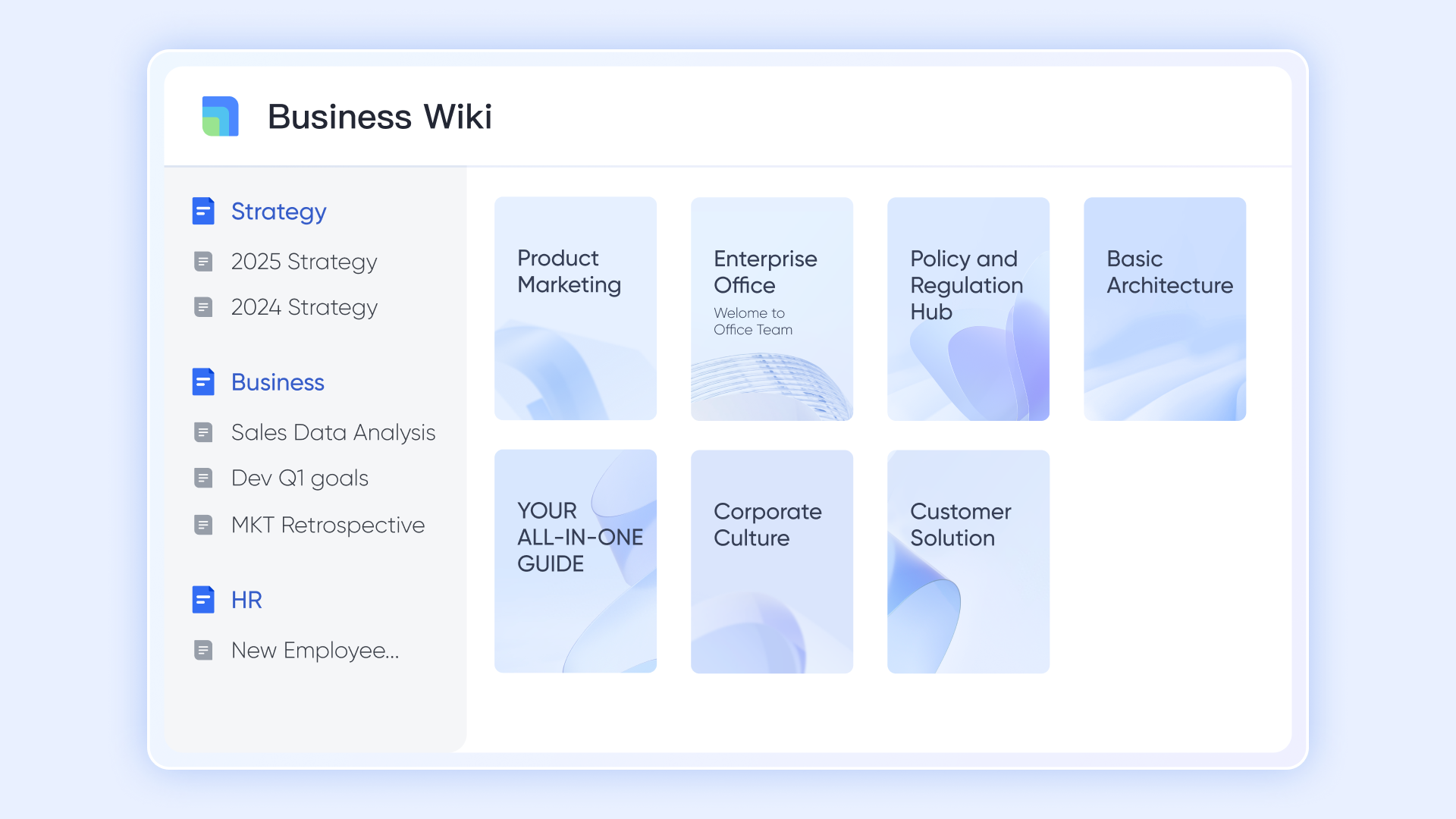
Version control and access to technical documentation: Lark Wiki and Docs offer built-in version control, a critical tech software capability for managing evolving technical documentation. This allows teams to track changes, revert to previous versions, and ensure that the most up-to-date information is always available and securely controlled.
IT asset management & configuration
With, the workflow becomes much more direct: Every device, software license, or configuration item (CI) becomes a record in Base, with fields for serial number, model, location, owner, status, and lifecycle stage.
:
- Starter plan: Free forever plan that includes 11 powerful tools for up to 20 users. It also comes with 100GB of storage, 1000 automation runs, AI translations, and more.
- Basic plan: $6/user/mo (billed annually) for up to 500 users. It includes everything in Starter plus group calling for up to 500 attendees, 5TB of storage, 1000 automation runs, and more. For more details, please .
- Pro plan: $12/user/mo (billed annually) for up to 500 users. It includes everything in Basic plus group calling for up to 500 attendees, 15TB of storage, 50,000 automation runs, and more.
- Enterprise plan: for custom pricing. Supports unlimited users and includes even more automation runs and advanced security, compliance, and management features.
For small teams with simple communication needs

18 months message history
1000 Base automation runs/month
2000 rows per table in Base
Most POPULAR
For companies with comprehensive collaboration and management needs
Unlimited message history
500-participant video meetings
50k Base automation runs/month
20k rows per table in Base
For large companies with advanced security and organizational management needs
Get a personalized demo and pricing
Unlimited message history
500-participant video meetings
15 TB storage + 30 GB storage/user
500k Base automation runs/month
50k Base automation runs/month
Most POPULAR
For companies with comprehensive collaboration and management needs
Unlimited message history
500-participant video meetings
50k Base automation runs/month
20k rows per table in Base
Choosing the best tech software for your business
Selecting the optimal tech software for your IT department is a strategic decision that can significantly impact your organization's efficiency, security, and growth trajectory. It's not merely about picking a tool with the most features, but rather about aligning software capabilities with your specific operational needs and long-term vision. To make an informed decision, IT leaders and procurement teams should adopt a structured assessment framework that goes beyond superficial comparisons.
- Evaluate your current IT pain points and objectives: Begin by thoroughly analyzing your existing challenges. Are fragmented communication channels causing delays in incident resolution? Is a lack of centralized documentation hindering knowledge transfer? Clearly define your objectives: do you aim to reduce operational costs, improve team collaboration, enhance security posture, or accelerate project delivery? A clear understanding of your pain points and desired outcomes will guide your software selection process.
- Consider your team size, budget, and existing infrastructure: The "best" solution for a small startup IT team may differ significantly from that of a large enterprise. Assess your current team size, growth projections, and available budget. Additionally, consider how the new software will integrate with your existing IT infrastructure, including hardware, operating systems, and other critical applications, especially if your teams rely heavily on remote collaboration and communication. Compatibility and ease of integration are crucial to avoid additional complexities.
- Prioritize integration capabilities and scalability: As discussed, the ability of new software to seamlessly integrate with your existing ecosystem is paramount. Look for solutions with open APIs, extensive integration marketplaces, and a proven track record of interoperability, especially for . Furthermore, ensure the software is scalable to accommodate your organization's future growth without requiring costly overhauls or migrations. A solution that serves your needs today but cannot support your growth tomorrow will ultimately prove inefficient, particularly for organizations coordinating .
- Emphasize user adoption and change management: Even the most powerful software is useless if your team doesn't adopt it. Prioritize solutions with intuitive user interfaces, comprehensive training resources, and strong vendor support. A robust change management plan, including clear communication, training, and champions within the IT team, is vital for successful implementation and sustained user adoption. Engage your IT professionals in the selection process to ensure their needs are met and to foster a sense of ownership.
Choosing the best tech software for your business
Conclusion
In an era where technology underpins every aspect of business, the effectiveness of an IT department is directly tied to the tools it employs. The pervasive challenge of fragmented tool stacks, leading to inefficiencies, increased costs, and communication breakdowns, underscores the urgent need for a more integrated approach to tech software solutions.
This article has explored the evolving landscape of IT software, highlighted the hidden costs of fragmentation, and outlined what truly makes a software solution "best" for IT teams—prioritizing integration, security, scalability, and user-centric design. We’ve presented the concept of a unified IT workspace as a strategic imperative, demonstrating how platforms like Lark can fundamentally transform IT operations. By consolidating essential functionalities into a single, intuitive platform, Lark empowers IT teams to streamline incident management, enhance sprint planning, centralize knowledge, and improve communication around asset management. The comprehensive nature of Lark—from its collaborative documents and messaging to its automation capabilities and flexible pricing—offers a compelling alternative to the traditional, disparate toolset.
We encourage IT leaders and enterprise managers to evaluate their current software ecosystems critically. By embracing a unified platform, organizations can not only mitigate existing pain points but also unlock new levels of efficiency, collaboration, and innovation within their IT departments. Explore how can be the catalyst for a more connected, productive, and secure future for your IT team.
Optimize your IT efficiency with a smart tool
FAQs
What defines "best tech software" for an enterprise IT team today?
The "best" tech software for an enterprise IT team is a solution that strategically aligns with business goals, enhances operational efficiency, provides robust security and compliance, supports hybrid work models, and offers an integrated approach to collaboration and workflow management. It's about a platform that reduces fragmentation and provides a clear total cost of ownership.
How does an all-in-one platform like Lark help IT teams combat the "shadow IT" phenomenon?
An all-in-one platform like Lark helps combat "Shadow IT" by offering a comprehensive, user-friendly, and IT-approved solution that addresses a wide range of employee needs for communication, collaboration, and productivity. By providing a superior, integrated alternative, it reduces the incentive for employees to seek out and adopt unauthorized, unmanaged tools.
What are the key security and compliance advantages of a unified workspace for IT operations?
A unified workspace like Lark centralizes security management, allowing IT teams to enforce consistent policies, manage user permissions, and track audit logs from a single console. This reduces the attack surface, simplifies data governance, ensures compliance with regulations, and provides greater visibility and control over the organization's digital assets.
Related reading