


How to Track Project Progress: A Complete Guide

Fecilia Clarke
Solutions Marketing Specialist
Aug 5, 2026
Fecilia Clarke
Aug 5, 2026

17 min read


Does your workday feel like a frantic search for information? You’re hunting through endless email threads for that one key decision, digging through chat histories for an updated file, and staring at a spreadsheet that you know was outdated the moment it was saved. If this sounds familiar, you’re not alone. This state of project chaos is the default for many teams, leading to missed deadlines, strained budgets, and a pervasive sense of burnout.
But it doesn't have to be this way. Imagine a world where every piece of project information is exactly where it should be, where progress is visible to everyone in real-time, and where you can answer any question about a project's progress with confidence. This isn't a fantasy; it's the result of effective project tracking. This guide will provide you with a clear, actionable framework of how to track project progress. We'll explore the methods, metrics, and tools you need to not just monitor your projects, but to lead them to success with precision and composure.
What is project tracking?
Project tracking is the continuous process of monitoring a project's progress against its established plan. It involves overseeing key project components—including tasks, timelines, budget, and resources—to ensure the project is on course to meet its objectives. This isn't just a passive observation; it’s an active discipline of collecting, recording, and analyzing performance data throughout the project lifecycle. The primary goal is to identify any deviations from the plan, allowing project managers to proactively address risks, manage scope creep, and provide accurate status reports to stakeholders, ultimately steering the project toward successful and timely delivery.

Your step-by-step guide on how to track project progress
The following steps provide a practical, repeatable process that you can adapt to any project, regardless of its size or complexity. Each step is designed to build upon the last, resulting in a comprehensive and low-friction system for monitoring progress from kickoff to completion.
Step 1: Choose a project tracking method that fits your workflow
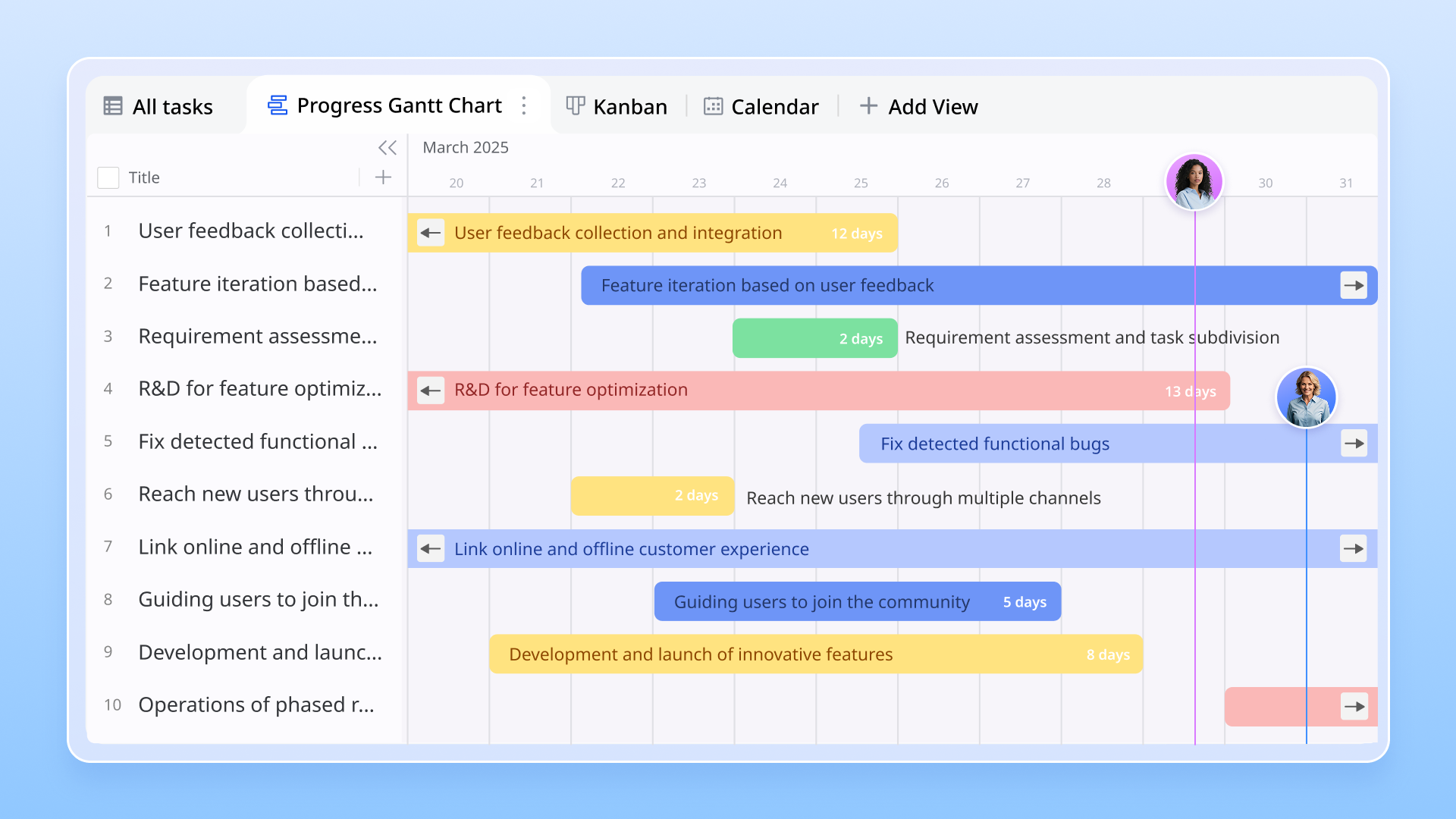
There is no single "best" way to track a project; the right method depends entirely on your team's workflow and the nature of the project itself. The most common and effective methods are Kanban boards and Gantt charts.
Kanban board: A Kanban board is a visual method that uses columns and cards to represent stages of work (e.g., To Do, In Progress, Done). It excels at visualizing workflow, identifying bottlenecks, and is ideal for agile projects or teams that have a continuous flow of tasks, like content creation or bug fixing.
Gantt chart: A Gantt chart is a timeline-based bar chart that illustrates the project schedule. It’s perfect for projects with clear start and end dates, complex dependencies, and critical milestones. A Gantt chart provides a high-level overview of the entire project timeline, showing how tasks relate to one another and what the critical path is to completion. It’s the method of choice for more structured projects like event planning, construction, or product launches, where timing and sequence are paramount for their project timelines.
Your project tracking software should be flexible enough to accommodate the method that works best for you, or even allow you to switch between views as needed. In Lark Base, for example, the same set of project data can be viewed as a classic grid, a Kanban board, or a Gantt chart. This means your marketing team can manage their tasks on a Kanban board while you, the project manager, can view that same data in a Gantt chart to report on the overall project timeline to stakeholders. This flexibility ensures the tracking tool adapts to your team, not the other way around.
Step 2: Centralize and assign all tasks for complete clarity
Once you’ve chosen your method, the next step is to break down your project into a comprehensive list of actionable tasks and populate them within your single source of truth. Every single piece of work required to complete tasks should be captured as a distinct item. Vague tasks like "Develop website" should be broken down into specific actions like "Design homepage mock-up" or "Test contact form." This level of granularity is essential to track tasks accurately and maintain a clear view of actual progress.
For each task, three pieces of information are non-negotiable: a clear description of what needs to be done, a single owner who is responsible for its completion, and a realistic due date. This trifecta of clarity eliminates ambiguity and fosters a strong sense of accountability. When every team member knows exactly what they are responsible for and when it is due, the entire project moves forward with more purpose and less confusion. This step is about creating a complete and unambiguous inventory of all the work that needs to get done.
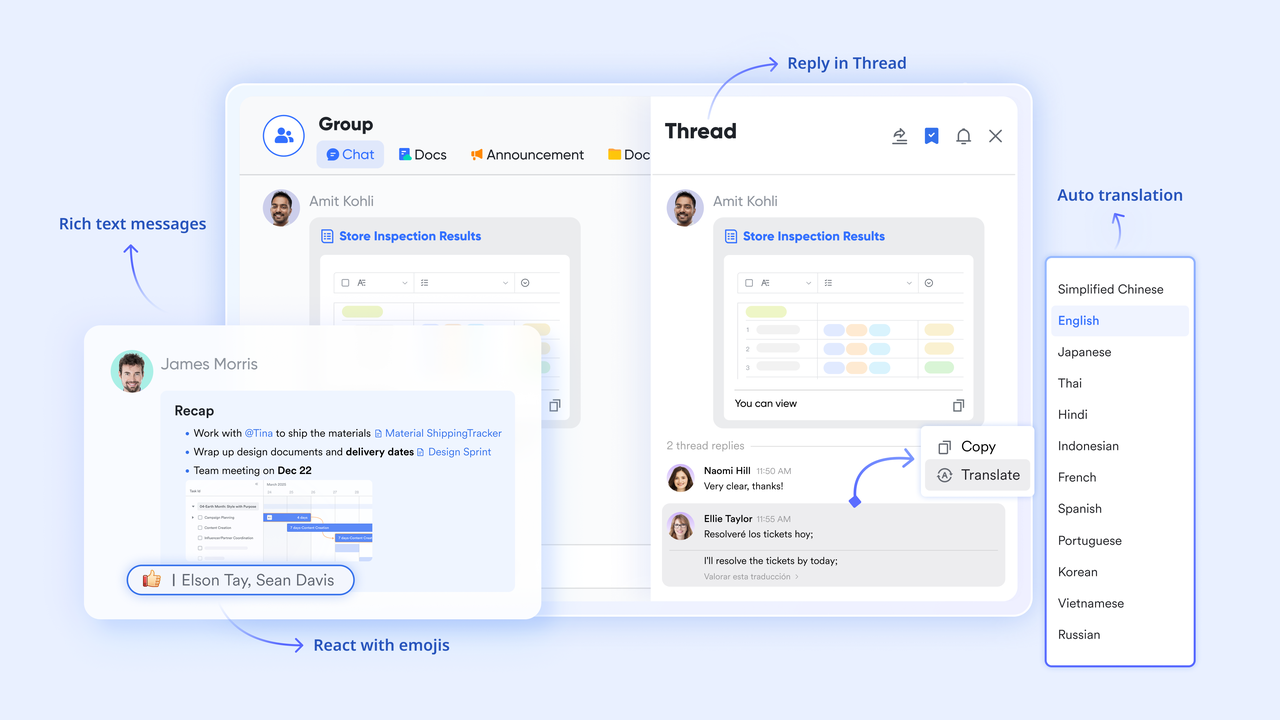
This is where having a unified platform shines. When you create a task and assign tasks in Lark Base, it doesn't just sit on a static list. You can set a deadline that automatically syncs with the assignee's Lark Calendar, ensuring it's visible alongside their other commitments. Furthermore, you can share and discuss that specific task directly within a Lark Messenger chat. The conversation about the task stays linked to the task itself, creating a contextual thread that is easy to refer back to, which is far more efficient than trying to piece together decisions from separate email chains or chat logs.
Step 3: Automate your updates to focus on what matters most
One of the biggest drains on a project manager's time and energy is the manual process of chasing down updates. Constantly asking "What's the status of this?" or "Is this task done yet?" interrupts your team members and pulls you away from more strategic work. The solution is to let your tools do the chasing for you. Modern project management tools excel at this through automated workflows, which are simple rules you can set up to handle routine communication and status changes, significantly streamlining workflows and boosting team productivity across the board.
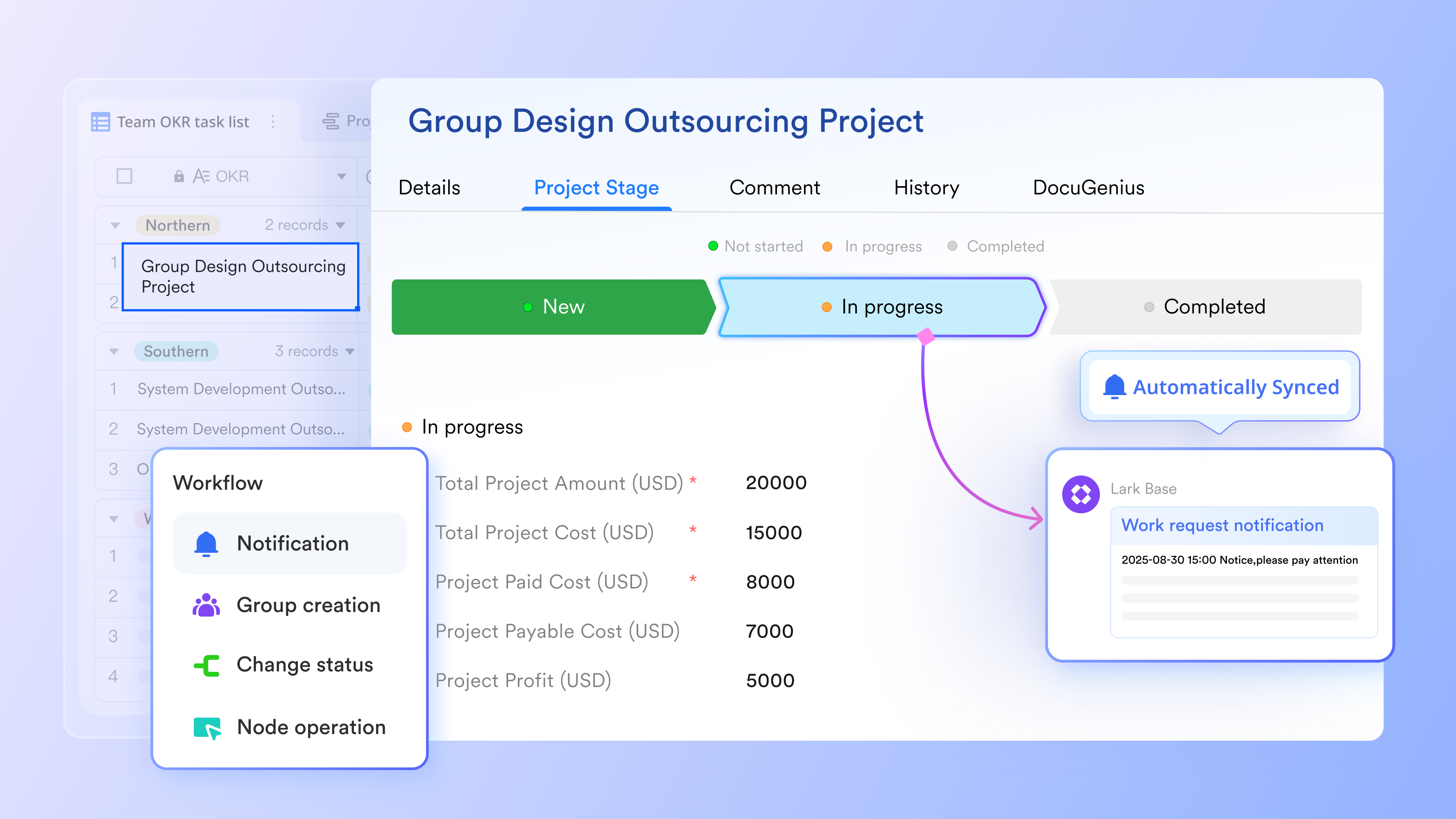
Imagine a world where, instead of manually updating a spreadsheet, the system updates itself based on your team’s actions. For example, you can create an automation rule that states: "When a task's status is changed to 'In Review,' automatically notify the team lead." Another could be: "Two days before a task's due date, send a reminder to the owner." These simple automations keep the project information flowing without requiring constant manual intervention, which is essential for efficient project tracking and maintaining a clear view of actual progress.
This kind of automation is a core component of an all-in-one platform. In Lark Base, setting up these rules is straightforward and incredibly powerful for managing progress. You can create custom triggers based on any field in your project tracker. This frees up project managers to focus on solving problems rather than just identifying them. By automating the administrative burden of task tracking, you empower your entire team to focus on their key tasks, confident that the right information will find the right person at the right time, improving the entire communication process.
Step 4: Make your project meetings more productive and actionable
Regular meetings are a necessary part of project management, but they can easily become unproductive time sinks if not managed correctly. A common pitfall is a meeting that ends with vague agreements but no clear, trackable actions. To make your project check-ins truly effective, they must be structured around a clear agenda and result in concrete, assigned tasks. The goal is to transform conversations into forward momentum, ensuring every discussion contributes directly to the project's progress.
An effective meeting workflow starts long before the meeting itself. A clear agenda should be circulated in advance, linking to any relevant documents or tasks that will be discussed. During the meeting, notes should be taken collaboratively, and most importantly, action items must be captured in real-time. Each action item should be immediately assigned to an owner and given a deadline. This ensures that accountability is established at the moment of decision, leaving no room for ambiguity about who is responsible for what. This is crucial for keeping the project schedule intact.
This is another area where an all-in-one suite transforms the workflow. You can create a meeting agenda in Lark Docs, linking directly to tasks in your project plan. During the call in Lark Meetings, AI Meeting Notes and Minutes can automatically transcribe the conversation and, more importantly, identify and suggest action items. With a single click, you can convert these suggestions into new tasks in Lark Base and assign tasks to team members. This seamless transition from discussion to documented action ensures that valuable insights from meetings are never lost and always lead to tangible progress.
Step 5: Create and share progress reports without the manual effort
Keeping stakeholders informed is a critical function of tracking project progress, but it shouldn't consume your entire week. Manually compiling project status reports by pulling data from multiple sources is not only time-consuming but also prone to error. The key to efficient reporting is to have your report generate itself from your single source of truth. Your goal should be to create a "living" report that is always up-to-date, providing stakeholders with a real-time view of the overall progress without any manual compilation on your part.
These reports should be more than just a list of completed tasks. They should provide a concise overview of the project's health against its most important project metrics. This includes providing accurate data on the project budget versus the actual cost, the planned project timeline versus the current project schedule, and any significant risks or blockers. Presenting clear, quantitative metrics gives stakeholders the confidence that the project team is in full control and that decisions are being made based on data, not just intuition. Good project reports build trust and alignment.
Choosing the right tool: Project progress tracking software recommendations
From our analysis, we can see that choosing the right software is a critical decision that hinges entirely on your team's specific needs. We understand that there is no single "best" tool, only the tool that is the "best fit" for your workflow, complexity, and budget. The right choice will reduce friction and act as a multiplier for your team's efforts, while the wrong one can easily create more work than it saves.
Based on the tools we reviewed, here are the top products for different needs:
1. Lark: An all-in-one suite combining projects, chat, docs, and meetings
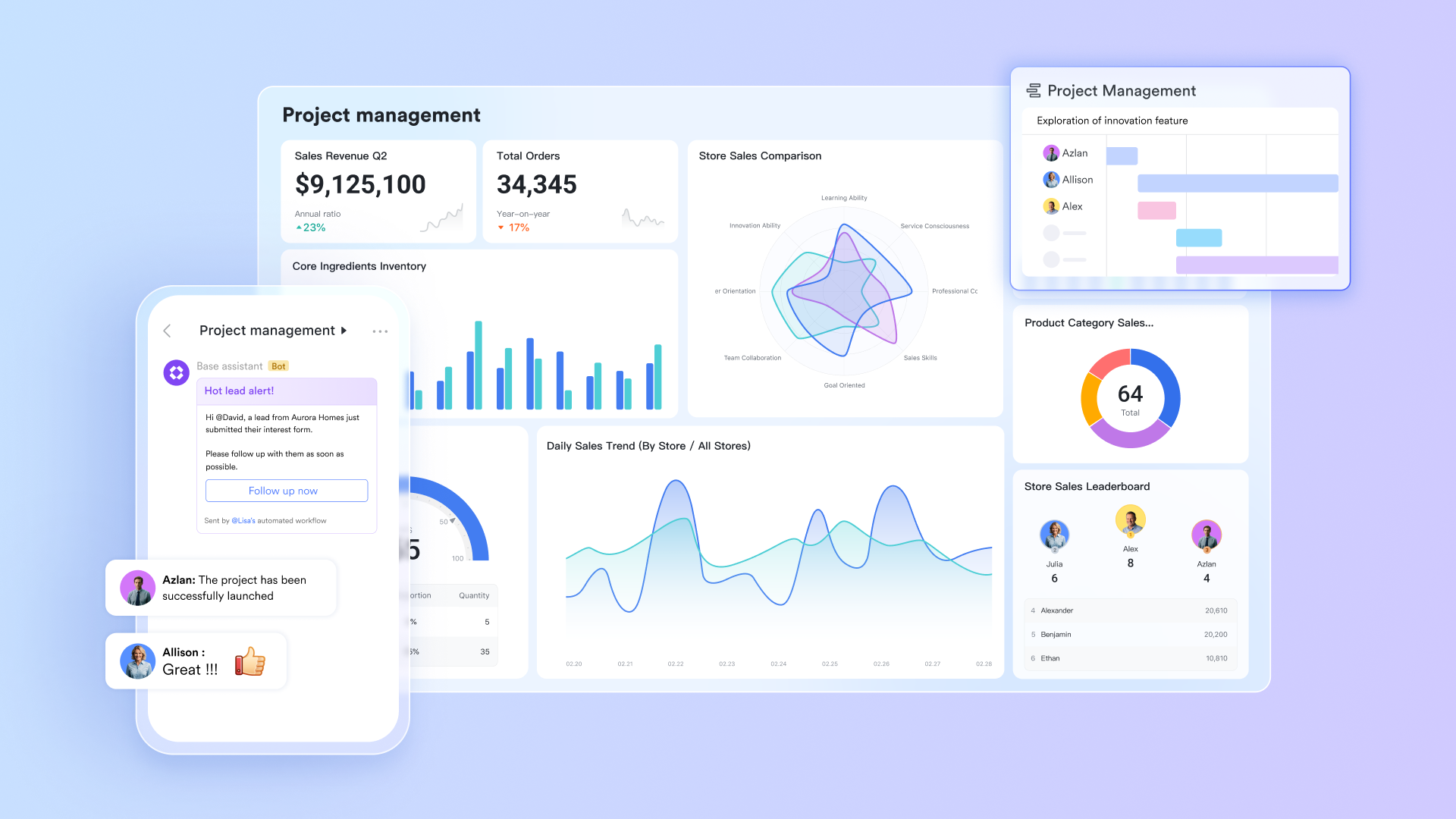
Key features:
- Built-in project tracking: Build powerful and flexible project trackers with Lark Base, using customizable views like Gantt charts and Kanban boards to fit your workflow.
- Powerful automation: Create custom, no-code automated workflows to handle routine tasks like status updates, deadline reminders, and approval requests
- Seamless communication: Discuss tasks, share files, and make decisions directly within Lark Messenger, keeping all project-related conversations in full context.
- AI-powered meetings: Use AI to automatically generate meeting summaries and instantly convert discussion points and action items into trackable tasks with assignees.
- Unified platform: Eliminate the cost and friction of app-switching by connecting your project management directly with your team's daily chat, calendar, and document tools.
Pricing: Lark, one of the most versatile project management tools, offers a comprehensive free plan ideal for small teams, with affordable Pro and Enterprise plans that add advanced administrative features and support.

👉Try Lark’s Savings Calculator: Switching to Lark’s Pro plan can lead to significant cost savings— for example, a 100-employee company using Slack, Google Workspace, and Airtable could save approximately $25,200 annually by consolidating their tools with Lark.
2. Asana: A user-friendly tool focused on task management and team collaboration
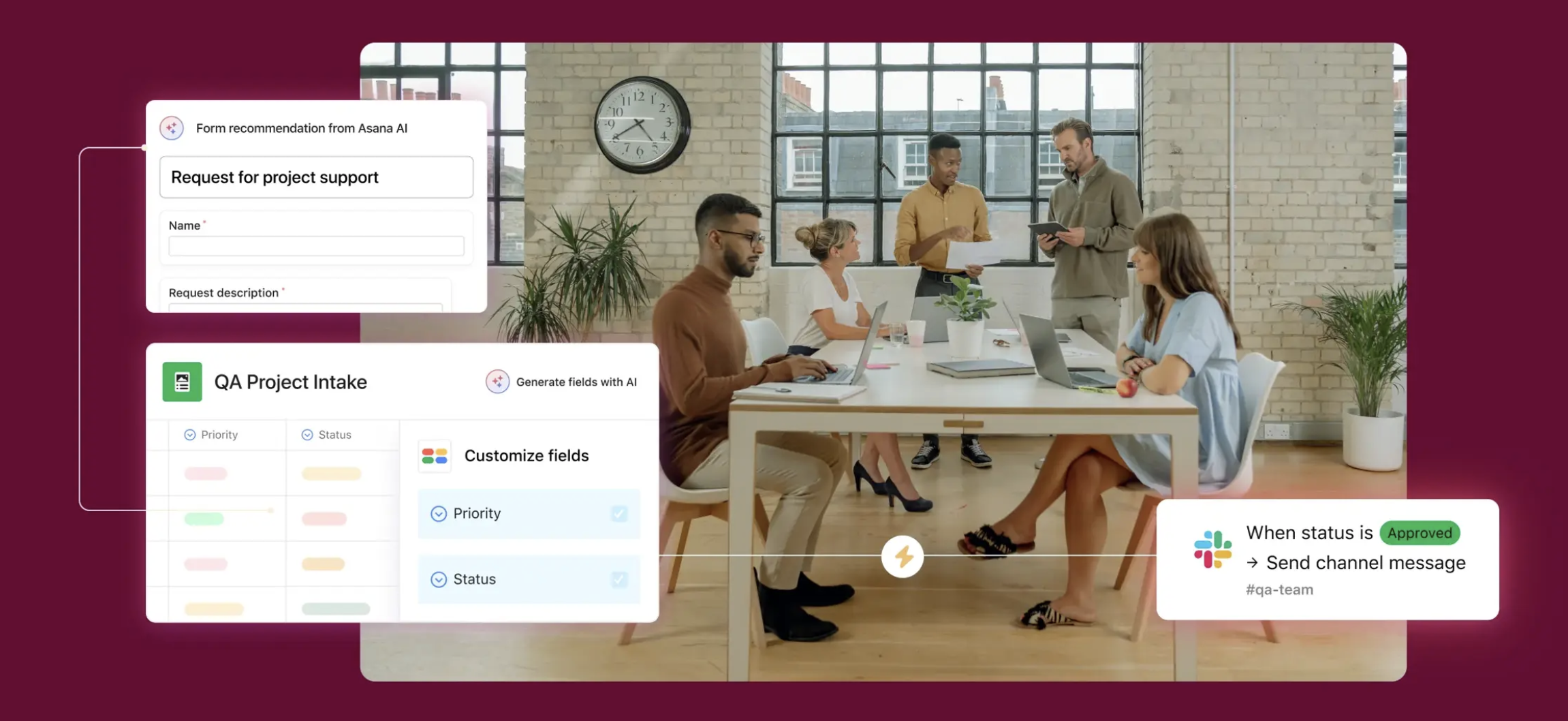
Image source: asana.com
Key features:
- Multiple project views: Organize work using Lists, Boards, Timelines, and Calendars, allowing each team member to visualize tasks in the way that suits them best.
- Workload management: Get a clear view of your team's capacity and reassign work as needed to prevent burnout and keep projects properly resourced.
- Goal tracking: Align project work with high-level company objectives by setting and tracking progress on strategic goals directly within the platform.
- Robust integrations: Connect Asana with hundreds of other business tools your team already uses, from Slack and Microsoft Teams to Adobe Creative Cloud.
Pricing: Asana provides a permanent free plan for individuals and small teams. Its paid tiers unlock more powerful features like custom rules and advanced reporting for tracking projects at scale.
3. Monday.com: A highly visual and customizable "Work OS" for building custom workflows
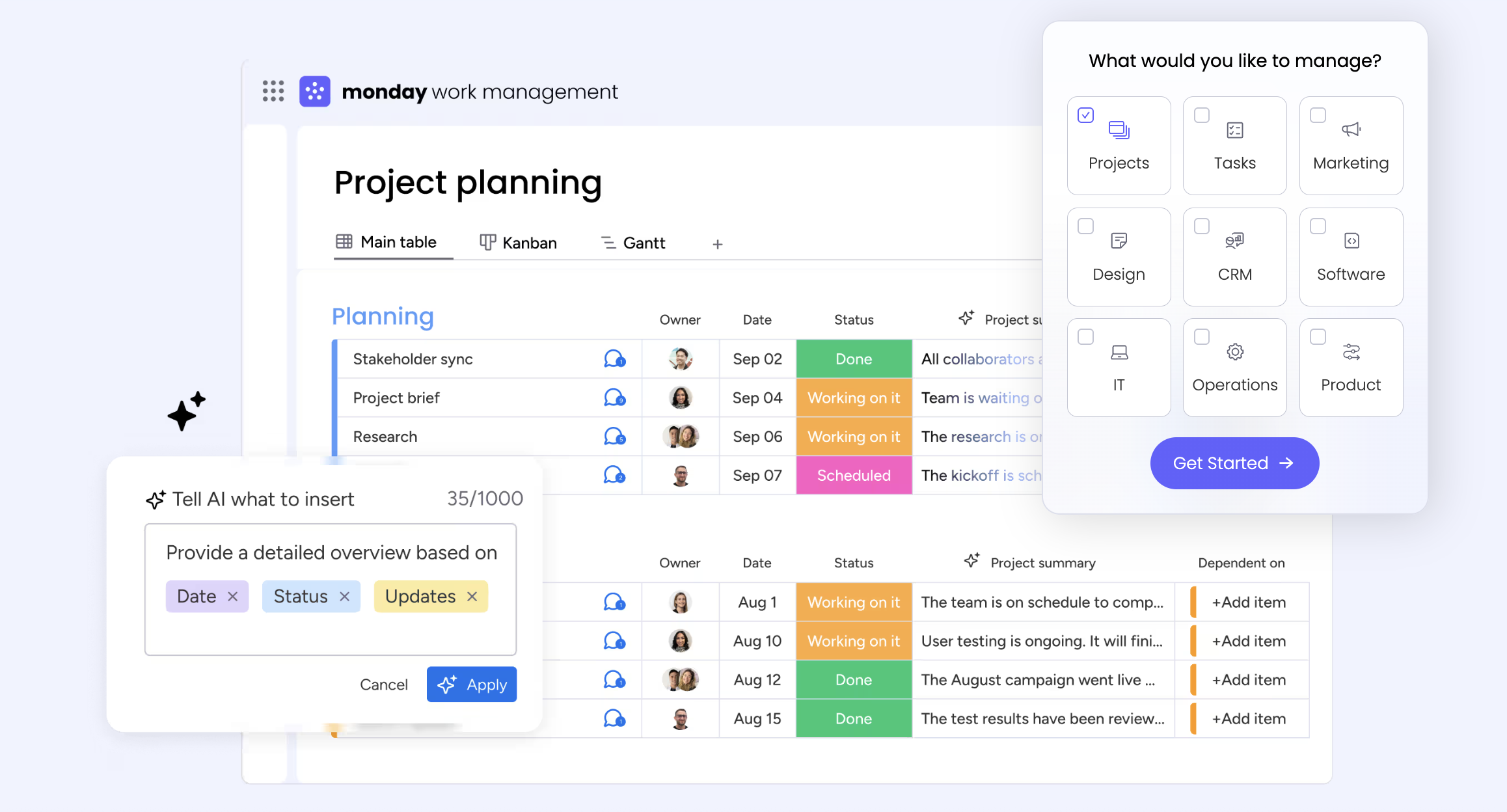
Image source: monday.com
Key features:
- Visual interface: Use a colorful, spreadsheet-like platform that makes project status, ownership, and timelines easy to understand at a single glance.
- Extensive automation: Build custom "recipes" to automate repetitive tasks, notifications, and status changes to reduce manual work and improve efficiency.
- Customizable dashboards: Combine various widgets to create detailed, real-time reports on project progress, budget tracking, and team performance KPIs.
- Workflow flexibility: Design custom workflows for nearly any business process beyond project management, including sales pipelines, marketing campaigns, and IT requests.
Pricing: Monday.com has a free plan. Its pricing is per-user and tiered based on features, which can become costly for larger teams.
4. Jira: The industry-standard software for agile development teams
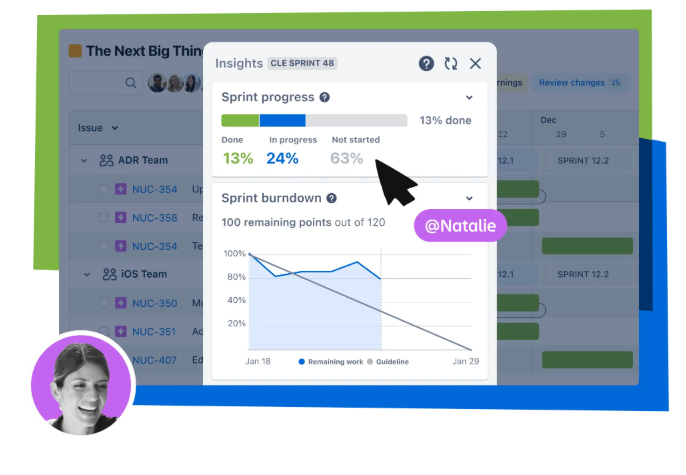
Image source: atlassian.com
Key features:
- Agile boards: Utilize deeply customizable Scrum and Kanban boards that are specifically designed for the workflows of software development cycles.
- Powerful reporting: Generate detailed reports essential for agile teams, including burndown charts, velocity reports, and cumulative flow diagrams.
- Developer tool integration: Connect seamlessly with code repositories (like Bitbucket and GitHub) and CI/CD tools for a unified development lifecycle.
- Advanced customization: Tailor everything from issue types and fields to complex workflows to match your team’s specific agile process precisely.
Pricing: Jira offers a free plan for up to 10 users. Its Standard and Premium plans scale with team size and add advanced features for security and administration.
5. ClickUp: An all-in-one productivity platform aiming to replace multiple apps
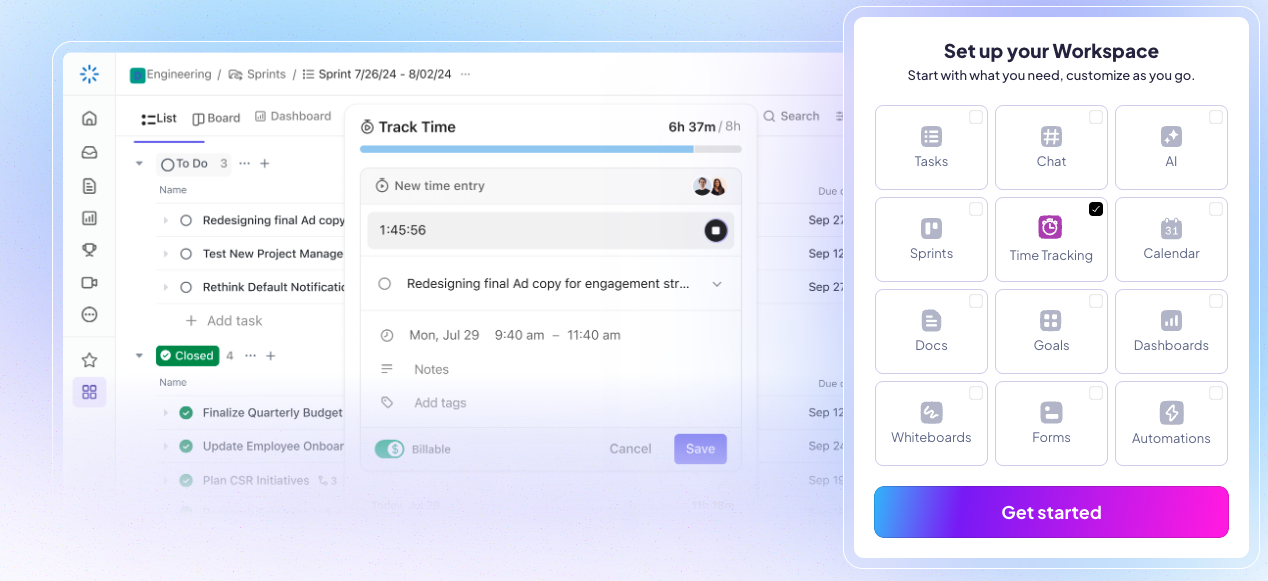
Image source: clickup.com
Key features:
- High degree of customization: Tailor almost every aspect of the platform, from custom task statuses to unique fields and views, to create a system that fits your exact needs.
- Multiple views: Choose from over 15 different ways to view your tasks and projects, including List, Board, Calendar, Box, and Mind Map views.
- Built-in goal tracking: Set high-level goals, break them down into measurable targets, and automatically link them to tasks to monitor progress.
- Integrated docs: Create documents, wikis, and knowledge bases directly within the platform, linking them to your projects and tasks to keep information connected.
Pricing: ClickUp features a competitive free plan. Its paid plans are priced affordably per user and unlock unlimited storage and advanced features.
Why is tracking project progress so critical for success?
Go beyond task management to strategic tracking
Effective project tracking is often mistaken for simple task management—a checklist of things to do. In reality, its importance runs much deeper, forming the strategic backbone of any successful project. It's the system that provides visibility, enables accountability, and empowers teams to navigate challenges proactively. Without a reliable method for monitoring progress, teams are essentially flying blind, relying on guesswork and assumptions. This inevitably leads to preventable problems, creating a cycle of reactive firefighting that drains energy and resources, leaving little room for innovation or high-quality work.
Shift from reactive firefighting to proactive problem-solving
True project tracking transforms your approach from reactive to proactive. It’s about more than just hitting deadlines; it’s about having a strategic direction. By establishing a clear baseline for your project scope, schedule, and cost, tracking allows you to measure any deviation from your plan in real-time. This constant feedback loop means you can spot a potential budget overrun before it happens or identify a resource management bottleneck before it grinds work to a halt. It’s the difference between seeing a problem on the horizon and being hit by it unexpectedly, giving you the time and insight to steer your project back on course.
Understand the high cost of flying blind
The costs of not tracking your projects are both tangible and intangible, yet they all impact the bottom line. Tangibly, you face wasted resources, with teams spending time on the wrong tasks or duplicating efforts. Budgets swell as unforeseen issues cause delays that require costly solutions. Intangibly, the damage can be even more severe. Stakeholder and client trust erodes when you can't provide clear updates, and team morale plummets when their hard work isn't visible or feels disconnected from the project goals. A lack of clear progress tracking fosters an environment of uncertainty and frustration.
Replace guesswork with data-driven confidence
Ultimately, the goal of tracking project progress is to move beyond subjective feelings and into the realm of objective facts. It replaces "I think we're a bit behind" with "We are three days behind schedule on this key deliverable, and here is the plan to catch up." This shift is transformational. It arms project managers and team leads with the concrete data needed to make sound, strategic decisions. It facilitates more productive conversations with stakeholders, grounded in reality, and builds a culture of ownership where everyone on the project team understands the impact of their work.
Beyond the basics: advanced project tracking strategies
Once you have a solid system in place to effectively track your projects, you can begin to implement more advanced effective project tracking strategies. These strategies move beyond simple task completion and focus on optimizing performance, mitigating risks, and ensuring your projects consistently deliver value. This is where excellent project managers distinguish themselves, by using their project tracking tool not just as a record-keeper, but as a strategic asset for monitoring progress.
One of the most important advanced strategies is active risk management. Your project tracker is a goldmine of data for identifying potential risks before they become major problems. Are tasks for a certain feature consistently behind schedule? This could indicate a risk of scope creep or an underestimation of complexity. Is one team member consistently overloaded? This is a resource management risk. By regularly reviewing progress data at the project level with an eye for negative trends, you can proactively address issues, adjust your resource allocation, and keep your project out of the danger zone.
Another powerful strategy is to leverage historical data to improve planning for future projects. The data from your completed projects—how long tasks actually took versus their estimates, what the actual cost was versus the project budget—is incredibly valuable. This data allows you to make much more accurate forecasts for upcoming project schedules and budgets. By analyzing past performance, you can identify areas for improvement in your estimation and planning process, leading to more predictable and successful project delivery over time.
Finally, don't underestimate the human side of tracking project progress. Use your system to maintain momentum and morale. Regularly acknowledge progress and make a point of celebrating milestones with the project team. When team members see their hard work reflected in the forward movement of a Gantt chart or the progression of cards across a Kanban board, it reinforces their sense of purpose and accomplishment. This positive feedback loop is crucial for keeping the team engaged through the long execution phase of complex projects.
Conclusion
As we've seen, learning how to track project progress is about much more than just watching a timeline. It's a comprehensive discipline that involves setting clear project goals and project objectives, choosing the right methods, and leveraging powerful tools to create a transparent and efficient workflow. The days of siloed tools and manual status updates are over. The most effective project teams are those that adopt a unified system where work, communication, and documentation flow together seamlessly, ensuring everyone is always on the same page.
The future of project management lies in unified platforms that are both intelligent and intuitive. Tools that can automate routine tasks, provide insightful reports, and connect conversations directly to the work at hand are no longer a luxury—they are a necessity for any team that wants to deliver a successful project on time and on budget. By embracing an all-in-one solution like Lark, you equip your team with a system that not only helps you complete tasks but fundamentally improves how you work together, paving the way for more successful and less stressful projects.
FAQs
What is the best way to monitor project progress?
The best way is a holistic approach. First, define clear KPIs and milestones so you know what success looks like. Then, centralize all tasks and documents into a single source of truth, like a dedicated project management tool. This enables real-time updates and transparent team communication, eliminating manual tracking and ensuring everyone is aligned on the project’s actual status.
How do you measure the progress of a project?
Project progress is measured by comparing your actual performance against your initial project plan. Use Key Performance Indicators (KPIs) like schedule variance, budget vs. actual cost, and the rate of milestone completion. These metrics provide objective, quantitative data on your project's health, allowing you to move beyond subjective feelings and make informed, data-driven decisions about resource allocation.
How to track project progress in Excel?
You can track projects in Excel by creating a spreadsheet with columns for tasks, owners, due dates, and status; Gantt chart templates are also available. However, this approach is manual, lacks real-time collaboration, and makes it difficult to keep everyone updated. As projects grow in complexity, teams often migrate to dedicated project tracking software to avoid these limitations and version control issues.
What is the best tool to track projects?
The best tool depends on your team’s needs, project complexity, and budget. While many specialized tools exist, all-in-one platforms like Lark often provide the most value. They integrate project tracking directly with communication, documentation, and meetings. This eliminates the friction of switching between apps and ensures your entire team works from a single, collaborative source of truth.
Related reading
Table of contents
Start using Lark today

Manage all your work in one place
Boost team efficiency by 10x
Save up to 70% on software costs
Table of contents
Start using Lark today
Manage all your work in one place
Boost team efficiency by 10x
Save up to 70% on software costs



2026 Lark Technologies Pte. Ltd.
Headquartered in Singapore with offices worldwide.






Explore: