Project milestones are critical checkpoints that indicate whether a project is progressing as planned. Using structured project milestone templates, teams can organize major deliverables, monitor timelines, and maintain visibility across complex projects. Instead of tracking progress through scattered updates, milestone templates provide a clear framework for planning phases, assigning responsibilities, and evaluating completion status.
Key takeaways
- Project milestone templates help teams track critical project phases.
- Structured milestone planning improves visibility and accountability.
- Different industries require customized milestone tracking approaches.
- Milestone templates support timeline monitoring and resource alignment.
- Collaborative platforms improve milestone tracking and reporting.
Why do people need a milestone project management template?
are important checkpoints that represent significant achievements within a project timeline. In structured project planning, these milestones help teams break large projects into manageable phases, making it easier to track progress and maintain focus on key objectives. Each milestone typically marks the completion of a major task, phase, or deliverable, allowing project managers to evaluate whether the project is moving according to plan.
Milestones also improve coordination among team members by clearly indicating when specific goals should be achieved. By setting and monitoring milestones throughout the project lifecycle, organizations can identify potential delays early, adjust strategies when necessary, and ensure the project stays aligned with its overall and goals.
Key elements included in project milestone templates
Project milestone templates help teams organize and track critical checkpoints throughout a . By clearly defining milestone details, responsibilities, and timelines, these templates make it easier to monitor progress and ensure that major project phases stay on schedule.
- Milestone name and description: Each milestone should have a clear name and a brief description that explains its purpose. This helps everyone involved understand the purpose of the checkpoint and the expected outcome upon reaching it. A well-defined milestone description also reduces confusion and ensures alignment among team members.
- Target completion date: Each milestone should include a specific deadline for completion. Setting a target completion date helps more effectively and maintain steady progress throughout the project. It also provides a timeline reference for tracking whether the project is on schedule.
- Responsible stakeholders: Assigning responsible stakeholders ensures accountability for each milestone. This may include project managers, team leaders, or specific departments responsible for delivering the required outcomes. Clearly identifying responsible individuals helps prevent delays and improves coordination within the project team.
- Milestone dependencies: Some milestones rely on the completion of earlier tasks or phases. Identifying these dependencies helps teams understand the sequence of activities and avoid scheduling conflicts. Properly mapping milestone dependencies ensures that project activities progress in the correct order.
- Progress status indicators: Provide a quick view of how close a milestone is to completion. Common indicators include statuses such as not started, in progress, completed, or delayed. These indicators allow project managers to monitor performance and quickly identify issues that may require attention.
- Project phase mapping: Milestones are often connected to specific phases of a project, such as , development, testing, or launch. Mapping milestones to project phases helps teams understand how each checkpoint contributes to the overall project timeline and ensures progress aligns with the planned workflow.
Track milestones and projects in one workspace
10 ready-to-use project milestone templates
Project milestone templates provide a clear framework for tracking key checkpoints and deliverables throughout . Using ready-to-use templates helps teams organize timelines, assign responsibilities, and monitor progress more effectively while keeping projects aligned with structured planning goals.
Project milestone template
Project management often involves many moving parts, and monitoring every milestone can become challenging. A Project milestone template simplifies this process by organizing all critical milestone details in one place. With this template, teams can track milestone ID, name, project phase, start date, target completion date, actual completion date, status, responsible person, deliverables, dependencies, and additional comments.
Project management Gantt chart template
The project management Gantt chart template is a visual planning tool used to organize and schedule project activities. It helps teams display the project timeline, outline tasks, and identify the individuals responsible for each activity. By presenting tasks along a time-based chart, the template provides a clear overview of project progress. It is especially useful for managing complex projects that involve multiple tasks, deadlines, and stakeholders.
OKR task subdivision and progress control template
The OKR task subdivision and progress control template is a comprehensive tool designed to help you manage and track your Objectives and Key Results (OKRs) tasks. It provides a detailed Gantt chart view of your tasks, allowing you to visualize your project timeline and monitor the progress of each task. The template also allows you to filter and sort tasks by status, priority, and owner, making it easier to prioritize and delegate taskst
Project timeline template
A project timeline is an essential tool in project management that outlines the schedule of tasks, milestones, and deliverables throughout the project lifecycle. This template offers a clear visual overview of the timeline, making it easier to monitor progress and coordinate activities. It includes fields such as task ID, task name, task description, start and end dates, duration, responsible team member, status, milestone indicators, and task dependencies to keep the project organized and on track.
Feature roadmap and timeline for product strategy
Every team member contributes to planning and delivering product features, which makes clear coordination essential. This feature roadmap template helps teams map out and monitor each feature's journey, from initial idea to final implementation. Using Lark's easy-to-use tools, teams can tailor the roadmap, assign responsibilities, set timelines, and track the progress of each feature in real time.
Project timeline template for software development
Managing a software development project timeline can be challenging because it involves multiple phases, tasks, dependencies, and team members. This template offers a complete overview of the project schedule, including start and end dates, task duration, responsible individuals, status updates, and task dependencies. With Lark's intuitive tools, teams can easily customize the timeline and track progress in a single centralized workspace.
Web3 project milestone tracker template
Managing a Web3 project involves several critical milestones that must be carefully tracked and monitored. From smart contract deployment to community growth, each milestone contributes to the overall success of the project. This template offers a clear overview of all project milestones, including descriptions, due dates, current status, assigned team members, priorities, and comments.
Milestone tracker for software projects template
Tracking milestones and monitoring progress is essential for the success of any software project. This template helps teams oversee each milestone, from the initial design stage to final deployment, ensuring the project remains aligned with its planned timeline. It includes useful fields such as estimated and actual completion dates, status updates, assigned team members, and a comments section.
Development milestones template
Keeping track of project milestones is crucial for ensuring that your project stays on schedule and within budget. This template allows you to input key information such as milestone ID, milestone name, responsible person, start date, end date, status, and remarks for each milestone. With Lark's intuitive features, you can easily monitor the progress of each milestone and make informed decisions to keep your project on track.
Milestone production tracker template
Monitoring project milestones is essential for keeping projects on schedule and ensuring successful completion. This template helps track each milestone, from the initial design review to the final delivery stage. By providing a clear overview of key checkpoints, it allows teams to easily monitor progress, identify potential delays, and keep the project aligned with its planned timeline.
From plan to execution: Smarter project management with Lark
Managing project milestones often requires coordination across teams, , and project documentation. Lark provides a unified workspace where organizations can plan milestones, track progress, and coordinate project execution efficiently. By combining , communication, and , teams can maintain clear visibility into milestones while keeping project collaboration organized.
Structured visibility in a unified system
At the heart of effective tracking is , which replaces static spreadsheets with a dynamic central database. Teams can categorize milestones by phase, owner, or priority, ensuring every stakeholder has a clear snapshot of the project's health. By utilizing Gantt and Kanban views, project managers can visualize how specific milestones—such as "UI Design Approval" or "Prototype Delivery"—align with the broader timeline. 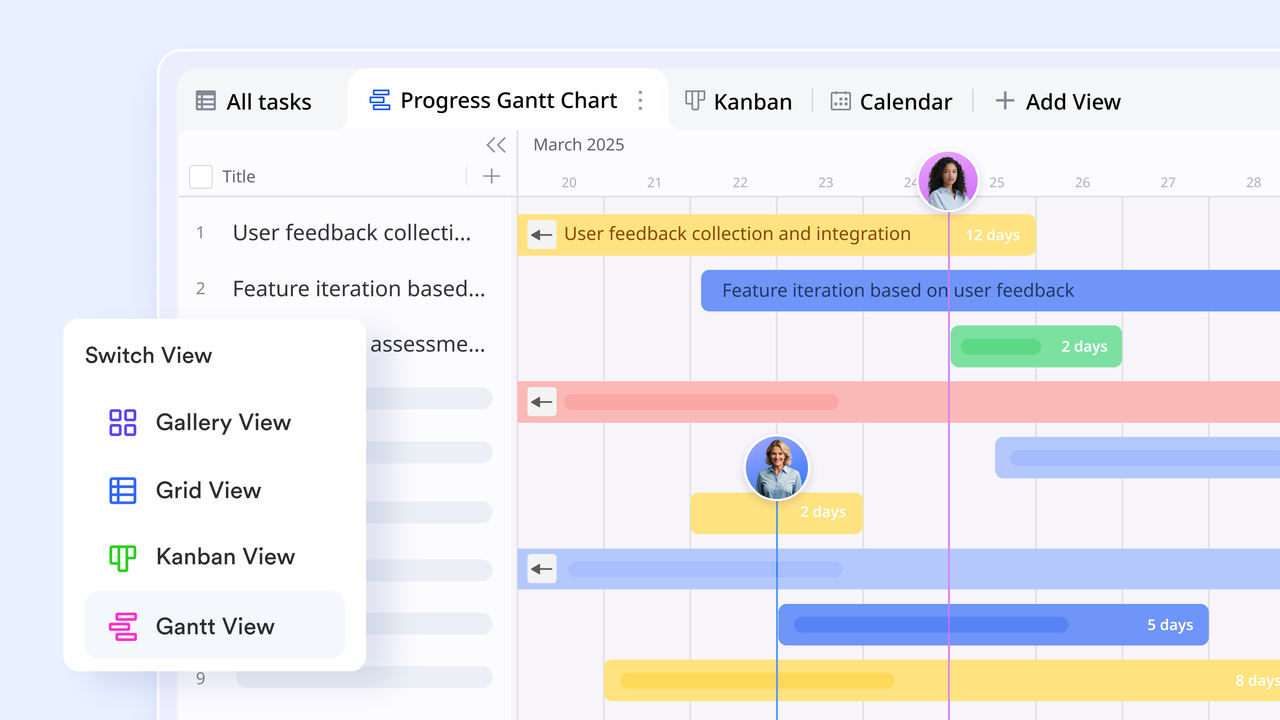
Precision focus via groups and filters
As projects scale, milestone data can quickly become overwhelming. Lark Base provides powerful grouping and filtering tools that allow teams to strip away the noise and focus on what matters most. Managers can instantly organize milestones by status—such as "In Progress," "Completed," or "At Risk"—to assess project health at a glance. Whether a sales team is monitoring "Contract Approvals" or a dev team is tracking "Beta Readiness," these dynamic filters ensure the view remains actionable and uncluttered. 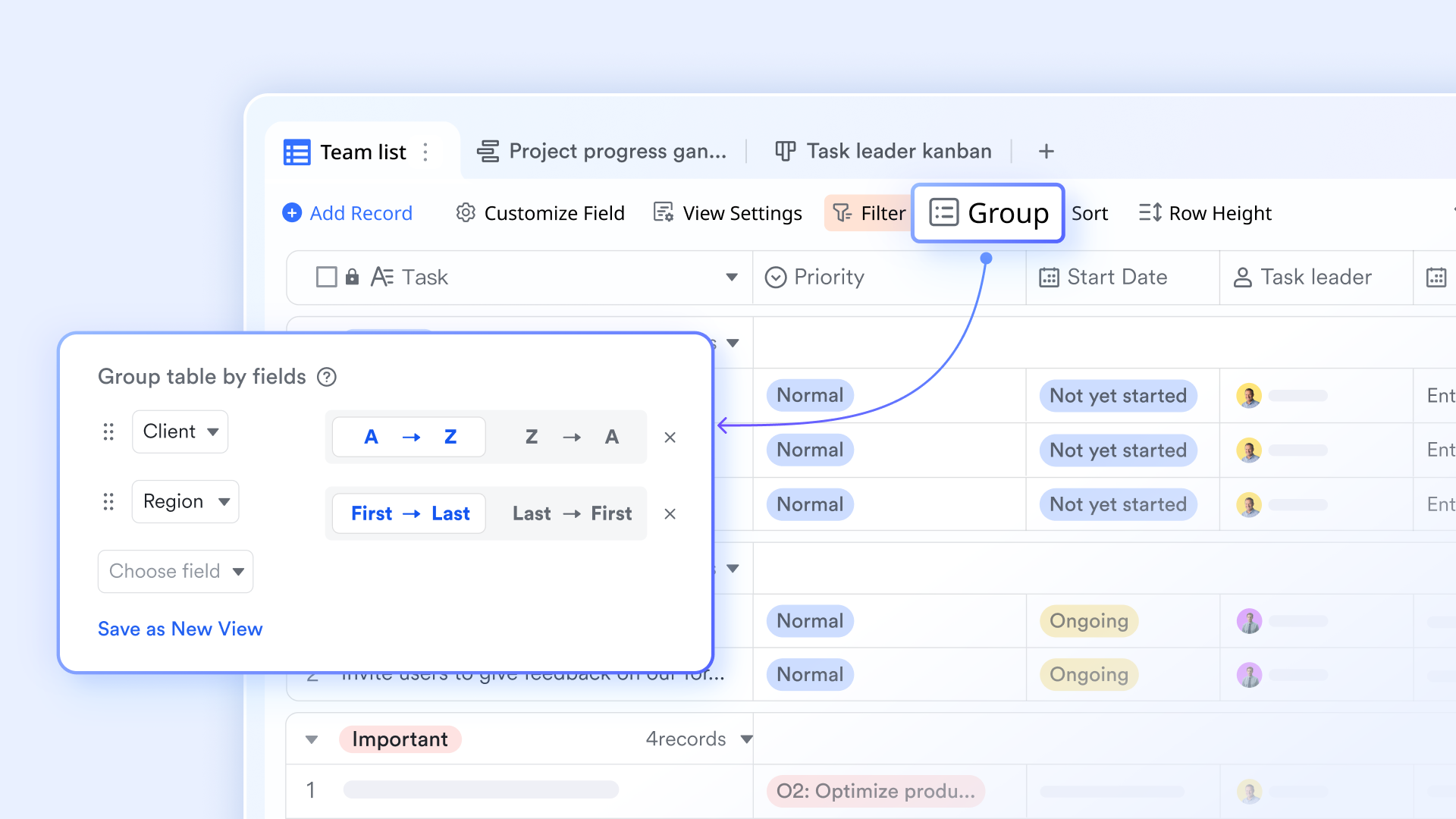
Data unified with two-way links
Maintaining a "single source of truth" is critical when managing complex workflows. The two-way linking feature connects related records, such as tasks, deliverables, and budgets, so that updates in one area are automatically reflected across all linked milestones. For example, when a linked task moves to "Completed," the corresponding progress can be updated in real-time. This synchronization eliminates duplicate entries and ensures that every team member is looking at the most current data. 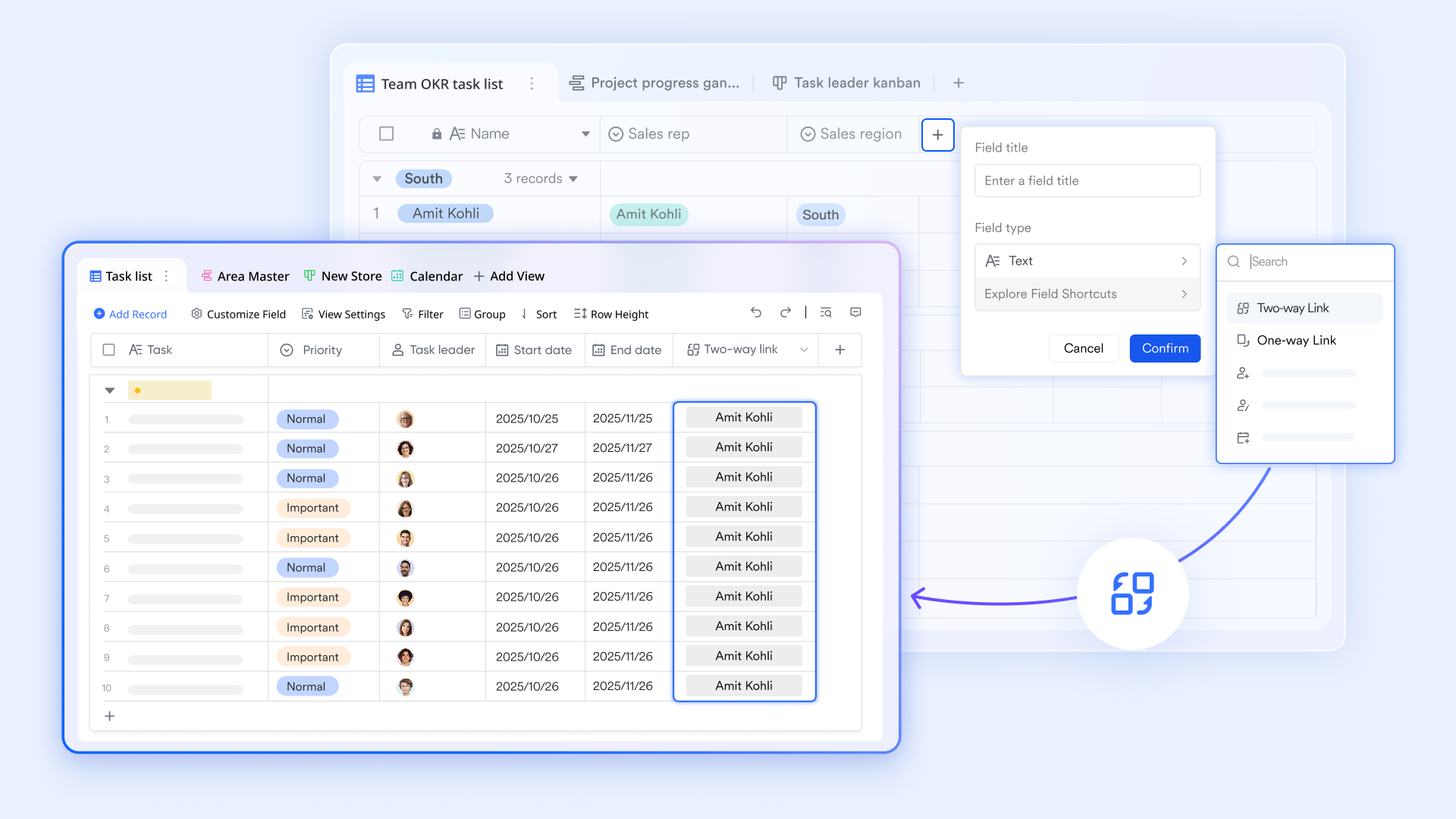
Proactive coordination through automation
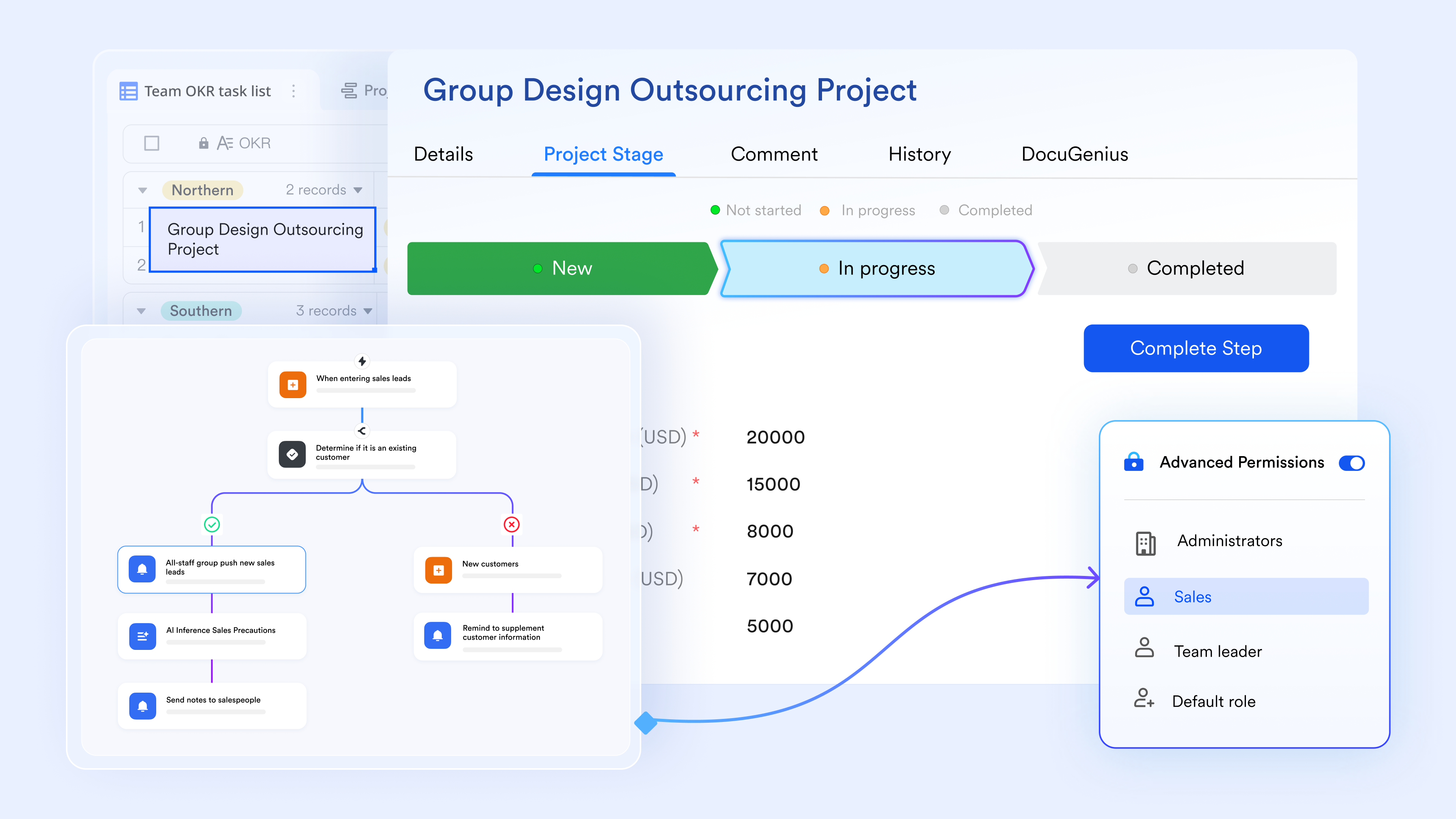
Manual follow-ups are a common bottleneck in . Lark Base workflows handle heavy lifting by sending timely reminders as deadlines approach. With no-code configuration of triggers, actions, and branches, owners can confirm task completion directly within , which then automatically updates the status in Lark Base or triggers a formal sign-off through .
:
- Starter plan: Free forever plan that includes 11 powerful tools for up to 20 users. It also comes with 100GB of storage, 1000 automation runs, AI translations, and more.
- Pro plan: $12/user/month (billed annually) for up to 500 users. It includes everything in Starter plus group calling for up to 500 attendees, 15TB of storage, 50,000 automation runs, and more.
- Enterprise plan: for custom pricing. Supports unlimited users and includes even more automation runs and advanced security, compliance, and management features.
For small teams with simple communication needs

18 months message history
1000 Base automation runs/month
2000 rows per table in Base
Most POPULAR
For companies with comprehensive collaboration and management needs
Unlimited message history
500-participant video meetings
50k Base automation runs/month
20k rows per table in Base
For large companies with advanced security and organizational management needs
Get a personalized demo and pricing
Unlimited message history
500-participant video meetings
15 TB storage + 30 GB storage/user
500k Base automation runs/month
50k Base automation runs/month
Most POPULAR
For companies with comprehensive collaboration and management needs
Unlimited message history
500-participant video meetings
50k Base automation runs/month
20k rows per table in Base
Milestone planning mistakes teams often overlook
Even with a well-structured project milestones template, teams sometimes overlook critical planning issues that can affect project progress. Avoiding these common mistakes helps ensure milestones remain clear, achievable, and aligned with .
- Unclear milestone definitions: Milestones should clearly represent significant checkpoints or completed phases within a project. When definitions are vague, teams may misunderstand what needs to be accomplished. A well-designed milestone template helps define milestones precisely and ensures everyone understands the expected outcomes.
- Unrealistic milestone timelines: Setting overly ambitious deadlines can lead to rushed work, missed targets, and team burnout. Milestone timelines should be based on realistic estimates of task complexity, resource availability, and potential risks. Using a project milestones template helps teams plan achievable schedules.
- Lack of stakeholder accountability: If milestones lack clearly assigned owners, accountability becomes unclear. Assigning responsible stakeholders for each milestone ensures tasks are monitored and completed on time. A structured milestone project management template helps define ownership and improve accountability.
- Disconnected reporting systems: When milestone updates are scattered across multiple tools or reports, it becomes difficult to accurately track project progress. Centralized tracking through a project milestones template ensures that milestone updates, progress reports, and project data remain consistent and accessible for all stakeholders.
Conclusion
Effective milestone planning helps teams maintain structure, track progress, and ensure that projects move forward according to schedule. By clearly defining milestones, assigning responsibilities, and monitoring timelines, organizations can improve coordination and reduce the risk of delays. Using a project plan with a milestone template or project milestone tracking also makes it easier to organize tasks and monitor key checkpoints throughout the project lifecycle.
Modern collaboration platforms like further support milestone tracking by bringing project planning, communication, and progress monitoring into one centralized workspace. With the right templates and tools, teams can manage milestones more efficiently and keep projects aligned with their goals from start to completion.
Start managing projects smarter with Lark today
FAQs
What are project milestone templates used for?
Project milestone templates are used to track important checkpoints within a project timeline. They help teams monitor progress, manage deadlines, and ensure that major phases of a project are completed on schedule. By organizing milestone details in one place, teams can maintain better visibility and coordination throughout the project lifecycle.
What should a milestone template include?
A milestone template typically includes fields such as milestone name, description, target completion date, responsible team member, dependencies, status updates, and related deliverables. These elements help project managers clearly define each milestone and monitor whether the project is progressing according to plan.
How are milestones different from project tasks?
Milestones represent significant achievements or checkpoints in a project, such as completing a project phase or delivering a key component. Tasks, on the other hand, are individual activities that must be completed to reach those milestones. In simple terms, tasks lead to milestones, while milestones mark major progress points.
Can milestone tracking be automated?
Yes, milestone tracking can be automated using project management and collaboration tools. These platforms can automatically update milestone status, send deadline reminders, generate progress reports, and track dependencies. Automation helps teams stay organized and reduces the risk of missing important deadlines.
Which teams use milestone templates the most?
Milestone templates are widely used by project management teams, software development teams, marketing departments, product management teams, and operations teams. Any team managing complex projects with multiple phases and deadlines can benefit from using milestone templates to track progress and maintain project alignment.
Related reading












