Effective project execution begins with structured planning. Many teams rely on project planning Excel sheets to organize tasks, allocate resources, and monitor timelines. Spreadsheets remain popular because they are flexible, accessible, and familiar to most professionals. However, without a clear structure, even the best intentions can turn into missed deadlines and misaligned priorities.
This guide explores how an Excel sheet for project planning helps teams bring order to complex initiatives. From defining scope to tracking progress, structured templates make execution more predictable and measurable. As projects grow more collaborative and dynamic, modern digital tools like Lark are also transforming how teams manage planning, communication, and real-time tracking in a unified workspace.
What is a project planning Excel sheet?
A project planning Excel sheet is a structured spreadsheet used to organize , tasks, timelines, resources, and to track progress. It acts as a centralized planning document where teams can outline deliverables, assign responsibilities, and monitor deadlines. Many organizations rely on an Excel project planning sheet because it offers flexibility and customizable formatting.
A project planning sheet in Excel often includes columns for task names, start and end dates, assigned team members, priority levels, and completion percentages. Conditional formatting and formulas can automatically calculate delays or . This makes spreadsheets useful for small to mid-sized projects.
While an Excel sheet for project planning provides structure, it requires manual updates and careful version control. Teams must ensure that information remains accurate and shared consistently to avoid confusion or duplication.
Drive project success with streamlined workflows
5-step guide to creating your own project plan template
Creating a structured project planning Excel sheet ensures clarity and accountability. Follow these steps to design a practical and scalable template.
Step 1: Define project scope and objectives
Start by outlining the project's purpose and what success looks like. Identify key deliverables and expected outcomes to guide the planning structure. A clear scope definition prevents unnecessary scope expansion later.
Step 2: Break down tasks and activities
List all major tasks required to complete the project. Divide complex activities into smaller, manageable steps for better tracking. This approach makes your project planning sheet in Excel easier to update and monitor. Smaller tasks help clarify dependencies and improve transparency.
Step 3: Assign timelines and milestones
Set realistic start and end dates for each task. Create milestones to measure progress at different stages of the project. Using date formulas in an Excel sheet for project planning can automatically highlight overdue tasks.
Step 4: Allocate resources and responsibilities
Assign team members to tasks and clearly define their roles. Include resource requirements such as budget, tools, or equipment. Ownership prevents confusion and improves accountability.
Step 5: Monitor progress and update regularly
Add a tracking section to and performance. Review progress periodically and adjust timelines or priorities as needed. Regular updates keep the project planning Excel sheets relevant and accurate.
20 ready-to-use best project planning templates
Using ready-made templates reduces setup time and improves planning accuracy. Below are structured templates that enhance both spreadsheet planning and digital execution.
Project planning implementation template
This template supports structured project rollout and execution tracking from start to finish. It helps teams map deliverables, timelines, and ownership in a single workspace. Clear task organization improves coordination and reduces delays. It is useful for teams managing cross-functional initiatives.
Project charter template
The project charter template defines scope, stakeholders, risks, and expected outcomes. It establishes a clear foundation before detailed planning begins. Teams can align expectations and avoid scope creep early. This template ensures that everyone understands project goals from the start.
Project plan template
This template provides a comprehensive overview of tasks, timelines, and dependencies. It helps teams visualize how each activity contributes to the final outcome. Clear structure improves accountability and progress tracking.
Detailed project plan template
A more granular template designed for complex initiatives and multi-phase execution. It supports task hierarchies, dependencies, and milestone tracking. Teams gain deeper visibility into project progress and risks. It helps manage large-scale projects more effectively.
Project overview roadmap template
This roadmap template focuses on high-level timelines and strategic milestones. Leaders can quickly understand progress and upcoming priorities. It supports long-term planning and executive reporting. This template improves transparency across departments.
Project management Gantt chart overview template
This template visualizes timelines using Gantt charts and dependencies. Teams can track schedules and identify the critical path easily. It simplifies complex planning that is difficult to manage in spreadsheets. Real-time updates improve coordination and delivery timelines.
Project management template
A versatile template designed to organize tasks, milestones, and deliverables. It supports collaboration and progress tracking across teams. The structure improves clarity and accountability during execution. Teams can standardize workflows across projects.
OKR task subdivision and progress control template
This template connects project planning with goal tracking. It helps break down objectives into measurable tasks and milestones. Teams gain visibility into progress and alignment. It supports performance monitoring and reporting.
Team task allocation template
This template focuses on assigning responsibilities and balancing workloads. It ensures that tasks are distributed efficiently across teams. Clear ownership improves accountability and reduces confusion. Managers can monitor capacity and workload distribution.
Gantt chart template
A classic timeline visualization tool designed for project scheduling. It helps track task dependencies and progress visually. Teams can quickly identify delays and adjust plans. This template improves scheduling accuracy and transparency.
Task management with an automatic reminder template
This template adds reminders and notifications to task tracking. Teams receive alerts for upcoming deadlines and overdue work. It reduces manual follow-ups and improves accountability. Automated reminders keep projects on track.
4x4 risk assessment template
This template helps identify and evaluate project risks systematically. Teams can prioritize mitigation strategies effectively. Structured risk analysis improves decision-making. It provides visibility into potential challenges. It complements project planning in an Excel sheet.
Project information management template
This template centralizes project data and documentation. Teams can access key information quickly and consistently. It reduces the number of scattered files and improves collaboration. Organized documentation supports better decision-making.
Design project management template
Designed for creative and design-focused projects. It helps track assets, timelines, and approvals efficiently. Teams can collaborate and maintain visibility across workflows. It supports structured planning for creative teams.
Gantt chart for requirement management template
This template connects requirement tracking with timeline planning. Teams can monitor delivery schedules and dependencies clearly. It improves coordination between stakeholders and developers. Structured tracking reduces misunderstandings.
OKR task subdivision and progress control multiple views template
This template provides multiple visualization views for tracking goals and tasks. Teams can switch between dashboards, timelines, and boards. It improves flexibility and collaboration. Visual insights support faster decision-making.
OKR management template
This template helps organizations align projects with strategic objectives. It tracks key results and performance metrics. Teams maintain visibility into goal progress. It supports leadership reporting and alignment.
Project request list template
This template organizes incoming project requests and approvals. It helps prioritize initiatives and allocate resources effectively. Teams gain better visibility into upcoming work. Structured intake improves planning efficiency.
Task management AI autofill task summary template
This template uses automation to generate task summaries quickly. It saves time and reduces manual documentation. Teams can focus more on execution and less on repetitive updates.
Short-term project plan template
This template focuses on quick execution and short timelines. It helps teams plan sprints and immediate deliverables. Clear tracking ensures fast progress and accountability. It is ideal for agile and fast-moving projects.
Modern choice: Use Lark to manage projects from step one to delivery
Traditional spreadsheet planning provides structure, but collaboration often requires more dynamic coordination. Teams increasingly need tools that connect communication, task management, and timeline visualization in one place. supports this shift by bringing structured planning and together. Instead of relying solely on a project planning Excel sheet, teams can combine structured templates with live updates and integrated dashboards.
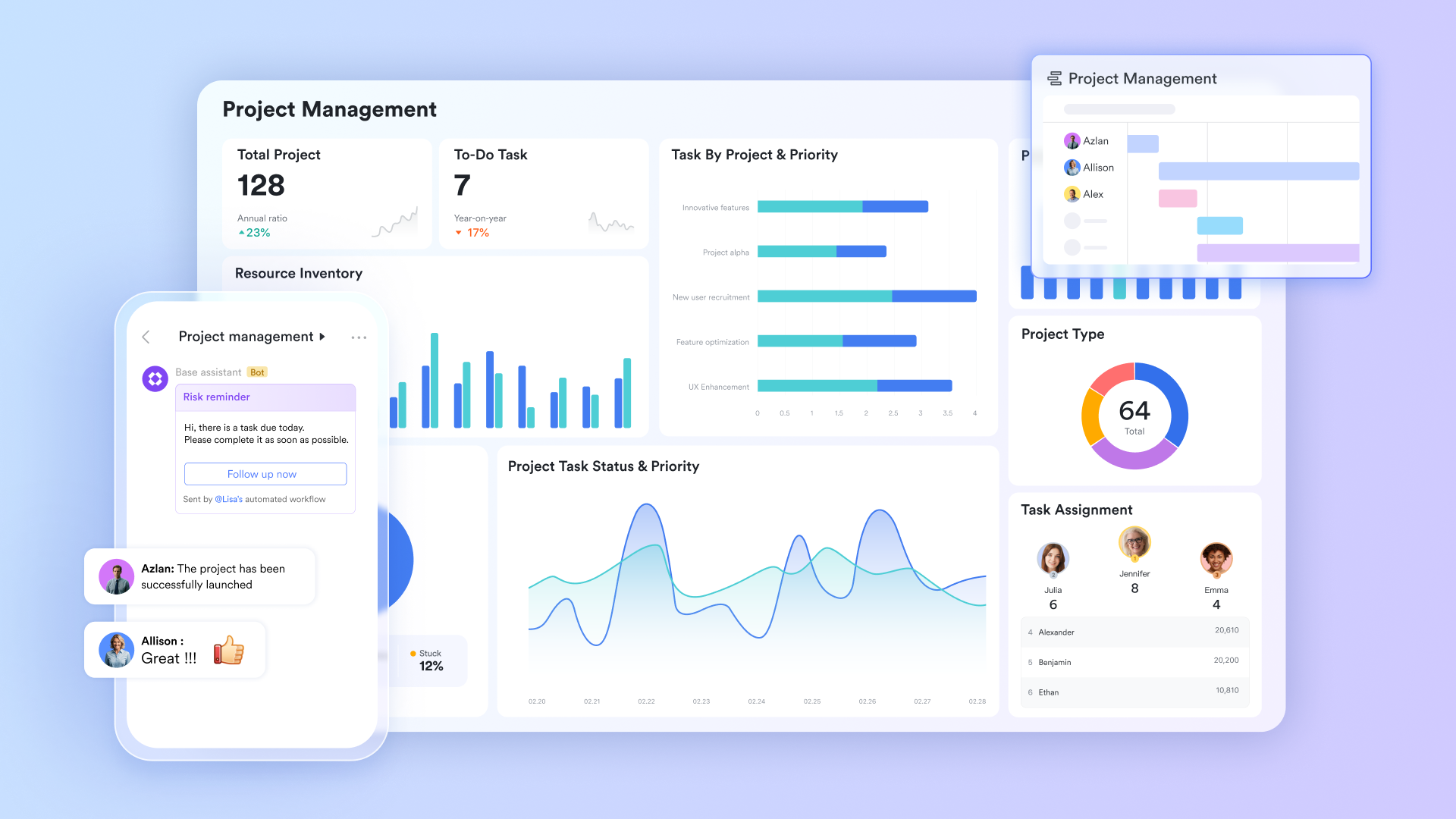
Unified engine for multidimensional project blueprinting
serves as the structural heart of project planning, acting as a flexible database where you can define milestones, assign owners, and track dependencies. It allows planners to switch instantly between a Grid view for data entry, a for agile sprints, and a for complex timeline management. Because it supports no-code customization, you can create specific fields for budgets, risk levels, or barcode scanning, ensuring the project blueprint is perfectly tailored to your industry's requirements.
Trackable execution and accountability
Lark Tasks is the feature that breaks high-level project plans into actionable items. During the planning phase, you can use sub-tasks to decompose complex deliverables into manageable steps, each with its own assignee and priority level. A key differentiator is its collaboration with : a planning decision made during a chat can be converted into a task with one click, ensuring that no strategic "to-do" is lost between the discussion and the project plan. 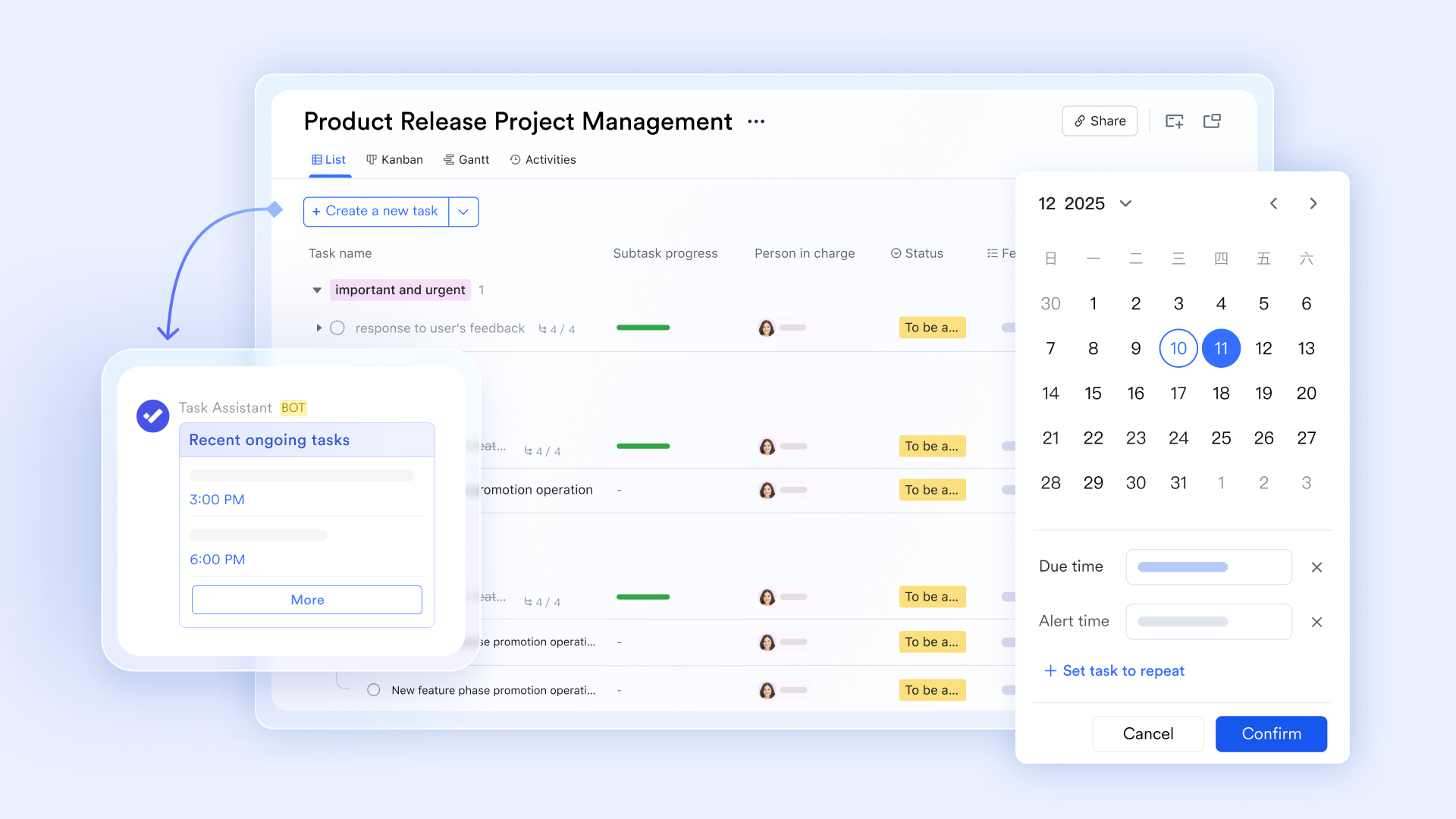
Project-specific communication groups
In the planning stage, allows for the creation of dedicated Project Groups that serve as the command center for all project-related talk. These groups can be automatically synced with events and Lark Tasks, meaning that any updates to the project plan are pushed directly into the chat feed. By pinning the project roadmap to the top of the chat, Lark ensures that every contributor has immediate access to the latest planning documents and timeline updates. 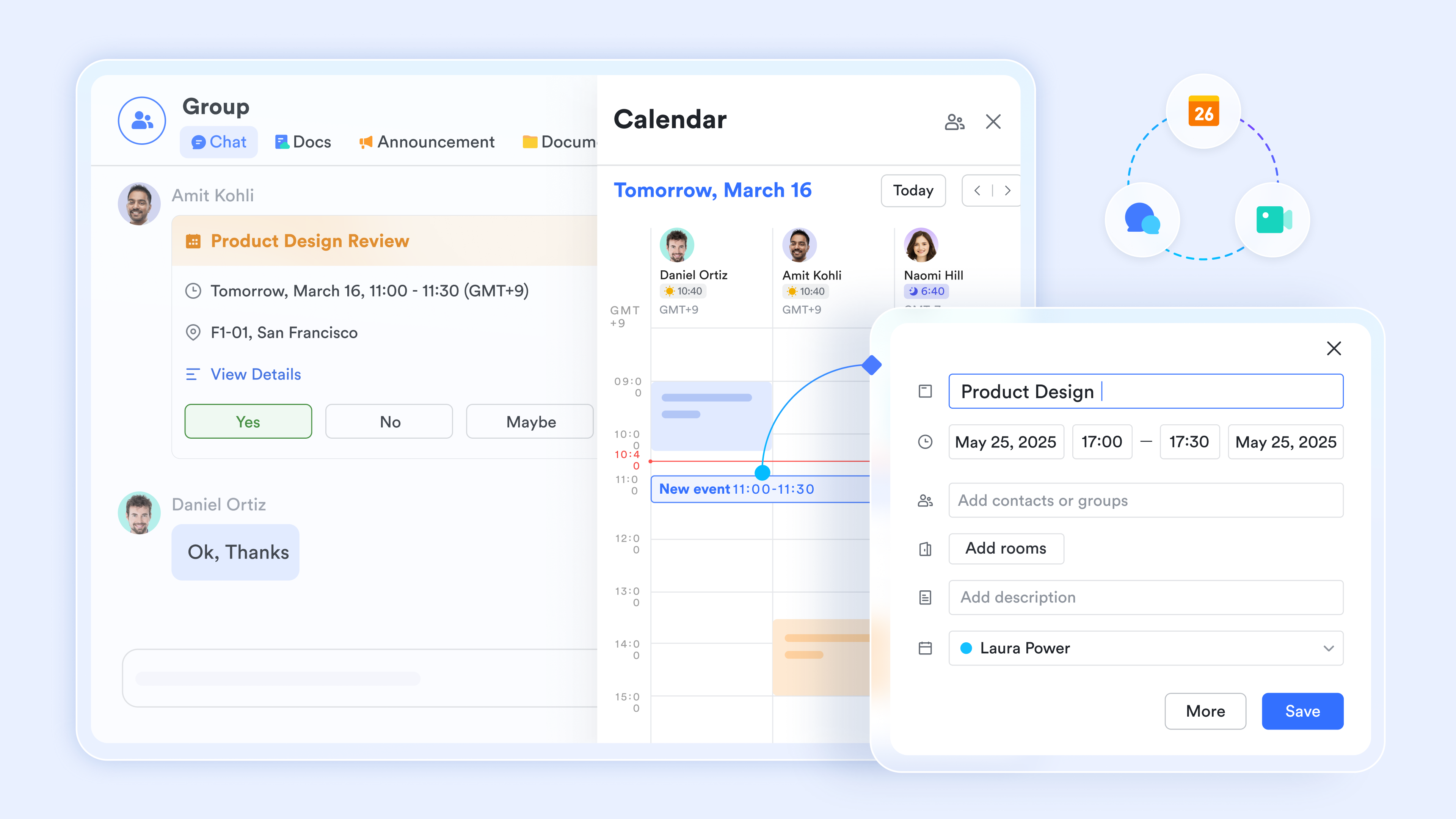
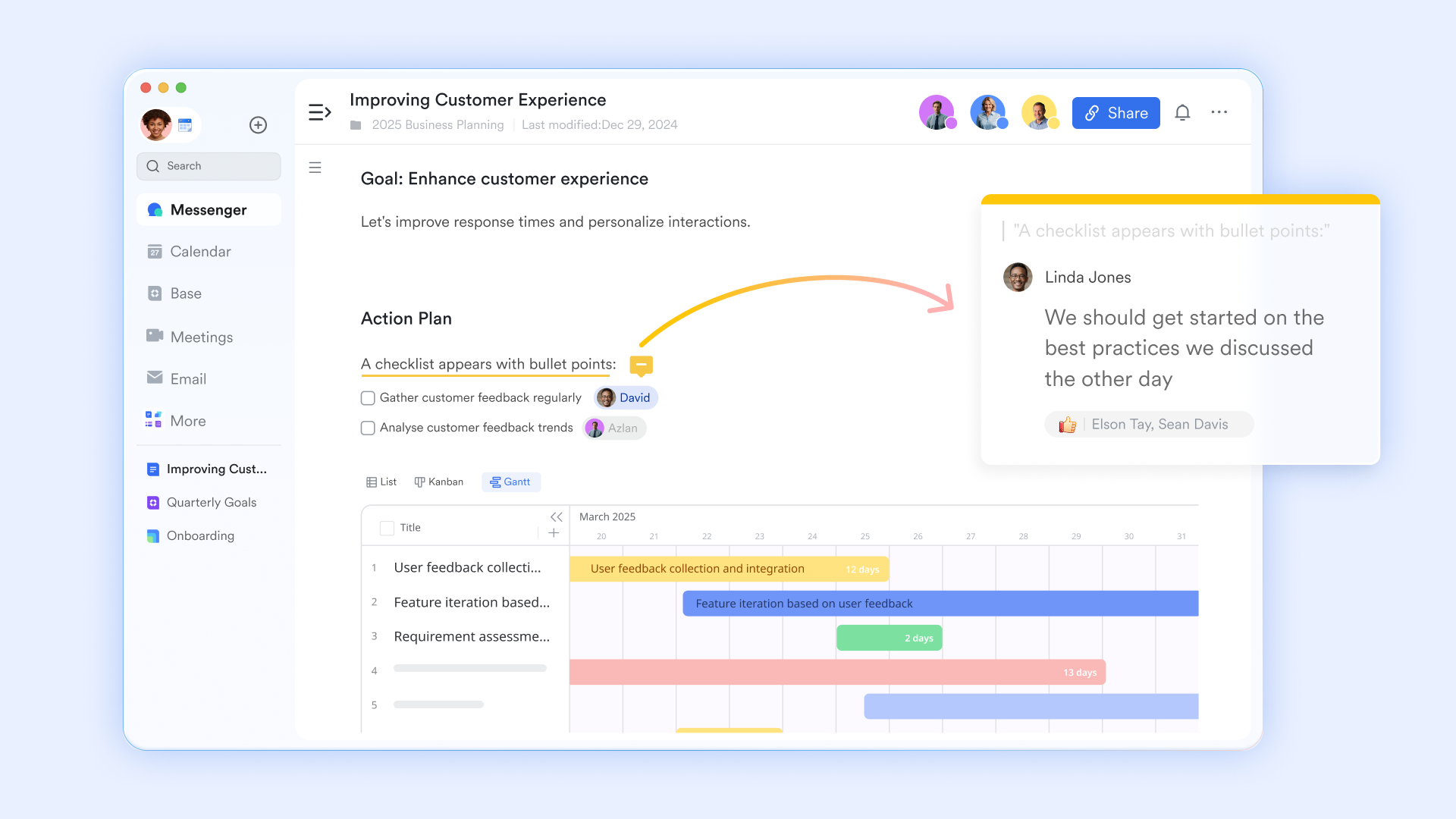
Collaborative project plans, charters, and briefs
replaces static planning documents with "living" project hubs where teams co-author project charters, technical specs, and creative briefs. Designers and engineers can embed Lark Base views or interactive polls directly into the document, allowing stakeholders to see live project status without leaving the page. This ensures that the "Source of Truth" for a and guidelines remains dynamic and accessible to the entire team in real time.
:
- Starter plan: Free forever plan that includes 11 powerful tools for up to 20 users. It also comes with 100GB of storage, 1000 automation runs, AI translations, and more.
- Pro plan: $12/user/month (billed annually) for up to 500 users. It includes everything in Starter plus group calling for up to 500 attendees, 15TB of storage, 50,000 automation runs, and more.
- Enterprise plan: for custom pricing. Supports unlimited users and includes even more automation runs and advanced security, compliance, and management features.
For small teams with simple communication needs

18 months message history
1000 Base automation runs/month
2000 rows per table in Base
Most POPULAR
For companies with comprehensive collaboration and management needs
Unlimited message history
500-participant video meetings
50k Base automation runs/month
20k rows per table in Base
For large companies with advanced security and organizational management needs
Get a personalized demo and pricing
Unlimited message history
500-participant video meetings
15 TB storage + 30 GB storage/user
500k Base automation runs/month
50k Base automation runs/month
Most POPULAR
For companies with comprehensive collaboration and management needs
Unlimited message history
500-participant video meetings
50k Base automation runs/month
20k rows per table in Base
Future trends in project planning driven by automation
Project planning continues to evolve with digital transformation.
- AI-assisted scheduling: Automation tools analyze historical data to predict realistic timelines. This reduces planning guesswork and improves accuracy. Teams can allocate resources more efficiently.
- : Advanced systems forecast delays before they happen. Early warnings help teams adjust plans proactively. This reduces risk and improves delivery timelines.
- : Shared dashboards allow teams to monitor progress together in real time. Visibility improves accountability and alignment. Decision-making becomes faster and more informed.
- Cloud-based planning systems: Cloud platforms enable remote access and seamless collaboration. Teams can update plans from anywhere at any time. This supports modern distributed work environments.
- Automated performance reporting: Dashboards generate reports without manual compilation. This saves time and reduces human error. Leaders gain instant insights into project performance.
Conclusion
A project planning Excel sheet remains a practical and accessible tool for organizing tasks, timelines, and responsibilities. It provides a structure that supports consistent tracking and accountability. For small teams or simple projects, spreadsheets offer flexibility and familiarity that make planning straightforward.
However, as projects become more complex and collaborative, teams benefit from tools that go beyond static files. Platforms like combine structured planning, live dashboards, and to support real-time coordination. By blending traditional spreadsheet planning with modern collaborative systems, organizations can improve efficiency, reduce errors, and achieve stronger project outcomes.
Start managing projects smarter with Lark today
FAQs
Can a project planning Excel sheet support multiple team members?
Yes, a Excel sheet can support multiple contributors through shared files and cloud storage. However, version control can become difficult as teams grow and updates happen frequently. Miscommunication and duplicated work may occur when edits are not visible instantly. Real-time collaboration platforms like Lark help improve visibility and reduce duplication across teams.
What industries rely heavily on Excel project planning sheets?
Industries such as construction, marketing, IT, and retail commonly use Excel project planning sheet templates. Spreadsheets provide a familiar and cost-effective way to manage timelines and resources. They work well for structured and predictable projects. Many growing teams later adopt tools like Lark to support larger and more collaborative workflows.
How do formulas improve project tracking in Excel?
Formulas automatically calculate timelines, budgets, and completion percentages. They help highlight overdue tasks and resource allocation gaps quickly. This makes an Excel sheet for project planning more efficient and data-driven. As planning becomes more advanced, platforms like Lark add automation and real-time dashboards for deeper insights.
When should teams move beyond Excel-based planning?
Teams should consider upgrading when projects involve and complex dependencies. Frequent version conflicts and manual updates often signal scalability limits. Advanced collaboration and automation have become essential for growth. Tools such as Lark provide better coordination and real-time project visibility.
Can digital planning tools replace traditional spreadsheets?
Yes, many digital systems provide spreadsheet-like flexibility with added automation and collaboration. They centralize communication, reporting, and tracking in one workspace. Teams gain better visibility and faster decision-making. Platforms like Lark help transition from static spreadsheets to dynamic project management.
Related reading





























