














Project Milestones: Definition, Examples for Effective Tracking

Ryan Tanner
Product Marketing Specialist
Sep 18, 2026
Ryan Tanner
Sep 18, 2026

17 min read


Every project follows a journey marked by checkpoints that determine its progress and success. These checkpoints, called project milestones, help teams and stakeholders measure how far a project has come and what's left to achieve. From concept approval to final delivery, milestones shape the rhythm of project execution. They also serve as a communication bridge between project managers, teams, and clients. Modern workspaces like Lark simplify milestone planning by bringing communication, tracking, and approvals into one connected system. Before exploring how Lark supports milestone management, let's first understand what project milestones really are.

What are milestones in project management?
Project milestones represent significant points or events that mark progress within a project's lifecycle. They don't indicate a deliverable or physical output but serve as markers that show when a key goal, decision, or phase has been completed. These markers provide structure and help visualize project progress across timelines.
In project management, milestones are used to signal major transitions such as "project approval," "design completion," or "testing sign-off." They make it easier for teams to assess whether the project is moving according to plan and for stakeholders to review progress without getting lost in task-level details.
Understanding what are milestones and how they connect to project deliverables is the foundation of strong planning and execution. The next section explores why defining and tracking these milestones is so critical to overall project success.
Project milestones vs deliverables milestones - Know the difference
It's common to hear teams use "milestones" and "deliverables" as interchangeable terms, but in reality, they describe two distinct concepts in project management. Understanding this difference helps teams plan more effectively and communicate progress with precision.
Project milestones
Milestones mark key events or stages in a project. They don't produce tangible outputs but represent completion checkpoints such as "design approved" or "client feedback received." These milestones help teams monitor whether the project is moving through its expected phases smoothly. In project management, milestones are like guideposts that visualize the journey toward project completion.
Project deliverables
Deliverables, on the other hand, are concrete outcomes or results produced during a project. These include items like "final report," "completed marketing campaign," or "software version release." Deliverables reflect the work done, whereas milestones signal that a specific point has been reached.
How they relate
Think of milestones as progress indicators and deliverables as the products of that progress. For instance, "prototype delivery" could be both a deliverable and a milestone if it marks a major transition in the project timeline. Understanding this relationship helps in defining project milestones and deliverables examples clearly when planning.
Practical example
In a website development project, milestones might include "design approval," "content upload completed," and "client review," while deliverables could be "live website," "style guide," or "launch assets." Together, they ensure both the journey and the outcome are tracked efficiently.
Common project milestone examples
Every project includes multiple stages that can be tracked using milestones in project management. These project management milestones act as reference points to ensure the project is progressing according to plan. Identifying key milestones in a project helps everyone from managers to stakeholders understand how close the team is to completing its goals.
Here are some common project milestones examples that apply across industries and project types.
- Initiation milestones: These mark the formal beginning of a project. Examples include project approval, resource allocation, or budget confirmation. At this stage, the team defines project milestones that will structure the timeline ahead. Reaching this first checkpoint confirms that the project is viable and ready for planning.
- Planning milestones: These focus on preparing schedules, identifying dependencies, and assessing risks. Planning milestones often include "risk assessment completed" or "schedule finalized." By setting clear planning milestones, teams ensure they can track progress accurately before execution begins.
- Execution milestones: These represent tangible progress during the main phase of work. Examples include design reviews, prototype delivery, or MVP launch. Tracking project milestones at this stage ensures that each deliverable aligns with predefined goals and quality benchmarks. For instance, completing "beta release approval" signals that development is on track.
- Testing milestones: Every project should include a phase where outcomes are validated. Testing milestones may include "QA testing completed" or "user acceptance testing (UAT) approved." These checkpoints verify that the deliverables meet functional and quality expectations before launch.
- Closure milestones: These mark the final steps of project delivery. Closure milestones include client acceptance, documentation finalization, and post-project review. Reaching these project management milestones signals the successful completion of the project and enables teams to reflect on performance and lessons learned.
Incorporating key milestones for a project not only provides structure but also enhances visibility into how efficiently the project moves from concept to completion.
How to set project milestones effectively
Knowing what project milestones are is only part of the process. The next step is learning how to define project milestones that are achievable, measurable, and strategically aligned with overall objectives. Effective milestone planning ensures smoother tracking, better collaboration, and timely delivery.
Here's how to set up project milestones templates and checkpoints that truly work.
- Break the project into logical phases: Divide your project into distinct stages such as initiation, planning, execution, and closure. Each phase should include key project milestones that reflect important transitions. This method simplifies tracking project milestones and allows for clear reporting at every stage.
- Identify critical dependencies between tasks: Milestones often depend on other tasks being completed first. When planning, identify dependencies so that delays can be managed effectively. For example, in milestones in project management, "design approval" must precede "development start." Visualizing dependencies helps prevent bottlenecks later.
- Assign owners to milestone checkpoints: Accountability is essential for progress. Assign milestone ownership to specific team members or departments. This ensures that tracking project milestones becomes a shared responsibility, promoting transparency across the team.
- Estimate realistic completion dates: Setting overly ambitious dates can lead to stress and misalignment. Use past data or historical project milestones examples to forecast achievable timelines. Realistic deadlines help maintain consistency and allow teams to plan resources effectively.
- Use tools to visualize milestones: A Gantt chart, calendar, or project milestones template can make timelines easier to follow. Tools that display project milestones visually help stakeholders grasp progress instantly. Digital workspaces like Lark allow you to visualize these key milestones for a project in dynamic ways that update in real time.
- Review and adjust as projects evolve: Projects often change in scope, timeline, or resources. Regularly revisiting your list of milestones ensures it stays relevant. Tracking project milestones dynamically ensures that changes in dependencies or deliverables are reflected instantly.
Establishing project milestones templates for different types of projects like product launches or software development helps teams standardize success tracking across projects and departments.
Practice on your own: Use Lark for smarter milestone management
Managing milestones in project management often involves juggling multiple tools for task updates, communication, and reporting. Lark simplifies this by combining all these functions into one unified workspace. This enables teams to define project milestones, track them visually, and communicate updates instantly without switching apps. Here's how Lark helps teams achieve smarter, more connected project milestone tracking.
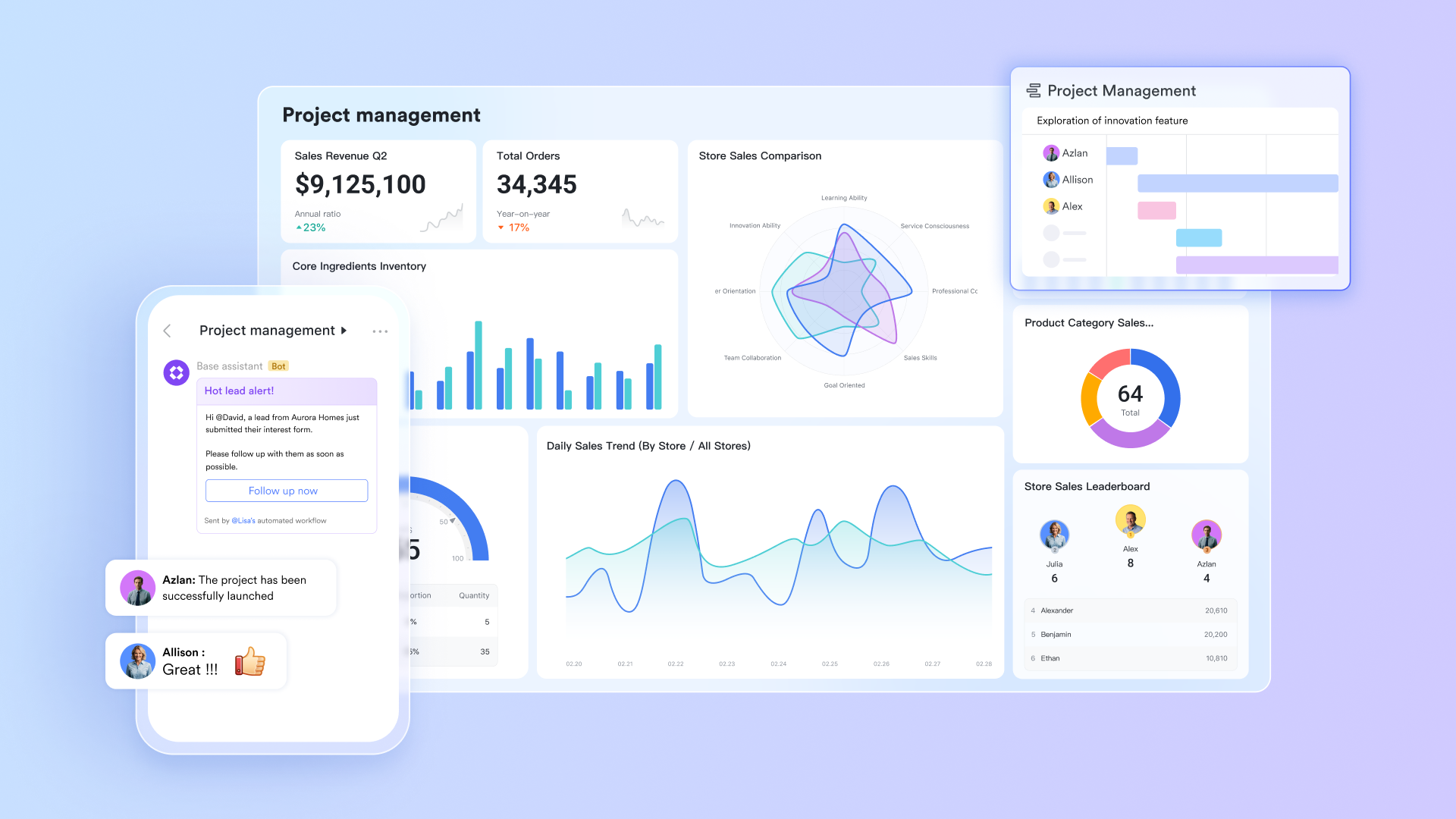
Structure milestones for clarity and visibility
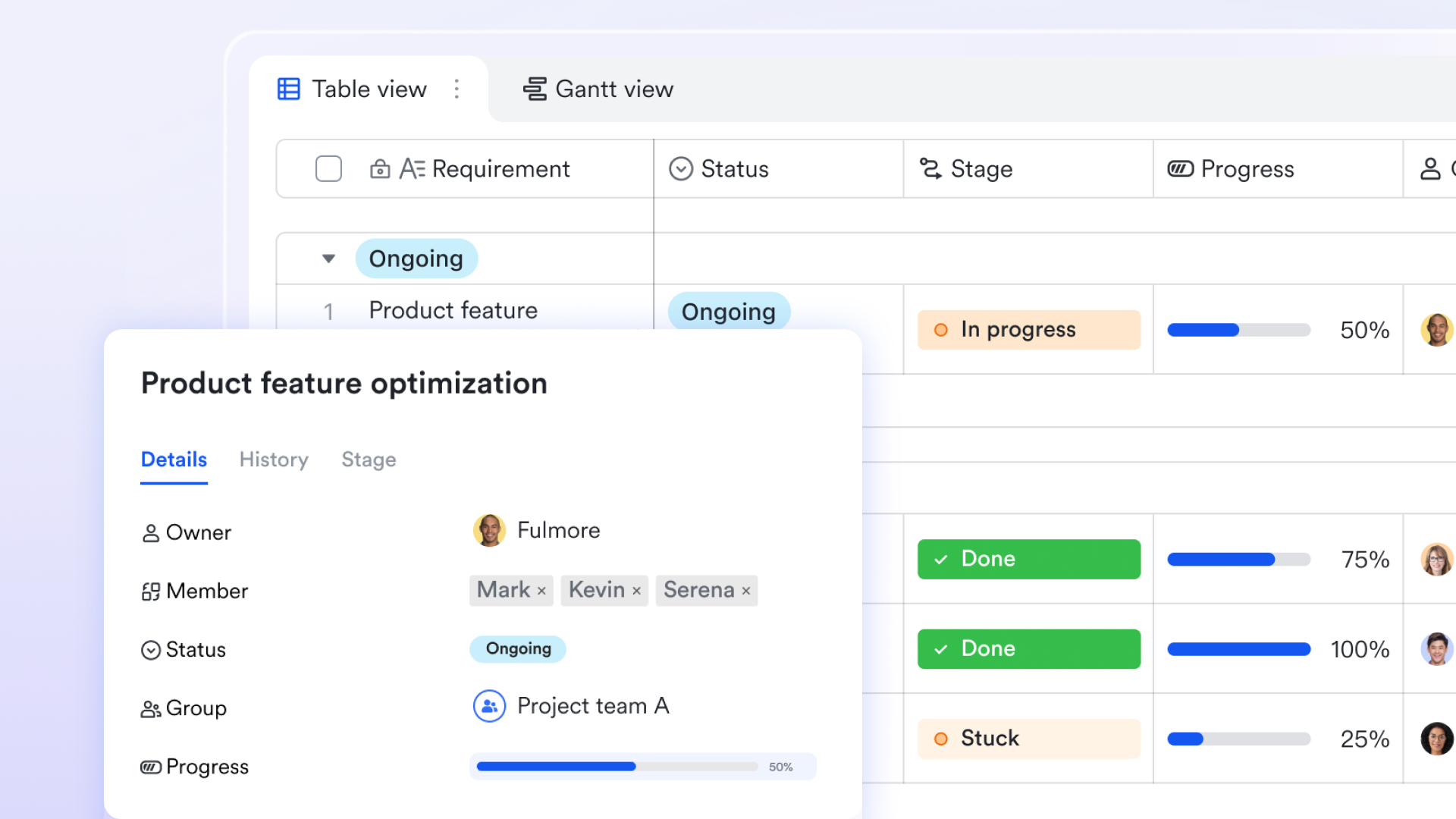
Lark Base acts as a central database for project management milestones. Instead of relying on disconnected spreadsheets, teams can create structured tables that categorize milestones by project, phase, or owner. Each entry can include attributes such as deadlines, dependencies, and completion status, giving managers a clear snapshot of key milestones in a project.
With Gantt and Kanban views, project managers can see how milestones align with overall timelines. For instance, a product team might track milestones such as "UI design approval," "prototype delivery," and "launch readiness" using a Lark Base table. This approach allows for better visibility and makes tracking project milestones more transparent for all stakeholders.
Lark Base supports customization as well. Teams can adjust columns, add formulas, or create milestone templates to match their workflow. This flexibility ensures that every team from IT to marketing can define project milestones that fit their unique processes.

Groups and filters to focus on the milestones that matter most
As projects expand, milestone data can quickly become cluttered. Within Lark Base, the groups and filters feature helps teams organize and view only what's most relevant. Managers can group milestones in project management by categories such as "in progress," "completed," or "at risk" to assess overall project health instantly. For instance, a sales team can filter milestones by project phase to monitor "contract approval" or "client onboarding" progress. These dynamic filters update automatically, ensuring tracking project milestones stays accurate and actionable without manual updates.
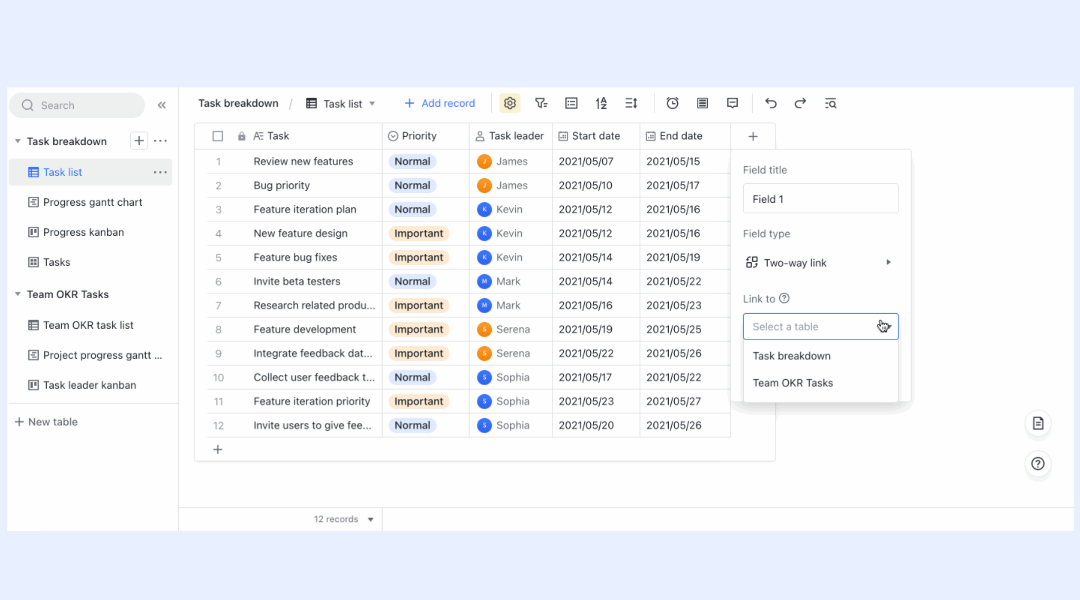
Two-way links to keep milestone data consistent and connected
Data consistency is vital when managing complex workflows, and Lark Base makes it effortless through two-way links. This feature connects related records such as tasks, deliverables, and budgets so that updates automatically reflect across all linked milestones. For example, when a task in a linked table moves from "In Progress" to "Completed," an automation can update the milestone's progress field, send a notification, or advance the project stage. This real-time synchronization helps maintain a single source of truth and ensures every stakeholder sees the latest status of key project milestones without duplicate entries.
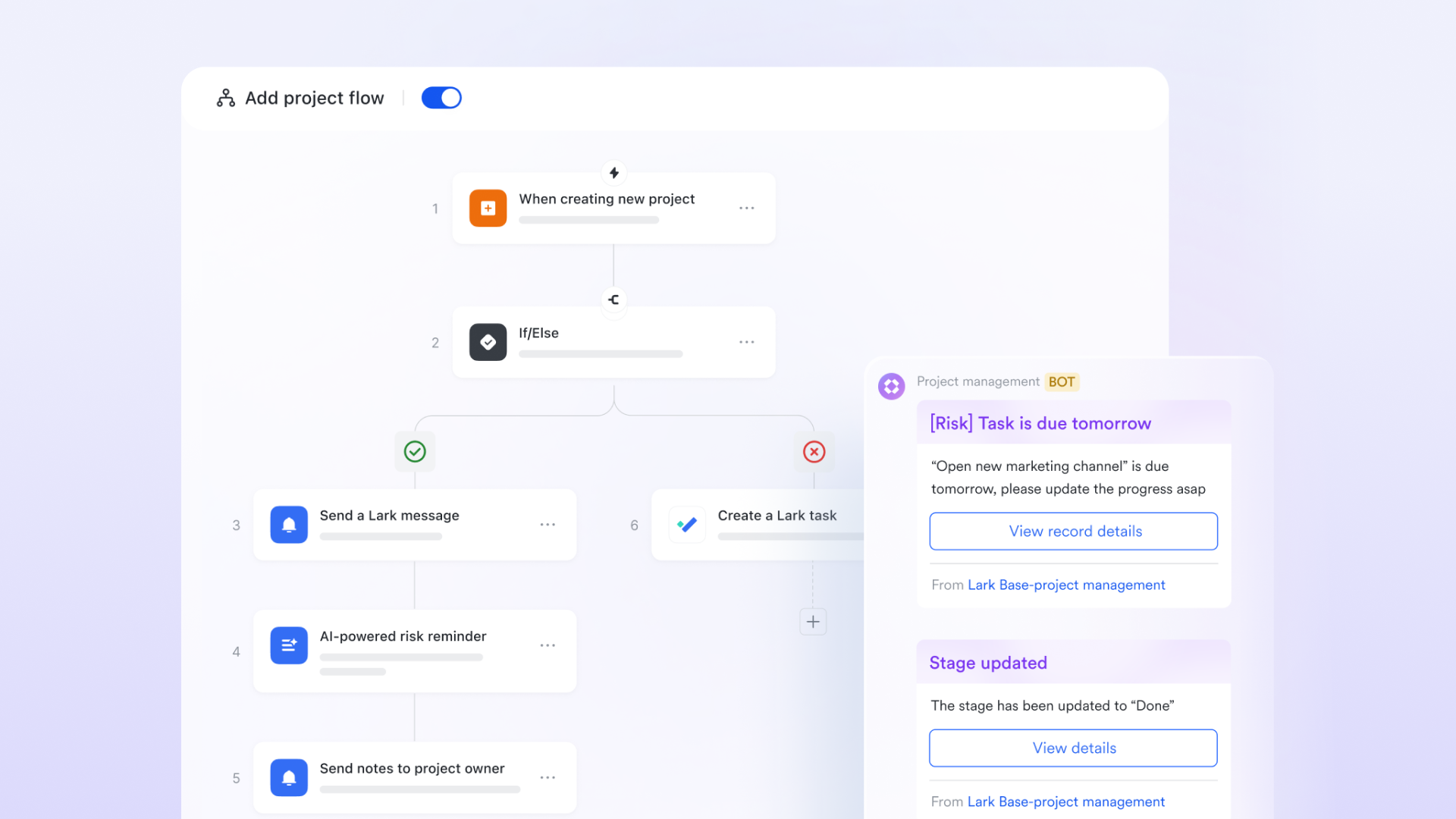
Automated reminders to never miss a milestone deadline
Manual follow-ups often lead to missed updates, but automations in Lark handles this seamlessly. The built-in automation system sends timely reminders and updates to the right team members. For instance, when a milestone deadline approaches, the owner can confirm task completion directly from the Lark Messenger and the status gets automatically updated Lark Base, or even initiate a sign-off flow through Lark Approval. This automated coordination ensures that milestones in project management stay on schedule, reduces manual workload, and keeps accountability transparent across all teams.
Task lists to bridge milestones with actionable execution
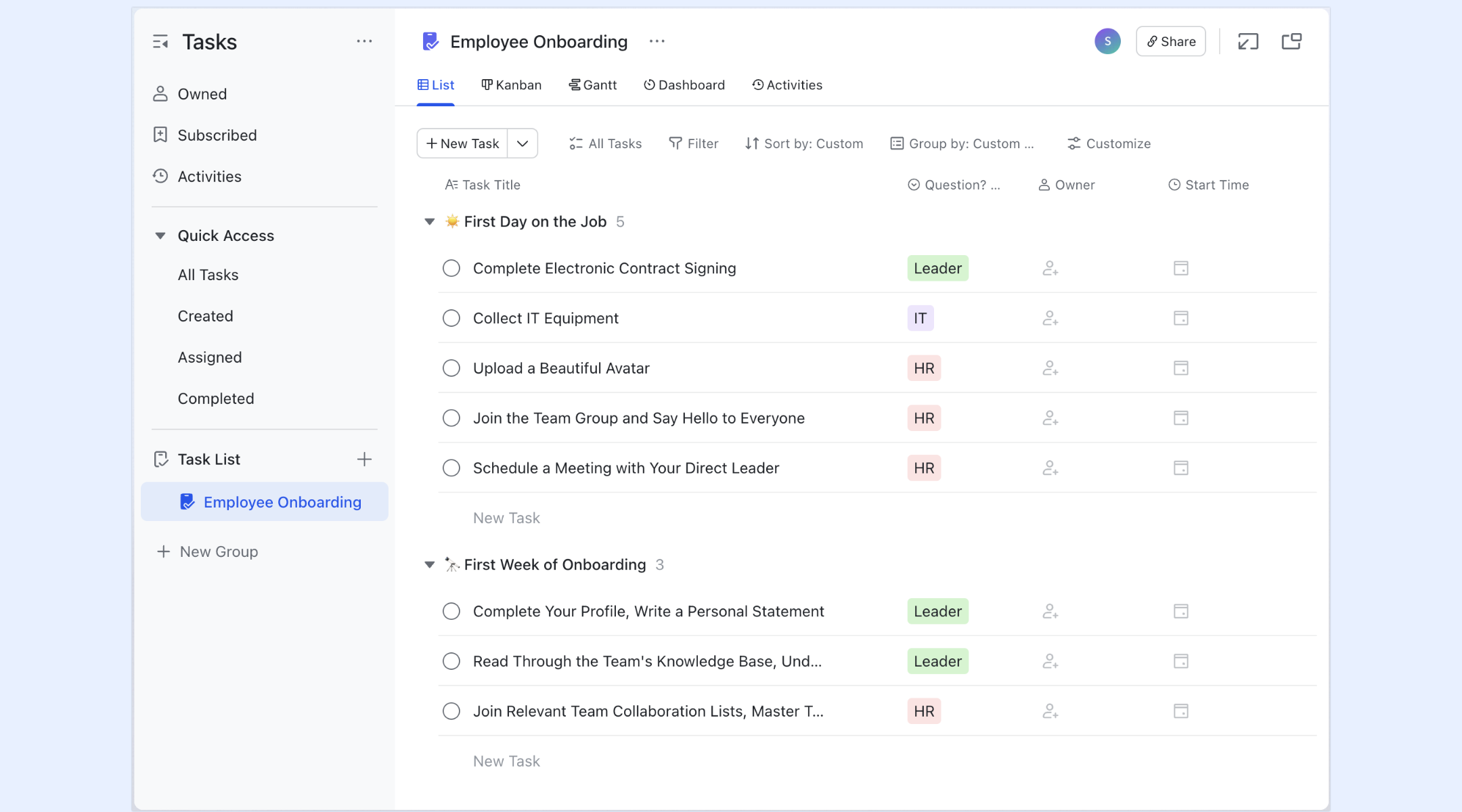
Milestones are only meaningful when supported by clear task execution. Lark Tasks connects directly with project management milestones to ensure that daily work contributes to larger goals. In Gantt view, you can set tasks as milestones, and these will be displayed with a diamond icon, making coordination seamless. For example, a product team tracking the "beta launch" milestone can instantly see tasks like "bug testing," "UI polishing," and "client demo prep" under one workspace. This connection ensures tracking project milestones remain structured and aligned with real progress across departments.
- Starter plan: Free forever plan that includes 11 powerful tools for up to 20 users. It also comes with 100GB of storage, 1000 automation runs, AI translations, and more.
- Pro plan: $12/user/month (billed annually) for up to 500 users. It includes everything in Starter plus group calling for up to 500 attendees, 15TB of storage, 50,000 automation runs, and more.
- Enterprise plan: Contact sales for custom pricing. Supports unlimited users and includes even more automation runs and advanced security, compliance, and management features.
Project milestone template ready-to-use
Templates help teams save time by offering ready-made frameworks for milestone setup and progress tracking. Instead of starting from scratch, you can choose a project milestones template that fits your industry and workflow. Lark provides multiple template options designed to help teams define project milestones, track progress visually, and coordinate cross-departmental updates in one workspace. Each template highlights how tracking project milestones can be adapted to specific needs, from general planning to specialized production and software development.
Production milestone tracker
The production milestone tracker template is designed for industries such as media, manufacturing, and creative production. It helps teams track key milestones for a project that involve multiple phases like concept creation, approval cycles, and final delivery. Each milestone clearly indicates what needs to be completed before moving to the next stage. This structured tracking approach allows managers to spot bottlenecks early and ensure that project milestones and deliverables examples are consistently aligned with output goals. Lark's real-time updates make it easy to monitor ongoing production progress.
Web3 project milestone tracker
For blockchain, crypto, and decentralized tech startups, the web3 project milestone tracker template brings clarity to fast-paced development cycles. This project milestones template helps teams manage evolving goals like protocol testing, community launches, and mainnet deployment. It captures both tangible deliverables and intangible achievements such as "community milestone reached" or "partnership confirmed." Tracking project milestones in this space requires flexibility, and this template ensures transparency at every phase. By defining project milestones upfront, teams can communicate progress clearly to investors and contributors.
Software project milestone tracker
The software project milestone tracker template helps engineering teams manage iterative development efficiently. It's built to handle phases like sprint completion, QA validation, beta release, and final deployment. Using this setup, teams can track milestones in project management with real-time updates and dependency mapping. Each milestone includes clear ownership and due dates to ensure accountability. The template also supports linking milestones with underlying tickets or feature tasks for better traceability. This makes it perfect for software teams aiming to improve visibility and delivery speed.
Development milestone tracker
The development milestone tracker template is ideal for technical teams managing long-term or multi-phase projects. It supports project milestones examples like prototype readiness, system testing, and release sign-off. This setup allows teams to define project milestones that map precisely to their engineering workflow. The template also unifies with automation for reminders and status updates, helping teams stay consistent and avoid deadline slips. With structured views, tracking project milestones becomes an organized, data-driven process that scales with project complexity.
TV show milestone tracker
The TV show milestone tracker template is designed for entertainment and media teams handling multiple production stages. It covers key milestones for a project such as script approval, casting, filming, editing, and final delivery. Each stage can be customized with ownership, dates, and dependencies. This template helps teams monitor overlapping projects like episodic releases or promotional campaigns simultaneously. By using this project milestones example, production managers can maintain consistency and transparency throughout every creative phase.
Why project milestones matter
Milestones play multiple roles in ensuring that projects remain structured, accountable, and measurable. They are more than just checkpoints; they are communication tools that align teams, track outcomes, and motivate consistent progress. Here's why they matter in modern project management.
- Progress measurement: Milestones serve as visual indicators of whether the project is on schedule. Each milestone acts like a progress gate that confirms a phase has been completed successfully. For example, reaching the "prototype approval" milestone ensures that foundational work is done before development starts. When used within project management tools, tracking project milestones helps teams maintain focus and avoid unexpected delays.
- Team accountability: Every milestone represents ownership and responsibility. Assigning clear owners for each milestone ensures that everyone knows who is responsible for its completion. This clarity prevents confusion and promotes proactive problem-solving. It also helps managers evaluate performance and identify dependencies that could impact downstream work.
- Stakeholder communication: Milestones offer a concise and structured way to report progress to clients and stakeholders. Instead of detailed task lists, milestone updates provide a high-level overview of the project's current status. This makes communication faster, more precise, and more meaningful, especially in multi-phase projects with numerous deliverables.
- Risk management: When milestones are delayed, it serves as an early warning signal that something may be off track. Tracking project milestones allows managers to spot schedule slippage and respond quickly. Addressing delays at the milestone level prevents cascading issues and keeps the overall project timeline realistic.
- Motivation and clarity: Each milestone achieved reinforces team confidence and creates a sense of accomplishment. Recognizing these checkpoints motivates teams to push toward the next stage with renewed energy. Milestones also give structure to long projects, helping members see tangible progress instead of feeling lost in an endless cycle of tasks.
Best practices for milestone success
Strong milestone management combines clarity, focus, and teamwork. Follow these practices to improve consistency across projects.
- Communicate expectations early: define project milestones and their owners clearly during the kickoff phase so everyone understands what's expected and when.
- Avoid overloading milestones: too many checkpoints dilute focus. Prioritize only the key project milestones that truly represent progress.
- Automate whenever possible: automation tools reduce manual follow-ups, helping teams stay efficient while tracking project milestones accurately.
- Conduct post-project reviews: once completed, analyze milestone data to identify areas for improvement. This helps refine future project milestones templates.
- Celebrate progress: acknowledging milestone achievements keeps teams motivated and reinforces collaboration across departments.
Applying these best practices ensures that milestones in project management serve as meaningful tools for both execution and reflection.
Conclusion
Project milestones transform abstract goals into measurable progress markers. They guide teams through each project phase, ensuring clarity, accountability, and success. However, the process of tracking project milestones becomes effortless only when visibility, communication, and automation converge in one place.
Lark empowers teams to manage project management milestones within a single connected workspace. From defining milestones and automating reminders to linking deliverables and customizing templates, everything stays synchronized. The result is improved transparency, faster updates, and stronger alignment across all teams.
Whether you're planning your first project milestones example or refining advanced workflows, Lark offers the structure and flexibility to help you succeed. Get started today and see how your next project milestone becomes a moment worth celebrating.
FAQs
What is the difference between project milestones and goals?
Project milestones mark significant progress points, while goals define the overall outcomes a project aims to achieve. Milestones in project management help measure progress in smaller, trackable phases that lead toward the larger goal. With Lark, teams can easily define project milestones and visualize them alongside goals in shared timelines, ensuring every stage contributes directly to the project's success.
How do you measure milestone success?
Milestone success is evaluated by checking if key project milestones are achieved within the planned schedule, scope, and quality standards. Using digital tools like Lark makes tracking project milestones easier through live dashboards and automated progress updates. Managers can instantly see which project management milestones are completed and where attention is needed, helping maintain continuous alignment with overall project goals.
How many milestones should a project have?
There's no fixed number, but most projects include only the essential milestones that represent major transitions such as planning completion, design approval, or final delivery. Having too much can dilute focus and cause confusion. Lark helps teams set up project milestone templates that strike the right balance highlighting only the key milestones in a project while keeping workflows organized and efficient.
What tools can help visualize project milestones effectively?
Visualization is critical when managing complex projects with multiple dependencies. Lark provides dynamic Gantt and Kanban views for tracking project milestones, allowing teams to view progress in real time. Each milestone is linked to tasks, approvals, and deliverables, ensuring clear visibility across departments. This centralized structure helps project managers present updates easily to both internal and external stakeholders.
Can automation help with project milestone tracking?
Yes, automation significantly improves how teams manage and track project milestones. Lark's automation tools send reminders before deadlines, update statuses automatically, and trigger workflows when milestones are reached. These smart updates reduce manual follow-ups and keep everyone informed. With automation built into the platform, teams can focus more on execution and less on administrative tracking.
Related reading
Table of contents
Start using Lark today

Manage all your work in one place
Boost team efficiency by 10x
Save up to 70% on software costs
Table of contents
Start using Lark today
Manage all your work in one place
Boost team efficiency by 10x
Save up to 70% on software costs
Keep reading







2026 Lark Technologies Pte. Ltd.
Headquartered in Singapore with offices worldwide.






Explore: