A shared whiteboard is a digital canvas where multiple people draw, write, and organize ideas simultaneously, no matter where they are. Teams use shared whiteboards for product roadmapping, sprint planning, online lessons, remote workshops, and investor pitch prep. Lark Suite offers a built-in virtual shared whiteboard inside chat and meetings, making visual collaboration part of your daily workflow. This guide covers the benefits, core features, tool comparisons, selection criteria, and best practices for running better whiteboard sessions.
What is a shared whiteboard?
A shared whiteboard is a cloud-based alternative to physical office whiteboards, accessible via any browser or app. Teams in different locations can visualize ideas and collaborate on the same canvas in real time, with all updates synced instantly, turning local collaboration into a fully distributed experience. It has many similar terms—shared whiteboard app, , virtual shared whiteboard—and all refer to a real-time collaborative digital whiteboard.
For example, a remote software team can map product launches, sketch user flows, add notes, and insert wireframes together. A university lecturer can run hybrid seminars with students contributing to case analyses in real time. Modern tools combine drawing, text, images, and templates into one flexible workspace.
Shared whiteboard vs. traditional whiteboard
Traditional whiteboards are limited to in-person meetings, tied to a single physical room, and their content is often lost forever once erased. They offer no way for remote or to contribute, and ideas cannot be saved or reused easily.
A shared whiteboard, by contrast, is a cloud-based visual workspace that breaks free from location restrictions. Team members from anywhere in the world can view, edit, and brainstorm together in real time.
Unlike physical whiteboards, digital shared whiteboards automatically preserve all work. Content can be archived, shared, referenced, and repurposed for future meetings, turning temporary brainstorming into .
Traditional whiteboards only support basic writing and drawing. A shared whiteboard comes with templates, collaboration tools, and deep integrations with other software, making it a complete solution for modern teamwork.
Key benefits of using a shared whiteboard
Teams in 2026 rely on shared whiteboards because hybrid and demand tools that create presence across distance. Visual collaboration delivers faster alignment, clearer decisions, and better engagement than text-heavy documents or passive slide presentations. When embedded in a platform like Lark, whiteboards become part of a continuous workflow rather than a one-off meeting tool.
- Visualizing complex ideas and workflows: A shared online whiteboard transforms abstract concepts into tangible visuals. Process maps, org charts, user journeys, and system architectures become easier to understand when drawn out rather than described in paragraphs of text. A marketing team can sketch a funnel from awareness to conversion, marking drop-off points and brainstorming interventions. An engineering squad can diagram a microservices architecture, using shapes and connectors to show data flows between components.
- in remote and hybrid meetings: Remote meetings often suffer from passive attendees, multitasking, and shallow discussion. When participants only listen without contributing, meetings feel like broadcasts rather than conversations. A virtual shared whiteboard changes the dynamic by turning everyone into a contributor.
- Enabling : A shared whiteboard app creates a neutral visual space for product, engineering, marketing, sales, and leadership to collaborate equally. It acts as shared ground for feature launch planning, letting teams outline roadmaps, flag technical constraints, align campaign timelines, and share customer feedback.
- Creating a persistent knowledge hub: Online shared whiteboards can be archived, versioned, and reused indefinitely, unlike physical whiteboards that are erased after use. Their searchable content lets teams quickly retrieve past decisions and context that plain meeting notes cannot provide. In Lark, whiteboards can be embedded into wikis and Docs, building a knowledge hub that combines visual thinking with written documentation for long-term reference.
Check the benefits of team collaboration now
Popular ways to use a shared whiteboard
Understanding practical use cases helps teams move from theory to action. The following scenarios illustrate how shared whiteboards fit into typical workdays across different functions and industries.
Brainstorming and ideation sessions
exercises translate naturally to digital whiteboards:
- Silent sticky-note brainstorms: Participants add sticky notes simultaneously, preventing groupthink
- Affinity mapping: Cluster related ideas by simply dragging notes together
- Dot-voting: Each person places dots on priority items to surface consensus visually
- Timeboxing: Display timers on the board to maintain energy and focus
A product team exploring new subscription models might start with silent ideation, asking everyone to add text describing potential features. After five minutes, the facilitator groups similar ideas, and the team votes on which concepts deserve deeper exploration. Color-coding by theme or contributor helps track patterns across the session.
Agile ceremonies and project planning
use shared whiteboards throughout the sprint cycle:
- : Map user stories to sprint goals using Kanban columns
- Daily standups: Quick visual updates on progress, blockers, and plans
- Retrospectives: Gather feedback using keep, stop, start frameworks
- Story mapping: Visualize the user journey with feature cards arranged by priority
Dependency diagrams help teams identify bottlenecks before they become blockers. Sprint goals and OKRs displayed visually keep priorities front and center throughout the iteration. After the session, facilitators can export key decisions or convert stickies directly into tracked tasks.
Design collaboration and customer journey mapping
UX and product teams map user journeys, information architectures, and rough wireframes on an online shared whiteboard before committing to high-fidelity designs. Rethinking the sign-up and onboarding flow for a mobile app might start with screenshots pinned on the board, annotated with observations about friction points.
Inviting marketing, support, and sales to mark pain points directly on the journey map creates cross-functional visibility. Support might flag where users frequently contact help, while sales highlights questions prospects ask during demos. This collective intelligence shapes better designs.
Operations, strategy, and decision-making
Leadership teams use whiteboards for strategic planning sessions:
- : Four-quadrant boards mapping strengths, weaknesses, opportunities, and threats
- Org chart planning: Visualize reporting structures and potential changes
- Roadmap reviews: Quarterly or annual plans displayed with dependencies and milestones
- Incident postmortems: Timeline-based boards tracing what happened and why
- Risk mapping: Probability and impact matrices for project risks
Documenting decisions directly on the board improves transparency and follow-through. Stakeholders can revisit the board to understand the reasoning behind choices, not just the outcomes.
Core features to look for in a shared whiteboard app
Choosing the right shared whiteboard requires understanding which features matter most for your workflows. This section serves as a buyer's checklist, tying each capability back to real user value. Lark's whiteboard combines these features natively within the wider productivity suite, reducing the need for separate tools.
- and presence: Strong real-time collaboration tools include live cursors, color-coded avatars, and activity indicators to show who's working on what, plus conflict-free co-editing for sticky notes, drawings, and text.
- Canvas, layout, and templates: An infinite canvas supports free brainstorming, while frames, sections, and zoom tools keep content easy to navigate. Ready-made templates for standups, retrospectives, Kanban boards, roadmaps, and SWOT analyses cut down setup time, and Lark offers prebuilt templates for , OKRs, and meetings to let teams start working immediately.
- Rich content: text, visuals, and embeds: Essential drawing tools include pens, highlighters, sticky notes, text boxes, shapes, and connectors to map ideas clearly. Top whiteboards also support high-res images, screenshots, PDFs, and Office files, and Lark goes further by letting teams embed live Docs, Sheets, and task cards that update automatically.
- Collaboration controls and permissions: Granular roles—owner, editor, commenter, and viewer—give teams precise access control, with link sharing, domain restrictions, SSO, and audit trails for enterprise security.
- Unification with meetings and workflows: The best whiteboards work seamlessly inside meetings with one-click access from video calls and stay linked to calendar events, chats, and projects after sessions. They also support task conversion, chat sharing, and exports.
Explore these features in one app
Transforming ideas into shared understanding with intelligent visual collaboration
A shared whiteboard is one of the most powerful tools for bringing ideas to life during meetings. elevates this experience by seamlessly integrating its whiteboard with other collaboration tools, turning simple drawings into dynamic, actionable discussions. Here's how Lark's approach to shared whiteboards fosters truly effective visual collaboration.
Structure complex ideas with unified mind maps
When tackling multifaceted problems or brainstorming new concepts, linear thinking on a whiteboard can become limiting. Lark addresses this by allowing users to insert fully functional Lark MindNotes directly into a board. This capability is crucial for moving from scattered notes to organized thought. A team can begin a session by creating a to visually capture and connect all related ideas, issues, or tasks around a central theme—for instance, mapping out all dependencies for a complex project or the root causes of a recurring operational problem. Because the mind map lives within the same collaborative board, the team can then seamlessly transition from structuring ideas in the mind map to detailing action steps in an adjacent flowchart or timeline. 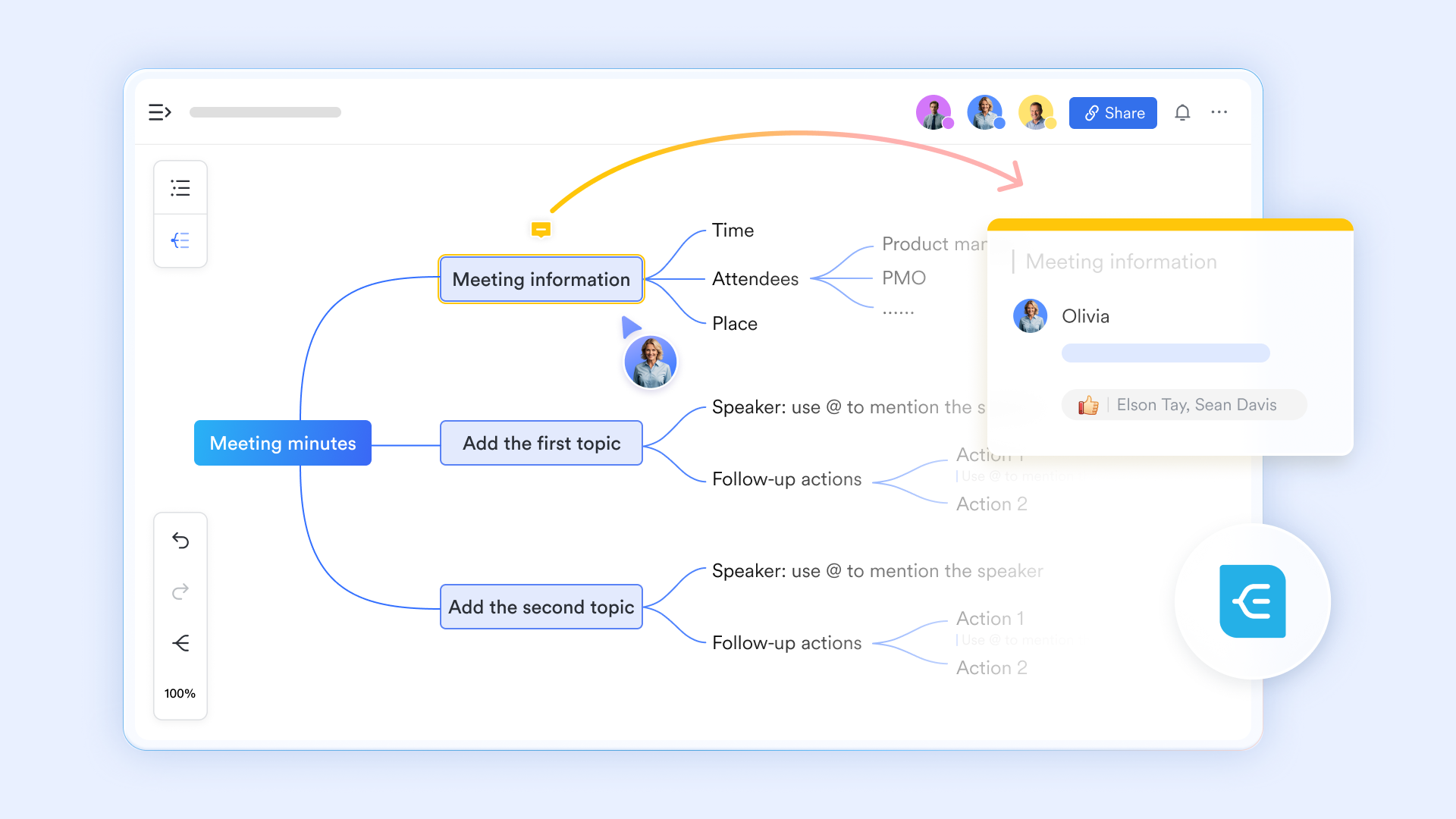
Jumpstart visual thinking with ready-made templates
Starting from a blank canvas can sometimes slow down creative momentum, especially when you need a specific framework like a flowchart, timeline, or organizational chart. Lark Board feature eliminates this friction by offering a rich template gallery directly within the editing interface. Whether you click "Templates" on a blank canvas or access the gallery from the toolbar, you can browse a wide variety of professionally designed templates categorized by purpose—from process flows and swimlane diagrams for complex workflows to mind maps for brainstorming and business model canvases for strategic planning. This means a team can instantly insert a structured template, such as a timeline for a product launch or a SWOT analysis grid, and immediately start populating it with their ideas. 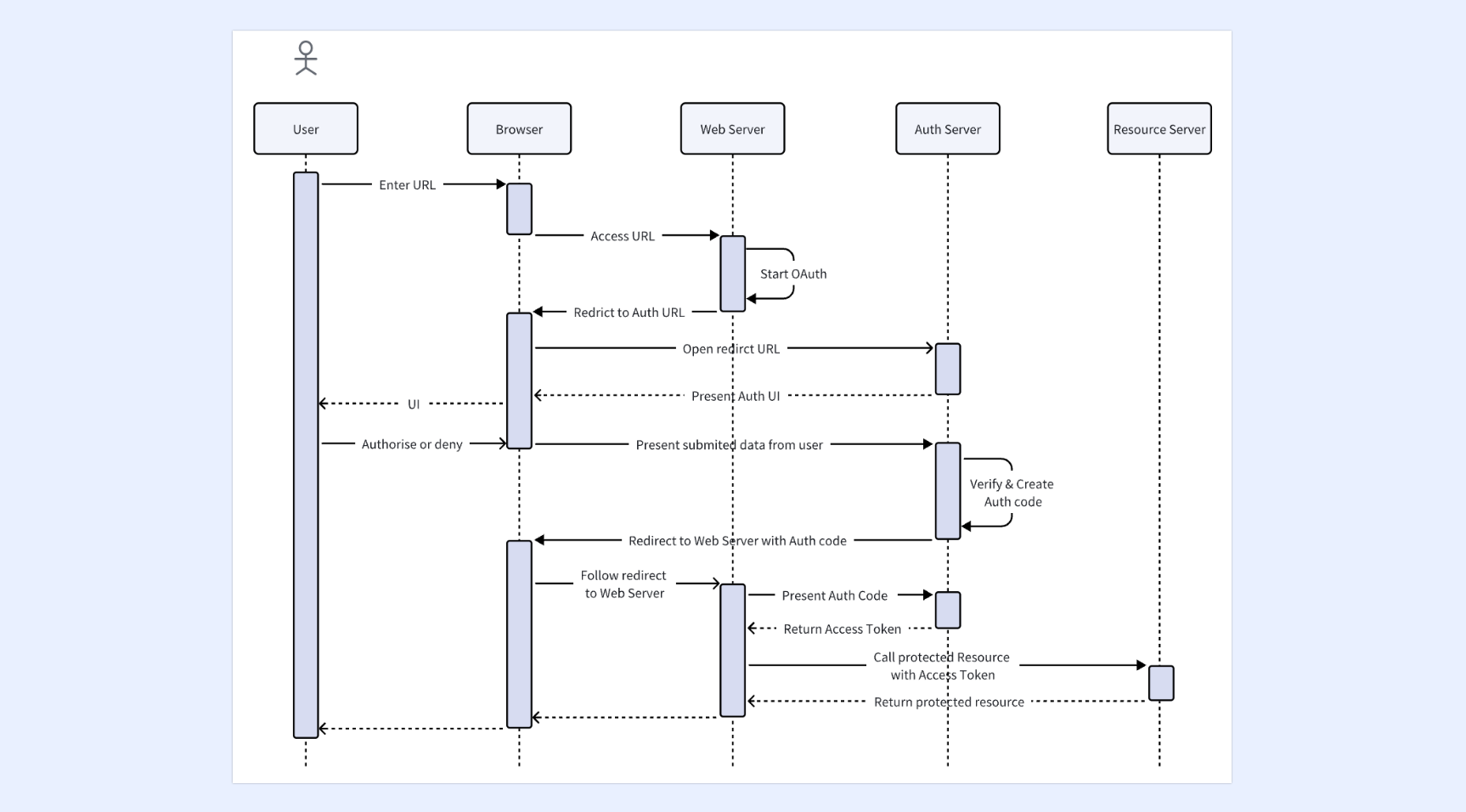
Turn static drawings into interactive discussions
A shared whiteboard should be more than just a digital canvas where people draw; it should be a space where everyone can actively participate. Lark's virtual whiteboard, accessible directly during , is designed for this level of engagement. All participants can view and contribute to the whiteboard in real time, using a full set of intuitive tools—pen, highlighter, shapes, and eraser—to express their ideas. This transforms a presenter's monologue into a collaborative workshop where concepts are built together, not just presented. 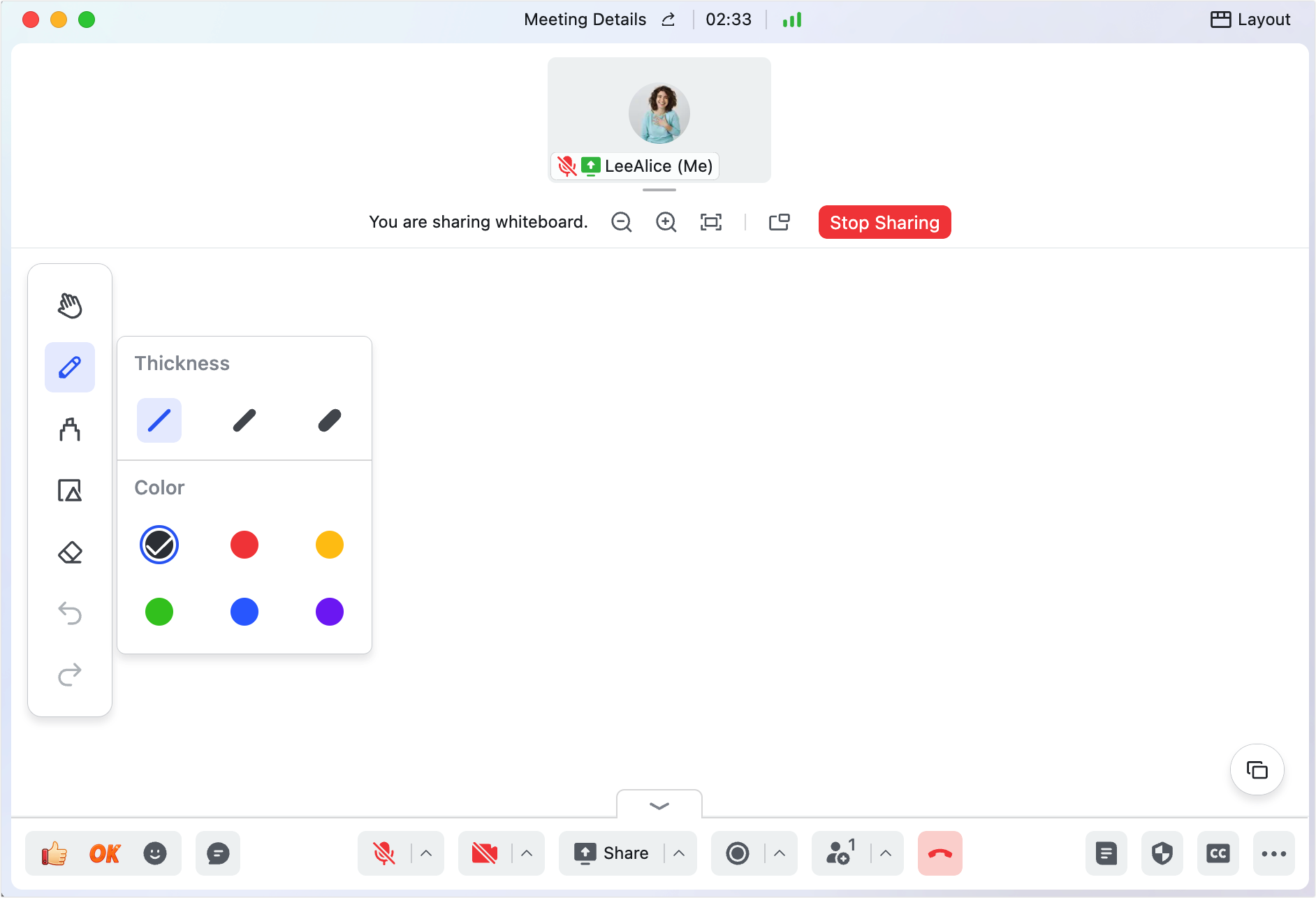
Connect visual ideas to structured content seamlessly
A common limitation of standalone whiteboards is that they exist in isolation, disconnected from the documents, data, and detailed plans that provide context. Lark solves this through its deep integration with Magic Share. During a meeting, you can effortlessly share not just a blank canvas, but containing complex data tables from Base, design mockups, or project plans. Participants can then interact with this content in a powerful way: they can choose to follow the presenter's pace for a guided tour, or view and scroll at their own pace to explore details independently. This dual-mode interaction ensures that while the group aligns on the big picture using the whiteboard for brainstorming, everyone can also access and understand the detailed information that informed those ideas. 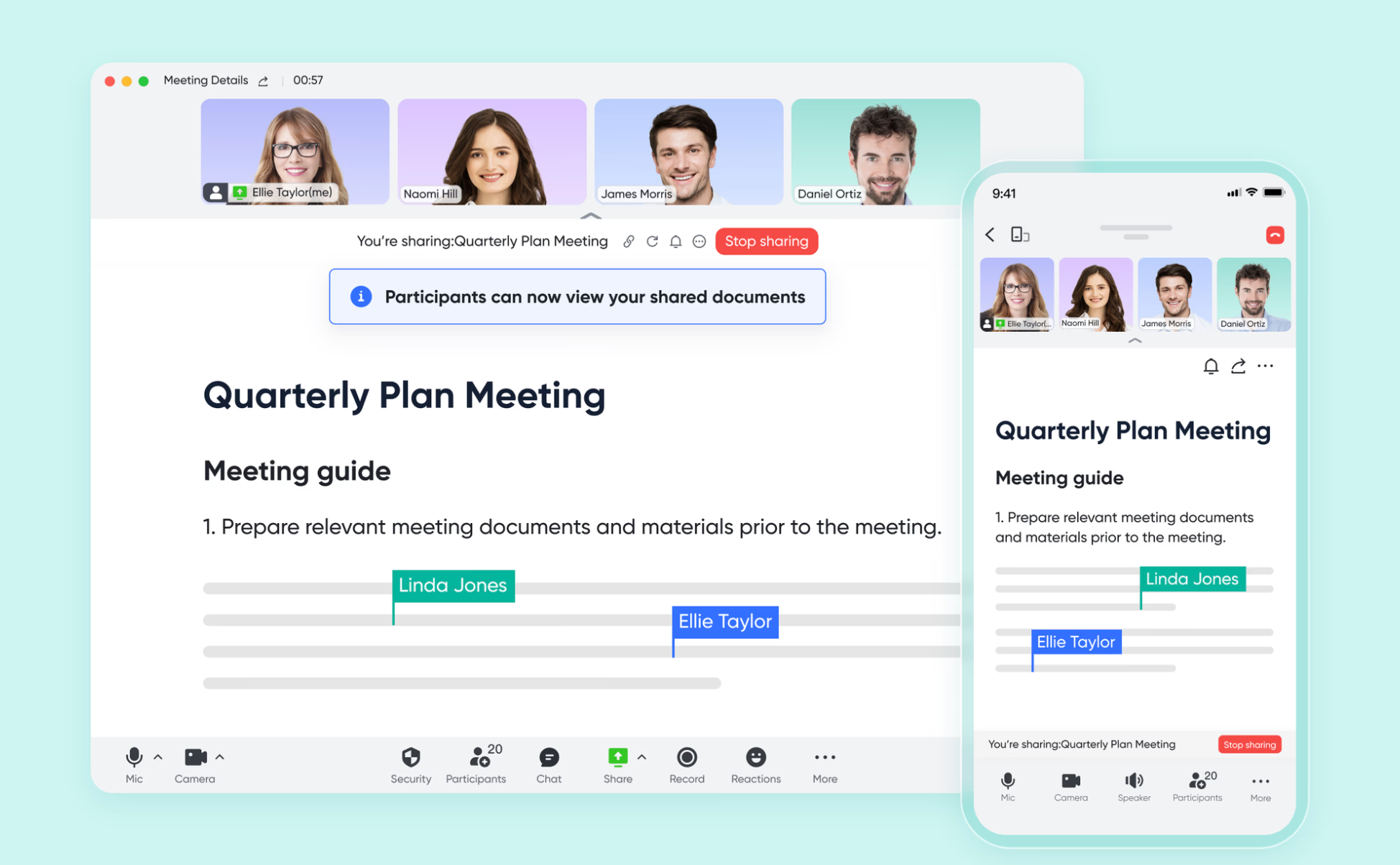
Preserve Ideas and Drive Action After the Meeting
The value of a whiteboard session is often lost when the meeting ends, and the drawings disappear. Lark ensures that the insights generated are captured and turned into action. While the whiteboard content itself is designed for the live session, you can easily save key ideas by taking screenshots. Moreover, because the whiteboard is part of a Lark Meeting, the entire session—including audio, video, and any shared documents—can be recorded and reviewed later through . It ensures that visual ideas translate into tangible outcomes.

- Starter plan: Free forever plan that includes 11 powerful tools for up to 20 users. It also comes with 100GB of storage, 1000 automation runs, AI translations, and more.
- Pro plan: $12/user/month (billed annually) for up to 500 users. It includes everything in Starter plus group calling for up to 500 attendees, 15TB of storage, 50,000 automation runs, and more.
- Enterprise plan: for custom pricing. Supports unlimited users and includes even more automation runs and advanced security, compliance, and management features.
For small teams with simple communication needs

18 months message history
1000 Base automation runs/month
2000 rows per table in Base
Most POPULAR
For companies with comprehensive collaboration and management needs
Unlimited message history
500-participant video meetings
50k Base automation runs/month
20k rows per table in Base
For large companies with advanced security and organizational management needs
Get a personalized demo and pricing
Unlimited message history
500-participant video meetings
15 TB storage + 30 GB storage/user
500k Base automation runs/month
50k Base automation runs/month
Most POPULAR
For companies with comprehensive collaboration and management needs
Unlimited message history
500-participant video meetings
50k Base automation runs/month
20k rows per table in Base
Common mistakes to avoid when using a shared whiteboard
While shared whiteboards are powerful tools for fostering collaboration and visual thinking, they're easy to misuse. Even small, common errors can derail sessions, waste valuable time, or leave impactful ideas unacted on. Below are the most frequent pitfalls teams face when using a shared whiteboard, along with simple guidance to steer clear of them.
- Starting with a completely blank canvas: Many teams open a shared whiteboard without any pre-planned structure, which wastes meeting time and leads to unfocused, disorganized discussions. A blank canvas gives participants no direction, so ideas spread randomly and collaboration feels chaotic. Always add a simple agenda, framework, or template before the session begins.
- Overloading the board with visual clutter: Using too many colors, shapes, stickers, and text styles can make your shared whiteboard hard to understand. Visual noise distracts from key ideas and makes it difficult for the team to prioritize information. Keep the design clean, use consistent formatting, and only add elements that support the session goal.
- Skipping post-session action and documentation: A shared whiteboard session delivers little value if ideas stay only on the board. Teams often finish brainstorming but fail to label decisions, assign owners, or . Without clear next steps, great concepts remain unused. Always turn whiteboard outputs into tasks, notes, or official documents.
- Misconfiguring user permissions: Setting incorrect permissions is a common and risky mistake. Too many editors may lead to accidental deletions, while overly strict settings can stop people from contributing. Before the session, confirm roles such as viewer, commenter, and editor to keep collaboration safe and smooth.
- Failing to archive and organize old boards: Over time, unused and unlabeled shared whiteboards create a messy, unsearchable workspace. Teams struggle to find past notes, templates, or decisions because they lack folders and clear naming rules. and reuse successful structures to maintain long-term productivity.
Best practices for running sessions on a shared whiteboard
Great tools only deliver results when used effectively. These practical tips help facilitators, team leads, and teachers run productive whiteboard sessions from preparation through follow-up.
- Prepare the board before the session: Preparing the board in advance avoids wasting valuable meeting time on a blank canvas, so you should set a clear session objective and agenda at the top of the board, build a structured layout with frames, sections and color codes to guide participants, add time allocations for each activity, define color conventions in advance, attach supporting images, links or data, and use ready-made templates to frame the discussion properly.
- Facilitate inclusive, focused collaboration: Structured facilitation helps ensure every team member contributes equally in discussions, which can be done by letting everyone write ideas silently before verbal sharing, using visible timers on the board to keep activities on track, inviting quieter participants to share their thoughts, assigning a unique color to each person for clear idea attribution, and creating a dedicated parking lot section to collect off-topic points for later review.
- Turn whiteboard outcomes into action: To turn productive whiteboard sessions into real action, you need to group related ideas into themes, clearly label decisions along with the people involved and any , assign owners to every next step, set due dates to ensure accountability, and export key sections of the board as screenshots or PDFs for official documentation.
- Maintain and reuse boards over time: Regular maintenance keeps boards organized and easy to use over time, which includes archiving completed boards in structured folders with consistent naming rules, turning effective board layouts into reusable templates, cleaning up outdated content quarterly, linking related boards and documents together, and using clear, searchable names that reflect the board's purpose and date.
Conclusion
Visual thinking has become essential for distributed teams who need to align quickly and make clear decisions. A shared whiteboard transforms passive meetings into active workshops where everyone contributes. The greatest impact comes when your whiteboard lives alongside chat, video meetings, documents, and project workflows in a unified platform. Rather than juggling separate apps and losing context between tools, teams that use an integrated solution save time and maintain momentum from ideation through execution. Try 's built-in shared whiteboard to streamline your meetings, capture great ideas, and turn visual collaboration into real results.
Transform your team's shared whiteboard today
FAQs
What are the most common use cases for a shared whiteboard at work?
A shared whiteboard is widely used for brainstorming, workflow mapping, sprint retrospectives, and strategic planning. It helps teams turn abstract ideas into clear, visual content in real time. Lark Whiteboard works perfectly for these scenarios and connects directly with your team's daily workflow.
Can a shared whiteboard support remote and hybrid team collaboration?
Yes, a cloud-based shared whiteboard allows team members to contribute from anywhere, on any device. Real-time co-editing removes geographic limits and keeps everyone on the same page. Lark Whiteboard runs smoothly inside Lark Meetings, making remote collaboration feel natural and efficient.
How can I keep my shared whiteboard sessions organized and productive?
Start with a clear agenda or template, use structure elements like frames and sections, and avoid unnecessary visual clutter. Preparing the board ahead of time also helps keep discussions focused. Lark offers professional templates to help you launch structured sessions instantly.
Is a shared whiteboard secure enough for company-sensitive content?
Trusted shared whiteboard tools use enterprise encryption and granular permissions to protect private data. You can control who can view, comment, or edit content to prevent misuse. Lark Whiteboard follows Lark's full security and compliance standards, making it safe for business-critical collaboration.
Related reading












