In today's dynamic work environment, accurately managing employee work hours has become more complex than ever. From ensuring fair pay to maintaining compliance with labor laws, businesses face a constant challenge in tracking time effectively. This is where modern apps for employee time clock step in. These digital solutions are designed to simplify the entire process, offering a more precise and efficient way to record employee attendance, manage shifts, and prepare for payroll. My goal here is to guide you through the options and understand what makes an employee time clock app truly effective, ensuring you can choose the best fit for your business needs.
Why your business needs a dedicated employee time clock app
Modern are designed to simplify this process, offering precise and efficient solutions for recording attendance, managing shifts, and preparing payroll.
Many businesses initially rely on informal methods, but these quickly become problematic as growth occurs. A dedicated employee time clock app addresses several critical pain points. First, it alleviates the administrative burden of manual data entry, which is time-consuming and prone to human error. Automation frees up valuable administrative time, transforming payroll processes.
Beyond efficiency, these are crucial for ensuring accuracy and compliance. Labor laws are complex, and inaccurate records expose businesses to legal risks and penalties. A robust app automatically calculates regular and overtime hours, helps enforce break policies, and generates clear, auditable records, giving you peace of mind regarding legal obligations.
Finally, a key benefit is preventing time theft and improving profitability. Issues like "buddy punching" can silently erode a business's bottom line. Modern apps often include features like photo verification, GPS tracking, or biometric logins to prevent such practices.
Turn chaotic timesheets into accurate workflows
Key features to look for in an employee time clock app
When evaluating employee time clock apps, certain features are essential for efficient and accurate time management. Focusing on these core capabilities ensures your chosen solution meets operational demands.
Ease of use is paramount.
An intuitive interface with straightforward navigation ensures high adoption rates and minimal training, especially when evaluating different . If employees struggle to clock in, the app's value is lost.
Mobile accessibility
The ability to clock in and out from a smartphone or tablet is crucial for remote, hybrid, or field-based teams, a core strength of modern that ensure all hours are accurately recorded regardless of location. For mobile or multi-location workforces, GPS and geofencing capabilities are invaluable. GPS verifies an employee's location at clock-in/out, preventing off-site "buddy punching." Geofencing allows you to define virtual work boundaries, ensuring employees can only clock in within designated areas, critical for industries like construction or delivery.
Seamless payroll integration
The best apps export time data directly to popular payroll systems or integrate automatically, eliminating manual data entry, reducing errors, and speeding up the payroll process, especially when combined with that capture hours accurately at the source. This alleviates a major administrative task for HR teams.
Robust reporting and analytics
Provide insights beyond basic timekeeping. Customizable reports on labor costs, overtime trends, attendance patterns, and project-specific time empower managers to make informed decisions about staffing, project budgets, and overall operational efficiency, especially when supported by comprehensive that centralize workforce data. Other important features include overtime and leave management for automated calculations and requests, and scalability, ensuring the app adapts as your business evolves.
Top employee time clock apps for modern teams
Finding the right employee time clock app means weighing features, pricing, and how well it fits your existing workflows. Here's a look at some of the best options available, starting with a comprehensive solution.
1. Lark: Best all-in-one online time tracking software
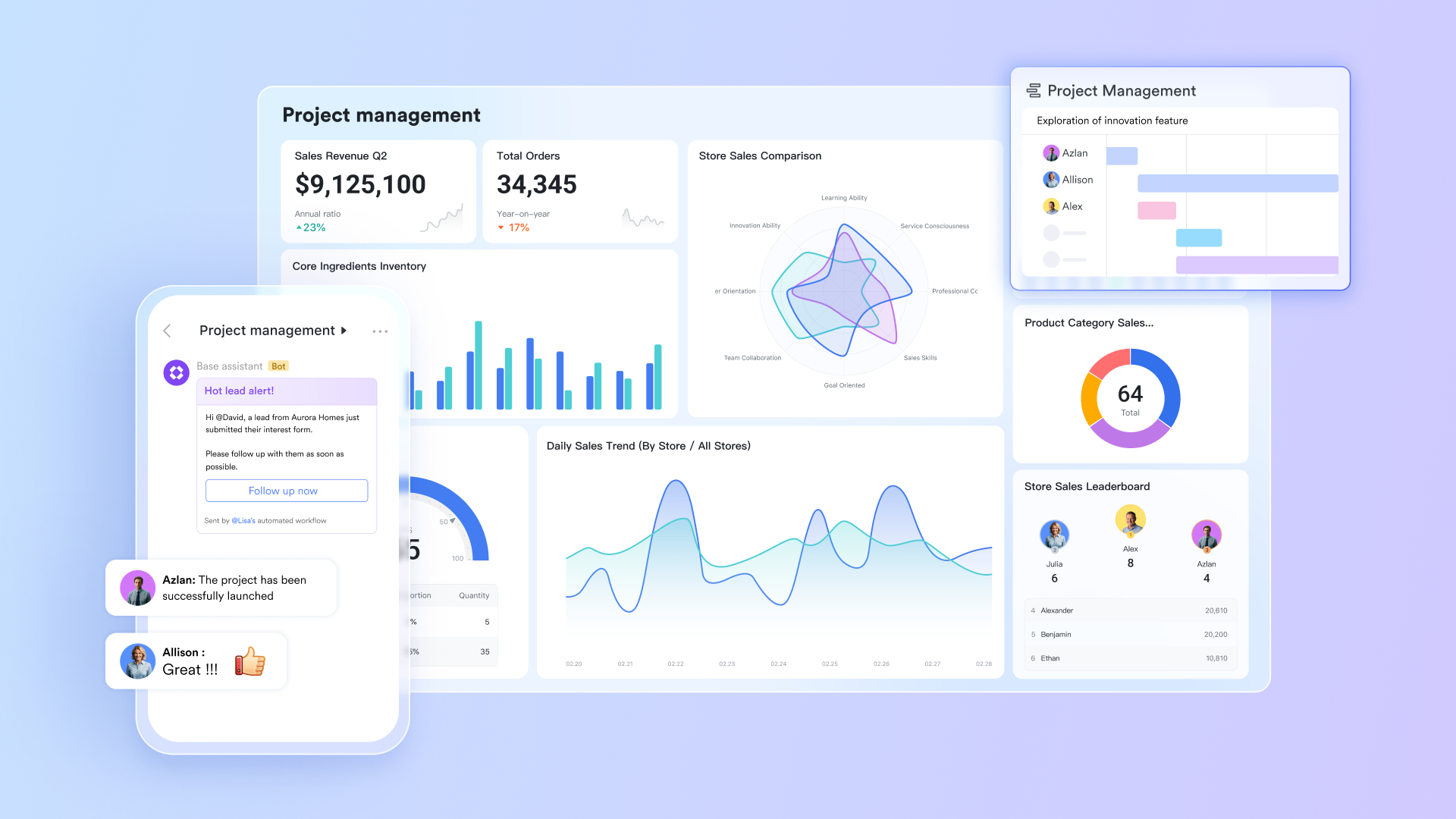
The verdict: stands out as a powerful all-in-one online that brings scheduling, task planning, and into a single cloud workspace. Teams can track working hours, manage deadlines, and monitor progress without switching between disconnected tools. Its cloud-first design ensures that data stays accessible, consistent, and updated in real time across locations and devices. From flexible time logs to visual capacity planning, Lark supports both daily tracking and long-term project accountability.
Key features:
Lark Base: Centralised database for flexible time tracking
works as a cloud-based database that teams can tailor into a fully flexible time-tracking system. By using customizable fields and formulas, you can capture, calculate, and visualize time data without relying on rigid templates. Field shortcuts simplify common tasks like converting date formats, tracking remaining days, monitoring progress, and calculating weekly or monthly breakdowns. With Lark Base running entirely on the cloud, all time logs, formulas, and dashboards update instantly and remain accessible from any device, creating a centralized, always-synced system for flexible and scalable time tracking. 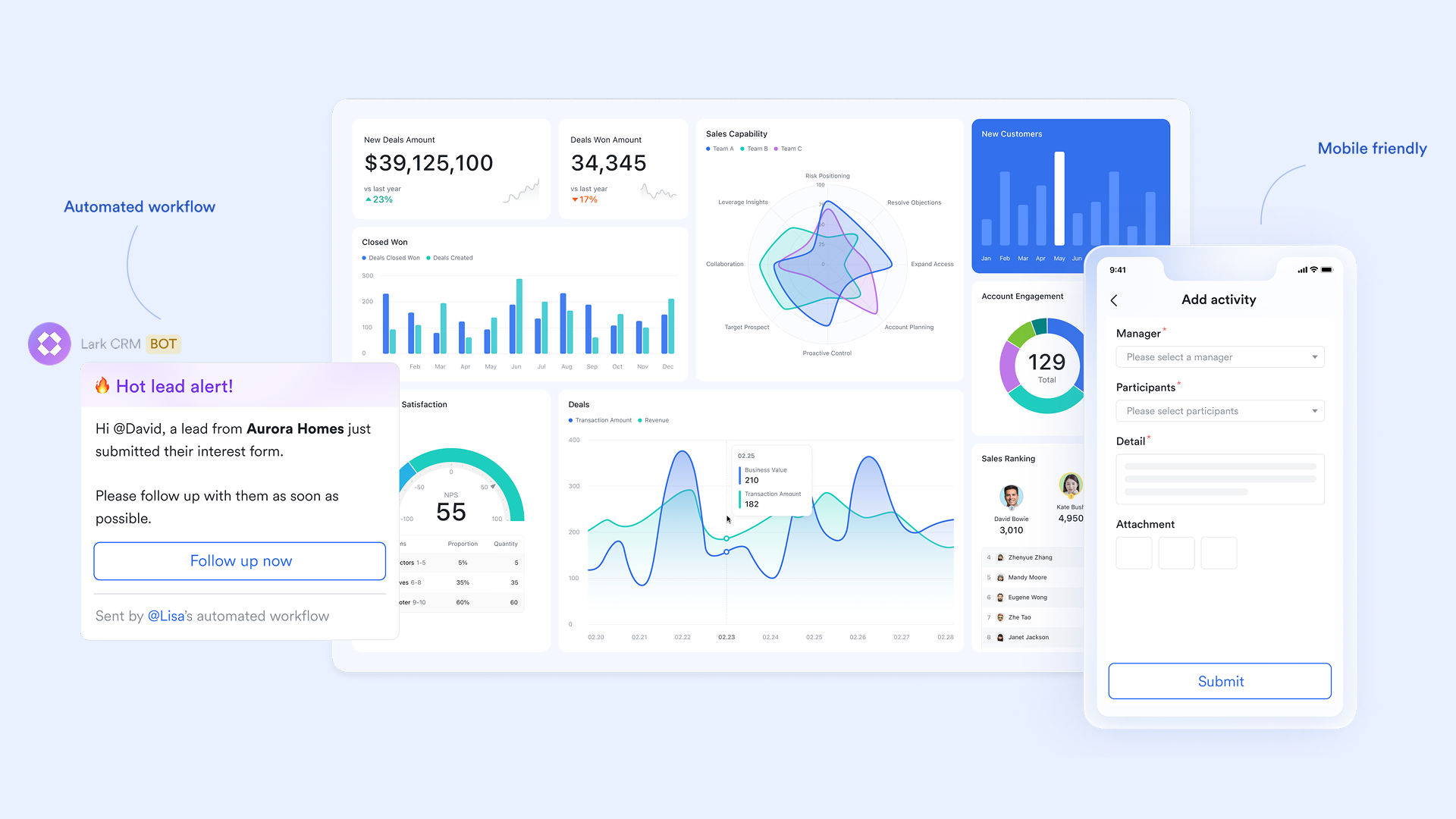
Lark Tasks: Task-linked online time accountability
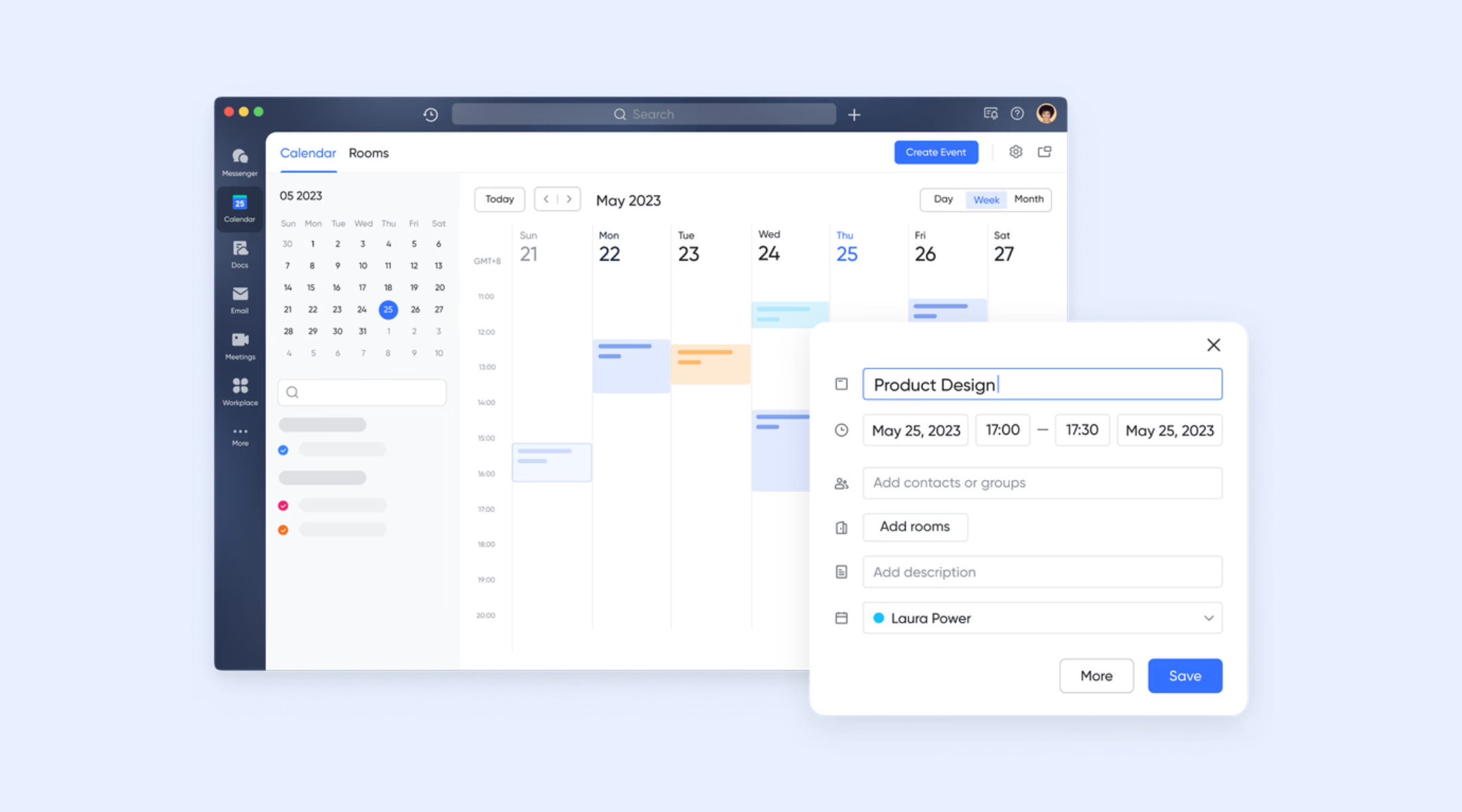
Lark Tasks connects time tracking directly to real work by linking schedules, deadlines, and progress to individual tasks. You can assign start and end dates to each task, clearly defining when work should begin and when it is expected to finish. These tasks automatically appear within the Calendar view, where scheduled time blocks and task durations are visually displayed, making it easy to understand how daily and weekly workloads are structured. 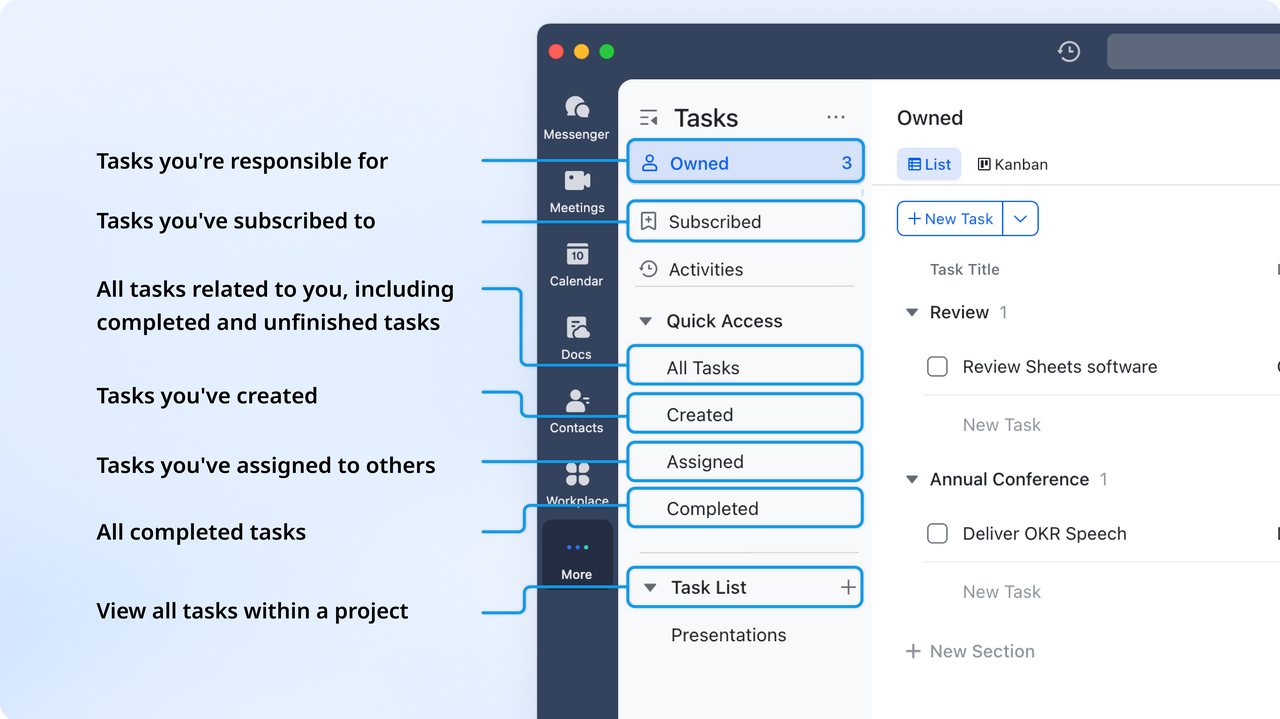
Lark Base Gantt view: Streamlined timelines for process tracking
In Lark Base the Gantt chart view further enhances time accountability by providing a timeline-based overview of projects. It allows teams to visualize task sequences, dependencies, and key milestones, so everyone understands how individual contributions affect overall delivery timelines. Managers can monitor progress in real time, identify potential delays early, and adjust schedules as needed—ensuring that time spent aligns with project plans and team capacity. 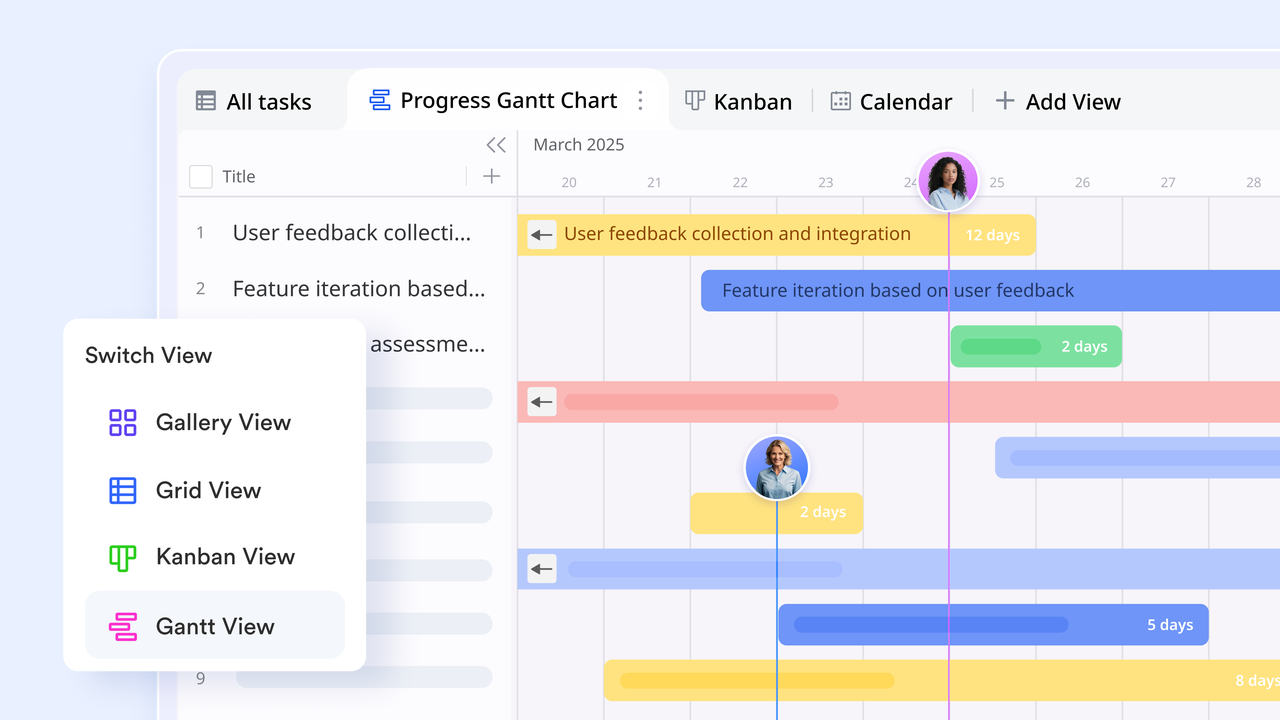
Lark Calendar: Visual scheduling and capacity planning
offers visual scheduling and capacity-planning tools that make it easy to coordinate team availability and manage project timelines. Teams can see participant schedules at a glance, set up meetings with clear agendas, and toggle between day, week, and month views to evaluate workload distribution. Within Lark Base, the calendar view displays records by date, letting you drag and reschedule entries directly on the timeline for flexible planning, deadline adjustments, and real-time project coordination.
Pros:
- Unified workspace reduces tool-switching
- Excellent for remote and hybrid teams
- Strong automation for reminders and approvals
- Clear visibility across tasks, hours, and workloads
Cons:
- Advanced reporting requires setup, while its provides complete guidance
:
- Starter plan: Free forever plan that includes 11 powerful tools for up to 20 users. It also comes with 100GB of storage, 1000 automation runs, AI translations, and more.
- Basic plan: $6/user/month (billed annually) for up to 500 users. It includes everything in Starter plus group calling for up to 500 attendees, 5TB of storage, 1000 automation runs, and more.
- Pro plan: $12/user/month (billed annually) for up to 500 users. It includes everything in Basic plus group calling for up to 500 attendees, 15TB of storage, 50,000 automation runs, and more.
- Enterprise plan: for custom pricing. Supports unlimited users and includes even more automation runs and advanced security, compliance, and management features.
For small teams with simple communication needs

18 months message history
1000 Base automation runs/month
2000 rows per table in Base
Most POPULAR
For companies with comprehensive collaboration and management needs
Unlimited message history
500-participant video meetings
50k Base automation runs/month
20k rows per table in Base
For large companies with advanced security and organizational management needs
Get a personalized demo and pricing
Unlimited message history
500-participant video meetings
15 TB storage + 30 GB storage/user
500k Base automation runs/month
50k Base automation runs/month
Most POPULAR
For companies with comprehensive collaboration and management needs
Unlimited message history
500-participant video meetings
50k Base automation runs/month
20k rows per table in Base
2. Connecteam: Comprehensive Employee Management for Deskless Teams
The verdict: Connecteam is best suited for businesses with a significant deskless or field-based workforce, such as construction, retail, or hospitality. Its robust features for employee scheduling, communication, and time tracking are specifically designed to meet the demands of these dynamic environments.
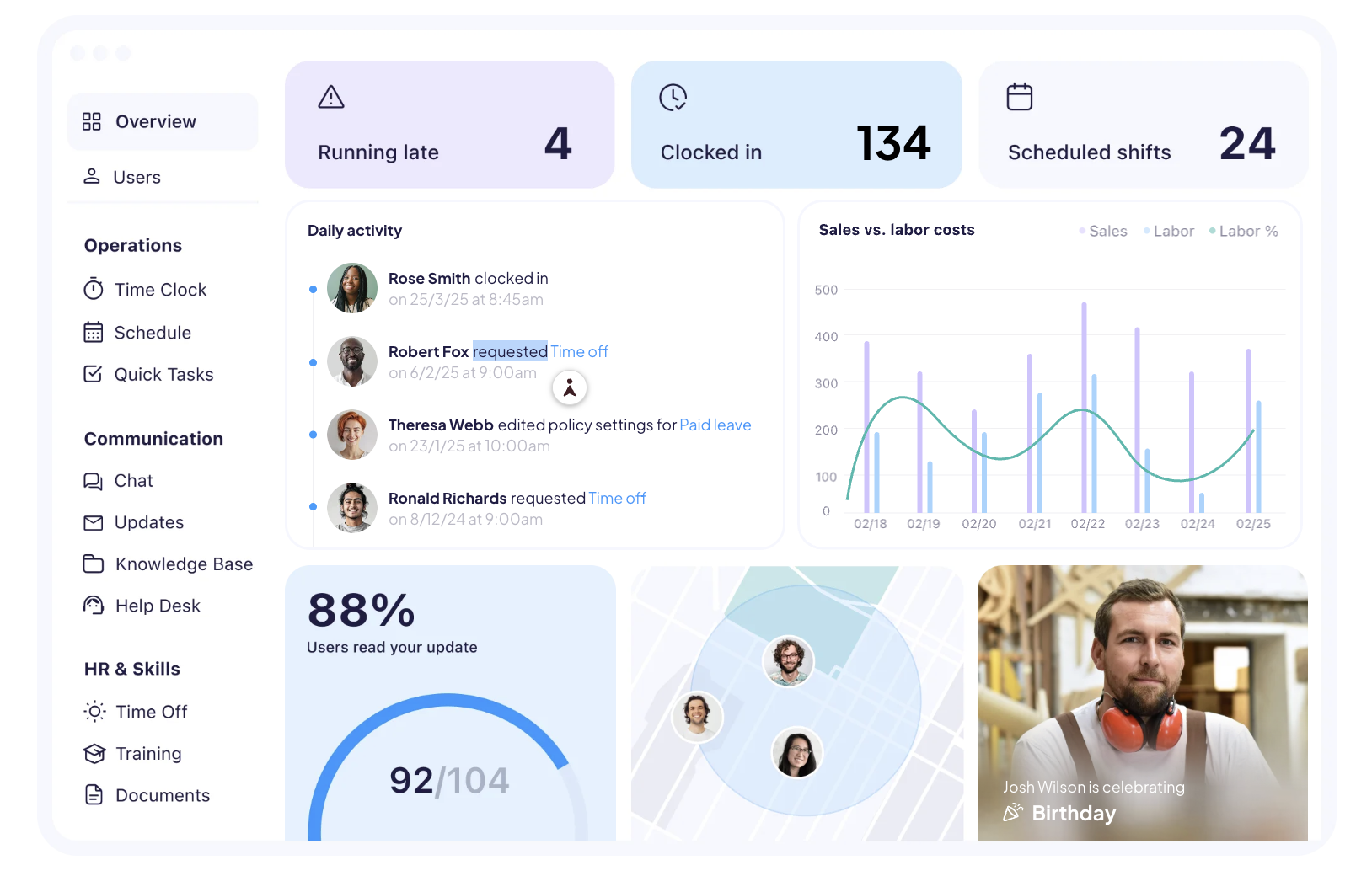
Image source: connecteam.com
Deep dive: Connecteam positions itself as an all-in-one app for deskless employees, bringing together communication, HR, and operations into a single platform. Its time clock feature is particularly strong, offering advanced functionalities tailored for field teams. This includes GPS tracking and geofencing, which ensure employees are clocking in and out from designated work locations. The app also supports photo clock-in, adding another layer of verification to prevent "buddy punching."
Key features:
- Time tracking with activity monitoring
- GPS and geofencing for mobile teams
- Automated payroll and invoicing
- Productivity dashboards and project reports
Pros:
- Ideal for field and remote workforce tracking
- Strong monitoring capabilities
- Accurate reporting with real-time insights
- Integrated payroll reduces admin work
Cons:
- Monitoring features may feel intrusive
- Higher-tier plans needed for advanced tools
Pricing:
- Starter: $4.99 per seat/month (2-seat minimum)
- Grow: $7.50 per seat/month (2-seat minimum)
- Team (Popular): $10 per seat/month (2-seat minimum)
- Enterprise: $25 per seat/month (billed annually)
3. Homebase: Best for hourly teams with scheduling needs
The verdict: Homebase is an excellent choice for small businesses and hourly teams, especially those in retail, restaurants, or services, that require a strong focus on scheduling, time clock features, and compliance. It simplifies the complexities of managing hourly workers with user-friendly tools.
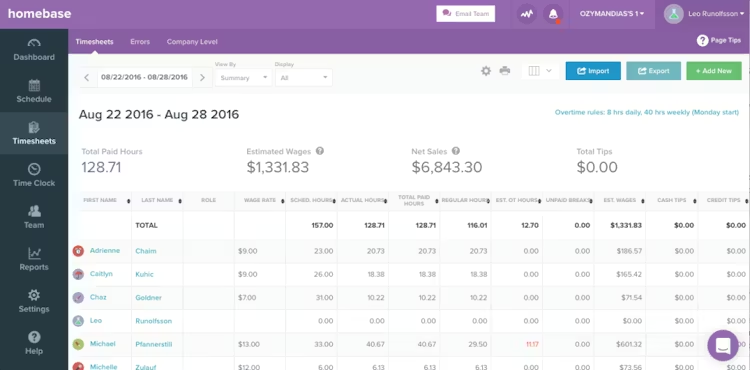
Image source: joinhomebase.com
Deep dive: Homebase positions itself as a comprehensive HR and team management platform built specifically for hourly employees. Its core strengths lie in its easy-to-use time clock, detailed employee scheduling, and robust HR and compliance features. Businesses can create schedules in minutes, share them with teams via the app, and employees can clock in/out directly from their smartphones, POS systems, or a dedicated tablet. Homebase also offers tools for managing breaks, overtime, and ensuring compliance with labor laws.
Key features:
- Employee scheduling and time clock
- Team messaging and shift coordination
- Hiring, onboarding, and HR tools
- Payroll add-ons and labor cost controls
Pros:
- Strong for hourly teams in retail, restaurants, and small businesses
- Easy scheduling and shift management
- Free entry plan available for basic needs
- Helpful labor cost visibility
Cons:
- Better suited to shift-based teams than project-based knowledge work
- Some payroll and HR features cost extra
- Less advanced reporting than some larger platforms
Pricing:
- Essentials: typically starts around $20 per location/month
- Plus: typically starts around $48 per location/month
- All-in-one: typically starts around $80 per location/month
4. My Hours: Easiest to use for basic time tracking
The verdict: My Hours is ideal for freelancers, small teams, and businesses that primarily need a straightforward, intuitive time tracking solution without extensive scheduling or advanced HR features. Its simplicity makes it easy to adopt for accurate project and task-based time logging.
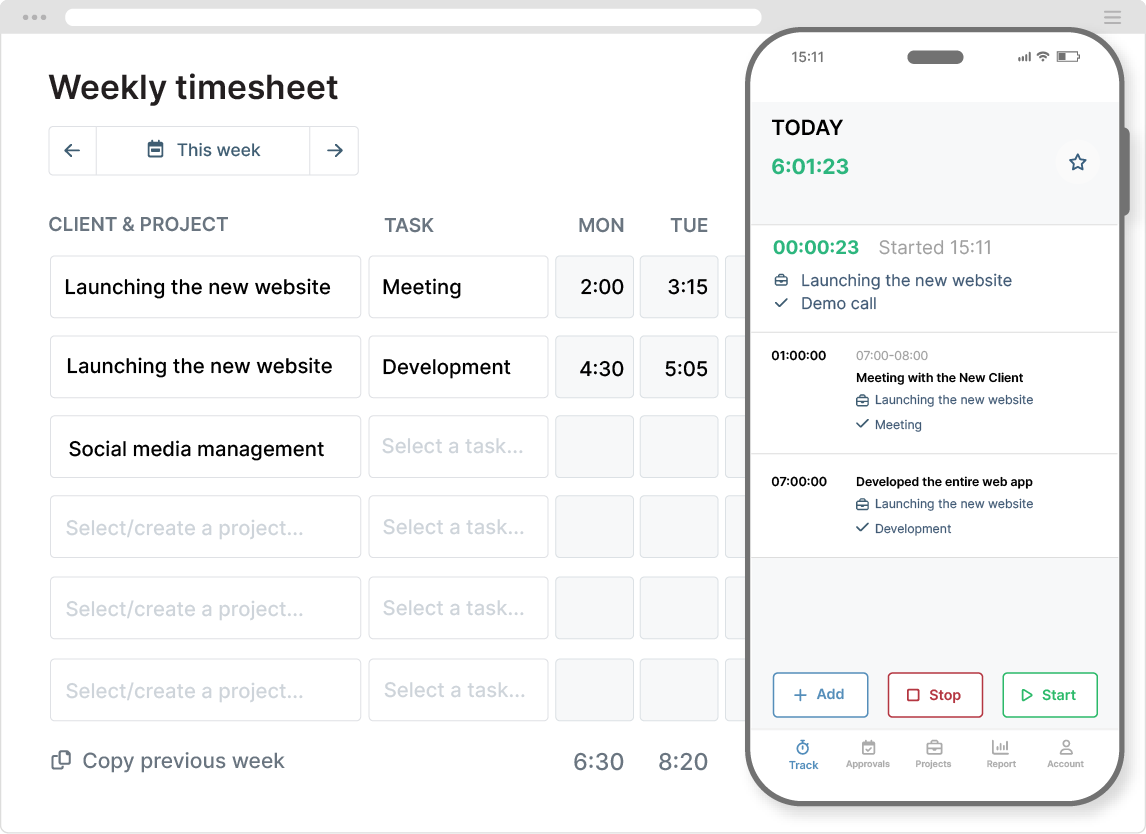
Image source: myhours.com
Deep dive: My Hours focuses on delivering a user-friendly and efficient time tracking experience. It's designed to be intuitive, allowing users to quickly start and stop timers for different projects and tasks, or manually add time entries with ease. The platform emphasizes clarity in reporting, making it simple to generate timesheets for clients, analyze project profitability, or track team performance.
Key features:
- Time tracking for projects and tasks
- Billable hours and budgeting controls
- Timesheets, approvals, and reporting
- Invoicing support for client work
Pros:
- Simple and clean interface
- Strong fit for agencies, consultancies, and project teams
- Good visibility into budgets and billable time
- Easier to adopt than heavier workforce platforms
Cons:
- Limited employee monitoring features
- Less suitable for frontline teams needing GPS or geofencing
- Payroll capabilities are lighter than specialized workforce tools
Pricing:
- Free: available for basic tracking
- Pro: typically around $8 per user/month
5. QuickBooks Time: Best for QuickBooks integration
The verdict: QuickBooks Time (formerly TSheets) is the top choice for businesses already using QuickBooks for accounting and payroll. It provides a seamless, deeply integrated time tracking solution that simplifies payroll processing and job costing directly within the QuickBooks ecosystem.
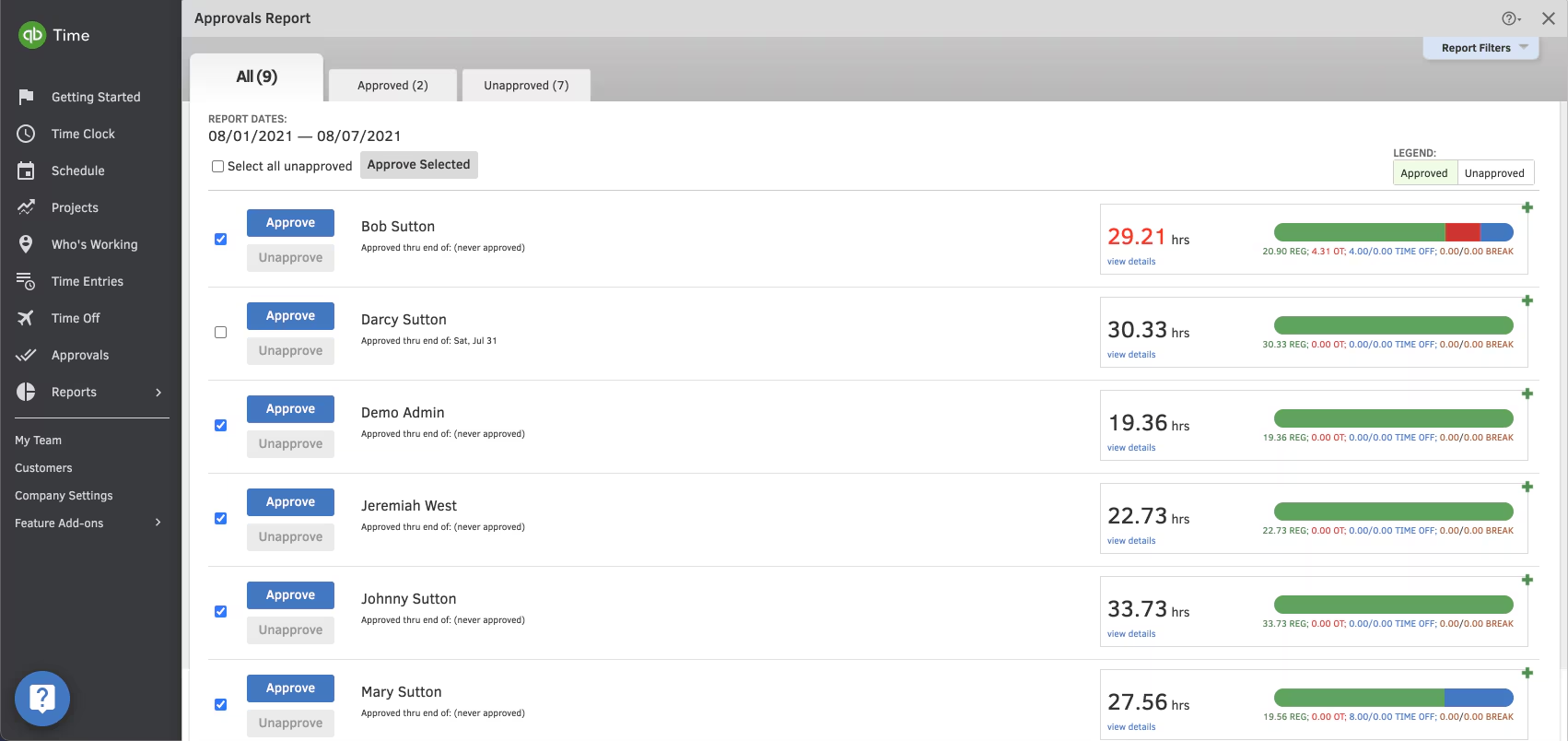
Image source: quickbooks.intuit.com
Deep dive: QuickBooks Time is Intuit's dedicated time tracking solution, built for flawless integration with QuickBooks Online and QuickBooks Desktop. Its primary strength lies in automating time capture for payroll, invoicing, and job costing. Employees can track time from anywhere using a mobile app, web dashboard, or even a physical time clock. Features like GPS tracking and geofencing are included to ensure accuracy for mobile workforces.
Key features:
- Time tracking on web and mobile
- GPS tracking and geofencing
- Scheduling and shift management
- Native integration with QuickBooks payroll and accounting
Pros:
- Strong choice for businesses already using QuickBooks
- Solid mobile tracking for field teams
- Reliable timesheets and approvals workflow
Cons:
- Can be expensive for smaller teams
- Best value depends on broader QuickBooks usage
- Reporting customization may be limited for some advanced cases
Pricing:
- Time premium: $6 per month + $8 per user/month (base fee includes 1 admin)
- Time elite: $12 per month + $10 per user/month (base fee includes 1 admin)
- Time premium + payroll premium: $26.40 per month + $10 per employee/month
- Time elite + payroll elite: $40.20 per month + $12 per employee/month
6. Jibble: Targeted towards field teams with photo clock-ins
The verdict: Jibble is an excellent, user-friendly option for businesses needing a reliable time clock app, especially for field teams, remote workers, or those requiring strong attendance verification. Its emphasis on facial recognition and GPS makes it a secure choice for diverse work environments.
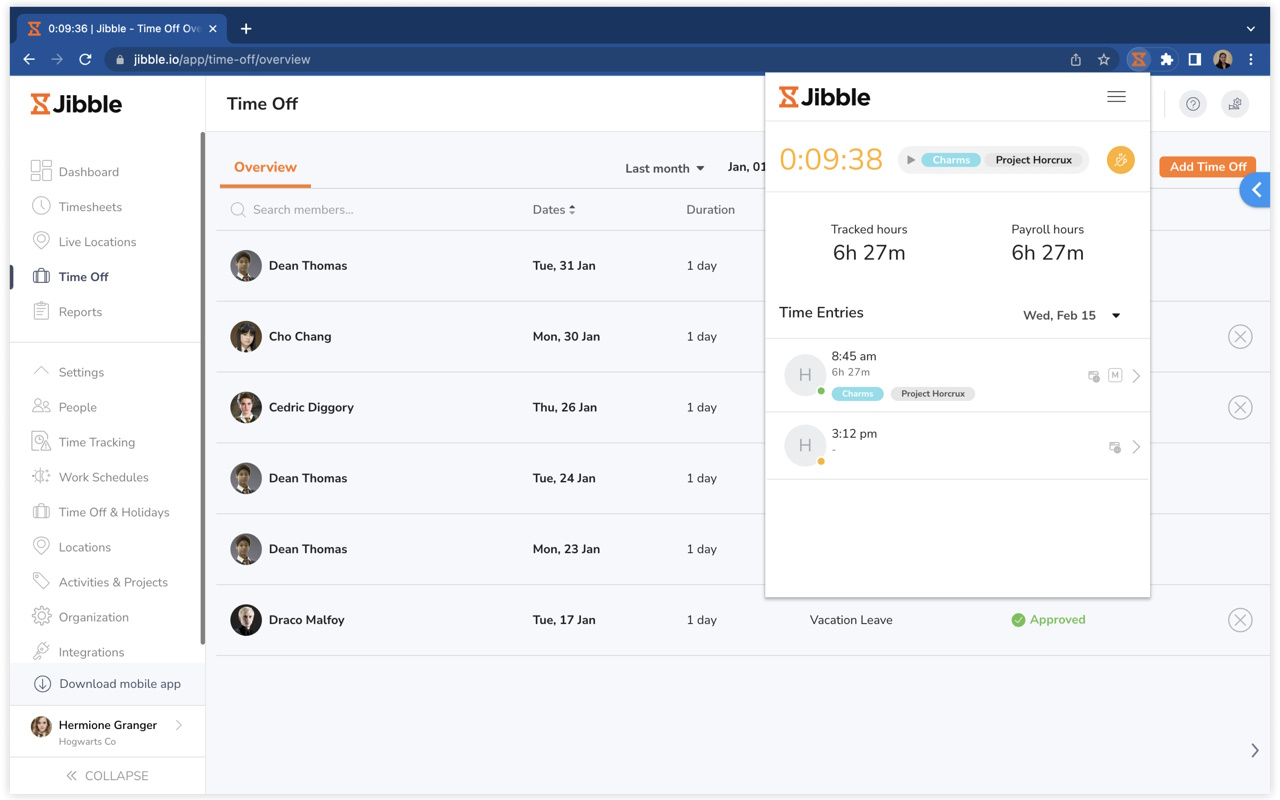
Image source: jibble.io
Deep dive: Jibble focuses on providing a modern and efficient time and attendance solution, particularly excelling in features for verifying employee presence. Key functionalities include facial recognition and GPS tracking for clock-ins, ensuring that the right person is at the right place when they start and end their shifts. It supports various clock-in methods, including mobile, web, and even a kiosk mode for on-site terminals. Jibble integrates with popular payroll and project management software, streamlining data flow for businesses.
Key features:
- Time clock with attendance tracking
- Facial recognition and GPS tracking
- Timesheets, overtime tracking, and reports
- Integrations with payroll and project tools
Pros:
- Good attendance and compliance support
- Useful for deskless, remote, and hybrid teams
- Easy to deploy for basic time tracking
Cons:
- Advanced features are locked behind paid plans
- Monitoring features may not suit every culture
- Less comprehensive than a full business suite than broader platforms
Pricing:
- Premium: typically around $2.99 per user/month
- Ultimate: typically around $4.99 per user/month
- Enterprise: custom pricing
7. Hubstaff: GPS and activity tracking for teams
The verdict: Hubstaff blends time tracking with GPS, productivity insights, and scheduling, which makes it a strong app for employees in mobile or field roles. Workers can clock in via phone while managers see location-verified logs. Its monitoring tools help distributed teams stay accountable. The combination of tracking and automation supports accurate reporting.
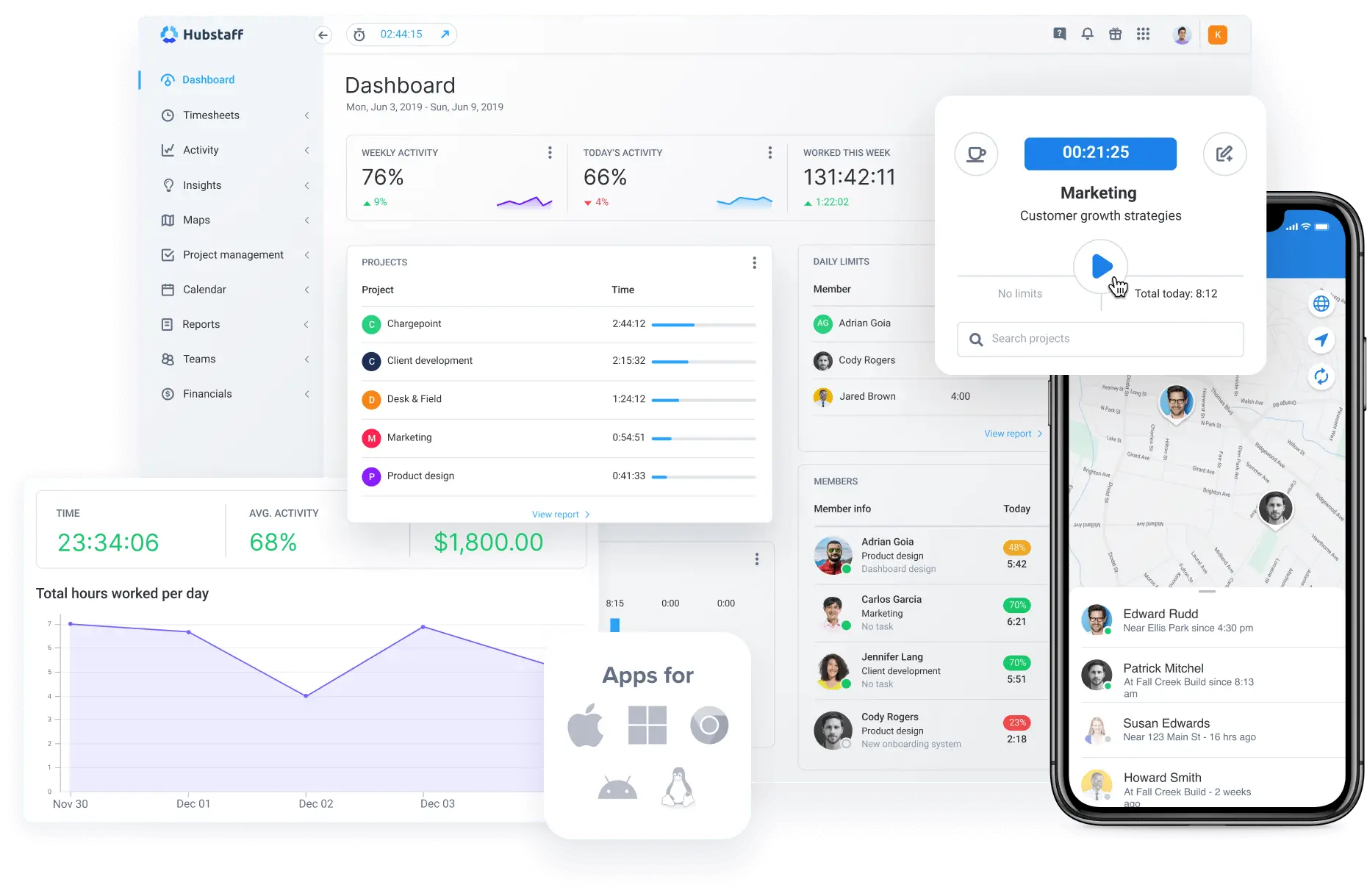
Image source: hubstaff.com
Deep Dive:
Hubstaff is a versatile time tracking and employee monitoring software designed to enhance productivity and streamline operations for businesses with varying needs, from remote teams to on-site employees.
Key features:
- Time tracking with desktop, web, and mobile apps
- GPS tracking and geofencing for field workers
- Activity levels with optional screenshots and app/URL usage
- Scheduling, timesheets, and payments (on higher plans)
- Budgeting, reports, and optional add-ons (locations, more screenshots, etc.)
Pros:
- Ideal for mobile and field teams needing location-aware tracking
- Flexible tiers from simple tracking to advanced monitoring
- Scheduling and payroll-style features on mid/high plans
- Add-ons let teams choose how much detail they want
Cons:
- Monitoring (screenshots, activity) may feel invasive for some teams
- Add-ons and per-seat pricing can become costly at scale
Pricing:
- Starter: $4.99/seat/month (annual), 2-seat minimum
- Grow: $7.50/seat/month (annual), 2-seat minimum
- Team: $10/seat/month (annual), 2-seat minimum
- Enterprise: $25/seat/month (annual), includes custom setup & dedicated support
Benefits of employee time tracking and management software
Modern employee time management software helps teams eliminate manual processes and gain real-time visibility into how work hours are used across projects, shifts, and departments. These tools streamline both operational and compliance workflows, making time tracking more accurate and easier to manage.
- Accurate payroll and billing: reduce discrepancies in manual timesheets and help ensure employees are paid for exactly the hours they work. Overtime, breaks, and billable hours are calculated consistently, without guesswork. As a result, HR and finance teams can process payroll more quickly and generate more precise client invoices.
- Reduced administrative workload: the implementation of automated approvals, digital timesheets, and integrated records significantly cuts down on the hours typically spent reconciling data or chasing incomplete information. Hr departments are liberated from the labor-intensive tasks of manually verifying logs or correcting handwritten mistakes, allowing them to dedicate resources to more impactful strategic activities like workforce development and procedural enhancements.
- Better compliance & audit trails: digital timestamps, location data capabilities, and consistent rule application are instrumental in helping organizations meet labor laws and internal guidelines. Comprehensive audit trails offer an undeniable record of employee work patterns, which is invaluable during regulatory inspections or dispute resolution. This reliable, tamper-proof data effectively mitigates compliance risks, protecting both employers and their workforce.
- Clearer scheduling & shift planning: managers can develop highly accurate schedules based on real-time availability, budgetary constraints, and projected operational demands. Employees benefit from clear, consistent visibility into their assigned shifts, reducing confusion and last-minute adjustments. When paired with automated time tracking, scheduling becomes far more predictable, ensuring optimal team coverage and operational continuity.
- Improved productivity: reveal how long tasks actually take, helping managers identify bottlenecks and workload imbalances. Employees can understand their own work habits and optimize how they allocate time throughout the day. This leads to better planning, fewer distractions, and more predictable project outcomes.
Improve your team's time accuracy today
Conclusion
Modern employee time clock apps are strategic assets that significantly enhance operational efficiency, ensure compliance, and boost workforce accountability. Beyond simple timekeeping, they streamline payroll, prevent time theft, and offer valuable insights into labor costs. Selecting the right app means assessing your unique business needs, prioritizing key features, and ensuring seamless integration with existing tools. Solutions like exemplify a comprehensive, integrated approach, consolidating time management within a unified workspace. By choosing a solution that aligns with your specific requirements, you can empower your team, simplify administration, and cultivate a more productive and transparent work environment.
Upgrade the way you manage employees with Lark
FAQs
Is an employee time clock app legally required?
No, a dedicated time clock app is not always legally required. However, employers are legally obligated to accurately track employee work hours for payroll, overtime, and compliance with labor laws. Time clock apps provide an efficient and verifiable method to meet these legal requirements, reducing the risk of disputes or penalties.
Can time clock apps really prevent time theft?
Yes, time clock apps can significantly reduce and often prevent time theft. Features like GPS tracking, geofencing, photo verification, and facial recognition help ensure that the person clocking in is the actual employee and that they are at the correct work location. This makes it much harder for practices like "buddy punching" or falsifying hours to occur.
How do I ensure employee privacy with time tracking?
Ensuring employee privacy involves clear communication and ethical use of time tracking data. Employees should be informed about what data is being collected, how it's used, and the company's policies regarding privacy. Features like GPS tracking should generally only be active during work hours or when an employee is on company premises/job sites, not during personal time. Transparency builds trust.
What's the difference between time tracking and project management software?
Time tracking software primarily focuses on recording when employees start and stop work, managing breaks, calculating total hours, and assisting with payroll. Project management software is designed to plan, execute, and monitor project tasks, deadlines, resources, and progress. While some project management tools include basic time tracking, dedicated time clock apps offer more robust features for attendance, compliance, and payroll integration. Integrated suites, like Lark, often bridge this gap by combining both functions.
Are free time clock apps sufficient for a growing business?
Free time clock apps can be a good starting point for very small businesses or those with basic needs. They typically cover fundamental clock-in/out functions. However, as a business grows, its needs for advanced features like complex scheduling, in-depth reporting, robust integrations, and scalable support often surpass what free versions can offer. Investing in a paid solution usually becomes necessary to ensure accurate, compliant, and efficient time management for an expanding workforce.
Related reading































