














Best 9 Developer Time Tracking Software for Your Team

Ryan Tanner
Product Marketing Specialist
Sep 18, 2026
Ryan Tanner
Sep 18, 2026

13 min read


Managing work hours is critical for software teams, especially when projects involve multiple developers, tight deadlines, and client deliverables. That's where developer time tracking software comes in. These tools help log work hours accurately, streamline billing, and provide visibility into how time is spent across tasks and projects. By tracking time effectively, teams can boost productivity, improve accountability, and optimize workflows.
Beyond just recording hours, modern time tracking apps also support reporting, analytics, and even collaboration features. Whether you're a freelancer looking for a simple time log app or an enterprise searching for advanced timesheet software, the right solution saves time, reduces errors, and keeps projects on track. Here is the brief preview:
- Lark: Collaborative time tracking
- Clockify: Free project time tracker
- Memtime: Activity-based developer time tracking
- Hubstaff: Developer activity monitoring
- MyHours: Simple timesheet software
- Toggl Track: Flexible time tracking app
- TimeCamp: Automated project tracker
- DeskTime: Productivity-focused monitoring
- Harvest: Invoicing and time tracking combined

Why developer time tracking software is essential for teams
Tracking how time is spent is just as important as tracking code quality. That's why many teams rely on time tracking apps to plan projects, optimize workflows, and ensure accountability across distributed teams.
- Monitor project hours for better planning and budgeting: When teams log hours consistently, managers gain visibility into how long tasks truly take. This makes it easier to forecast resources, allocate budgets accurately, and avoid underestimating development cycles.
- Identifies bottlenecks and productivity gaps in workflows: Time reports can highlight repetitive delays—such as long code reviews or frequent rework—that affect productivity. By spotting these gaps early, teams can fix inefficiencies before they escalate.
- Supports remote team management and accountability: For distributed teams, time tracking ensures that progress remains visible regardless of location. Managers can see which tasks are in progress, completed, or overdue, strengthening trust and accountability.
- Improves time-based billing accuracy and client transparency: Accurate time logs are crucial for agencies and freelancers who bill by the hour. Detailed timesheets reduce disputes and give clients confidence that they're being charged fairly for completed work.
How to choose the right developer time tracking software
Not all time tracking solutions are created equal. The best choice depends on your team size, workflow complexity, and whether you need simple time logs or advanced reporting and automation. Here are the key factors to consider when selecting the right tool.
- Key features to look for: A strong developer time tracking solution should include automatic timers, detailed reporting, and integrations with project management or communication tools. These features save time, reduce errors, and ensure data flows seamlessly across your workflow.
- Free vs paid software comparison: Free time tracking software works well for freelancers or small teams with basic needs. Paid plans, however, add advanced reporting, billing, payroll, and automation—making them more suitable for scaling businesses.
- Scalability for small teams vs enterprise: Startups may need a lightweight, affordable app, while enterprises require advanced dashboards, compliance tools, and multi-team management. The right software should grow alongside your team.
- Platform compatibility: Choose a solution that works across desktop, mobile, and web. Cross-platform access ensures developers can log time from any device, keeping records accurate whether they're coding at home, in the office, or on the go.
Comparison table of developer time tracking software
9 top developer time tracking tools
1. Lark: Collaborative time tracking
Lark is more than just a time tracking tool—it's a complete collaboration and productivity platform built for modern teams. For developers, it simplifies the challenge of managing hours, tasks, and communication across multiple projects. Instead of switching between apps for timesheets, task boards, and meetings, Lark brings everything into a single workspace. Its combination of time tracking, collaboration, and automation makes it especially powerful for developer teams managing complex sprints or client projects. By tying time logs directly to tasks, Lark ensures accurate reporting, improved accountability, and higher project efficiency.
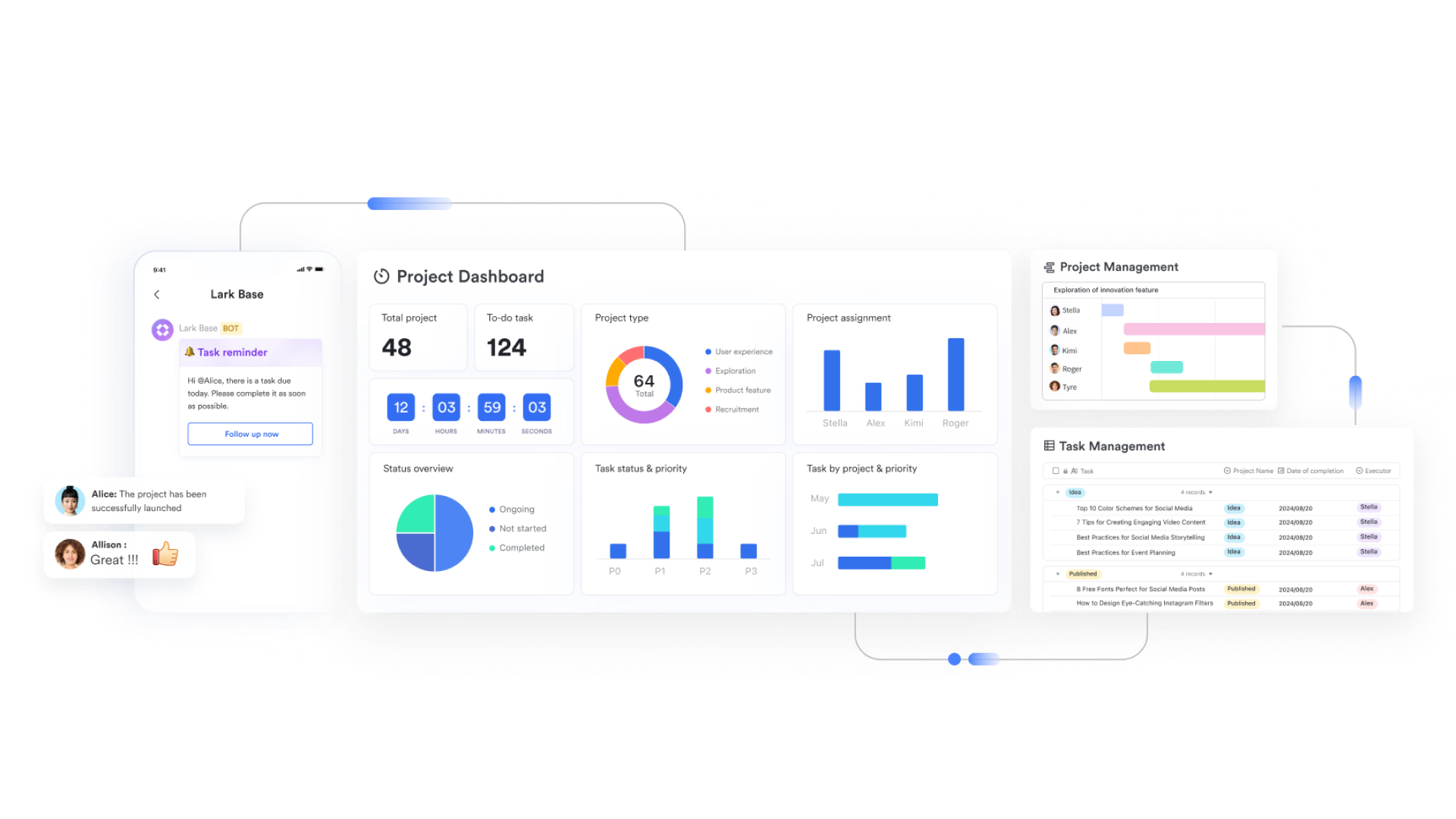
Task and project boards: Developers can manage sprints using task boards in Lark Base, organizing stories, bugs, and tasks with clear ownership. Each task can have deadlines and subtasks, allowing teams to see not only what is being done but also how much time each task consumes. Example: A backend team can track how many hours are logged against database optimization tasks, helping managers forecast timelines.
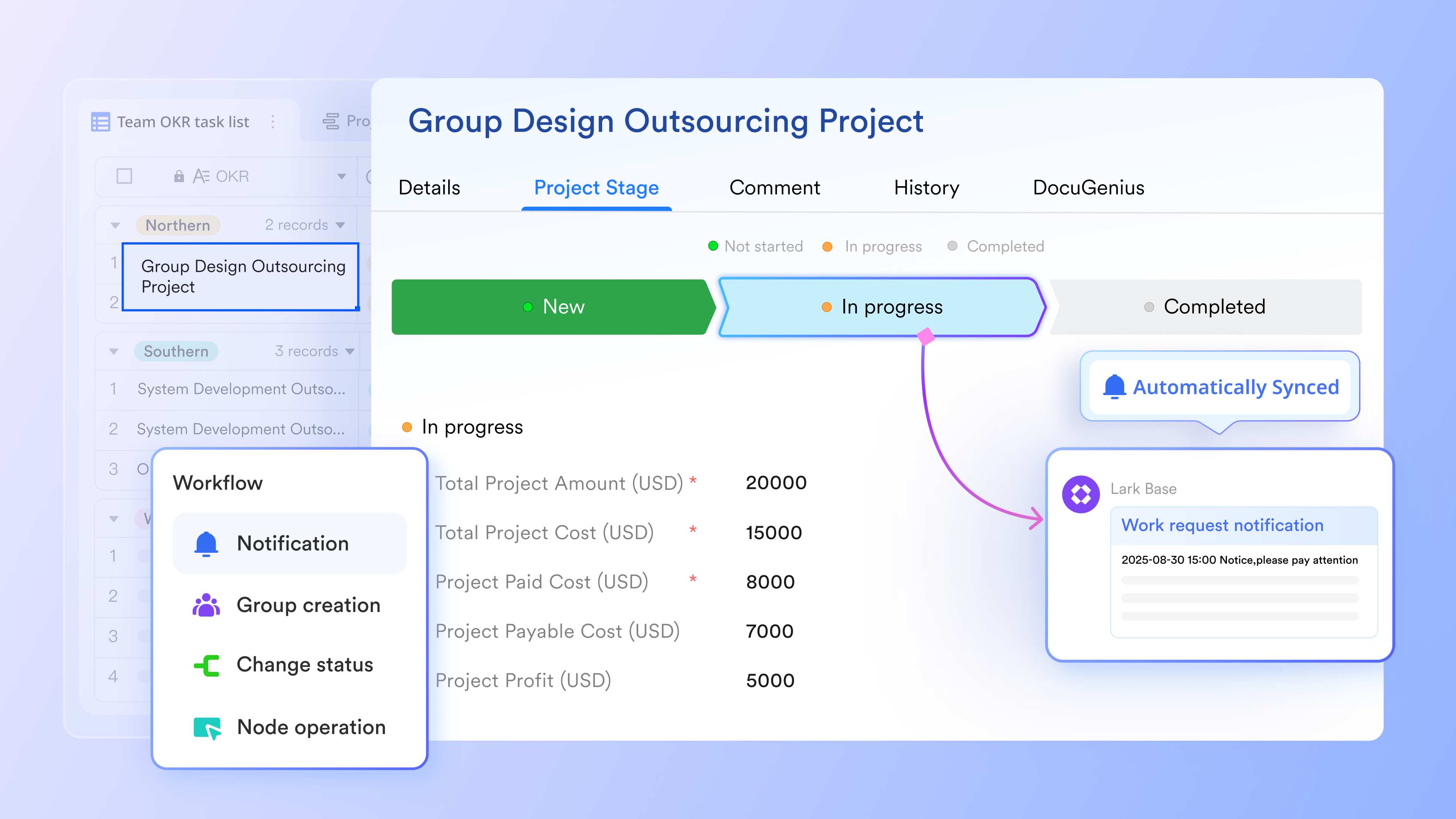
Automated time tracking: Instead of manual entries, Lark Base allows automated time capture linked directly to task updates. As developers move tasks across stages (e.g., In Progress → Completed), Lark logs the time spent. This ensures timesheets are accurate without disrupting developer focus. Scenario: A developer working on a feature branch doesn't need to start/stop timers—Lark records progress seamlessly.
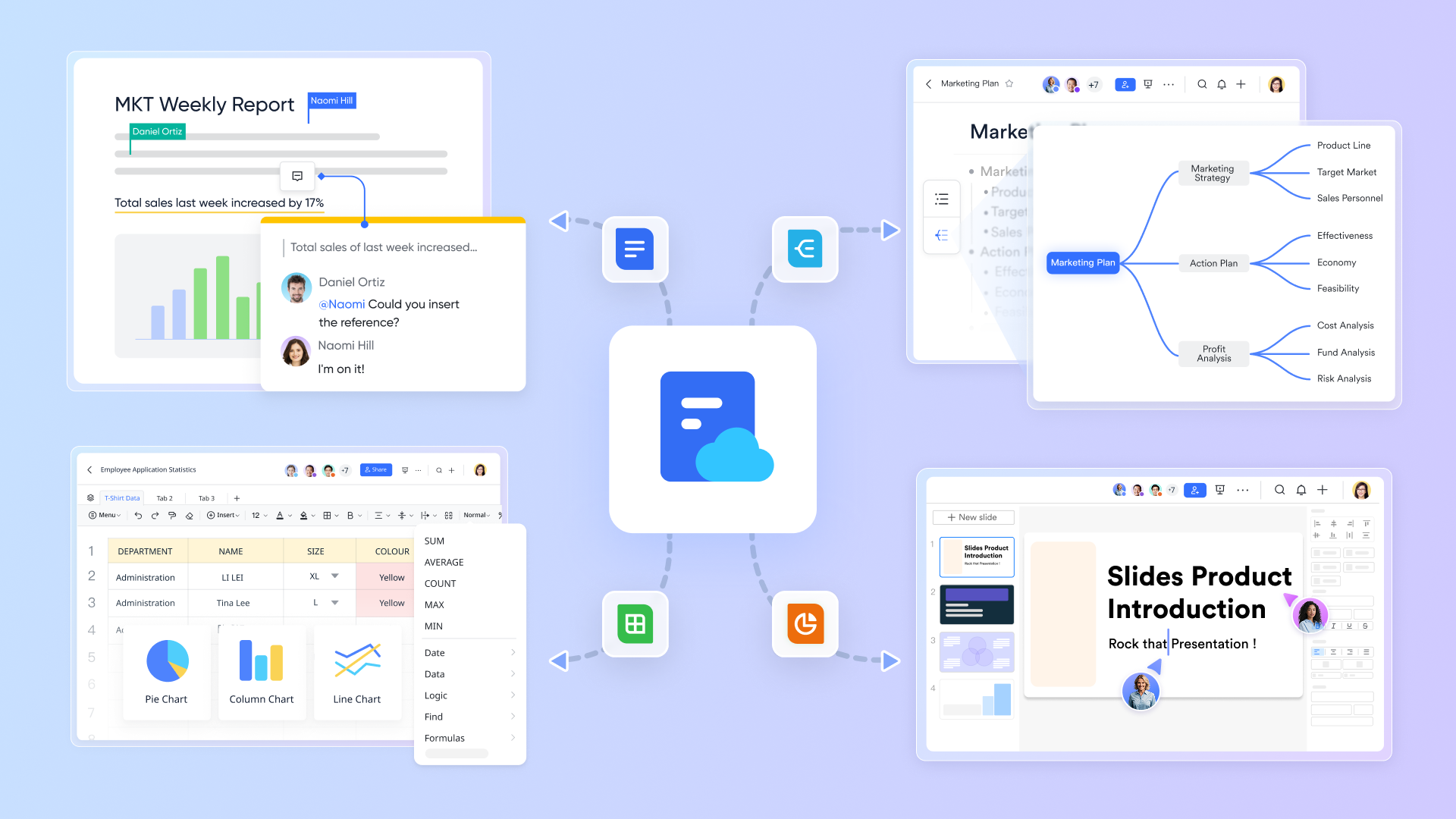
Docs and Sheets collaboration: Teams can embed timesheets and project progress reports into Lark Docs for easy sharing. For example, weekly sprint reports can include live timesheet data from Lark Sheets, ensuring transparency with stakeholders. This eliminates version chaos and keeps data context-rich.
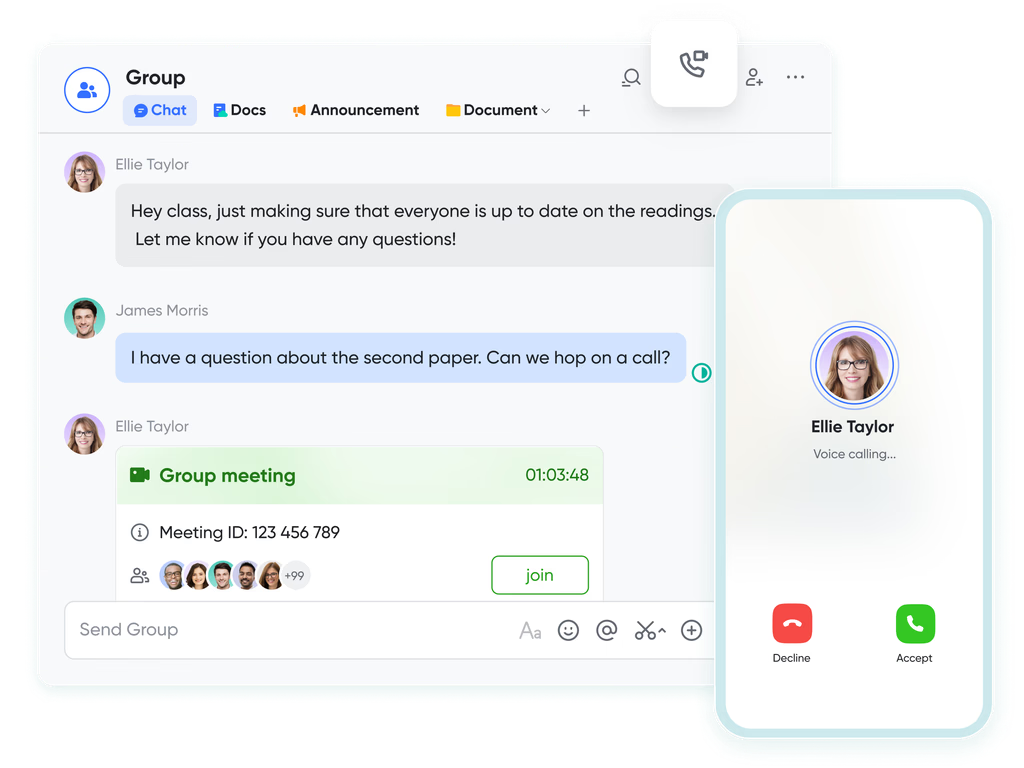
Built-in chat and video meetings: With Lark Messenger and Lark Meetings, discussions about tasks happen where the data lives. For example, if a task's logged hours exceed estimates, developers can start a thread in Messenger or schedule a quick review meeting—without exporting reports to external apps.
AI field shortcuts: Lark's AI field shortcuts analyze work patterns and suggest improvements. Developers might receive summaries of how much time was spent debugging vs coding new features, or AI may flag tasks consistently taking longer than expected. This helps managers reallocate resources before bottlenecks form.
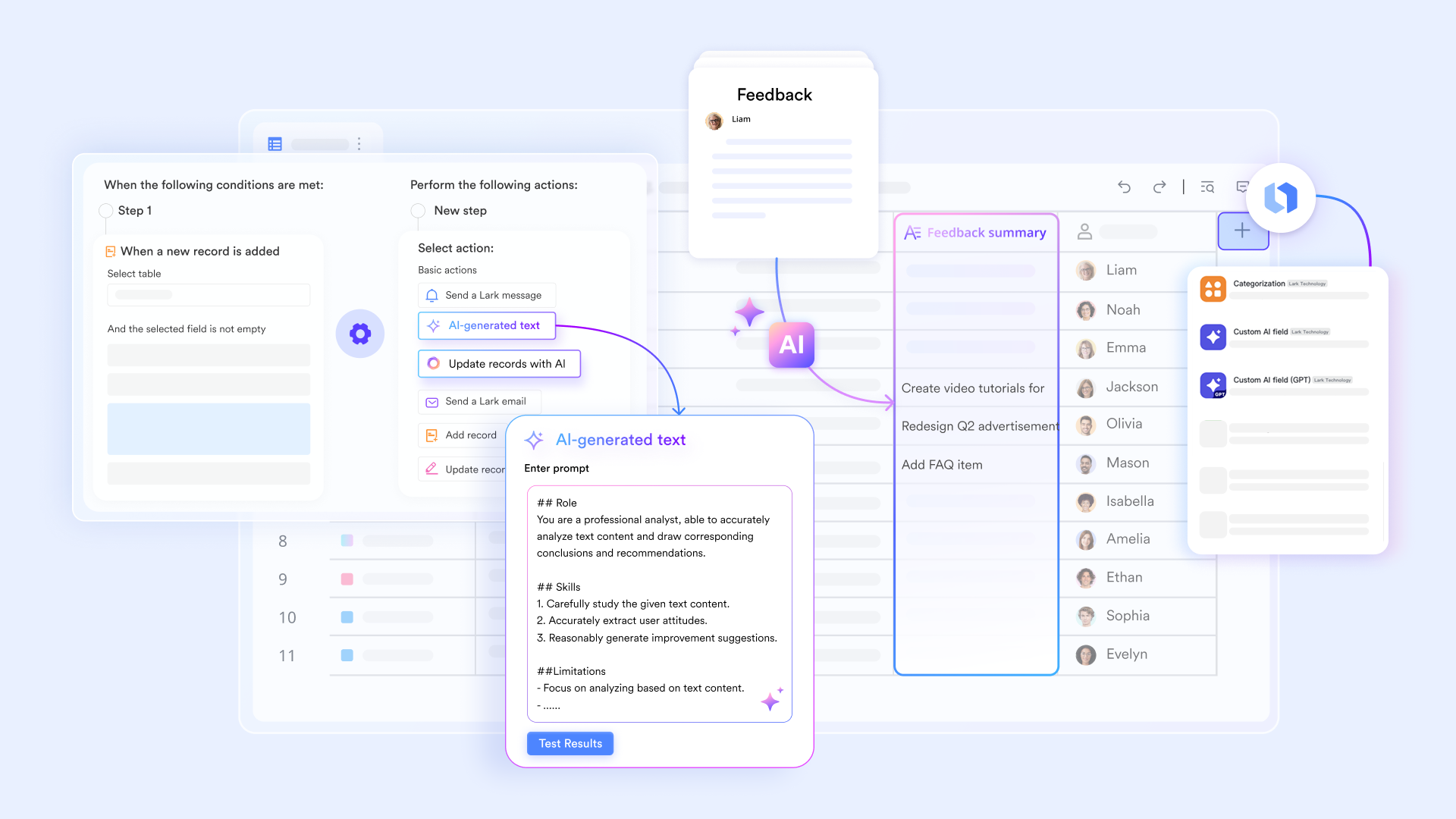
Customizable templates
Pre-built templates for sprint logs, timesheets, and project tracking make setup quick. Example: A team starting a new sprint can apply a ready-made sprint template, complete with time tracking columns, instead of building everything from scratch.
Pros
- Combines time tracking with collaboration and communication.
- Automated timesheets reduce manual logging errors.
- AI-driven insights for productivity optimization.
- Works for both small dev teams and large enterprises.
Cons
- Teams new to all-in-one tools may need onboarding.
- Advanced automation setups require initial configuration.
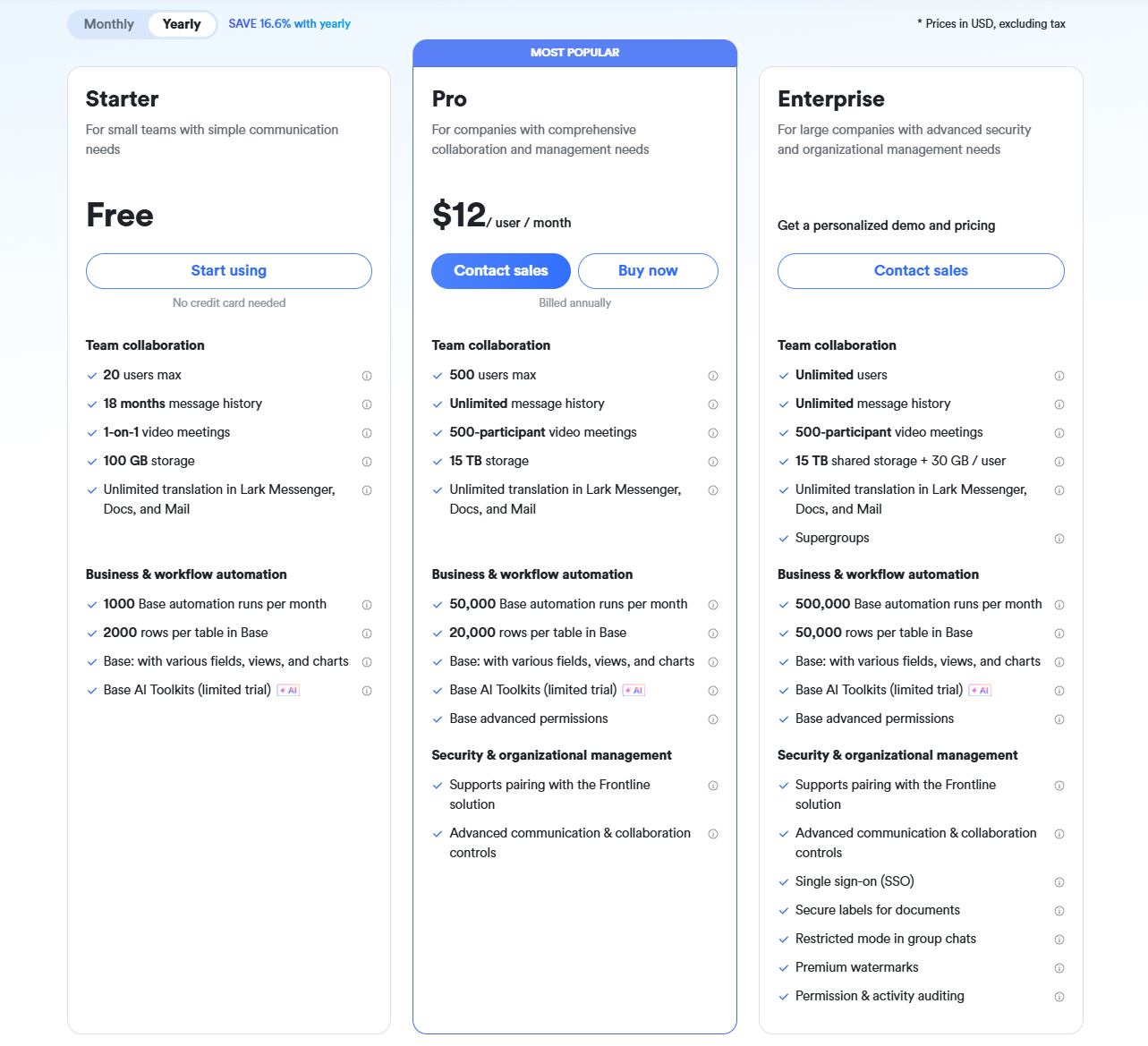
- Starter plan: Free forever plan that includes 11 powerful tools for up to 20 users. It also comes with 100GB of storage, 1000 automation runs, AI translations, and more.
- Pro plan: $12/user/month (billed annually) for up to 500 users. It includes everything in Starter plus group calling for up to 500 attendees, 15TB of storage, 50,000 automation runs, and more.
- Enterprise plan: Contact sales for custom pricing. Supports unlimited users and includes even more automation runs and advanced security, compliance, and management features.
2. Clockify: Free project time tracker
Clockify is a popular time tracking software that offers a generous free plan, making it appealing to developers, freelancers, and small teams alike. You can track hours across multiple tasks and projects without upfront cost. It supports both manual entry and timer mode, and has basic reporting and export features. Because its free tier is quite generous, many startups begin with Clockify before migrating to paid tools. It balances simplicity with functionality, especially for teams that value open access to time logs.
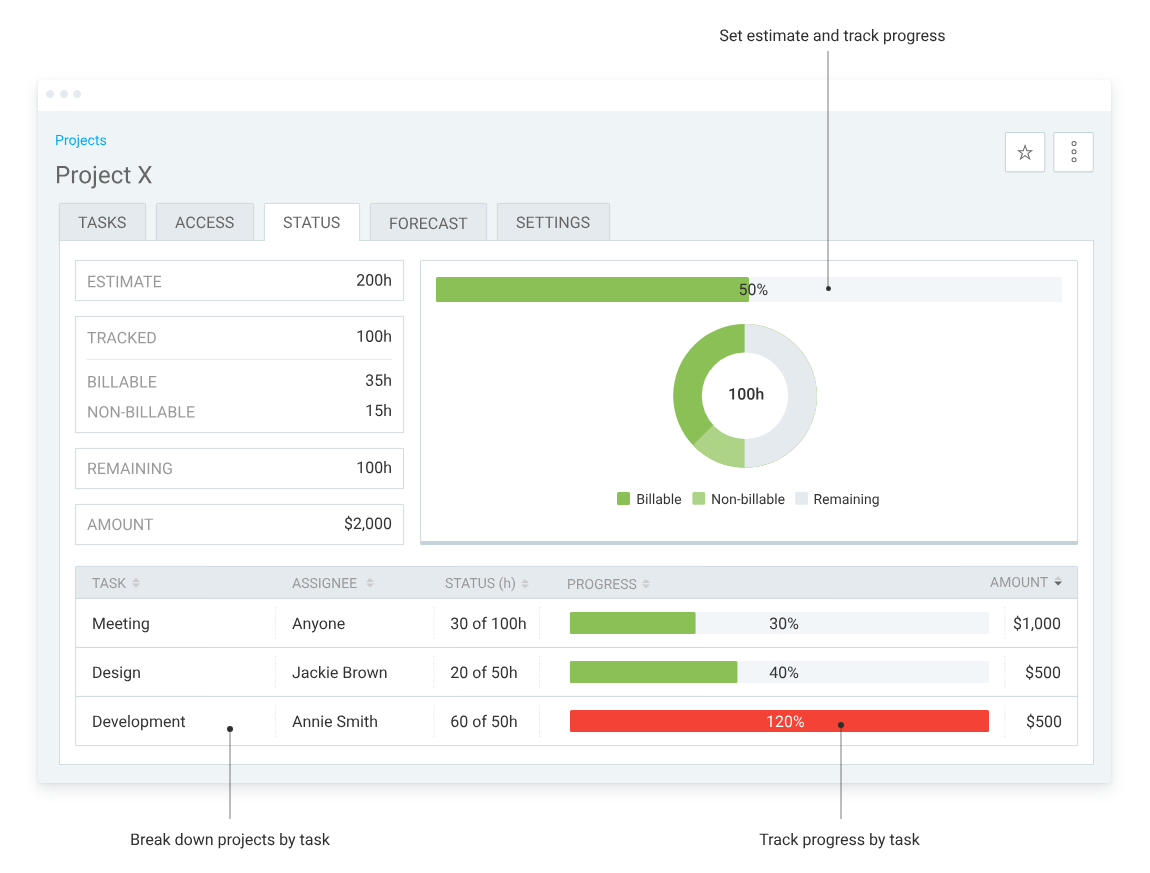
Image source: clockify.com
Features
- Unlimited users, projects, and time entries even on free plan.
- Manual and automatic timer modes.
- Reports with filters, dashboards, and exports (CSV, PDF).
- Billable rates, invoicing, and time approvals (in paid tiers).
- Integrations with tools like Asana, Jira, Trello, Zapier, etc.
Pros
- Generous free plan — no user or project limits.
- Easy to set up and intuitive UI for developers.
- Solid reporting and dashboard capabilities even in lower tiers.
- Good integration ecosystem for developers using multiple tools.
Cons
- Advanced features (invoicing, locking timesheets, forecasting) are locked behind paid tiers.
- Free version lacks some controls and audit features needed for enterprise.
Pricing
- Free: Unlimited users, projects, time tracking.
- Basic: $3.99/user/month (billed annually)
- Standard: $5.49/user/month (billed annually)
- Pro: $7.99/user/month (billed annually)
- Enterprise: $11.99/user/month (billed annually)
3. Memtime: Activity-based developer time tracking
Memtime is a desktop time tracking tool designed for professionals who prefer reviewing their workday afterward instead of managing timers while working. The app records activity in the background and lets users convert those activities into structured time entries later.
For developers who frequently move between coding environments, documentation, issue trackers, and communication tools, this approach makes it easier to reconstruct how time was actually spent during the day. A broader overview of this approach can be found here.
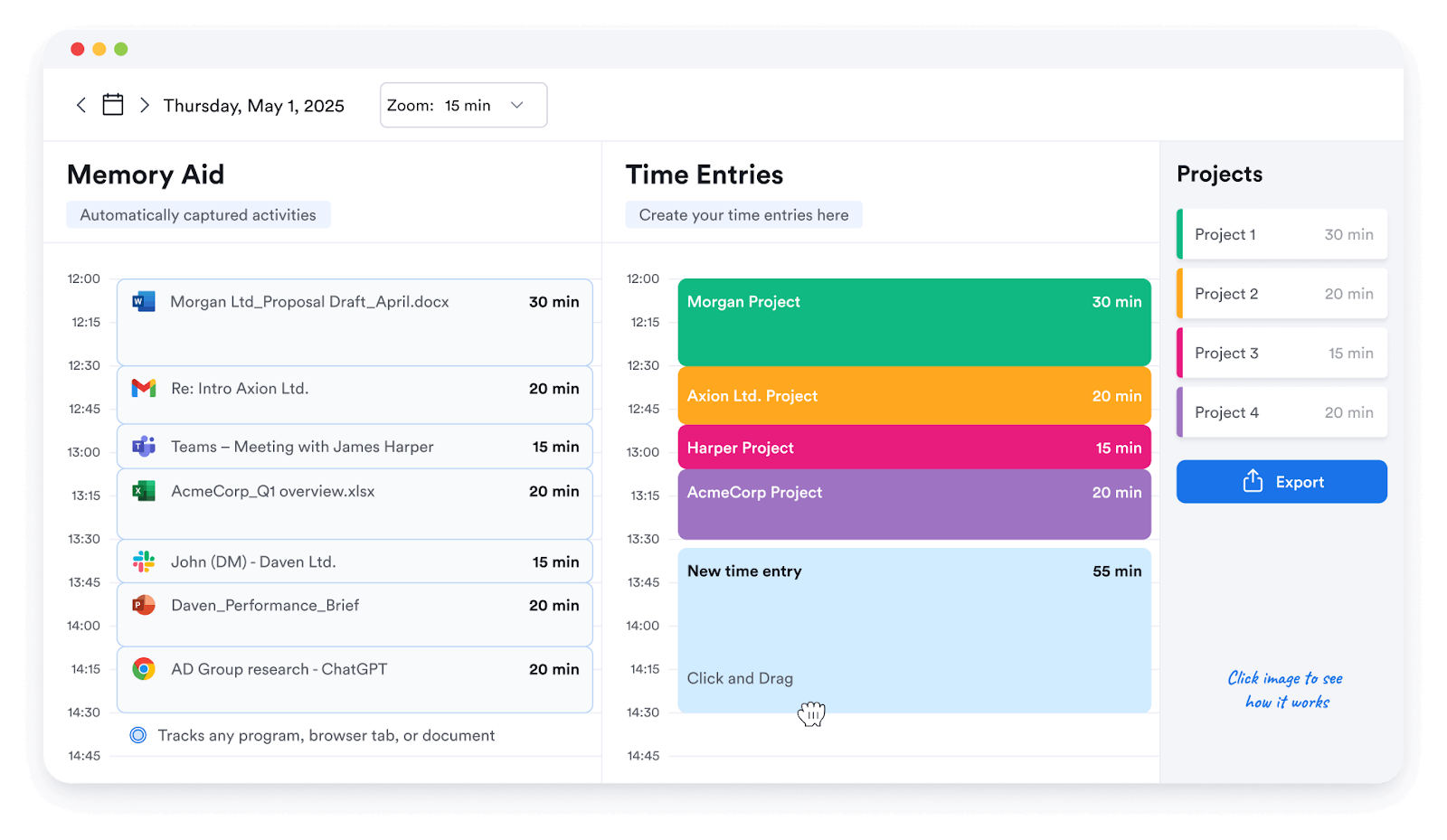
Image source: memtime.com
Features
- Chronological record of apps, documents, and websites used during the workday
- Select portions of recorded activity and convert them into time entries
- Review and edit recorded activity before assigning it to projects
- Export logged hours for project reports or client billing
Pros
- Helps reconstruct fragmented developer workflows
- Reduces the need to track time manually during focused work
- Works well for freelancers as well as lean development teams
Cons
- Users need to review recorded activity before finalizing timesheets
- Less suitable for organizations that rely on heavy employee monitoring
Pricing
- Basic: from $12/user/month
- Connect: from $18/user/month
- Premium: from $23/user/month
- Enterprise: custom pricing depending on team size
4. Hubstaff: Developer activity monitoring
Hubstaff is a timekeeping app built for deeper visibility into work activity, especially useful for remote development teams. Beyond simple time logs, it offers features like screenshots, URL/app tracking, and GPS, suited for teams needing accountability. Managers can monitor productivity, payments, and even automate payroll from the same platform. While it's powerful, its detailed features may be overkill for teams that only need basic time tracking. Its balance of tracking and monitoring makes it a strong option when oversight is important.
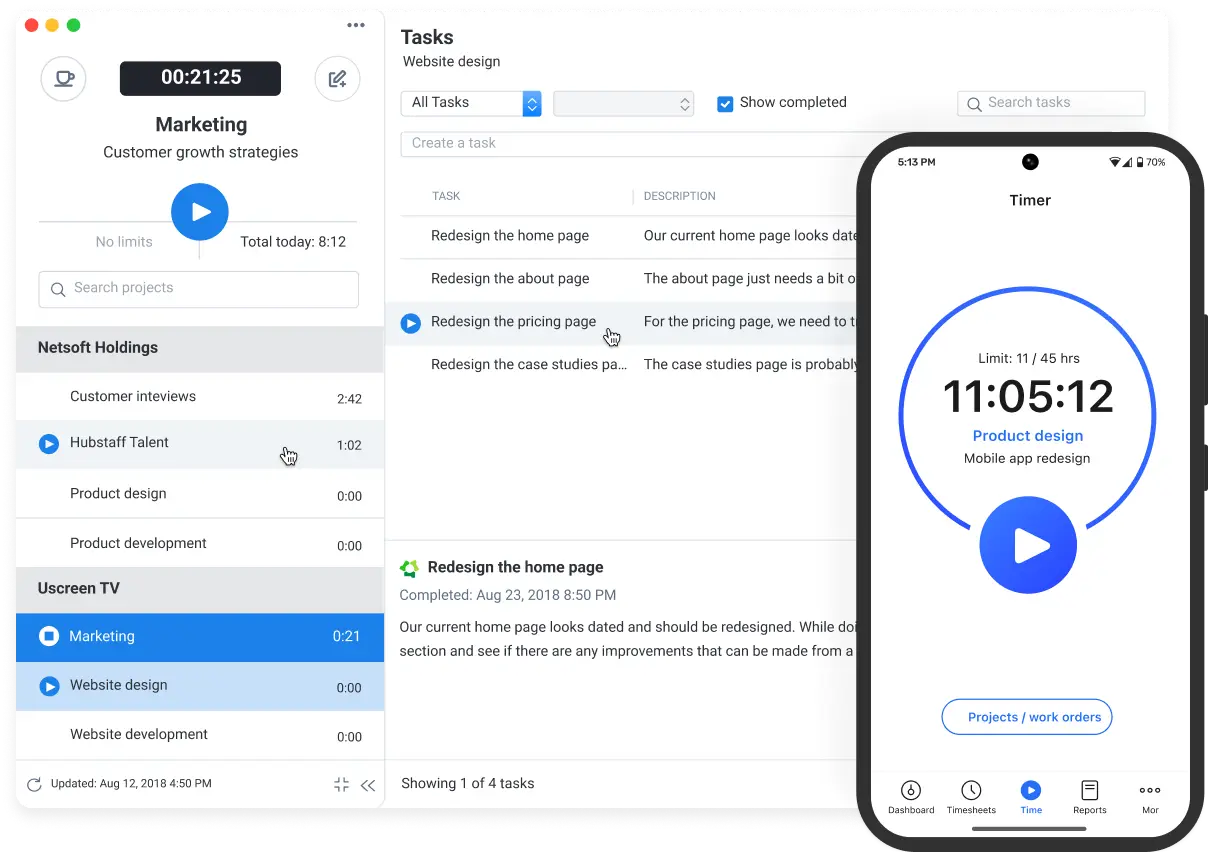
Image source: hubstaff.com
Features
- Time tracking with optional screenshots and activity levels.
- App/URL monitoring to measure tool usage.
- GPS & location tracking for field work.
- Automated payroll and timesheet approvals.
- Integrations with project management, accounting, and team tools.
Pros
- Rich visibility into developer activity and productivity.
- Payroll and billing automation built-in.
- Strong control features (approvals, integrations, reporting).
- Scalable from small teams to large remote operations.
Cons
- Can feel intrusive to developers if activity monitoring is overused.
- Some features require higher-tier plans, increasing cost.
Pricing
- Starter: $7/user/month (minimum 2 users)
- Grow: $9/user/month
- Team: $12/user/month
- Enterprise: Custom / high tier (~$25)
5. MyHours: Simple timesheet software
MyHours is designed for simplicity and reliability, making it a good timesheet software choice for developers who prefer clean, no-frills time logging. It focuses on basic project-based tracking, reporting, and invoicing—without overwhelming users with advanced features. For small dev shops or freelancers who want minimal setup and clear billing, MyHours delivers just what's needed. Its straightforward UI and minimal learning curve make it a dependable tool for timesheet tracking.
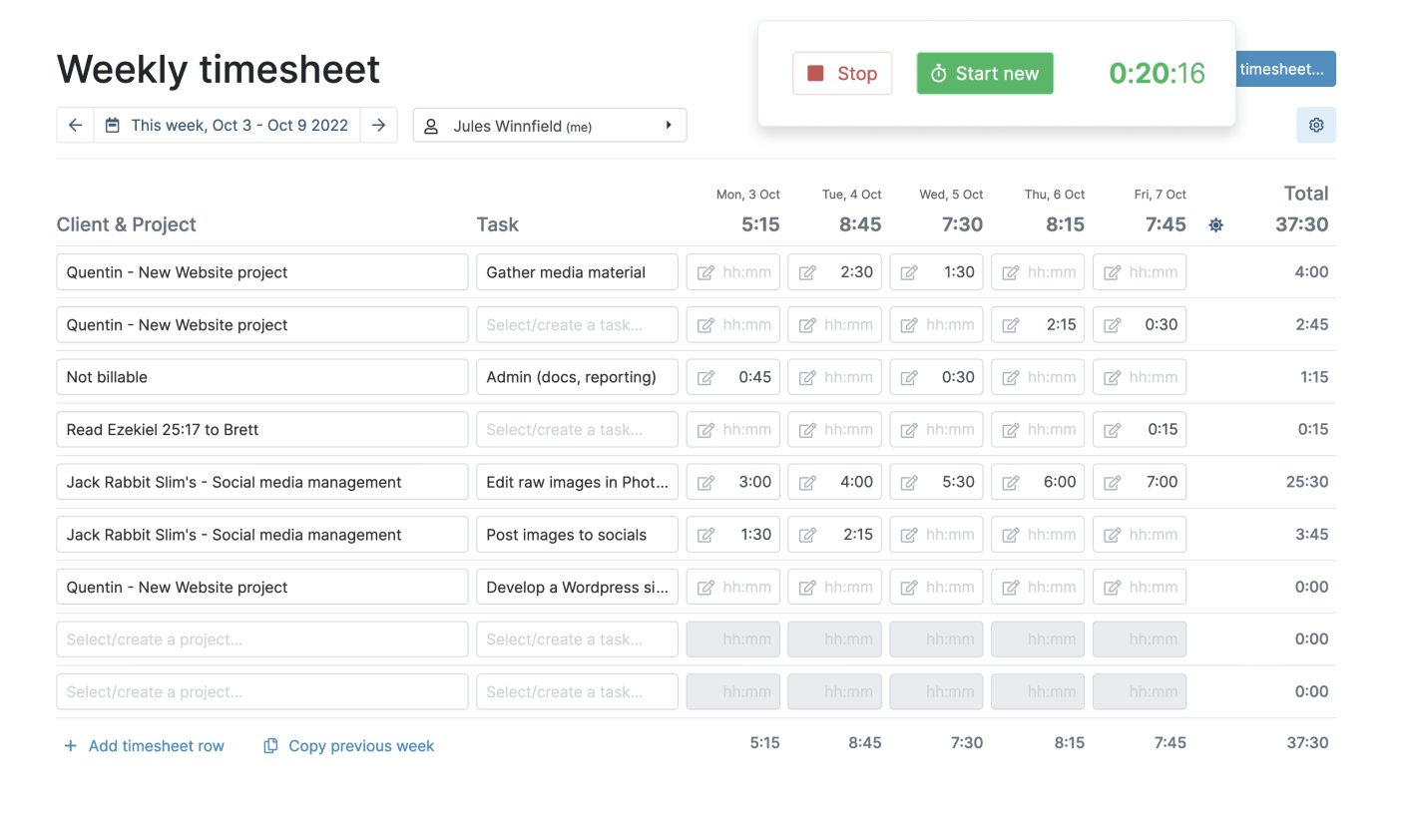
Image source: myhours.com
Features
- Manual time entry by project or task.
- Billable rates and client invoicing.
- Reporting by project, client, and team.
- Team time tracking and approval flows.
- Export data (CSV, PDF) for accounting or payroll.
Pros
- Simple and intuitive—easy for new users.
- Good for client billing and clean timesheet reports.
- Affordable pricing structure.
- Useful for teams focused more on accuracy than elaborate analytics.
Cons
- Not built for deep automation or activity monitoring.
- Lacks real-time tracking and advanced integration options in some cases.
Pricing
6. Toggl Track: Time tracking app
Toggl Track is a versatile time log app that's widely loved for its simplicity and integration support. Developers can start and stop timers with a click, or log time manually, then analyze patterns via dashboards and reports. It supports many platforms, making it great for teams that switch between desktops, browsers, and mobiles. Toggl strikes a balance: more powerful than simple trackers but less heavy than full monitoring suites. Its flexibility makes it a solid choice for dev teams of all sizes.
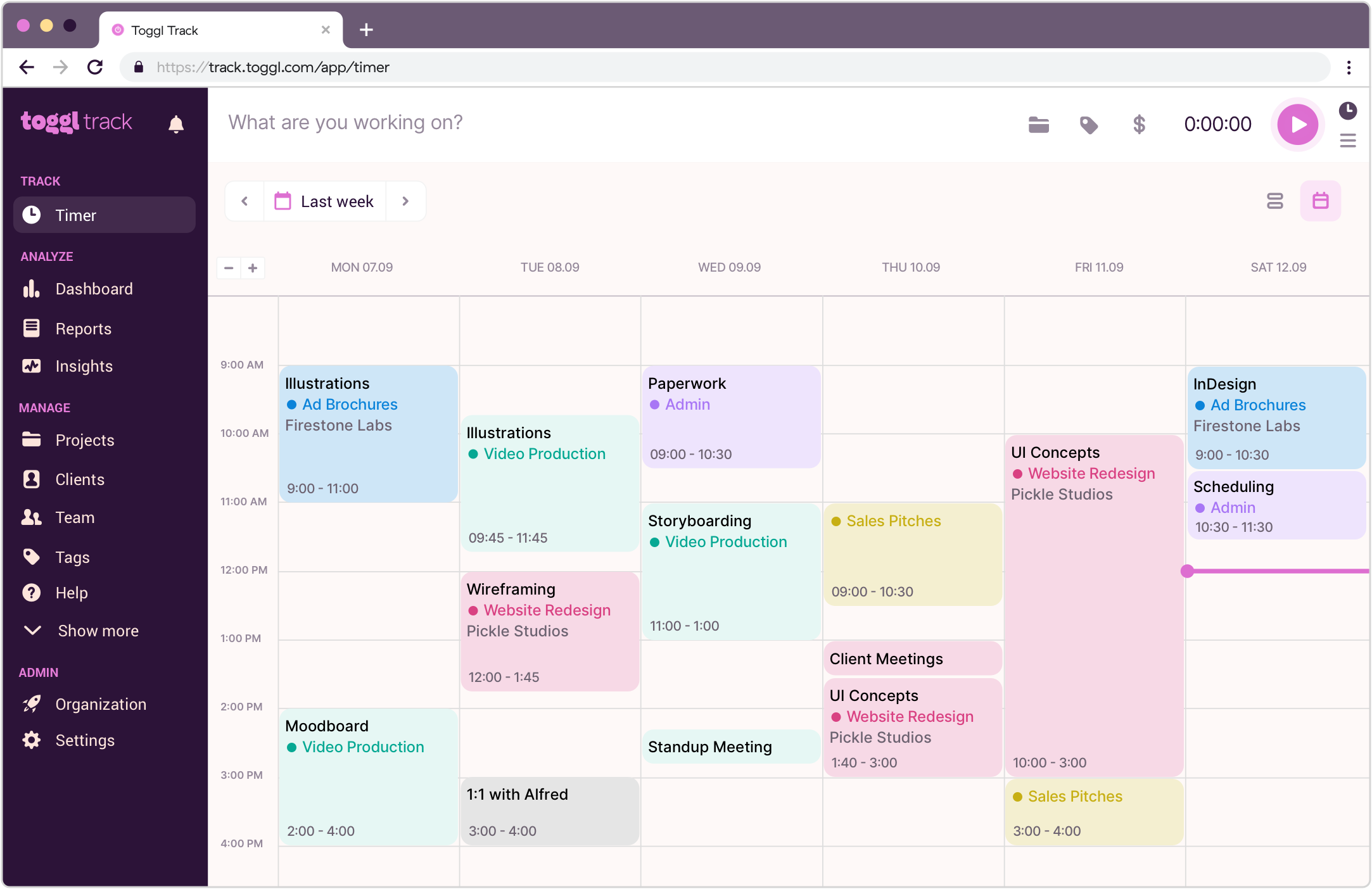
Image source: toggl.com
Features
- One-click timer and manual entry.
- Intelligent time suggestions and reminders.
- Detailed reports and dashboards.
- Tagging, project categorization, and billable rates.
- Integration with project tools (Jira, GitHub, Asana, etc.).
Pros
- Very user-friendly and fast to adopt.
- Strong cross-platform support (web, desktop, mobile).
- Good reporting for budget and time comparison.
- Extensive integrations for dev toolchains.
Cons
- Free plan is limited in advanced features.
- Doesn't offer built-in activity monitoring or screenshots.
Pricing
- Free (limited features)
- Premium / Paid tiers (from ~$10/user/month)
7. TimeCamp: Automated project tracker
TimeCamp is known as an automated project tracker—it can log time automatically based on user activity, compare it with planned hours, and provide rich insights. Developers who dislike manual timers benefit from its auto-tracking capabilities. It blends productivity tracking with invoicing and reporting. For dev teams, TimeCamp bridges the gap between passive time capture and actionable insights, reducing administrative burden and improving transparency.
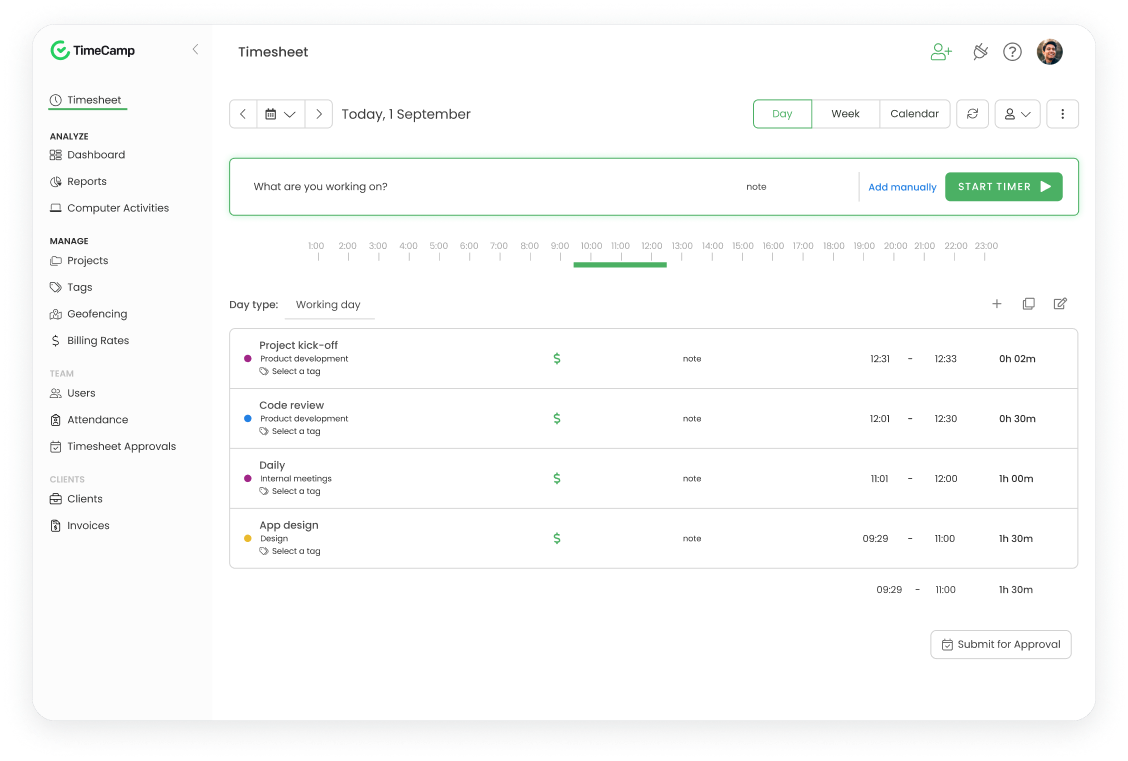
Image source: timecamp.com
Features
- Automatic time capture based on app/URL usage.
- Manual time correction and entry.
- Project and client billing and invoices.
- Detailed reports, charts, and dashboards.
- Integrations with tools like Trello, Jira, Slack, etc.
Pros
- Hands-off time capture reduces manual effort.
- Strong reporting visuals and dashboards.
- Built-in billing and invoicing support.
- Flexible integrations to fit dev workflows.
Cons
Pricing
- Free version (basic functionality)
- Paid plans starting around ~$7/user/month
8. DeskTime: Project time log app
DeskTime is a project time log app with a focus on productivity and efficiency. It tracks app / web usage, idle time, and time spent on tasks to give dev teams insight into how work actually happens. Its goal is to highlight productive vs. non-productive time, helping developers reflect on work behavior. For remote teams especially, DeskTime offers a clear view of where time is spent—without complex setup.
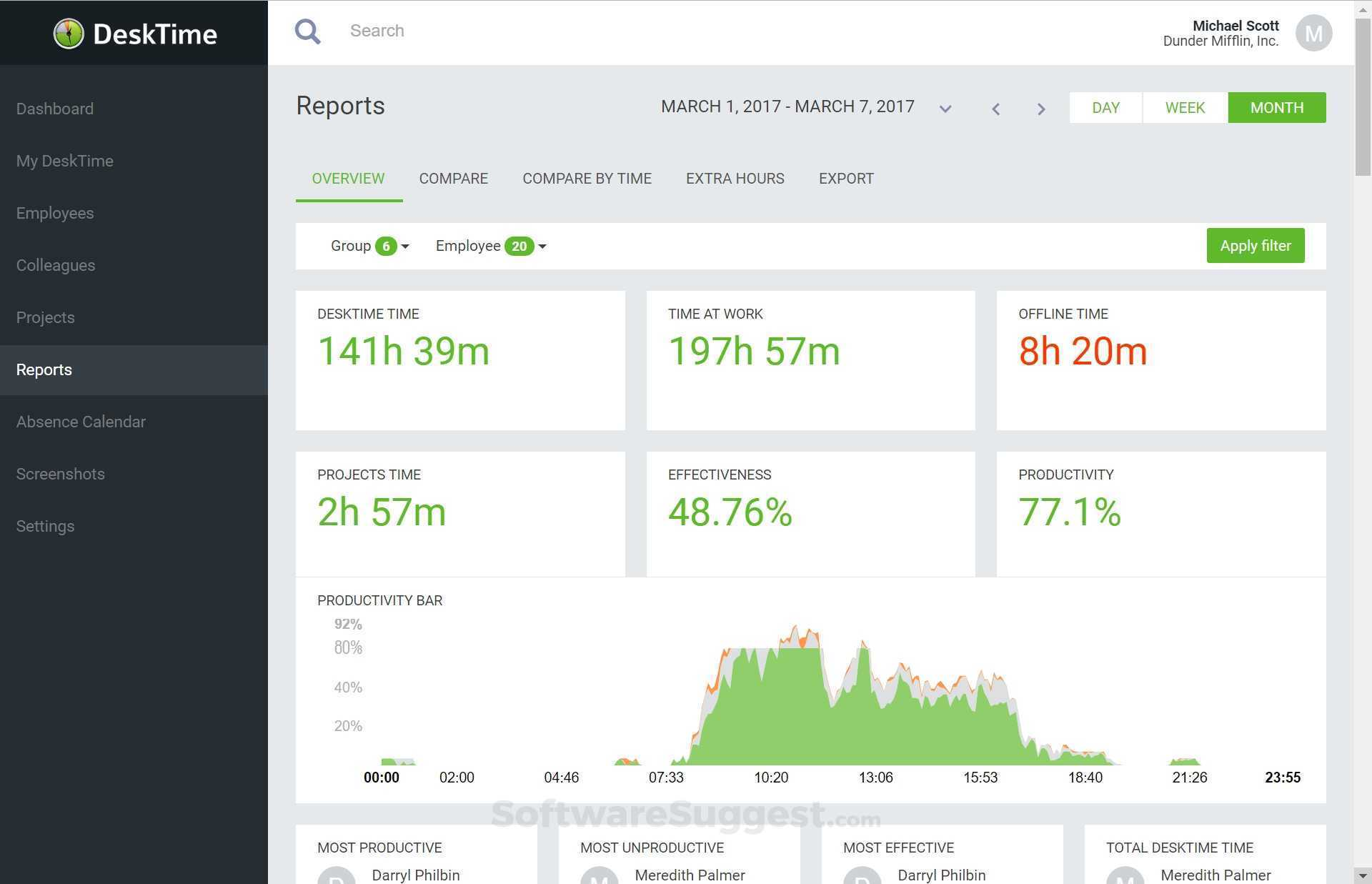
Image source: desktime.com
Feature
- Automatic time tracking with idle detection.
- App and URL monitoring to see usage.
- Offline time tracking and auto-synchronization.
- Reports with timelines, top metrics, and project breakdowns.
- Integration with project tools and export options.
Pros
- Good insight into productivity and app usage.
- Passive tracking—no manual timers needed.
- Useful metrics for process improvement.
- Helps remote teams understand working patterns.
Cons
- Monitoring features may feel invasive for some devs.
- May not replace deeper project management or task tracking.
Pricing
- Starts around $7/user/month (varies by plan & features)
9. Harvest: Agency work hour tracker
Harvest is a time tracking and work hours tracker tool favored by agencies, freelancers, and teams who want time + expense + invoicing in one platform. Developers can clock hours, track expenses, and send invoices—all from the same interface. Its clean design and lightweight feature set make it good for teams that want more than a timer but less than a full monitoring system. For dev shops handling client billing, Harvest is a practical and efficient choice.
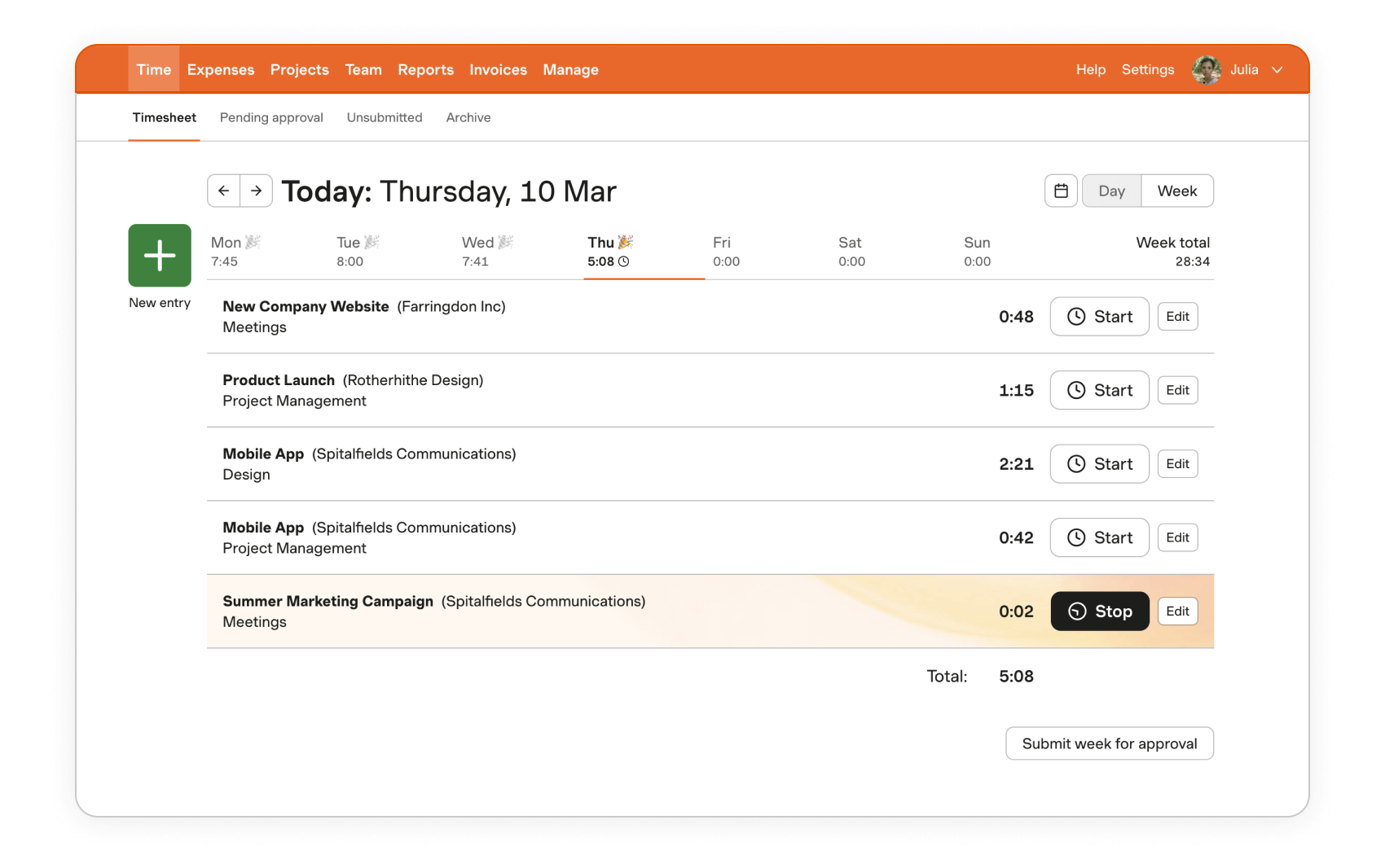
Image source: harvest.com
Feature
- Timer and manual time entry.
- Expense tracking linked to projects.
- Client invoicing and estimate generation.
- Reports and dashboards of time vs budget.
- Integrations with tools like Asana, QuickBooks, Slack, etc.
Pros
- Combines time tracking and billing in one tool.
- Clean and intuitive UI.
- Good for client-facing development teams.
- Integrations help embed it into workflows.
Cons:
- Less suited for deep monitoring or auto tracking.
- Advanced features may come with higher cost.
Pricing
- Starting from $12/user/month
Leveraging analytics and reporting features to optimize workflow
Analytics and reporting turn raw time logs into actionable insights. By using the reporting features built into developer time tracking software, teams can make smarter decisions, optimize workflows, and deliver projects with greater efficiency.
- Generate performance reports for individuals and teams
Detailed reports show how much time developers spend on tasks, projects, or clients. For example, managers can compare actual vs estimated hours to ensure projects stay on track.
- Identify bottlenecks or delayed tasks early
Reports highlight stages where work consistently stalls—such as code reviews or QA testing—so managers can reassign resources or adjust priorities before deadlines slip.
- Use data-driven insights to improve project planning
Analytics reveal patterns in how long tasks typically take. This helps create more accurate estimates for future sprints and prevents under-or over-allocation of developer time.
- Track productivity trends over weeks or months
By monitoring long-term data, teams can spot trends like recurring overtime or idle periods. These insights support better workload distribution and sustainable productivity.
Benefits of cross-platform and mobile access for remote development teams
For distributed or hybrid development teams, flexibility is essential. With staff time tracking software that works across devices, developers can stay productive and accountable whether they're at home, in the office, or on the go.
- Monitor tasks from desktop, mobile, or tablet devices
Cross-platform access ensures that managers and team members can check progress anytime. A project board updated on desktop is instantly visible on mobile, reducing delays in communication.
- Ensure developers can log hours regardless of location
Remote developers often work from different environments—coffee shops, client sites, or home offices. A mobile app lets them log hours instantly without waiting until they're back at a laptop.
- Support flexible work schedules without losing visibility
Time tracking apps with mobile access allow asynchronous teams to maintain accountability. Even if developers work different hours, project managers can see when and where time was logged.
- Enable instant updates on project progress in real time
Mobile notifications and updates ensure stakeholders stay in the loop. For example, when a sprint task is marked complete on mobile, the project board reflects it immediately for the entire team.
Enhancing workflow management with integrations and AI-powered insights
Modern time management systems go beyond simple tracking. By connecting with other tools and leveraging AI, teams can automate repetitive tasks, gain smarter recommendations, and optimize productivity without extra overhead.
- Connect with project management and collaboration tools
Integrations ensure that logged hours automatically sync with project boards, calendars, or invoicing systems. This eliminates duplicate data entry and keeps all workflows aligned in one place.
- Use AI to suggest task prioritization and next steps
AI can analyze logged time and project history to recommend which tasks should be tackled first. For developers, this means less time juggling priorities and more time coding.
- Get automated reminders for pending or overdue tasks
Instead of manually checking deadlines, automated alerts notify developers when tasks are approaching due dates. This reduces missed deadlines and ensures smoother sprint progress.
- Optimize team schedules and workload distribution
By analyzing workload patterns, AI can identify overburdened team members and redistribute tasks. This ensures fair allocation of work and prevents burnout while keeping projects on track.
Use cases of developer time tracking software by industry
Different industries rely on developer time tracking software for specific goals, from sprint efficiency to client billing. Here are some common scenarios where time tracking creates real value.
IT and software development: Task-level tracking for sprints
In Agile teams, developers work in sprints with strict deadlines. Time tracking tools log hours against each story or bug, helping managers measure velocity and improve sprint planning.
Marketing agencies: Billable hours and client reporting
Agencies need to prove value to clients. Timesheet programs allow them to track project hours, generate reports, and create transparent invoices, reducing billing disputes.
Freelancers: Accurate time logging for invoicing
Freelancers often juggle multiple clients. A time log app ensures hours are captured accurately for each project, making invoicing straightforward and professional.
Remote teams: Monitor distributed team productivity
With developers spread across locations and time zones, remote managers use time tracking apps to maintain visibility. This ensures accountability, balanced workloads, and smooth progress across projects.
Conclusion
Developer time tracking software helps teams boost productivity, accountability, and billing accuracy by making work hours visible and actionable. From freelancers to enterprises, these tools streamline reporting, identify bottlenecks, and support better project planning.
Among the top solutions, Lark stands out by combining time tracking with collaboration, AI insights, and automation—all in one connected workspace. This eliminates the need for multiple apps and keeps developers focused while managers maintain visibility.
The best choice depends on your team's size, workflow needs, and budget, but with the right tool in place, you can save time, optimize resources, and keep projects running smoothly.
FAQs
Can these tools integrate with project management apps?
Yes, most time tracking software connects with project management platforms like Jira, Trello, or Asana. However, this often requires third-party add-ons. With Lark, task boards, time tracking, and collaboration are already built into one workspace—no extra integrations needed.
Is Lark free for small teams?
Yes. Lark offers a free forever plan for up to 20 users with generous features including task boards, Docs, Sheets, chat, and time tracking support. This makes it a great option for small developer teams who want powerful tools without upfront costs.
Can time tracking work offline?
Some tools allow offline logging, syncing data once you reconnect. Lark supports offline editing in Docs and Sheets, ensuring developers can keep records even without internet, then sync automatically when back online—keeping time logs consistent.
Which software is best for freelancers?
Freelancers often need a time log app that simplifies invoicing and client reporting. Tools like Clockify or Harvest work well, but Lark offers an edge with its free plan, collaborative Docs for invoices, and built-in templates for project tracking.
How secure is developer time tracking data?
Security varies by provider, but leading apps use encryption and role-based permissions. Lark provides enterprise-grade security with advanced compliance, admin controls, and data protection, so developer hours, reports, and client data remain safe.
Related reading
Table of contents
Start using Lark today

Manage all your work in one place
Boost team efficiency by 10x
Save up to 70% on software costs
Table of contents
Start using Lark today
Manage all your work in one place
Boost team efficiency by 10x
Save up to 70% on software costs
Keep reading







2026 Lark Technologies Pte. Ltd.
Headquartered in Singapore with offices worldwide.






Explore: