














How to Auto Transcribe Video Meetings and Connect Them to Your Workflows

Chloe Wang
Content Manager
Sep 18, 2026
Chloe Wang
Sep 18, 2026

11 min read


In today's dynamic business environment, efficiently capturing and managing information is more critical than ever. Teams are often juggling multiple communication channels, virtual meetings, and content creation, making it challenging to keep track of every important discussion or detail. Many organizations find themselves relying on fragmented tools, which can lead to inefficiencies and missed opportunities. However, there's a powerful solution emerging: auto transcription. By converting spoken words into text, auto transcription streamlines workflows and enhances collaboration. When integrated into a unified workspace, this technology transforms how teams work, making information more accessible and actionable.
What is auto transcribe and why it matters
At its core, auto transcribe refers to the automatic conversion of spoken language from audio or video recordings into written text. This process is powered by advanced Artificial Intelligence (AI) and speech recognition technology, which analyzes sound waves and matches them to corresponding words and phrases. Think of it as having an intelligent assistant that listens to every conversation, presentation, or interview and types out a precise record.
Key features and capabilities
Modern auto transcription tools come equipped with a range of features designed to enhance their utility for businesses. These often include speaker identification, which attempts to distinguish between different voices in a recording and label their contributions, creating a clearer transcript. Many solutions also offer robust multilingual support, allowing for transcription and even translation across numerous languages. They can handle various audio and video formats, making them versatile for different types of content, from recorded meetings to podcasts and training videos. The resulting text can then be exported in multiple formats, such as plain text, PDF, or subtitle files (SRT, VTT), for diverse applications.
The "why" for businesses
Auto transcribe matters for businesses because it directly addresses several critical needs. Firstly, it significantly enhances accessibility, ensuring that content is available to individuals who are deaf or hard of hearing, and providing an alternative for those who prefer to read rather than listen. Secondly, it vastly improves the searchability of spoken content. Once converted to text, every word becomes searchable, allowing teams to quickly find specific information within hours of recordings. Lastly, it streamlines documentation. From meeting minutes to interview notes, auto transcription provides a quick and accurate starting point for creating official records, reducing manual effort and potential errors. By using an all-in-one platform like Lark, auto transcription provides a quick and accurate starting point for your meeting minutes and interview notes. This reduces manual effort, prevents errors, and keeps all your transcribed records easily accessible in one unified hub.

Why manual and fragmented approaches are holding your team back
For many years, converting audio and video into text meant a time-consuming and often frustrating manual process. This, coupled with a reliance on disparate tools for different aspects of team communication and project management, creates significant drag on productivity.
The time drain and inefficiency
One of the most immediate impacts of manual transcription is the significant time investment required. Consider a marketing team recording an hour-long brainstorming session. To get a written record, someone would need to listen to the entire recording, pause, rewind, and type out every word. This can take anywhere from five to ten times the length of the audio itself. That's hours diverted from core tasks like developing campaign ideas. When teams use fragmented tools—for example, one app for video calls, another for chat, and a third for document creation—the problem compounds. Information becomes siloed, requiring manual transfer and context switching. If a transcript is created in one tool, it then needs to be copied and pasted into a project management system or a shared document, introducing additional manual steps and opportunities for data loss or inconsistency.
Accuracy concerns and rework
Beyond the time investment, manual transcription is also highly susceptible to human error. Even the most diligent transcriber can mishear words, especially when dealing with poor audio quality, multiple speakers, background noise, or strong accents. For instance, a finance team reviewing an earnings call transcript might miss a critical nuance if a specific number or term is misidentified. Such inaccuracies can lead to misunderstandings or incorrect data analysis. The need for constant review and correction adds another layer of effort, leading to rework. Similarly, fragmented workflows often result in information being updated in one tool but not another, creating conflicting versions and further accuracy concerns.
Costly and unscalable
The reliance on manual transcription can become a significant financial burden, especially for growing businesses. Whether hiring internal staff or outsourcing to third-party services, the costs accumulate quickly. Moreover, manual methods are inherently difficult to scale. As a company grows and the volume of meetings, interviews, and video content increases, manual transcription simply cannot keep pace without a proportional increase in resources, leading to backlogs and delays. The inefficiency of managing multiple, disconnected software solutions also adds to operational costs. Subscribing to several single-purpose tools, each with its own learning curve and management overhead, can be more expensive and less effective than investing in a unified platform.
The benefits of automated transcription within a unified workspace
While standalone auto transcription tools offer clear benefits, their true potential is realized when integrated into a unified workspace like Lark. This goes beyond simply converting speech to text; it transforms raw information into a central, collaborative, and actionable asset. The fragmented approach, where transcription happens in one application and then needs to be manually transferred to another for collaboration or storage, creates new inefficiencies. A unified workspace, on the other hand, creates a cohesive environment where transcription is a native function, enhancing every aspect of team communication and project management.
Saving time and resources
The most compelling advantage of auto transcribe is its ability to dramatically accelerate the conversion of audio and video into text. AI-powered transcription services can process an hour of audio in a fraction of the time it would take a human, often within minutes. This rapid turnaround frees up valuable employee time, allowing them to focus on their core responsibilities, ultimately contributing to higher output and more efficient resource allocation. For example, instead of a project coordinator spending hours transcribing a client feedback session, an automated tool can deliver a transcript in minutes, allowing the coordinator to immediately start analyzing the feedback and delegating tasks.
Improving accuracy and reliability
While early auto transcription tools sometimes struggled with accuracy, modern AI speech-to-text technology has made significant strides. Leading AI transcription platforms now report achieving high accuracy rates, some even reaching 99% in optimal audio conditions, effectively matching or approaching the quality of professional human transcribers. This means businesses can generally rely on the initial output, reducing the need for extensive post-transcription editing. Features like speaker identification also help create a clearer and more structured record, ensuring that contributions from different team members are correctly attributed, which is crucial for accountability and clarity in collaborative environments.
Enhanced accessibility and inclusivity
Auto transcription also plays a vital role in making information more accessible and fostering inclusivity within teams. Transcripts provide an alternative format for consuming spoken content, which is particularly beneficial for individuals with hearing impairments or those who prefer to read rather than listen. For example, a global team with members in different time zones can rely on a meeting transcript to catch up on discussions, rather than being forced to attend late-night or early-morning calls. Furthermore, with the advent of AI translation capabilities, auto-generated transcripts can be quickly translated into multiple languages, allowing global teams to communicate and collaborate more effectively, breaking down language barriers and ensuring everyone is on the same page.
Centralized information hub
The true power of auto transcription is amplified within a centralized information hub. Imagine all your important spoken interactions—from daily stand-ups to client calls and training sessions—automatically converted into searchable text and stored alongside your documents, chat histories, and calendars. This is invaluable for preventing information silos and ensuring all divisions of an organization have access to a common source of trusted data. This centralization makes knowledge easily discoverable and reduces the overhead associated with information retrieval. For instance, a sales manager needing to recall a specific client request from a recorded video call can simply search within their unified workspace, pulling up the transcript directly alongside related client notes and sales proposals.
When and where auto transcribe makes a difference: key business scenarios
Auto transcription is not just a general productivity booster; it offers specific and tangible benefits across a variety of business scenarios, fundamentally changing how teams manage and leverage their spoken communications.
Meetings and webinars
Perhaps the most common and impactful use case for auto transcription is in meetings and webinars. For many teams, meetings consume a significant portion of the workday, and capturing all the details accurately can be challenging. Auto transcription ensures that every word spoken is recorded and converted into a searchable text format. This is invaluable for attendees who need to review specific points, for those who were unable to attend but need to get up to speed quickly, and for creating official meeting minutes. For example, a global engineering team scattered across different time zones can rely on a meeting transcript to ensure everyone, regardless of attendance, has a complete record of decisions made, technical specifications discussed, and next steps agreed upon. This reduces miscommunication and ensures project continuity.
Interviews and user research
For teams involved in market research, HR, or product development, conducting interviews is a common practice. Analyzing these qualitative discussions can be incredibly time-consuming when relying solely on audio recordings. Auto transcription transforms spoken interviews into searchable text, making it significantly easier to identify themes, extract key insights, and pull specific quotes. A user research team, for instance, can quickly search through dozens of transcribed user interviews for mentions of specific pain points or feature requests, allowing them to rapidly synthesize feedback and make data-driven product decisions without lengthy manual review. This accelerates the research cycle and improves the depth of analysis.
Content creation and repurposing
Content creators, marketers, and educators can find immense value in auto transcription for streamlining their production workflows. Whether it's a podcast episode, a video tutorial, a recorded lecture, or a presentation, auto transcription provides a quick and efficient way to generate the text needed for various purposes. For example, a marketing team can automatically transcribe a video testimonial and use the text to generate captions for accessibility, create a blog post summarizing the client's experience, or pull out compelling quotes for social media campaigns. This not only saves time but also extends the reach and impact of existing multimedia content across different platforms and audiences.
Training and onboarding
For organizations that rely on extensive training programs or need efficient onboarding processes, auto transcription is a powerful ally. Recorded training sessions, presentations, and onboarding modules can be automatically transcribed, creating searchable and reviewable resources. New hires can quickly access and search through past training materials, allowing them to get up to speed faster without constantly asking questions or re-watching entire videos. This creates a scalable and efficient learning environment, ensuring that critical information is consistently delivered and easily accessible.
How to choose and implement the right solution for your enterprise
When considering an auto transcribe solution for your organization, it's important to look beyond just the basic speech-to-text functionality. The right choice can significantly impact your team's efficiency, collaboration, and data security. Enterprises, in particular, need a solution that aligns with their complex operational needs and existing IT infrastructure.
Assessing accuracy and language support
The foundation of any good transcription tool is accuracy. While no automated system is perfect, modern AI has greatly improved. When evaluating options, look for providers that highlight high accuracy rates, particularly for diverse accents, technical jargon specific to your industry, and noisy environments. Equally important for global enterprises is robust language support. If your teams operate in multiple regions or communicate in different languages, ensure the solution can accurately transcribe and, ideally, translate content across the languages you need. A real estate company with international clients, for example, would benefit from a transcription tool that can handle meetings in both English and Spanish with high fidelity.
Evaluating integration capabilities
A standalone transcription tool, no matter how powerful, can create a new silo if it doesn't integrate well with the rest of your tech stack. For enterprise environments, seamless integration with your existing communication platforms, document management systems, and project management tools is critical. The ideal solution should either be part of a unified workspace or offer robust APIs and connectors to ensure that transcripts can flow effortlessly into your established workflows. This prevents information fragmentation and reduces the friction associated with moving data between applications. Imagine a customer support team where call transcripts automatically populate into their CRM, providing agents with a complete history of client interactions without manual data entry.
Prioritizing security and compliance
For businesses handling sensitive information, data security and compliance are paramount. When choosing an auto transcribe solution, thoroughly investigate its security protocols, data encryption practices, and compliance certifications (e.g., SOC 2, HIPAA, GDPR). It's crucial to understand how your data is stored, processed, and protected. Does the provider offer secure cloud storage? Do they have strict access controls? A healthcare provider, for instance, must ensure that any transcription service they use adheres to stringent privacy regulations like HIPAA to protect patient confidentiality. Similarly, companies handling data of EU citizens must ensure GDPR compliance. Prioritizing a provider with a strong commitment to enterprise-grade security helps safeguard your confidential business communications and avoids potential legal risks.
User experience and collaboration features
Beyond the technical specifications, consider the user experience and built-in collaboration features. Is the interface intuitive and easy for your team to learn and use? Does the solution offer tools for collaborative editing, commenting, and sharing of transcripts? A good user experience ensures that the tool is adopted effectively across the organization. For example, a legal team reviewing deposition transcripts would benefit immensely from a system that allows multiple team members to highlight relevant sections and add notes simultaneously. These features directly impact how efficiently your team can leverage transcribed content for their daily tasks.
How lark helps: auto transcribe within your all-in-one suite
Lark is an all-in-one suite that combines messaging, video meetings, cloud-native documents and sheets, calendar, email, wiki, and more into a unified workspace. This integrated approach fundamentally changes how auto transcription can support and elevate your team's productivity and collaboration. Instead of being a separate task that requires moving content between applications, transcription becomes a natural extension of your daily workflows within a single, cohesive platform.
Meetings to minutes, instantly
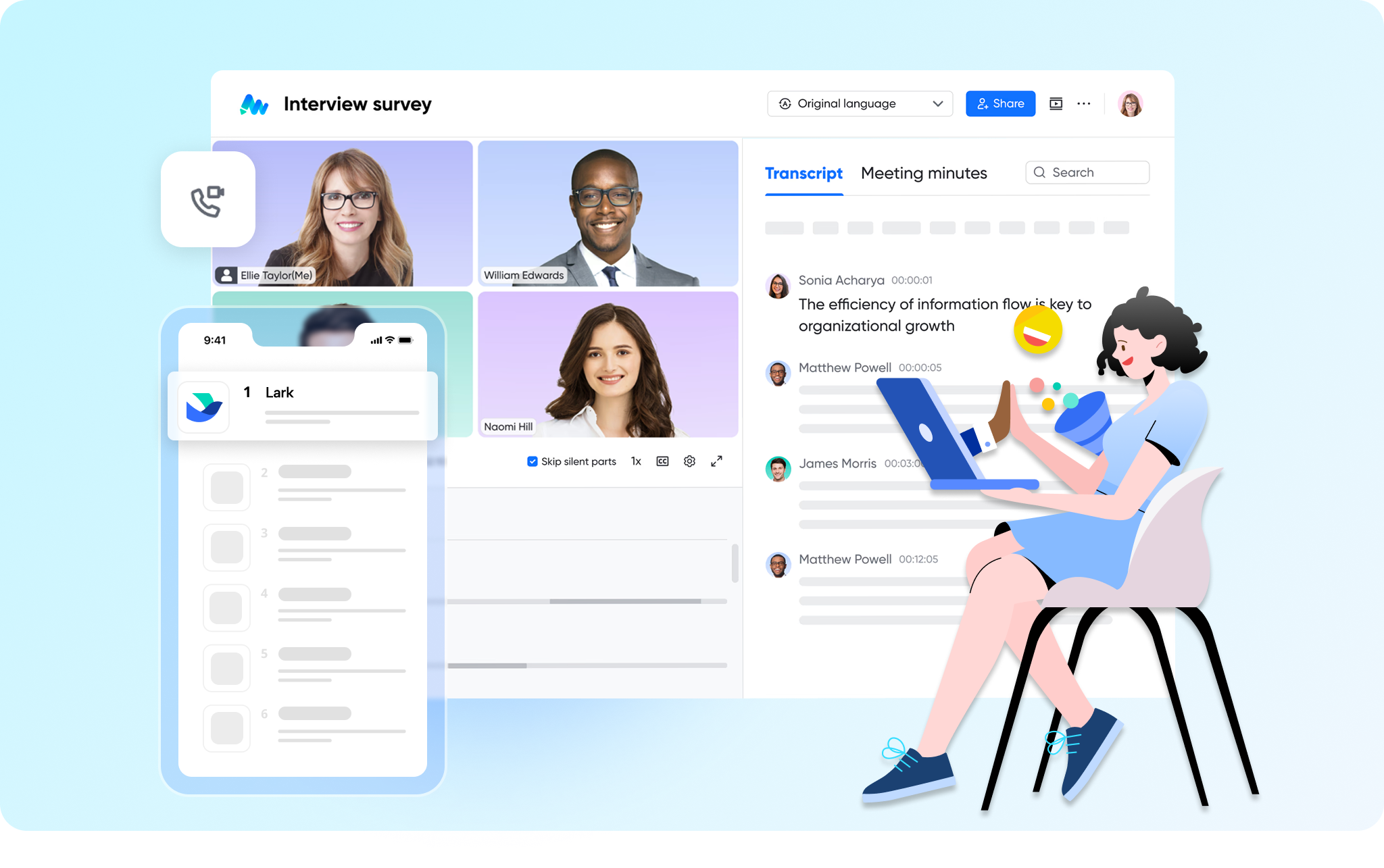
One of Lark's core strengths lies in its ability to streamline meeting management through integrated auto transcription. When you conduct a video meeting in Lark, the platform automatically transcribes the discussion, creating searchable and collaborative transcripts with Lark Minutes. This means that as soon as a meeting concludes, a full record is available. Teams can then use this transcript to quickly generate meeting notes, highlight key decisions, identify action items, and even translate discussions into other languages. For example, a project manager holding a daily stand-up can rely on Lark's auto-generated transcript to ensure all team members, especially those who might have joined late or are in different time zones, can quickly review what was discussed and what needs to be done, without requiring a manual recap. This significantly reduces the effort involved in post-meeting follow-up and ensures clarity.
Knowledge management, reimagined
In a fragmented tool stack, valuable insights from spoken conversations often get lost or are difficult to retrieve. Lark addresses this by transforming spoken content into easily searchable and shareable knowledge within its unified environment. Transcribed meeting discussions, presentations, or training sessions can be directly integrated into Lark Wiki or Lark Docs. This allows organizations to build a rich, living knowledge base where spoken information is no longer ephemeral but a durable and accessible asset. A new employee, for instance, could search the company wiki for previous project discussions, pulling up transcribed meetings that offer direct insights into past decisions and challenges. This accelerates onboarding and ensures that institutional knowledge is preserved and readily available to everyone who needs it.
Breaking down language barriers
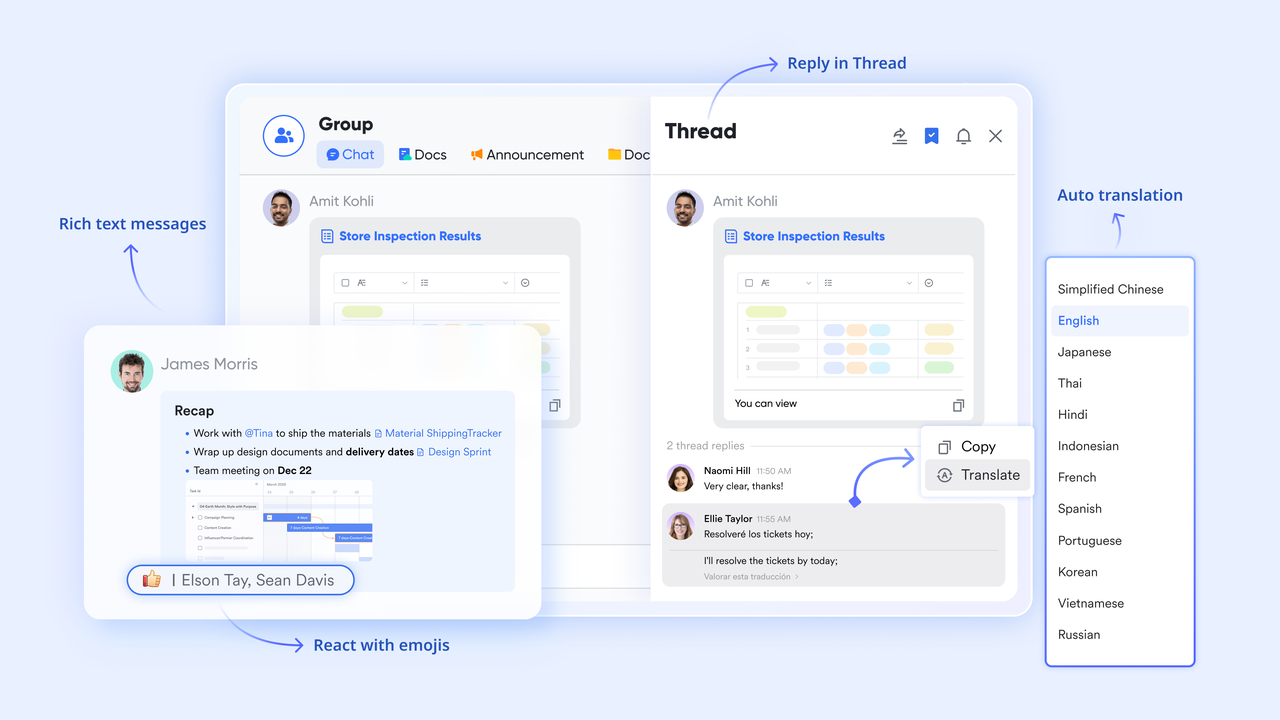
For growing SMEs and large enterprises operating in a globalized world, multilingual support is not just a feature—it's a necessity. Lark's auto transcription capabilities are enhanced by its robust AI translation features. The platform can recognize over 100 source languages and translate them into 24 target languages. This means that a meeting conducted in English can be transcribed and then instantly translated for team members who speak different languages. For example, a marketing team planning a global campaign could hold a discussion, have it auto-transcribed, and then allow team members in Japan or Germany to view the transcript in their native language, facilitating clearer understanding and more effective collaboration across international boundaries. This exceptional multilingual support helps ensure that all voices are heard and understood, fostering a truly inclusive and efficient global team.
Streamlining workflows
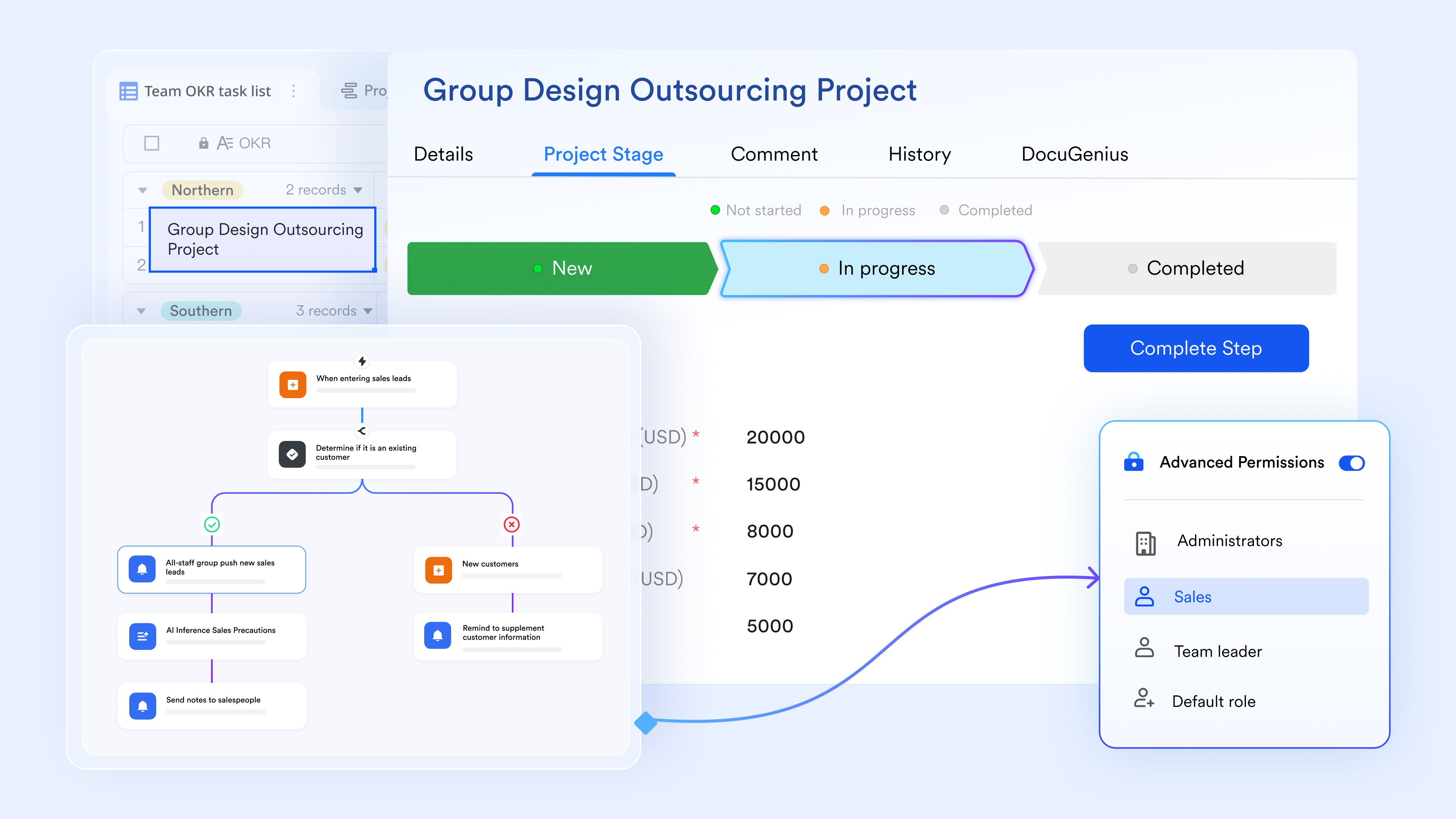
Lark’s integrated auto transcription goes beyond simple text conversion by becoming a direct input into your team’s workflows. A transcribed meeting can automatically feed into subsequent tasks or approvals, eliminating manual handoffs. For example, if a team discusses a new feature during a meeting, Lark’s AI meeting notes can identify the action item, and a team lead can directly assign it to a team member within Lark’s project management tools, or even trigger an approval workflow for a budget request mentioned in the transcript. This seamless connection transforms spoken discussions into concrete, trackable actions, ensuring that decisions are acted upon quickly and efficiently.
Conclusion
The journey from manual, time-consuming transcription to intelligent, automated systems marks a significant leap in business productivity. Auto transcribe technology is not merely a convenience; it is a strategic asset that empowers teams to capture, manage, and leverage spoken information with unprecedented efficiency. By minimizing manual effort, improving accuracy, and enhancing accessibility, it addresses critical pain points faced by modern enterprises.
When integrated into a unified workspace like Lark, auto transcription transcends its basic function. It becomes an integral part of a comprehensive suite that seamlessly connects communication, documentation, and collaboration. This synergy transforms raw audio and video into actionable insights, fuels real-time teamwork, and builds a centralized knowledge base that drives informed decision-making. For growing SMEs and large enterprises navigating the complexities of remote and hybrid work, an all-in-one solution that includes robust auto transcription is no longer a luxury, but a foundational element for fostering clear communication, boosting productivity, and building a more agile, connected organization. We encourage you to explore how Lark can integrate auto transcription into your daily workflows and reshape how your team collaborates and innovates.
FAQs
How long does it take to transcribe 1 hour?
The average person can transcribe one audio hour in about 4 hours. It takes most people about one hour to transcribe 15 minutes of a clear, slow audio file.
Is AI transcription legal?
AI transcription tools that join meetings or record conversations without the affirmative consent of all participants may expose law firms, employers, and individuals using the platforms to violations of federal and/or state law and associated penalties.
Will AI replace transcriptionist?
If you're a transcriptionist worried about AI taking your job, here's the good news: AI transcription is creating more work, not less. But the work is changing. Instead of typing out words, transcriptionists are: Becoming AI transcription editors who refine and enhance AI-generated text.
Related reading
Table of contents
Start using Lark today

Manage all your work in one place
Boost team efficiency by 10x
Save up to 70% on software costs
Table of contents
Start using Lark today
Manage all your work in one place
Boost team efficiency by 10x
Save up to 70% on software costs
Keep reading



![What Is a 2-2-3 Work Schedule? Explanation and More [2026]](https://framerusercontent.com/images/uKHRfkp4v7y4azRNTYUmuteNQz8.png)



2026 Lark Technologies Pte. Ltd.
Headquartered in Singapore with offices worldwide.






Explore: