














Client Onboarding Guide: Steps, Tools and Templates

Prathyusha
Freelance Content Creator
Oct 30, 2026
Prathyusha
Oct 30, 2026

16 min read
Add to preferred sources


Client onboarding is one of the most important stages in building strong, lasting relationships. It sets the tone for collaboration, helps align goals, and ensures both sides start with clarity and confidence. Yet many teams still struggle with disorganised communication, manual data entry, and inconsistent follow-ups. The right tools can make this process smoother, more transparent, and easier to manage.
Modern onboarding solutions integrate task tracking, documentation, and automation into a single workspace. In this guide, we will fully explore these solutions with full reviews. Here is a list of the best client onboarding software:
1. Lark: All-in-one workspace for seamless onboarding
2. Rocketlane: Purpose-built platform for client onboarding
3. ClickUp: Flexible project tool with onboarding workflows
4. HubSpot: CRM-driven onboarding with automation tools
5. Clinked: Secure client portal for document sharing
6. Asana: Reliable task and timeline tracking for onboarding projects
7. Notion: Customizable workspace for onboarding templates and collaboration
8. Trello: Simple Kanban tool for managing onboarding checklists
9. Monday.com: Visual project management for client onboarding pipelines
10. Smartsheet: Spreadsheet-style onboarding tracker with automation options

Understanding client onboarding and why teams struggle
Client onboarding is the process of guiding new clients from contract signing to project handoff. It ensures both parties start aligned on goals, expectations, and timelines. A strong onboarding experience builds trust, sets the tone for collaboration, and helps clients quickly see value in your partnership.
Onboarding, however, varies across industries. Agencies may focus on defining scope and creative assets, SaaS companies emphasise account setup and user training, while banking and wealth management prioritise compliance, documentation, and KYC verification. Each industry has its own unique challenges and requirements.
Despite these differences, many teams share similar struggles with scattered communication, manual data entry, and slow coordination between departments. These inefficiencies delay progress and weaken client confidence. The solution lies in adopting a unified system that centralises communication, documentation, and task management, creating a smoother, more transparent onboarding process for both clients and teams.
The 7 essential steps of client onboarding
A structured onboarding process ensures every client enjoys a consistent, high-quality experience. Clarity at each step helps set expectations, avoid confusion, and build trust from the start. The following seven steps outline a proven framework to make client onboarding smooth, organised, and effective.
Step 1: Collect client information
Start by gathering all necessary details such as contracts, goals, contact information, and project requirements. Use structured forms or checklists to ensure consistency and avoid missing key information.
Step 2: Set up the client workspace
Create a dedicated space to organize client data, documents, and communication. Define roles, assign responsibilities, and establish project timelines and milestones for a clear start.
Step 3: Send a personalized welcome and kickoff invitation
Welcome the client with a personalized message. Introduce your team, outline next steps, and schedule a kickoff meeting to align on expectations, goals, and deliverables.
Step 4: Share onboarding materials and documentation
Provide clients with access to essential documents such as guidelines, training materials, and resources. Centralize everything in one accessible location to ensure clarity and efficiency.
Step 5: Manage onboarding tasks and milestones
Break the onboarding process into smaller, trackable tasks. Assign ownership, monitor progress, and maintain regular communication to keep both teams aligned and on schedule
Step 6: Automate repetitive onboarding actions
Automate routine tasks like sending reminders, progress updates, or approval requests. Automation saves time, minimizes manual effort, and ensures a consistent experience for every client. If fixed rules aren't enough, you can also learn how to build an AI agent for client onboarding that collects intake details and hands a reviewable summary to your team.
Step 7: Review feedback and confirm readiness
Once onboarding is complete, request feedback from the client to evaluate their experience. Review key outcomes, confirm that objectives are met, and make improvements for future onboarding cycles
These seven steps from collecting information to reviewing feedback help create a structured, efficient, and client-friendly onboarding process that builds trust and long-term relationships.
10 Best client onboarding software reviewed for you
Choosing the right client onboarding software can transform how your team welcomes new clients. The best tools help you organize data, automate workflows, track milestones, and maintain consistent communication. Below are the top platforms with Lark, the all-in-one workspace that simplifies onboarding from start to finish.
1. Lark: All-in-one workspace for seamless onboarding
Lark is an all-in-one workspace designed to simplify client onboarding by connecting communication, project tracking, documentation, and automation in a single, unified platform. Instead of juggling multiple tools, teams can manage every step of onboarding from client intake to project handoff inside one collaborative environment. With built-in features for task management, documents, databases, and real-time chat, Lark ensures every client enjoys a transparent, organized, and efficient onboarding experience.
Lark Base for building and managing client workflows: Lark Base provides a structured system to organize all client onboarding data in one place. Teams can build databases to store client information, track onboarding stages, and assign responsibilities easily. Multiple viewing options—like list, Kanban, or timeline—offer flexibility for managing different workflows. Automated updates keep progress visible to everyone in real time. It helps teams stay organized, efficient, and consistent when managing multiple clients.
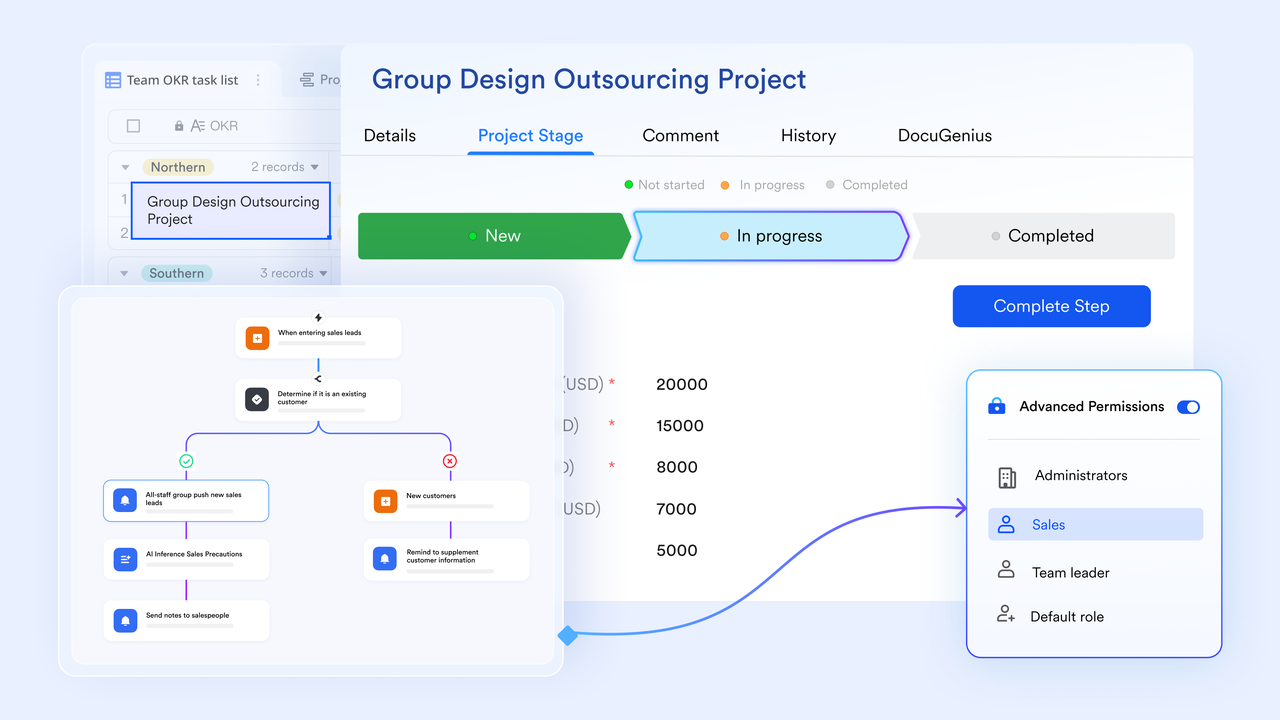
Lark Docs and Lark Wiki for creating and sharing onboarding content: Lark Docs and Lark Wiki act as a centralized space for all onboarding materials, from templates and contracts to training guides and checklists. Real-time editing allows teams to collaborate without version issues or file confusion. The Wiki stores key information for long-term access, creating a single source of truth for all clients. Together, Docs and Wiki simplify content management and improve process consistency.
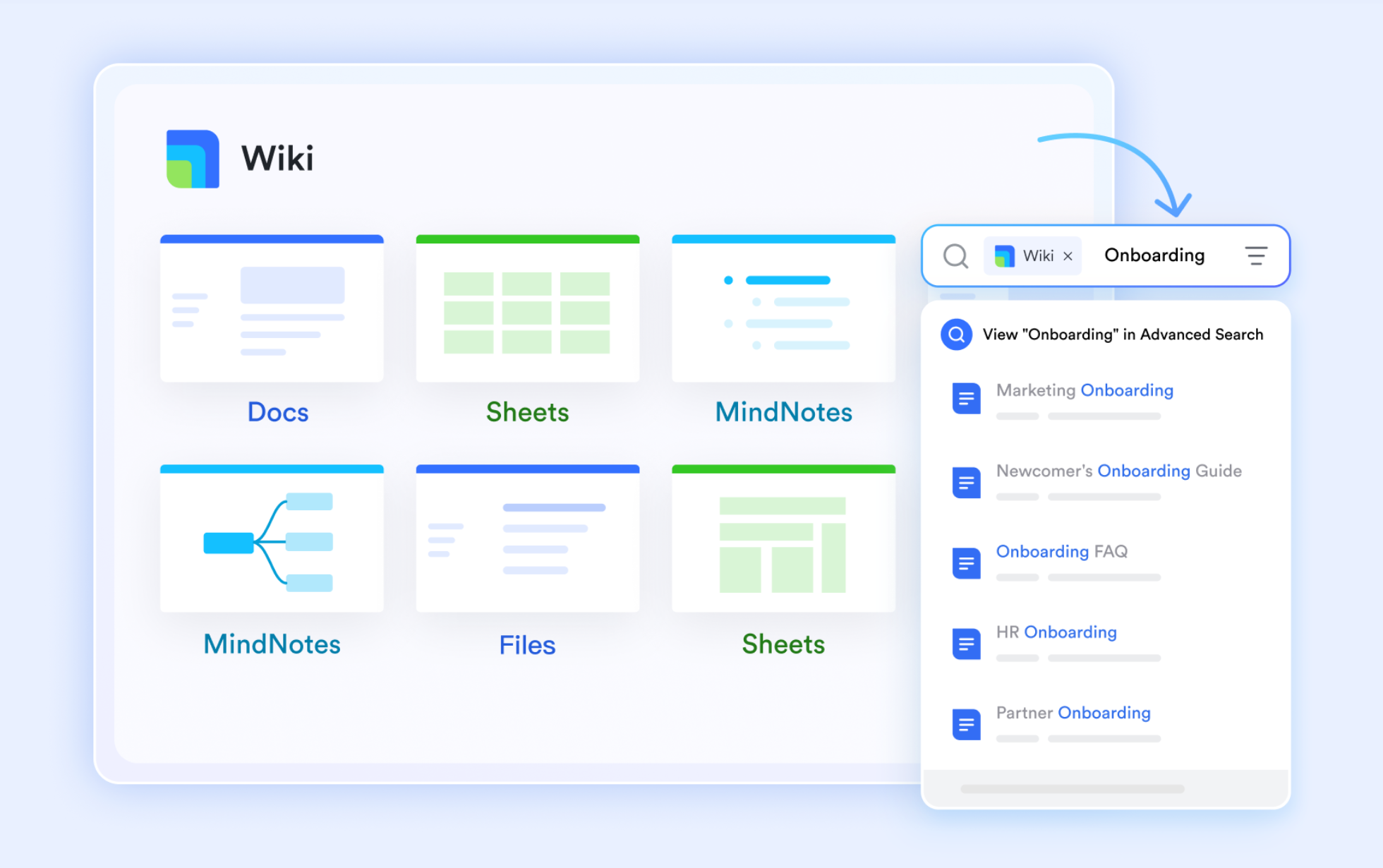
Chat, Mail, and Calendar for seamless communication and coordination: Lark Messenger, Lark Mail, and Lark Calendar bring all client communication into one connected system. Teams can chat instantly, share documents, or switch to meetings without leaving the workspace. Mail keeps client correspondence organized and easy to track, while Calendar simplifies scheduling calls and follow-ups. This collaboration ensures nothing is missed and communication remains clear throughout the onboarding process.
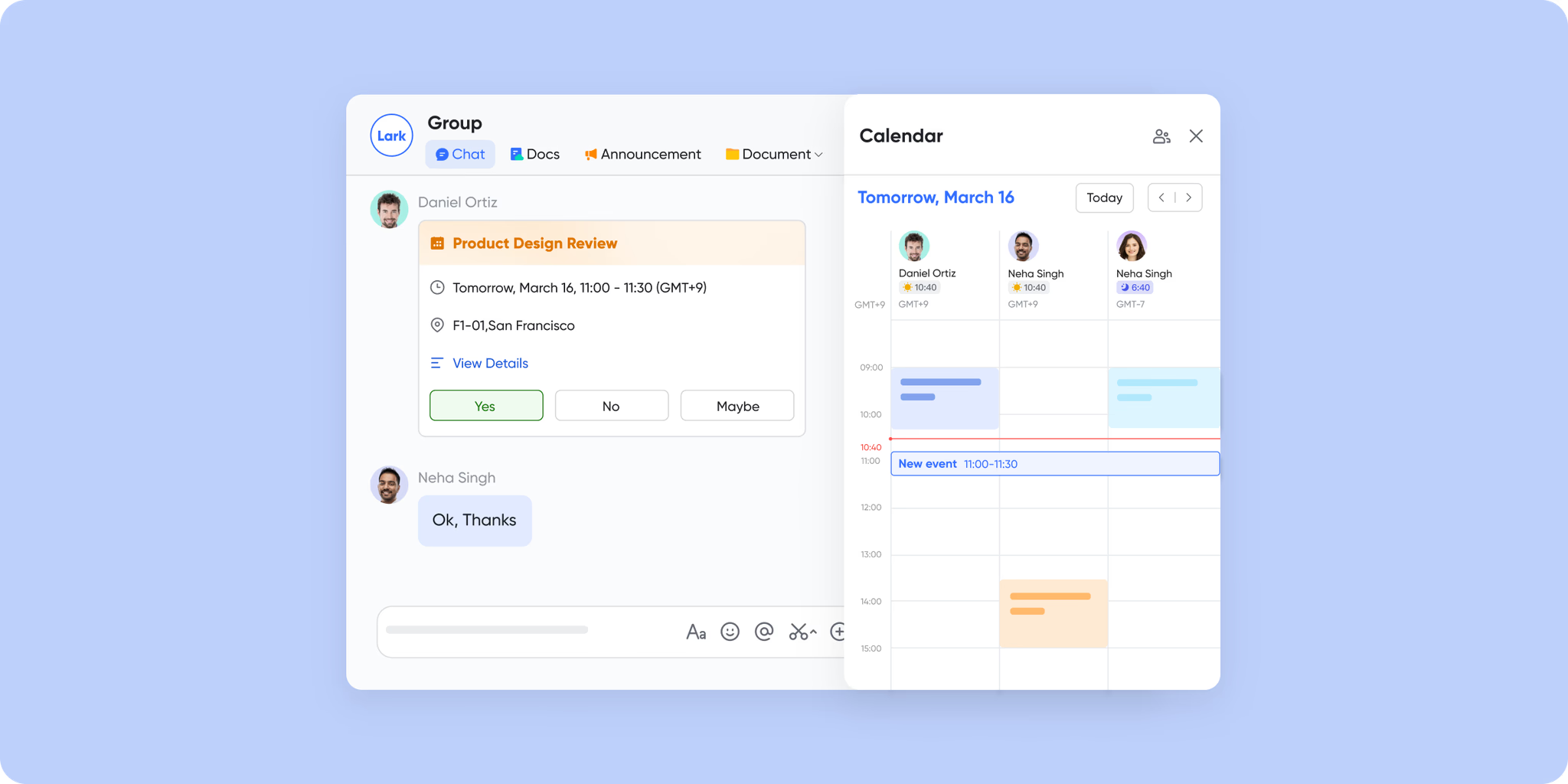
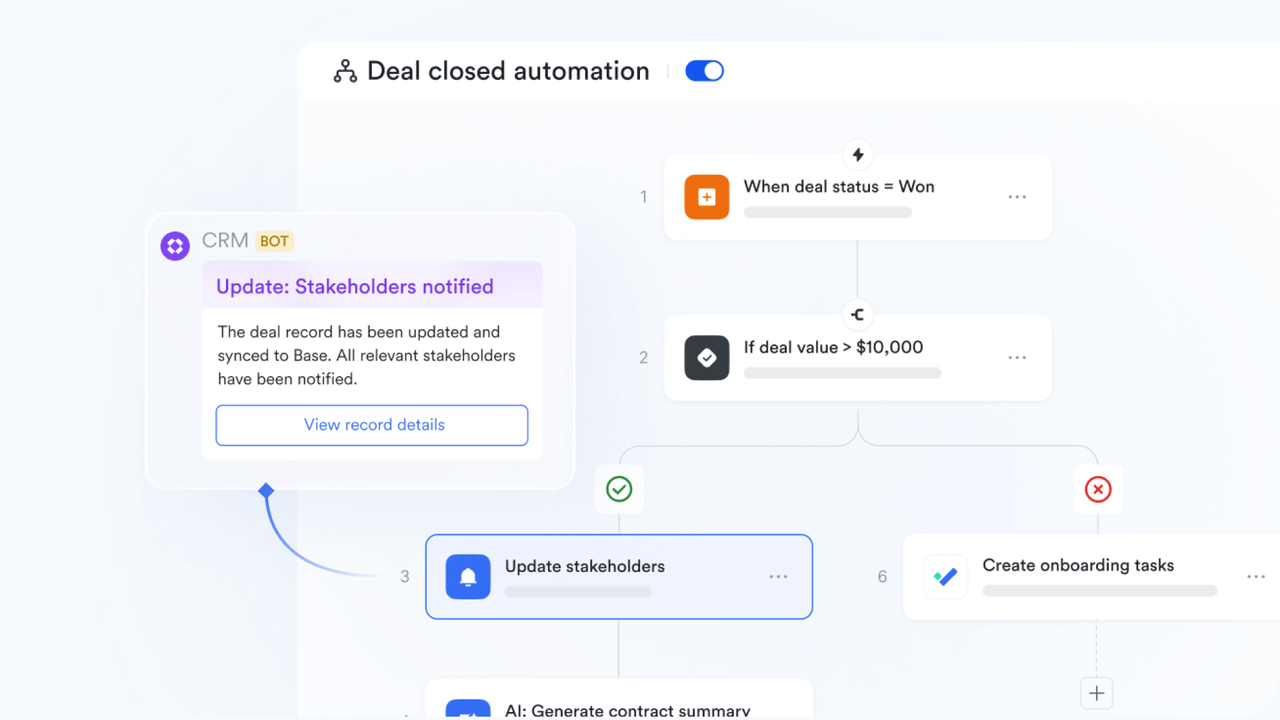
Workflow automation for reducing manual work and errors: Workflow automation in Lark Base helps teams eliminate repetitive tasks during client onboarding. Automated reminders, approvals, and follow-ups can be triggered based on progress or deadlines. Custom rules make the system adaptable to any onboarding structure. It reduces manual effort, minimizes delays, and ensures every client follows the same consistent process.
Pros:
- Combines collaboration, communication, and workflow automation in one workspace.
- Provides real-time visibility across every onboarding step.
- Easy to customize templates for different client types or industries.
- Supports both internal and external collaboration without switching tools.
Cons:
- Some advanced features need setting up, while Help Center and built-in AI Assistant can provide complete guides.
Best for: Teams and agencies looking for a unified, customizable platform to manage onboarding, client communication, and project execution.
- Starter plan: Free forever plan that includes 11 powerful tools for up to 20 users. It also comes with 100GB of storage, 1000 automation runs, AI translations, and more.
- Pro plan: $12/user/month (billed annually) for up to 500 users. It includes everything in Starter plus group calling for up to 500 attendees, 15TB of storage, 50,000 automation runs, and more.
- Enterprise plan: Contact sales for custom pricing. Supports unlimited users and includes even more automation runs and advanced security, compliance, and management features.
2. Rocketlane: Purpose-built platform for client onboarding
Rocketlane is designed specifically for client onboarding and implementation projects. It focuses on improving visibility, accountability, and collaboration between teams and clients. The platform includes project templates, milestone tracking, and real-time progress dashboards. Ideal for customer success and onboarding teams that manage multiple client projects.
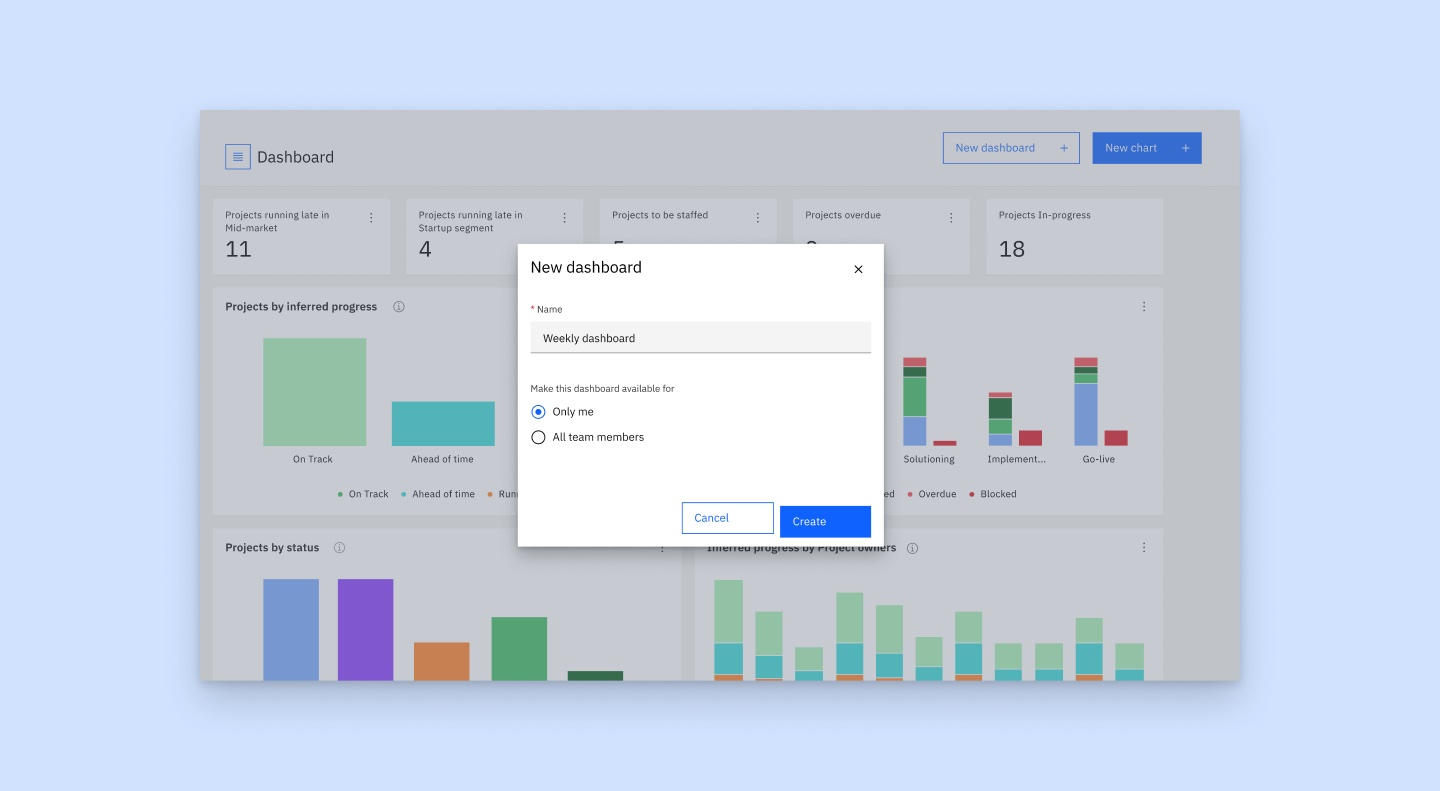
Image source: rocketlane.com
Key features:
- Customizable client onboarding templates
- Real-time project timelines and progress tracking
- Shared client collaboration portals
- Integrated task and milestone management
- Performance analytics and reporting tools
Pros:
- Built for onboarding-specific workflows
- Transparent project tracking for both sides
- Improves accountability through shared visibility
- Great for enterprise client projects
Cons:
- Limited communication features
- Pricing may be high for small teams
Best for: Customer success and onboarding teams at enterprise or mid-size organizations
Pricing: Starts at $19/user/month (custom enterprise pricing available)
3. ClickUp: Flexible project tool with onboarding workflows
ClickUp is a highly customizable project management tool adaptable for client onboarding. It lets teams plan, organize, and track every onboarding task in one place. With automation, docs, and dashboards, ClickUp can replace multiple tools. Its flexibility makes it a strong choice for onboarding teams across different industries.
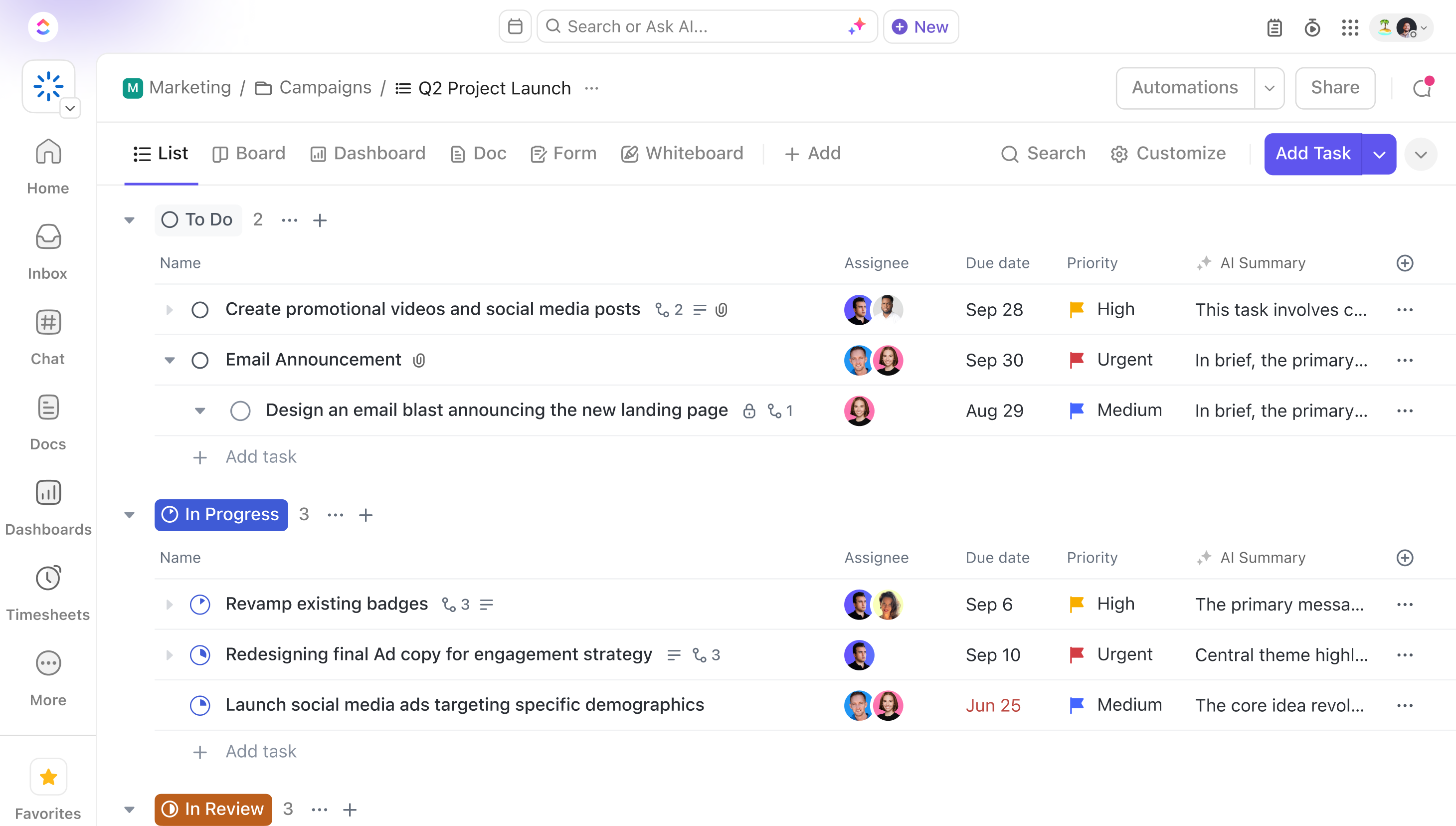
Image source: clickup.com
Key features:
- Onboarding templates and task automation
- Goal tracking and progress dashboards
- Shared document editing and comments
- Time tracking and reminders
- Integration with Slack, Google Drive, and more
Pros:
- All-in-one tool for planning and tracking
- Strong automation capabilities
- Highly customizable workspace
- Free plan available for small teams
Cons:
- Slight learning curve for new users
- Limited native communication features
Best for: Project-based teams that need flexible, visual onboarding management
Pricing: Free plan available; paid plans start at $7/user/month (limited functions)
4. HubSpot: CRM-driven onboarding with automation tools
HubSpot combines CRM, automation, and service tools for seamless client onboarding. It centralizes client data, automates onboarding emails, and tracks client progress through pipelines. Ideal for businesses that want to align onboarding with sales and customer success efforts.
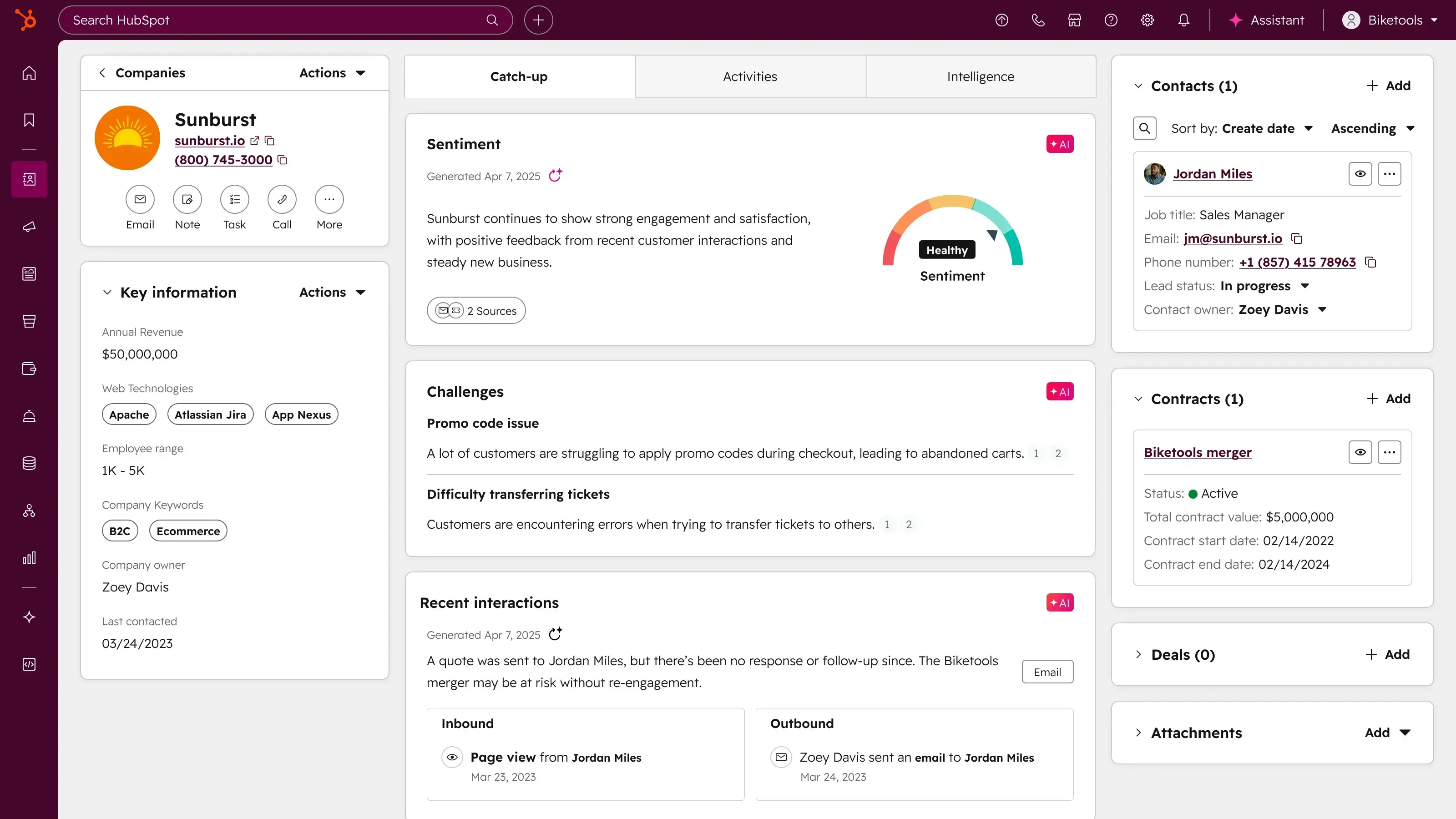
Image source: hubspot.com
Key features:
- CRM integration with contact management
- Automated onboarding workflows
- Email templates and sequences
- Task scheduling and reminders
- Reporting and analytics dashboards
Pros:
- Excellent for data-driven onboarding
- Deep automation and CRM integration
- Scalable for growing teams
- Enhances marketing and customer success alignment
Cons:
- Premium features can be costly
- Complex setup for smaller teams
Best for: Businesses already using HubSpot CRM or looking to connect sales and onboarding
Pricing: Free CRM plan; onboarding automation starts at $45/month
5. Clinked: Secure client portal for document sharing
Clinked is a secure, white-labeled client portal designed for smooth client communication and document management. It allows businesses to share files, manage tasks, and exchange messages in a private, branded space. Perfect for financial, legal, and consulting firms that handle sensitive client data.
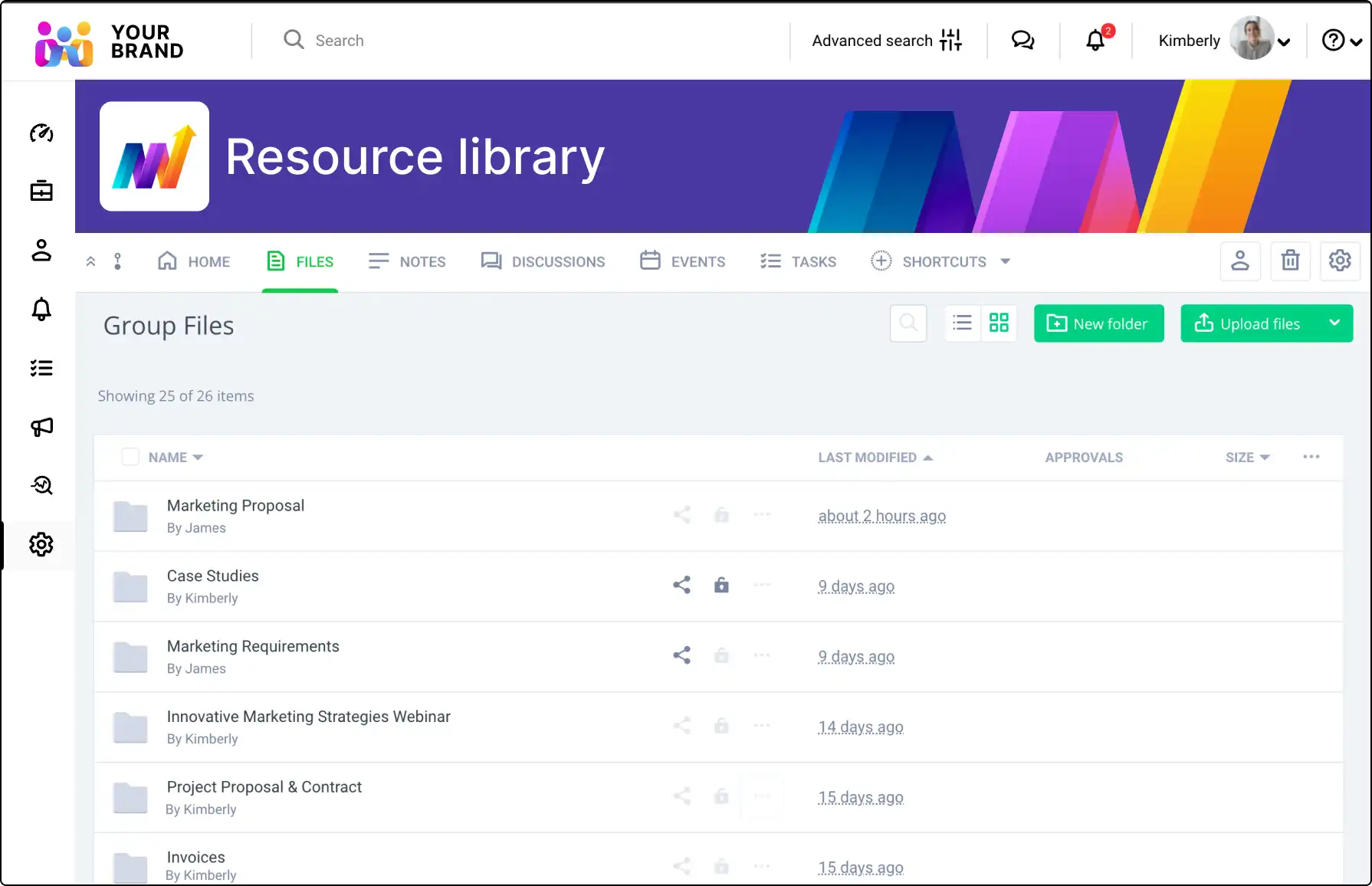
Image source: clinked.com
Key features:
- Secure document sharing and storage
- Client messaging and activity tracking
- Custom branding and white-labeling
- Task and event management
- Integrations with Google Workspace and Microsoft 365
Pros:
- High level of data security
- Easy for clients to access and use
- Supports company branding
- Ideal for client-facing professionals
Cons:
- Limited automation features
- Fewer project management tools
Best for: Professional service firms needing secure, branded client portals
Pricing: Starts at $99/month for up to 25 users
6. Asana: Reliable task and timeline tracking for onboarding projects
Asana helps teams plan, organize, and manage onboarding tasks visually. It supports multiple views like lists, timelines, and Kanban boards to simplify project tracking. With automations and reporting, Asana ensures every step of onboarding stays on schedule.
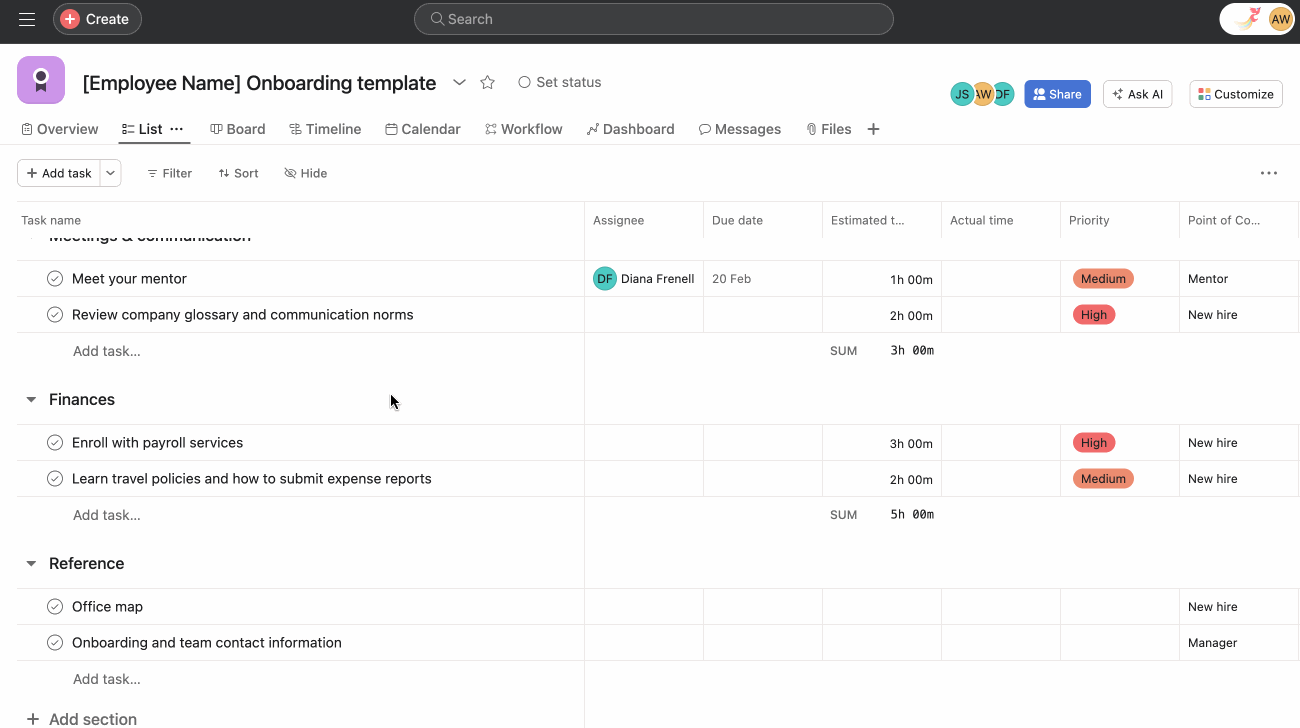
Image source: asana.com
Key features:
- Task management with subtasks and dependencies
- Timeline and calendar views
- Automation rules and reminders
- Integration with Slack, Gmail, and Drive
- Reporting dashboards for progress tracking
Pros:
- Easy-to-use interface and templates
- Great for managing recurring tasks
- Robust integration ecosystem
- Free version for small teams
Cons:
- Limited client-facing visibility
- Advanced features require paid plans
Best for: Teams that want a simple, visual tool for managing onboarding workflows
Pricing: Free plan available; Premium starts at $10.99/user/month (limited functions)
7. Notion: Customizable workspace for onboarding templates and collaboration
Notion combines note-taking, databases, and project tracking in a flexible workspace. It’s ideal for teams that want to design custom onboarding templates and documentation hubs. With its drag-and-drop interface, Notion adapts easily to any onboarding style.
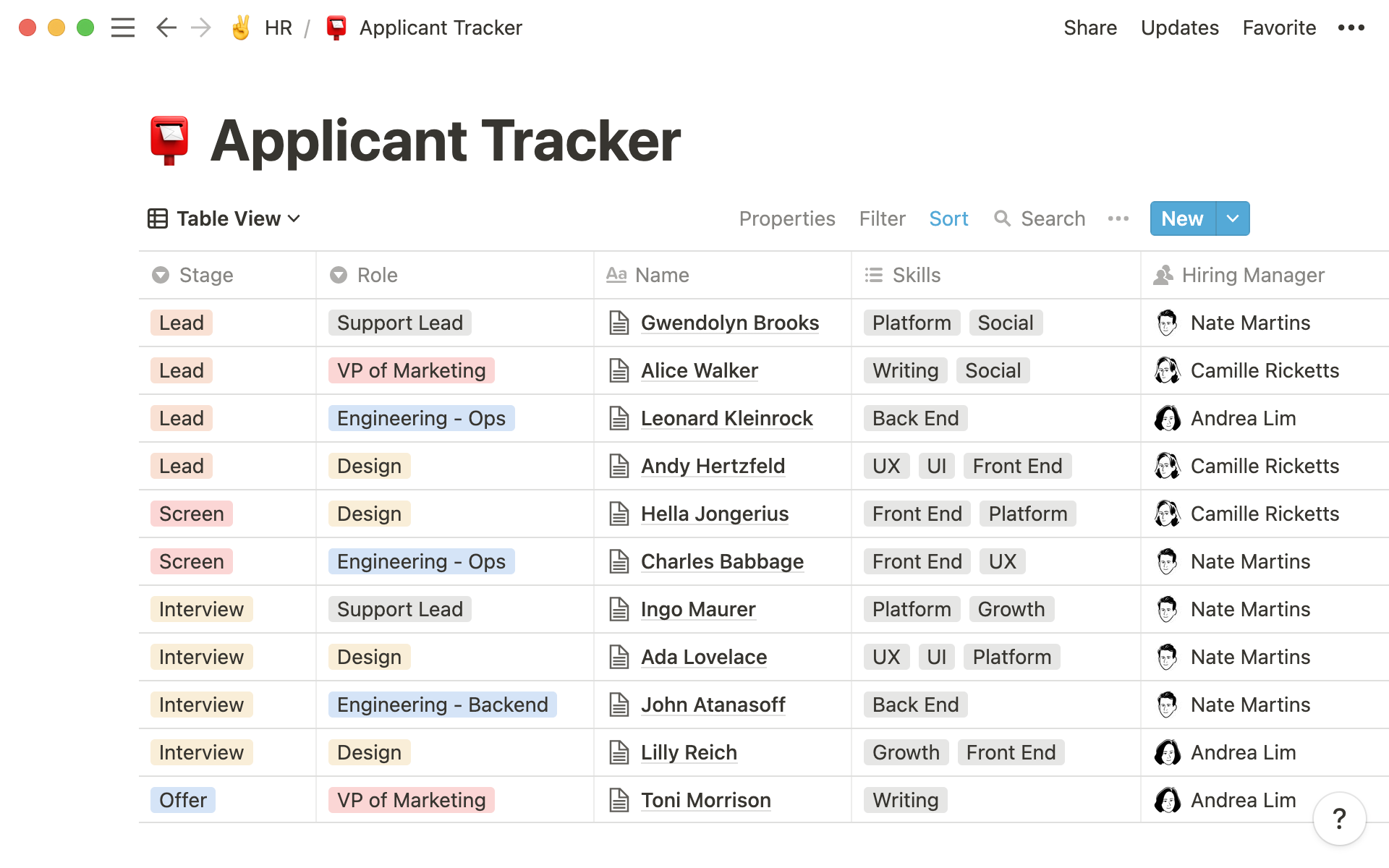
Image source: notion.com
Key features:
- Custom databases for client information
- Shared onboarding templates and guides
- Task tracking and timelines
- Real-time collaboration and comments
- Integrations with Slack, Google Drive, and more
Pros:
- Highly customizable and intuitive
- Perfect for knowledge management
- Lightweight yet powerful for documentation
- Free plan for individuals and small teams
Cons:
- Limited automation capabilities
- Not ideal for complex project tracking
Best for: Creative and consulting teams that prioritize documentation and collaboration
Pricing: Free plan; paid plans start at $8/user/month (limited functions)
8. Trello: Simple Kanban tool for managing onboarding checklists
Trello is a straightforward project management tool based on the Kanban method. It helps teams visualize onboarding workflows using boards, lists, and cards. Its simplicity makes it perfect for startups and small teams with straightforward onboarding needs.
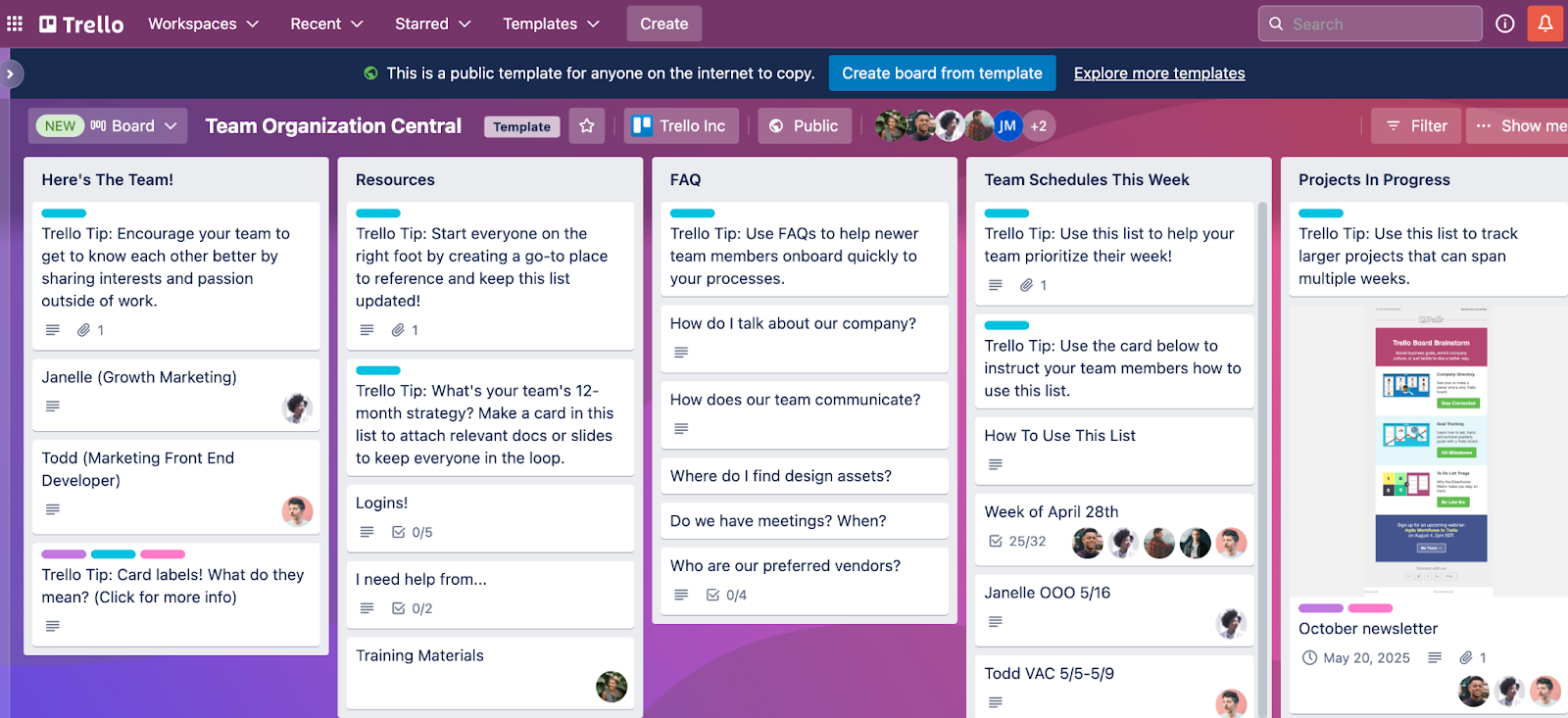
Image source: trello.com
Key features:
- Drag-and-drop Kanban boards
- Custom labels, checklists, and due dates
- Power-Up integrations for automation
- File attachments and comments
- Calendar and timeline views
Pros:
- Extremely easy to use
- Visually clear progress tracking
- Great for small teams
- Free plan available
Cons:
- Limited reporting capabilities
- Basic automation options
Best for: Small teams or startups managing simple onboarding processes
Pricing: Free plan; paid plans start at $5/user/month (limited functions)
9. Monday.com: Visual project management for client onboarding pipelines
Monday.com offers a highly visual and customizable interface for managing client onboarding. Teams can automate workflows, assign ownership, and track progress across pipelines. Its dashboards make it ideal for teams that value clarity and automation.
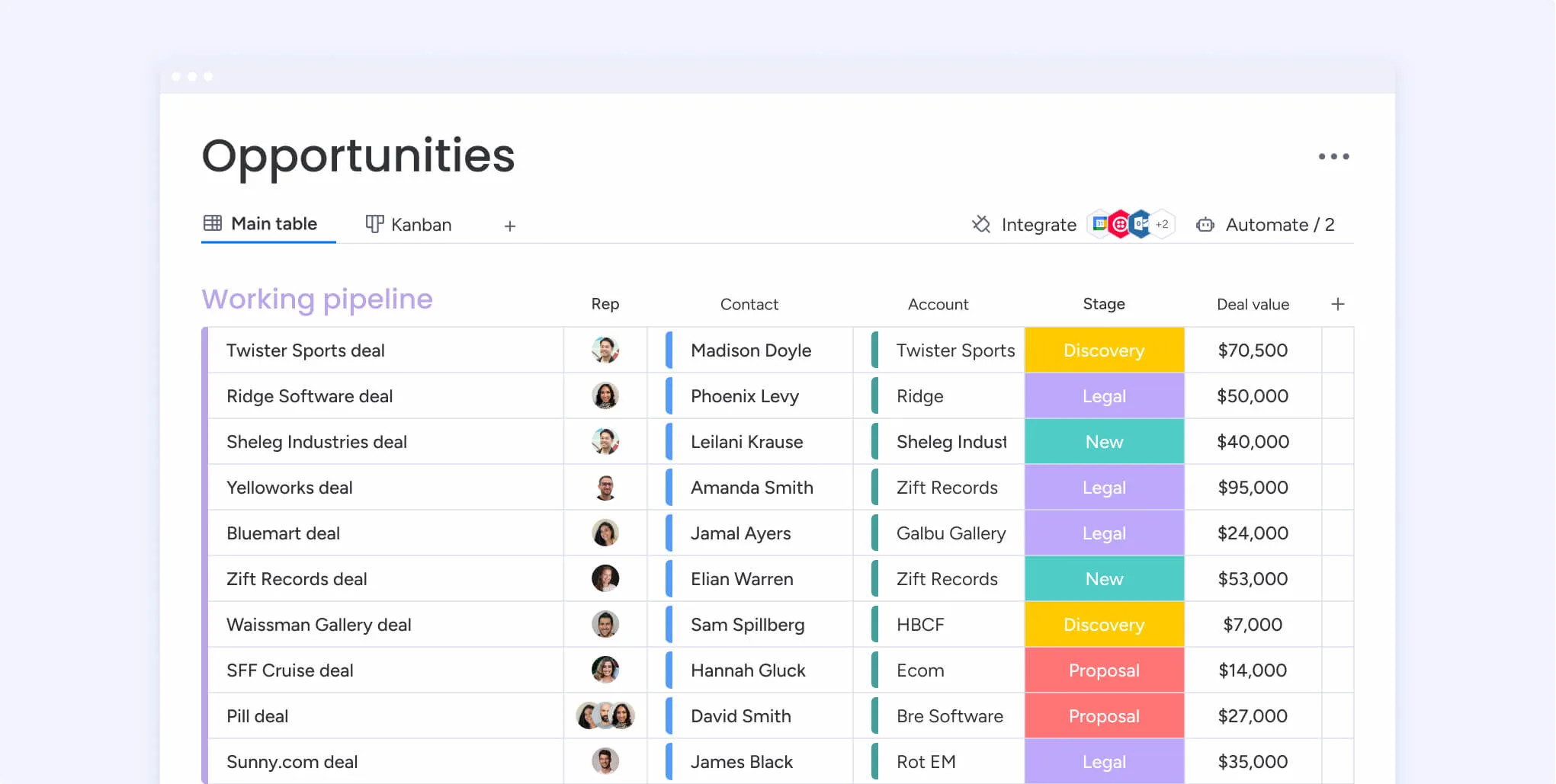
Image source: monday.com
Key features:
- Visual boards and onboarding templates
- Automation rules and status updates
- Dashboards and reporting
- File sharing and comments
- Integrations with Slack, Gmail, and Drive
Pros:
- Intuitive and visually engaging layout
- Strong automation and collaboration tools
- Great analytics and dashboard features
- Highly flexible for any onboarding style
Cons:
- Can be costly for larger teams
- Initial setup takes time
Best for: Teams managing multiple onboarding projects with visual tracking needs
Pricing: Free plan available; paid plans start at $10/user/month (limited functions)
10. Smartsheet: Spreadsheet-style onboarding tracker with automation options
Smartsheet combines spreadsheet functionality with automation and project management tools. It’s perfect for teams that prefer a familiar Excel-like interface but want more control and visibility. Smartsheet helps track onboarding stages, assign owners, and generate progress reports efficiently.
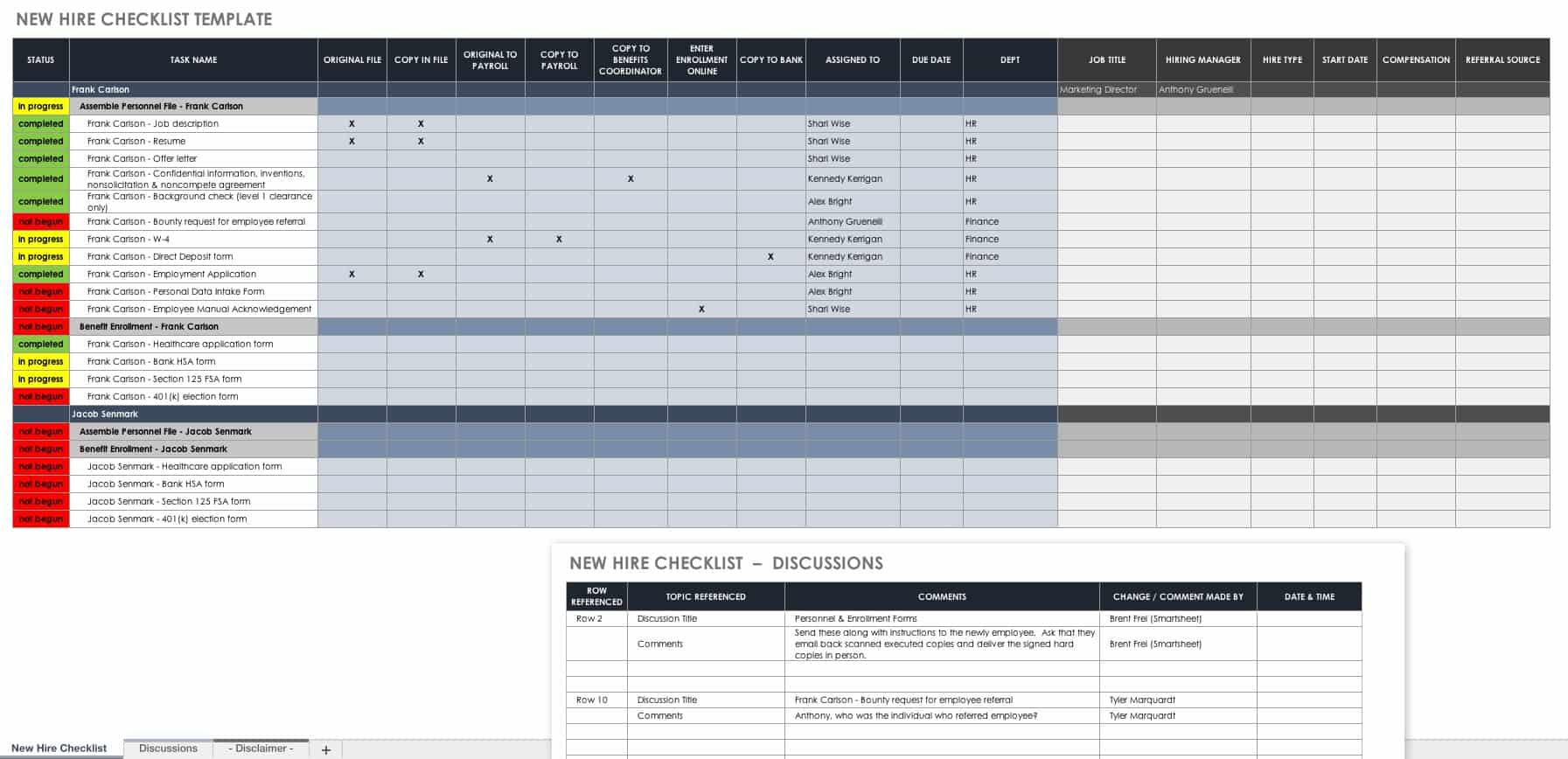
Image source: smartsheet.com
Key features:
- Spreadsheet-style onboarding tracker
- Automated reminders and task updates
- Gantt charts and dashboards
- File attachments and comments
- Integrations with Office 365, Slack, and Drive
Pros:
- Familiar spreadsheet experience
- Scalable for enterprise teams
- Strong reporting and automation tools
- Great for structured data tracking
Cons:
- Steeper learning curve for new users
- Interface feels corporate compared to modern tools
Best for: Teams that prefer spreadsheet-based project management with automation capabilities
Pricing: Starts at $7/user/month (limited functions); enterprise pricing available
Fast track: Explore Lark's ready-to-use templates
As our top recommended tool, Lark completes its own platform with a gallery of templates. With these choices, you can smooth out onboarding without complex setup. Here are the popular templates:
New client onboarding template
New client onboarding is vital for any business, especially startups, small teams, and agencies. Using this template helps you complete every onboarding step efficiently and consistently. It simplifies the process, improves team communication, and ensures tasks stay on track. You can manage timelines and budgets with ease. Most importantly, it delivers a smooth, professional experience for every new client.
Multi-project tracker template
This template is a comprehensive project management tool that allows you to track and manage your projects in a structured and organized manner. It provides a Gantt chart for visualizing project progress, a task priority view for identifying critical tasks, and customizable fields for tailoring the template to your specific needs. It also allows you to filter, group, and sort tasks based on various parameters such as project, priority, status, and executor. Additionally, it provides a record of start and end dates for each task, enabling you to keep track of timelines effectively.
Email template
Email template is a time-saving tool for businesses and individuals who frequently send out emails for different occasions. With Lark's email template feature, you can create personalized templates for various occasions such as welcome emails, monthly newsletters, service feedback requests, holiday greetings, event invitations, product launches, technical support closings, and subscription renewals. Each template can be customized with specific subject lines, body text, call-to-action buttons, and signatures..
Tasks management template
The task management template is a comprehensive tool designed to help you keep track of all your tasks in one place. It includes fields for task name, owner, description, and creation date, allowing you to have a clear overview of all your tasks. The template also includes features for adding records, configuring fields, setting up views, filtering, grouping, sorting, and coloring rows, providing you with a high level of customization to suit your specific needs.
Customer feedback template
Customer feedback is a valuable source of information for any business looking to improve its products or services. This template helps you track and manage customer feedback across different channels, categories, and details. It also allows you to document the actions taken in response to feedback, schedule follow-up dates, and measure the effectiveness of your responses. By centralizing all customer feedback in one place, you can easily identify trends, prioritize improvements, and enhance overall customer satisfaction.
Best practices for a smooth client onboarding experience
A smooth client onboarding experience sets the foundation for long-term success. It helps build trust, reduces friction, and ensures clients feel confident from the start. Following proven best practices keeps your process organized, transparent, and consistent across every new client relationship.
- Personalize every interaction: Tailor your communication, tone, and documents to match each client’s needs and preferences. This creates a stronger connection and sets the stage for long-term trust.
- Centralize communication: Keep all messages, files, and updates in one platform to avoid scattered information. A single source of truth ensures clarity and faster collaboration.
- Use automation: Automate reminders, follow-ups, and approvals to save time and reduce manual effort. It keeps the onboarding process consistent and error-free.
- Keep everything transparent: Share progress dashboards or project views with clients for real-time visibility. Transparency builds confidence and minimises unnecessary check-ins.
- Assign clear roles: Define responsibilities for every team member involved in onboarding. Clear ownership prevents overlap and ensures smooth coordination.
- Request feedback early: Collect feedback during onboarding rather than waiting until the end. Early insights help you resolve issues and improve the experience quickly.
- Continuously improve: Analyse each onboarding cycle to identify what worked and what didn’t. Use these learnings to update templates and enhance future workflows.
Measuring onboarding success and continuous improvement
Measuring the success of your client onboarding process helps identify what’s working and where improvements are needed. Track key metrics such as onboarding completion rate, client satisfaction, and time-to-value to understand the overall effectiveness of your approach. These insights reveal how quickly clients achieve their first success and how smoothly the process runs.
Once onboarding is complete, gather feedback directly from clients to pinpoint areas for refinement. Analyze progress data through dashboards or reports to spot trends and bottlenecks. Use these insights to update checklists, streamline workflows, and enhance automations for a consistently better onboarding experience over time.
Conclusion
An effective client onboarding process lays the foundation for long-term success. It builds trust, strengthens relationships, and ensures clients feel supported from the very beginning. When done right, onboarding reduces churn, shortens ramp-up time, and sets the stage for smoother collaboration and faster project outcomes. A structured, transparent process also helps teams work more efficiently and consistently deliver value.
By adopting modern tools and streamlined workflows, businesses can eliminate confusion, improve communication, and enhance client experience. Starting your next onboarding process with a unified platform like Lark can help you bring every element tasks, communication, documentation, and automation—together in one place for a professional, seamless, and scalable onboarding journey.
FAQs
How can Lark improve and automate client onboarding?
Lark centralizes communication, tasks, and documentation in one platform. Its automation tools handle reminders, approvals, and follow-ups. This streamlines workflows and ensures faster, more consistent onboarding.
What should be included in a client onboarding checklist?
Include client details, contracts, and access setup. Add kickoff meetings, onboarding materials, and milestone tracking. End with feedback collection and review steps.
How long does client onboarding usually take?
Onboarding duration varies by project complexity and industry. It can take from a few days to several weeks. Clear communication and tracking help ensure efficiency.
What are common mistakes to avoid during client onboarding?
Avoid unclear processes, scattered tools, and poor communication. Missing early feedback or expectations often causes delays. Structure and transparency prevent these issues.
Related reading
Table of contents
Start using Lark today

Manage all your work in one place
Boost team efficiency by 10x
Save up to 70% on software costs
Table of contents
Start using Lark today
Manage all your work in one place
Boost team efficiency by 10x
Save up to 70% on software costs
Keep reading








2026 Lark Technologies Pte. Ltd.
Headquartered in Singapore with offices worldwide.






Explore: