














10 Best Client Portal Software for Any Business

Ryan Tanner
Product Marketing Specialist
Sep 18, 2026
Ryan Tanner
Sep 18, 2026


Why client portal software matters
What to look for in client portal software
- Security & compliance (logins, permissions, encryption): Protecting client data is non-negotiable, especially for accountants and financial professionals. Look for accounting client portal software that offers encrypted file sharing, secure logins, and permission-based access. Compliance-ready systems safeguard sensitive information while maintaining audit trails for accountability.
- Client experience: branded portal, ease of use, mobile access: A professional, branded interface enhances client trust and makes navigation intuitive. Clients should easily log in, view files, or communicate from any device. The best client portal software for small businesses ensures simplicity without sacrificing polish.
- Workflow & integrations: Your portal should connect seamlessly with existing tools like CRMs, billing apps, or project management software with client portal features. This creates a single workspace where communication, invoices, and tasks stay connected, reducing manual effort and data duplication.
- Pricing transparency, scalability, support for small businesses vs enterprise: Evaluate how pricing changes as your team or client base grows. Scalable plans and clear cost structures make it easier for small firms to plan long-term. Good client portal software offers flexible tiers with strong support for both startups and larger organizations.
- Free or low-cost options and what trade-offs they bring: For startups or freelancers, free client portal software can be a practical starting point. However, lower-cost plans may limit storage, branding, or automation. Weigh the trade-offs between affordability and the functionality your business truly needs.
Take a glance at the best client portal software you need
Top 10 client portal software tools you must check out
1. Lark: All-in-one workspace with a built-in client portal for collaboration
- Real-time document collaboration
- With Lark Docs, multiple people can work on the same document at once—whether drafting proposals, reviewing contracts, or finalizing reports. Changes appear instantly, eliminating version confusion or long email threads. Built-in commenting enables teams and clients to discuss edits within the context. Version history keeps every update traceable, so you can revert anytime. It's a fluid, modern way to co-create documents while maintaining full visibility.
- Task tracking and accountability with Lark Tasks
- Lark Tasks ensures nothing falls through the cracks. You can assign tasks to teammates, set due dates, and track progress—all linked directly to relevant documents or messages. Clients can be looped in for approvals or progress checks without switching tools. Automated reminders keep deadlines on track and foster accountability. Every deliverable stays transparent, making collaboration both efficient and measurable.
- Centralized communication with Lark Messenger
- Lark Messenger brings all client communication into one organized hub. You can create dedicated chat channels for each project, share updates instantly, and attach files or Docs right inside the conversation. replies keep discussions clear, and pinned messages highlight important updates. Teams no longer need to juggle between email, chat apps, and file drives. The result is smoother communication and faster decision-making.
- Video meetings and screen sharing with Lark Meetings
- With Lark Meetings, you can connect face-to-face with clients or teammates in just a click. Screen sharing makes it simple to walk through reports, design drafts, or dashboards in real time. Meetings can be recorded and saved for reference or client transparency. AI Meeting Notes allow quick documentation of next steps as discussions happen. It's a collaboration that feels both personal and structured, yet seamlessly unified.
- Record and analyse data with Lark Sheets
- Lark Sheets is a cloud-based tool for data processing, analysis, and visualization. It enables teams to collaborate in real-time, with easy sharing and referencing in Docs. You can summarize project progress, budgets, or timelines using live data from other Lark tools. Because sheets are updated in real time, every stakeholder always sees the latest metrics. Teams can add charts, filters, and formulas just like a regular spreadsheet—but connected to their workflow.
- Knowledge sharing and client resources with Lark Docs and Wiki
- Using Lark Docs or Wiki, you can create centralized hubs of knowledge—like onboarding guides, FAQs, or project instructions. Clients and team members can access these resources anytime without endless email requests. The content stays editable and up to date, so your documentation evolves with each project. Searchable pages make it easy to find answers fast. This empowers clients with self-service while keeping your team aligned.
- Starter plan: Free forever plan that includes 11 powerful tools for up to 20 users. It also comes with 100GB of storage, 1000 automation runs, AI translations, and more.
- Pro plan: $12/user/month (billed annually) for up to 500 users. It includes everything in Starter plus group calling for up to 500 attendees, 15TB of storage, 50,000 automation runs, and more.
- Enterprise plan: Contact sales for custom pricing. Supports unlimited users and includes even more automation runs and advanced security, compliance, and management features.
Starter
For small teams with simple communication needs
$0
/ user / month

Pro
For companies with comprehensive collaboration and management needs
$12
/ user / month
Enterprise
For large companies with advanced security and organizational management needs
Get a personalized demo and pricing
Pro
For companies with comprehensive collaboration and management needs
$12
/ user / month
2. Zendesk: A client service portal focused on support and self-service
- Ticket management: Centralized inbox for client queries.
- Knowledge base: Clients can access FAQs and guides directly within the portal.
- Customizable branding: Maintain a consistent brand experience with personalized themes.
- Excellent for large teams managing high ticket volumes
- Strong automation and analytics tools
- Intuitive and mobile-friendly client access
- Advanced features can be costly for small businesses
- Initial setup can take time for complex workflows
- Zendesk offers plans starting at $19 per agent/month, with higher tiers for advanced automation, AI support, and analytics.
3. Monday.com: A flexible client portal for project visibility and collaboration
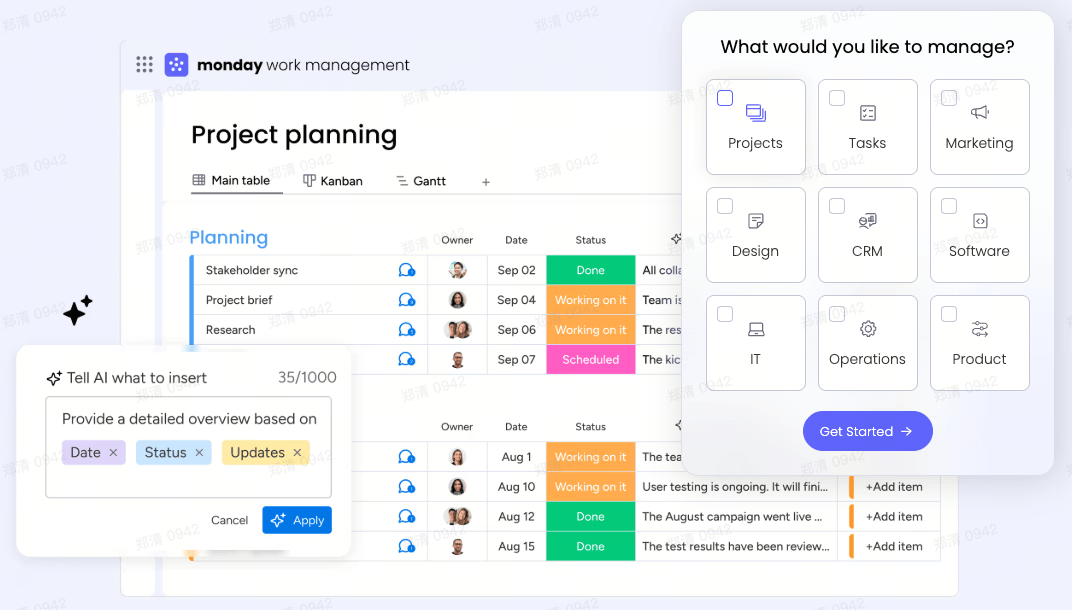
- Custom dashboards: Track projects, budgets, and deadlines visually.
- Guest access: Allow clients to review progress and share feedback securely.
- Automation tools: Streamline task assignments and update notifications.
- Highly visual and intuitive interface
- Scales well for teams of all sizes
- Great mix of collaboration and workflow tools
- Limited advanced reporting in lower plans
- Guest access may count toward user limits in some tiers
- Monday.com's Basic plan starts at $9 per seat/month, billed annually, with higher tiers for automation and advanced dashboards.
4. Pipedrive: A CRM platform with secure client communication portals
- Sales pipeline management: Track deals and conversations at every stage.
- Secure file sharing: Send quotes, contracts, and invoices directly through the portal.
- Email and call tracking: Keep all communication organized for complete visibility.
- Easy-to-use CRM built for client-facing teams
- Affordable and quick to set up
- Excellent data visualization for pipelines
- Lacks deep project management features
- Some integrations require higher-tier plans
- Plans start at $14 per user/month, with a 14-day free trial available.
5. Richpanel: A personalized customer portal for e-commerce and service teams
- Unified inbox: Manage messages from email, chat, and social platforms.
- Self-service workflows: Clients can track issues or request updates without human support.
- Personalized dashboards: Tailor the experience to each client's account or project.
- Reduces ticket load with self-service
- User-friendly, modern interface
- Great for e-commerce and support-heavy businesses
- Limited advanced analytics in entry plans
- Better suited for B2C than large B2B operations
- Starts at $49 per month, with pricing scaling based on ticket volume and user count.
6. Softr: A no-code platform to build customized client portals easily
- Drag-and-drop builder: Build portals quickly without technical expertise.
- User permissions: Control client visibility and access to data.
- Custom branding: Add your logo, colors, and custom domains.
- Ideal for startups and non-developers
- Flexible pricing with a free tier
- Great for prototyping client experiences
- Dependent on Airtable/Sheets for data
- Limited scalability for large enterprises
- Free plan available. Paid plans start at $49/month, with advanced access control and branding.
7. ProProfs Desk: A simple client portal solution for support and documentation
- Ticketing and shared inbox: Assign, track, and resolve client queries easily.
- Knowledge base: Create articles and FAQs for clients.
- Reporting tools: Monitor response times and satisfaction metrics.
- Easy to set up and use
- Affordable for small teams
- Combines documentation and support in one platform
- Limited customization options
- Not suited for complex workflows
- Plans start at $20/user/month with a free trial available.
8. ShareFile: A secure document portal built for client data exchange
- Bank-grade encryption: Keeps client documents fully secure.
- File request and e-signatures: Collect signed files safely.
- Audit tracking: Monitor access and activity for compliance.
- Top-tier data security
- Perfect for regulated industries
- Simple, professional client experience
- Interface feels dated compared to newer tools
- Lacks live collaboration features
- Starts at $10/month per user, with enterprise options available for compliance-heavy firms.
9. Flowlu: A business management platform with an integrated client portal
- Client workspaces: Share updates, invoices, and tasks securely.
- Financial management: Handle billing, estimates, and budgets.
- CRM integration: Keep track of all client interactions and deals.
- Complete business suite with built-in client access
- Affordable and scalable
- Suitable for freelancers, small firms, and agencies
- The interface can feel cluttered
- Some advanced automations require higher plans
- Free plan available for up to 2 users; paid plans start at $29/month.
10. Freshworks: A customer engagement suite offering a client self-service portal
- Self-service knowledge base: Clients can access resources 24/7.
- Omnichannel support: Handle emails, chat, and calls from one dashboard.
- Custom portals: Offer branded experiences for each client.
- Strong automation and AI-powered chat support
- Excellent for customer service and IT teams
- Easy to scale as your business grows
- Feature-rich interface may require training
- AI tools are only available in higher tiers
- Free tier available. Paid plans start at $15 per agent/month, with advanced automation and analytics in premium tiers.
Use-case breakdowns: accounting, small business, agencies
How to choose the right client portal software for you
- Define your client touch-points and workflows: Identify where and how clients interact with your team—from onboarding to deliverables. This helps you choose a portal that supports every stage of your client management workflow effectively.
- Map your integrations (billing, CRM, project management): List the systems your team already uses, like CRMs, billing software, or project management tools with client portals. Mapping these connections ensures smooth data flow and reduces manual work.
- Consider scale and growth: Choose software that can handle more clients, projects, and team members over time. Scalable client portal solutions prevent costly migrations as your firm expands.
- Test free tiers or trials: Always experiment with free client portal software or limited trials before committing. Hands-on testing reveals usability issues and ensures the platform aligns with your workflow.
- Look for strong support and data migration readiness: Reliable customer support and easy data migration are key for long-term success. The best client portal software for small businesses offers onboarding guidance and responsive help when you need it most.
Implementation and adoption of best practices
- Get buy-in from clients: show them the portal benefit: Introduce the portal as a convenience, not a chore. Demonstrate how it simplifies file sharing, progress tracking, and communication. When clients see value upfront, adoption becomes effortless.
- Keep your branding consistent inside the portal: A branded client document portal reinforces professionalism and trust. Customize colors, logos, and language so the experience feels like an extension of your business—not a third-party tool. To support this consistency, top logo maker platforms help create and refine professional logos that align seamlessly with your portal’s visual identity.
- Set up training/guides for internal teams: Your staff should understand how to upload files, manage permissions, and respond to client queries. Short training sessions or quick-start guides ensure consistency and confidence across teams.
- Monitor adoption metrics (logins, document uploads, feedback): Use built-in analytics to track usage patterns—who's logging in, how often documents are uploaded, and what features are underused. These insights help you fine-tune your client portal software strategy.
- Review feedback and iterate: Regularly gather feedback from clients and team members to identify pain points. Continuous updates and small adjustments keep your client portal platform efficient, user-friendly, and aligned with evolving needs.
Conclusion
FAQs
What's the difference between a client portal and a customer portal?
How secure is client portal software for sharing sensitive documents?
What features should I prioritize if I'm just starting out?
How does a client portal improve client relationships?
Related reading

Start using Lark today

Manage all your work in one place
Boost team efficiency by 10x
Save up to 70% on software costs
Start using Lark today
Manage all your work in one place
Boost team efficiency by 10x
Save up to 70% on software costs
Keep reading









2026 Lark Technologies Pte. Ltd.
Headquartered in Singapore with offices worldwide.





