














Top 15 Communication and Collaboration Platforms

Sreya Anumolu
Content Specialist
Nov 3, 2026
Sreya Anumolu
Nov 3, 2026


Key takeaways: Top 5 communication and collaboration software
Overview: 5 best communication and collaboration platforms

What is a unified communication and collaboration platform?
15 Best entity collaboration and communication platforms
1. Lark: All-in-one collaboration workspace for unified team execution
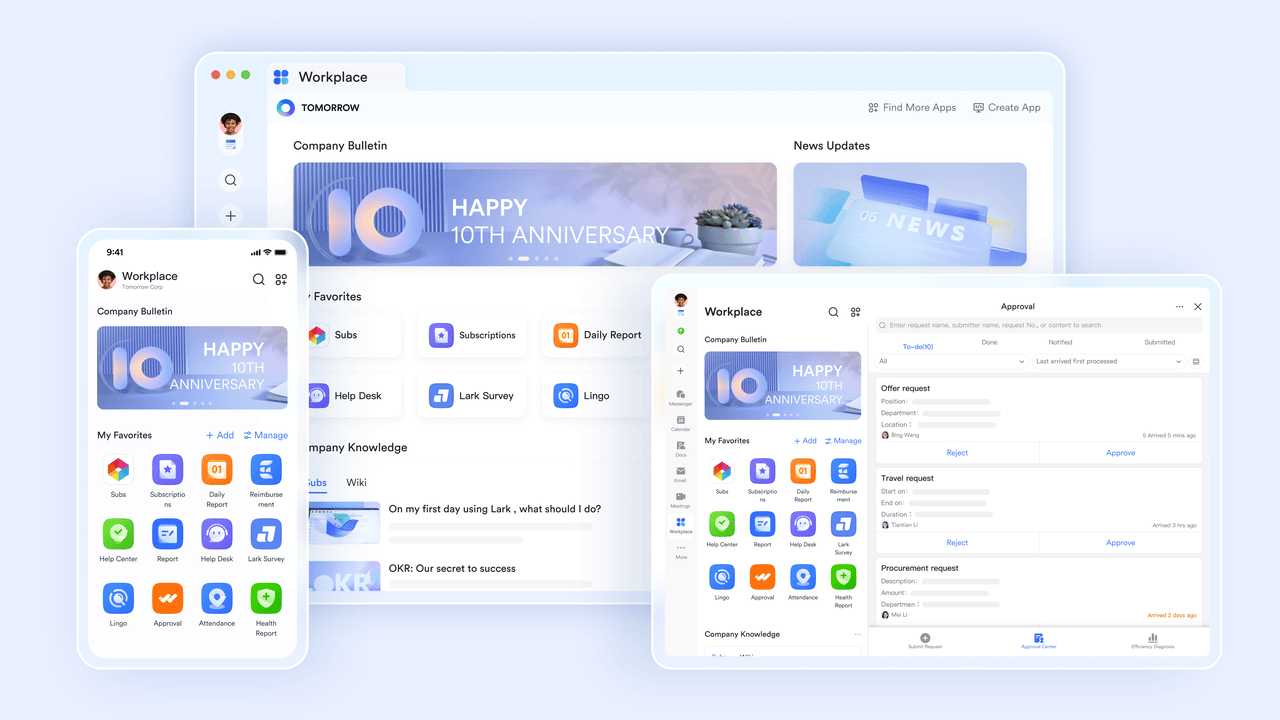
- Unified workspace environment: Messaging, meetings, documents, and workflows exist in a single platform, reducing tool fragmentation.
- Strong automation capabilities: Teams can build automated workflows to streamline operational processes and reduce repetitive tasks.
- Scalable collaboration infrastructure: The platform supports organizations ranging from startups to large enterprises with governance and security controls.
- Built-in productivity ecosystem: Chat, docs, meetings, calendar, and task management operate inside the same environment.
- Initial learning curve for new users, though the Lark Help Center provides helpful guides.
- Starter plan: Free forever plan that includes 11 powerful tools for up to 20 users. It also comes with 100GB of storage, 1000 automation runs, AI translations, and more.
- Basic plan: $6/user/month (billed annually) for up to 500 users. It includes everything in Starter plus group calling for up to 500 attendees, 5TB of storage, 1000 automation runs, and more. For more details, please contact sales.
- Pro plan: $12/user/month (billed annually) for up to 500 users. It includes everything in Basic plus group calling for up to 500 attendees, 15TB of storage, 50,000 automation runs, and more.
- Enterprise plan: Contact sales for custom pricing. Supports unlimited users and includes even more automation runs and advanced security, compliance, and management features.
Starter
For small teams with simple communication needs
$0
/ user / month

Pro
For companies with comprehensive collaboration and management needs
$12
/ user / month
Enterprise
For large companies with advanced security and organizational management needs
Get a personalized demo and pricing
Pro
For companies with comprehensive collaboration and management needs
$12
/ user / month
2. Microsoft Teams: Enterprise communication and meeting platform
- Channel-based communication: Teams organizes conversations into channels dedicated to projects or departments, helping teams structure discussions and information flow.
- Microsoft 365 document collaboration: Users can edit Word, Excel, and PowerPoint documents directly within the Teams environment without leaving the chat interface.
- Video conferencing capabilities: Teams supports meetings with screen sharing, recording, and webinar features.
- Enterprise security and compliance: Organizations can apply identity management, governance policies, and compliance controls.
- Strong Microsoft ecosystem compatibility: Organizations already using Microsoft 365 can easily adopt Teams.
- Enterprise-level security: Built-in governance and compliance tools support regulated industries.
- Reliable meeting capabilities: The platform supports large virtual meetings and webinars.
- Document collaboration support: Integration with Office apps improves productivity.
- Complex interface for beginners: Some users find the interface crowded due to many features.
- Requires Microsoft ecosystem: Organizations outside the Microsoft ecosystem may experience limited benefits.
- Limited project management features: Teams rely on additional tools for advanced task management.
- Microsoft Teams Essentials: $4/user/month billed annually.
- Microsoft 365 Business Basic: $6/user/month billed annually.
- Microsoft 365 Business Standard: $12.50/user/month billed annually.
3. Slack: Messaging-first communication software
- Channel-based messaging: Teams can create channels dedicated to projects, departments, or specific workflows.
- Workflow builder automation: Slack allows teams to automate reminders, approval requests, and notifications.
- Extensive integration marketplace: Thousands of external applications can connect directly with Slack.
- Searchable message history: Teams can easily locate previous conversations, files, and links.
- User-friendly interface: Teams can quickly adopt the platform with minimal training.
- Strong integration ecosystem: Slack connects with a wide range of productivity and development tools.
- Flexible communication structure: Channels allow teams to organize discussions clearly.
- Reliable real time messaging: Instant communication helps teams coordinate tasks quickly.
- Limited built-in project management: Teams often require external tools for task tracking.
- Video meeting capabilities are basic: Slack relies on integrations for advanced meeting features.
- Costs increase with large teams: Pricing may scale quickly as organizations grow.
- Free plan: Includes limited message history and integrations.
- Pro plan: $7.25/user/month billed annually.
- Business+ plan: $15/user/month billed annually.
4. Zoom Workplace: Video-first collaboration platform
- HD video conferencing: Zoom supports high-quality video meetings with breakout rooms, screen sharing, and recording capabilities. These features help teams conduct presentations, training sessions, and collaborative meetings.
- Team chat messaging: Built-in chat allows employees to communicate instantly before, during, and after meetings. Messages remain searchable and can include shared files.
- Collaborative whiteboards: Teams can brainstorm ideas visually during meetings using digital whiteboards that support annotations and collaborative editing.
- Meeting scheduling tools: Integration with popular calendar systems allows teams to organize and launch meetings directly from their schedules.
- Reliable meeting infrastructure: Zoom delivers stable audio and video performance across different devices and networks.
- User-friendly interface: Teams can join and host meetings quickly without complicated setup.
- Large meeting support: The platform supports webinars and large virtual conferences.
- Strong global adoption: Many organizations already use Zoom for remote communication.
- Limited task management tools: Zoom focuses mainly on meetings rather than project coordination.
- Basic document collaboration: File collaboration capabilities are limited compared to full collaboration suites.
- Automation features are minimal: Workflow automation is not a core capability.
- Basic plan: Free plan with limited meeting duration and participant capacity.
- Pro plan: $14.16/user/month billed annually.
- Business plan: $18.33/user/month billed annually.
5. Google Workspace: Cloud-based collaboration suite
- Real-time document editing: Google Docs, Sheets, and Slides allow multiple users to edit documents simultaneously while tracking changes and comments.
- Cloud file storage: Google Drive provides centralized storage with version history and file sharing permissions.
- Integrated video meetings: Google Meet enables virtual meetings with screen sharing and meeting recording.
- Shared calendar coordination: Google Calendar helps teams manage schedules and organize collaborative events.
- Excellent document collaboration: Multiple users can work on files simultaneously without version conflicts.
- Cloud accessibility: Teams can access documents and communication tools from any device.
- Simple user interface: The platform is easy to learn for new users.
- Reliable infrastructure: Google's cloud infrastructure ensures consistent performance.
- Limited workflow automation: Automation features are not as advanced as specialized platforms.
- Basic project tracking: Task management tools are limited compared to dedicated project systems.
- Enterprise governance limitations: Advanced compliance features require higher plans.
- Business Starter: $7/user/month billed annually.
- Business Standard: $14/user/month billed annually.
- Business Plus: $22/user/month billed annually.
6. Asana: Project collaboration and task tracking software
- Task and project management: Teams can create tasks, assign owners, set deadlines, and organize projects using lists or boards.
- Workflow automation: Automated rules help teams trigger actions such as task updates, notifications, and approvals.
- Project timeline views: Timeline and Gantt-style views help teams visualize project schedules and dependencies.
- Goal tracking: Organizations can connect project work with broader company objectives.
- Clear task visibility: Teams can easily track project progress and responsibilities.
- Flexible workflow structure: Projects can be organized using multiple visualization formats.
- Automation capabilities: Automated rules reduce repetitive manual tasks.
- Strong reporting tools: Dashboards help managers monitor team productivity.
- Limited built-in messaging: Teams may require separate chat platforms.
- No native video meetings: External meeting tools are required.
- Complex projects require configuration: Advanced workflows may require setup time.
- Basic plan: Free plan for small teams.
- Premium plan: $10.99/user/month billed annually.
- Business plan: $24.99/user/month billed annually.
7. ClickUp: Customizable project collaboration platform
- Custom task management: Teams can organize work using lists, boards, calendars, and timelines.
- Document collaboration: ClickUp Docs allows teams to create documentation and link it directly to tasks.
- Workflow automation: Automation rules trigger updates, notifications, and task assignments automatically.
- Time tracking tools: Built-in tracking helps teams measure productivity and project effort.
- Highly customizable workflows: Teams can configure the platform for different operational needs.
- Comprehensive project visibility: Dashboards provide detailed project insights.
- Automation support: Automated workflows help reduce repetitive administrative work.
- Centralized productivity workspace: Multiple tools can be replaced with one platform.
- Learning curve for beginners: Extensive customization can make onboarding complex.
- Interface complexity: The platform contains many configuration options.
- Performance issues with large projects: Very large workspaces may require optimization.
- Free forever plan: Basic features for small teams.
- Unlimited plan: $7/user/month billed annually.
- Business plan: $12/user/month billed annually.
8. Monday.com: Visual team workflow solution
- Visual workflow boards: Teams can organize tasks and processes using customizable boards.
- Automation rules: Automated triggers update task statuses and send notifications.
- Project dashboards: Dashboards display project progress, workload distribution, and key metrics.
- Integration ecosystem: Monday.com connects with external productivity and communication tools.
- Visual workflow management: Boards make it easy to track tasks and progress.
- Flexible customization: Teams can configure boards for different workflows.
- Automation capabilities: Automated actions reduce manual updates.
- Cross-team visibility: Managers can monitor projects across departments.
- Messaging features are limited: Teams often need additional communication tools.
- Pricing increases with scale: Costs grow as teams expand.
- Advanced reporting requires higher plans
- Basic plan: $9/user/month billed annually.
- Standard plan: $12/user/month billed annually.
- Pro plan: $19/user/month billed annually.
9. Notion: Knowledge-centric collaboration workspace
- Collaborative documentation: Teams can create shared pages that support text, media, and databases.
- Knowledge base creation: Organizations build internal wikis to store company information.
- Task and database management: Notion databases help teams track projects and workflows.
- Content organization tools: Pages and nested structures allow teams to organize information efficiently.
- Flexible workspace design: Teams can customize pages, databases, and layouts to support different project workflows.
- Strong knowledge management capabilities: The platform allows organizations to store documentation and internal knowledge in one centralized system.
- Supports project planning and documentation: Teams can manage both documentation and task tracking within the same workspace.
- Highly adaptable platform: Notion supports multiple use cases, including documentation, project planning, and team collaboration.
- Limited built-in communication features: Notion focuses more on documentation than messaging or real-time communication tools.
- Automation capabilities are basic: Workflow automation options are limited compared with advanced collaboration platforms.
- Large workspaces may become complex: As the number of pages and databases grows, managing the workspace structure can become challenging.
- Free plan: Personal use and small teams.
- Plus plan: $10/user/month billed annually.
- Business plan: $20/user/month billed annually.
10. Confluence: Documentation-focused collaboration tool
- Team knowledge base: Teams can create structured documentation for projects and processes.
- Collaborative editing: Multiple users can edit pages simultaneously.
- Integration with Jira: Product teams can connect documentation with development workflows.
- Template library: Prebuilt templates help teams create documentation quickly.
- Strong documentation capabilities: Confluence allows teams to create detailed documentation and knowledge bases for projects.
- Effective for knowledge sharing: Teams can store and organize technical documentation in a centralized environment.
- Integration with Atlassian ecosystem: The platform works seamlessly with Jira and other Atlassian tools used by development teams.
- Structured content organization: Pages and hierarchical structures help teams manage large documentation libraries.
- Limited communication tools: The platform focuses primarily on documentation rather than real-time messaging.
- Interface may feel outdated: Some users may find the interface less modern compared with newer collaboration platforms.
- Advanced customization requires setup: Configuring templates, permissions, and workflows may require administrative setup.
- Free plan: Small teams with limited storage.
- Standard plan: $5.42/user/month billed annually.
- Premium plan: $10.44/user/month billed annually.
11. Basecamp: Simplified team communication platform
- Team message boards: Teams can organize discussions around specific topics and projects. These boards allow conversations to remain structured and easy to follow.
- To-do list management: Tasks can be assigned to team members with deadlines and progress tracking. This helps teams manage responsibilities clearly.
- File and document sharing: Teams can store project documents within project workspaces. Files remain accessible for all team members involved in the project.
- Project scheduling tools: Built-in calendars allow teams to track deadlines, milestones, and upcoming events.
- Simple and intuitive interface: The platform focuses on clarity and ease of use. Teams can quickly adopt the system without extensive training.
- Centralized project communication: Conversations, tasks, and files are stored within one workspace. This reduces the need for multiple communication tools.
- Minimal setup required: Teams can create projects and start collaborating immediately without complex configuration.
- Useful for small teams: Smaller teams benefit from the platform's straightforward structure and streamlined workflow management.
- Limited automation capabilities: The platform provides minimal workflow automation features compared with advanced collaboration systems.
- Basic reporting features: Analytics and reporting tools are limited, which may reduce visibility into detailed project performance.
- Not ideal for complex project workflows: Organizations managing large-scale projects may require more advanced planning capabilities.
- Basecamp Plus: $15/user/month billed annually.
- Basecamp Pro Unlimited: $299/month flat price billed annually.
12. Wrike: Enterprise project collaboration software
- Advanced task management: Teams can organize projects using lists, boards, and Gantt charts. These views help teams track progress and dependencies across tasks.
- Workflow automation: Automated approvals and notifications help streamline operational processes. Teams can reduce repetitive manual actions.
- Project reporting dashboards: Managers gain visibility into project performance and team workload through detailed analytics dashboards.
- Resource management tools: Teams can allocate resources and monitor capacity to ensure balanced workloads.
- Strong enterprise project capabilities: The platform supports complex workflows across multiple departments and teams.
- Detailed reporting and analytics: Dashboards provide insights into project progress, team productivity, and resource utilization.
- Scalable workflow automation: Automation features allow organizations to streamline repetitive operational tasks.
- Supports complex project structures: Wrike works well for organizations managing large multi-stage projects.
- Steeper learning curve: New users may require training to understand the platform's advanced project features.
- Higher pricing for advanced features: Enterprise-level capabilities are available only in higher pricing tiers.
- Interface may feel complex: Some teams may find the interface overwhelming due to the number of available tools.
- Free plan: Basic task management for small teams.
- Team plan: $10/user/month billed annually.
- Business plan: $25/user/month billed annually.
13. Smartsheet: Structured collaboration and planning solution
- Spreadsheet-style project planning: Teams organize tasks using familiar grid-based layouts similar to spreadsheets. This approach helps teams manage structured workflows.
- Workflow automation tools: Automated rules trigger updates, reminders, and approvals to streamline operational processes.
- Project dashboards: Visual dashboards provide insights into project performance and progress.
- Collaboration features: Teams can comment on tasks, attach files, and share updates within project sheets.
- Familiar spreadsheet interface: Teams comfortable with spreadsheets can easily adopt the platform.
- Strong reporting capabilities: Dashboards provide visibility into performance metrics and project timelines.
- Automation features available: Automated workflows help teams reduce repetitive administrative work.
- Suitable for structured workflows: Smartsheet works well for operational planning and project tracking.
- Interface may feel outdated: The spreadsheet-style interface may appear less modern compared with other platforms.
- Limited messaging tools: Communication features are minimal compared with full collaboration platforms.
- Learning curve for advanced automation: Teams may need time to configure complex workflow automations.
- Pro plan: $9/user/month billed annually.
- Business plan: $19/user/month billed annually.
14. Zoho Projects: Budget-friendly project collaboration software
- Project task management: Teams can assign tasks, set milestones, and monitor progress throughout the project lifecycle.
- Time tracking tools: Built-in tracking allows teams to measure productivity and project effort accurately.
- Workflow automation: Automated updates and notifications help streamline project management processes.
- Reporting dashboards: Visual reports help managers analyze project performance and identify bottlenecks.
- Affordable pricing structure: Zoho Projects offers competitive pricing suitable for small and mid-sized businesses.
- Integration with Zoho ecosystem: The platform connects with Zoho CRM, analytics, and other productivity tools.
- Strong task tracking capabilities: Teams can clearly manage responsibilities and deadlines.
- Automation features included: Automated workflows help reduce repetitive administrative tasks.
- Interface may feel dated: Some users may find the interface less modern than newer collaboration platforms.
- Limited advanced analytics: Reporting tools may lack advanced analytics compared with enterprise solutions.
- Messaging features are basic: Teams may require additional communication tools for real-time discussions.
- Free plan: Limited features for small teams.
- Premium plan: $4/user/month billed annually.
- Enterprise plan: $9/user/month billed annually.
15. Hive: Automation-driven team collaboration app
- Project and task management: Teams can organize work using multiple project views such as boards, lists, and timelines.
- Workflow automation: Automated actions allow teams to update tasks, assign responsibilities, and send notifications.
- Collaborative messaging: Built-in messaging connects conversations directly with project tasks.
- Performance analytics: Reporting dashboards help teams monitor productivity and project progress.
- Strong workflow automation: Automation features help teams streamline repetitive tasks and operational workflows.
- Flexible project views: Teams can switch between multiple views to track project progress effectively.
- Built-in messaging features: Communication tools keep discussions aligned with tasks.
- Useful analytics dashboards: Performance reports help managers understand team productivity.
- Advanced features require higher plans: Some automation and reporting capabilities are available only in premium plans.
- Interface customization may require setup: Teams may need time to configure workflows and dashboards.
- Smaller integration ecosystem: Hive supports fewer third-party integrations compared with larger platforms.
- Free plan: Limited features for small teams.
- Starter plan: $1/user/month billed annually.
- Teams plan: $3/user/month billed annually.
How to evaluate your best collaboration platform in practice
- Does it unify communication and execution? A strong platform should connect messaging, meetings, documents, and task management in one environment. When communication and execution happen within the same system, teams reduce context switching and maintain better project visibility.
- Can workflows be automated? Automation helps teams reduce repetitive tasks such as approvals, notifications, and status updates. Platforms that support workflow automation improve operational efficiency and reduce manual coordination.
- Are governance controls enterprise-ready? Security, compliance, and access controls are essential for organizations handling sensitive data. A reliable collaboration platform should provide strong governance features to support enterprise environments.
- Does it scale across departments? The platform should support collaboration across multiple teams and departments. As organizations grow, the system must accommodate larger teams, complex workflows, and increasing data volumes.
- What is the total cost of ownership? Businesses should evaluate not only subscription pricing but also implementation costs, integration requirements, and long-term maintenance expenses. A cost-effective collaboration platform should deliver strong functionality without requiring multiple additional tools.
Conclusion
FAQs
What is a communication and collaboration platform?
What are collaboration tools in modern workplaces?
What are some communication and collaboration examples?
What are web-based collaboration tools?
Are there free collaboration tools for remote teams?
Related reading

Start using Lark today

Manage all your work in one place
Boost team efficiency by 10x
Save up to 70% on software costs
Start using Lark today
Manage all your work in one place
Boost team efficiency by 10x
Save up to 70% on software costs
Keep reading
![What Is a 2-2-3 Work Schedule? Explanation and More [2026]](https://p16-hera-overseas.larksuitecdn.com/tos-mya-i-lojyj5t9n9/44878bb7037d480a833a337eb2613ae4~tplv-lojyj5t9n9-png:0:0.png)







2026 Lark Technologies Pte. Ltd.
Headquartered in Singapore with offices worldwide.





