


Key Components of CRM: Explanation and Recommended Tool

Ryan Tanner
Product Marketing Specialist
Aug 5, 2026
Ryan Tanner
Aug 5, 2026

11 min read


A Customer Relationship Management (CRM) system is more than a contact list—it's the foundation businesses use to manage customer data, improve sales processes, and enhance long-term relationships. The CRM components diagram typically connects six core elements: contact management, sales automation, marketing workflows, customer service, analytics, and workflow automation. Together, these components create a unified process that turns customer data into measurable outcomes.
In this guide, we'll break down each of these CRM components, explore how they function within a CRM process, and show how modern platforms like Lark help teams put strategy into action.

Why CRM components matter?
The strength of any customer relationship strategy lies in how well its core systems work together. CRM components matter because they define the structure that connects data, people, and processes across an organization. When these components—such as contact management, sales automation, and analytics—operate in harmony, teams gain a single source of truth for every customer interaction. This unified view helps businesses make informed decisions, deliver personalized experiences, and respond faster to opportunities or issues.
Without well-defined CRM components, data becomes fragmented, communication slows down, and customer insights get lost between departments. A cohesive CRM framework ensures every touchpoint, from marketing outreach to post-sale support, contributes to stronger relationships and higher retention. Modern platforms like Lark simplify this alignment by combining communication, collaboration, and data management in one connected workspace—so teams move from managing information to building lasting customer value.
Core components of the CRM system
A well-structured CRM framework depends on its core building blocks—each designed to manage different aspects of the customer lifecycle. These CRM components work together to centralize information, automate workflows, and create a seamless experience across sales, marketing, and service teams.
- Contact & data management: This component serves as the foundation of every CRM system. It stores and organizes customer details—such as names, emails, communication history, and purchase records—in a single, easily accessible database. Centralized data ensures accuracy, eliminates duplication, and gives teams a complete view of every relationship.
- Sales force automation: Sales automation tracks leads, opportunities, and deals across stages of the pipeline. It reduces manual data entry by automating follow-ups, reminders, and updates. With real-time visibility, sales teams can focus more on closing deals and less on administrative tasks.
- Marketing automation: This component simplifies campaign management, segmentation, and lead nurturing. It enables teams to send personalized messages, track engagement, and score leads based on behavior. Automated workflows ensure consistent communication that converts prospects into loyal customers.
- Customer service & support: The support component manages tickets, cases, and customer interactions after the sale. It helps teams resolve issues quickly, track service performance, and maintain detailed support histories. By improving response times and transparency, it enhances satisfaction and loyalty.
- Analytics & reporting: Analytics transforms raw CRM data into actionable insights. It helps businesses monitor sales performance, track marketing ROI, and understand customer behavior trends. With dashboards and reports, leaders can make informed, data-driven decisions for future growth.
- Workflow automation: This component streamlines repetitive processes such as sending reminders, updating records, and assigning tasks. It ensures consistent execution of key steps across teams, reducing delays and minimizing human error. Automation keeps customer engagement timely and efficient.
- Integration layer: The integration layer connects CRM data with essential business tools like email, calendars, and chat platforms. This ensures that customer information stays synchronized across systems, eliminating silos. Teams gain a unified, real-time view of every interaction—strengthening collaboration and productivity.
Include all in one: Choose Lark as your CRM platform
A CRM system becomes truly powerful when its core components work seamlessly together—and that's where Lark shines. Designed for modern, data-driven teams, Lark brings structure, visibility, and automation to every stage of the customer journey. From data organization to deal management and team communication, it helps turn CRM strategy into daily execution that drives growth.
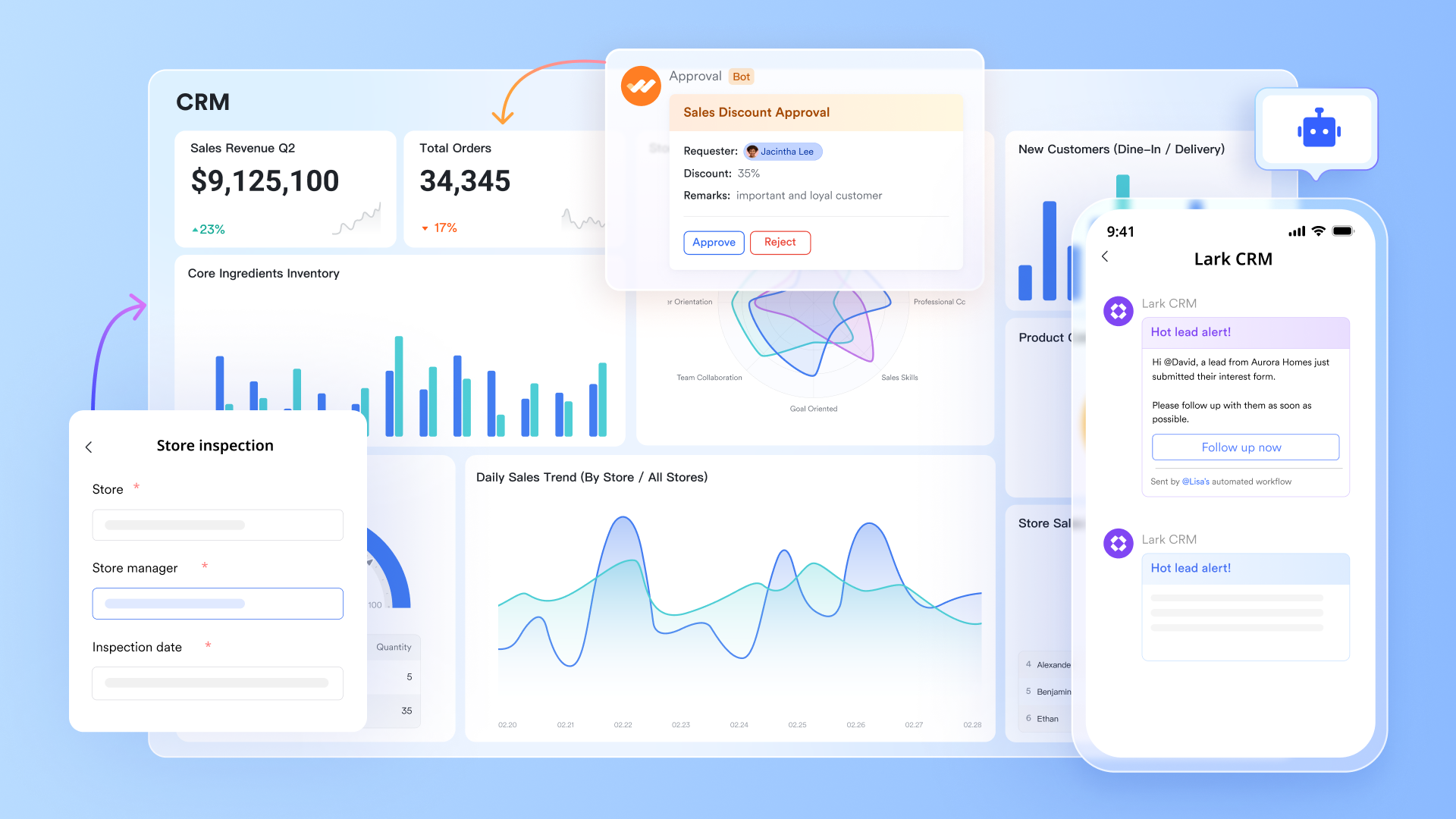
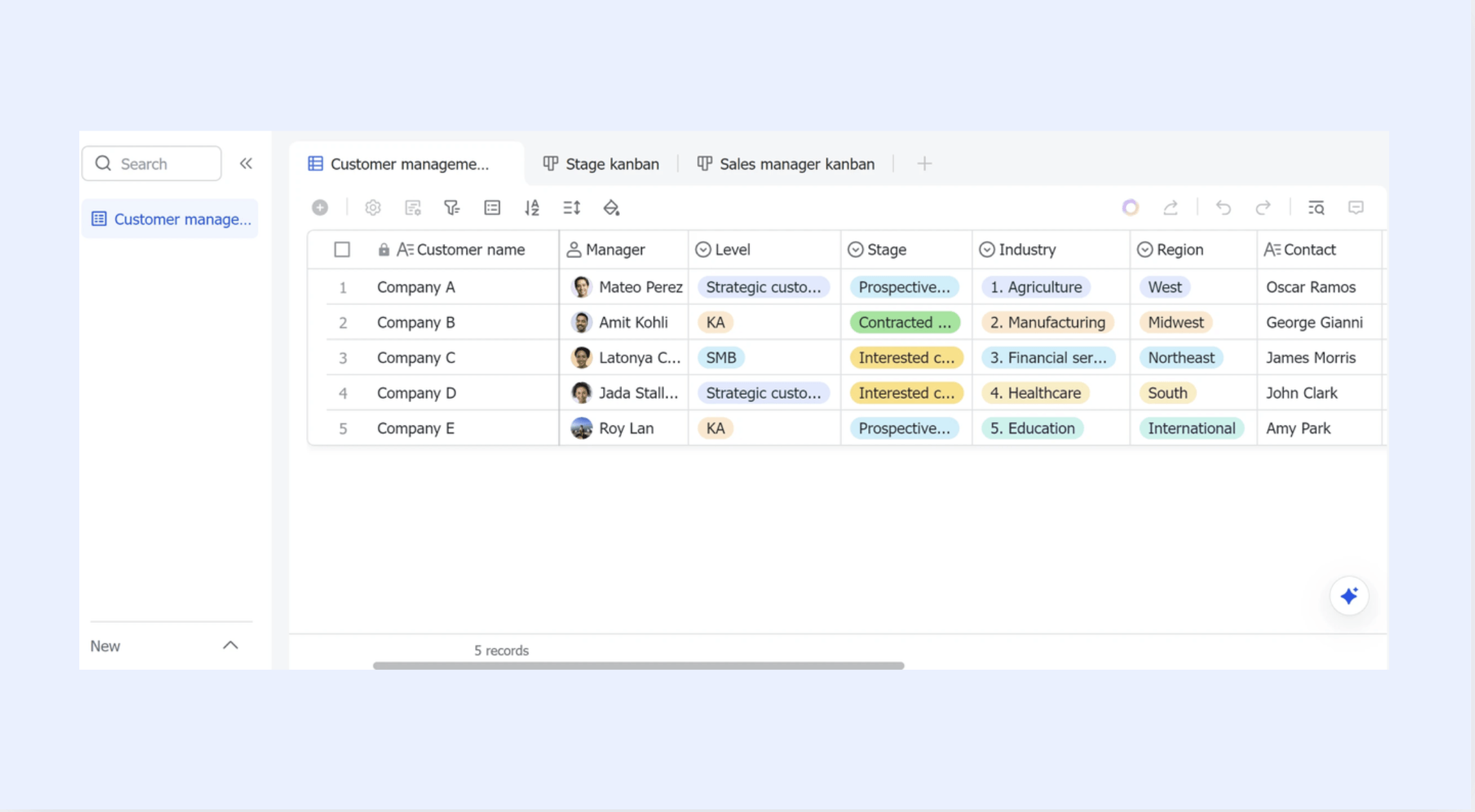
Clean contact & data management: Multiple views in Lark Base
You can create multiple views in Lark Base to inspect your customer data from different angles, without altering the underlying table. Each view updates automatically when records change, ensuring everyone sees consistent, real-time information. Whether you use a Kanban, grid, Gantt, or Gallery view, switching perspectives helps teams focus on what matters.
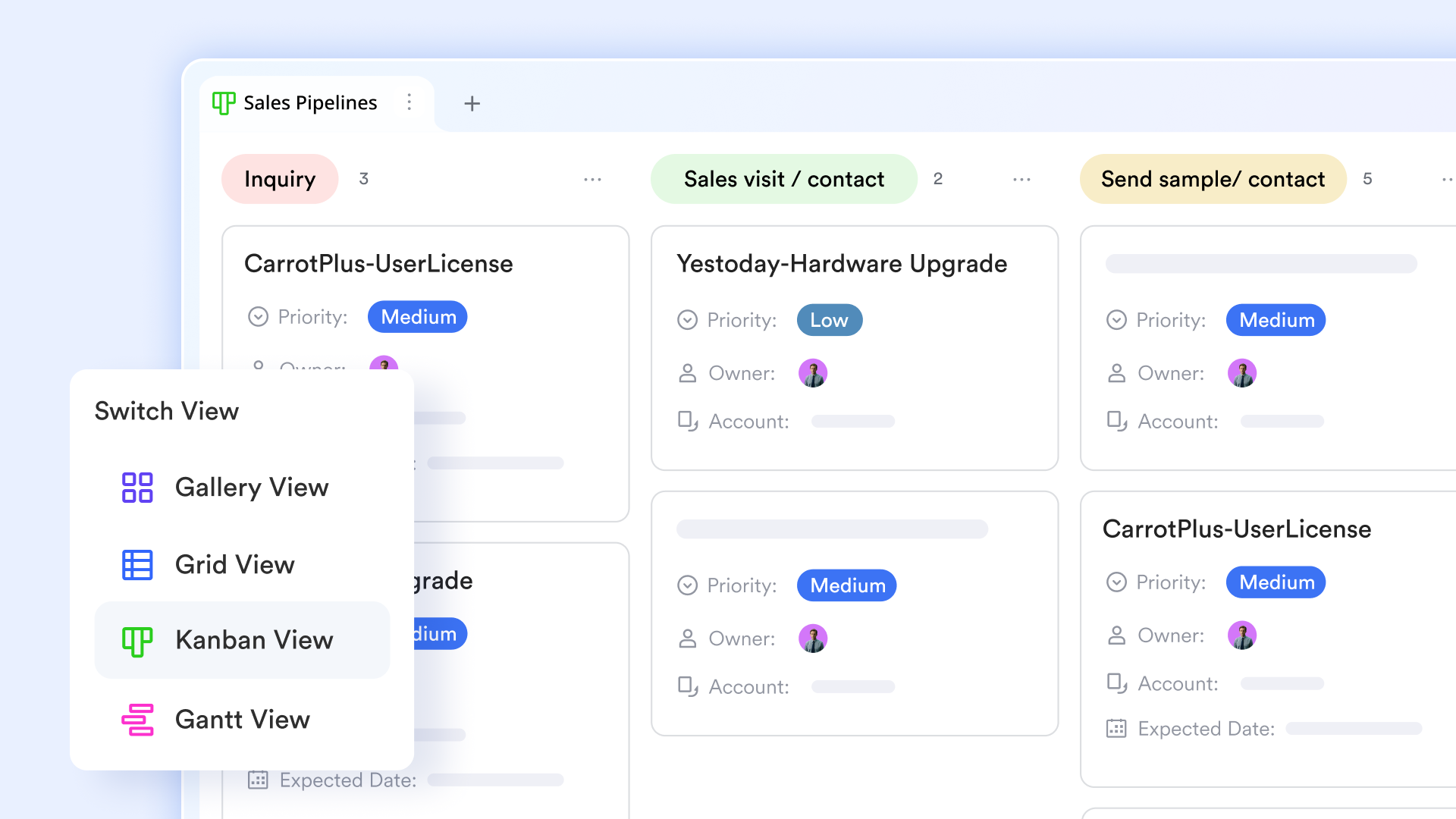
Effective sales force/workflow automation: Automation in Lark Base
With automation in Lark Base, you can set up triggers that respond to changes in your data—such as status updates or new record entries—and automatically perform actions like notifications, field updates, or task assignments. Workflows help reduce manual effort by routing approvals, syncing records, and sending timely messages without human intervention.
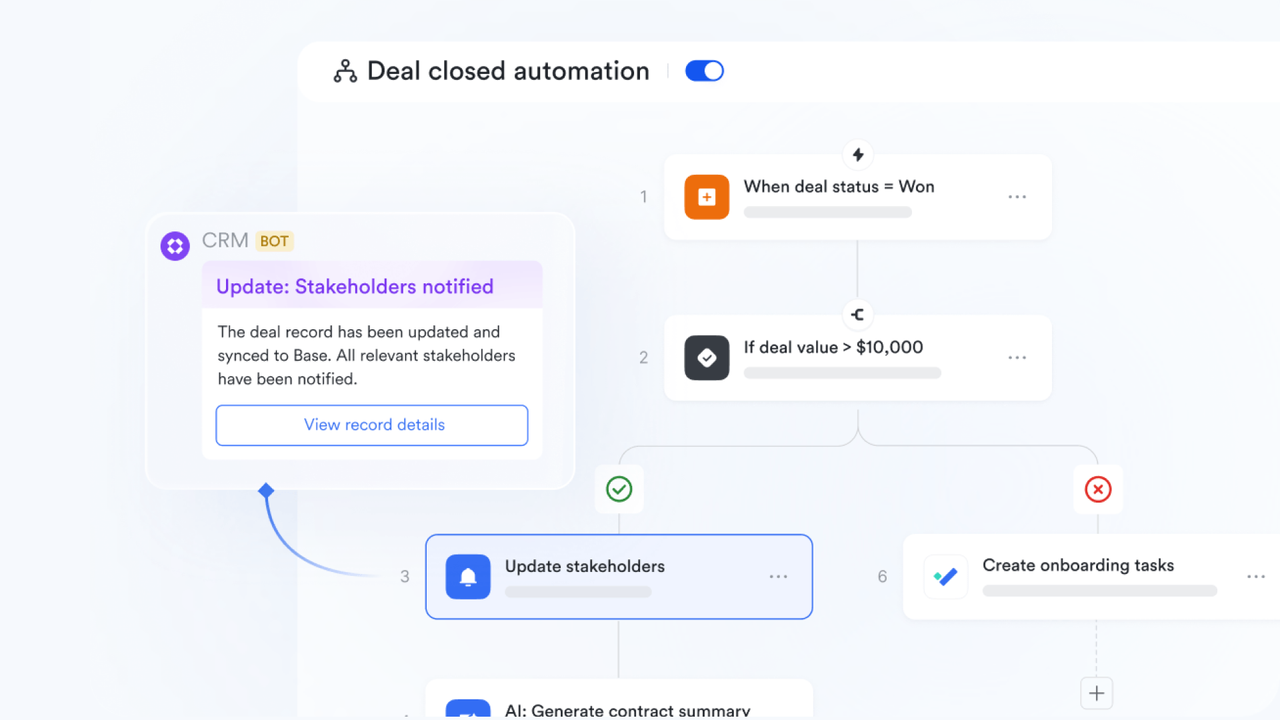
Streamlined marketing automation: Lark Forms and Dashboard in Lark Base
Create a Lark Forms to collect marketing data from users and share the link for easy access. All responses are automatically recorded in Base, where you can organize, manage, and export the results. Also, use Base's dashboards to visualize the data. You can also automate the delivery of dashboard snapshots and AI-generated summaries to specific users or groups, either on a schedule or when certain triggers occur.
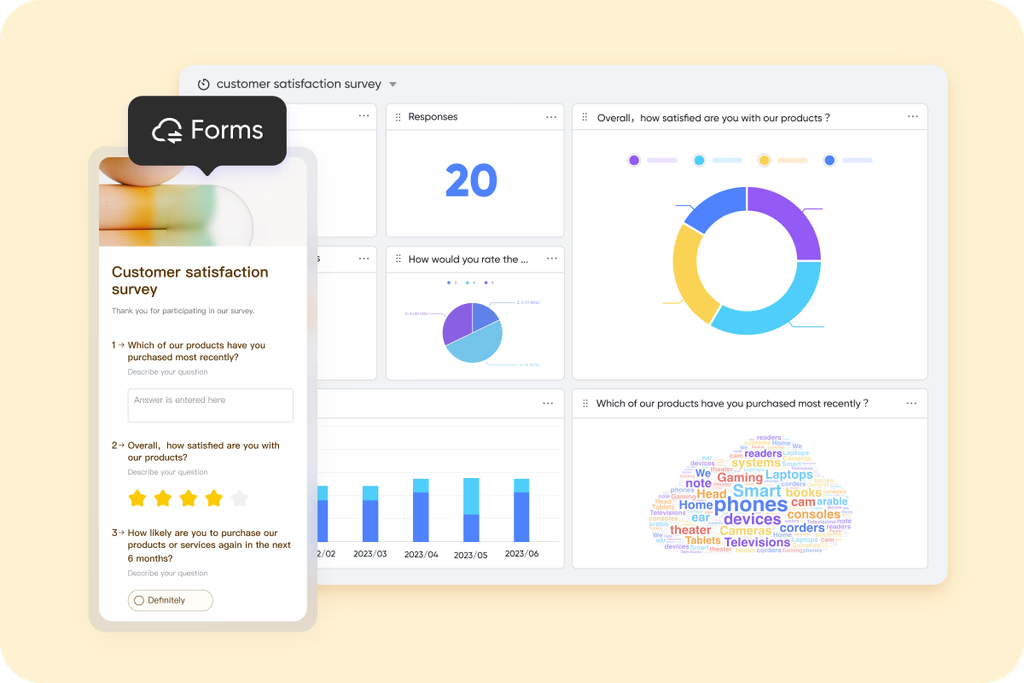
Arranged customer service & support: Lark Base tables & templates
Leverage Lark Base's specialized tables and templates to structure your customer service workflows. Each customer is assigned a dedicated row on a Base table, with columns to record status, follow-up details, and progress. Built‑in views let you monitor incoming tickets, service SLAs and team workloads in different formats, while automations can trigger follow‑up reminders or escalate unresolved issues automatically.
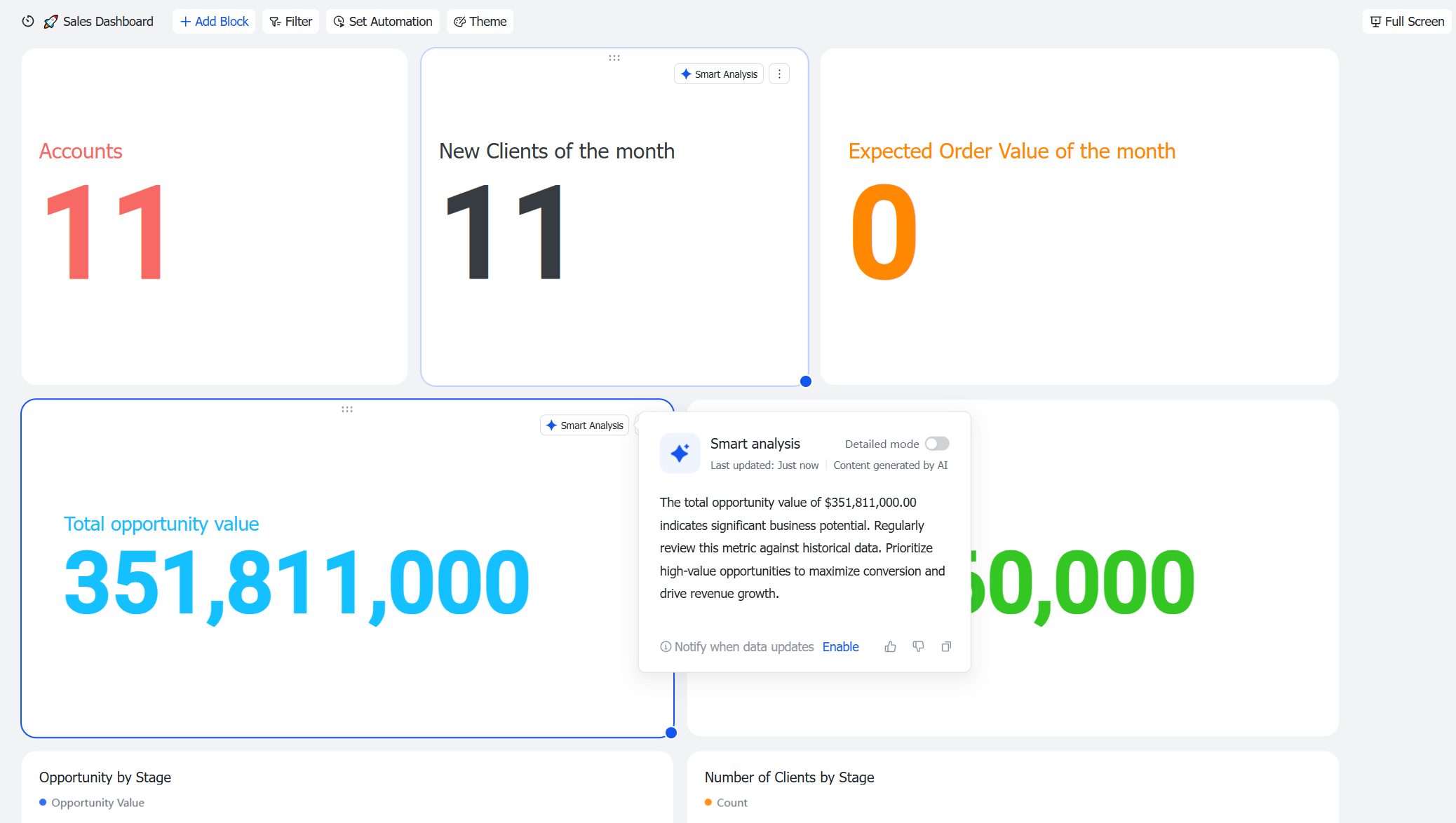
AI-powered analytics & reporting: Smart Analysis in Lark Base
With Smart Analysis in Lark Base, you can hover over any chart and activate AI to interpret the data for you—highlighting key trends, anomalies, and insights without manual digging. You can also schedule dashboard summaries or send them when certain triggers are met, keeping stakeholders informed with minimal effort. Combined dashboards let you visualize data through multiple chart types and dimensions, giving every team member a real‑time snapshot of performance.
Strong integration layer: Integration support in Lark
Lark Base offers a robust integration framework that connects your key business systems—such as Salesforce, HubSpot, Slack, Google Workspace, and Microsoft 365—into one unified workspace. With built-in connectors, OpenAPI support, and migration tools, Lark lets you synchronize data, trigger workflows, and maintain consistency across apps without manual workarounds.

- Starter plan: Free forever plan that includes 11 powerful tools for up to 20 users. It also comes with 100GB of storage, 1000 automation runs, AI translations, and more.
- Pro plan: $12/user/month (billed annually) for up to 500 users. It includes everything in Starter plus group calling for up to 500 attendees, 15TB of storage, 50,000 automation runs, and more.
- Enterprise plan: Contact sales for custom pricing. Supports unlimited users and includes even more automation runs and advanced security, compliance, and management features.
Reviewing Google Workspace pricing can help identify potential savings opportunities across your software stack.
Best practices for implementing CRM components effectively
Implementing a CRM system isn't just about choosing software—it's about aligning people, processes, and technology around shared goals. Following best practices ensures that all CRM components work together smoothly and deliver measurable results across the organization.
- Ensure clean, centralized data before automating workflows: A CRM is only as strong as its data. Before setting up automation, consolidate customer information into one reliable database and eliminate duplicates or outdated records. Clean data improves accuracy, reporting, and the overall performance of every CRM component.
- Align sales, marketing, and service teams on process ownership: Each department plays a unique role in the customer journey. Clearly define responsibilities and workflows so that sales, marketing, and service teams operate from the same data and process. Alignment ensures seamless handoffs and a consistent customer experience.
- Define clear KPIs for each component: Set measurable goals for every CRM area—such as deal velocity for sales, campaign engagement for marketing, or response time for service. Clear KPIs help track progress, identify gaps, and maintain accountability across teams.
- Start simple — add automation and analytics once your process is stable: A phased approach to CRM implementation reduces complexity and improves adoption. Begin with core functions like contact management and deal tracking. Once workflows are consistent, layer in automation, analytics, and custom dashboards for greater efficiency.
- Regularly review reports and user feedback for optimization: CRM success depends on continuous improvement. Schedule routine check-ins to analyze performance reports, review user feedback, and refine processes. This keeps the system aligned with business goals and ensures every CRM component evolves with your needs.
Common pitfalls to avoid
While building or improving a CRM system, many teams focus on tools before strategy. Avoiding these common mistakes ensures your CRM components work cohesively and deliver long-term results rather than short-term fixes.
- Over-customizing the CRM before aligning the workflow: Excessive customization can make your CRM overly complex and difficult to manage. Establish clear processes first, then adapt your system to support them. This keeps workflows efficient and prevents unnecessary technical overhead.
- Ignoring data hygiene and user training: Even the most advanced CRM fails without accurate data and knowledgeable users. Regular data audits and comprehensive training ensure information stays reliable and teams use the system effectively. Well-informed users are key to maintaining healthy CRM operations.
- Treating CRM as only a tech tool, not a cross-functional strategy: CRM success depends on collaboration, not just software. Treat it as an organization-wide strategy that connects sales, marketing, and service teams. This mindset encourages shared accountability and customer-centric decision-making.
- Failing to connect customer touchpoints: Disjointed emails, meetings, and service logs create blind spots in the customer journey. Integrate every touchpoint into the CRM so all teams access the same complete history. A unified view strengthens coordination and enhances the customer experience.
Conclusion
The true value of a CRM lies in how well its core components work together to connect people, processes, and data. When contact management, sales automation, marketing, service, analytics, and workflow automation operate in sync, businesses gain a clear, actionable view of every customer relationship. These CRM components turn everyday interactions into insights that drive loyalty and growth. Modern platforms like Lark make this alignment effortless by combining collaboration and data management in one workspace—helping teams move beyond tracking activities to building meaningful, long-term customer connections.
FAQs
What are the three main types of CRM (Operational, Analytical, Collaborative)?
Operational CRM manages daily activities like sales, marketing, and service workflows. Analytical CRM focuses on insights from customer data to guide strategy. Collaborative CRM connects communication across departments and channels. Together, these CRM types ensure all CRM components work cohesively to improve efficiency, decision-making, and customer satisfaction throughout the lifecycle.
How do CRM components differ between B2B and B2C businesses?
B2B companies use CRM components to manage longer sales cycles, multiple stakeholders, and account-based relationships. B2C businesses focus on high-volume interactions, personalization, and real-time engagement. While both share core elements like data management and analytics, their workflows and automation priorities differ—B2B emphasizes pipeline tracking, whereas B2C optimizes speed and customer experience.
Can small businesses build CRM workflows using free tools?
Yes. Many free platforms, such as Lark, offer essential CRM components like contact management, task tracking, and workflow automation. Small businesses can start with simple CRM workflows to manage leads and customers efficiently without heavy investment. As operations grow, these tools can scale with advanced analytics, integrations, and automation features for greater impact.
What's the difference between CRM components and CRM features?
CRM components are the foundational elements—data management, automation, analytics, and service—that define how the system functions. Features are the specific tools or actions that enable those components, like contact records, dashboards, or alerts. In short, components form the structure, while features bring the structure to life through functionality and usability.
How does AI improve CRM automation and analytics?
AI enhances CRM components by predicting customer behavior, recommending next actions, and automating repetitive tasks. It strengthens analytics through real-time forecasting, sentiment analysis, and personalized insights. By learning from historical data, AI allows businesses to engage customers proactively, prioritize leads effectively, and optimize campaigns for higher conversion and retention rates.
Related reading
Table of contents
Start using Lark today

Manage all your work in one place
Boost team efficiency by 10x
Save up to 70% on software costs
Table of contents
Start using Lark today
Manage all your work in one place
Boost team efficiency by 10x
Save up to 70% on software costs
Keep reading









2026 Lark Technologies Pte. Ltd.
Headquartered in Singapore with offices worldwide.






Explore: