Video meetings have moved from occasional check-ins to a core layer of daily work. Teams depend on them to align priorities, review progress, and make decisions together in real time. As meetings take on more responsibility, tools are no longer judged only by audio or video quality but by how well they support clarity, participation, and continuity after the call ends.
This Google Meet review looks at how Google Meet performs across business and education scenarios where reliability and ease of use matter most. Many teams choose it because it feels familiar and fits naturally inside Google Workspace. Over time, some teams begin to notice that important discussions live only inside meetings. This is often when teams start exploring ways, including platforms like Lark, to connect meetings more closely with documents, tasks, and day-to-day execution.
What is Google Meet?
Google Meet is a browser-based developed by Google and included with Google Workspace plans. It evolved from earlier tools like Hangouts and Hangouts Meet, which is why many users still refer to it in a Google Hangouts Meet review context. Today, Google Meet supports one-on-one calls, large group meetings, webinars, and education-focused sessions.
At its core, Google Meet is designed for fast access and low setup. Users can join directly from a browser, Gmail, or Calendar invite without installing software. This simplicity has made it popular among distributed teams and schools. In any review of Google Meet, ease of access consistently stands out as a key strength.
Google Meet also benefits from native connections to Google Calendar and Gmail. Meetings appear automatically on calendars, reminders are handled by default, and joining links stay consistent. For teams already embedded in Google Workspace, this tight alignment reduces friction during scheduling and joining.
Google Meet review: Core meeting features
Google Meet focuses on essential meeting functionality rather than advanced workflow features. The platform prioritizes stability, accessibility, and predictable behavior across devices. This section of the review of Google Meet analysis looks at how those core features work in daily use.
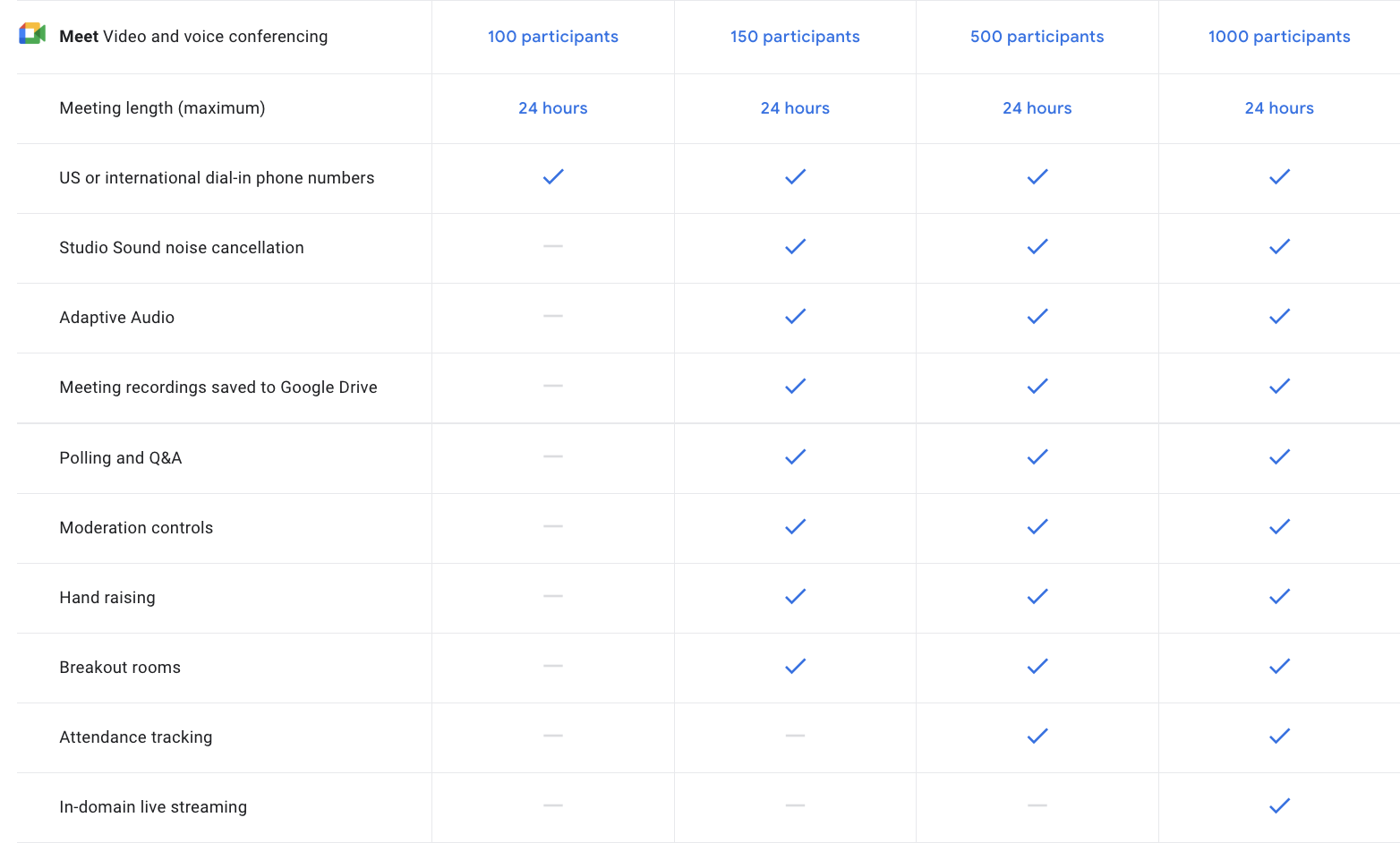
Image source: google.com
Google Meet grid review: layout, visibility, and usability
The grid layout determines how participants experience meetings, especially in larger calls. The platform supports tiled views that display multiple participants simultaneously. Users can switch between auto layout and manual pinning to focus on speakers or shared content.
While the grid view is clean and readable, customization is limited compared to newer platforms. There are fewer layout presets and less control over participant sizing. For smaller teams, this is rarely an issue. In larger meetings, visibility tradeoffs become more noticeable, which often comes up in any review of Google Meet grid behavior.
Overall usability remains strong. Controls are easy to find, and the interface avoids clutter. This consistency is one reason Google Meet remains comfortable for first-time users.
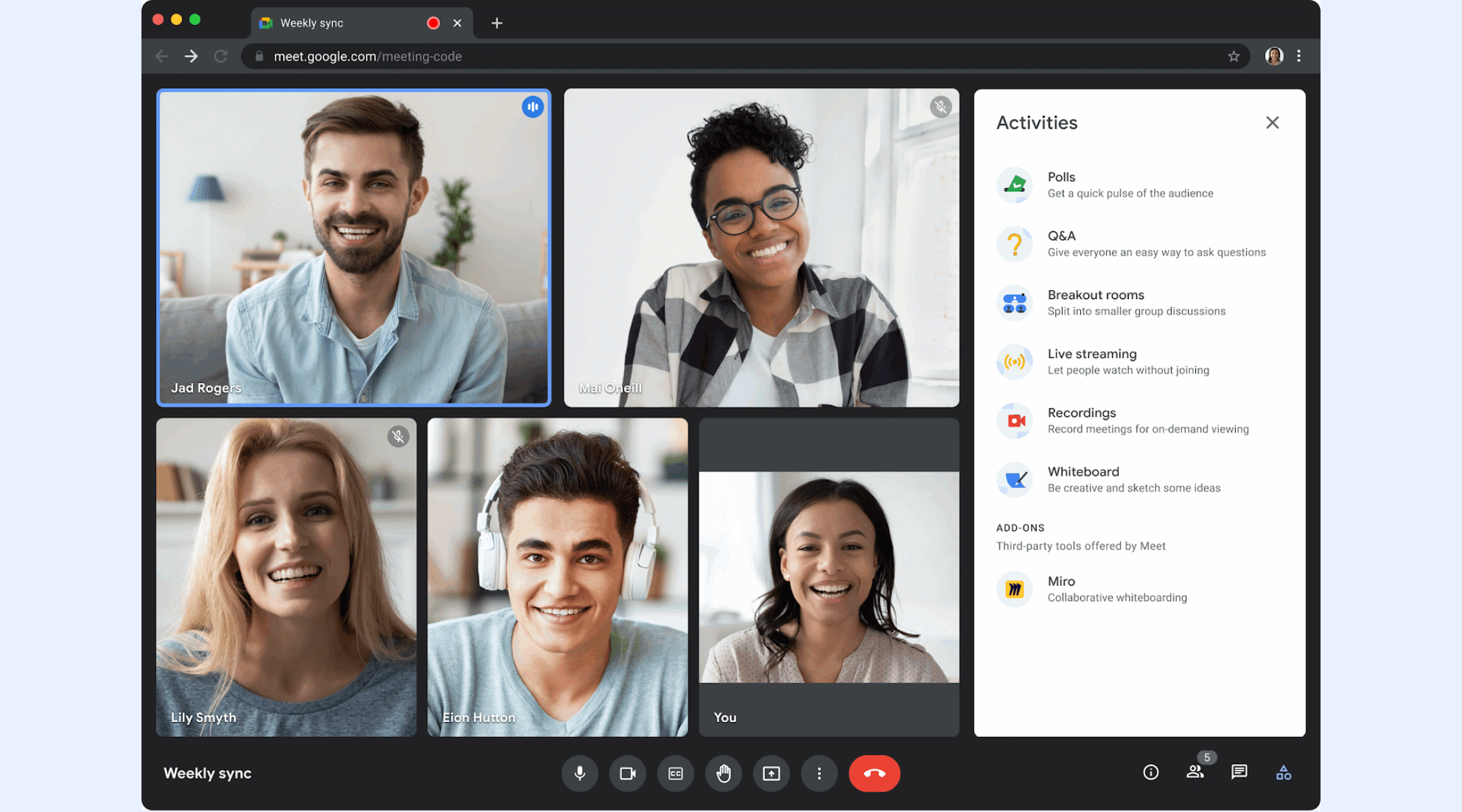
Image source: google.com
Google Meet attendance review for managers and educators
Attendance tracking is a common requirement in education and regulated business environments. Google Meet provides for certain Workspace plans. Hosts can download participant lists after meetings, including join and leave times.
For educators, this helps confirm student participation. For managers, it offers basic visibility into meeting presence. However, attendance data is not deeply analytical. Long-term trends, engagement scoring, and cross-meeting insights are limited.
As a result, teams that rely heavily on attendance metrics often supplement Google Meet with spreadsheets or external tools. This limitation appears frequently in Google Meet review discussions focused on management use cases.
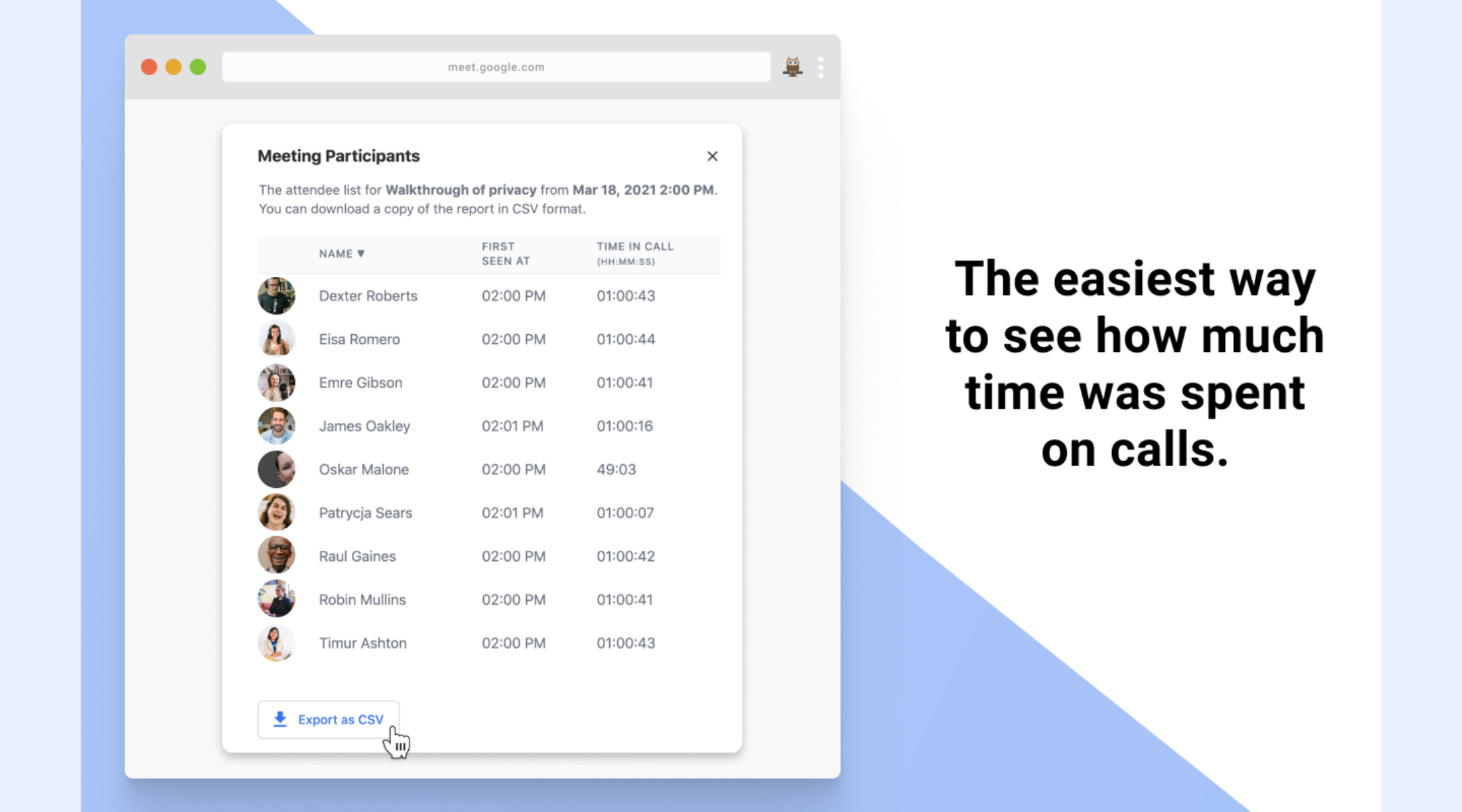
Image source: google.com
Google Meet free plan review: What you get without paying
First of all, Google Meet is completely free to use. The free version of Google Meet is generous compared to many competitors. It allows users to host up to 100 participants per meeting. Users can host one-to-one meetings with no time limit and group meetings with a time cap. Screen sharing, captions, and basic layouts are included.
For individuals and small teams, the free plan is often sufficient. It supports without cost barriers. However, recording, attendance reports, and advanced security controls are locked behind paid plans.
This creates a clear upgrade threshold. As meetings become central to operations, teams quickly encounter limits that push them toward paid tiers. That transition point is a recurring theme in any review of Google Meet's free usage.
Details of Google Meet pricing and features
Update time: 2025-12-29
Note: Pricing and plan details reflect publicly available data as of the update date and may vary based on region, billing cycle, and number of agents.
👉 Know more:
Google Meet Plus review
Google Meet Plus (also known as GMP) is a comprehensive Chrome extension that enhances the native Google Meet experience. It serves as a "must-have" tool for educators, project managers, and remote teams by introducing a suite of interactive, collaborative, and fun features that are not available in the standard version of Google Meet.
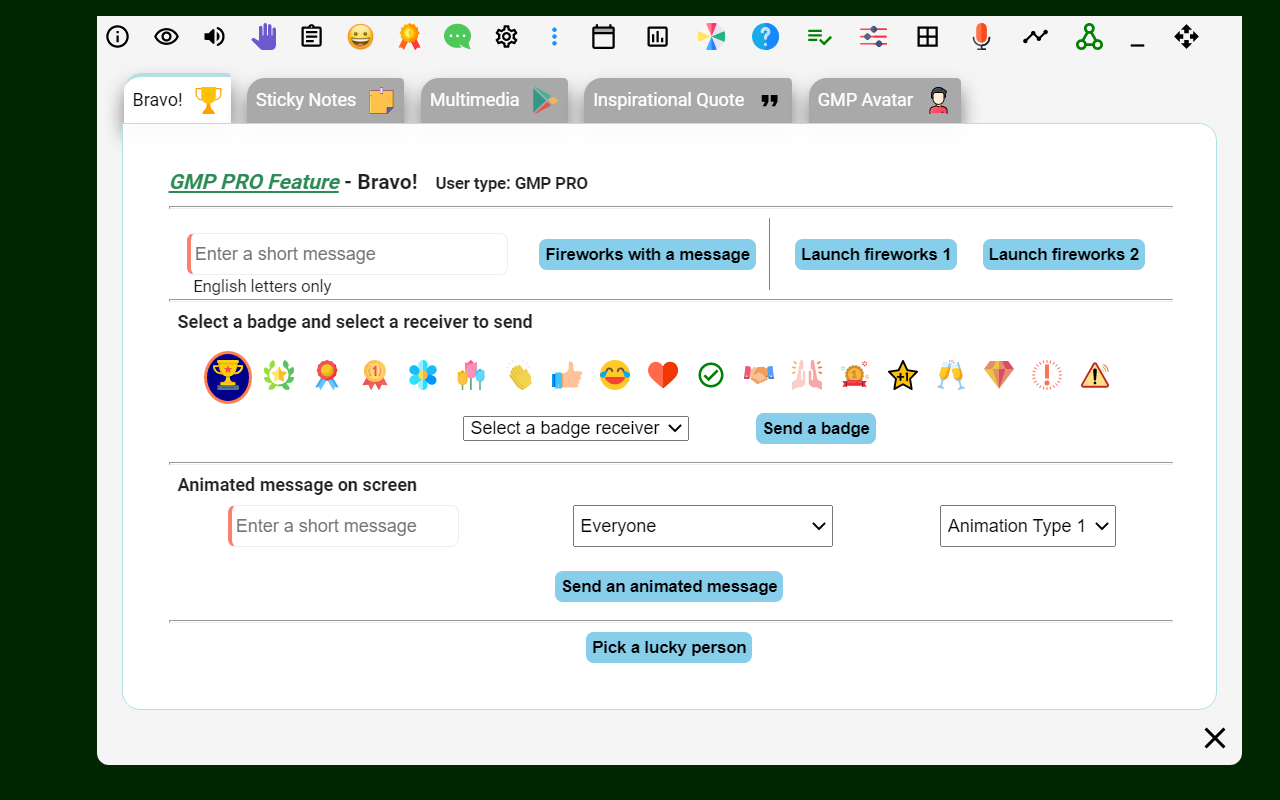
Image source: google.com
Key features:
- Advanced host controls: Includes breakout rooms, attendance tracking, "mute all" functionality, and a dedicated host control panel.
- Interactive collaboration: Features a real-time collaborative whiteboard, private messaging (Messenger), and instant file/link sharing.
- Engagement tools: Built-in trivia quizzes, polls, animated "Super Emojis," and a reward system for participant engagement.
- Productivity utilities: Provides push-to-talk (walkie-talkie) mode, meeting timers, stopwatches, and an "auto-join" feature.
- Interface customization: Allows users to resize and rearrange video tiles, enable dark mode, and set default microphone/camera states.
Performance and reliability in real-world usage
Reliability is one of Google Meet's strongest attributes. Calls generally connect quickly, audio quality is stable, and video adapts well to varying bandwidth. In most reviews of Google Meet, uptime and performance score highly.
The browser-based architecture reduces installation issues and keeps updates automatic. Google's global infrastructure contributes to consistent performance across regions. This makes Google Meet a dependable choice for large distributed teams.
However, performance does not extend to workflow depth. Meetings run smoothly, but what happens before and after the call remains largely outside the platform. This gap becomes more visible as teams scale.
Where Google Meet starts to fall short for teams
To be fair, Google Meet is a standard choice when you need an online conference. While Google Meet is highly accessible, it often falls short for professional teams in the following areas:
- Lack of persistence: In-meeting chats and shared links disappear once the call ends, making it difficult to reference decisions or resources later.
- Fragmented workflows: Because Meet is a standalone video tool, users must constantly switch tabs to take notes or manage tasks, which disrupts focus.
- No native task management: There is no built-in way to assign action items or track follow-ups during a session, often leading to lost momentum.
- Limited collaboration: Features like built-in whiteboarding and file sharing within the chat are either missing or require external integration.
- Resource-heavy: As a browser-based app, it can be CPU-intensive during large meetings, causing lag or system slowdowns on some devices.
- Restricted engagement. Advanced tools like breakout rooms, polls, and attendance tracking are often locked behind higher-tier enterprise licenses.
As teams mature, they begin exploring platforms that treat meetings as part of a continuous work cycle rather than isolated events. This is usually the point where alternatives enter the conversation.
Meet a new option that reshapes online conferencing
Meet Lark: Embrace modern collaboration in conferencing
While Google Meet serves as a standalone video tool, , a standout choice among modern , combines conferencing directly into your team's ongoing conversations and shared calendars. It eliminates the friction of switching apps by allowing you to transition instantly from a chat to a collaborative call where participants can in real-time.
Beyond the meeting itself, the platform automatically transforms discussions into searchable records and actionable tasks, ensuring that outcomes are tracked and executed without manual data entry. This unified approach turns transient calls into permanent knowledge assets, keeping your team accountable and productive within a single workspace.
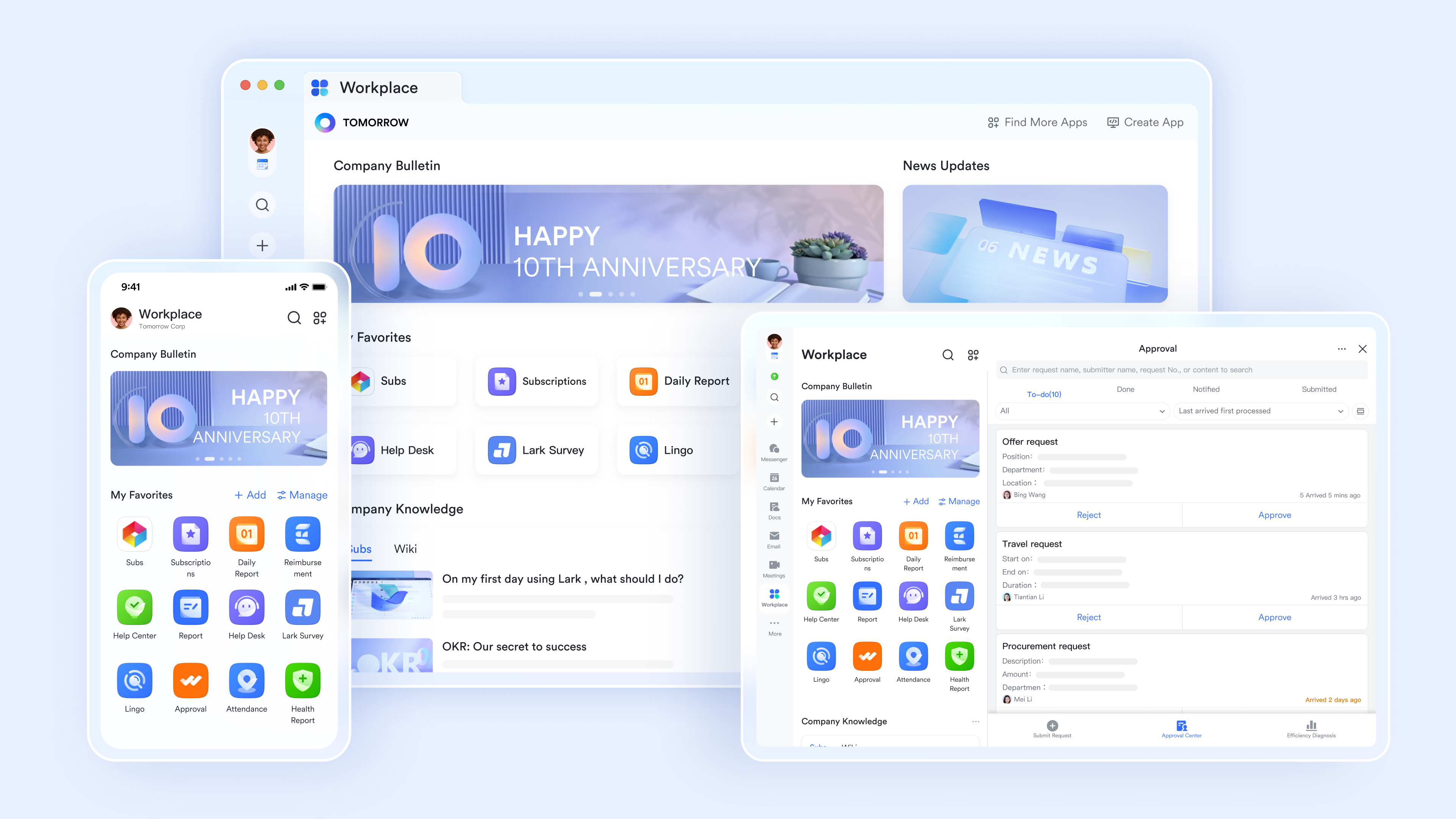
Meetings embedded directly into daily work
Powered by , conferences are accessible from multiple entry points: team chats, one-on-one conversations, group discussions, shared calendars, and the main navigation. This design allows meetings to start naturally from context, rather than as isolated events. When a chat discussion requires escalation, users can launch a meeting instantly without creating links or switching tools. Calendar events, chat threads, and meeting sessions remain connected, preserving continuity before and after the call. 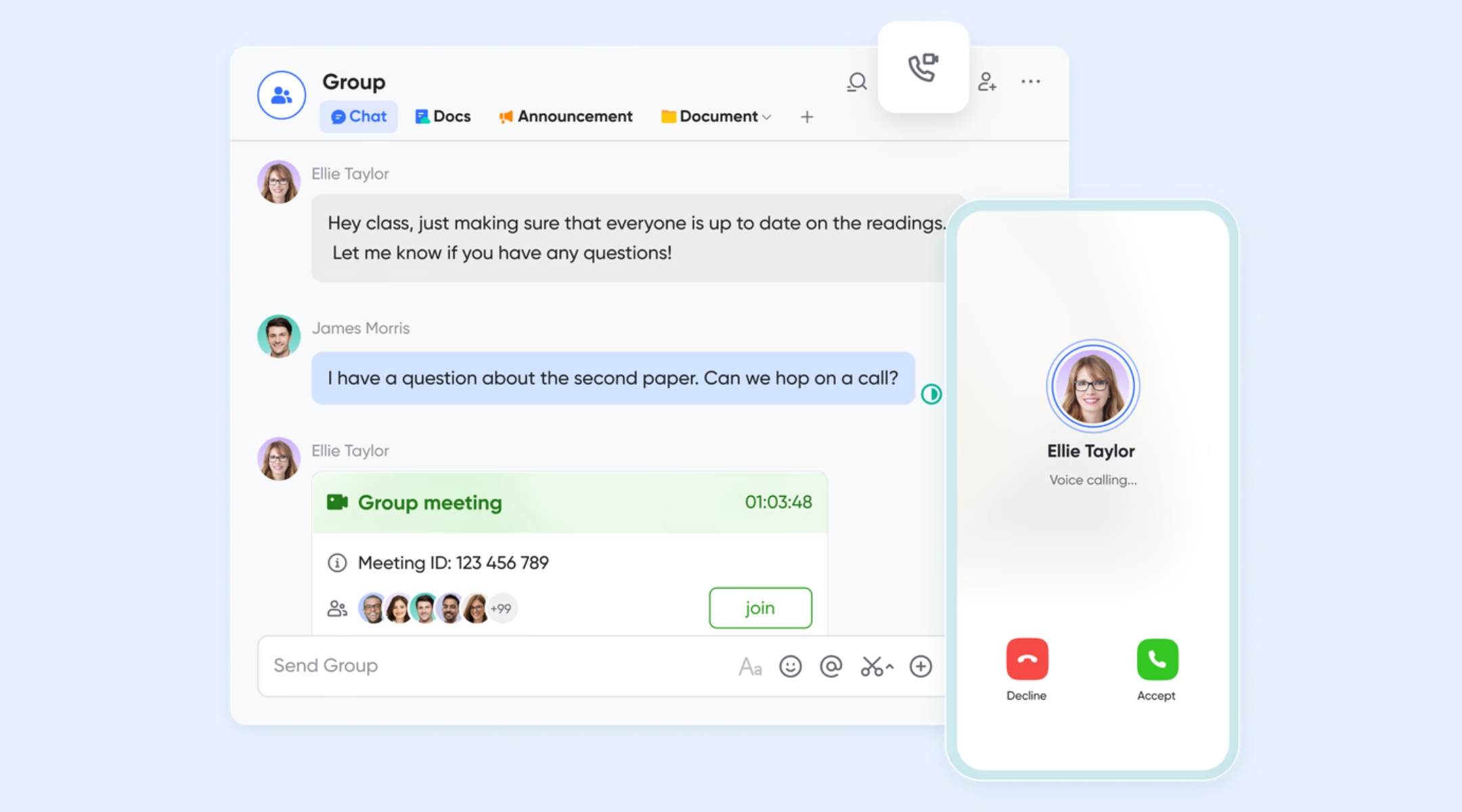
Advanced preparation and meeting control
Before joining a meeting, Lark provides a dedicated preview screen where users can test microphones, speakers, and cameras, ensuring technical readiness. Visual tools such as virtual backgrounds, avatars, filters, and touch-up options are available to improve on-camera presence. During the meeting, hosts and co-hosts can manage participant permissions, control screen sharing, and adjust security settings in real time. These controls support both informal discussions and highly structured sessions like training, reviews, or external briefings. 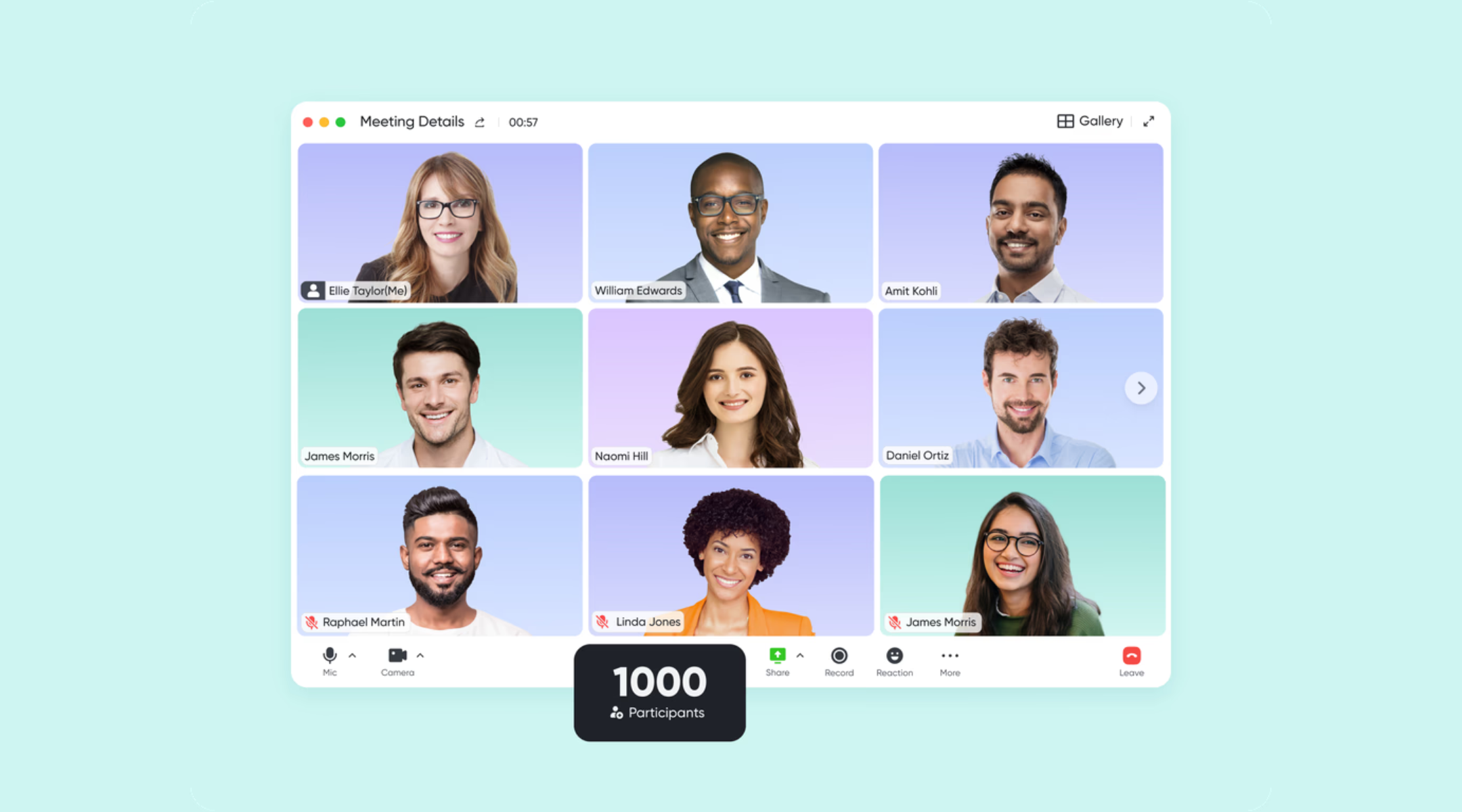
AI-generated summaries and structured meeting records
When AI summary is turned on, during or after meetings, capturing key discussion points and automatically extracting to-do items. When meetings are recorded and uploaded, produces searchable transcripts that allow teams to quickly revisit specific topics without replaying full recordings. This transforms meetings from transient conversations into lasting knowledge assets that can be referenced by attendees and non-attendees alike.
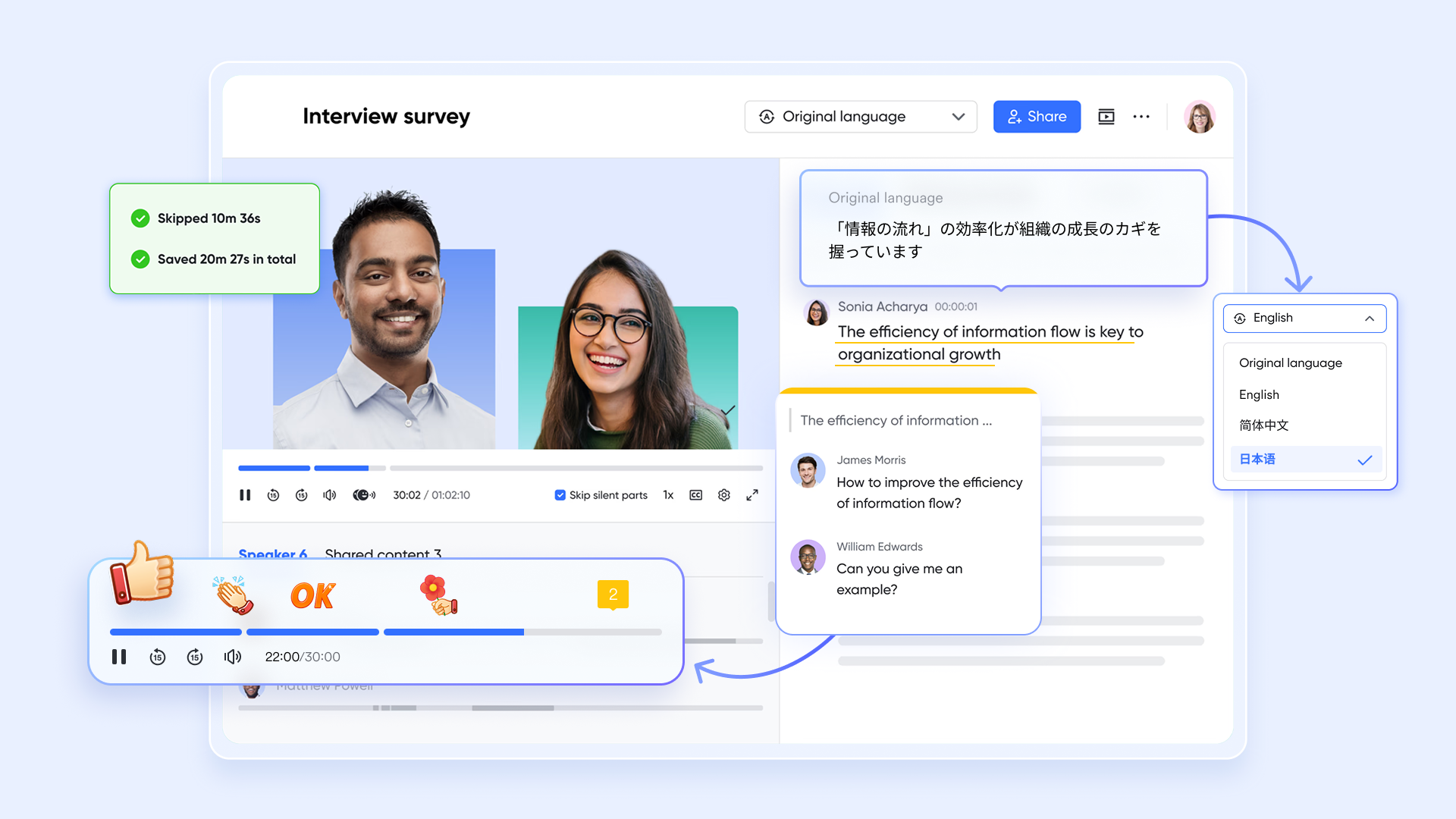
Native collaboration tools inside meetings
Lark Meetings include Magic Share for , allowing participants to interact with shared files at their own pace or follow the presenter's view. Built-in whiteboards support live brainstorming and visual explanation, while chat, reactions, and flexible layout options enable dynamic interaction. Because these tools are native, teams can collaborate fluidly without relying on external apps or extensions. 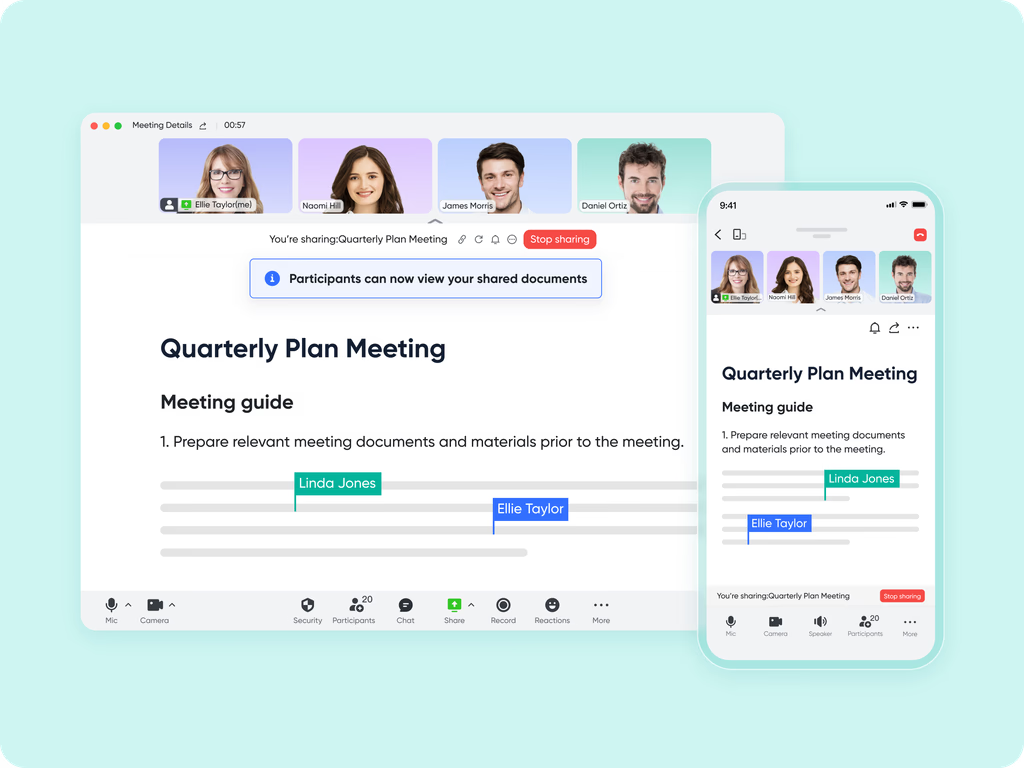
Meetings connected to execution and accountability
Lark ensures that meeting outcomes move seamlessly into execution. After a meeting, teams can capture decisions and notes in , where participants can be @mentioned to assign ownership or draw attention to specific points. These mentions notify users instantly and keep accountability visible within the document itself. Lark Docs also supports native task lists, allowing teams to convert action items directly into trackable tasks during or after the meeting. Tasks can be assigned, given due dates, and linked back to the discussion context. This eliminates the need to copy notes into separate task tools and ensures follow-ups remain tightly connected to the original conversation. 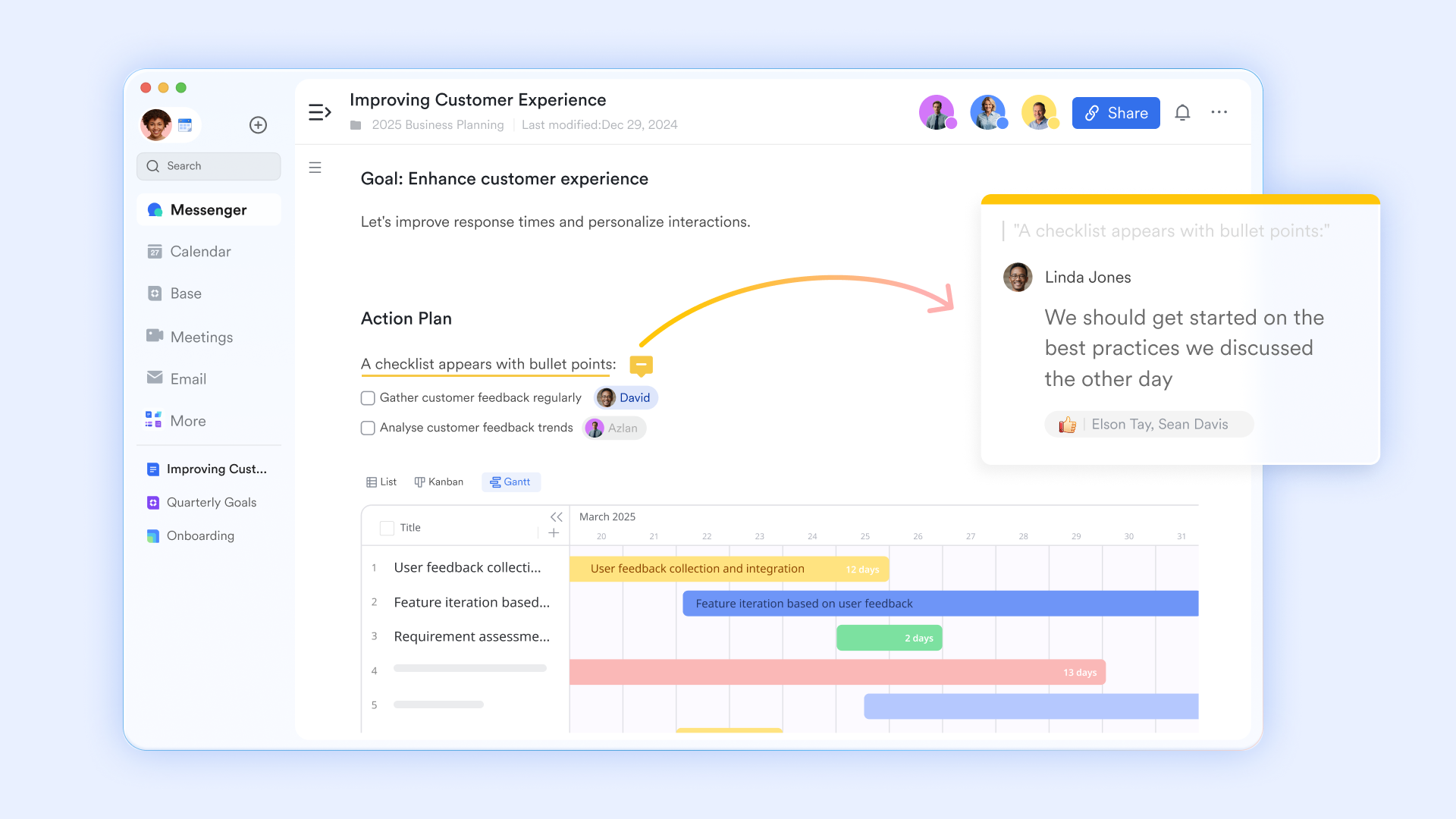
:
- Starter plan: Free forever plan that includes 11 powerful tools for up to 20 users. It also comes with 100GB of storage, 1000 automation runs, AI translations, and more.
- Basic plan: $6/user/month (billed annually) for up to 500 users. It includes everything in Starter plus group calling for up to 500 attendees, 5TB of storage, 1000 automation runs, and more. For more details, please .
- Pro plan: $12/user/month (billed annually) for up to 500 users. It includes everything in Basic plus group calling for up to 500 attendees, 15TB of storage, 50,000 automation runs, and more.
- Enterprise plan: for custom pricing. Supports unlimited users and includes even more automation runs and advanced security, compliance, and management features.
For small teams with simple communication needs

18 months message history
1000 Base automation runs/month
2000 rows per table in Base
Most POPULAR
For companies with comprehensive collaboration and management needs
Unlimited message history
500-participant video meetings
50k Base automation runs/month
20k rows per table in Base
For large companies with advanced security and organizational management needs
Get a personalized demo and pricing
Unlimited message history
500-participant video meetings
15 TB storage + 30 GB storage/user
500k Base automation runs/month
50k Base automation runs/month
Most POPULAR
For companies with comprehensive collaboration and management needs
Unlimited message history
500-participant video meetings
50k Base automation runs/month
20k rows per table in Base
Final check: Google Meet vs Lark
Choosing between Google Meet and Lark depends on whether you need a lightweight, familiar tool for quick calls or a deeply integrated "hub" where the meeting is just one part of a larger project workflow.
Choose Google Meet if:
- You already use Google Workspace: If your team relies on Gmail, Google Calendar, and Drive, Meet is the "frictionless" choice. There's no new software to learn, and it's already paid for in your annual subscription.
- You frequently meet with external guests: Meet is the industry standard for accessibility. Guests can join via a simple browser link without needing to download an app or create an account, making it ideal for client pitches or interviews.
- You prefer a "Lightweight" experience: If you just need a reliable video window and basic screen sharing without being overwhelmed by sidebars, task lists, or complex document tools, Meet's minimalist UI is superior.
- You prioritize stability over features: Meet is known for being resource-efficient on laptops and having very high uptime, which is critical for large-scale "broadcast" style meetings.
Choose Lark if:
- You want "Context-first" collaboration: Choose Lark if you hate switching between apps. You can launch a meeting directly from a chat thread, and the chat history stays visible and connected to the call.
- You need "Magic Share" for co-editing: If your meetings involve active work (like writing a PRD or updating a spreadsheet), Lark allows everyone to edit the document inside the video window at their own pace, rather than just watching a screen share.
- You want automated accountability: Lark excels at turning talk into action. Its AI (Lark Minutes) generates searchable transcripts and extracts "to-do" items that are automatically pushed into your team's task lists and follow-up docs.
- You work in a multilingual team: Lark offers superior real-time subtitle translation (supporting 100+ languages) and transcription features that are often more robust for international teams than Google's current offerings.
Conclusion
This Google Meet review shows why the platform remains widely used. It is reliable, accessible, and easy to adopt. For many teams, especially those already using , it solves the basic problem of quickly and consistently getting people on a call.
However, meetings today are not just conversations. They are decision points. As teams grow, the need to capture outcomes, assign ownership, and track follow-through becomes more critical. That is where limitations begin to appear in any long-term Google Meet analysis.
Some teams continue with Google Meet and supplement it with other tools. Others gradually move toward platforms like that connect meetings directly to documents, tasks, and execution. The right choice depends on how central meetings are to getting real work done.
Build meetings into real work using Lark
FAQs
What are the disadvantages of Google Meet?
Google Meet lacks some advanced engagement tools found in competitors, such as a native whiteboard (following the retirement of Jamboard) and a built-in waiting room for all plans. It also has stricter participant display limits, showing fewer people on screen at once compared to Zoom. Additionally, its browser-based nature can sometimes lead to high CPU usage or freezing during large meetings.
Which is better, Zoom or Google Meet?
The choice depends on your specific needs: Zoom is generally superior for large-scale webinars, complex breakout sessions, and advanced AI-driven features like meeting summaries. Google Meet is better for teams already using Google Workspace, as it offers a simpler interface, easier scheduling via Google Calendar, and more cost-effective annual pricing for small-to-medium businesses.
Is Google Meet free and safe?
Yes, Google Meet is free for anyone with a Google account, offering 60-minute group meetings and unlimited 1:1 calls. It is highly secure, featuring encryption in transit and at rest, anti-abuse controls, and the advantage of being browser-based, which reduces the need for frequent software patches and lowers the risk of security vulnerabilities.
What are the limitations of Google Meet?
The primary limitation for free users is a 60-minute cap on group meetings with three or more participants. It also limits meetings to 100 participants on basic plans and reserves "pro" features for paid Workspace subscribers, like cloud recording, noise cancellation, and attendance tracking. Also, it does not support sending direct file attachments within the meeting chat.
Is Google Meet suitable for project-heavy teams?
Google Meet works well for holding project discussions and review calls. However, it does not manage decisions, tasks, or accountability once meetings end. Project-heavy teams often rely on additional tools to track follow-ups and ownership. Over time, this creates across apps. As a result, some teams gradually explore platforms like Lark that connect meetings more directly to execution.
Related reading






























