














Google Sheets CRM Template Guide: 9 Top Picks and Alternatives

Ryan Tanner
Product Marketing Specialist
Sep 18, 2026
Ryan Tanner
Sep 18, 2026

19 min read


Google Sheets CRM templates have become a reliable starting point for small teams, startups, and freelancers who want to manage customer data without complex software. These templates make it easy to organize leads, track deals, and monitor sales pipelines in a structured way. With the flexibility of Google Sheets, businesses can customize their workflows, share updates, and stay consistent across projects.
In this guide, we'll review the nine best Google Sheets CRM templates available today, from simple trackers to advanced pipeline systems. And if you're ready to upgrade from manual spreadsheets, we'll also introduce a modern solution, Lark templates, for more intelligent control and data management. Let's dive in now!

What is a Google Sheets CRM template?
A Google Sheets CRM template is a pre-formatted spreadsheet designed to help businesses manage customer relationships and sales processes efficiently. It allows users to input lead details, deal status, contact history, and key performance data in a single document. These templates often include formulas, filters, and dashboards that help visualize your sales funnel or track follow-ups. For freelancers or small businesses, it's a convenient starting point to manage clients without relying on paid CRM software.
While basic, these templates can be powerful when customized for unique workflows. You can modify them to suit your sales stages, assign responsibilities, or automate calculations. For teams that prefer manual control, Google Sheets CRM templates remain a popular first step before transitioning to advanced tools.
Why spreadsheets still dominate the CRM conversation
Even with a range of modern CRM software options available, spreadsheets continue to dominate many small-business workflows. Their simplicity, flexibility, and accessibility make them a trusted choice for teams that prioritize ease of use and quick setup.
- Familiarity: Most teams already know how to use spreadsheets, which makes adopting them for CRM simple and intuitive. There's no need for additional training or complex onboarding. This familiarity allows teams to start organizing customer data immediately without learning new software or tools.
- Affordability: Google Sheets is completely free and hosted in the cloud, making it one of the most budget-friendly CRM solutions available. Startups and freelancers can manage their customer information and sales pipelines without the financial burden of paid systems. It's a practical choice for teams that want functionality without subscription costs.
- Want to learn more about Google Sheet pricing? Check out our Google Workspace pricing guide
- Flexibility: Spreadsheets can be shaped to match any workflow. Teams can customize columns, add formulas, and modify layouts to suit unique sales processes or reporting needs. This flexibility gives users total control over how data is tracked and presented, making it easy to evolve the system as the business grows.
- Accessibility: Because Google Sheets is cloud-based, it can be accessed from any device with an internet connection. This allows team members to view, edit, and update information in real time, no matter where they are working. It's particularly useful for distributed or remote teams that need constant access to live data.
- Quick setup: Unlike many dedicated CRMs that require configuration or user onboarding, Google Sheets CRM templates can be used right away. Teams can download a template, input their leads, and start tracking deals within minutes. This immediacy helps small businesses focus on sales rather than spending time setting up tools.
These factors make spreadsheets a low-barrier, easy-to-manage CRM solution for early-stage teams that need flexibility and speed without the overhead of traditional CRM systems.
What makes a good CRM template?
Before downloading the first spreadsheet you find online, it's worth understanding what actually makes a CRM template effective. A well-designed CRM sheet ensures that every customer interaction is tracked accurately and that no opportunity slips through the cracks. It also promotes consistency across your sales process and helps visualize data for faster decision-making. When built correctly, it becomes more than just a static document, it becomes a living tool for managing growth.
A good CRM template should:
- Track key lead and deal information clearly: It should include fields for lead source, contact info, deal stage, and assigned sales rep. This helps everyone in the team stay aligned on priorities and ensures that no lead is missed or duplicated.
- Enable simple filtering and sorting for insights: A strong CRM template allows you to quickly filter by lead stage, deal size, or date. This helps sales managers analyze conversion rates and identify which parts of the pipeline need attention.
- Provide visibility into follow-ups and deal stages: The best templates include automated date tracking or color coding to highlight overdue follow-ups. This ensures teams maintain timely communication with clients.
- Allow easy sharing across teams: Since customer data often involves multiple stakeholders, the sheet should be structured for clear collaboration. Google Sheets' built-in sharing makes it ideal for this, provided access levels are well managed.
- Be scalable as customer lists grow: A template must remain efficient even as data increases. Dynamic ranges and linked dashboards can prevent slowdowns and errors as your pipeline expands.
9 Best Google Sheets CRM templates you can start using today
Whether you're a solo consultant or part of a growing team, the following CRM templates can help you organize contacts and sales pipelines effectively. We'll start with Lark's powerful templates, which combine simplicity with automation, and then explore other popular Google Workspace alternatives available today.
1. Google Sheets simple CRM tracker
This template is best for individuals, consultants, or small businesses who want an easy way to manage client data. It tracks contacts, deal stages, and follow-ups without requiring complex setup. The clean layout helps teams record essential details and stay organized from lead to closure. It's an excellent first step for those building a customer management process using spreadsheets.
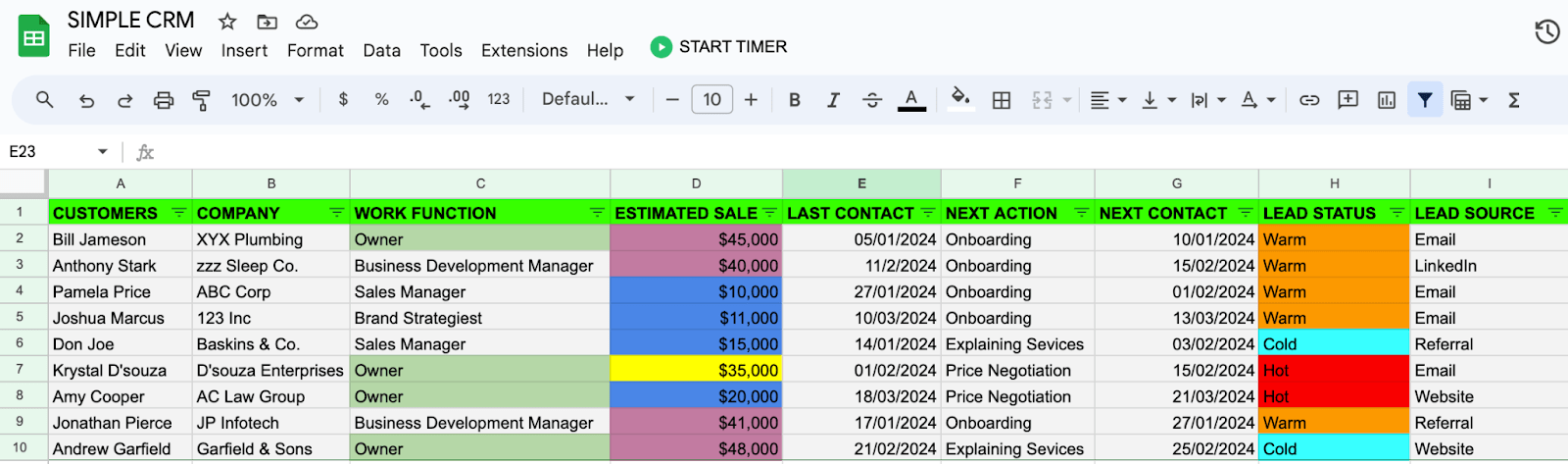
Image source: docs.google.com
2. HubSpot free CRM spreadsheet
HubSpot's free CRM spreadsheet offers a professional yet simple way to manage leads and deals. It mirrors the core structure of HubSpot's main CRM, making it ideal for small teams testing organized workflows. With predefined columns and deal stages, it helps teams keep track of client communication and pipeline health. It's a practical starting point before adopting more advanced CRM tools.
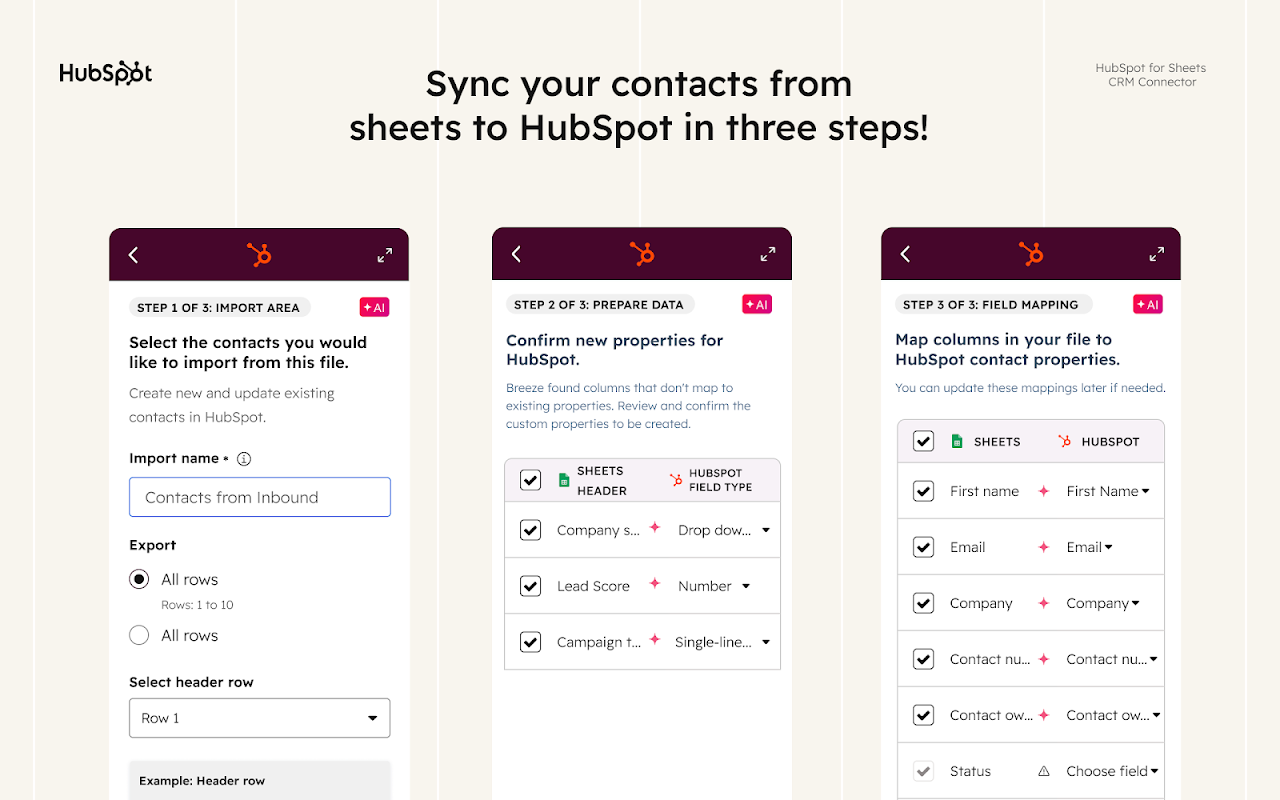
Image source: hubspot.com
3. Vertex42 sales pipeline manager
The Vertex42 sales pipeline manager is designed for teams that value structure and forecasting accuracy. It uses built-in formulas to calculate deal probabilities, revenue forecasts, and sales performance. The organized layout makes it easy to visualize the health of the sales funnel and identify priority opportunities. It's well suited for managers who want measurable insights from every deal stage.
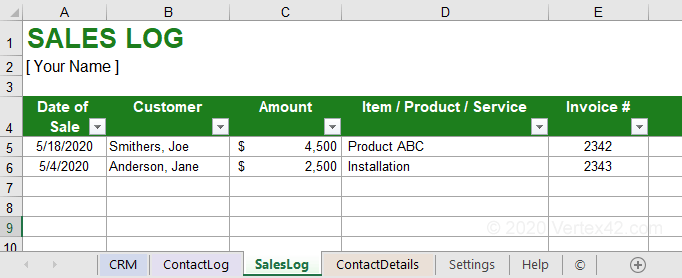
Image source: vertex42.com
4. Copper CRM Google Workspace template
Copper's Google Workspace CRM template is built for users already working within Google's ecosystem. It connects smoothly with Gmail and Calendar, allowing teams to track conversations, follow-ups, and meeting notes. The layout focuses on relationship management, giving users a single view of clients and deals. It's ideal for businesses that rely heavily on Google tools for daily communication.
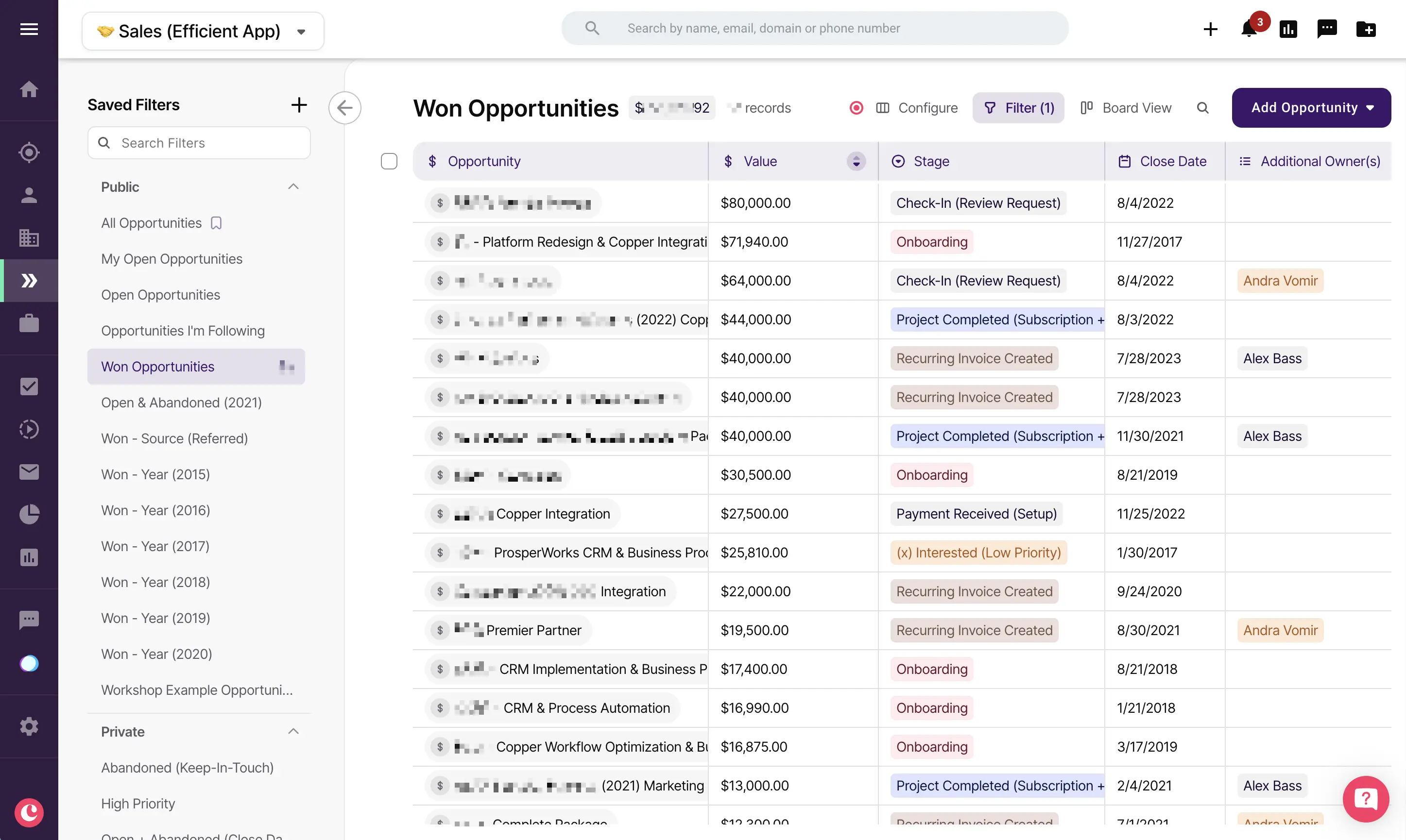
Image source: copper.com
5. Airtable-style CRM sheet for Google sheets
This template recreates the look and feel of Airtable while keeping the simplicity of Google Sheets. It's perfect for teams that prefer a visually organized workspace with color-coded stages and filters. Leads, deals, and clients can be grouped or tagged easily, giving quick visibility into the sales process. It's a smart choice for those who want structure without leaving the spreadsheet format.
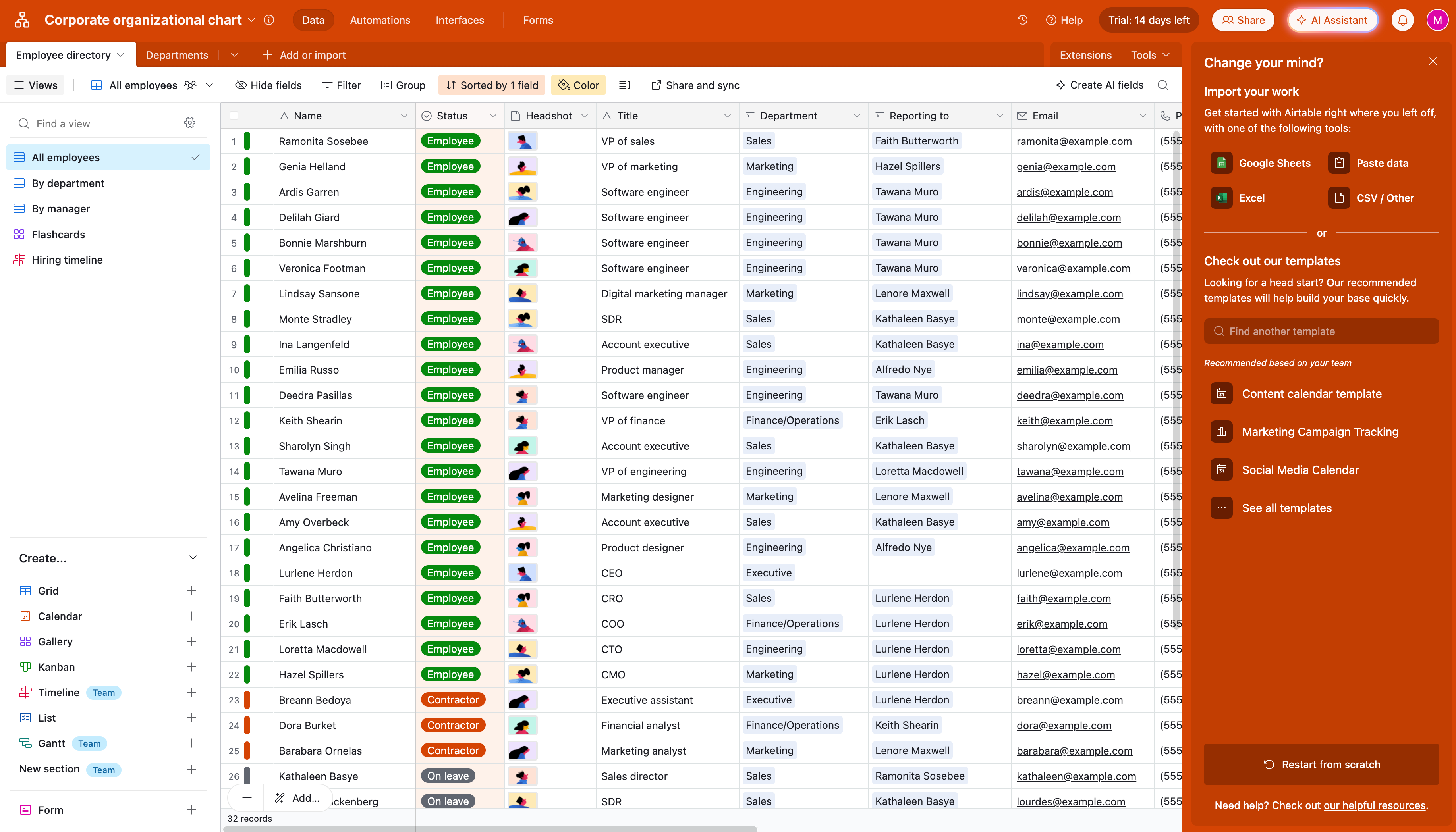
Image source: airtable.com
6. Smartsheet CRM for SMBs
Smartsheet's CRM template is made for small and mid-sized businesses that need collaboration and accountability in their sales process. It allows multiple users to track deals, assign tasks, and leave updates in one shared sheet. The dashboard-style design provides real-time visibility into performance metrics. It helps teams move beyond manual updates to a more coordinated sales rhythm.
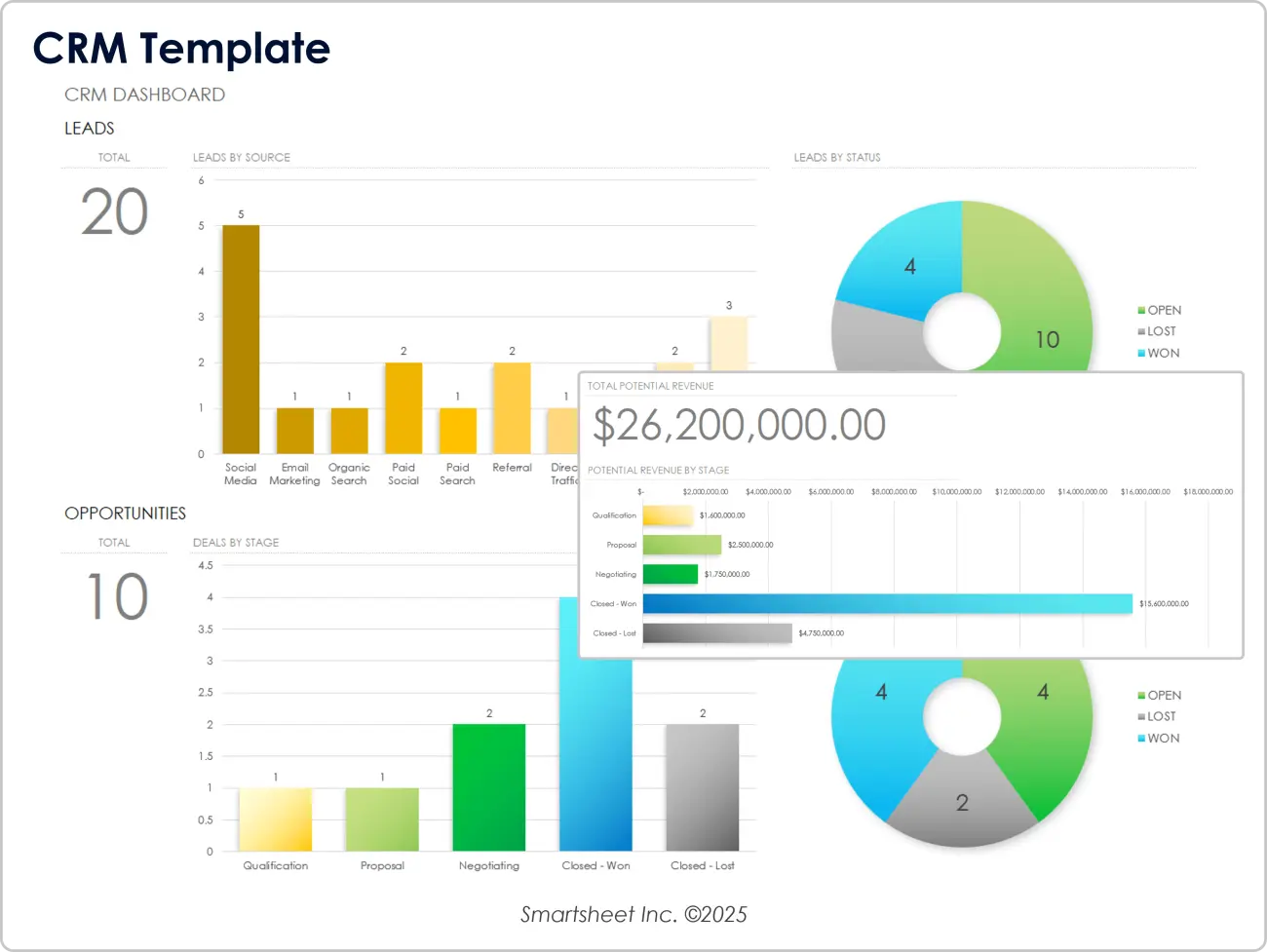
Image source: smartsheet.com
7. Monday.com CRM template for Google Sheets
Monday.com's CRM template combines color-coded clarity with spreadsheet functionality. It's great for teams that want a visual approach to managing leads, activities, and deal progress. Each column represents a stage in the pipeline, helping users spot bottlenecks and priorities quickly. It's a user-friendly option for marketing and sales teams working within Google Sheets.
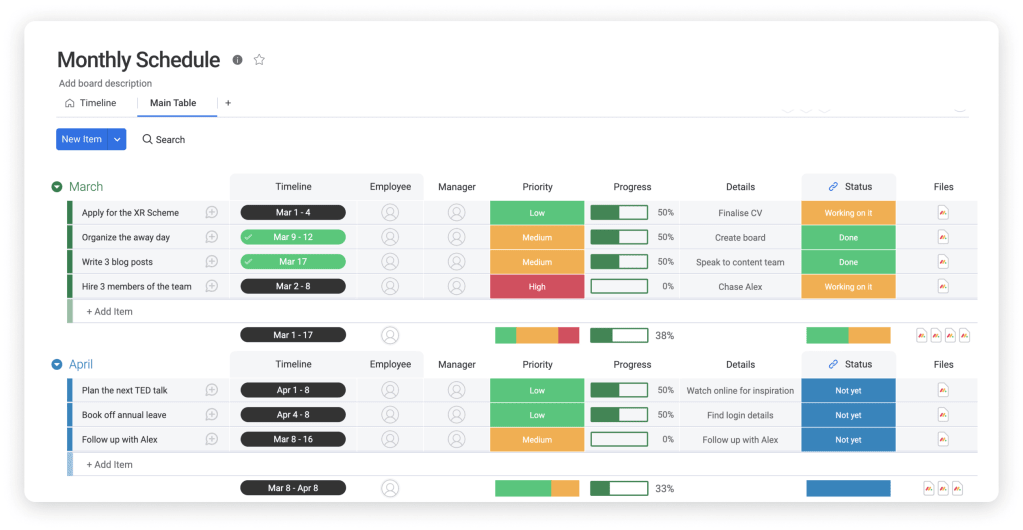
Image source: Monday.com
8. Clarify.ai CRM performance sheet
Clarify.ai's CRM performance sheet focuses on turning sales data into actionable insights. It allows teams to track customer engagement, retention, and lifetime value in one place. The setup blends CRM tracking with analytical metrics to measure overall business performance. It's a strong choice for teams that want to combine marketing and sales analysis within one template.
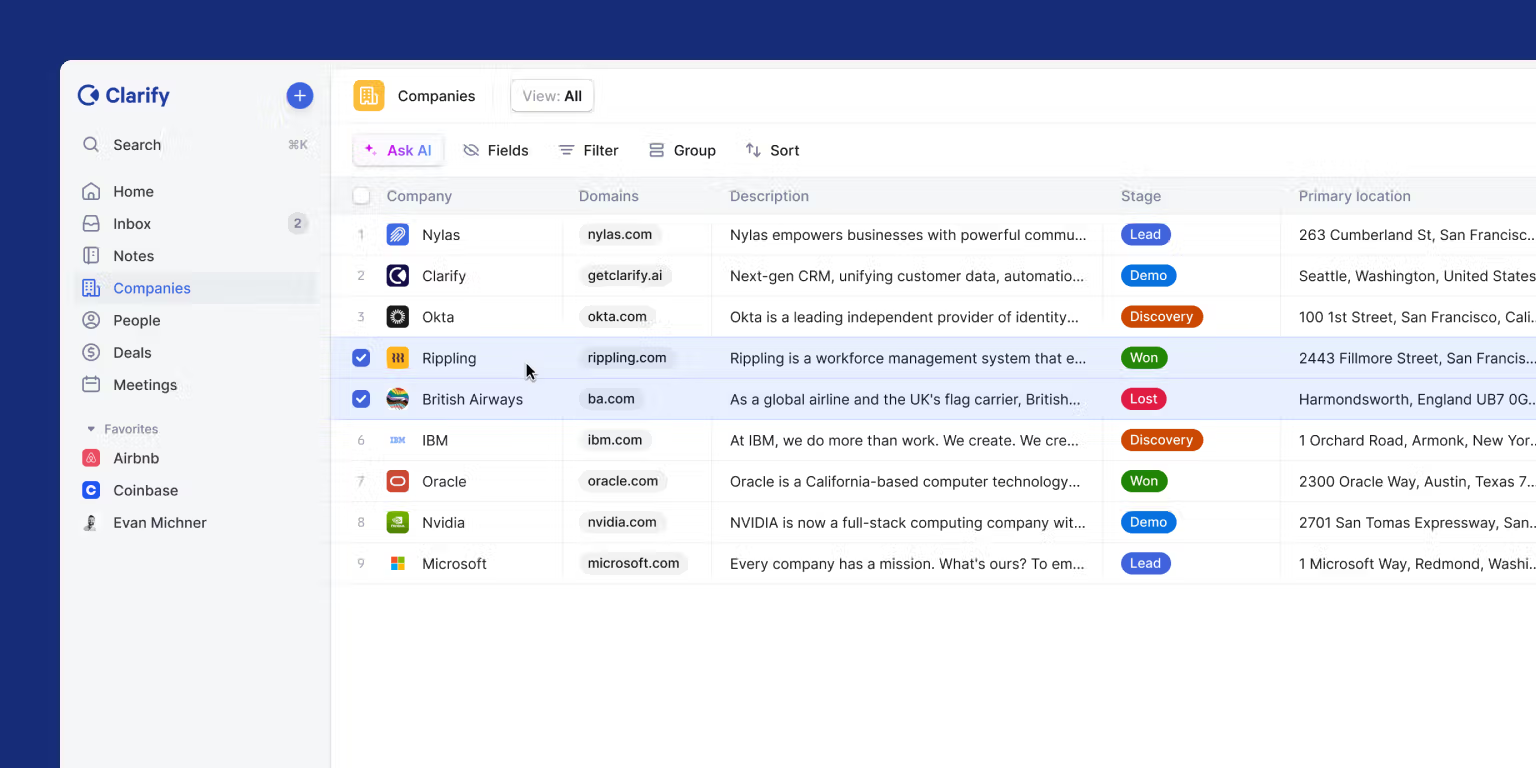
Image source: clarify.ai
9. Salesflare CRM log
The Salesflare CRM log is designed for tech startups and SaaS companies that depend on inbound leads. It captures contact data, engagement details, and deal progress automatically from online forms or emails. The clear structure helps teams track lead sources and identify which channels drive conversions. It's a simple, efficient tool for growth-focused teams managing fast-moving pipelines.
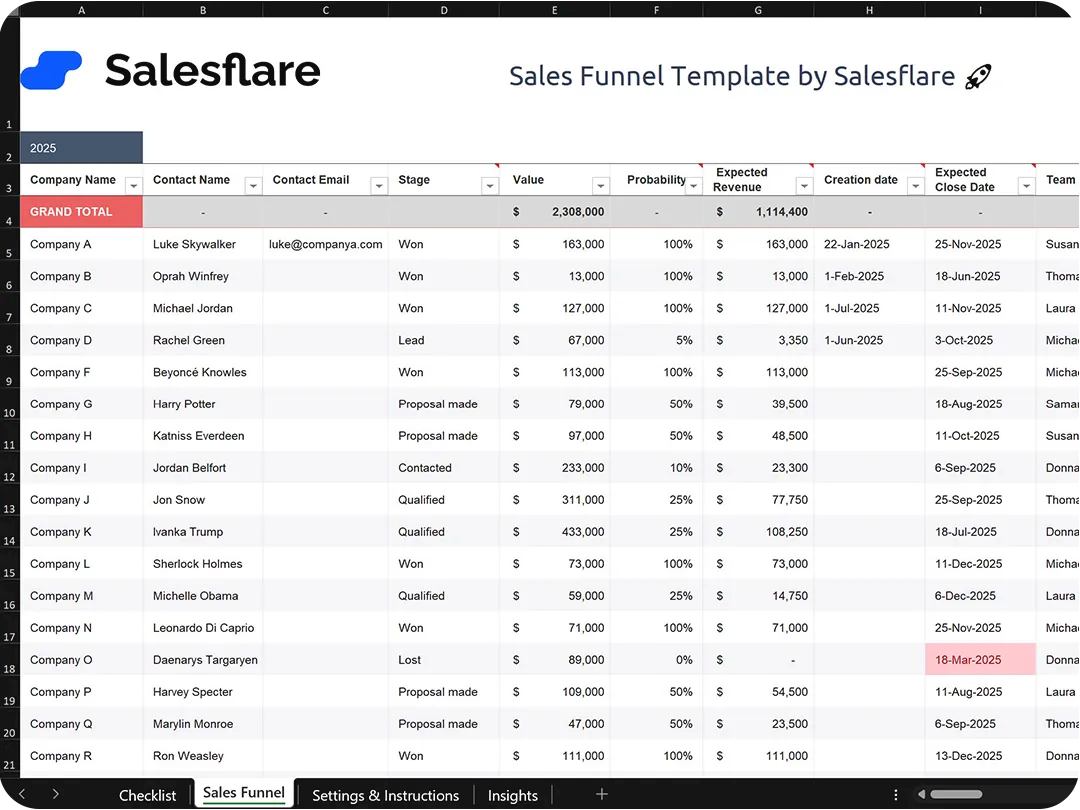
Image source: salesflare.com
Where Google Sheets CRM templates fall short
Google Sheets is great for beginners, but as teams expand, limitations appear quickly. Managing growing customer data becomes increasingly difficult when everything depends on manual entry and version control. Over time, these small inefficiencies accumulate and begin to affect collaboration, accuracy, and overall productivity.
- Manual data entry: Every new contact or deal update must be typed manually, which increases the chance of human error. As records grow, tracking updates or correcting mistakes becomes time-consuming. Without automation, data accuracy can quickly decline, leading to inconsistencies in reports and forecasts. This also places additional workload on sales teams, reducing time spent on meaningful client interactions.
- Version control issues: When multiple users access and edit the same spreadsheet, version conflicts often occur. It's easy to lose track of the latest data, especially if files are downloaded, copied, or shared repeatedly. Different team members might update different versions, making it unclear which information is correct. This problem multiplies as teams expand or handle multiple sheets simultaneously.
- No real-time communication: Google Sheets lacks built-in messaging or task-tracking tools, forcing teams to rely on separate apps for collaboration. This constant switching between tools slows down communication and increases the risk of missed updates. Critical discussions about client follow-ups or deal progress happen outside the document, making it harder to maintain context. The lack of centralized communication reduces overall workflow efficiency.
- Limited visibility: Spreadsheets are static, meaning teams can only view one aspect of data at a time. Generating insights or visualizing live performance requires manual chart creation and frequent updates. Managers cannot easily monitor KPIs or identify pipeline bottlenecks in real time. This limitation makes reporting slower and less responsive to daily operational changes.
- Scaling pain: As customer lists and data volumes grow, Google Sheets slows down and becomes harder to manage. Large datasets lead to longer loading times, formula errors, and potential crashes. Organizing multiple sheets for teams or departments becomes complex, especially when there's no unified dashboard. Over time, maintaining performance and data consistency turns into a challenge that spreadsheets were never built to handle.
These drawbacks make it clear that while Google Sheets CRM templates are practical starting points, scaling teams need a unified workspace that reduces manual effort and increases automation. That's where Lark, the Google Workspace alternative, comes in: it's a more connected solution that delivers real-time updates, more innovative collaboration, and accurate insights for long-term business growth.
Alternative: Lark comprehensive CRM platform & smart templates
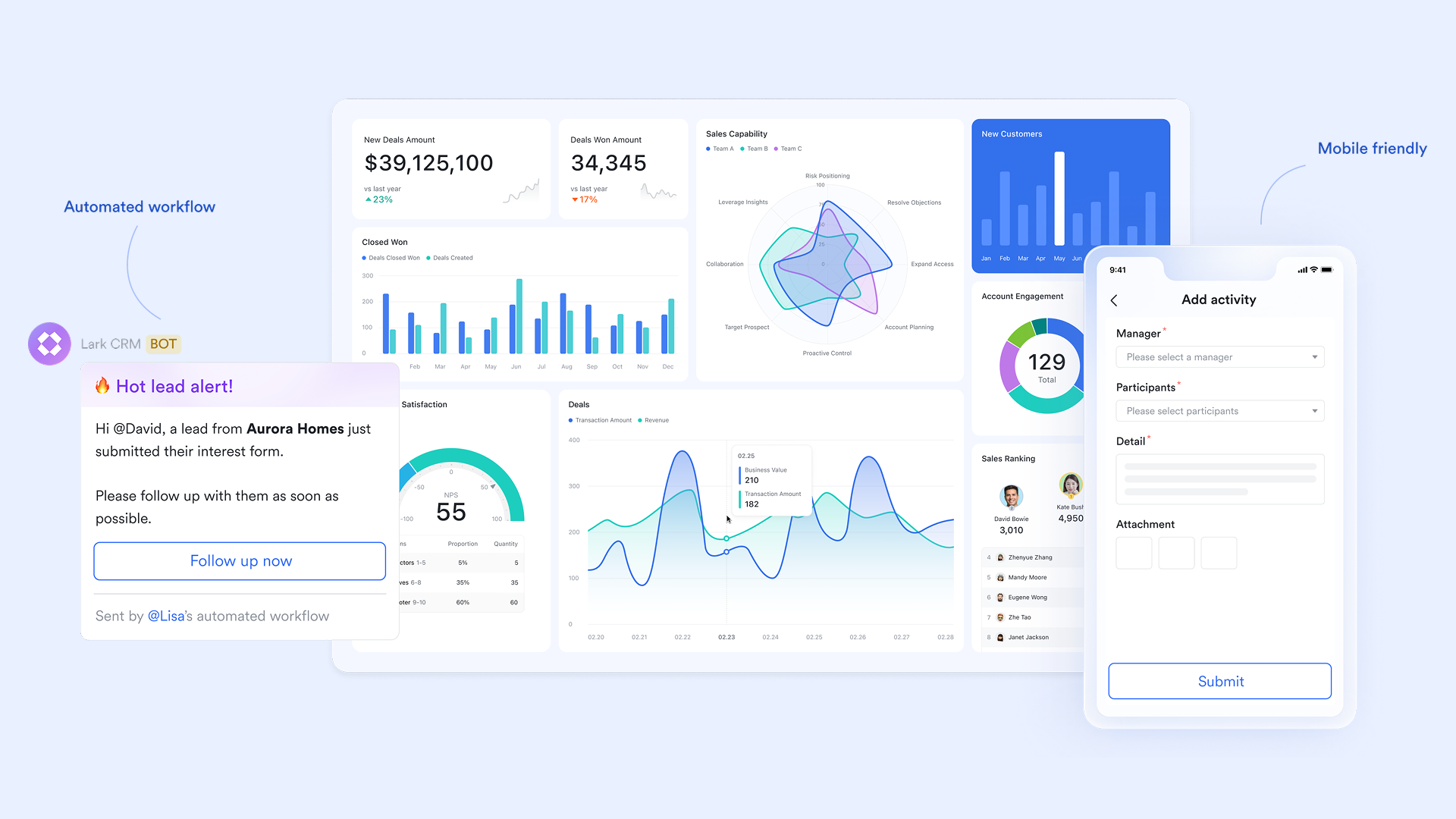
Lark is an all-in-one platform that transforms how teams manage customer relationships by combining CRM functionality with real-time collaboration tools. Instead of switching between multiple apps for data tracking, communication, and reporting, teams can handle everything related to CRM in one connected workspace.
With Lark's CRM templates, teams can quickly build customized pipelines, automate workflows, and visualize customer journeys using Base, Tasks, and Docs. Whether you're nurturing leads, managing accounts, or analyzing sales performance, Lark keeps every interaction transparent and every process aligned.
Sales tracker: Lead analysis and follow-up template
This template is a complete system for managing and tracking sales leads from start to finish. It features a lead stage dashboard, a customer transaction record table, and a transaction form for detailed data entry. With this template, you can log every aspect of a transaction from the assigned salesperson and service type to discounts, pricing, quantity, and payment details. It's ideal for teams that want an organized, transparent view of each lead's journey and financial performance.
Sales & CRM template
The sales & CRM template is designed to simplify and centralize your entire sales process. It supports advanced functions such as adding records, customizing views, configuring cards, and filtering or sorting by specific criteria. A built-in Client Visit Form lets sales reps record visit details instantly, while the Opportunity Management Table tracks deals, links related records, and auto-calculates follow-up intervals. Interactive dashboards visualize key sales metrics and ongoing opportunities, giving your team a clear overview of performance and priorities.
Sales management system template
The sales management system template offers a structured and efficient way to handle every stage of your sales cycle from lead generation to deal closure. It enables teams to add records, configure fields, and categorize information through filters, groups, or color coding. This makes it easy to visualize pipeline stages and monitor progress at a glance. Perfect for sales professionals, managers, and business owners, it's a practical tool for streamlining sales activities and boosting productivity.
Sales order management template
The sales order management template provides a systematic framework for organizing and tracking sales orders across your business. It gives teams a clear snapshot of targets, completed sales, and performance rates, along with a countdown to the quarter's end. You can also segment data by region to analyze local sales performance. This template helps sales leaders evaluate progress, identify trends, and make informed decisions that drive better results.
Store performance reporting system template
The store performance reporting system template helps retail and franchise operators monitor store performance with precision. It consolidates data across multiple branches, tracks critical KPIs, and generates detailed performance reports. Whether you're managing a single outlet or a nationwide network, this template delivers actionable insights to improve operations, boost efficiency, and optimize store performance.
Contract management template
Lark's contract management template helps teams centralize contract creation, tracking, and provide automated approval in one organized workspace. With automated reminders, version control, and linked approvals, businesses can ensure no contract deadlines or renewals are missed. Teams can collaborate securely in real time, reducing manual errors and improving compliance across departments.
AI-powered customer review analysis template
This AI-powered template helps teams automatically collect, categorize, and analyze customer reviews across multiple channels. By using Lark Base and AI tools, teams can uncover sentiment trends, pinpoint product insights, and identify service gaps — all without manual sorting. The dashboard transforms feedback into clear visuals for faster decision-making.
Procurement, sales, and inventory system for chain stores template
Designed for retail and operations teams, this template streamlines the management of procurement, sales tracking, and inventory control across multiple branches. With real-time data syncing in Lark Base, teams can monitor stock levels, supplier performance, and sales trends from one dashboard. Automated workflows help reduce manual updates and ensure accuracy across stores.
- Starter plan: Free forever plan that includes 11 powerful tools for up to 20 users. It also comes with 100GB of storage, 1000 automation runs, AI translations, and more.
- Pro plan: $12/user/month (billed annually) for up to 500 users. It includes everything in Starter plus group calling for up to 500 attendees, 15TB of storage, 50,000 automation runs, and more.
- Enterprise plan: Contact sales for custom pricing. Supports unlimited users and includes even more automation runs and advanced security, compliance, and management features.
Comparison: Google CRM sheets vs. Lark templates
As businesses grow, efficiency and collaboration become essential. While Google Sheets CRM templates help teams manage data, they struggle to deliver the automation, communication, and analytics that modern workflows require.
Lark bridges this gap by combining collaboration tools, real-time chat, and project management within a single workspace. This allows teams to track sales, communicate instantly, and automate updates seamlessly, all without switching between apps. The comparison below highlights key differences between the two systems.
Conclusion
Google Sheets CRM templates offer an easy and cost-effective way to manage sales pipelines, customer details, and follow-ups. They are especially useful for startups, freelancers, and small teams that need a simple system to stay organized. These templates provide flexibility and control, allowing users to customize fields, filters, and reports based on their workflows. However, as businesses scale and collaboration expands, the limits of manual spreadsheets quickly become visible. Version issues, manual entry, and slow performance can hold back team productivity.
Lark provides a modern, connected alternative that goes far beyond traditional spreadsheets. It combines CRM tracking, task management, team chat, automation, and analytics within one unified workspace. Teams can update records in real time, automate reminders, and monitor deal performance without switching between apps. With its free plan and scalable paid options, Lark empowers organizations to manage customer relationships more efficiently and make smarter, data-driven decisions.
FAQs
Can I use Google Sheets as a CRM for my business?
Yes, you can use Google Sheets as a basic CRM to manage leads, deals, and client communication. It's a good starting point for freelancers or small teams who need simple data organization. However, as your customer base grows, manual updates become harder to manage. Upgrading to an automated solution like Lark can help streamline collaboration and reduce repetitive work..
What are the advantages of using a Google Sheets CRM template?
Google Sheets CRM templates are free, easy to use, and highly customizable. They allow teams to track sales pipelines, assign follow-ups, and visualize progress using filters and charts. These templates are especially useful for startups with limited budgets. When your workflow scales, switching to Lark brings automation and built-in communication tools for greater efficiency.
What are the biggest limitations of Google Sheets CRM templates?
While flexible, Google Sheets CRM templates require manual data entry and lack automation. Teams often face version conflicts, limited visibility, and slower performance with large datasets. These issues can reduce accuracy and productivity over time. Tools like Lark solve these challenges by offering automated workflows, real-time collaboration, and built-in messaging.
How do I choose the best CRM template for Google Sheets?
The best template depends on your team size and workflow needs. Look for one that includes lead tracking, follow-up reminders, deal stage categorization, and basic analytics. For growing teams, scalability and collaboration are key. When you outgrow spreadsheets, Lark offers an easy transition to a connected workspace with CRM capabilities.
Is Lark a good alternative to Google Sheets CRM?
Yes, Lark is a strong alternative for teams that want more than a manual CRM. It combines chat, docs, tasks, and automation in one platform, allowing sales teams to manage deals and communication seamlessly. Lark also supports data dashboards, reminders, and advanced workflow automation for improved accuracy and speed.
Related reading
Table of contents
Start using Lark today

Manage all your work in one place
Boost team efficiency by 10x
Save up to 70% on software costs
Table of contents
Start using Lark today
Manage all your work in one place
Boost team efficiency by 10x
Save up to 70% on software costs
Keep reading









2026 Lark Technologies Pte. Ltd.
Headquartered in Singapore with offices worldwide.






Explore: