














Kanban Board Examples: Real Use Cases for Every Team

Ryan Tanner
Product Marketing Specialist
Sep 18, 2026
Ryan Tanner
Sep 18, 2026

15 min read


Kanban board examples are everywhere today—and for good reason. Teams love them because they make work visible, structured, and much easier to manage. Instead of tasks slipping through the cracks, every step is carefully mapped out, ensuring nothing gets lost along the way.
At its simplest, a Kanban board is a visual tool that shows tasks moving across different workflow stages. This clear view helps teams quickly spot bottlenecks, track progress, and stay aligned without endless status meetings.
What started as sticky notes on physical boards has grown into robust digital systems that adapt to almost any workflow. In this guide, we'll explore real Kanban board examples and practical use cases that demonstrate how different teams are utilizing this method to work more efficiently.

What makes a good Kanban board example?
Not all Kanban boards are created equal. The best ones share a few common traits that keep teams focused, organized, and able to adapt when priorities shift. Let's break down what makes a Kanban board truly effective:
1. Clear columns that match the workflow: A Kanban board only works if its structure mirrors the way your team actually operates. Clear, well-defined columns—like To Do, In Progress, Review, Done—make it instantly obvious where each task stands. If the workflow is vague or mismatched, the board becomes confusing rather than helpful. Good boards evolve over time as teams refine their processes, ensuring the columns always represent the real path work takes.
2. Tasks/cards with ownership and details: Each card on a Kanban board should be more than just a task title; it should also include a description. It should carry essential details—such as deadlines, notes, or priority—so anyone looking at it can understand its context. Assigning ownership is equally important because when responsibility is clear, accountability follows. A well-crafted task card eliminates guesswork and makes collaboration smoother across the team.
3. WIP (Work in Progress) limits to avoid overload: One of Kanban's core principles is preventing bottlenecks by limiting the number of tasks in progress at any given time. Without WIP limits, boards can quickly become cluttered with half-finished work, causing delays and stress. By setting reasonable caps, teams stay focused on completing tasks before starting new ones, which improves both efficiency and morale. It's a minor adjustment that has a significant impact on flow.
4. Flexibility to adapt as projects evolve: A static board is rarely a useful one. Projects shift, priorities change, and new requirements surface—so a good Kanban board needs to bend without breaking. Flexibility can mean adding new columns, reordering tasks, or even redefining the workflow as the team grows. This adaptability ensures the board remains a living tool that reflects reality, not just an idealized plan.
And this is where digital tools shine. With Lark Base, teams don't just build static boards—they create dynamic systems. Columns can be adjusted as workflows change, ownership is clear through Tasks assignments, and automations keep updates consistent across the board. This means less manual tracking and more focus on moving work forward, precisely the way Kanban was meant to function.
Software development Kanban board examples
For development teams, Kanban boards are more than just visual trackers—they're essential tools for managing complex workflows, coordinating across roles, and ensuring that nothing slips through the cracks. Here's what a typical setup looks like:
Columns: A software development Kanban board usually starts with a Backlog column, where new features, user requests, and bugs are collected. From there, tasks move into 'In Progress' when a developer picks them up, followed by 'Testing' once QA reviews are underway, and finally into 'Done' after a successful release. This step-by-step flow makes it clear what's being worked on and what's ready for deployment, reducing confusion in fast-moving sprints.
Example cards: The cards themselves represent the lifeblood of a dev team's work. Common examples include user stories that describe new features, bug fixes that address issues reported by users, and code reviews that ensure quality before merging. Each card can be enriched with details such as acceptance criteria, priority, or links to technical documentation—ensuring that developers and testers have everything they need at a glance.
This system works so well for developers because it balances visibility with control. Teams can view the full scope of upcoming work in the backlog, track ongoing development, and quickly identify bottlenecks—such as when too many tasks accumulate in testing. It streamlines releases, improves accountability, and fosters smoother collaboration across developers, QA engineers, and product managers.
In practice, tools like Lark Base make this process even more seamless. Developers can manage their backlog and in-progress tasks directly in Base, while storing technical specifications in Docs for easy reference. Meanwhile, Messenger supports quick stand-ups and asynchronous discussions, ensuring that blockers are identified and resolved quickly. Together, these features recreate the entire development cycle in a single, integrated platform.
Marketing Kanban board examples
For marketing teams, a Kanban board brings clarity to the often-chaotic flow of campaigns, content creation, and approvals. Instead of juggling scattered spreadsheets or endless email threads, everything sits in one place, moving smoothly from idea to execution.
Columns: A typical marketing Kanban board typically includes stages such as Plan, Design, Publish, and Review. Campaign ideas or content requests begin in the planning phase, move into design for creative development, get scheduled for publishing, and then head into review once results come in. These columns keep the team aligned and prevent critical deliverables from slipping through the cracks.
Example cards: On a marketing board, cards might represent campaign concepts, social media posts, or blog drafts. Each card can contain attachments like copy drafts, design files, or approval notes, making it a central hub for collaboration. This way, everyone—writers, designers, and managers—has context at their fingertips.
What makes this approach so effective? Kanban brings transparency to editorial calendars and approval workflows, allowing teams to instantly see which campaigns are coming up, which assets are in design, and which pieces are ready to publish. This visibility reduces bottlenecks, accelerates approvals, and provides stakeholders with confidence through a real-time view of progress.
In Lark, marketers can go a step further. Lark Calendar helps align campaign timelines with product launches or events, while Lark Base templates provide ready-made Kanban boards designed for content production. Together, these tools keep campaigns running on time and ensure no detail is overlooked.
Sales Kanban board examples
For sales teams, visibility into the pipeline is everything. A Kanban board transforms what could be a messy list of names and numbers into a transparent, structured process that clearly shows the current status of every opportunity.
Columns: A typical sales Kanban board starts with Lead, then moves to Contacted, Proposal, and finally Closed. Each stage reflectsthe journey of a prospect, from first touch to final deal. This linear setup makes it easy to track progress and spot which leads need more attention.
Example cards: Cards on a sales board often represent opportunities or client follow-ups. Each one can hold details such as deal size, contact history, or next steps, providing sales reps with a quick reference point before every call. Over time, these cards provide a running history of interactions, making it easier to build stronger client relationships.
So why does this approach click for sales teams? A Kanban pipeline keeps the sales process transparent and measurable. Managers can instantly see which deals are moving forward, where potential bottlenecks are forming, and how close the team is to hitting targets. It fosters accountability while providing salespeople with clear priorities.
With Lark Base CRM templates, sales teams can build their pipeline in minutes and customize it to fit their specific process. Automations take it further by sending follow-up reminders or automatically updating statuses, ensuring that no opportunity slips through the cracks. This way, sales managers don't just track deals—they actively drive them forward.
HR Kanban board examples
Recruiting can get complicated fast—with dozens of candidates, multiple interview rounds, and piles of paperwork to manage. An HR Kanban board simplifies this process by presenting the entire hiring journey in one precise, visual flow.
Columns: A typical HR board includes stages such as sourcing, Interviewing, Offer, and Onboarding. Every candidate progresses through these steps, providing recruiters and hiring managers with a comprehensive view of each application's status. This structure eliminates guesswork and ensures no candidate gets lost in the shuffle.
Example cards: Cards often represent candidate applications, scheduled interview slots, or finalized contracts. Each card can be enriched with details such as resumes, interviewer notes, and hiring deadlines. This creates a single source of truth for the entire team, making it easier to collaborate and move candidates forward smoothly.
Why does this approach work so well for HR teams? Because hiring is a team sport. With a Kanban board, everyone involved—from recruiters to department heads—can view the pipeline, track progress, and understand which roles are nearing completion. It brings transparency to a process that's often scattered across emails, spreadsheets, and chat threads.
Lark In Lark, this workflow becomes even more streamlined. Recruiters manage candidate pipelines directly in Base, schedule interviews seamlessly with Calendar, and keep resumes and contracts organized in Docs. Together, these tools remove the friction from hiring and help teams move top candidates from first contact to onboarding without delay.
Personal productivity Kanban board examples
Kanban boards aren't just for teams—they work brilliantly for individuals too. Whether you're managing errands, side projects, or daily priorities, a personal Kanban board brings order and focus to your to-do list.
Columns: The simplest personal setup consists of three stages: To-do, In Progress, and Done. Tasks start in the to-do column, shift into 'in progress' when you're actively working on them, and land in 'done' once completed. This visual flow makes it easier to stay focused without feeling overwhelmed.
Example cards: Cards on a personal Kanban board represent daily tasks, errands, or longer-term projects. Each card can include notes, links, or reminders to help you stay organized and avoid losing track of details. Over time, the done column becomes a satisfying record of progress, reinforcing motivation.
Why does this setup work for individuals? Because it builds visual accountability. You can see at a glance what's on your plate, what you're currently handling, and what you've already accomplished. That clarity reduces stress and helps you prioritize the tasks that matter most.
Even at a personal level, Lark makes this simple. With Tasks integrated into Base, individuals can organize their workflow in a Kanban format, while automated reminders through Lark Messenger help keep things on track. It's a streamlined way to turn scattered to-dos into a clear, actionable plan.
Physical vs digital Kanban board examples
Kanban started as a physical system, but in today's hybrid and remote work environment, digital boards have taken the lead. Each approach has its own strengths—and understanding the difference helps teams choose the right fit.
Physical boards: The classic Kanban setup often lives on whiteboards, sticky notes, or office walls. These physical Kanban board examples are highly visual and easy to interact with during in-person meetings. Moving sticky notes from one column to another can be surprisingly satisfying. The downside, however, is that they don't scale well. Updates aren't visible outside the office, and tracking historical data or automations is nearly impossible.
Digital boards: Modern project management tools like Lark Base, Jira, and Trello bring Kanban online. These platforms are where you'll often see software development Kanban board examples or even Jira Kanban board examples in action, supporting agile workflows and sprint planning. Digital boards replicate the visual simplicity of sticky notes, but add powerful features such as remote access, cloud storage, and search capabilities. Tasks can be updated in real-time by multiple team members, regardless of their location. This makes digital Kanban essential for distributed teams and fast-moving projects.
The real power of digital Kanban boards comes from their ability to stay in sync across teams and devices. With real-time updates, built-in automation, and anywhere access, they go far beyond what sticky notes can do. Teams can set automated reminders, track progress across multiple projects, and even experiment with layouts such as Kanban board swimlane examples for added clarity. For hybrid or global teams, that flexibility isn't just nice to have—it's essential.
What makes Lark stand out is how deeply connected its Kanban boards are to the rest of your workflow. Unlike standalone tools, Lark Base Kanban integrates seamlessly with other essentials: teams can link boards directly to Lark Docs for specifications, use Lark Calendar for scheduling, and keep communication flowing with Messenger. That means you're not just tracking tasks—you're collaborating around them in one integrated workspace, keeping everyone aligned from start to finish.
Kanban swimlane examples
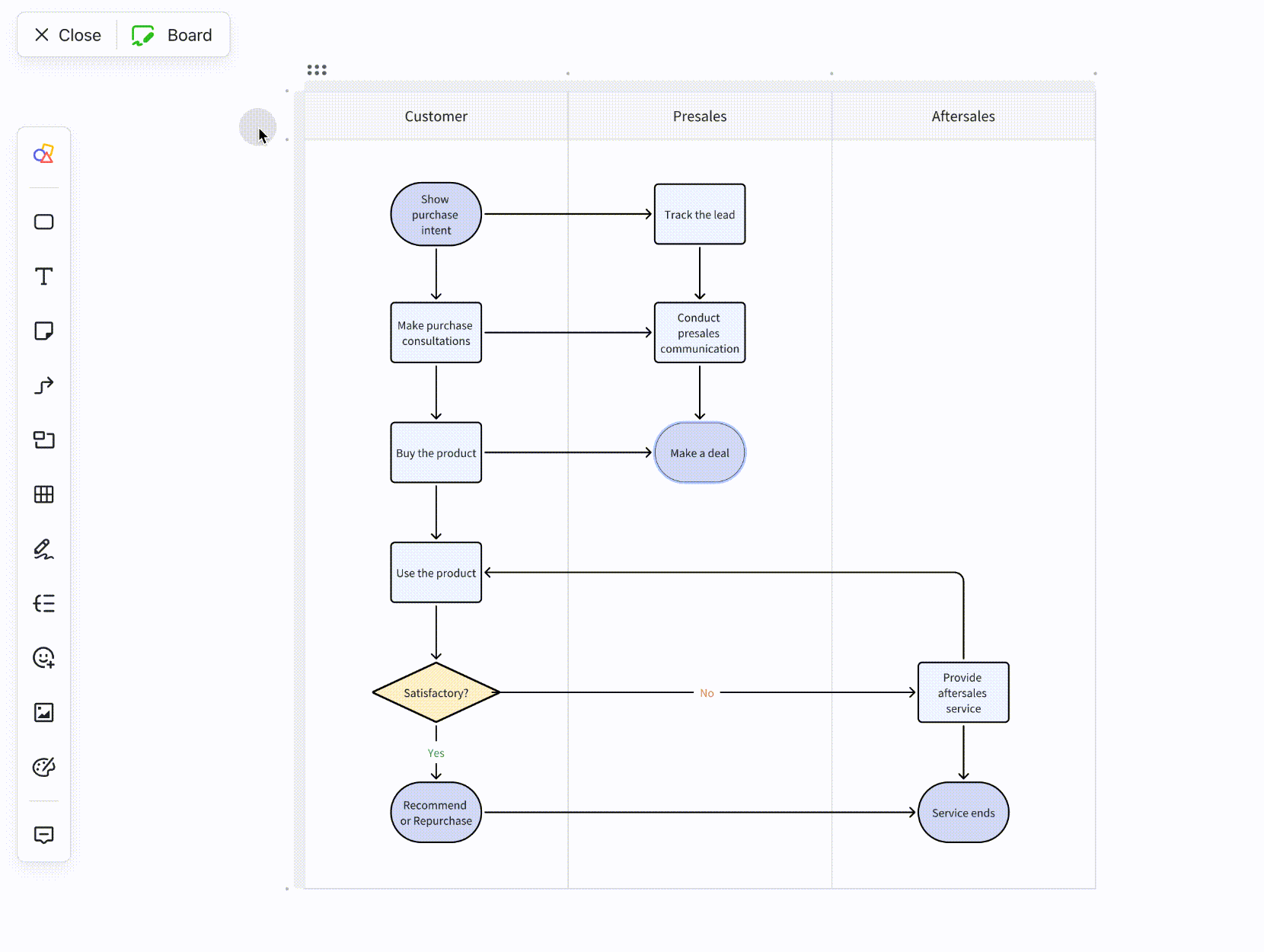
Swimlanes are a powerful way to bring more structure to a Kanban board. Instead of only moving tasks vertically across workflow stages, swimlanes add horizontal lanes that group tasks by a chosen category. This extra layer of organization makes it easier to spot patterns, balance workloads, and keep related tasks aligned.
Before moving ahead, let's take a look at what swinlane is. A swimlane is essentially a horizontal divider on a Kanban board. Each lane represents a grouping—whether by type of work, priority, or responsibility—so tasks can be sorted in a more meaningful way.
Examples: Teams might use swimlanes to separate tasks by priority (high, medium, low), by team (design, engineering, marketing), or even by product line. For instance, a product company could manage development tasks across different apps or features, all within the same board but split into swimlanes for clarity.
In Lark, swimlanes can be created through Lark Doc's Board feature, giving teams a simple way to organize work horizontally. Tasks can be grouped by priority, team, or project stream, making busy workflows easier to follow and manage. Because everything stays connected to shared docs and discussions, cross-team collaboration becomes far more seamless.
Getting started with Kanban in Lark doesn't require a significant investment—its pricing is designed to scale with your team's needs. Whether you're an individual experimenting with personal boards or an enterprise managing global workflows, there's a plan that suits you.
- Starter plan (Free forever): Perfect for small teams of up to 20 users. It includes 11 core tools—like Docs, Messenger, Calendar, and Tasks—plus 100GB of storage, 1,000 automation runs, and even AI-powered translations to support global collaboration.
- Pro plan ($12/user/month, billed annually): Best for growing teams of up to 500 users. You get everything in the Starter plan, along with advanced features like group calls with up to 500 attendees, 15TB of storage, and 50,000 automation runs for scaling workflows.
- Enterprise plan (Custom pricing): Tailored for organizations with complex needs and unlimited users. It offers even more automation capacity, plus advanced security, compliance, and management features. To explore this option, you can connect directly with the Lark sales team.
Conclusion
Kanban boards have proven their value across almost every domain—from software development and marketing campaigns to sales pipelines, HR hiring processes, and even personal productivity. Their strength lies in making work visible, structured, and easier to manage, regardless of team size or project complexity.
What makes this even more powerful today is the move from physical boards to digital platforms. With ready-made Lark Base templates, teams can start quickly without building from scratch. At the same time, features like real-time collaboration, automations, and integrations with Docs, Calendar, and Messenger ensure that workflows stay connected and efficient.
In short, Kanban isn't just a method—it's a mindset for working smarter. And with the right tools, like Lark, it becomes effortless to adapt that mindset to any team or project.
FAQs
Can Kanban board examples be applied in education or classrooms?
Yes, Kanban boards work well in classrooms for organizing assignments, projects, and group tasks. Teachers can use simple physical Kanban board examples with sticky notes or digital ones to track student progress. With Lark Base, education teams can take this further by using templates to assign tasks, set deadlines, and keep communication organized in one place.
How do remote teams use Kanban board examples effectively?
Remote teams rely on digital Kanban boards to stay aligned across time zones. Tools like Jira Kanban board examples or Lark Base templates make it easy to update tasks in real time, track progress, and avoid long status meetings. With Lark, boards connect directly to Messenger and Docs, so discussions and files are always tied to the task at hand.
What tools offer free Kanban board templates?
Many platforms offer free Kanban templates, including Trello, Miro, ClickUp, and Wrike. These templates save setup time by giving teams prebuilt structures. Lark Base also includes free Kanban templates, but unlike basic tools, it integrates automation, Calendar scheduling, and document collaboration for a more complete workflow.
How do Kanban board examples improve team productivity?
Kanban boards improve productivity by making work visible, structured, and measurable. Teams can quickly spot bottlenecks, limit work in progress, and focus on finishing tasks rather than juggling too many at once. With Lark Base, productivity is boosted further through automations, reminders, and real-time updates, ensuring teams spend less time tracking and more time delivering.
Related reading
Table of contents
Start using Lark today

Manage all your work in one place
Boost team efficiency by 10x
Save up to 70% on software costs
Table of contents
Start using Lark today
Manage all your work in one place
Boost team efficiency by 10x
Save up to 70% on software costs
Keep reading







2026 Lark Technologies Pte. Ltd.
Headquartered in Singapore with offices worldwide.






Explore: