Managing team productivity often feels like herding cats. You have updates in a chat thread, action items buried in a spreadsheet, and personal reminders scattered across sticky notes. If your team relies on standalone apps to track progress, you are likely experiencing the pain of workflow fragmentation.
In this review, I look closely at the Microsoft To Do list app. While it offers a solid foundation for personal organization, we will explore why growing enterprises and ambitious managers need a more unified, context-rich alternative to keep their teams aligned.
What is the Microsoft To Do app?
When searching for a reliable to do list microsoft offers this dedicated application designed to help users organize their daily lives. Built to function as a smart daily planner, it allows individuals to manage everything from work assignments to grocery lists in one central location.
Based on Microsoft's official support documentation, the platform operates on a relatively straightforward premise. You , break tasks down into smaller steps, set due dates, and add notes. All your tasks are stored securely on Exchange Online and sync automatically with Outlook, which makes it highly accessible for those already living inside an email-centric workflow.
The crown jewel of the application is the "My Day" feature. Instead of overwhelming you with a massive, never-ending backlog of chores, My Day presents a clean slate every morning. It offers intelligent suggestions based on your existing lists, allowing you to prioritize and focus only on the immediate tasks you need to tackle in the next 24 hours.
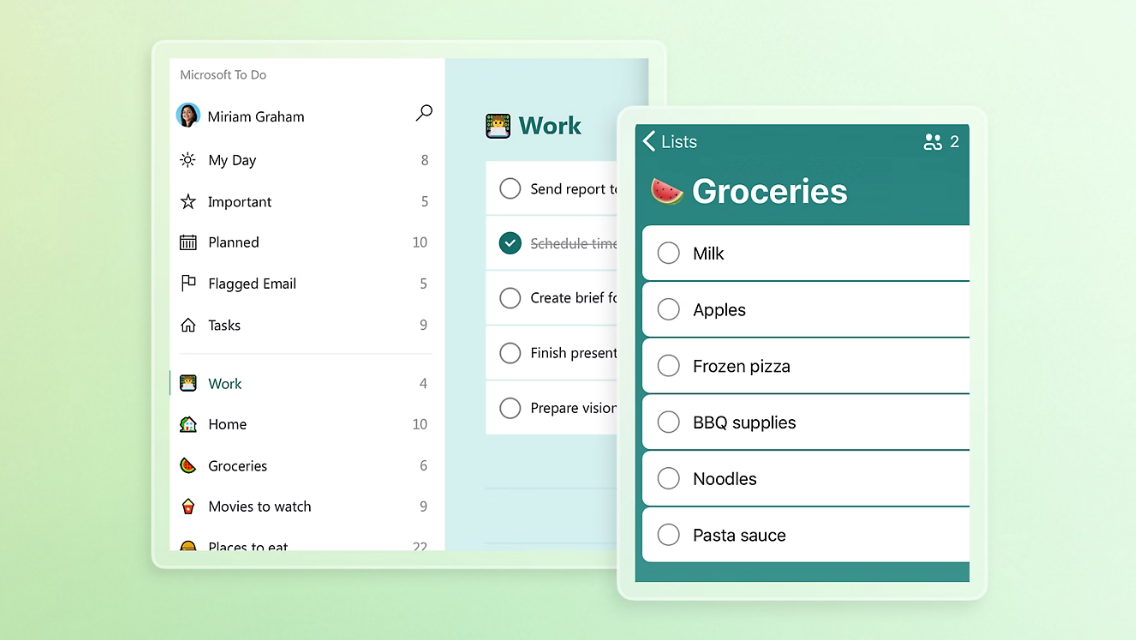
Image source: microsoft.com
App customization and user experience
With over 10 million downloads and a 4.7-star rating on Google Play, Microsoft To Do delivers a polished, secure, and highly customizable user experience:
- Cross-platform sync: Fully supported on Windows, macOS, Android, and iOS. Because tasks are securely stored on Exchange Online, they sync automatically with your Outlook account.
- Visual customization: You can personalize individual lists with custom colors and themes. The app also features full native Dark Mode support across all operating systems to reduce eye strain.
- Strict data privacy: Microsoft guarantees that no user data is shared with third parties, and users maintain full control with built-in options to request data deletion.
- Frictionless list sharing: While not built for enterprise project management, users can instantly share specific lists with colleagues or family members to easily coordinate small-scale efforts.
The strengths and limitations of Microsoft To Do
Where it works well (strengths)
- Excellent for individual task : The app excels as a straightforward digital notepad. It is highly effective for managing personal, day-to-day responsibilities, such as remembering to call a client or outlining a specific report.
- Reduces cognitive load: By encouraging users to tackle a manageable number of daily tasks (ideally around three), the app successfully prevents burnout. This focused approach helps improve mental clarity and can even positively impact sleep quality.
Where it falls short (limitations)
- Inadequate for enterprise scaling: The platform is fundamentally built around personal and family use cases. It lacks the robust infrastructure needed for complex, cross-functional team management, completely missing advanced features like resource allocation, automated custom workflows, and scalable database views.
- Unreliable cross-device syncing: Despite a high rating and millions of downloads, a major technical flaw is its inconsistent synchronization. Users frequently report that task priorities, item orders, or widgets fail to update across devices (e.g., from a mobile phone to a desktop). In a fast-paced professional environment, these sync failures can lead to team members working on the wrong assets, compounding into massive project delays.
- Fosters "invisible work" and team silos: When applied to team settings, relying on an isolated personal planner like Microsoft To Do can actually sabotage team alignment. Because work is managed in private silos, managers and peers only see a checked box without any vital context—they miss out on understanding why a task took longer than expected, what files were used, or what critical roadblocks were resolved along the way.
The hidden cost of isolated personal to-do apps
There is a widespread assumption that if every team member uses a good personal task tracker, the whole team will naturally become more productive. In my experience, the opposite is true. Relying heavily on isolated personal to-do list apps can secretly sabotage team alignment.
When individuals manage their work in private silos, it creates several major bottlenecks:
- The rise of "invisible work": A manager might see a checked box on a status report, but they lack all the surrounding context. Why did this task take three days instead of one? What files were referenced? Who answered the critical questions blocking progress? Modern enterprise managers do not just need to track what is being done; they must integrate the how and why.
- A disconnect from actual work: When you use a standalone app, the task is entirely disconnected from where the actual work happens. Your team discusses strategy in a chat platform, drafts proposals in cloud documents, and holds strategy meetings on video calls.
- Workflow friction: If your team has to manually copy and paste action items into a separate task manager, you introduce friction. Context is lost in translation.
To achieve true efficiency, task management must be embedded directly within the communication and documentation hubs your team already uses.
Eliminate workflow friction by unifying your team in Lark
Navigating the Microsoft task ecosystem: To Do, Planner, and Teams
While standalone apps cause friction, what happens when you try to use a suite of connected tools? Let's look at how Microsoft handles enterprise task management across its broader ecosystem."Microsoft 365 offers a sprawling suite of productivity tools. According to Microsoft’s documentation, an enterprise manager's intended workflow relies on several moving parts:
- Microsoft To Do app: Used to track individual daily tasks.
- Microsoft Planner: Used to manage team projects using Kanban boards.
- Tasks app within Microsoft Teams: Used to view everything together.
- Outlook: Used to convert emails directly into tasks.
On paper, this interconnected ecosystem sounds comprehensive. In reality, it introduces the heavy friction of switching between multiple interfaces.
Think about a typical Tuesday morning managing a marketing campaign. To get a clear picture of the day, you must check a to do list Microsoft application for your personal action items, open Planner to find design bottlenecks, and then jump into Teams to communicate about them. Because your (Teams) is structurally separated from deep (Planner) and daily task execution (To Do), context inevitably gets lost. Team members spend more time updating their statuses across three platforms than actually executing the work.Even if you set up a microsoft teams to do list to aggregate these views, the underlying structure remains fragmented. Different types of work require different apps.
Moving beyond the Microsoft Word to-do list template
Because software ecosystems often feel overly complex, managers frequently retreat to familiar, old-school methods. This explains why search volume remains high for a basic Microsoft Word template. When faced with learning three different task management interfaces, downloading a printable Word document feels like a breath of fresh air.
However, relying on static documents for dynamic enterprise project management is a critical mistake. A Word template might help you organize your thoughts on a quiet Sunday, but it falls apart in a real-world team environment because it cannot:
- Send a push notification when a deadline is approaching.
- Trigger an approval workflow when a designer finishes a mockup.
- Sync automatically (if an assignee changes, you have to manually save a new version and email it out, creating version control nightmares).
Transitioning away from rigid templates to automated, real-time tracking systems is non-negotiable for growing teams—but that system needs to be intuitive enough that your team actually wants to use it.
How Lark unifies your workflow and replaces scattered apps
Instead of building separate applications and trying to wire them together after the fact, Lark was designed from the ground up as a single, unified workspace.
Lark combines messaging, video meetings, cloud-native documents and sheets, shared calendars, email integration, and approval workflows into one platform. For growing SMEs and large enterprises struggling with a fragmented tool stack, this consolidation is a game changer. Rather than juggling a standalone task app and different software for team projects, Lark embeds context-rich task management directly where your team collaborates.
Dynamic documentation via Synced Blocks
operates on an innovative block-based architecture. One of its standout capabilities is "Synced Blocks," which empowers a single piece of content—like a p or a vital design spec—to exist across various documents at the same time. When you check off an item or modify a detail in your personal daily log, that exact update mirrors instantly within your central project Wiki. This eliminates manual copy-pasting and guarantees complete data consistency across your entire workspace. 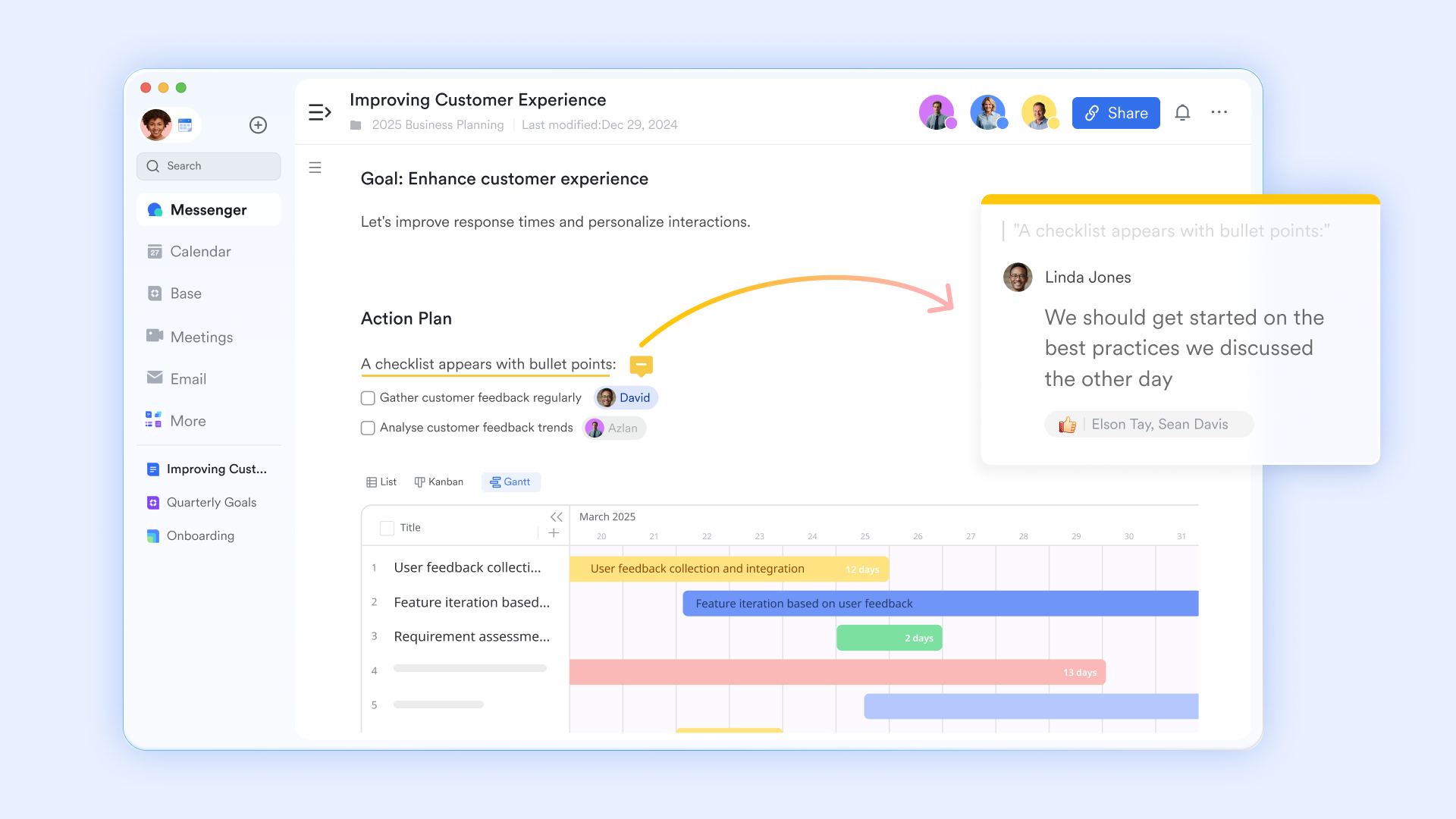
Seamless brainstorming with MindNotes
For ideation and early-stage planning, Lark introduces MindNotes. This dedicated brainstorming feature provides an intuitive dual-view format. Users can quickly type out a standard linear outline and, with a single click, transform that text into a highly visual Mind Map. This allows teams to instantly see how complex concepts connect, entirely bypassing the friction of exporting data to a third-party mind-mapping tool. 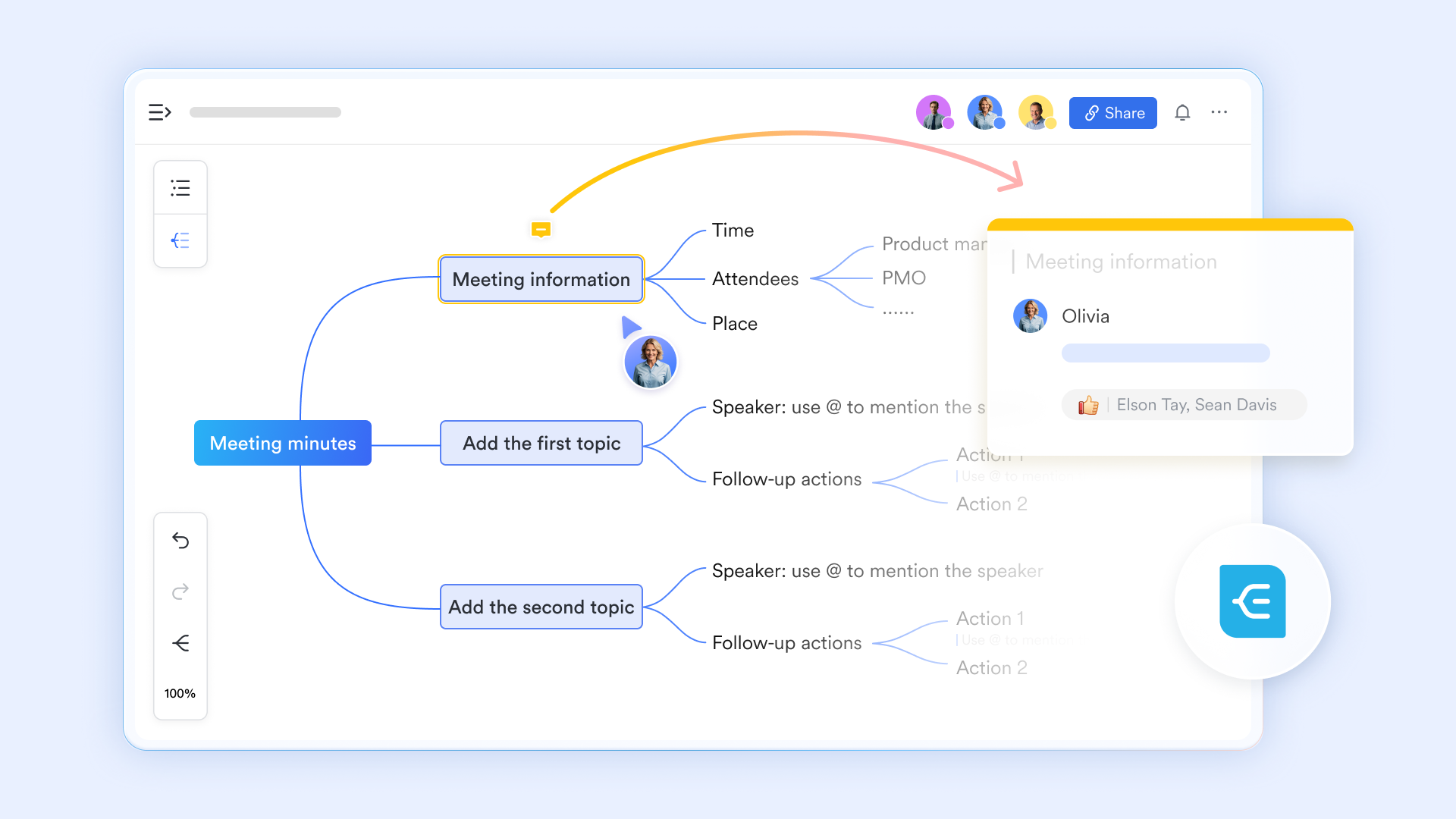
Advanced to do list tracking and team accountability
Instead of a basic checklist, Lark offers a robust to do list engine that centralizes team execution. Workflows are neatly categorized into tailored views like "Assigned," "Owned," and "Subscribed." Managers can easily deconstruct massive enterprise projects into manageable sub-to-dos, establish recurring rules, and leverage advanced tools like multi-condition filters and tracking. By letting users toggle effortlessly between traditional List, Kanban board, and Gantt chart perspectives, it guarantees that every single item on your team's to do list is visually tracked and completed on schedule. 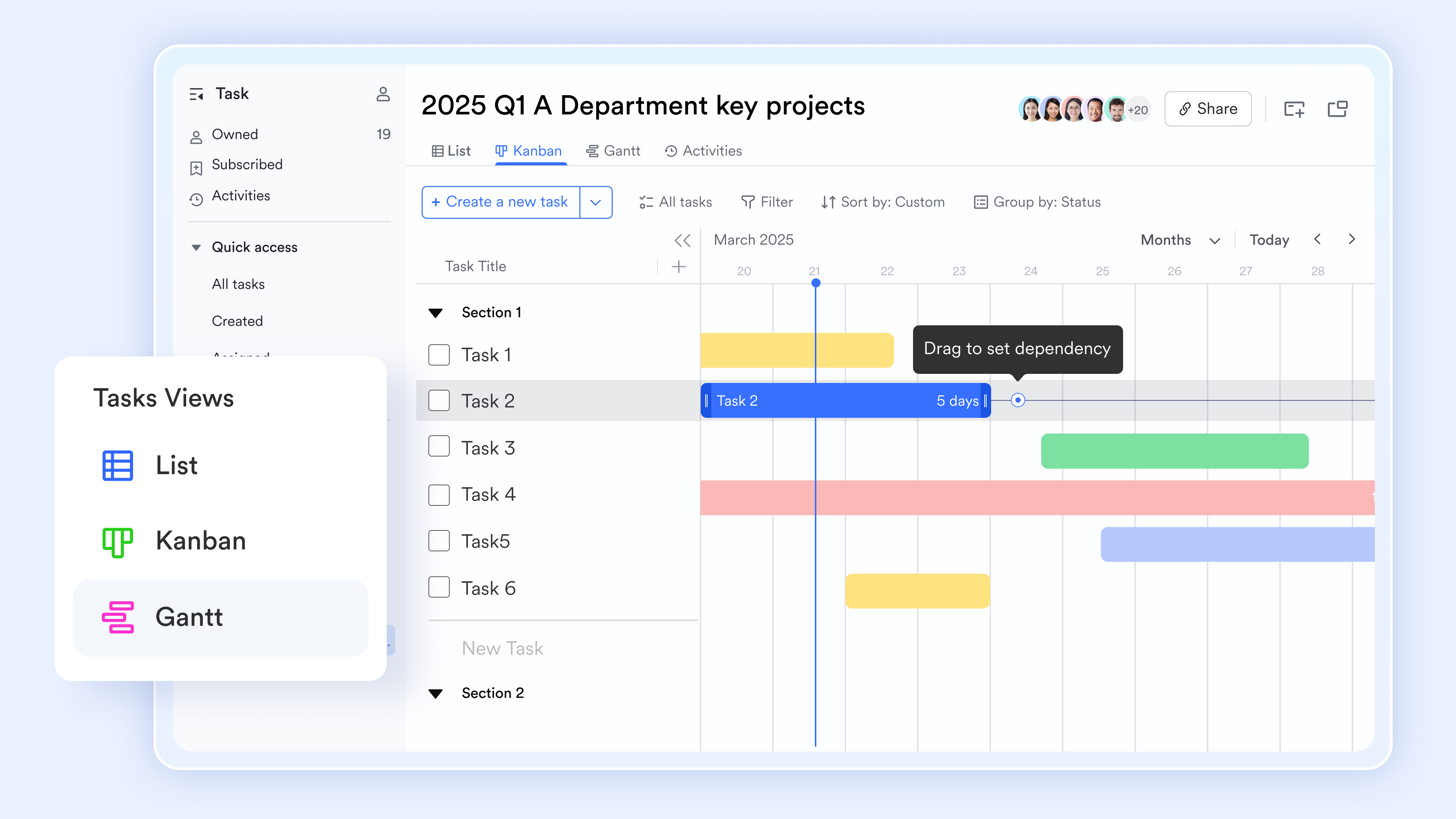
AI Meeting Notes replaces manual note-taking
is the official tool for converting conversations into documented knowledge. It provides real-time transcription and uses AI to generate smart summaries, identify "key decisions," and extract "action items." This ensures that verbal agreements in meetings are instantly documented as organized AI notes and assigned as trackable tasks in the same workspace. 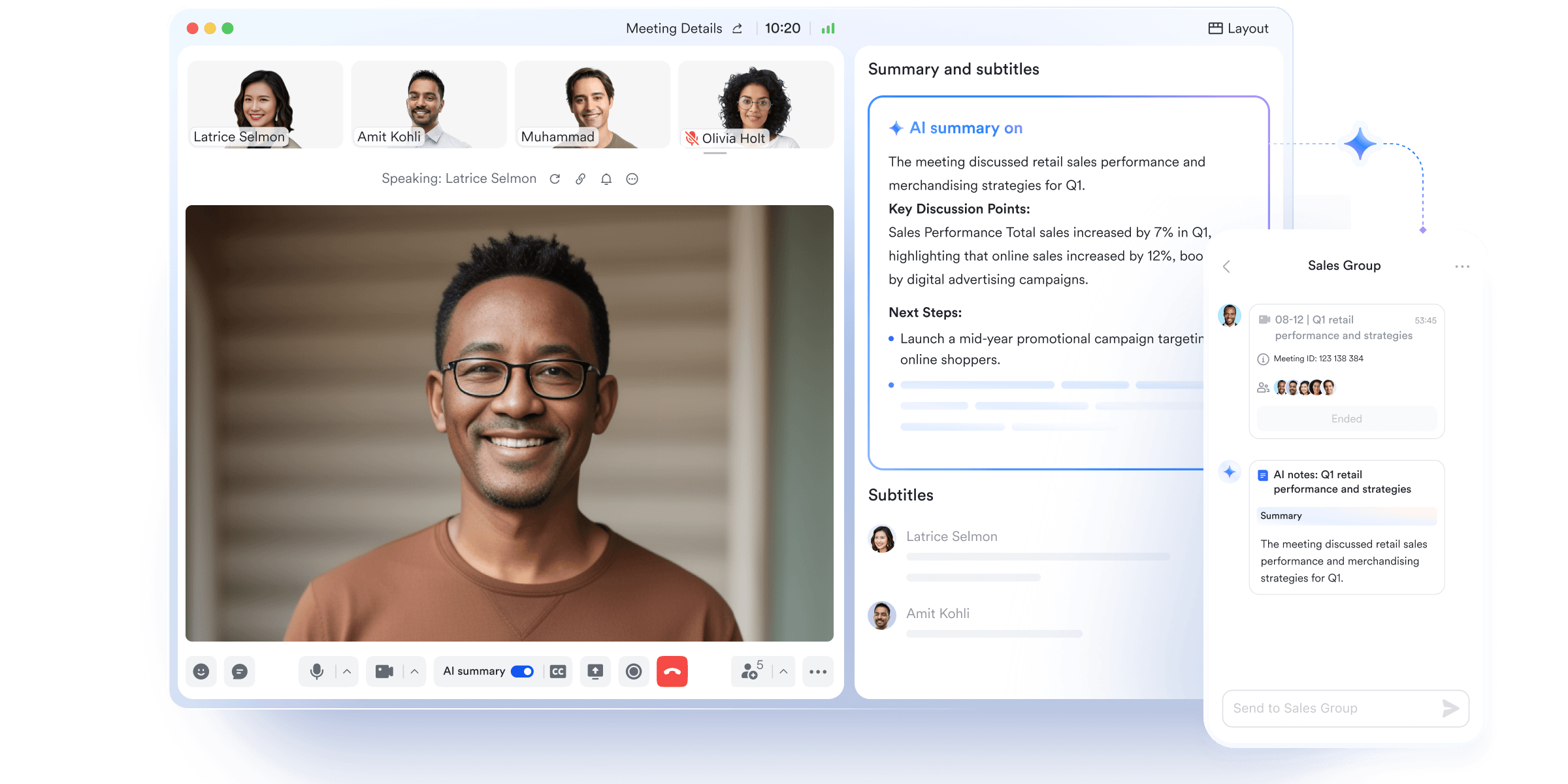
A centralized, hierarchical knowledge base
To combat scattered information, acts as your company’s ultimate structured repository. Moving away from traditional, flat folder arrangements, it utilizes a deep "wiki pages" framework. This allows teams to logically nest everything from quick research notes to formal meeting minutes under one unified umbrella. Every document becomes universally indexed and searchable, transforming isolated daily notes into a collaborative, single source of truth for the entire organization. 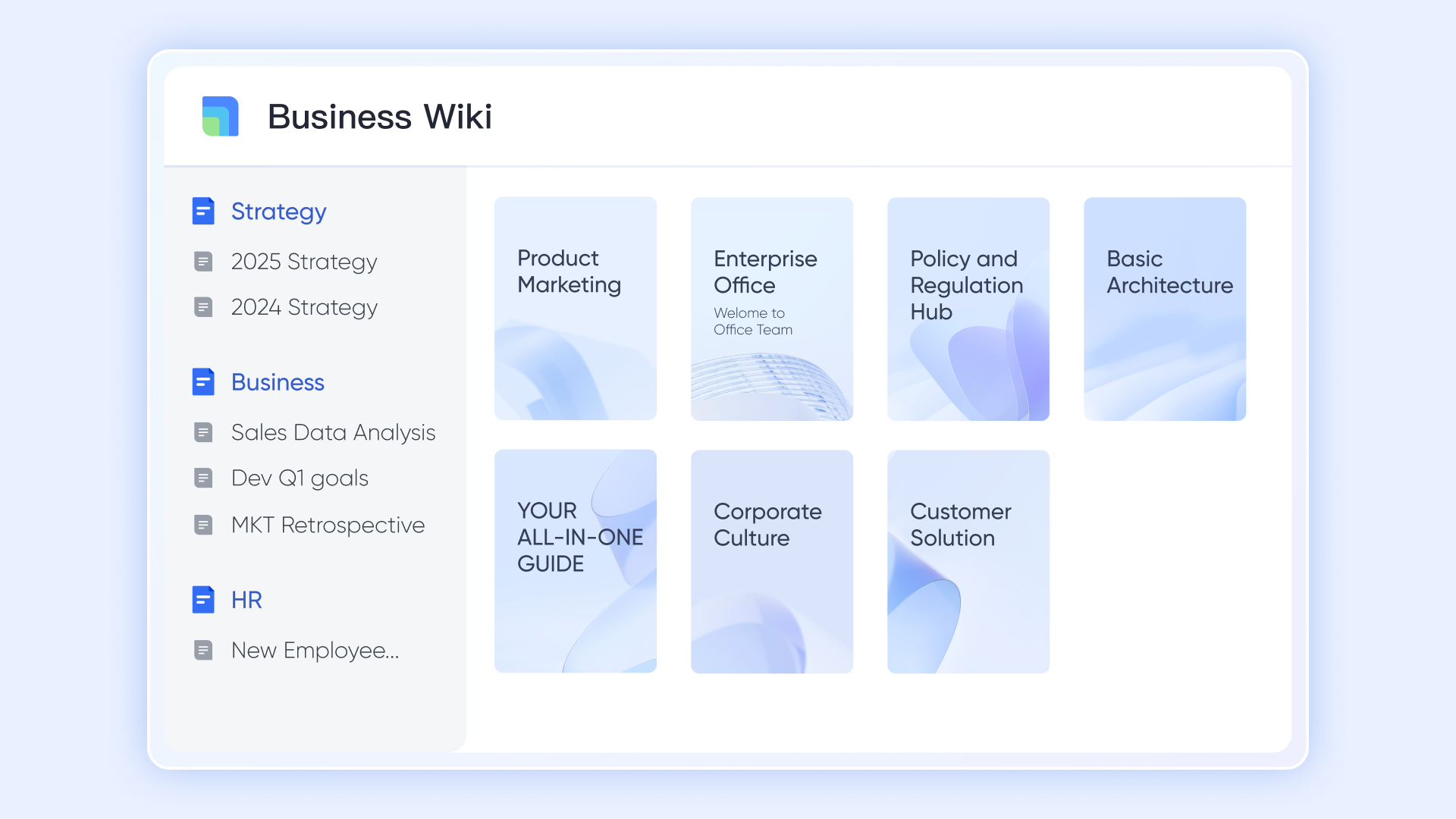
Comparing costs and finding the right fit
When evaluating task management solutions, you have to look beyond surface-level features and consider the financial weight of your software stack. Managing separate subscriptions for team communication, document storage, and complex project management gets expensive quickly. Furthermore, the IT overhead required to manage permissions across a fragmented ecosystem drains resources.
Many Windows users default to Microsoft To Do because it feels native and familiar. While it is excellent for managing a personal agenda, it often requires managers to purchase expensive, advanced Microsoft 365 licenses or secondary project management tools just to facilitate deep team collaboration and complex document sharing.
For growing SMEs and large enterprises, replacing a disjointed stack of standalone apps with a single, unified workspace is not just a productivity upgrade; it is a straightforward way to achieve serious cost-efficiency. This is why a unified platform like Lark often makes more financial sense than piecing together a suite of single-purpose tools.
:
- Starter plan: that includes 11 powerful tools for up to 20 users. It also comes with 100GB of storage space, 1000 automation runs, AI translations, and more. No credit card needed.
- Pro plan: (billed annually) for up to 500 users. It includes everything in Basic plus group calling for up to 500 attendees, 15TB of storage space, 50,000 automation runs, and more.
- Enterprise plan: for custom pricing. Supports unlimited users and includes even more automation runs and advanced security, compliance, and management features.
For small teams with simple communication needs

18 months message history
1000 Base automation runs/month
2000 rows per table in Base
Most POPULAR
For companies with comprehensive collaboration and management needs
Unlimited message history
500-participant video meetings
50k Base automation runs/month
20k rows per table in Base
For large companies with advanced security and organizational management needs
Get a personalized demo and pricing
Unlimited message history
500-participant video meetings
15 TB storage + 30 GB storage/user
500k Base automation runs/month
50k Base automation runs/month
Most POPULAR
For companies with comprehensive collaboration and management needs
Unlimited message history
500-participant video meetings
50k Base automation runs/month
20k rows per table in Base
Conclusion
Relying on scattered applications for enterprise workflows creates severe blind spots. While the Microsoft To Do app serves well as a personal daily planner, modern teams require integrated context to succeed. By consolidating chat, documents, and task tracking into a unified workspace, you eliminate the friction of app-switching. Stop paying for fragmented tools that isolate your team's hard work. Instead, invest in a centralized platform that aligns communication directly with execution, keeping your entire organization focused.
This is exactly what is built to do. Ready to eliminate context switching and streamline your team's execution? Try Lark now and bring your chats, documents, and to-dos into one powerful, unified workspace.
Try Lark to unify your chats, docs, and to-dos
FAQs
Is there a to-do list on Microsoft?
Yes, Microsoft offers the Microsoft To Do app. It is a dedicated task management application designed to help users organize daily tasks, set reminders, and create simple lists. It integrates with Exchange Online and syncs directly with Outlook tasks.
What is replacing the Microsoft Lists app?
Microsoft Lists is not currently being replaced. It remains a core component of the Microsoft 365 ecosystem, designed primarily for tracking information, managing inventory, and organizing structured data. However, for direct personal task tracking, users typically rely on Microsoft To Do.
What Microsoft program is best for To Do lists?
If you are tracking personal, day-to-day activities, the Microsoft To Do app is the best fit due to its straightforward "My Day" feature. If you are managing larger team projects that require assignees, attachments, and visual workflows, Microsoft Planner is the superior choice.
Is Microsoft Planner replacing To Do?
No, Microsoft Planner and Microsoft To Do are designed to coexist, though they serve different functions. Planner is built for team collaboration and project tracking using Kanban boards. To Do is built for individual, personal task management. Microsoft Teams attempts to aggregate both of these into a single view via its built-in Tasks functionality.
Related reading































