A pipeline tracker helps teams organize deals, projects, and opportunities from first contact to final outcome. Whether used as a sales pipeline tracker, project pipeline tracker, or mortgage pipeline tracker, it provides structured visibility into progress and performance. Many teams begin with a sales pipeline tracker Excel template before moving to more scalable platforms. This guide explores how pipeline tracking works, compares spreadsheet tools to modern systems, and explains when teams should upgrade beyond a free sales pipeline tracker.
Key takeaways: Pipeline tracker essentials
- A pipeline tracker centralizes deal or project stages in one structured view.
- A sales pipeline tracker focuses on revenue progression, while a project pipeline tracker tracks delivery milestones.
- A sales pipeline tracker Excel template works well for early-stage teams.
- Industry-specific needs, such as a mortgage pipeline tracker or a real estate pipeline tracker, require customized stages.
- Modern tools reduce manual updates and forecasting errors common in pipeline tracker template spreadsheets.
What a pipeline tracker actually does
A pipeline tracker organizes work into clear stages that represent progression. It can be used for , loan approvals, property deals, or project approvals. Whether it is an Excel sales pipeline tracker or a cloud-based system, the purpose remains the same: structured visibility. Teams use it to improve predictability, coordination, and accountability.
- Tracking deals, opportunities, or designing a project: A pipeline tracker maps each opportunity to a defined stage. In a sales pipeline tracker, this might include , qualification, proposal, and close. In a project pipeline tracker, stages may reflect approval, planning, and execution milestones. Clear stages reduce ambiguity and improve consistency.
- Visualizing progress from first contact to close: A pipeline tracker template often uses a Kanban-style board or structured table. This visual layout helps teams understand movement through the funnel. A sales pipeline tracker Excel template commonly relies on columns representing stages. Visualization improves clarity for managers and contributors.
- Identifying bottlenecks before they impact revenue: When deals or projects stall in one stage, a pipeline tracker highlights delays. Sales managers can quickly identify slow negotiation phases. Project leaders can detect approval backlogs. Early visibility prevents revenue leakage and operational slowdowns.
- Connecting pipeline tracking to performance management: A sales pipeline tracker connects stage movement to conversion rates and forecasts. Metrics such as win rate and average deal size rely on accurate tracking. A free sales pipeline tracker may require manual calculations, while scalable systems automate these insights. Performance visibility improves strategic decisions.
Sales pipeline tracker vs project pipeline tracker
Although both tools share structural similarities, they serve different business goals. A sales pipeline tracker is revenue-driven, while a project pipeline tracker supports delivery and execution. Some teams require both views within a unified system. Understanding the distinction ensures better design and ownership.
- Revenue-driven pipelines vs delivery-focused pipelines: A sales pipeline tracker prioritizes , probability, and closing dates. Revenue forecasting depends on stage accuracy. A project pipeline tracker focuses on milestones, resource allocation, and task dependencies. Each pipeline reflects a different operational objective.
- Differences in stages and ownership: In a sales pipeline tracker Excel template, ownership usually belongs to account executives. In a project pipeline tracker, ownership shifts to . Stages differ based on business outcomes. Clear accountability improves reliability.
- When teams need both views in one system: Growing organizations often need a unified structure. Sales close a deal while delivery prepares execution. A disconnected pipeline tracker template can create silos. Integrated systems reduce friction between revenue and operations.
Accelerate delivery with streamlined workflows today
14 popular pipeline tracker templates
Sales management system template
This template provides a complete sales pipeline tracker with structured stages, deal value tracking, and . Teams can monitor opportunity progress, assign ownership, and forecast revenue within one interface. Unlike a basic sales pipeline tracker Excel file, it supports real-time collaboration and automation. It works well for growing sales teams that require structured reporting and visibility.
Sales CRM template
The Sales CRM template expands beyond a simple pipeline tracker template by including and client relationship tracking. Users can capture lead source data, deal probability, and next actions within structured views. It replaces scattered spreadsheet tracking with unified data storage. This template supports teams transitioning from a sales pipeline tracker Excel solution to a scalable CRM environment.
Project pipeline template
This template allows you to track project IDs, names, descriptions, stages, priorities, team members, estimated and actual start and end dates, progress, and notes. It provides a clear overview of all your projects, making it easier to monitor progress and make necessary adjustments.
Sales management system template
This structured pipeline tracker template centralizes opportunity tracking and performance metrics. It connects sales stages with revenue forecasting dashboards. Teams can define custom fields and probability weighting for more accurate projections. It is ideal for organizations replacing a free sales pipeline tracker spreadsheet.
Daily sales forecast report template
This template enhances revenue planning by combining pipeline data with . Sales managers can analyze weighted opportunities and projected closing timelines. Unlike static sales pipeline tracker Excel formulas, dashboards update automatically. It supports more accurate financial planning.
Sales tracker lead analysis and follow-up template
This template focuses on structured follow-up management within a sales pipeline tracker. It tracks next activities, lead quality, and engagement history in one place. Automated reminders reduce the risk of stalled opportunities. It provides greater discipline than a traditional pipeline tracker template spreadsheet.
Sales lead management template
The template organizes prospects before they enter advanced pipeline stages. Teams can categorize leads by source, priority, and conversion likelihood. It supports structured filtering and segmentation. This makes it a strong upgrade from a basic sales pipeline tracker Excel workflow.
Sales daily report template
This template captures daily pipeline activity and deal movement. It helps managers track performance trends over time. Reports can be linked directly to opportunity records for context. Compared to manual updates in a free sales pipeline tracker, it improves data reliability.
Daily sales amount summary template
The Amount Summary template aggregates revenue figures from the pipeline tracker into clear summaries. Managers can review daily totals, monthly projections, and performance targets. Automated calculations reduce spreadsheet errors. It enhances forecasting accuracy beyond traditional sales pipeline tracker Excel tools.
Microsoft sales pipeline management
offers a structured sales pipeline tracker Excel template with fields for opportunity name, contact details, region, and forecast value. Separate tabs, such as Pipeline Calculations and Pipeline Totals, help managers analyze performance. Weighted close dates and forecast amounts improve financial planning accuracy. This template works well for teams already using Microsoft Office tools.
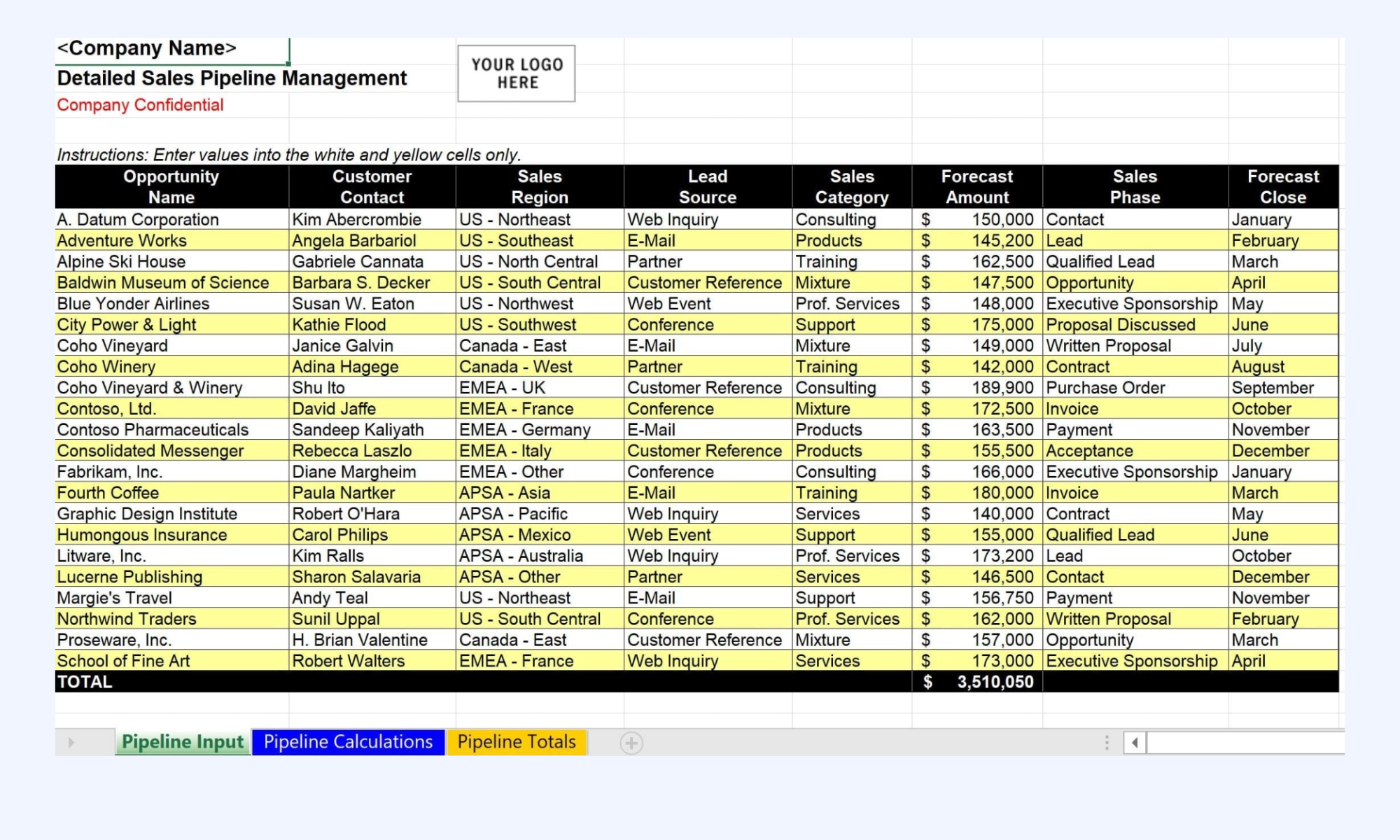
Image source: microsoft.com
Google Sheets sales pipeline templates
Google Sheets provides a and sales pipeline tracker that allows multiple users to update deals in real time. Many teams connect forms or lead ads to automatically add new rows to the spreadsheet. This reduces manual data entry compared to static files. It suits teams that want a free sales pipeline tracker with live syncing capabilities.
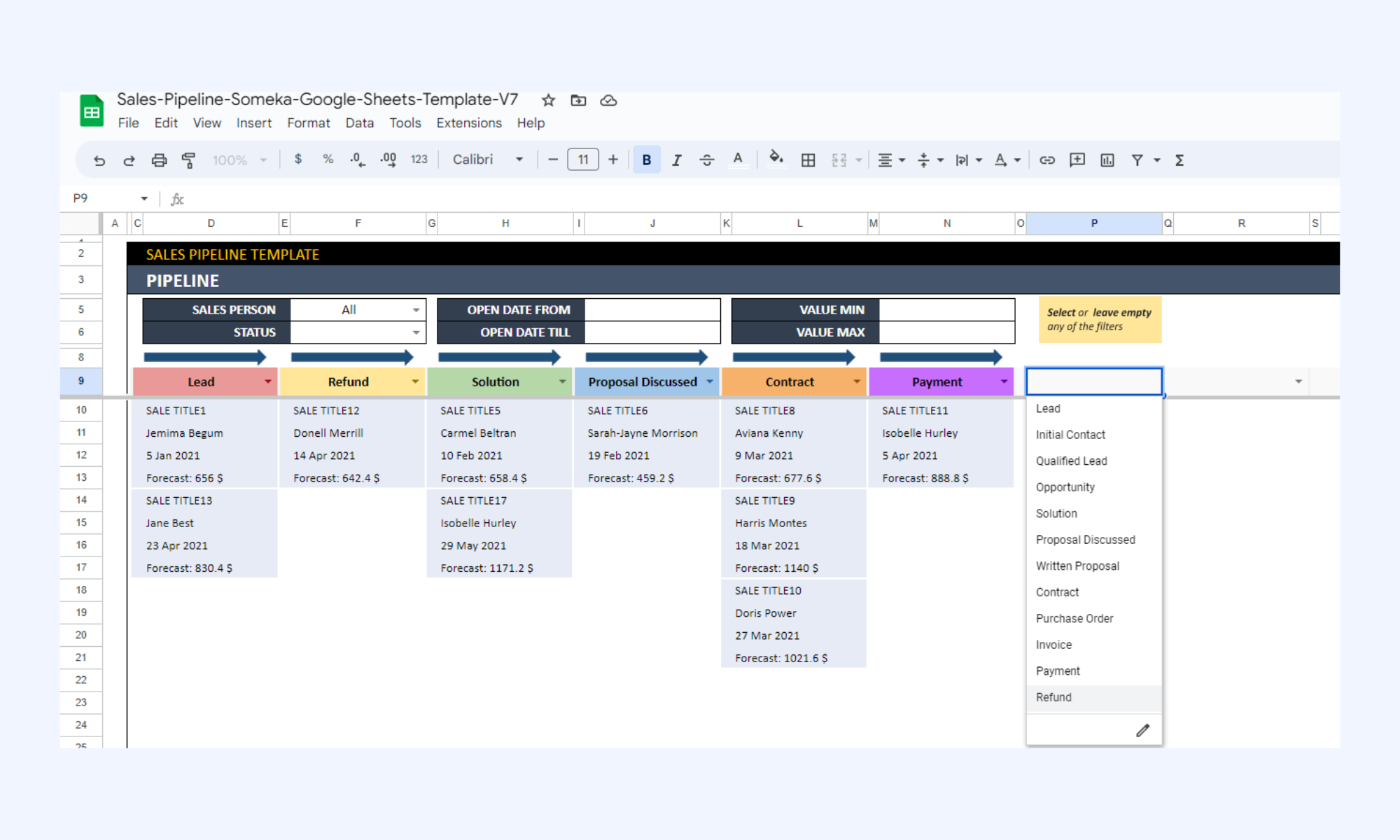
Image source: google.com
Sales pipeline template from Smartsheet
Smartsheet offers a structured pipeline tracker template organized by fiscal quarter. It separates lead data, financial metrics, and next steps into defined sections. Calculated fields estimate weighted revenue forecasts. This format helps teams move beyond simple list tracking toward more structured pipeline tracking.
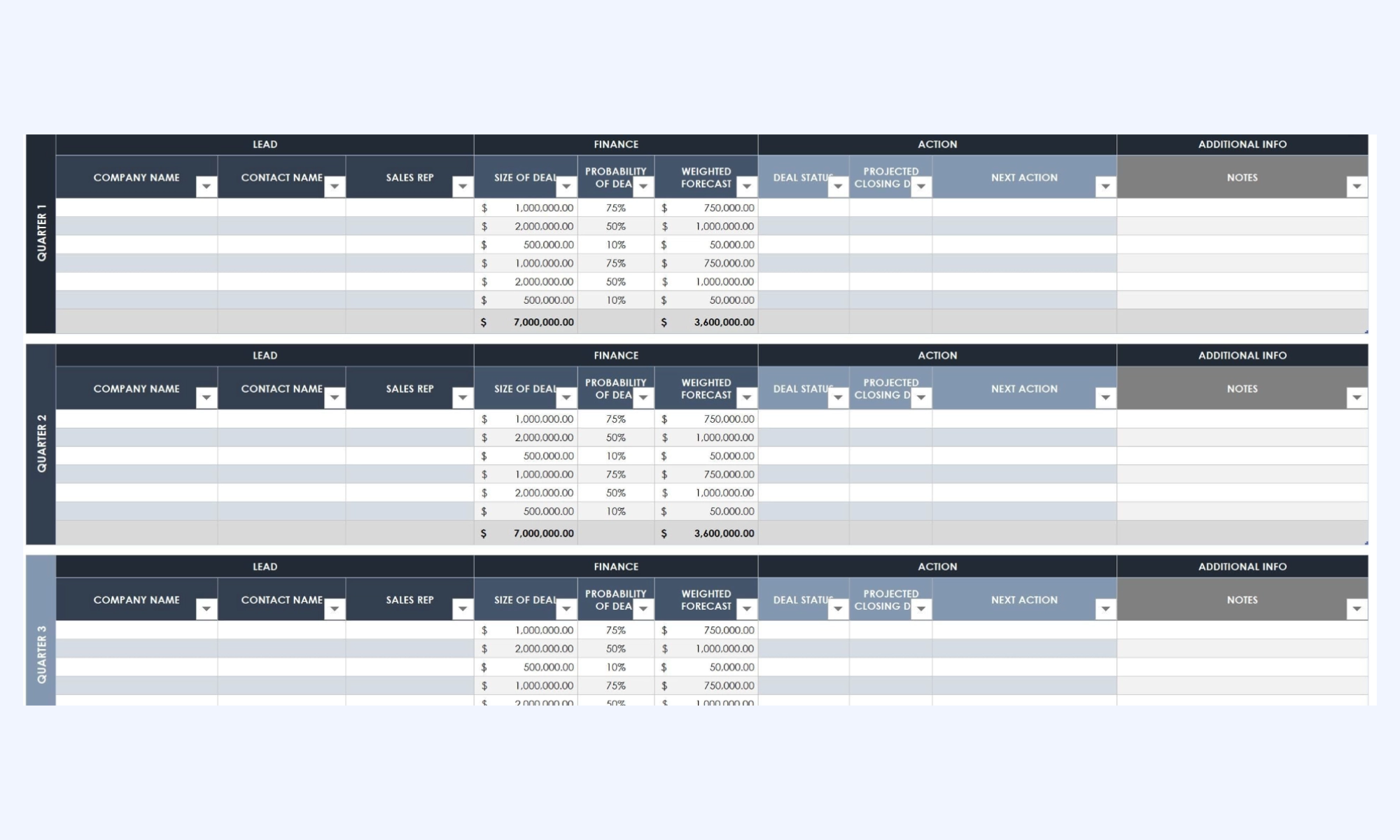
Image source: smartsheet.com
Sales pipeline template from Close
The Close template uses color coding to separate deals by quarter and stage. Key details such as win probability and expected close dates are clearly displayed. Each deal includes the next activity field to ensure consistent follow-up. It supports small teams that need visibility across their sales pipeline tracker Excel workflow.
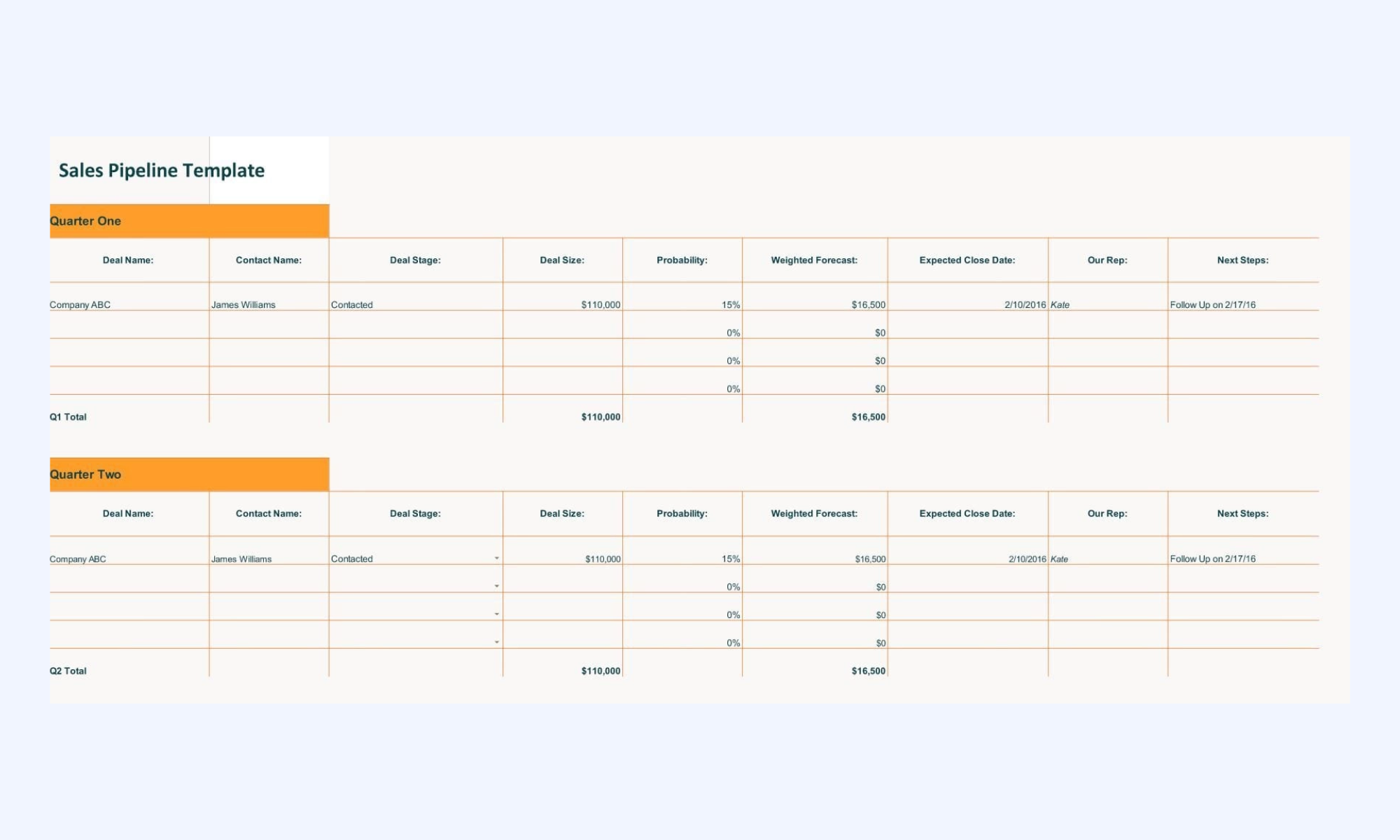
Image source: close.com
Pipeline tracker spreadsheet from Sales Hacker
The Sales Hacker spreadsheet organizes deals by quarter and summarizes total pipeline value. Columns capture company name, deal size, and probability of closing. Clear separation between demographic data and financial metrics improves review clarity. It provides a straightforward structure for quarterly .
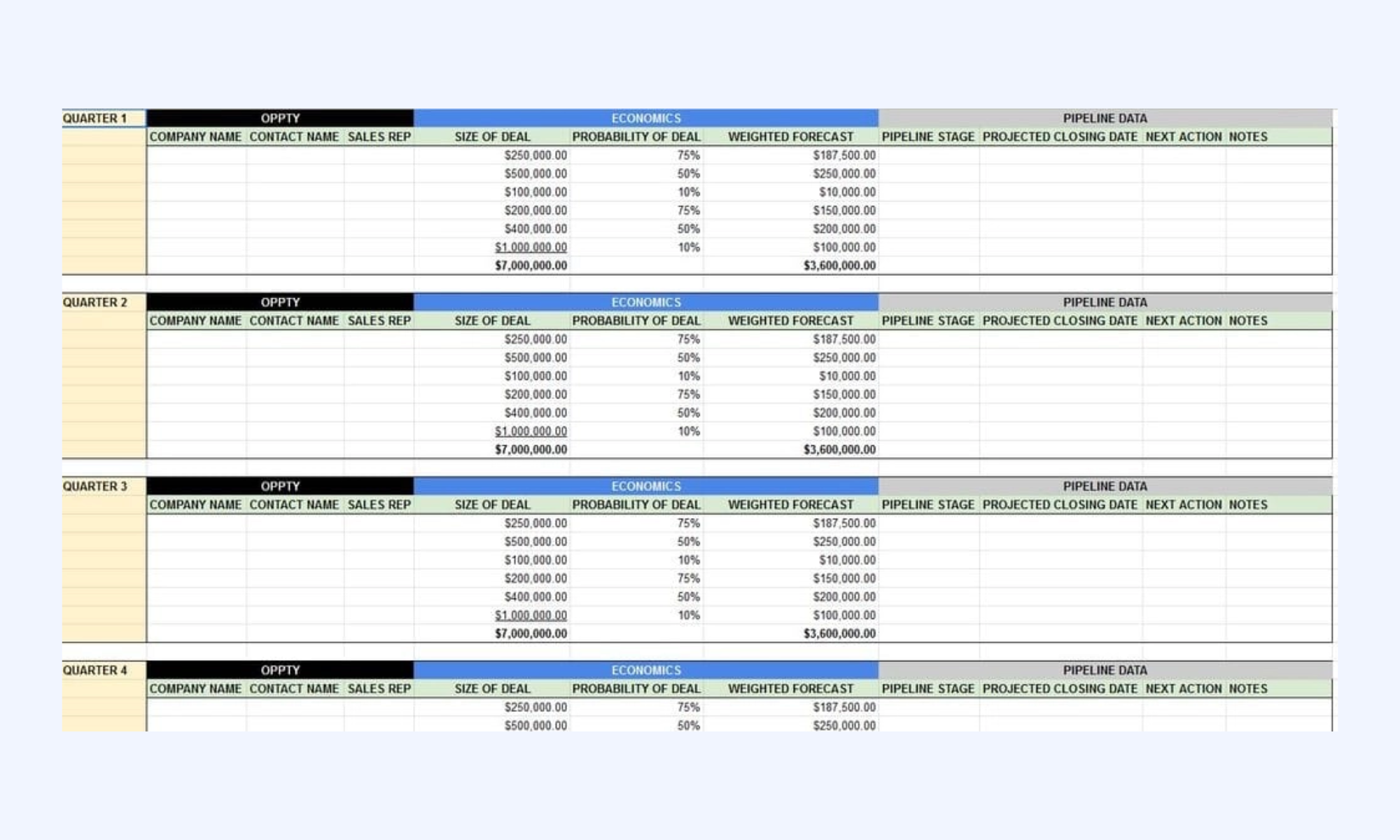
Image source: saleshacker.com
Beyond sheets: Track, manage, and upgrade pipelines with Lark
As teams grow beyond spreadsheets, they often need more than a basic pipeline tracker template. A pipeline tracker must support automation, shared visibility, and real-time collaboration across departments. While a sales pipeline tracker Excel solution works initially, scaling requires structured permissions, combinations, and unified communication. provides an all-in-one platform that transforms pipeline tracking from static data management into an active, collaborative workflow system.
Customizable pipeline boards
is the core feature used to build bespoke CRM systems. Unlike rigid software, it allows you to create a "Kanban view" to visualize your sales funnel and "Form views" for lead capture. You can define custom fields for deal value, lead source, and closing probability. Because it is a multidimensional database, you can view the same sales data as a table, a gallery of client logos, or a Gantt chart to track long-term contract negotiations. 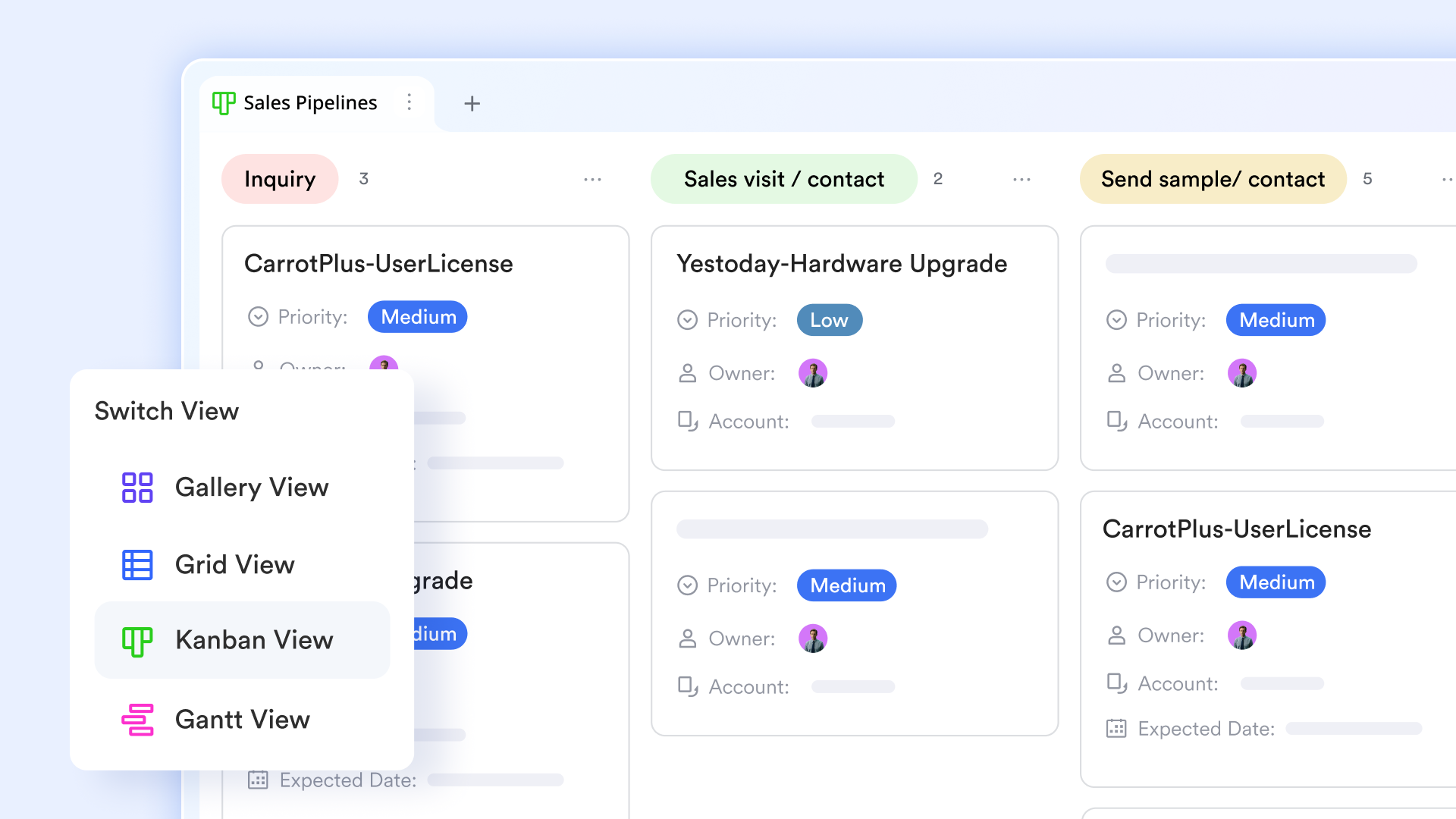
Real-time updates across sales and project teams
Visibility in Lark is powered by permission management and linked records. When a Sales Representative updates a deal status in , the change is live across the entire workspace. For project-driven teams, the delivery department can be given view-only access to the sales pipeline. This ensures that as a deal moves toward "closed-won," the project team can see upcoming resource requirements in real-time, preventing the common "silo" effect between sales and operations. 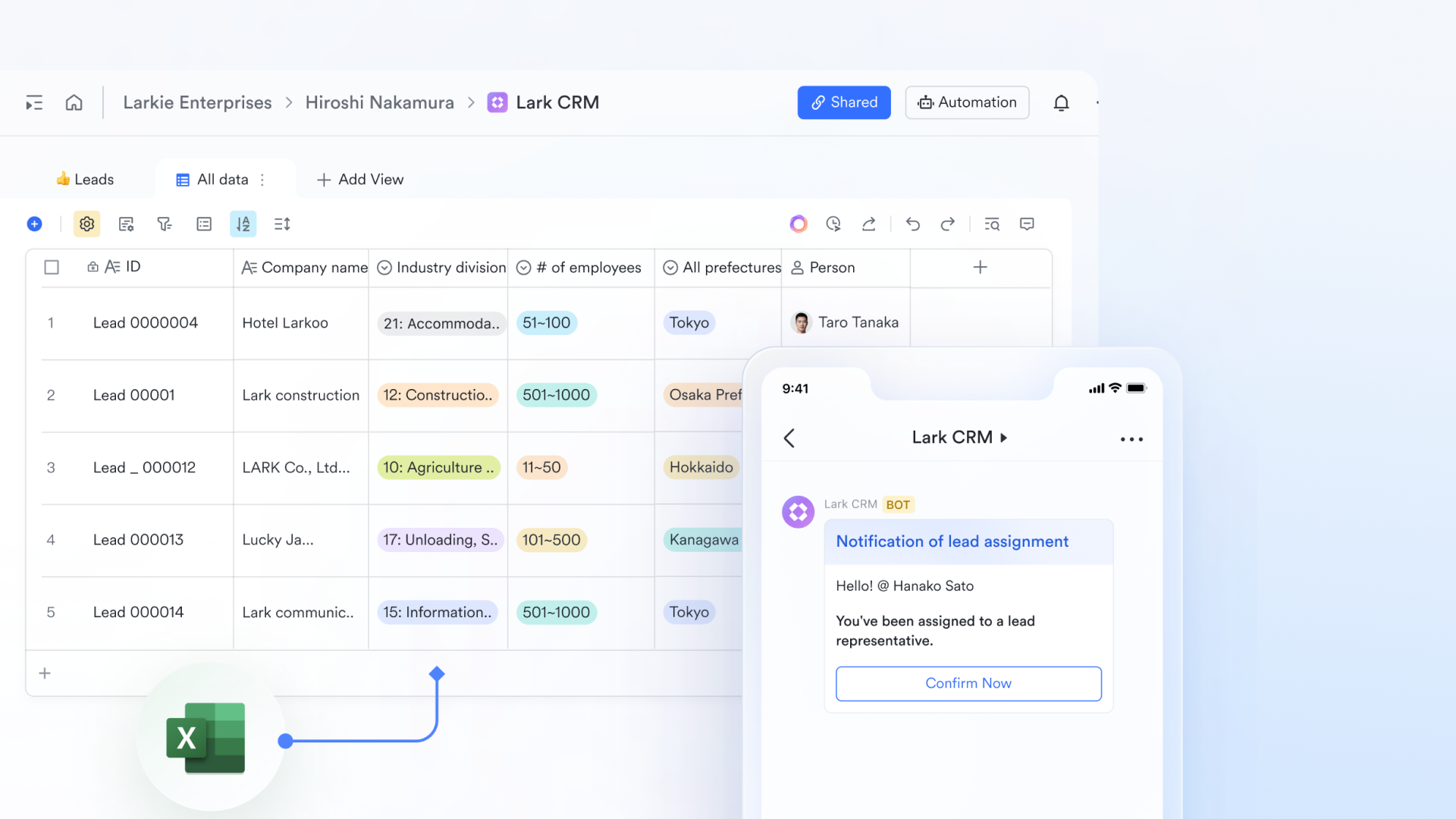
Trigger-based workflow automation
Lark Base ase automation engine allows you to set triggers that eliminate manual data entry. For example, when a deal stage changes to "negotiation," Lark can automatically create a follow-up task for the legal team. Furthermore, Lark AnyCross (the platform's merged connector) can sync this data with external tools, ensuring that your sales pipeline status is always reflected in your broader business ecosystem without human intervention. 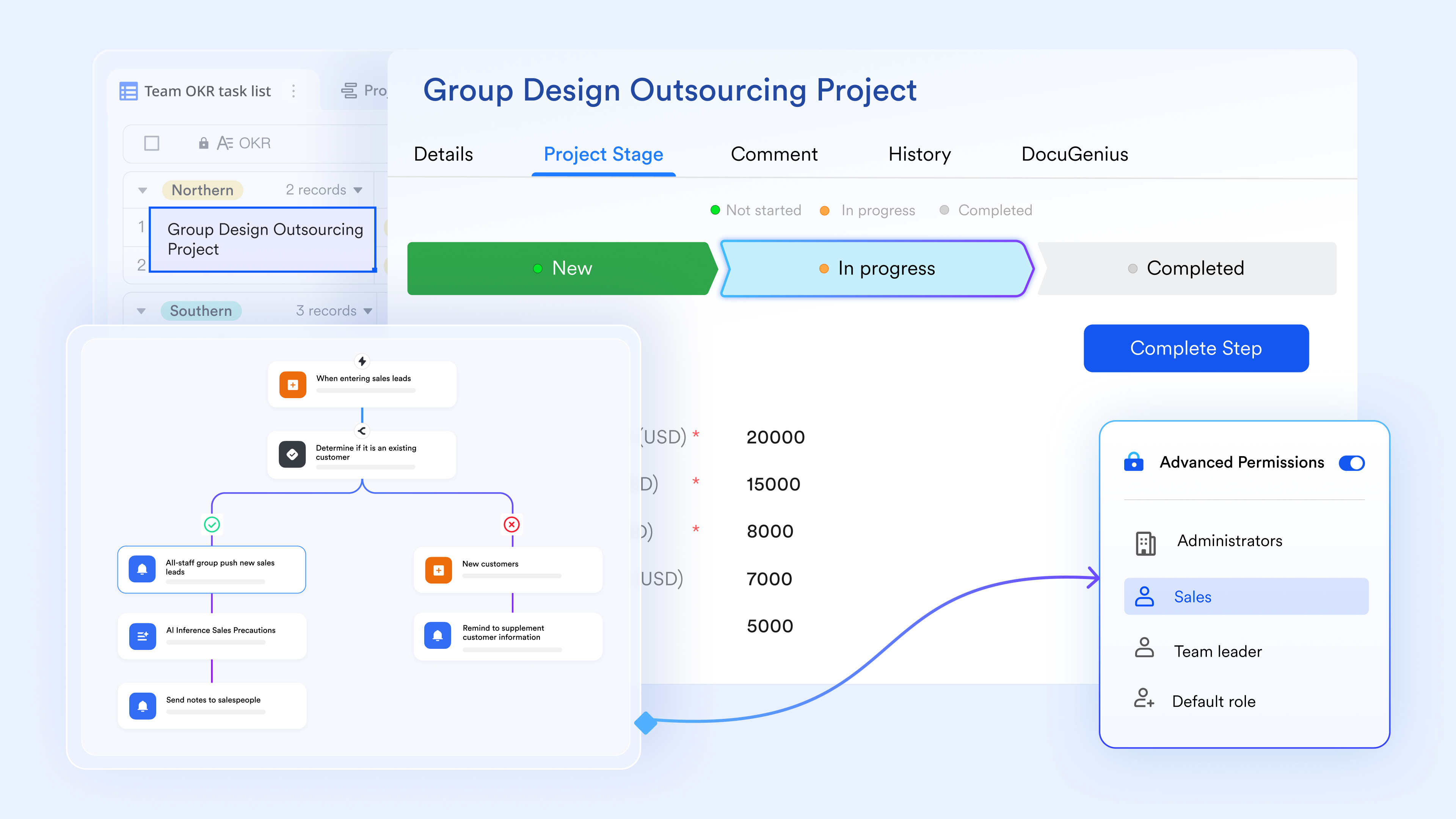
Unified communication hub
The most powerful aspect is merged with . You can configure "automated bot notifications" to send a message to a specific group chat whenever a high-value deal is created or closed. Instead of leaving the pipeline to discuss a deal, team members can use the "chat inside base" feature to leave comments on specific deal cards. This keeps the conversation, the data, and the decision-making process unified in a single interface. 
:
- Starter plan: Free forever plan that includes 11 powerful tools for up to 20 users. It also comes with 100GB of storage, 1000 automation runs, AI translations, and more.
- Pro plan: $12/user/month (billed annually) for up to 500 users. It includes everything in Starter plus group calling for up to 500 attendees, 15TB of storage, 50,000 automation runs, and more.
- Enterprise plan: for custom pricing. Supports unlimited users and includes even more automation runs and advanced security, compliance, and management features.
For small teams with simple communication needs

18 months message history
1000 Base automation runs/month
2000 rows per table in Base
Most POPULAR
For companies with comprehensive collaboration and management needs
Unlimited message history
500-participant video meetings
50k Base automation runs/month
20k rows per table in Base
For large companies with advanced security and organizational management needs
Get a personalized demo and pricing
Unlimited message history
500-participant video meetings
15 TB storage + 30 GB storage/user
500k Base automation runs/month
50k Base automation runs/month
Most POPULAR
For companies with comprehensive collaboration and management needs
Unlimited message history
500-participant video meetings
50k Base automation runs/month
20k rows per table in Base
Bonus: How to transition from Excel to a scalable pipeline tracker
Moving from a sales pipeline tracker Excel template to a scalable system requires structured planning. As deal volume increases, manual spreadsheets become difficult to manage and forecast accurately. A modern pipeline tracker improves visibility, automation, and while maintaining data consistency.
- Migrating structured data: Begin by cleaning and organizing your existing sales pipeline tracker Excel data. Standardize column names, remove duplicates, and verify probability formulas. Structured data ensures a smooth import into a scalable pipeline tracker template. Clear formatting prevents reporting inconsistencies later.
- Redefining stages and ownership: Review your current and clarify definitions for each step. A scalable sales pipeline tracker requires precise stage criteria to improve forecasting accuracy. Assign clear ownership for every deal or project stage. Defined responsibility increases accountability and data reliability.
- Automating repetitive tracking tasks: Manual updates are common in a free sales pipeline tracker spreadsheet. A modern pipeline tracker allows automated reminders, task creation, and status changes. Automation reduces human error and ensures follow-ups are consistent. This improves both deal velocity and reporting accuracy.
- Training teams for consistent updates: Technology alone does not guarantee reliable pipeline tracking. Teams must understand stage definitions and update responsibilities. Regular training reinforces accurate data entry within the sales pipeline tracker. Consistent updates strengthen forecasting and decision-making.
Conclusion
A pipeline tracker provides structure to sales, project, and industry-specific workflows by turning scattered deal data into organized stages. While a sales pipeline tracker Excel template or free sales pipeline tracker spreadsheet works for early-stage teams, limitations quickly emerge as volume, collaboration, and forecasting complexity increase. Manual updates, version conflicts, and human error can reduce visibility and confidence in projections.
As organizations grow, they often require more than a static pipeline tracker template. Real-time updates, automation, and shared dashboards have become essential for aligning sales and operations. Modern platforms provide scalable alternatives that connect pipeline tracking with communication and execution. For teams ready to move beyond spreadsheets, solutions like offer a unified approach that transforms pipeline management into a collaborative and data-driven process. Break bottlenecks and win projects with Lark today
FAQs
What's the best data pipeline tool?
The best data pipeline tool depends on your goals and team structure. For small teams, a sales pipeline tracker Excel template may be sufficient at first. Growing organizations typically benefit from tools that support automation, shared visibility, and forecasting. Many teams eventually move toward that combine tracking, communication, and reporting, such as Lark.
What is the best way to visualize a pipeline?
A Kanban board is one of the most effective ways to visualize a pipeline tracker because it clearly displays stages and movement. Tables work well for detailed analysis, while dashboards improve forecasting visibility. Modern systems allow teams to switch between views depending on their needs. Platforms like Lark make it possible to view the same pipeline data as boards, tables, or charts.
How much does pipeline CRM cost?
Pipeline CRM costs vary widely depending on features and team size. A free sales pipeline tracker spreadsheet may cost nothing, but it requires manual maintenance. Dedicated CRM tools often charge per user per month, with costs increasing as teams scale. Some modern platforms, including Lark, offer flexible pricing tiers that combine CRM-style tracking with .
How often should a pipeline tracker be updated?
A pipeline tracker should be updated whenever a deal changes stage or new information becomes available. In a sales pipeline tracker Excel file, updates are manual and depend on the user's discipline. systems reduce the risk of outdated data by syncing changes instantly. Tools such as Lark help ensure updates are visible across teams without version conflicts.
What's the ideal number of stages in a sales pipeline?
The ideal number of stages depends on sales complexity, but most teams use five to seven clearly defined steps. Too few stages reduce forecasting accuracy, while too many create confusion. A structured sales pipeline tracker should reflect meaningful progression milestones. Flexible systems like Lark allow teams to customize stages as their process evolves.
Related reading




















