Staying on top of daily sales is vital for any business to spot trends, catch issues early, and keep the team accountable. For many, a daily sales report template in Excel remains the go-to solution, offering a simple and familiar way to organize transactions and measure frontline performance. However, as your data volume and team scale, traditional spreadsheets can create manual bottlenecks, pushing the need for more automated, collaborative tools. Whether you want to download a free Excel template today or explore smarter alternatives, here is everything you need to know to upgrade your reporting workflow:
What is a daily sales report template?
A daily sales report template—such as the ready-to-use options found in the —is a structured format that lets you systematically record, organize, and summarize each day’s sales activity. Far more than just a simple table, it provides much-needed consistency to your .
By logging daily transactions into a standardized format, sales reps and managers can quickly capture a snapshot of key metrics, such as total revenue, top-performing products, and emerging trends. For businesses of any size, a reliable template removes guesswork, unifies records, and makes day-to-day comparisons highly accurate.
People across different roles rely on these templates for distinct reasons:
- Sales representatives use them to log their daily performance efficiently.
- Team leaders review them to identify top performers or spot training needs.
- Business owners depend on them to monitor overall progress and forecast next steps.
A standard template typically includes preset columns for the transaction date, salesperson, product or service, quantity, value, and customer comments. Extra fields for notes help track unique situations or returned items. This consistent structure ensures every piece of valuable sales data is captured, giving your team both granular details and a big-picture view.
Why templates matter
While the template is the tool you use, the report itself is the critical output. A tracks a single day's sales activity, covering products sold, revenue generated, refunds, discounts, payment methods, and core KPIs. Think of it as a morning snapshot that answers urgent questions such as:
- How much did we sell today?
- Which products or services performed best?
- Did we hit today's sales targets?
- Which channels underperformed?
(KPIs) like total daily revenue and average order value feed directly into weekly, monthly, and quarterly dashboards used for project management and revenue planning. By tracking both product metrics and customer activity, frontline teams gain clear visibility into how their daily efforts translate into tangible outcomes.
These reports also drive agile decision-making for business development and recruitment. For example, if Tuesday afternoons consistently show lagging sales, you can immediately adjust staffing levels or run a targeted flash promotion. against set goals allows stakeholders to , rather than waiting for month-end reviews to spot the issue.
Core elements of a daily sales report template in Excel
Whether you build it in Excel or a modern spreadsheet tool, every effective daily reporting template should include three distinct areas: a header, a sales table, and a summary section.
1. Header area
This section establishes the context of the report. It should include the report date (e.g., 16 July 2026), store or region name, sales rep name, shift (morning/evening), and the currency used.
2. Sales table columns
This is where the granular data lives. At a minimum, your table should track the following:
Pro tip: Adding optional columns for sales channel (in-store, e-commerce, marketplace), campaign code, and customer segment helps connect daily sales directly to ongoing marketing initiatives.
3. Summary section
Usually placed at the bottom of the table or on a separate dashboard tab. It calculates high-level metrics, such as Total Net Revenue (the sum of all daily net sales).
A strong summary section displays total sales, average order value, variance against the daily target, and the top 5 items by revenue. Modern templates utilize small charts and conditional formatting to visualize these KPIs, instantly highlighting performance issues like a specific category dropping below its target. If you are using Excel, utilizing formulas like SUM, SUMIF, and XLOOKUP will automate these aggregations and significantly reduce manual data entry errors.
👉 For a deeper walkthrough, see .
Free Excel sales report templates
Daily sales report form template by Template.net
This daily sales report template is designed for straightforward tracking of daily transactions, including product details, quantities sold, and sales amounts. It provides a clean, structured format suitable for small businesses or retail teams needing clear daily records. The template’s intuitive layout helps users quickly summarize and review sales performance at the end of each day.
Image source: template.net
Sales forecast template by Hubspot
Focused on , this template helps you predict future sales trends using historical data comparison and simple projection models. It’s ideal for teams that want to visualize expected results and plan for upcoming periods. The layout includes fields for timelines, forecasted revenue, and periodic progress tracking.
Image source: hubspot.com
Sales performance report template by WPS
This template is designed to evaluate team or individual sales achievements, featuring sections for key indicators like target completion rates, sales rankings, and progress updates. Its organized design helps managers and staff review daily or periodic performance at a glance. It’s particularly useful for tracking goals and identifying top performers within a team.
Image source: wps.com
Limitations of free Excel sales report templates
While the free Excel templates mentioned above are an excellent starting point for standardizing your daily records, they quickly reveal their shortcomings as your team's volume of data and need for collaboration grow. Relying solely on static spreadsheets can inadvertently create bottlenecks that slow down your sales process. Here are the most common challenges teams face when scaling with traditional Excel files:
1. Manual data entry and frequent errors
All information must be entered and updated by hand, making daily record-keeping tedious and error-prone. Small mistakes can accumulate over time, impacting the accuracy of sales analysis and decision-making.
2. Collaboration barriers and version chaos
Multiple users cannot edit the same file in real time, leading to confusion from duplicate versions or overwritten changes. Teams often struggle to stay coordinated, especially when working remotely or across departments.
3. No integration with other business systems
These templates can’t connect to CRM, inventory, or other business tools, meaning all data must be manually imported or exported. This isolation causes repetitive work and increases the chance of missing important updates.
4. Limited automation and workflow support
Beyond basic calculations, these templates do not offer automated reminders, approval flows, or exception alerts. Users must constantly check and update reports, which reduces overall efficiency. 5. Scalability issues as data grows
As sales records and team size increase, the templates quickly become unwieldy and difficult to manage. They lack features that support expansion, making them less practical for growing businesses with evolving needs.
Why modern teams are moving beyond static Excel
While Excel templates are a great starting point, they inherently lack real-time visibility. Sales reps spend hours manually updating spreadsheets, and managers are left looking at outdated data. To stay competitive, modern teams are moving away from fragmented, static spreadsheets and embracing unified platforms like .
As an all-in-one collaboration suite, it seamlessly integrates , , , , and workflow automation into a single workspace.
By upgrading to , you can transform a static daily report into an automated, interactive sales board. This shifts the focus from manual data entry to driving actual revenue—because when data is transparent and live, performance naturally improves.
Just take it from V12Software, who saw direct bottom-line results after switching to Lark's unified platform:

"Lark has changed how we uplevel sales and customer success. The month I shared our sales boards in Lark Base with our teams, I saw a real lift in digital advertising sales. These boards are where our race to the top can happen, and we finally have the transparency to do so efficiently."

Mona Abisourour
Chief Growth Officer
Why Lark is the ultimate solution for daily sales reporting
Generating accurate and timely daily sales reports is an essential part of retail and sales management. Traditional tools like static spreadsheets or email often fall short when teams need to collaborate, automate repetitive work, or gain fast insights. Lark provides an integrated suite specially suited for daily sales reporting, replacing fragmented manual work with designed for clarity, control, and growth.

Key features in Lark for daily sales reporting
Task: Automated assignment and real-time progress tracking
Lark Tasks feature lets managers set up daily or recurring sales report assignments for individuals or teams. Each task includes clear instructions, deadlines, and notifications. Progress can be monitored at a glance, and overdue items trigger reminders automatically. This ensures every branch or salesperson knows exactly what to submit and by when, greatly reducing missed deadlines and manual reminders. 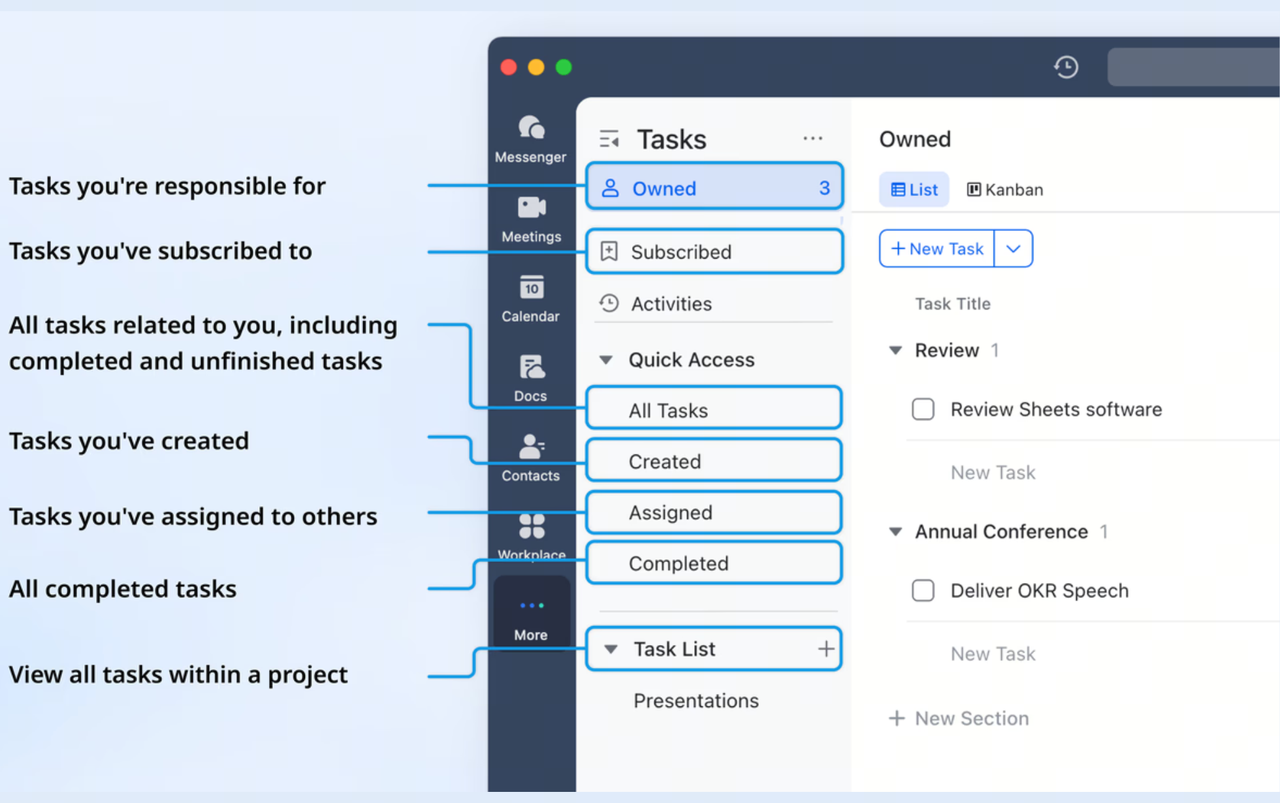
Messenger: Direct and context-rich communication
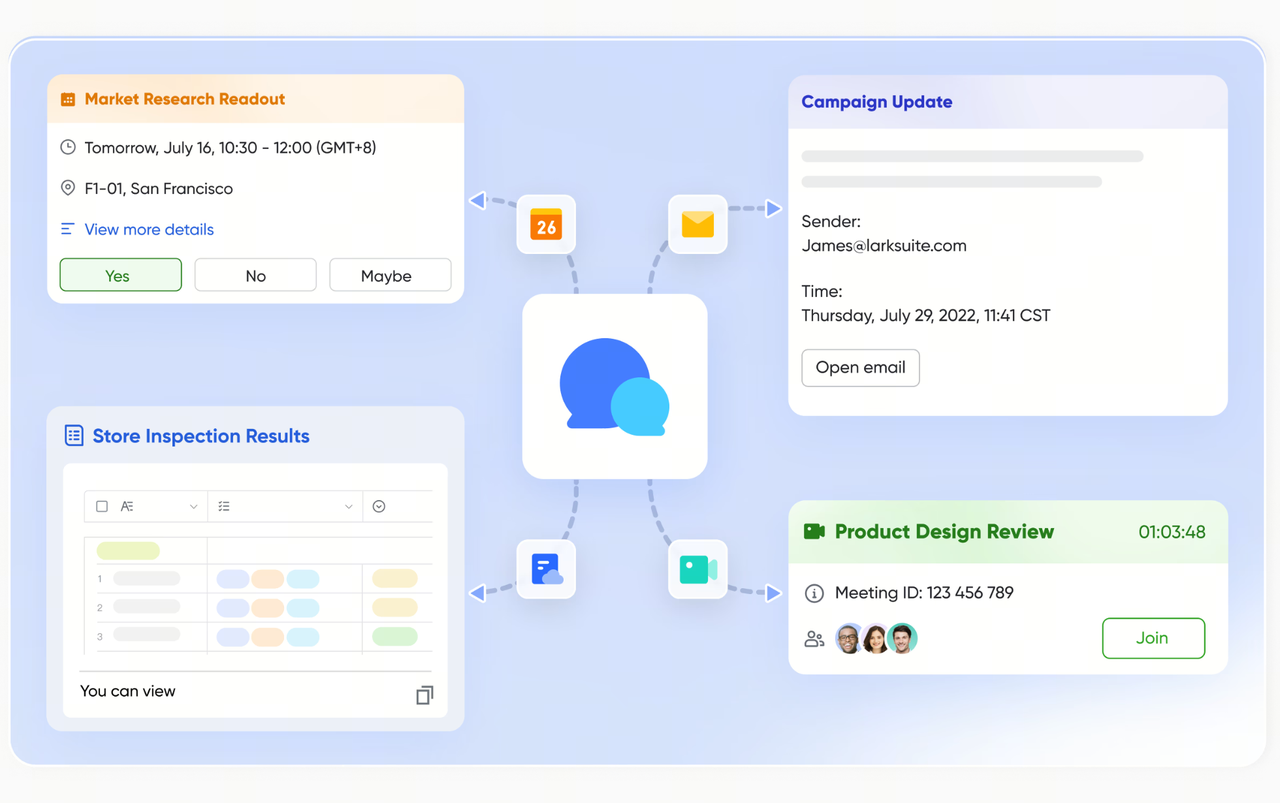
provides dedicated channels just for sales report coordination and discussion. Team members can quickly share updates, ask clarifying questions, and tag supervisors when exceptions arise—all within a single chat thread directly linked to their daily reporting. Files and previous conversations are searchable, so nothing gets lost or overlooked, and everyone has the complete context they need.
Docs: Standardized templates and transparent documentation
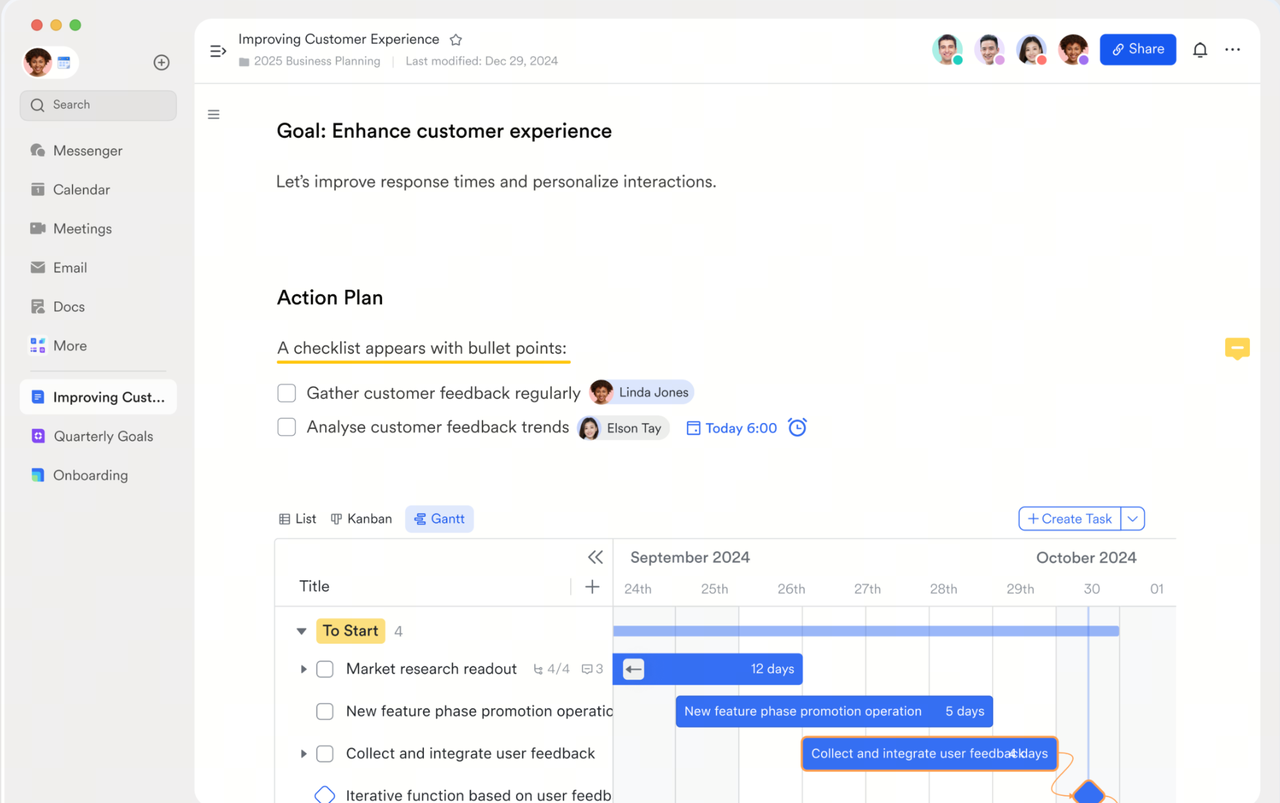
With , organizations can create, distribute, and continuously update daily sales report templates and procedural guides. These documents are easy to co-edit, track changes, and comment on, ensuring every reporting standard or requirement is up-to-date. Teams can reference or immediately access historical reports, helping new employees ramp up quickly and ensuring documentation keeps pace with business needs.
Base: Structured data collection and live insights
transforms sales reporting from a static log to a living database. Sales data from each location or team is entered via structured forms, instantly updating a centralized record. Managers can generate dashboards and analytics views on demand, filter data by product or date, and set permissions for sensitive information. This dynamic base makes it simple to turn daily numbers into actionable trends and share customized reports with stakeholders. 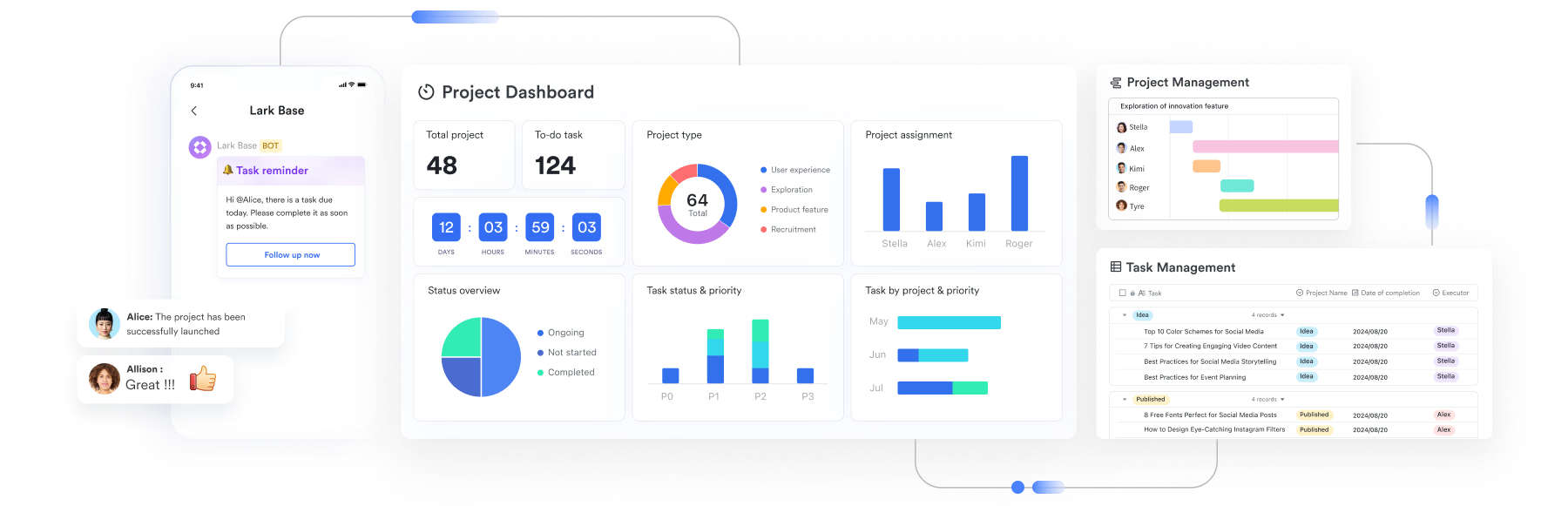
Top 5 benefits of Lark for daily sales report
1. Dramatically streamlines daily sales workflows
By integrating tasks, messages, documents, and databases into one environment, Lark eliminates fragmented communication and manual handoffs. Team members know exactly where to submit, review, and discuss reports each day, reducing confusion and wasted time typical of multi-tool systems.
2. Boosts accuracy and consistency in every report
Standardized and smart forms help ensure submitted data uses the correct fields and formats, reducing accidental omissions and . Built-in checks and required fields keep important sales information from slipping through the cracks.
3. Fosters true team collaboration and accountability
Real-time co-editing, team chat threads, and transparent assignment histories keep everyone in the loop. If issues arise, teams can resolve them together right where the data is managed, with clear comment trails and decision logs, making teamwork both efficient and auditable.
4. Delivers instant access to actionable sales intelligence
Instead of waiting for end-of-month aggregation, managers can monitor progress instantly with dashboard views and live data feeds. They can spot emerging patterns or concerns as soon as they develop, providing a foundation for swift, proactive management. 5. Grows seamlessly as your business evolves
Whether adding new team members, opening more locations, or changing reporting criteria, Lark’s modular structure adapts effortlessly. Data, processes, and templates scale without disruption, keeping operational knowledge intact as the organization expands and changes.
By optimizing every stage of the daily sales report process, Lark transforms reporting from a daily bottleneck into a driver of continuous improvement and business agility.
Reap all these benefits with Lark's solution
Essential Lark templates for sales teams
Daily sales amount summary
This template offers a clear, structured overview of daily sales performance, aggregating key figures from each salesperson or store. It enables managers to monitor revenue trends, track individual contributions, and quickly identify inconsistencies in reported data. Start using this template to ensure your daily sales numbers are transparent, reliable, and always accessible.
Store sales management (dashboard)
Designed as an interactive dashboard, this template allows sales leaders to visualize store performance in real time. Easily filter results by product, branch, or period and gain instant clarity on which locations are outperforming or lagging behind. Implement this dashboard to transform raw store data into actionable insights and better business decisions.
Daily sales forecast report
Forecasting becomes effortless with this dynamic template, which projects upcoming sales based on recent trends and historical patterns. Teams can input expected figures, compare actuals, and adjust targets proactively to stay on course. Try this template to make your daily planning smarter and your sales goals more achievable.
Sales tracker – lead analysis and follow-up
Keep every opportunity in focus with a specialized template for tracking leads and follow-up actions. You’ll be able to log contact info, stage progress, next steps, and outcomes in one centralized view, improving conversion rates and response times. Use this template to empower your team with a complete, organized approach to sales follow-ups and relationship management.
Conclusion
Lark fundamentally transforms the way sales teams manage daily sales reports by bringing all essential functions—task assignment, real-time communication, document collaboration, and dynamic data analysis—into a single, user-friendly platform. This seamless integration reduces manual effort and streamlines the entire reporting workflow, so your team spends less time on repetitive work and more time driving results. With automated reminders, template-based entries, and instant analytics, managers gain clear oversight and can make better, faster decisions. ’s collaborative features break down the barriers between team members, ensuring everyone stays aligned and informed, no matter where they are.
Switch to Lark for smarter daily sales report
FAQs
Why should I choose Lark over other tools?
Lark combines communication, data management, and workflow features in one place, eliminating the need to manage multiple disconnected tools. This unified approach increases efficiency and minimizes errors, especially for fast-moving sales teams.
Is Lark suitable for small teams or startups?
Yes, Lark offers scalable features and easy onboarding, making it ideal for teams of any size. Small businesses and startups can start simple and expand as their needs grow—without switching platforms.
How does Lark ensure data security and privacy?
Lark provides robust data encryption, strict access controls, and compliance with international privacy standards. Your business data is protected at every layer, from user authentication to data storage.
How long does it take to set up sales reporting in Lark?
Most teams can deploy basic sales reporting workflows and templates within a day. Lark’s intuitive interface and ready-made templates make setup quick and hassle-free.
Can non-technical team members use Lark easily?
Absolutely. Lark’s design is user-friendly and requires no coding knowledge. Step-by-step guides and in-app tutorials ensure everyone on your team can adapt rapidly.
Related reading
































