A project risk register is a core project management tool used to identify, assess, and track potential risks that could affect timelines, costs, or outcomes. Instead of reacting to issues after they occur, teams use a project risk register to document risks early, evaluate their probability and impact, assign ownership, and plan mitigation actions. When maintained properly, it creates visibility, accountability, and control across the project lifecycle. In this guide, you'll learn what a project risk register is, how it works in real projects, the essential fields it should include, and practical examples, templates, and to help you manage project risks more effectively.
Manage risks before they escalate
What a project risk register actually represents
In project management, uncertainty is unavoidable, but unmanaged uncertainty leads to failure. A risk register in to understanding, prioritizing, and controlling potential threats before they disrupt delivery. Rather than serving as a static document, a project management risk register captures how risks are identified, assessed, owned, and mitigated over time.
It reflects the team's shared understanding of exposure across scope, cost, schedule, and quality. By documenting probability, impact, and response strategies, the register enables informed decision-making, timely escalation, and accountability— from reactive problem-solving into a proactive, governance-driven discipline throughout the project lifecycle.
Project risk register example from a real project
A project risk register example from a real project might include a software implementation facing a risk of delayed vendor integration. The risk description notes dependency on third-party APIs, with a high probability and medium-to-high . A technical lead is assigned as the owner, with mitigation actions such as early API testing and fallback integration options. The risk status is reviewed weekly, ensuring potential delays are identified early and addressed before they affect the project schedule.
Risk register in project management vs reactive firefighting
In project management, a risk register enables teams to anticipate and control potential threats before they escalate. It provides visibility into risks, assigns ownership, and defines mitigation plans in advance. Reactive firefighting, by contrast, occurs when issues are addressed only after damage has been done—often leading to rushed decisions, missed deadlines, and higher costs. By maintaining a , teams shift from constant crisis response to proactive risk management, enabling steadier execution, clearer accountability, and more predictable project outcomes.
Key fields that project risk registers should contain
A project risk register is only effective when it captures the right information in a clear, consistent format. These core fields ensure risks are understood, assessed objectively, and actively
- Risk description: Clearly explains what the risk is and why it may occur. It should be specific enough that all stakeholders interpret the risk the same way.
- Probability: Indicates how likely the risk is to occur, often rated as low, medium, or high. This helps teams prioritise attention and resources.
- Impact: Measures the potential effect on scope, cost, schedule, or quality if the risk occurs. High-impact risks demand early mitigation planning.
- Owner: Identifies the individual responsible for monitoring and managing the risk. Ownership ensures accountability and timely action.
- Mitigation plan: Outlines the actions taken to reduce the likelihood or impact of the risk. A clear plan turns identified risks into .
- Status: Shows the current state of the risk, such as open, mitigated, or closed. Regular updates keep the register accurate and actionable.
Mark these fields and build your risk register today
How to create a risk register
Creating a risk register requires a structured, repeatable approach that helps teams identify uncertainties early and manage them consistently throughout the project lifecycle. The following steps outline how to build and maintain an effective risk register.
Step 1: Identify risks
Review project objectives, scope, timelines, and dependencies to uncover potential risks. Involve key stakeholders and use lessons from past projects to ensure no critical threats are overlooked. For example, you can use to collect risk inputs from different team members in one shared document, enabling real-time collaboration and comments.
Step 2: Describe each risk clearly
Document each risk in simple, specific terms, explaining what could happen and why. Clear descriptions prevent misinterpretation and support effective analysis.
Step 3: Assess probability and impact
Evaluate how likely each risk is to occur and the level of impact it would have on cost, schedule, scope, or quality. This prioritizes risk response efforts. With a robust tool like , you can build a risk scoring table where probability and impact are automatically calculated for easier prioritization.
Step 4: Assign a risk owner
Designate an individual responsible for monitoring and . Ownership ensures accountability and timely action. Try Lark Tasks or Todoist to assign owners directly and clear bottlenecks, so responsibilities are tracked clearly. Step 5: Define mitigation actions
Outline steps to reduce the likelihood or impact of the risk. Effective mitigation plans turn identified risks into manageable tasks.
Step 6: Monitor and update the register
Review the risk register regularly, update statuses, and add new risks as the project evolves. This keeps risk management proactive and relevant.
Project management risk register templates
4x4 risk assessment
The 4x4 risk assessment is a comprehensive tool designed to help you identify, assess, and manage risks in your organization. It allows you to categorize risks by severity and likelihood and assign them to specific departments for management. The template also includes fields for risk description, the date it was reported, and the person who created the entry.
Risk register template
Risk is an inevitable part of any project or business. However, with proper planning and management, you can mitigate these risks and ensure your project or business runs smoothly. Our provides a comprehensive overview of all potential risks, their likelihood, impact, severity, mitigation strategies, the person responsible for managing the risk, their current status, and the next review date. This template allows you to keep track of all risks in one place, making it easier to manage and mitigate them.
Software development risk register template
Software development is a complex process that involves various potential risks. It's crucial to identify and mitigate these risks to ensure the success of the development project. The provides comprehensive prompts to help you analyze and address software development risks effectively. From identifying potential risks to developing mitigation strategies and establishing risk management protocols, this template guides you through the entire risk management process.
AI prompts for risk register template
A risk register is an essential tool for identifying, assessing, and managing risks within a project or organization. AI prompts can help in creating a comprehensive and effective risk register. for risk identification, assessment, response planning, and monitoring.
Enterprise risk management template
Enterprise risk management is crucial for any organization looking to identify, assess, and mitigate risks that could impact its operations, finances, or reputation. provides a comprehensive overview of all identified risks, their current status, and the actions being taken to address them.
Action time: Try Lark as a unified workspace for managing risks
brings risk management into a single, connected workspace where teams can identify, track, and control project risks in real time. Instead of relying on disconnected spreadsheets and emails, Lark combines documentation, databases, automation, and . This unified approach ensures risks are captured consistently, owned clearly, and monitored continuously. By centralizing collaboration and execution, Lark helps project teams move from reactive issue handling to proactive, structured risk control across the entire project lifecycle.
Collaborative context via unified documentation
serves as the "knowledge hub" for your risk management strategy, moving beyond simple spreadsheets to provide a workspace for risk frameworks and decision logs. Instead of disconnected files, teams maintain risk policies and mitigation guidelines in a living document where inline comments and @mentions allow for real-time debate over specific threats. Because every edit is captured in a permanent version history, the organization maintains a clear audit trail of why risk thresholds or scoring methodologies were adjusted, ensuring all stakeholders share a consistent understanding of the project's safety boundaries. 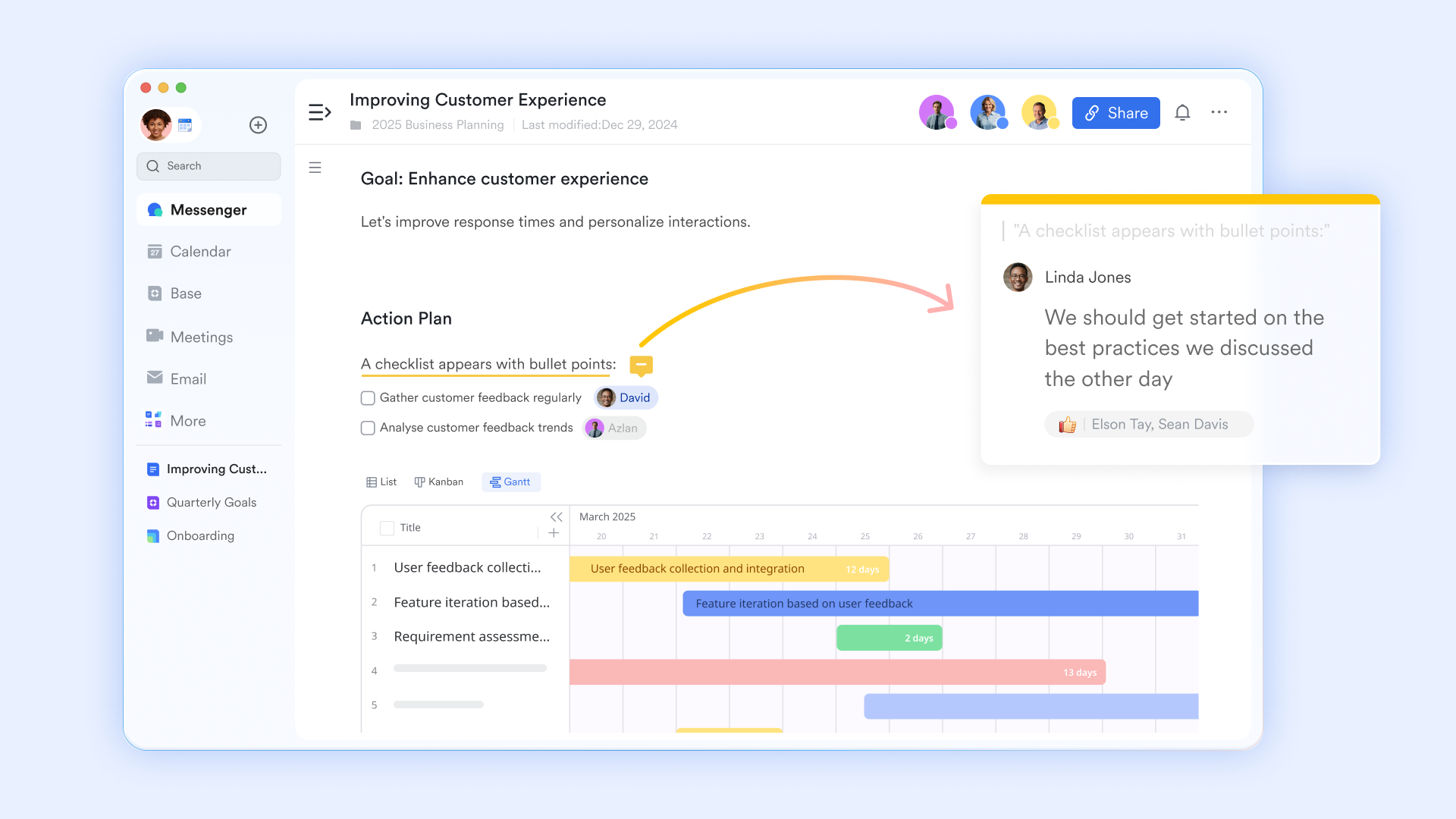
Standardized capture through smart forms
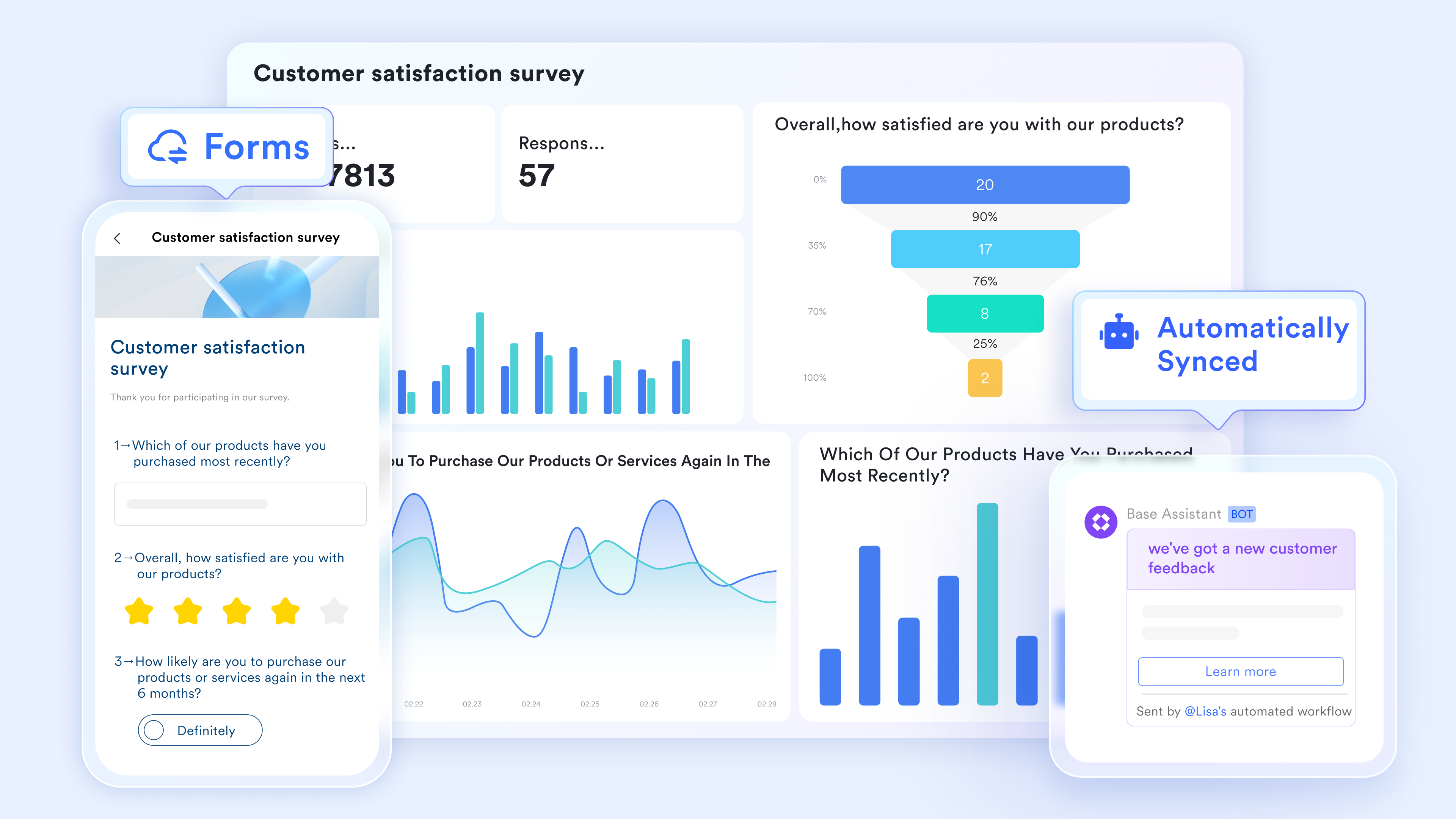
To eliminate the chaos of inconsistent reporting, Lark Forms provides a structured gateway for identifying new threats. Project leads can build customized intake forms that mandate specific data—such as impact severity, probability, and proposed owners—before a submission can be finalized. This "clean data" approach uses dropdown menus and requires fields to prevent incomplete entries. Most importantly, these forms are natively synced to and turned into a dashboard for deep analysis.
A relational engine for dynamic risk tracking
Lark Base functions as a sophisticated, centralized repository that evolves alongside your project. Unlike a flat list, this database allows you to build relational fields for financial exposure and escalation levels with structured fields and live records. On the other hand, stakeholders can pivot between views: use a Grid view for data entry and records, a for the overall timelines, a to track mitigation progress through different stages, or a Gallery view to focus on high-priority threats. This flexibility ensures that the risk register remains a live resource that informs daily project decisions. 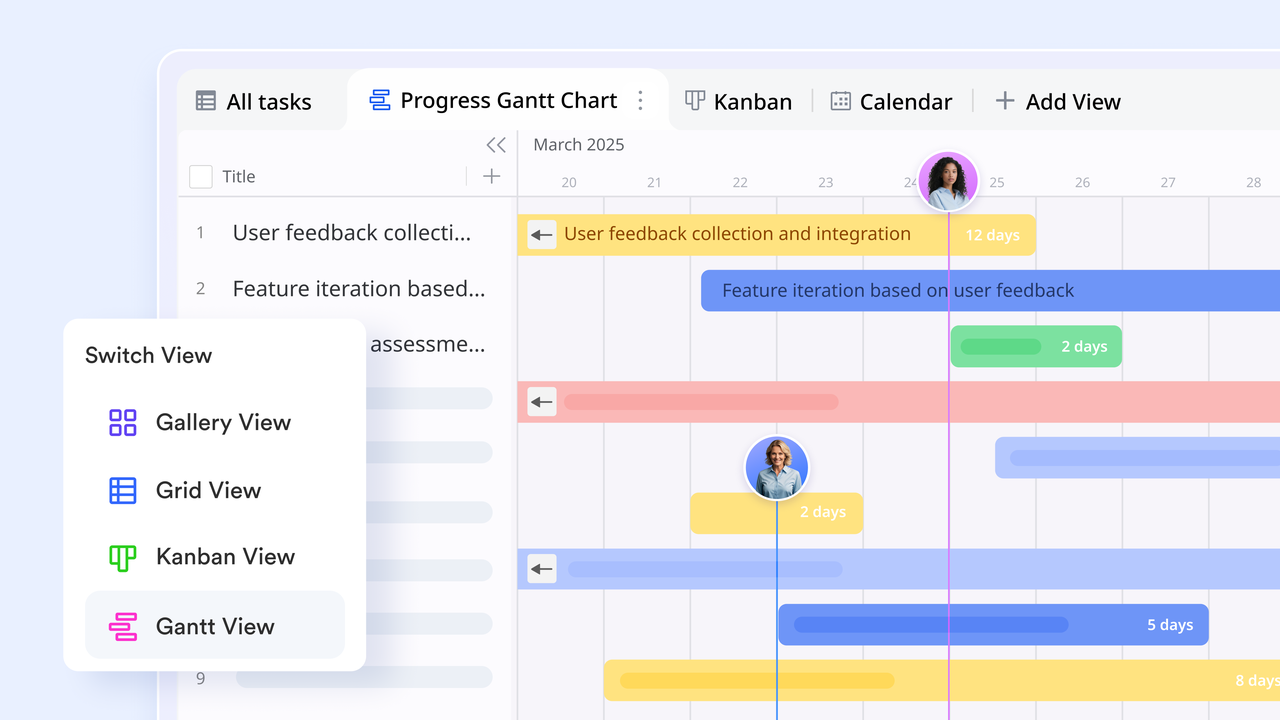
Proactive monitoring via automated logic
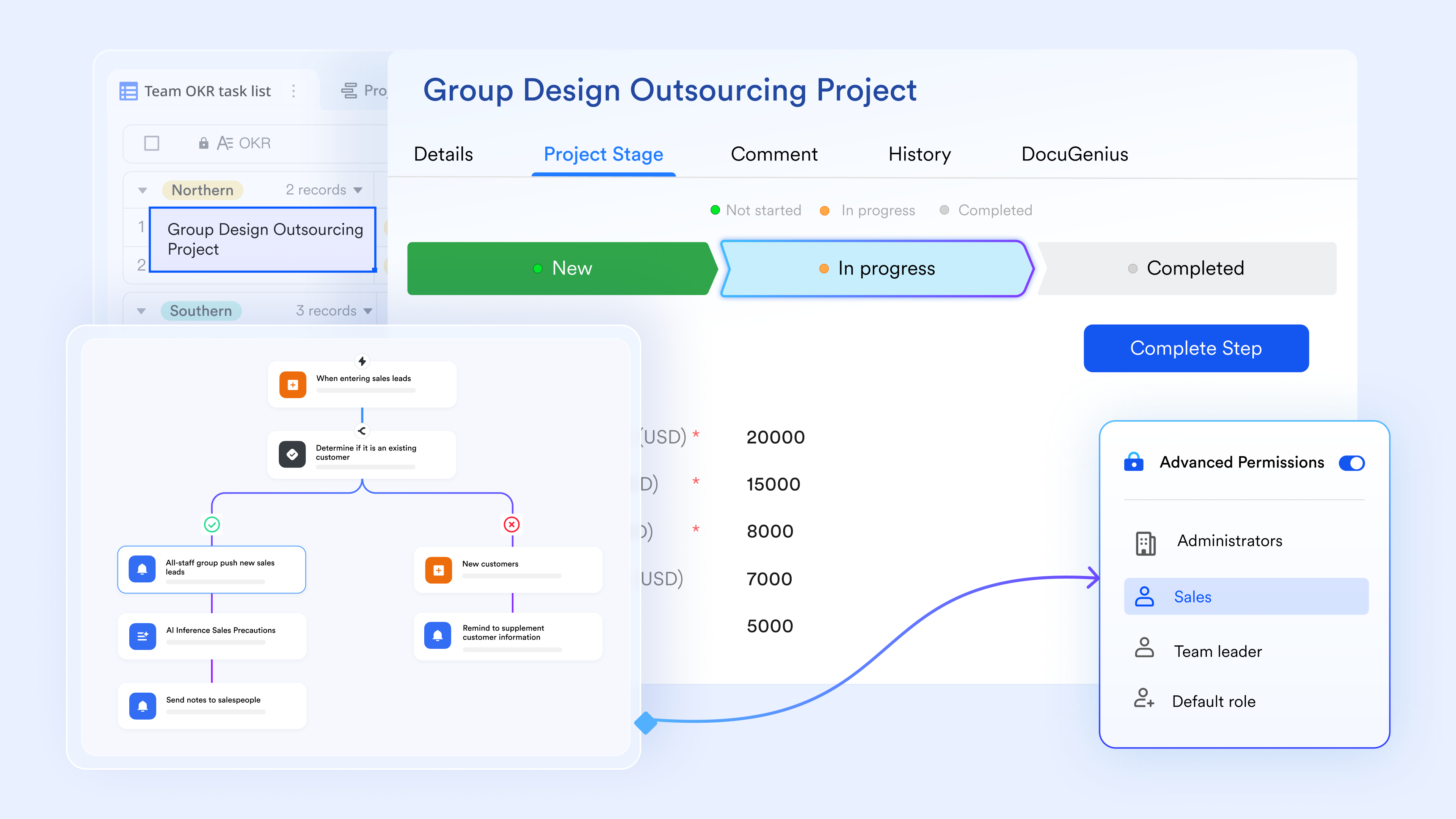
Lark Base removes the need for manual check-ins by using to guard the project timeline. You can adjust "If-Then" logic to trigger instant alerts the moment a "High Impact" risk is logged or when a mitigation deadline is 48 hours away. This conditional notification system ensures that the right experts are brought into the conversation exactly when they are needed, shifting the team's posture from reactive firefighting to proactive, automated risk mitigation.
Execution tracking through unified task management
Lark Tasks bridges the gap between identifying a risk and actually solving it. Every entry in the risk register can be converted into a tangible task with assigned owners and hard deadlines. For complex threats, the system allows you to break down mitigation plans into granular subtasks, providing a clear for resolution. With built-in progress indicators and automated reminders, the task console ensures that safety measures are actively executed and documented, rather than simply being listed in a report and forgotten. 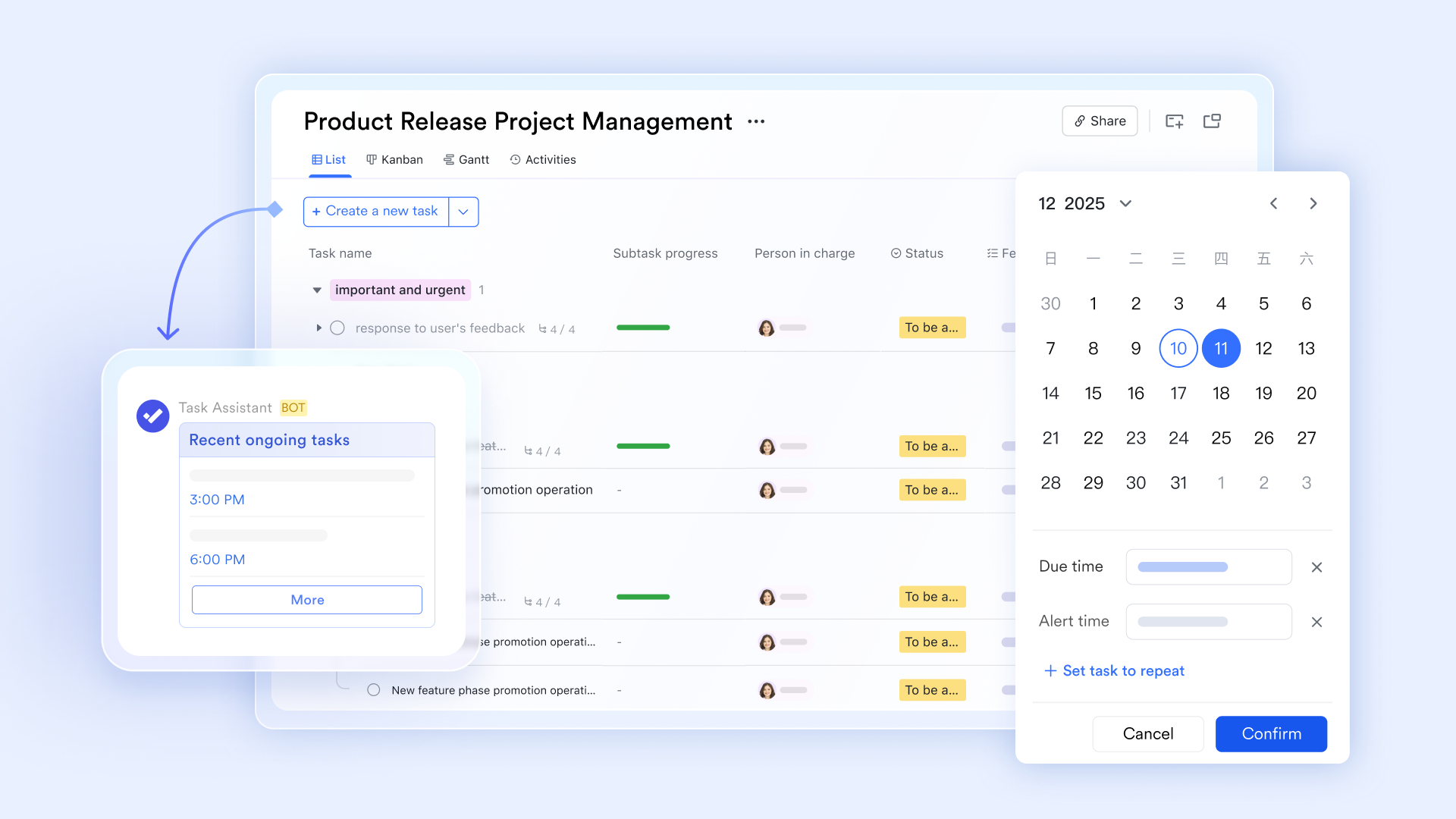
:
- Starter plan: Free forever plan that includes 11 powerful tools for up to 20 users. It also comes with 100GB of storage, 1000 automation runs, AI translations, and more.
- Pro plan: $12/user/month (billed annually) for up to 500 users. It includes everything in Starter plus group calling for up to 500 attendees, 15TB of storage, 50,000 automation runs, and more.
- Enterprise plan: for custom pricing. Supports unlimited users and includes even more automation runs and advanced security, compliance, and management features.
For small teams with simple communication needs

18 months message history
1000 Base automation runs/month
2000 rows per table in Base
Most POPULAR
For companies with comprehensive collaboration and management needs
Unlimited message history
500-participant video meetings
50k Base automation runs/month
20k rows per table in Base
For large companies with advanced security and organizational management needs
Get a personalized demo and pricing
Unlimited message history
500-participant video meetings
15 TB storage + 30 GB storage/user
500k Base automation runs/month
50k Base automation runs/month
Most POPULAR
For companies with comprehensive collaboration and management needs
Unlimited message history
500-participant video meetings
50k Base automation runs/month
20k rows per table in Base
Maintenance: How often should a project risk register be reviewed
A project risk register delivers value only when it is reviewed and updated regularly. Review frequency should align with project complexity, pace, and risk exposure to ensure emerging threats are identified early and managed effectively.
- Weekly project reviews: Risks should be reviewed during to capture changes in scope, schedule, or resources. This keeps risk information current and actionable. Weekly reviews also reinforce ownership and accountability.
- Phase-gate reviews: At major project milestones, the risk register should be reassessed in detail. New risks often emerge as projects move between phases. Phase-gate reviews ensure mitigation strategies remain aligned with upcoming work.
- Crisis triggers: The risk register should be reviewed immediately when unexpected events occur. Issues such as major delays, budget overruns, or external disruptions may elevate existing risks. Immediate review supports fast, informed response decisions.
Bonus: When to escalate risks to leadership
Not all risks require executive involvement, but some demand timely escalation to prevent serious impact. Clear escalation criteria ensure leadership is informed at the right moment and can intervene effectively.
- Escalation thresholds: Risks should be escalated when their probability or impact exceeds predefined tolerance levels. High-impact risks affecting budget, timeline, compliance, or reputation typically require leadership attention. Thresholds remove ambiguity and delay.
- Communication format: Escalated risks should be . Use standardized summaries highlighting risk severity, potential impact, and recommended actions. This enables leaders to grasp the situation quickly and respond decisively.
- Decision authority: Escalation is necessary when risk responses exceed the team's authority. Leadership involvement ensures approval for scope changes, additional resources, or strategic trade-offs. Clear decision ownership accelerates resolution and reduces uncertainty.
Conclusion
Effective risk management depends on visibility, accountability, and consistent follow-through. When risks are identified early, reviewed regularly, and owned clearly, teams can prevent minor threats from escalating into serious disruptions. Structured risk tracking enables informed decisions and smoother execution across the project lifecycle. With , teams can centralize risk registers, automate monitoring, and , transforming risk management from reactive firefighting into a proactive, ongoing discipline that supports confident leadership and predictable outcomes.
Track project risks in real time
FAQs
What is a project risk register?
A project risk register is a document used to identify, assess, and track potential risks that may affect a project's scope, schedule, cost, or quality.
Who maintains the project risk register?
The project manager maintains the risk register, while individual risks are owned and managed by assigned risk owners.
How often should a project risk register be updated?
A project risk register should be updated weekly, at phase milestones, and immediately after major changes or unexpected events.
What is the difference between a risk register and an issue log?
A risk register tracks potential future problems, while an issue log records problems that have already occurred.
Is a project risk register used in agile projects?
Yes, agile teams use lightweight risk registers or review risks during sprint planning and retrospectives to manage uncertainty continuously.
Related reading





























