A project status report is a critical tool for any organization looking to maintain clarity and transparency in their project management processes. This report provides regular updates on a project's progress, including its current status, updates on deliverables, risks, budget status, and future actions. Utilizing a structured approach to reporting not only enhances communication among team members but also fosters accountability and supports decision-making. Tools like Lark can facilitate the creation and sharing of effective project status reports, making it easier for teams to collaborate and stay aligned.
What is a project status report?
A project status report is a concise document detailing a project's current state, highlighting accomplishments, challenges, and future steps. Its primary purpose is to keep stakeholders informed about the progress and health of the project. In , these reports are vital as they provide insight into whether a project is on track, ahead, or behind schedule. A project status report should always include the project name and report date to ensure clarity and proper record-keeping.
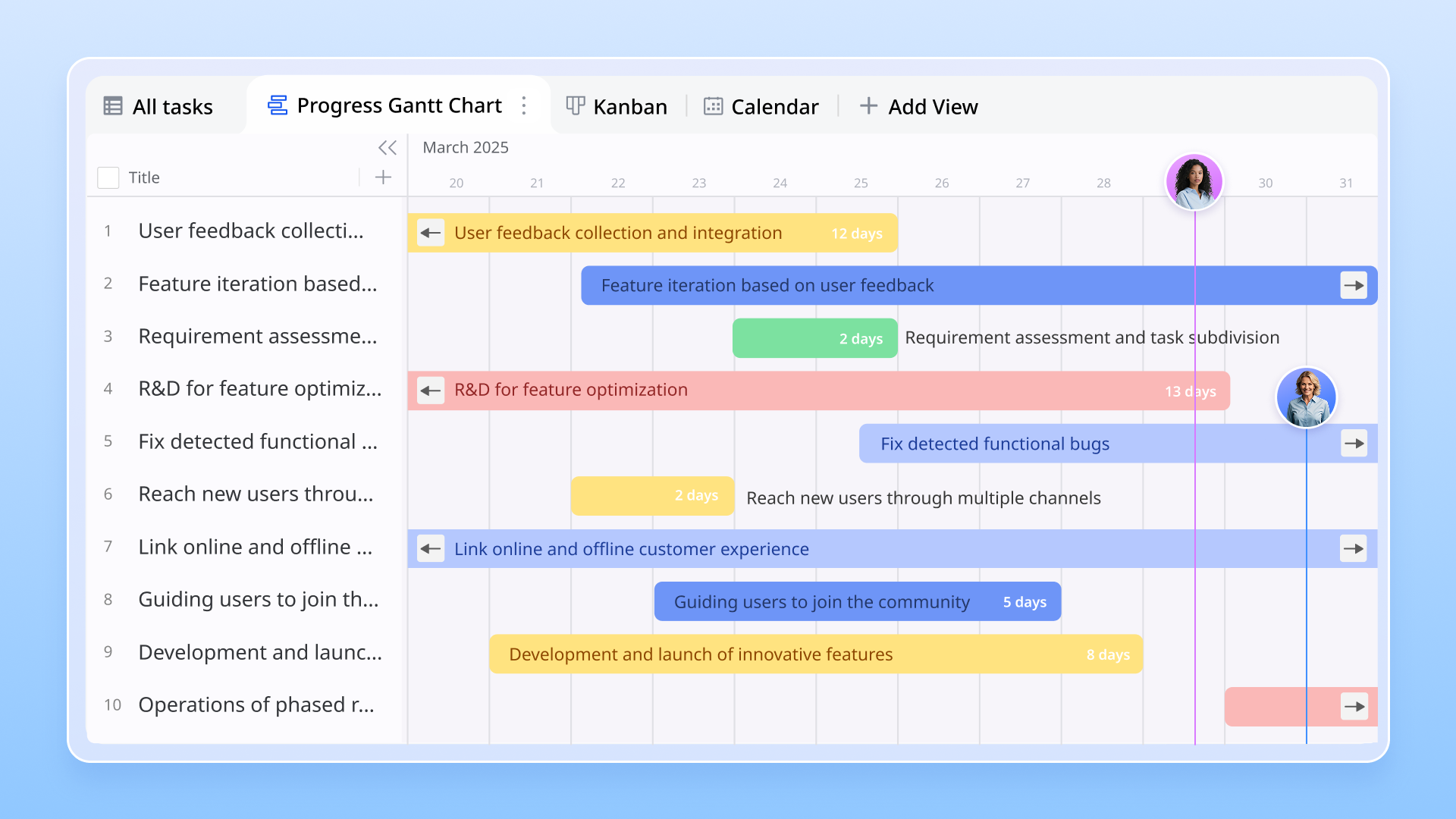
Transparency in project management involves sharing information openly and regularly. By communicating effectively, team members can build trust and collaboration, which are essential components of successful project execution. Including project details—such as , objectives, and milestones—provides important context for key stakeholders, such as sponsors, clients, and executives. Regular project status updates not only spotlight progress made but also allow teams to identify potential risks and obstacles early on. This proactive approach ensures that all and reduces the likelihood of surprises down the road.
Key components of a project status report
An effective project status report is essential for maintaining transparency and keeping all stakeholders aligned. An effective status report should include the following key elements to ensure comprehensive and clear communication. The following key elements provide a comprehensive view of the and health and should be included in every project status report.
Current status
Defining the current status of a project is crucial for understanding its progress. Regularly reporting the project's current status, progress, and timeline is essential to provide stakeholders with a clear picture of ongoing activities, achievements, and any potential delays. This section provides an overview of where the project stands at a specific point in time. Key elements to consider include:
- Defining project progress: Assess the percentage of completion for various tasks and . Use clear indicators or metrics to showcase progress, such as whether critical deliverables have been met on schedule. Understanding the current status and progress helps clarify the project's direction for all stakeholders.
- Visual tools for tracking timelines: Leverage visual tools like to display timelines and task dependencies. Gantt charts offer a graphical representation of the project schedule, allowing stakeholders to see not only the current status but also any upcoming deadlines and areas where tasks may be lagging. Utilizing a project status report template that incorporates Gantt charts can greatly improve clarity and visibility.
Updates on deliverables
The updates on deliverables section is where the team can outline what has been completed and what is upcoming. This aspect is vital for ensuring that stakeholders are informed about the progress and any .
- Discuss tasks completed: Clearly state which tasks completed since the last report. Highlighting tasks completed is essential in status reporting as it provides a detailed update on project progress, helps track upcoming work, and allows for prompt identification of issues, facilitating effective communication and project oversight.
- Outline what's next: Provide a brief summary of the next steps and upcoming deliverables. It's critical to document these updates to create a continuous feedback loop that keeps everyone aligned on deliverables and timelines.
Teams can efficiently create status reports to completed and upcoming deliverables, ensuring streamlined communication and centralized project progress updates for all stakeholders.
Risk assessment
Risk management is a vital component of project management, and the project status report should include a section dedicated to risk assessment.
- Defining : This involves identifying potential risks that could impact project success, including delays, budget overruns, resource shortages, or issues that could impact the project budget. Evaluate the likelihood and potential impact of these risks on the overall project.
- Importance of identifying risks early: Early identification allows the team to develop mitigation strategies to minimize the impact of these risks. Regular updates in the risk assessment section can equip the project team with the information needed to make proactive adjustments, thereby enhancing the chances of. Incorporating significant risks into the executive project status report template can ensure that higher management, including the project sponsor, is aware and engaged in addressing these challenges and is kept informed of major risks and their potential budget implications.
Budget status
Keeping track of financials is critical to ensure the project stays within the project budget. The budget status section provides an overview of current expenditures relative to what was planned.
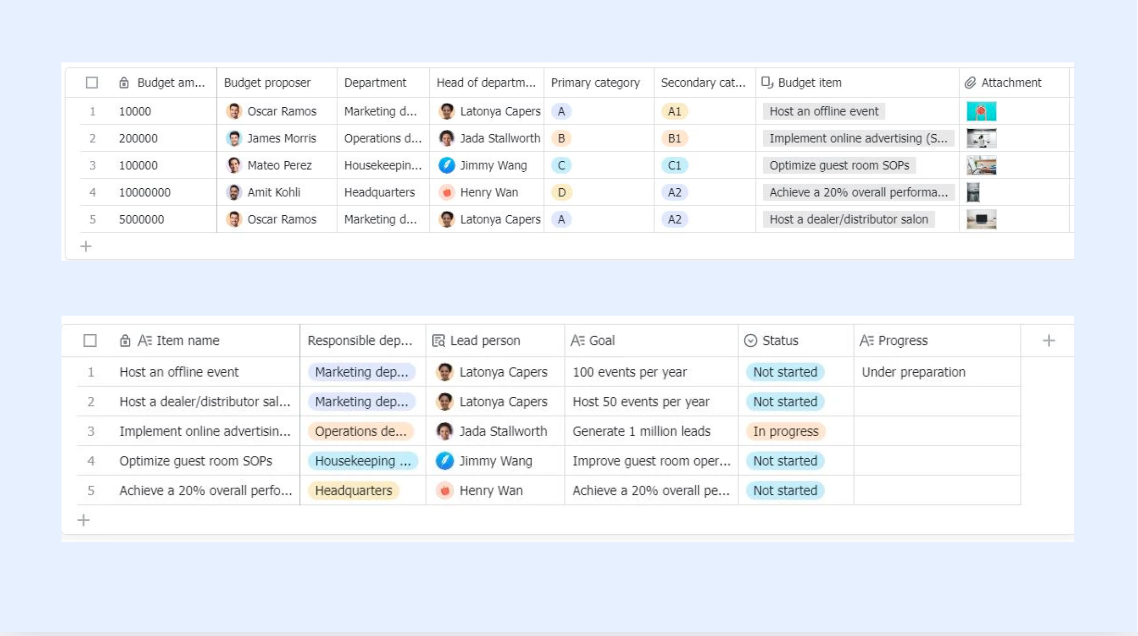
- Reporting on project budget versus expenditures: Detail the current project budget spent and compare it against the initial . Highlight any discrepancies or areas of concern that could impact the overall project budget.
- Common financial pitfalls in project management: Discuss challenges like underestimating costs or unforeseen expenses that may arise during project execution. Providing insights on the project budget in a monthly project status report template can help stakeholders make informed decisions regarding resource allocation and overall financial health.
can help generate reports that track the project budget and highlight financial trends for better decision-making.
Future actions
The final section of the project status report should focus on the next steps and responsibilities to maintain momentum.
- Outline next steps: Clearly define the actions required to move the project forward, including any tasks that need to be completed in the upcoming reporting period. When a project is completed, it is important to summarize the outcomes and outline any next steps or follow-up actions to ensure a smooth transition or .
- Importance of clear action items: Documenting clear action items is crucial for accountability. Assign responsibilities to specific team members, ensuring that everyone knows their role in achieving the project's next milestones. This clarity not only assists in tracking progress but also fosters a sense of ownership within the team. A well-structured executive project status report template PPT can help in clearly conveying these future actions to stakeholders.
Documenting lessons learned and action items in the project status report not only supports the current project but also provides valuable insights that can improve and execution for future projects.
Enhance project management with professional tips
Types of status reports
Understanding the various types of project status reports is vital for and project management. Project management tools make it easy to create a project status or create reports tailored to different audiences and needs, streamlining the reporting process. Each type serves a specific purpose and is tailored for different audiences and circumstances. Let's explore these types in more detail:
Weekly status reports
Weekly status reports are designed to provide frequent updates on project progress. are essential for maintaining momentum and ensuring ongoing alignment among team members and stakeholders. These reports help teams track work done over the past week and outline priorities for the upcoming week.
Key features:
- Summary of accomplishments: Outline what has been completed, including key milestones achieved.
- Immediate challenges: Identify any obstacles that arose and how they were managed.
- Next steps: Clearly state what tasks are on the agenda for the coming week.
Example utilization: In a software development project, a weekly status report might detail features completed during the last iteration, issues faced during testing, and planned user feedback sessions.
Monthly status reports
Monthly status reports provide a broader overview of , making them suitable for long-term projects that demand detailed analysis over time. These reports capture trends and changes in progress that may not be visible in weekly updates.
Key features:
- Holistic view of progress: Assess overall accomplishments against the.
- Comprehensive budget analysis: Provide insights into spending versus budgeted amounts, identifying any financial discrepancies.
- Strategic adjustments: Suggest any necessary changes based on trends observed during the month.
Example utilization: For a construction project, a monthly status report could document the completion of significant phases, provide photographs of current progress, and outline any adjustments needed to stay on schedule or budget.
Quarterly status reports
Quarterly status reports are essential for evaluating project performance over more extended periods, usually aligning with business reporting cycles. Quarterly reports provide a comprehensive, high-level overview for decision-makers by summarizing project progress, milestones, KPIs, budgets, and risks over a three-month period. They are particularly useful for high-level stakeholders, providing them with key insights into project alignment with .
Key features:
- Summary of strategic goals: Measure progress towards long-term objectives and assess whether the project is on track to meet rates of success.
- Risk review: Revisit identifies risks and their status, alongside any newly recognized threats.
- KPI evaluations: Use Key Performance Indicators (KPIs) to demonstrate how well the project is performing.
Example utilization: In a marketing initiative, a quarterly status report can be used to summarize key milestones, strategic insights, campaign performance, ROI, and adjustments made to marketing strategies based on customer feedback and sales performance analytics.
Executive project status reports
Executive project status reports are aimed specifically at senior management and stakeholders who require concise and high-level summaries of project progress. These reports drive strategic decision-making at the highest levels and are often less detailed than other reports. Executive project status reports are especially valuable for complex projects that require detailed oversight and strategic alignment.
Key features:
- Concise summaries: Focus on critical achievements, major risks, and budget implications.
- Strategic alignment: Highlight how project outcomes align with broader organizational goals.
- Actionable insights: Provide clear recommendations for executive focus and decision-making.
Example utilization: An executive project status report might illustrate the overall progress of a corporate restructuring initiative, detailing achieved objectives, financial impacts, and upcoming strategic decisions required by the leadership team.
Daily status reports
A daily status report is utilized primarily in high-stakes projects where immediate awareness of developments is critical. These reports are particularly common in industries such as , construction, and event planning, where conditions can change rapidly.
Key features:
- Snapshot of the day: Offer a quick summary of daily activities, issues encountered, and decisions made.
- Rapid response needs: Identify urgent issues that require immediate attention or escalation.
- Daily goal setting: State objectives for the next day to ensure focused efforts.
Example utilization: In a software development sprint, a daily status report may include information on completed coding tasks, bugs found during testing, and the next programming objectives for the developers.
Each type of status report plays a crucial role in maintaining effective communication throughout the . Utilizing specific templates, such as a weekly executive project status report template or project status report template PPT, can enhance consistency and professionalism in presentations. A powerful tool like Lark can meet your needs to build all these types of status reports within one workspace.
Try various types of reporting methods with one tool
Project status report vs. project dashboard
While both project status reports and serve the essential function of providing insights into project progress, they do so in distinctly different ways. Dashboards offer ongoing visibility and real-time updates, whereas previous reports may become outdated and less useful for real-time decision-making. Understanding these differences can help teams leverage both tools effectively.
Project status reports
A project status report is a formal document that provides a comprehensive overview of a project's key metrics, accomplishments, challenges, and next steps. A standard section in project status reports is the project summary, which offers a concise overview of the entire project, including objectives, progress, milestones, and outcomes. Typically delivered on a regular schedule (weekly, monthly, or quarterly), these reports facilitate in-depth reviews and communication among stakeholders.
- Focus: In-depth analysis of project progress, risks, and future actions.
- Format: Structured reports often include detailed descriptions and explanations.
- Frequency: Issued at predetermined intervals, offering a retrospective view of the project.
Project dashboards
In contrast, a project dashboard offers a real-time visual representation of project metrics and performance indicators. Dashboards graphically display key information in an easy-to-read format, enabling quick reviews of project health and immediate status updates. By leveraging visual metrics and analytics, dashboards provide real-time insights into a project's performance, allowing teams to monitor progress and respond to issues as they arise.
- Focus: Quick visual snapshots of current project health and progress.
- Format: Interactive graphs, charts, and metrics that allow immediate insights.
- Frequency: Continuously updated in real-time, providing an ongoing view of performance.
Using both tools together can enhance overall project management. While a project status report delivers detailed insights and comprehensive analysis at set intervals, a project dashboard provides the ongoing visibility needed for day-to-day operations. Together, they can ensure that stakeholders are both informed and engaged throughout the project lifecycle.
Why project status reports are essential for project success
Project status reports are critical to ensuring project success, as they foster communication, accountability, and informed decision-making among stakeholders. Their importance can be highlighted through two primary aspects: stakeholder management and the project's overall health.
The role of status reports in stakeholder management
Status reports serve as a vital communication tool that keeps all stakeholders informed about the project's progress and potential challenges. They help bridge the information gap between team members and higher management, ensuring that everyone has a clear understanding of the project's direction.
- Enhanced communication: Regular updates in status reports facilitate open dialogue between project teams and stakeholders, allowing for timely discussions regarding progress and issues.
- Alignment of expectations: By and next steps, project status reports align stakeholder expectations, allowing for better resource allocation and strategic planning.
Link between project status and overall project health
The project status report provides insights into the project's current state, enabling teams to assess its health effectively.
- : By regularly documenting key metrics such as timelines, deliverables, and risks, project managers can identify any deviation from the original plan, and address any potential issues before they escalate.
- Risk identification: Regular status updates allow teams to highlight risks and challenges, supporting early intervention and risk management strategies.
- Overall project assessment: These reports allow stakeholders to gauge whether the project is on track to meet its objectives and timelines, influencing strategic decisions and resource allocation moving forward.
In summary, project status reports play an indispensable role in project success. They facilitate stakeholder engagement, enhance communication, and provide vital insights into project health, ultimately guiding teams towards successful project outcomes.
Achieve project transparency and project success
Best practices for creating an effective project status report
Creating a project status report that effectively communicates key information requires attention to detail, clarity, and relevance. Using project management tools to create effective status reports can streamline the process to create reports efficiently, helping teams stay organized and keeping stakeholders informed. Here are some best practices to consider:
Keeping it concise: Importance of summarization and clarity
A project status report should prioritize conciseness and clarity to prevent overwhelming readers with unnecessary details. Here are some strategies to maintain clarity:
Use bullet points and lists: These formats can condense information into easily digestible segments, enhancing readability. Using a file editor that supports rich formatting styles helps project planning clarity, such as Lark‘s Lark Docs function, which supports bullet points, tasks lists, and Gantt charts to be embedded in.
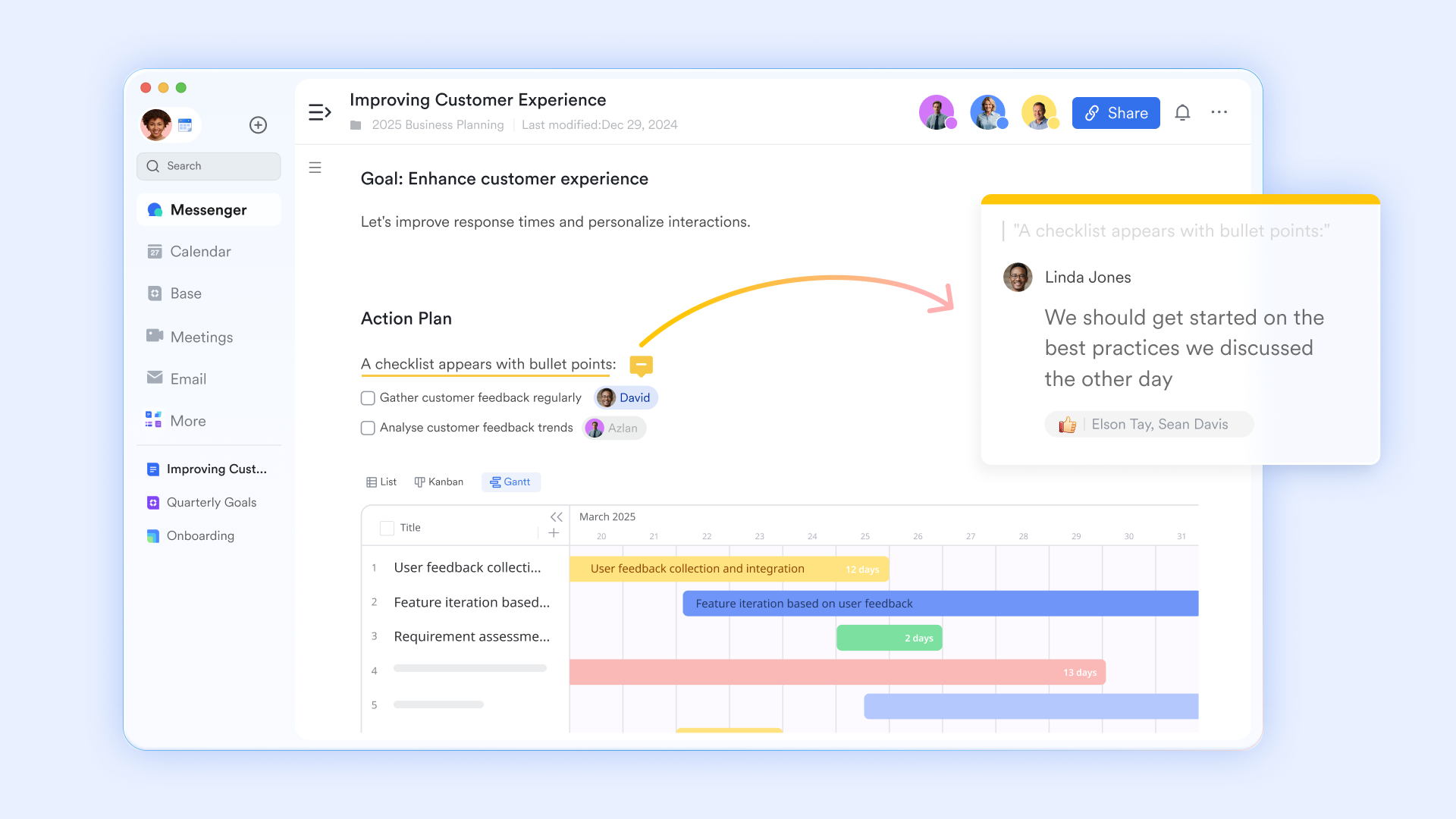
Focus on key achievements and challenges: Highlight the most critical elements of progress and issues, avoiding lengthy narratives.
Limit jargon: Use straightforward language that can be easily understood by all stakeholders, including those not directly involved in the project.
Regular updates: Establishing a cadence for reporting:
Consistency in reporting frequency helps establish a rhythm that both the project team and stakeholders can rely on. Consider the following:
Set a regular schedule: Determine how often reports should be generated based on —weekly, monthly, or quarterly—and stick to this cadence. In case of foegetting regular reporting, setting automated reminders through automation tool like Lark can save much time and energy.
Create templates: Standardizing the structure of reports can save time and ensure that all necessary information is included. For example, a weekly project status report template can streamline this process.
Use technology to automate reminders and generate reports: Employing project management tools that can automatically generate reports on a set schedule will help maintain this regularity, ensuring that stakeholders receive timely updates.
Tailoring reports for your audience: Adjust detail level for different stakeholders:
Different stakeholders require varying levels of detail based on their roles and responsibilities. Tailoring the report to meet these needs increases effectiveness:
Senior management: Executive project status reports should focus primarily on high-level metrics, risks, and strategic considerations, summarizing key points succinctly.
Project teams: Detailed reports for team members might dive deeper into task specifics, assigning responsibilities and addressing challenges in more depth.
Clients or external stakeholders: These reports should highlight milestones achieved, upcoming deliverables, and , ensuring that external parties are kept in the loop without bogging them down in excessive detail.
Ready-to-use project status report templates
Using standardized project status report templates can enhance communication and streamline updates among stakeholders. Templates make it easy to create a project status report quickly and consistently, allowing teams to create a project status with minimal effort and ensuring all key information is included. Here are some common types of templates along with their specific purposes:
Executive project status report template
The executive project status report template is designed for senior management and focuses on high-level project metrics and strategic insights. It summarizes key achievements, major challenges, budget status, and next steps, allowing executives to grasp the project's progress quickly and identify areas that may require their attention.
Weekly project status report template
The weekly project status report template provides frequent updates on project progress. This template highlights accomplishments from the past week, current tasks, and any blockers that might affect ongoing work. It helps ensure that all team members and stakeholders are aligned and aware of the immediate priorities and challenges.
Monthly project status report template
The monthly project status report template offers a broader overview of project performance over a month, making it particularly useful for long-term projects. It includes comprehensive metrics, budget analysis, and a summary of the next month's objectives, helping stakeholders understand trends and shifts in project dynamics.
Project status report template for stakeholders
The project status report template for stakeholders is tailored to keep all relevant parties informed about the project's status. This template succinctly presents the overall project status, major achievements, challenges, upcoming deliverables, and key decisions that require stakeholder input, ensuring effective communication across the board.
Project status report template in Excel
For teams that prefer data-driven management, the project status report template in Excel allows for dynamic tracking of project metrics. This editable format enables real-time updates, includes charts for visual analysis, and has built-in formulas for budget tracking, making it a practical choice for ongoing project management.
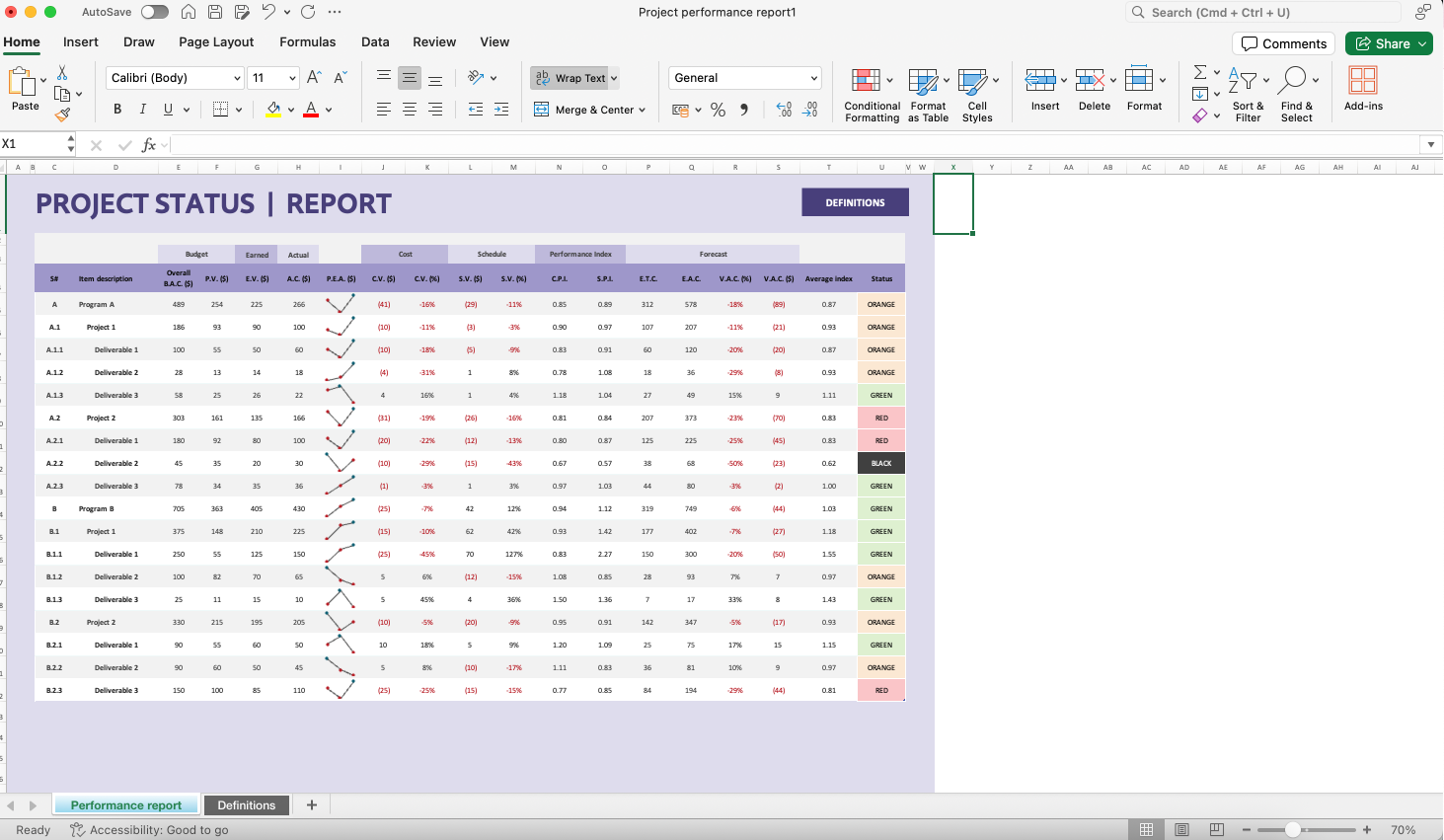
Image source: Screenshot of Excel
Project status report template in PPT
Finally, the project status report template in PPT is ideal for visually presenting project updates during meetings. This template includes slides for each section of the report, with options for visual aids like charts and graphs, allowing project managers to deliver engaging presentations that capture the attention of stakeholders.
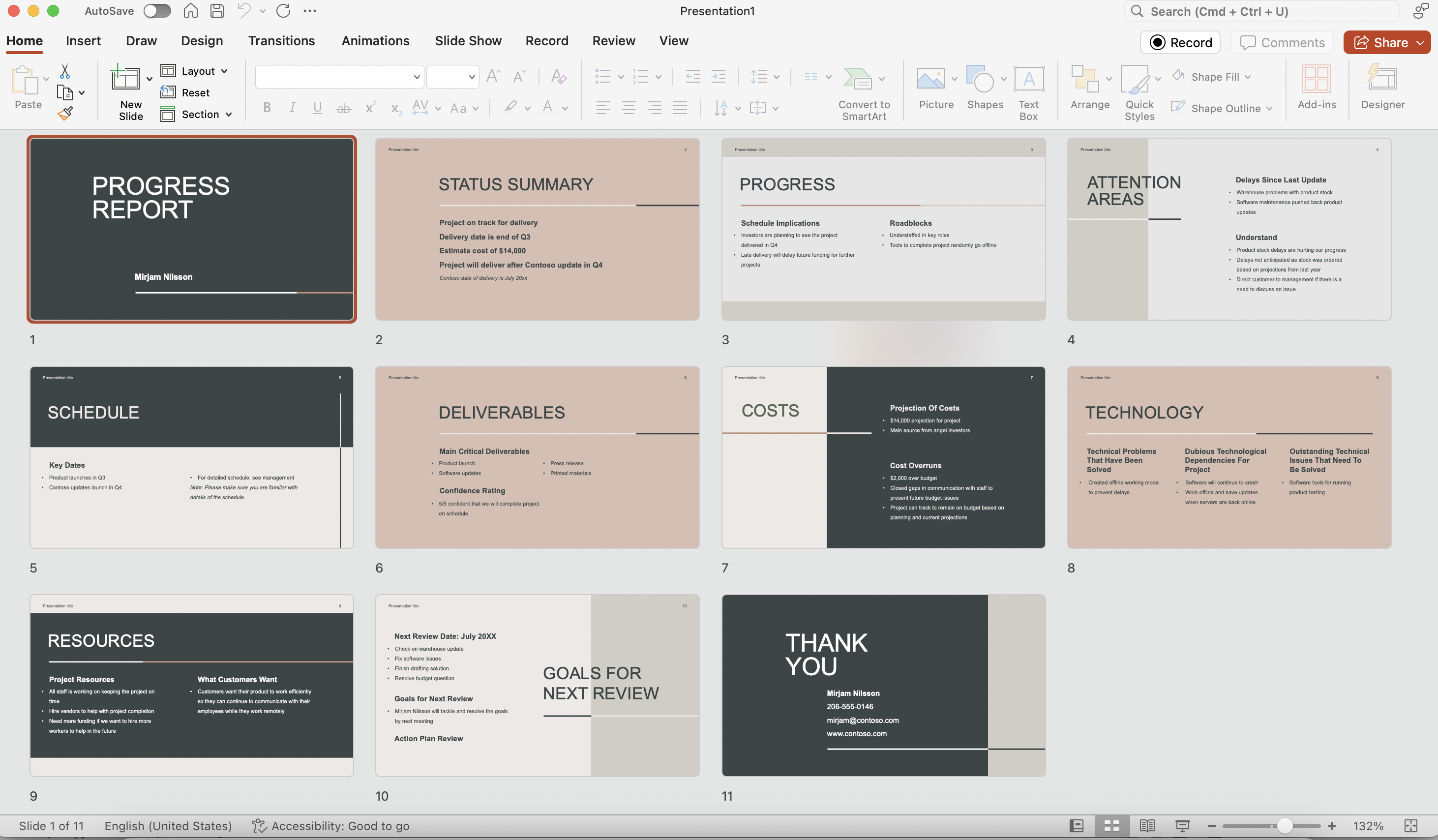
Image source: Screenshot of PowerPoint
Transform status updates. Start with templates
Modern tool to enhance your project status reporting
Lark provides a comprehensive platform that integrates various tools necessary for effective project management, making it an ideal choice for status reporting. With modern tools like Lark, teams can create reports quickly and efficiently, which streamlines communication, keeps stakeholders informed, and helps everyone stay organized. Its all-in-one design means that teams can manage different aspects of their projects without needing to switch between multiple applications, thereby enhancing efficiency and coherence.
Visual dashboard and Gantt charts for visual progress tracking
One of the standout features of is its visual dashboard, which allows project managers to see key metrics and overall project health at a glance. The dashboard provides real-time insights into project timelines, deliverables, and team performance. Additionally, the Gantt charts available in Lark Base offer a visually intuitive way to track project timelines and progress, helping teams to organize tasks sequentially and monitor dependencies between them. This visual representation makes it easier to identify potential delays and adjust plans as needed.
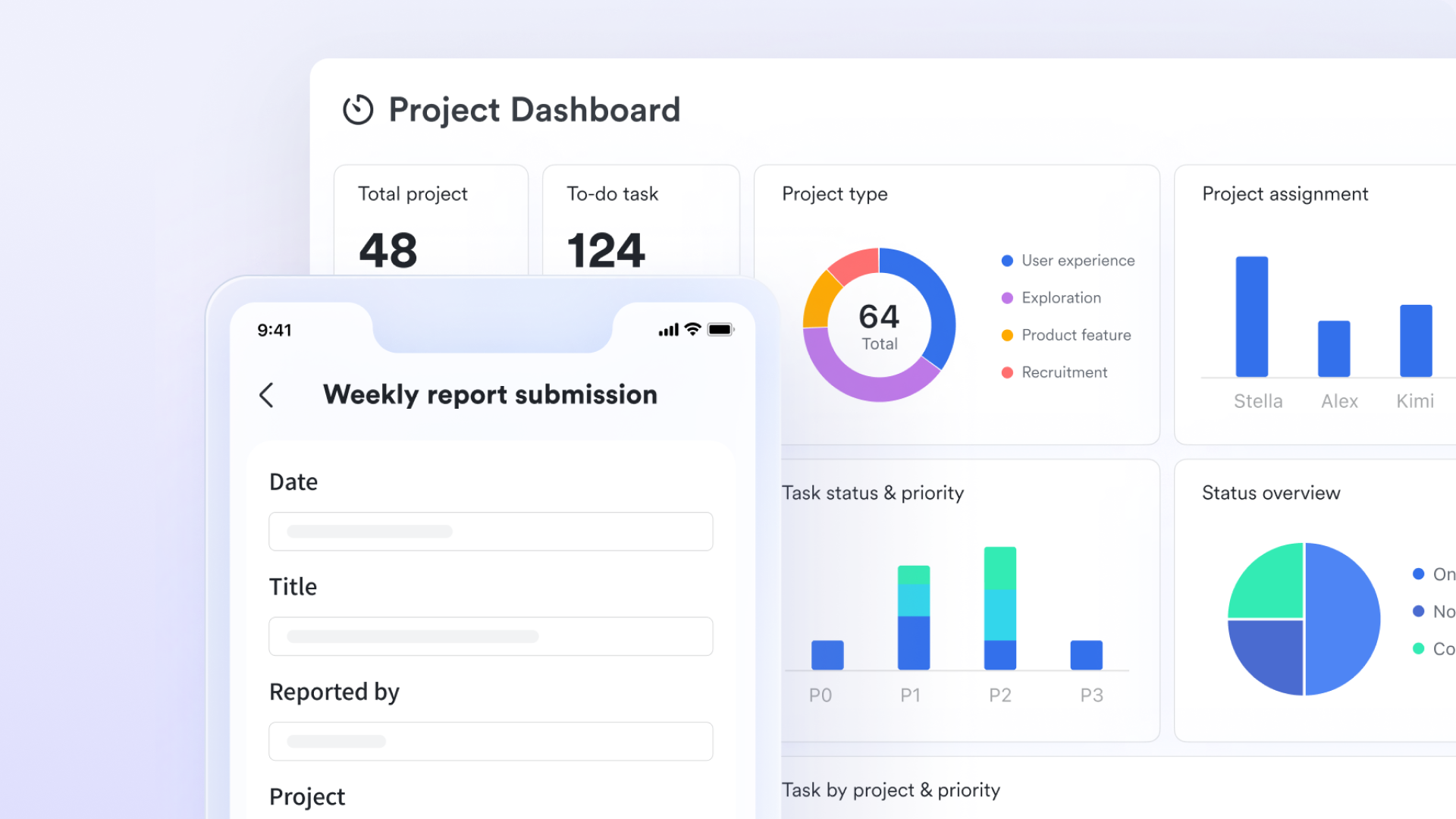
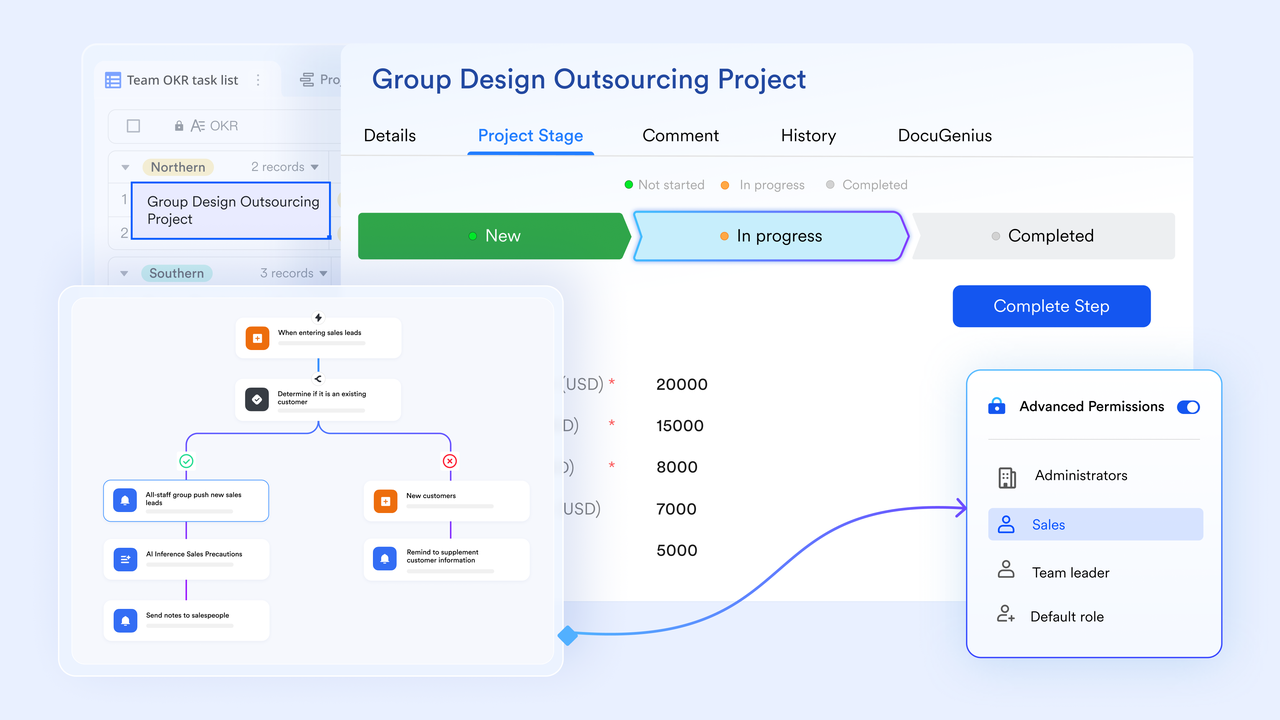
Lark Base enhances project management with automated workflows that streamline the process of tracking deliverables. Teams can set up automated reminders and notifications for key tasks and phases, ensuring that nothing falls through the cracks. These workflows help both project managers and team members stay accountable for their responsibilities, allowing for timely updates and smoother project execution.
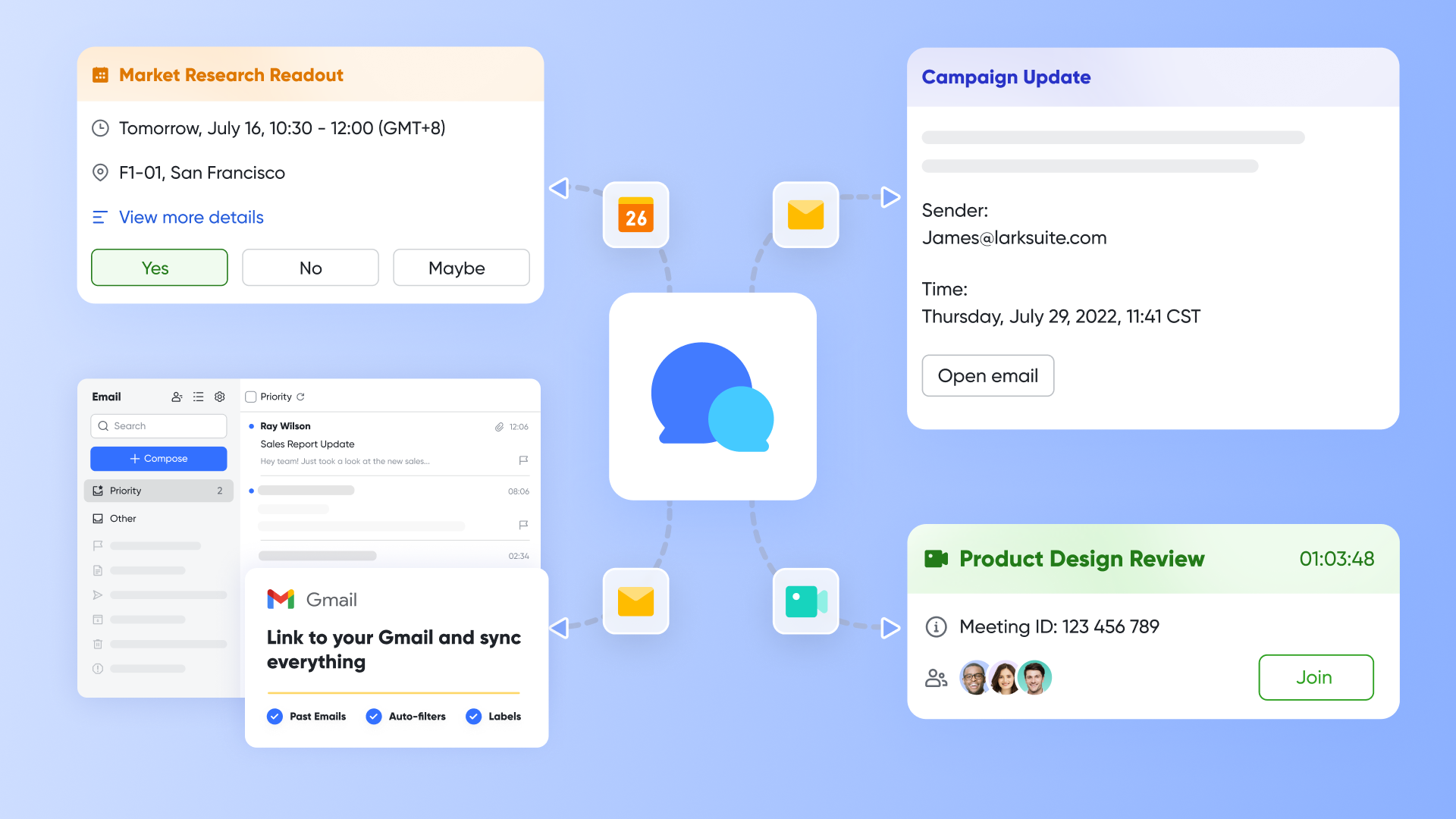
Messaging and meeting capabilities for team communication
Effective communication is critical to project success, and Lark excels in this area with its robust messaging and meeting features. With built-in chat, , and video conferencing, , teams can discuss project updates, address issues, and brainstorm ideas in real time. This capability fosters collaboration and ensures that everyone is on the same page regarding project status and next steps.
Approval tools for budget tracking
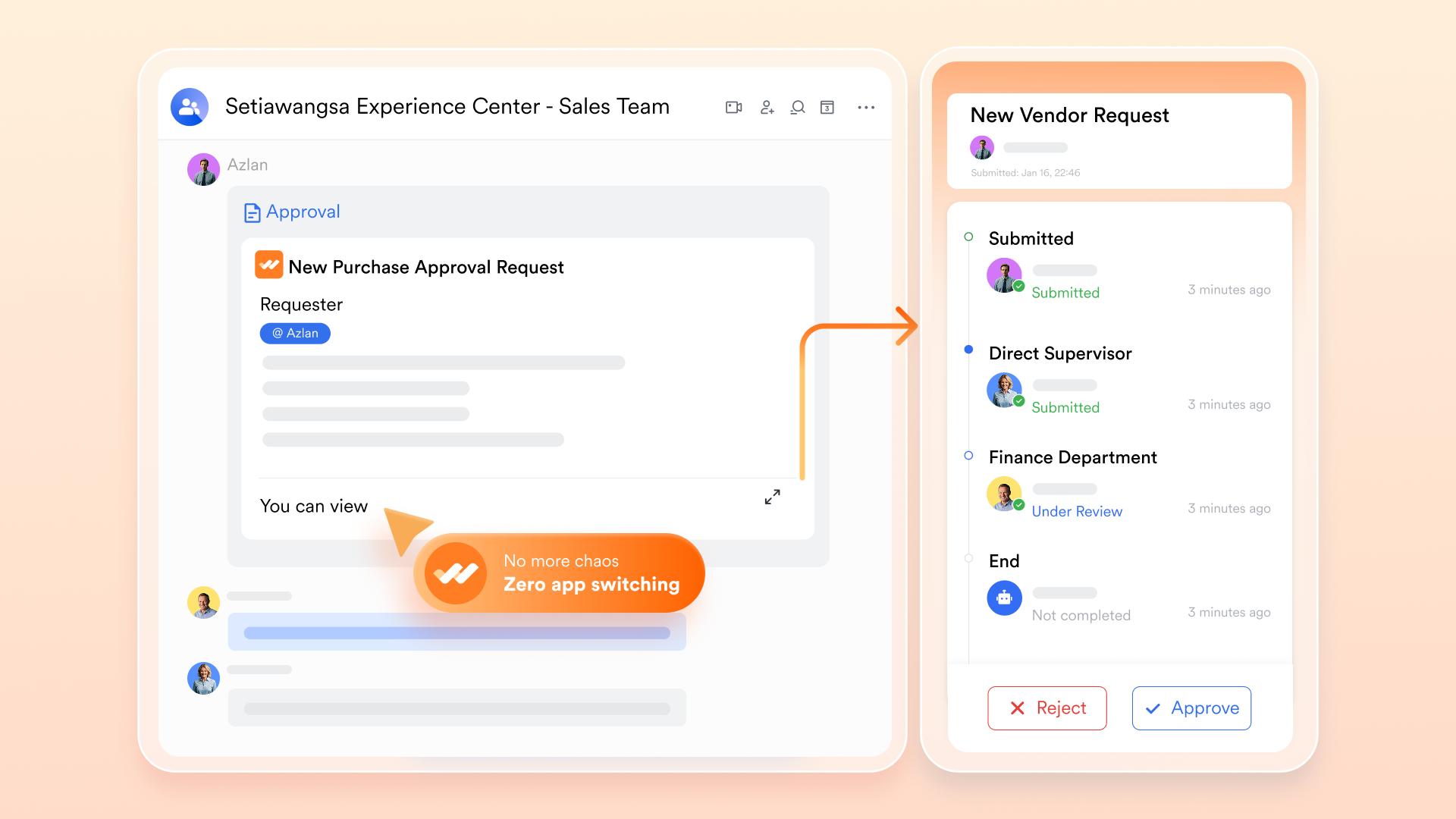
Lark also includes approval tool, , that facilitates and financial management. Project managers can use these tools to request and manage budget approvals directly within the platform, making it easier to maintain control over project finances. By streamlining the approval process, Lark Approval helps teams avoid delays related to budgetary constraints and ensures that spending aligns with project goals.
Collaborative document editing for brainstorming and reporting
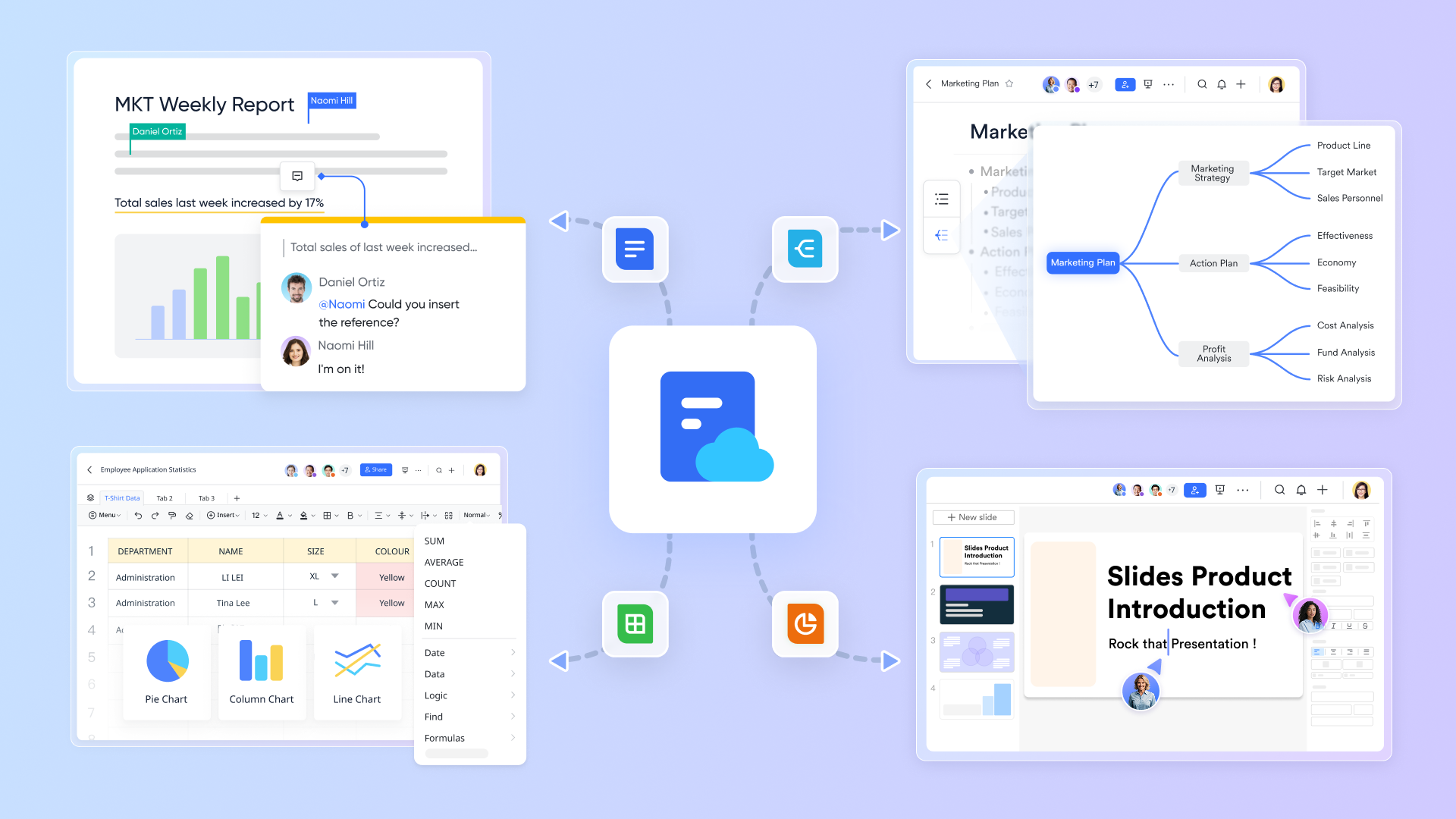
Lark greatly enhances team collaboration by offering a robust suite of document editing tools. allows team members to collaboratively draft project plans, seamlessly incorporating Base's Gantt charts to visualize progress across different phases. Meanwhile, provides a platform for creating engaging reports that effectively present project updates to stakeholders. offers a variety of formulas and table views, enabling teams to analyze data comprehensively and report their findings clearly. As a result, stakeholders receive well-rounded project reports that reflect varied perspectives and updates, ultimately supporting informed decision-making and project success.
Lark provides a modern and effective solution for enhancing project status reporting. By leveraging its visual dashboard, automated workflows, integrated communication tools, budget approval capabilities, and collaborative document editing, project managers can improve transparency, keep stakeholders informed, and drive project success more efficiently.
for Lark:
- Starter plan: Free forever plan that includes 11 powerful tools for up to 20 users. It also comes with 100GB of storage, 1,000 automation runs, AI translations, and more.
- Pro plan: $12/user/month (billed annually) for up to 500 users. It includes everything in Starter plus a group calling for up to 500 attendees, 15TB of storage, 50,000 automation runs, and more.
- Enterprise plan: for custom pricing. Supports unlimited users and includes even more automation runs and advanced security, compliance, and management features.
For small teams with simple communication needs

18 months message history
1000 Base automation runs/month
2000 rows per table in Base
Most POPULAR
For companies with comprehensive collaboration and management needs
Unlimited message history
500-participant video meetings
50k Base automation runs/month
20k rows per table in Base
For large companies with advanced security and organizational management needs
Get a personalized demo and pricing
Unlimited message history
500-participant video meetings
15 TB storage + 30 GB storage/user
500k Base automation runs/month
50k Base automation runs/month
Most POPULAR
For companies with comprehensive collaboration and management needs
Unlimited message history
500-participant video meetings
50k Base automation runs/month
20k rows per table in Base
: Switching to Lark’s Pro plan can lead to significant cost savings— for example, a 100-employee company using Slack, Google Workspace, and Airtable could save approximately $25,200 annually by consolidating their tools with Lark.
Conclusion
Well-crafted project status reports are crucial for successful project management, providing stakeholders with essential insights into progress, challenges, and next steps. These reports enhance transparency and accountability, allowing project managers to make informed decisions and align team efforts towards common goals. Effective status reporting fosters communication among all project participants, ensuring that everyone is aware of the project's current state and any potential risks.
Leveraging modern tools like can significantly improve the reporting process, offering features such as visual dashboards, automated workflows, and collaborative document editing. By utilizing these tools, project managers can streamline their reporting, enhance communication, and ultimately drive better project outcomes. We encourage teams to embrace these solutions to not only improve their status reporting but also to cultivate a culture of collaboration and efficiency. In doing so, they can ensure that their projects remain on track and meet stakeholder expectations effectively.
FAQs
How to write a project status report sample?
To write a project status report, start with a clear title and date, including the project name. Begin with an executive summary that outlines the project's objectives and overall status (e.g., on track, at risk). Include key sections such as milestones achieved, current progress against the timeline, any issues or risks encountered, and next steps. Use bullet points for clarity and keep the language straightforward.
What is the difference between a progress report and a status report?
A progress report focuses primarily on what has been accomplished during a specific period of time, detailing completed tasks and milestones achieved. In contrast, a status report provides a broader overview of the entire project's health, incorporating current progress, challenges, risks, and future plans. While progress reports can be seen as subsets of status reports, the latter aims to give stakeholders a comprehensive view of the project's trajectory and alignment with objectives.
How to summarize project status?
To summarize project status, provide a brief overview covering key aspects: current progress against timeline and budget, any significant achievements, ongoing challenges, and upcoming tasks. Start with a clear statement about the overall project health (on track, delayed, etc.), then include specific metrics or milestones.
What are the top 3 elements that should be in an ideal project status report?
The top three elements that should be included in an ideal project status report are:
- Current progress: A clear update on what has been completed compared to the project plan, often expressed as a percentage of completion.
- Risks and issues: Identification of any challenges that could affect the project's success, along with their potential impact and proposed mitigation strategies.
- Next steps: A concise outline of upcoming tasks, deadlines, and any actions required from stakeholders to ensure continued progress.
Including these elements ensures that the report is informative and actionable, fostering better decision-making among stakeholders.
Related reading