














Sales Invoice Guide: What It Is, Templates and Best Practices

Ryan Tanner
Product Marketing Specialist
Sep 18, 2026
Ryan Tanner
Sep 18, 2026

17 min read


In every business, documenting transactions accurately is critical for financial clarity and compliance. One of the most essential documents in this process is the sales invoice, which records the details of goods or services sold and the amount owed by the customer. A well-structured sales invoice ensures timely payments, builds credibility, and supports better cash flow management.
With modern business tools like Lark, teams can simplify invoice creation, sharing, and tracking, helping sales and finance teams stay aligned while minimizing manual errors. This guide explains what a sales invoice is, its key components, types, and best practices to streamline your workflow efficiently.

What is a sales invoice
Sales invoices serve as official records of a completed sale between a business and its customer. They outline the products or services delivered, the quantity, pricing, taxes, and payment terms. A sales invoice is not just a payment request; it's also a document that ensures transparency, legal compliance, and smooth financial reporting.
When managed properly, sales invoices form the backbone of your revenue process. They help track what's owed, when it's due, and what's been paid, which is essential for forecasting and maintaining a healthy cash flow. With digital tools, businesses can issue invoices instantly and track payment updates in real time, eliminating delays and confusion.
Image source: unsplash.com
Types of sales invoices
Before choosing the right format, businesses should understand the different kinds of sales invoices used in various industries. Each type serves a specific purpose depending on the transaction stage or customer relationship. Selecting the right one ensures that communication and billing accuracy remain consistent across the sales process.
- Standard sales invoice: This is the most common invoice type used to bill customers after goods or services have been delivered. It includes essential details such as invoice date, due date, item descriptions, and payment terms. Businesses in retail, services, and e-commerce frequently use this format. A clear and concise standard invoice supports faster approval and payment.
- Pro forma invoice: A pro forma invoice acts as a preliminary bill sent before the final delivery. It provides an estimate of the transaction, helping customers review costs and authorize the order. This type of invoice is often used in international trade or projects where quotes need pre-approval. Sending a pro forma invoice helps manage expectations and reduces potential billing disputes later.
- Recurring invoice: For subscription-based services or ongoing contracts, recurring invoices are ideal. These are automatically generated at regular intervals, reducing manual work. Businesses offering monthly maintenance, consulting, or digital subscriptions benefit greatly from this format. In addition,utilizing automated invoicing software like Zintego also ensures predictable revenue and saves administrative time. Businesses in Australia and New Zealand often set these up through MYOB invoicing for small business, which handles the recurring billing and local GST reporting in one place.
- Commercial invoice: In global trade, commercial invoices serve as customs documentation. They include additional details such as shipment weight, tariff codes, and export declarations. This helps ensure compliance with international trade laws. Businesses engaging in export or import operations must issue these invoices accurately to avoid clearance delays.
- Credit and debit invoices: Credit invoices are issued when a refund or discount is provided after a sale, while debit invoices apply when additional charges are required. These are essential for adjusting customer accounts and maintaining accurate books. Regular monitoring of such invoices helps businesses manage reconciliation efficiently.
Key components of a good sales invoice template
A well-structured sales invoice template simplifies creation and ensures consistency across transactions. Every field plays an important role in maintaining clarity and compliance. When designed correctly, an invoice can be both functional and visually professional.
- Essential details to include: Each invoice should contain customer name, address, invoice number, issue date, due date, itemized description, quantity, pricing, tax rate, and total amount. Including payment instructions ensures clarity for both parties. Missing or unclear details can delay approvals and payments.
- Design and formatting: A clear layout improves readability and prevents confusion. Businesses should maintain consistent branding, color themes, and logos on every invoice. Digital templates can use clean tables and alignment to keep information organized, while avoiding unnecessary clutter.
- Functional features: Modern invoice templates include editable fields, digital signatures, and automated totals. These features make the process faster and reduce manual calculation errors. Some tools even allow one-click conversion of approved estimates into final invoices.
- Digital delivery and accessibility: Sending invoices electronically ensures quick delivery and reduces paperwork. Cloud storage enables secure record keeping and easy retrieval for audits or customer queries. Tracking viewed or downloaded invoices adds accountability.
- Workflow compatibility: A good invoice template aligns with your existing tools and workflows. Using a connected workspace like Lark allows your sales, finance, and operations teams to manage invoices, reminders, and follow-ups from one place improving transparency and productivity.
Ready-to-use sales invoice templates
Templates simplify the process of creating professional invoices. Businesses can choose from free or paid versions depending on their customization needs, branding preferences, and automation level. Below are some reliable options:
Contractor invoice template
Independent professionals and contractors often need flexible invoice templates that let them bill clients quickly while maintaining professionalism. A contractor invoice template helps record project details, labor hours, materials, and payment terms clearly. It ensures transparency and smooth payment cycles for both parties.
Plumbers invoice template
Service-based professionals like plumbers rely on invoices to record completed jobs, materials used, and labor charges. A plumber's invoice template makes this process simple by offering predefined sections for service details, parts replaced, and hourly rates. It helps technicians maintain consistency and speed up payment collection.
Proforma invoice template
Before goods or services are delivered, businesses often issue a proforma invoice as a quotation or cost estimate. This document outlines expected charges and terms before final billing. Using a proforma invoice template ensures customers have full cost visibility, reducing misunderstandings and improving transaction confidence.
Invoice tracker template
Keeping track of invoices, payments, and due dates can quickly become overwhelming — especially when you're working with multiple clients, projects or billing cycles. Our Invoice Tracker Template simplifies this process: allowing you to monitor each invoice by client name, project, amount due, issue date, due date, payment status, and payment date.
Vertex42 sales invoice template
Vertex42 offers Excel-based invoice templates that are easy to edit and track. This sales invoice template is suitable for small businesses or freelancers who prefer spreadsheet-based record keeping. It includes automatic calculations, customizable fields, and simple formatting that helps users issue invoices quickly and accurately.
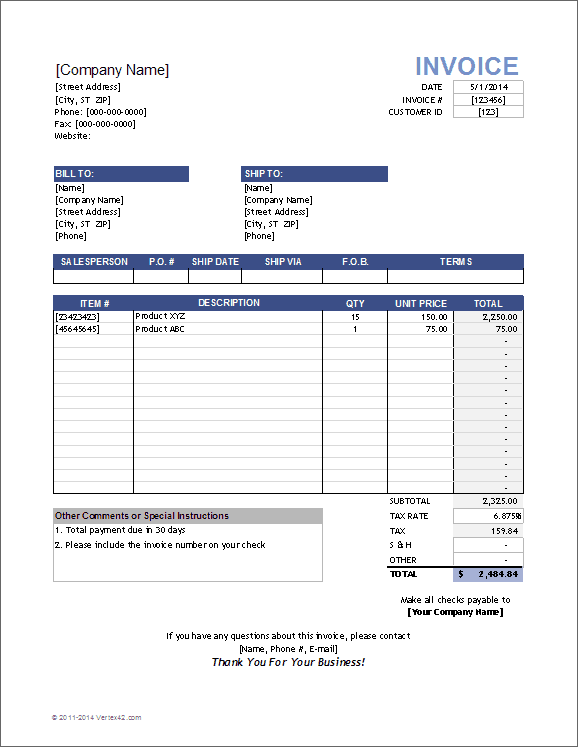
Image source: vertex42.com
Zoho sales invoice template
Zoho offers an easy-to-use online invoice template designed for businesses that want a polished and professional look. The template allows full customization of company details, taxes, and payment terms. It helps users create branded invoices quickly and send them digitally for faster approvals. Zoho's format is ideal for teams that prefer an organized, cloud-based billing approach.
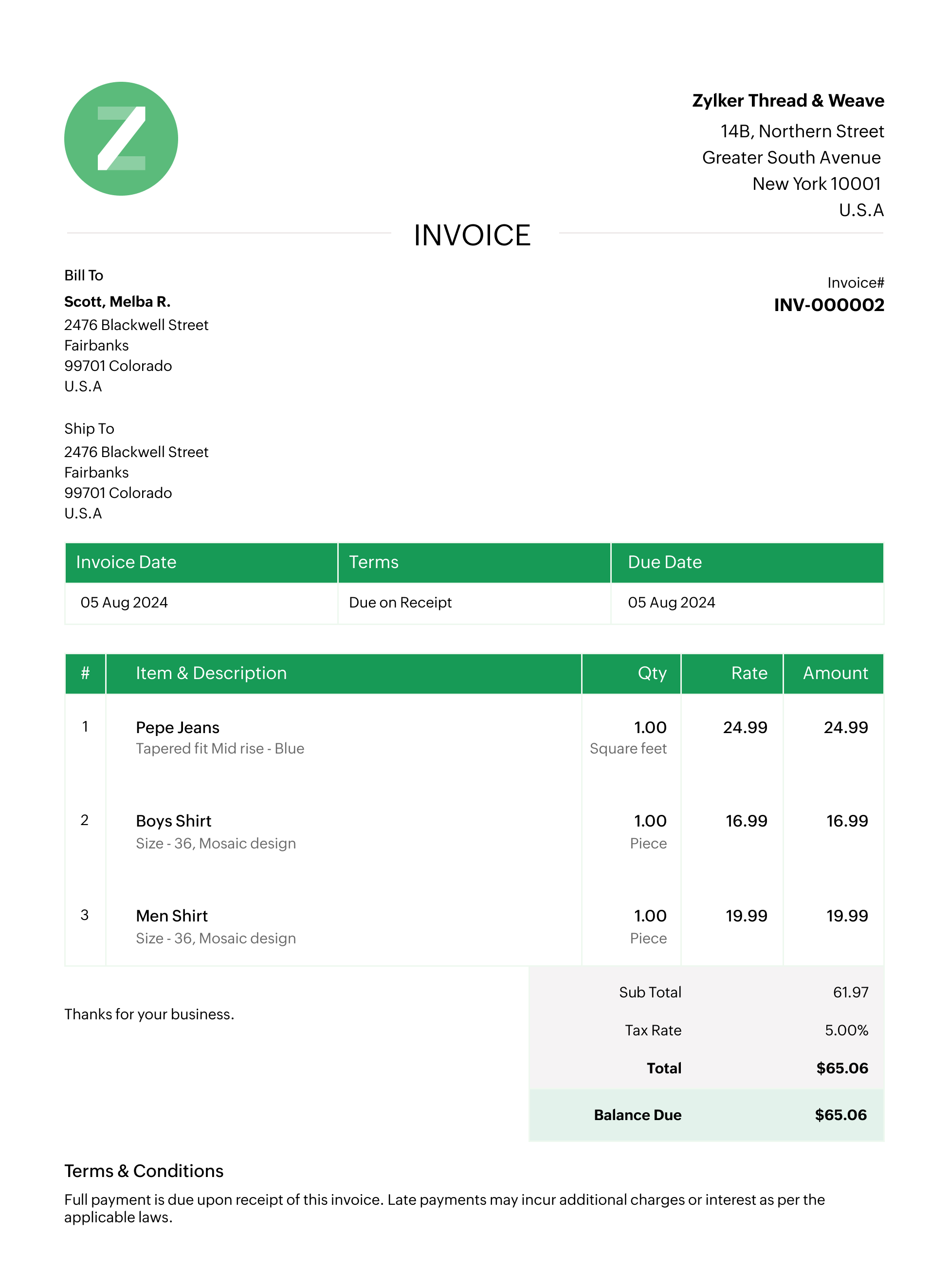
Image source: zoho.com
Smartsheet invoice templates
Smartsheet provides cloud-based invoice templates suitable for teams managing multiple projects or clients. These templates allow users to track billing data in real time, reducing the risk of version conflicts or manual updates. Businesses can customize layouts, automate calculations, and collaborate seamlessly within the same sheet. This makes Smartsheet templates especially useful for growing companies that value efficiency and team visibility.
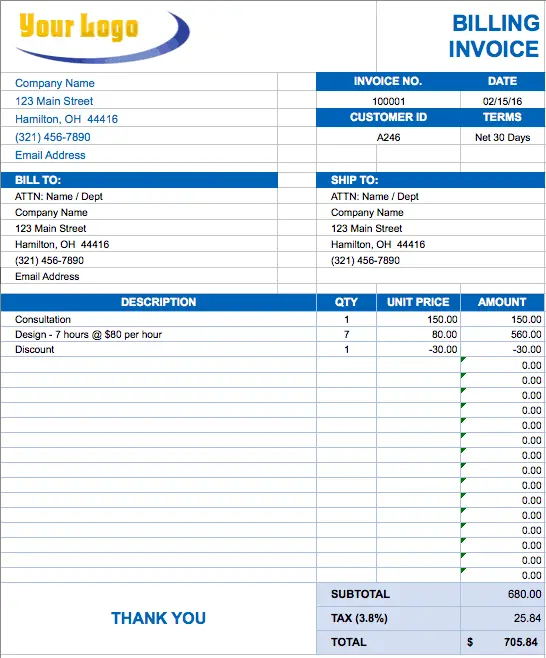
Image source: smartsheet.com
Pandadoc invoice templates
The sales invoice template from PandaDoc is designed to streamline the billing process for businesses of any size—whether you're selling a product or offering a service. It contains all the essential elements: your company's details, the client's info, invoice number, payment terms and due date, followed by an itemised list of goods/services with pricing, discounts, tax, and total amount due.
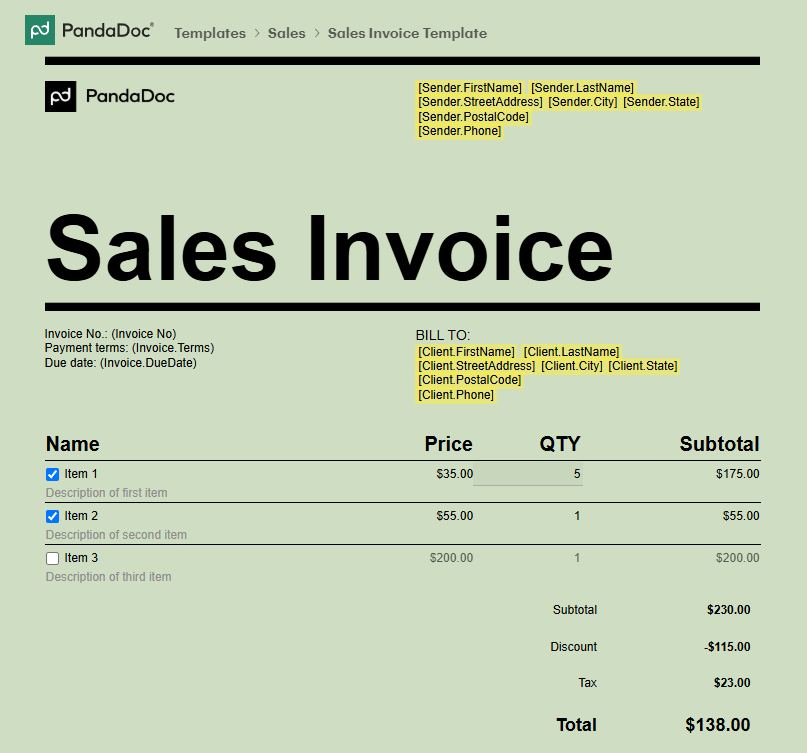
Image source: pandadoc.com
Manage sales better: Use Lark to streamline invoice workflow
Managing sales invoices shouldn't require switching between five different tools. Lark brings sales, order management, and operations into one connected workspace, so invoices are issued faster, tracked accurately, and paid on time without manual chasing or miscommunication.
Lark Base: Track invoice records, status & automated payment reminders
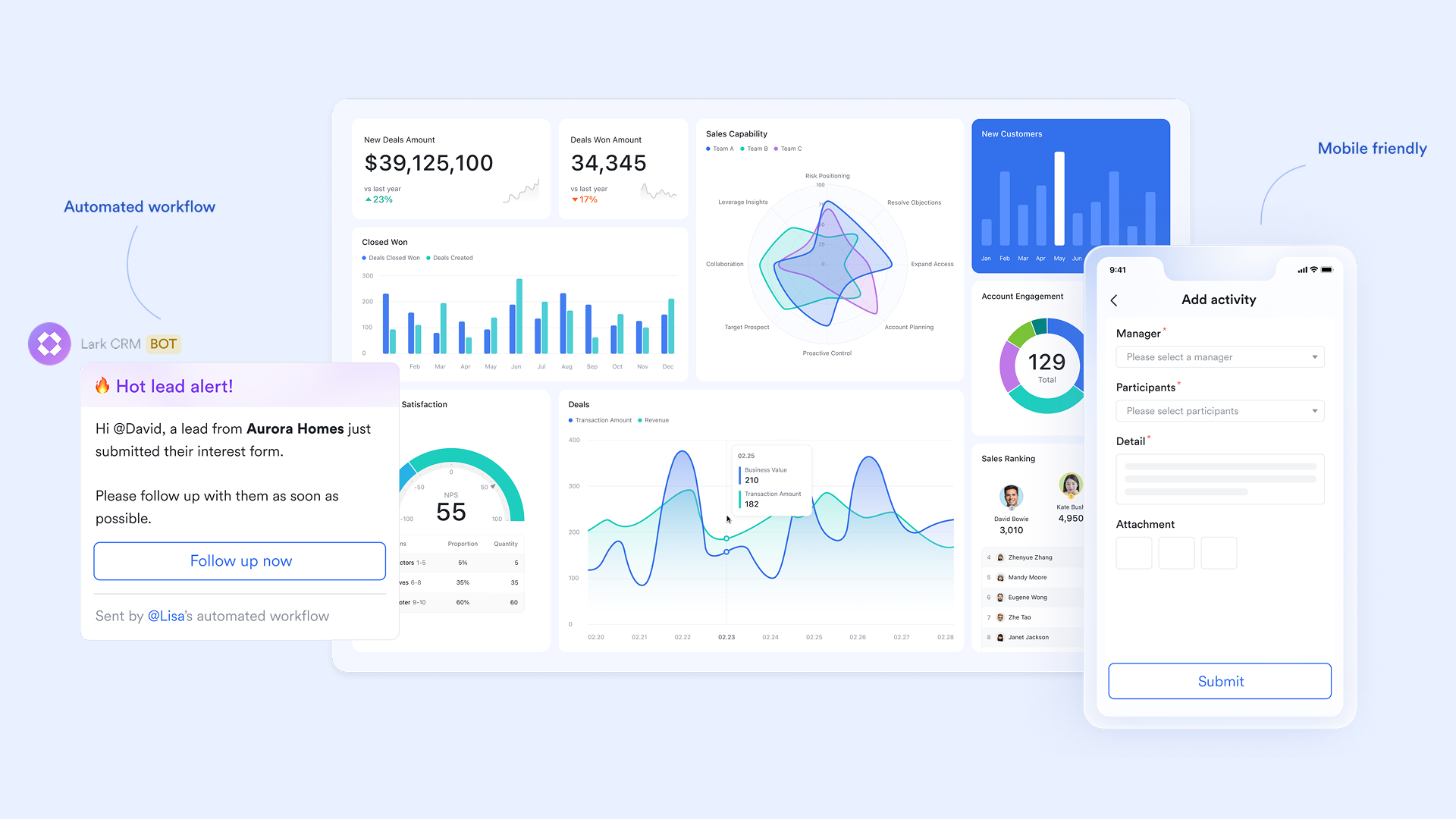
Lark Base functions as a centralized invoice management system where every transaction, client record, and payment detail stays organized in one place. Teams can view invoice due dates, payment terms, tax breakdowns, and historical billing data with full visibility across departments. This shared access reduces errors and improves coordination between sales and finance.
Example: When an invoice approaches its due date, base automatically updates its status to "Pending Follow-up" and alerts the account owner. If a customer consistently delays payments, Base highlights the trend through a dashboard view. This proactive insight helps finance teams plan recovery strategies efficiently while maintaining smooth operations.
Lark Tasks: Assign ownership for issuing invoices and payment follow-ups
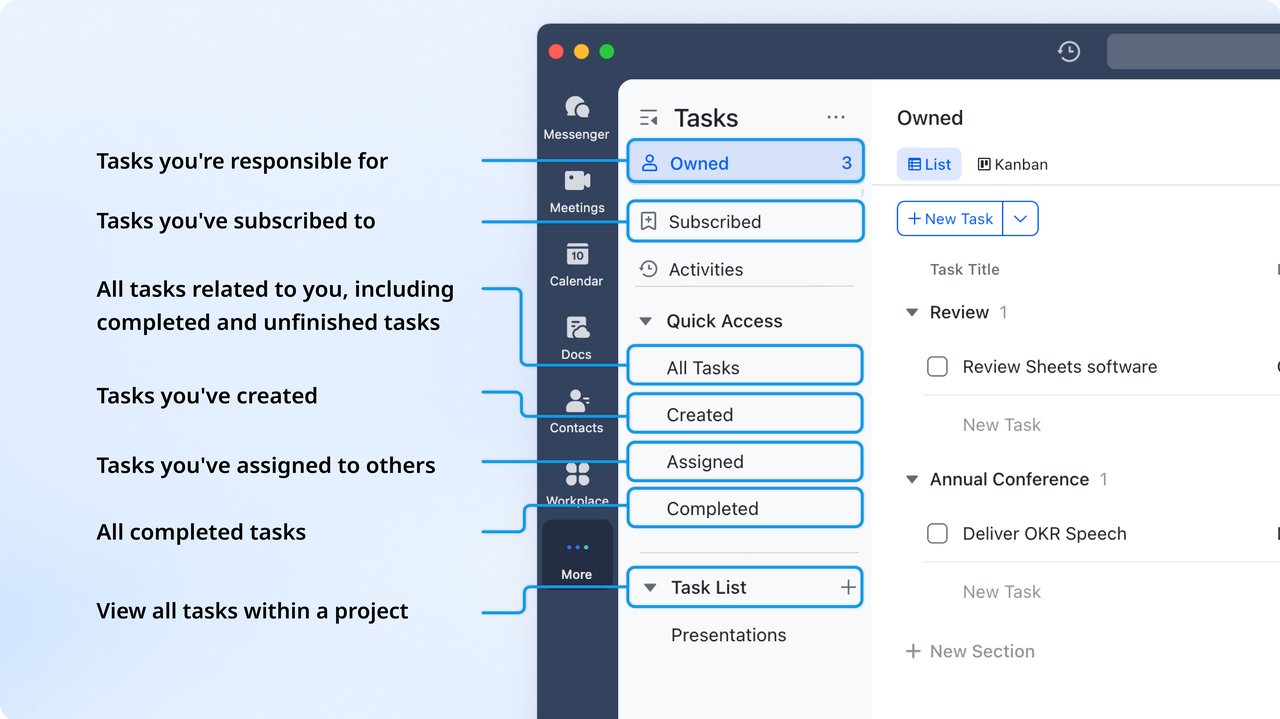
Timely invoicing often depends on clear task ownership. Lark Tasks ensures that every invoice action has a responsible team member assigned, keeping accountability transparent. When tasks are linked directly to the sales and finance process, nothing slips through the cracks. It helps teams maintain workflow clarity and prevent overdue billing.
Example: After a deal is marked "Closed Won" in Base, an automated workflow in Lark Tasks creates a task for the finance teammate to issue the invoice within 24 hours. If a payment remains pending beyond its due date, another task is automatically triggered to remind the sales rep to follow up with the customer. Every responsibility stays visible, reducing delays and confusion.
Lark Docs: Build professional invoice drafts with shared templates
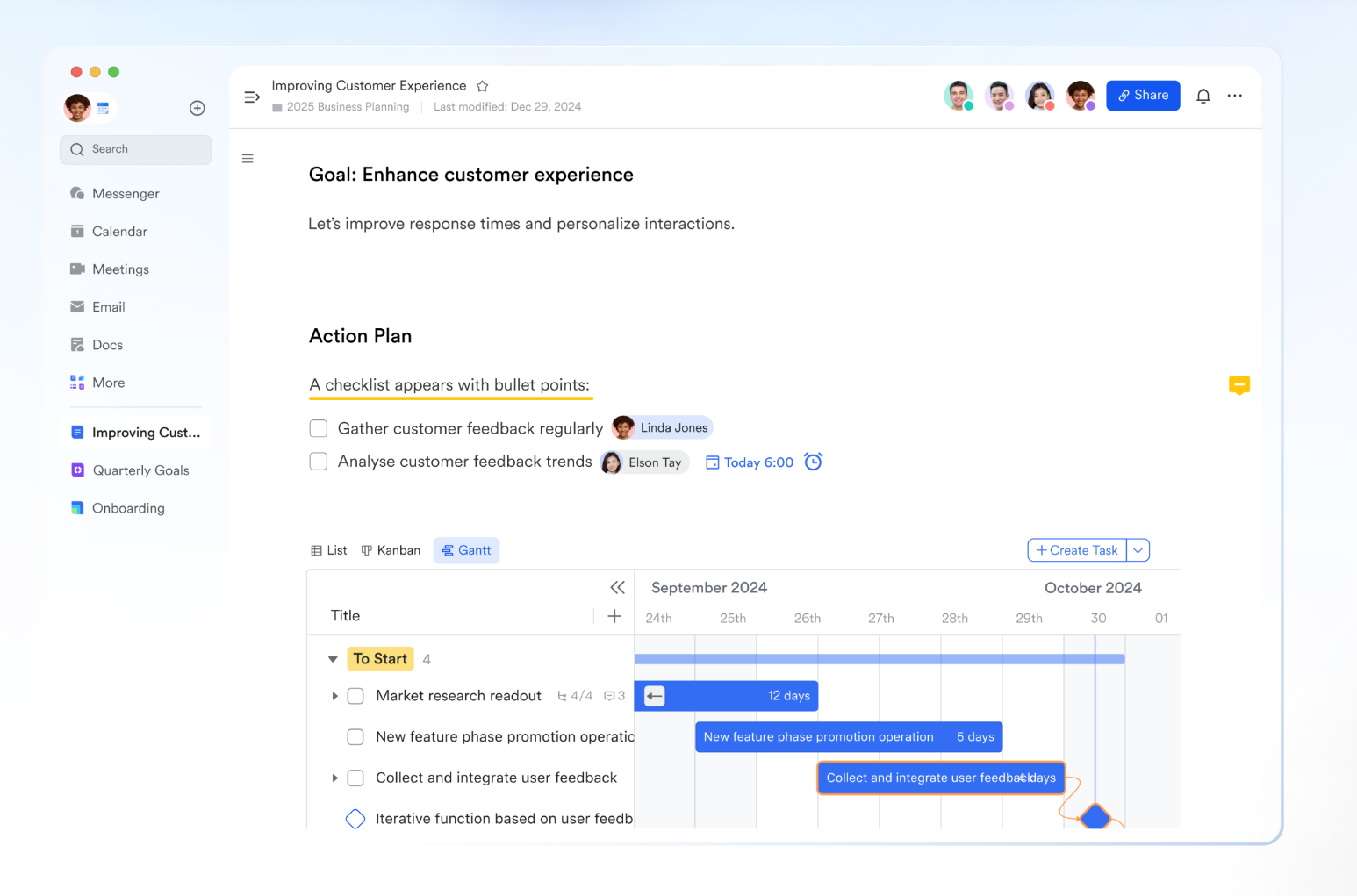
Creating invoices that are consistent, compliant, and professional becomes simple with Lark Docs. Finance teams can maintain a standardized invoice template that sales reps can reuse for each client. This shared document format ensures accuracy, saves time, and reduces unnecessary manual formatting. It allows teams to co-edit in real time while keeping everything traceable.
Example: A sales rep opens the invoice template in Lark Docs, fills in customer details and pricing, and tags finance for review using @mention. The finance team validates tax details and approves the invoice directly within the same Doc. This instant collaboration cuts approval time from days to minutes and eliminates multiple file versions.
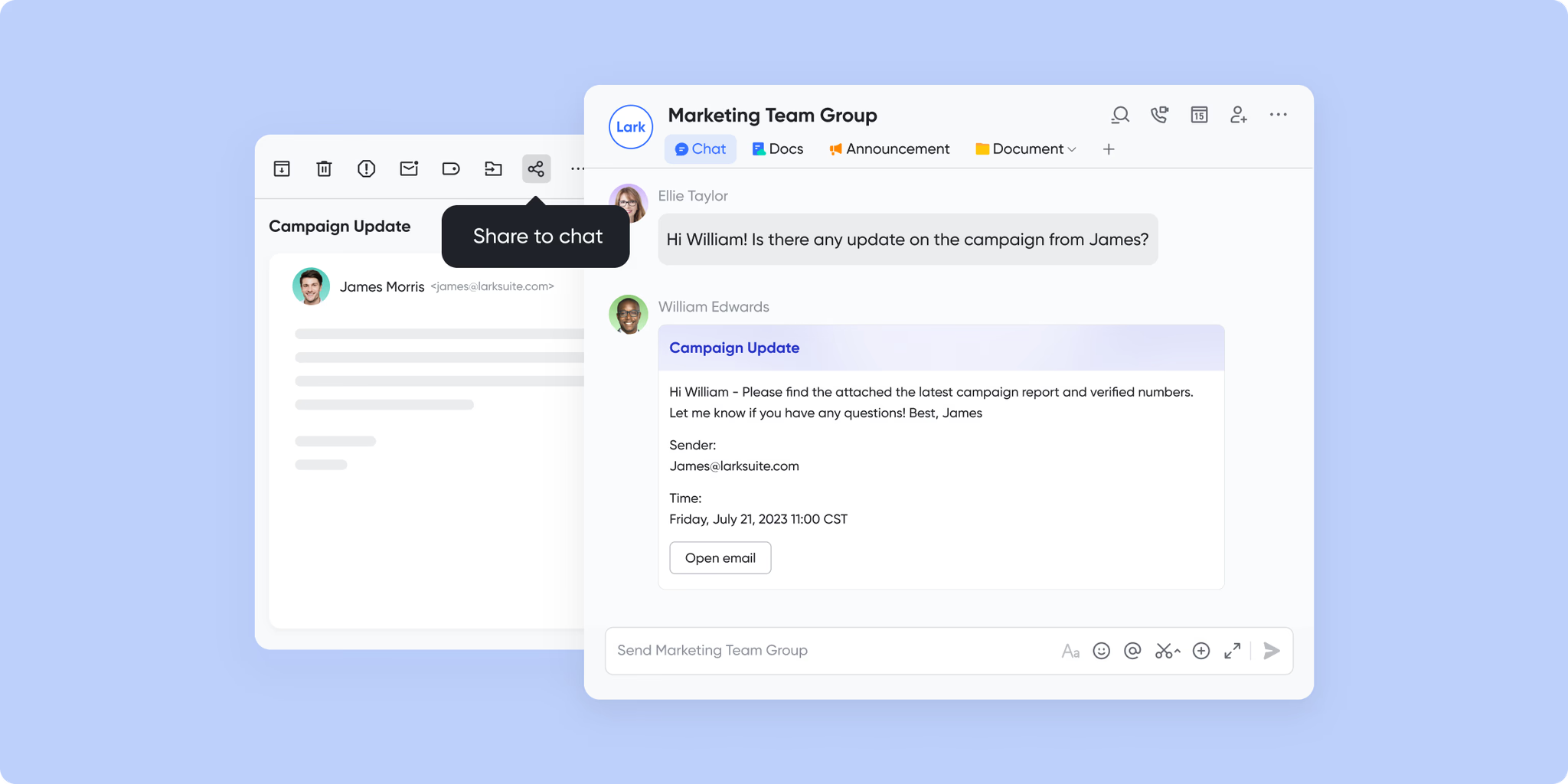
Lark Messenger & Lark Mail: Send invoices to customers and align instantly
Communication plays a vital role once an invoice is ready for delivery. With Lark Messenger and Lark Mail, teams can share invoices directly with customers, respond to billing questions, and loop in internal teams instantly. This connected communication approach reduces email backlogs and ensures that context is never lost.
Example: The approved invoice Doc or Base record can be sent in Lark Messenger to the customer's contact, or via Lark Mail for external clients. If the customer asks a question about payment terms, the sales rep can tag finance directly within the same thread. This seamless collaboration leads to faster resolutions, quicker payments, and a more professional client experience.
- Starter plan: Free forever plan that includes 11 powerful tools for up to 20 users. It also comes with 100GB of storage, 1000 automation runs, AI translations, and more.
- Pro plan: $12/user/month (billed annually) for up to 500 users. It includes everything in Starter plus group calling for up to 500 attendees, 15TB of storage, 50,000 automation runs, and more.
- Enterprise plan: Contact sales for custom pricing. Supports unlimited users and includes even more automation runs and advanced security, compliance, and management features.
Differences of common things: Sales order vs sales invoice
Understanding the distinction between a sales order and a sales invoice is vital for proper workflow management. While they appear similar, these documents serve different roles in the sales cycle. Knowing when to issue each helps maintain clarity between teams and customers.
- Sales order: confirmation of a customer's intent
- A sales order is created when a customer confirms their intent to buy. It includes product details, quantities, and agreed pricing. The purpose of a sales order is to initiate the fulfillment process, ensuring both buyer and seller agree on the terms before delivery.
- Sales invoice: confirmation of delivery and payment
- Once the goods or services are delivered, a sales invoice is issued. It requests payment from the customer based on the completed transaction. This document legally confirms the transfer of ownership and establishes the payment obligation.
- Relationship between both two documents
- In many businesses, especially those using CRMs or workflow software, a sales order automatically converts into an invoice once fulfillment is marked as complete. This seamless handoff ensures no manual duplication or missed billing.
- Common confusion and process alignment
- Small and mid-sized businesses often confuse sales orders and invoices due to manual tracking. Using a unified digital workspace like Lark allows both sales and finance teams to access the same data in real time, eliminating redundancy and improving billing accuracy.
Why sales invoices matter for businesses
Sales invoices do more than request payment, they impact your company's financial health, customer relationships, and brand image. When managed efficiently, they become a source of valuable insights that can shape future decisions and performance tracking.
- Improves cash flow and revenue recognition: Timely invoicing helps maintain a steady cash inflow. It ensures payments are tracked, received, and recorded without unnecessary delays. With proper scheduling, teams can forecast revenue and allocate budgets confidently. Automated reminders also reduce overdue payments and enhance financial stability.
- Ensures tax and legal compliance: Every business must comply with local tax regulations. Well-documented invoices support accurate reporting, audit trails, and compliance with laws governing goods and services. Missing invoice details can lead to tax discrepancies, penalties, or reputational risks, so a clear system is crucial.
- Enhances professionalism and customer trust: Professionally designed invoices leave a strong impression. They communicate reliability, organization, and attention to detail. A consistent invoice format also helps customers identify your brand instantly, improving recognition and loyalty.
- Reduces human errors: Manual data entry often leads to mistakes such as incorrect amounts or missing tax fields. Automated invoicing eliminates such errors, speeds up approval, and prevents disputes. Businesses save time that can be redirected to strategic tasks instead of corrections.
- Generates valuable business data: Invoice data provides insights into customer behavior, payment cycles, and profitability trends. Analysing this information helps teams refine their pricing strategy, identify delayed payers, and make informed financial decisions.
Sales invoice best practices you should follow
Following best practices ensures accuracy, speed, and professionalism. Implementing these consistently helps businesses avoid payment delays and strengthens customer confidence.
- Issue invoices immediately after delivery
- Timely invoicing sets clear expectations and reduces confusion. The sooner you send the invoice, the faster you can receive payment and maintain positive cash flow.
- Maintain consistent numbering and format
- A uniform numbering system simplifies record tracking and avoids duplication. It also ensures transparency during audits or reconciliations.
- Use clear and concise payment terms
- Define due dates, late fees, and acceptable payment methods upfront. Customers appreciate clarity, and it reduces disputes or misunderstandings later.
- Include detailed itemization
- List each product or service separately with its price and tax rate. This improves transparency and allows customers to verify charges quickly.
- Track payment status regularly
- Monitoring invoices helps you identify pending or overdue accounts. Tools like Lark automate these checks and notify responsible team members for follow-up.
Conclusion
A sales invoice is much more than a financial document, it's a reflection of a company's professionalism, operational efficiency, and customer management discipline. By establishing a clear workflow, businesses can ensure faster payments, accurate reporting, and better relationships with their clients.
Lark empowers teams to manage every step of the invoicing process seamlessly, from creating standardized templates in Docs to tracking payment statuses in Base and collaborating through Messenger. With Lark, organizations can eliminate manual work, enhance transparency, and achieve smarter financial workflows.
FAQs
What is a sales invoice, and how does it differ from a purchase invoice?
A sales invoice is issued by a seller to request payment for goods or services sold, while a purchase invoice is received by a buyer as proof of what they owe. Both documents reflect opposite sides of the same transaction. In connected platforms like Lark, these records can be linked within shared databases, making it easier for teams to track both perspectives and maintain accurate financial records.
Can a sales order become an invoice?
Yes, once goods or services are delivered, a sales order can be converted into an invoice. Many modern workflow systems support this conversion automatically. In Lark, for instance, a completed sales order recorded in Base can trigger a task for the finance team to issue the invoice immediately, reducing manual follow-ups and delays.
What should a sales invoice include to be valid?
A valid sales invoice should include details such as seller and buyer information, invoice number, issue date, due date, item descriptions, tax amounts, and payment terms. These fields ensure transparency and compliance. Using shared templates in Lark Docs allows teams to maintain consistency and update invoice details collaboratively without multiple document versions.
How do you record a sales invoice in accounting?
Sales invoices are typically recorded as accounts receivable in a company's books. Once payment is received, the entry updates to show revenue and closes the outstanding amount. When managed in Lark Base, these entries can be tagged with payment status and automatically reflected in reports for easy visibility across departments.
Is there free software or template I can use for sales invoices?
Yes, there are several free tools and templates available online for creating sales invoices. However, using an all-in-one workspace like Lark helps simplify this process further. Teams can build reusable invoice templates in Docs, assign responsibilities in Tasks, and track every invoice's progress in Base all in one place.
Related reading
Table of contents
Start using Lark today

Manage all your work in one place
Boost team efficiency by 10x
Save up to 70% on software costs
Table of contents
Start using Lark today
Manage all your work in one place
Boost team efficiency by 10x
Save up to 70% on software costs
Keep reading









2026 Lark Technologies Pte. Ltd.
Headquartered in Singapore with offices worldwide.






Explore: