














Salesforce vs Zoho CRM: Which One Fits Your Business?

Ryan Tanner
Product Marketing Specialist
Sep 18, 2026
Ryan Tanner
Sep 18, 2026

15 min read


Choosing the right CRM (Customer Relationship Management) tool is one of the most important decisions a business can make. The right CRM not only manages contacts but also tracks deals, automates workflows, and provides analytics to improve performance. Two of the most popular names in this space are Salesforce and Zoho CRM, often compared because they cater to very different business segments. Salesforce is known as the enterprise giant, while Zoho is recognized as the budget-friendly SMB solution.
But while both tools have their strengths, they also come with trade-offs. In this guide, we'll delve into the details of Salesforce vs. Zoho CRM, examining their key features, pricing, use cases, and limitations. Then, we'll examine why modern teams are embracing collaboration-first platforms like Lark, which seamlessly integrate CRM-style functionality with built-in communication and automation.

Salesforce CRM: Built for the enterprise battlefield
Salesforce has long been the dominant force in the CRM world. Originally designed for Fortune 500 companies, it's built to handle complex sales processes, global operations, and compliance-heavy industries. If your business has thousands of employees, multiple regions, and strict governance, Salesforce is a natural fit.
Image source: wikimedia.org
What Salesforce nails:
- Advanced customization: Almost every process can be customized—workflows, objects, dashboards, and more.
- AI insights (Einstein): Predictive analytics and AI-driven suggestions to optimize sales pipelines.
- Deep analytics: Enterprise-grade reporting and forecasting tools that go beyond surface-level metrics.
- Partner ecosystem: Thousands of third-party integrations and add-ons through the Salesforce AppExchange.
Where it hurts:
- High costs: License fees escalate quickly, especially as you unlock more advanced features.
- Training burden: Complex setup means teams often need weeks of onboarding.
- Dedicated admins required: Many enterprises employ Salesforce administrators just to maintain the system.
Example: A global bank uses Salesforce to manage over 10,000 client accounts across regions, handling compliance workflows, regional teams, and regulatory reporting—all within the platform.
Zoho CRM: The scrappy SMB champion
Zoho CRM, on the other hand, is designed for startups and mid-market businesses that need something simpler and more budget-friendly. It provides a clean interface, quick setup, and an affordable pricing model.
Image source: business.com
What Zoho nails:
- Affordability: A free plan is available, and paid tiers start low compared to Salesforce.
- Ease of setup: Teams can be onboarded quickly without heavy training.
- Broad suite of apps: Zoho integrates naturally with Zoho Books, Zoho Campaigns, and other apps in the Zoho ecosystem.
Where it hurts:
- Less customization depth: While flexible, Zoho can't match Salesforce's advanced customization.
- Tier-based limitations: Many advanced features (AI, deep analytics) are locked behind higher pricing tiers.
Example: A 10-person SaaS startup uses Zoho CRM to manage inbound leads affordably, relying on its built-in integrations with Zoho Mail and Zoho Desk for a lean setup.
Salesforce vs Zoho CRM: Key differences
When comparing Salesforce CRM vs Zoho CRM, the biggest distinction lies in scale vs simplicity.
- Pricing & scalability: Zoho starts with a much lower entry price and is appealing to startups and small businesses. Costs rise gradually as teams add users, activate advanced modules, or need premium support. Salesforce begins at a higher price point and its costs increase significantly as you expand licenses, integrations, and storage, but the platform is built to support complex, enterprise-level processes from day one.
- Customization: Salesforce offers near-unlimited customization, automation, and third-party integrations—but these often require dedicated administrators or developers to implement and maintain. Zoho, while flexible for SMBs with its modular apps and drag-and-drop workflows, hits limits sooner in terms of deep system changes and advanced coding.
- Analytics: Salesforce shines with its Einstein AI, predictive analytics, and real-time forecasting features, making it especially powerful for data-driven enterprises. Zoho provides functional dashboards and standard reports sufficient for most small to medium businesses but lacks the same depth, AI-driven insights, and advanced predictive modeling capabilities.
- Team adoption: Zoho's simpler interface and self-service setup make it easier for small teams to adopt quickly with minimal training. Salesforce, on the other hand, has a steeper learning curve and usually requires structured onboarding, user training, and ongoing change management to get the most out of it.
- Collaboration: Both systems integrate with major productivity and communication tools like Slack, Zoom, Google Workspace, and Microsoft 365. However, because these collaboration features mostly live outside the core CRM platforms, teams may experience fragmented workflows unless integrations are carefully designed and maintained. Salesforce offers more robust APIs and integration options to unify these tools, while Zoho relies more on its own suite of connected apps to fill the gaps.
For more Google Workspace's information, you can refer to Google Workspace Pricing and Google Workspace alternatives.
Salesforce vs Zoho CRM: Pricing breakdown
- Salesforce ricing
Salesforce's CRM Suite in the Asia-Pacific region currently offers two main entry tiers. The Starter Suite costs US $25 per user per month (annual contract) and includes core CRM software features such as lead, account, contact, and opportunity management, built-in sales flows, lead routing, basic email marketing and analytics, plus Slack integration. The Pro Suite is priced at US $100 per user per month (annual contract) and adds enhanced automation, greater customization, sales quoting and forecasting, and broader modules covering marketing, sales, service, and commerce.
Beyond these, Salesforce also offers higher plans such as Enterprise and Unlimited, which are priced well above the Pro Suite and deliver advanced analytics, predictive AI, full sandbox environments, and premium support. Although the official APAC page highlights Starter and Pro, it notes that features like “Foundations” can be activated at no additional base cost for qualifying Enterprise Edition customers. As with all Salesforce tiers, total cost can rise with add-ons, extra storage, premium support packages or regional taxes.
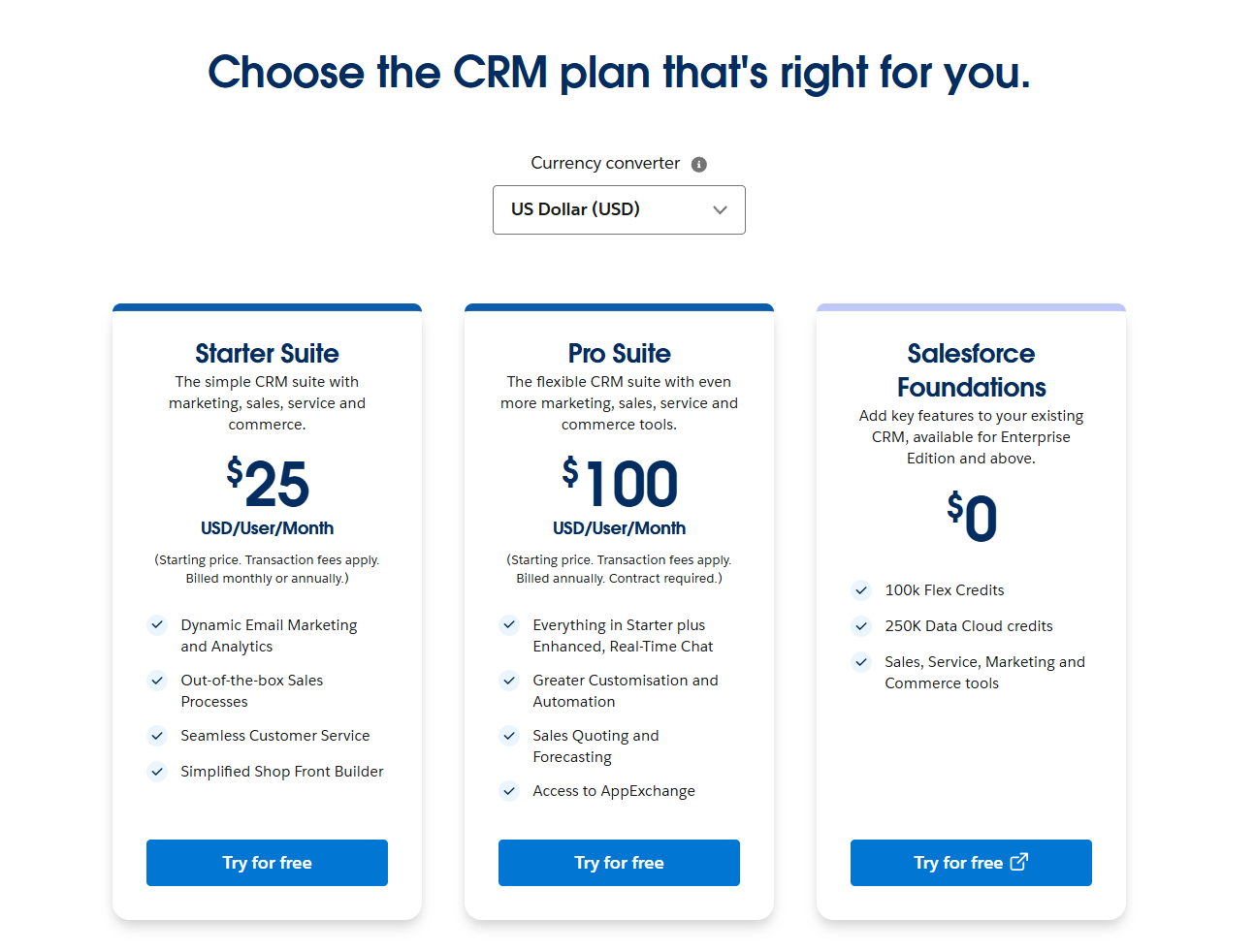
Image source: salesforce.com
- Zoho CRM Pricing
Zoho CRM offers a free edition that supports up to three (3) users, which includes essential CRM features like leads, documents, mobile apps and basic functionality—suitable for small or home-based operations.
The entry paid tier is called Standard, which adds capabilities such as mass emails and automated follow-up sequences, custom modules and layouts per team, workflows, cadences, sales forecasting, lookup fields, canvas, and offline or cloud integrations. Zoho
Above that is the Professional plan, which builds on the Standard tier by adding blueprint workflows (step-by-step process maps), CPQ (configure-price-quote) features, real-time signals (notifications during the customer journey), inventory management (invoicing, purchase/sales orders, vendors, products), webhooks, assignment & validation rules, plus other custom functions and integrations.
Next is the Enterprise plan, which includes everything in Professional plus more advanced features: Zoho's AI assistant (“Zia”) for anomaly detection, competitor alerts, churn prediction, etc., territory management, journey orchestration, multi-user portals, improved page layouts, client scripting, an approval process, and a sandbox environment for testing customisations.
The highest-tier plan is Ultimate, which layers on top of Enterprise: enhanced limits, augmented analytics (deeper reporting / dashboards), data storytelling tools, advanced administration, larger storage, custom AI/ML pipelines (QuickML), etc. Local taxes (VAT, GST, etc.) are charged in addition to the listed prices.
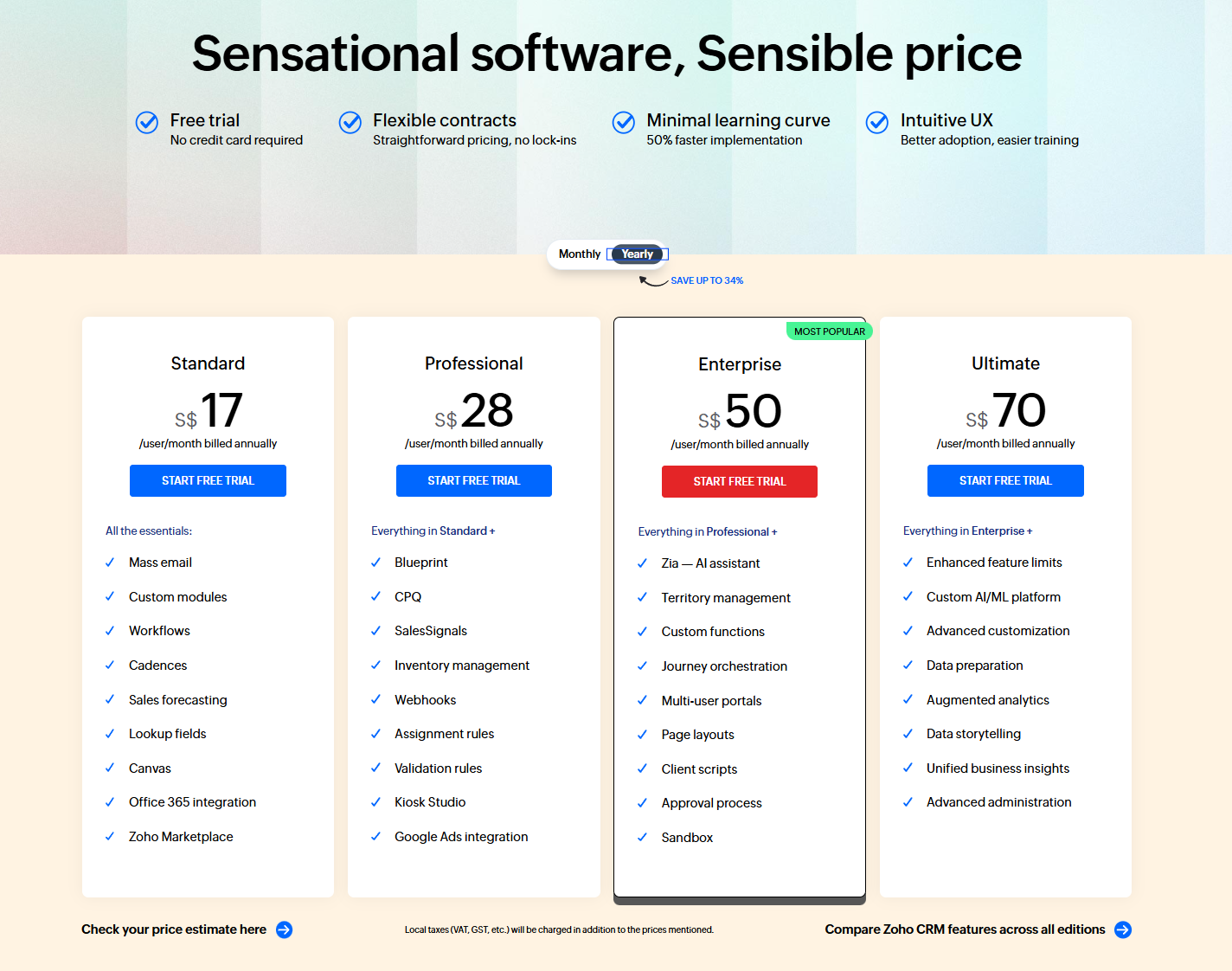
Image source: zoho.com
- Cost Considerations (TCO)
- Billing frequency: Annual billing is usually cheaper per user than monthly. Zoho clearly shows differences between annual and monthly billing.
- Add-ons/Feature packs: Some advanced features in Salesforce (e.g., premium support, additional AI modules, extra API/data cloud credits) incur an additional cost. Zoho also charges more for higher storage, more advanced AI/analytics (Zia), more mass emails, etc.
- User count: Per-user fees scale with the number of users; discounts may apply for large volumes.
- Implementation/customization/training: With Salesforce, these often require external consultants, especially for larger or more complex deployments. That increases up-front and ongoing costs.
- Support levels: Higher tiers or premium plans often include faster SLAs, more support channels, and dedicated resources (e.g., “premier success plan” in Salesforce).
- Regional pricing/tax/currency differences: What you pay in Singapore may differ significantly due to currency, VAT/GST, and local promotions.
- Upgrade locking & contract terms: Some plans require a minimum term, or make it harder to downgrade. Always check contract terms.
Shared drawbacks of Salesforce and Zoho CRM
- High complexity vs limited depth: Salesforce delivers enterprise-grade power but can quickly overwhelm teams with its sheer range of features and the need for dedicated administrators or consultants to set up and maintain. Zoho, by contrast, is simpler and more approachable but lacks the same level of depth in advanced customization, AI-driven analytics, and large-scale process automation.
- Collaboration gap: Both platforms depend heavily on external integrations—Slack, Zoom, Google Docs, Microsoft 365—for everyday communication and document sharing. This reliance often fragments workflows, forces context switching, and creates silos between CRM data and team discussions.
- Scaling costs: Salesforce's price per user escalates rapidly as organizations grow or activate add-ons, making total ownership costs high for larger teams. Zoho starts off far cheaper, but key capabilities like advanced analytics, deeper automation, or increased storage are locked behind upper-tier plans, which steadily raise costs as the company scales.
- Adoption friction: Salesforce typically requires formal onboarding, extensive training, and ongoing change management to get users up to speed, which can slow adoption. Zoho's interface is easier to grasp and deploy, but lacks some of the enterprise-level governance, security, and compliance features larger organizations need
- The result: Both Salesforce and Zoho CRM are powerful in their own ways, but neither truly delivers an all-in-one environment where sales, collaboration, automation, and project execution coexist seamlessly. Teams are often left stitching together multiple tools and processes, which undermines efficiency and adds hidden costs.
From a balanced perspective, both Salesforce and Zoho CRM come with trade-offs. Salesforce delivers massive power but can overwhelm teams with its complexity and the need for dedicated administrators, while Zoho feels lighter but lacks depth in advanced customization and analytics.
This is where Lark stands apart. Rather than being just another traditional CRM, it's built as a collaboration-first platform that natively combines client tracking, team communication, project execution, automation, and documentation in one space. That means fewer add-ons, fewer silos, and a smoother experience for teams who want CRM capabilities without sacrificing real-time collaboration and ease of use.
Lark: The collaboration-first CRM solution
While Salesforce and Zoho are strong CRMs in their own right, both depend heavily on external integrations for communication, documentation, and collaboration. This creates fragmented workflows where sales teams spend as much time switching between apps as they do closing deals. Lark takes a different approach. It's not just a CRM substitute—it's a collaboration-first platform that blends client tracking with communication, automation, and reporting in one unified system.
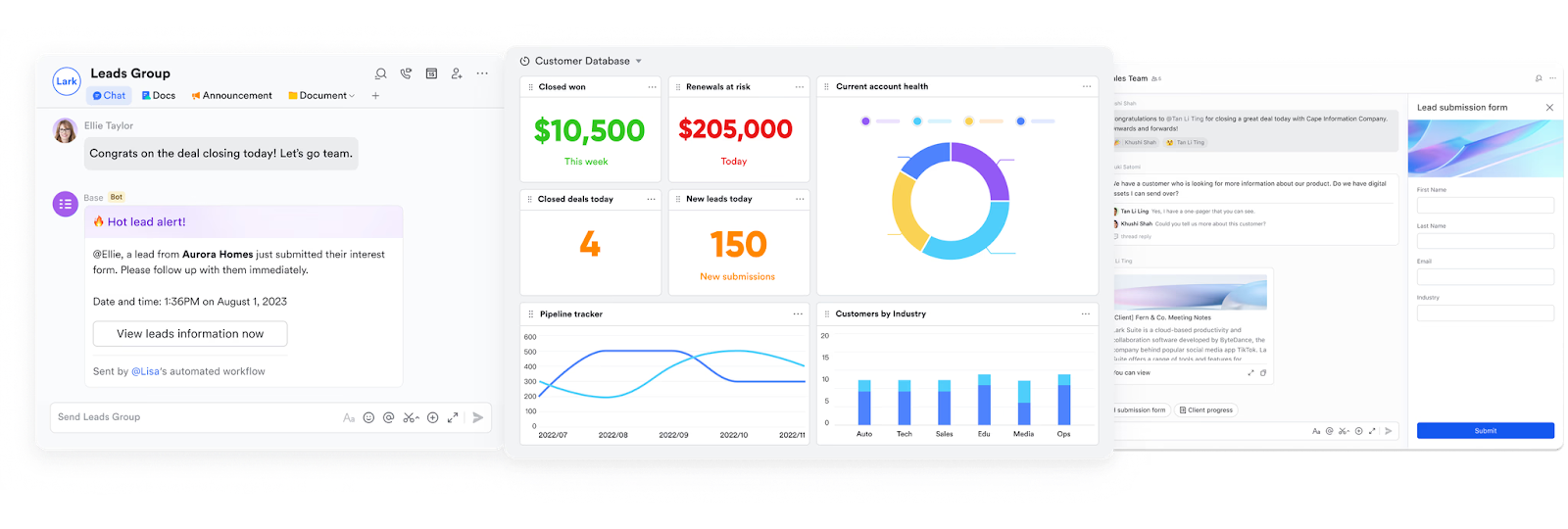
Lark Base: Track clients, deals, bookings, and dashboards
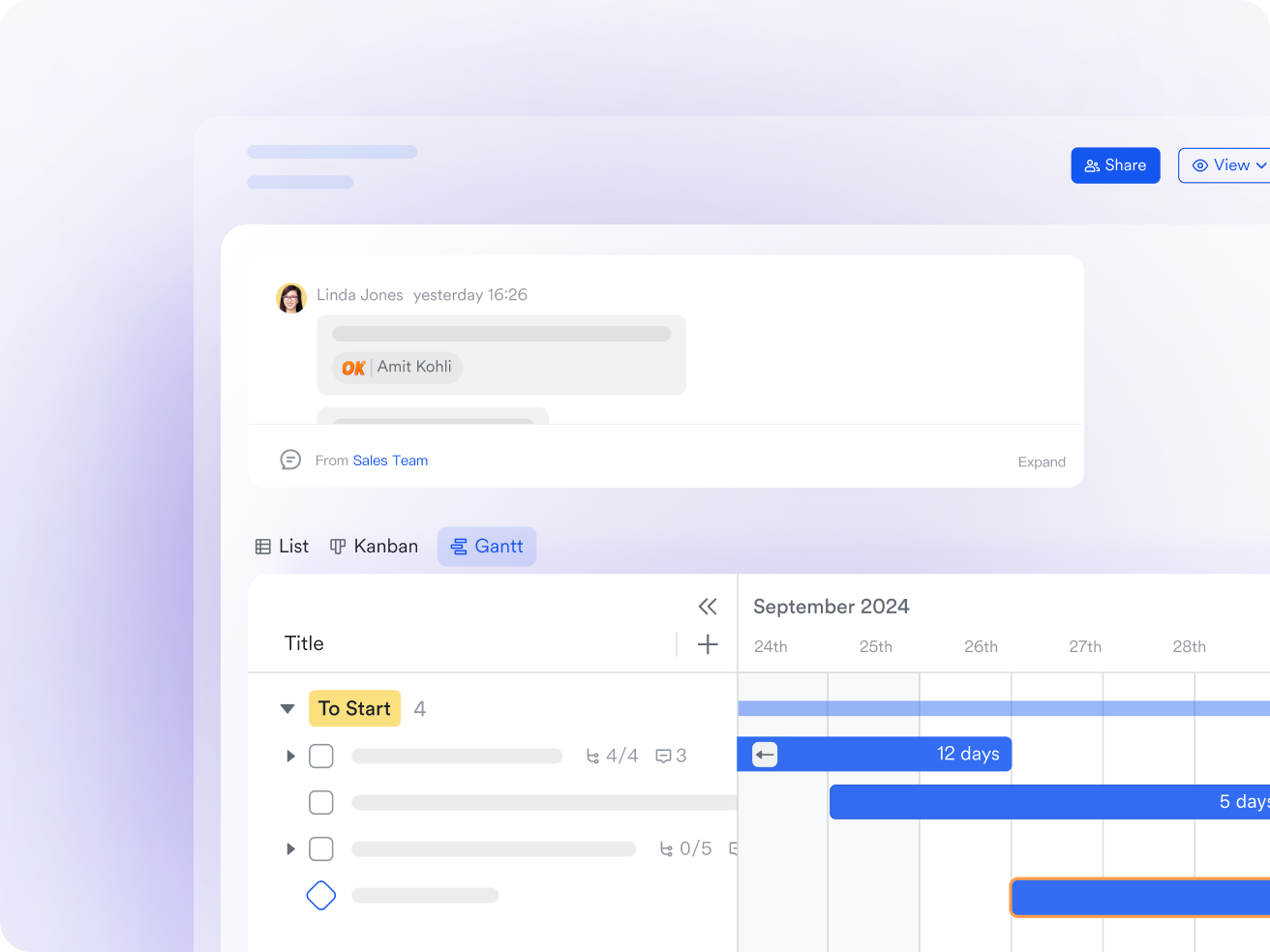
Lark Base acts as the CRM-style engine, giving teams full control over client records, deal pipelines, and bookings. Sales data can be displayed in flexible formats like Kanban, Gantt, or table views.
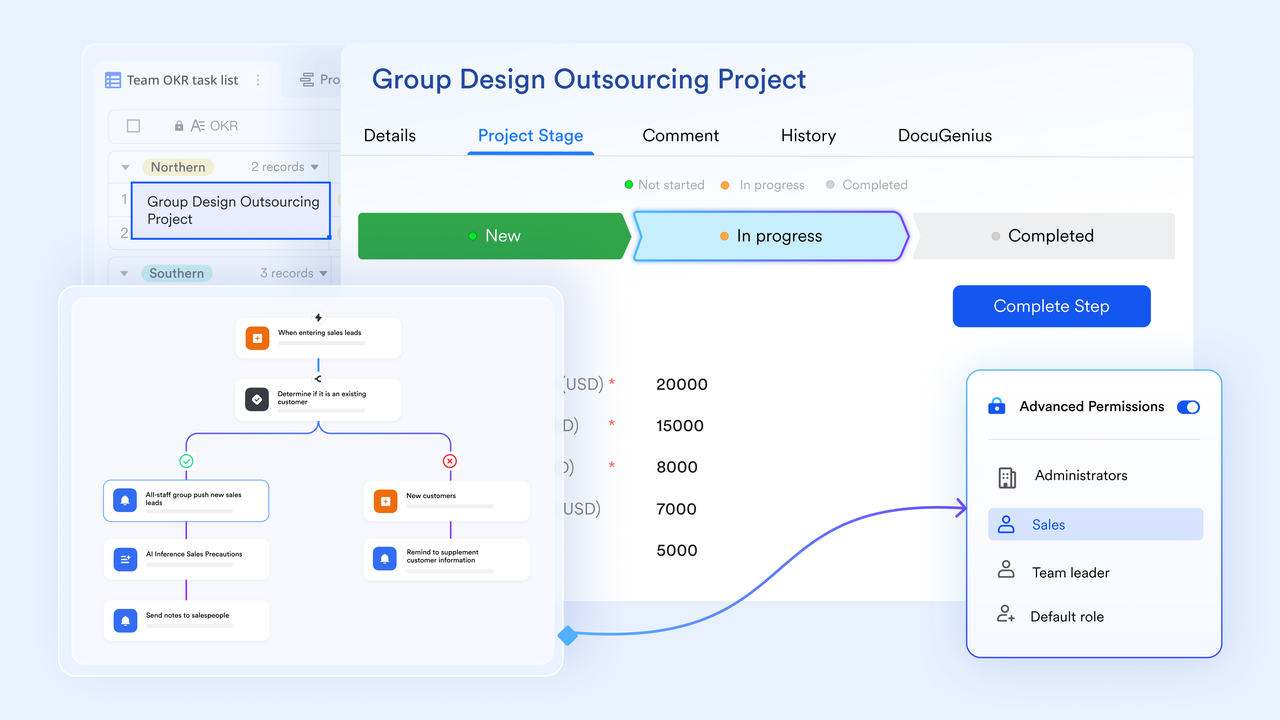
A standout feature of Base is its real-time dashboards. Sales leaders can visualize key metrics—revenue, win rates, or pipeline health—without needing third-party add-ons. Automated workflows further enhance accuracy by updating dashboards instantly as deals progress.
Example: A consulting firm uses Lark Base to manage its client lifecycle—from initial inquiry to signed contract. As soon as a deal moves to "Closed Won," the dashboard updates in real time, giving leadership visibility into monthly revenue without manual reporting.
Lark Approval: Automate contract reviews and sign-offs
Instead of chasing signatures via email or manually routing contracts, Lark Approval feature automates the entire review and sign-off process. Teams can set rules for approvals, track status in real time, and eliminate bottlenecks.
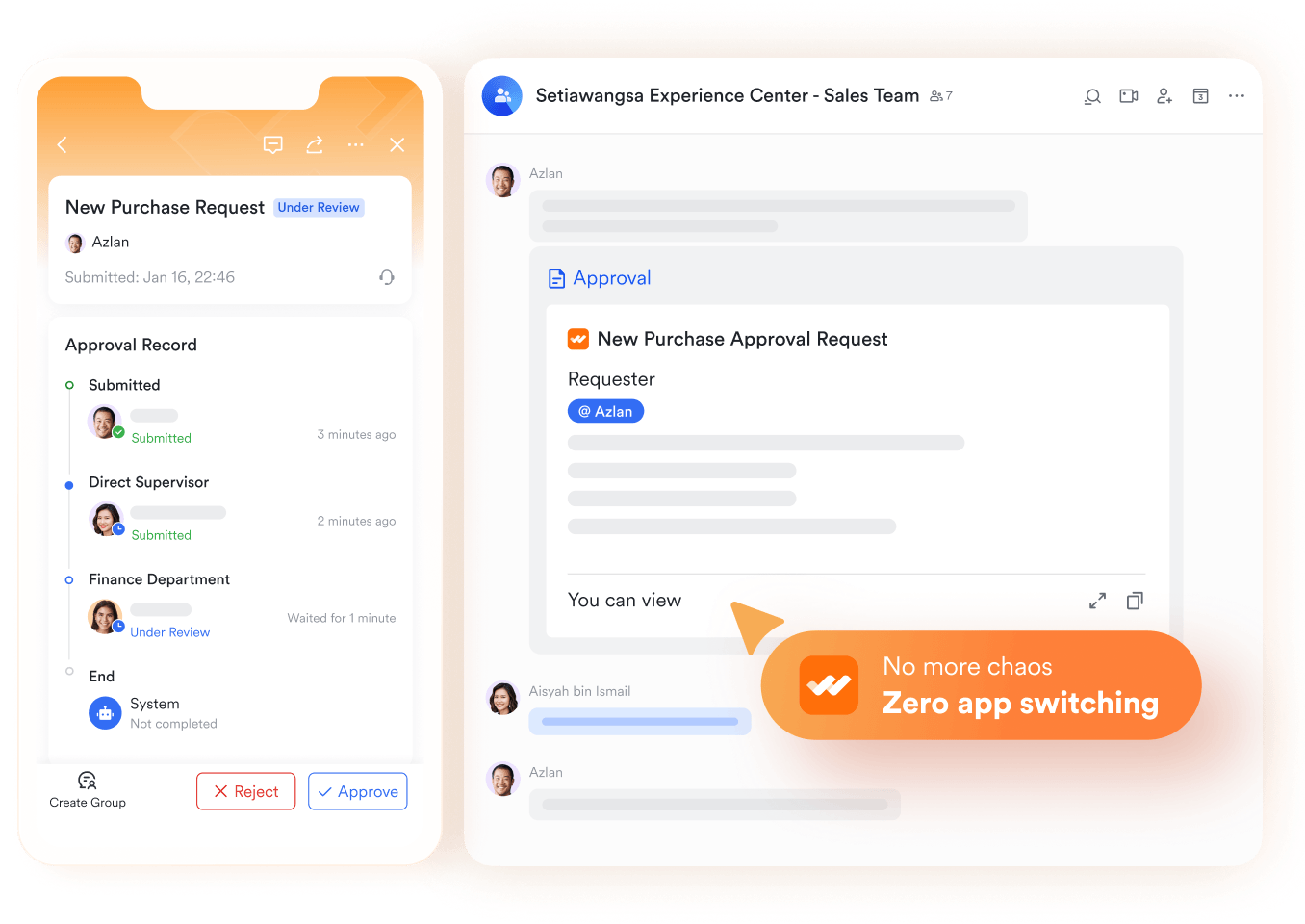
Example: A sales rep closes a deal and submits a pricing discount for approval. The request is automatically routed to the sales manager in Lark Approval. Once approved, the contract is instantly forwarded to finance—no delays, no missed handoffs.
Lark Docs & Lark Wiki: Proposals, playbooks, onboarding
Documentation is critical in sales, from proposals to onboarding guides. With Lark Docs and Wiki, teams can co-create, edit, and store all these resources in one place. Docs support live collaboration, while Wiki serves as the always-updated knowledge base.
Example: A SaaS company builds its sales playbook in Lark Docs, embedding deal templates and pricing sheets directly inside. New reps can easily find everything they need in the Wiki, reducing ramp-up time and ensuring consistency.
Lark Messenger & Lark Meetings: Client and team communication
Sales conversations don't happen in isolation—they happen in chats, calls, and meetings. Lark Messenger and Lark Meetings bring communication directly into the CRM workflow. Sales reps can create deal-specific group chats, schedule meetings, and even launch video calls from within Messenger.
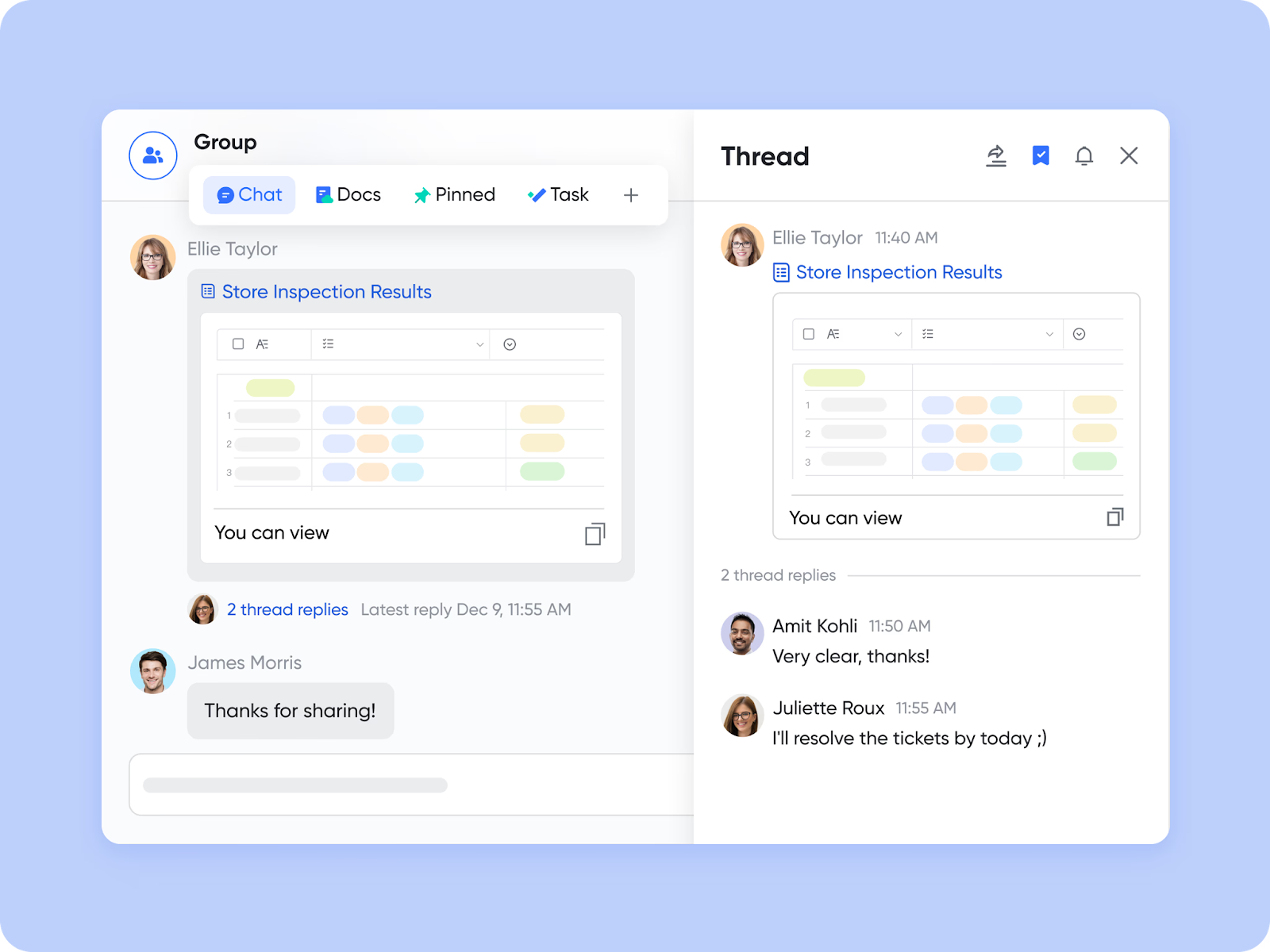
Example: When negotiating with a large client, the sales team creates a dedicated Messenger group tied to the deal in Base. Proposal updates are pinned in the chat, and a sprint planning call with the client is launched in Lark Meetings without leaving the platform.
- Starter plan: Free forever plan that includes Sheets, Docs, Base, and 8 other powerful tools for up to 20 users. It also comes with 100GB of cloud storage, 1000 automation runs, AI translations, and more.
- Pro plan: $12/user/month (billed annually) for up to 500 users. It includes everything in Starter plus group calling for up to 500 attendees, 15TB of storage, 50,000 automation runs, and more.
- Enterprise plan: Contact sales for custom pricing. Supports unlimited users and includes even more automation runs and advanced security, compliance, and management features.
Salesforce vs Zoho CRM vs Lark: Quick showdown table
Conclusion
When it comes to Salesforce vs Zoho CRM, the choice often comes down to size and budget. Salesforce is unmatched for enterprises that demand heavy customization, while Zoho shines for smaller teams needing affordability and simplicity.
But both tools leave gaps in collaboration and integration overload—a critical weakness for modern, distributed teams. That's why businesses are increasingly adopting Lark: a platform that unites client tracking, team communication, automation, and reporting in one workspace.
FAQs
Which is easier to implement, Salesforce or Zoho CRM?
Zoho CRM is generally easier to implement, thanks to its straightforward setup and lighter learning curve. Salesforce, while more powerful, usually requires professional onboarding and sometimes dedicated admins to configure. With Lark, implementation is fast because it comes with ready-to-use CRM-style templates in Base. Teams can start tracking leads, setting workflows, and building dashboards in minutes without technical expertise.
Do Salesforce and Zoho CRM offer free plans?
Zoho CRM offers a free plan for up to three users, making it appealing for small businesses starting out. Salesforce does not provide a free tier, though it occasionally offers trials. Lark provides a free forever plan for up to 20 users, which includes Base, Docs, Sheets, Messenger, and 1,000 automation runs—covering both CRM tracking and team collaboration from the start.
Which CRM is better for global teams?
Salesforce is better suited for large global enterprises with multi-region operations, thanks to its enterprise-level governance and compliance. Zoho can support distributed teams but is more tailored to SMBs. Lark is built with global teams in mind, offering Messenger with AI-powered translations, Meetings for cross-time-zone collaboration, and Base dashboards accessible anywhere—making it ideal for distributed organizations.
Is Salesforce more secure than Zoho CRM?
Both platforms offer strong security. Salesforce leads with enterprise-grade compliance (HIPAA, GDPR, SOC 2) and governance controls. Zoho CRM provides solid security but fewer enterprise governance features. Lark Enterprise adds advanced security options, including admin controls, data encryption, and compliance certifications—ensuring teams get enterprise-level protection without complexity.
Where does Lark fit compared to Salesforce and Zoho CRM?
Salesforce excels in large enterprises needing deep customization, while Zoho is better for small-to-mid businesses looking for affordability and quick setup. However, both depend heavily on integration for communication and collaboration. Lark fits as the collaboration-first alternative: it combines CRM-style client tracking (Base), automation (workflows, approvals), and built-in collaboration (Messenger, Meetings, Docs) into one platform. This eliminates silos and gives teams a unified way to manage sales and clients.
Related reading
Table of contents
Start using Lark today

Manage all your work in one place
Boost team efficiency by 10x
Save up to 70% on software costs
Table of contents
Start using Lark today
Manage all your work in one place
Boost team efficiency by 10x
Save up to 70% on software costs
Keep reading



Lark recognized in 2023 Gartner® Collaborative Content Workspaces and Meeting Solutions reports
Lark, the global superapp for productivity, is delighted to announce it receives recognition in the Gartner's 2023 Innovation Insight for Collaborative Content Workspaces and Market Guide for Meeting Solutions.





2026 Lark Technologies Pte. Ltd.
Headquartered in Singapore with offices worldwide.






Explore: