














Trello CRM: How It Works, Benefits & Limitations

Sreya Anumolu
Content Specialist
Nov 3, 2026
Sreya Anumolu
Nov 3, 2026

20 min read
Add to preferred sources


Sales teams often seek straightforward and practical methods to track leads and manage customer activities without investing in a comprehensive CRM platform. Trello has become a popular choice because users can set up visual pipelines that feel like a practical Trello CRM workflow without complex tools or long onboarding. Its card-based structure makes deal tracking easy for small teams, freelancers, and early-stage businesses that want a quick way to organize sales cycles. Some users later explore connected workplace platforms like Lark when they require communication, documentation, and structured data in one environment as their processes scale.

Is Trello a CRM?
Trello was originally designed as a Kanban task board system where users move cards across lists to represent progress. It is not built as a full CRM system by default, but many freelancers and small teams use it to track contacts, deals, leads, meetings, and follow-up reminders. With the help of templates, card customization, custom fields, checklists, and Power-Ups, Trello can function like a lightweight pipeline tracker for simple cycles. Users searching for Trello as a CRM or Trello as CRM often look for ways to turn boards into pipeline stages or customer status boards.
For users who want a lightweight option, Trello can serve as an entry point, especially when supported with add-ons like Trello CRM Power-Up or other plug-ins. However, those who need deeper features, structured data relations, reporting, revenue forecasting, or omnichannel sales workflows will eventually compare Trello against dedicated CRM platforms or growing workspace tools.
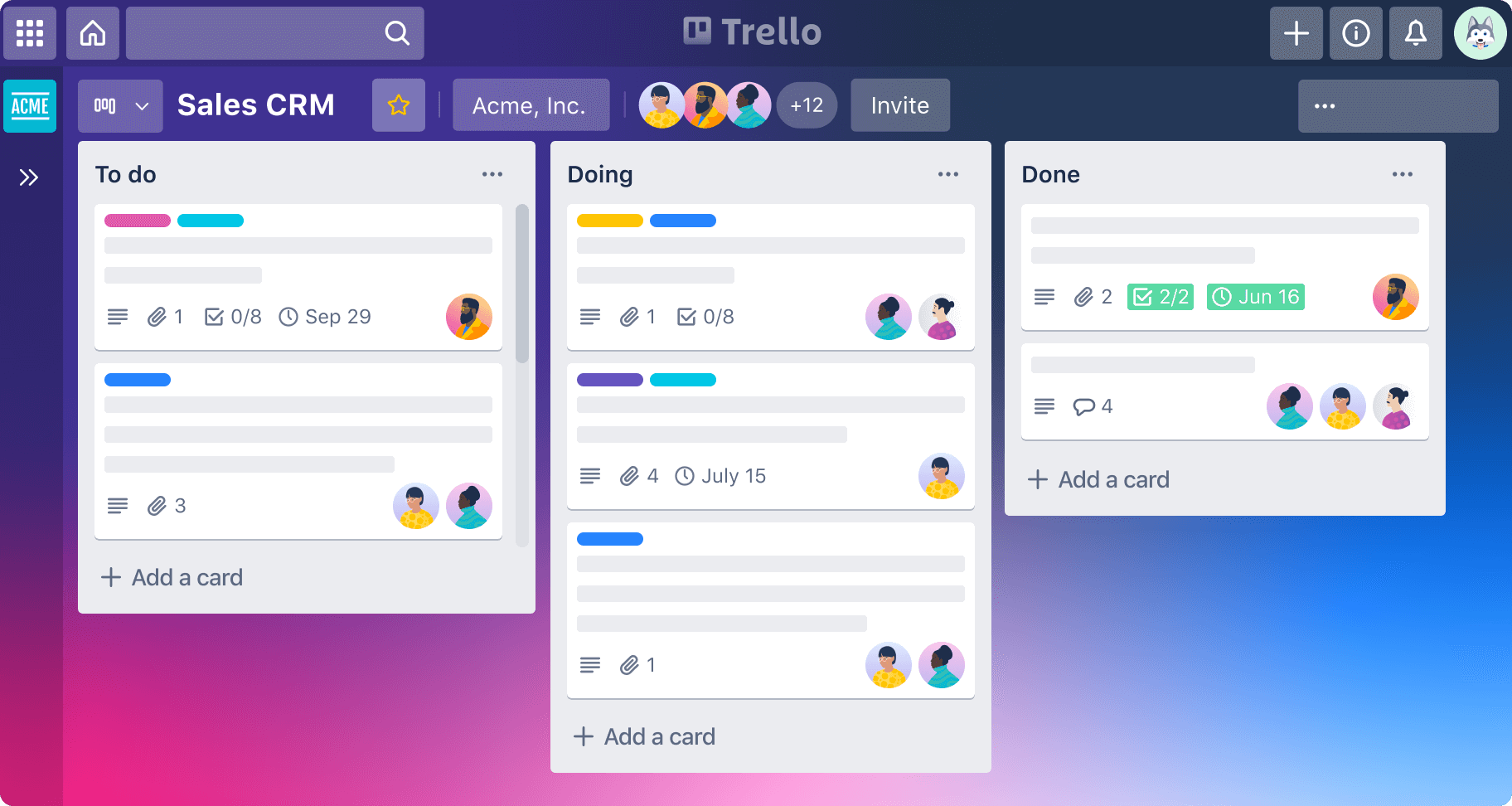
Image source: trello.com
Trello pricing
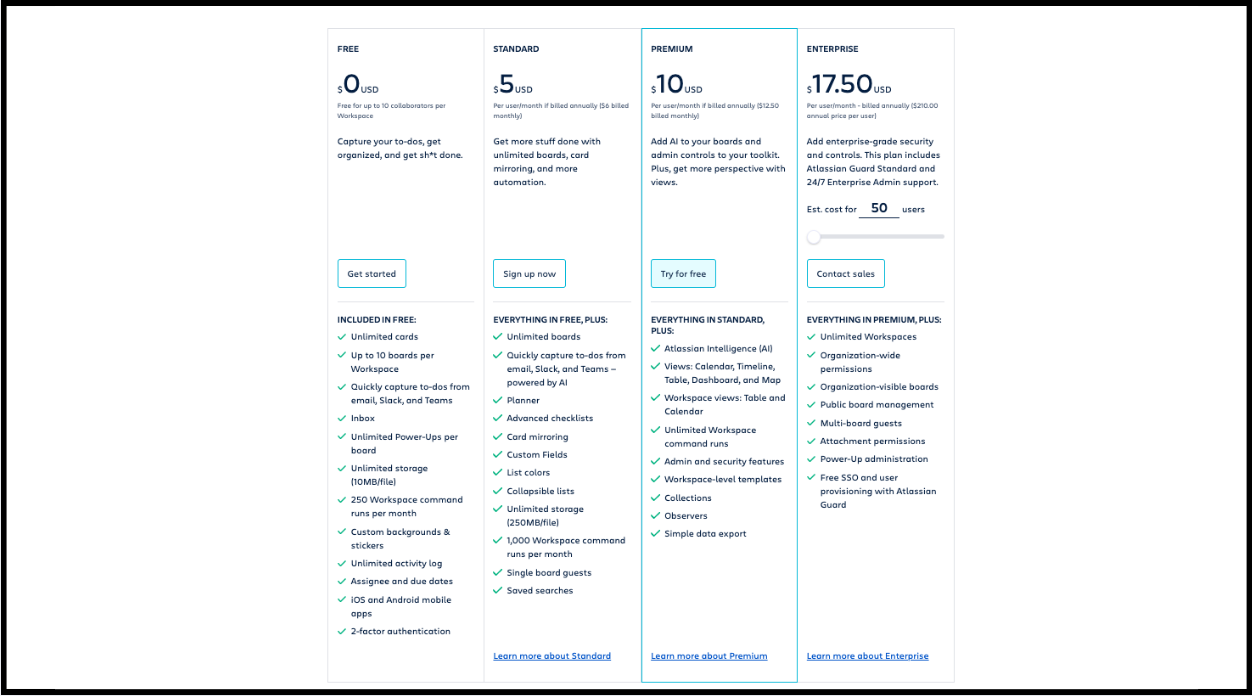
Image source: trello.com
Trello pricing plans:
- Free: Up to 10 users per workspace; unlimited cards; limited to 10 boards per workspace; 250 automation commands/month.
- Standard: $ 5/user/month; unlimited boards; 1,000 automation commands/month; advanced checklists and custom fields.
- Premium: $ 10/user/month; unlimited automation; multiple views; admin and security features.
- Enterprise: $ 17.50/user/month; for 50+ users; includes organization-wide permissions, unlimited workspaces, SAML SSO, advanced security, and 24/7 admin support.
Note: Some Power-Ups by partners require an additional subscription fee.
Information source: Official vendor sites
Update time: 2025-11-15
Note: Pricing and plan details reflect publicly available data as of the update date and may vary based on region, billing cycle, and number of agents.
How to set up Trello as a CRM: A step-by-step guide
Anyone can create a Trello as a CRM setup using standard board features and a few power-ups. The process is simple and suitable for light use cases. Below are clear steps that can serve as a starter blueprint.
Step 1: Create your CRM board structure
Start by naming lists as sales stages, such as new lead, contacted, qualification, demo, proposal, negotiation, closed won, and closed lost. Cards will move along these stages, representing progress. Add checklists for follow-up tasks inside cards to keep activity traceable.
Step 2: Add CRM fields to cards
Add fields such as value, owner, follow-up date, contact person, email, product interest, and lead source. This converts each card into a CRM record. If required, install custom field Power-Ups to store detailed information. Maintain field consistency across cards to avoid data confusion.
Step 3: Use labels for segmentation
Labels help identify priority, deal size, industry, region, or lead source at a glance. Teams can later filter cards with labels to run focused pipeline reviews. Color-based segmentation also helps managers quickly evaluate where attention is required.
Step 4: Add automation
Use Trello automation triggers to move cards, assign teammates, add due dates, or send notifications. Automations reduce manual effort and improve pipeline hygiene. Keep automation logic simple so the board stays easy to manage.
Step 5: Add activity tracking
Use checklists, card comments, and attachments to document sales actions. Add meeting notes, proposal files, or discussion history inside each card for full visibility. Activity tracking ensures continuity even when ownership changes.
CRM Power-Ups that enhance Trello CRM
Users searching Trello CRM or Trello as CRM often explore Power-Ups to enhance features. Below are useful Power-Ups that help extend CRM behaviour inside Trello.
- Custom fields: This adds structured fields for values, dates, contacts, or status attributes, and it is essential for CRM card enrichment inside Trello because it helps teams maintain uniform customer records.
- Calendar: This displays card due dates visually and supports better follow-up planning while helping teams stay aware of deadlines during each sales stage.
- SendBoard: This allows users to send and receive email inside Trello while keeping communication context attached to each card, which helps avoid switching between platforms.
- Planyway: This provides timeline and resource planning views that help teams understand workload distribution and long cycle planning with better visual clarity.
- Forms by Blue Cat: This helps collect lead information using user friendly forms, and every new submission automatically becomes a Trello card which reduces manual entry work.
- Zapier: This helps connect Trello with external tools like spreadsheets, mail apps, or marketing systems, and it supports quick automation although it requires planning to prevent clutter.
- Crmble: This adds CRM style contact fields and pipeline structures inside Trello, making it suitable for small teams that prefer lightweight and visual CRM usage.
Crmble for Trello CRM (Power-Up)
Crmble has become one of the most popular Power-Ups for users searching for "Trello Crmble Power-Up" or "Crmble Trello" because it adds an actual CRM style structure inside Trello. It turns basic cards into lightweight CRM entries without complex learning curves.
What is Crmble
Crmble is an add-on that transforms Trello boards into simple CRM environments with structured fields and pipeline layouts. It aims to make Trello behave like an entry-level CRM without requiring system changes. Setup is quick and suitable for small teams who want visual yet slightly structured CRM flows.
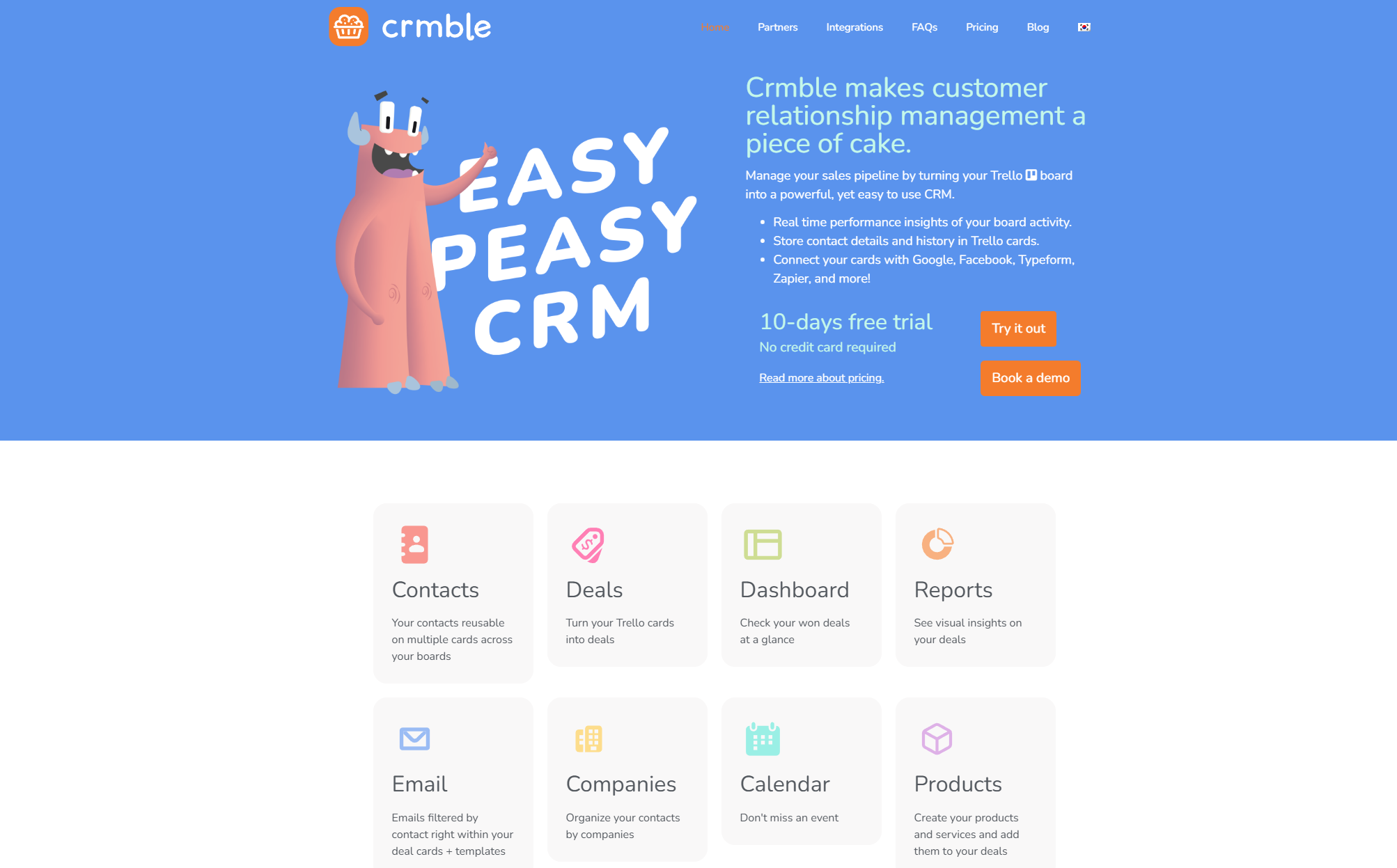
Image source: Crmble.com
Key features
- Pre-built CRM pipeline: Crmble comes with predefined pipeline views that users can adopt instantly. This helps first-time users experience structured CRM without building everything manually. Teams can rename or customize stages based on their process.
- Contact management: Crmble adds contacts as structured entities rather than simple card descriptions. This makes customer information easier to search and recall. Contacts can be stored in a separate list or linked to deal cards.
- Data enrichment: Crmble supports automated populations of certain fields by reading available contact information. This helps reduce manual inputs in some scenarios.
- Simple reporting: Crmble provides small visual reports that help users view basic performance metrics. Reporting is limited but useful for small teams.
- Integrations with Google Contacts and Outlook: Crmble supports sync with common contact sources, which reduces duplication and manual transfers. This is useful for freelancers or small teams working with personal inboxes.
For more Google Workspace's information, you can refer to Google Workspace Pricing and Google Workspace alternatives.
Pros:
- Very easy to set up and learn
- Simple visual workflow that matches Trello usage habits
- Affordable for freelancers and small teams
- Works inside existing boards without platform switching
Cons:
- Limited reporting and analytics depth
- Not suitable for complex data relationships
- Scalability challenges for growing teams
Who should use Crmble
Crmble is ideal for freelancers, single-user workflows, and small B2B teams. It is perfect for those who want visual clarity without heavy CRM configuration. Larger teams should evaluate full CRM systems or connected workspace platforms before usage.
Benefits of using Trello as a CRM
Trello has attracted small businesses, creators, and freelancers who love visual interactions and easy tracking. People who search for "Trello CRM templates", "Trello CRM free ", or "Crmble Trello " often want speed, simplicity, and low-effort setup. Below are the key benefits described in depth, so teams understand what Trello truly offers.
- Kanban simplicity and visual clarity: Trello's Kanban board allows teams to visualize every lead and sales activity in a single view. Cards can be dragged between lists that reflect sales stages such as prospecting, negotiation, demo, proposal, or closure. Visual clarity helps small teams instantly understand priority without complex dashboards. It is especially useful for those who prefer seeing work instead of reading spreadsheets.
- Easy drag and drop pipeline management: Users can move cards between lists quickly, which feels natural and smooth during pipeline reviews. Pipeline transitions do not require form filling or field configuration, which reduces unnecessary friction for small teams. This suits teams who want lightweight movement instead of rigid processes. Early-stage founders and independent sellers find this very convenient.
- Quick adoption with minimal training: Most users understand Trello within minutes because of its simple interface. There is no heavy training, onboarding, or system learning curve. This makes Trello attractive for small sales operations that do not want to spend time configuring technical CRM features. New team members can join easily and follow board activities without confusion.
- Flexible templates for CRM style workflows: Users can find multiple Trello CRM template resources online, where pre-built boards replicate common sales pipelines. Templates reduce setup time and offer guidance for card structure and activity tracking. Some templates include example checklists, team comments, and deal stage samples which help faster execution. Teams can clone templates and adjust fields as they grow.
- Power-Ups for CRM style features: Trello can expand using Power-Ups, including automation triggers, email add-ons, calendar tools, or data field extensions. Trello Crmble Power-ups is a popular CRM enhancement because it adds contact fields and CRM workflow layouts. These Power-Ups help Trello behave more like a simple CRM tool by adding features only when needed, which keeps the workspace lightweight.
- Affordable for small teams: Trello CRM free becomes an attractive keyword because many early-stage users do not want to purchase CRM software immediately. Trello's free tier already supports basic pipelines, simple automation, mobile usage, and integrations with popular workflow apps. This makes Trello cost-efficient for those who only need light CRM behaviour without financial pressure.
Key limitations of Trello as a CRM
While Trello can serve small sales teams effectively, it is limited to advanced CRM capabilities. Users searching for a CRM that integrates with Trello or is Trello a CRM often discover limitations when deal volume or team size grows. Below are detailed key limitations for evaluation.
- Limited reporting and analytics: Trello does not provide advanced dashboards for deal forecasting, conversion ratios, revenue trends, or sales velocity. Teams who scale quickly require structured reporting features, which Trello partially supports only through Power-Ups. This may cause blind spots for leaders who want predictable forecasting and performance benchmarking.
- No built-in email calling or meeting management: Full CRM systems usually include inbox sync, dialers, meeting schedulers, and conversation logs. Trello requires external tools or plug-ins that connect communication records manually. This creates fragmented data and prevents timeline-based customer communication history from staying inside one record.
- Restricted automation for complex sales workflows: Trello offers simple automation triggers but cannot fully support branching logic, dependency controls, scored routing, or multi-system approval loops. Larger funnels or multi-team pipelines require more structured workflow automation, which becomes difficult to maintain inside Trello boards. Complex cycles feel heavy or messy with card-based systems.
- No native deal forecasting: Sales forecasting models need numeric calculations, weighted probabilities, and pipeline health scoring. Trello does not provide structured financial forecasting inside cards, which forces teams to maintain spreadsheets separately. This reduces real-time visibility and may lead to inaccurate revenue expectations.
- Scaling challenges for growing sales teams: When deals, members, regions, or products expand, boards become crowded and lose clarity. High-volume teams struggle to maintain clean card structures and data consistency. Larger organizations require data models with hierarchy, relationships, and controlled write permissions, which Trello struggles to deliver.
- Data modeling limitations compared to classic CRMs: Trello does not support multi-relational data structures, such as contacts linked to companies across multiple deals. Most CRM logic relies on relational data, while Trello focuses on task-style cards. Custom fields help partially, but cannot support full relational mapping with cross-table analytics.
Afterthought
As sales operations mature, many teams eventually outgrow Trello's card-based structure and begin looking for a platform that can handle deeper data relationships, automated workflows, and integrated communication. This is where a more unified, scalable system becomes essential—one that connects tasks, CRM data, messaging, meetings, and reporting in a single workspace. Lark offers exactly that: a comprehensive platform designed to streamline sales processes end-to-end. Let's dive into this platform now.
New option: Try Lark to improve CRM with smart control
Trello remains useful for basic CRM-style workflows, but growing teams look for connected data, seamless communication, workflow automation, and AI-assisted operations. Lark is a unified workspace platform that combines collaboration and structured records. It is not only for CRM style usage but for end-to-end work coordination.
Centralised, structured CRM-style database
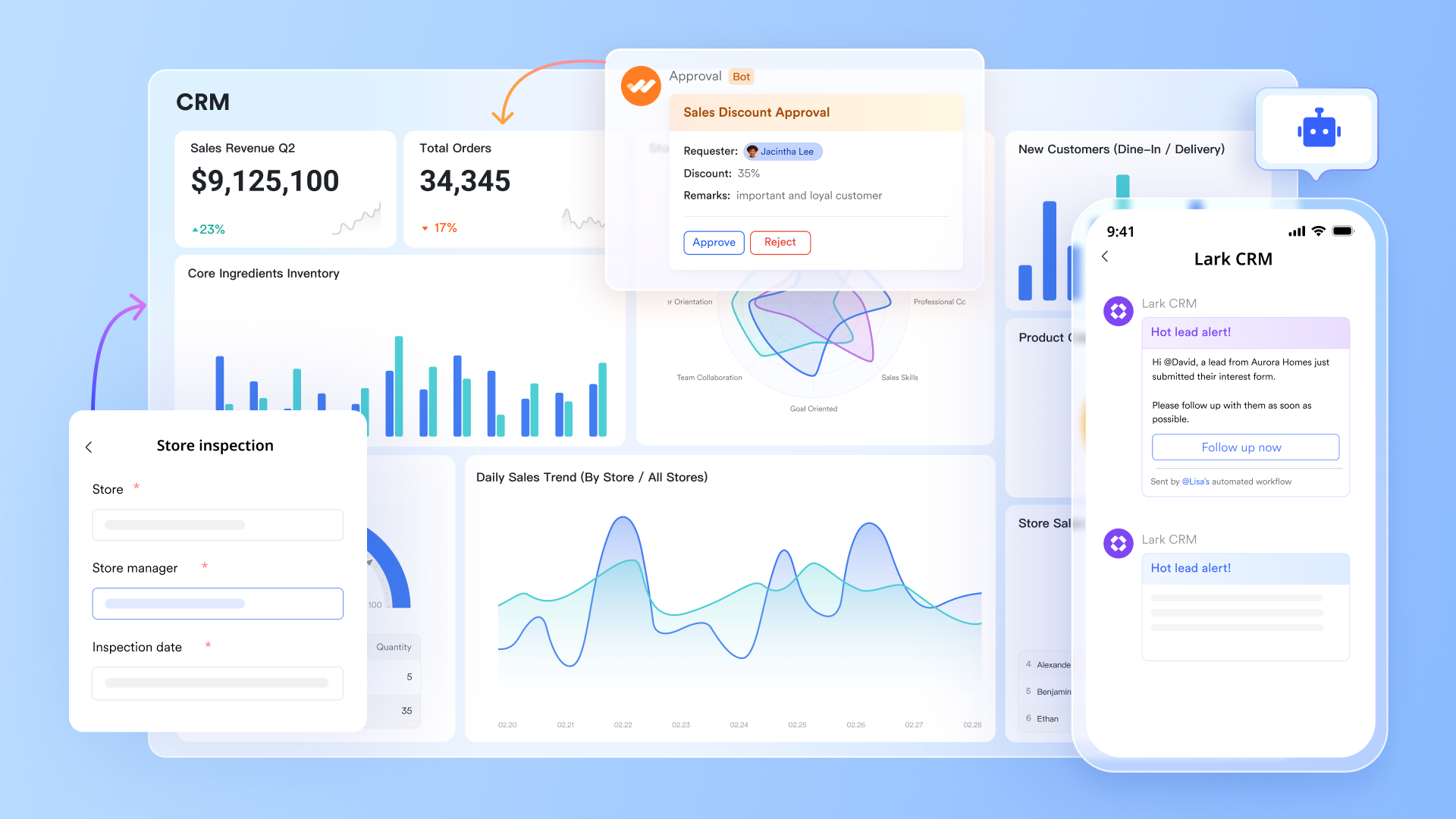
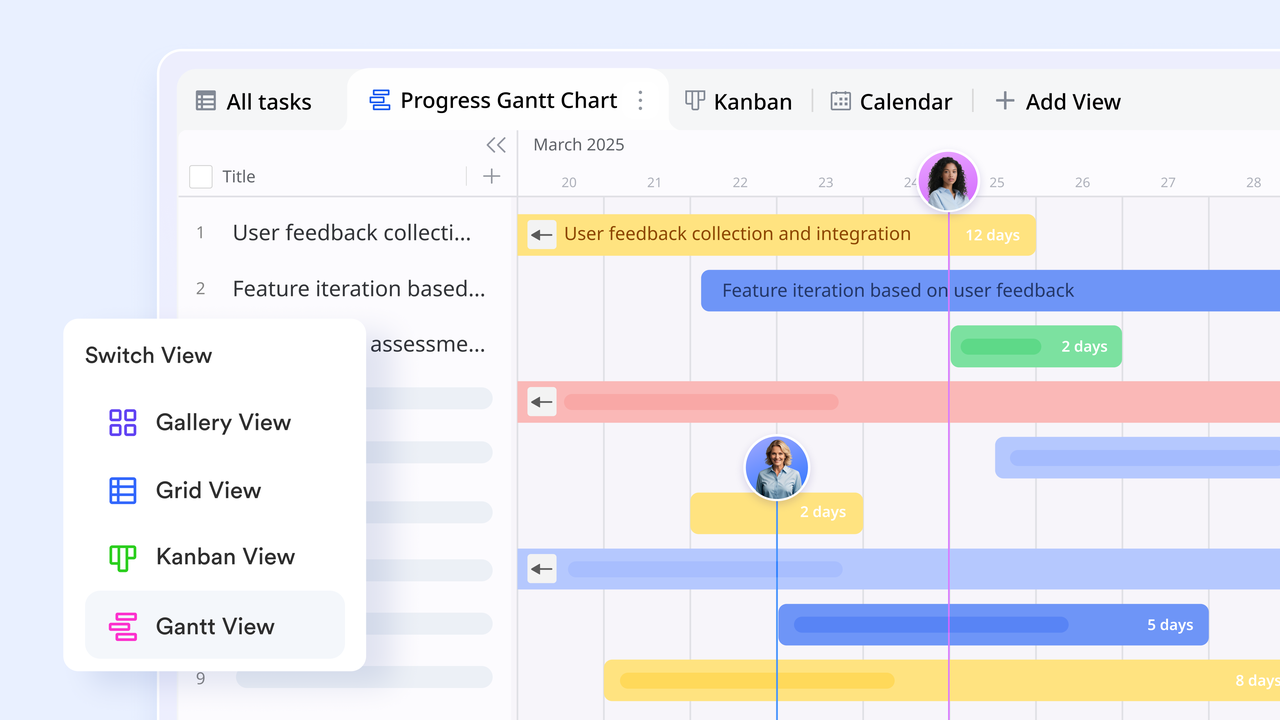
Lark Base functions as a customizable, database-style system where teams manage contacts, companies, deals, product lists, and service records. Users can design their own CRM-style tables with fields for pipeline stages, priorities, deal sizes, or follow-up dates. Multiple views, including grid, Kanban, Gantt, and dashboards, allow teams to see information in the way that best supports their process. Two-way linked records create a connected data model, so updates made in one place reflect everywhere else. Automated rules help teams keep data clean and ensure the right actions happen when statuses change.
Built-in AI and AI-powered workflow
Lark's built-in AI enhances daily CRM workflows. Via the AI-generated text feature, it can assist with summaries, data extraction, classification, translation, and quick content creation. Via AI field shortcuts in Base, teams can convert long customer messages into organized notes, generate follow-up drafts, classify leads based on content, or extract key details into structured fields—all without leaving the platform. AI Meeting Notes automatically capture call highlights and action items, allowing reps to focus on selling instead of documentation. These AI-powered capabilities help teams move faster with better accuracy while minimizing manual work.

Advanced task and project management
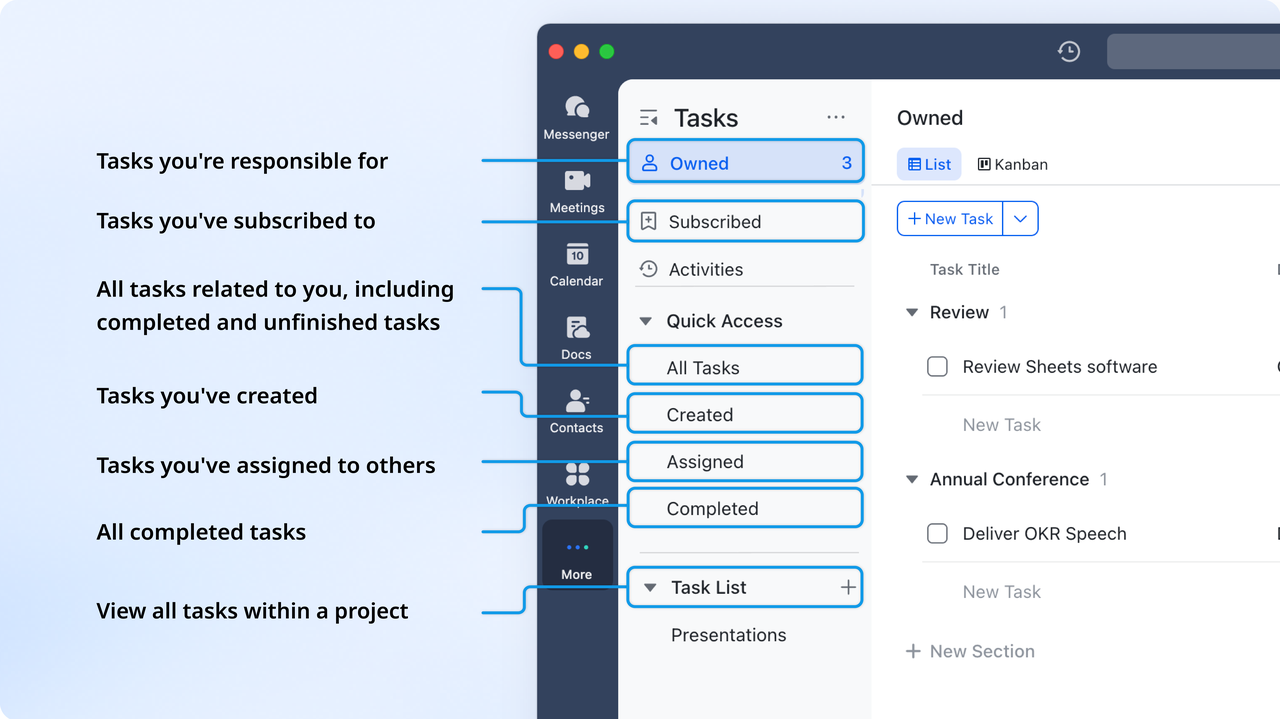
Lark Tasks provides a high-visibility, accountability-driven workflow for managing follow-ups, proposals, demos, renewals, and automated approval. By enabling automatic sync, updates made to a task list are automatically synced to Base every hour, keeping all work clearly connected to sales pipeline progression when automatic sync is enabled. In Lark Base reps receive notifications for deadlines, managers can view team workload in real time, and tasks update automatically when certain conditions are met in Base. With personal views, team dashboards, and due-date tracking, nothing slips through the cracks ensuring that CRM actions are completed on time and with full transparency.
Unified workspace for communication, recording, & practicing
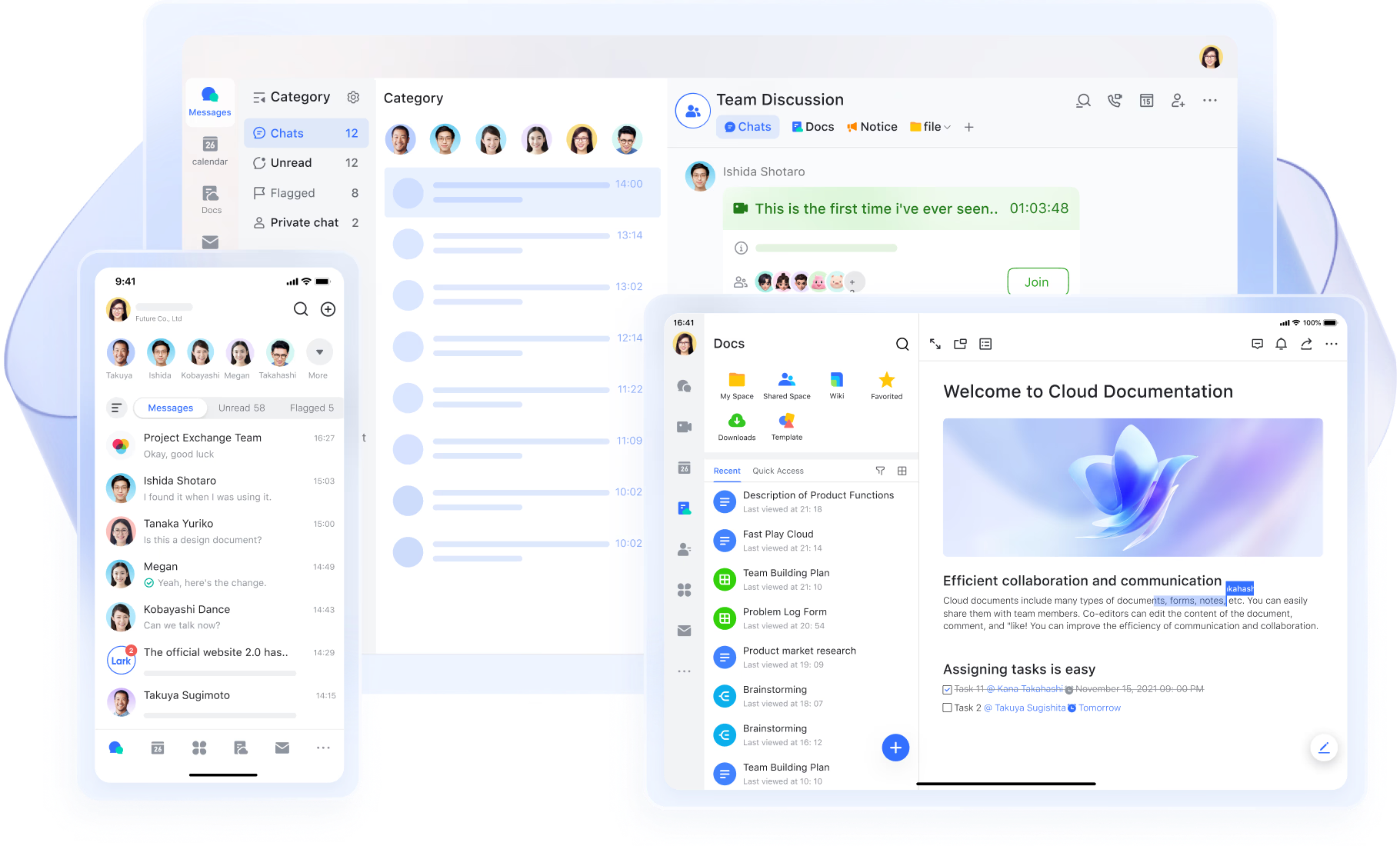
Lark provides a single connected workspace where conversations, data, tasks, and documents sit side by side. Sales and operations teams don't have to switch between disjointed tools to find updates, track customer activity, or check what was discussed earlier. Chats in Lark Messenger can reference records from Lark Base directly, making every message contextual and traceable. Lark Approval synced with Messenger and Base, allowing CRM-related approvals and data syncing within workflows. Lark Docs can be shared in group chat, embedded in Base fields, and reviewed and revised via Magic Share in Lark Meetings. In these ways, communication and execution go hand in hand, no longer scattered.
- Starter plan: Free forever plan that includes 11 powerful tools for up to 20 users. It also comes with 100GB of storage, 1000 automation runs, AI translations, and more.
- Basic plan: $6/user/month (billed annually) for up to 500 users. It includes everything in Starter plus group calling for up to 500 attendees, 5TB of storage, 1000 automation runs, and more.
- Pro plan: $12/user/month (billed annually) for up to 500 users. It includes everything in Starter plus group calling for up to 500 attendees, 15TB of storage, 50,000 automation runs, and more.
- Enterprise plan: Contact sales for custom pricing. Supports unlimited users and includes even more automation runs and advanced security, compliance, and management features.
Choose your tool: Trello vs Lark
Below is a friendly comparison based on real usage patterns for small and growing teams. This helps readers understand which platform grows with which scenario.
Conclusion
Trello can serve as a simple and friendly CRM option for freelancers, creators, and small B2B teams who want visual clarity and quick sales pipelines. Searches like Trello a CRM, CRM that integrates with Trello, Trello CRM template, Trello as CRM, Trello CRM free, Trello Crmble Power-Up, and Crmble Trello reflect how people look for practical setups. Trello offers speed and simplicity, but teams that grow in size or complexity will require connected data, structured automation, reporting, AI powered workflows, and unified communication.
Modern platforms like Lark can support CRM style execution by combining communication, data, tasks, meetings, and documentation inside one connected environment. Users who outgrow Trello's lightweight flexibility can explore Lark gradually and decide when centralization becomes important for repeatable customer experience outcomes.
FAQs
Can Trello replace a CRM?
Trello may replace a CRM for small and simple pipelines where users prefer visual tracking and minimal configuration. It is suitable for freelancers or tiny teams who handle fewer leads and do not require advanced analytics or reporting. Some users later look for connected workspaces where communication, records, and tasks stay together, and Lark becomes an option for those exploring longer-term scalability. Trello CRM free can be a starting point before moving to more structured systems if growth increases.
What is the best CRM that works with Trello?
Many people search for a CRM that integrates with Trello when they want to combine Trello boards with external CRM tools. Integrations can work, but consistency and long-term maintenance should be considered. Some teams later explore unified platforms like Lark, where messages, docs, data tables, and meeting workflows exist in the same place for better visibility. The final choice depends on scale and process depth.
What is Trello Crmble?
Trello Crmble Power-Up provides basic CRM style behaviour inside Trello by offering fields, reporting, and simple pipeline layouts. It is useful for small teams who want a quick setup without heavy onboarding. When data relationships, workload coordination, and documentation increase, workspace platforms like Lark may support more connected processes. Crmble stays suitable for light usage and early-stage sales activity.
Is Trello CRM free?
Trello CRM free setups are possible using Trello's free plan, combined with limited Power-Ups and features. This is helpful for beginners or very small teams wanting cost-friendly pipeline tracking. As usage grows, teams may explore systems like Lark, where free starter plans already include collaboration, docs, tasks, meetings, and structured data spaces. Trello remains a practical entry point before advanced requirements appear.
How do I create a CRM in Trello?
Users can configure a board by adding custom fields, lists, labels, automation triggers, and CRM checklists. Installing a Trello CRM template or Trello Crmble Power-Up can help start faster with ready structures. Teams that later require linked records, workflow automation across communication and tasks, and AI summarization can explore workspace tools like Lark. The setup choice depends on current process maturity and growth plans.
Related reading
Table of contents
Start using Lark today

Manage all your work in one place
Boost team efficiency by 10x
Save up to 70% on software costs
Table of contents
Start using Lark today
Manage all your work in one place
Boost team efficiency by 10x
Save up to 70% on software costs
Keep reading









2026 Lark Technologies Pte. Ltd.
Headquartered in Singapore with offices worldwide.






Explore: