In the world of project management, missing a single deadline can trigger a domino effect that delays your entire launch. Understanding critical path examples is essential for any team seeking to identify the "heartbeat" of their project—the sequence of tasks that determines the absolute minimum time to complete it.
This guide breaks down real-world examples of critical path method implementation across industries like retail and tech, while showing you how to move beyond static charts. Discover how modern tools can transform these rigid diagrams into dynamic, automated workflows that keep your milestones on track.
Control your project with a clean roadmap today
What is the critical path method?
The Critical Path Method (CPM) is a step-by-step project management technique used to identify activities on the critical path. It is a mathematical algorithm that determines the longest sequence of dependent activities and measures the time required to complete them from start to finish. In essence, any delay in an activity on the critical path directly impacts the project's completion date.
When looking at critical path method examples, the focus is always on the "zero float" tasks. While some activities have "slack"—meaning they can be delayed without affecting the end date—critical tasks have no such luxury. Understanding this distinction is vital for because it tells the team exactly where the pressure points lie. By mastering these examples of the critical path and leveraging reliable , project managers can pivot from reactive firefighting to proactive .
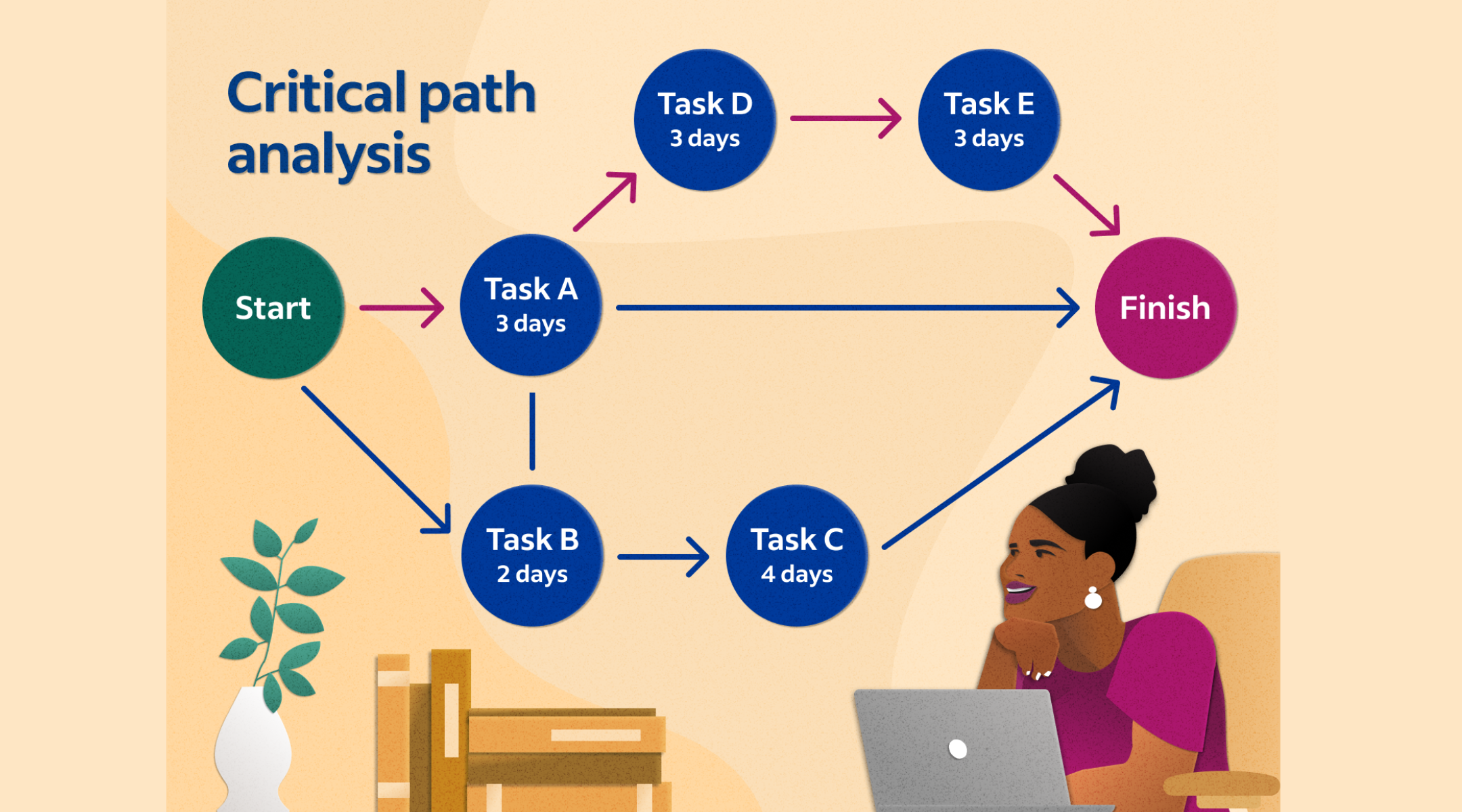
Image source: indeed.com
Why critical path analysis matters in project management
Without a clear understanding of your critical path, you are effectively flying blind. Critical path analysis examples demonstrate that projects often fail not because the team is lazy, but because they are focusing their energy on the wrong tasks. If a non-critical task is delayed, the project survives; if a critical task slips, the whole ship sinks.
This analysis is foundational for operational efficiency. It allows managers to allocate resources where they are most needed. For instance, if you are , the critical path helps you identify the essential cultural or technical shifts that must happen before the rest of the organization can follow suit.
Key components of critical path analysis
To build a reliable schedule, you must understand the building blocks that make up the critical path method examples in project management:
- Activities and task durations: Every project is a collection of tasks. To find the critical path, you must estimate the time each task will take. Use historical data or expert judgment to ensure these durations are realistic.
- Dependencies and sequencing: Tasks rarely exist in a vacuum. Most rely on a predecessor. Sequencing involves determining which tasks must finish before others can begin. This is where become invaluable, as they can track these links automatically.
- float vs non-float activities: "float" or "slack" is the amount of time an activity can be delayed without delaying the project. Critical tasks have zero "float". Understanding this is key to .
- Milestones vs critical tasks: Milestones are checkpoints with zero duration, while critical tasks are the actual work that moves the needle. Both are essential for a clear .
Step-by-step: How to find the critical path in any project
Finding the critical path is a logical process that moves from a chaotic list of ideas to a precise mathematical timeline. By following these steps, you create a digital workplace environment where data, not guesswork, drives your deadlines.
Step 1: List all activities
Begin by breaking the project down into granular, manageable tasks using a Work Breakdown Structure (WBS). This step ensures that no secondary task—like a safety inspection or a final approval—is overlooked, as even small tasks can end up on the critical path.
Step 2: Identify dependencies
Determine the logical relationship between tasks to see which activities must be finished before the next can begin. Identifying these "Finish-to-Start" or "Parallel" sequences is crucial for understanding the flow of work and avoiding resource bottlenecks later on.
Step 3: Draw a network diagram
Create a visual flow chart, often called a PERT chart or node diagram, to represent the sequence of your tasks. This visualization helps you see how different branches of work converge and makes it easier to track the cumulative time of different task chains.
Step 4: Estimate completion time
Assign a realistic duration to every activity based on historical data, team capacity, or expert judgment. Accurate estimations are the foundation of the Critical Path Method; if your durations are off, your entire project deadline will be unreliable.
Step 5: Identify the longest path
Calculate the total duration of every possible sequence of dependent tasks from start to finish. The sequence with the longest total time is your critical path, representing the absolute minimum time required to complete the project.
Step 6: Calculate the float
Determine the "float" or "slack" for non-critical tasks by finding the difference between their earliest possible finish and their latest possible finish. This indicates which tasks have "wiggle room" and which tasks (those with zero float) must be closely monitored using to prevent project delays.
Critical path examples in real-world projects
Seeing examples of critical path analysis in action helps clarify the theory:
Construction project critical path example: In a construction project, the critical path follows the sequence from Clear site and Build Foundation through to Drywall and the Final Walkthrough, as these essential dependencies dictate the project's finish date. Parallel tasks like Windows or Electric are "flexible" and contain a "float," meaning they can be adjusted without delaying the overall handover.
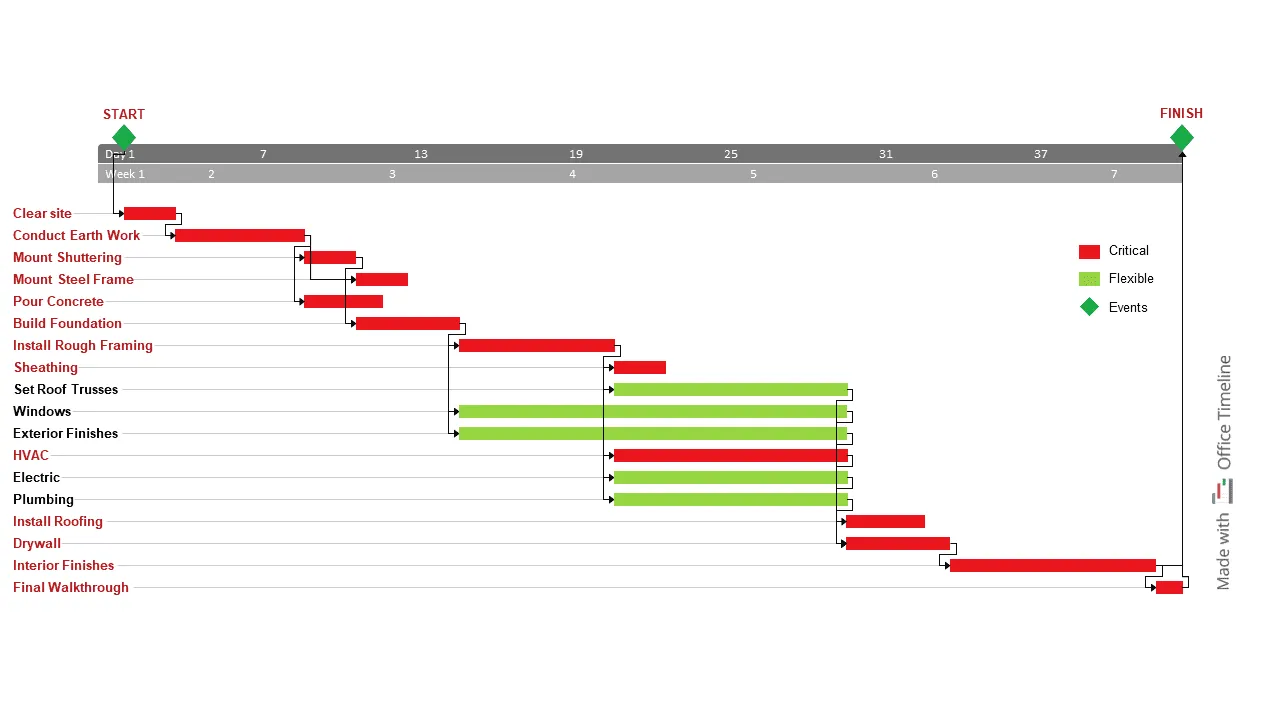
Image source: officetimeline.com
Product development timeline: The critical path typically involves Material collection → Process design → Material output, as these foundational steps dictate the primary production timeline. While tasks like "Sample testing" or "Packaging design review" occur in parallel, they often have a "float" because they can be completed without stalling the main assembly line.
Restaurant opening project: In this culinary workflow, the critical path is typically Gather ingredients → Prepare meat → Cook meat → Serve, as protein cooking times generally dictate the total duration. While chopping and preheating happen in parallel, they rarely delay the final "Serve" step as much as the meat preparation does.
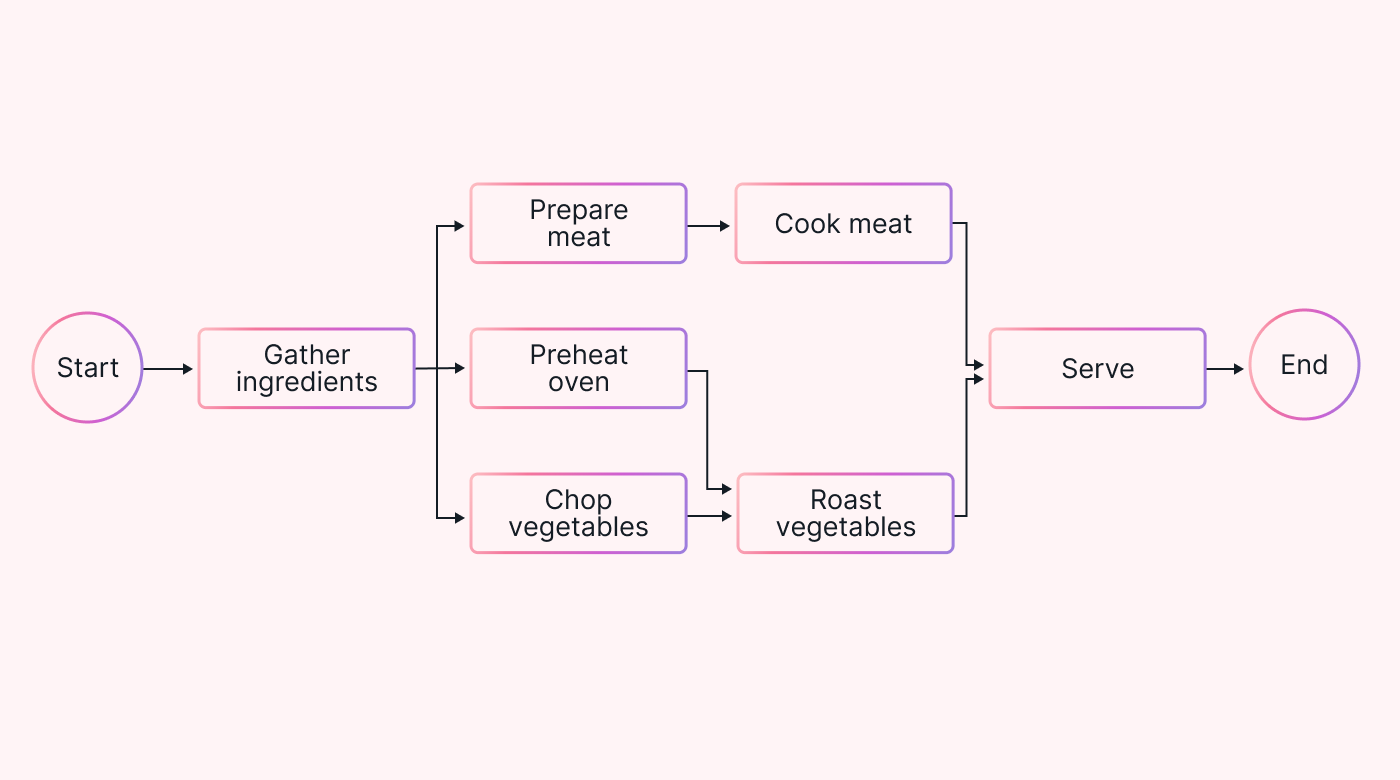
Image source: motion.com
Marketing campaign launch schedule: The critical path follows the high-level phases from "Research" and "Design" through to "Marketing" and "Official Launch," as these primary milestones dictate your year-end delivery. While specific events like "Insight workshops" or "Event planning" are essential, they often have a "float" because their exact timing can be adjusted without derailing the December launch.
Critical path analysis examples and common patterns
- Linear vs branching critical paths: A linear path is a straight line of dependencies. A branching path is more complex, where multiple sequences of tasks converge at a single milestone.
- Multiple critical paths in complex projects: In large-scale projects, you might have two paths of equal length. This is a high-risk scenario because a delay in either path delays the project.
- How scope changes create new critical paths: When "scope creep" occurs, new tasks are added that may suddenly have longer durations than the original critical path, completely shifting the project's focus. This is why a is essential to define boundaries.
Critical path vs non-critical tasks: What teams often miss
In the heat of a project, it is a common mistake for teams to view non-critical tasks as "optional" or unimportant. However, the relationship between these two types of activities is dynamic, not static. Critical path method examples in project management frequently show that the line between a critical and non-critical task is thinner than most realize.
- The "Vanishing float" trap: Every non-critical task has a Slack, a specific buffer of time which can be delayed without pushing back the final deadline. The danger occurs when teams treat this float as an excuse for procrastination. If a task with 5 days of float is ignored for 6 days, it doesn't just stay delayed; it shifts onto the critical path, and your final project deadline moves with it.
- Resource contention and the "hidden" path: Even if a task is not logically dependent on a critical one, it may share the same human or technical resources. If your lead designer is busy with a non-critical "nice-to-have" marketing asset and misses the start date for a critical UI wireframe, the project is delayed. This is why monitoring is essential; it reveals when low-priority work is cannibalizing the bandwidth needed for high-stakes milestones.
- The psychological risk of "Low-Impact" focus: Teams often gravitate toward non-critical tasks because they are often easier or less stressful than high-stakes critical tasks. This leads to a false sense of progress where the team is "busy" but not actually moving the project toward completion. Without clear centered around the critical path, efforts are wasted on minor details while the core project heartbeat slows down.
- When reprioritization breaks the chain: Sudden changes in project scope can instantly flip the script. A task that had 10 days of float can become critical if the project deadline is moved up or if a predecessor task takes longer than expected. Using a that updates in real-time allows teams to see these shifts immediately, preventing a non-critical "sleeping" task from waking up as a project-killing bottleneck.
Challenge in action: What makes your path impassable
Identifying the critical path is only half the battle; the real challenge lies in maintaining it as project realities shift. Many organizations rely on outdated methods that turn a high-level strategy into a source of confusion.
- Static Gantt charts that go out of date: Most teams start with a beautiful Gantt chart created in a spreadsheet or a basic design tool. However, these are often "dead on arrival" because they are not linked to live data. The moment a task takes two days longer than planned, the entire chart becomes a historical artifact rather than a steering tool. Without , the team loses sight of which tasks are currently critical.
- Manual dependency updates: In traditional setups, if Task A is delayed, the project manager must manually move Tasks B, C, and D. This manual "shuffling" is prone to human error and often results in missed dependencies. In complex critical path method examples, a single missed link can lead to a "hidden" delay where the team thinks they are on schedule, but the final deadline has already shifted. This lack of creates an administrative burden that slows down actual work.
- CPM calculations that don't reflect reality: Theoretical examples of critical path analysis often assume perfect conditions. They fail to account for "resource contention"—scenarios where a person is assigned to two critical tasks at once. When calculations ignore team bandwidth or delays, the resulting schedule is a "best-case scenario" that inevitably breaks under the pressure of real-world execution.
- Communication gaps when timelines shift: When the critical path changes, the information often stays trapped in the project manager's head or a private file. Stakeholders continue working under old assumptions because there is no to broadcast the shift. This "context gap" leads to wasted effort on tasks that are no longer priorities while the real bottlenecks are left unaddressed.
Avoid these common pitfalls with a reliable tool
Mert Lark: Set the project work smoothly on the path you planned
Traditional project management often fails because it treats the critical path as a static drawing rather than a living, breathing workflow. bridges this gap by integrating your project data directly into the communication tools your team uses every day. Instead of toggling between disconnected apps, you get a unified environment where schedules, tasks, and chats live in perfect sync. By transforming rigid diagrams into dynamic systems, Lark ensures that every shift in your is immediately visible and actionable. It is the ultimate solution for teams that need to move beyond "planning" and start mastering real-time execution.
The visual blueprint for "making the path"
Before locking your project into a structured database, you need a space to visualize the "why" and "how" of your strategy. Lark board provides an infinite canvas where teams can brainstorm and link dependencies visually, ensuring every stakeholder understands the critical chain before execution begins. Lark Board allows you to move beyond the constraints of a grid. Use connector lines and flowchart shapes to visualize complex, non-linear dependencies. This is where you "make the path" by dragging and dropping task nodes to see how a delay in one branch (like Creative) might intersect with another (like Technical), providing a "bird's-eye view" of your project's heartbeat. 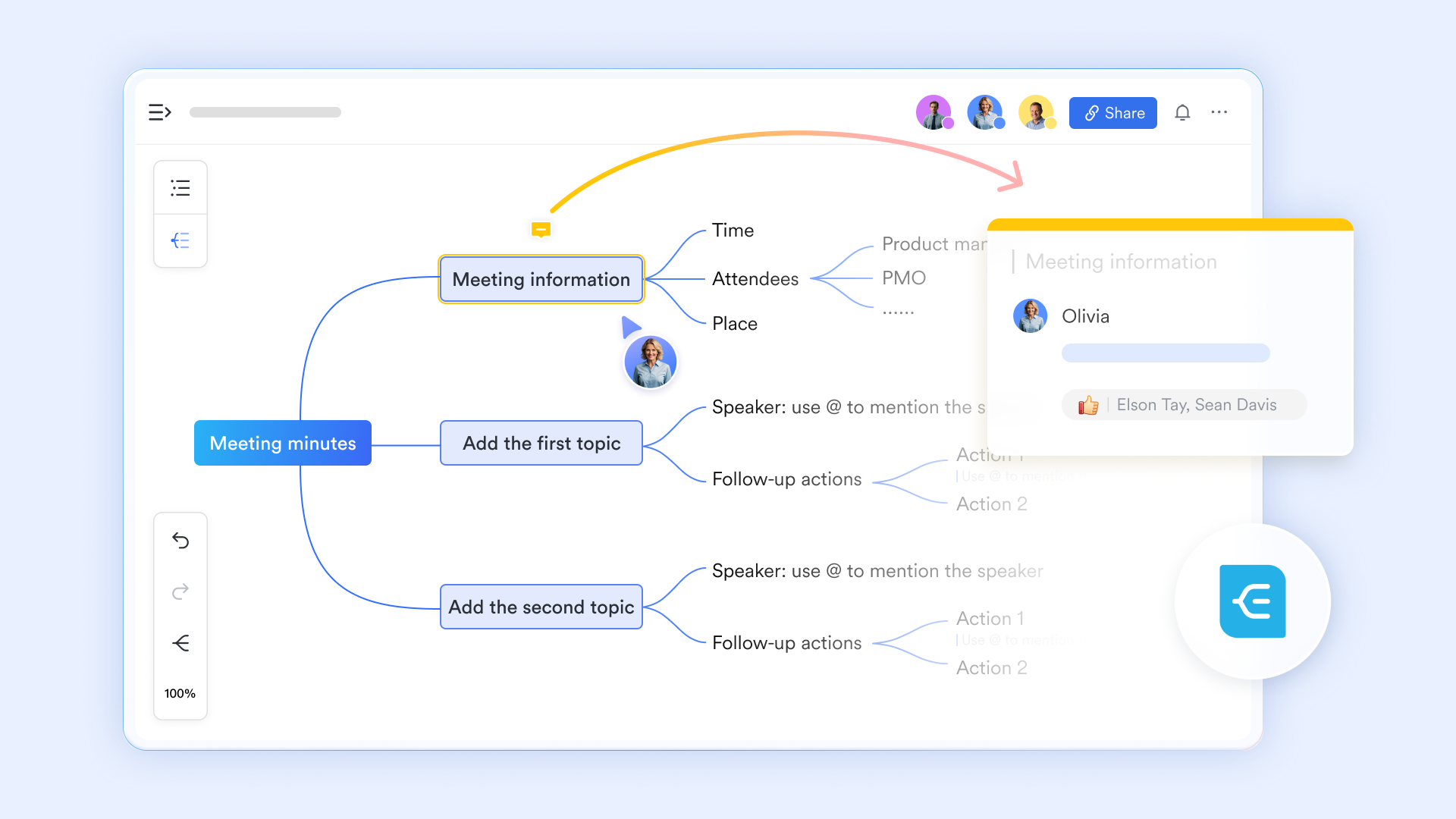
Using the Gantt view to enforce "Hard" dependencies
The Gantt view in is your primary tool for tracking and controlling the critical path. By clicking and dragging "Dependency Arrows" between task bars, you create a logical lock. If you have a "Finish-to-Start" dependency, Lark can be configured to prevent a successor task from being marked "In Progress" until the predecessor is "Done." This prevents teams from jumping ahead and working on non-critical items while a critical bottleneck remains unresolved. 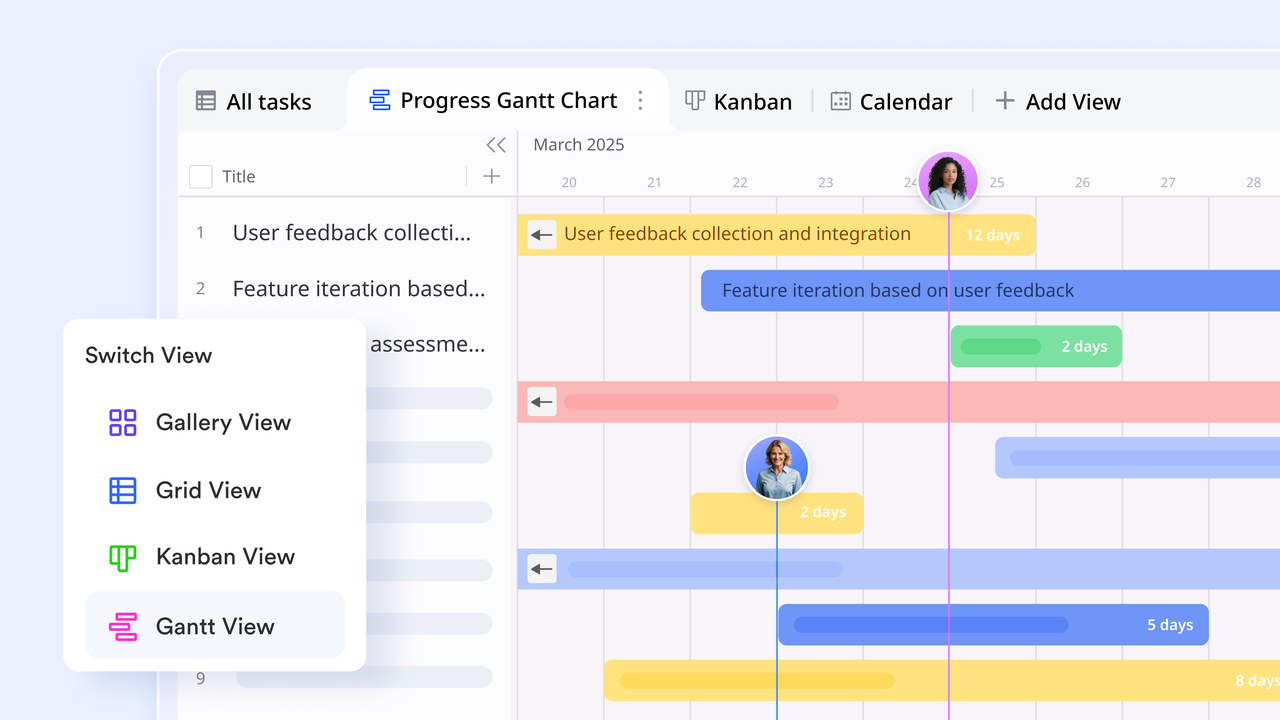
Task-level plan and granular control
A single "critical task" on a Gantt chart sometimes hides dozens of smaller requirements. Lark Tasks allows you to freely define hierarchical relationships by breaking down complex objectives into manageable sub-tasks. With checkbox-styled UI and clear , it ensures that every granular detail remains visible within the larger project scope. On the other hand, you can assign specific owners to each sub-task to distribute the workload, while the master task tracks the overall progress toward your annual goals in real-time. 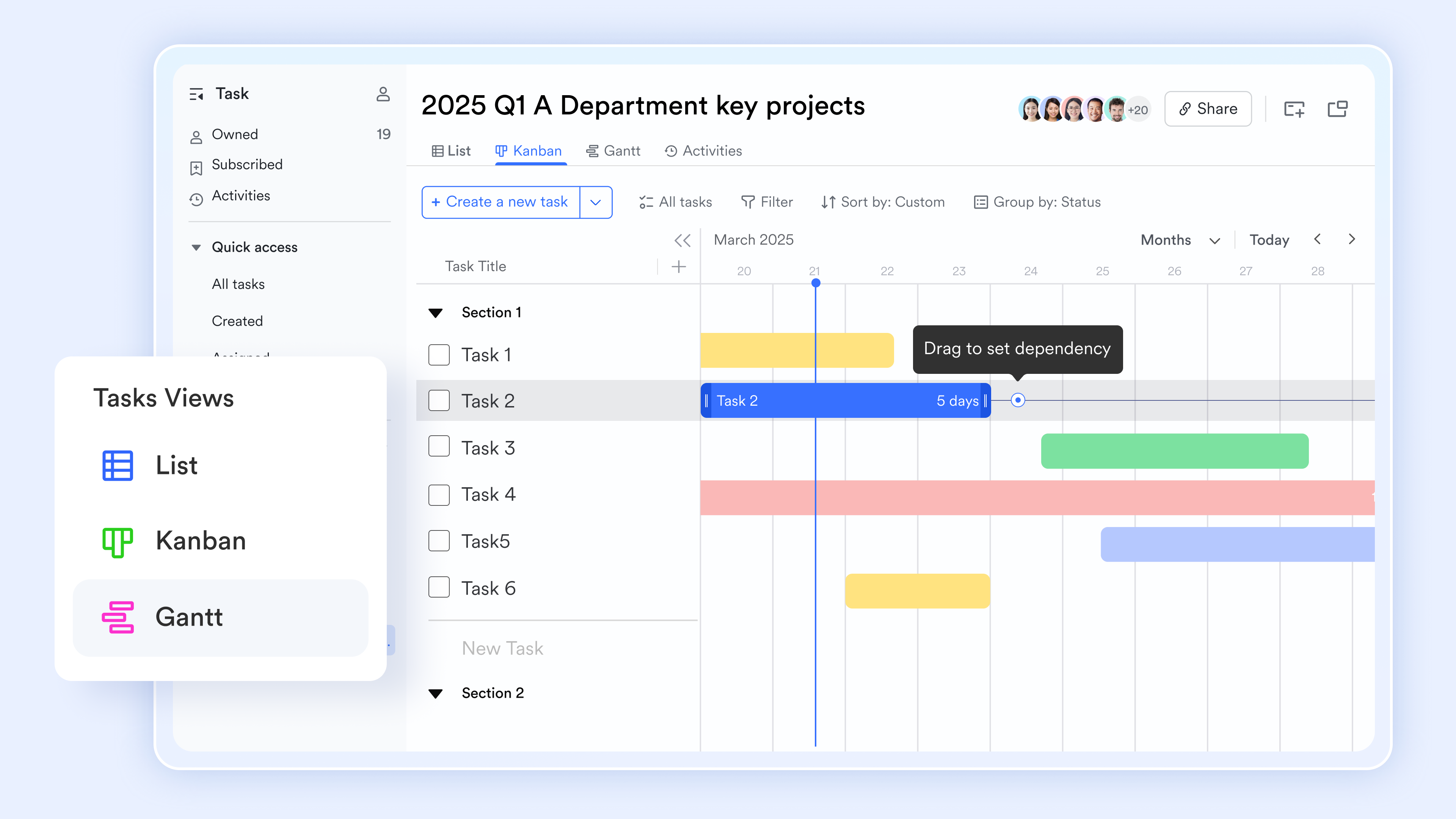
Automated "Successor" notifications
To keep the momentum of the critical path moving, you can set up a Lark Base automation triggered by task completion. The moment a critical task is finished in the Gantt view, Lark sends a Lark Messenger notification to the owner of the next task. This eliminates "lag time" between tasks, ensuring the next person starts their work the second they are logically able to do so. 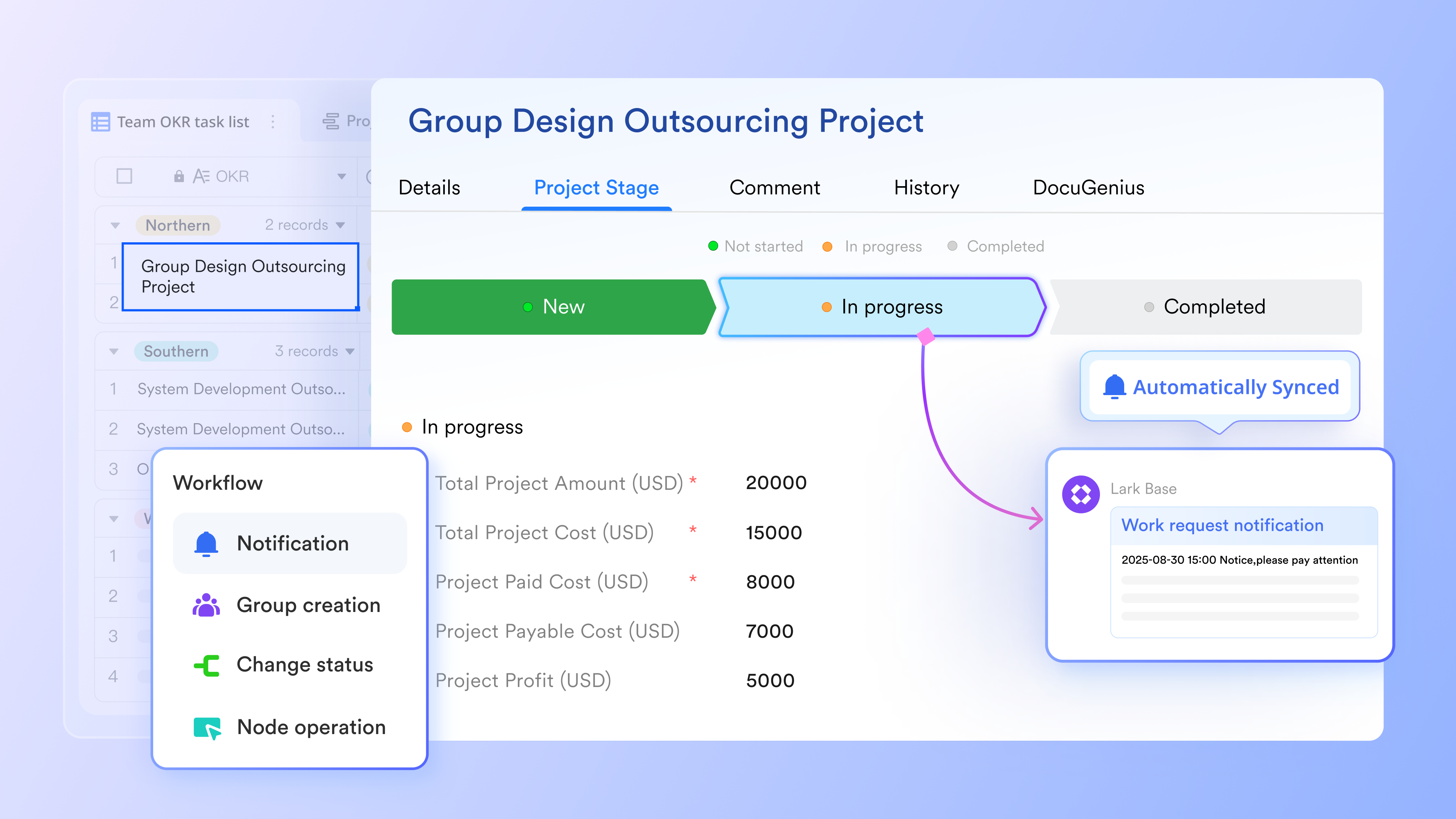
Field-level permissions for controlled updates
For projects with high complexity, you can use field permissions in Lark Base to ensure only specific leads can change the dates or dependencies of the critical path. This ensures that while everyone can see the schedule, the "micro control" of logic remains in the hands of the project manager, maintaining the integrity of the project roadmap. :
- Starter plan: Free forever plan that includes 11 powerful tools for up to 20 users. It also comes with 100GB of storage, 1000 automation runs, AI translations, and more.
- Pro plan: $12/user/month (billed annually) for up to 500 users. It includes everything in Starter plus group calling for up to 500 attendees, 15TB of storage, 50,000 automation runs, and more.
- Enterprise plan: for custom pricing. Supports unlimited users and includes even more automation runs and advanced security, compliance, and management features.
For small teams with simple communication needs

18 months message history
1000 Base automation runs/month
2000 rows per table in Base
Most POPULAR
For companies with comprehensive collaboration and management needs
Unlimited message history
500-participant video meetings
50k Base automation runs/month
20k rows per table in Base
For large companies with advanced security and organizational management needs
Get a personalized demo and pricing
Unlimited message history
500-participant video meetings
15 TB storage + 30 GB storage/user
500k Base automation runs/month
50k Base automation runs/month
Most POPULAR
For companies with comprehensive collaboration and management needs
Unlimited message history
500-participant video meetings
50k Base automation runs/month
20k rows per table in Base
Common pitfalls in critical path analysis and how to avoid them
While the Critical Path Method (CPM) is a powerful framework, its effectiveness depends entirely on the quality of your data and the agility of your team. Even the most seasoned project managers can fall into these common traps.
The "Garbage In, Garbage Out" trap
CPM is a mathematical algorithm, which means it is only as accurate as the durations you provide.
- The pitfall: Over-optimistic task estimates or "guesstimated" durations lead to a critical path that exists only on paper. If your foundation work is estimated at 5 days but historically takes 10, your entire project timeline is a fiction.
- The fix: Use historical data and the Three-point estimation technique (Optimistic, Pessimistic, and Most Likely). In Lark, you can use Base formula fields to automatically calculate the weighted average of these three points for more realistic planning.
Ignoring resource constraints
A task may be "logically" ready to start, but that doesn't mean it can start.
- The pitfall: Traditional CPM assumes infinite resources. It might show two critical tasks happening simultaneously, but if both tasks require the same Senior Developer, one will inevitably stall.
- The fix: Practice Resource Leveling. In Lark, use the Dashboard view to create a "Resource Heatmap" that overlays your critical path with team bandwidth, ensuring no one is double-booked on critical tasks.
Excessive use of "Hard" constraints
- The pitfall: Many managers force tasks to "Start No Earlier Than" a specific date. These hard constraints break the natural "ebb and flow" of the schedule, preventing the critical path from recalibrating when a predecessor finishes early.
- The fix: Use Logical Dependencies (Finish-to-Start) instead of fixed dates. Let logic drive the schedule. If you use Lark's Gantt view, the "Auto-scheduling" feature will move your tasks based on logic, not arbitrary dates.
Neglecting the "Near-Critical" paths
- The pitfall: Teams often focus 100% of their energy on the critical path, ignoring tasks with 1 or 2 days of float. If one of those non-critical tasks slips slightly, it instantly becomes the new critical path, catching the team off guard.
- The fix: Monitor "Total float" across the entire project, not just zero-float tasks. Use Lark automations to instantly alert project leads whenever a task's float drops below a specific threshold (e.g., "Alert if float < 3 days").
Treating the CPM as a static document
- The pitfall: Creating a beautiful network diagram at the project kickoff and never updating it. A critical path that doesn't reflect actual progress is worse than having no plan at all because it provides a false sense of security.
- The fix: Update your project status daily. Lark turns this into a "living system" by allowing team members to update their progress via Lark Tasks on mobile, which instantly feeds back into the master Base and recalibrates the critical path.
Conclusion
The critical path is the living pulse of your operation rather than a one-time diagram. Mastering this method allows teams to shift from reactive firefighting to high-precision execution driven by real-time data. elevates this process by automating dependency tracking and integrating strategic milestones directly into your team's daily communication. By moving from static charts to a unified digital workplace, you transform the critical path into a dynamic tool for maximum operational efficiency. Stop relying on guesswork—identify your path, automate your workflows, and launch your next project with total confidence.
Predict launch dates with total precision
FAQs
What is an example of critical path testing?
In software development, critical path testing focuses on verifying the end-to-end journey of a user’s most vital transactions, such as the sequence from "Add to Cart" to "Final Payment" in an e-commerce app. By prioritizing these high-value sequences over edge cases, teams ensure that any failure in the core functional flow—which would directly halt business operations—is identified and resolved first. This approach guarantees that the system's most essential dependencies are stable and performant under real-world conditions.
What is the critical path in simple terms?
In short, the critical path is the longest sequence of dependent tasks in a project that determines the earliest possible completion date. Any delay in a task on this path will directly push back the entire project's finish time, as there is no "slack" or extra time built in. By identifying this path, managers can focus their resources on the most essential activities to ensure the project stays on schedule.
Can the critical path change mid-project?
Yes, the critical path is a dynamic sequence that shifts whenever a task with "float" is delayed beyond its available slack. If a non-critical activity takes too long, it instantly becomes a zero- task and establishes a new longest path for the project. Using a living system like Lark ensures these shifts are detected immediately so the team can adjust their priorities in real-time.
What is "Negative float" and how do you fix it?
Negative float occurs when the project's calculated completion date is already later than the required hard deadline. This signifies that the project is mathematically behind schedule and will miss its target unless intervention occurs. To fix it, managers must either "crash" the schedule by adding more resources or "fast-track" tasks by running sequential activities in parallel.
Is CPM useful for Agile teams?
Yes, CPM is highly effective in hybrid environments where Agile sprints must align with fixed external milestones or hardware dependencies. It allows teams to maintain flexibility within their iterations while ensuring that "hard" dependencies, like legal approvals or vendor deliveries, stay on track. This combination provides a structured roadmap for stakeholders without stifling the creative freedom of the development team.
How can AI predict future critical path shifts?
AI can analyze vast amounts of historical project data to identify specific tasks that consistently run over their estimated durations. By spotting these patterns early, AI can flag high-risk tasks before they start and suggest recalibrations to the critical path to prevent potential delays. In the future, this predictive capability will allow project managers to reallocate resources proactively rather than reacting to a crisis after it occurs.
Related reading

















