When it comes to effective project management, understanding the pricing structure of collaboration tools is essential. Podio offers a range of pricing options that cater to different organizational needs, ensuring teams can find a suitable plan. As organizations explore their options, including alternatives like Lark, it is crucial to evaluate the best fit for project requirements and budget. In this article, we will dive into Podio's features, Podio pricing breakdown, and the limitations associated with its offerings, all while highlighting the importance of making informed choices.
Key takeaways: Podio pricing overview
- Free plan: Up to 5 employees
- Plus plan: $11.20/user/month, paid yearly
- Premium: $19.20/user/month, paid yearly
👉 Know more:
How we select and assess software in our reviews
Our editorial team follows a transparent, repeatable methodology. Every review is based on using experience in realistic working scenarios, and we always stick to a set of consistent scoring criteria.
- Features and functionality
- Security, privacy, and compliance
- Integrations and compatibility
Our team reviews and assesses tools using consistent datasets and real-world scenarios, focusing on the things users care about most—such as sales pipelines, marketing automation, collaboration, and knowledge management. We confirm the official pricing and release notes of each product we review, and gather user feedback from across different channels. We do not accept paid placements and ensure our reviews are completely unbiased and fair. Additionally, as software and digital work environments constantly evolve, we review our content at least quarterly and update articles whenever products undergo significant changes. For more information about our review methodology, read the full rundown of.
What is Podio?
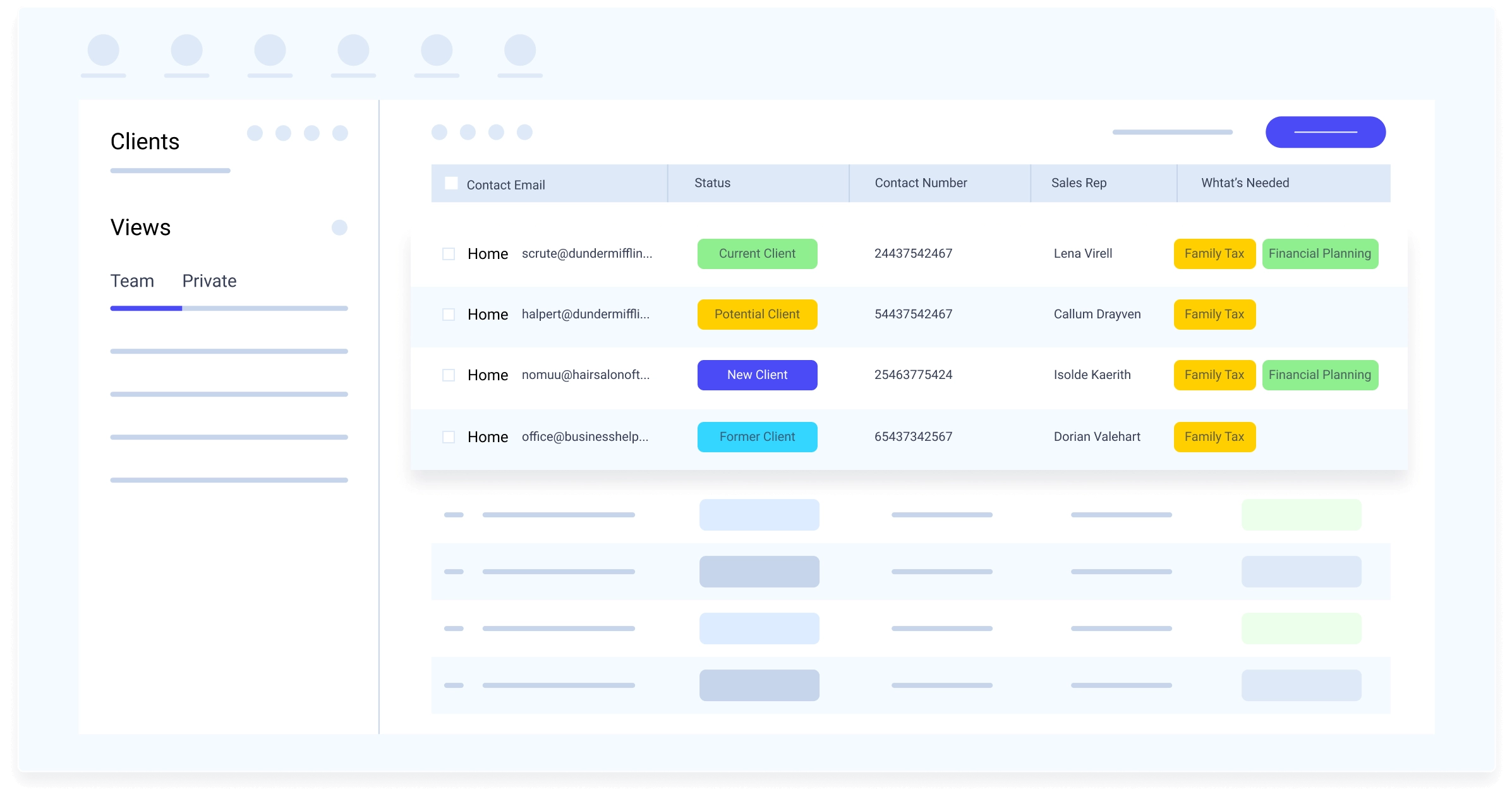
Image source: podio.com
Podio is a flexible designed to enhance collaboration among teams. Developed by Citrix, Podio provides a platform where users can customize workflows and manage tasks effectively. It stands out due to its unique combination of customizable apps and social collaboration features.
Core features of Podio
Podio project management software offers a comprehensive suite of features designed to enhance team collaboration and . Its core capabilities enable organizations to create customizable workflows and applications tailored to their project management needs. Here's a breakdown of Podio's key features:
- Customizable workspaces: Podio allows teams to establish multiple customizable apps and workspaces, organizing project information and delegating tasks efficiently from a single platform. This flexibility caters to varying project complexities and daily operational tasks.
- Intelligent : Podio enhances efficiency through intelligent workflow automation, which streamlines repetitive tasks and reduces manual intervention. Teams can set up automated processes triggered by specific events, saving time and allowing members to focus on strategic work while ensuring that important details are managed consistently.
- Task management: The platform provides robust that facilitate task creation, assignment, and tracking. Users gain clear visibility of responsibilities and timelines, complemented by performance insights and interactive dashboards that enhance decision-making and resource allocation.
- Effective collaboration: Collaboration is streamlined with features such as file sharing, real-time messaging, and mobile app capabilities. Podio's user-friendly design caters to various technical backgrounds, enabling effective among team members regardless of their location.
- Security features: Podio emphasizes security with comprehensive measures, including data protection protocols and flexible user access permissions. This ensures sensitive project information is safeguarded and accessible only to authorized users. Integration with third-party applications like Google Workspace further extends its functionality.
- Integration with other tools: The platform supports integrations with various third-party applications, enhancing its functionality and allowing teams to work seamlessly with the tools they already use, such as CRM systems.
- User experience: User feedback on Podio commonly highlights its versatility and flexibility. Many appreciate that they can mold the platform according to their specific workflows. Podio's user interface is designed to be intuitive and customizable, but may require time to master. Podio's app-building and customization features can be utilized without requiring advanced technical skills, making it accessible to a wide range of users. However, some users do encounter challenges due to the complexity associated with customizing Podio fully. While it offers robust capabilities, this can lead to a steeper learning curve for new users.
Podio's key features—customizable workspaces, intelligent workflow automation, solid task management, effective collaboration tools, and a focus on security—create a comprehensive solution for businesses looking to enhance project management. With reasonable pricing and integration options, Podio equips teams with the necessary tools to boost productivity, improve communication, and achieve significant business results.
Master efficient project management right now
Detailed breakdown of Podio project management software pricing
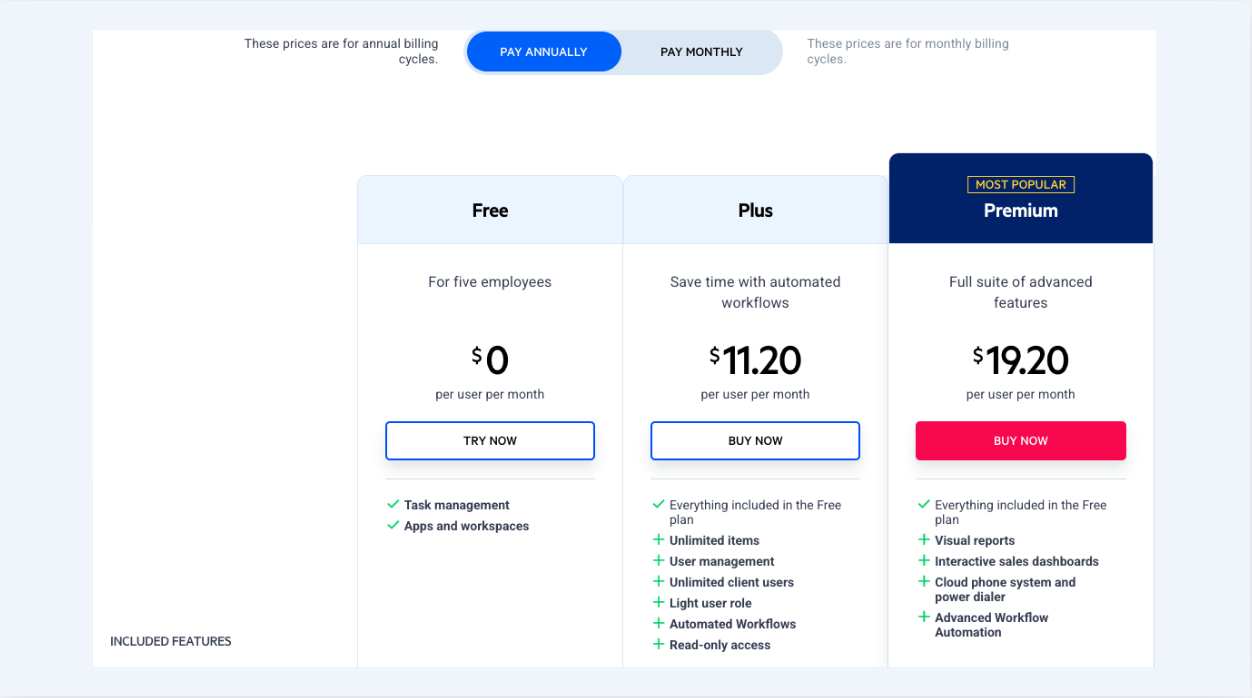
Image source: podio.com
Understanding the Podio pricing page is crucial for teams looking to integrate this tool into their workflow. Podio cost varies depending on the chosen plan and the size of your team, allowing organizations to select the most suitable option for their needs. Podio offers several pricing tiers designed to meet the needs of various teams:
- Free plan: This plan offers basic features for up to 5 users, making it an excellent entry point for small teams or startups. It allows users to explore Podio's capabilities without any initial investment, helping teams understand how the tool fits into their workflows.
- Plus plan ($11.20/user/month, paid yearly): The Plus plan provides enhanced features for a monthly fee. This tier is suitable for growing teams that require more extensive capabilities, including increased storage and additional integrations. The software offers improved , including the ability to assign light user roles for limited access and support for read only access to streamline administration and improve security. It allows users to manage tasks more effectively with fewer limitations.
- Premium plan ($19.20/user/month, paid yearly): For organizations that require the full suite of features, the Premium plan offers advanced functionalities, including priority support and advanced reporting options. This tier is ideal for larger teams or those managing complex projects that benefit from deeper insights and customization. The software offers comprehensive user management, advanced workflow automation, and flexible access controls, including light user roles and read only access for certain users.
Hidden costs of Podio
While Podio offers flexible pricing, it's important to acknowledge potential hidden costs that may arise. When evaluating Podio features and pricing, consider the following:
- Advanced integrations and features: While the core plans provide essential functionalities, certain advanced features or required integrations may come at an additional cost. Access to Podio support for customization, integrations, and troubleshooting may also incur additional costs depending on the plan. Teams need to to avoid unexpected expenses.
- Training and onboarding: New users may require additional training to fully utilize Podio's customization features. Automating manual tasks with Podio can help reduce the time and resources spent on routine activities, but may require initial setup. Investing time and resources in proper onboarding could significantly affect overall project efficiency.
- Increased costs with scaling: As teams grow, the number of users inevitably increases, leading to higher overall costs. It's vital to project future growth when selecting a plan to ensure.
Understanding these potential hidden costs allows organizations to budget accurately while utilizing Podio's capabilities, ensuring that the investment aligns with the expected return to productivity and project success.
Avoid hidden costs with an all-in-one solution
Industries that use Podio
Podio's flexibility and sophisticated capabilities make it an appealing choice across diverse industries, yet its true strength lies in adaptability. The platform's customizable workspaces and automated workflows prove invaluable for businesses navigating complex projects with , while its interactive sales dashboards and workflow automation offer larger teams the insights they need, but in an approachable way that enhances rather than overwhelms team performance.
Industries that find genuine value in Podio include:
- Marketing and advertising agencies: These creative environments benefit from Podio's campaign management capabilities, yet appreciate how effortlessly it tracks project progress while providing team performance insights through that remain intuitive but powerful.
- IT and software development companies: Technical teams leverage Podio's advanced features and workflow automation to coordinate development cycles seamlessly, but find equal value in its ability to manage complex projects while integrating smoothly with third-party applications for operations that feel natural yet comprehensive.
- Construction and real estate firms: These project-heavy industries utilize customizable workspaces to handle multiple ventures and stakeholders effectively, yet maintain transparency and accessibility that keeps project progress visible but never overwhelming.
- Consulting and professional services firms: Professional environments rely on Podio's intuitive interface and automated workflows to manage thoughtfully, yet benefit from its ability to track deliverables and maintain collaboration that feels organic but structured.
- Non-profit organizations and educational institutions: Mission-driven organizations embrace Podio's unified platform approach to centralize communication efficiently, yet find it scales beautifully for larger teams while offering extensive functionality through integrations that remain accessible but comprehensive.
Podio's versatility, paired with its capacity to serve both intimate teams and expansive organizations, positions it as an elegant solution for industries seeking sophisticated features and meaningful insights, yet requiring the flexibility to evolve with changing business landscapes. Whether coordinating daily operations or orchestrating complex, multi-phase initiatives, Podio delivers the essential tools for success, but always in a way that feels manageable and purposeful.
See successful project management across industries
Limitations of Podio: Why alternatives?
While Podio offers a range of features that can benefit teams looking to enhance their , it does come with several limitations that users have pointed out. Understanding these drawbacks is crucial when considering whether to adopt Podio or explore alternatives.
Complexity and steep learning curve
One of the primary criticisms of Podio is its complexity. Users often find that the platform requires a significant amount of time and effort to set up properly. The flexibility that Podio offers can lead to confusion, particularly for new users who may struggle to understand how to and utilize all available features effectively. Many users have noted that the initial learning process can be overwhelming, which might discourage teams from fully harnessing Podio's capabilities. In contrast, alternatives like Teamwork and Trello provide more intuitive interfaces that facilitate quick onboarding and ease of use.
Concerns about pricing structure and perceived value
Another common concern revolves around Podio's pricing structure. While the Podio pricing plans seem competitive at first glance, some users feel that the value offered does not match the costs, particularly as teams scale and require more advanced features. The transition from free to paid tiers can lead to unexpected costs, especially if teams find that they need additional integration or support as their needs grow. This makes budgeting more challenging compared to other that present clearer pricing models or offer a more comprehensive feature set within their free plans, such as Lark.
Need for better integration and advanced workflow automation with other tools
Users have also reported limitations related to Podio's ability to integrate with other software platforms. Though Podio supports some integrations, users often find the process cumbersome and lacking in functionality compared to competitors. This can hinder productivity, particularly for teams reliant on multiple applications for their workflows. Alternatives like ClickUp or Teamwork often provide more seamless integration options, allowing users to connect to a broader range of tools effectively and improving overall workflow efficiency.
While Podio can serve as a powerful project management tool, its complexity, pricing concerns, and integration limitations may lead teams to explore alternative solutions that better align with their specific needs and preferences.
Choose a tool that solves all limitations
5 alternatives to Podio
1. Lark: An all-in-one collaboration platform
is an all-in-one collaboration platform that combines various essential tools, including communication, document creation, storage, and project management. It combines these functionalities into a unified workspace, making it easy for teams to collaborate and manage tasks efficiently. This ease of integration and usability positions Lark as an attractive alternative to Podio, especially for teams seeking a leaner, more intuitive experience.
Key features:
Customizable and visual dashboard
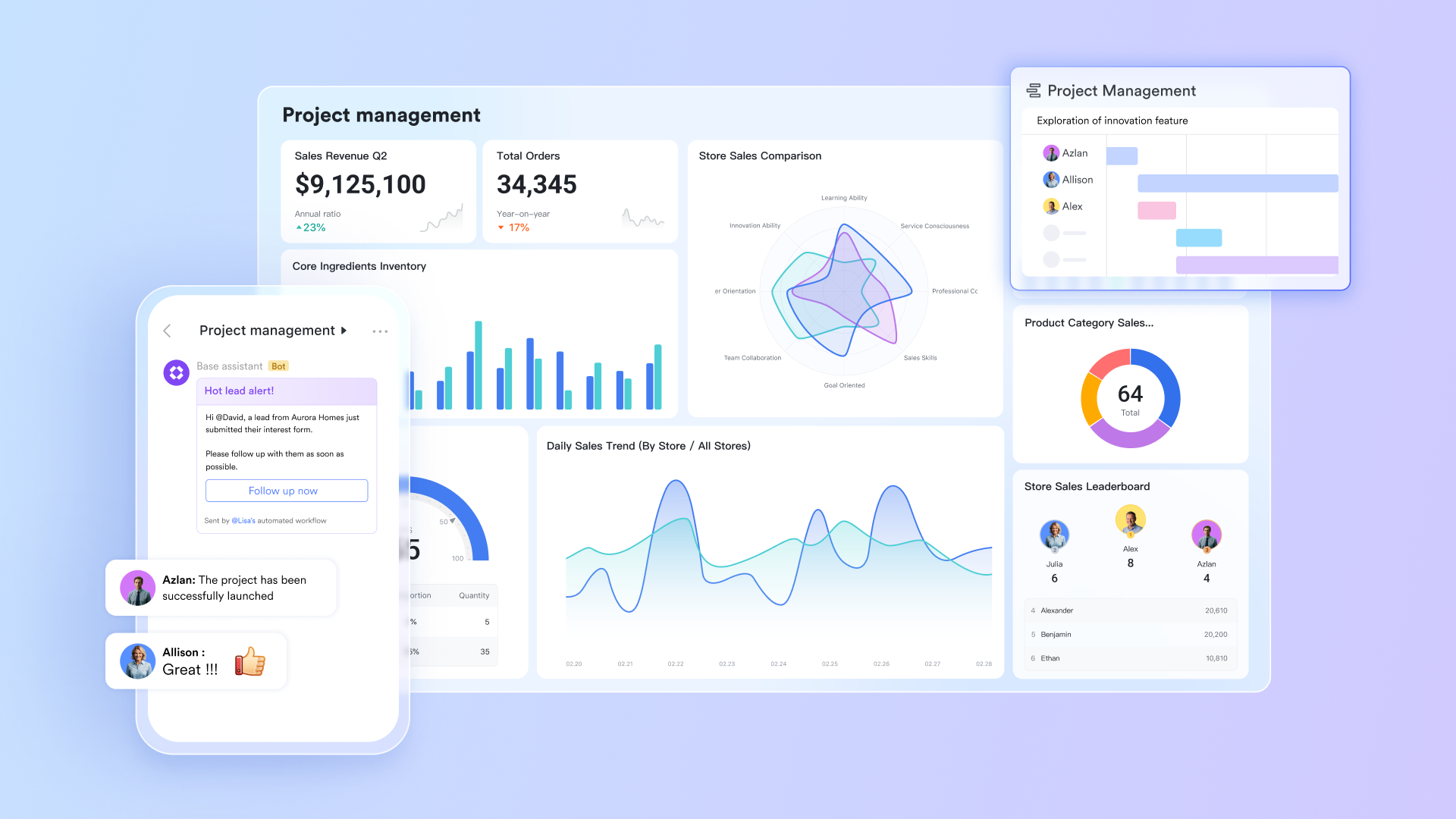
offers a customizable dashboard that allows users to tailor their workspace according to their project management needs. Teams can create and organize tasks in a way that best fits their unique processes, enhancing user engagement and productivity.
Workflow automation
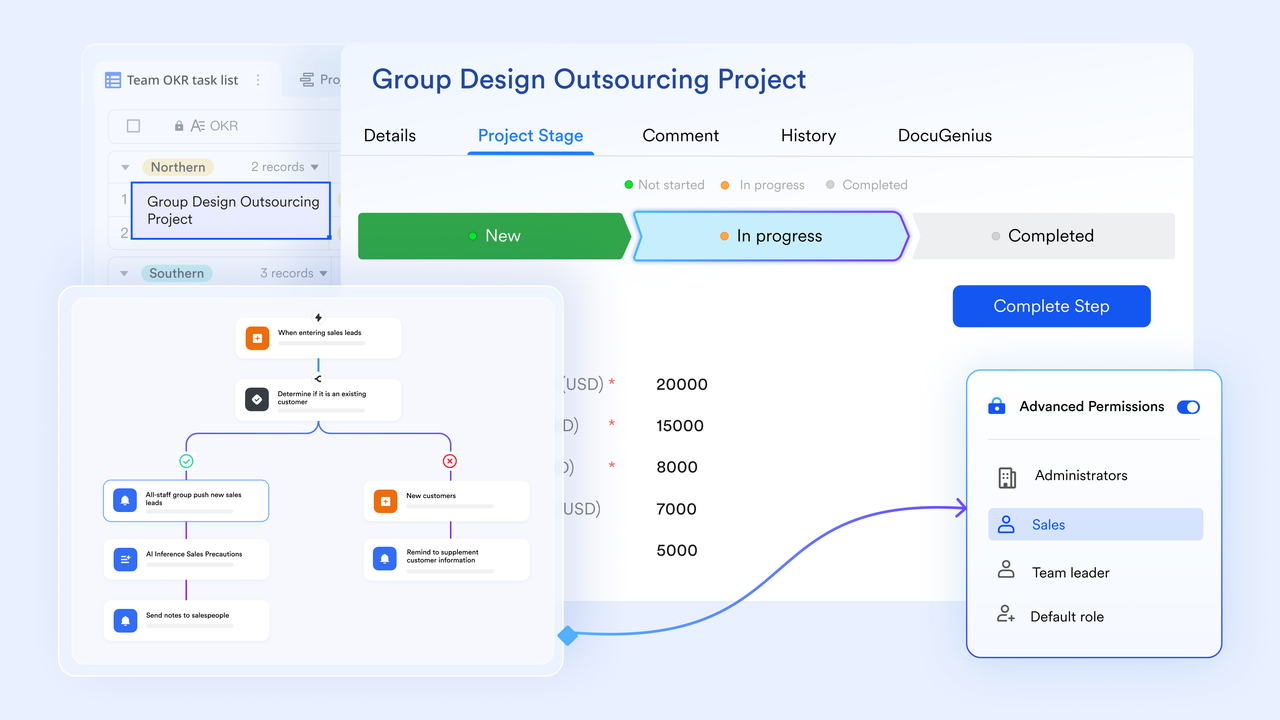
in Lark facilitate the efficient handling of repetitive tasks. With , teams can manage repetitive procedures and feedback quickly, ensuring that processes flow smoothly and reducing bottlenecks during project execution. In addition, allows customizing approval automation flows, reducing time for decision-making. This automation allows team members to focus on strategic decisions rather than getting bogged down in routine tasks.
Efficient task management
Lark Tasks offers robust task management capabilities, enabling teams to create, assign, and track tasks effortlessly. Users can set deadlines, prioritize tasks, and monitor progress in Kanban or Gantt view in real-time, providing clarity and accountability within the team. 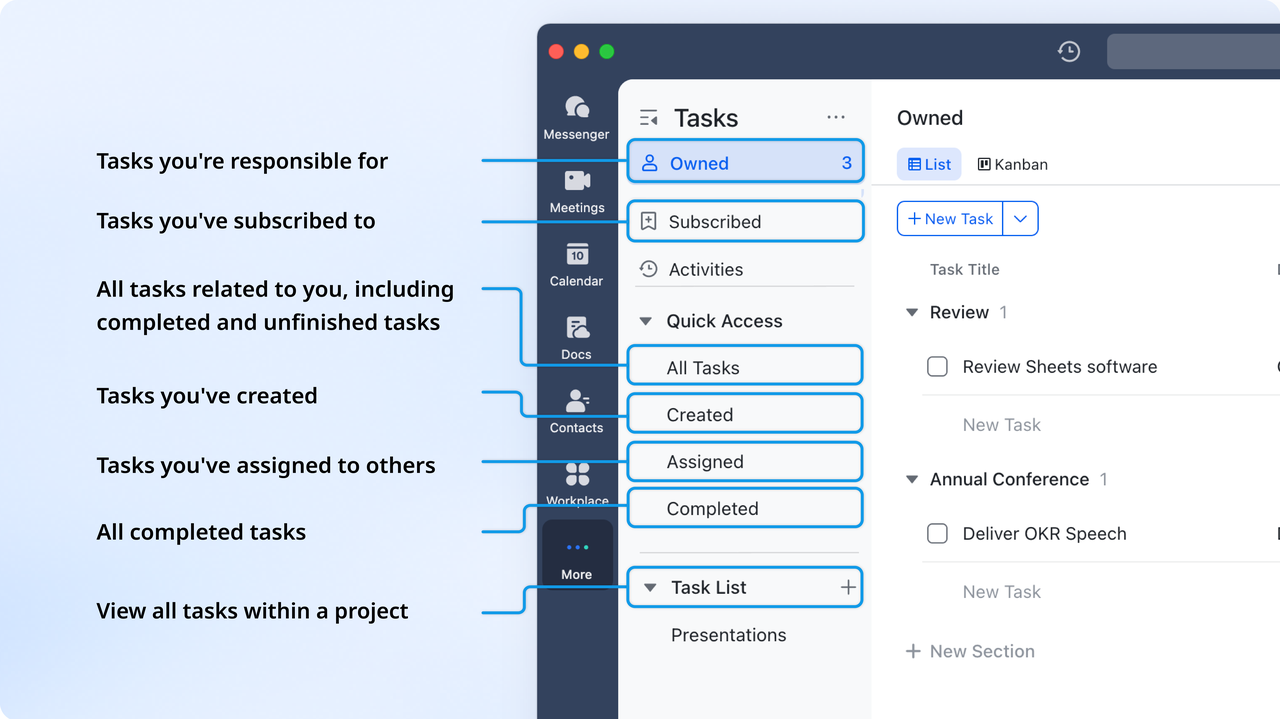
Security and permission rules
Lark takes data security seriously, offering comprehensive security management features. Organizations can establish permissions and access rules to ensure that sensitive information remains secure, giving administrators peace of mind regarding data protection.
Integration ability
Lark supports a variety of integrations with other tools and services, including productivity software and third-party applications. This flexibility allows teams to connect their favorite tools, enhancing the overall functionality and adaptability of their workspace. Unified workspace
Lark provides a unified workspace that combines chat, video conferencing, calendars, and document management in one place. This consolidation helps teams streamline communication and keep all project-related information accessible, reducing the need to switch between multiple applications and improving overall efficiency.
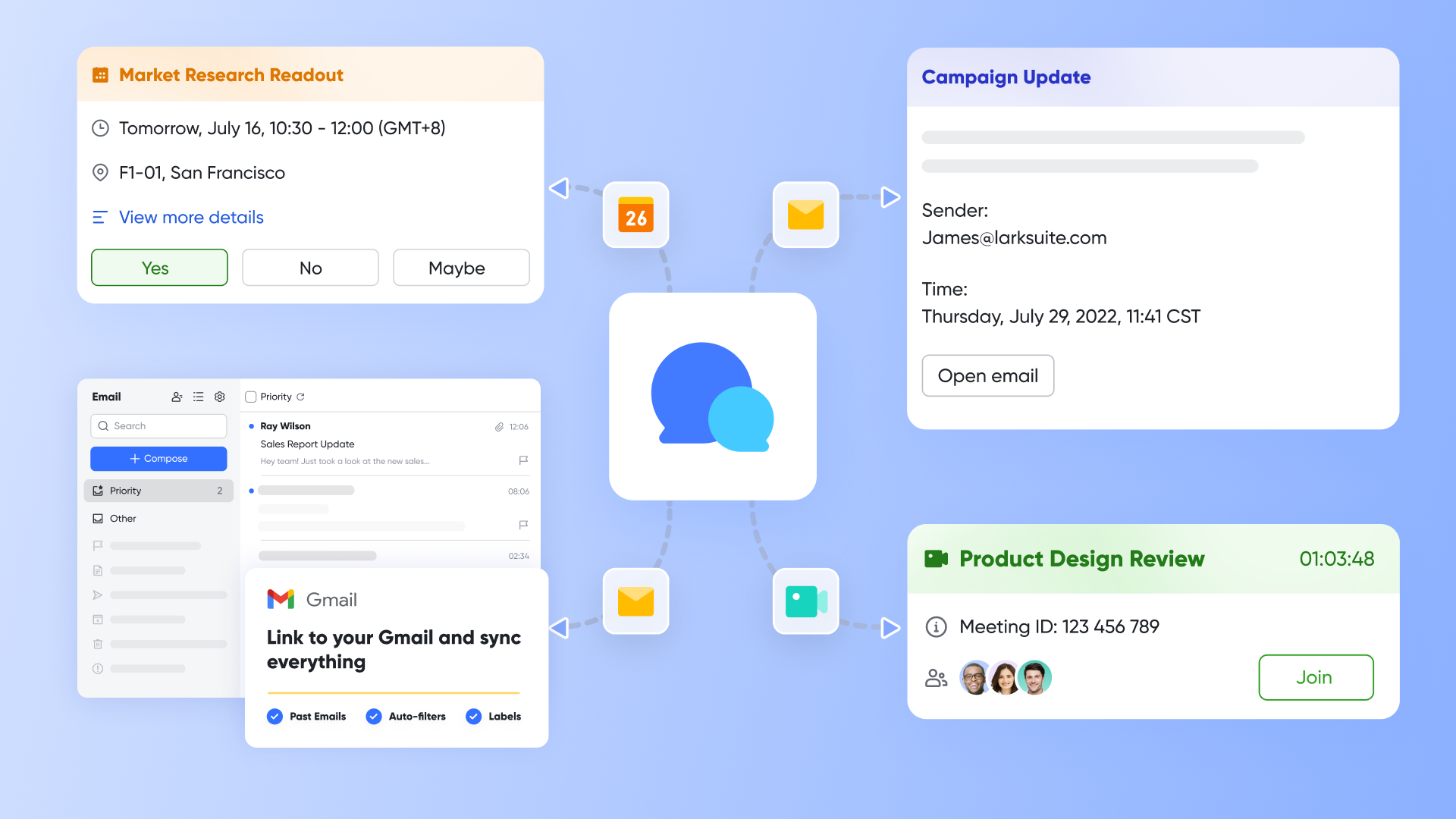
Why Lark is a good alternative to Podio: Lark is a compelling alternative to Podio, particularly due to its user-friendly interface that mitigates the complexity and steep learning curve often associated with Podio. Additionally, Lark offers a transparent and competitive pricing structure that alleviates concerns regarding perceived value, making it a cost-effective choice for teams. Its advanced workflow automation features streamline processes without unnecessary complications, allowing teams to focus on high-priority tasks.
:
- Starter plan: Free forever plan that includes 11 powerful tools for up to 20 users. It also comes with 100GB of storage, 1,000 automation runs, AI translations, and more.
- Basic plan: $6/user/month (billed annually) for up to 500 users, including everything in Starter plus 1-on-1 video meetings, 5TB of storage, 1,000 automation runs, and more. To know more about Basic plan, .
- Pro plan: $12/user/month (billed annually) for up to 500 users. It includes everything in Basic plus a group calling for up to 500 attendees, 15TB of storage, 50,000 automation runs, and more.
- Enterprise plan: for custom pricing. Supports unlimited users and includes even more automation runs and advanced security, compliance, and management features.
For small teams with simple communication needs

18 months message history
1000 Base automation runs/month
2000 rows per table in Base
Most POPULAR
For companies with comprehensive collaboration and management needs
Unlimited message history
500-participant video meetings
50k Base automation runs/month
20k rows per table in Base
For large companies with advanced security and organizational management needs
Get a personalized demo and pricing
Unlimited message history
500-participant video meetings
15 TB storage + 30 GB storage/user
500k Base automation runs/month
50k Base automation runs/month
Most POPULAR
For companies with comprehensive collaboration and management needs
Unlimited message history
500-participant video meetings
50k Base automation runs/month
20k rows per table in Base
2. PortfolioManager (formerly LiquidPlanner): Tool for predictive scheduling and capacity management
PortfolioManager is a project management software that sets itself apart with its dynamic, predictive scheduling capabilities. It enables teams to prioritize tasks and manage resources in a way that accounts for uncertainty in project timelines. This makes PortfolioManager an ideal tool for teams handling projects that require frequent adjustments based on changing conditions.
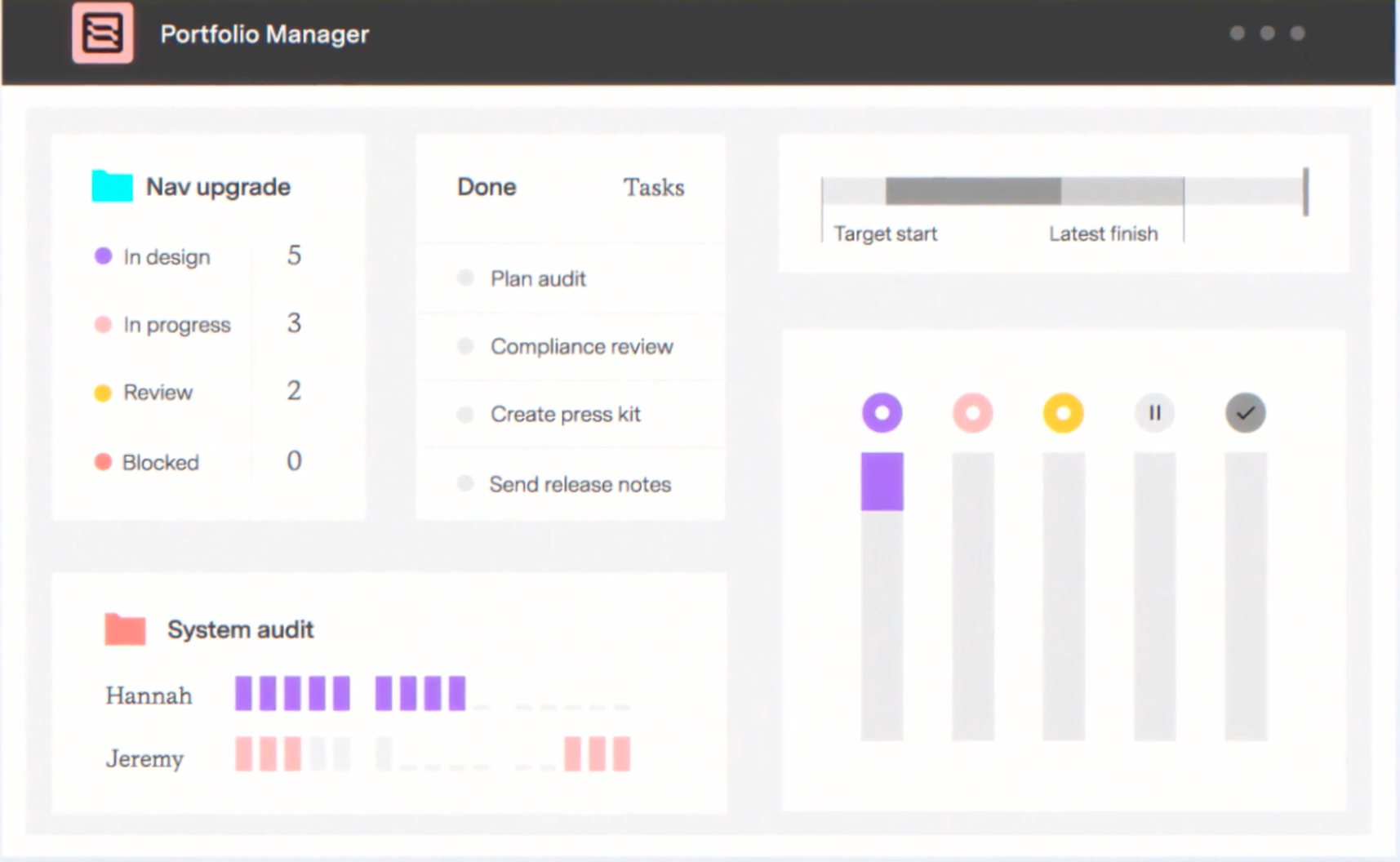
Image source: tempo.io
Key features:
- Predictive scheduling: Automatically adjust project schedules based on task priorities and available resources.
- Customizable pipelines: Track work through a series of defined stages, adapting as projects progress.
- Resource management: Monitor team capacity and allocation to ensure that workloads are balanced and manageable.
- Reporting and analytics: Generate detailed reports to gain insights into project performance, resource utilization, and risks.
- Collaboration features: Enable team discussions and file sharing directly within tasks to streamline communication.
Why PortfolioManager is a good alternative to Podio: PortfolioManager's focus on predictive capabilities makes it a solid choice for organizations that handle dynamic and frequently changing projects. Its automation reduces the need for manual adjustments that Podio often requires, allowing teams to focus on delivering results.
Pricing (annual billing):
- Essentials: $15/user/month
- Professional: $28/user/month
- Ultimate: $42/user/month
3. ClickUp: A highly customizable project and task management platform
ClickUp is a highly versatile project management platform that combines features from various productivity tools into a single solution. It is known for its high level of customization, allowing teams to tailor the workspace to meet their specific needs easily.
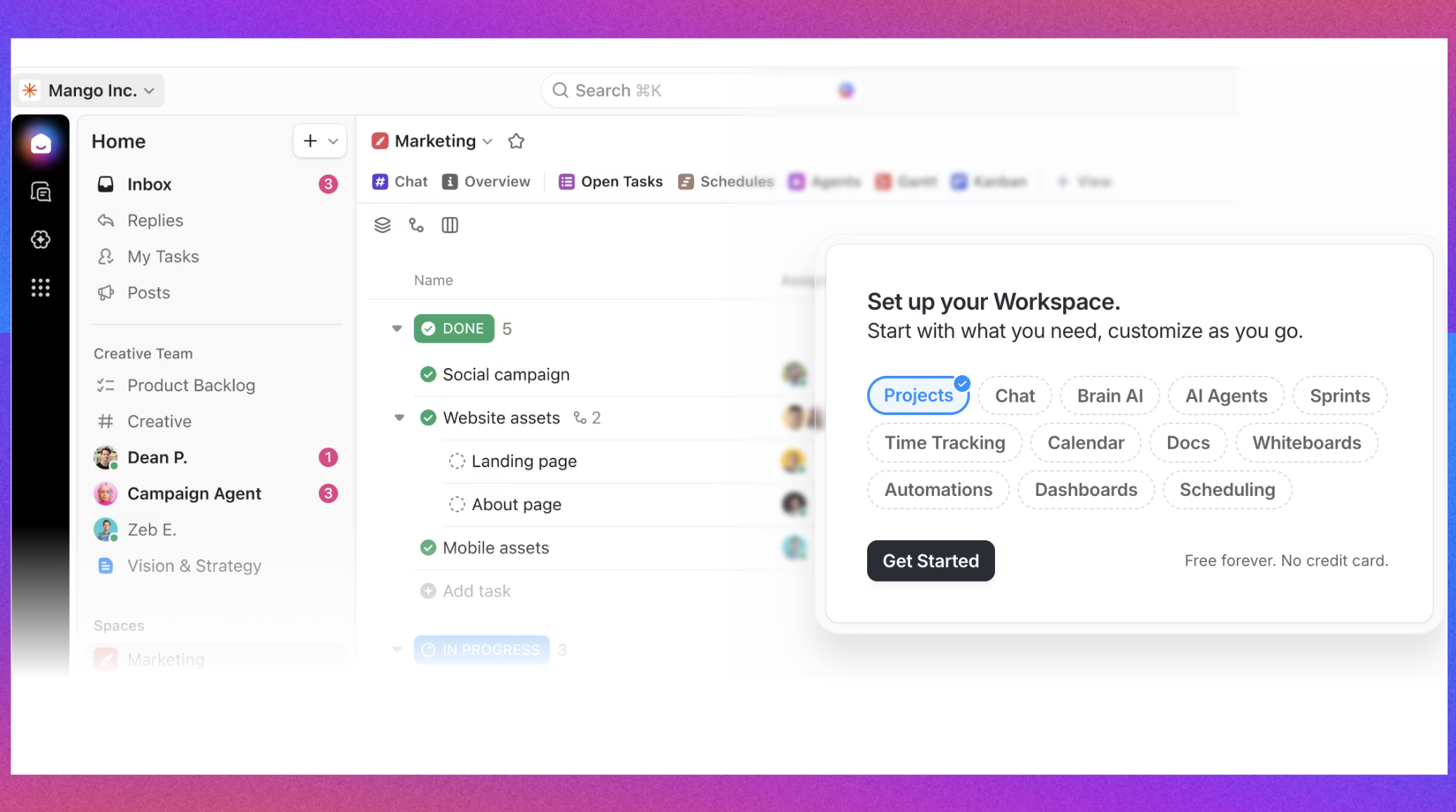
Image source: clickup.com
Key features:
- Customizable workflows: Create workflows that fit your team's processes, accommodating different project styles and methodologies.
- Task management: Organize tasks with priorities, deadlines, tags, and statuses to keep everyone on the same page.
- Time tracking: Monitor time spent on tasks directly within the app, allowing for better time management and productivity insights.
- Document storage and collaboration: Store essential documents and collaborate in real-time on tasks and notes.
- Goal tracking: Set objectives, track progress, and visualize results to ensure alignment with team goals.
Why ClickUp is a good alternative to Podio: ClickUp's adaptability and extensive feature set provide a holistic approach to project management without the steep learning curve associated with Podio. Teams can tailor ClickUp to fit their workflows and operational needs effectively.
Pricing (annual billing):
- Unlimited: $7/user/month, paid yearly
- Business: $12/user/month, paid yearly
- Enterprise: Custom pricing
4. Trello: A visual project management tool
Trello is a visual project management tool designed for simplicity and ease of use. Its card and board system allows teams to organize tasks in a straightforward way, making it easy to track progress and manage workflows visually.
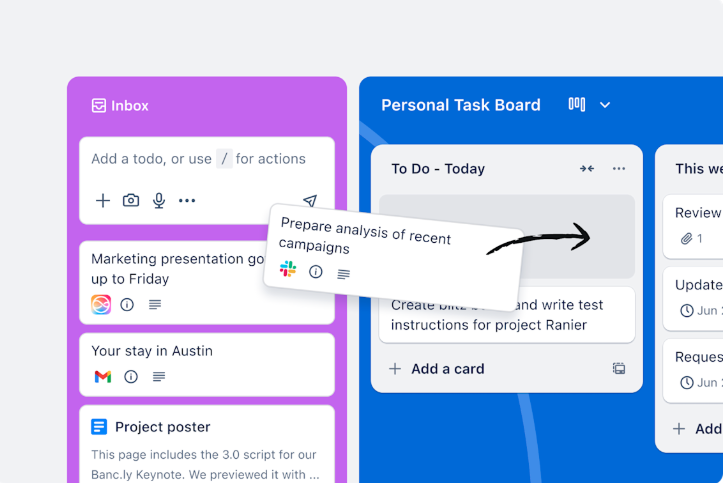
Image source: trello.com
Key features:
- Visual task management: Utilize boards, cards, and lists to create a highly visual representation of tasks and projects.
- Customizable boards: Personalize boards with labels, due dates, and checklists to suit individual project needs.
- Collaboration tools: Invite team members to boards and tasks, allowing for easy collaboration and communication.
- Power-Ups for enhanced functionality: Integrate additional features from a library of Power-Ups to extend Trello's capabilities, including time tracking and reporting.
- Mobile accessibility: Access Trello on-the-go through its mobile app, ensuring that teams can manage their projects from anywhere.
Why Trello is a good alternative to Podio: Trello's straightforward approach is ideal for teams that prefer a visual project management system over the more complex setups required by Podio. It allows smaller teams to quickly manage projects without needing extensive formal training.
Pricing (annual billing):
- Free: Up to 10 boards per workspace
- Standard: $5 per user/month
- Premium: $10 per user/month
- Enterprise: Custom pricing
5. Teamwork: A powerful project management tool
Teamwork is a robust project management platform designed to help teams manage their projects and tasks effectively by promoting collaboration and communication. It is particularly well-suited for client-driven projects, allowing users to track progress and manage resources seamlessly. Teamwork provides an interface that helps streamline project workflows, making it easier for teams to stay organized and focused on their goals.
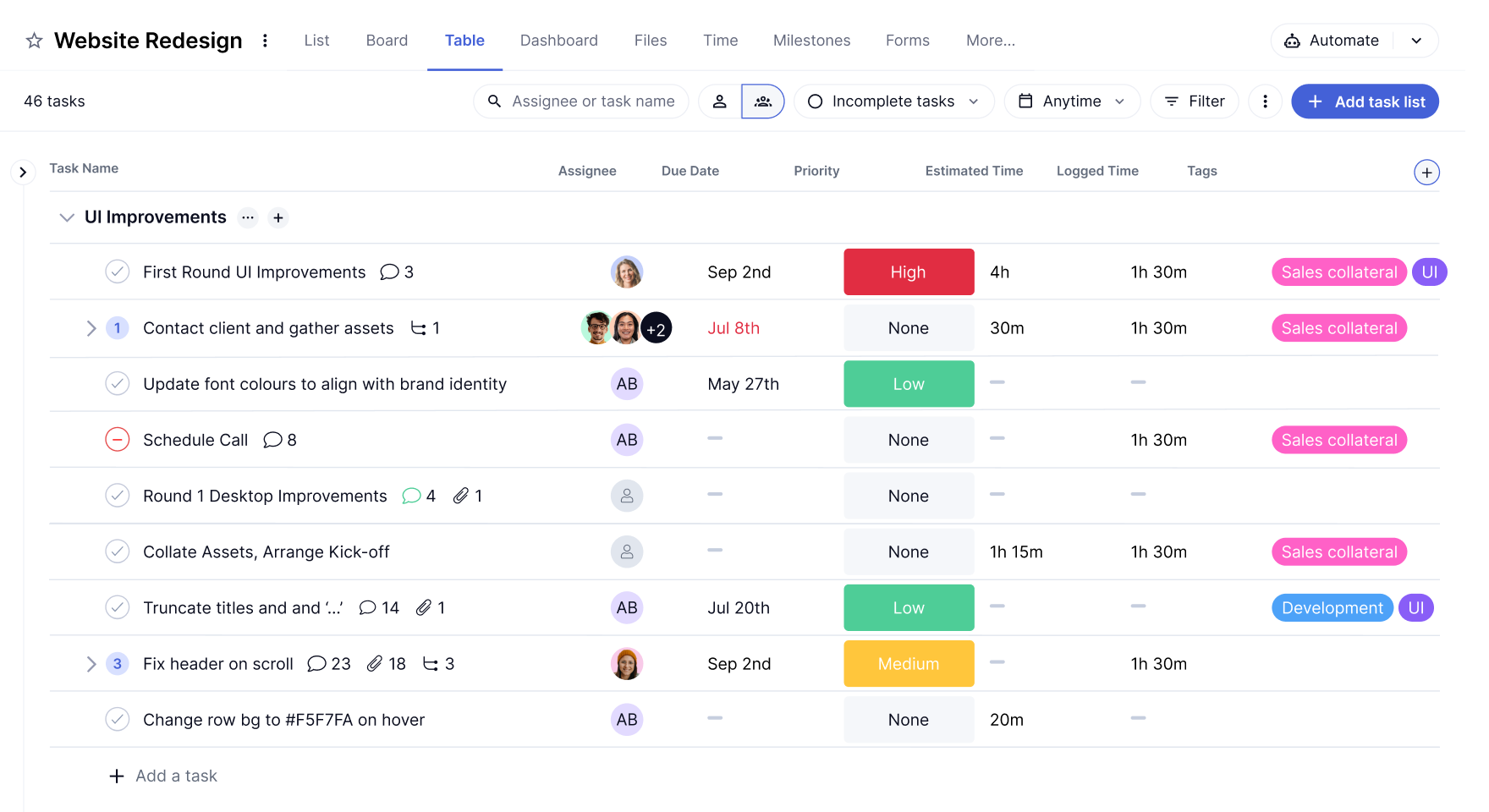
Image source: teamwork.com
Key features:
- Task management: Create tasks and subtasks, assign them to team members, and set deadlines to ensure accountability.
- Time tracking: Monitor time spent on various tasks to manage resources efficiently and analyze productivity.
- Gantt charts: Visualize project timelines and dependencies with interactive Gantt charts to understand project progress at a glance.
- Collaboration tools: Share files, add comments, and discuss project updates in real-time to keep everyone informed.
- Project templates: Use pre-made templates for common projects to save time when setting up new initiatives.
Why Teamwork is a good alternative to Podio: Teamwork emphasizes project visibility and resource management, making it particularly suitable for complex projects where teams need clear oversight of tasks and progress. Its structured approach is less reliant on customization than Podio, allowing teams to get started more quickly.
Pricing (annual billing):
- Free: Up to 5 projects/users
- Deliver: $10.99/user/month
- Grow: $19.99/user/month
These alternatives offer a range of features and pricing models that cater to different project management needs, showcasing the variety of solutions available to teams looking for efficiency and effectiveness outside of Podio. Each tool has unique strengths, allowing teams to choose one that best aligns with their workflows and project requirements.
Choose a solution that suits you best
Making the choice: Are costs justified?
When evaluating whether Podio's costs are justified, it's essential to consider specific scenarios that align with your team's needs. Below are common situations with tailored recommendations to help guide your decision—keeping in mind that there are various options available, including Lark, Trello, and others.
Scenario 1: Complex project management needs
If your organization requires extensive customization and tailored workflows to manage complex projects, then Podio may be the right choice. Its flexibility enables users to create highly specific project management solutions, making it suitable for industries like IT, marketing, and non-profits where frequently evolve.
Scenario 2: Simplicity and quick deployment
If your team prefers a more straightforward solution with an intuitive interface and minimal setup time, then consider alternatives like Lark or Trello. Lark offers a user-friendly experience that facilitates quick implementation without the complexity often associated with Podio. Similarly, Trello's visual, card-based system is easy to use, making it ideal for smaller teams needing to manage tasks efficiently right out of the gate.
Scenario 3: Budget constraints
If your organization is operating under budget constraints, then tools like Lark or ClickUp may be more appealing. Lark offers a robust free plan that includes essential without incurring high costs. ClickUp also provides a free tier with solid project management capabilities and additional features available at competitive prices, making it a budget-friendly option for teams looking for effective solutions.
Scenario 4: Focused collaboration and communication
If your primary need is centered around effective collaboration and communication within your team, then Lark or Teamwork could serve you well. Lark combines messaging, file sharing, and project management seamlessly, while Teamwork offers powerful communication tools that help keep teams connected and informed. Conclusion
In summary, understanding Podio's pricing and the features that come with it is crucial for teams evaluating their options. While Podio offers extensive capabilities, the associated costs must be weighed against the benefits, especially considering potential hidden costs related to onboarding and integrations. Tools like , Teamwork, and Freedcamp provide viable alternatives that cater to diverse project management needs without the same level of complexity.
For businesses considering their project management options, the best approach is to assess both current requirements and future growth potential. Organizations should explore various platforms to find the right balance between usability, cost, and functionality, ensuring they invest wisely in tools that enhance their productivity and project outcomes.
FAQs
Is Podio a good CRM?
Yes, Podio is a good CRM (Customer Relationship Management) tool, particularly for businesses seeking a customizable solution. It allows users to manage leads, track customer interactions, and collaborate effectively within teams. Podio's flexibility facilitates tailored workflows that can adapt to various sales processes, making it suitable for diverse industries. However, some users note that it may not be as straightforward as dedicated CRM systems, so initial setup and learning may require more effort to fully utilize its capabilities.
How does Podio compare to Trello?
Podio and Trello serve similar project management purposes but differ in their approaches. Trello is recognized for its visual, card-based interface, making it easy to organize tasks and manage projects at a glance. This simplicity appeals particularly to smaller teams or individuals. In contrast, Podio offers a greater depth of customization and features, suitable for more complex project needs. While Trello's user-friendly design promotes quick usage, Podio's flexibility allows for tailored workflows that can better fit intricate project demands. Thus, for visual simplicity, Trello excels, while Podio is better for comprehensive project management.
Can Podio be used for small businesses?
Absolutely! Podio is well-suited for small businesses. Its free tier allows small teams to explore its functionalities without upfront costs, making it a practical choice for startups and emerging businesses. Additionally, Podio's customizable features enable small enterprises to manage projects, tasks, and client relationships according to their specific workflows and needs. This adaptability, combined with collaborative tools, facilitates efficient team management even within smaller organizations.
Is Podio good for project management?
Yes, Podio is regarded as a solid option for project management. It offers tools for task management, file sharing, communication, and workflow customization, making it effective for teams to collaborate and stay organized. While Podio's extensive features can lead to a steeper learning curve for some users, those who invest the time into mastering the platform often find it enhances productivity and project oversight significantly. Overall, Podio provides valuable project management capabilities, especially for teams willing to customize their processes.
Related reading


















