














Simple Project Management Software For Success

Isak Sandvik
Growth Content Marketer
Nov 3, 2026
Isak Sandvik
Nov 3, 2026

15 min read
Add to preferred sources


Simple project management focuses on keeping workflows organized, straightforward, and easy to follow, without overwhelming teams with complex tools. Many businesses, especially SMBs, freelancers, and remote teams, struggle with too many apps, scattered communication, high costs, and unclear task tracking. By utilizing an inexpensive project management software with features such as visual task management, teams can streamline their workflow, assign tasks efficiently, and track progress in one centralized location. In this article, we'll highlight the best simple project management software, compare their pros and cons, and explore key features like project boards, task assignment, and integrated communication. You'll also find detailed sections covering pros, cons, features, and pricing of various software, and pros and considerations of using simple project management software. Here's a quick look at the top tools we’ll cover:
- Lark: Best all-in-one project management & collaboration tool
- Trello: Best for simple Kanban boards
- Asana: Best for lightweight task workflows
- ClickUp: Best for customization in budget-friendly plans
- Monday: Best for collaborative boards
- Wrike: Best for scalable entry-level project management
- Smartsheet: Best for spreadsheet-style project tracking
- Basecamp: Best for simple team collaboration
- Zoho Projects: Best for affordability with integrations
- Notion: Best for docs + tasks in one workspace
What is simple project management software?
Simple project management software is a tool that helps teams plan, organize, and track work efficiently without unnecessary complexity. Unlike enterprise project suites, it focuses on affordability and ease of use, making it ideal for SMBs, freelancers, and remote teams. Core features include an online project board, task assignment, progress tracking, and project communication software, ensuring everyone stays aligned. With intuitive interfaces and visual task management, teams can quickly understand workloads, prioritize tasks, and improve collaboration. For small and growing teams, inexpensive project management software like Lark provides an all-in-one solution, combining project boards, messaging, calendars, and task tracking in a single platform that's both simple and effective.

Key features of the easiest project management software
- Project board online: Visualize tasks and workflows with Kanban boards, calendars, and timelines, giving teams a clear overview of project progress and deadlines. This feature is essential for effective, simple project management across small and growing teams.
- Lightweight task assignment: Quickly assign, prioritize, and update tasks without extra complexity, helping teams focus on high-priority work and stay aligned on goals. Task ownership and accountability are made transparent and straightforward.
- Progress tracking: Monitor milestones and task completion in real-time, allowing teams to identify bottlenecks, track achievements, and keep projects moving forward efficiently. Visual indicators support visual task management and improve clarity.
- Visual task management: Drag-and-drop interfaces, color-coded boards, and intuitive layouts enable teams to organize workloads and deadlines at a glance, making online project board features even more effective.
- Integrated project communication software: Built-in chat, messaging, and collaborative spaces allow seamless updates without relying on multiple apps. Teams can discuss tasks, share documents, and stay connected directly within the platform.
Quick brief of 10 simple project communication software
Top 10 simple project management software in 2026
1. Lark: Best all-in-one project management & collaboration tool
Lark is designed for teams that prioritize clarity and efficiency in simple project management. Instead of switching between multiple apps, teams can manage tasks, track milestones, and organize resources within one streamlined platform. Lark Tasks helps assign priorities and monitor deadlines, while Lark Calendar ensures schedules stay transparent for everyone. For documentation, teams can create and share SOPs, wikis, and project files in real time. Its strength lies in powerful project communication software, combining Messenger, video meetings, and file sharing to keep conversations directly tied to work. With AI support for meeting summaries and intelligent reporting, Lark reduces noise and boosts productivity. It's an all-in-one solution designed to help teams work smarter, not harder.
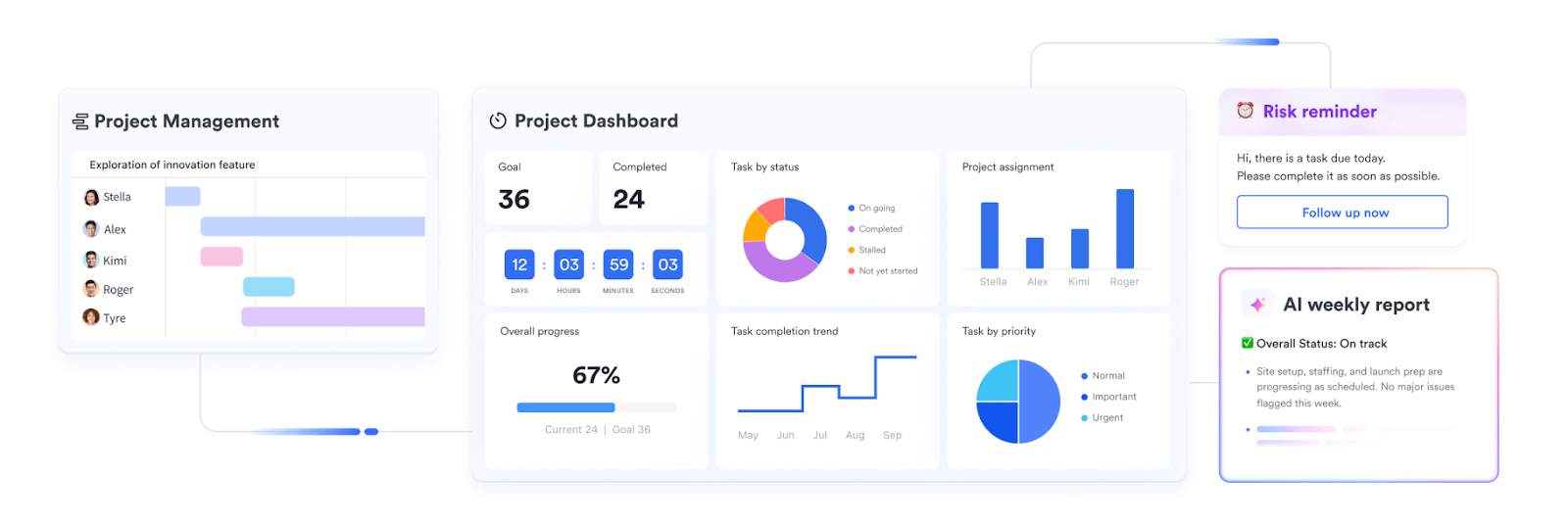
Key features:
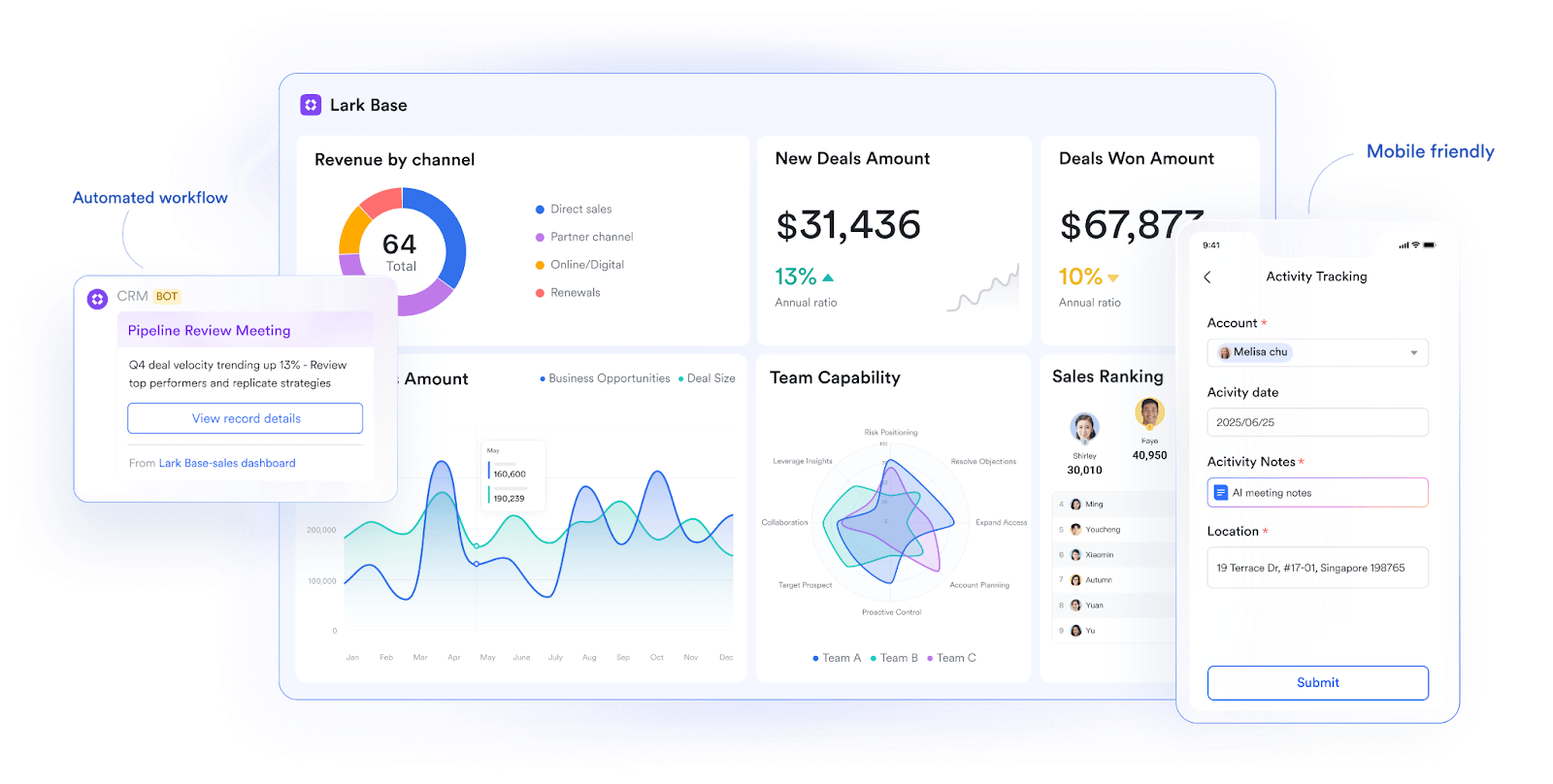
- Lark Base: Lark Base offers multiple view options, including Grid, Kanban, Gantt, Calendar, and Gallery, allowing teams to choose the visualization that best suits their needs. It supports real-time data synchronization across all views, ensuring that changes in one view are immediately reflected in others. Teams can create role-specific views in seconds (e.g., marketing uses calendar, ops uses Kanban, executives use dashboards) to match their workflows. Base also automates repetitive tasks, such as moving tasks or sending alerts, thereby reducing manual effort. Dashboards tracking KPIs and project progress enable truly visual task management for every team.
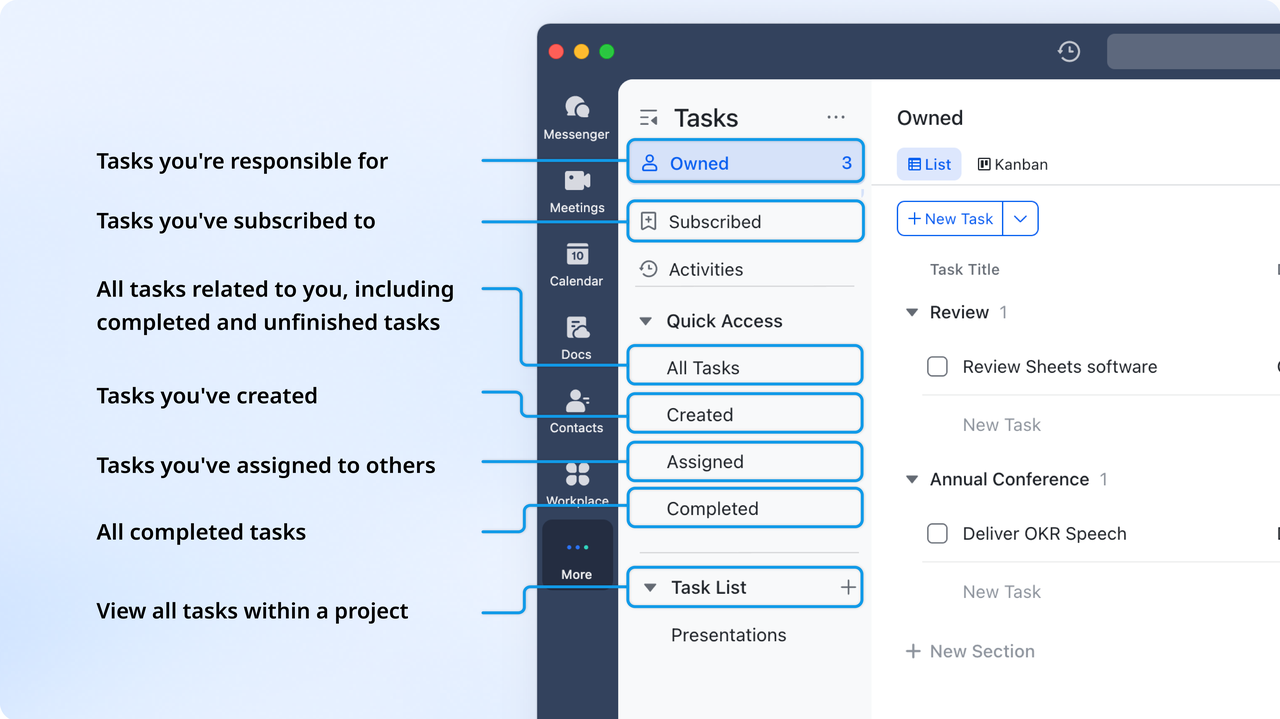
- Lark Tasks: Lark Tasks enable you to assign work, set priorities, and define deadlines and progress indicators, ensuring clear accountability. They sync seamlessly with shared calendars so deadlines appear alongside project milestones. Real-time updates ensure any change in task status or assignment is reflected instantly across the team. Features such as subtasks, attachments, and comments help break down complex work into smaller, manageable actions. Notifications and reminders help teams stay on track, making Lark a project management software option for smaller businesses.
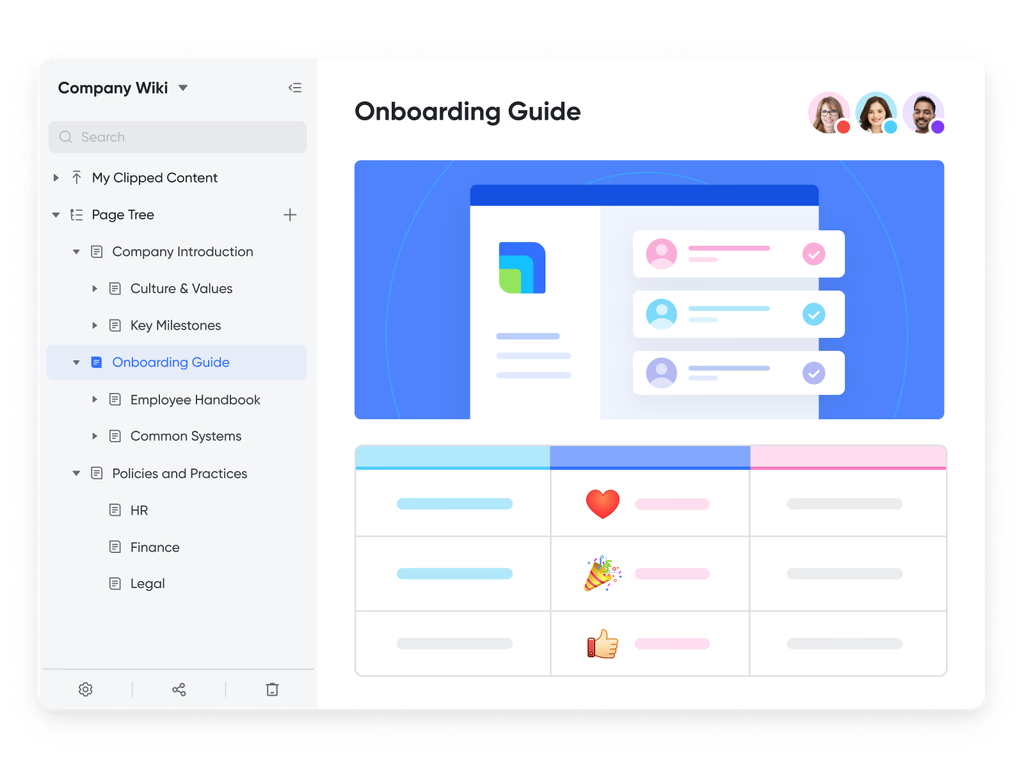
- Lark Docs and Lark Wiki: These platforms provide shared spaces to store SOPs, policies, project documentation, and knowledge resources, all accessible in one place. Teams can co-edit documents in real-time, eliminating version conflicts and accelerating collaboration. Built-in version history allows users to roll back or review earlier changes as needed. Access permissions grant administrators control over visibility and editing rights, which are crucial for managing sensitive documents. With powerful search and linking capabilities, Docs + Wiki serves as a living project communication software for modern teams.
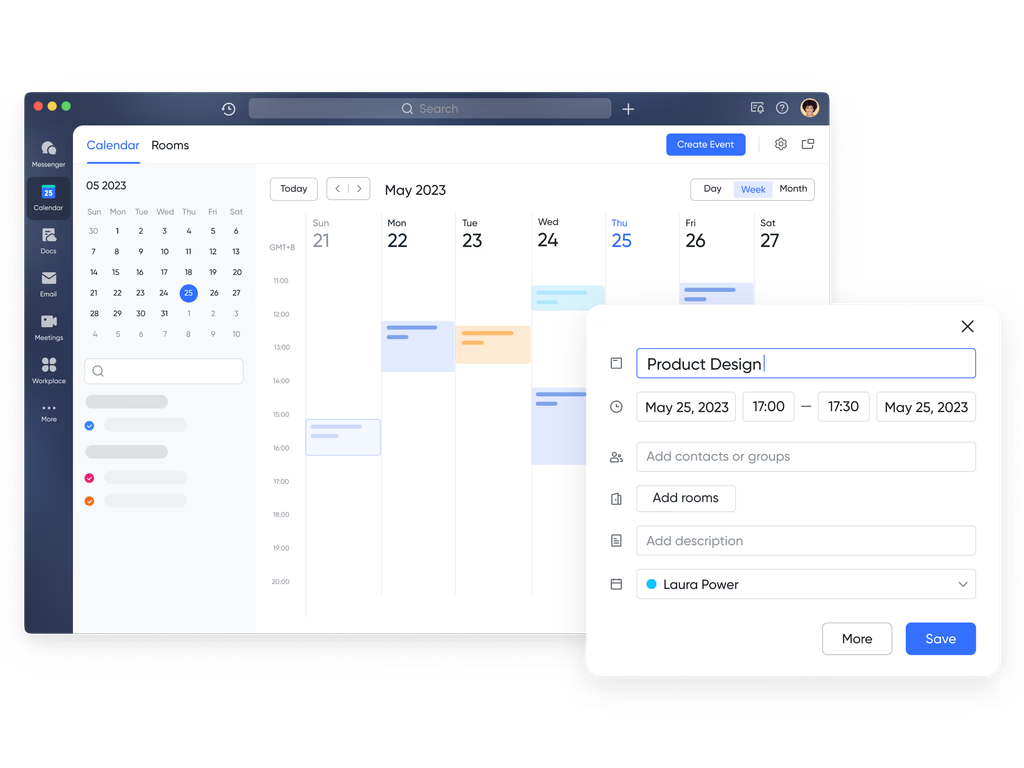
- Lark Calendar: Shared calendars in Lark sync milestones, deadlines, and team events in clear visual formats for transparent scheduling. Teams can connect multiple calendars—personal, project, or department- into a single workspace for complete visibility. It links directly with meeting scheduling, so project discussions, calls, and due dates stay aligned. Reminders and alerts keep essential tasks from slipping through the cracks. As part of simple project management, the calendar gives teams a streamlined way to coordinate across functions and timelines.
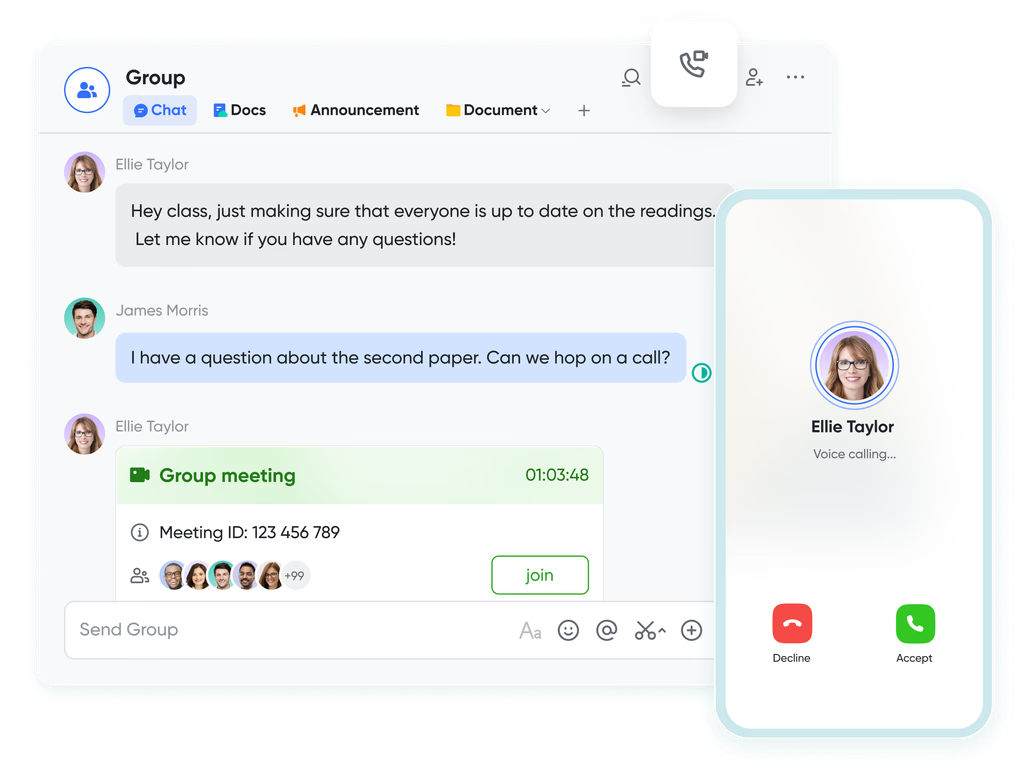
- Lark Messenger + Lark Meetings: Lark Messenger supports chats, threads, pinned messages, and file sharing, ensuring communication is central and searchable. Lark Meetings adds video conferencing with screen sharing, scheduling via calendar, and AI-powered transcription. Teams can collaborate on Docs or take notes live during meetings, making decisions more actionable. Messenger links directly to tasks and calendar events, allowing users to assign or schedule tasks right from the chat—features like instant translations further position it as a top-tier project communication software for global teams.
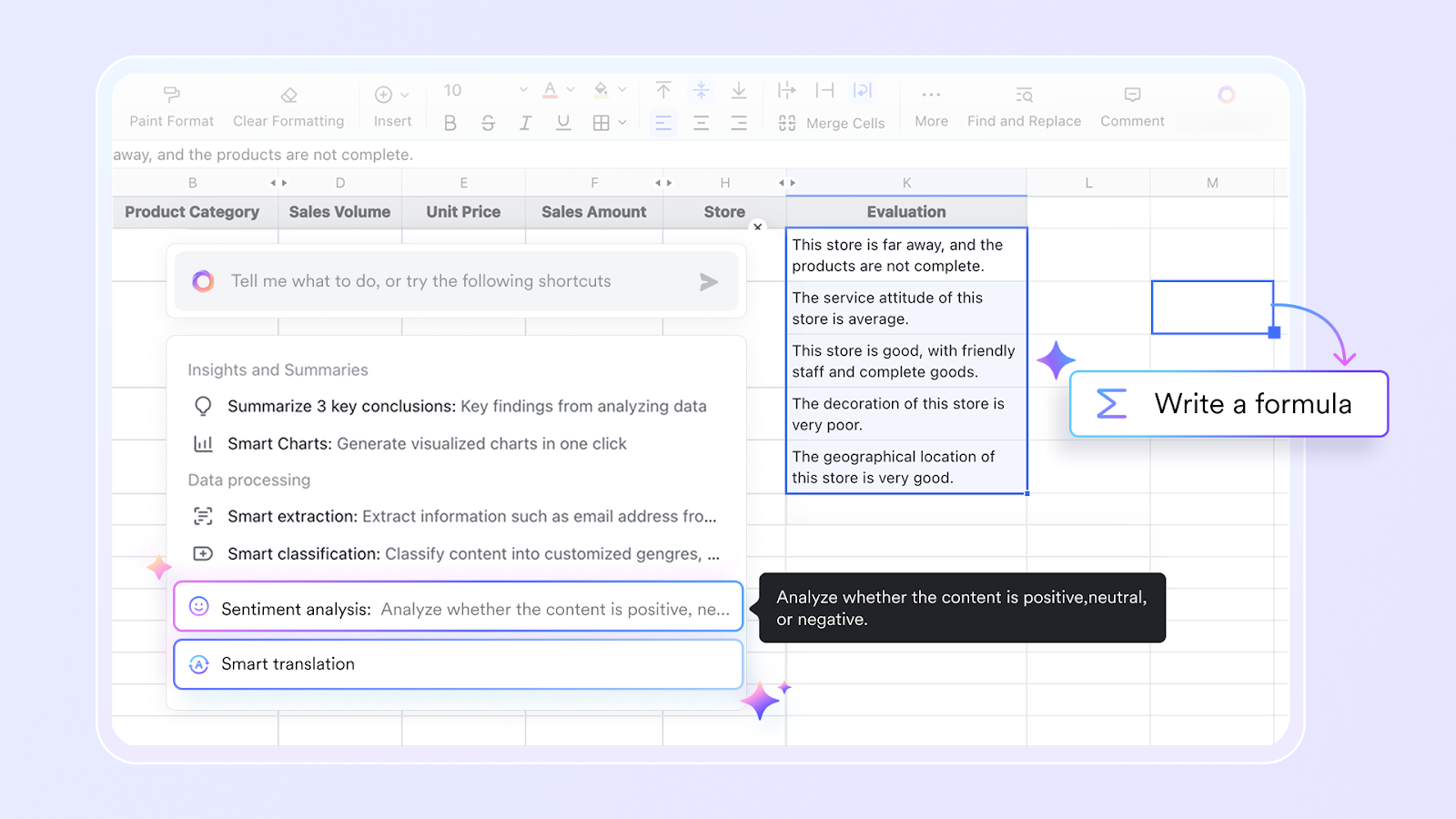
- AI field shortcuts: Lark’s AI support not only automates repetitive workflows—sending reminders, routing approvals, or generating reports—but also enhances how data is captured and used in Base with AI field shortcuts: you can have fields that automatically classify data, summarize information, or translate text as new records are added, making your database smarter and more responsive.
Pros:
- All-in-one convenience keeps tasks, communication, and documents together, removing the hassle of juggling different apps for daily work.
- Affordable plans make it accessible to small teams and startups, while still offering enough flexibility to grow with expanding business needs.
- AI-powered tools, such as meeting summaries and automated reports, save time, allowing teams to focus on execution rather than manual updates.
- Cross-department collaboration ensures marketing, sales, and operations stay aligned in one space, avoiding silos and fragmented workflows.
Cons:
- Teams need time to learn how to use various features. But once adopted, workflows become more efficient overall.
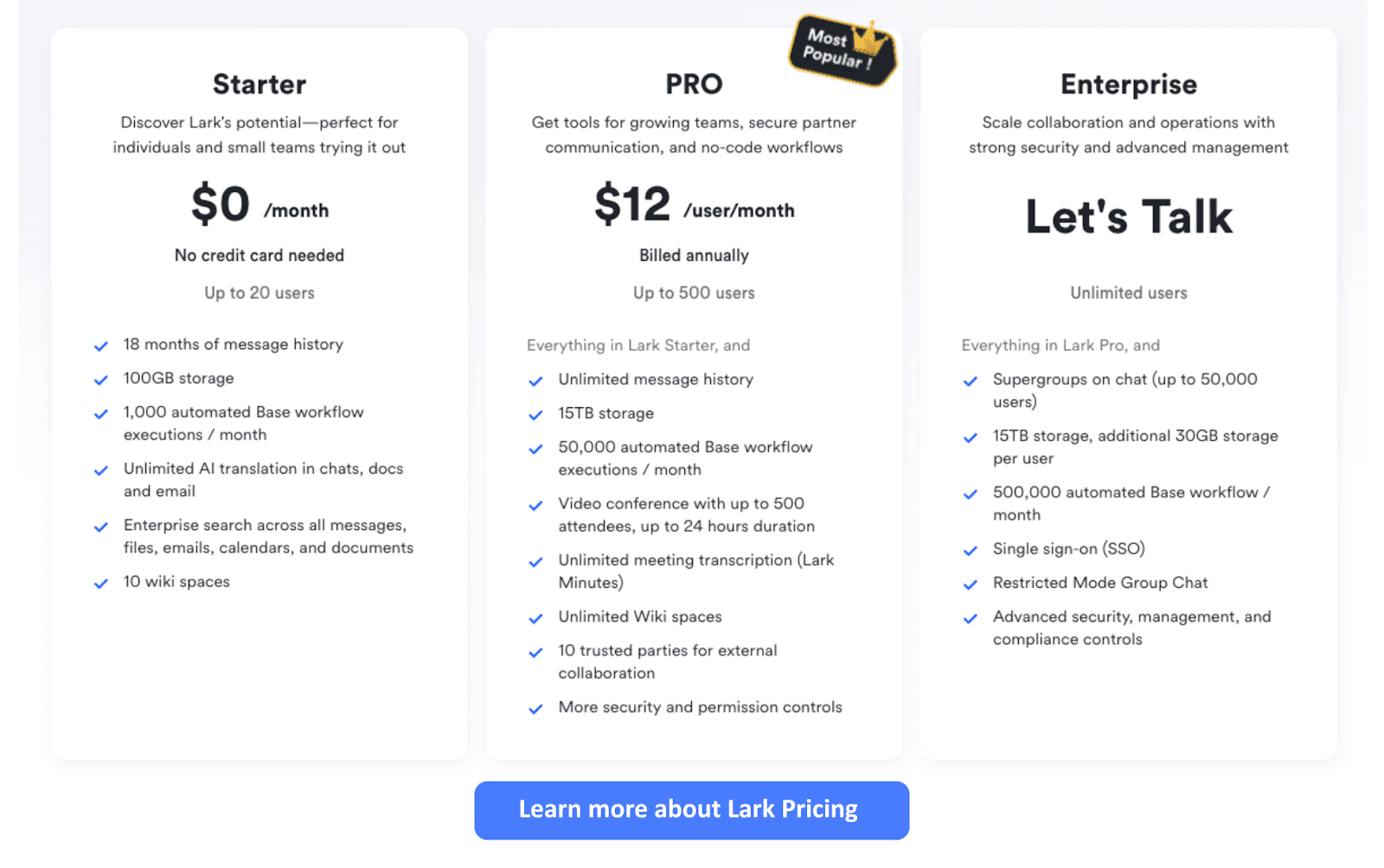
- Starter plan: Free forever plan that includes 11 powerful tools for up to 20 users. It also comes with 100GB of storage, 1000 automation runs, AI translations, and more.
- Pro plan: $12/user/month (billed annually) for up to 500 users. It includes everything in Starter plus group calling for up to 500 attendees, 15TB of storage, 50,000 automation runs, and more.
- Enterprise plan: Contact sales for custom pricing. Supports unlimited users and includes even more automation runs and advanced data security, compliance, and management features.
2. Trello: Best for simple Kanban boards
Trello is a widely trusted tool for visual project management, built around simple Kanban boards that make task tracking effortless. Each task is organized into cards with checklists, attachments, and due dates, helping teams stay on top of progress at a glance. Its clean interface makes it ideal for freelancers, startups, and small teams who want clarity without unnecessary complexity. With optional automation and advanced views available on paid plans, Trello strikes a balance between simplicity and flexibility for effective team collaboration.
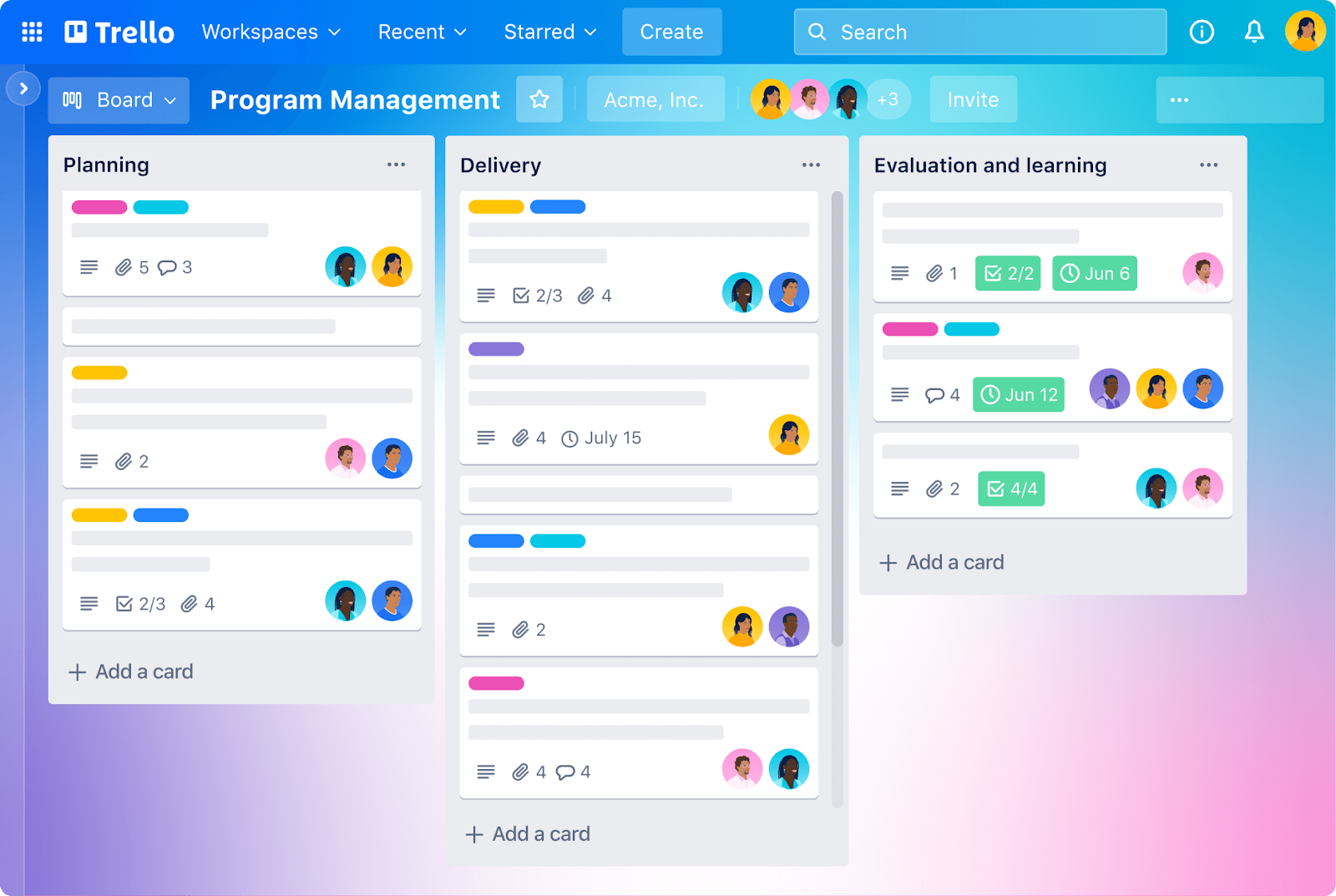
Image source: trello.com
Key features:
- Visual boards & cards: Organize tasks using Kanban-style boards with lists and cards, enabling easy drag-and-drop task management and clear workflow visualization.
- Butler automation: Automate repetitive tasks such as moving cards, setting due dates, and sending reminders using Trello's built-in automation tool, Butler.
- Power-Ups (Integrations): Enhance functionality by integrating with various apps, such as Slack, Google Drive, and Jira, through Trello's Power-Ups.
- Calendar view: Visualize due dates and deadlines with the Calendar Power-Up, helping teams manage time-sensitive tasks effectively.
- Custom fields: Add custom fields to cards to capture specific information, such as priority levels or estimated hours, tailored to your team's needs.
Pros:
- User-friendly interface with a drag-and-drop system makes task management intuitive.
- Highly customizable with various Power-Ups to suit different workflows.
- Effective for small to medium-sized teams looking for a straightforward project management tool.
- Offers a free plan with essential features, making it accessible for startups and individuals.
Cons:
- Advanced features like Timeline and Dashboard views are limited to paid plans.
- Automation capabilities are restricted on the free plan, potentially requiring manual task management.
Pricing:
- Free plan: Includes unlimited personal boards, up to 10 team boards, and unlimited Power-Ups per board.
- Standard plan: Priced at $5 per user/month, offering unlimited boards, custom fields, and advanced checklists.
- Premium Plan: At $10 per user/month, adds features like Timeline, Dashboard, and enhanced automation.
Enterprise Plan: Starting at $17.50 per user/month, provides advanced security and admin controls for large organizations.
3. Asana: Best for lightweight task workflows
Asana is a versatile and simple project management tool designed to help teams organize, track, and manage their work efficiently. It offers a user-friendly interface with multiple project views, including lists, boards, and timelines, catering to various team preferences and work styles. Asana's robust task management features, such as subtasks, dependencies, and milestones, enable teams to break down complex projects into manageable tasks. With its extensive integration capabilities, Asana connects seamlessly with numerous third-party applications, enhancing workflow automation and collaboration. Whether you're a small startup or a large enterprise, Asana provides the flexibility and scalability needed to streamline project workflows and improve team productivity.
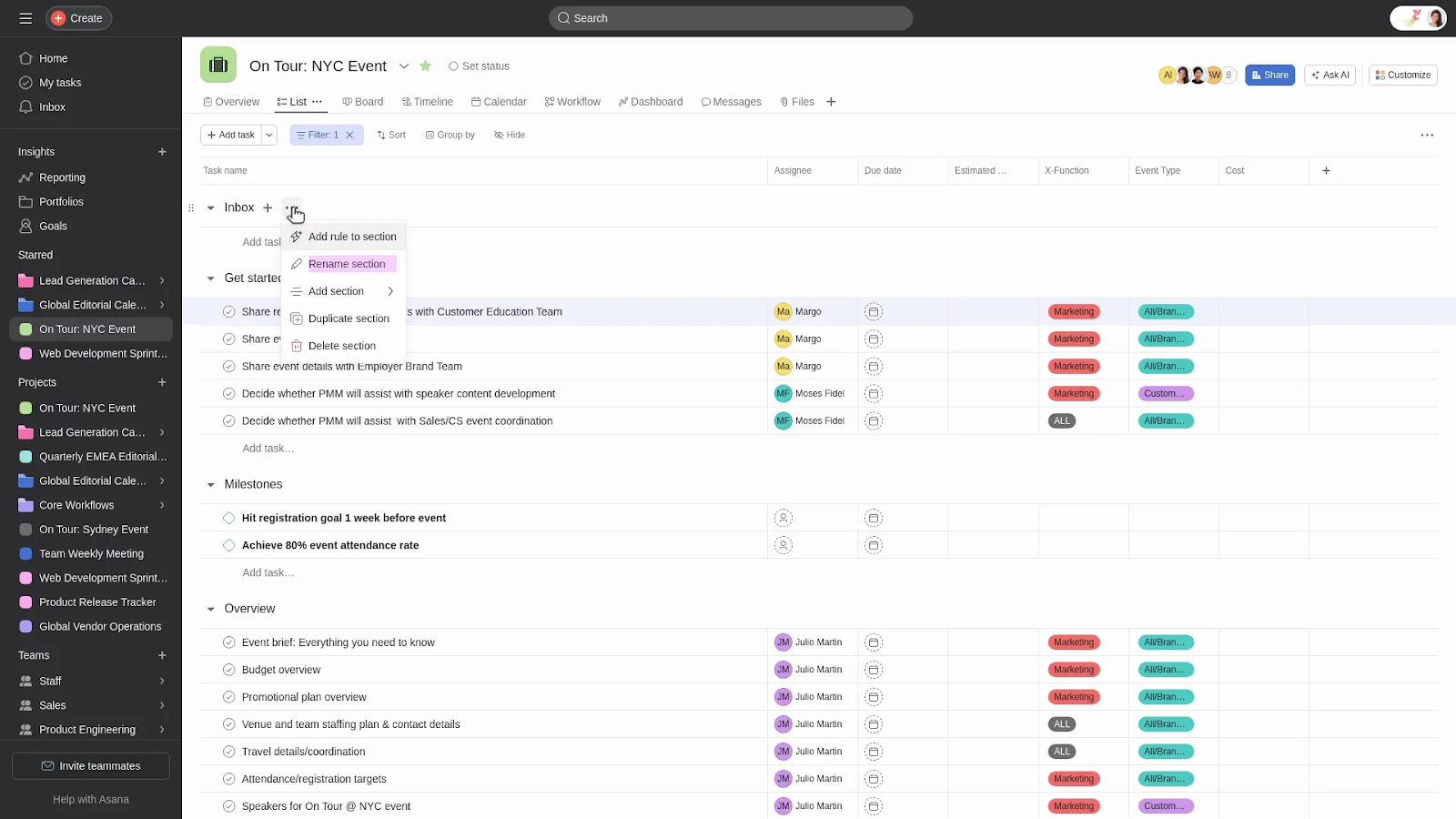
Image source: helpasana.com
Key features:
- Multiple project views: Asana offers various project views, including list, board, and timeline, allowing teams to choose the layout that best suits their workflow and preferences.
- Task dependencies: Teams can set dependencies between tasks, ensuring that work is completed in the correct sequence and preventing bottlenecks in project timelines.
- Milestones tracking: Asana enables users to define and track milestones, providing a clear overview of project progress and helping teams stay aligned with key objectives.
- Custom fields: Users can add custom fields to tasks, capturing specific information such as priority levels, estimated hours, or project phases, tailored to their team's needs.
- Advanced reporting: Asana's reporting tools enable teams to generate detailed insights into project performance, resource allocation, and task completion rates, facilitating data-driven decision-making.
Pros:
- Asana's clean and user-friendly interface makes it easy for teams to adopt and navigate the platform.
- Features like subtasks, dependencies, and milestones help in managing complex projects effectively.
- Asana integrates with a wide range of third-party applications, enhancing workflow automation and collaboration.
- Suitable for teams of all sizes, from startups to large enterprises, with flexible plans to accommodate growth.
Cons:
- Asana's paid plans can be relatively expensive, particularly for small teams or startups.
- New users may experience a slight learning curve due to the platform's extensive features and customization options.
Pricing:
- Free plan: Available for teams of up to 10 members, offering basic task management features.
- Starter plan: Priced at $10.99 per user/month, providing features like Asana AI and workflow builder.
- Advanced plan: At $24.99 per user/month, providing features like AI studio and native time tracking.
- Enterprise plan: Custom pricing for large organizations requiring advanced security, compliance, and administrative features.
4. ClickUp: Best for customization in budget-friendly plans
ClickUp is a versatile and inexpensive project management software designed to streamline workflows for teams of all sizes. It offers a wide range of features, including task management, time tracking, and collaboration tools, all within a single platform. ClickUp's flexibility enables teams to tailor their workspace to meet their specific needs, making it an ideal choice for businesses seeking a personalized project management solution without incurring significant costs. With its user-friendly interface and powerful customization options, ClickUp empowers teams to work smarter and more efficiently.
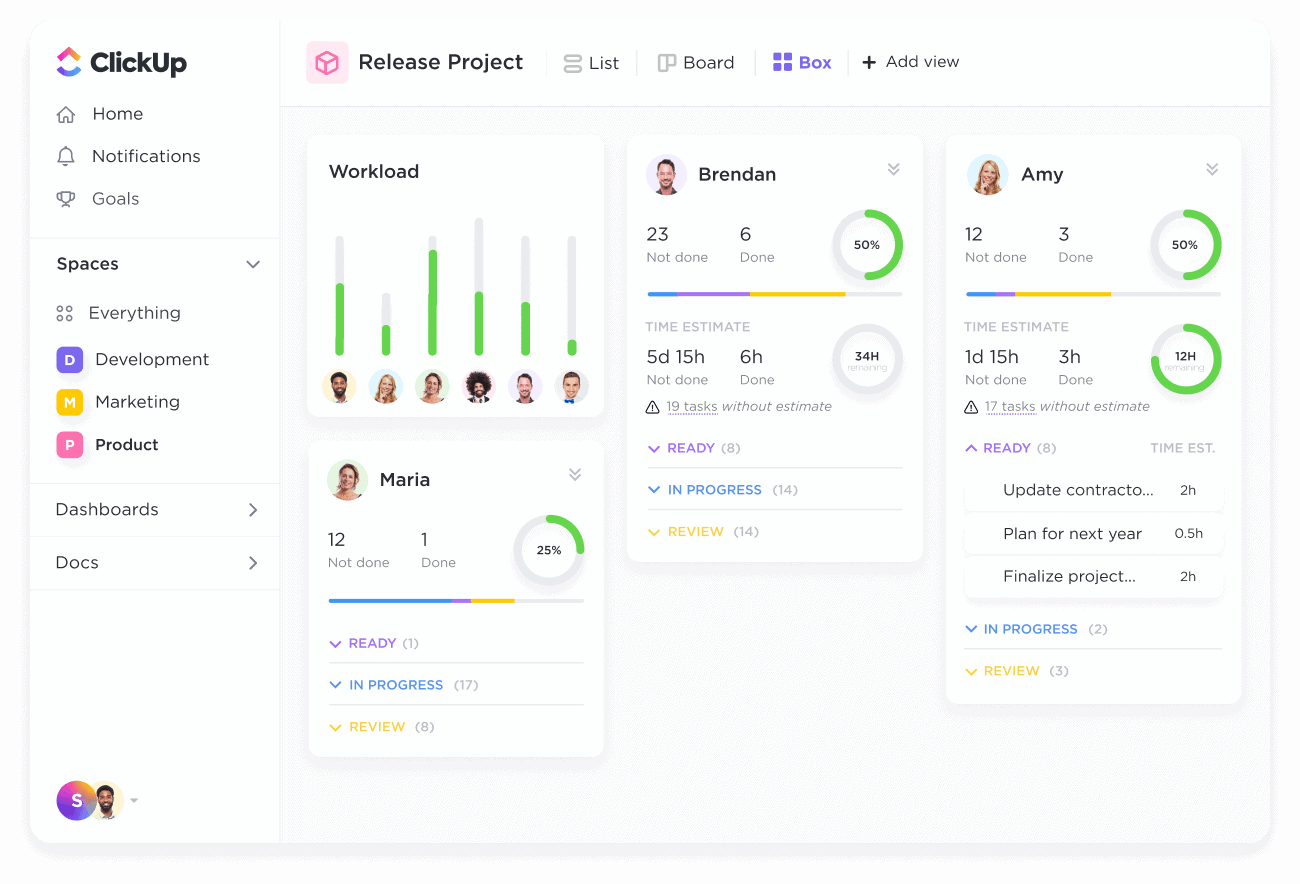
Image source: clickup.com
Key features:
- Customizable task management: ClickUp offers over 35 ClickApps, enabling teams to customize tasks with features such as custom fields, priorities, and statuses, ensuring that workflows align with specific project requirements.
- Multiple view options: Users can choose from various views, including List, Board, Calendar, and Gantt, enabling teams to visualize their work in the way that best suits their project needs.
- Time tracking and reporting: Built-in time tracking and reporting tools enable teams to monitor progress, allocate resources efficiently, and generate insights to enhance productivity.
- Automation capabilities: ClickUp offers automation features that enable teams to streamline repetitive tasks, such as assigning tasks or setting due dates, saving time and reducing manual effort.
- Collaboration tools: Integrated chat, document sharing, and real-time editing features facilitate seamless communication and collaboration among team members.
Pros:
- Very generous free plan with unlimited tasks and members, making it cost-effective for startups and small teams.
- Highly scalable tool that can adapt as businesses grow, moving from simple task management to advanced project portfolios.
- Frequent product updates and continuous feature improvements ensure users always have access to modern project management solutions.
- Strong ecosystem of integrations with apps like Slack, Google Workspace, and Zoom, reducing the need to switch between multiple tools.
Cons:
- Performance issues on large projects or with high data loads: slow load times, lag, and glitches are reported, especially when many views/dashboards/automations are active.
- Default notification settings can generate numerous alerts, which can distract or overwhelm users if not correctly configured.
Pricing:
- Free forever: Includes 60MB storage, unlimited tasks, and basic features.
- Unlimited plan: Priced at $7 per user/month when billed annually, offering unlimited integrations, dashboards, and time tracking.
- Business plan: At $12 per user/month when billed annually, offering features such as milestones, reporting tools, and custom fields.
- Enterprise plan: Custom pricing available for large organizations providing everything a business needs plus many other additional features.
5. Monday.com: Best for collaborative boards
Monday.com is a versatile work operating system designed to streamline team collaboration and simple project management. Its intuitive interface and customizable workflows make it suitable for teams of all sizes across various industries. With features like visual boards, automation, and integrations, Monday.com enhances productivity and ensures seamless communication among team members. Whether you're managing marketing campaigns, software development, or HR processes, Monday.com provides the tools to keep your projects on track and your team aligned.
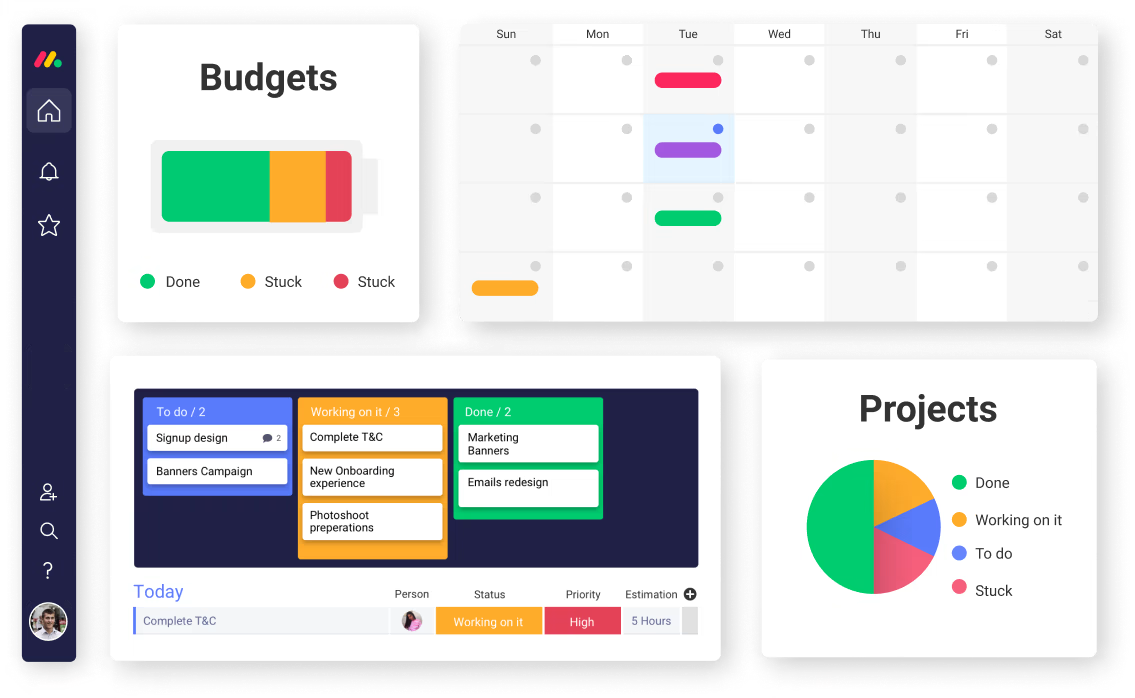
Image source: monday.com
Key features:
- Visual boards: Organize tasks using customizable boards with various views such as Kanban, Gantt, and Calendar, allowing teams to visualize workflows effectively.
- Templates library: Over 200 templates for various industries and use cases make it easy to get started quickly, whether for marketing, product development, HR, or operations.
- Baselines & milestones: Track your project’s original plan (baseline) alongside current progress, and set clear milestones to mark critical points. This helps you see scope creep or delays more clearly and stay aligned.
- Workload & resource management: Built-in workload view helps managers allocate resources evenly, avoid bottlenecks, and spot overworked team members before deadlines slip.
- Advanced dashboards & analytics: Custom dashboards combine multiple boards into one high-level view, allowing teams to track KPIs, budgets, timelines, and project dependencies in real time.
Pros:
- Works equally well for small startups and large enterprises, making it future-proof.
- Clean, modern interface reduces friction and makes onboarding easy for non-technical users.
- Marketing, HR, operations, and IT can all work in one shared workspace without siloed tools.
- Clear ownership of tasks and visual progress indicators encourages accountability across teams.
Cons:
- While integrations are a strength, relying too heavily on them may create complexity for simpler projects.
- Some premium views and automation limits are gated behind costlier plans.
Pricing:
- Free Plan: Includes basic features and is free forever.
- Basic Plan: Starting at $9 per user/month, offering essential features for small teams.
- Standard Plan: At $12 per user/month, it adds timeline views and integrations.
- Pro Plan: Priced at $19 per user/month, includes time tracking and advanced reporting.
- Enterprise Plan: Custom pricing for large organizations requiring advanced security and administrative features.
6. Wrike: Best for scalable entry-level project management
Wrike is a robust project management platform designed to support teams of all sizes, from small startups to large enterprises. It's intuitive interface and scalable features make it an ideal choice for organizations looking to streamline their workflows and enhance collaboration. With tools like Gantt charts, workload management, and real-time collaboration, Wrike empowers teams to plan, execute, and monitor projects effectively. Whether you're managing marketing campaigns, product launches, or IT projects, Wrike provides the flexibility and scalability needed to meet your team's evolving needs.
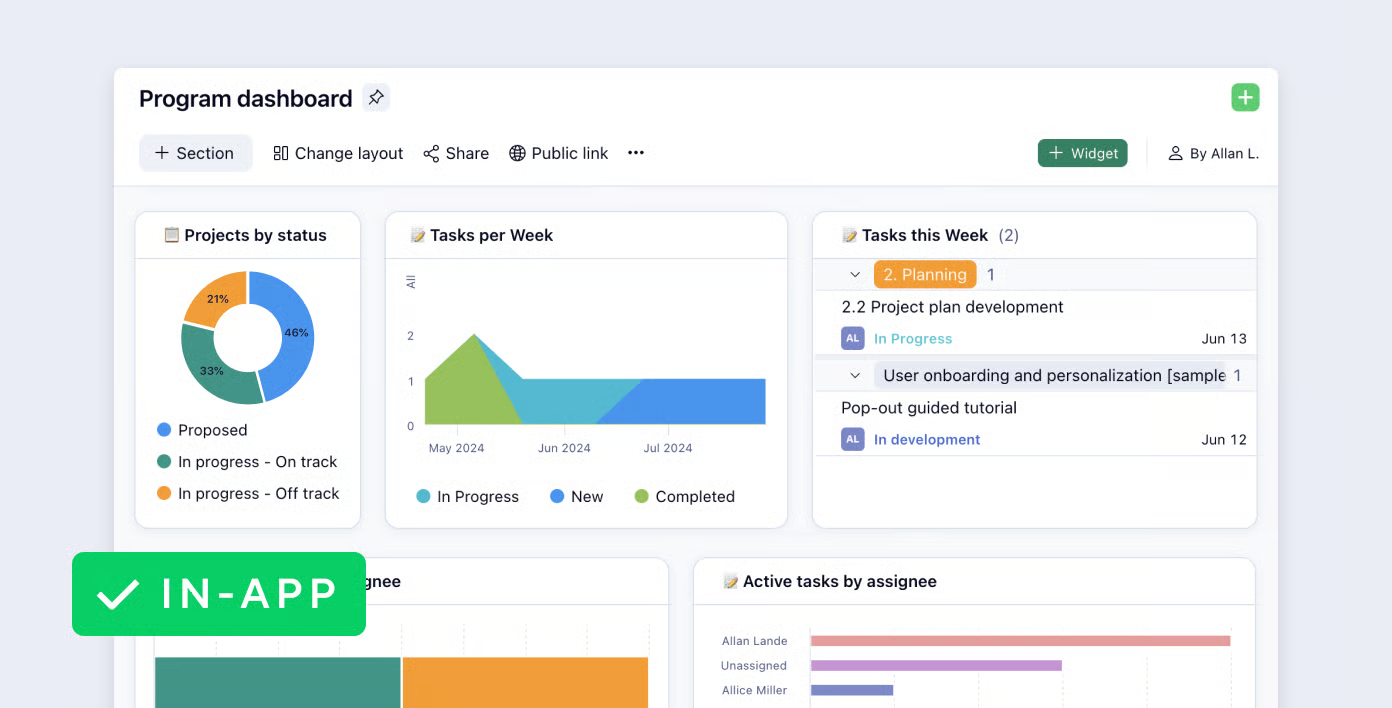
Image source: wrike.com
Key features:
- Customizable dashboards: Create personalized dashboards to track project progress, team performance, and key metrics, ensuring you have a comprehensive view of your work.
- Advanced reporting tools: Utilize built-in reporting features to generate insights into project timelines, resource allocation, and task completion, facilitating data-driven decision-making.
- Workload management: Balance team workloads by visualizing task assignments and capacity, helping to prevent burnout and optimize resource utilization.
- Document collaboration: Collaborate on documents in real-time, with version control and approval workflows, ensuring seamless content creation and review processes.
- Flexible permissions & secure workspaces: Custom user types and roles, locked/secure spaces, fine-grained permissions, and SSO support. Useful when dealing with external stakeholders or sensitive data.
Pros:
- Offers highly customizable workflows and dashboards that enable teams of varying sizes and complexities to tailor the tool to their specific needs.
- Strong reporting & analytics, giving leaders visibility into resource utilization, project progress, and performance metrics.
- Wrike is praised for enabling teams across marketing, operations, design, and other departments to collaborate easily on shared projects and files, thereby reducing silos and increasing visibility.
Cons:
- Pricing for advanced capabilities (reports, resource tools, integrations) becomes expensive, especially for smaller teams that want more power without a full enterprise investment.
- Limited customer support on lower-tier plans: advanced support, faster response, or certain integration/access features are reserved for higher-tier plans.
Pricing:
- Free plan: Includes basic task and project management features for small teams.
- Team plan: Priced at $10 per user/month, offering additional features like shareable dashboards and interactive Gantt charts.
- Business plan: At $25 per user/month, it includes advanced tools such as real-time reports and a custom blueprint.
- Enterprise plan: Custom pricing for large organizations requiring advanced resources and administrative controls.
7. Smartsheet: Best for spreadsheet-style project tracking
Smartsheet is a robust project management platform that combines the familiarity of spreadsheets with powerful project tracking capabilities. Designed for teams seeking a structured approach to manage tasks, timelines, and resources, Smartsheet offers a range of features to enhance productivity. Its spreadsheet-style interface allows for easy customization, making it suitable for various industries and project types. With advanced reporting tools, automation, and collaboration features, Smartsheet empowers teams to efficiently plan, execute, and monitor projects.
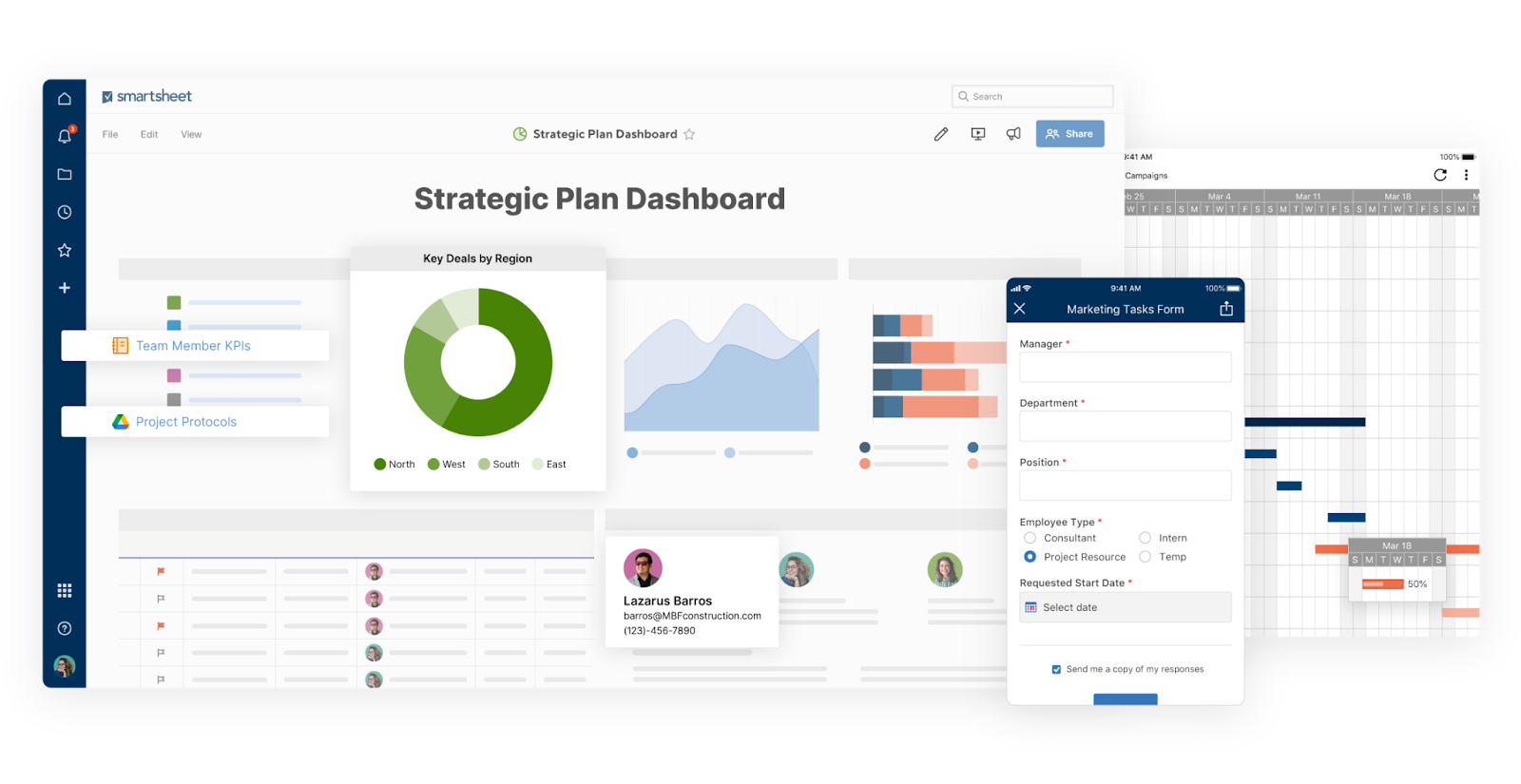
Image source: smartsheet.com
Key features:
- Spreadsheet-style interface with enterprise depth: Smartsheet resembles a spreadsheet, but it provides project tracking, task dependencies, and advanced collaboration tools built on top.
- Portfolio and project management tools: Beyond individual projects, Smartsheet supports portfolio-level planning, with program roll-ups, resource allocation, and reporting across multiple projects.
- Content collaboration & proofing: Teams can upload creative assets, mark up files with comments, request approvals, and track version history all within Smartsheet.
- Control Center & governance features: For large organizations, Smartsheet provides centralized templates, project consistency, and governance policies to standardize workflows.
- Enterprise-grade security & compliance: With features like single sign-on (SSO), admin controls, role-based permissions, and compliance certifications, Smartsheet suits regulated industries.
Pros:
- The automations and workflow features massively cut down manual follow-ups, reminders, and repetitive tasks, saving team time.
- Resource and workload tracking helps avoid overloading individuals, improves fairness in assignments, and ensures projects don't stall due to resource bottlenecks.
- Extensive integrations allow Smartsheet users to plug it into existing toolchains, reducing the need to jump between apps.
Cons:
- Mobile apps and on-the-go editing are less potent than desktop views, with some functionalities limited.
Pricing:
- Free plan: Includes basic features upto 2 sheets only for individuals or small teams.
- Pro plan: Priced at $9 per user/month, offering advanced features for small teams.
- Business plan: At $19 per user/month, it includes additional collaboration and workload tracking tools.
- Enterprise plan: Custom pricing for large organizations wanting to build complex solutions and company-wide security and controls.
8. Basecamp: Best for simple team collaboration
Basecamp is a straightforward project management and team collaboration tool designed to streamline communication and task management within organizations. With its intuitive interface and centralized platform, Basecamp helps teams stay organized and focused on their work. Whether you're managing projects, coordinating with clients, or facilitating internal communication, Basecamp offers the tools needed to enhance productivity and collaboration. Its emphasis on simplicity and ease of use makes it an ideal choice for teams seeking an efficient solution without unnecessary complexity.
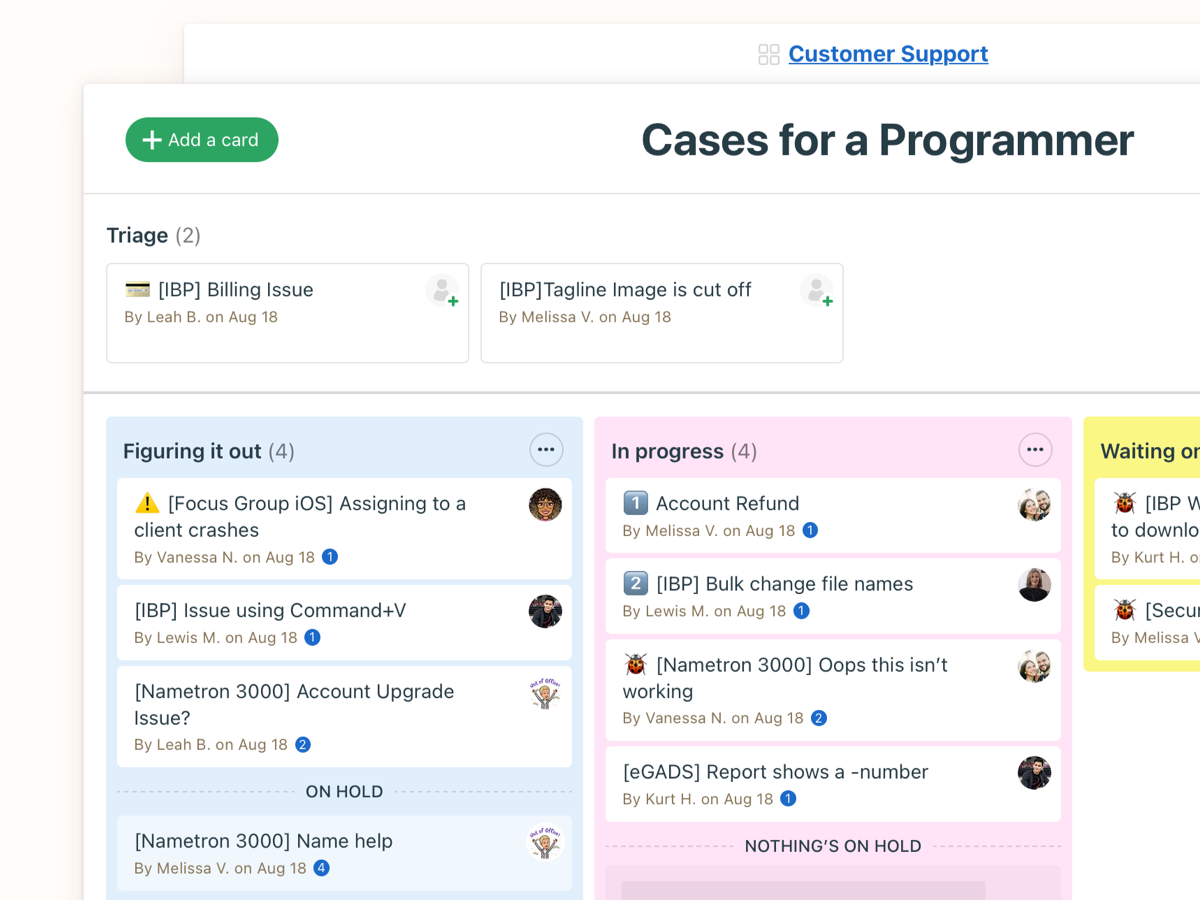
Image source: basecamp.com
Key features:
- To-do lists & task management: Create to-do items, assign them to team members, set due dates, mark things as done, and track progress across projects.
- Single-page project organization: Within each project, you get a unified view of tasks, messages, files, and schedules. Also, calendar syncing and scheduling so deadlines & events are visible.
Pros:
- Automatic check-ins reduce meeting overload and help keep team members accountable without requiring constant manual follow-ups.
- Flat-rate “Pro Unlimited” plan encourages larger teams or agencies to scale without worrying about per-user pricing.
Cons:
- The tool has fewer options for workflow flexibility, custom fields, or layout personalization compared to more feature-rich tools.
- Reporting is basic, as it lacks advanced analytics or exportable reports for performance or project metrics.
Pricing:
- Free plan: Includes limited features suitable for small teams or individual use.
- Basecamp plan: Priced at $15 per user/month, offering full access to all features.
- Pro Unlimited plan: At $299 per month, it provides unlimited users and additional support options.
9. Zoho Projects: Best for affordability with integrations
Zoho Projects is a comprehensive project management solution that combines affordability with a rich set of features, making it ideal for small to medium-sized teams. Designed to streamline project planning, tracking, and collaboration, it offers a range of tools to enhance productivity. Its seamless integration with other Zoho applications and third-party tools further extends its capabilities, providing a unified platform for managing various aspects of business operations. Whether you're in IT, marketing, or consulting, Zoho Projects offers a scalable solution to meet your team's needs.
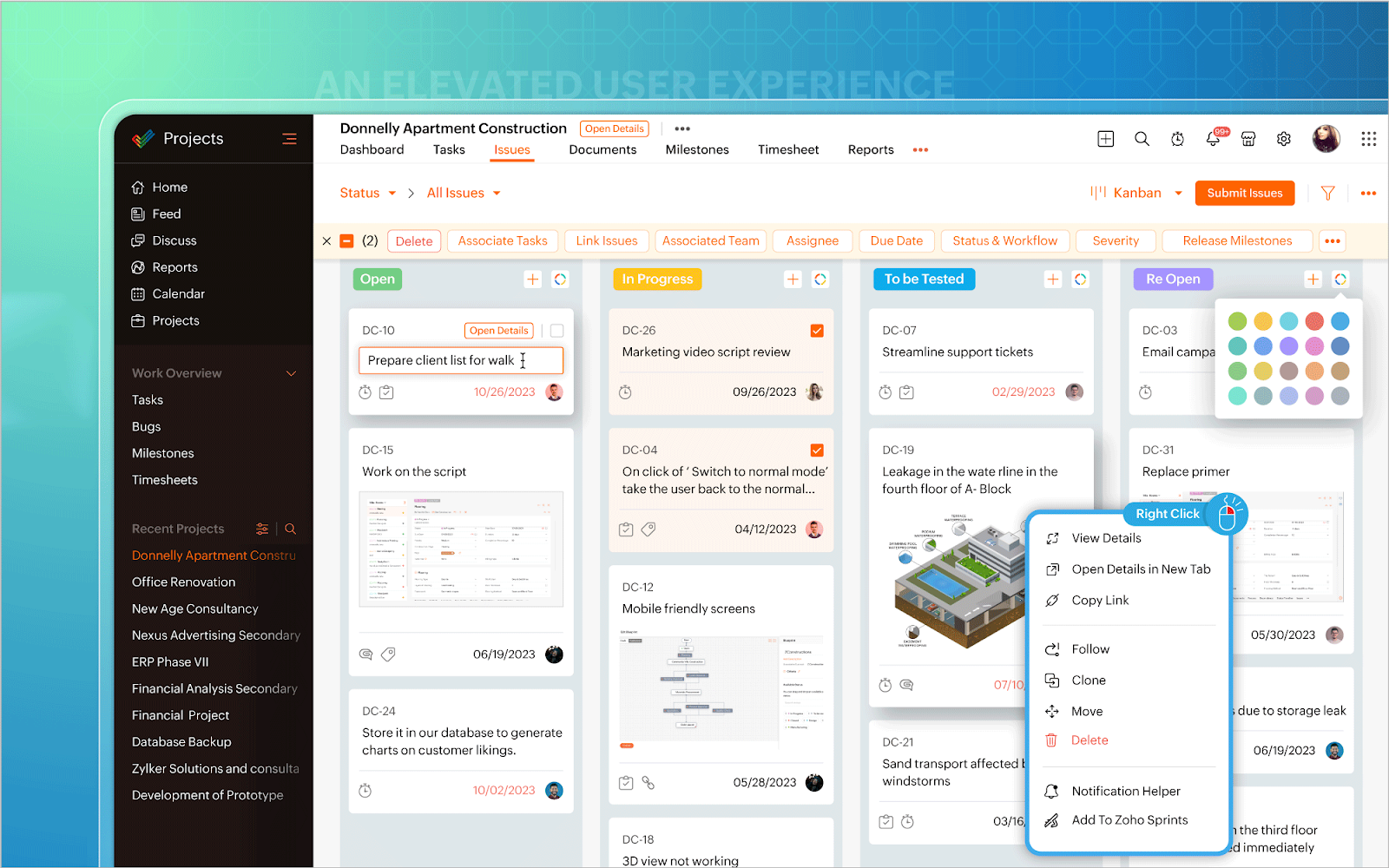
Image source: zoho.com
Key features:
- Multi-user task assignment & dependencies: You can assign a task to more than one user, create subtasks, set dependencies (predecessors), and ensure work flows logically.
- Gantt charts & milestones: Zoho Projects’ Gantt view enables you to visualize timelines spanning multiple months, track milestones, adjust schedules, and view dependencies in a comprehensive, big-picture view.
- Customization & automation (with Templates & Zia):
Zoho Projects supports custom fields, customizable statuses, templates (in paid plans), and automation via workflows and Zia (its AI assistant) for suggestions & predictive insights.
- Built-in collaboration tools: Includes built-in chat, group and individual messaging, forums, document sharing, attachment support, comments, and page/wiki-style internal document pages.
Pros:
- Free plan available (up to 3 users) for light usage; helps startups / small projects test the platform.
- Strong integration with the Zoho ecosystem (CRM, Books, etc.), which streamlines workflows if you’re already using other Zoho tools.
Cons:
- Customization is limited in lower-tier plans; advanced features (custom fields, templates) are often locked behind higher/Enterprise plans.
- An interface can feel cluttered or overwhelming when managing multiple projects or tasks; the learning curve for larger, more complex setups is steeper.
Pricing:
- Free plan: Includes basic task management and collaboration tools for up to 3 users.
- Premium plan: At $4 per user/month, it offers enhanced project tracking and templates.
- Enterprise plan: At $9 per user/month, it includes advanced features such as custom fields, a global Gantt chart, and enhanced automation.
10. Notion: Best for docs + tasks in one workspace
Notion is an all-in-one workspace that combines note-taking, task management, databases, and wikis into a single platform. Designed for individuals and teams seeking flexibility and customization, Notion allows users to create interconnected pages, databases, and boards tailored to their specific needs. Whether you're managing personal projects, collaborating with a team, or organizing company knowledge, Notion provides a versatile solution that adapts to various workflows. Its intuitive interface and extensive template library make it easy to get started and build a personalized workspace.
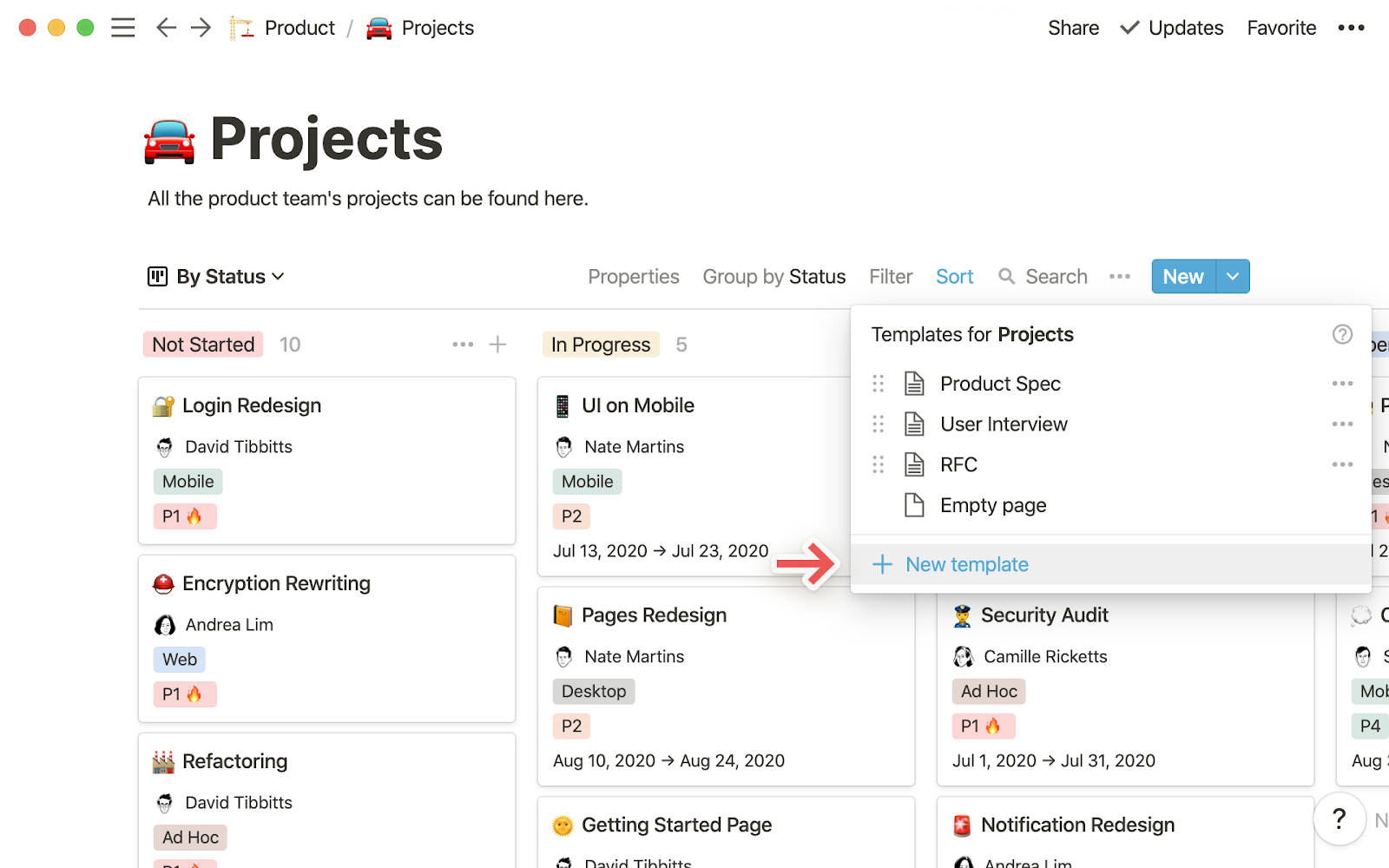
Image source: notion.com
Key features:
- “Share to Web” & public pages: Notion allows certain pages to be published live on the web, enabling you to share a document, wiki, or simple site publicly.
Pros:
- Cross-platform access (web, desktop, mobile) ensures users can access their workspace from anywhere.
Cons:
- Performance issues arise with large, complex databases or huge pages, as they are slower to load and exhibit reduced responsiveness when scaling up.
- Editing while being offline has constraints, as the access is limited, and syncing back may require reconnection.
Pricing:
- Free plan: Includes unlimited pages and blocks for individual use.
- Plus plan: At $10 per user/month (billed annually), it offers unlimited file uploads and collaboration features.
- Business plan: At $20 per user/month (billed annually), includes advanced permissions and admin tools.
- Enterprise plan: Custom pricing for large organizations requiring enhanced security and support.
Considerations of using simple project management software
Pros:
- Affordable options: Many project management tools, including Lark, offer free or low-cost plans suitable for startups and small teams, making professional project management accessible without adding financial strain. The flexibility of these plans enables teams to scale features as their needs evolve without incurring sudden cost increases.
- Ease of adoption: Intuitive interface ensures a minimal learning curve, allowing team members, including non-technical users, to get started quickly and easily. Teams can organize tasks, set priorities, and monitor progress efficiently without extensive training or onboarding time.
- Visual task management: With Kanban boards, Gantt charts, and shared calendars, smart software provides clear visualizations of task progress. Teams can track deadlines, dependencies, and project milestones in a single, unified view, enhancing clarity and accountability.
- Integrated communication: Built-in chat, document sharing, and meeting features allow teams to collaborate directly within one platform. This reduces the need for multiple apps and keeps all project-related discussions, files, and updates in a single, accessible location.
- Scalable growth: Advanced tools can grow alongside your team, accommodating more users, projects, and advanced features as your organization expands. Teams can maintain simple workflows while gradually adopting new functionalities without overwhelming the system.
- Cross-team alignment: Departments such as marketing, sales, and operations can collaborate seamlessly within one centralized platform. This ensures everyone is aligned with priorities, deadlines, and project status, fostering better coordination across the organization.
Considerations:
- Learning curve: For advanced features, and customization tools, teams will need time to get accustomed to it.
- Switching cost: Moving from multiple tools to unified system requires initial adaptation, but reduces clutter and the long-term cost.
Conclusion
Simple project management is all about clarity, affordability, and collaboration. In this article, we explored the 10 best simple project management software, each offering unique ways to plan, track, and manage tasks. While tools like Trello, ClickUp, and Zoho Projects are strong contenders, Lark stands out as the best choice for teams of all sizes. It's an all-in-one platform that combines task management, chat, meetings, docs, and AI support, reducing the need for multiple apps. With a free unified plan, intuitive interface, and scalable features, Lark ensures teams stay productive, aligned, and focused, making project management simple and efficient.
FAQs
What is simple project management software?
Simple project management software helps teams organize tasks, track progress, and collaborate efficiently without unnecessary complexity. It is ideal for small businesses, freelancers, and remote teams. Lark excels in this space by combining task tracking, communication, and scheduling in one platform. Its intuitive interface and visual task management make project oversight easy and effective for any team size.
What is inexpensive project management software for startups?
Inexpensive project management software offers essential tools at a low cost, making it an ideal choice for startups and small teams. Many platforms, including Lark, offer free or budget-friendly plans to help teams get started quickly. Lark's free unified plan allows task management, communication, and file sharing in a single workspace. This ensures small teams can stay productive without incurring high software expenses.
How does project communication software improve collaboration?
Project communication software centralizes discussions, file sharing, and meetings, reducing the need for multiple apps. Teams can collaborate in real-time, share updates, and resolve issues more efficiently. Lark's built-in chat, meetings, and document tools make it easy to maintain clear communication across all projects. This unified approach enhances efficiency, minimizes errors, and ensures everyone is aligned on tasks and deadlines.
Why is visual task management more effective than lists?
Visual task management provides a clear, at-a-glance view of workflows, deadlines, and priorities. Tools like Kanban boards, Gantt charts, and calendars help teams track progress faster than traditional lists. Lark’s visual task management features allow teams to organize, assign, and monitor tasks efficiently. This clarity enhances productivity and accountability, ensuring that no task or deadline is overlooked.
Can a free job tracking app replace paid project tools?
Yes, for small teams or startups, free job tracking apps can effectively handle basic task management needs. Lark balances its free plan with scalable features, offering task assignment, collaboration, and tracking all in one platform. As teams grow, Lark allows smooth upgrades to paid plans with advanced functionalities. This ensures continuity in project management without disrupting workflows or losing data.
Related reading
Table of contents
Start using Lark today

Manage all your work in one place
Boost team efficiency by 10x
Save up to 70% on software costs
Table of contents
Start using Lark today
Manage all your work in one place
Boost team efficiency by 10x
Save up to 70% on software costs
Keep reading








2026 Lark Technologies Pte. Ltd.
Headquartered in Singapore with offices worldwide.






Explore: