














The 7 Best Requirements Management Software for 2026

Ben Guan
Senior Content Manager
Nov 4, 2026
Ben Guan
Nov 4, 2026

20 min read
Add to preferred sources


If your team is trying to manage a complex project, chances are you're drowning in a sea of Word documents, master spreadsheets, and scattered chat messages. This disorganized approach is a recipe for scope creep, missed deadlines, and building the wrong product. Requirements management software can change all of that. They provide the structure needed to systematically gather, analyze, and track every requirement, ensuring your team can build the right product, the right way.
To help you find the right platform, this blog examines the top options on the market, breaking down their key features, strengths, and weaknesses.
Top requirements management tools
- Lark: Best for unified team collaboration and productivity
- Jama Connect: Best for complex systems in regulated industries
- Jira: Best for agile project and issue tracking
- IBM DOORS Next: Best for enterprise-scale systems engineering
- Siemens Polarion: Best for unified Application Lifecycle Management (ALM)
- Codebeamer: Best for regulated software and product development
- Visure: Best for flexible, compliance-focused ALM

What is requirements management software?
Requirements management software provides a centralized platform for development teams to document, track, analyze, and agree upon project requirements throughout the entire product development lifecycle. They are designed to replace scattered Word documents, spreadsheets, and email chains with a structured, single source of truth. By doing so, they help teams ensure the final product is built correctly, meets stakeholder expectations, reduces costly rework, and accelerates time to market.
Requirements management software comparison
To help you navigate the options, here is a quick overview of the top platforms on the market.
The top 7 requirements management software tools
Lark: Best for unified team collaboration
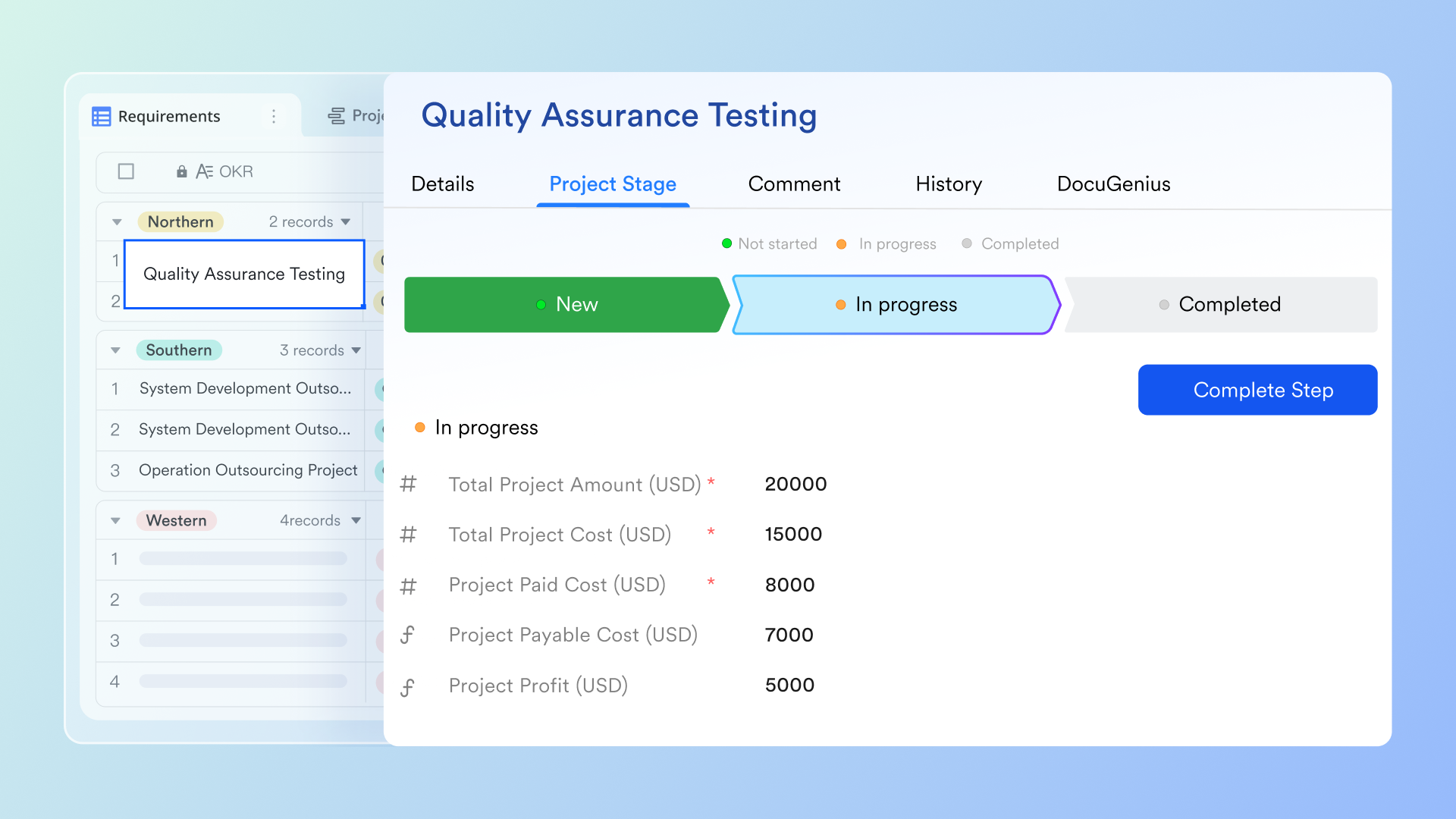
Lark is a comprehensive solution that keeps teams aligned on requirements so developments can move forward efficiently. Instead of juggling separate apps for drafting specifications, discussing changes, and tracking tasks, often leading to delays and miscommunication, Lark consolidates the entire requirements lifecycle. From the starting requirements gathering process to final execution, every step is managed within a single, connected workspace where ideas can be shared, tasks assigned, and deliverables tracked with full visibility.
After the initial requirements are set, Lark simplifies the process of monitoring progress and adapting to changes. Teams can assign owners to specific requirements, establish deadlines, and track every detail using flexible views like Kanban boards or Gantt charts. The platform's built-in automations handle routine updates and reminders, and because information is synced in real-time across chats, documents, and calendars, the entire team remains on the same page.
Ready to jump right in? You can give this Requirements & Bug Management template a try or browse our template gallery for more.
Key features
- Lark Docs: A powerful collaborative document editor where teams can draft specifications, user stories, and technical requirements in real time. Product managers, designers, developers, and engineers can co-edit, leave comments, and embed mockups directly within the document, creating a dynamic and living single source of truth for the project.
- Lark Messenger: A central communication hub that keeps project-related conversations organized into specific groups or topics. This prevents important decisions and feedback from getting buried in endless email chains or scattered across different chat apps. All relevant notifications can also be found here and tasks can be created and assigned directly from a message, ensuring action items are never missed.
- Built-in Calendar & Approval: The Lark platform includes shared calendars to keep key dates and milestones visible to the entire team, helping to keep the development process on track. Lark Approval streamlines sign-offs for things like scope changes or feature requests, turning potential bottlenecks into transparent, digital workflows.
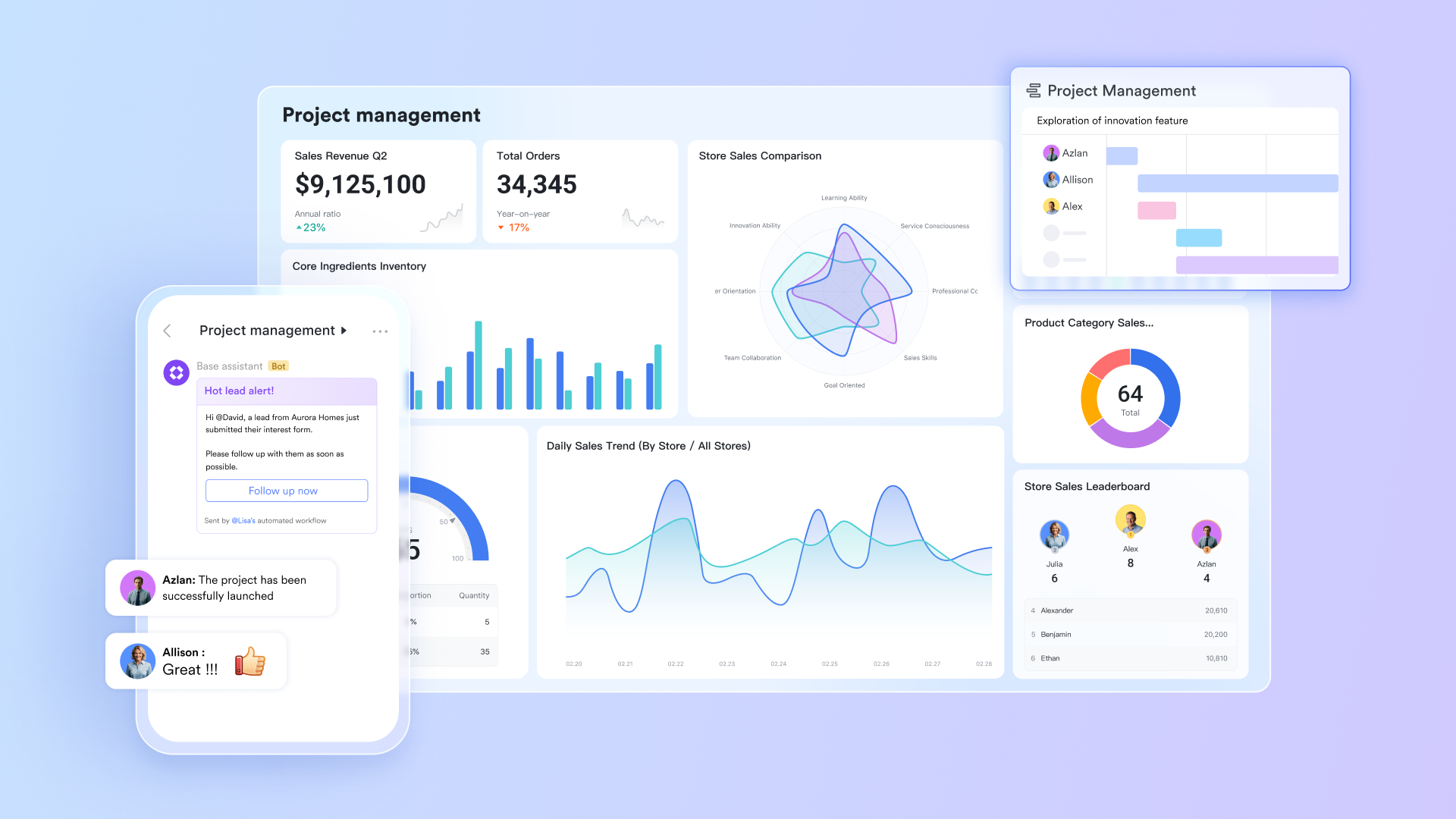
- Lark Base: A versatile no-code database tool that can be customized for any workflow. Teams can use it to create structured repositories for product requirements, track bugs, manage tasks, and link requirements to specific deliverables. The data can be visualized in different ways through different views or live dashboards, enabling your team to make full use of the data.
Pros
- All-in-one platform: By combining chat, documents, spreadsheets, and video conferencing in one place, Lark eliminates the constant context-switching that drains productivity and leads to information silos.
- Seamless real-time collaboration: The entire suite is built for live, simultaneous collaboration, which dramatically improves communication and reduces the risk of misunderstandings.
- Highly customizable: Lark Base is incredibly flexible, allowing teams to build custom workflows and databases that perfectly match their specific needs using AI, from a simple bug tracker to a complex matrix of software requirements.
- Generous free tier: The Starter plan is free for up to 20 users and includes 11 essential tools for collaboration and requirements management, making it an accessible and powerful option for small teams and startups looking to establish good practices early on.
Cons
- Potential learning curve: The wide variety of features may take some time to learn, but there are comprehensive guides in the help center as well as responsive customer support.
Pricing
- Starter plan: Free forever plan that includes 11 powerful tools for up to 20 users. It also comes with 100GB of storage, 1000 automation runs, AI translations, and more.
- Pro plan: $12/user/month (billed annually) for up to 500 users. It includes everything in Starter plus group calling for up to 500 attendees, 15TB of storage, 50,000 automation runs, and more.
- Enterprise plan: Contact sales for custom pricing. Supports unlimited users and includes even more automation runs and advanced security, compliance, and management features.
Jama Connect: Best for complex systems in regulated industries
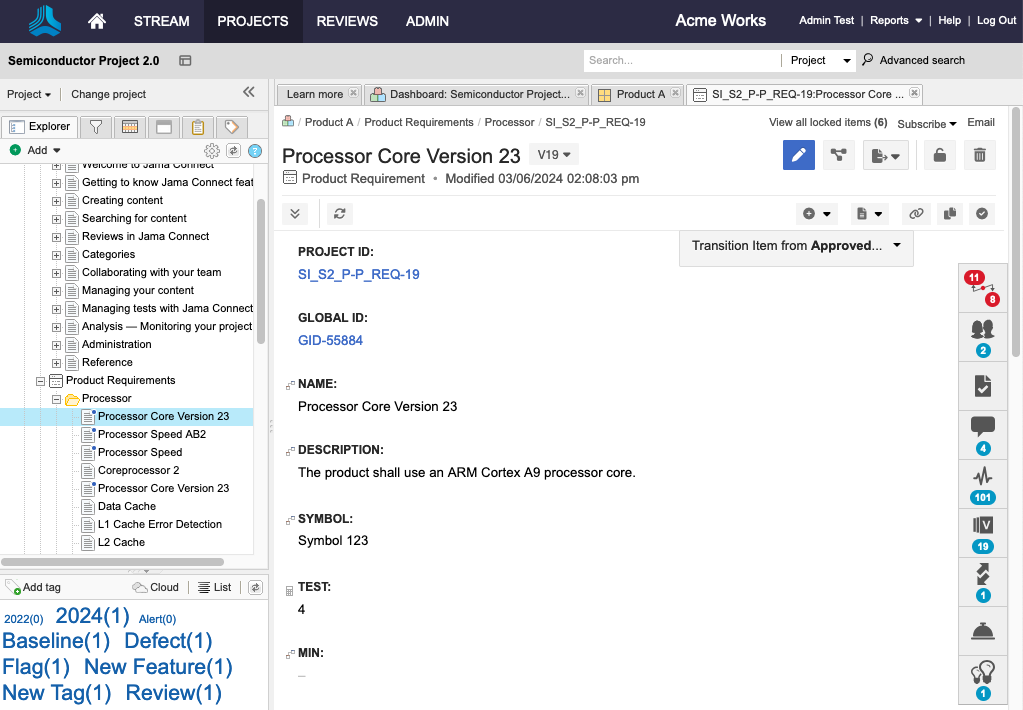
Image source: www.jamasoftware.com
Jama Connect is popular for teams developing complex products and systems where safety, compliance, and meticulous documentation are important. It is a major player in the medical device, automotive, aerospace, and semiconductor industries, where the cost of failure is extremely high and the need for a verifiable audit trail is non-negotiable.
Key features
- Live Traceability™: It creates a live, bidirectional link between every requirement and all associated artifacts—including risks, tests, and design elements—across the entire product lifecycle management process. When something changes, the impact is immediately visible everywhere.
- Risk and hazard analysis: The platform has integrated risk management capabilities that are purpose-built to help teams comply with industry-specific standards, such as ISO 14971 for medical devices.
- Review center: A dedicated module that serves as a central hub for all stakeholder reviews. It allows for real-time collaboration, commenting, and approvals on requirements, creating a clear and auditable record of every decision made.
- Reuse and baseline management: Teams can create catalogs of validated requirements that can be reused across different projects or product variants, which significantly accelerates development. The baselining feature allows you to capture a complete snapshot of your project at a specific point in time for milestones or compliance submissions.
Pros
- Traceability: It is considered the gold standard for end-to-end traceability, making it invaluable for proving compliance and performing thorough impact analysis.
- Compliance: Jama Connect offers pre-configured frameworks and templates aligned with various industry standards. This can dramatically reduce the manual effort and time required to prepare for audits.
Cons
- Steep learning curve: The platform is very complex. It can be overwhelming for new users, especially those who are not already well-versed in formal systems engineering methodologies.
- High cost: The licensing fees for Jama Connect are substantial, which often places it out of reach for smaller companies or teams working on projects that do not operate in a highly regulated industry.
- Dated user interface: Some users report that the UI feels clunky and less intuitive compared to more modern, web-native SaaS applications, which can hinder user adoption.
Pricing
- Custom pricing
Jira: Best for agile project and issue tracking
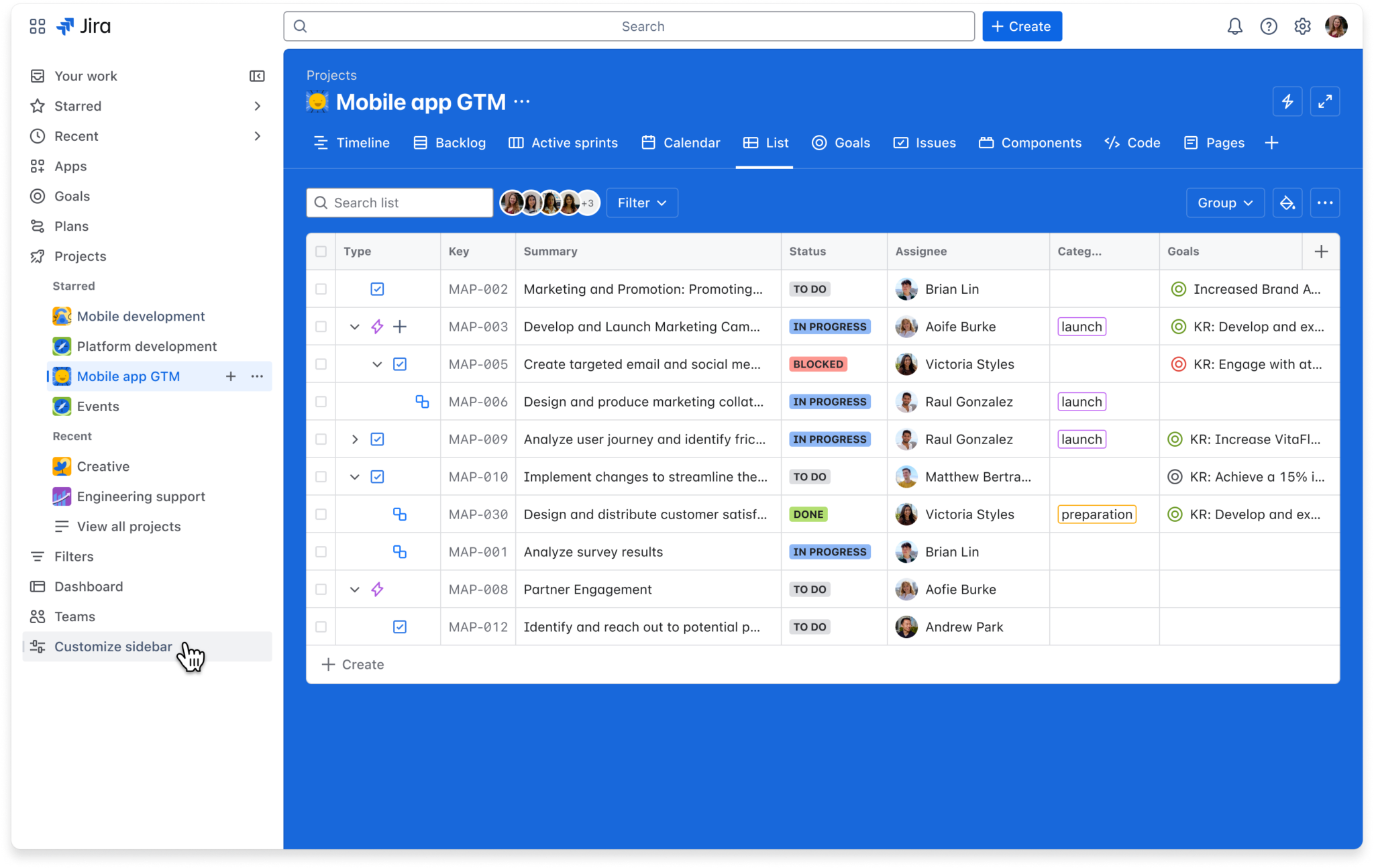
Image source: atlassian.com
Jira is widely known as the app for agile software development. While it isn't a dedicated requirements management software out of the box, its flexibility and vast ecosystem of integrations and add-ons allow it to be effectively configured for that purpose. For the millions of teams that already live and breathe in Jira for issue tracking and sprint planning, extending its use to manage requirements is a natural choice.
Key features
- Custom issue types: Teams can easily create their own issue types—such as "Requirement," "User Story," or "Functional Specification"—and add an unlimited number of custom fields to track key attributes like priority, owner, status, and risk level.
- Customizable workflows: You can design and implement custom workflows that mirror your team's exact process for how a requirement moves from an initial idea to draft, review, approval, implementation, and verification.
- Confluence integration: The tight integration with Confluence, Atlassian's wiki tool, is essential for effective requirements management in Jira. Teams can use Confluence to write detailed product requirements documents and then link those pages directly to Jira issues that track the implementation work.
Pros
- Flexibility: Jira can be bent and shaped to fit almost any agile workflow, making it a powerful choice for teams that want to define their own processes.
- Integration ecosystem: It connects with thousands of other tools across the development landscape, solidifying its role as a central hub for all project-related activities.
Cons
- Requires heavy customization: To make Jira work well for requirements management, you need to invest significant time in setup and configuration. Often, it also requires purchasing one or more paid apps from the Marketplace to get the features you need.
- Prone to clutter: Without strong governance and team discipline, a Jira instance can quickly become a disorganized mess of thousands of issues, making it difficult to maintain a clear single source of truth for requirements.
Pricing
- Free: Available for up to 10 users with core project and issue tracking features.
- Standard: Starts at approximately $7.53 per user per month (based on 300 users).
- Premium: Starts at approximately $13.53 per user per month (based on 300 users).
- Enterprise: Custom pricing for large-scale deployments, billed annually.
IBM DOORS Next: Best for enterprise-scale systems engineering
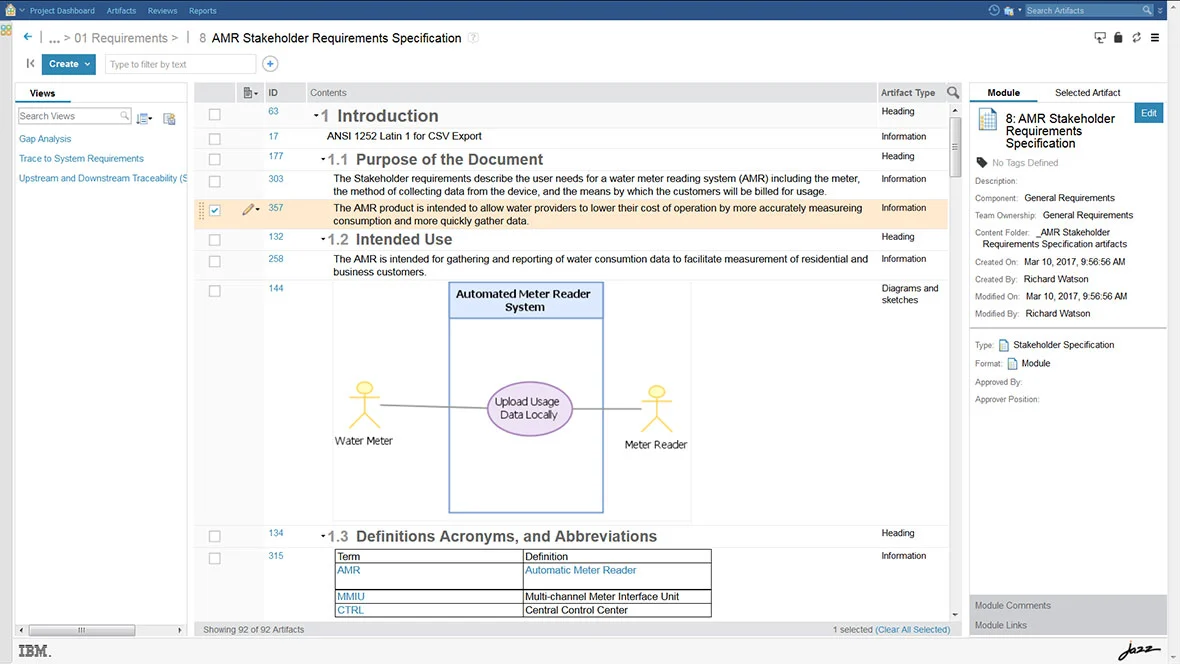
Image source: g2.com
IBM DOORS (Dynamic Object-Oriented Requirements System) is the tool of choice for some of the world's most complex systems engineering projects, particularly in the aerospace, defense, and automotive sectors. The modern iteration, DOORS Next, is a web-based platform built on IBM's Jazz technology, designed to bring collaboration and modern integrations to its powerful, enterprise-grade foundation.
Key features
- High scalability: DOORS Next is engineered to handle an enormous volume of data, capable of managing projects with hundreds of thousands or even millions of individual requirements across vast, distributed teams.
- Advanced configuration management: It provides robust features for managing versions, variants, and baselines, which are critical for organizations that develop complex product lines with many shared and unique components.
- Granular traceability and impact analysis: The platform offers deep and granular linking capabilities, allowing teams to trace requirements through every stage of the lifecycle. Its Links Explorer provides a graphical view to instantly assess the impact of any proposed change.
- Rigorous compliance support: With features designed to support strict regulatory standards, DOORS provides strong audit trails, review management, and (in the classic version) electronic signatures to ensure process adherence.
Pros
- Industrial-strength robustness: It is a proven and reliable tool that has been battle-tested on some of the most demanding engineering projects imaginable.
- Powerful traceability: Its capabilities for ensuring full coverage and understanding complex dependencies in large-scale systems are top-tier.
Cons
- Prohibitive cost and complexity: Both the licensing costs and the inherent complexity of the platform make it a viable option for only the largest enterprise organizations. It is generally too expensive and complicated for small to mid-sized businesses.
- Steep learning curve: DOORS Next is not an intuitive tool. It requires significant training, and users often describe the interface as clunky, outdated, and difficult to navigate for simple tasks.
- Legacy feel: While DOORS Next is a modern web application, the overall ecosystem can feel heavy and less agile compared to newer, born-in-the-cloud SaaS solutions.
Pricing
- Professional Software as a Service: Starts at $164 per user per month for a single-tenant cloud instance.
- Enterprise Software as a Service & Perpetual License: Custom pricing.
Siemens Polarion: Best for unified Application Lifecycle Management (ALM)
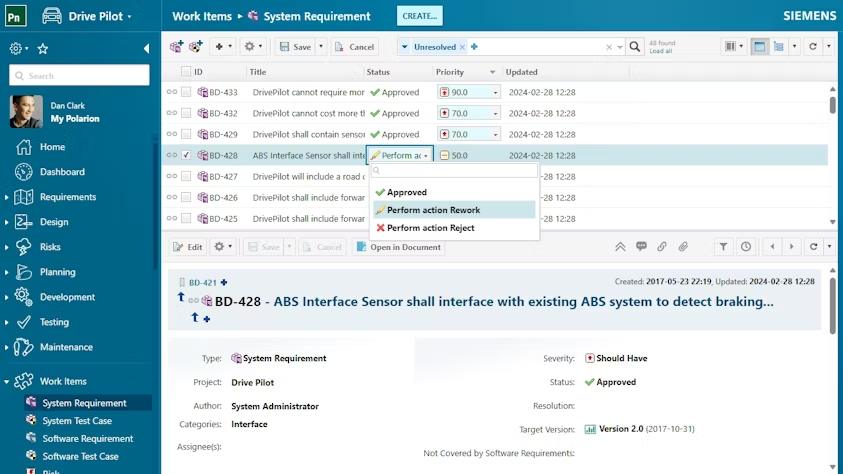
Image source: siemens.com
Siemens Polarion positions itself not just as a tool to manage requirements, but as a fully unified Application Lifecycle Management (ALM) platform. It is designed to bring requirements, coding, quality assurance, and release management together into a single, integrated solution. This all-in-one approach is particularly appealing to organizations in the embedded systems, automotive, and industrial manufacturing sectors that want to manage the entire development process in one place.
Key features
- LiveDocs: A feature that allows teams to collaborate on requirements specifications in a familiar, document-like interface. Behind the scenes, every paragraph, table, or list item is treated as a discrete work item, enabling granular traceability without sacrificing usability.
- Reuse and branching: The platform has strong capabilities for reusing or branching entire projects or specific sets of artifacts (like requirements and test cases). This is highly effective for managing product lines with shared platforms and unique variants.
- Traceability and reporting: It provides end-to-end traceability across all artifacts within the system. Its real-time reporting and customizable dashboards give managers clear visibility into project progress and potential risks.
Pros
- Single, integrated solution: The all-in-one approach simplifies the technology stack, reduces administrative overhead, and ensures a consistent single source of truth across the entire lifecycle.
- Flexible deployment options: Polarion is available as a traditional on-premise installation or as a SaaS cloud solution (Polarion X), giving organizations the flexibility to choose the deployment model that best fits their IT and security policies.
Cons
- Can be overkill for focused needs: For teams that only need a dedicated tool for requirements management and prefer to use other best-of-breed tools for testing or issue tracking, the full ALM suite can be more than they need.
- Complex advanced configuration: While the basic functionality is user-friendly, setting up advanced customizations, workflows, and reports can be complex and may require specialized expertise or professional services.
- Performance concerns: Some users have reported that the system can become sluggish and slow to respond, particularly in large-scale deployments with many concurrent users and vast amounts of data.
Pricing
- Polarion X (Cloud): Starts at $42 per user per month.
- On-Premise (Polarion ALM, Polarion Requirements, Polarion QA): Custom pricing.
Codebeamer: Best for regulated software and product development
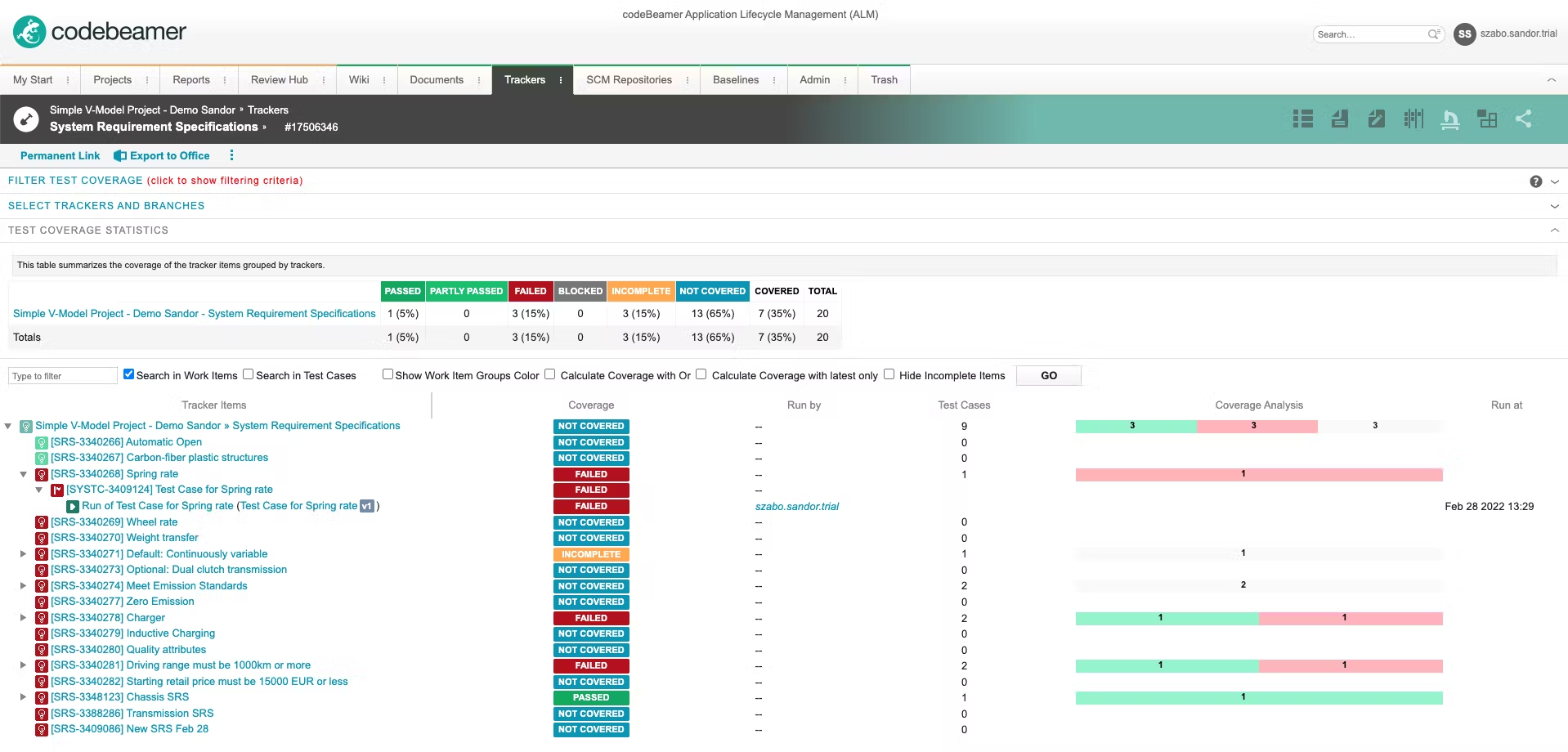
Image source: capterra.com
Codebeamer, from PTC, is another comprehensive ALM platform that shines in environments where regulatory compliance is a critical business driver. It is particularly strong in the medical device, automotive, and industrial engineering sectors. Its key differentiator is the use of pre-configured project templates that are specifically designed to help teams streamline their adherence to complex industry standards like ISO 26262, IEC 62304, and ASPICE.
Key features
- Pre-built compliance templates: Codebeamer offers out-of-the-box project templates that come with predefined artifacts, workflows, and domain knowledge baked in. This can dramatically accelerate the setup process and reduce the costs associated with preparing for regulatory audits.
- End-to-end traceability: The platform provides a centralized data repository that ensures complete and gapless traceability across the entire development lifecycle, from requirements to design, code, tests, and release.
- Integrated risk management: It includes dedicated features for defining, managing, and mitigating risks in a way that aligns with the requirements of various safety-critical standards.
Pros
- Simplifies the path to compliance: The pre-built templates are a significant time-saver and a powerful asset for any team that needs to undergo formal audits.
- Highly configurable and flexible: The platform can be extensively customized to support very specific and complex workflows, making it adaptable to a wide range of organizational processes.
Cons
- High complexity and steep learning curve: The same flexibility that makes Codebeamer powerful also makes it complex. The interface can be overwhelming for new users, and mastering its configuration requires a significant investment of time.
- Cumbersome data entry: Some users have noted that the system requires filling out a large number of mandatory fields when creating or updating work items, which can feel bureaucratic and slow down the workflow.
Pricing
- Custom pricing
Visure: Best for flexible, compliance-focused ALM
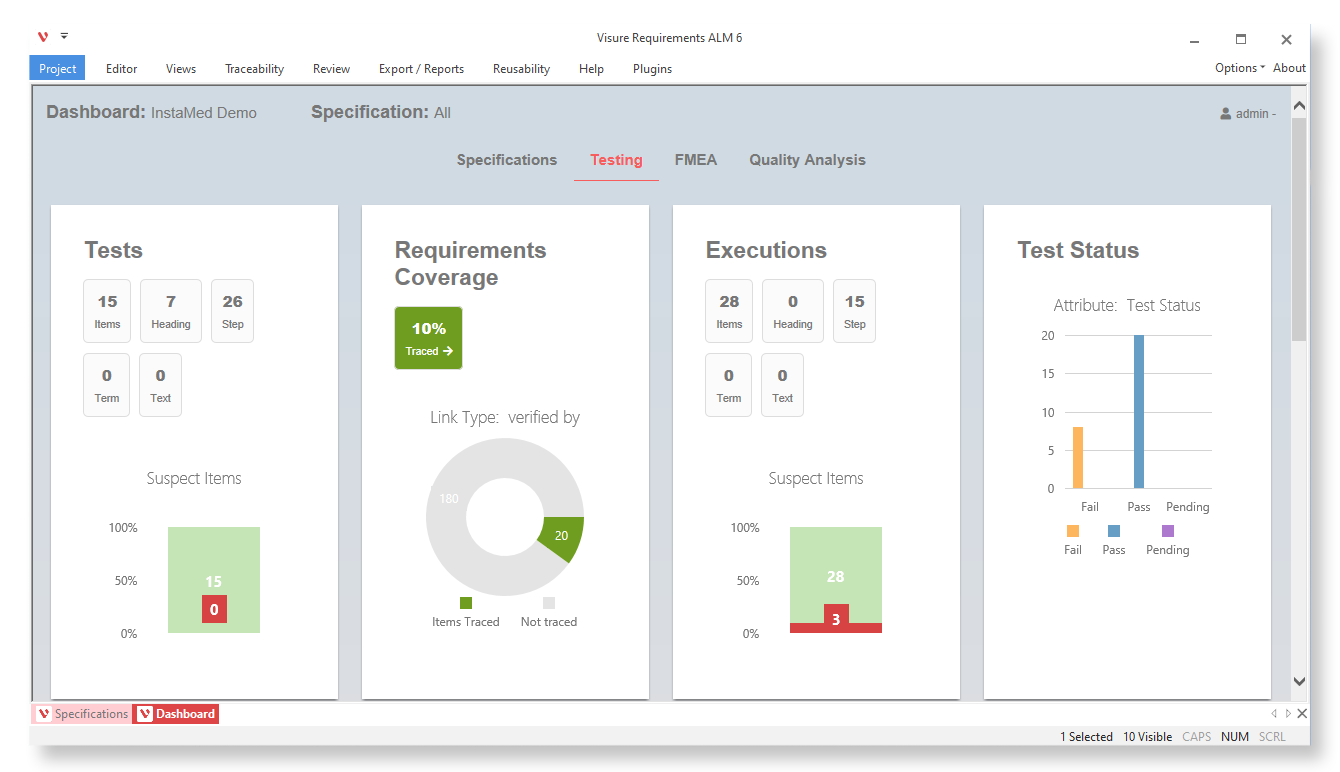
Image source: visure.com
Visure presents itself as a flexible and complete ALM platform that offers a strong value-driven alternative to some of the more expensive enterprise solutions on the market. It is well-suited for safety-critical and regulated industries such as aerospace, medical devices, and defense, providing powerful capabilities for traceability, risk management, and test management.
Key features
- Bidirectional traceability: This is a core strength of the Visure platform. It offers robust traceability matrices and other visualization tools to ensure full coverage of requirements and to simplify the process of conducting an impact analysis for any changes.
- Comprehensive change management: The tool is designed to manage the entire change lifecycle. It automatically handles versioning and maintains a complete history of every requirement, providing a clear audit trail.
- Broad integration capabilities: The platform integrates with a wide range of common engineering and project management tools, including Jira, Azure DevOps, GitHub, and Microsoft Word and Excel, allowing it to fit into diverse technology ecosystems.
Pros
- Traceability features: Users praise the platform for its clean interface and powerful traceability capabilities, which help to reduce errors and ensure that no requirement is missed.
- Strong focus on compliance: The tool provides strong support for a variety of industry standards, including DO-178C, ISO 26262, and IEC 62304, making it a solid choice for regulated environments.
Cons
- Fewer support resources: As a smaller player, Visure has less brand recognition and a smaller user community, which can mean fewer publicly available resources and community-driven support options.
- Potential for complexity: As a full ALM suite, it contains a deep feature set that may present a steeper learning curve than simpler, more focused tools, especially for teams new to formal requirements management.
Pricing
- Custom pricing
What to look for in requirements management software
Choosing the right management tool can feel overwhelming. The market is filled with options, each with a different approach and feature set. Before diving into the specific tools, it’s helpful to understand the core capabilities that make a real difference.
End-to-end traceability
This is the ability to create a clear, unbroken link from an initial requirement to every related artifact throughout the development lifecycle, including designs, code, and test cases. Complete requirements traceability is essential for conducting an impact analysis. If a requirement changes, you can instantly see everything that will be affected downstream. For companies in a highly regulated industry like automotive or medical devices, this is non-negotiable for proving compliance.
Collaboration features
Modern product development is a team sport. Your software should act as a central hub where cross-functional teams and stakeholders can communicate, provide feedback, and sign off on approvals in real time. This breaks down silos and ensures everyone is working with the most up-to-date information, which is a common failure point in manual processes.
Version control and change management
Requirements are not static; they evolve. A good system must provide robust version control, allowing you to track every modification, compare different versions, and understand the history of each requirement. It should also include a formal change management process to ensure that any adjustments to the project scope are properly reviewed, approved, and communicated to all stakeholders.
Integration capabilities
No tool works in isolation. An effective requirements management software must integrate seamlessly with the other tools your team already uses. This includes connections to project management platforms like Jira, version control systems like Git, and various testing and automation tools. These integrations create a cohesive digital thread, preventing information from becoming siloed in different applications.
Ease of use and adoption
Finally, even the most powerful platform is worthless if your team finds it too complex to use. An intuitive user interface, a manageable learning curve, and clear documentation are critical for successful adoption. The goal is to find a tool that empowers your team, not one that adds another layer of bureaucratic friction to their workflow.
Conclusion
Selecting the right requirements management software is a critical decision that hinges on your team’s core philosophy. While some teams require rigid, compliance-focused tools, many modern organizations find their biggest challenges are communication friction and information silos.
For these collaboration-first teams that prioritize speed and agility, Lark offers a fundamentally different and more integrated path forward. By embedding the entire requirements management workflow directly into the collaborative suite your team uses every day, Lark helps you achieve clarity and consensus as a natural outcome of working together, ultimately helping you build better products faster.
FAQs on requirements management software
What is requirements management software?
Requirements management software provides a centralized platform to document, track, and analyze project requirements, replacing scattered documents with a single source of truth. This ensures the final product meets stakeholder expectations, reduces costly rework, and accelerates time to market.
Is there any free requirement management software?
Yes, several requirements management tools offer free plans that are ideal for small teams or those just getting started. For example, Lark provides a generous free plan for up to 20 users that includes a robust set of requirements management and collaboration features.
What industry is requirements management software typically used in?
Requirements management software is used across a wide variety of industries, especially those that develop complex products or operate in highly regulated environments. The software is critical for managing the specific needs of various sectors, including:
- Software development requirements management software
- Semiconductor requirements management software
Are there any open-source requirements management software?
Yes, open-source options like OSRMT, OpenProject, and ZenTao are available for teams seeking free, community-supported solutions for defining, managing, and tracking software requirements.
What is the best requirements management software for small businesses?
The best software for a small business depends on its specific needs and budget. All-in-one platforms like Lark are an excellent choice, providing a cost-effective workflow by combining requirements management with essential collaboration tools.
Related reading
Table of contents
Start using Lark today

Manage all your work in one place
Boost team efficiency by 10x
Save up to 70% on software costs
Table of contents
Start using Lark today
Manage all your work in one place
Boost team efficiency by 10x
Save up to 70% on software costs
Keep reading








2026 Lark Technologies Pte. Ltd.
Headquartered in Singapore with offices worldwide.






Explore: