














10 Best Workflow Examples and Recommended Management Tool

Ryan Tanner
Product Marketing Specialist
Sep 18, 2026
Ryan Tanner
Sep 18, 2026

12 min read


Ever felt like your team spends more time chasing updates than actually getting work done? Maybe tasks slip through the cracks, approvals drag on for days, or everyone has their own version of "how things should be done." These bottlenecks don't just waste time—they drain morale and slow down growth.
That's why workflows matter. At their core, workflows are repeatable sequences of steps that bring order to chaos. Instead of relying on memory or endless email threads, workflows ensure everyone knows what comes next, who's responsible, and how to keep things moving.
The real game-changer lies in modern workflow automation examples—tools that take those diagrams off the whiteboard and turn them into living, breathing systems. Platforms like Lark empower teams to design, automate, and adapt workflows in real time, cutting out manual busywork and reducing errors. In this guide, we'll walk through 10 powerful workflow examples that you can put into practice right away. No more small talk, let's cut to the chase now.

What is a workflow?
A workflow is a structured sequence of steps that guides how tasks move from start to finish. It clarifies responsibilities, reduces errors, and ensures nothing falls through the cracks. Traditionally, workflows were manual—built on checklists, emails, or paper approvals. While helpful, these often slow teams down and leave room for mistakes. Automated workflows, on the other hand, use digital tools to trigger actions instantly, send reminders, and track progress in real time. That's why many teams look at workflow examples—to see how proven processes, when automated, can save hours and drive efficiency.
10 workflow examples with use cases
Workflows aren't just theory—they're the backbone of how modern teams get things done. Here are 10 practical workflow examples you can adapt to streamline operations, reduce errors, and keep your team in sync.
1. Employee onboarding workflow
Steps: Document submission → orientation → training.
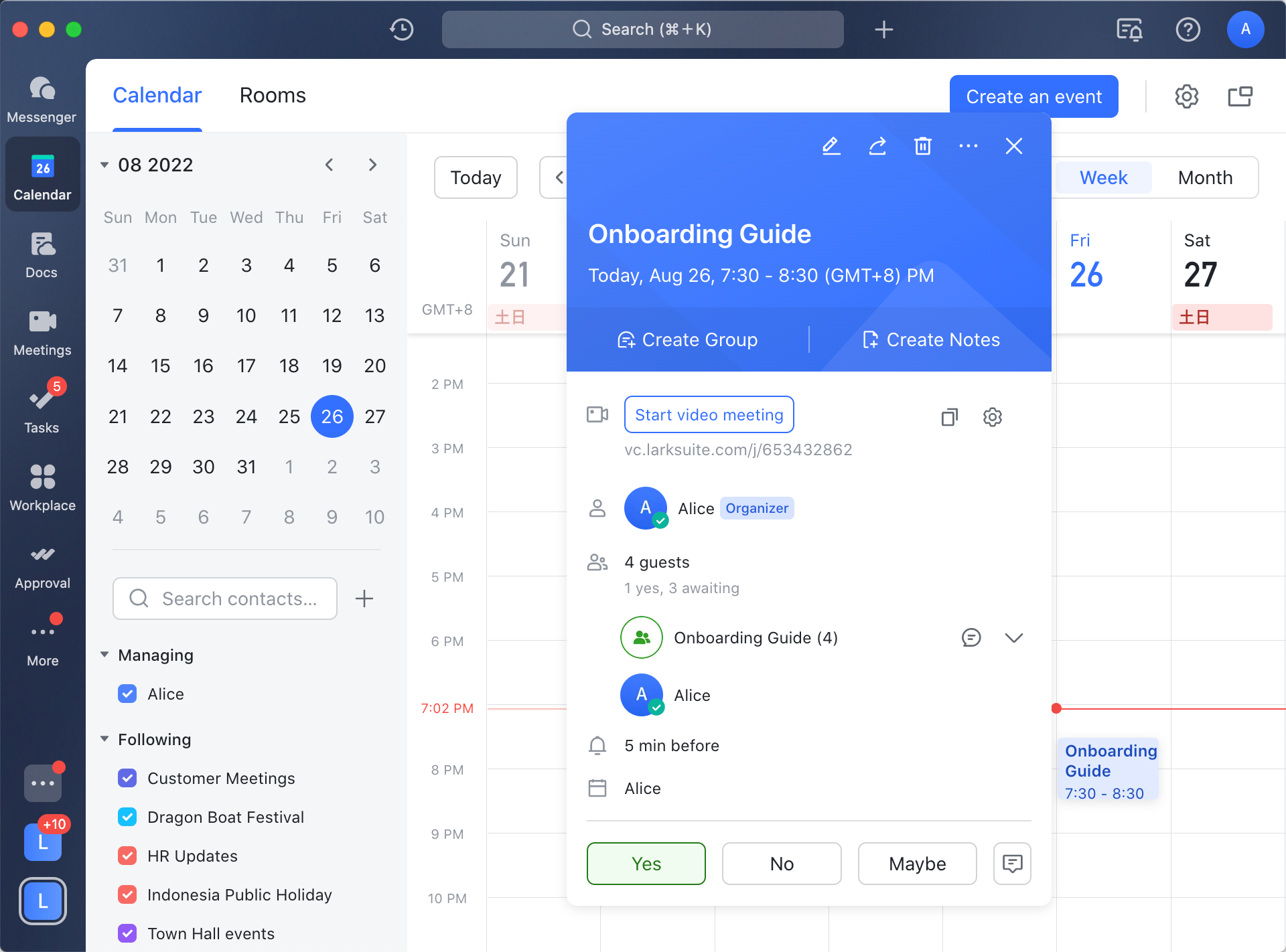
Onboarding a new employee often involves HR, IT, and team managers. It starts with the submission of required documents such as ID proofs and tax forms. Next comes orientation, where new hires are introduced to company culture, policies, and systems. The final step is training, which equips them with the role-specific knowledge they need to succeed.
Example: Automating this workflow in Lark Base and scheduling orientation and training sessions in Lark Calendar ensures that every employee enjoys a smooth and consistent start.
2. Content approval workflow
Steps: Draft → review → edit → approval → publish.
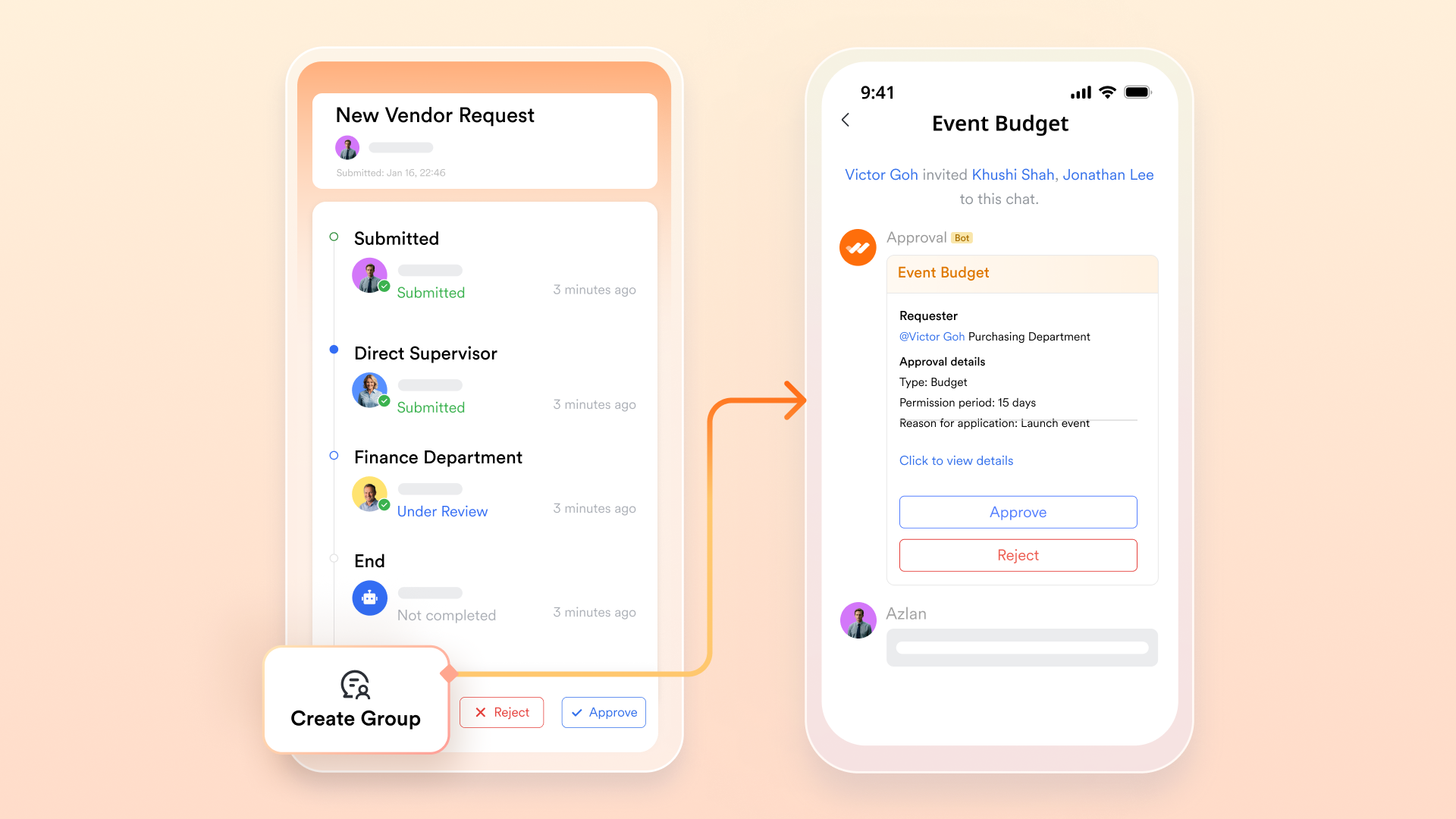
In marketing teams, content typically moves through multiple hands. A draft is prepared, passed to reviewers for feedback, edited for quality, and then submitted for approval before publishing. Without structure, this process can lead to missed deadlines and confusion.
Example: Automating content approvals in Lark ensures drafts move seamlessly from one stage to the next, eliminating bottlenecks and keeping campaigns on track.
3. Sales pipeline workflow
Steps: Lead capture → qualification → proposal → close.
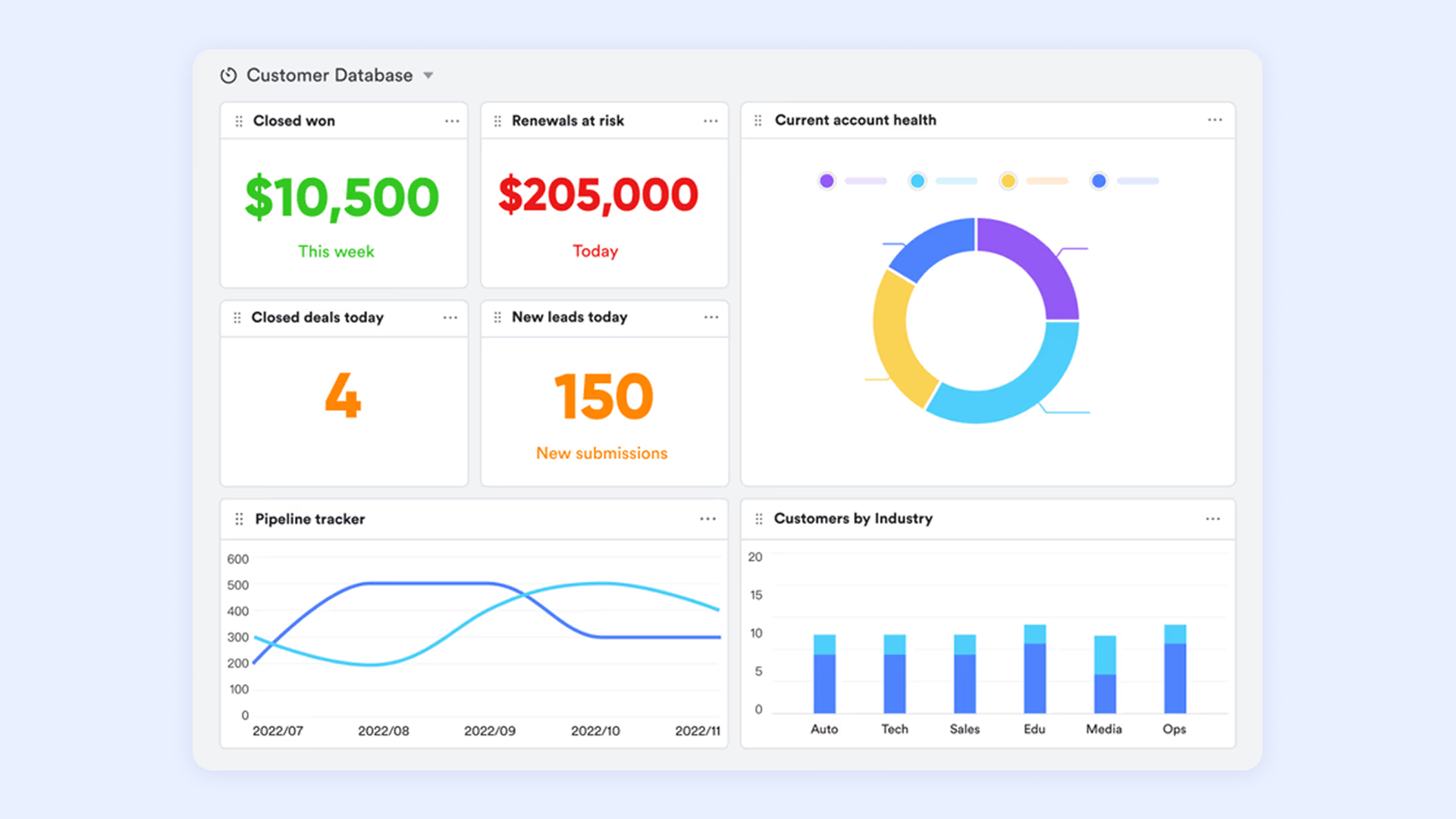
Sales pipelines thrive on structure. Leads are captured through various channels, including forms, ads, and referrals. They are then qualified to assess fit before moving into the proposal stage, where demos or offers are presented. The process ends with closing the deal.
Example: Using Lark Base, sales teams can track leads like a simple CRM, update deal stages, and collaborate in real time to accelerate conversions.
4. Customer support workflow
Steps: Ticket creation → triage → resolution → feedback.
Support teams need efficiency and clarity. A workflow begins when a customer raises a ticket. The triage stage prioritizes the request and assigns it to the right agent. Resolution follows, and the final step involves gathering feedback to ensure the customer's issue has been fully addressed.
Example: Automating ticket assignment and reminders in Lark ensures urgent issues are prioritized and nothing slips through the cracks.
5. Invoice approval workflow
Steps: Submission → manager review → finance approval → payment.
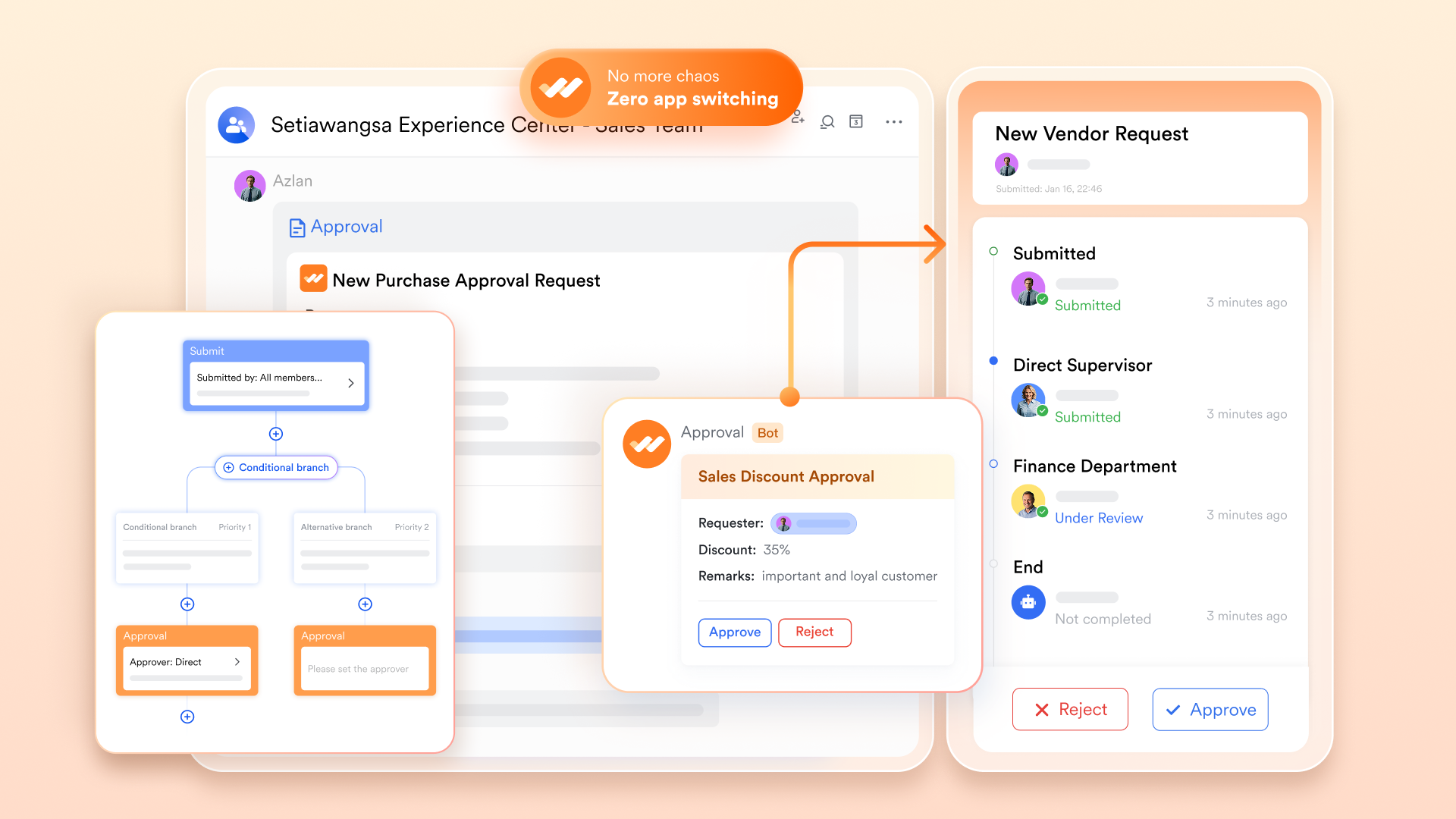
Invoices often get delayed due to manual checks. The process starts when an invoice is submitted, then passes to a manager for review, followed by finance approval, and finally payment release.
Example: With Lark Approval, the workflow moves automatically between stakeholders, reducing delays and ensuring timely vendor payments.
6. Product development workflow
Steps: Ideation → design → testing → launch.
Product development requires clear coordination. Teams start with brainstorming ideas and prioritizing them. Designs are then created and passed into testing to ensure quality. Once everything checks out, the product is launched to market.
Example: With Lark Docs for brainstorming and Lark Tasks for managing testing deadlines, teams can maintain a transparent and efficient development cycle.
7. Project management workflow
Steps: Plan → assign → track progress → deliver.
Projects succeed when roles and timelines are clear. The workflow starts with planning goals and scope, followed by assigning tasks to the right people. Progress is tracked to keep milestones on schedule, and the project closes with delivery and reporting.
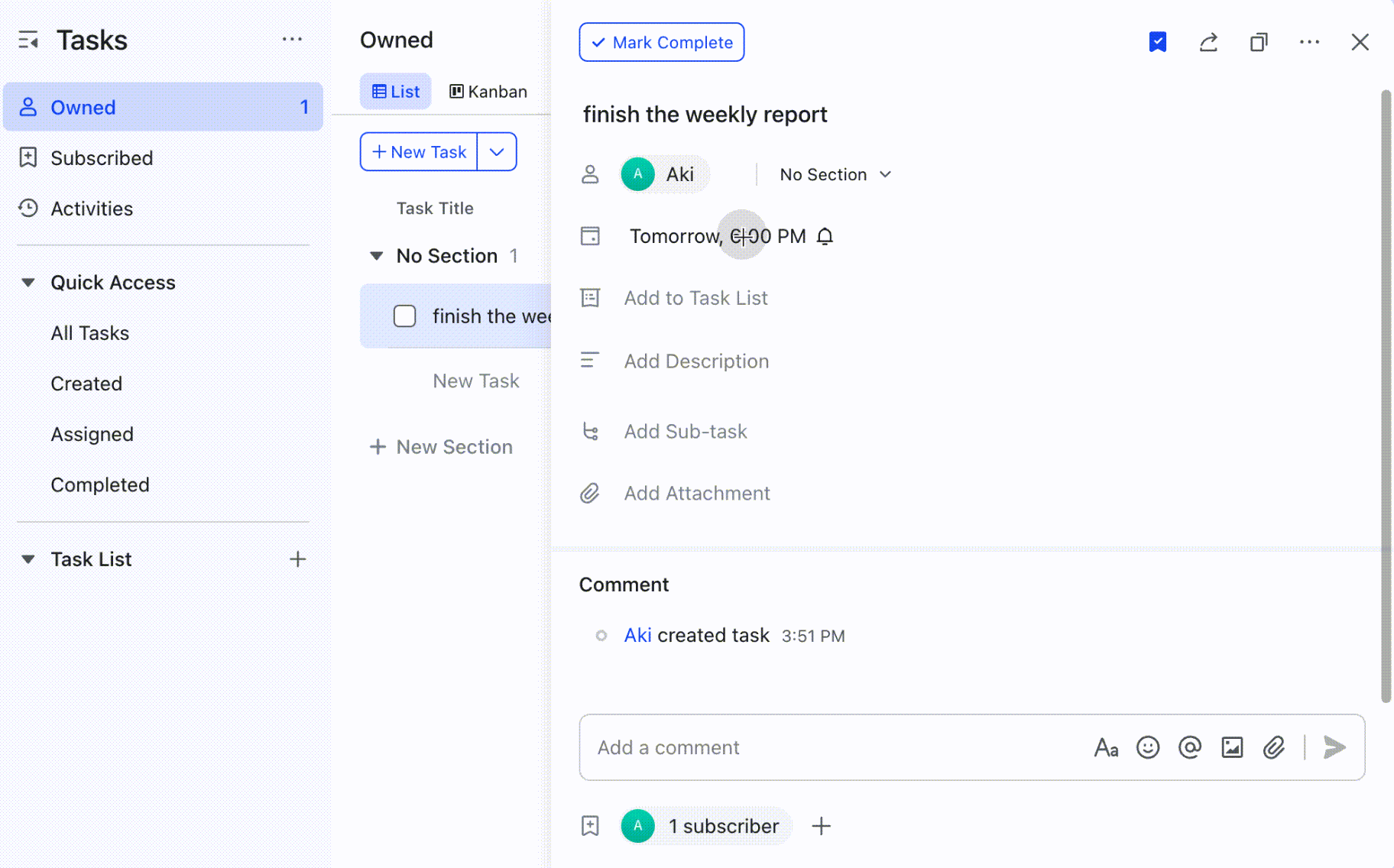
Example: Managers can streamline this workflow in Lark Tasks, with automated reminders and updates consolidated into a single dashboard.
8. UX workflow example
Steps: Research → wireframe → prototype → usability testing.
Great user experiences depend on iteration. The UX process starts with user research, followed by wireframes that outline the structure. Prototypes are then developed to simulate the product. Finally, usability testing validates the design with real users before it is rolled out. Looking at proven UX workflow examples helps teams structure their design process in a way that reduces rework and improves product usability.
Example: UX teams can store research insights in Lark Base, share wireframes for feedback, and automate testing tasks to ensure nothing gets skipped.
9.0 Recruitment workflow
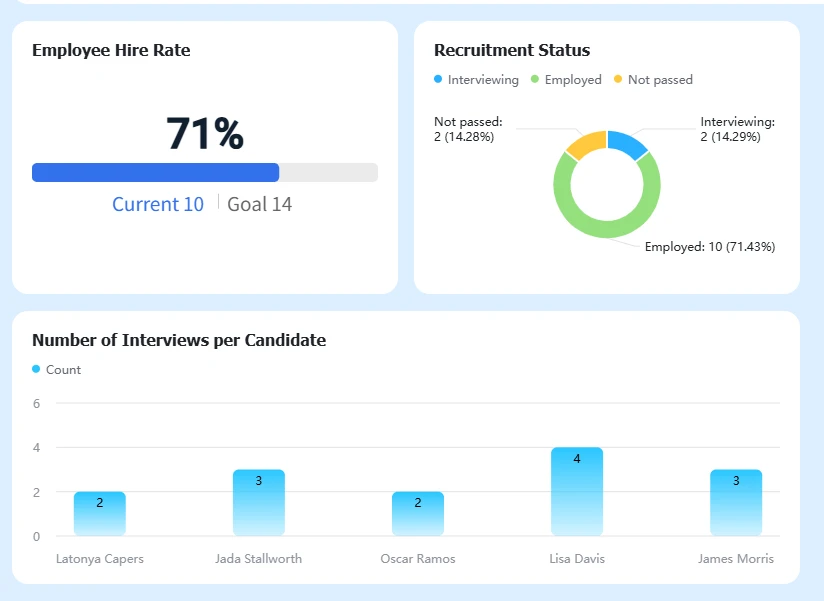
Steps: Job posting → candidate screening → interview → offer.
Hiring is one of the most process-heavy workflows. It begins with posting a job across various platforms, screening applicants for a good fit, and shortlisting candidates for interviews. The final step is extending an offer to the selected candidate.
Example: HR teams can manage candidate data in Lark Base, sync interviews with Calendar, and send automated updates to ensure a consistent, transparent experience.
10. IT support workflow
Steps: Issue logged → troubleshooting → resolution → closure.
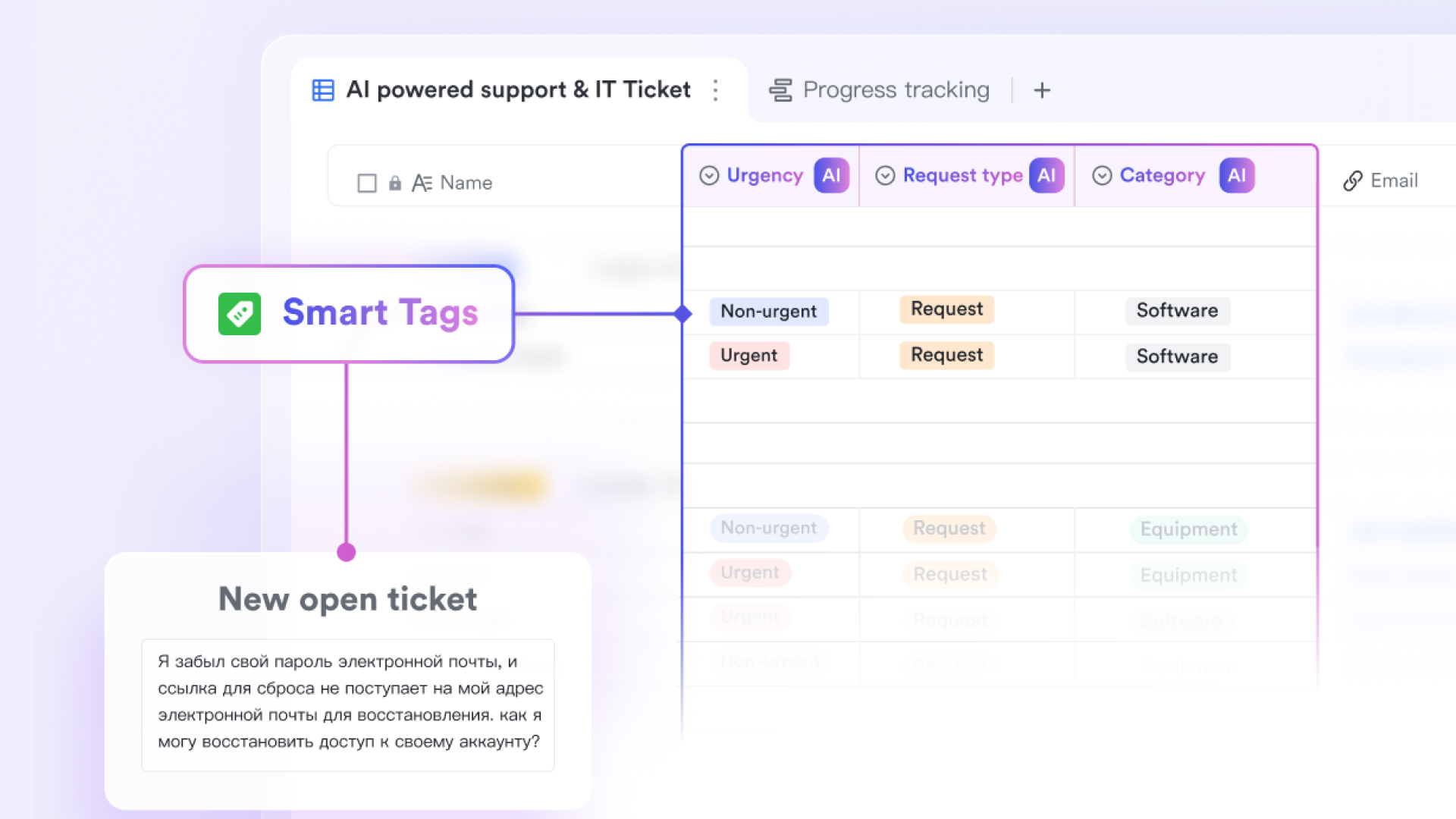
When technical issues arise, speed and accuracy are key. The workflow begins when an issue is logged. IT then troubleshoots, implements a fix, and confirms resolution. The ticket is closed once the problem is fully resolved.
Example: IT teams can automate ticket logging and routing in Lark, ensuring fast resolution times and better tracking of recurring issues.
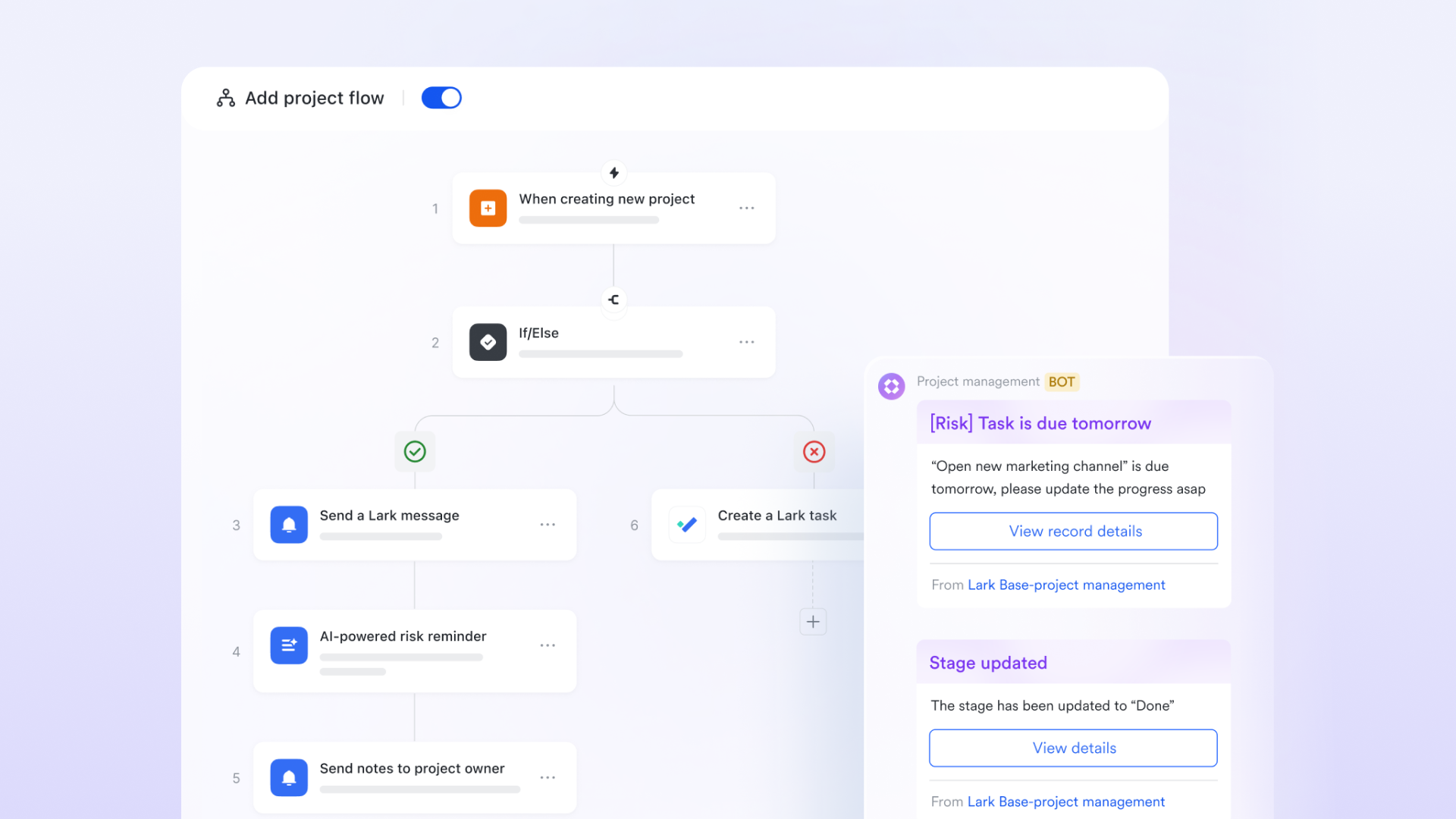
Lark for building and managing workflows
Static workflow charts can only take you so far. Modern teams need something more—a living system that ties people, tasks, and information together in real time. That's where Lark shines. Instead of juggling multiple apps, teams can design, automate, and manage their entire workflow inside one connected platform.
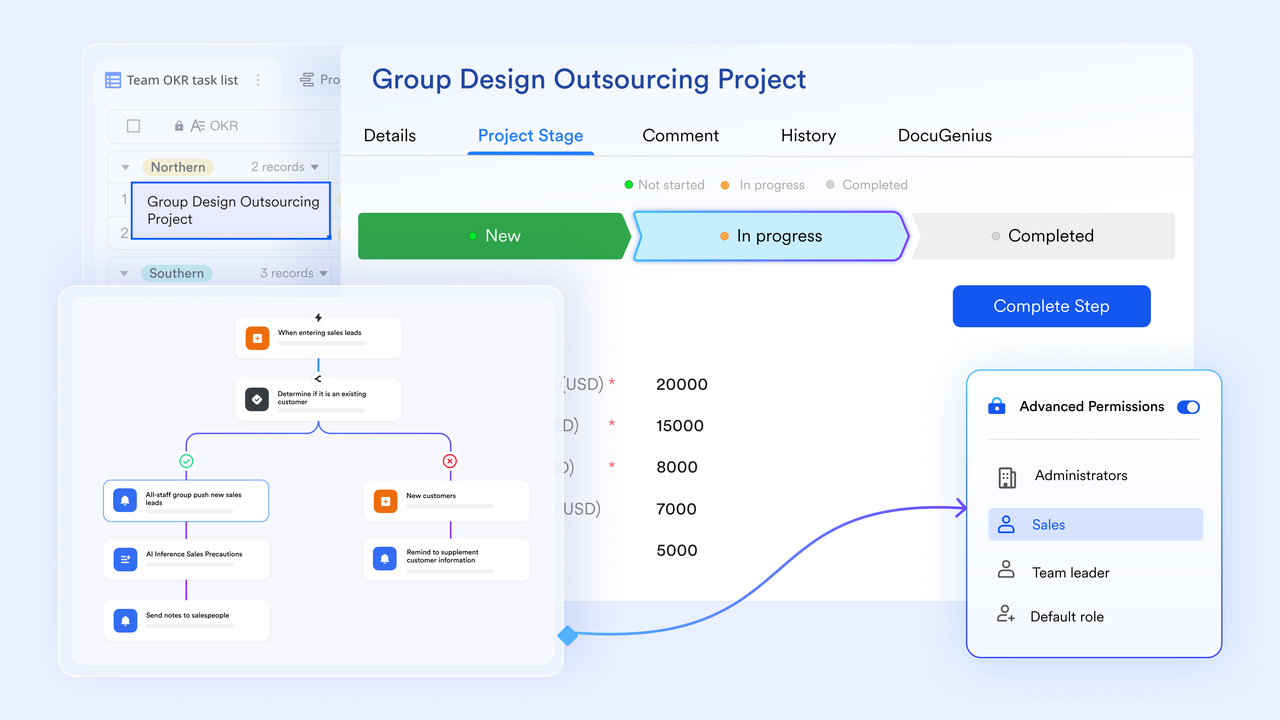
Key features:
- Lark Base works like a flexible database, making it easy to track onboarding checklists, sales pipelines, or project milestones. Teams can see who's responsible for what and how work is progressing—all in one place.
- Lark Messenger keeps conversations linked directly to the work at hand. Approvals, file sharing, and quick decisions happen in context, not buried in email threads.
- Lark Calendar ensures necessary steps never slip through the cracks. From onboarding sessions to project deadlines, everything is automatically scheduled and visible to the whole team.
- Lark Docs brings collaboration to life. Proposals, training materials, and product specs can be co-edited in real time, keeping ideas flowing alongside tasks.
Practical use:
HR teams can set up onboarding workflows in Base, sync training sessions with Calendar, and keep new hires on track with Messenger reminders. Finance teams can cut bottlenecks by running invoice approvals through Approval and tracking them in Base. Project managers can map milestones in Docs, assign tasks in Base, and use Messenger updates to keep everyone aligned.
The result? Lark isn't just another communication tool—it's a modern workflow hub. By integrating collaboration, scheduling, documentation, and automation into a single platform, it transforms static workflow diagrams into dynamic processes that evolve and adapt with your business.
One of Lark's most significant advantages is how accessible it is compared to traditional enterprise platforms:
- Starter plan: Free forever for up to 20 users, with 11 built-in tools, 100GB storage, 1,000 automation runs, AI translations, and more.
- Pro plan: $12/user/month (billed annually) for up to 500 users. Includes everything in Starter plus group calls with up to 500 participants, 15TB of storage, and 50,000 automation runs.
- Enterprise plan: Custom pricing for unlimited users, with advanced security, compliance, and expanded automation capacity. Before selecting a productivity suite, it's worth reviewing the latest Google Workspace pricing and ClickUp pricing plans.
With a generous free plan and affordable upgrades, Lark provides growing teams with enterprise-grade workflow automation at a fraction of the enterprise-level costs.
Conclusion
In the work environment, efficiency isn't a nice-to-have—it's a necessity. The right workflows bring order to complexity, ensuring tasks move smoothly, errors are minimized, and teams can focus on meaningful work instead of repetitive busywork. From onboarding and sales to UX design and IT support, the workflow examples we explored show how structured processes make collaboration easier and outcomes more reliable.
But static workflow charts and diagrams can only go so far. What truly drives impact is having a platform that turns those plans into action. That's where Lark comes in. By uniting communication, scheduling, documentation, and automation in a single hub, Lark transforms scattered processes into seamless, real-time workflows that adapt as your business grows.
If your team is ready to reduce friction, improve collaboration, and scale smarter, Lark makes it simple to start.
FAQs
Can workflows be customized for different teams?
Yes. Every team—from HR to product to IT—has unique processes, and workflows can be tailored to match those needs. For example, HR may focus on onboarding checklists while sales teams track leads through a pipeline. With Lark Base, teams can customize workflows to fit their structure, link tasks to Calendar events, and use Messenger for real-time collaboration, all without needing separate tools.
How does Lark help with workflow automation?
Lark makes automation accessible by removing manual handoffs. Teams can set up triggers in Base to assign tasks, send notifications in Messenger, or log approvals instantly. This ensures that steps like invoice reviews or project updates happen automatically, saving time and reducing the chance of missed tasks.
What's the difference between a workflow and a process?
A process is the high-level plan of how work should get done, while a workflow is the detailed, step-by-step execution of that plan. For instance, "hiring" is a process, but a recruitment workflow includes specific steps—such as job posting, screening, interviews, and offers. Tools like Lark turn these processes into actionable workflows by combining checklists, docs, and communication in one place.
What are the best workflow tools?
The best workflow tools are those that bring structure and automation without creating complexity. Traditional options often require juggling multiple platforms for docs, tasks, and approvals. Lark combines all of these into a single hub—Base for tracking, Docs for collaboration, Calendar for scheduling, and Messenger for communication—making it easier for teams to stay aligned.
How do workflow diagrams improve team productivity?
Workflow diagrams help visualize steps so teams can spot inefficiencies or overlaps. They provide a clear roadmap of who does what, reducing miscommunication. The real productivity boost comes when those diagrams are put into action. With Lark, you can move beyond static workflow diagram examples and turn them into live workflows with automation, reminders, and shared visibility.
Can workflows work across remote teams?
Absolutely. In fact, workflows are even more critical for remote teams, where communication gaps can slow progress. Remote teams rely on clear steps and automated updates to stay aligned and efficient. Lark is built for this: Messenger handles real-time chat, Calendar syncs deadlines across time zones, and Docs allow instant co-editing—keeping distributed teams productive and connected.
What are common mistakes in workflow management?
The most common mistakes include overcomplicating workflows, failing to assign clear ownership, and relying too much on manual updates. These issues often cause bottlenecks and missed deadlines. Lark helps avoid these pitfalls by simplifying workflows into structured steps, automatically assigning responsibilities, and providing visibility across the team so nothing falls through the cracks.
Related reading
Table of contents
Start using Lark today

Manage all your work in one place
Boost team efficiency by 10x
Save up to 70% on software costs
Table of contents
Start using Lark today
Manage all your work in one place
Boost team efficiency by 10x
Save up to 70% on software costs
Keep reading







2026 Lark Technologies Pte. Ltd.
Headquartered in Singapore with offices worldwide.






Explore: